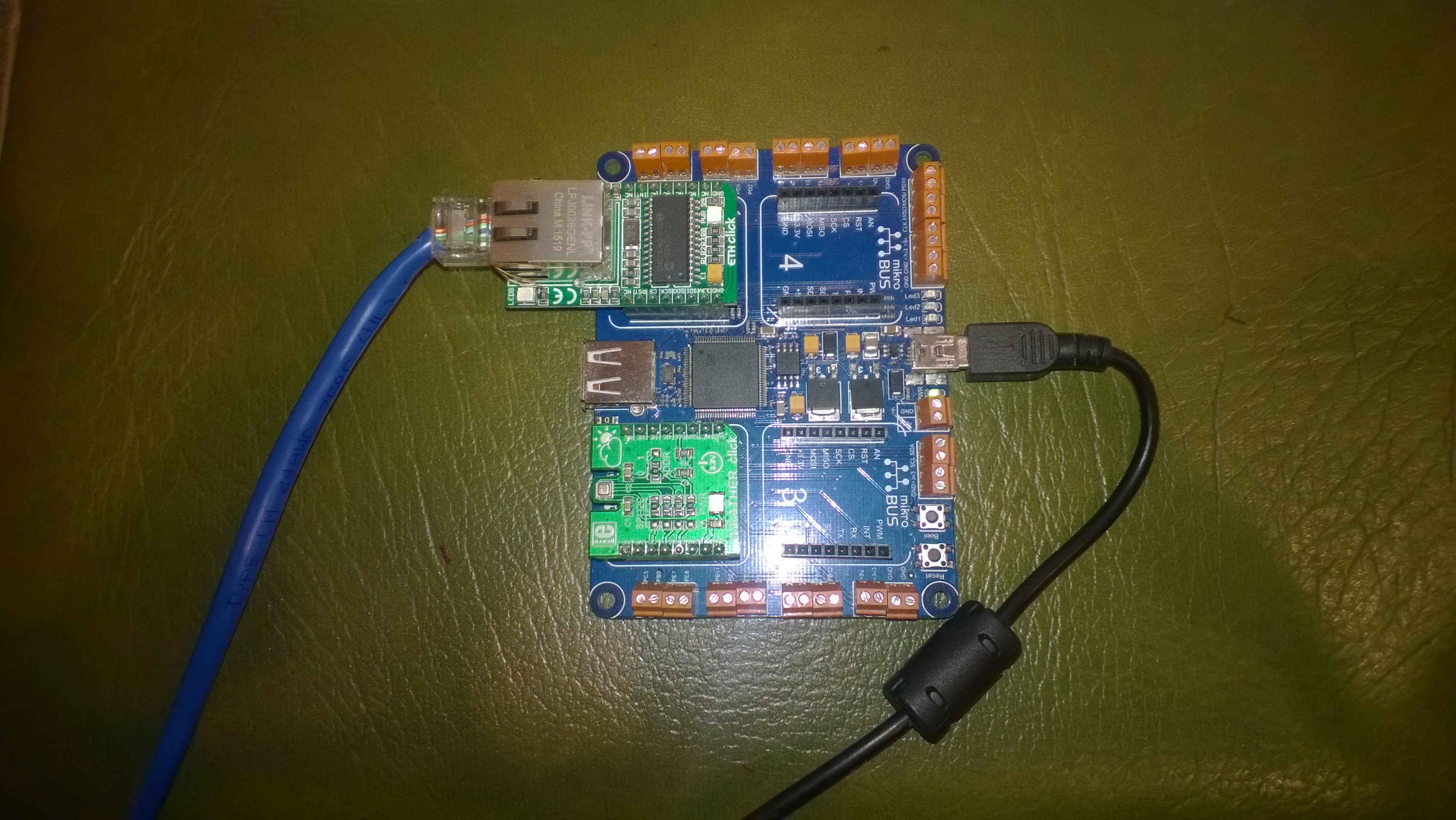
Swarm Space – Azure IoT Basic Client

To figure out how to poll the Swarm Hive API I have built yet another “nasty” Proof of Concept (PoC) which gets ToDevice and FromDevice messages. Initially I have focused on polling as the volume of messages from my single device is pretty low (WebHooks will be covered in a future post).

Like my Azure IoT The Things Industry connector I use Alastair Crabtrees’s LazyCache to store Azured IoT Hub DeviceClient instances.

NOTE: Swarm Space technical support clarified the parameter values required to get FromDevice and ToDevice messages using the Bumbleebee Hive API.

Swarm API Docs messages functionality

The Messages Get method has a lot of parameters for filtering and paging the response message lists. Many of the parameters have default values so can be null or left blank.
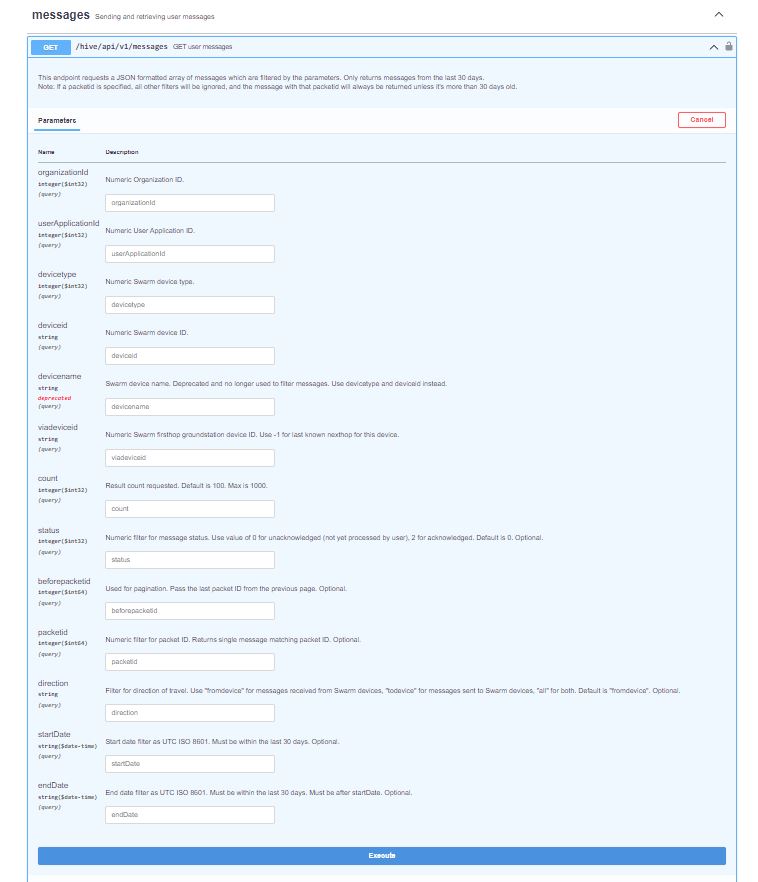
Swarm API Get User Message filters

I started off by seeing if I could duplicate the functionality of the user interface and get a list of all ToDevice and FromDevice messages.

Swarm Dashboard messages list

I first called the Messages Get method with the direction set to “fromdevice” (Odd this is a string rather than an enumeration) and the messages I had sent from my Sparkfun Satellite Transceiver Breakout – Swarm M138 were displayed.

Swarm API Docs displaying “fromdevice” messages

I then called the Messages Get method with the direction set to “all” and only the FromDevice messages were displayed which I wasn’t expecting.
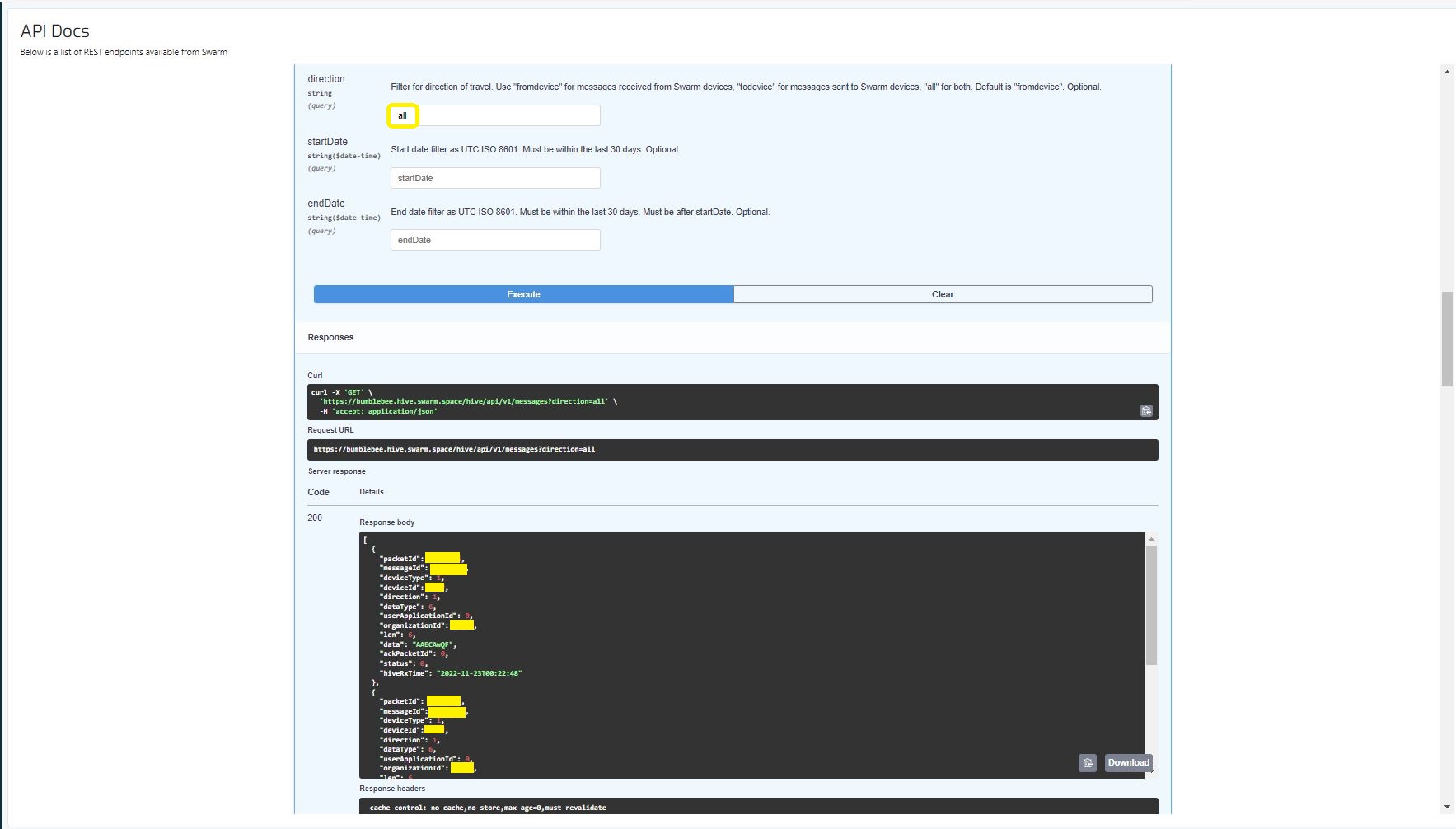
Swarm API Docs displaying ToDevice and FromDevices messages

I then called the Messages Get method with the direction set to “FromDevice and no messages were displayed which I wasn’t expecting

Swarm API Docs displaying “todevice” messages

I then called the Message Get method with the messageId of a ToDevice message and the detailed message information was displayed.

Swarm API Docs displaying the details of a specific inbound message

For testing I configured 5 devices (a real device and the others simulated) in my Azure IoT Hub with the Swarm Device ID ued as the Azure IoT Hub device ID.

Devices configured in Azure IoT Hub

My console application calls the Swarm Bumblebee Hive API Login method, then uses Azure IoT Hub DeviceClient SendEventAsync upload device telemetry.

Nasty console application processing the three “fromdevice” messages which have not been acknowledged.

The console application stores the Swarm Hive API username, password and the Azure IoT Hub Device Connection string locally using the UserSecretsConfigurationExtension.

internal class Program
{
    private static string AzureIoTHubConnectionString = "";
    private readonly static IAppCache _DeviceClients = new CachingService();

    static async Task Main(string[] args)
    {
        Debug.WriteLine("devMobile.SwarmSpace.Hive.AzureIoTHubBasicClient starting");

        IConfiguration configuration = new ConfigurationBuilder()
            .SetBasePath(Directory.GetCurrentDirectory())
            .AddJsonFile("appsettings.json")
            .AddUserSecrets("b4073481-67e9-41bd-bf98-7d2029a0b391").Build();

        AzureIoTHubConnectionString = configuration.GetConnectionString("AzureIoTHub");

        using (HttpClient httpClient = new HttpClient())
        {
            BumblebeeHiveClient.Client client = new BumblebeeHiveClient.Client(httpClient);

            client.BaseUrl = configuration.GetRequiredSection("SwarmConnection").GetRequiredSection("BaseURL").Value;

            BumblebeeHiveClient.LoginForm loginForm = new BumblebeeHiveClient.LoginForm();

            loginForm.Username = configuration.GetRequiredSection("SwarmConnection").GetRequiredSection("UserName").Value;
            loginForm.Password = configuration.GetRequiredSection("SwarmConnection").GetRequiredSection("Password").Value;

            BumblebeeHiveClient.Response response = await client.PostLoginAsync(loginForm);

            Debug.WriteLine($"Token :{response.Token[..5]}.....{response.Token[^5..]}");

            string apiKey = "bearer " + response.Token;
            httpClient.DefaultRequestHeaders.Add("Authorization", apiKey);

            var devices = await client.GetDevicesAsync(null, null, null, null, null, null, null, null, null);

            foreach (BumblebeeHiveClient.Device device in devices)
            {
                Debug.WriteLine($" Id:{device.DeviceId} Name:{device.DeviceName} Type:{device.DeviceType} Organisation:{device.OrganizationId}");

                DeviceClient deviceClient = await _DeviceClients.GetOrAddAsync<DeviceClient>(device.DeviceId.ToString(), (ICacheEntry x) => IoTHubConnectAsync(device.DeviceId.ToString()), memoryCacheEntryOptions);
            }

            foreach (BumblebeeHiveClient.Device device in devices)
            {
                DeviceClient deviceClient = await _DeviceClients.GetAsync<DeviceClient>(device.DeviceId.ToString());

                var messages = await client.GetMessagesAsync(null, null, null, device.DeviceId.ToString(), null, null, null, null, null, null, "all", null, null);
                foreach (var message in messages)
                {
                    Debug.WriteLine($" PacketId:{message.PacketId} Status:{message.Status} Direction:{message.Direction} Length:{message.Len} Data: {BitConverter.ToString(message.Data)}");

                    JObject telemetryEvent = new JObject
                    {
                        { "DeviceID", device.DeviceId },
                        { "ReceivedAtUtc", DateTime.UtcNow.ToString("s", CultureInfo.InvariantCulture) },
                    };

                    telemetryEvent.Add("Payload",BitConverter.ToString(message.Data));

                    using (Message telemetryMessage = new Message(Encoding.ASCII.GetBytes(JsonConvert.SerializeObject(telemetryEvent))))
                    {
                        telemetryMessage.Properties.Add("iothub-creation-time-utc", message.HiveRxTime.ToString("s", CultureInfo.InvariantCulture));

                        await deviceClient.SendEventAsync(telemetryMessage);
                    };

                    //BumblebeeHiveClient.PacketPostReturn packetPostReturn = await client.AckRxMessageAsync(message.PacketId, null);
                }
            }

            foreach (BumblebeeHiveClient.Device device in devices)
            {
                DeviceClient deviceClient = await _DeviceClients.GetAsync<DeviceClient>(device.DeviceId.ToString());

                await deviceClient.CloseAsync();
            }
        }
    }

    private static async Task<DeviceClient> IoTHubConnectAsync(string deviceId)
    {
        DeviceClient deviceClient;

        deviceClient = DeviceClient.CreateFromConnectionString(AzureIoTHubConnectionString, deviceId, TransportSettings);

        await deviceClient.OpenAsync();

        return deviceClient;
    }

    private static readonly MemoryCacheEntryOptions memoryCacheEntryOptions = new MemoryCacheEntryOptions()
    {
        Priority = CacheItemPriority.NeverRemove
    };

    private static readonly ITransportSettings[] TransportSettings = new ITransportSettings[]
    {
        new AmqpTransportSettings(TransportType.Amqp_Tcp_Only)
        {
            AmqpConnectionPoolSettings = new AmqpConnectionPoolSettings()
            {
                Pooling = true,
            }
        }
    };
}

While testing I disabled the message RxAck functionality so I could repeatedly call the MessagesGet method so I didn’t have to send new messages and burn through my 50 free messages.

Azure IoT Explorer telemetry displaying the three messages processed by my console application.

.

Updated parameters based on feedback from Swarm technical support

Need to have status set to -1

Swarm Space – Bumblebee Hive Basic Emulator

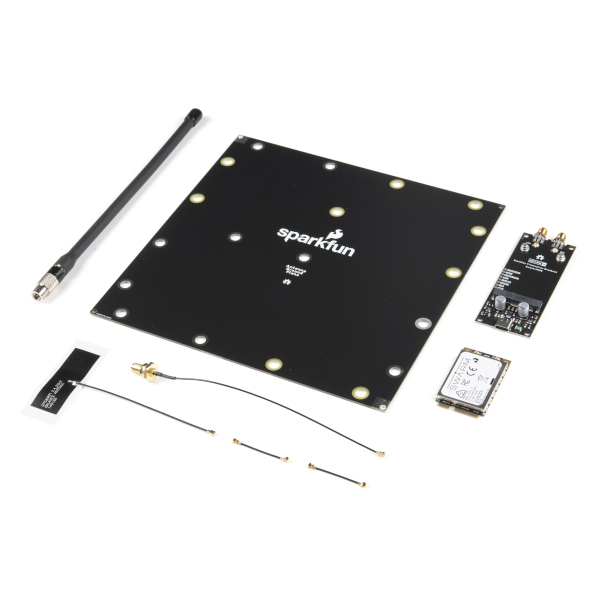
One of the main problems building a Cloud Identity Translation Gateway (like my TTIV3AzureIoTConnector) is getting enough devices to make testing (esp. scalability) realistic. This is a problem because I have only got two devices, a Sparkfun Satellite Transceiver Breakout – Swarm M138 and a Swarm Asset Tracker. (Considering buying a Swarm Eval Kit)

Satellite Transceiver Breakout – Swarm M138
Swarm Asset Tracker

So, I can simulate lots of devices and test more complex configurations I have started build a Swarm Bumble Bee Hive emulator based on the API and Delivery-API OpenAPI files.

NSwagStudio configuration for generating ASP.NET Core web API

As well as generating clients NSwagStudio can also generate ASP.NET Core web APIs. To test my approach, I built the simplest possible client I could which calls the generated PostLoginAsync and GetDeviceCountAsync.

Swagger UI for NSwagStudio generated ASP.NET Core web API

Initially the BumblebeeHiveBasicClientConsole login method would fail with an HTTP 415 Unsupported Media Type error.

BumblebeeHiveBasicClientConsole application 415 Unsupported Media Type error

After some trial and error, I modified the HiveController.cs and HiveControllerImplementation.cs Login method signatures so the payload was “application/x-www-form-urlencoded” rather than “application/json” by changing FromBody to FromForm

Task<Response> IAuthController.PostLoginAsync([FromForm] LoginForm body)
{
     return Task.FromResult(new Response()
    {
        Token = Guid.NewGuid().ToString()
    });
}

Modifying code generated by a tool like NSwagStudio should be avoided but I couldn’t work out a simpler solution

/// <summary>
/// POST login
/// </summary>
/// <remarks>
/// &lt;p&gt;Use username and password to log in.&lt;/p&gt;&lt;p&gt;On success: returns status code 200. The response body is the JSON &lt;code&gt;{"token": "&amp;lt;token&amp;gt;"}&lt;/code&gt;, along with the header &lt;code&gt;Set-Cookie: JSESSIONID=&amp;lt;token&amp;gt;; Path=/; Secure; HttpOnly;&lt;/code&gt;. The tokens in the return value and the &lt;code&gt;Set-Cookie&lt;/code&gt; header are the same. The token is a long string of letters, numbers, and punctuation.&lt;/p&gt;&lt;p&gt;On failure: returns status code 401.&lt;/p&gt;&lt;p&gt;To make authenticated requests, there are two ways: &lt;ul&gt;&lt;li&gt;(Preferred) Use the token as a Bearer Authentication token by including the HTTP header &lt;code&gt;Authorization: Bearer &amp;lt;token&amp;gt;&lt;/code&gt; in further requests.&lt;/li&gt;&lt;li&gt;(Deprecated) Use the token as the JSESSIONID cookie in further requests.&lt;/li&gt;&lt;/ul&gt;&lt;/p&gt;
/// </remarks>
/// <returns>Login success</returns>
[Microsoft.AspNetCore.Mvc.HttpPost, Microsoft.AspNetCore.Mvc.Route("login")]
public System.Threading.Tasks.Task<Response> PostLogin([Microsoft.AspNetCore.Mvc.FromForm] LoginForm body)
{

    return _implementation.PostLoginAsync(body);
}

BumblebeeHiveBasicCLientConsole application calling the simulator
BumblebeeHiveBasicClientConsole application calling the production system

After some initial problems with content-types the Swarm Hive API (not tried the Delivery-API yet) appears to be documented and easy to use. Though, some of the variable type choices do seem a bit odd.

public virtual async System.Threading.Tasks.Task<string> GetDeviceCountAsync(int? devicetype, System.Threading.CancellationToken cancellationToken)

Swarm Space – Bumblebee Hive API Basic client

Back in July I purchased a Satellite Transceiver Breakout – Swarm M138 from SparkFun and it has been sitting on the shelf since then. I want to get telemetry from a sensor to an Azure IoT Hub or Azure IoT Central over a Swarm Space link for a project I am working on.

I’ll need to solder on some headers and cut a couple of tracks on the breakout board so my device (most probably a SparkFun – ESP32-S2 WROOM) can connect to the Swarm-M1138 modem. The NET nanoFramework team have an IoT.Device Swarm Tile NuGet package which I will use to interface the device to the modem.

I have started with a “nasty” Proof of Concept(PoC) to figure out how to connect to the Swarm Hive API.

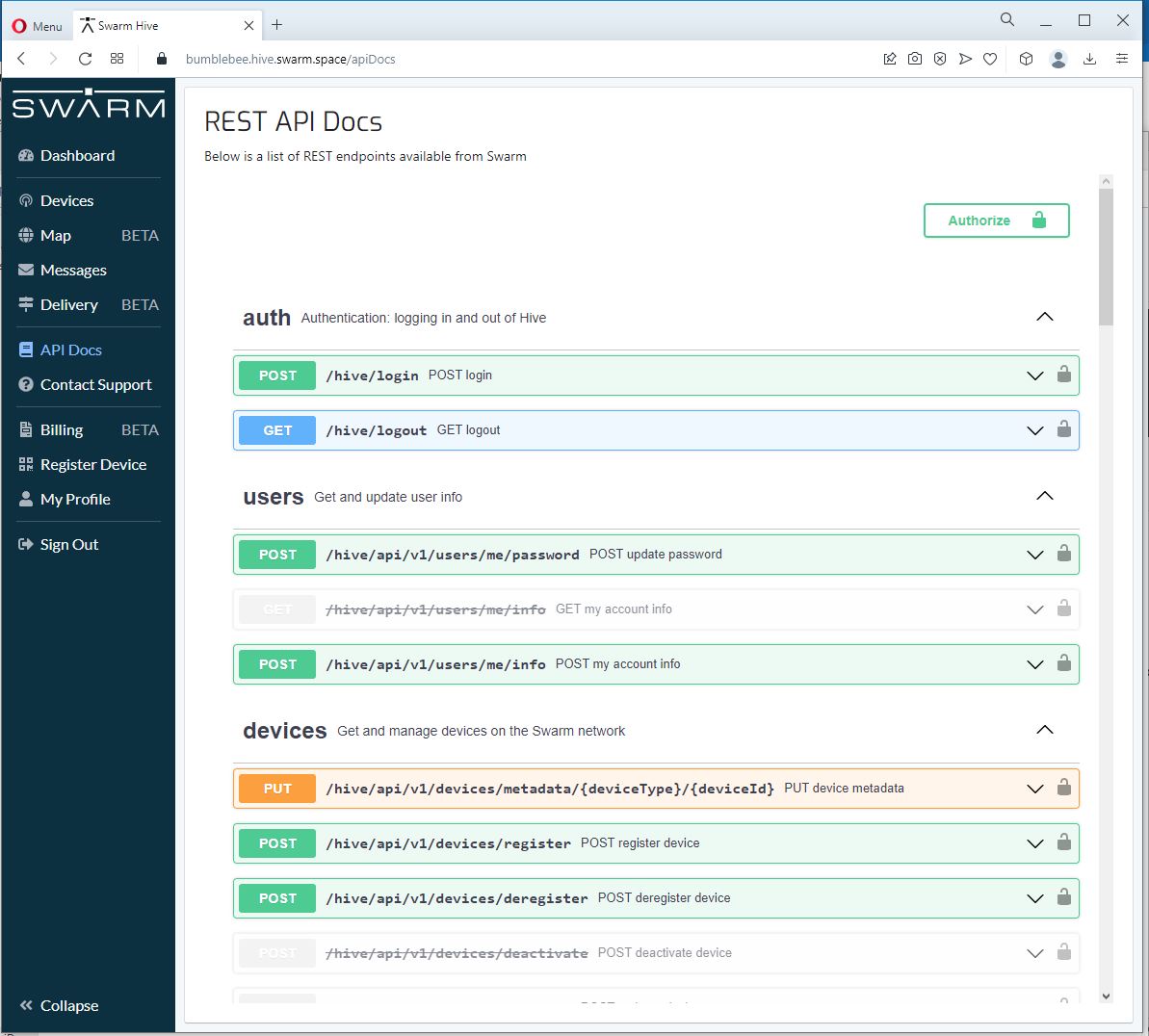
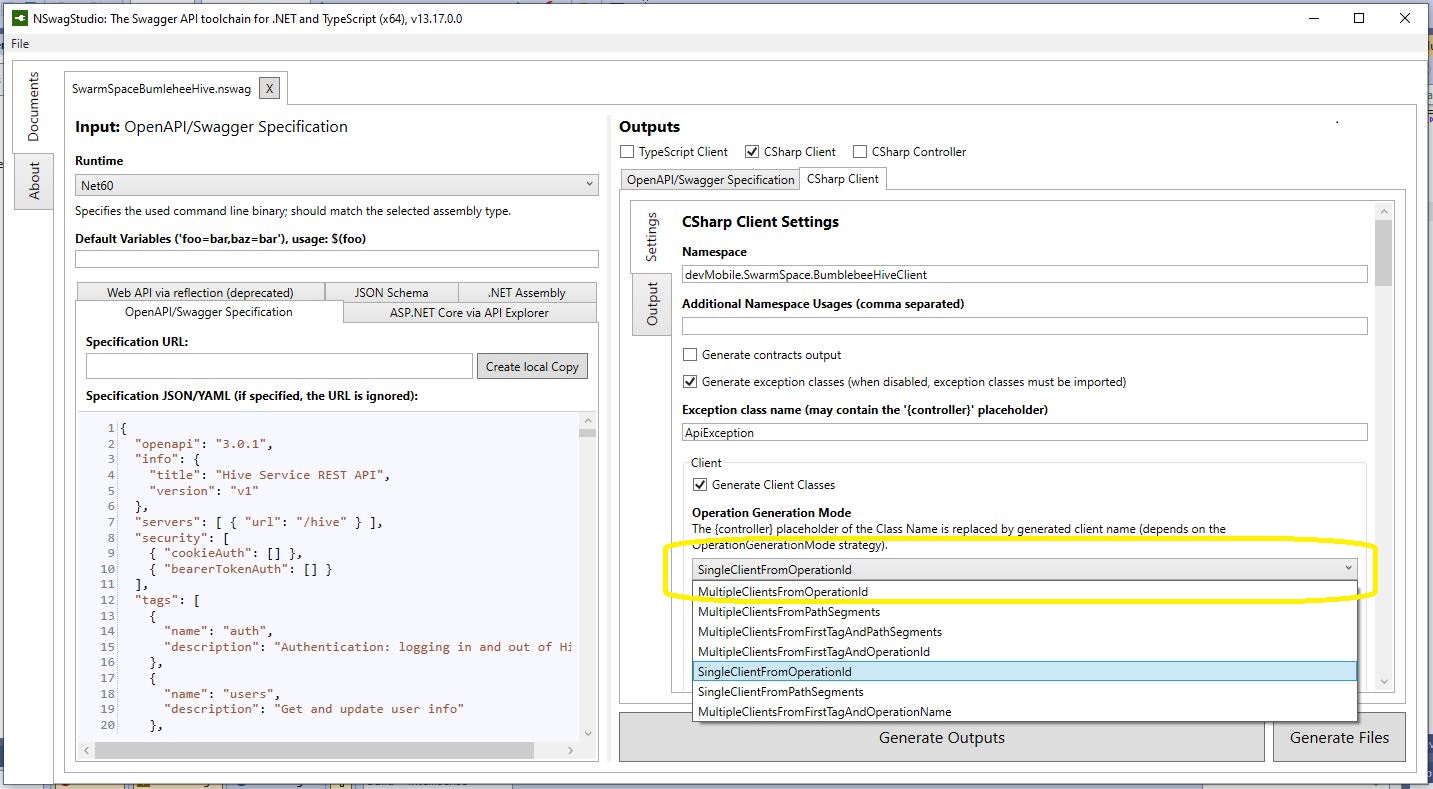
The Swarm Hive API has been published with Swagger/OpenAPI which is really simple to use. I used NSwagStudio to generate a C# client to I didn’t have to “handcraft” one.

Initially the code would compile but I found a clue in a Github Issue from September 2017 which was to change the “Operation Generation Model” to SingleClientFromOperationId.(The setting is highlighted above).

static async Task Main(string[] args)
{
    using (HttpClient httpClient = new HttpClient())
    {
        BumblebeeHiveClient.Client client = new BumblebeeHiveClient.Client(httpClient);

        client.BaseUrl = "https://bumblebee.hive.swarm.space/hive/";

        BumblebeeHiveClient.LoginForm loginForm = new BumblebeeHiveClient.LoginForm();

        // https://bumblebee.hive.swarm.space/login/
        loginForm.Username = "...";
        loginForm.Password = "...";

        Console.WriteLine($"devMobile SwarmSpace Bumblebee Hive Console Client");
        Console.WriteLine("");

        Console.WriteLine($"Login POST");
        BumblebeeHiveClient.Response response = await client.PostLoginAsync(loginForm);

        Console.WriteLine($"Token :{response.Token[..5]}.....{response.Token[^5..]}");
        Console.WriteLine($"Press <enter> to continue");
        Console.ReadLine();

        string apiKey = "bearer " + response.Token;

        httpClient.DefaultRequestHeaders.Add("Authorization", apiKey);


        Console.WriteLine($"Device count GET");

        string count = await client.GetDeviceCountAsync(1);

        Console.WriteLine($"Device count :{count}");
        Console.WriteLine($"Press <enter> to continue");
        Console.ReadLine();

        Console.WriteLine($"Device(s) information GET");

        var devices = await client.GetDevicesAsync(1, null, null, null, null, null, null, null, null);

        foreach (var device in devices)
        {
            Console.WriteLine($" Id:{device.DeviceId} Name:{device.DeviceName} Type:{device.DeviceType} Organisation:{device.OrganizationId}");
        }

        Console.WriteLine($"Press <enter> to continue");
        Console.ReadLine();

        Console.WriteLine($"User Context GET");
        var userContext = await client.GetUserContextAsync();

        Console.WriteLine($" Id:{userContext.UserId} Name:{userContext.Username} Country:{userContext.Country}");

        Console.WriteLine("Additional properties");
        foreach ( var additionalProperty in userContext.AdditionalProperties)
        {
            Console.WriteLine($" Id:{additionalProperty.Key} Value:{additionalProperty.Value}");
        }

        Console.WriteLine($"Press <enter> to exit");
        Console.ReadLine();
    }
}

I tried a couple of ways to attach the Swarm Hive API authorisation token (returned by the Login method) to client requests. After a couple for failed attempts, I “realised” that adding the “Authorization” header to the HttpClient defaultRequestHeaders was by far the simplest approach.

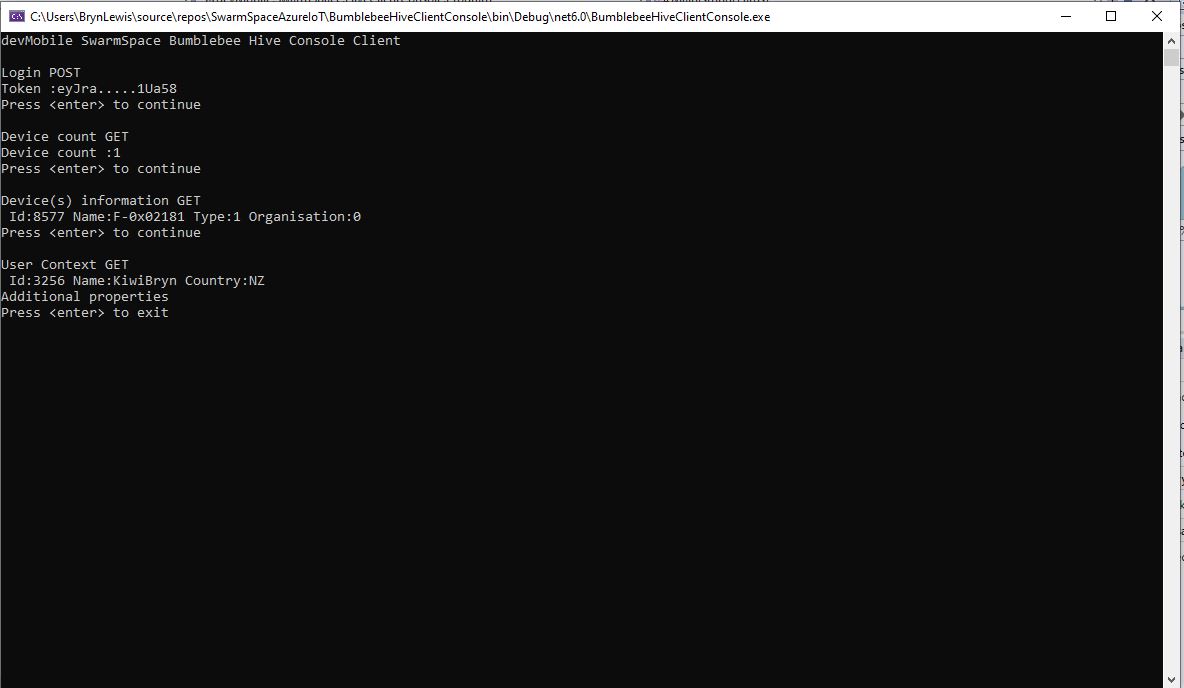
My “nasty” console application calls the Login method, then requests the number of devices (I only have one), gets a list of the properties of all the devices(very short list) then gets the User Context and displays their ID, Name and Country.

ASP MVC Core V2.1 and Cross-Origin Resource Sharing

I’m working on an project for a customer which implements a number of application programming Interfaces(API) for a Single Page Application(SPA) and other clients. We are using entity tags (ETags) for versioning and the front end developers found the couldn’t access them from javascipt running in mainstream browser clients (June 2018).

The problems was understanding how Cross-Origin Resource Sharing (CORS) worked and how it interacted with our security model (API key and OAuth2.0 depending on the client)

In our scenario we first found the pre-flight check wasn’t working because in the HyperText Transfer Protocol (HTTP) OPTIONS method our X-API-KEY check was failing

OPTIONS http://xyz.azurewebsites.net/api/portfolio HTTP/1.1
...
Access-Control-Request-Headers: x-api-key
Access-Control-Request-Method: GET
Accept-Encoding: gzip, deflate
Content-Length: 0
Host: xyz.azurewebsites.net
Connection: Keep-Alive
Pragma: no-cache

HTTP/1.1 400 Bad Request
Transfer-Encoding: chunked
Server: Kestrel
X-Powered-By: ASP.NET
...
Date: Sun, 24 Jun 2018 05:48:30 GMT

13
API Key is invalid.
0

So I disabled X-API-KEY validation in startup.cs

public async Task Invoke(HttpContext context)
{
   if (context.Request.Method == "OPTIONS")
   {
      await this.next.Invoke(context);
      return;
   }

   var claims = new List();
…

OPTIONS then worked

OPTIONS http://xyz.azurewebsites.net/api/portfolio HTTP/1.1
...
Access-Control-Request-Headers: x-api-key
Access-Control-Request-Method: GET
Accept-Encoding: gzip, deflate
Content-Length: 0
Host: xyz.azurewebsites.net
Connection: Keep-Alive
Pragma: no-cache

HTTP/1.1 404 Not Found
Server: Kestrel
X-Powered-By: ASP.NET
...
Date: Sun, 24 Jun 2018 05:52:20 GMT
Content-Length: 0

I then turned on CORS allowing pretty much anything

public void ConfigureServices(IServiceCollection services)
{
   services.AddCors(options =>
   {
      options.AddPolicy("CorsPolicy",
      builder => builder.AllowAnyOrigin()
         .AllowAnyMethod()
         .AllowAnyHeader()
         .AllowCredentials());
   });
   services.AddMvc();
}

public void Configure(IApplicationBuilder app, IHostingEnvironment env, ILoggerFactory loggerFactory)
{
   if (env.IsDevelopment())
   {
      app.UseDeveloperExceptionPage();
   }

   TelemetryConfiguration.Active.InstrumentationKey = this.configuration.GetSection("ApplicationInsights").GetSection("InstrumentationKey").Value;

   loggerFactory.AddLog4Net();
   this.log.Info("Startup.Configure called");

   app.ApplyUserKeyValidation();
   app.UseCors("CorsPolicy");
   app.UseMvc();
   }
}

OPTIONS then worked

OPTIONS http://xyz.azurewebsites.net/api/portfolio HTTP/1.1
...
Access-Control-Request-Headers: x-api-key
Access-Control-Request-Method: GET
Accept-Encoding: gzip, deflate
Content-Length: 0
Host: xyz.azurewebsites.net
Connection: Keep-Alive
Pragma: no-cache

HTTP/1.1 204 No Content
Vary: Origin
Server: Kestrel
Access-Control-Allow-Credentials: true
Access-Control-Allow-Headers: x-api-key
Access-Control-Allow-Origin: file://
X-Powered-By: ASP.NET
...
Date: Sun, 24 Jun 2018 05:57:33 GMT

GET then worked

GET http://xyz.azurewebsites.net/api/portfolio HTTP/1.1
...
X-API-KEY: ABCDEFGHIJKLMNOPQRSTUVWXYZ
Accept-Language: en-NZ
Accept-Encoding: gzip, deflate
If-None-Match: 00-00-00-00-00-00-00-76
Host: xyz.azurewebsites.net
Connection: Keep-Alive

HTTP/1.1 200 OK
Content-Type: application/json; charset=utf-8
ETag: 00-00-00-00-00-00-00-76
Vary: Origin,Accept-Encoding
Server: Kestrel
Access-Control-Allow-Credentials: true
Access-Control-Allow-Origin: file://
X-Powered-By: ASP.NET
...
Date: Sun, 24 Jun 2018 05:57:34 GMT
Content-Length: 2216

[{"...."}}

But HEAD didn’t work

HEAD http://xyz.azurewebsites.net/api/portfolio HTTP/1.1
...
X-API-KEY: ABCDEFGHIJKLMNOPQRSTUVWXYZ
Accept-Language: en-NZ
Accept-Encoding: gzip, deflate
If-None-Match: 00-00-00-00-00-00-00-76
Host: xyz.azurewebsites.net
Connection: Keep-Alive

HTTP/1.1 400 Bad Request
Content-Length: 0
Vary: Origin
Server: Kestrel
Access-Control-Allow-Credentials: true
Access-Control-Allow-Origin: file://
X-Powered-By: ASP.NET
...
Date: Sun, 24 Jun 2018 05:59:55 GMT

From the Application Insights logging and RestTest client (which I ran locally and remotely) I could see that the client side code couldn’t access the value of our eTag.  It had to be “exposed”

public void ConfigureServices(IServiceCollection services)
{
   services.AddCors(options =>
   {
      options.AddPolicy("CorsPolicy",
            builder => builder.AllowAnyOrigin()
            .AllowAnyMethod()
            .AllowAnyHeader()
            .WithExposedHeaders("etag")
            .AllowCredentials()
         );
      });
      services.AddMvc();
   }
...

GET then worked

GET http://xyz.azurewebsites.net/api/portfolio HTTP/1.1
...
X-API-KEY: ABCDEFGHIJKLMNOPQRSTUVWXYZ
ETag: 00-00-00-00-00-00-00-76
Accept-Language: en-NZ
Accept-Encoding: gzip, deflate
If-None-Match: 00-00-00-00-00-00-00-76
Host: xyz.azurewebsites.net
Connection: Keep-Alive

HTTP/1.1 200 OK
Transfer-Encoding: chunked
Content-Type: application/json; charset=utf-8
Content-Encoding: gzip
ETag: 00-00-00-00-00-00-00-76
Vary: Origin,Accept-Encoding
Server: Kestrel
Access-Control-Allow-Credentials: true
Access-Control-Allow-Origin: file://
X-Powered-By: ASP.NET
...
Date: Sun, 24 Jun 2018 07:53:41 GMT

[{"...."}}

HEAD then worked

OPTIONS http://xyz.azurewebsites.net/api/portfolio HTTP/1.1
...
Access-Control-Request-Headers: x-api-key,etag
Access-Control-Request-Method: HEAD
Accept-Encoding: gzip, deflate
Content-Length: 0
Host: xyz.azurewebsites.net
Connection: Keep-Alive
Pragma: no-cache

HTTP/1.1 204 No Content
Vary: Origin
Server: Kestrel
Access-Control-Allow-Credentials: true
Access-Control-Allow-Headers: x-api-key,etag
Access-Control-Allow-Origin: file://
X-Powered-By: ASP.NET
...
Date: Sun, 24 Jun 2018 07:57:31 GMT

HEAD http://xyz.azurewebsites.net/api/portfolio HTTP/1.1
...
X-API-KEY: ABCDEFGHIJKLMNOPQRSTUVWXYZ
ETag: 00-00-00-00-00-00-00-76
Accept-Language: en-NZ
Accept-Encoding: gzip, deflate
Host: xyz.azurewebsites.net
Connection: Keep-Alive
Pragma: no-cache

HTTP/1.1 304 Not Modified
Vary: Origin
Server: Kestrel
Access-Control-Allow-Credentials: true
Access-Control-Allow-Origin: file://
X-Powered-By: ASP.NET
...
Date: Sun, 24 Jun 2018 07:57:31 GMT

I had some oddness with releasing code updates which I think was down to caching of pre-flight request responses.
Next steps tidy up the headers etc. and lock the CORS configuration down to expose the minimum necessary required for the application to work.

AdaFruit IO Swagger based desktop HTTP client

Manually building clients for complex RESTful APIs (like AdaFruit.IO) can be a bit tedious so I figured I would try generating a C# http client from the Swagger OpenAPI specification(OAS) metadata.

My initial attempts using the Swagger Editor and NSwag on the AdaFruit.IO public API description didn’t go so well. (for more info see this AdaFruit.IO support forum thread) You may need to manually modify the type of the id field in Data & DataResponse, plus possibly other responses.

After figuring out how to set the API key, my code which uploads simulates three individual feeds and one feed group appears to work reliably.

/*

Copyright ® 2018 Jan devMobile Software, All Rights Reserved

THIS CODE AND INFORMATION IS PROVIDED "AS IS" WITHOUT WARRANTY OF ANY
KIND, EITHER EXPRESSED OR IMPLIED, INCLUDING BUT NOT LIMITED TO THE
IMPLIED WARRANTIES OF MERCHANTABILITY AND/OR FITNESS FOR A PARTICULAR
PURPOSE.

http://www.devmobile.co.nz

*/
using System;
using System.Diagnostics;
using System.Threading.Tasks;
using AdaFruit.IO;

namespace AdaFruit.IO
{
public partial class Client
{
string adaFruitIOApiKey = "yourAPIKey";

partial void PrepareRequest(System.Net.Http.HttpClient client, System.Net.Http.HttpRequestMessage request, string url)
{
client.DefaultRequestHeaders.Add("X-AIO-Key", adaFruitIOApiKey);
}
}
}

namespace devMobile.IoT.Adafruit.IO.Desktop
{
class Program
{
static void Main(string[] args)
{
string userName = "YourUserName"; // This is mixed case & case sensitive
// The feed group and feed key are forced to lower case by UI
const string feedGroup = "devduinov2-dot-2";
const string temperatureKey = "t";
const double temperatureBase = 20.0;
const double temperatureRange = 10.0;
const string humidityKey = "h";
const double humidityBase = 70.0;
const double humidityRange = 20.0;
const string batteryVoltageKey = "v";
const double batteryVoltageBase = 3.00;
const double batteryVoltageRange = -1.00;
TimeSpan feedUpdateDelay = new TimeSpan(0, 0, 15);
TimeSpan groupUpdateDelay = new TimeSpan(0, 0, 30);
Random random = new Random();

while (true)
{
Client client = new Client();
double temperature = temperatureBase + random.NextDouble() * temperatureRange;
double humidity = humidityBase + random.NextDouble() * humidityRange;
double batteryVoltage = batteryVoltageBase + random.NextDouble() * batteryVoltageRange;

Debug.WriteLine("Temperature {0}°C  Humidity {1}%  Battery Voltage {2}V", temperature.ToString("F1"), humidity.ToString("F0"), batteryVoltage.ToString("F2"));

// First Update the 3 feeds individually
// Temperature
Datum temperatureDatum = new Datum()
{
Value = temperature.ToString("F1"),
};
client.CreateDataAsync(userName, temperatureKey, temperatureDatum).Wait();
Task.Delay(feedUpdateDelay).Wait();

// Humidity
Datum humidityDatum = new Datum()
{
Value = humidity.ToString("F0"),
};
client.CreateDataAsync(userName, humidityKey, humidityDatum).Wait();
Task.Delay(feedUpdateDelay).Wait();

// Battery
Datum batteryDatum = new Datum()
{
Value = batteryVoltage.ToString("F2"),
};
client.CreateDataAsync(userName, batteryVoltageKey, batteryDatum).Wait();
Task.Delay(feedUpdateDelay).Wait();

// Then update a feed in a group
Group_feed_data devDuinoData = new Group_feed_data();

devDuinoData.Feeds.Add(new Anonymous2() { Key = temperatureKey, Value = temperature.ToString("F1")});
devDuinoData.Feeds.Add(new Anonymous2() { Key = humidityKey, Value = humidity.ToString("F0")});
devDuinoData.Feeds.Add(new Anonymous2() { Key = batteryVoltageKey, Value = batteryVoltage.ToString("F2")});

client.CreateGroupDataAsync(userName, feedGroup, devDuinoData).Wait();
Task.Delay(groupUpdateDelay).Wait();
}
}
}
}

AdaFruit IO basic Netduino HTTP client

I use Netduino devices for teaching and my students often build projects which need a cloud based service like AdaFruit.IO to capture, store and display their sensor data.

My Proof of Concept (PoC) which uses a slightly modified version of the AdaFruit.IO basic desktop HTTP client code has been running on several Netduino 2 Plus, Netduino 3 Ethernet and Netduino 3 Wifi devices for the last couple of days and looks pretty robust.

The Netduino 3 Wifi device also supports https for improved security and privacy. They also make great field gateways as they can run off solar/battery power.

N2PN3WDashBoard

The devices have been uploading temperature and humidity measurements from a Silicon labs Si7005 sensor. (Outside sensor suffering from sunstrike)

N3WifiTemperatureAndHumiditySensor

program.cs

*

Copyright ® 2017 December devMobile Software, All Rights Reserved

THIS CODE AND INFORMATION IS PROVIDED "AS IS" WITHOUT WARRANTY OF ANY
KIND, EITHER EXPRESSED OR IMPLIED, INCLUDING BUT NOT LIMITED TO THE
IMPLIED WARRANTIES OF MERCHANTABILITY AND/OR FITNESS FOR A PARTICULAR
PURPOSE.

http://www.devmobile.co.nz

*/
using System;
using System.Net;
using System.Threading;
using Microsoft.SPOT;
using Microsoft.SPOT.Hardware;
using Microsoft.SPOT.Net.NetworkInformation;
using SecretLabs.NETMF.Hardware.Netduino;
using devMobile.NetMF.Sensor;
using devMobile.IoT.NetMF;

namespace devMobile.IoT.AdaFruitIO.NetMF.Client
{
public class Program
{
private const string adaFruitIOApiBaseUrl = @"https://IO.adafruit.com/api/v2/";
private const string group = "netduino3";
private const string temperatureFeedKey = "t";
private const string humidityFeedKey = "h";
private const string adaFruitUserName = "YourUserName";
private const string adaFruitIOApiKey = "YourAPIKey";
private static readonly TimeSpan timerDueAfter = new TimeSpan(0, 0, 15);
private static readonly TimeSpan timerPeriod = new TimeSpan(0, 0, 30);
private static OutputPort led = new OutputPort(Pins.ONBOARD_LED, false);
private static SiliconLabsSI7005 sensor = new SiliconLabsSI7005();
private static AdaFruitIoClient adaFruitIoClient = new AdaFruitIoClient(adaFruitUserName, adaFruitIOApiKey, adaFruitIOApiBaseUrl);

public static void Main()
{
// Wait for Network address if DHCP
NetworkInterface networkInterface = NetworkInterface.GetAllNetworkInterfaces()[0];
if (networkInterface.IsDhcpEnabled)
{
Debug.Print(" Waiting for DHCP IP address");

while (NetworkInterface.GetAllNetworkInterfaces()[0].IPAddress == IPAddress.Any.ToString())
{
Debug.Print(" .");
led.Write(!led.Read());
Thread.Sleep(250);
}
led.Write(false);
}

// Display network config for debugging
Debug.Print("Network configuration");
Debug.Print(" Network interface type : " + networkInterface.NetworkInterfaceType.ToString());
Debug.Print(" MAC Address : " + BytesToHexString(networkInterface.PhysicalAddress));
Debug.Print(" DHCP enabled : " + networkInterface.IsDhcpEnabled.ToString());
Debug.Print(" Dynamic DNS enabled : " + networkInterface.IsDynamicDnsEnabled.ToString());
Debug.Print(" IP Address : " + networkInterface.IPAddress.ToString());
Debug.Print(" Subnet Mask : " + networkInterface.SubnetMask.ToString());
Debug.Print(" Gateway : " + networkInterface.GatewayAddress.ToString());

foreach (string dnsAddress in networkInterface.DnsAddresses)
{
Debug.Print(" DNS Server : " + dnsAddress.ToString());
}

Timer humidityAndtemperatureUpdates = new Timer(HumidityAndTemperatureTimerProc, null, timerDueAfter, timerPeriod);

Thread.Sleep(Timeout.Infinite);
}

static private void HumidityAndTemperatureTimerProc(object state)
{
led.Write(true);

try
{
double humidity = sensor.Humidity();

Debug.Print(" Humidity " + humidity.ToString("F0") + "%");
adaFruitIoClient.FeedUpdate(group, humidityFeedKey, humidity.ToString("F0"));
}
catch (Exception ex)
{
Debug.Print("Humidifty read+update failed " + ex.Message);

return;
}

try
{
double temperature = sensor.Temperature();

Debug.Print(" Temperature " + temperature.ToString("F1") + "°C");
adaFruitIoClient.FeedUpdate(group, temperatureFeedKey, temperature.ToString("F1"));
}
catch (Exception ex)
{
Debug.Print("Temperature read+update failed " + ex.Message);

return;
}

led.Write(false);
}

private static string BytesToHexString(byte[] bytes)
{
string hexString = string.Empty;

// Create a character array for hexidecimal conversion.
const string hexChars = "0123456789ABCDEF";

// Loop through the bytes.
for (byte b = 0; b < bytes.Length; b++)          {             if (b > 0)
hexString += "-";

// Grab the top 4 bits and append the hex equivalent to the return string.
hexString += hexChars[bytes[b] >> 4];

// Mask off the upper 4 bits to get the rest of it.
hexString += hexChars[bytes[b] & 0x0F];
}

return hexString;
}
}
}

AdaFruit.IO client.cs, handles feed groups and individual feeds

/*

Copyright ® 2017 December devMobile Software, All Rights Reserved

THIS CODE AND INFORMATION IS PROVIDED "AS IS" WITHOUT WARRANTY OF ANY
KIND, EITHER EXPRESSED OR IMPLIED, INCLUDING BUT NOT LIMITED TO THE
IMPLIED WARRANTIES OF MERCHANTABILITY AND/OR FITNESS FOR A PARTICULAR
PURPOSE.

http://www.devmobile.co.nz

*/
using System;
using System.IO;
using System.Net;
using System.Text;
using Microsoft.SPOT;

namespace devMobile.IoT.NetMF
{
public class AdaFruitIoClient
{
private const string apiBaseUrlDefault = @"http://IO.adafruit.com/api/v2/";
private string apiBaseUrl = "";
private string userName = "";
private string apiKey = "";
private int httpRequestTimeoutmSec;
private int httpRequestReadWriteTimeoutmSec;

public AdaFruitIoClient(string userName, string apiKey, string apiBaseUrl = apiBaseUrlDefault, int httpRequestTimeoutmSec = 2500, int httpRequestReadWriteTimeoutmSec = 5000)
{
this.apiBaseUrl = apiBaseUrl;
this.userName = userName;
this.apiKey = apiKey;
this.httpRequestReadWriteTimeoutmSec = httpRequestReadWriteTimeoutmSec;
this.httpRequestTimeoutmSec = httpRequestTimeoutmSec;
}

public void FeedUpdate(string group, string feedKey, string value)
{
string feedUrl;

if (group.Trim() == string.Empty)
{
feedUrl = apiBaseUrl + userName + @"/feeds/" + feedKey + @"/data";
}
else
{
feedUrl = apiBaseUrl + userName + @"/feeds/" + group.Trim() + "." + feedKey + @"/data";
}

HttpWebRequest request = (HttpWebRequest)WebRequest.Create(feedUrl);
{
string payload = @"{""value"": """ + value + @"""}";
byte[] buffer = Encoding.UTF8.GetBytes(payload);

DateTime httpRequestedStartedAtUtc = DateTime.UtcNow;

request.Method = "POST";
request.ContentLength = buffer.Length;
request.ContentType = @"application/json";
request.Headers.Add("X-AIO-Key", apiKey);
request.KeepAlive = false;
request.Timeout = this.httpRequestTimeoutmSec;
request.ReadWriteTimeout = this.httpRequestReadWriteTimeoutmSec;

using (Stream stream = request.GetRequestStream())
{
stream.Write(buffer, 0, buffer.Length);
}

using (var response = (HttpWebResponse)request.GetResponse())
{
Debug.Print(" Status: " + response.StatusCode + " : " + response.StatusDescription);
}

TimeSpan duration = DateTime.UtcNow - httpRequestedStartedAtUtc;
Debug.Print(" Duration: " + duration.ToString());
}
}
}
}

Bill of materials for PoC

AdaFruit IO basic desktop HTTP client

AdaFruit IO meets my basic criteria as it has support for HTTP/S clients (it also has an MQTT interface which I will look at in a future post) and the API is well documented.

My first Proof of Concept (PoC) was to build a desktop client which used the HttpWebRequest (for ease of porting to NetMF) classes to upload data.

The program uploaded one of three simulated values to AdaFruit.IO every 10 seconds.

I found the username, group, and feed keys to be case sensitive so pay close attention to the values displayed in the webby UI or copy n paste.

program.cs

 class Program
   {
      static void Main(string[] args)
      {
         string adaFruitIOApiBaseUrl = "https://IO.adafruit.com/api/v2/";
         string adaFruitIOUserName = "YourUserName"; // This is mixed case & case sensitive
         string adaFruitIOApiKey = "YourAPIKey";
         // The feed group and feed key are forced to lower case by UI
         const string feedGroup = "";
         //const string feedGroup = "devduinov2-dot-2";
         const string temperatureKey = "t";
         const double temperatureBase = 20.0;
         const double temperatureRange = 10.0;
         const string humidityKey = "h";
         const double humidityBase = 70.0;
         const double humidityRange = 20.0;
         const string batteryVoltageKey = "v";
         const double batteryVoltageBase = 3.00;
         const double batteryVoltageRange = -1.00;
         TimeSpan dataUpdateDelay = new TimeSpan(0, 0, 10);
         Random random = new Random();

         while (true)
         {
            double temperature = temperatureBase + random.NextDouble() * temperatureRange;
            Console.WriteLine("Temperature {0}°C", temperature.ToString("F1"));
            AdaFruitIoFeedUpdate(adaFruitIOApiBaseUrl, adaFruitIOUserName, adaFruitIOApiKey, feedGroup, temperatureKey, temperature.ToString("F1"));

            Thread.Sleep(dataUpdateDelay);

            double humidity = humidityBase + random.NextDouble() * humidityRange;
            Console.WriteLine("Humidity {0}%", humidity.ToString("F0"));
            AdaFruitIoFeedUpdate(adaFruitIOApiBaseUrl, adaFruitIOUserName, adaFruitIOApiKey, feedGroup, humidityKey, humidity.ToString("F0"));

            Thread.Sleep(dataUpdateDelay);

            double batteryVoltage = batteryVoltageBase + random.NextDouble() * batteryVoltageRange;
            Console.WriteLine("Battery voltage {0}V", batteryVoltage.ToString("F2"));
            AdaFruitIoFeedUpdate(adaFruitIOApiBaseUrl, adaFruitIOUserName, adaFruitIOApiKey, feedGroup, batteryVoltageKey, batteryVoltage.ToString("F2"));

            Thread.Sleep(dataUpdateDelay);
         }
      }

client.cs

      public void AdaFruitIoFeedUpdate(string apiBaseUrl, string userName, string apiKey, string group, string feedKey, string value, int httpRequestTimeoutmSec = 2500, int httpRequestReadWriteTimeoutmSec = 5000)
      {
         string feedUrl;

         if (group.Trim() == string.Empty)
         {
            feedUrl = apiBaseUrl + userName + @"/feeds/" + feedKey + @"/data";
         }
         else
         {
            feedUrl = apiBaseUrl + userName + @"/feeds/" + group.Trim() + "." + feedKey + @"/data";
         }

         Console.WriteLine(" Feed URL :{0}", feedUrl);

         try
         {
            HttpWebRequest request = (HttpWebRequest)WebRequest.Create(feedUrl);
            {
               string payload = @"{""value"": """ + value + @"""}";

               byte[] buffer = Encoding.UTF8.GetBytes(payload);

               DateTime httpRequestedStartedAtUtc = DateTime.UtcNow;

               request.Method = "POST";
               request.ContentLength = buffer.Length;
               request.ContentType = @"application/json";
               request.Headers.Add("X-AIO-Key", apiKey);
               request.KeepAlive = false;
               request.Timeout = httpRequestTimeoutmSec;
               request.ReadWriteTimeout = httpRequestReadWriteTimeoutmSec;

               using (Stream stream = request.GetRequestStream())
               {
                  stream.Write(buffer, 0, buffer.Length);
               }

               using (var response = (HttpWebResponse)request.GetResponse())
               {
                  Console.WriteLine(" Status: " + response.StatusCode + " : " + response.StatusDescription);
               }

               TimeSpan duration = DateTime.UtcNow - httpRequestedStartedAtUtc;
               Console.WriteLine(" Duration: " + duration.ToString());
            }
         }
         catch (Exception ex)
         {
            Console.WriteLine(ex.Message);
            throw;
         }
      }
   }

This approach seemed to work pretty reliably

DesktopHTTPRequest

Mikrobus.Net Quail, EthClick and xively

My second proof of concept application for the Mikrobus.Net Quail and EthClick uploads temperature and humidity data to Xively every 30 seconds for display and analysis.

Temperature and humidity Xively data stream

Temperature and humidity Xively data stream

The Xively REST API uses an HTTP PUT which initially didn’t work because the payload was not getting attached.

I patched the AssembleRequest method in the EtherClick driver to fix this issue.

private byte[] AssembleRequest()
{
   var a = RequestType;
   a += " " + Path + " " + Protocol + "\r\nHost: ";
   a += Host + "\r\n";

   foreach (object aHeader in Headers.Keys)
      a += (string)aHeader + ": " + (string)Headers[aHeader] + "\r\n";

   a += "\r\n"; // Cache-Control: no-cache\r\n  //Accept-Charset: utf-8;\r\n

   if (Content != null && Content != string.Empty && (RequestType == "POST" || RequestType == "PUT")) a += Content;

   return Encoding.UTF8.GetBytes(a);
}

The code reads the WeatherClick temperature and humidity values then assembles a CSV payload which it uploads with an HTTP PUT

</pre>
public class Program
{
   private const string xivelyHost = @"api.xively.com";
   private const string xivelyApiKey = @"YourAPIKey";
   private const string xivelyFeedId = @"YourFeedID";

   public static void Main()
   {
      WeatherClick weatherClick = new WeatherClick(Hardware.SocketOne, WeatherClick.I2CAddresses.Address0);
      weatherClick.SetRecommendedMode(WeatherClick.RecommendedModes.WeatherMonitoring);

      EthClick ethClick = new EthClick(Hardware.SocketTwo);
      ethClick.Start(ethClick.GenerateUniqueMacAddress("devMobileSoftware"), "QuailDevice");

      // Wait for an internet connection
      while (true)
      {
         if (ethClick.ConnectedToInternet)
         {
            Debug.Print("Connected to Internet");
            break;
         }
         Debug.Print("Waiting on Internet connection");
      }

      while (true)
      {
         Debug.Print("T " + weatherClick.ReadTemperature().ToString("F1") + " H " + weatherClick.ReadHumidity().ToString("F1") + " P " + weatherClick.ReadPressure(PressureCompensationModes.Uncompensated).ToString("F1"));

         HttpRequest request = new HttpRequest(@"http://" + xivelyHost + @"/v2/feeds/" + xivelyFeedId + @".csv");
         request.Host = xivelyHost;
         request.RequestType = "PUT";
         request.Headers.Add("Content-Type", "text/csv");
         request.Headers.Add("X-ApiKey", xivelyApiKey );

         request.Content = "OfficeT," + weatherClick.ReadTemperature().ToString("F1") + "\r\n" + "OfficeH," + weatherClick.ReadHumidity().ToString("F1") ;
         request.Headers.Add("Content-Length", request.Content.Length.ToString());

         var response = request.Send();
         if (response != null)
         {
            Debug.Print("Response: " + response.Message);
         }
         else
         {
            Debug.Print("No response");
         }
      Thread.Sleep(30000);
      }
   }
}

MikrobustNet Quail with Eth and Weather Clicks

MikrobustNet Quail with Eth and Weather Clicks

This proof of concept code appears to be reliable and has run for days at a time. The IP stack looks like it needs a bit more work.

Mikrobus.Net Quail and EthClick

In my second batch of MikroElektronika Mikrobus clicks I had purchased an EthClick to explore the robustness and reliability of the Mikrobus.Net IP Stack.

My first trial application uses the Internet Chuck Norris database (ICNBD) to look up useful “facts” about the movie star.

public static void Main()
{
   EthClick ethClick = new EthClick(Hardware.SocketTwo);

   ethClick.Start(ethClick.GenerateUniqueMacAddress("devMobileSoftware"), "QuailDevice");

   while (true)
   {
      if (ethClick.ConnectedToInternet)
      {
         Debug.Print("Connected to Internet");
         break;
      }
   Debug.Print("Waiting on Internet connection");
   }

   while (true)
   {
      var r = new HttpRequest(@&amp;quot;http://api.icndb.com/jokes/random&amp;quot;);

      r.Headers.Add("Accept", "*/*");

      var response = r.Send();
      if (response != null)
      {
         if (response.Status == "HTTP/1.1 200 OK")
         {
            Debug.Print(response.Message);
         }

      }
      else
      {
         Debug.Print("No response");
      }
      Thread.Sleep(10000);
   }
}

The ran first time and returned the following text

7c
{ "type": "success, "value": { "id": 496, "joke": "Chuck Norris went out of an infinite loop.", "categories": ["nerdy"]}}
0

85
{ "type": "success", "value": { "id": 518, "joke": "Chuck Norris doesn't cheat death. He wins fair and square.", "categories": []}}
0

It looks like the HTTP response parsing is not quite right as each message starts with the length of the message in bytes in hex and the terminating “0”.

Some fun with a Netduino Plus and the icndb

A chat with some co-workers about displaying the status of the team’s Jenkins build process led to bit of research into calling RESTful services and JSON support on NetMF devices. Previously this had required a bit of hand crafted code but now it looks like the library support has matured a bit. I don’t run Jenkins at home so I decided to build a NetduinoPlus client for the internet Chuck Norris database which has a RESTful API.

This API returns Chuck Norris “facts”…

“Chuck Norris doesn’t read books. He stares them down until he gets the information he wants.”
“There is no theory of evolution, just a list of creatures Chuck Norris allows to live.”
“Some people wear Superman pajamas. Superman wears Chuck Norris pajamas.”
“Chuck Norris can slam a revolving door.”

The icndb API returns JSON

{ "type": "success", "value": { "id": 109, "joke": "It takes Chuck Norris 20 minutes to watch 60 Minutes.", "categories": [] } }

I used the NetMF system.HTTP libraries to initiate the request and Json.NetMF to unpack the response. This snippet illustrates how I processed the request/response

using (HttpWebRequest request = (HttpWebRequest)WebRequest.Create(@"http://api.icndb.com/jokes/random"))
{
   //request.Proxy = proxy;
   request.Method = "GET";
   request.KeepAlive = false;
   request.Timeout = 5000;
   request.ReadWriteTimeout = 5000;

   using (var response = (HttpWebResponse)request.GetResponse())
   {
      if (response.StatusCode == HttpStatusCode.OK)
      {
         byte[] buffer = new byte[response.ContentLength];

         using (Stream stream = response.GetResponseStream())
         {
            stream.Read(buffer, 0, (int)response.ContentLength);

            string json = new string(Encoding.UTF8.GetChars(buffer));

            Hashtable jsonPayload = JsonSerializer.DeserializeString(json) as Hashtable;

            Hashtable value = jsonPayload["value"] as Hashtable ;
            Debug.Print(value["joke"].ToString());
         }
      }
   }
}

icndb Netduino client

Bill of materials