Myriota Connector – Azure IoT Hub Downlink final refactoring

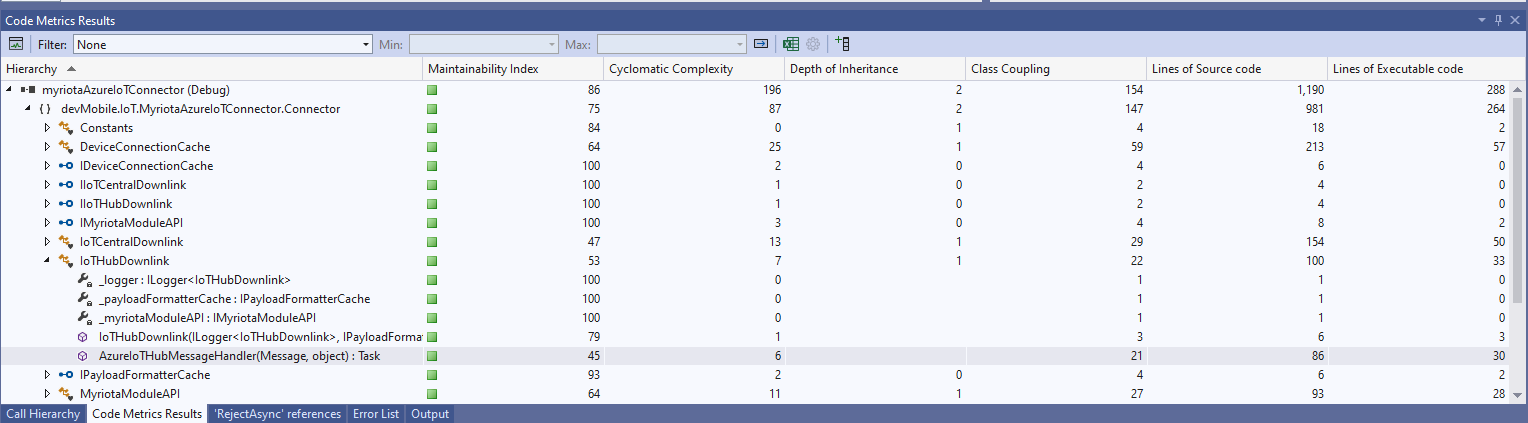
I often print code and review it away from a computer. I can’t be distracted by “tinkering” with the code and I find that drawing on it helps me visualise what is going on. The payload formatters are retrieved from Azure Storage blob which have a default retry policy, the Azure IoT Hub DeviceClient methods have a default retry policy, the Myriota Cloud API SendMessage has retries (Implemented with Polly) and if the CS-Script compilation fails there is nothing that can be done so the code could be simplified.

The Azure IoT Hub downlink message handler was a partial class and part of implementation of the IDeviceConnectionCache which was a hangover from one of the initial versions.

internal partial class DeviceConnectionCache : IDeviceConnectionCache
{
   public async Task AzureIoTHubMessageHandler(Message message, object userContext)
   {
      Models.DeviceConnectionContext context = (Models.DeviceConnectionContext)userContext;

      _logger.LogInformation("Downlink- IoT Hub TerminalId:{termimalId} LockToken:{LockToken}", context.TerminalId, message.LockToken);

I replaced the IDeviceConnectionCache interface with IIoTHubDownlink which was declare in a new file in the interfaces folder.

namespace devMobile.IoT.MyriotaAzureIoTConnector.Connector
{
   public interface IIoTHubDownlink
   {
      public Task AzureIoTHubMessageHandler(Message message, object userContext);
   }
}

Then had to inject all the required dependencies which had been implemented in one of the other partial class files.

internal class IoTHubDownlink : IIoTHubDownlink
{
   private readonly ILogger<IoTHubDownlink> _logger;
   private readonly IPayloadFormatterCache _payloadFormatterCache;
   private readonly IMyriotaModuleAPI _myriotaModuleAPI;

   public IoTHubDownlink(ILogger<IoTHubDownlink> logger, IPayloadFormatterCache payloadFormatterCache, IMyriotaModuleAPI myriotaModuleAPI)
   {
      _logger = logger;
      _payloadFormatterCache = payloadFormatterCache;
      _myriotaModuleAPI = myriotaModuleAPI;
   }
...
}

The implementation had been extracted to a separate class so it had to be constructed by the Dependency Injection plumbing.

...
services.AddSingleton<IPayloadFormatterCache, PayloadFormatterCache>();
services.AddSingleton<IIoTHubDownlink, IoTHubDownlink>();
services.AddSingleton<IIoTCentralDownlink, IoTCentralDownlink>();
services.AddOptions<Models.MyriotaSettings>().Configure<IConfiguration>((settings, configuration) =>
{
    configuration.GetSection("Myriota").Bind(settings);
 });
 services.AddSingleton<IMyriotaModuleAPI, MyriotaModuleAPI>();
...

The lifetime of the Microsoft.Azure.Devices.Client.Message was being managed manually which seemed a bit odd.

public async Task AzureIoTHubMessageHandler(Message message, object userContext)
{
   Models.DeviceConnectionContext context = (Models.DeviceConnectionContext)userContext;

   _logger.LogInformation("Downlink- IoT Hub TerminalId:{termimalId} LockToken:{LockToken}", context.TerminalId, message.LockToken);

   // Use default formatter and replace with message specific formatter if configured.
   string payloadFormatter;
   if (!message.Properties.TryGetValue(Constants.IoTHubDownlinkPayloadFormatterProperty, out payloadFormatter) || string.IsNullOrEmpty(payloadFormatter))
   {
      payloadFormatter = context.PayloadFormatterDownlink;
   }

   _logger.LogInformation("Downlink- IoT Hub TerminalID:{termimalId} LockToken:{LockToken} Payload formatter:{payloadFormatter} ", context.TerminalId, message.LockToken, payloadFormatter);

   try
   {
   ...
   }
   finally
   {
      // Mop up the non managed resources of message
      message.Dispose();
   }
}

I replaced this with a with a “using” which “automagically” manages the lifetime of any non-managed resources. I also added string Locktoken variable for DeviceClient.RejectAsync and DeviceClient.CompletedAsync so that the “using” could be inside the try/catch (there is scope to reduce the amount of code in the “using”)

public async Task AzureIoTHubMessageHandler(Message message, object userContext)
{
   Models.DeviceConnectionContext context = (Models.DeviceConnectionContext)userContext;

   _logger.LogInformation("Downlink- IoT Hub TerminalId:{TermimalId} LockToken:{lockToken}", context.TerminalId, message.LockToken);

   // broken out so using for message only has to be inside try
   string lockToken = message.LockToken; 

   try
   {
      using (message)
      {
...
      }
      catch (Exception ex)
      {
         _logger.LogError(ex, "Downlink- IoT Hub TerminalID:{TerminalId} LockToken:{lockToken} MessageHandler processing failed", context.TerminalId, lockToken);

         await context.DeviceClient.RejectAsync(lockToken);
      }
   }
}

The handling of the Encoding.UTF8.GetString and JObject.Parse payload was broken. If the Encoding.UTF8.GetString threw an exception there was no point in calling the JObject.Parse

// If this fails payload broken
byte[] messageBytes = message.GetBytes();

// This will fail for some messages, payload formatter gets bytes only
string messageText = string.Empty;
try
{
   messageText = Encoding.UTF8.GetString(messageBytes);
}
catch (ArgumentException aex)
{
   _logger.LogInformation("Downlink- IoT Hub TerminalID:{TerminalId} LockToken:{LockToken} messageBytes:{2} not valid Text", context.TerminalId, message.LockToken, BitConverter.ToString(messageBytes));
}

// This will fail for some messages, payload formatter gets bytes only
JObject? messageJson = null;
try
{
   messageJson = JObject.Parse(messageText);
}
catch ( JsonReaderException jex)
{
   _logger.LogInformation("Downlink- IoT Hub TerminalID:{TerminalId} LockToken:{LockToken} messageText:{2} not valid json", context.TerminalId, message.LockToken, BitConverter.ToString(messageBytes));
}

The Encoding.UTF8.GetString and JObject.Parse are now processed in a single Try with a specialised catch handling.

// These will fail for some messages, then payload formatter gets bytes only
string messageText = string.Empty;
JObject? messageJson = null;
try
{
   messageText = Encoding.UTF8.GetString(messageBytes);

   messageJson = JObject.Parse(messageText);
 }
catch (ArgumentException aex)
{
   _logger.LogInformation("Downlink- IoT Hub TerminalID:{TerminalId} LockToken:{lockToken} messageBytes:{messageBytes} not valid text exception:{Message}", context.TerminalId, lockToken, BitConverter.ToString(messageBytes), aex.Message);
}
catch (JsonReaderException jex)
{
   _logger.LogInformation("Downlink- IoT Hub TerminalID:{TerminalId} LockToken:{lockToken} messageText:{messageText} not valid json exception:{Message}", context.TerminalId, lockToken, messageText, jex.Message);
}

// This shouldn't fail, but it could for lots of different reasons, invalid path to blob, syntax error, interface broken etc.
IFormatterDownlink payloadFormatter = await _payloadFormatterCache.DownlinkGetAsync(payloadFormatterName);

This refactored code now looks an awful lot like the “sunny days” code checked in on the 3rd of November.
.NET Core web API + Dapper – Polly Retries

Recovering from transient failures with Polly

It’s not uncommon for SQL Azure servers and databases to suffer from “transient failures”. In application logs I have seen these occur during scale up/down events, periods where my application’s performance has been temporarily impacted (but its throughput has not changed), which I assume has been some load balancing going on in the background and when network connectivity has been a bit flakey.

Microsoft has published guidance for building Microservices applications, troubleshooting common AzureSQL errors and improving the resilience of ADO.Net connections which cover different approaches in depth.

For many years I used the Microsoft Enterprise Library Transient Fault Handling Application Block (TOPAZ), then upgraded to the .Net Core Version built by Mo Chavoshi both of which have been retired.

Now I’m using The Polly Project which builds on the concepts of TOPAZ but has been thoroughly re-engineered with lots of extensibility, an active community and modern codebase. Inspired by Ben Hyrman and several other developers I have built a minimalist wrapper for the Dapper Async methods which detects transient errors using the same approach as the Entity Framework Core library.

public static Task<int> ExecuteWithRetryAsync(
			  this IDbConnection connection,
			  string sql,
			  object param = null,
			  IDbTransaction transaction = null,
			  int? commandTimeout = null,
			  CommandType? commandType = null) => RetryPolicy.ExecuteAsync(() => connection.ExecuteAsync(sql, param, transaction, commandTimeout, commandType));

I did think about retry functionality for async methods which returned object/dynamic but have only implemented strongly typed ones for the initial version.

[HttpGet]
public async Task<ActionResult<IEnumerable<Model.StockItemListDtoV1>>> Get()
{
	IEnumerable<Model.StockItemListDtoV1> response = null;

	try
	{
		using (SqlConnection db = new SqlConnection(this.connectionString))
		{
			response = await db.QueryWithRetryAsync<Model.StockItemListDtoV1>(sql: @"SELECT [StockItemID] as ""ID"", [StockItemName] as ""Name"", [RecommendedRetailPrice], [TaxRate] FROM [Warehouse].[StockItems]", commandType: CommandType.Text);
		}
	}
	catch (SqlException ex)
	{
		logger.LogError(ex, "Retrieving list of StockItems");

		return this.StatusCode(StatusCodes.Status500InternalServerError);
	}

	return this.Ok(response);
}

I have struggled to get reproduceable transient failures without pausing execution in the Visual Studio debugger and tinkering with variables or scaling up/down my databases (limit to how often this can be done) or unplugging the network cable at the wrong time.

NOTE : Error Handling approach has been updated

The Things Network V2 MQTT SQL Connector

This code was written to solve a problem I had debugging and testing an application which processed data from sensors attached to The Things Network(TTN) and I figured others might find it useful.

As part of my series of TTN projects I wanted to verify that the data from a number of LoRaWAN sensors connected to TTN was reasonable and complete. I’m familiar with Microsoft SQL Server so I built a .Net Core console application which uses the TTN Message Queue Telemetry Transport(MQTT) Data API (so it can run alongside my existing TTN integration) to receive messages from the all devices in a TTN application and store them in a database for post processing.

The console application uses MQTTNet to connect to TTN MQTT Data API. It subscribes to an application device uplink topic, then uses a combination of Stackoverflow Dapper with Microsoft SQL Server tables and stored procedures to store the device data points. I re-generated the classes I had used in my other projects, added any obvious missing fields and fine tuned the data types by delving into the TTN V2 GO code.

The core of the application is in the MQTTNet application message received handler.

private static void MqttClient_ApplicationMessageReceived(MqttApplicationMessageReceivedEventArgs e)
{
   PayloadUplinkV2 payload;

   log.InfoFormat($"Receive Start Topic:{e.ApplicationMessage.Topic}");

   string connectionString = configuration.GetSection("TTNDatabase").Value;

   try
   {
      payload = JsonConvert.DeserializeObject<PayloadUplinkV2>(e.ApplicationMessage.ConvertPayloadToString());
   }
   catch (Exception ex)
   {
      log.Error("DeserializeObject failed", ex);
      return;
   }

   try
   {
      if (payload.PayloadFields != null)
      {
         var parameters = new DynamicParameters();

         EnumerateChildren(parameters, payload.PayloadFields);

         log.Debug($"Parameters:{parameters.ParameterNames.Aggregate((i, j) => i + ',' + j)}");

         foreach (string storedProcedure in storedProcedureMappings.Keys)
         {
            if (Enumerable.SequenceEqual(parameters.ParameterNames, storedProcedureMappings[storedProcedure].Split(',', StringSplitOptions.RemoveEmptyEntries), StringComparer.InvariantCultureIgnoreCase))
            {
               log.Info($"Payload fields processing with:{storedProcedure}");

               using (SqlConnection db = new SqlConnection(connectionString))
               {
                  parameters.Add("@ReceivedAtUtc", payload.Metadata.ReceivedAtUtc);
                  parameters.Add("@DeviceID", payload.DeviceId);
                  parameters.Add("@DeviceEui", payload.DeviceEui);
                  parameters.Add("@ApplicationID", payload.ApplicationId);
                  parameters.Add("@IsConfirmed", payload.IsConfirmed);
                  parameters.Add("@IsRetry", payload.IsRetry);
                  parameters.Add("@Port", payload.Port);

                  db.Execute(sql: storedProcedure, param: parameters, commandType: CommandType.StoredProcedure);
               }
            }
         }
      }
      else
      {
         foreach (string storedProcedure in storedProcedureMappings.Keys)
         {
            if (string.Compare(storedProcedureMappings[storedProcedure], "payload_raw", true) == 0)
            {
               log.Info($"Payload raw processing with:{storedProcedure}");

               using (SqlConnection db = new SqlConnection(connectionString))
               {
                  var parameters = new DynamicParameters();

                  parameters.Add("@ReceivedAtUtc", payload.Metadata.ReceivedAtUtc);
                  parameters.Add("@DeviceID", payload.DeviceId);
                  parameters.Add("@DeviceEui", payload.DeviceEui);
                  parameters.Add("@ApplicationID", payload.ApplicationId);
                  parameters.Add("@IsConfirmed", payload.IsConfirmed);
                  parameters.Add("@IsRetry", payload.IsRetry);
                  parameters.Add("@Port", payload.Port);
                  parameters.Add("@Payload", payload.PayloadRaw);

                  db.Execute(sql: storedProcedure, param: parameters, commandType: CommandType.StoredProcedure);
               }
            }
         }
      }
   }
   catch (Exception ex)
   {
      log.Error("Message processing failed", ex);
   }
}

For messages with payload fields the code attempts to match the list of field names (there maybe more than one match) with the parameter list for stored procedures in the AppSettings.json file. The Enumerable.SequenceEqual uses a case insensitive comparison but order is important. I did consider sorting the two lists of parameters but wasn’t certain the added complexity was worth it.

{
   "TTNDatabase": "Server=DESKTOP-1234567;Initial Catalog=Rak7200TrackerTest;Persist Security Info=False;User ID=TopSecret;Password=TopSecret;Connection Timeout=30",
   "MqttServer": "eu.thethings.network",
   "MqttPassword": "ttn-account-TopSecret",
   "ApplicationId": "rak811wisnodetest",
   "MqttClientId": "TTNSQLClient",
   "StoredProcedureMappings": {
      "EnvironmentalSensorProcess": "relative_humidity_0,temperature_0",
      "PayloadRawProcess": "payload_raw",
      "WeatherSensorProcess": "barometric_pressure_0,temperature_0",
      "PositionReportProcess": "accelerometer_3x,accelerometer_3y,accelerometer_3z,analog_in_10,analog_in_11,analog_in_8,analog_in_9,gps_1altitude,gps_1latitude,gps_1longitude,gyrometer_5x,gyrometer_5y,gyrometer_5z"
   }
}

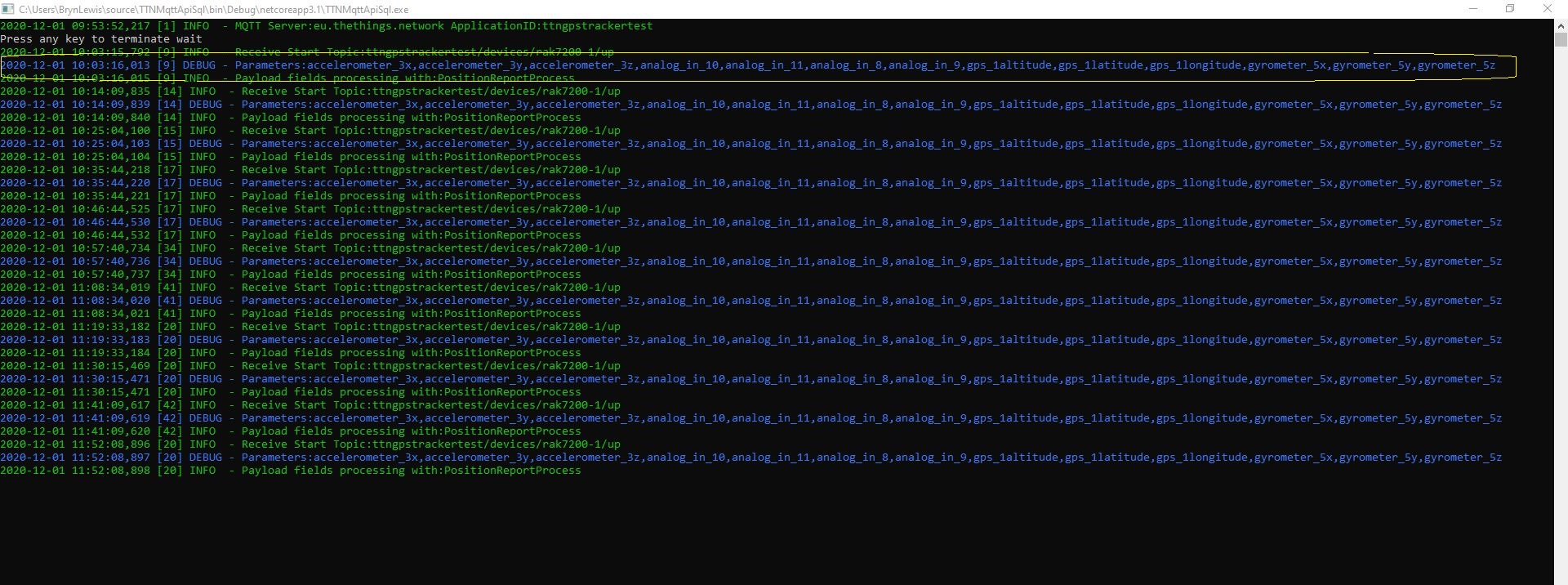
To reduce the scope for mistakes (especially with longer parameter lists) I usually copy them from the Log4Net RollingFileAppender file or ManagedColoredConsoleAppender console output.

Environmental sensor output with flat data format

I created a database table to store the temperature and humidity values.

CREATE TABLE [dbo].[EnvironmentalSensorReport](
	[WeatherSensorReportUID] [UNIQUEIDENTIFIER] NOT NULL,
	[ReceivedAtUtC] [DATETIME] NOT NULL,
	[DeviceID] [NVARCHAR](32) NOT NULL,
	[DeviceEui] [NVARCHAR](32) NOT NULL,
	[ApplicationID] [NVARCHAR](32) NOT NULL,
	[IsConfirmed] [BIT] NOT NULL,
	[IsRetry] [BIT] NOT NULL,
	[Port] [SMALLINT] NOT NULL,
	[Temperature] [FLOAT] NOT NULL,
	[Humidity] [FLOAT] NOT NULL,
CONSTRAINT [PK_EnvironmentalSensorReport] PRIMARY KEY CLUSTERED 
(
	[WeatherSensorReportUID] ASC
)WITH (PAD_INDEX = OFF, STATISTICS_NORECOMPUTE = OFF, IGNORE_DUP_KEY = OFF, ALLOW_ROW_LOCKS = ON, ALLOW_PAGE_LOCKS = ON) ON [PRIMARY]
) ON [PRIMARY]
GO

ALTER TABLE [dbo].[EnvironmentalSensorReport] ADD  CONSTRAINT [DF_EnvironmentalSensorReport_EnvironmentalSensorReporttUID]  DEFAULT (NEWID()) FOR [WeatherSensorReportUID]
GO

The stored procedure must have the parameters @ReceivedAtUtc, @DeviceID, @DeviceEui, @ApplicationID, @IsRetry, @IsConfirmed and @Port. In this example the payload specific fields generated by the Low Power Protocol(LPP) decoder are @Temperature_0 and @relative_humidity_0

CREATE PROCEDURE [dbo].[EnvironmentalSensorProcess]
   @ReceivedAtUtc AS DATETIME,
   @DeviceID AS NVARCHAR(32),
   @DeviceEui AS NVARCHAR(32),
   @ApplicationID AS NVARCHAR(32),
   @IsRetry AS BIT,
   @IsConfirmed AS BIT,
   @Port AS SMALLINT,
   @Temperature_0 AS FLOAT,
   @relative_humidity_0 AS FLOAT
AS
BEGIN
   SET NOCOUNT ON;
 
   INSERT INTO [dbo].[EnvironmentalSensorReport]
           ([PositionReportUID]
	   .[ReceivedAtUtc]
           ,[DeviceID]
           ,[DeviceEui]
           ,[ApplicationID]
           ,[IsConfirmed]
           ,[IsRetry]
           ,[Port]
	   ,Temperature
	   ,Humidity)
   VALUES
   (
      @ReceivedAtUtc,
      @DeviceID,
      @DeviceEui,
      @ApplicationID,
      @IsConfirmed,
      @IsRetry,
      @port,
      @Temperature_0,
      @relative_humidity_0)
END
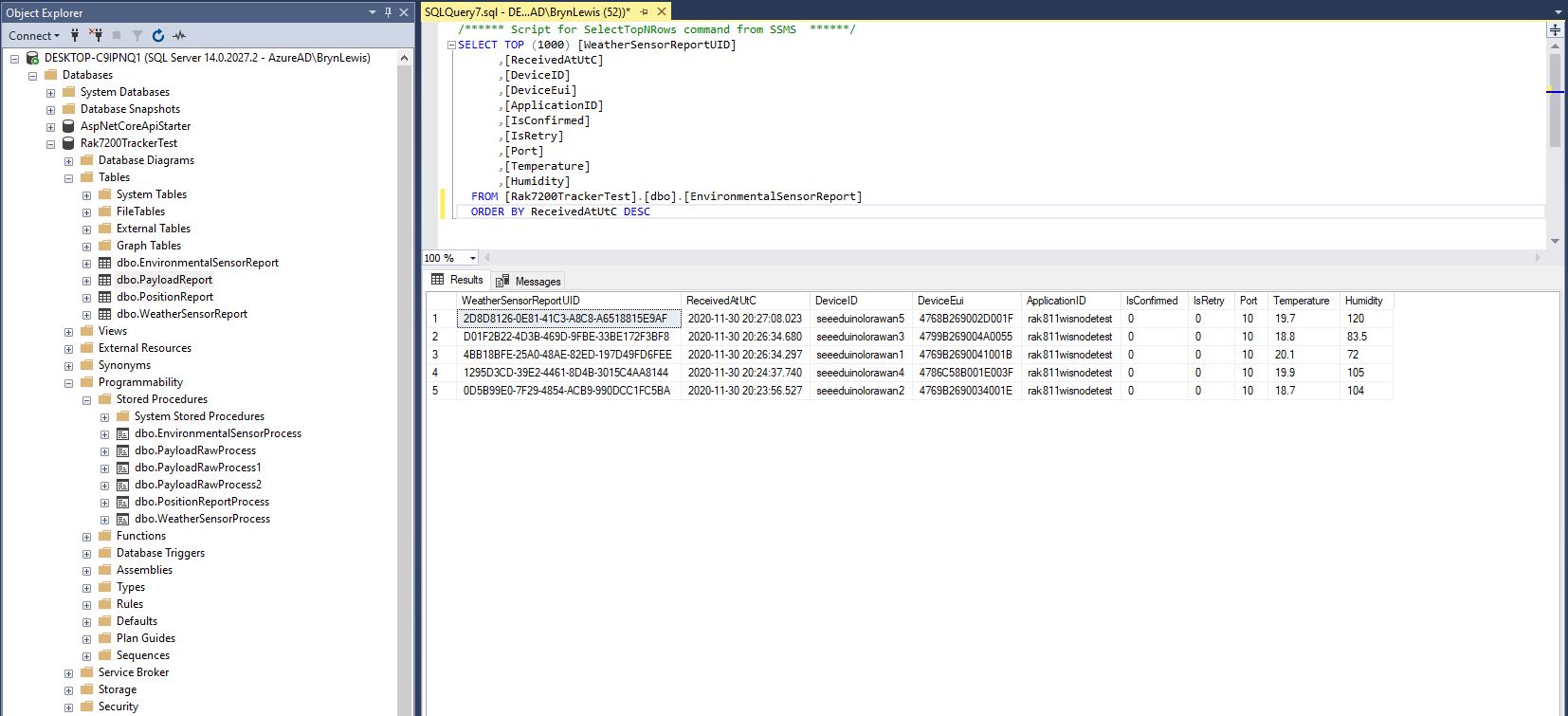
Environmental sensor data displayed in SQL Server Management Studio(SSMS)

To store more complex nest payload fields (e.g. latitude, longitude and altitude values), I flattened the the hierarchy.

private static void EnumerateChildren(DynamicParameters parameters, JToken token, string prefix ="")
{
   if (token is JProperty)
      if (token.First is JValue)
      {
         JProperty property = (JProperty)token;
         parameters.Add($"@{prefix}{property.Name}", property.Value.ToString());
      }
      else
      {
         JProperty property = (JProperty)token;
         prefix += property.Name;
      }

   foreach (JToken token2 in token.Children())
   {
      EnumerateChildren(parameters,token2, prefix);
   }
}
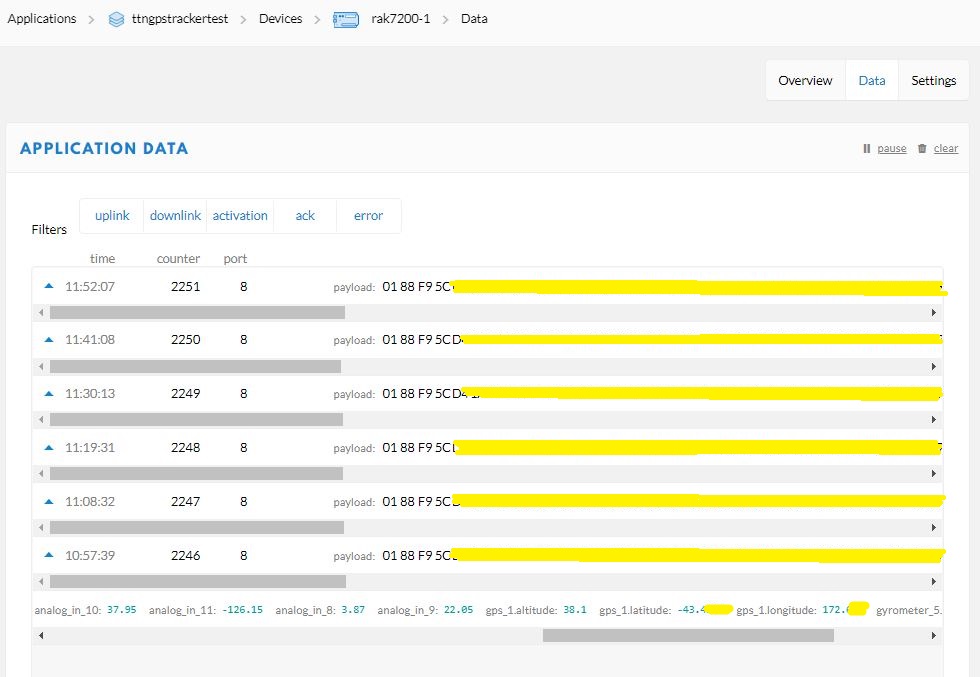
Unpacked LPP payload from GPS tracker displayed in TTN application data view
Flattened location, acceleration and rotation information
CREATE TABLE [dbo].[PositionReport](
      [PositionReportUID] [UNIQUEIDENTIFIER] NOT NULL,
      [ReceivedAtUtC] [DATETIME] NOT NULL,
      [DeviceID] [NVARCHAR](32) NOT NULL,
      [DeviceEui] [NVARCHAR](32) NOT NULL,
      [ApplicationID] [NVARCHAR](32) NOT NULL,
      [IsConfirmed] [BIT] NOT NULL,
      [IsRetry] [BIT] NOT NULL,
      [Port] [SMALLINT] NOT NULL,
      [Latitude] [FLOAT] NOT NULL,
      [Longitude] [FLOAT] NOT NULL,
      [Altitude] [FLOAT] NOT NULL,
 CONSTRAINT [PK_PositionReport] PRIMARY KEY CLUSTERED 
(
	[PositionReportUID] ASC
)WITH (PAD_INDEX = OFF, STATISTICS_NORECOMPUTE = OFF, IGNORE_DUP_KEY = OFF, ALLOW_ROW_LOCKS = ON, ALLOW_PAGE_LOCKS = ON) ON [PRIMARY]
) ON [PRIMARY]
GO

I created a database table to store values of only the fields I cared about.

CREATE PROCEDURE [dbo].[PositionReportProcess]
      @ReceivedAtUtc AS DATETIME,
      @DeviceID AS NVARCHAR(32),
      @DeviceEui AS NVARCHAR(32),
      @ApplicationID AS NVARCHAR(32),
      @IsRetry AS Bit,
      @IsConfirmed AS BIT,
      @Port AS SMALLINT,
      @accelerometer_3x AS FLOAT,
      @accelerometer_3y AS FLOAT,
      @accelerometer_3z AS FLOAT,
      @analog_in_8 AS FLOAT,
      @analog_in_9 AS FLOAT,
      @analog_in_10 AS FLOAT,
      @analog_in_11 AS FLOAT,
      @gps_1Latitude AS FLOAT,
      @gps_1Longitude AS FLOAT,
      @gps_1Altitude AS FLOAT,
      @gyrometer_5x  AS FLOAT, 
      @gyrometer_5y  AS FLOAT, 
      @gyrometer_5z  AS FLOAT 
AS
BEGIN
   SET NOCOUNT ON;

   INSERT INTO [dbo].[PositionReport]
      ([PositionReportUID]
      .[ReceivedAtUtc]
      ,[DeviceID]
      ,[DeviceEui]
      ,[ApplicationID]
      ,[IsConfirmed]
      ,[IsRetry]
      ,[Port]
      ,Latitude
      ,Longitude
      ,Altitude)
   VALUES
   (
      @ReceivedAtUtc,
      @DeviceID,
      @DeviceEui,
      @ApplicationID,
      @IsConfirmed,
      @IsRetry,
      @port,
      @gps_1Latitude,
      @gps_1Longitude,
      @gps_1Altitude)
END

The stored procedure for storing the GPS tracker payload has to have parameters matching each payload field but some of the fields are not used.

Location data displayed in SQL Server Management Studio(SSMS)

For uplink messages with no payload fields the message processor looks for a stored procedure with a single parameter called “payload_raw”.(there maybe more than one match)

CREATE TABLE [dbo].[PayloadReport](
      [PayloadReportUID] [UNIQUEIDENTIFIER] NOT NULL,
      [ReceivedAtUtC] [DATETIME] NOT NULL,
      [DeviceID] [NVARCHAR](32) NOT NULL,
      [DeviceEui] [NVARCHAR](32) NOT NULL,
      [ApplicationID] [NVARCHAR](32) NOT NULL,
      [IsConfirmed] [BIT] NOT NULL,
      [IsRetry] [BIT] NOT NULL,
      [Port] [SMALLINT] NOT NULL,
      [Payload] [NVARCHAR](128) NOT NULL,
CONSTRAINT [PK_PayloadReport] PRIMARY KEY CLUSTERED 
(
      [PayloadReportUID] ASC
)WITH (PAD_INDEX = OFF, STATISTICS_NORECOMPUTE = OFF, IGNORE_DUP_KEY = OFF, ALLOW_ROW_LOCKS = ON, ALLOW_PAGE_LOCKS = ON) ON [PRIMARY]
) ON [PRIMARY]
GO

ALTER TABLE [dbo].[PayloadReport] ADD  CONSTRAINT [DF_PayloadReport_PositionReportUID]  DEFAULT (NEWID()) FOR [PayloadReportUID]
GO
ALTER PROCEDURE [dbo].[PayloadRawProcess]
      @ReceivedAtUtc AS DATETIME,
      @DeviceID AS NVARCHAR(32),
      @DeviceEui AS NVARCHAR(32),
      @ApplicationID AS NVARCHAR(32),
      @IsRetry AS Bit,
      @IsConfirmed AS BIT,
      @Port AS SMALLINT,
      @Payload AS NVARCHAR(128)
AS
BEGIN
      SET NOCOUNT ON;

      INSERT INTO [dbo].[PayloadReport]
         ([PositionReportUID]
         .[ReceivedAtUtc]
         ,[DeviceID]
         ,[DeviceEui]
         ,[ApplicationID]
         ,[IsConfirmed]
         ,[IsRetry]
         ,[Port]
         ,[Payload])
     VALUES(@ReceivedAtUtc,
         @DeviceID,
         @DeviceEui,
         @ApplicationID,
         @IsConfirmed,
         @IsRetry,
         @port,
         @Payload)
END
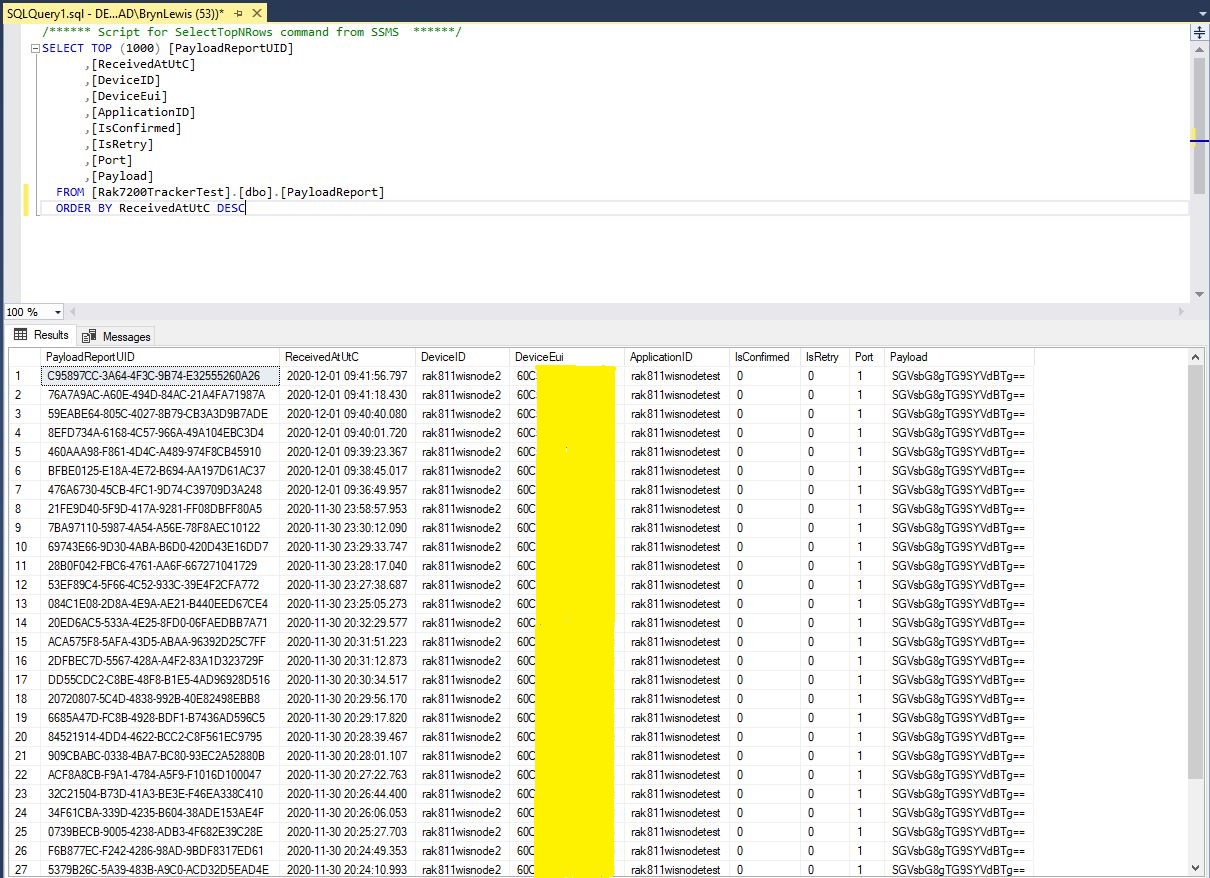
Raw payload data displayed in SQL Server Management Studio(SSMS)

Initially the application just used Console.Writeline for logging, then I added Log4Net because it would be useful to persist information about failures and so I could copy n paste parameter lists to the appSettings.json file.

To make the application more robust adding a retries with the Enterprise Library Transient Fault Handling and Configuration blocks or Polly on the Dapper Execute would be a good idea. It also would take much work to get the application to run in Microsoft Azure as a “headless” webapp.

Dapper supports a number of database platforms so in theory this application (with a little bit of effort) should be platform portable.