.NET nanoFramework Adafruit PMSA003I Basic connectivity

This is a “throw away” .NET nanoFramework application for investigating how Adafruit PMSA003I Inter Integrated Circuit bus(I²C) connectivity works.

Adafruit PMSA003I Particulates Sensor

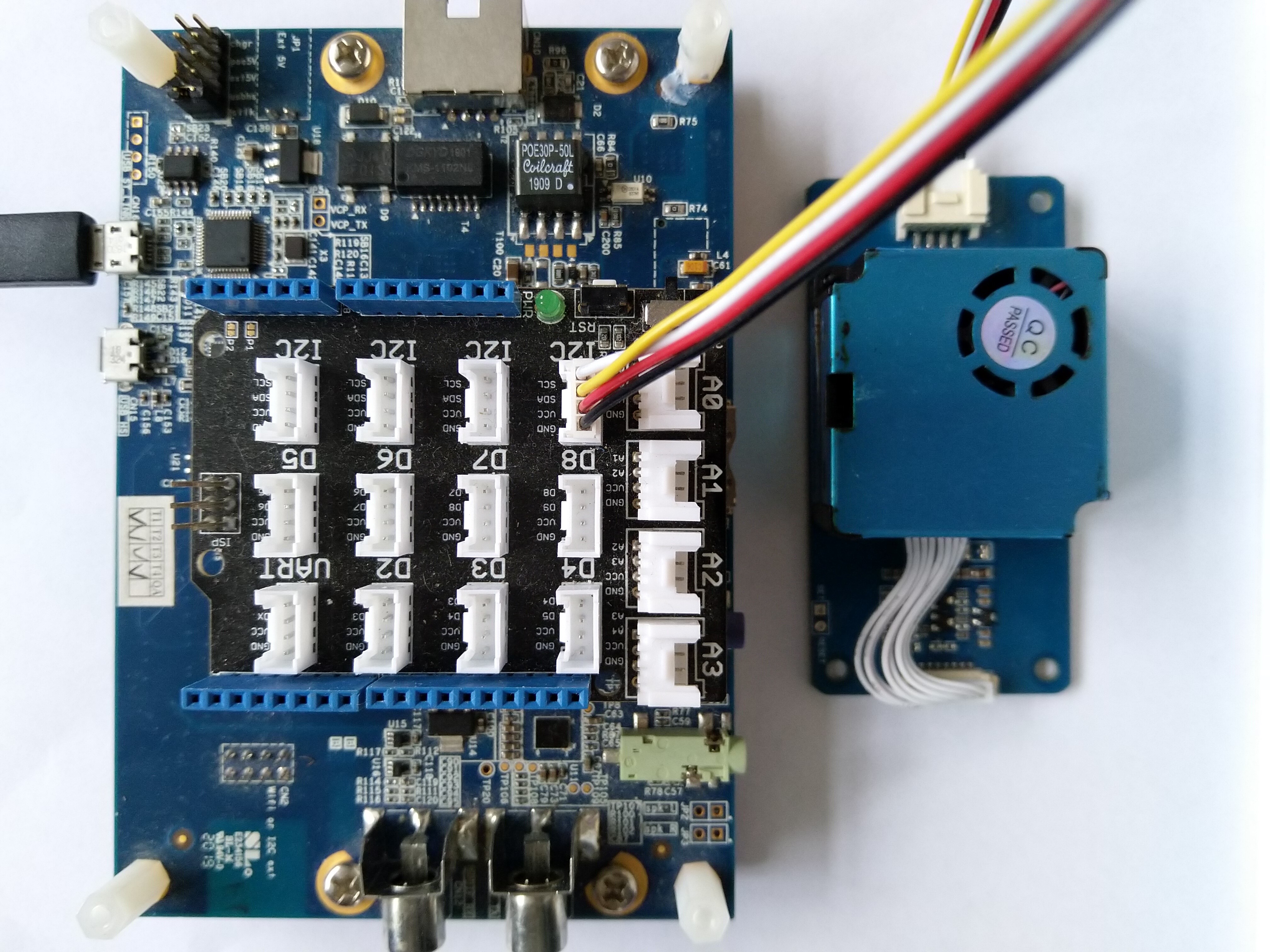
My test setup is a simple .NET nanoFramework console application running on an Adafruit FeatherS2- ESP32-S2.

Adafruit PMSA003I + Adafruit Feather ESP32 test rig

The PMSA0031 application has lots of magic numbers from the PMSA003I Module Datasheet and is just a tool for exploring how the sensor works.

public static void Main()
{
#if SPARKFUN_ESP32_THING_PLUS
    Configuration.SetPinFunction(Gpio.IO23, DeviceFunction.I2C1_DATA);
    Configuration.SetPinFunction(Gpio.IO22, DeviceFunction.I2C1_CLOCK);
#endif
#if ADAFRUIT_FEATHER_S2
    Configuration.SetPinFunction(Gpio.IO08, DeviceFunction.I2C1_DATA);
    Configuration.SetPinFunction(Gpio.IO09, DeviceFunction.I2C1_CLOCK);
#endif
    Thread.Sleep(1000);

    I2cConnectionSettings i2cConnectionSettings = new(1, 0x12, I2cBusSpeed.StandardMode);

    using (I2cDevice i2cDevice = I2cDevice.Create(i2cConnectionSettings))
    {
        {
            SpanByte writeBuffer = new byte[1];
            SpanByte readBuffer = new byte[1];

            writeBuffer[0] = 0x0;

            i2cDevice.WriteRead(writeBuffer, readBuffer);

            Console.WriteLine($"0x0 {readBuffer[0]:X2}");
        }

        while (true)
        {
            SpanByte writeBuffer = new byte[1];
            SpanByte readBuffer = new byte[32];

            writeBuffer[0] = 0x0;

            i2cDevice.WriteRead(writeBuffer, readBuffer);

            //Console.WriteLine(System.BitConverter.ToString(readBuffer.ToArray()));
            Console.WriteLine($"Length:{ReadInt16BigEndian(readBuffer.Slice(0x2, 2))}");

            if ((readBuffer[0] == 0x42) || (readBuffer[1] == 0x4d))
            {
                Console.WriteLine($"PM    1.0:{ReadInt16BigEndian(readBuffer.Slice(0x4, 2))}, 2.5:{ReadInt16BigEndian(readBuffer.Slice(0x6, 2))}, 10.0:{ReadInt16BigEndian(readBuffer.Slice(0x8, 2))} std");
                Console.WriteLine($"PM    1.0:{ReadInt16BigEndian(readBuffer.Slice(0x0A, 2))}, 2.5:{ReadInt16BigEndian(readBuffer.Slice(0x0C, 2))}, 10.0:{ReadInt16BigEndian(readBuffer.Slice(0x0E, 2))} env");
                Console.WriteLine($"µg/m3 0.3:{ReadInt16BigEndian(readBuffer.Slice(0x10, 2))}, 0.5:{ReadInt16BigEndian(readBuffer.Slice(0x12, 2))}, 1.0:{ReadInt16BigEndian(readBuffer.Slice(0x14, 2))}, 2.5:{ReadInt16BigEndian(readBuffer.Slice(0x16, 2))}, 5.0:{ReadInt16BigEndian(readBuffer.Slice(0x18, 2))}, 10.0:{ReadInt16BigEndian(readBuffer.Slice(0x1A, 2))}");

                // Don't need to display these values everytime
                //Console.WriteLine($"Version:{readBuffer[0x1c]}");
                //Console.WriteLine($"Error:{readBuffer[0x1d]}");
            }
            else
            {
                Console.WriteLine(".");
            }

            Thread.Sleep(5000);
        }
    }
}

private static ushort ReadInt16BigEndian(SpanByte source)
{
    if (source.Length != 2)
    {
        throw new ArgumentOutOfRangeException();
    }

    ushort result = (ushort)(source[0] << 8);

    return result |= source[1];
}

The unpacking of the value standard particulate, environmental particulate and particle count values is fairly repetitive, but I will fix it in the next version.

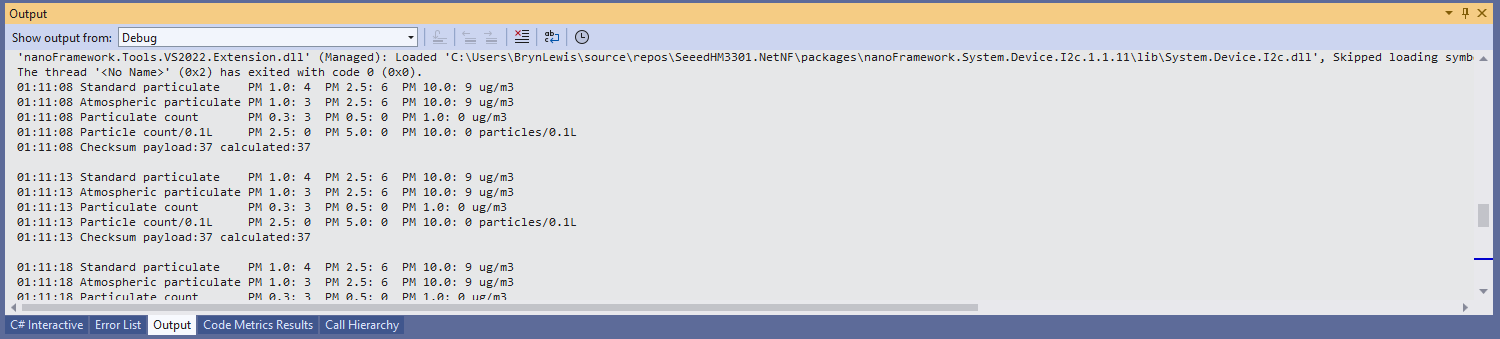
Visual Studio 2022 Debug Output

The checksum calculation isn’t great even a simple cyclic redundancy check(CRC) would be an improvement on summing the 28 bytes of the payload.
.NET nanoFramework Seeedstudio HM3301 library on Github

The source code of my .NET nanoFramework Seeedstudio Grove – Laser PM2.5 Dust Sensor HM3301 library is now available on GitHub. I have tested the library and sample application with Sparkfun Thing Plus and ST Micro STM32F7691 Discovery devices. (I can validate on more platform configurations if there is interest).

Important: make sure you setup the I2C pins especially on ESP32 Devices before creating the I2cDevice,

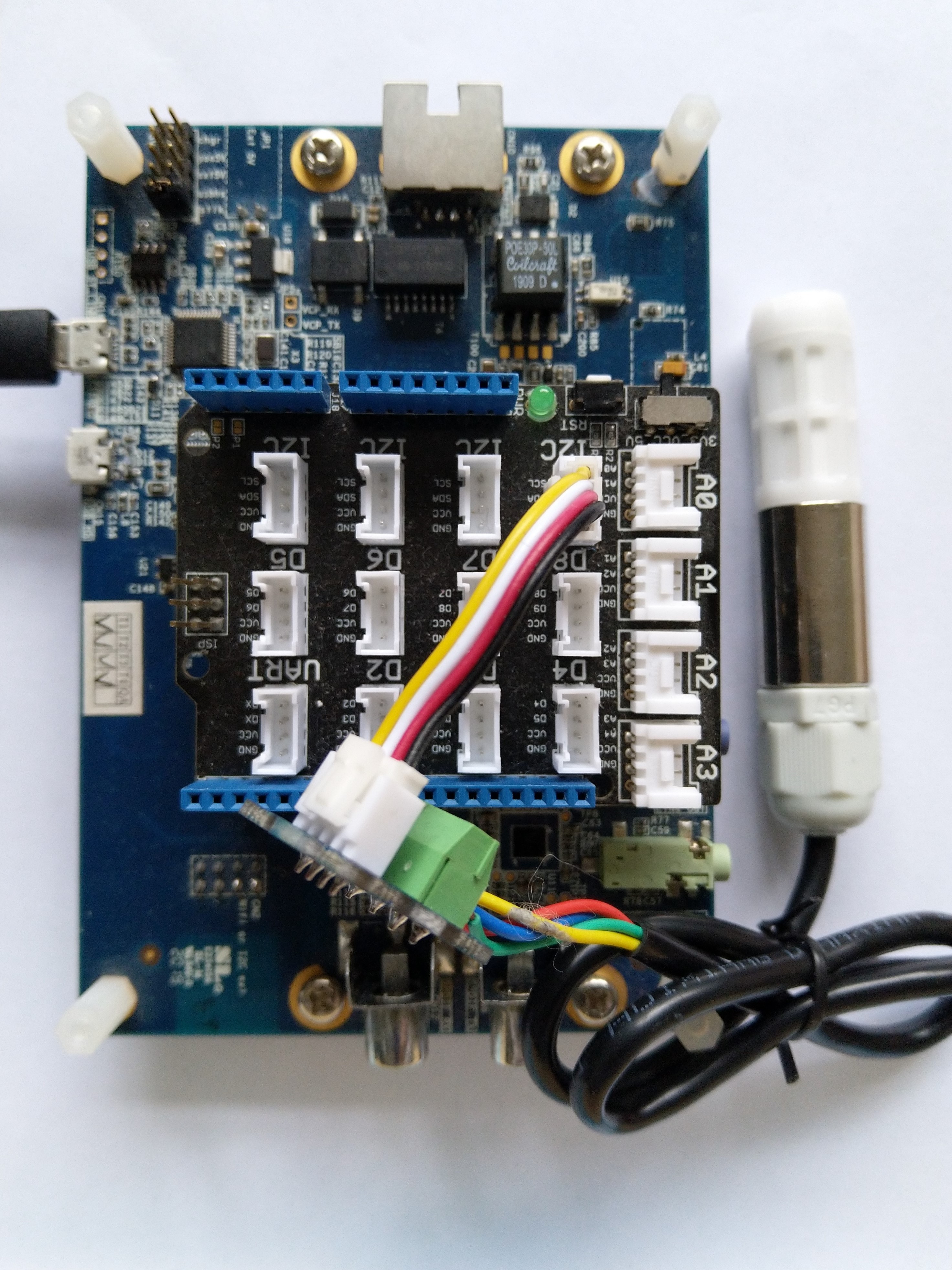
SHT20 +STM32F769 Discovery test rig

The .NET nanoFramework device libraries use a TryGet… pattern to retrieve sensor values, this library throws an exception if reading a sensor value fails. I’m not certain which approach is “better” as reading the Seeedstudio Grove – Laser PM2.5 Dust Sensor has never failed. The only time reading the “values” buffer failed was when I unplugged the device which I think is “exceptional”.

//---------------------------------------------------------------------------------
// Copyright (c) April 2023, devMobile Software
//
// Licensed under the Apache License, Version 2.0 (the "License");
// you may not use this file except in compliance with the License.
// You may obtain a copy of the License at
//
//     http://www.apache.org/licenses/LICENSE-2.0
//
// Unless required by applicable law or agreed to in writing, software
// distributed under the License is distributed on an "AS IS" BASIS,
// WITHOUT WARRANTIES OR CONDITIONS OF ANY KIND, either express or implied.
// See the License for the specific language governing permissions and
// limitations under the License.
//
// nanoff --target ST_STM32F769I_DISCOVERY --update 
// nanoff --platform ESP32 --serialport COM7 --update
//
//---------------------------------------------------------------------------------
#define ST_STM32F769I_DISCOVERY 
//#define  SPARKFUN_ESP32_THING_PLUS
namespace devMobile.IoT.Device.SeeedstudioHM3301
{
    using System;
    using System.Device.I2c;
    using System.Threading;

#if SPARKFUN_ESP32_THING_PLUS
    using nanoFramework.Hardware.Esp32;
#endif

    class Program
    {
        static void Main(string[] args)
        {
            const int busId = 1;

            Thread.Sleep(5000);

#if SPARKFUN_ESP32_THING_PLUS
            Configuration.SetPinFunction(Gpio.IO23, DeviceFunction.I2C1_DATA);
            Configuration.SetPinFunction(Gpio.IO22, DeviceFunction.I2C1_CLOCK);
#endif
            I2cConnectionSettings i2cConnectionSettings = new(busId, SeeedstudioHM3301.DefaultI2cAddress);

            using I2cDevice i2cDevice = I2cDevice.Create(i2cConnectionSettings);
            {
                using (SeeedstudioHM3301 seeedstudioHM3301 = new SeeedstudioHM3301(i2cDevice))
                {
                    while (true)
                    {
                        SeeedstudioHM3301.ParticulateMeasurements particulateMeasurements = seeedstudioHM3301.Read();

                        Console.WriteLine($"Standard PM1.0: {particulateMeasurements.Standard.PM1_0} ug/m3   PM2.5: {particulateMeasurements.Standard.PM2_5} ug/m3  PM10.0: {particulateMeasurements.Standard.PM10_0} ug/m3 ");
                        Console.WriteLine($"Atmospheric PM1.0: {particulateMeasurements.Atmospheric.PM1_0} ug/m3   PM2.5: {particulateMeasurements.Atmospheric.PM2_5} ug/m3  PM10.0: {particulateMeasurements.Standard.PM10_0} ug/m3");

                        // Always 0, checked payload so not a conversion issue. will check in Seeedstudio forums
                        // Console.WriteLine($"Count 0.3um: {particulateMeasurements.Count.Diameter0_3}/l 0.5um: {particulateMeasurements.Count.Diameter0_5} /l 1.0um : {particulateMeasurements.Count.Diameter1_0}/l 2.5um : {particulateMeasurements.Count.Diameter2_5}/l 5.0um : {particulateMeasurements.Count.Diameter5_0}/l 10.0um : {particulateMeasurements.Count.Diameter10_0}/l");

                        Thread.Sleep(new TimeSpan(0,1,0));
                    }
                }
            }
        }
    }
}

I’m going to soak test the library for a week to check that is working okay, then most probably refactor the code so it can be added to the nanoFramework IoT.Device Library repository.

.NET nanoFramework RAK11200 – Brownout Voltage Revisited

The voltage my test setup was calculating looked wrong, then I realised that the sample calculation in the RAK Wireless forums wasn’t applicable to my setup.

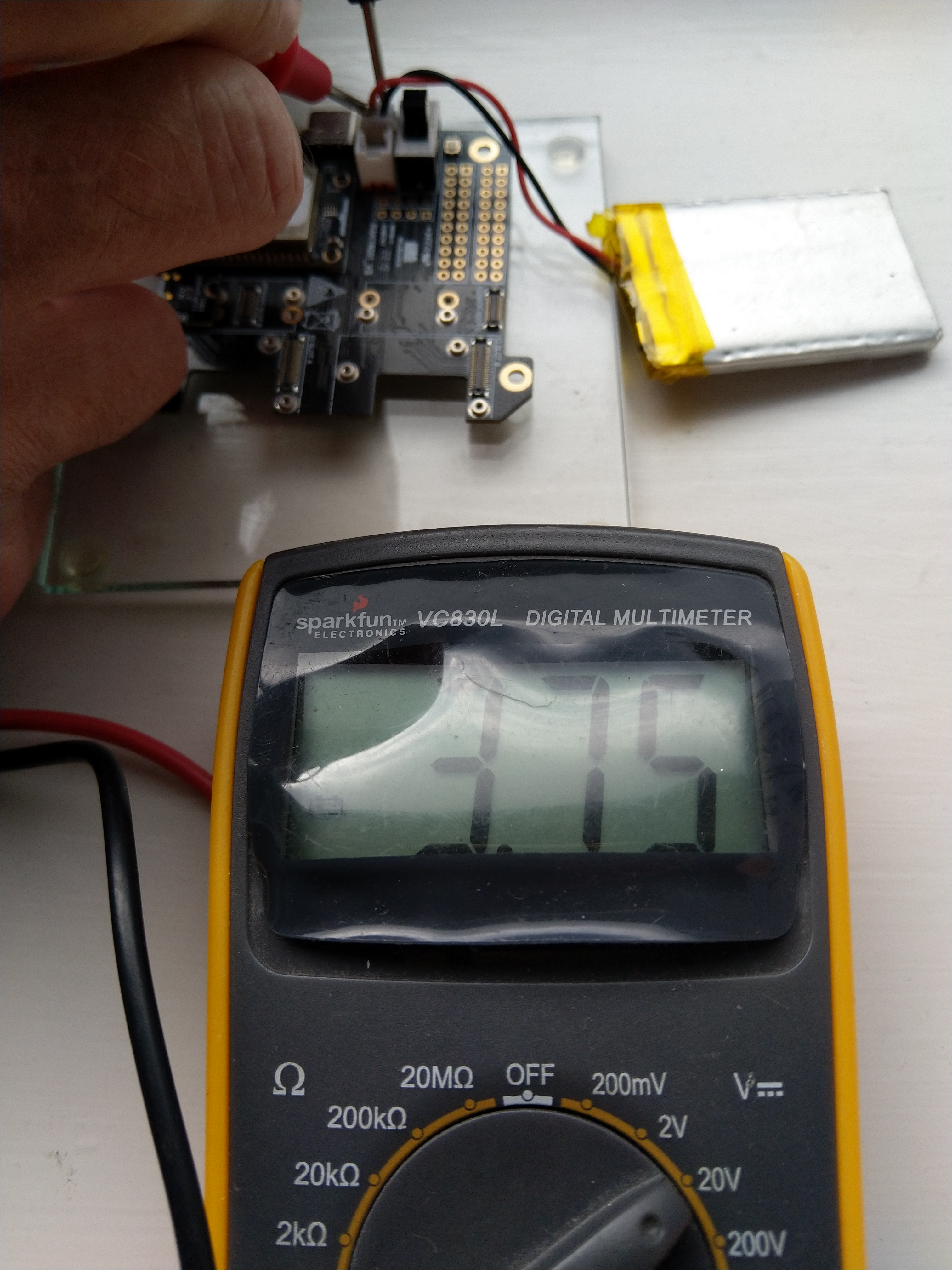
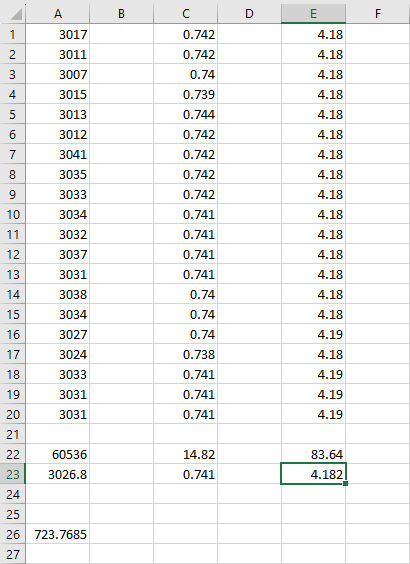
I reassembled my RAK11200 WisBlock WiFi Module, RAK19001 WisBlock Base Board, RAK1901 WisBlock Temperature and Humidity Sensor, 1200mAH Lithium Polymer (LiPo) battery, SKU920100 Solar Board test setup, put a new 9V battery (I had forgotten to turn it off last-time) in my multimeter then collected some data. A=ReadValue(), C= ReadRatio(), E= measured battery voltage.

Excel spreadsheet for calculating ratio

I updated the formula used to calculate the battery voltage and deployed the application

public static void Main()
{
    Debug.WriteLine($"{DateTime.UtcNow:HH:mm:ss} devMobile.IoT.RAK.Wisblock.AzureIoTHub.RAK11200.PowerSleep starting");

    Thread.Sleep(5000);

    try
    {
        double batteryVoltage;

        Configuration.SetPinFunction(Gpio.IO04, DeviceFunction.I2C1_DATA);
        Configuration.SetPinFunction(Gpio.IO05, DeviceFunction.I2C1_CLOCK);

        Debug.WriteLine($"{DateTime.UtcNow:HH:mm:ss} Battery voltage measurement");

        // Configure Analog input (AIN0) port then read the "battery charge"
        AdcController adcController = new AdcController();

        using (AdcChannel batteryVoltageAdcChannel = adcController.OpenChannel(AdcControllerChannel))
        {
            batteryVoltage = batteryVoltageAdcChannel.ReadValue() / 723.7685;

            Debug.WriteLine($" BatteryVoltage {batteryVoltage:F2}");

            if (batteryVoltage < Config.BatteryVoltageBrownOutThreshold)
            {
                Sleep.EnableWakeupByTimer(Config.FailureRetryInterval);
                Sleep.StartDeepSleep();
            }
        }
        catch (Exception ex)
        {
...    
}

To test the accuracy of the voltage calculation I am going to run my setup on the office windowsill for a week regularly measuring the voltage. Then, turn the solar panel over (so the battery is not getting charged) and monitor the battery discharging until the RAK11200 WisBlock WiFi Module won’t connect to the network.

.NET nanoFramework RAK11200 – Brownout Voltage

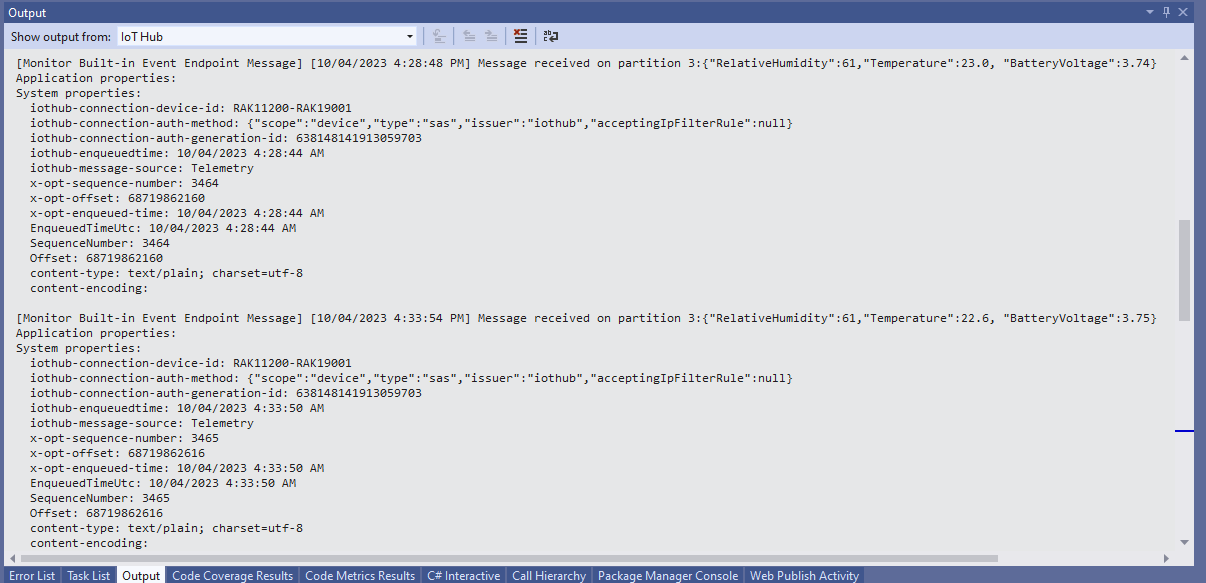
My test setup was a RAK11200 WisBlock WiFi Module, RAK19001 WisBlock Base Board, RAK1901 WisBlock Temperature and Humidity Sensor, 1200mAH Lithium Polymer (LiPo) battery and SKU920100 Solar Board. The test setup uploads temperature, humidity and battery voltage telemetry to an Azure IoT Hub every 5 minutes (short delay so battery life reduced).

The first step was to check that I could get a “battery voltage” value for the RAKWireless RAK11200 WisBlock WiFi Module on a RAK19001 WisBlock Base Board for managing “brownouts” and send to my Azure IoT Hub.

RAK19001 Power supply schematic

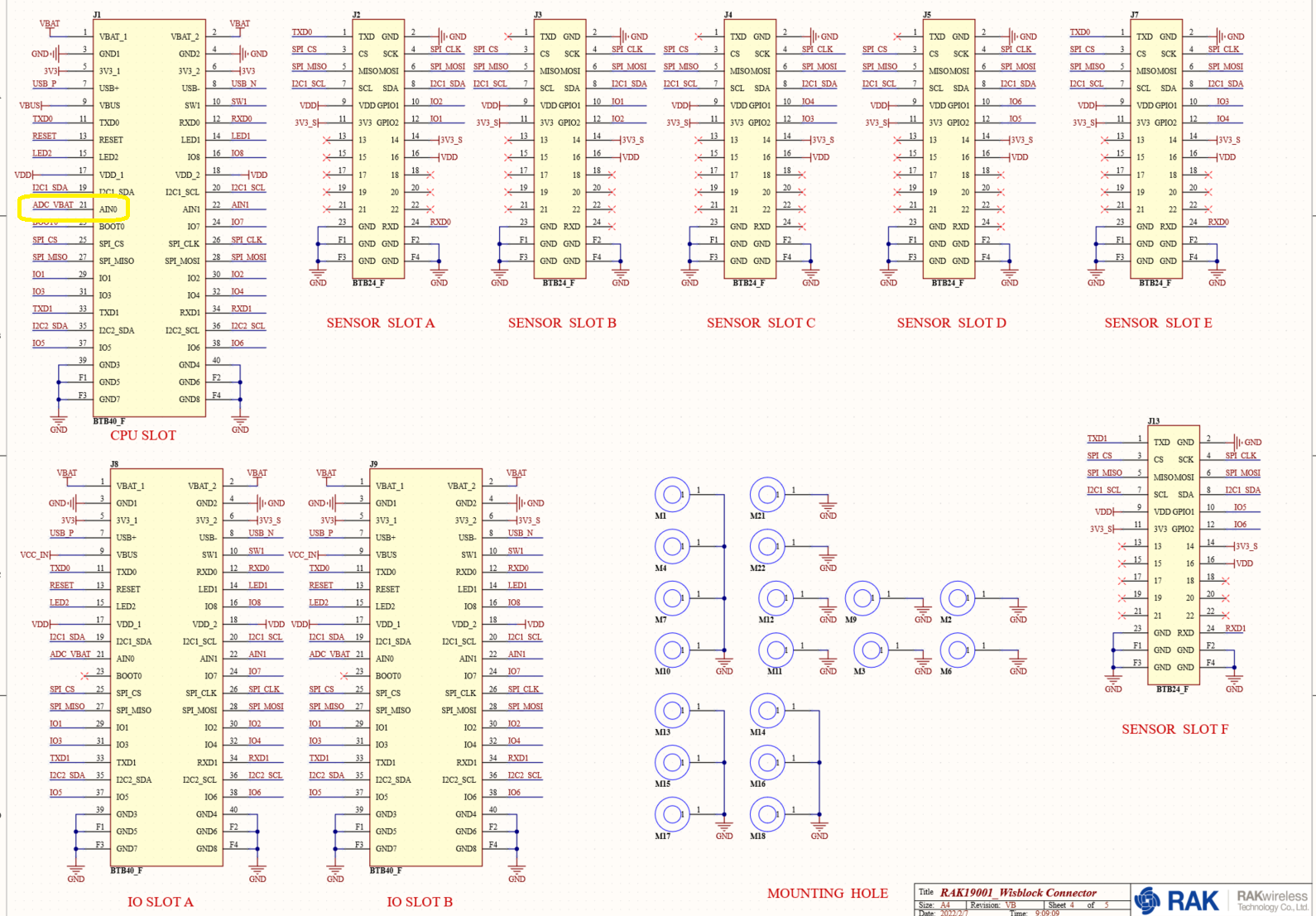
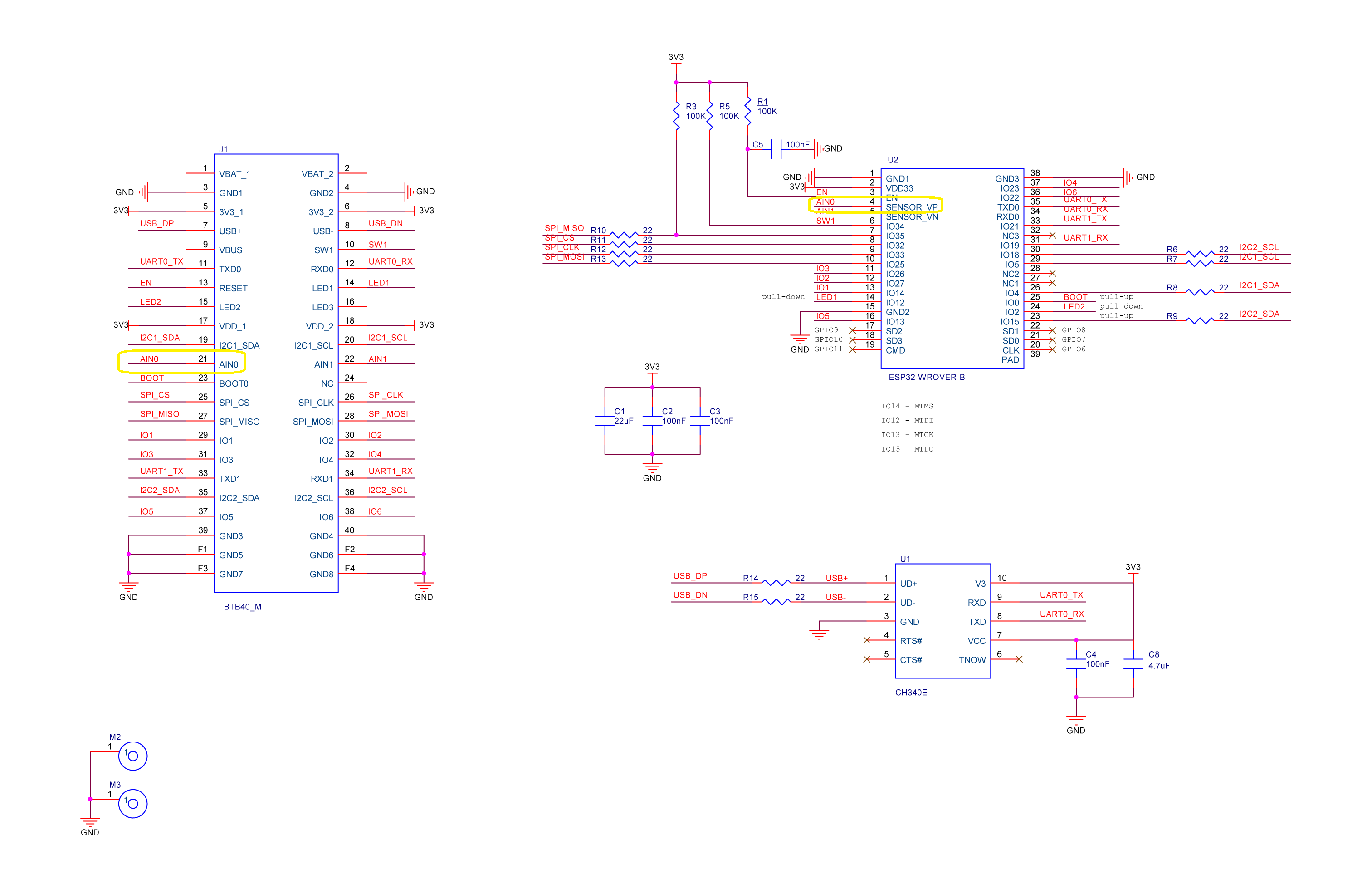
The RAK19001 WisBlock Base Board has a voltage divider (R4&R5 with output ADC_VBAT) which is connected to pin 21(AIN0) on the CPU slot connector.

RAK19001 connector schematic

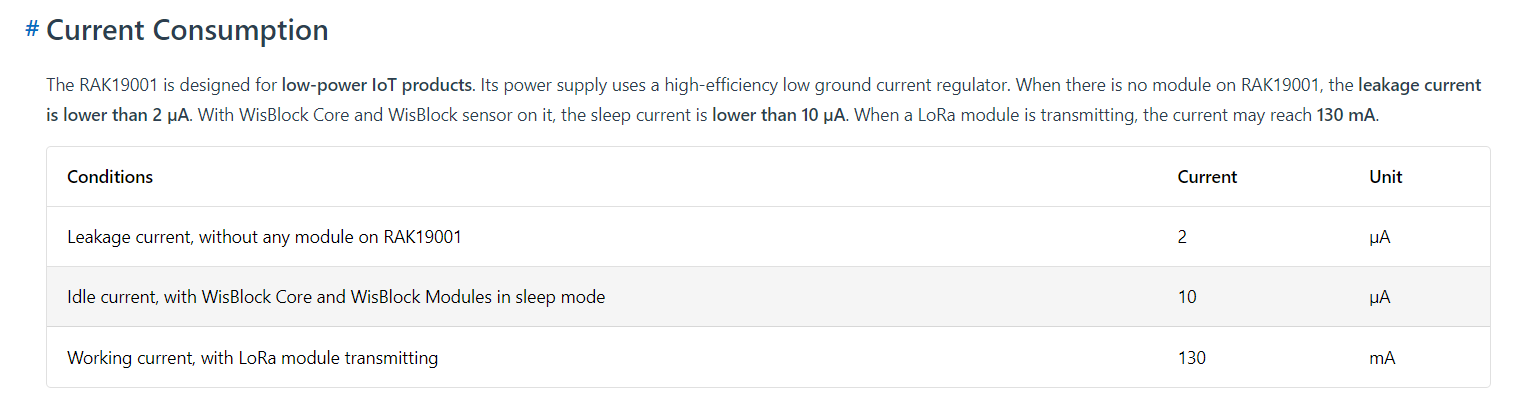
The RAK19001 WisBlock Base Board has quite a low leakage current so the majority of the power consumption should be the RAK11200 WisBlock WiFi Module.

RAK19001 leakage current from specifications

I used AdcController + AdcChannel to read AIN0 and modified the code using the formula (for a RAK4631 module) in the RAK Wireless forums to calculate the battery voltage. (UPDATE This calculation is not applicable to my scenario)

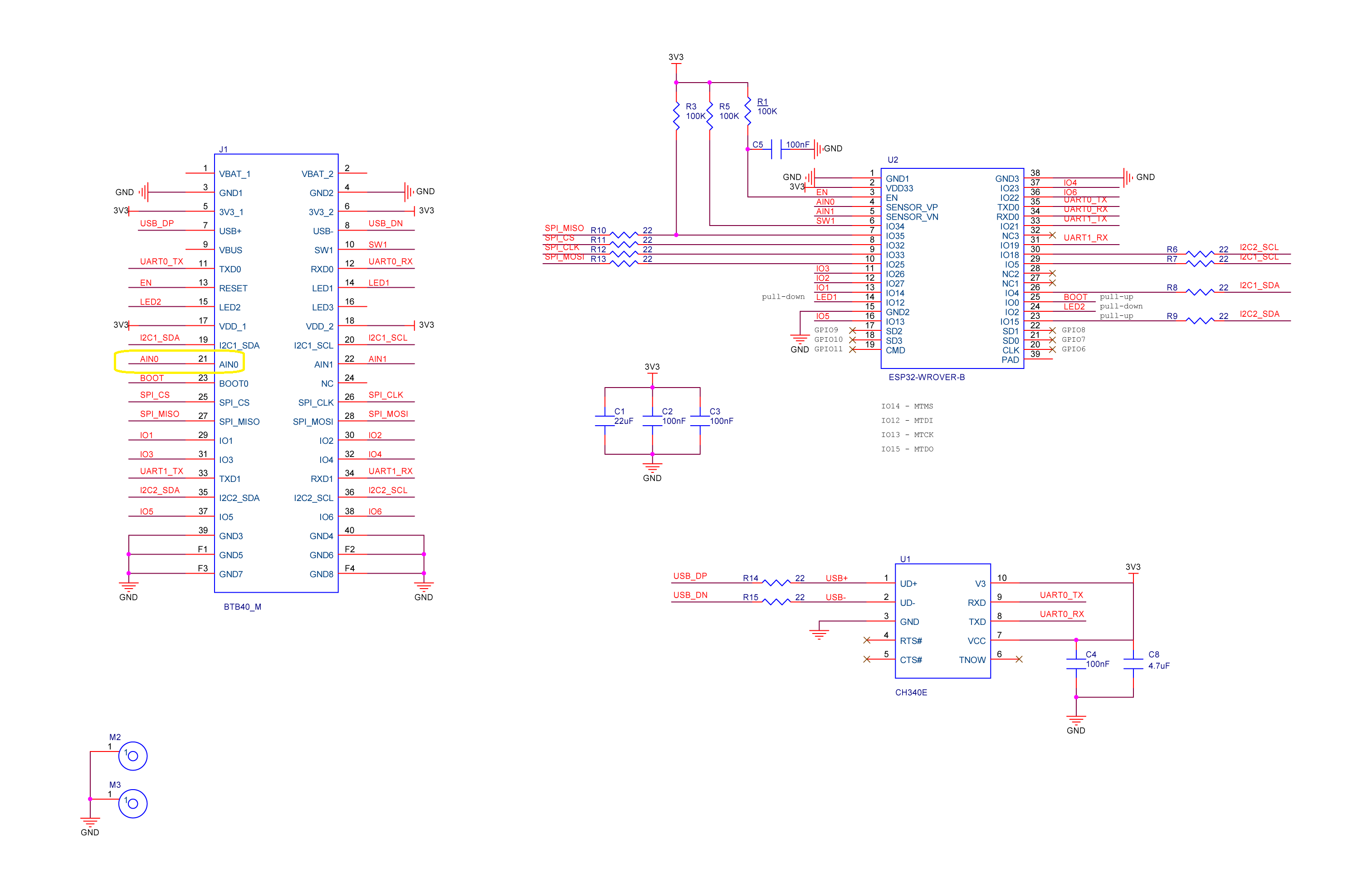
RAK11200 Schematic with battery voltage analog input highlighted

When “slept” the RAK11200 WisBlock WiFi Module power consumption is very low

RAK11200 low power current from specifications
public static void Main()
{
    Debug.WriteLine($"{DateTime.UtcNow:HH:mm:ss} devMobile.IoT.RAK.Wisblock.AzureIoTHub.RAK11200.PowerSleep starting");

    Thread.Sleep(5000); // This do debugger can attach consider removing in realease version

    try
    {
        double batteryVoltage;

        Configuration.SetPinFunction(Gpio.IO04, DeviceFunction.I2C1_DATA);
        Configuration.SetPinFunction(Gpio.IO05, DeviceFunction.I2C1_CLOCK);

        Debug.WriteLine($"{DateTime.UtcNow:HH:mm:ss} Battery voltage measurement");

        // Configure Analog input (AIN0) port then read the "battery charge"
        AdcController adcController = new AdcController();

        using (AdcChannel batteryVoltageAdcChannel = adcController.OpenChannel(AdcControllerChannel))
        {

            // https://forum.rakwireless.com/t/custom-li-ion-battery-voltage-calculation-in-rak4630/4401/7
            // When I checked with multimeter I had to increase 1.72 to 1.9
            batteryVoltage = batteryVoltageAdcChannel.ReadValue() * (3.0 / 4096) * 1.9;

            Debug.WriteLine($" BatteryVoltage {batteryVoltage:F2}");

            if (batteryVoltage < Config.BatteryVoltageBrownOutThreshold)
            {
                Sleep.EnableWakeupByTimer(Config.FailureRetryInterval);
                Sleep.StartDeepSleep();
            }
        }

        Debug.WriteLine($"{DateTime.UtcNow:HH:mm:ss} Wifi connecting");

        if (!WifiNetworkHelper.ConnectDhcp(Config.Ssid, Config.Password, requiresDateTime: true))
        {
            if (NetworkHelper.HelperException != null)
            {
                Debug.WriteLine($"{DateTime.UtcNow:HH:mm:ss} WifiNetworkHelper.ConnectDhcp failed {NetworkHelper.HelperException}");
            }

            Sleep.EnableWakeupByTimer(Config.FailureRetryInterval);
            Sleep.StartDeepSleep();
        }
        Debug.WriteLine($"{DateTime.UtcNow:HH:mm:ss} Wifi connected");

        // Configure the SHTC3 
        I2cConnectionSettings settings = new(I2cDeviceBusID, Shtc3.DefaultI2cAddress);

        string payload ;

        using (I2cDevice device = I2cDevice.Create(settings))
        using (Shtc3 shtc3 = new(device))
        {
            if (shtc3.TryGetTemperatureAndHumidity(out var temperature, out var relativeHumidity))
            {
                Debug.WriteLine($" Temperature {temperature.DegreesCelsius:F1}°C Humidity {relativeHumidity.Value:F0}% BatteryVoltage {batteryVoltage:F2}");

                payload = $"{{\"RelativeHumidity\":{relativeHumidity.Value:F0},\"Temperature\":{temperature.DegreesCelsius:F1}, \"BatteryVoltage\":{batteryVoltage:F2}}}";
            }
            else
            {
                Debug.WriteLine($" BatteryVoltage {batteryVoltage:F2}");

                payload = $"{{\"BatteryVoltage\":{batteryVoltage:F2}}}";
            }

#if SLEEP_SHT3C
            shtc3.Sleep();
#endif
        }

        // Configure the HttpClient uri, certificate, and authorization
        string uri = $"{Config.AzureIoTHubHostName}.azure-devices.net/devices/{Config.DeviceID}";

        HttpClient httpClient = new HttpClient()
        {
            SslProtocols = System.Net.Security.SslProtocols.Tls12,
            HttpsAuthentCert = new X509Certificate(Config.DigiCertBaltimoreCyberTrustRoot),
            BaseAddress = new Uri($"https://{uri}/messages/events?api-version=2020-03-13"),
        };
        httpClient.DefaultRequestHeaders.Add("Authorization", SasTokenGenerate(uri, Config.Key, DateTime.UtcNow.Add(Config.SasTokenRenewFor)));

        Debug.WriteLine($"{DateTime.UtcNow:HH:mm:ss} Azure IoT Hub device {Config.DeviceID} telemetry update start");

        HttpResponseMessage response = httpClient.Post("", new StringContent(payload));

        Debug.WriteLine($"{DateTime.UtcNow:HH:mm:ss} Response code:{response.StatusCode}");

        response.EnsureSuccessStatusCode();
    }
    catch (Exception ex)
    {
        Debug.WriteLine($"{DateTime.UtcNow:HH:mm:ss} Azure IoT Hub telemetry update failed:{ex.Message} {ex?.InnerException?.Message}");

        Sleep.EnableWakeupByTimer(Config.FailureRetryInterval);
        Sleep.StartDeepSleep();
    }

    Sleep.EnableWakeupByTimer(Config.TelemetryUploadInterval);
#if SLEEP_LIGHT
    Sleep.StartLightSleep();
#endif
#if SLEEP_DEEP
    Sleep.StartDeepSleep();
#endif
}

The nanoFramework.Hardware.Esp32.Sleep functionality supports LightSleep and DeepSleep states. The ESP32 device can be “woken up” by GPIO pin(s), Touch pad activity or by a Timer.

RAK11200+RAK19007+RAK1901+ LiPo battery test rig

After some “tinkering” I found the voltage calculation was surprisingly accurate (usually within 0.01V) for my RAK19001 and RAK19007 base boards.

When the battery voltage was close to its minimum working voltage of the ESP32 device it would reboot when the WifiNetworkHelper.ConnectDhcp method was called. This would quickly drain the battery flat even when the solar panel was trying to charge the battery.

Now, before trying to connect to the wireless network the battery voltage is checked and if too low (more experimentation required) the device goes into a deep sleep for a configurable period (more experimentation required). This is so the solar panel can charge the battery to a level where wireless connectivity will work.

.NET nanoFramework SHT20 library on Github

The full source code (just need to do readme) of my .NET nanoFramework Sensirion SHT20 temperature and humidity(Waterproof) library is now available on GitHub. I have tested the library and sample application with Sparkfun Thing Plus and ST Micro STM32F7691 Discovery devices. (I can validate on more platform configurations if there is interest).

Important: make sure you setup the I2C pins especially on ESP32 Devices before creating the I2cDevice,

SHT20 +STM32F769 Discovery test rig

The .NET nanoFramework device libraries use a TryGet… pattern to retrieve sensor value, this library throws an exception if reading a sensor value fails. I’m not certain which approach is “better” as reading Sensirion SHT20 temperature and humidity(Waterproof) has never failed The only time reading a value failed was when I unplugged the device which I think is “exceptional”.

//---------------------------------------------------------------------------------
// Copyright (c) March 2023, devMobile Software
//
// Licensed under the Apache License, Version 2.0 (the "License");
// you may not use this file except in compliance with the License.
// You may obtain a copy of the License at
//
//     http://www.apache.org/licenses/LICENSE-2.0
//
// Unless required by applicable law or agreed to in writing, software
// distributed under the License is distributed on an "AS IS" BASIS,
// WITHOUT WARRANTIES OR CONDITIONS OF ANY KIND, either express or implied.
// See the License for the specific language governing permissions and
// limitations under the License.
//
// nanoff --target ST_STM32F769I_DISCOVERY --update 
// nanoff --platform ESP32 --serialport COM7 --update
//
//---------------------------------------------------------------------------------
#define ST_STM32F769I_DISCOVERY 
//#define  SPARKFUN_ESP32_THING_PLUS
namespace devMobile.IoT.Device.Sht20
{
    using System;
    using System.Device.I2c;
    using System.Threading;

#if SPARKFUN_ESP32_THING_PLUS
    using nanoFramework.Hardware.Esp32;
#endif

    class Program
    {
        static void Main(string[] args)
        {
            const int busId = 1;

            Thread.Sleep(5000);

#if SPARKFUN_ESP32_THING_PLUS
            Configuration.SetPinFunction(Gpio.IO23, DeviceFunction.I2C1_DATA);
            Configuration.SetPinFunction(Gpio.IO22, DeviceFunction.I2C1_CLOCK);
#endif

            I2cConnectionSettings i2cConnectionSettings = new(busId, Sht20.DefaultI2cAddress);

            using I2cDevice i2cDevice = I2cDevice.Create(i2cConnectionSettings);
            {
                using (Sht20 sht20 = new Sht20(i2cDevice))
                {
                    sht20.Reset();

                    while (true)
                    {
                        double temperature = sht20.Temperature();
                        double humidity = sht20.Humidity();
#if HEATER_ON_OFF
					    sht20.HeaterOn();
					    Console.WriteLine($"{DateTime.Now:HH:mm:ss} HeaterOn:{sht20.IsHeaterOn()}");
#endif
                        Console.WriteLine($"{DateTime.UtcNow:HH:mm:ss} Temperature:{temperature:F1}°C Humidity:{humidity:F0}% HeaterOn:{sht20.IsHeaterOn()}");
#if HEATER_ON_OFF
					    sht20.HeaterOff();
					    Console.WriteLine($"{DateTime.Now:HH:mm:ss} HeaterOn:{sht20.IsHeaterOn()}");
#endif
                        Thread.Sleep(1000);
                    }
                }
            }
        }
    }
}

I’m going to soak test the library for a week to check that is working okay, then most probably refactor the code so it can be added to the nanoFramework IoT.Device Library repository.

.NET nanoFramework Seeedstudio HM3301 Basic connectivity

This is a “throw away” .NET nanoFramework application for investigating how Seeedstudio Grove HM3301 Inter Integrated Circuit bus(I²C) connectivity works.

Seeedstudio Grove HM3301 Sensor

My test setup is a simple .NET nanoFramework console application running on an STM32F7691 Discovery board.

Seeedstudio Grove HM3301 + STM32F769 Discovery test rig

The HM3301I2C application has lots of magic numbers from the HM3301 datasheet and is just a tool for exploring how the sensor works.

public static void Main()
{
    I2cConnectionSettings i2cConnectionSettings = new(1, 0x40);

    // i2cDevice.Dispose
    I2cDevice i2cDevice = I2cDevice.Create(i2cConnectionSettings);

    while (true)
    {
        byte[] writeBuffer = new byte[1];
        byte[] readBuffer = new byte[29];

        writeBuffer[0] = 0x88;

        i2cDevice.WriteRead(writeBuffer, readBuffer);

        //i2cDevice.WriteByte(0x88);
        //i2cDevice.Read(readBuffer);

        ushort standardParticulatePm1 = (ushort)(readBuffer[4] << 8);
        standardParticulatePm1 |= readBuffer[5];

        ushort standardParticulatePm25 = (ushort)(readBuffer[6] << 8);
        standardParticulatePm25 |= readBuffer[7];

        ushort standardParticulatePm10 = (ushort)(readBuffer[8] << 8);
                standardParticulatePm10 |= readBuffer[9];

        Console.WriteLine($"{DateTime.UtcNow:HH:mm:ss} Standard particulate    PM 1.0: {standardParticulatePm1}  PM 2.5: {standardParticulatePm25}  PM 10.0: {standardParticulatePm10} ug/m3");

        ushort atmosphericPm1 = (ushort)(readBuffer[10] << 8);
        atmosphericPm1 |= readBuffer[11];

        ushort atmosphericPm25 = (ushort)(readBuffer[12] << 8);
        atmosphericPm25 |= readBuffer[13];

        ushort atmosphericPm10 = (ushort)(readBuffer[14] << 8);
        atmosphericPm10 |= readBuffer[15];

        Console.WriteLine($"{DateTime.UtcNow:HH:mm:ss} Atmospheric particulate PM 1.0: {atmosphericPm1:3}  PM 2.5: {atmosphericPm25}  PM 10.0: {atmosphericPm10} ug/m3");


        ushort particulateCountPm03 = (ushort)(readBuffer[16] << 8);
        particulateCountPm03 |= readBuffer[17];

        ushort particulateCountPm05 = (ushort)(readBuffer[18] << 8);
        particulateCountPm05 |= readBuffer[19];

        ushort particulateCountPm1 = (ushort)(readBuffer[20] << 8);
        particulateCountPm1 |= readBuffer[21];

        Console.WriteLine($"{DateTime.UtcNow:HH:mm:ss} Particulate count       PM 0.3: {particulateCountPm03:3}  PM 0.5: {particulateCountPm05}  PM 1.0: {particulateCountPm1} ug/m3");


        ushort particleCountPm25 = (ushort)(readBuffer[22] << 8);
        particleCountPm25 |= readBuffer[23];

        ushort particleCountPm5 = (ushort)(readBuffer[24] << 8);
        particleCountPm5 |= readBuffer[25];

        ushort particleCountPm10 = (ushort)(readBuffer[26] << 8);
        particleCountPm10 |= readBuffer[27];

        Console.WriteLine($"{DateTime.UtcNow:HH:mm:ss} Particle count/0.1L     PM 2.5: {particleCountPm25}  PM 5.0: {particleCountPm5}  PM 10.0: {particleCountPm10} particles/0.1L");


        byte checksum = 0;
        for (int i = 0; i < readBuffer.Length - 1; i++)
        {
            checksum += readBuffer[i];
        }
        Console.WriteLine($"{DateTime.UtcNow:HH:mm:ss} Checksum payload:{readBuffer[28]} calculated:{checksum}");
        Console.WriteLine("");

        Thread.Sleep(5000);
    }
}

The unpacking of the value standard particulate, particulate count and particle count values is fairly repetitive, but I will fix it in the next version.

Visual Studio 2022 Debug output

The checksum calculation isn’t great even a simple cyclic redundancy check(CRC) would be an improvement on summing the 28 bytes of the payload.

.NET nanoFramework SHT20 Basic connectivity

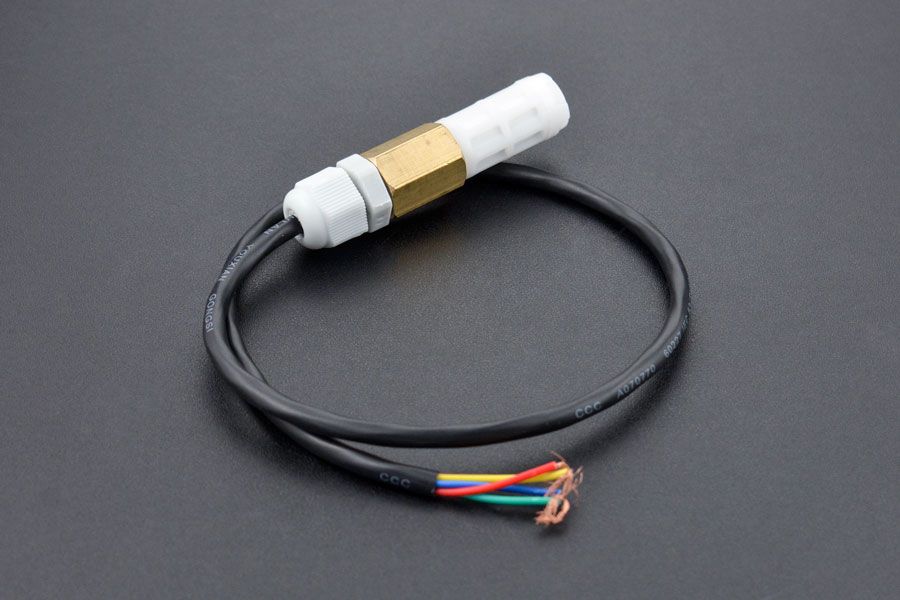
A couple of years ago I wrote a .NET Core library for the Sensirion SHT20 temperature and humidity(Waterproof) sensor from DFRobot. This .NET nanoFramework version was “inspired” by the .NET Core library version, though I have added some message validation functionality.

DF Robot SHT20 Waterproof sensor

My test setup is a simple .NET nanoFramework console application running on an STM32F7691 Discovery board.

Discovery STM32F769 + SHT20 Testrig

The SH20DeviceI2C application has lots of magic numbers from the SHT20 datasheet and was just a tool for exploring how the sensor works.

 public static void Main()
{
    I2cConnectionSettings i2cConnectionSettings = new(1, 0x40);

    // i2cDevice.Dispose in final program
    I2cDevice i2cDevice = I2cDevice.Create(i2cConnectionSettings);

    while (true)
    {
        byte[] readBuffer = new byte[3] { 0, 0, 0 };

        // First temperature
        i2cDevice.WriteByte(0xF3);

        //Thread.Sleep(50); // no go -46.8
        //Thread.Sleep(60);
        Thread.Sleep(70);
        //Thread.Sleep(90);
        //Thread.Sleep(110);

        i2cDevice.Read(readBuffer);

        ushort temperatureRaw = (ushort)(readBuffer[0] << 8);
        temperatureRaw += readBuffer[1];

        //Debug.WriteLine($"Raw {temperatureRaw}");

        double temperature = temperatureRaw * (175.72 / 65536.0) - 46.85;

        // Then read the Humidity
        i2cDevice.WriteByte(0xF5);

        //Thread.Sleep(50);  
        //Thread.Sleep(60);  
        Thread.Sleep(70);  
        //Thread.Sleep(90);  
        //Thread.Sleep(110);   
                
        i2cDevice.Read(readBuffer);

        ushort humidityRaw = (ushort)(readBuffer[0] << 8);
        humidityRaw += readBuffer[1];

        //Debug.WriteLine($"Raw {humidityRaw}");

        double humidity = humidityRaw * (125.0 / 65536.0) - 6.0;

        //Console.WriteLine($"{DateTime.UtcNow:HH:mm:ss} Temperature:{temperature:F1}°C");
        //Console.WriteLine($"{DateTime.UtcNow:HH:mm:ss} Humidity:{humidity:F0}%");
        Console.WriteLine($"{DateTime.UtcNow:HH:mm:ss} Temperature:{temperature:F1}°C Humidity:{humidity:F0}%");

        Thread.Sleep(1000);
    }
}

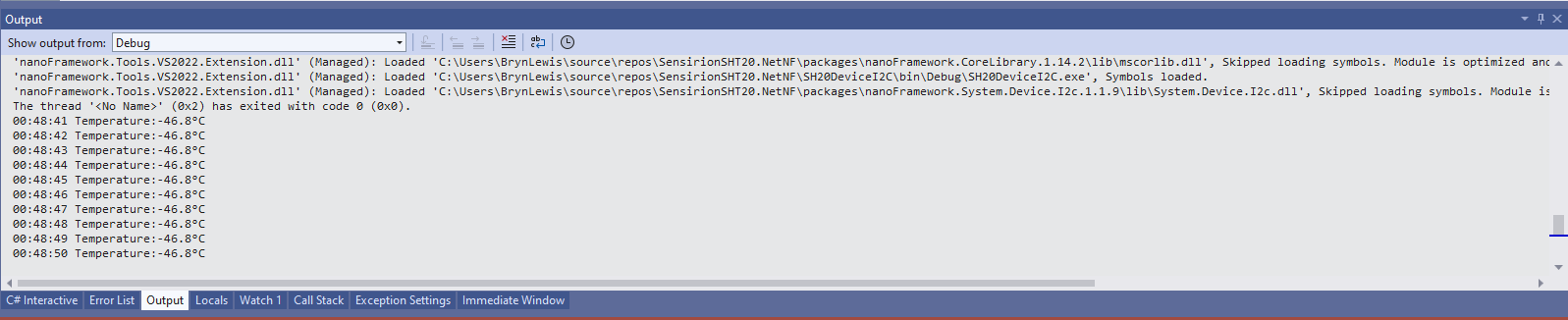
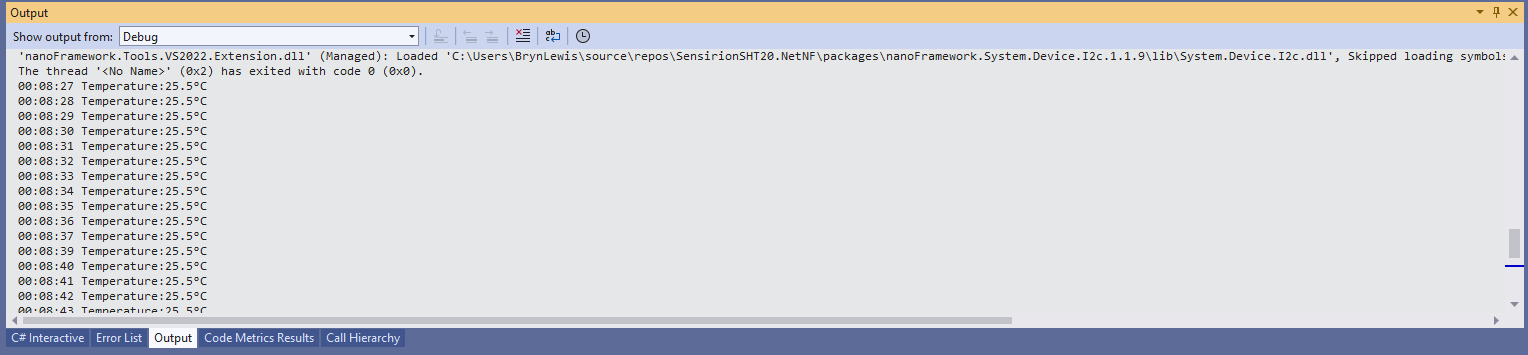
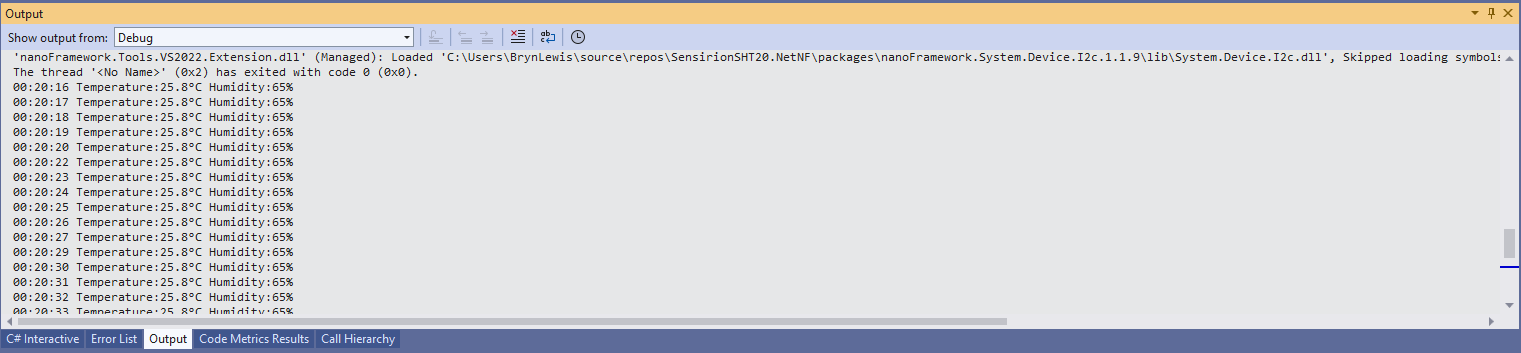
While tinkering with the sensor I found that having a short delay between initiating the temperature reading (TemperatureNoHold = 0xF3 was used so as not to hang up the I2C bus) and reading the value was important.

Temperature value without Thread.Sleep

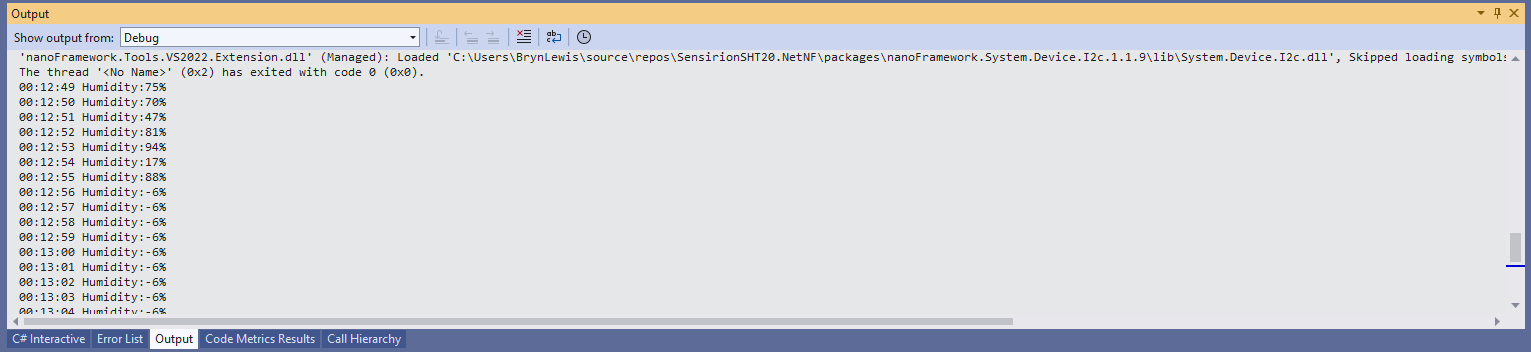
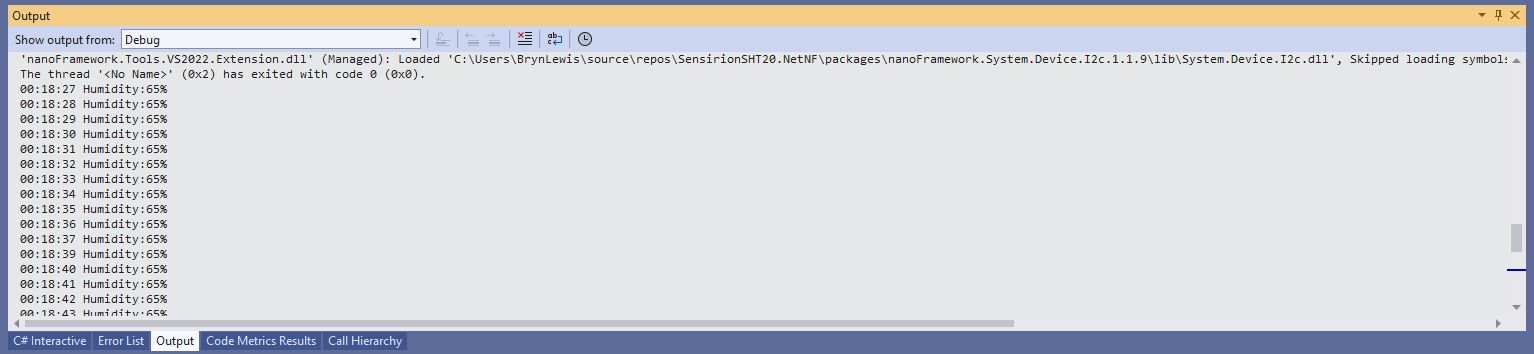
When I ran the application without a Thread.Sleep(70) the temperature and/or humidity the values were incorrect and sometimes quite random.

Temperature value with Thread.Sleep(70)
Humidity value without Thread.Sleep
Humidity value with Thread.Sleep(70)
Temperature and Humidity values with Thread.Sleep(70)

The .NET Core library didn’t validate the message payload Cyclic Redundancy Check (CRC) so I have added that in this version

void CheckCrc(byte[] bytes, byte bytesLen, byte checksum)
{
    var crc = 0;

    for (var i = 0; i < bytesLen; i++)
    {
        crc ^= bytes[i];
        for (var bit = 8; bit > 0; --bit)
        {
            crc = ((crc & 0x80) == 0x80) ? ((crc << 1) ^ CrcPolynomial) : (crc << 1);
        }
    }

    if (crc != checksum)
    {
        throw new Exception("CRC Error");
    }
}

The CheckCrc is called in Temperature and Humidity methods.

public double Temperature()
{
    byte[] readBuffer = new byte[3] { 0, 0, 0 };
    if (_i2cDevice == null)
    {
        throw new ArgumentNullException(nameof(_i2cDevice));
    }

    _i2cDevice.WriteByte(TemperatureNoHold);

    Thread.Sleep(ReadingWaitmSec);

    _i2cDevice.Read(readBuffer);

    CheckCrc(readBuffer, 2, readBuffer[2]);

    ushort temperatureRaw = (ushort)(readBuffer[0] << 8);
    temperatureRaw += readBuffer[1];

    double temperature = temperatureRaw * (175.72 / 65536.0) - 46.85;

    return temperature;
}

I’m going to soak test the library for a week to check that is working okay, then refactor the code so it can be added to the nanoFramework IoT.Device Library repository.

.NET nanoFramework RAK11200 – Azure IoT Hub HTTP Power conservation

My test setup was a RAK11200 WisBlock WiFi Module, RAK19007 WisBlock Base Board, RAK1901 WisBlock Temperature and Humidity Sensor and Keweisi KWS-MX19 USB Tester DC 4V-30V 0-5A Current Voltage Detector to measure the power consumption of my test setup.

RAK11200 + RAK19007 +RAK1901+Keweisi KWS-MX19 test setup

The baseline version of the RAK11200 WisBlock WiFi Module software had no power conservation functionality.

public static void Main()
{
    DateTime sasTokenValidUntilUtc = DateTime.UtcNow;

    Debug.WriteLine($"{DateTime.UtcNow:HH:mm:ss} devMobile.IoT.RAK.Wisblock.AzureIoTHub.RAK11200.PowerConservation starting");

    Configuration.SetPinFunction(Gpio.IO04, DeviceFunction.I2C1_DATA);
    Configuration.SetPinFunction(Gpio.IO05, DeviceFunction.I2C1_CLOCK);

    if (!WifiNetworkHelper.ConnectDhcp(Config.Ssid, Config.Password, requiresDateTime: true))
    {
        if (NetworkHelper.HelperException != null)
        {
             Debug.WriteLine($"{DateTime.UtcNow:HH:mm:ss} WifiNetworkHelper.ConnectDhcp failed {NetworkHelper.HelperException}");
        }

        Thread.Sleep(Timeout.Infinite);
    }

    string uri = $"{Config.AzureIoTHubHostName}.azure-devices.net/devices/{Config.DeviceID}";

    // not setting Authorization here as it will change as SAS Token refreshed
    HttpClient httpClient = new HttpClient
    {
        SslProtocols = System.Net.Security.SslProtocols.Tls12,
        HttpsAuthentCert = new X509Certificate(Config.DigiCertBaltimoreCyberTrustRoot),
        BaseAddress = new Uri($"https://{uri}/messages/events?api-version=2020-03-13"),
    };

    I2cConnectionSettings settings = new(I2cDeviceBusID, Shtc3.DefaultI2cAddress);
    I2cDevice device = I2cDevice.Create(settings);
    Shtc3 shtc3 = new(device);

    AdcController adcController = new AdcController();
    AdcChannel batteryChargeAdcChannel = adcController.OpenChannel(AdcControllerChannel);

    string sasToken = "";

    while (true)
    {
        DateTime standardisedUtcNow = DateTime.UtcNow;

        Debug.WriteLine($"{DateTime.UtcNow:HH:mm:ss} Azure IoT Hub device {Config.DeviceID} telemetry update start");

        if (sasTokenValidUntilUtc <= standardisedUtcNow)
        {
            sasTokenValidUntilUtc = standardisedUtcNow.Add(Config.SasTokenRenewEvery);

            sasToken = SasTokenGenerate(uri, Config.Key, sasTokenValidUntilUtc);

            Debug.WriteLine($" Renewing SAS token for {Config.SasTokenRenewFor} valid until {sasTokenValidUntilUtc:HH:mm:ss dd-MM-yy}");
        }

        if (!shtc3.TryGetTemperatureAndHumidity(out var temperature, out var relativeHumidity))
        {
            Debug.WriteLine($" Temperature and Humidity read failed");

            continue;
        }

        double batteryCharge = batteryChargeAdcChannel.ReadRatio() * 100.0;

        Debug.WriteLine($" Temperature {temperature.DegreesCelsius:F1}°C Humidity {relativeHumidity.Value:F0}% BatteryCharge {batteryCharge:F1}%");

        string payload = $"{{\"RelativeHumidity\":{relativeHumidity.Value:F0},\"Temperature\":{temperature.DegreesCelsius.ToString("F1")}, \"BatteryCharge\":{batteryCharge:F1}}}";

        try
        {
            using (HttpContent content = new StringContent(payload))
            {
                content.Headers.Add("Authorization", sasToken);

                using (HttpResponseMessage response = httpClient.Post("", content))
                {
                    Console.WriteLine($"{DateTime.UtcNow:HH:mm:ss} Response code:{response.StatusCode}");

                    response.EnsureSuccessStatusCode();
                 }
            }
        }
        catch (Exception ex)
        {
            Debug.WriteLine($"{DateTime.UtcNow:HH:mm:ss} Azure IoT Hub POST failed:{ex.Message} {ex?.InnerException?.Message}");
        }

        Debug.WriteLine($"{DateTime.UtcNow:HH:mm:ss} Azure IoT Hub telemetry update done");

        Thread.Sleep(Config.TelemetryUploadInterval);
    }
}

When the program was “idle” the current varied between 0.067A to 0.074A with “spikes” when transmitting.

The second version of the application could be configured to “sleep” the RAK11200 WisBlock WiFi Module and RAK1901 WisBlock Temperature and Humidity Sensor. The RAK11200 WisBlock WiFi Module can be put into a LightSleep or DeepSleep.

public static void Main()
{
    Debug.WriteLine($"{DateTime.UtcNow:HH:mm:ss} devMobile.IoT.RAK.Wisblock.AzureIoTHub.RAK11200.PowerSleep starting");

    Thread.Sleep(5000);

    try
    {
        Configuration.SetPinFunction(Gpio.IO04, DeviceFunction.I2C1_DATA);
        Configuration.SetPinFunction(Gpio.IO05, DeviceFunction.I2C1_CLOCK);

        Debug.WriteLine($"{DateTime.UtcNow:HH:mm:ss} Wifi connecting");

        if (!WifiNetworkHelper.ConnectDhcp(Config.Ssid, Config.Password, requiresDateTime: true))
       {
            if (NetworkHelper.HelperException != null)
            {
                 Debug.WriteLine($"{DateTime.UtcNow:HH:mm:ss} WifiNetworkHelper.ConnectDhcp failed {NetworkHelper.HelperException}");
            }

            Sleep.EnableWakeupByTimer(Config.FailureRetryInterval);
            Sleep.StartDeepSleep();
        }

        Debug.WriteLine($"{DateTime.UtcNow:HH:mm:ss} Wifi connected");

        // Configure the SHTC3 
        I2cConnectionSettings settings = new(I2cDeviceBusID, Shtc3.DefaultI2cAddress);
        I2cDevice device = I2cDevice.Create(settings);
        Shtc3 shtc3 = new(device);

        // Assuming that if TryGetTemperatureAndHumidity fails accessing temperature or relativeHumidity will cause an exception
        shtc3.TryGetTemperatureAndHumidity(out var temperature, out var relativeHumidity);

#if SLEEP_SHT3C
        shtc3.Sleep();
#endif

        // Configure Analog input (AIN0) port then read the "battery charge"
        AdcController adcController = new AdcController();
        AdcChannel batteryChargeAdcChannel = adcController.OpenChannel(AdcControllerChannel);

        double batteryCharge = batteryChargeAdcChannel.ReadRatio() * 100.0;

        Debug.WriteLine($" Temperature {temperature.DegreesCelsius:F1}°C Humidity {relativeHumidity.Value:F0}% BatteryCharge {batteryCharge:F1}");

        // Assemble the JSON payload, should use nanoFramework.Json
        string payload = $"{{\"RelativeHumidity\":{relativeHumidity.Value:F0},\"Temperature\":{temperature.DegreesCelsius.ToString("F1")}, \"BatteryCharge\":{batteryCharge:F1}}}";

        // Configure the HttpClient uri, certificate, and authorization
        string uri = $"{Config.AzureIoTHubHostName}.azure-devices.net/devices/{Config.DeviceID}";

        HttpClient httpClient = new HttpClient()
        {
            SslProtocols = System.Net.Security.SslProtocols.Tls12,
            HttpsAuthentCert = new X509Certificate(Config.DigiCertBaltimoreCyberTrustRoot),
            BaseAddress = new Uri($"https://{uri}/messages/events?api-version=2020-03-13"),
        };
        httpClient.DefaultRequestHeaders.Add("Authorization", SasTokenGenerate(uri, Config.Key, DateTime.UtcNow.Add(Config.SasTokenRenewFor)));

        Debug.WriteLine($"{DateTime.UtcNow:HH:mm:ss} Azure IoT Hub device {Config.DeviceID} telemetry update start");

        HttpResponseMessage response = httpClient.Post("", new StringContent(payload));

        Debug.WriteLine($"{DateTime.UtcNow:HH:mm:ss} Response code:{response.StatusCode}");

        response.EnsureSuccessStatusCode();
    }
    catch (Exception ex)
    {
        Debug.WriteLine($"{DateTime.UtcNow:HH:mm:ss} Azure IoT Hub telemetry update failed:{ex.Message} {ex?.InnerException?.Message}");

        Sleep.EnableWakeupByTimer(Config.FailureRetryInterval);
        Sleep.StartDeepSleep();
    }

    Sleep.EnableWakeupByTimer(Config.TelemetryUploadInterval);
#if SLEEP_LIGHT
    Sleep.StartLightSleep();
#endif
#if SLEEP_DEEP
    Sleep.StartDeepSleep();
#endif
 }

The LightSleep or DeepSleep based code is significantly less complex because the allocation and deallocation of resources does not have to be managed because the application is restarted when the WakeUp Timer triggers.

Both LightSleep and DeepSleep reduced the idle current to 0.000A. The Keweisi KWS-MX19 USB Tester DC 4V-30V 0-5A Current Voltage Detector is not a precision laboratory instrument. I couldn’t detect if sleeping the RAK1901 WisBlock Temperature and Humidity Sensor or LightSleep vs. DeepSleep made any difference. But it did show the power consumption of my setup could be significantly reduced by using the ESP32 LightSleep and DeepSleep functionality.

.NET nanoFramework RAK11200 – Azure IoT Hub HTTP battery charge monitoring

The first step was to check that I could get a “battery charge” value for the RAKWireless RAK11200 WisBlock WiFi Module on a RAK19007 WisBlock Base Board to send to an Azure IoT Hub.

RAK1702 Schematic with voltage divider to ADC_VBAT connection highlighted
RAK1701 Schematic with ADC_VBAT to CPU slot connection highlighted

The RAK19007 WisBlock Base Board has a voltage divider (R3&R4 with output ADC_VBAT) which is connected (via R7) to pin 21(AIN0) on the CPU slot connector.

RAK11200 schematic with CPU Slot to ESP32-WROVER-B connection highlighted

The AIN0(pin 21) of the RAK11200 WisBlock WiFi Module is connected to SENSOR_VP(pin4) of the Espressif ESP32-WROVER-B so I could measure the battery charge.

RAK11200+RAK19007+RAK1901+ LiPo battery test rig

My test setup was a RAK11200 WisBlock WiFi Module, RAK19007 WisBlock Base Board, RAK1901 WisBlock Temperature and Humidity Sensor and 1200mAH Lithium Polymer (LiPo) battery which uploads temperature, humidity and battery charge telemetry to an Azure IoT Hub every 10 minutes.

I used AdcController + AdcChannel to read the AIN0 value which was then inserted in the Java Script Object Notation(JSON) telemetry payload.

 public class Program
 {
     private const int I2cDeviceBusID = 1;
     private const int AdcControllerChannel = 0;

     public static void Main()
     {
         DateTime sasTokenValidUntilUtc = DateTime.UtcNow;

         Debug.WriteLine($"{DateTime.UtcNow:HH:mm:ss} devMobile.IoT.RAK.Wisblock.AzureIoTHub.RAK11200.PowerBaseline starting");

         Configuration.SetPinFunction(Gpio.IO04, DeviceFunction.I2C1_DATA);
         Configuration.SetPinFunction(Gpio.IO05, DeviceFunction.I2C1_CLOCK);

         if (!WifiNetworkHelper.ConnectDhcp(Config.Ssid, Config.Password, requiresDateTime: true))
         {
             if (NetworkHelper.HelperException != null)
             {
                 Debug.WriteLine($"{DateTime.UtcNow:HH:mm:ss} WifiNetworkHelper.ConnectDhcp failed {NetworkHelper.HelperException}");
             }

             Thread.Sleep(Timeout.Infinite);
         }

         string uri = $"{Config.AzureIoTHubHostName}.azure-devices.net/devices/{Config.DeviceID}";

         // not setting Authorization here as it will change as SAS Token refreshed
         HttpClient httpClient = new HttpClient
         {
             SslProtocols = System.Net.Security.SslProtocols.Tls12,
             HttpsAuthentCert = new X509Certificate(Config.DigiCertBaltimoreCyberTrustRoot),
             BaseAddress = new Uri($"https://{uri}/messages/events?api-version=2020-03-13"),
         };

         I2cConnectionSettings settings = new(I2cDeviceBusID, Shtc3.DefaultI2cAddress);
         I2cDevice device = I2cDevice.Create(settings);
         Shtc3 shtc3 = new(device);

         AdcController adcController = new AdcController();
         AdcChannel batteryChargeAdcChannel = adcController.OpenChannel(AdcControllerChannel);

         string sasToken = "";

         while (true)
         {
             DateTime standardisedUtcNow = DateTime.UtcNow;

             Debug.WriteLine($"{DateTime.UtcNow:HH:mm:ss} Azure IoT Hub device {Config.DeviceID} telemetry update start");

             if (sasTokenValidUntilUtc <= standardisedUtcNow)
             {
                 sasTokenValidUntilUtc = standardisedUtcNow.Add(Config.SasTokenRenewEvery);

                 sasToken = SasTokenGenerate(uri, Config.Key, sasTokenValidUntilUtc);

                 Debug.WriteLine($" Renewing SAS token for {Config.SasTokenRenewFor} valid until {sasTokenValidUntilUtc:HH:mm:ss dd-MM-yy}");
             }

             if (!shtc3.TryGetTemperatureAndHumidity(out var temperature, out var relativeHumidity))
             {
                 Debug.WriteLine($" Temperature and Humidity read failed");

                 continue;
             }

             double batteryCharge = batteryChargeAdcChannel.ReadRatio() * 100.0;

             Debug.WriteLine($" Temperature {temperature.DegreesCelsius:F1}°C Humidity {relativeHumidity.Value:F0}% BatteryCharge {batteryCharge:F1}%");

             string payload = $"{{\"RelativeHumidity\":{relativeHumidity.Value:F0},\"Temperature\":{temperature.DegreesCelsius.ToString("F1")}, \"BatteryCharge\":{batteryCharge:F1}}}";

             try
             {
                 using (HttpContent content = new StringContent(payload))
                 {
                     content.Headers.Add("Authorization", sasToken);

                     using (HttpResponseMessage response = httpClient.Post("", content))
                     {
                         Console.WriteLine($"{DateTime.UtcNow:HH:mm:ss} Response code:{response.StatusCode}");

                         response.EnsureSuccessStatusCode();
                     }
                 }
             }
             catch (Exception ex)
             {
                 Debug.WriteLine($"{DateTime.UtcNow:HH:mm:ss} Azure IoT Hub POST failed:{ex.Message} {ex?.InnerException?.Message}");
             }

             Debug.WriteLine($"{DateTime.UtcNow:HH:mm:ss} Azure IoT Hub telemetry update done");

             Thread.Sleep(Config.TelemetryUploadInterval);
         }
     }
...
}

I used Azure IoT Explorer to monitor the Azure IoT Hub device telemetry to see how BatteryCharge value decreased to a level where the device wouldn’t transmit.

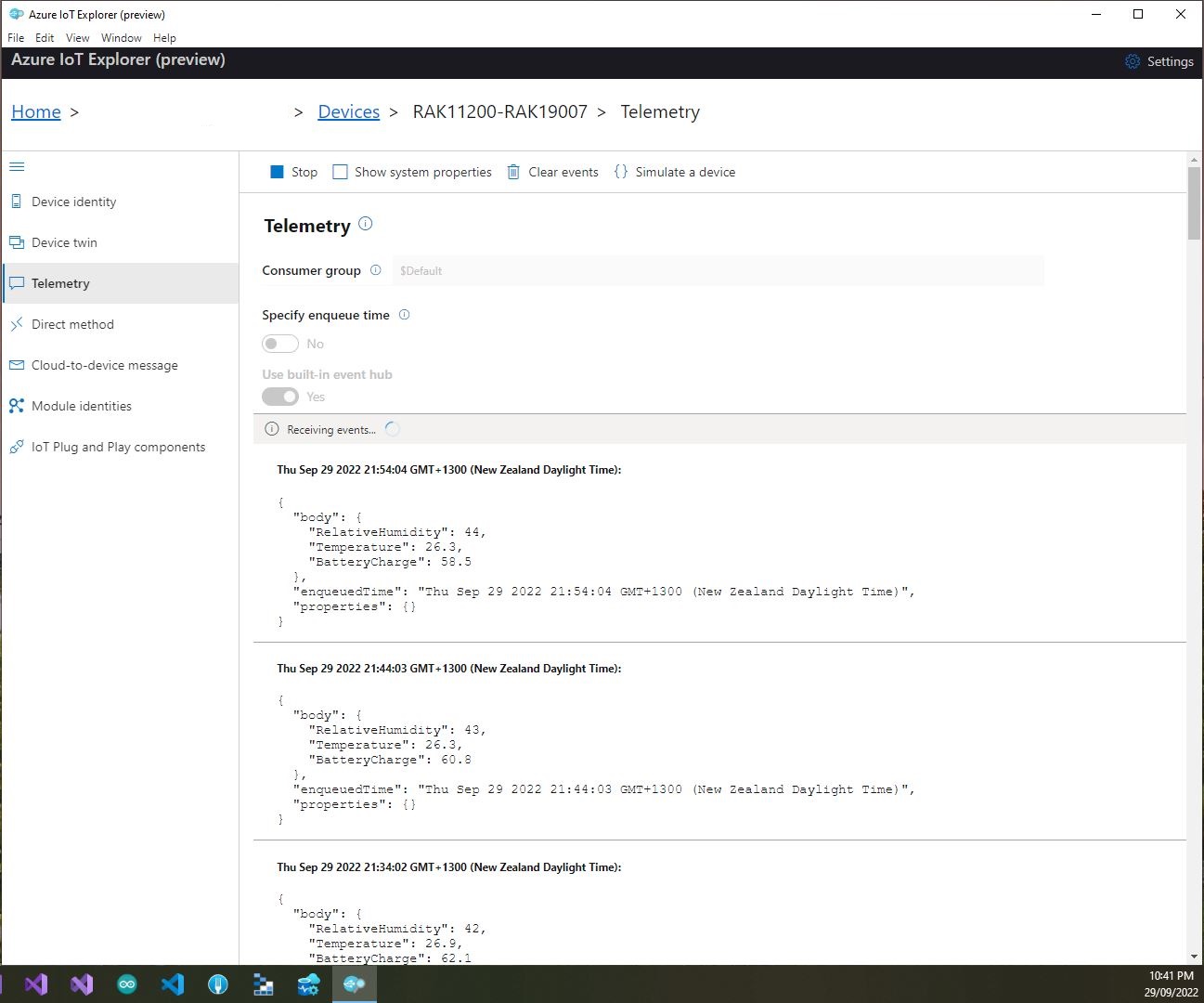
Azure IoT Explorer telemetry – device connected to a USB charger (11:01:19) then un-plugged (11:02:02)
Azure IoT Explorer telemetry – Last two messages sent by the device

With no use of the “power conservation” functionality of the ESP32-WROVER-B powered by a 1200mAH battery the device ran for approximately 11hrs (11:00am – 10:00pm).

RAK2305 Wisblock AIN0 pin highlighted

I think the RAK2305 will not be able to measure “battery charge” as the SENSOR_VP pin on the Espressif ESP32-WROVER-B is not connected to AIN0.

.NET nanoFramework RAK11200 – Azure IoT Hub HTTP SAS Keys

This is a significantly improved .NET nanoFramework Azure IoT Hub client (inspired by this nanoFramework sample) which “automatically” generates and then renews the SAS Token connection string used for authorisation.

RAK11200 + RAL19001 + RAK1901 test hardware

My test setup was a RAKwireless RAK11200 WisBlock WiFi Module, RAK19001 WisBlock Dual IO Base Board and RAK1901 WisBlock Temperature and Humidity Sensor

public static void Main()
{
   DateTime sasTokenValidUntilUtc = DateTime.UtcNow;

   Debug.WriteLine($"{DateTime.UtcNow:HH:mm:ss} devMobile.IoT.RAK.Wisblock.AzureIoHub.RAK1901.SasKey starting");

...         
   string uri = $"{Config.AzureIoTHubHostName}.azure-devices.net/devices/{Config.DeviceID}";

   // not setting Authorization here as it will change as SAS Token refreshed
   _httpClient = new HttpClient
   {
      SslProtocols = System.Net.Security.SslProtocols.Tls12,
      HttpsAuthentCert = new X509Certificate(Config.DigiCertBaltimoreCyberTrustRoot),
      BaseAddress = new Uri($"https://{uri}/messages/events?api-version=2020-03-13"),
   };

   I2cConnectionSettings settings = new(I2cDeviceBusID, Shtc3.DefaultI2cAddress);
   I2cDevice device = I2cDevice.Create(settings);
   Shtc3 shtc3 = new(device);

   string sasToken = "";

   while (true)
   {
      DateTime standardisedUtcNow = DateTime.UtcNow;

      Debug.WriteLine($"{DateTime.UtcNow:HH:mm:ss} Azure IoT Hub device {Config.DeviceID} telemetry update start");

      if (sasTokenValidUntilUtc <= standardisedUtcNow)
      {
         sasTokenValidUntilUtc = standardisedUtcNow.Add(Config.SasTokenRenewEvery);

         sasToken = SasTokenGenerate(uri, Config.Key, sasTokenValidUntilUtc);

         Debug.WriteLine($" Renewing SAS token for {Config.SasTokenRenewFor} valid until {sasTokenValidUntilUtc:HH:mm:ss dd-MM-yy}");
      }

      if (!shtc3.TryGetTemperatureAndHumidity(out var temperature, out var relativeHumidity))
      {
         Debug.WriteLine($" Temperature and Humidity read failed");

         continue;
      }

      Debug.WriteLine($" Temperature {temperature.DegreesCelsius:F1}°C Humidity {relativeHumidity.Value:F0}%");

      string payload = $"{{\"RelativeHumidity\":{relativeHumidity.Value:F0},\"Temperature\":{temperature.DegreesCelsius.ToString("F1")}}}";

      try
      {
         using (HttpContent content = new StringContent(payload))
         {
            content.Headers.Add("Authorization", sasToken);

            using (HttpResponseMessage response = _httpClient.Post("", content))
            {
               Console.WriteLine($"{DateTime.UtcNow:HH:mm:ss} Response code:{response.StatusCode}");

               response.EnsureSuccessStatusCode();
            }
         }
      }
     catch (Exception ex)
     {
         Debug.WriteLine($"{DateTime.UtcNow:HH:mm:ss} Azure IoT Hub POST failed:{ex.Message} {ex?.InnerException?.Message}");
      }

      Debug.WriteLine($"{DateTime.UtcNow:HH:mm:ss} Azure IoT Hub telemetry update done");

      Thread.Sleep(Config.TelemetryUploadInterval);
   }
}

How long a SAS Token is valid for and how often it has to be renewed is specified in the config.cs file

public class Config
{
   public const string DeviceID = "RAK11200-RAK19001";
   public const string AzureIoTHubHostName = "...";
   public const string Key = "...";
   public readonly static TimeSpan SasTokenRenewFor = new TimeSpan(24, 0, 0);
   public readonly static TimeSpan SasTokenRenewEvery = new TimeSpan(0, 30, 0);
   public readonly static TimeSpan TelemetryUploadInterval = new TimeSpan(0, 10, 0);

   public const string Ssid = "Orcon-Wireless";
   public const string Password = "160220502280";
...
}

The SasTokenGenerate method is based on code from an old blog post “Azure IoT Hub SAS Tokens revisited again” from, late 2019

public static string SasTokenGenerate(string resourceUri, string key, DateTime sasKeyTokenUntilUtc)
{
   long sasKeyvalidUntilUtcUnix = sasKeyTokenUntilUtc.ToUnixTimeSeconds();

   string stringToSign = $"{HttpUtility.UrlEncode(resourceUri)}\n{sasKeyvalidUntilUtcUnix}";

   var hmac = SHA.computeHMAC_SHA256(Convert.FromBase64String(key), Encoding.UTF8.GetBytes(stringToSign));

   string signature = Convert.ToBase64String(hmac);

   return $"SharedAccessSignature sr={HttpUtility.UrlEncode(resourceUri)}&sig={HttpUtility.UrlEncode(signature)}&se={sasKeyvalidUntilUtcUnix}";
}

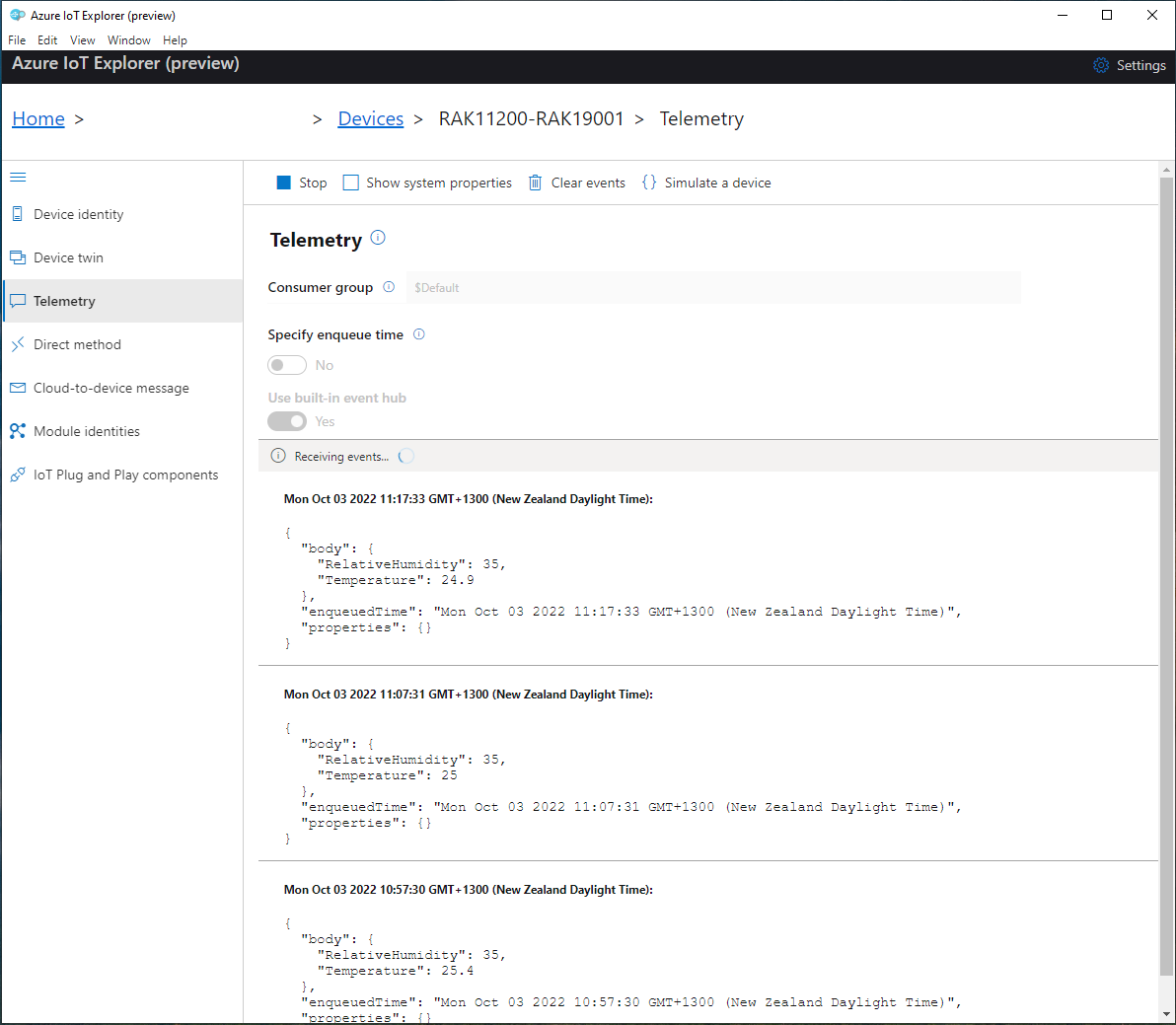
I use Azure IoT Explorer to monitor the telemetry and the application appears to run reliably for weeks

Azure IoT Explorer displaying test rig telemetry(22/09)
Azure IoT Explorer displaying test rig telemetry(03/10)