TTI V3 Connector Device Provisioning Service(DPS) support

The previous versions of my Things Network Industries(TTI) and The Things Network(TTN) connectors supported the Azure IoT Hub Device Provisioning Service(DPS) with Symmetric Key Attestation(SAS) to “automagically” setup the LoRaWAN devices in a TTI Application.(See my V2 Gateway DPS setup post for more detail).
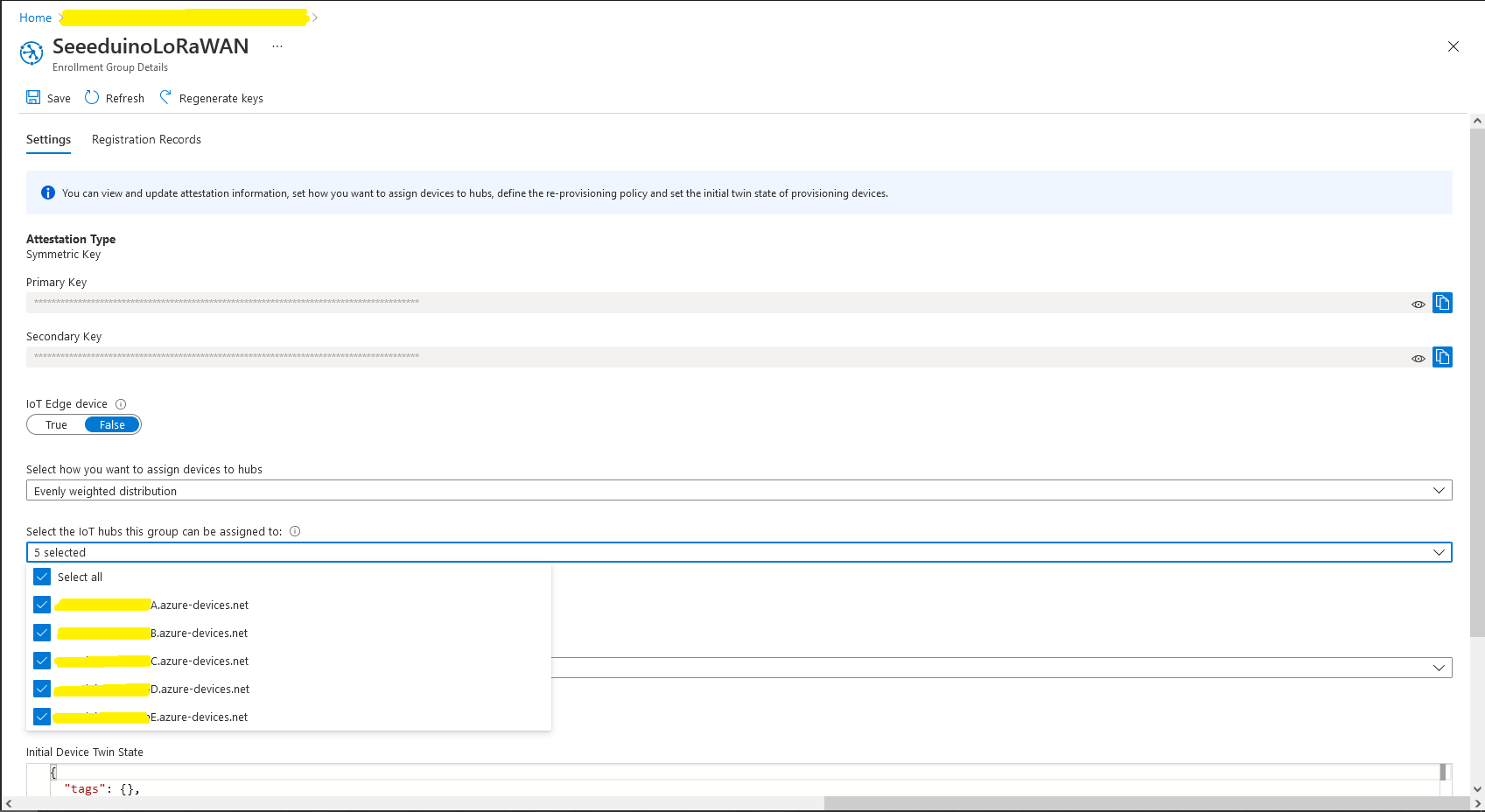
Azure Device Provisioning Service configuring Azure IoT Hubs

I used an “evenly weighted distribution” to spread the devices across five Azure IoT Hubs.
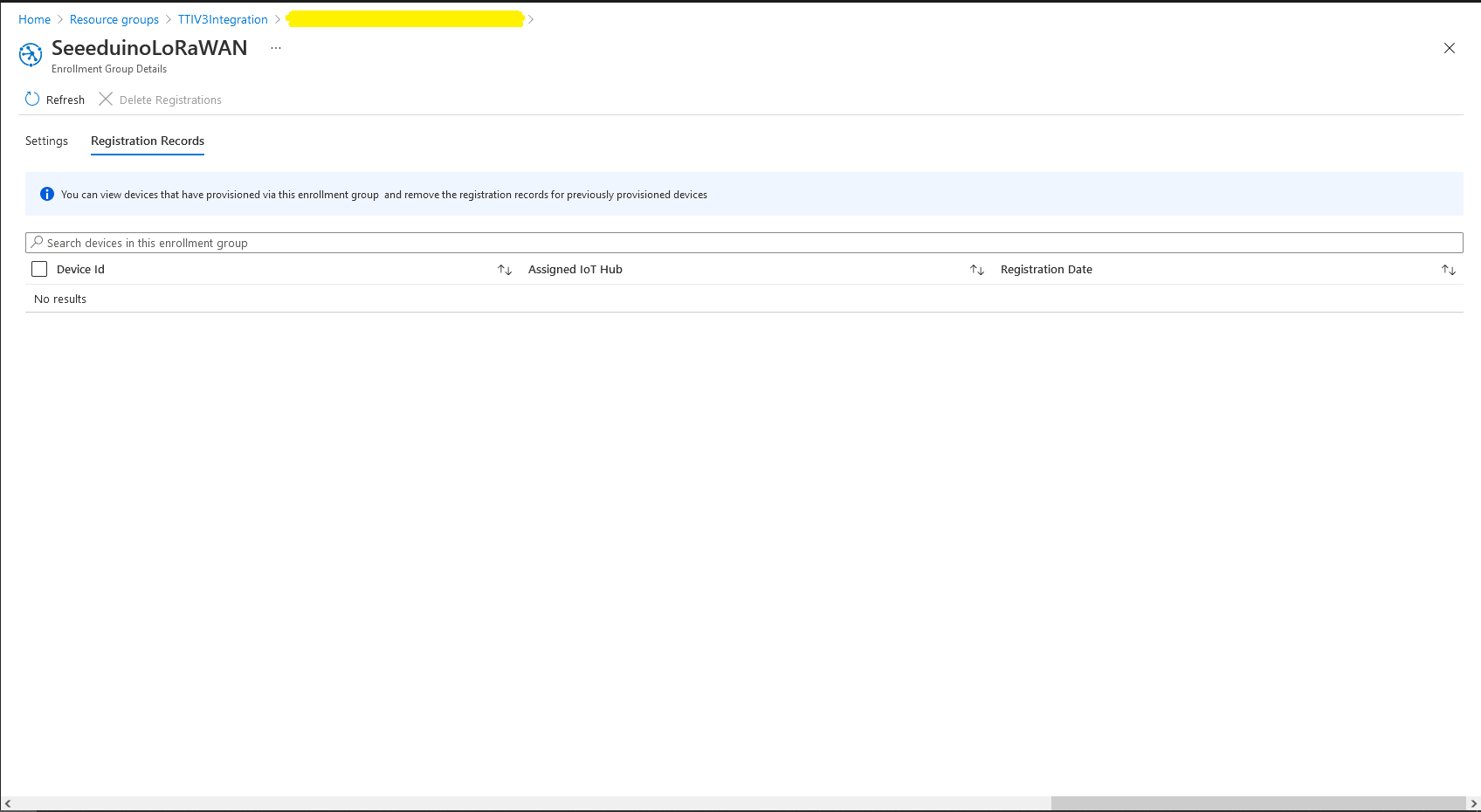
Azure IoT Hub no registered devices

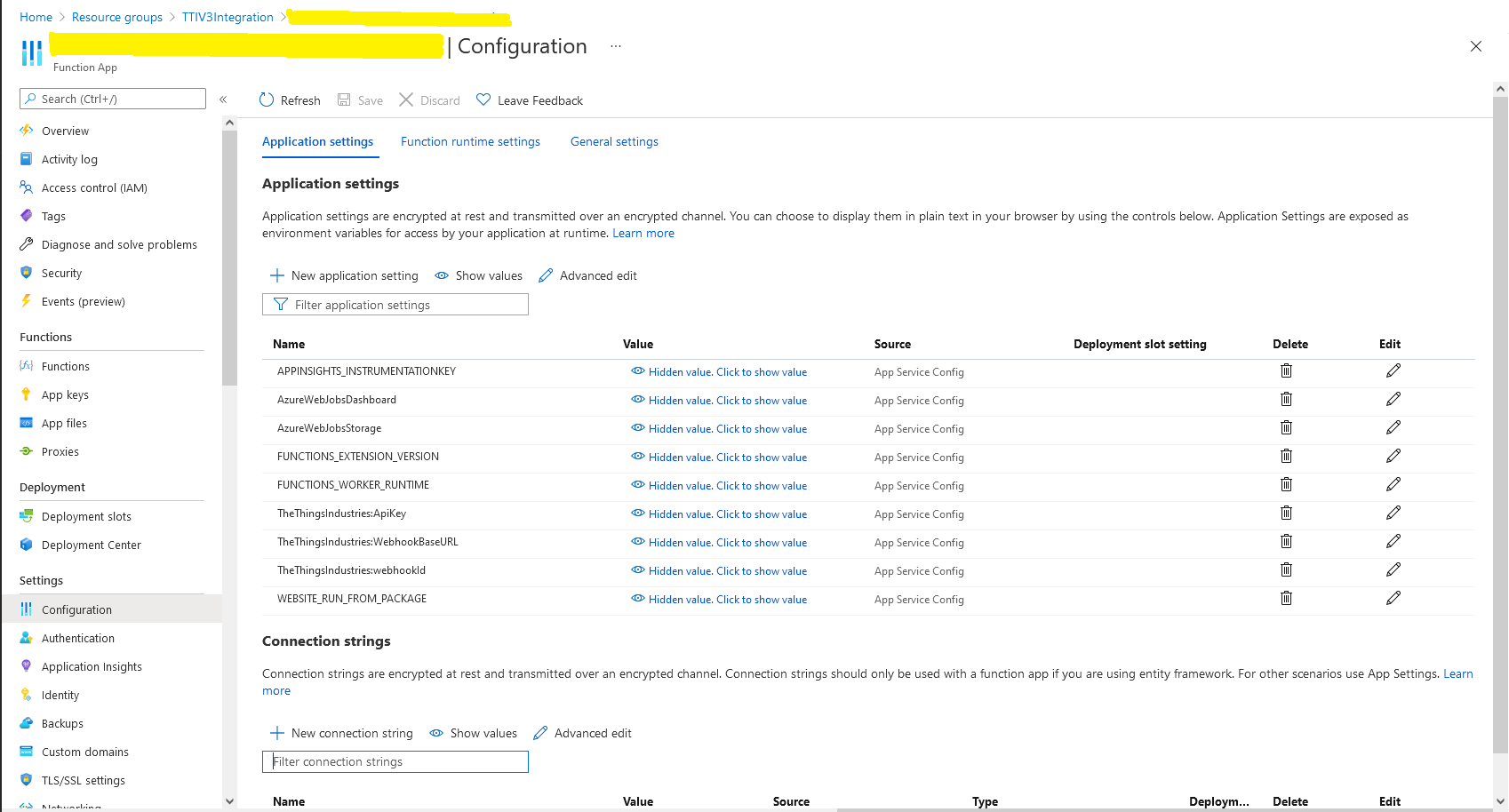
In the Azure Portal I configured the DPS ID Scope (AzureSettings:DeviceProvisioningServiceSettings:IdScope) and the Group Enrollment Key(AzureSettings:DeviceProvisioningServiceSettings:GroupEnrollmentKey) then saved the configuration which restarted the AppService.
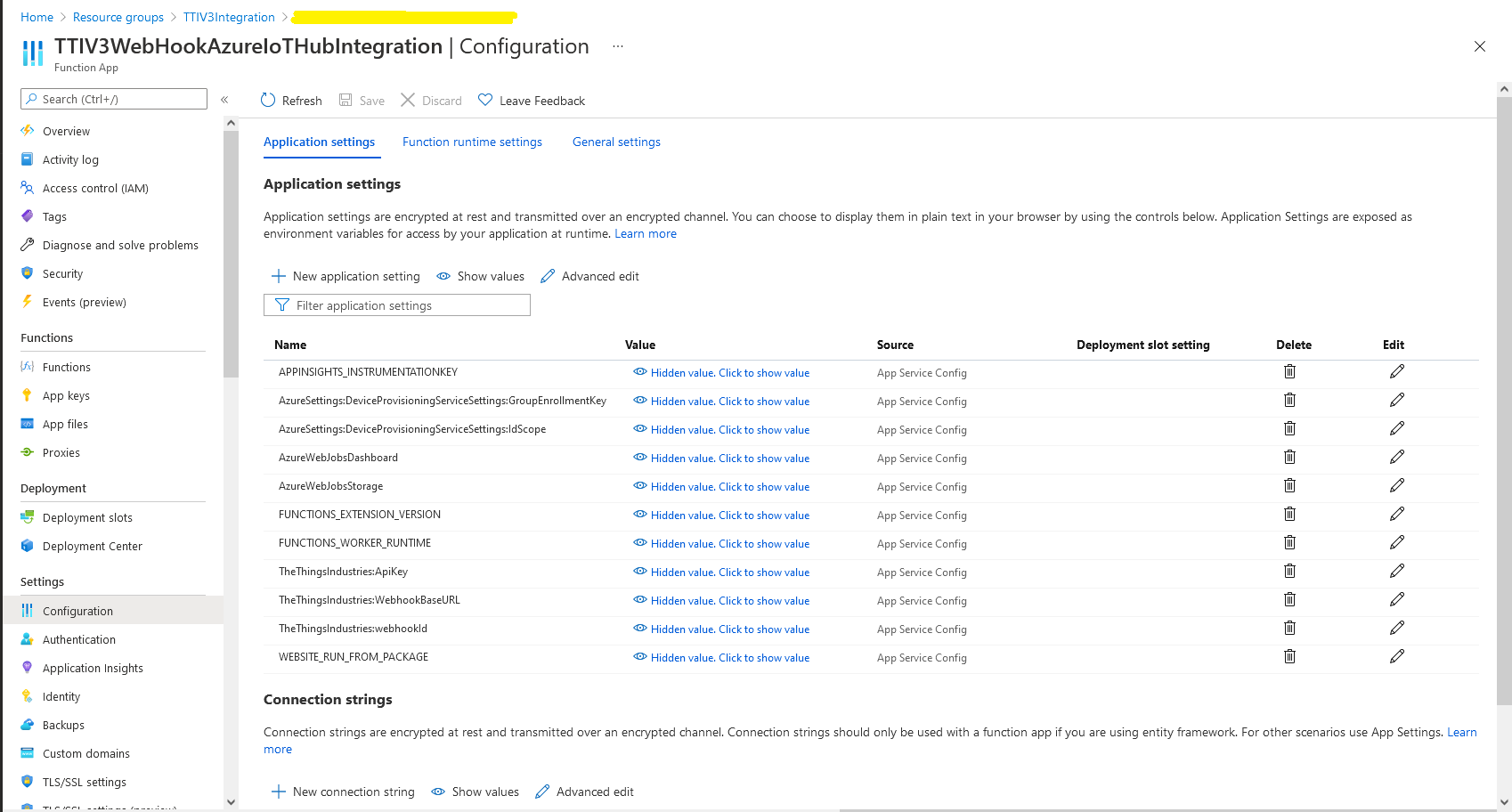
Azure Portal AppService configration

The first time a device sent an uplink message the cache query fails and the RegisterAsync method of the ProvisioningDeviceClient is called to get a device connection string.

	logger.LogInformation("Uplink-ApplicationID:{0} DeviceID:{1} Port:{2} Payload Raw:{3}", applicationId, deviceId, port, payload.UplinkMessage.PayloadRaw);

	if (!_DeviceClients.TryGetValue(deviceId, out DeviceClient deviceClient))
	{
		logger.LogInformation("Uplink-Unknown device for ApplicationID:{0} DeviceID:{1}", applicationId, deviceId);

		// Check that only one of Azure Connection string or DPS is configured
		if (string.IsNullOrEmpty(_azureSettings.IoTHubConnectionString) && (_azureSettings.DeviceProvisioningServiceSettings == null))
		{
			logger.LogError("Uplink-Neither Azure IoT Hub connection string or Device Provisioning Service configured");

			return req.CreateResponse(HttpStatusCode.UnprocessableEntity);
		}

		// Check that only one of Azure Connection string or DPS is configured
		if (!string.IsNullOrEmpty(_azureSettings.IoTHubConnectionString) && (_azureSettings.DeviceProvisioningServiceSettings != null))
		{
			logger.LogError("Uplink-Both Azure IoT Hub connection string and Device Provisioning Service configured");

			return req.CreateResponse(HttpStatusCode.UnprocessableEntity);
		}

		// User Azure IoT Connection string if configured and Device Provisioning Service isn't
		if (!string.IsNullOrEmpty(_azureSettings.IoTHubConnectionString))
		{
			deviceClient = DeviceClient.CreateFromConnectionString(_azureSettings.IoTHubConnectionString, deviceId, transportSettings);

			try
			{
				await deviceClient.OpenAsync();
			}
			catch (DeviceNotFoundException)
			{
				logger.LogWarning("Uplink-Unknown DeviceID:{0}", deviceId);

				return req.CreateResponse(HttpStatusCode.NotFound);
			}
		}

		// Azure IoT Hub Device provisioning service if configured
		if (_azureSettings.DeviceProvisioningServiceSettings != null) 
		{
			string deviceKey;

			if ( string.IsNullOrEmpty(_azureSettings.DeviceProvisioningServiceSettings.IdScope) || string.IsNullOrEmpty(_azureSettings.DeviceProvisioningServiceSettings.GroupEnrollmentKey))
			{
				logger.LogError("Uplink-Device Provisioning Service requires ID Scope and Group Enrollment Key configured");

				return req.CreateResponse(HttpStatusCode.UnprocessableEntity);
			}

			using (var hmac = new HMACSHA256(Convert.FromBase64String(_azureSettings.DeviceProvisioningServiceSettings.GroupEnrollmentKey)))
			{
				deviceKey = Convert.ToBase64String(hmac.ComputeHash(Encoding.UTF8.GetBytes(deviceId)));
			}

			using (var securityProvider = new SecurityProviderSymmetricKey(deviceId, deviceKey, null))
			{
				using (var transport = new ProvisioningTransportHandlerAmqp(TransportFallbackType.TcpOnly))
				{
					ProvisioningDeviceClient provClient = ProvisioningDeviceClient.Create(
						Constants.AzureDpsGlobalDeviceEndpoint,
						_azureSettings.DeviceProvisioningServiceSettings.IdScope,
						securityProvider,
						transport);

					DeviceRegistrationResult result = await provClient.RegisterAsync();

					if (result.Status != ProvisioningRegistrationStatusType.Assigned)
					{
						_logger.LogError("Config-DeviceID:{0} Status:{1} RegisterAsync failed ", deviceId, result.Status);

						return req.CreateResponse(HttpStatusCode.FailedDependency);
					}

					IAuthenticationMethod authentication = new DeviceAuthenticationWithRegistrySymmetricKey(result.DeviceId, (securityProvider as SecurityProviderSymmetricKey).GetPrimaryKey());

					deviceClient = DeviceClient.Create(result.AssignedHub, authentication, transportSettings);

					await deviceClient.OpenAsync();
				}
			}
		}

		if (!_DeviceClients.TryAdd(deviceId, deviceClient))
		{
			logger.LogWarning("Uplink-TryAdd failed for ApplicationID:{0} DeviceID:{1}", applicationId, deviceId);

			return req.CreateResponse(HttpStatusCode.Conflict);
		}

		Models.AzureIoTHubReceiveMessageHandlerContext context = new Models.AzureIoTHubReceiveMessageHandlerContext()
		{
			DeviceId = deviceId,
			ApplicationId = applicationId,
			WebhookId = _theThingsIndustriesSettings.WebhookId,
			WebhookBaseURL = _theThingsIndustriesSettings.WebhookBaseURL,
			ApiKey = _theThingsIndustriesSettings.ApiKey
		};

		await deviceClient.SetReceiveMessageHandlerAsync(AzureIoTHubClientReceiveMessageHandler, context);

		await deviceClient.SetMethodDefaultHandlerAsync(AzureIoTHubClientDefaultMethodHandler, context);
	}

	JObject telemetryEvent = new JObject
	{
		{ "ApplicationID", applicationId },
		{ "DeviceID", deviceId },
		{ "Port", port },
		{ "Simulated", payload.Simulated },
		{ "ReceivedAtUtc", payload.UplinkMessage.ReceivedAtUtc.ToString("s", CultureInfo.InvariantCulture) },
		{ "PayloadRaw", payload.UplinkMessage.PayloadRaw }
	};

	// If the payload has been decoded by payload formatter, put it in the message body.
	if (payload.UplinkMessage.PayloadDecoded != null)
	{
		telemetryEvent.Add("PayloadDecoded", payload.UplinkMessage.PayloadDecoded);
	}

	// Send the message to Azure IoT Hub
	using (Message ioTHubmessage = new Message(Encoding.ASCII.GetBytes(JsonConvert.SerializeObject(telemetryEvent))))
	{
		// Ensure the displayed time is the acquired time rather than the uploaded time. 
		ioTHubmessage.Properties.Add("iothub-creation-time-utc", payload.UplinkMessage.ReceivedAtUtc.ToString("s", CultureInfo.InvariantCulture));
		ioTHubmessage.Properties.Add("ApplicationId", applicationId);
		ioTHubmessage.Properties.Add("DeviceEUI", payload.EndDeviceIds.DeviceEui);
		ioTHubmessage.Properties.Add("DeviceId", deviceId);
		ioTHubmessage.Properties.Add("port", port.ToString());
		ioTHubmessage.Properties.Add("Simulated", payload.Simulated.ToString());

		await deviceClient.SendEventAsync(ioTHubmessage);

		logger.LogInformation("Uplink-DeviceID:{0} SendEventAsync success", payload.EndDeviceIds.DeviceId);
	}
}
catch (Exception ex)
{
	logger.LogError(ex, "Uplink-Message processing failed");

	return req.CreateResponse(HttpStatusCode.InternalServerError);
}

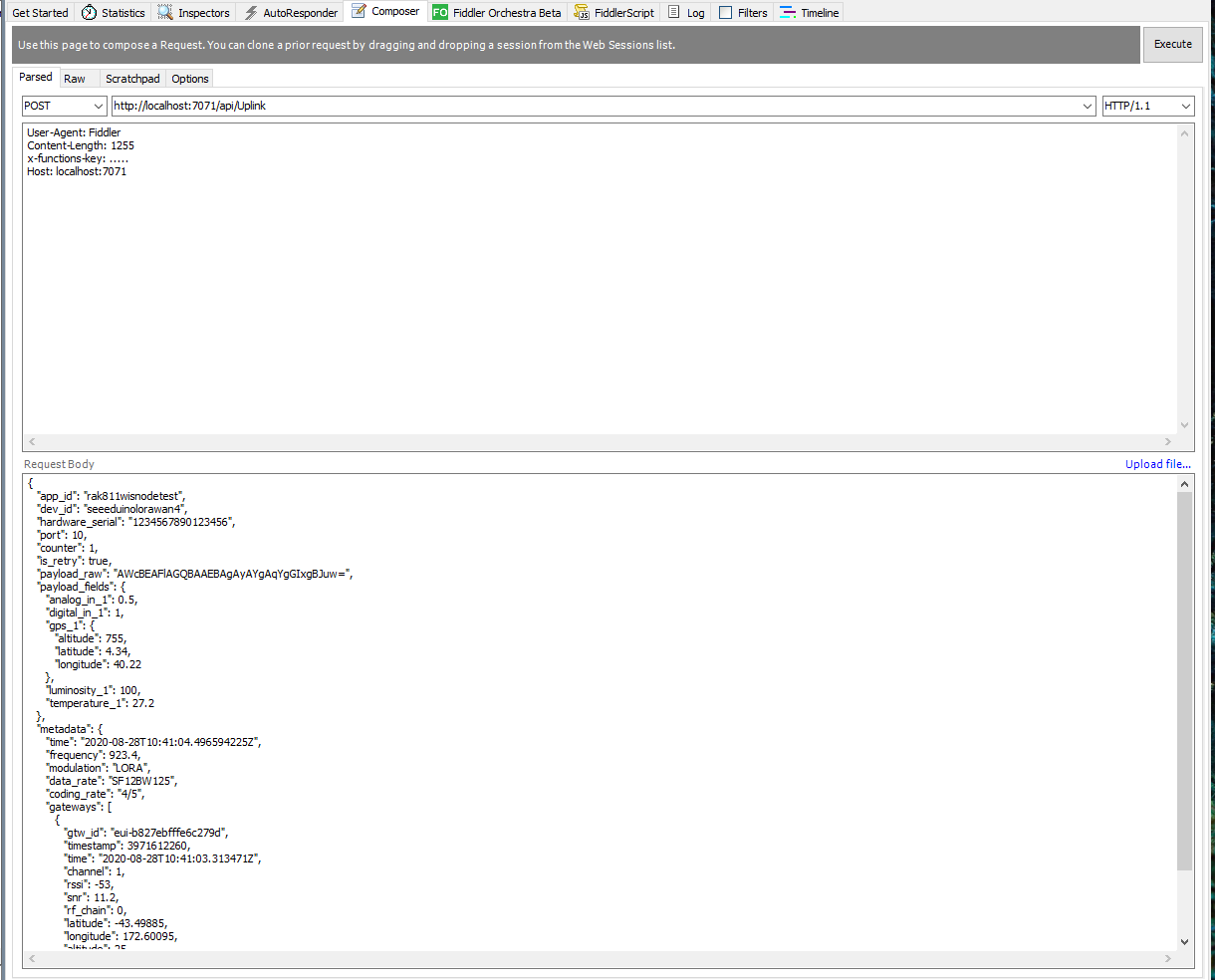
I used Telerik Fiddler and some sample payloads copied from my Azure Storage Queue sample to simulate many devices and the registrations were spread across my five Azure IoT Hubs.
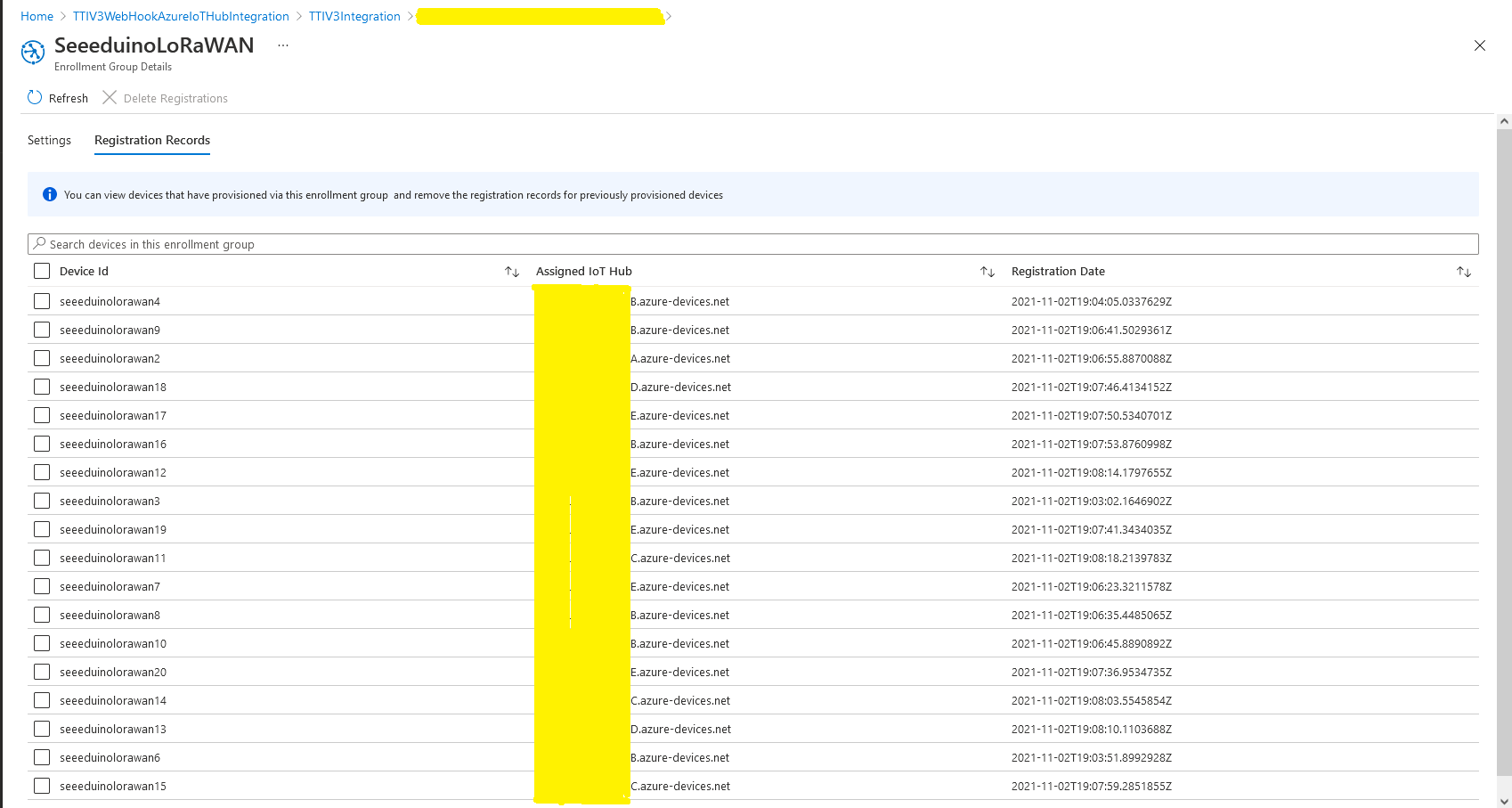
DPS Device Registrations tab showing distribution of LoRaWAN Devices

I need to review the HTTP Error codes returned for different errors and ensure failures are handled robustly.
TTI V3 Connector Minimalist Cloud to Device(C2D)

In a previous version of my Things Network Industries(TTI) The Things Network(TTN) connector I queried the The Things Stack(TTS) Application Programing Interface(API) to get a list of Applications and their Devices. For a large number of Applications and/or Devices this process could take many 10’s of seconds. Application and Device creation and deletion then had to be tracked to keep the AzureDeviceClient connection list current, which added significant complexity.
In this version a downlink message can be sent to a device only after an uplink message. I’m looking at adding an Azure Function which initiates a connection to the configured Azure IoT Hub for the specified device to mitigate with this issue.

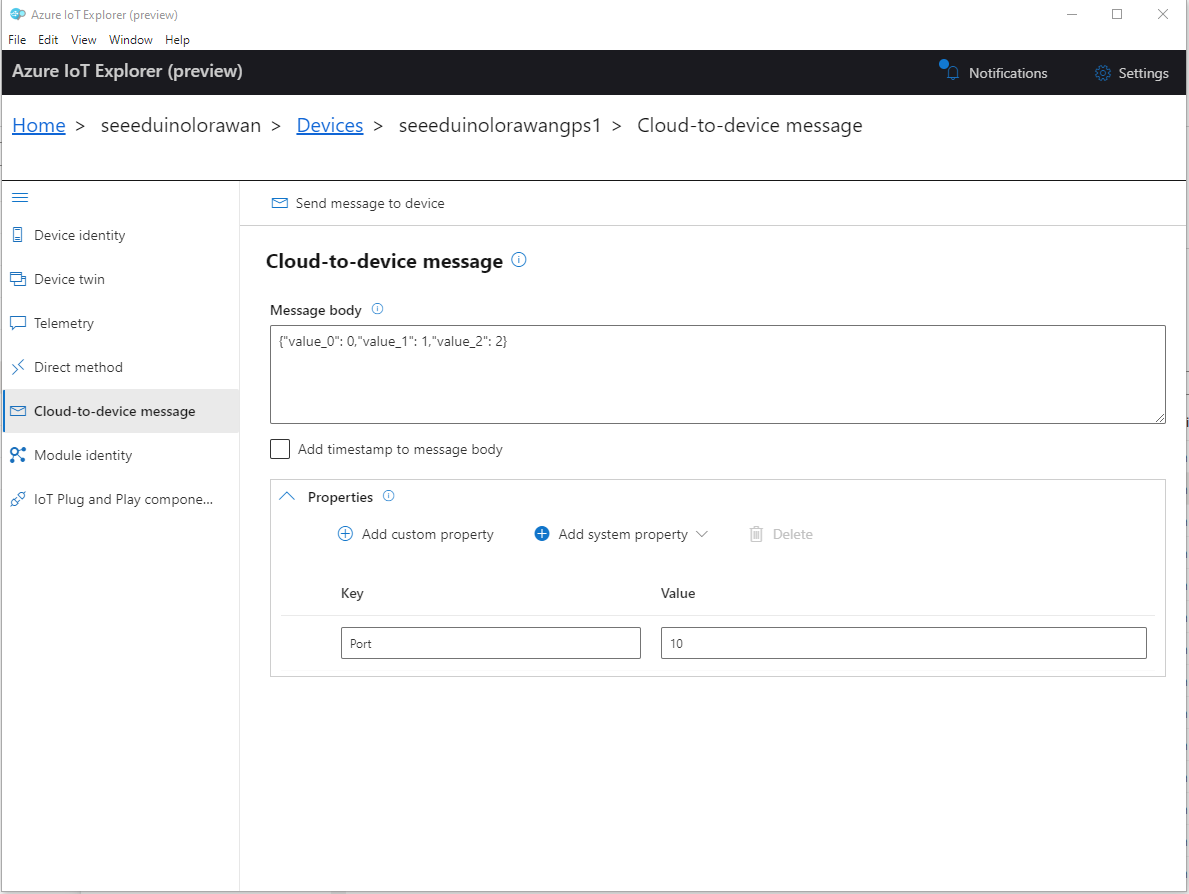
To send a TTN downlink message to a device the minimum required info is the LoRaWAN port number (specified in a Custom Property on the Azure IoT Hub cloud to device message), the device Id (from uplink message payload, which has been validated by a successful Azure IoT Hub connection) web hook id, web hook base URL, and an API Key (The Web Hook parameters are stored in the Connector configuration).

Azure IoT Explorer Clod to Device message with LoRaWAN Port number custom parameter

When a LoRaWAN device sends an Uplink message a session is established using Advanced Message Queuing Protocol(AMQP) so connections can be multiplexed)

I used Azure IoT Explorer to send Cloud to Device messages to the Azure IoT Hub (to initiate the sending of a downlink message to the Device by the Connector) after simulating a TTN uplink message with Telerik Fiddler and a modified TTN sample payload.

BEWARE – TTN URLs and Azure IoT Hub device identifiers are case sensitive

...
if (!_DeviceClients.TryGetValue(deviceId, out DeviceClient deviceClient))
{
   logger.LogInformation("Uplink-Unknown device for ApplicationID:{0} DeviceID:{1}", applicationId, deviceId);

   deviceClient = DeviceClient.CreateFromConnectionString(_configuration.GetConnectionString("AzureIoTHub"), deviceId, 
                    new ITransportSettings[]
                    {
                        new AmqpTransportSettings(TransportType.Amqp_Tcp_Only)
                        {
                            AmqpConnectionPoolSettings = new AmqpConnectionPoolSettings()
                            {
                                Pooling = true,
                            }
                        }
                    });

   try
   {
      await deviceClient.OpenAsync();
   }
   catch (DeviceNotFoundException)
   {
      logger.LogWarning("Uplink-Unknown DeviceID:{0}", deviceId);

      return req.CreateResponse(HttpStatusCode.NotFound);
   }

   if (!_DeviceClients.TryAdd(deviceId, deviceClient))
   {
      logger.LogWarning("Uplink-TryAdd failed for ApplicationID:{0} DeviceID:{1}", applicationId, deviceId);

      return req.CreateResponse(HttpStatusCode.Conflict);
   }

   Models.AzureIoTHubReceiveMessageHandlerContext context = new Models.AzureIoTHubReceiveMessageHandlerContext()
   { 
      DeviceId = deviceId,
      ApplicationId = applicationId,
      WebhookId = _configuration.GetSection("TheThingsIndustries").GetSection("WebhookId").Value,
      WebhookBaseURL = _configuration.GetSection("TheThingsIndustries").GetSection("WebhookBaseURL").Value,
      ApiKey = _configuration.GetSection("TheThingsIndustries").GetSection("APiKey").Value,
   };      

   await deviceClient.SetReceiveMessageHandlerAsync(AzureIoTHubClientReceiveMessageHandler, context);

   await deviceClient.SetMethodDefaultHandlerAsync(AzureIoTHubClientDefaultMethodHandler, context);
 }

...

An Azure IoT Hub can invoke methods(synchronous) or send messages(asynchronous) to a device for processing. The Azure IoT Hub DeviceClient has two methods SetMethodDefaultHandlerAsync and SetReceiveMessageHandlerAsync which enable the processing of direct methods and messages.

private async Task<MethodResponse> AzureIoTHubClientDefaultMethodHandler(MethodRequest methodRequest, object userContext)
{
	if (methodRequest.DataAsJson != null)
	{
		_logger.LogWarning("AzureIoTHubClientDefaultMethodHandler name:{0} payload:{1}", methodRequest.Name, methodRequest.DataAsJson);
	}
	else
	{
		_logger.LogWarning("AzureIoTHubClientDefaultMethodHandler name:{0} payload:NULL", methodRequest.Name);
	}

	return new MethodResponse(404);
}

After some experimentation in previous TTN Connectors I found the synchronous nature of DirectMethods didn’t work well with LoRAWAN “irregular” connectivity so currently they are ignored.

public partial class Integration
{
	private async Task AzureIoTHubClientReceiveMessageHandler(Message message, object userContext)
	{
		try
		{
			Models.AzureIoTHubReceiveMessageHandlerContext receiveMessageHandlerContext = (Models.AzureIoTHubReceiveMessageHandlerContext)userContext;

			if (!_DeviceClients.TryGetValue(receiveMessageHandlerContext.DeviceId, out DeviceClient deviceClient))
			{
				_logger.LogWarning("Downlink-DeviceID:{0} unknown", receiveMessageHandlerContext.DeviceId);
				return;
			}

			using (message)
			{
				string payloadText = Encoding.UTF8.GetString(message.GetBytes()).Trim();

				if (!AzureDownlinkMessage.PortTryGet(message.Properties, out byte port))
				{
					_logger.LogWarning("Downlink-Port property is invalid");

					await deviceClient.RejectAsync(message);
					return;
				}

				// Split over multiple lines in an attempt to improve readability. In this scenario a valid JSON string should start/end with {/} for an object or [/] for an array
				if ((payloadText.StartsWith("{") && payloadText.EndsWith("}"))
														||
					((payloadText.StartsWith("[") && payloadText.EndsWith("]"))))
				{
					try
					{
						downlink.PayloadDecoded = JToken.Parse(payloadText);
					}
					catch (JsonReaderException)
					{
						downlink.PayloadRaw = payloadText;
					}
				}
				else
				{
					downlink.PayloadRaw = payloadText;
				}

				_logger.LogInformation("Downlink-IoT Hub DeviceID:{0} MessageID:{1} LockToken :{2} Port{3}",
					receiveMessageHandlerContext.DeviceId,
					message.MessageId,
		            message.LockToken,
					downlink.Port);

				Models.DownlinkPayload Payload = new Models.DownlinkPayload()
				{
					Downlinks = new List<Models.Downlink>()
					{
						downlink
					}
				};

				string url = $"{receiveMessageHandlerContext.WebhookBaseURL}/{receiveMessageHandlerContext.ApplicationId}/webhooks/{receiveMessageHandlerContext.WebhookId}/devices/{receiveMessageHandlerContext.DeviceId}/down/replace");

				using (var client = new WebClient())
				{
					client.Headers.Add("Authorization", $"Bearer {receiveMessageHandlerContext.ApiKey}");

					client.UploadString(new Uri(url), JsonConvert.SerializeObject(Payload));
				}

				_logger.LogInformation("Downlink-DeviceID:{0} LockToken:{1} success", receiveMessageHandlerContext.DeviceId, message.LockToken);
			}
		}
		catch (Exception ex)
		{
			_logger.LogError(ex, "Downlink-ReceiveMessge processing failed");
		}
	}
}

If the message body contains a valid JavaScript Object Notation(JSON) payload it is “spliced” into the DownLink message decoded_payload field otherwise the Base64 encoded frm_payload is populated.

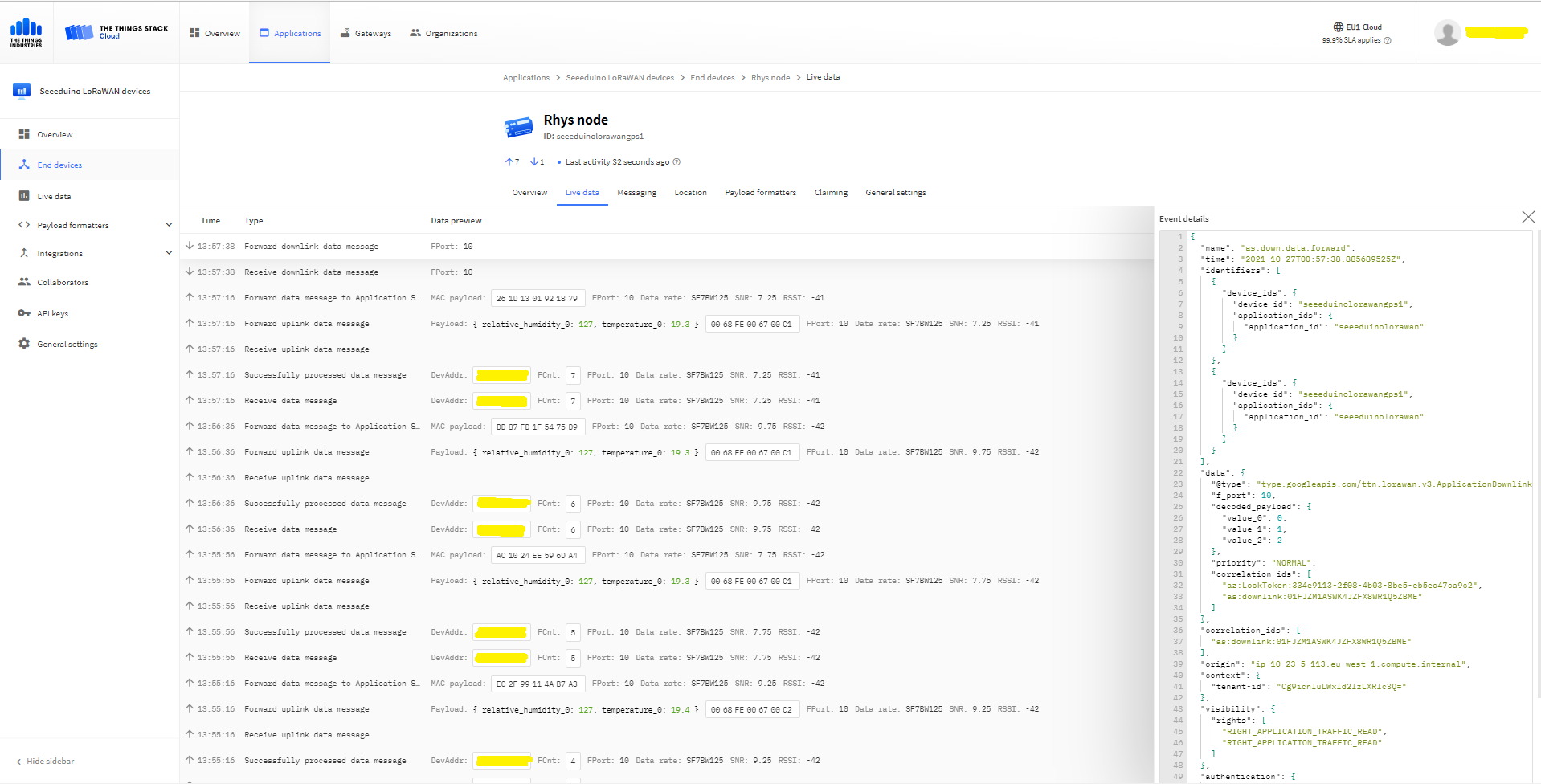
The Things “Industries Live” data tab downlink message

The SetReceiveMessageHandlerAsync context information is used to construct a TTN downlink message payload and request URL(with default queuing, message priority and confirmation options)

Arduino Serial Monitor displaying Uplink and Downlink messages

TTI V3 Connector Minimalist Device to Cloud(D2C)

After pausing my Azure Storage Queued based approach I built a quick Proof of Concept(PoC) with an HTTPTrigger Azure Function. The application has a single endpoint for processing uplink messages which is called by a The Things Industries(TTI) Webhooks integration.

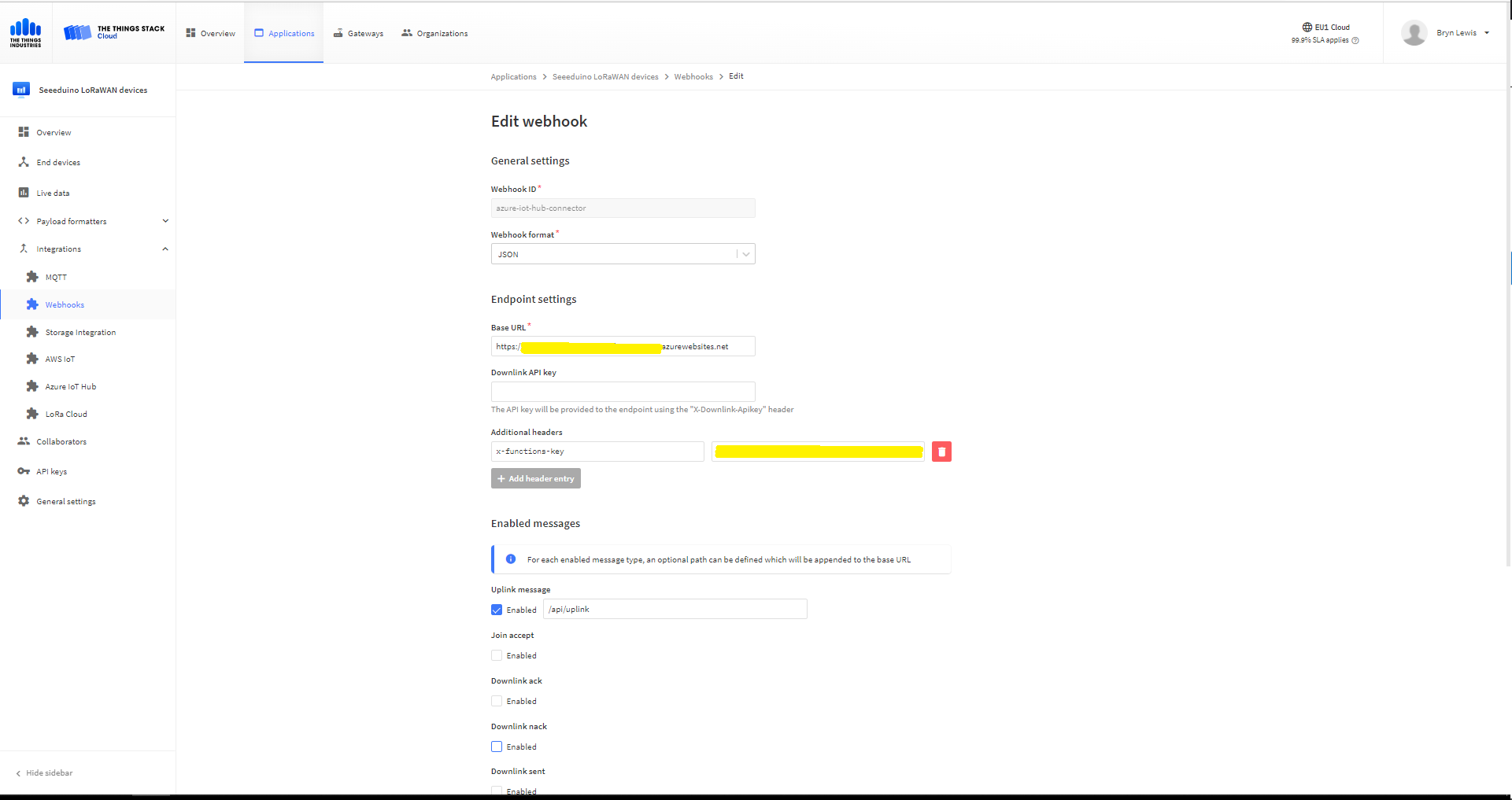
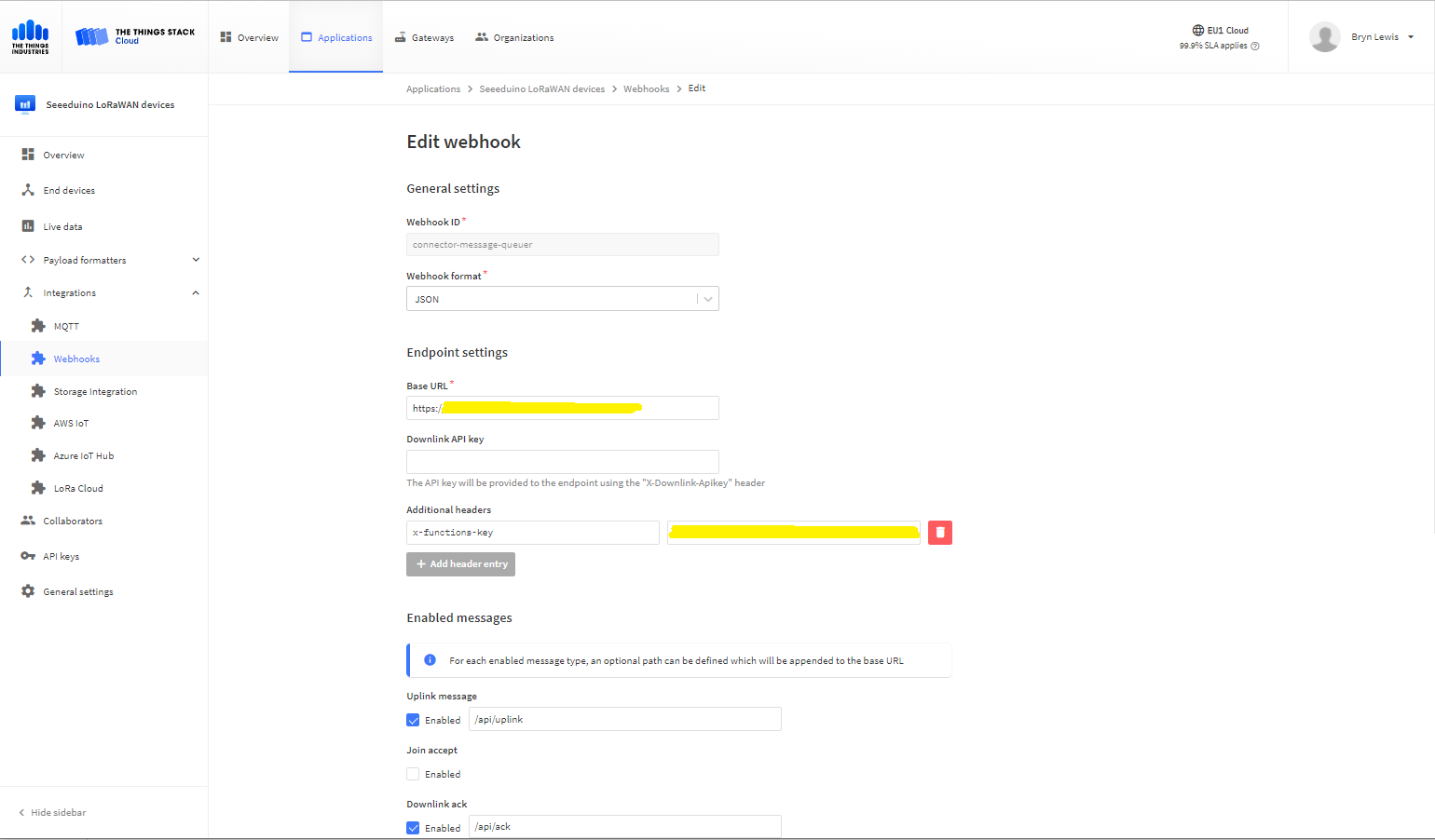
The Things Industries Application Webhook configuration
namespace devMobile.IoT.TheThingsIndustries.AzureIoTHub
{
	using System.Collections.Concurrent;
	using Microsoft.Azure.Devices.Client;
...

	public partial class Integration
	{
...
		private static readonly ConcurrentDictionary<string, DeviceClient> _DeviceClients = new ConcurrentDictionary<string, DeviceClient>();
...
	}
}

The connector uses a ConcurrentDictionary(indexed by TTI deviceID) to cache Azure IoT Hub DeviceClient instances.

public partial class Webhooks
{
	[Function("Uplink")]
	public async Task<HttpResponseData> Uplink([HttpTrigger(AuthorizationLevel.Function, "post")] HttpRequestData req, FunctionContext executionContext)
	{
		var logger = executionContext.GetLogger("Uplink");

		// Wrap all the processing in a try\catch so if anything blows up we have logged it. Will need to specialise for connectivity failues etc.
		try
		{
			Models.PayloadUplink payload = JsonConvert.DeserializeObject<Models.PayloadUplink>(await req.ReadAsStringAsync());
			if (payload == null)
			{
				logger.LogInformation("Uplink: Payload {0} invalid", await req.ReadAsStringAsync());

				return req.CreateResponse(HttpStatusCode.BadRequest);
			}

			string applicationId = payload.EndDeviceIds.ApplicationIds.ApplicationId;
			string deviceId = payload.EndDeviceIds.DeviceId;

			if ((payload.UplinkMessage.Port == null ) || (!payload.UplinkMessage.Port.HasValue) || (payload.UplinkMessage.Port.Value == 0))
			{
				logger.LogInformation("Uplink-ApplicationID:{0} DeviceID:{1} Payload Raw:{2} Control nessage", applicationId, deviceId, payload.UplinkMessage.PayloadRaw);

				return req.CreateResponse(HttpStatusCode.BadRequest);
			}

			int port = payload.UplinkMessage.Port.Value;

			logger.LogInformation("Uplink-ApplicationID:{0} DeviceID:{1} Port:{2} Payload Raw:{3}", applicationId, deviceId, port, payload.UplinkMessage.PayloadRaw);

			if (!_DeviceClients.TryGetValue(deviceId, out DeviceClient deviceClient))
			{
				logger.LogInformation("Uplink-Unknown device for ApplicationID:{0} DeviceID:{1}", applicationId, deviceId);

				deviceClient = DeviceClient.CreateFromConnectionString(_configuration.GetConnectionString("AzureIoTHub"), deviceId);

				try
				{
					await deviceClient.OpenAsync();
				}
				catch (DeviceNotFoundException)
				{
					logger.LogWarning("Uplink-Unknown DeviceID:{0}", deviceId);

					return req.CreateResponse(HttpStatusCode.NotFound);
				}

				if (!_DeviceClients.TryAdd(deviceId, deviceClient))
				{
					logger.LogWarning("Uplink-TryAdd failed for ApplicationID:{0} DeviceID:{1}", applicationId, deviceId);

					return req.CreateResponse(HttpStatusCode.Conflict);
				}
			}

			JObject telemetryEvent = new JObject
			{
				{ "ApplicationID", applicationId },
				{ "DeviceID", deviceId },
				{ "Port", port },
				{ "PayloadRaw", payload.UplinkMessage.PayloadRaw }
			};

			// If the payload has been decoded by payload formatter, put it in the message body.
			if (payload.UplinkMessage.PayloadDecoded != null)
			{
				telemetryEvent.Add("PayloadDecoded", payload.UplinkMessage.PayloadDecoded);
			}

			// Send the message to Azure IoT Hub
			using (Message ioTHubmessage = new Message(Encoding.ASCII.GetBytes(JsonConvert.SerializeObject(telemetryEvent))))
			{
				// Ensure the displayed time is the acquired time rather than the uploaded time. 
				ioTHubmessage.Properties.Add("iothub-creation-time-utc", payload.UplinkMessage.ReceivedAtUtc.ToString("s", CultureInfo.InvariantCulture));
				ioTHubmessage.Properties.Add("ApplicationId", applicationId);
				ioTHubmessage.Properties.Add("DeviceEUI", payload.EndDeviceIds.DeviceEui);
				ioTHubmessage.Properties.Add("DeviceId", deviceId);
				ioTHubmessage.Properties.Add("port", port.ToString());

				await deviceClient.SendEventAsync(ioTHubmessage);
			}
		}
		catch (Exception ex)
		{
			logger.LogError(ex, "Uplink message processing failed");

			return req.CreateResponse(HttpStatusCode.InternalServerError);
		}

		return req.CreateResponse(HttpStatusCode.OK);
	}
}

For initial development and testing I ran the function application in the desktop emulator and simulated TTI webhook calls with Telerik Fiddler and modified TTI sample payloads.

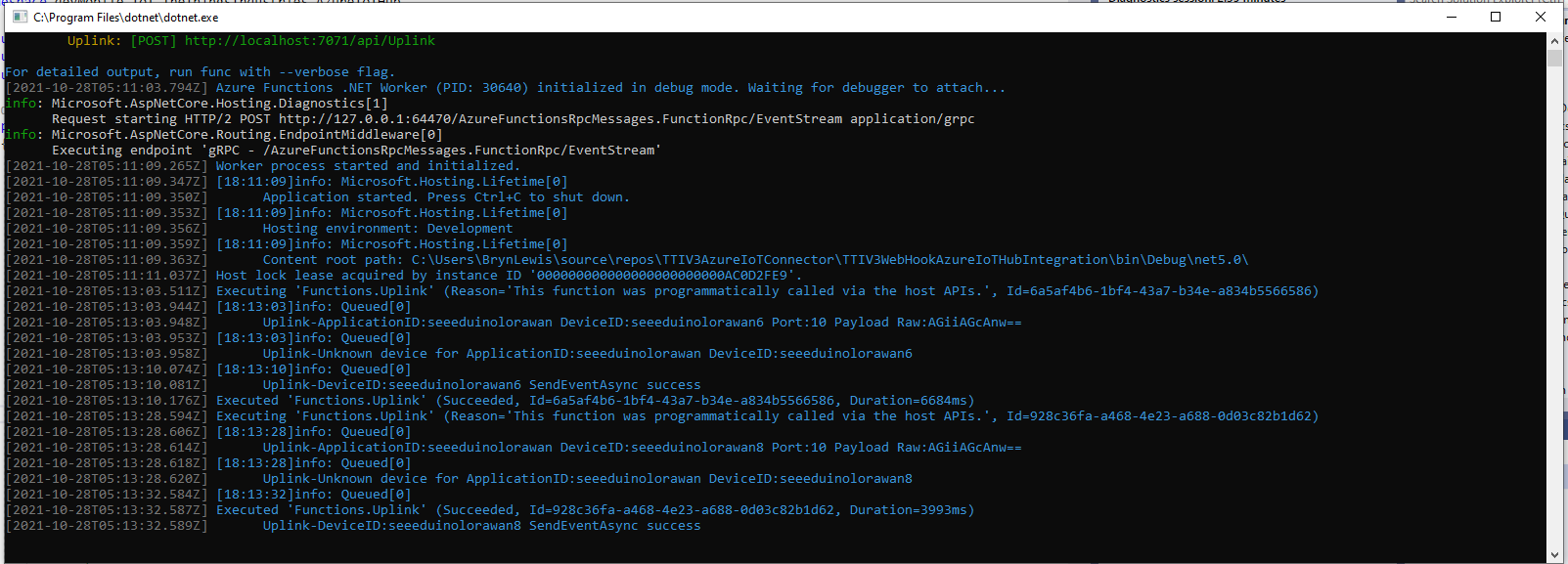
Azure Functions Desktop development environment

I then deployed my function to Azure and configured the Azure IoT Hub connection string, Azure Application Insights key etc.

Azure Function configuration

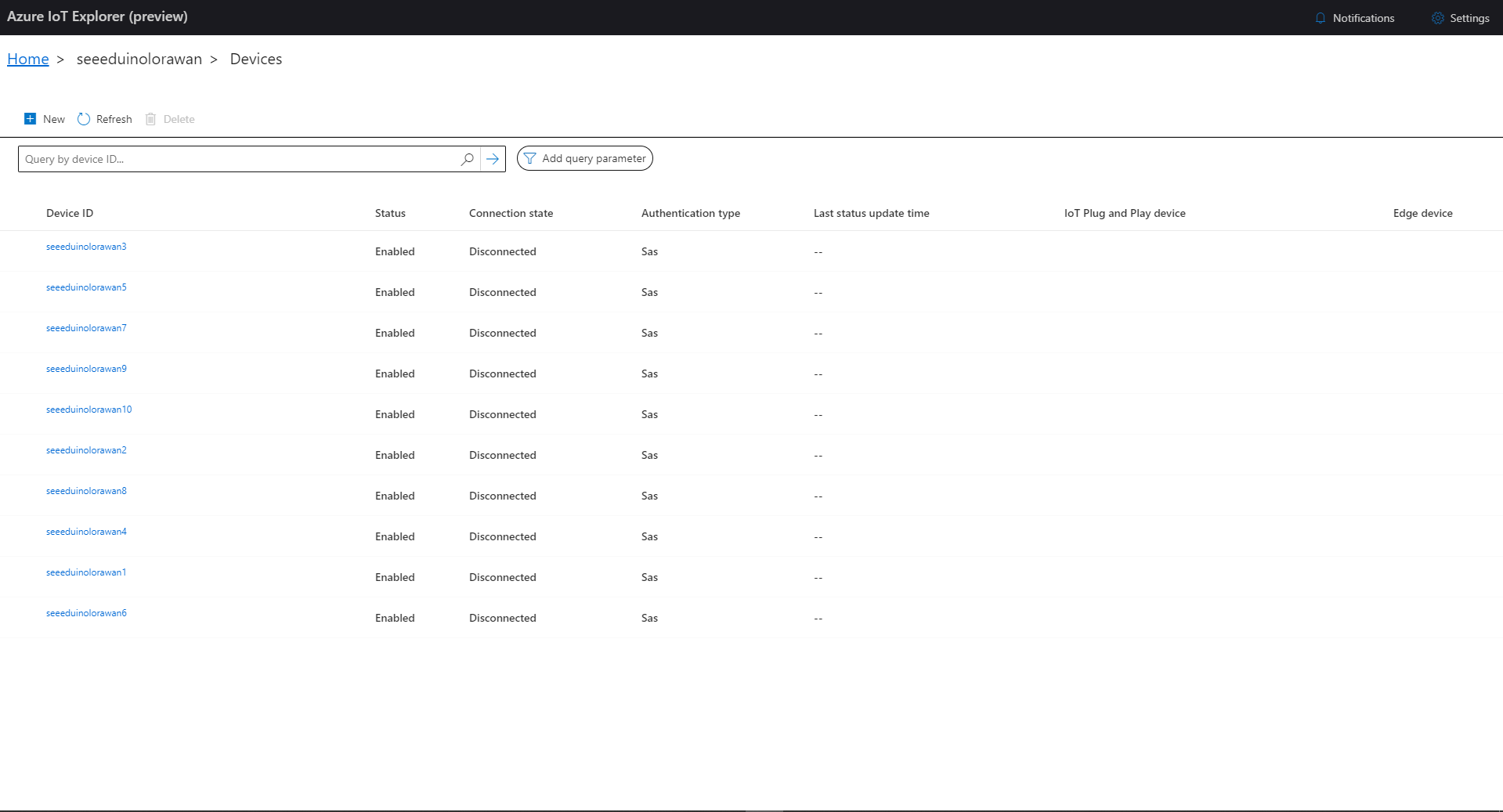
I then used Azure IoT Explorer to configure devices, view uplink traffic etc. When I connected to my Azure IoT Hub shortly after starting the application all the devices were disconnected.

Azure IoT Explorer – no connected devices

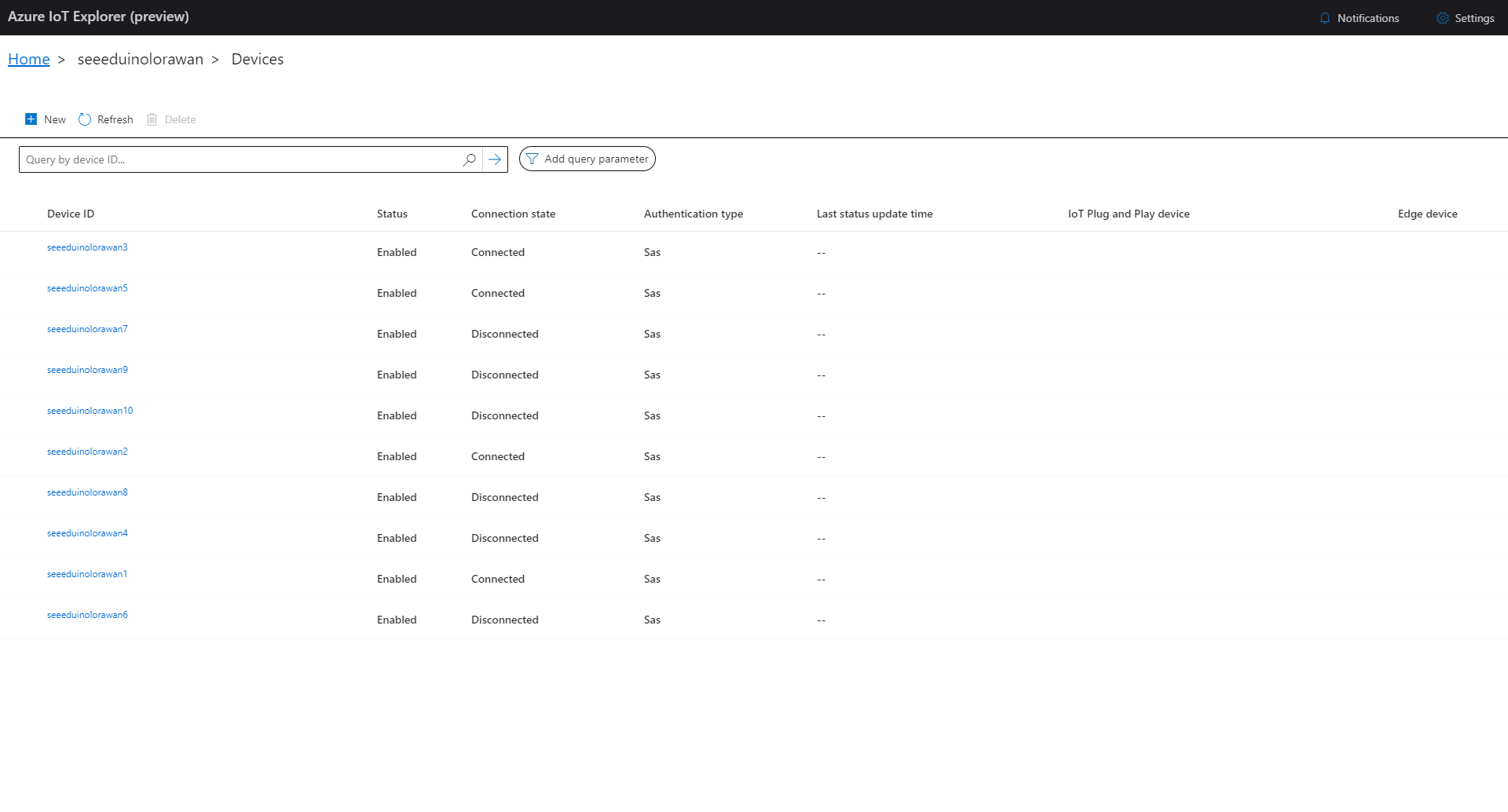
The SeeeduinoLoRaWAN devices report roughly every 15 minutes so it took a while for them all to connect. (the SeeeduinoLoRaWAN4 & SeeeduinoLoRaWAN6 need to be repaired) .

Azure IoT Explorer – some connected devices

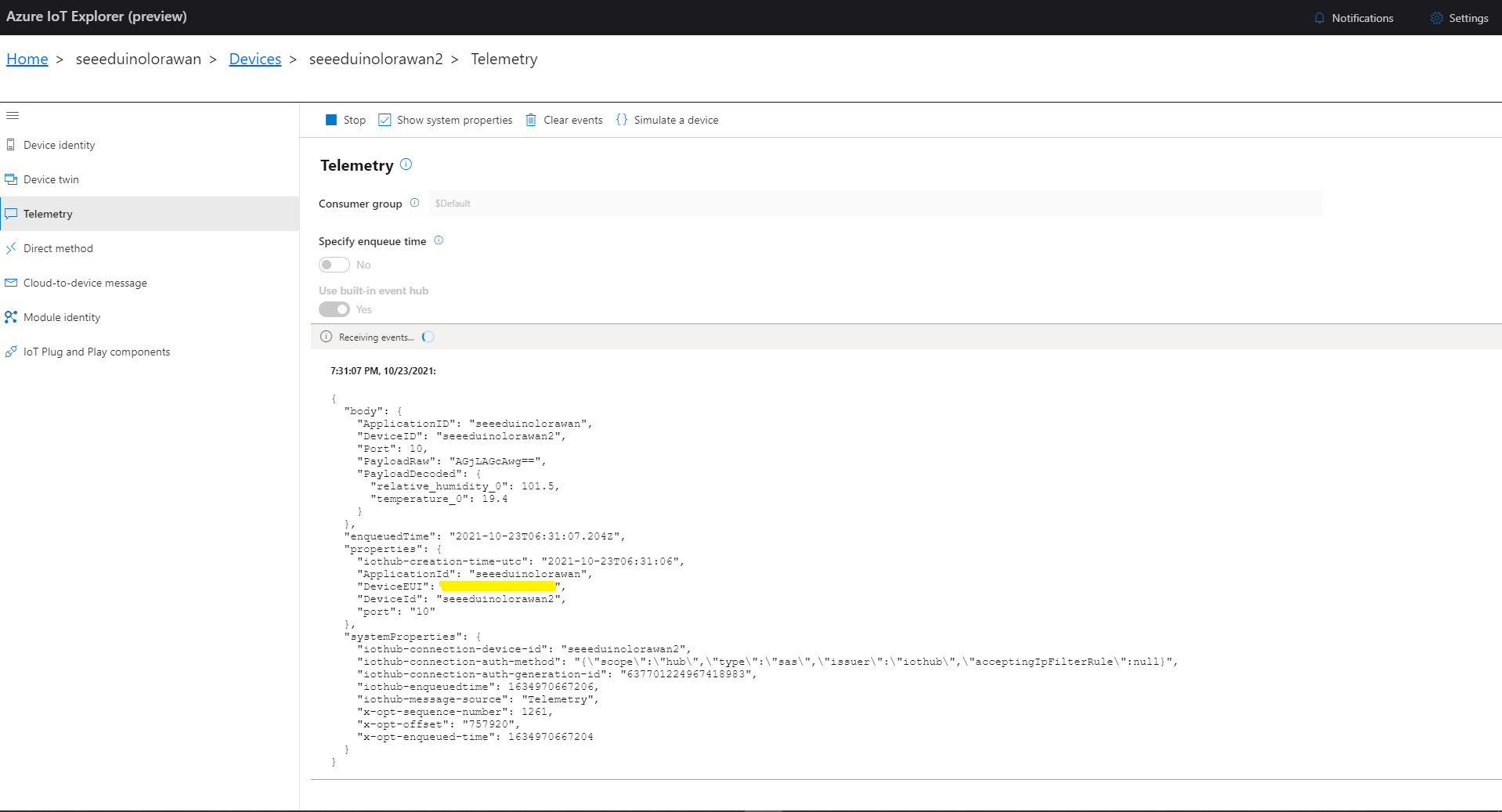
After a device had connected I could use Azure IoT Explorer to inspect the Seeeduino LoRaWAN device uplink message payloads.

Azure IoT Explorer displaying device telemetry

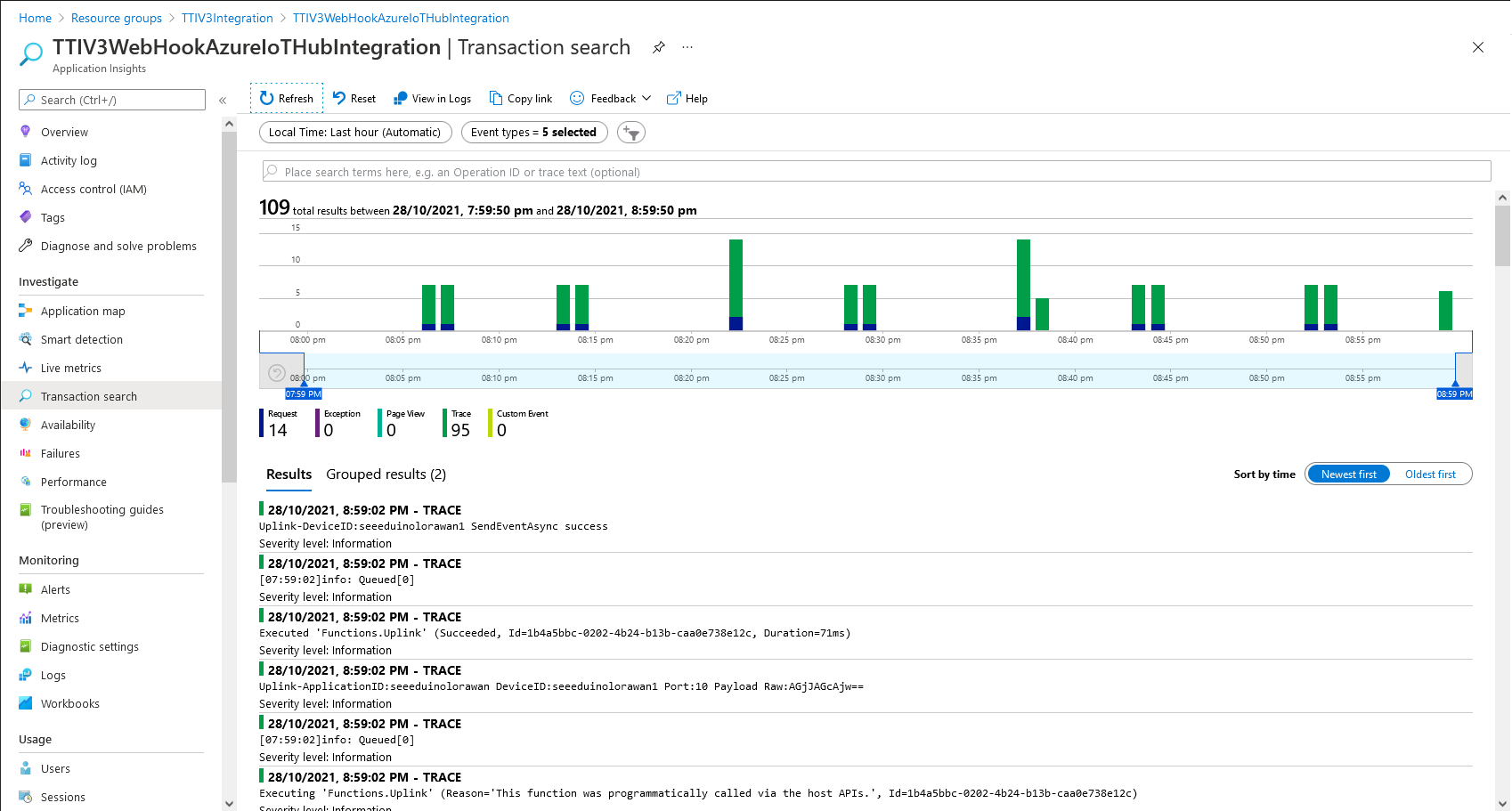
I also used Azure Application Insights to monitor the performance of the function and device activity.

Azure Application Insights displaying device telemetry

The Azure functions uplink message processor was then “soak tested” for a week without an issues.

TTI V3 Connector Azure Storage Queues

The first Proof of Concept(PoC) for my updated The Things Industries(TTI) V3 Webhooks Integration was to explore the use of Azure Functions to securely ingest webhook calls. The aim was to have uplink and downlink message progress message payloads written to Azure Storage Queues with output bindings ready for processing.

namespace devMobile.IoT.TheThingsIndustries.HttpInputStorageQueueOutput
{
	using System.Net;
	using System.Threading.Tasks;

	using Microsoft.Azure.Functions.Worker;
	using Microsoft.Azure.Functions.Worker.Http;
	using Microsoft.Azure.WebJobs;
	using Microsoft.Extensions.Logging;


	[StorageAccount("AzureWebJobsStorage")]
	public static class Webhooks
	{
		[Function("Uplink")]
		public static async Task<HttpTriggerUplinkOutputBindingType> Uplink([HttpTrigger(AuthorizationLevel.Function, "post")] HttpRequestData req, FunctionContext context)
		{
			var logger = context.GetLogger("UplinkMessage");

			logger.LogInformation("Uplink processed");
			
			var response = req.CreateResponse(HttpStatusCode.OK);

			return new HttpTriggerUplinkOutputBindingType()
			{
				Name = await req.ReadAsStringAsync(),
				HttpReponse = response
			};
		}

		public class HttpTriggerUplinkOutputBindingType
		{
			[QueueOutput("uplink")]
			public string Name { get; set; }

			public HttpResponseData HttpReponse { get; set; }
		}

...

		[Function("Failed")]
		public static async Task<HttpTriggerFailedOutputBindingType> Failed([HttpTrigger(AuthorizationLevel.Function, "post")] HttpRequestData req, FunctionContext context)
		{
			var logger = context.GetLogger("Failed");

			logger.LogInformation("Failed procssed");

			var response = req.CreateResponse(HttpStatusCode.OK);

			return new HttpTriggerFailedOutputBindingType()
			{
				Name = await req.ReadAsStringAsync(),
				HttpReponse = response
			};
		}

		public class HttpTriggerFailedOutputBindingType
		{
			[QueueOutput("failed")]
			public string Name { get; set; }

			public HttpResponseData HttpReponse { get; set; }
		}
	}
}

After some initial problems with the use of Azure Storage Queue output bindings to insert messages into the ack, nak, failed, queued, and uplink Azure Storage Queues I found it didn’t take much code and worked reliably on my desktop.

Azure Functions Desktop Development environment running my functions

I used Telerik Fiddler with some sample payloads to test my application.

Telerik Fiddler Request Composer “posting” sample message to desktop endpoint

Once the functions were running reliably on my desktop, I created an Azure Service Plan, deployed the code, then generated an API Key for securing my HTTPTrigger endpoints.

Azure Functions Host Key configuration dialog

I then added a TTI Webhook Integration to my TTI SeeduinoLoRaWAN application, manually configured the endpoint, enabled the different messages I wanted to process and set the x-functions-key header.

TTI Application Webhook configuration

After a short delay I could see messages in the message uplink queue with Azure Storage Explorer

Azure Storage Explorer displaying content of my uplink queue

Building a new version of my TTIV3 Azure IoT connector is a useful learning exercise but I’m still deciding whether is it worth the effort as TTI has one now?

Azure HTTP Trigger Functions with .NET Core 5

Updated .NET Core V6 Version

My updated The Things Industries(TTI) connector will use a number of Azure Functions to process Application Integration webhooks (with HTTP Triggers) and Azure Storage Queue messages(with Output Bindings & QueueTriggers).

On a couple of customer projects we had been updating Azure Functions from .NET 4.X to .NET Core 3.1, and most recently .NET Core 5. This process has been surprisingly painful so I decided to build a series of small proof of concept (PoC) projects to explore the problem.

Visual Studio Azure Function Trigger type selector

I started with the Visual Studio 2019 Azure Function template and created a plain HTTPTrigger.

public static class Function1
{
   [Function("Function1")]
   public static HttpResponseData Run([HttpTrigger(AuthorizationLevel.Function, "get", "post")] HttpRequestData req,
      FunctionContext executionContext)
   {
      var logger = executionContext.GetLogger("Function1");
      logger.LogInformation("C# HTTP trigger function processed a request.");

      var response = req.CreateResponse(HttpStatusCode.OK);
      response.Headers.Add("Content-Type", "text/plain; charset=utf-8");

      response.WriteString("Welcome to Azure Functions!");

      return response;
   }
}

I changed the AuthorizationLevel to Anonymous to make testing in Azure with Telerik Fiddler easier

public static class Function1
{
	[Function("PlainAsync")]
	public static async Task<IActionResult> Run([HttpTrigger(AuthorizationLevel.Anonymous, "get", "post", Route = null)] HttpRequestData request, FunctionContext executionContext)
	{
		var logger = executionContext.GetLogger("UplinkMessage");

		logger.LogInformation("C# HTTP trigger function processed a request.");

		var response = request.CreateResponse(HttpStatusCode.OK);

		response.Headers.Add("Content-Type", "text/plain; charset=utf-8");

		response.WriteString("Welcome to Azure Functions!");

		return new OkResult();
	}
}

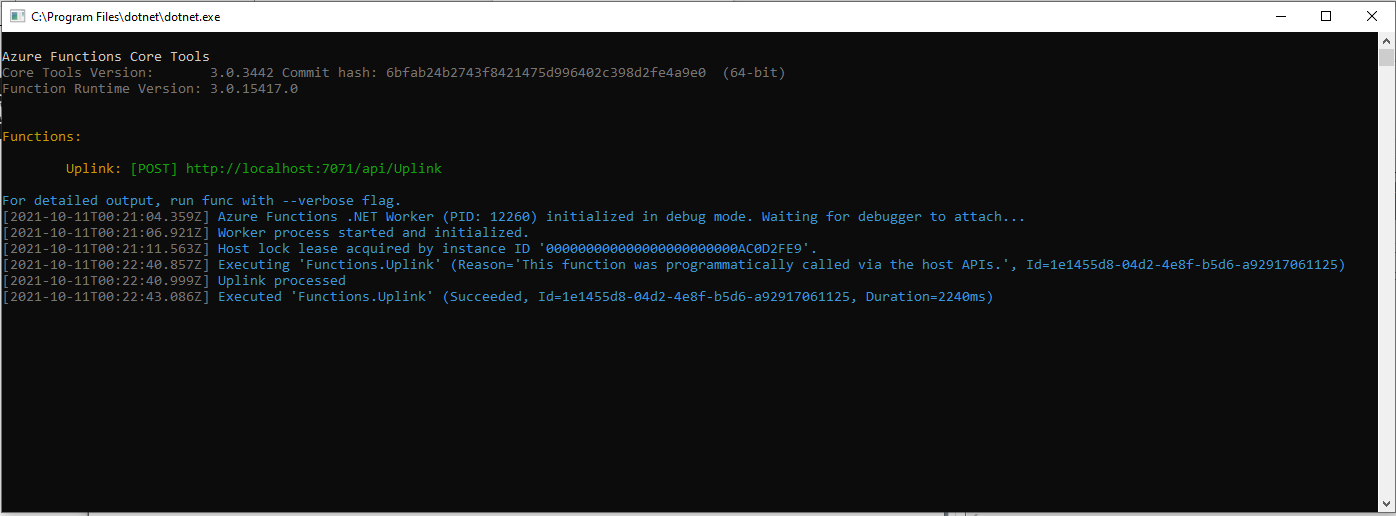
With not a lot of work I had an Azure Function I could run in the Visual Studio debugger

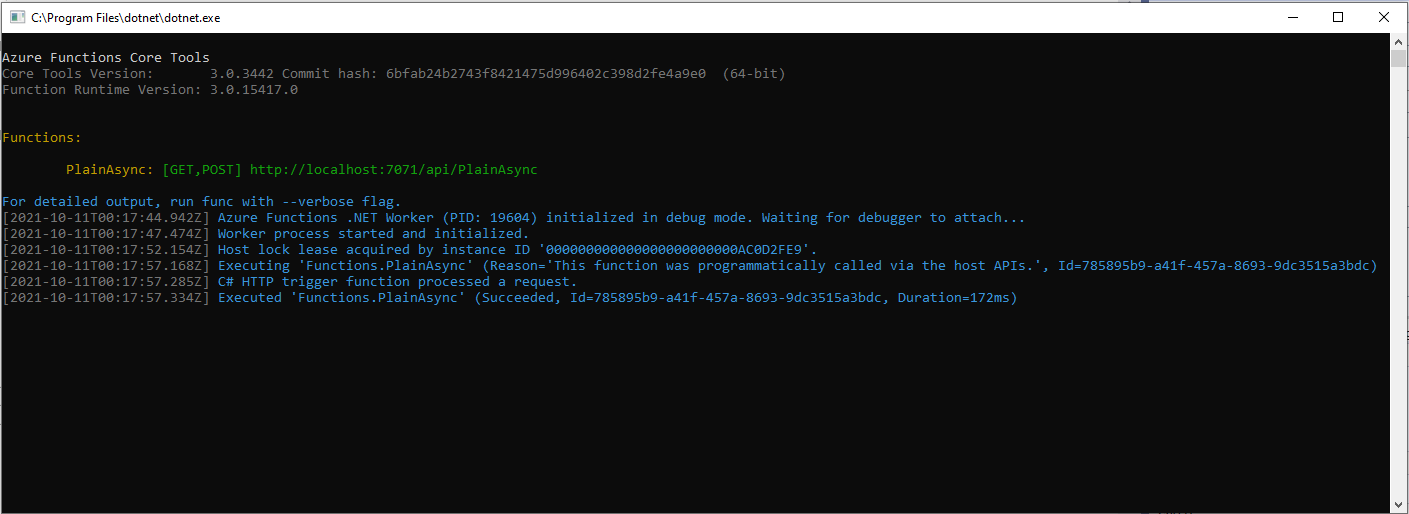
Azure Functions Debug Diagnostic Output

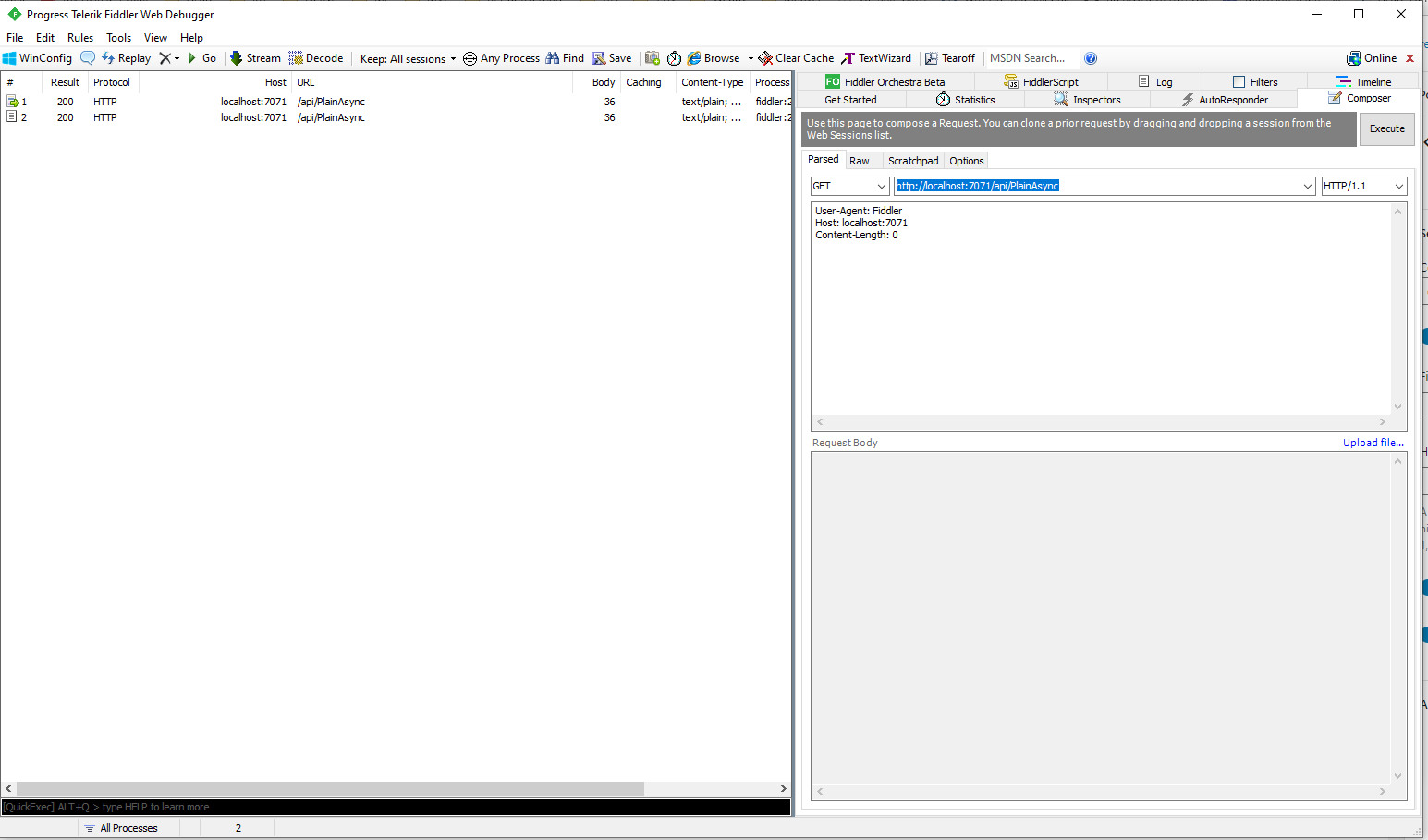
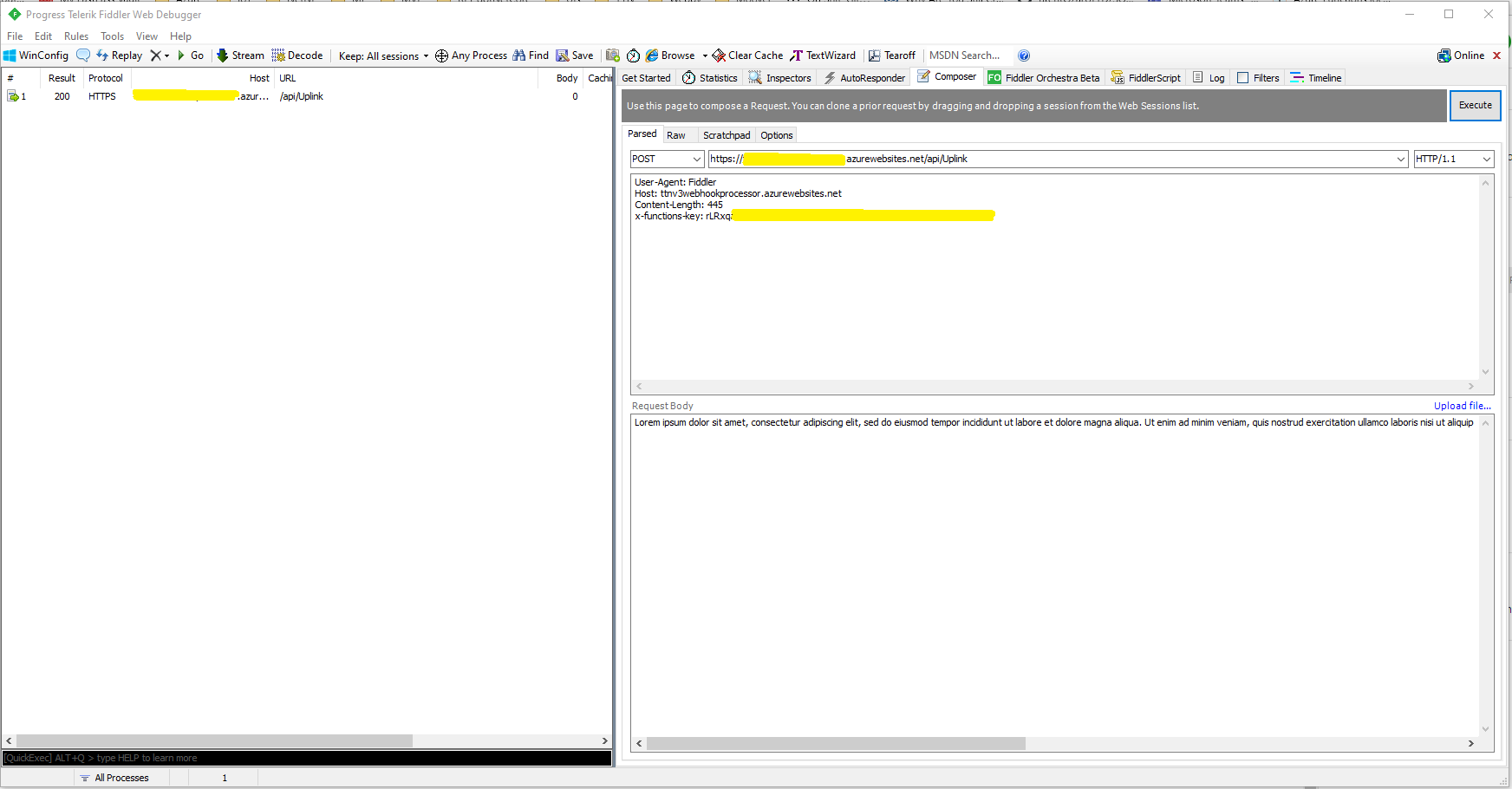
I could invoke the function using the endpoint displayed as debugging environment started.

Telerik Fiddler Composer invoking Azure Function running locally

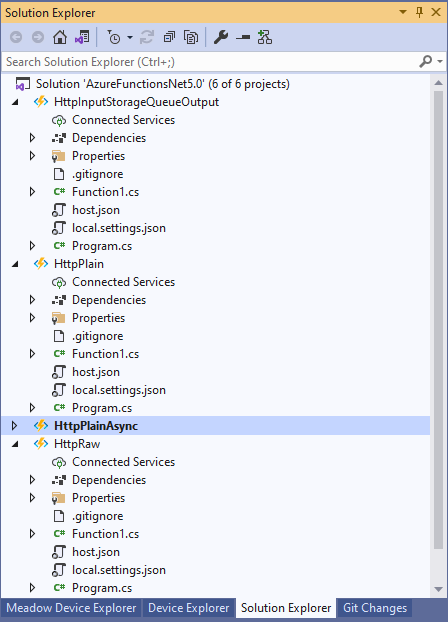
I then added more projects to explore asynchronicity, and output bindings

Azure Functions Solution PoC Projects

After a bit of “trial and error” I had an HTTPTrigger Function that inserted a message containing the payload of an HTTP POST into an Azure Storage Queue.

[StorageAccount("AzureWebJobsStorage")]
public static class Function1
{
	[Function("Uplink")]
	public static async Task<HttpTriggerUplinkOutputBindingType> Uplink([HttpTrigger(AuthorizationLevel.Function, "post")] HttpRequestData req, FunctionContext context)
	{
		var logger = context.GetLogger("UplinkMessage");

		logger.LogInformation("Uplink processed");
			
		var response = req.CreateResponse(HttpStatusCode.OK);

		return new HttpTriggerUplinkOutputBindingType()
		{
			Name = await req.ReadAsStringAsync(),
			HttpReponse = response
		};
	}

	public class HttpTriggerUplinkOutputBindingType
	{
		[QueueOutput("uplink")]
		public string Name { get; set; }

		public HttpResponseData HttpReponse { get; set; }
	}
}

The key was Multiple Output Bindings so the function could return a result for both the HttpResponseData and Azure Storage Queue operations

Azure Functions Debug Diagnostic Output

After getting the function running locally I deployed it to a Function App running in an App Service plan

Azure HTTP Trigger function Host Key configuration

Using the Azure Portal I configured an x-functions-key which I could use in Telerik Fiddler

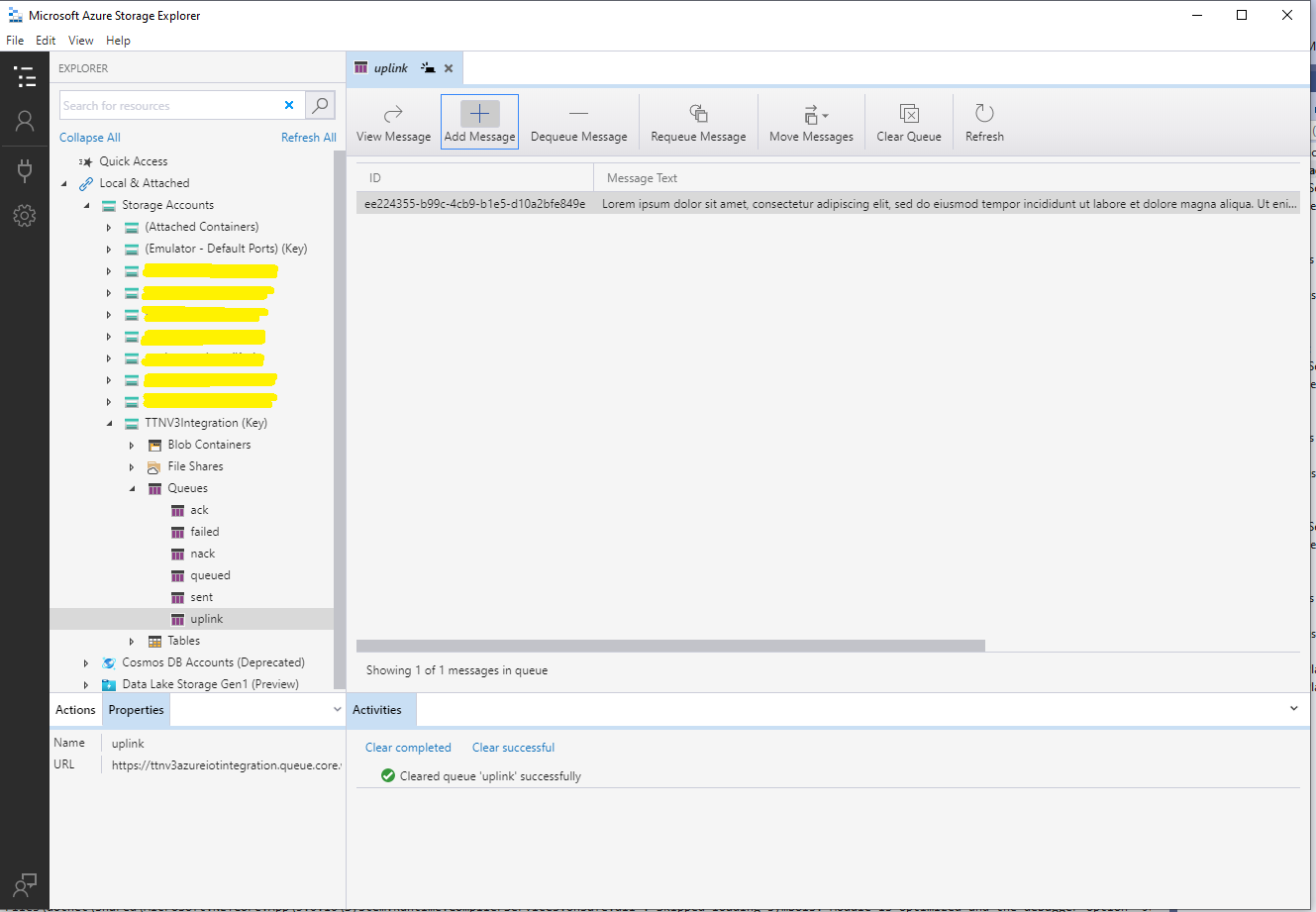
After fixing an accidental truncation of the x-functions-key a message with the body of the POST was created in the Azure Storage Queue.

Azure Storage Queue Message containing HTTP Post Payload

The aim of this series of PoCs was to have an Azure function that securely (x-functions-key) processed an Hyper Text Transfer Protocol(HTTP) POST with an HTTPTrigger and inserted a message containing the payload into an Azure Storage Queue using an OutputBinding.

Use the contents of this blog post with care as it may not age well.

Azure Functions with VB.Net 4.X

Updated .NET Core V6 Version

As part of my “day job” I spend a lot of time working with C# and VB.Net 4.X “legacy” projects doing upgrades, bugs fixes and moving applications to Azure. For the last couple of months I have been working on a project replacing Microsoft message queue(MSMQ) queues with Azure Storage Queues so the solution is easier to deploy in Azure.

The next phase of the project is to replace a number of Windows Services with Azure Queue Trigger and Timer Trigger functions. The aim is a series of small steps which we can test before deployment rather than major changes, hence the use of V1 Azure functions for the first release.

Silver Fox systems sells a Visual Studio extension which generates an HTTP Trigger VB.Net project. I needed Timer and Queue Trigger functions so I created C# examples and then used them to figure out how to build VB.Net equivalents

Visual Studio Solution Explorer

After quite a few failed attempts I found this sequence worked for me

Add a new VB.Net class library
Provide a name for new class library
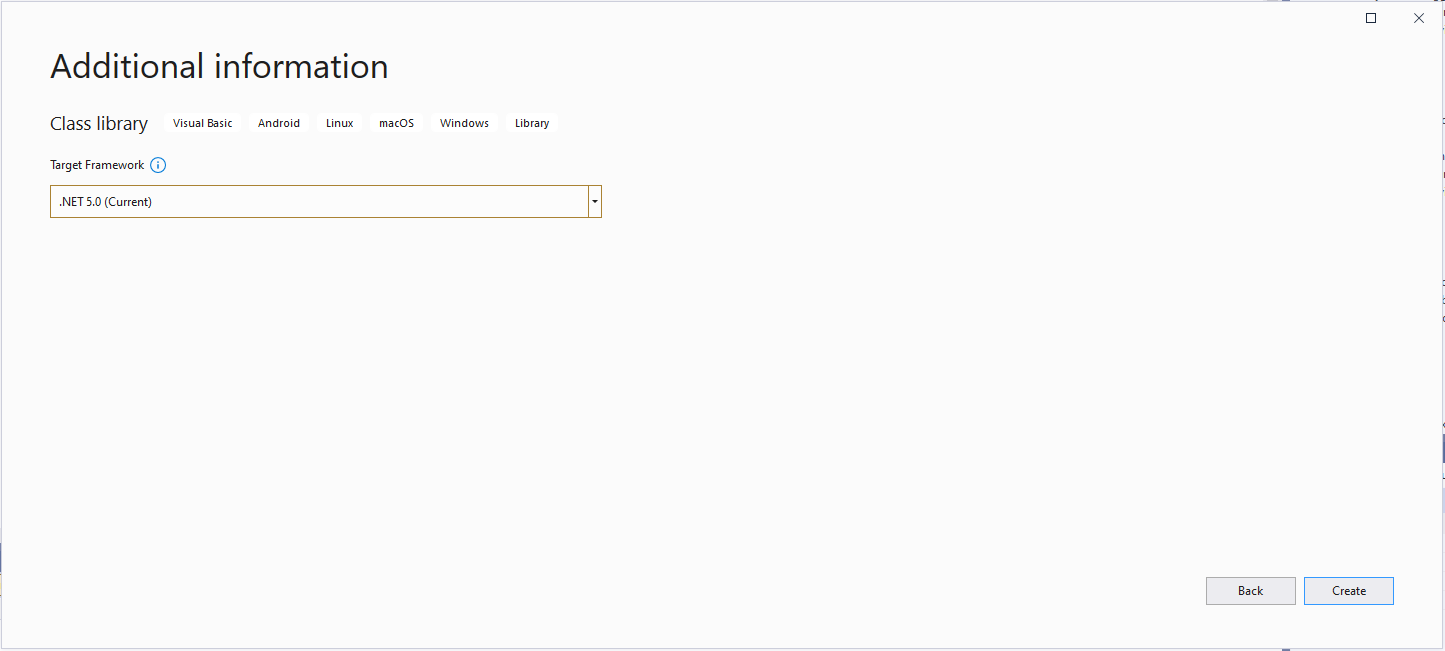
Select target framework

Even though the target platform is not .NET 5.0 ignore this and continue.

Microsoft.NET.Sdk.Functions

Added Microsoft.NET.Sdk.Functions (make sure version 1.0.38)

Visual Studio project with Azure Function Icon.

Then unload the project and open the file.

<Project Sdk="Microsoft.NET.Sdk">

  <PropertyGroup>
    <RootNamespace>TimerClass</RootNamespace>
    <TargetFramework>net5.0</TargetFramework>
  </PropertyGroup>

  <ItemGroup>
    <PackageReference Include="Microsoft.NET.Sdk.Functions" Version="1.0.38" />
  </ItemGroup>

</Project>

Add the TargetFramework and AzureFunctionsVersion lines

<Project Sdk="Microsoft.NET.Sdk">

  <PropertyGroup>
    <RootNamespace>TimerClass</RootNamespace>
    <TargetFramework>net48</TargetFramework>
    <AzureFunctionsVersion>v1</AzureFunctionsVersion>
  </PropertyGroup>
  <ItemGroup>
    <PackageReference Include="Microsoft.NET.Sdk.Functions" Version="1.0.38" />
  </ItemGroup>

</Project>

At this point the project should compile but won’t do much, so update the class to look like the code below.

Imports System.Threading

Imports Microsoft.Azure.WebJobs
Imports Microsoft.Extensions.Logging


Public Class TimerTrigger
   Shared executionCount As Int32

   <FunctionName("Timer")>
   Public Shared Sub Run(<TimerTrigger("0 */1 * * * *")> myTimer As TimerInfo, log As ILogger)
      Interlocked.Increment(executionCount)

      log.LogInformation("VB.Net TimerTrigger next trigger:{0} Execution count:{1}", myTimer.ScheduleStatus.Next, executionCount)

   End Sub
End Class

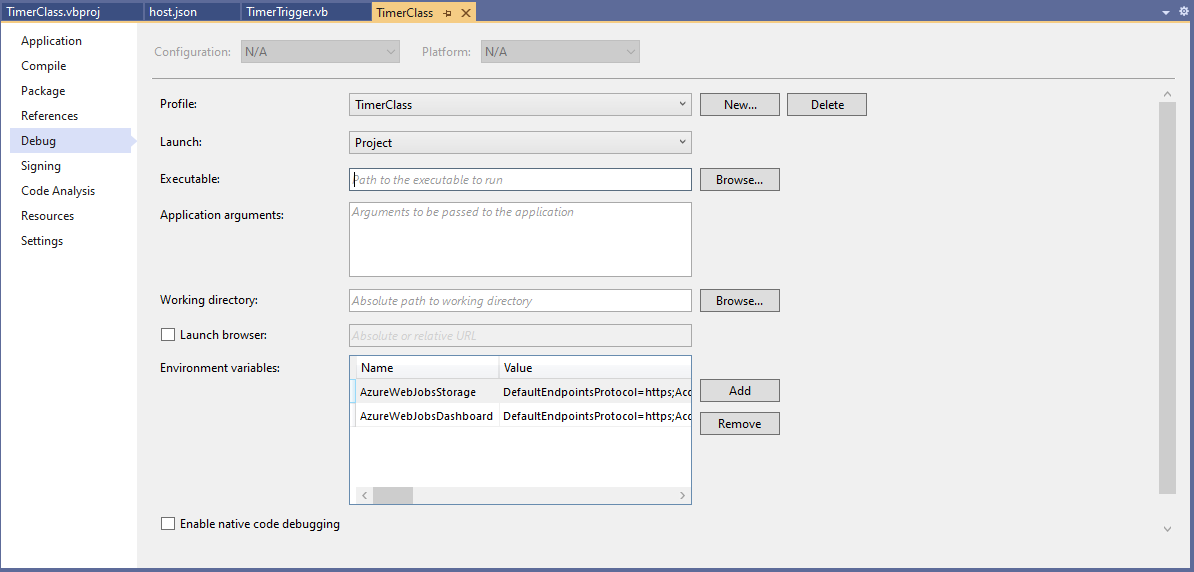
Then add an empty hosts.json file (make sure “copy if newer” is configured in properties) to the project directory, then depending on deployment model configure the AzureWebJobsStorage and AzureWebJobsDashboard connection strings via environment variables or a local.settings.json file.

Visual Studio Environment variables for AzureWebJobsStorage and AzureWebJobsDashboard connection strings

Blob Trigger Sample code

Imports System.IO
Imports System.Threading

Imports Microsoft.Azure.WebJobs
Imports Microsoft.Extensions.Logging


Public Class BlobTrigger
   Shared executionCount As Int32

   ' This function will get triggered/executed when a new message is written on an Azure Queue called events.
   <FunctionName("Notifications")>
   Public Shared Async Sub Run(<BlobTrigger("notifications/{name}", Connection:="BlobEndPoint")> payload As Stream, name As String, log As ILogger)
      Interlocked.Increment(executionCount)

      log.LogInformation("VB.Net BlobTrigger processed blob name:{0} Size:{1} bytes Execution count:{2}", name, payload.Length, executionCount)
   End Sub
End Class

HTTP Trigger Sample code

Imports System.Net
Imports System.Net.Http
Imports System.Threading

Imports Microsoft.Azure.WebJobs
Imports Microsoft.Azure.WebJobs.Extensions.Http
Imports Microsoft.Extensions.Logging


Public Class HttpTrigger
   Shared executionCount As Int32

   <FunctionName("Notifications")>
   Public Shared Async Function Run(<HttpTrigger(AuthorizationLevel.Anonymous, "get", "post", Route:=Nothing)> req As HttpRequestMessage, log As ILogger) As Task(Of HttpResponseMessage)
      Interlocked.Increment(executionCount)

      log.LogInformation($"VB.Net HTTP trigger Execution count:{0} Method:{1}", executionCount, req.Method)

      Return New HttpResponseMessage(HttpStatusCode.OK)
   End Function
End Class

Queue Trigger Sample Code

Imports System.Threading

Imports Microsoft.Azure.WebJobs
Imports Microsoft.Extensions.Logging


Public Class QueueTrigger
   Shared ConcurrencyCount As Long
   Shared ExecutionCount As Long

   <FunctionName("Alerts")>
   Public Shared Sub ProcessQueueMessage(<QueueTrigger("notifications", Connection:="QueueEndpoint")> message As String, log As ILogger)
      Interlocked.Increment(ConcurrencyCount)
      Interlocked.Increment(ExecutionCount)

      log.LogInformation("VB.Net Concurrency:{0} Message:{1} Execution count:{2}", ConcurrencyCount, message, ExecutionCount)

      ' Wait for a bit to force some consurrency
      Thread.Sleep(5000)

      Interlocked.Decrement(ConcurrencyCount)
   End Sub
End Class

As well as counting the number of executions I also wanted to check that >1 instances were started to process messages when the queues had many messages. I added a “queues” section to the hosts.json file so I could tinker with the options.

{
  "queues": {
    "maxPollingInterval": 100,
    "visibilityTimeout": "00:00:05",
    "batchSize": 16,
    "maxDequeueCount": 5,
    "newBatchThreshold": 8
  }
}

The QueueMessageGenerator application inserts many messages into a queue for processing.

When I started the QueueTrigger function I could see the concurrency count was > 0

Timer Trigger Sample Code

Imports System.Threading

Imports Microsoft.Azure.WebJobs
Imports Microsoft.Extensions.Logging


Public Class TimerTrigger
   Shared executionCount As Int32

   <FunctionName("Timer")>
   Public Shared Sub Run(<TimerTrigger("0 */1 * * * *")> myTimer As TimerInfo, log As ILogger)
      Interlocked.Increment(executionCount)

      log.LogInformation("VB.Net TimerTrigger next trigger:{0} Execution count:{1}", myTimer.ScheduleStatus.Next, executionCount)

   End Sub
End Class

The source code for the C# and VB.Net functions is available on GitHub

Downlink messages NahYeah

While running my The Things IndustriesTTI) gateway I noticed an exception in the logs every so often

Exception of type 'Microsoft.Azure.Devices.Client.Exceptions.DeviceMessageLockLostException' was thrown.

My client subscribes to Message Queue Telemetry Transport Topics(MQTT) (using MQTTNet) for each TTI Application and establishes a connection (using an Azure DeviceClient) for each TTI Device to an Azure IoT Hub(s).

  • v3/{application id}@{tenant id}/devices/{device id}/up
  • v3/{application id}@{tenant id}/devices/{device id}/down/queued
  • v3/{application id}@{tenant id}/devices/{device id}/down/sent
  • v3/{application id}@{tenant id}/devices/{device id}/down/ack
  • v3/{application id}@{tenant id}/devices/{device id}/down/nack
  • v3/{application id}@{tenant id}/devices/{device id}/down/failed

The application subscribes to the queued, ack, nack, and failed topics so the progress of a downlink message can be monitored. For downlink messages the correlation_id “az:LockToken:” contains the message.LockToken so that they can be Abandoned, Completed or Rejected in the MQTT receive messageHandler.

Below is the logging from my application for an odd sequence of messages

*****Nothing much happening for a couple of hours the .'s represent approx 1 second. Wisnode 4 sends roughly every 5 minues

.....................................................................................................................................................................................................................................................................................................................
03:36:08 TTN Uplink message
 ApplicationID: application1
 DeviceID: wisnodetest04
 Port: 5
.....................................................................................................................................................................................................................................................................................................................
03:41:18 TTN Uplink message
 ApplicationID: application1
 DeviceID: wisnodetest04
 Port: 5
...........................................................................
03:42:34 Azure IoT Hub downlink message
 ApplicationID: application1
 DeviceID: wisnodetest04
 LockToken: 57ea0fad-b6b3-492e-b194-10c4ff3e53cb
 Body: vu8=

*****I then started sending 5 messages to Wisnode 5 same payload vu8=, port 71 thru 75 

***** 71 Queued
03:42:34 Queued: v3/application1@tenant1/devices/wisnodetest04/down/queued
 payload: {"end_device_ids":{"device_id":"wisnodetest04","application_ids":{"application_id":"application1"}},
	"correlation_ids":[
"az:LockToken:57ea0fad-b6b3-492e-b194-10c4ff3e53cb",
"as:downlink:01EXX9B1CA4DB68PKCDAK4SS4H"],
	"downlink_queued":{"f_port":71,"frm_payload":"vu8=","confirmed":true,"priority":"NORMAL",
	"correlation_ids":[
"az:LockToken:57ea0fad-b6b3-492e-b194-10c4ff3e53cb",
"as:downlink:01EXX9B1CA4DB68PKCDAK4SS4H"]}}
...
03:42:37 Azure IoT Hub downlink message
 ApplicationID: application1
 DeviceID: wisnodetest04
 LockToken: e2fef28c-fb1f-42cd-bb40-3ad8e6051da9
 Body: vu8=
.

***** 72 Queued
03:42:38 Queued: v3/application1@tenant1/devices/wisnodetest04/down/queued
 payload: {"end_device_ids":{"device_id":"wisnodetest04","application_ids":{"application_id":"application1"}},
	"correlation_ids":[
"az:LockToken:e2fef28c-fb1f-42cd-bb40-3ad8e6051da9",
"as:downlink:01EXX9B4RGSCJ4BN21GHPM85W5"],
	"downlink_queued":{"f_port":72,"frm_payload":"vu8=",
"confirmed":true,"priority":"NORMAL",
	"correlation_ids":[
"az:LockToken:e2fef28c-fb1f-42cd-bb40-3ad8e6051da9",
"as:downlink:01EXX9B4RGSCJ4BN21GHPM85W5"]}}
...
03:42:41 Azure IoT Hub downlink message
 ApplicationID: application1
 DeviceID: wisnodetest04
 LockToken: 70d61d71-9b24-44d2-b54b-7cc08da4d072
 Body: vu8=

***** 73 Queued
03:42:41 Queued: v3/application1@tenant1/devices/wisnodetest04/down/queued
 payload: {"end_device_ids":{"device_id":"wisnodetest04","application_ids":{"application_id":"application1"}},
	"correlation_ids":[
"az:LockToken:70d61d71-9b24-44d2-b54b-7cc08da4d072","as:downlink:01EXX9B800WF7FEP56J3EZ3M8A"],
	"downlink_queued":{"f_port":73,"frm_payload":"vu8=",
"confirmed":true,"priority":"NORMAL",
	"correlation_ids":[
"az:LockToken:70d61d71-9b24-44d2-b54b-7cc08da4d072",
"as:downlink:01EXX9B800WF7FEP56J3EZ3M8A"]}}
...

***** 74 Queued
03:42:45 Azure IoT Hub downlink message
 ApplicationID: application1
 DeviceID: wisnodetest04
 LockToken: 12537728-de4a-4489-ace5-92923e49b8e4
 Body: vu8=
.
03:42:45 Queued: v3/application1@tenant1/devices/wisnodetest04/down/queued
 payload: {"end_device_ids":{"device_id":"wisnodetest04","application_ids":{"application_id":"application1"}},
	"correlation_ids":[
"az:LockToken:12537728-de4a-4489-ace5-92923e49b8e4",
"as:downlink:01EXX9BBWA2YNCN2DFE5FC3BP3"],
	"downlink_queued":{
"f_port":74,"frm_payload":"vu8=",
"confirmed":true,"priority":"NORMAL",
	"correlation_ids":[
"az:LockToken:12537728-de4a-4489-ace5-92923e49b8e4",
"as:downlink:01EXX9BBWA2YNCN2DFE5FC3BP3"]}}
...

***** 75 Queued
03:42:48 Azure IoT Hub downlink message
 ApplicationID: application1
 DeviceID: wisnodetest04
 LockToken: 388efc11-4514-406e-8147-9109289095f4
 Body: vu8=

03:42:49 Queued: v3/application1@tenant1/devices/wisnodetest04/down/queued
 payload: {"end_device_ids":{"device_id":"wisnodetest04","application_ids":{"application_id":"application1"}},
	"correlation_ids":[
"az:LockToken:388efc11-4514-406e-8147-9109289095f4",
"as:downlink:01EXX9BFCM2G51EPYNWGDWPS0N"],
	"downlink_queued":{"f_port":75,"frm_payload":"vu8=",
"confirmed":true,"priority":"NORMAL",
	"correlation_ids":[
"az:LockToken:388efc11-4514-406e-8147-9109289095f4",
"as:downlink:01EXX9BFCM2G51EPYNWGDWPS0N"]}}

***** Waiting for Wisniode
..........................................................................................................................................................................
03:47:18 TTN Uplink message
 ApplicationID: application1
 DeviceID: wisnodetest04
 Port: 5

***** Waiting for Wisniode again, I think might have been such a long delay becuase TTI didn't get
..........................................................................................................................................................................................................................................................................................................................................................................................................................................................................................................................................................................................
***** 71 Nack'd
03:56:52 Nack: v3/application1@tenant1/devices/wisnodetest04/down/nack
 payload: {"end_device_ids":{"device_id":"wisnodetest04","application_ids":{"application_id":"application1"},
	"dev_eui":"60C5A8FFFE781691","join_eui":"70B3D57ED0000000","dev_addr":"26083BE1"},
	"correlation_ids":[
"as:downlink:01EXX9B1CA4DB68PKCDAK4SS4H",
"as:up:01EXXA572VHN7X7G5KFTHBQPNG",
"az:LockToken:57ea0fad-b6b3-492e-b194-10c4ff3e53cb",
"gs:conn:01EXRPTTFGFNTRGH7V8FTC3R0S",
"gs:up:host:01EXRPTTFTEXBNV87KZFYFWP5V",
"gs:uplink:01EXXA56VPK14XG5S8JB9Q0V0X",
"ns:uplink:01EXXA56VYCHGGPPN1K77REMNM",
"rpc:/ttn.lorawan.v3.GsNs/HandleUplink:01EXXA56VRG6811HRCF803VJ34"],
	"received_at":"2021-02-07T03:56:53.211893610Z",
	"downlink_nack":{
"session_key_id":"AXd6GPmneD3dKVoArcS36g==",
"f_port":71,"f_cnt":35,
"frm_payload":"vu8=",
"confirmed":true,"priority":"NORMAL",
	"correlation_ids":[
"az:LockToken:57ea0fad-b6b3-492e-b194-10c4ff3e53cb",
"as:downlink:01EXX9B1CA4DB68PKCDAK4SS4H"]}}

 Found az:LockToken:

03:56:52 TTN Uplink message
 ApplicationID: application1
 DeviceID: wisnodetest04
 Port: 5

03:56:52 Azure IoT Hub downlink message
 ApplicationID: application1
 DeviceID: wisnodetest04
 LockToken: 856f5a9b-bc37-435c-8de9-19d2213999f8
 Body: vu8=

03:56:53 Queued: v3/application1@tenant1/devices/wisnodetest04/down/queued
 payload: {
"end_device_ids":{"device_id":"wisnodetest04","application_ids":{"application_id":"application1"},
	"correlation_ids":[
"az:LockToken:856f5a9b-bc37-435c-8de9-19d2213999f8",
"as:downlink:01EXXA57JJWWYEDX3Z55TNSTP5"],
	"downlink_queued":{"f_port":71,
"frm_payload":"vu8=",
"confirmed":true,"priority":"NORMAL",
	"correlation_ids":
["az:LockToken:856f5a9b-bc37-435c-8de9-19d2213999f8",
"as:downlink:01EXXA57JJWWYEDX3Z55TNSTP5"]}}

......
***** 71 Ack'd
03:56:58 Ack: v3/application1@tenant1/devices/wisnodetest04/down/ack
 payload: {"end_device_ids":{"device_id":"wisnodetest04","application_ids":{"application_id":"application1"},
	"dev_eui":"60C5A8FFFE781691","join_eui":"70B3D57ED0000000","dev_addr":"26083BE1"},
	"correlation_ids":[
"as:downlink:01EXX9B1CA4DB68PKCDAK4SS4H",
"as:up:01EXXA5D45E77S19TXEV1E4GAJ",
"az:LockToken:57ea0fad-b6b3-492e-b194-10c4ff3e53cb",
"gs:conn:01EXRPTTFGFNTRGH7V8FTC3R0S",
"gs:up:host:01EXRPTTFTEXBNV87KZFYFWP5V",
"gs:uplink:01EXXA5CV73THH2RKEAC2T9MDP",
"ns:uplink:01EXXA5CVDCWPFBTXGGGB3T02W",
"rpc:/ttn.lorawan.v3.GsNs/HandleUplink:01EXXA5CVDEXDFBPYXC0J01Q3E"],
	"received_at":"2021-02-07T03:56:59.397330003Z",
	"downlink_ack":{
"session_key_id":"AXd6GPmneD3dKVoArcS36g==",
"f_port":71,"f_cnt":36,"frm_payload":"vu8=",
"confirmed":true,"priority":"NORMAL",
	"correlation_ids":[
"az:LockToken:57ea0fad-b6b3-492e-b194-10c4ff3e53cb",
"as:downlink:01EXX9B1CA4DB68PKCDAK4SS4H"]}}

 Found az:LockToken:
Exception of type 'Microsoft.Azure.Devices.Client.Exceptions.DeviceMessageLockLostException' was thrown.

03:56:59 TTN Uplink message
 ApplicationID: application1
 DeviceID: wisnodetest04
 Port: 0
......
03:57:04 Ack: v3/application1@tenant1/devices/wisnodetest04/down/ack
 payload: {"end_device_ids":{"device_id":"wisnodetest04","application_ids":{"application_id":"application1"},
"dev_eui":"60C5A8FFFE781691","join_eui":"70B3D57ED0000000","dev_addr":"26083BE1"},
"correlation_ids":[
"as:downlink:01EXX9B4RGSCJ4BN21GHPM85W5",
"as:up:01EXXA5K2FWGP9DGD7THWZ8HNR",
"az:LockToken:e2fef28c-fb1f-42cd-bb40-3ad8e6051da9",
"gs:conn:01EXRPTTFGFNTRGH7V8FTC3R0S",
"gs:up:host:01EXRPTTFTEXBNV87KZFYFWP5V",
"gs:uplink:01EXXA5JVDR102TKCWQ77P4YYF",
"ns:uplink:01EXXA5JVGNGMZN33FNT47G6PF",
"rpc:/ttn.lorawan.v3.GsNs/HandleUplink:01EXXA5JVGJFFQVEWX2M1XSFKK"],
"received_at":"2021-02-07T03:57:05.487910418Z","downlink_ack":{"session_key_id":"AXd6GPmneD3dKVoArcS36g==",
"f_port":72,"f_cnt":37,
"frm_payload":"vu8=",
"confirmed":true,"priority":"NORMAL","correlation_ids":
["az:LockToken:e2fef28c-fb1f-42cd-bb40-3ad8e6051da9","as:downlink:01EXX9B4RGSCJ4BN21GHPM85W5"]}}

The sequence of messages is a bit odd, in the Azure DeviceClient ReceiveMessageHandler a downlink message is published, then a queued message is received, then a nak and finally an ack, The exception was because my client was trying to Complete the delivery of a message that had already been Abandoned.

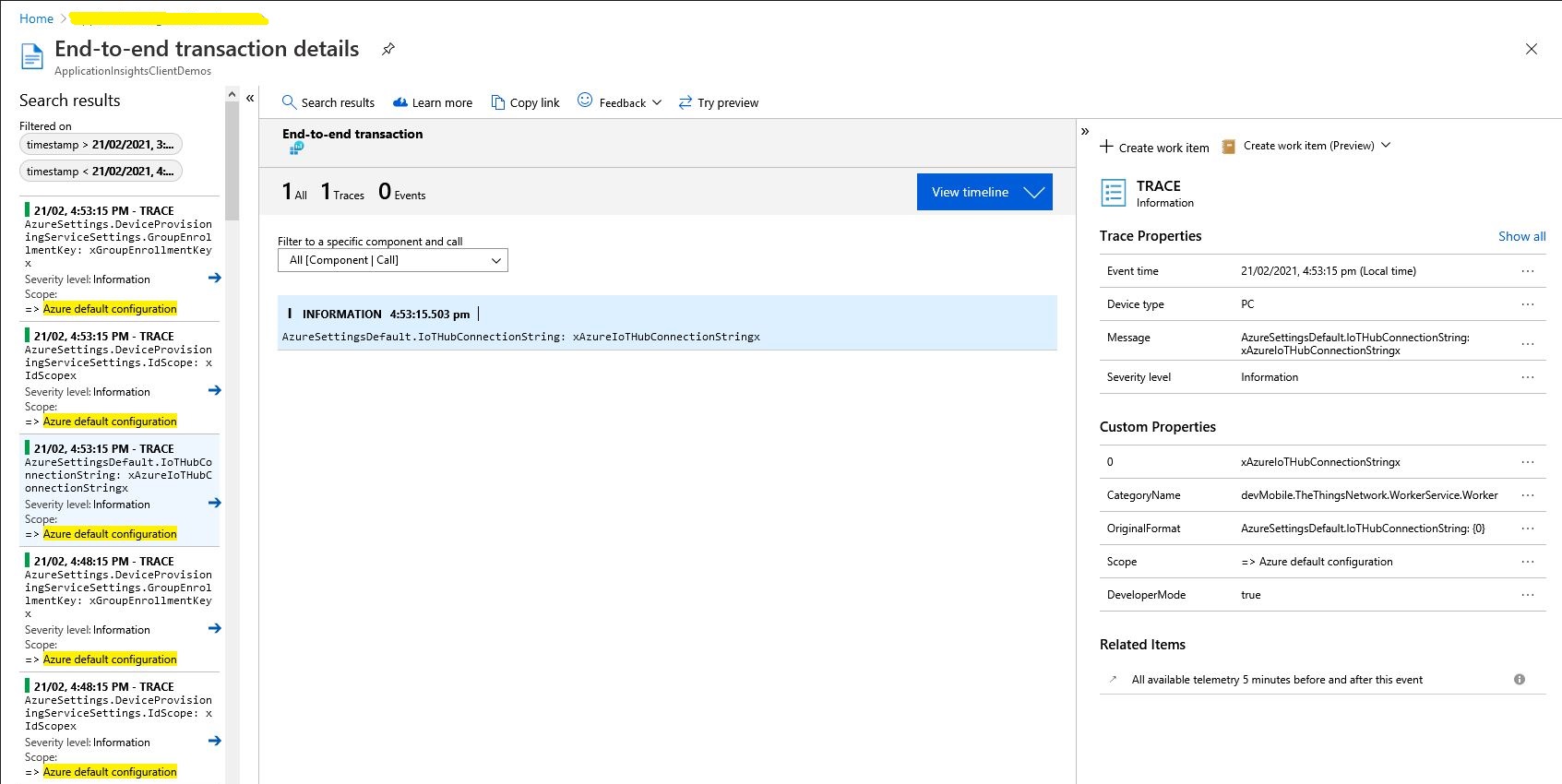
Application Insights & Configuration

As part of my The Things IndustriesTTI) Integration my current approach is to use an Azure web job and configure the Azure App Service host so it doesn’t get shutdown after a period of inactivity. This so my application won’t have to repeatedly use the TTI API to request the Application and Device configuration information to reload the cache (still not certain if this is going to be implemented with a ConcurrentDictionary or ObjectCache).

namespace devMobile.TheThingsNetwork.WorkerService
{
   using System.Collections.Generic;

   public class AzureDeviceProvisiongServiceSettings
   {
      public string IdScope { get; set; }
      public string GroupEnrollmentKey { get; set; }
   }

   public class AzureSettings
   {
      public string IoTHubConnectionString { get; set; }
      public AzureDeviceProvisiongServiceSettings DeviceProvisioningServiceSettings { get; set; }
   }

   public class ApplicationSetting
   {
      public AzureSettings AzureSettings { get; set; }

      public string MQTTAccessKey { get; set; }

      public byte? ApplicationPageSize { get; set; }

      public bool? DeviceIntegrationDefault { get; set; }
      public byte? DevicePageSize { get; set; }
   }

   public class TheThingsIndustries
   {
      public string MqttServerName { get; set; }
      public string MqttClientName { get; set; }

      public string Tennant { get; set; }
      public string ApiBaseUrl { get; set; }
      public string ApiKey { get; set; }

      public bool ApplicationIntegrationDefault { get; set; }
      public byte ApplicationPageSize { get; set; }

      public bool DeviceIntegrationDefault { get; set; }
      public byte DevicePageSize { get; set; }
   }

   public class ProgramSettings
   {
      public TheThingsIndustries TheThingsIndustries { get; set; }

      public AzureSettings AzureSettingsDefault { get; set; }

      public Dictionary<string, ApplicationSetting> Applications { get; set; }
   }
}

The amount of configuration required to support multiple TTI Applications containing many Devices is also starting to get out of hand.

I need to subscribe to a Message Queue Telemetry Transport Topics(MQTT using MQTTNet) for each Application and establish a connection (using an Azure DeviceClient) for each TTI Device to the configured Azure IoT Hub(s).

  • v3/{application id}@{tenant id}/devices/{device id}/up
  • v3/{application id}@{tenant id}/devices/{device id}/down/queued
  • v3/{application id}@{tenant id}/devices/{device id}/down/sent
  • v3/{application id}@{tenant id}/devices/{device id}/down/ack
  • v3/{application id}@{tenant id}/devices/{device id}/down/nack
  • v3/{application id}@{tenant id}/devices/{device id}/down/failed

The Azure DeviceClient has to be configured and OpenAsync called just before/after subscribing to the TTI Application /up topic so the SendEventAsync method can be called to send messages to the configured Azure IoT Hub(s). For downlink messages the SetReceiveMessageHandler method will need to be called just before/after subscribing to ../down/queued, ../down/sent,../down/ack,…/down/nack and ,…/down/failed downlink topics.

The ordering of downloading the Application and Device configuration so downlink messages can be sent and uplink message received as soon as possible (so no messages are lost) is important. I have considered making the downlink process multi-threaded so API calls are made concurrently but I’m not certain the additional complexity would be worth it, especially in initial versions.

I’m also currently not certain about how to register my program for Application and Device registry changes so it doesn’t have to be restarted when configuration changes. I have also considered reverting to an HTTP Integration so that I could use Azure Storage queues to buffer uplink and downlink messages. This may also introduce ordering issues when multiple threads are created for Azure Queue Trigger functions to process a message backlog.

For debugging the application and monitoring in production I was planning on using the Apache Log4Net library but now I’m not certain the additional configuration complexity and dependencies are worth it. The built in Microsoft.Extensions.Logging library with Azure Application Insights integration looks like a “light weight” alternative with sufficient functionality .

protected override async Task ExecuteAsync(CancellationToken stoppingToken)
{
   while (!stoppingToken.IsCancellationRequested)
   {
      _logger.LogDebug("Debug worker running at: {time}", DateTimeOffset.Now);
      _logger.LogInformation("Info worker running at: {time}", DateTimeOffset.Now);
      _logger.LogWarning("Warning worker running at: {time}", DateTimeOffset.Now);
      _logger.LogError("Error running at: {time}", DateTimeOffset.Now);

      using (_logger.BeginScope("TheThingsIndustries configuration"))
      {
         _logger.LogInformation("Tennant: {0}", _programSettings.TheThingsIndustries.Tennant);
         _logger.LogInformation("ApiBaseUrl: {0}", _programSettings.TheThingsIndustries.ApiBaseUrl);
         _logger.LogInformation("ApiKey: {0}", _programSettings.TheThingsIndustries.ApiKey);

         _logger.LogInformation("ApplicationPageSize: {0}", _programSettings.TheThingsIndustries.ApplicationPageSize);
         _logger.LogInformation("DevicePageSize: {0}", _programSettings.TheThingsIndustries.DevicePageSize);

         _logger.LogInformation("ApplicationIntegrationDefault: {0}", _programSettings.TheThingsIndustries.ApplicationIntegrationDefault);
         _logger.LogInformation("DeviceIntegrationDefault: {0}", _programSettings.TheThingsIndustries.DeviceIntegrationDefault);

         _logger.LogInformation("MQTTServerName: {0}", _programSettings.TheThingsIndustries.MqttServerName);
         _logger.LogInformation("MQTTClientName: {0}", _programSettings.TheThingsIndustries.MqttClientName);
      }

      using (_logger.BeginScope("Azure default configuration"))
      {
         if (_programSettings.AzureSettingsDefault.IoTHubConnectionString != null)
         {
            _logger.LogInformation("AzureSettingsDefault.IoTHubConnectionString: {0}", _programSettings.AzureSettingsDefault.IoTHubConnectionString);
         }

         if (_programSettings.AzureSettingsDefault.DeviceProvisioningServiceSettings != null)
         {
            _logger.LogInformation("AzureSettings.DeviceProvisioningServiceSettings.IdScope: {0}", _programSettings.AzureSettingsDefault.DeviceProvisioningServiceSettings.IdScope);
            _logger.LogInformation("AzureSettings.DeviceProvisioningServiceSettings.GroupEnrollmentKey: {0}", _programSettings.AzureSettingsDefault.DeviceProvisioningServiceSettings.GroupEnrollmentKey);
         }
      }
    
      foreach (var application in _programSettings.Applications)
      {
         using (_logger.BeginScope(new[] { new KeyValuePair<string, object>("Application", application.Key)}))
         {
            _logger.LogInformation("MQTTAccessKey: {0} ", application.Value.MQTTAccessKey);

            if (application.Value.ApplicationPageSize.HasValue)
            {
               _logger.LogInformation("ApplicationPageSize: {0} ", application.Value.ApplicationPageSize.Value);
            }

            if (application.Value.DeviceIntegrationDefault.HasValue)
            {
               _logger.LogInformation("DeviceIntegation: {0} ", application.Value.DeviceIntegrationDefault.Value);
            }

            if (application.Value.DevicePageSize.HasValue)
            {
               _logger.LogInformation("DevicePageSize: {0} ", application.Value.DevicePageSize.Value);
            }

            if (application.Value.AzureSettings.IoTHubConnectionString != null)
            {
               _logger.LogInformation("AzureSettings.IoTHubConnectionString: {0} ", application.Value.AzureSettings.IoTHubConnectionString);
            }

            if (application.Value.AzureSettings.DeviceProvisioningServiceSettings != null)
            {
               _logger.LogInformation("AzureSettings.DeviceProvisioningServiceSettings.IdScope: {0} ", application.Value.AzureSettings.DeviceProvisioningServiceSettings.IdScope);
               _logger.LogInformation("AzureSettings.DeviceProvisioningServiceSettings.GroupEnrollmentKey: {0} ", application.Value.AzureSettings.DeviceProvisioningServiceSettings.GroupEnrollmentKey);
            }
         }
      }

      await Task.Delay(300000, stoppingToken);
   }
}

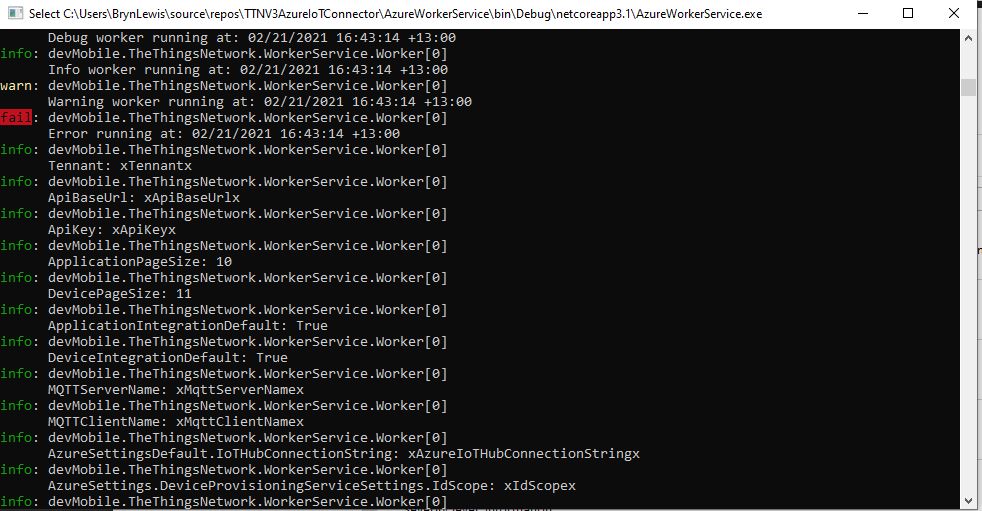
The logging information formatting is sufficiently readable when running locally

Extensive use of the BeginScope method to include additional meta-data on logged records should make debugging easier.

This long post is to explain some of my design decisions and which ones are still to be decided

MQTTnet Azure Function Binding

It Looks promising

I’m using MQTTnet to build my The Things Industries client and it looked like the amount of code for my Message Queue Telemetry Transport (MQTT) Data API Integration could be reduced by using the AzureFunction MQTT Binding by Kees Schollaart.

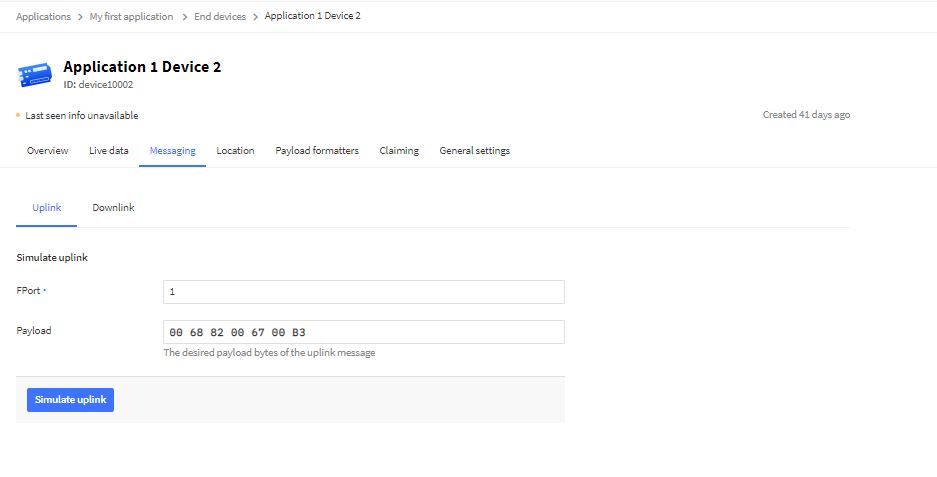
I used The Things Industries simulate uplink functionality for my initial testing

TTI uplink message simulator

The first version of the Azure function code proof of concept(PoC) was very compact

namespace MQTTnetAzureFunction
{
   using System;
   using System.Text;
   using Microsoft.Azure.WebJobs;
   using Microsoft.Extensions.Logging;

   using CaseOnline.Azure.WebJobs.Extensions.Mqtt;
   using CaseOnline.Azure.WebJobs.Extensions.Mqtt.Messaging;
   using CaseOnline.Azure.WebJobs.Extensions.Mqtt.Config;
   using CaseOnline.Azure.WebJobs.Extensions.Mqtt.Bindings;

   using MQTTnet.Client.Options;
   using MQTTnet.Extensions.ManagedClient;

   public static class Subscribe
   {
      [FunctionName("UplinkMessageProcessor")]
      public static void UplinkMessageProcessor(
            [MqttTrigger("v3/application123456789012345/devices/+/up", ConnectionString = "TTNMQTTConnectionString")] IMqttMessage message,
IMqttMessage message,
            ILogger log)
      {
         var body = Encoding.UTF8.GetString(message.GetMessage());

         log.LogInformation($"Advanced: message from topic {message.Topic} \nbody: {body}");
      }
   }
}

I configured the TTNMQTTConnectionString in the application’s local.settings.json file

{
    "IsEncrypted": false,
   "Values": {
      "AzureWebJobsStorage": "DefaultEndpointsProtocol=https;AccountName=...",
      "AzureWebJobsDashboard": "DefaultEndpointsProtocol=https;AccountName=...",
      "FUNCTIONS_WORKER_RUNTIME": "dotnet",
      "TTNMQTTConnectionString": "Server=...;Username=application1@...;Password=...",
   }
}

This was a good start but I need to be able to configure the MQTT topic for deployments.

After looking at the binding source code plus some trial and error based on the AdvancedConfiguration sample I have a nasty PoC

public static class Subscribe
{
   [FunctionName("UplinkMessageProcessor")]
   public static void UplinkMessageProcessor(
         [MqttTrigger(typeof(ExampleMqttConfigProvider), "v3/%TopicName%/devices/+/up")] IMqttMessage message,
         ILogger log)
   {
      var body = Encoding.UTF8.GetString(message.GetMessage());

      log.LogInformation($"Advanced: message from topic {message.Topic} \nbody: {body}");
   }
}

public class MqttConfigExample : CustomMqttConfig
{
  public override IManagedMqttClientOptions Options { get; }

  public override string Name { get; }

  public MqttConfigExample(string name, IManagedMqttClientOptions options)
  {
     Options = options;
     Name = name;
   }
}

public class ExampleMqttConfigProvider : ICreateMqttConfig
{
   public CustomMqttConfig Create(INameResolver nameResolver, ILogger logger)
   {
      var connectionString = new MqttConnectionString(nameResolver.Resolve("TTNMQTTConnectionString"), "CustomConfiguration");

      var options = new ManagedMqttClientOptionsBuilder()
             .WithAutoReconnectDelay(TimeSpan.FromSeconds(5))
             .WithClientOptions(new MqttClientOptionsBuilder()
                  .WithClientId(connectionString.ClientId.ToString())
                  .WithTcpServer(connectionString.Server, connectionString.Port)
                  .WithCredentials(connectionString.Username, connectionString.Password)
                  .Build())
             .Build();

      return new MqttConfigExample("CustomConnection", options);
   }
}

The TTNMQTTConnectionString and TopicName can be configured in the application’s local.settings.json file

{
    "IsEncrypted": false,
   "Values": {
      "AzureWebJobsStorage": "DefaultEndpointsProtocol=https;AccountName=...",
      "AzureWebJobsDashboard": "DefaultEndpointsProtocol=https;AccountName=...",
      "FUNCTIONS_WORKER_RUNTIME": "dotnet",
      "TTNMQTTConnectionString": "Server=...;Username=application1@...;Password=...",
      "TopicName": "application1@..."
   }
}

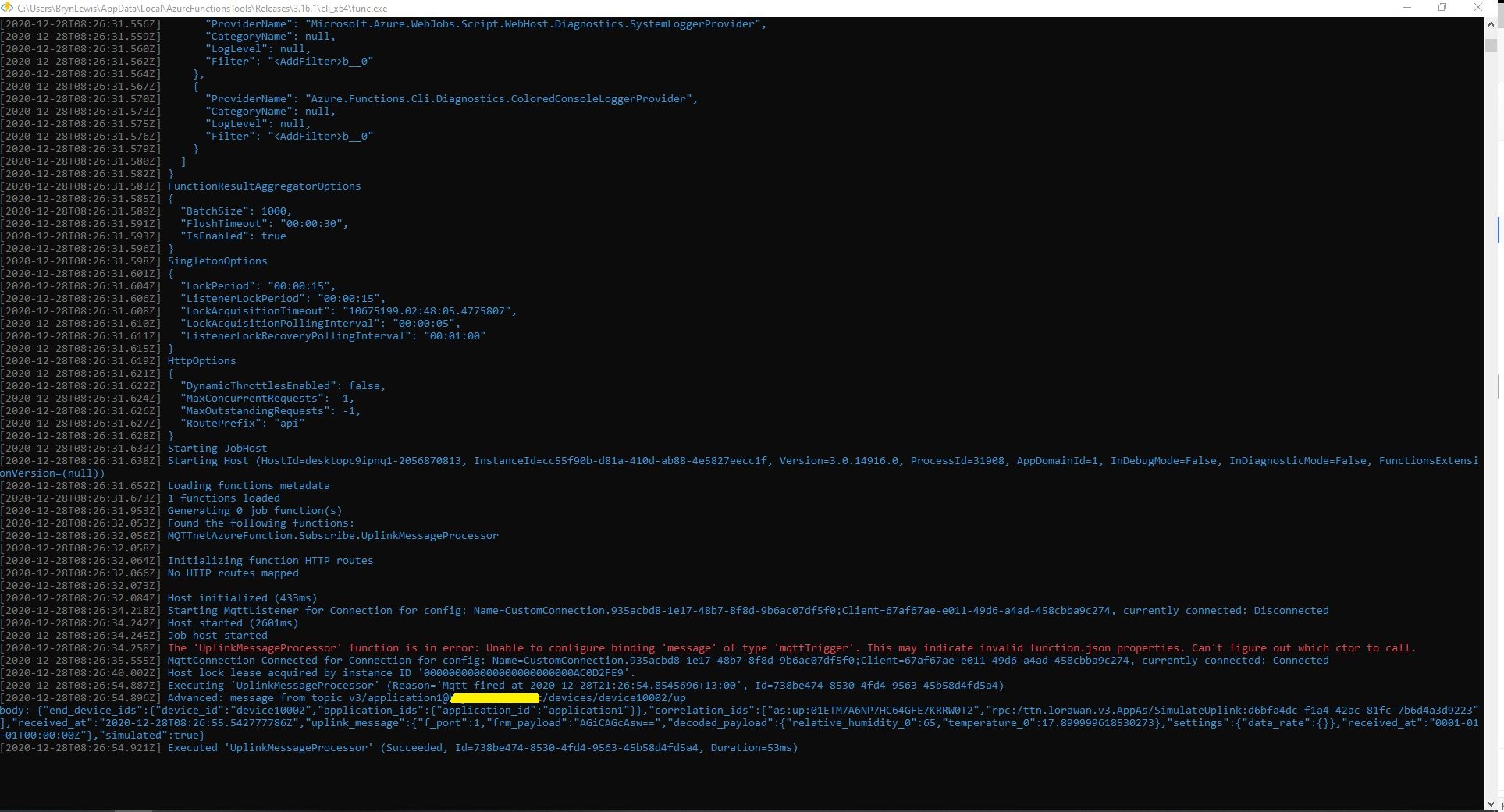
When run in the Azure Functions Core Tools the simulated message properties and payload are displayed

The message “The ‘UplinkMessageProcessor’ function is in error: Unable to configure binding ‘message’ of type ‘mqttTrigger’. This may indicate invalid function.json properties. Can’t figure out which ctor to call.” needs further investigation.

The Things Network HTTP Integration Part13

Connection multiplexing

For the Proof of Concept(PoC) I had used a cache to store Azure IoT Hub connections to reduce the number of calls to the Device Provisioning Service(DPS).

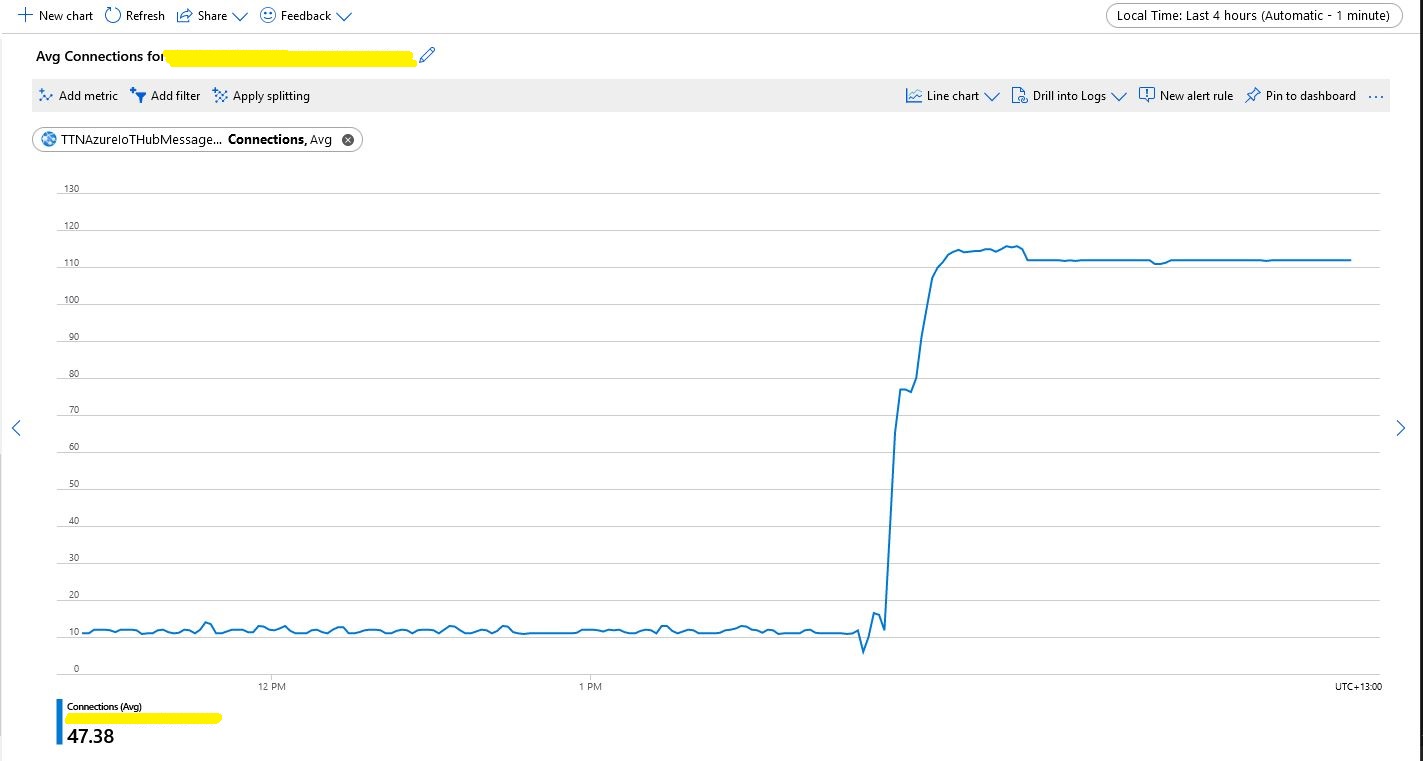
Number of connections with no pooling

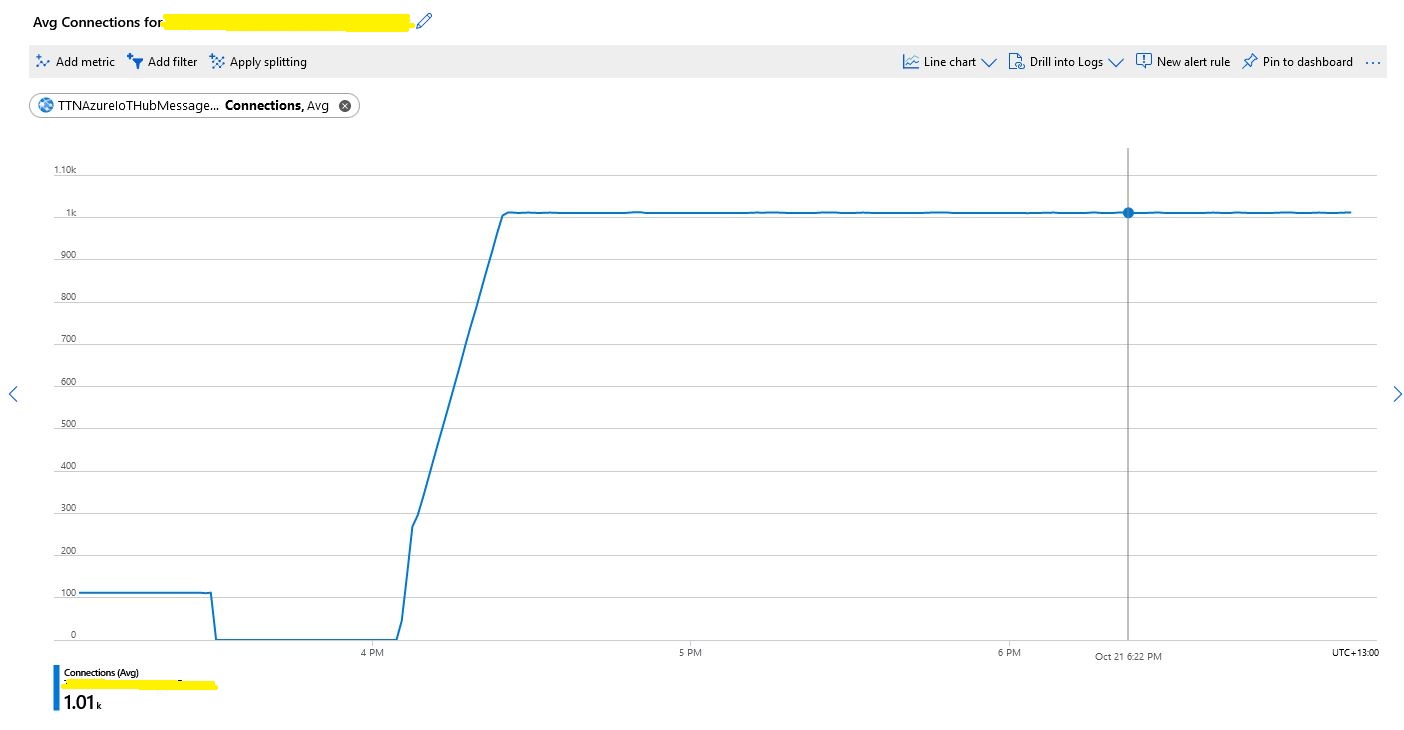
When stress testing with 1000’s of devices my program hit the host connection limit so I enabled Advanced Message Queuing Protocol(AMQP) connection pooling.

return DeviceClient.Create(result.AssignedHub,
                  authentication,
                  new ITransportSettings[]
                  {
                     new AmqpTransportSettings(TransportType.Amqp_Tcp_Only)
                     {
                        PrefetchCount = 0,
                        AmqpConnectionPoolSettings = new AmqpConnectionPoolSettings()
                        {
                           Pooling = true,
                        }
                     }
                  }
               );

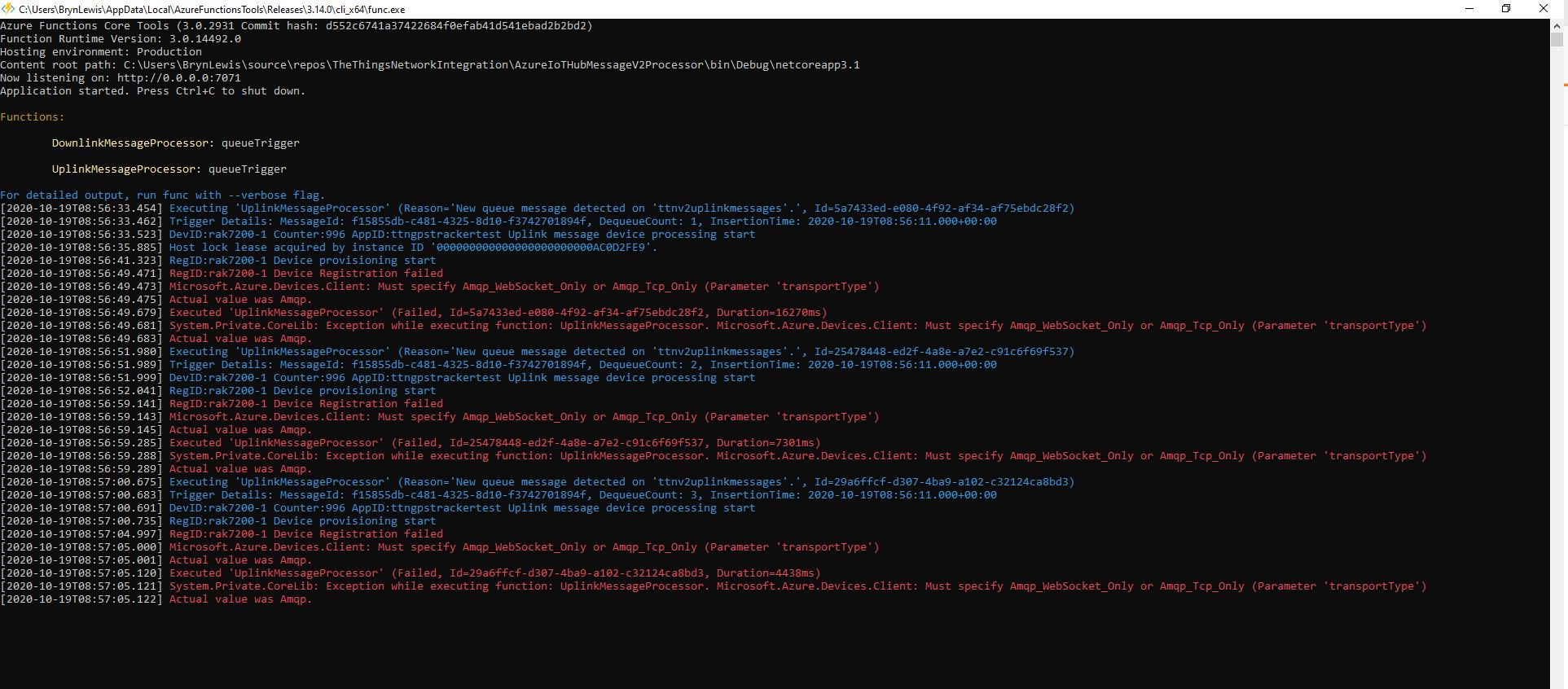
My first attempt failed as I hadn’t configured “TransportType.Amqp_Tcp_Only” which would have allowed the AMQP implementation to fallback to other protocols which don’t support pooling.

Exception caused by not using TransportType.Amqp_Tcp_Only

I then deployed the updated code and ran my 1000 device stress test (note the different x axis scales)

Number of connections with pooling

This confirmed what I found in the Azure.AMQP source code

/// <summary>
/// The default size of the pool
/// </summary>
/// <remarks>
/// Allows up to 100,000 devices
/// </remarks>
/// private const uint DefaultPoolSize = 100;