Azure Function SendGrid Binding Fail

This post is for Azure Function developers having issues with the SendGrid binding throwing exceptions like the one below.

System.Private.CoreLib: Exception while executing function: Functions.AzureBlobFileUploadEmailer. Microsoft.Azure.WebJobs.Extensions.SendGrid: A 'To' address must be specified for the message

My Azure BlobTrigger Function sends an email (with SendGrid) when a file is uploaded to an Azure Blob Storage Container(a couple of times a day).

public class FileUploadEmailer(ILogger<FileUploadEmailer> logger, IOptions<EmailSettings> emailSettings)
{
   private readonly ILogger<FileUploadEmailer> _logger = logger;
   private readonly EmailSettings _emailSettings = emailSettings.Value;

   [Function(nameof(AzureBlobFileUploadEmailer))]
   [SendGridOutput(ApiKey = "SendGridAPIKey")]
   public string Run([BlobTrigger("filestobeprocesed/{name}", Connection = "upload-file-storage")] Stream stream, string name)
   {
      _logger.LogInformation("FileUploadEmailer Blob trigger function Processed blob Name:{0} start", name);

      try
      {
         var message = new SendGridMessage();

         message.SetFrom(_emailSettings.From);
         message.AddTo(_emailSettings.To);
         message.Subject = _emailSettings.Subject;

         message.AddContent(MimeType.Html, string.Format(_emailSettings.BodyFormat, name, DateTime.UtcNow));

         // WARNING - Use Newtonsoft JSON serializer to produce JSON string. System.Text.Json won't work because property annotations are different
         var messageJson = Newtonsoft.Json.JsonConvert.SerializeObject(message);

         _logger.LogInformation("FileUploadEmailer Blob trigger function Processed blob Name:{0} finish", name);

         return messageJson;
      }
      catch (Exception ex)
      {
         _logger.LogError(ex, "FileUploadEmailer Blob trigger function Processed blob Name: {0}", name);

         throw;
      }
   }
}

I missed the first clue when I looked at the JSON and missed the Tos, Ccs, Bccs property names.

{
"From":{"Name":"Foo","Email":"bryn.lewis@devmobile.co.nz"},
"Subject":"Hi 30/09/2024 1:27:49 pm",
"Personalizations":[{"Tos":[{"Name":"Bar","Email":"bryn.lewis@devmobile.co.nz"}],
"Ccs":null,
"Bccs":null,
"From":null,
"Subject":null,
"Headers":null,
"Substitutions":null,
"CustomArgs":null,
"SendAt":null,
"TemplateData":null}],
"Contents":[{"Type":"text/html","Value":"\u003Ch2\u003EHello AssemblyInfo.cs\u003C/h2\u003E"}],
"PlainTextContent":null,
"HtmlContent":null,
"Attachments":null,
"TemplateId":null,
"Headers":null,
"Sections":null,
"Categories":null,
"CustomArgs":null,
"SendAt":null,
"Asm":null,
"BatchId":null,
"IpPoolName":null,
"MailSettings":null,
"TrackingSettings":null,
"ReplyTo":null,
"ReplyTos":null
}

I wasn’t paying close enough attention to the sample code and used the System.Text.Json rather than Newtonsoft.Json to serialize the SendGridMessage object. They use different attributes for property names etc. so the JSON generated was wrong.

Initially, I tried adding System.Text.Json attributes to the SendGridMessage class

namespace SendGrid.Helpers.Mail
{
   /// <summary>
   /// Class SendGridMessage builds an object that sends an email through Twilio SendGrid.
   /// </summary>
   [JsonObject(IsReference = false)]
   public class SendGridMessage
   {
      /// <summary>
      /// Gets or sets an email object containing the email address and name of the sender. Unicode encoding is not supported for the from field.
      /// </summary>
      //[JsonProperty(PropertyName = "from")]
      [JsonPropertyName("from")]
      public EmailAddress From { get; set; }

      /// <summary>
      /// Gets or sets the subject of your email. This may be overridden by personalizations[x].subject.
      /// </summary>
      //[JsonProperty(PropertyName = "subject")]
      [JsonPropertyName("subject")]
      public string Subject { get; set; }

      /// <summary>
      /// Gets or sets a list of messages and their metadata. Each object within personalizations can be thought of as an envelope - it defines who should receive an individual message and how that message should be handled. For more information, please see our documentation on Personalizations. Parameters in personalizations will override the parameters of the same name from the message level.
      /// https://sendgrid.com/docs/Classroom/Send/v3_Mail_Send/personalizations.html.
      /// </summary>
      //[JsonProperty(PropertyName = "personalizations", IsReference = false)]
      [JsonPropertyName("personalizations")]
      public List<Personalization> Personalizations { get; set; }
...
}

SendGridMessage uses other classes like EmailAddress which worked because the property names matched the JSON

namespace SendGrid.Helpers.Mail
{
    /// <summary>
    /// An email object containing the email address and name of the sender or recipient.
    /// </summary>
    [JsonObject(IsReference = false)]
    public class EmailAddress : IEquatable<EmailAddress>
    {
        /// <summary>
        /// Initializes a new instance of the <see cref="EmailAddress"/> class.
        /// </summary>
        public EmailAddress()
        {
        }

        /// <summary>
        /// Initializes a new instance of the <see cref="EmailAddress"/> class.
        /// </summary>
        /// <param name="email">The email address of the sender or recipient.</param>
        /// <param name="name">The name of the sender or recipient.</param>
        public EmailAddress(string email, string name = null)
        {
            this.Email = email;
            this.Name = name;
        }

        /// <summary>
        /// Gets or sets the name of the sender or recipient.
        /// </summary>
        [JsonProperty(PropertyName = "name")]
        public string Name { get; set; }

        /// <summary>
        /// Gets or sets the email address of the sender or recipient.
        /// </summary>
        [JsonProperty(PropertyName = "email")]
        public string Email { get; set; }
...
}

Many of the property name “mismatch” issues were in the Personalization class with the Toos, Ccs, bccs etc. properties

namespace SendGrid.Helpers.Mail
{
    /// <summary>
    /// An array of messages and their metadata. Each object within personalizations can be thought of as an envelope - it defines who should receive an individual message and how that message should be handled. For more information, please see our documentation on Personalizations. Parameters in personalizations will override the parameters of the same name from the message level.
    /// https://sendgrid.com/docs/Classroom/Send/v3_Mail_Send/personalizations.html.
    /// </summary>
    [JsonObject(IsReference = false)]
    public class Personalization
    {
        /// <summary>
        /// Gets or sets an array of recipients. Each email object within this array may contain the recipient’s name, but must always contain the recipient’s email.
        /// </summary>
        [JsonProperty(PropertyName = "to", IsReference = false)]
        [JsonConverter(typeof(RemoveDuplicatesConverter<EmailAddress>))]
        public List<EmailAddress> Tos { get; set; }

        /// <summary>
        /// Gets or sets an array of recipients who will receive a copy of your email. Each email object within this array may contain the recipient’s name, but must always contain the recipient’s email.
        /// </summary>
        [JsonProperty(PropertyName = "cc", IsReference = false)]
        [JsonConverter(typeof(RemoveDuplicatesConverter<EmailAddress>))]
        public List<EmailAddress> Ccs { get; set; }

        /// <summary>
        /// Gets or sets an array of recipients who will receive a blind carbon copy of your email. Each email object within this array may contain the recipient’s name, but must always contain the recipient’s email.
        /// </summary>
        [JsonProperty(PropertyName = "bcc", IsReference = false)]
        [JsonConverter(typeof(RemoveDuplicatesConverter<EmailAddress>))]
        public List<EmailAddress> Bccs { get; set; }

        /// <summary>
        /// Gets or sets the from email address. The domain must match the domain of the from email property specified at root level of the request body.
        /// </summary>
        [JsonProperty(PropertyName = "from")]
        public EmailAddress From { get; set; }

        /// <summary>
        /// Gets or sets the subject line of your email.
        /// </summary>
        [JsonProperty(PropertyName = "subject")]
        public string Subject { get; set; }
...
}

After a couple of failed attempts at decorating the SendGrid SendGridMessage, EmailAddress, Personalization etc. classes I gave up and reverted to the Newtonsoft.Json serialiser.

Note to self – pay closer attention to the samples.
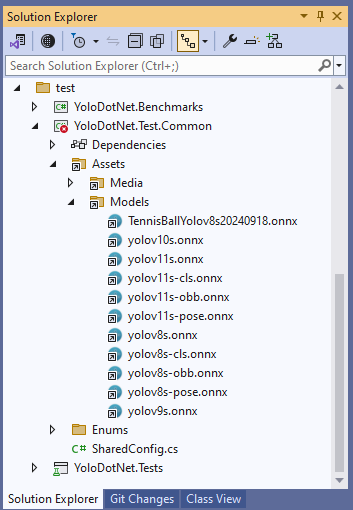
YoloV8 ONNX – Nvidia Jetson Orin Nano™ Execution Providers

The Seeedstudio reComputer J3011 has two processors an ARM64 CPU and an Nvidia Jetson Orin 8G which can be used for inferencing with the Open Neural Network Exchange(ONNX)Runtime.

Story of Fail

Inferencing worked first time on the ARM64 CPU because the required runtime is included in the Microsoft.ML.OnnxRuntime NuGet

ARM64 Linux ONNX runtime
Microsoft.ML.OnnxRuntime NuGet ARM64 Linux runtime

Inferencing failed on the Nividia Jetson Orin 8G because the CUDA Execution provider and TensorRT Execution Provider for the ONNXRuntime were not included in the Microsoft.ML.OnnxRuntime.GPU.Linux NuGet.

Missing ARM64 Linux GPU runtime

There were Linux x64 and Windows x64 versions of the ONNXRuntime library included in the Microsoft.ML.OnnxRuntime.Gpu NuGet

Microsoft.ML.OnnxRuntime.Gpu NuGet x64 Linux runtime

Desperately Seeking libonnxruntime.so

The Nvidia ONNX runtime site had pip wheel files for the different versions of Python and the Open Neural Network Exchange(ONNX)Runtime.

The onnxruntime_gpu-1.18.0-cp312-cp312-linux_aarch64.whl matched the version of the ONNXRuntime I needed and version of Python on the device..

When the pip wheel file was renamed onnxruntime_gpu-1.18.0-cp312-cp312-linux_aarch64.zip it could be opened, but there wasn’t a libonnruntime.so.

Onnxruntime_gpu-1.18.0-cp312-cp312-linux_aarch64 file listing

Building the TensorRT & CUDA Execution Providers

The ONNXRuntime build has to be done on Nividia Jetson Orin so after installing all the necessary prerequisites the first attempt failed.

bryn@ubuntu:~/onnxruntime/onnxruntime$ ./build.sh --config Release --update --build --build_wheel \
--use_tensorrt --cuda_home /usr/local/cuda --cudnn_home /usr/lib/aarch64-linux-gnu \
--tensorrt_home /usr/lib/aarch64-linux-gnu

When in high power mode more cores are used but this consumes more resource when building the ONNXRuntime. To limit resource utilisation --parallel2 was added the command line because the compile process was having “out of memory” failures.

bryn@ubuntu:~/onnxruntime/onnxruntime$ ./build.sh --config Release --update --build --parallel 2 --build_wheel \
--use_tensorrt --cuda_home /usr/local/cuda --cudnn_home /usr/lib/aarch64-linux-gnu \
--tensorrt_home /usr/lib/aarch64-linux-gnu

There were some compiler warnings but they appear to be benign.

First attempt at running the application failed because libonnxruntime.so was missing so –build_shared_lib was added to the command line

2024-06-10 18:21:58,480 build [INFO] - Build complete
bryn@ubuntu:~/onnxruntime/onnxruntime$ ./build.sh --config Release --update --build --parallel 2 --build_wheel --use_tensorrt --cuda_home /usr/local/cuda --cudnn_home /usr/lib/aarch64-linux-gnu --tensorrt_home /usr/lib/aarch64-linux-gnu --build_shared_lib

When the build completed the files were copied to the runtime folder of the program.

The application could then be configured to use the TensorRT Execution Provider.

Getting CUDA and TensorRT working on the Nvidia Jetson Orin 8G took much longer than I expected, with many dead ends and device factory resets before the process was repeatable.

YoloV8 ONNX – Nvidia Jetson Orin Nano™ CPU & GPU TensorRT Inferencing

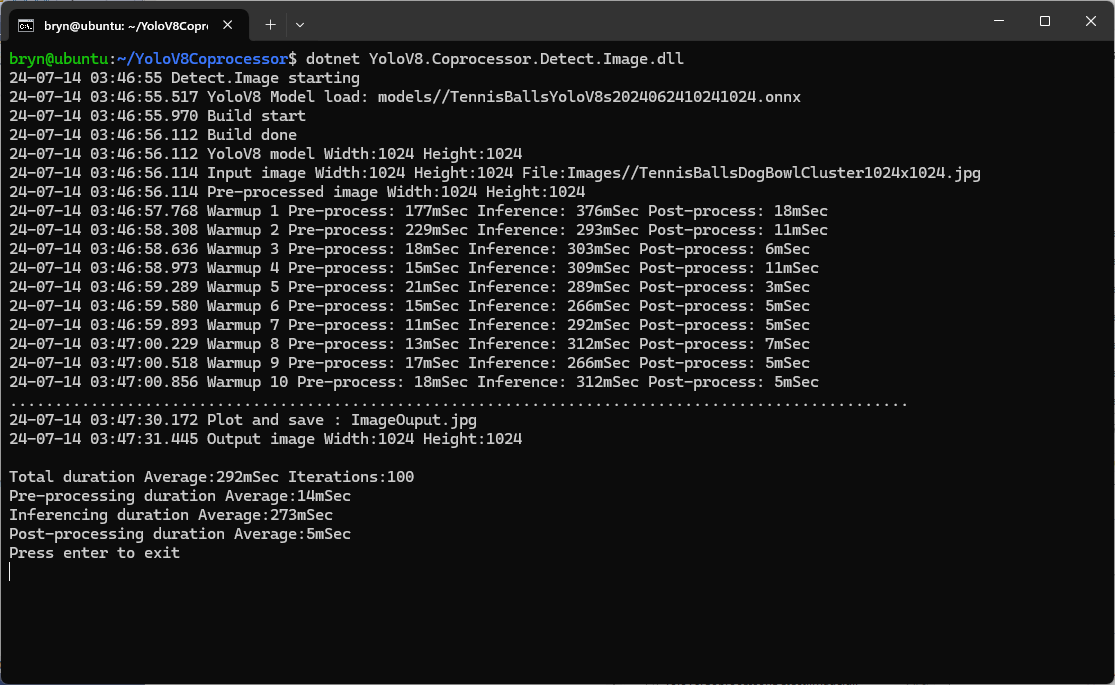
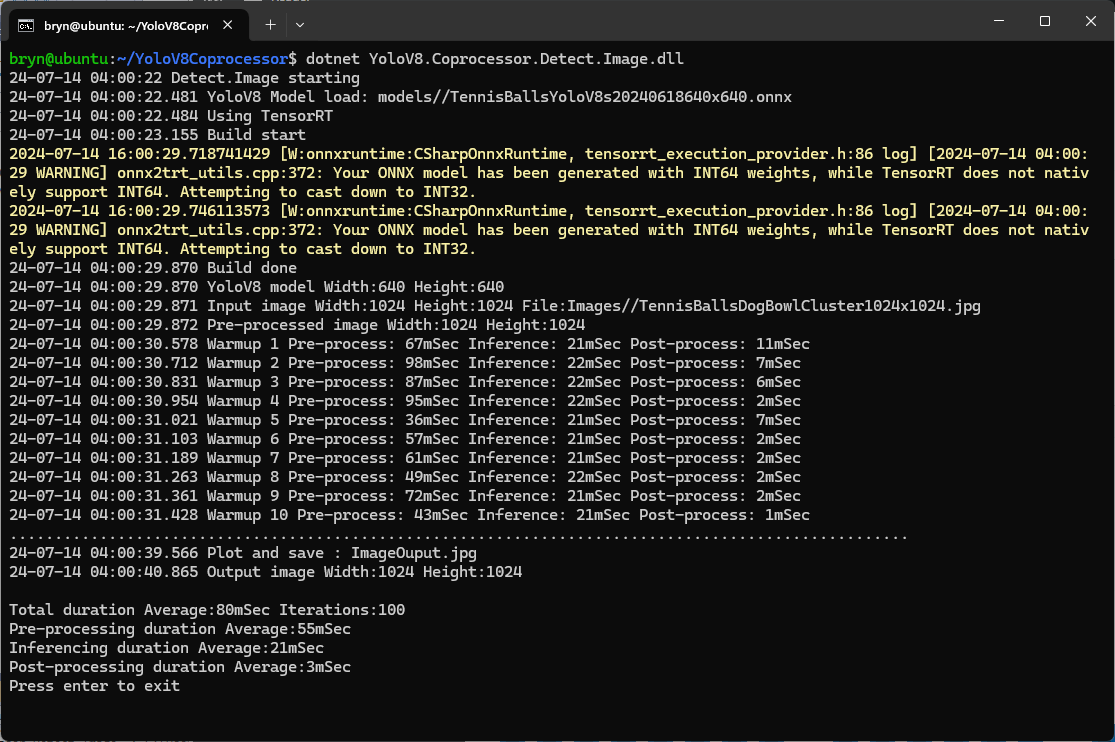
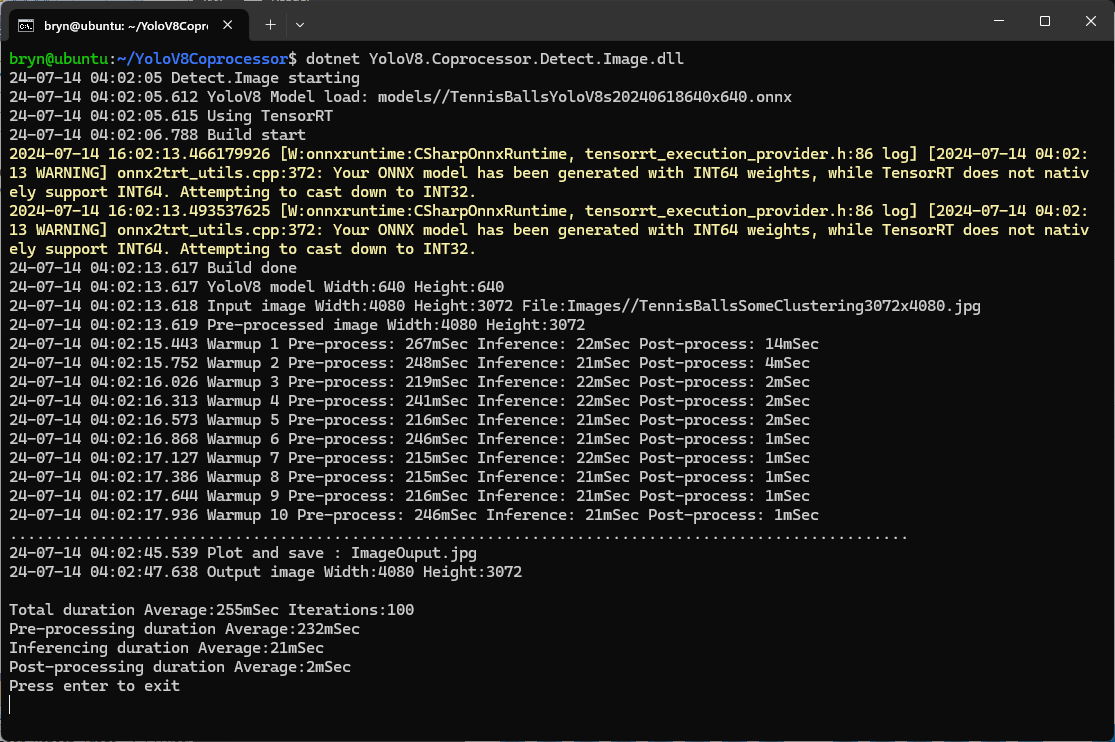
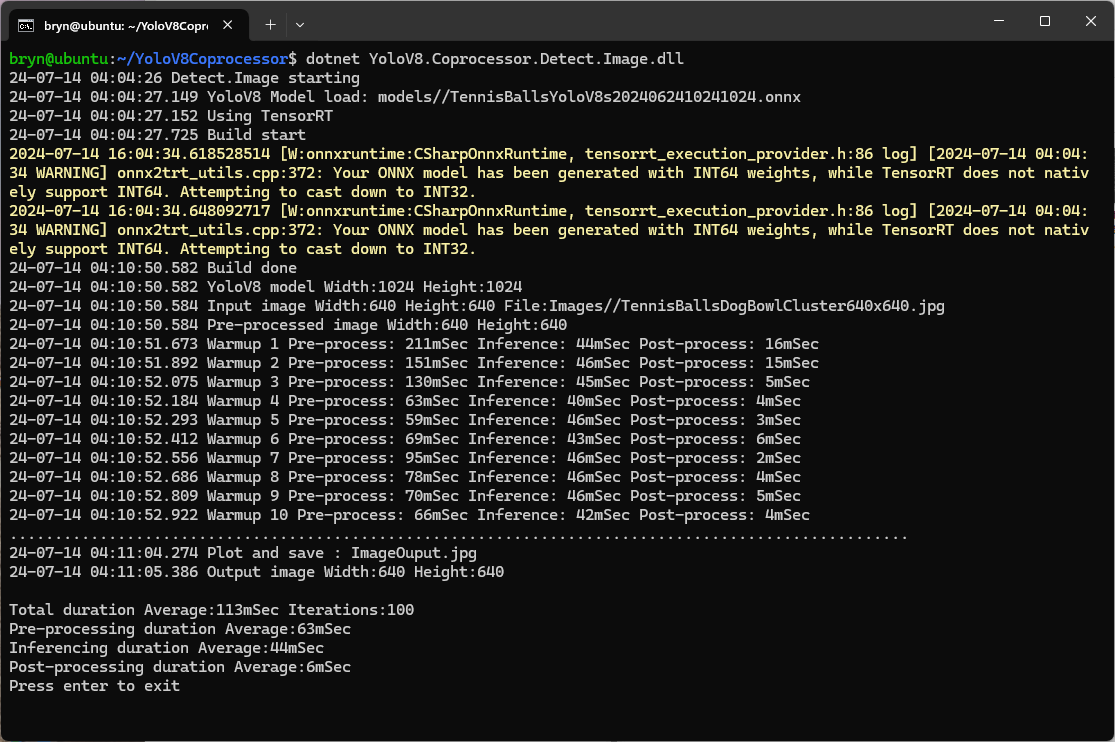
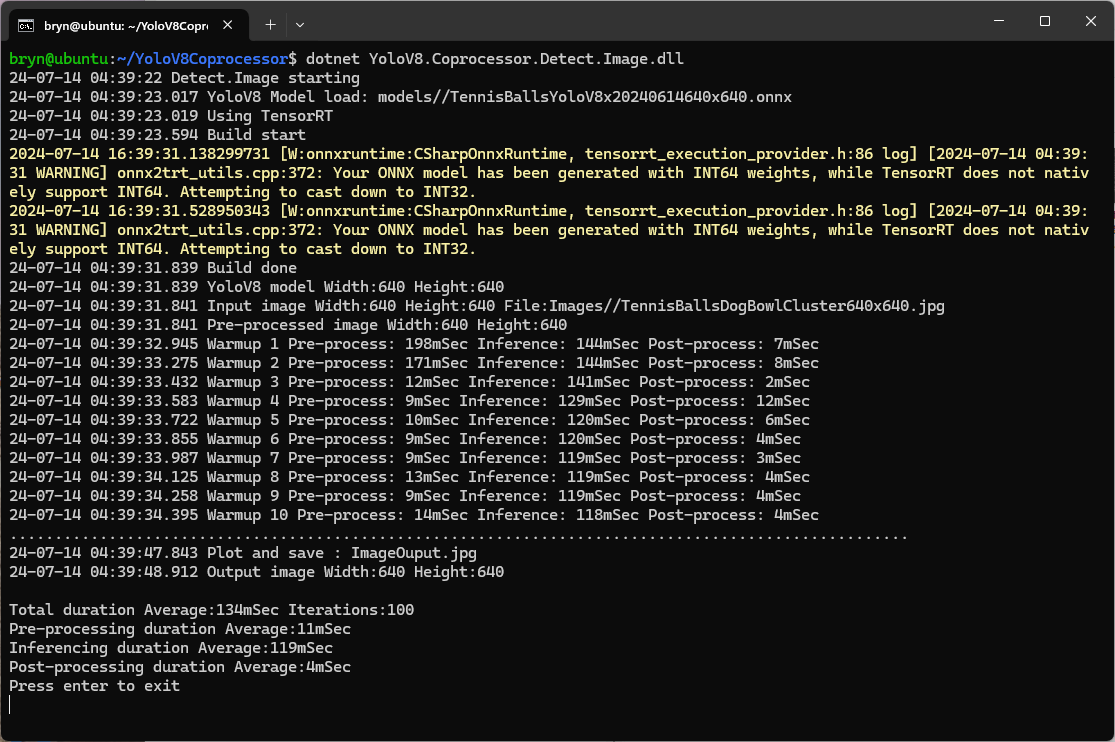
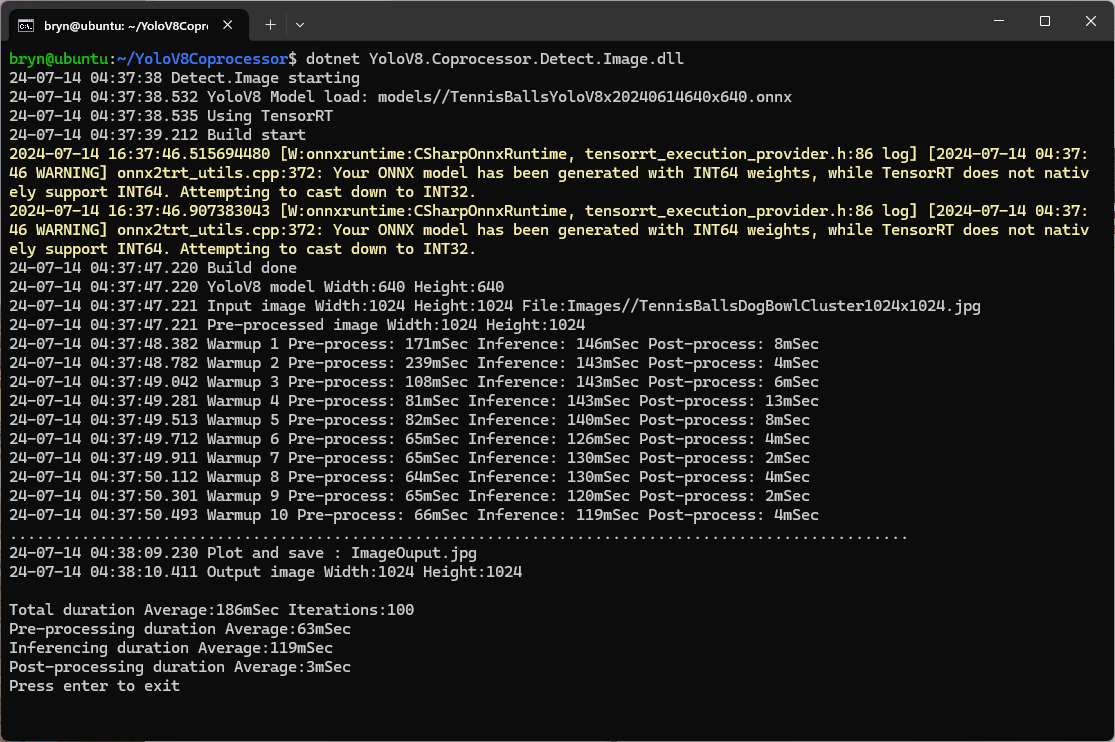
The Seeedstudio reComputer J3011 has two processors an ARM64 CPU and an Nividia Jetson Orin 8G. To speed up TensorRT inferencing I built an Open Neural Network Exchange(ONNX) TensorRT Execution Provider. After updating the code to add a “warm-up” and tracking of average pre-processing, inferencing & post-processing durations I did a series of CPU & GPU performance tests.

The testing consisted of permutations of three models TennisBallsYoloV8s20240618640×640.onnx, TennisBallsYoloV8s2024062410241024.onnx & TennisBallsYoloV8x20240614640×640 (limited testing as slow) and three images TennisBallsLandscape640x640.jpg, TennisBallsLandscape1024x1024.jpg & TennisBallsLandscape3072x4080.jpg.

Executive Summary

As expected, inferencing with a TensorRT 640×640 model and a 640×640 image was fastest, 9mSec pre-processing, 21mSec inferencing, then 4mSec post-processing.

If the image had to be scaled with SixLabors.ImageSharp this significantly increased the preprocessing (and overall) time.

CPU Inferencing

GPU TensorRT Small model Inferencing

GPU TensorRT Large model Inferencing

YoloV8 ONNX – Nvidia Jetson Orin Nano™ DenseTensor Performance

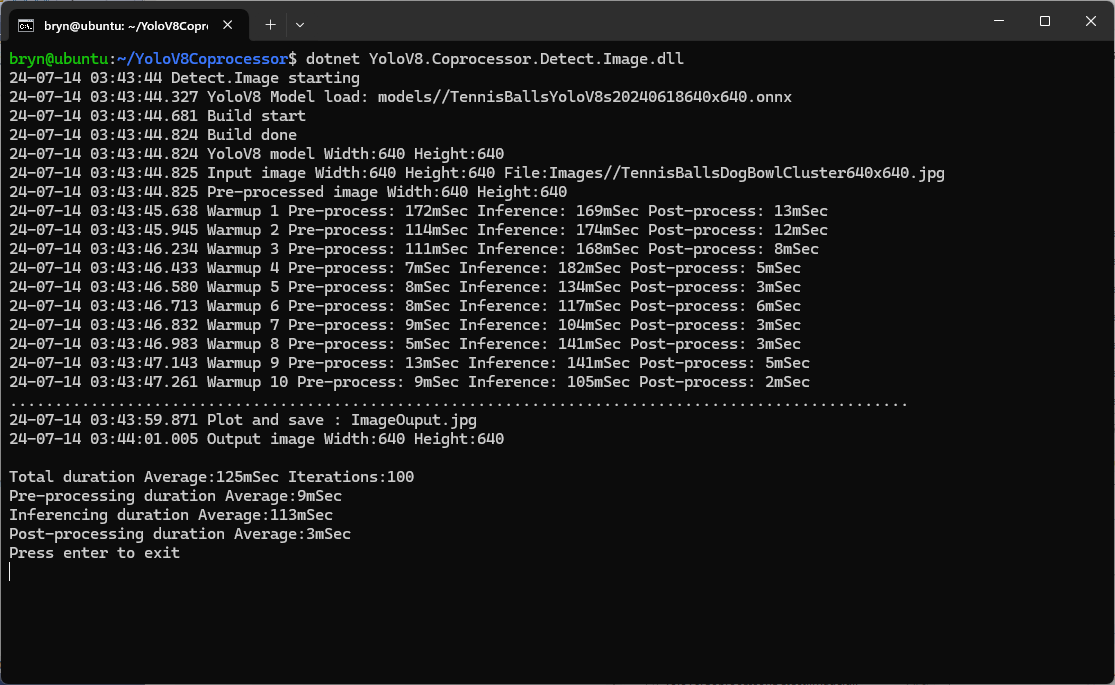
When running the YoloV8 Coprocessor demonstration on the Nividia Jetson Orin inferencing looked a bit odd, the dotted line wasn’t moving as fast as expected. To investigate this further I split the inferencing duration into pre-processing, inferencing and post-processing times. Inferencing and post-processing were “quick”, but pre-processing was taking longer than expected.

YoloV8 Coprocessor application running on Nvidia Jetson Orin

When I ran the demonstration Ultralytics YoloV8 object detection console application on my development desktop (13th Gen Intel(R) Core(TM) i7-13700 2.10 GHz with 32.0 GB) the pre-processing was much faster.

The much shorter pre-processing and longer inferencing durations were not a surprise as my development desktop does not have a Graphics Processing Unit(GPU)

Test image used for testing on Jetson device and development PC

The test image taken with my mobile was 3606×2715 pixels which was representative of the security cameras images to be processed by the solution.

Redgate ANTS Performance Profiler instrumentation of application execution

On my development box running the application with Redgate ANTS Performance Profiler highlighted that the Computnet YoloV8 code converting the image to a DenseTensor could be an issue.

 public static void ProcessToTensor(Image<Rgb24> image, Size modelSize, bool originalAspectRatio, DenseTensor<float> target, int batch)
 {
    var options = new ResizeOptions()
    {
       Size = modelSize,
       Mode = originalAspectRatio ? ResizeMode.Max : ResizeMode.Stretch,
    };

    var xPadding = (modelSize.Width - image.Width) / 2;
    var yPadding = (modelSize.Height - image.Height) / 2;

    var width = image.Width;
    var height = image.Height;

    // Pre-calculate strides for performance
    var strideBatchR = target.Strides[0] * batch + target.Strides[1] * 0;
    var strideBatchG = target.Strides[0] * batch + target.Strides[1] * 1;
    var strideBatchB = target.Strides[0] * batch + target.Strides[1] * 2;
    var strideY = target.Strides[2];
    var strideX = target.Strides[3];

    // Get a span of the whole tensor for fast access
    var tensorSpan = target.Buffer;

    // Try get continuous memory block of the entire image data
    if (image.DangerousTryGetSinglePixelMemory(out var memory))
    {
       Parallel.For(0, width * height, index =>
       {
             int x = index % width;
             int y = index / width;
             int tensorIndex = strideBatchR + strideY * (y + yPadding) + strideX * (x + xPadding);

             var pixel = memory.Span[index];
             WritePixel(tensorSpan.Span, tensorIndex, pixel, strideBatchR, strideBatchG, strideBatchB);
       });
    }
    else
    {
       Parallel.For(0, height, y =>
       {
             var rowSpan = image.DangerousGetPixelRowMemory(y).Span;
             int tensorYIndex = strideBatchR + strideY * (y + yPadding);

             for (int x = 0; x < width; x++)
             {
                int tensorIndex = tensorYIndex + strideX * (x + xPadding);
                var pixel = rowSpan[x];
                WritePixel(tensorSpan.Span, tensorIndex, pixel, strideBatchR, strideBatchG, strideBatchB);
             }
       });
    }
 }

 private static void WritePixel(Span<float> tensorSpan, int tensorIndex, Rgb24 pixel, int strideBatchR, int strideBatchG, int strideBatchB)
 {
    tensorSpan[tensorIndex] = pixel.R / 255f;
    tensorSpan[tensorIndex + strideBatchG - strideBatchR] = pixel.G / 255f;
    tensorSpan[tensorIndex + strideBatchB - strideBatchR] = pixel.B / 255f;
 }

For a 3606×2715 image the WritePixel method would be called tens of millions of times so its implementation and the overall approach used for ProcessToTensor has a significant impact on performance.

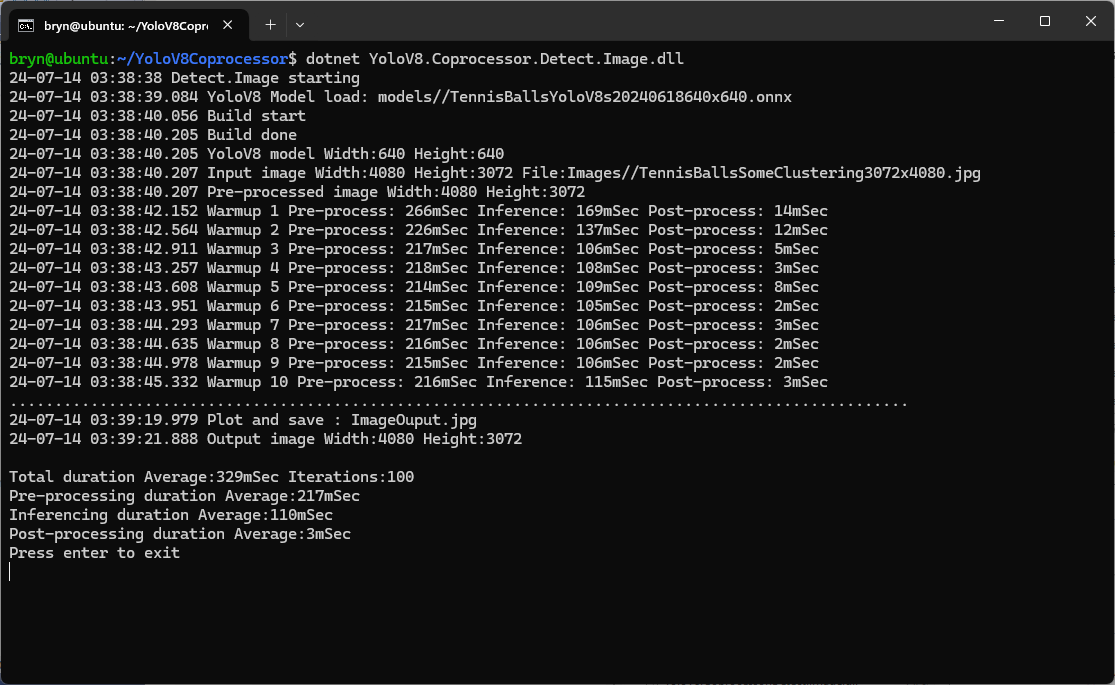
YoloV8 Coprocessor application running on Nvidia Jetson Orin with a resized image

Resizing the images had a significant impact on performance on the development box and Nividia Jetson Orin. This will need some investigation to see how much reducing the resizing the images impacts on the performance and accuracy of the model.

The ProcessToTensor method has already had some performance optimisations which improved performance by roughly 20%. There have been discussions about optimising similar code e.g. Efficient Bitmap to OnnxRuntime Tensor in C#, and Efficient RGB Image to Tensor in dotnet which look applicable and these will be evaluated.

YoloV8 ONNX – Nvidia Jetson Orin Nano™ GPU TensorRT Inferencing

The Seeedstudio reComputer J3011 has two processors an ARM64 CPU and an Nividia Jetson Orin 8G. To speed up inferencing on the Nividia Jetson Orin 8G with TensorRT I built an Open Neural Network Exchange(ONNX) TensorRT Execution Provider.

Roboflow Universe Tennis Ball by Ugur ozdemir dataset

The Open Neural Network Exchange(ONNX) model used was trained on Roboflow Universe by Ugur ozdemir dataset which has 23696 images. The initial version of the TensorRT integration used the builder.UseTensorrt method of the IYoloV8Builder interface.

...
YoloV8Builder builder = new YoloV8Builder();

builder.UseOnnxModel(_applicationSettings.ModelPath);

if (_applicationSettings.UseTensorrt)
{
   Console.WriteLine($" {DateTime.UtcNow:yy-MM-dd HH:mm:ss.fff} Using TensorRT");

   builder.UseTensorrt(_applicationSettings.DeviceId);
}
...

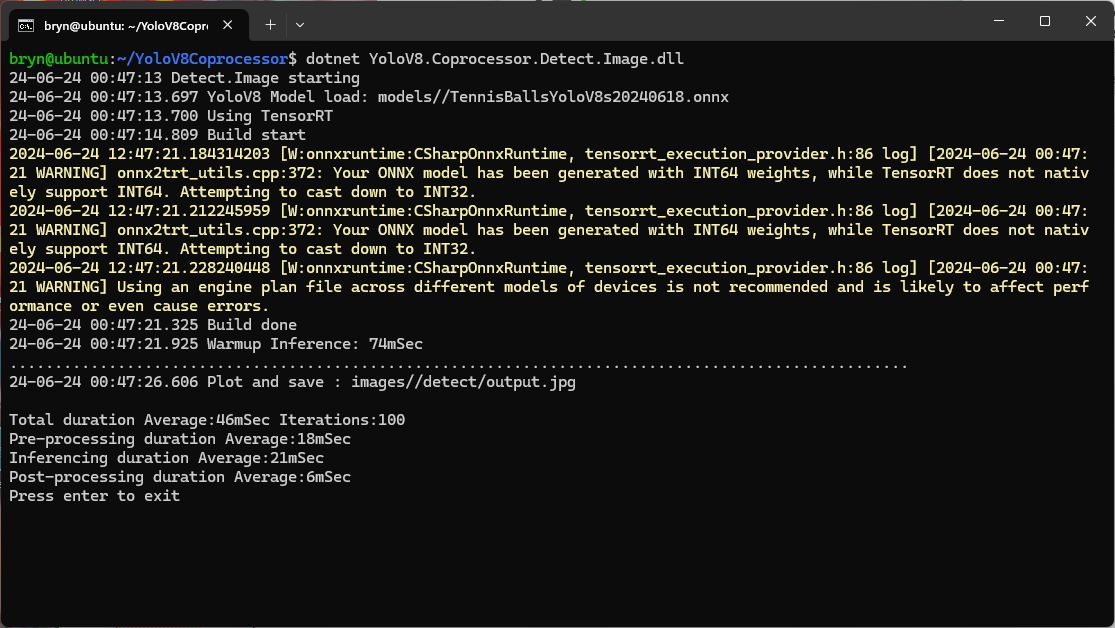
When the YoloV8.Coprocessor.Detect.Image application was configured to use the NVIDIA TensorRT Execution provider the average inference time was 58mSec but it took roughly 7 minutes to build and optimise the engine each time the application was run.

Generating the TensorRT engine every time the application is started

The TensorRT Execution provider has a number of configuration options but the IYoloV8Builder interface had to modified with UseCuda, UseRocm, UseTensorrt and UseTvm overloads implemented to allow additional configuration settings.

...
public class YoloV8Builder : IYoloV8Builder
{
...
    public IYoloV8Builder UseOnnxModel(BinarySelector model)
    {
        _model = model;

        return this;
    }

#if GPURELEASE
    public IYoloV8Builder UseCuda(int deviceId) => WithSessionOptions(SessionOptions.MakeSessionOptionWithCudaProvider(deviceId));

    public IYoloV8Builder UseCuda(OrtCUDAProviderOptions options) => WithSessionOptions(SessionOptions.MakeSessionOptionWithCudaProvider(options));

    public IYoloV8Builder UseRocm(int deviceId) => WithSessionOptions(SessionOptions.MakeSessionOptionWithRocmProvider(deviceId));
    
    // Couldn't test this don't have suitable hardware
    public IYoloV8Builder UseRocm(OrtROCMProviderOptions options) => WithSessionOptions(SessionOptions.MakeSessionOptionWithRocmProvider(options));

    public IYoloV8Builder UseTensorrt(int deviceId) => WithSessionOptions(SessionOptions.MakeSessionOptionWithTensorrtProvider(deviceId));

    public IYoloV8Builder UseTensorrt(OrtTensorRTProviderOptions options) => WithSessionOptions(SessionOptions.MakeSessionOptionWithTensorrtProvider(options));

    // Couldn't test this don't have suitable hardware
    public IYoloV8Builder UseTvm(string settings = "") => WithSessionOptions(SessionOptions.MakeSessionOptionWithTvmProvider(settings));
#endif
...
}

The trt_engine_cache_enable and trt_engine_cache_path TensorRT Execution provider session options configured the engine to be cached when it’s built for the first time so when a new inference session is created the engine can be loaded directly from disk.

...
YoloV8Builder builder = new YoloV8Builder();

builder.UseOnnxModel(_applicationSettings.ModelPath);

if (_applicationSettings.UseTensorrt)
{
   Console.WriteLine($" {DateTime.UtcNow:yy-MM-dd HH:mm:ss.fff} Using TensorRT");

   OrtTensorRTProviderOptions tensorRToptions = new OrtTensorRTProviderOptions();

   Dictionary<string, string> optionKeyValuePairs = new Dictionary<string, string>();

   optionKeyValuePairs.Add("trt_engine_cache_enable", "1");
   optionKeyValuePairs.Add("trt_engine_cache_path", "enginecache/");

   tensorRToptions.UpdateOptions(optionKeyValuePairs);

   builder.UseTensorrt(tensorRToptions);
}
...

In order to validate that the loaded engine loaded from the trt_engine_cache_path is usable for the current inference, an engine profile is also cached and loaded along with engine

If current input shapes are in the range of the engine profile, the loaded engine can be safely used. If input shapes are out of range, the profile will be updated and the engine will be recreated based on the new profile.

Reusing the TensorRT engine built the first time the application is started

When the YoloV8.Coprocessor.Detect.Image application was configured to use NVIDIA TensorRT and the engine was cached the average inference time was 58mSec and the Build method took roughly 10sec to execute after the application had been run once.

trtexec console application output

The trtexec utility can “pre-generate” engines but there doesn’t appear a way to use them with the TensorRT Execution provider.

YoloV8 ONNX – Nvidia Jetson Orin Nano™ GPU CUDA Inferencing

The Seeedstudio reComputer J3011 has two processors an ARM64 CPU and an Nividia Jetson Orin 8G. To speed up inferencing with the Nividia Jetson Orin 8G with Compute Unified Device Architecture (CUDA) I built an Open Neural Network Exchange(ONNX) CUDA Execution Provider.

The Open Neural Network Exchange(ONNX) model used was trained on Roboflow Universe by Ugur ozdemir dataset which has 23696 images.

// load the app settings into configuration
var configuration = new ConfigurationBuilder()
      .AddJsonFile("appsettings.json", false, true)
.Build();

_applicationSettings = configuration.GetSection("ApplicationSettings").Get<Model.ApplicationSettings>();

Console.WriteLine($" {DateTime.UtcNow:yy-MM-dd HH:mm:ss.fff} YoloV8 Model load: {_applicationSettings.ModelPath}");

YoloV8Builder builder = new YoloV8Builder();

builder.UseOnnxModel(_applicationSettings.ModelPath);

if (_applicationSettings.UseCuda)
{
   builder.UseCuda(_applicationSettings.DeviceId) ;
}

if (_applicationSettings.UseTensorrt)
{
   builder.UseTensorrt(_applicationSettings.DeviceId);
}

/*
builder.WithConfiguration(c =>
{
});
*/

/*
builder.WithSessionOptions(new Microsoft.ML.OnnxRuntime.SessionOptions()
{

});
*/

using (var image = await SixLabors.ImageSharp.Image.LoadAsync<Rgba32>(_applicationSettings.ImageInputPath))
using (var predictor = builder.Build())
{
   var result = await predictor.DetectAsync(image);

   Console.WriteLine();
   Console.WriteLine($"Speed: {result.Speed}");
   Console.WriteLine();

   foreach (var prediction in result.Boxes)
   {
      Console.WriteLine($" Class {prediction.Class} {(prediction.Confidence * 100.0):f1}% X:{prediction.Bounds.X} Y:{prediction.Bounds.Y} Width:{prediction.Bounds.Width} Height:{prediction.Bounds.Height}");
   }

   Console.WriteLine();

   Console.WriteLine($" {DateTime.UtcNow:yy-MM-dd HH:mm:ss.fff} Plot and save : {_applicationSettings.ImageOutputPath}");

   using (var imageOutput = await result.PlotImageAsync(image))
   {
      await imageOutput.SaveAsJpegAsync(_applicationSettings.ImageOutputPath);
   }
}

When configured to run the YoloV8.Coprocessor.Detect.Image on the ARM64 CPU the average inference time was 729 mSec.

The first time ran the YoloV8.Coprocessor.Detect.Image application configured to use CUDA for inferencing it failed badly.

The YoloV8.Coprocessor.Detect.Image application was then configured to use CUDA and the average inferencing time was 85mSec.

It took a couple of weeks to get the YoloV8.Coprocessor.Detect.Image application inferencing on the Nividia Jetson Orin 8G coprocessor and this will be covered in detail in another posts.

YoloV8 ONNX – Nvidia Jetson Orin Nano™ ARM64 CPU Inferencing

I configured the demonstration Ultralytics YoloV8 object detection(yolov8s.onnx) console application to process a 1920×1080 image from a security camera on my desktop development box (13th Gen Intel(R) Core(TM) i7-13700 2.10 GHz with 32.0 GB)

Object Detection sample application running on my development box

A Seeedstudio reComputer J3011 uses a Nividia Jetson Orin 8G and looked like a cost-effective platform to explore how a dedicated Artificial Intelligence (AI) co-processor could reduce inferencing times.

To establish a “baseline” I “published” the demonstration application on my development box which created a folder with all the files required to run the application on the Seeedstudio reComputer J3011 ARM64 CPU. I had to manually merge the “User Secrets” and appsettings.json files so the camera connection configuration was correct.

The runtimes folder contained a number of folders with the native runtime files for the supported Open Neural Network Exchange(ONNX) platforms

Object Detection application publish runtimes folder

This Nividia Jetson Orin ARM64 CPU requires the linux-arm64 ONNX runtime which was “automagically” detected. (in previous versions of ML.Net the native runtime had to be copied to the execution directory)

Linux ONNX ARM64 runtime

The final step was to use the demonstration Ultralytics YoloV8 object detection(yolov8s.onnx) console application to process a 1920×1080 image from a security camera on the reComputer J3011 (6-core Arm® Cortex®64-bit CPU 1.5Ghz processor)

Object Detection sample application running on my Seeedstudio reComputer J3011

When I averaged the pre-processing, inferencing and post-processing times for both devices over 20 executions my development box was much faster which was not a surprise. Though the reComputer J3011 post processing times were a bit faster than I was expecting

ARM64 CPU Preprocess 0.05s Inference 0.31s Postprocess 0.05

Myriota Connector – Azure IoT Central Downlink Methods

This post is about Azure IoT Central downlink methods and should be read in conjunction with the Myriota Connector – Azure IoT Central Downlink Methods post. My Myriota Sense and Locate template has 4 commands and in this post, I have focused on the fan speed command.

Sense and Locate Azure IoT Central Template

The Myriota Connector only supports Direct Methods which provide immediate confirmation of the result being queued by the Myriota Cloud API. The Myriota (API) control message send method responds with 400 Bad Request if there is already a message being sent to a device.

Myriota Azure Function Environment Variable configuration

The fan speed downlink payload formatter is specified in the Azure Function Environment Variables.
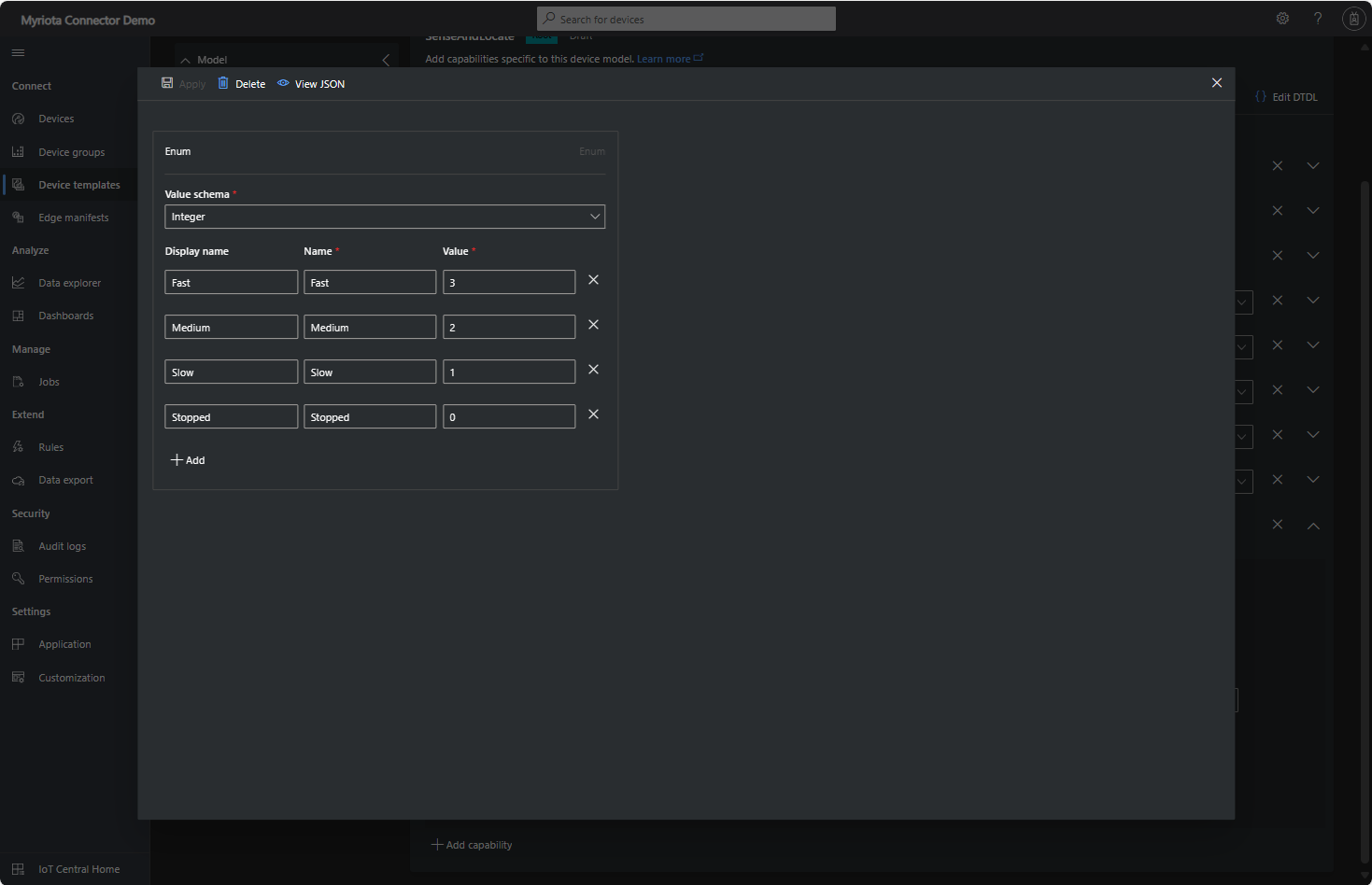
Sense and Locate Azure IoT Central Template Fan Speed Enumeration

The fan speed value in the message payload is configured in the fan speed enumeration.

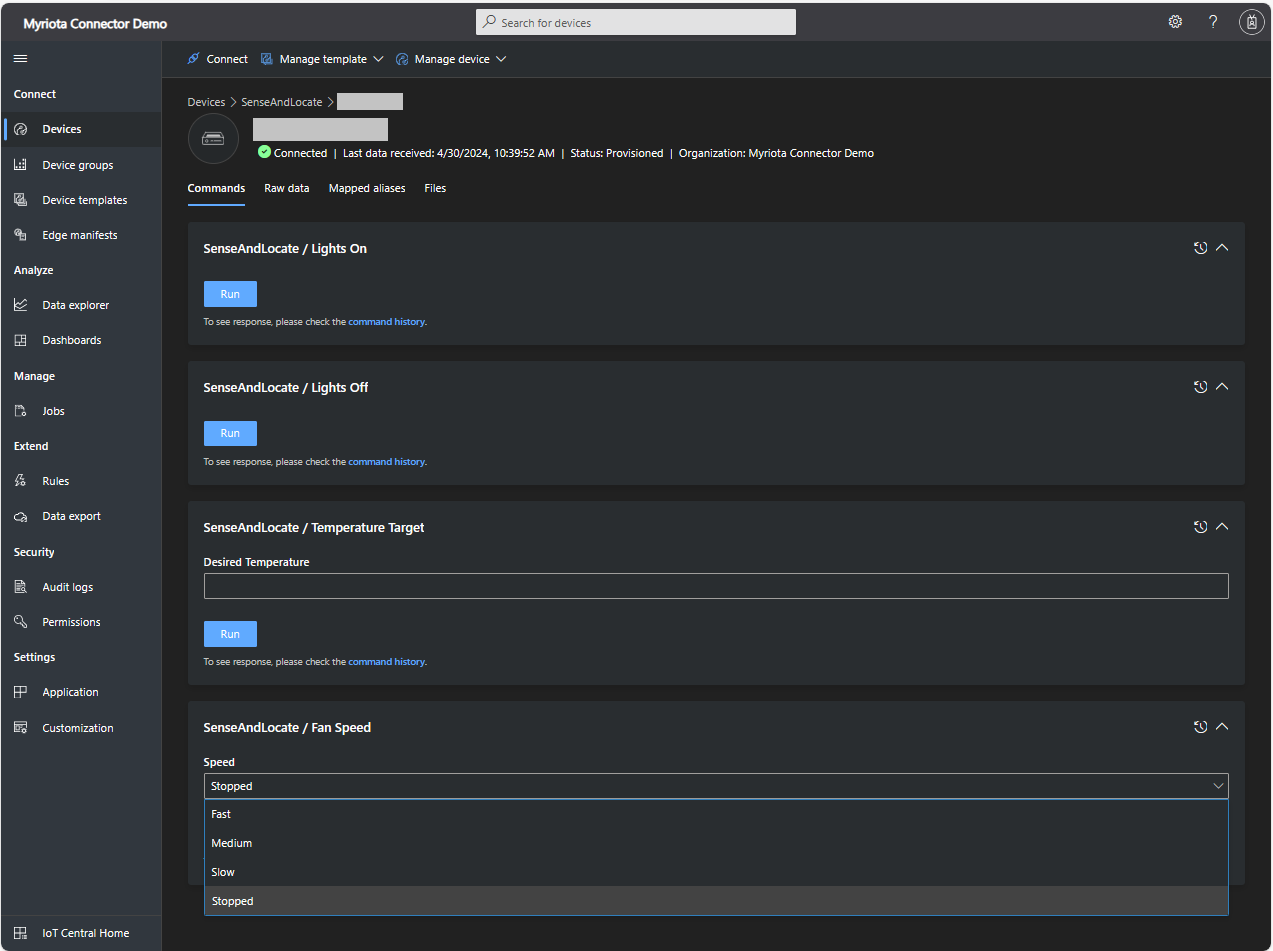
Sense and Locate Azure IoT Central Command Fan Speed Selection

The FanSpeed.cs payload formatter extracts the FanSpeed value from the Javascript Object Notation(JSON) payload and returns a two-byte array containing the message type and speed of the fan.

using System;
using System.Collections.Generic;

using Newtonsoft.Json;
using Newtonsoft.Json.Linq;

public class FormatterDownlink : PayloadFormatter.IFormatterDownlink
{
   public byte[] Evaluate(string terminalId, string methodName, JObject payloadJson, byte[] payloadBytes)
   {
      byte? status = payloadJson.Value<byte?>("FanSpeed");

      if (!status.HasValue)
      {
         return new byte[] { };
      }

      return new byte[] { 1, status.Value };
   }
}

Sense and Locate Azure IoT Central Command Fan Speed History

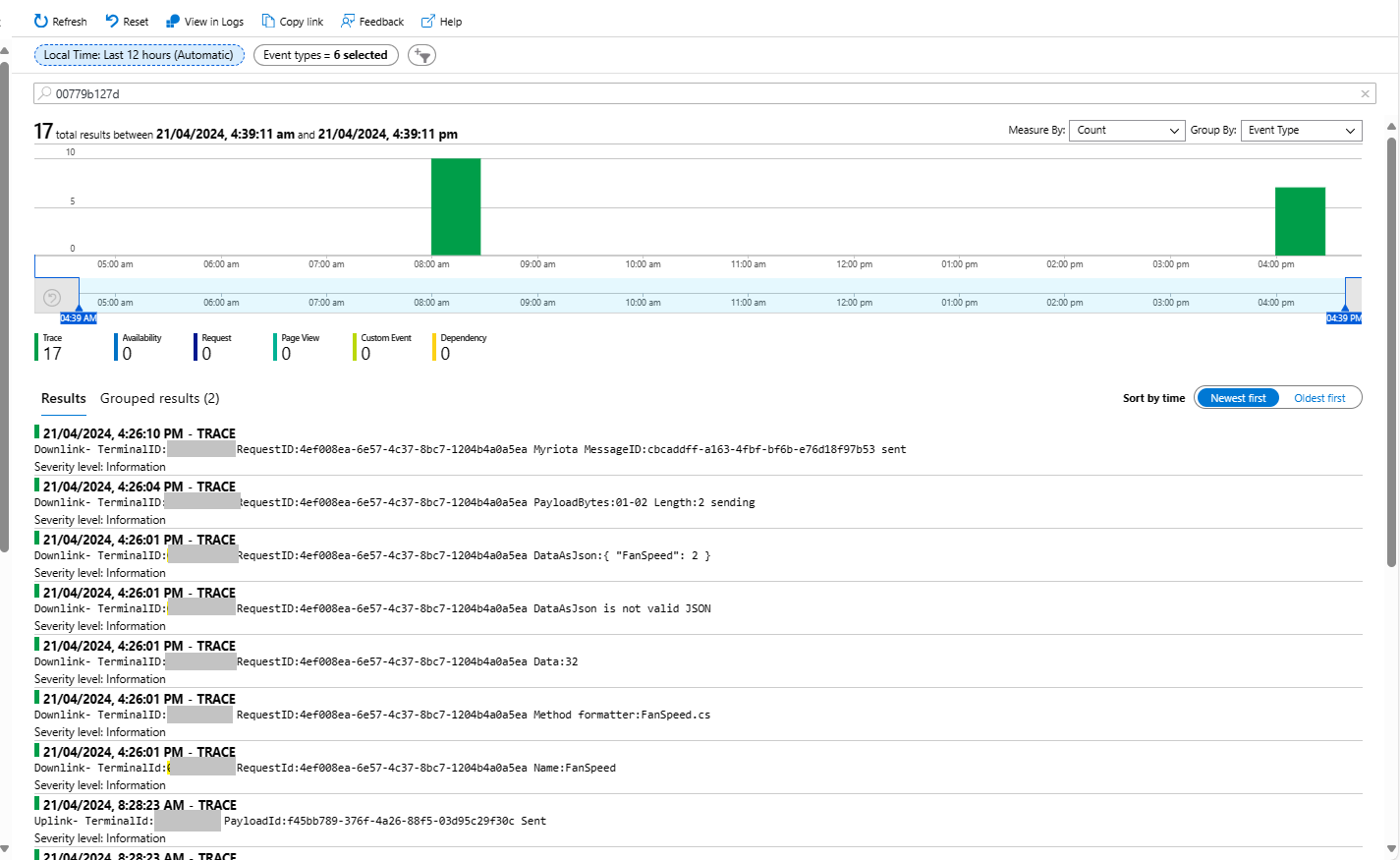
Each Azure Application Insights log entry starts with the TerminalID (to simplify searching for all the messages related to device) and the requestId a Globally Unique Identifier (GUID) to simplify searching for all the “steps” associated with sending/receiving a message) with the rest of the logging message containing “step” specific diagnostic information.

Sense and Locate Azure IoT Central Command Fan Speed Application Insights

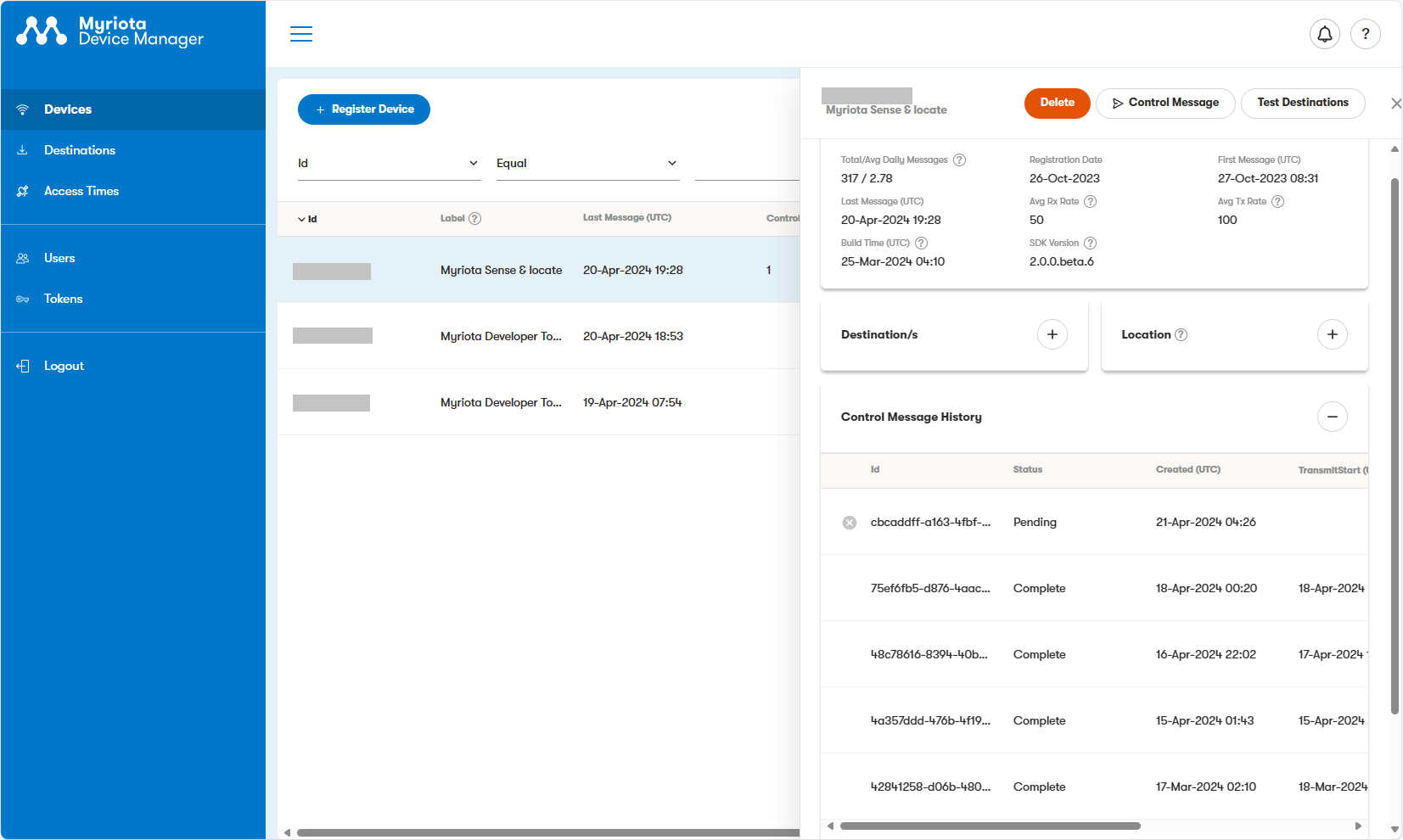
In the Myriota Device Manager the status of Control Messages can be tracked and they can be cancelled if in the “pending” state.

Myriota Control Message status Pending

A Control Message can take up to 24hrs to be delivered and confirmation of delivery has to be implemented by the application developer.

Azure Event Grid MQTT-With HiveMQ & MQTTnet Clients

Most of the examples of connecting to Azure Event Grid’s MQTT broker use MQTTnet so for a bit of variety I started with a hivemq-mqtt-client-dotnet based client. (A customer had been evaluating HiveMQ for a project which was later cancelled)

BEWARE – ClientID parameter is case sensitive.

The HiveMQ client was “inspired” by the How to Guides > Custom Client Certificates documentation.

class Program
{
   private static Model.ApplicationSettings _applicationSettings;
   private static HiveMQClient _client;
   private static bool _publisherBusy = false;

   static async Task Main()
   {
      Console.WriteLine($"{DateTime.UtcNow:yy-MM-dd HH:mm:ss} Hive MQ client starting");

      try
      {
         // load the app settings into configuration
         var configuration = new ConfigurationBuilder()
               .AddJsonFile("appsettings.json", false, true)
               .AddUserSecrets<Program>()
         .Build();

         _applicationSettings = configuration.GetSection("ApplicationSettings").Get<Model.ApplicationSettings>();

         var optionsBuilder = new HiveMQClientOptionsBuilder();

         optionsBuilder
            .WithClientId(_applicationSettings.ClientId)
            .WithBroker(_applicationSettings.Host)
            .WithPort(_applicationSettings.Port)
            .WithUserName(_applicationSettings.UserName)
            .WithCleanStart(_applicationSettings.CleanStart)
            .WithClientCertificate(_applicationSettings.ClientCertificateFileName, _applicationSettings.ClientCertificatePassword)
            .WithUseTls(true);

         using (_client = new HiveMQClient(optionsBuilder.Build()))
         {
            _client.OnMessageReceived += OnMessageReceived;

            var connectResult = await _client.ConnectAsync();
            if (connectResult.ReasonCode != ConnAckReasonCode.Success)
            {
               throw new Exception($"Failed to connect: {connectResult.ReasonString}");
            }

            Console.WriteLine($"Subscribed to Topic");
            foreach (string topic in _applicationSettings.SubscribeTopics.Split(',', StringSplitOptions.RemoveEmptyEntries | StringSplitOptions.TrimEntries))
            {
               var subscribeResult = await _client.SubscribeAsync(topic, _applicationSettings.SubscribeQualityOfService);

               Console.WriteLine($" Topic:{topic} Result:{subscribeResult.Subscriptions[0].SubscribeReasonCode}");
            }
   }
//...
}
HiveMQ Client console application output

The MQTTnet client was “inspired” by the Azure MQTT .NET Application sample

class Program
{
   private static Model.ApplicationSettings _applicationSettings;
   private static IMqttClient _client;
   private static bool _publisherBusy = false;

   static async Task Main()
   {
      Console.WriteLine($"{DateTime.UtcNow:yy-MM-dd HH:mm:ss} MQTTNet client starting");

      try
      {
         // load the app settings into configuration
         var configuration = new ConfigurationBuilder()
               .AddJsonFile("appsettings.json", false, true)
               .AddUserSecrets<Program>()
         .Build();

         _applicationSettings = configuration.GetSection("ApplicationSettings").Get<Model.ApplicationSettings>();

         var mqttFactory = new MqttFactory();

         using (_client = mqttFactory.CreateMqttClient())
         {
            // Certificate based authentication
            List<X509Certificate2> certificates = new List<X509Certificate2>
            {
               new X509Certificate2(_applicationSettings.ClientCertificateFileName, _applicationSettings.ClientCertificatePassword)
            };

            var tlsOptions = new MqttClientTlsOptionsBuilder()
                  .WithClientCertificates(certificates)
                  .WithSslProtocols(System.Security.Authentication.SslProtocols.Tls12)
                  .UseTls(true)
                  .Build();

            MqttClientOptions mqttClientOptions = new MqttClientOptionsBuilder()
                     .WithClientId(_applicationSettings.ClientId)
                     .WithTcpServer(_applicationSettings.Host, _applicationSettings.Port)
                     .WithCredentials(_applicationSettings.UserName, _applicationSettings.Password)
                     .WithCleanStart(_applicationSettings.CleanStart)
                     .WithTlsOptions(tlsOptions)
                     .Build();

            var connectResult = await _client.ConnectAsync(mqttClientOptions);
            if (connectResult.ResultCode != MqttClientConnectResultCode.Success)
            {
               throw new Exception($"Failed to connect: {connectResult.ReasonString}");
            }

            _client.ApplicationMessageReceivedAsync += OnApplicationMessageReceivedAsync;

            Console.WriteLine($"Subscribed to Topic");
            foreach (string topic in _applicationSettings.SubscribeTopics.Split(',', StringSplitOptions.RemoveEmptyEntries | StringSplitOptions.TrimEntries))
            {
               var subscribeResult = await _client.SubscribeAsync(topic, _applicationSettings.SubscribeQualityOfService);

               Console.WriteLine($" {topic} Result:{subscribeResult.Items.First().ResultCode}");
            }
      }
//...
}
MQTTnet client console application output

The design of the MQTT protocol means that the hivemq-mqtt-client-dotnet and MQTTnet implementations are similar. Having used both I personally prefer the HiveMQ client library.

Azure Event Grid MQTT-Certificates

When configuring Root, Intermediate and Device certificates for my Azure Event Grid Devices using the smallstep step-ca or OpenSSL I made mistakes/typos which broke my deployment and in the end I was copying and pasting commands from Windows Notepad.

For one test deployment it took me an hour to generate the Root, Intermediate and a number of Devices certificates which was a waste of time. At this point I decided investigate writing some applications to simplify the process.

After some searching I stumbled across CREATING CERTIFICATES FOR X.509 SECURITY IN AZURE IOT HUB USING .NET CORE by Damien Bod which showed how to generate certificates for Azure IoT Hub solutions using his NuGet package Certificate Manager.

The AzureIoTHubDps repository had a sample showing how to generate the certificate chain for Azure IoT Hub devices. It worked really well but I accidentally overwrote my Root and Intermediate certificates, there were some “magic numbers” and hard coded passwords (it was a sample) so I decided to “chop” the sample up into three command line applications.
static void Main(string[] args)
{
   var serviceProvider = new ServiceCollection()
         .AddCertificateManager()
         .BuildServiceProvider();

   // load the app settings into configuration
   var configuration = new ConfigurationBuilder()
         .AddJsonFile("appsettings.json", false, true)
         .AddUserSecrets<Program>()
   .Build();

   _applicationSettings = configuration.GetSection("ApplicationSettings").Get<Model.ApplicationSettings>();
//------
   Console.WriteLine($"validFrom:{validFrom} ValidTo:{validTo}");

   var serverRootCertificate = serviceProvider.GetService<CreateCertificatesClientServerAuth>();

   var root = serverRootCertificate.NewRootCertificate(
         new DistinguishedName { 
               CommonName = _applicationSettings.CommonName,
               Organisation = _applicationSettings.Organisation,
               OrganisationUnit = _applicationSettings.OrganisationUnit,
               Locality = _applicationSettings.Locality,
               StateProvince  = _applicationSettings.StateProvince,
               Country = _applicationSettings.Country
         },
         new ValidityPeriod { 
         ValidFrom = validFrom,
         ValidTo = validTo,
         },
         _applicationSettings.PathLengthConstraint,
         _applicationSettings.DnsName);
   root.FriendlyName = _applicationSettings.FriendlyName;

   Console.Write("PFX Password:");
   string password = Console.ReadLine();
   if ( String.IsNullOrEmpty(password))
   {
      Console.WriteLine("PFX Password invalid");
      return;
   }

   var exportCertificate = serviceProvider.GetService<ImportExportCertificate>();

   var rootCertificatePfxBytes = exportCertificate.ExportRootPfx(password, root);
   File.WriteAllBytes(_applicationSettings.RootCertificateFilePath, rootCertificatePfxBytes);

   Console.WriteLine($"Root certificate file:{_applicationSettings.RootCertificateFilePath}");
   Console.WriteLine("press enter to exit");
   Console.ReadLine();
}

The application’s configuration was split between application settings file(certificate file paths, validity periods, Organisation etc.) or entered at runtime ( certificate filenames, passwords etc.) The first application generates a Root Certificate using the distinguished name information from the application settings, plus file names and passwords entered by the user.

Root Certificate generation application output

The second application generates an Intermediate Certificate using the Root Certificate, the distinguished name information from the application settings, plus file names and passwords entered by the user.

static void Main(string[] args)
{
   var serviceProvider = new ServiceCollection()
         .AddCertificateManager()
         .BuildServiceProvider();

   // load the app settings into configuration
   var configuration = new ConfigurationBuilder()
         .AddJsonFile("appsettings.json", false, true)
         .AddUserSecrets<Program>()
   .Build();

   _applicationSettings = configuration.GetSection("ApplicationSettings").Get<Model.ApplicationSettings>();
//------
   Console.WriteLine($"validFrom:{validFrom} be after ValidTo:{validTo}");

   Console.WriteLine($"Root Certificate file:{_applicationSettings.RootCertificateFilePath}");

   Console.Write("Root Certificate Password:");
   string rootPassword = Console.ReadLine();
   if (String.IsNullOrEmpty(rootPassword))
   {
      Console.WriteLine("Fail");
      return;
   }
   var rootCertificate = new X509Certificate2(_applicationSettings.RootCertificateFilePath, rootPassword);

   var intermediateCertificateCreate = serviceProvider.GetService<CreateCertificatesClientServerAuth>();

   var intermediateCertificate = intermediateCertificateCreate.NewIntermediateChainedCertificate(
         new DistinguishedName
         {
            CommonName = _applicationSettings.CommonName,
            Organisation = _applicationSettings.Organisation,
            OrganisationUnit = _applicationSettings.OrganisationUnit,
            Locality = _applicationSettings.Locality,
            StateProvince = _applicationSettings.StateProvince,
            Country = _applicationSettings.Country
         },
      new ValidityPeriod
      {
         ValidFrom = validFrom,
         ValidTo = validTo,
      },
            _applicationSettings.PathLengthConstraint,
            _applicationSettings.DnsName, rootCertificate);
      intermediateCertificate.FriendlyName = _applicationSettings.FriendlyName;

   Console.Write("Intermediate certificate Password:");
   string intermediatePassword = Console.ReadLine();
   if (String.IsNullOrEmpty(intermediatePassword))
   {
      Console.WriteLine("Fail");
      return;
   }

   var importExportCertificate = serviceProvider.GetService<ImportExportCertificate>();

   Console.WriteLine($"Intermediate PFX file:{_applicationSettings.IntermediateCertificatePfxFilePath}");
   var intermediateCertificatePfxBtyes = importExportCertificate.ExportChainedCertificatePfx(intermediatePassword, intermediateCertificate, rootCertificate);
   File.WriteAllBytes(_applicationSettings.IntermediateCertificatePfxFilePath, intermediateCertificatePfxBtyes);

   Console.WriteLine($"Intermediate CER file:{_applicationSettings.IntermediateCertificateCerFilePath}");
   var intermediateCertificatePemText = importExportCertificate.PemExportPublicKeyCertificate(intermediateCertificate);
   File.WriteAllText(_applicationSettings.IntermediateCertificateCerFilePath, intermediateCertificatePemText);

   Console.WriteLine("press enter to exit");
   Console.ReadLine();
}
Intermediate Certificate generation application output
Uploading the Intermediate certificate to Azure Event Grid

The third application generates Device Certificates using the Intermediate Certificate, distinguished name information from the application settings, plus device id, file names and passwords entered by the user.

static void Main(string[] args)
{
   var serviceProvider = new ServiceCollection()
         .AddCertificateManager()
         .BuildServiceProvider();

   // load the app settings into configuration
   var configuration = new ConfigurationBuilder()
         .AddJsonFile("appsettings.json", false, true)
         .AddUserSecrets<Program>()
   .Build();

   _applicationSettings = configuration.GetSection("ApplicationSettings").Get<Model.ApplicationSettings>();
//------
   Console.WriteLine($"validFrom:{validFrom} ValidTo:{validTo}");

   Console.WriteLine($"Intermediate PFX file:{_applicationSettings.IntermediateCertificateFilePath}");

   Console.Write("Intermediate PFX Password:");
   string intermediatePassword = Console.ReadLine();
   if (String.IsNullOrEmpty(intermediatePassword))
   {
      Console.WriteLine("Intermediate PFX Password invalid");
      return;
   }
   var intermediate = new X509Certificate2(_applicationSettings.IntermediateCertificateFilePath, intermediatePassword);

   Console.Write("Device ID:");
   string deviceId = Console.ReadLine();
   if (String.IsNullOrEmpty(deviceId))
   {
      Console.WriteLine("Device ID invalid");
      return;
   }

   var createClientServerAuthCerts = serviceProvider.GetService<CreateCertificatesClientServerAuth>();

   var device = createClientServerAuthCerts.NewDeviceChainedCertificate(
         new DistinguishedName
         {
            CommonName = deviceId,
            Organisation = _applicationSettings.Organisation,
            OrganisationUnit = _applicationSettings.OrganisationUnit,
            Locality = _applicationSettings.Locality,
            StateProvince = _applicationSettings.StateProvince,
            Country = _applicationSettings.Country
         },
      new ValidityPeriod
      {
         ValidFrom = validFrom,
         ValidTo = validTo,
      },
      deviceId, intermediate);
   device.FriendlyName = deviceId;

   Console.Write("Device PFX Password:");
   string devicePassword = Console.ReadLine();
   if (String.IsNullOrEmpty(devicePassword))
   {
      Console.WriteLine("Fail");
      return;
   }

   var importExportCertificate = serviceProvider.GetService<ImportExportCertificate>();

   string devicePfxPath = string.Format(_applicationSettings.DeviceCertificatePfxFilePath, deviceId);

   Console.WriteLine($"Device PFX file:{devicePfxPath}");
   var deviceCertificatePath = importExportCertificate.ExportChainedCertificatePfx(devicePassword, device, intermediate);
   File.WriteAllBytes(devicePfxPath,  deviceCertificatePath);

   Console.WriteLine("press enter to exit");
   Console.ReadLine();
}
Device Certificate generation application output
Uploading the Intermediate certificate to Azure Event Grid

These applications wouldn’t have been possible without Damien Bod’s CREATING CERTIFICATES FOR X.509 SECURITY IN AZURE IOT HUB USING .NET CORE blog post, and his Certificate Manager NuGet package.