Azure Event Grid esp-mqtt-arduino Client – Success

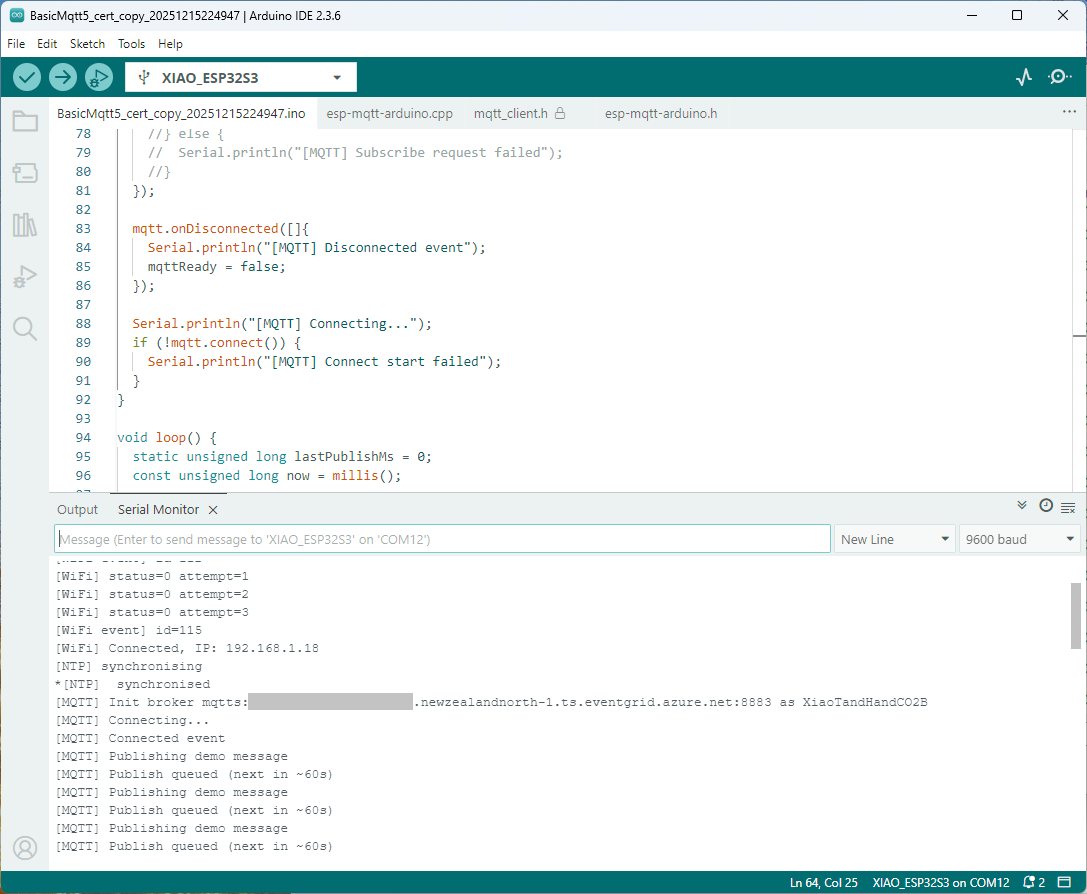
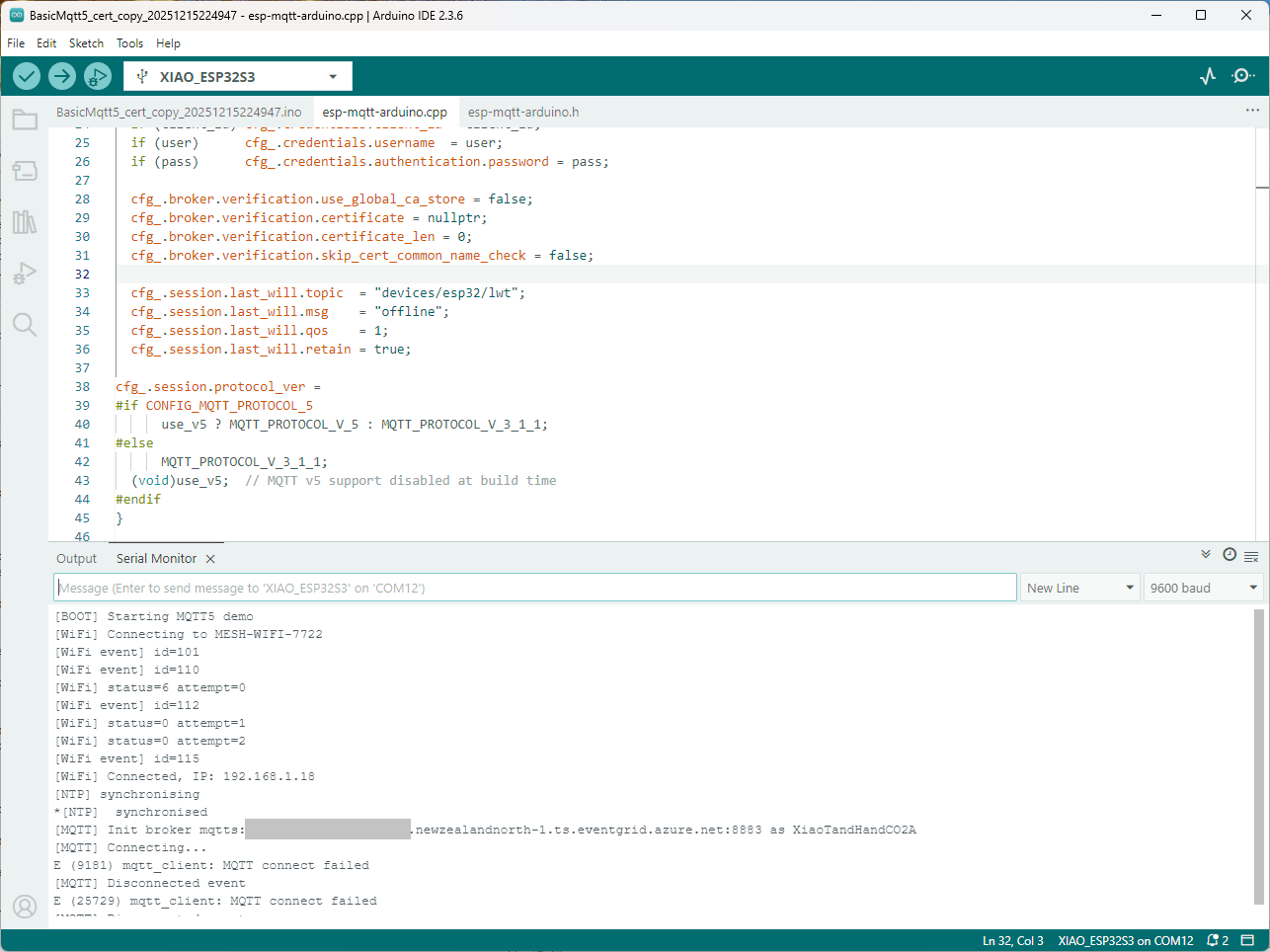
Still couldn’t figure out why my code was failing so I turned up logging to 11 and noticed a couple of messages which didn’t make sense. The device was connecting than disconnecting which indicated a another problem. As part of the Message Queue Telemetry Transport(MQTT) specification there is a “feature” Last Will and Testament(LWT) which a client can configure so that the MQTT broker sends a message to a topic if the device disconnects unexpectedly.

I was looking at the code and noticed that LWT was being used and that the topic didn’t exist in my Azure Event Grid MQTT Broker namespace. When the LWT configuration was commented out the application worked.

void Mqtt5ClientESP32::begin(const char* uri, const char* client_id, const char* user, const char* pass, bool use_v5) {
  connected_ = false;
  insecure_ = false;
  cfg_.broker.address.uri = uri;
  if (client_id) cfg_.credentials.client_id = client_id;
  if (user)      cfg_.credentials.username  = user;
  if (pass)      cfg_.credentials.authentication.password = pass;

  cfg_.broker.verification.use_global_ca_store = false;
  cfg_.broker.verification.certificate = nullptr;
  cfg_.broker.verification.certificate_len = 0;
  cfg_.broker.verification.skip_cert_common_name_check = false;
  
/*
  cfg_.session.last_will.topic  = "devices/esp32/lwt";
  cfg_.session.last_will.msg    = "offline";
  cfg_.session.last_will.qos    = 1;
  cfg_.session.last_will.retain = true;
*/

cfg_.session.protocol_ver = 
#if CONFIG_MQTT_PROTOCOL_5
      use_v5 ? MQTT_PROTOCOL_V_5 : MQTT_PROTOCOL_V_3_1_1;
#else
      MQTT_PROTOCOL_V_3_1_1;
  (void)use_v5;  // MQTT v5 support disabled at build time
#endif
}

Two methods were added so that the LWT could be configured if required

void SetLWT(const char *topic, const char *msg, int msg_len,int qos, int retain);
void Mqtt5ClientESP32::SetLWT(const char *topic, const char *msg, int msg_len,int qos, int retain){
   cfg_.session.last_will.topic  = topic;
   cfg_.session.last_will.msg    = msg;
   cfg_.session.last_will.msg_len= msg_len;
   cfg_.session.last_will.qos    = qos;
   cfg_.session.last_will.retain = retain;
}

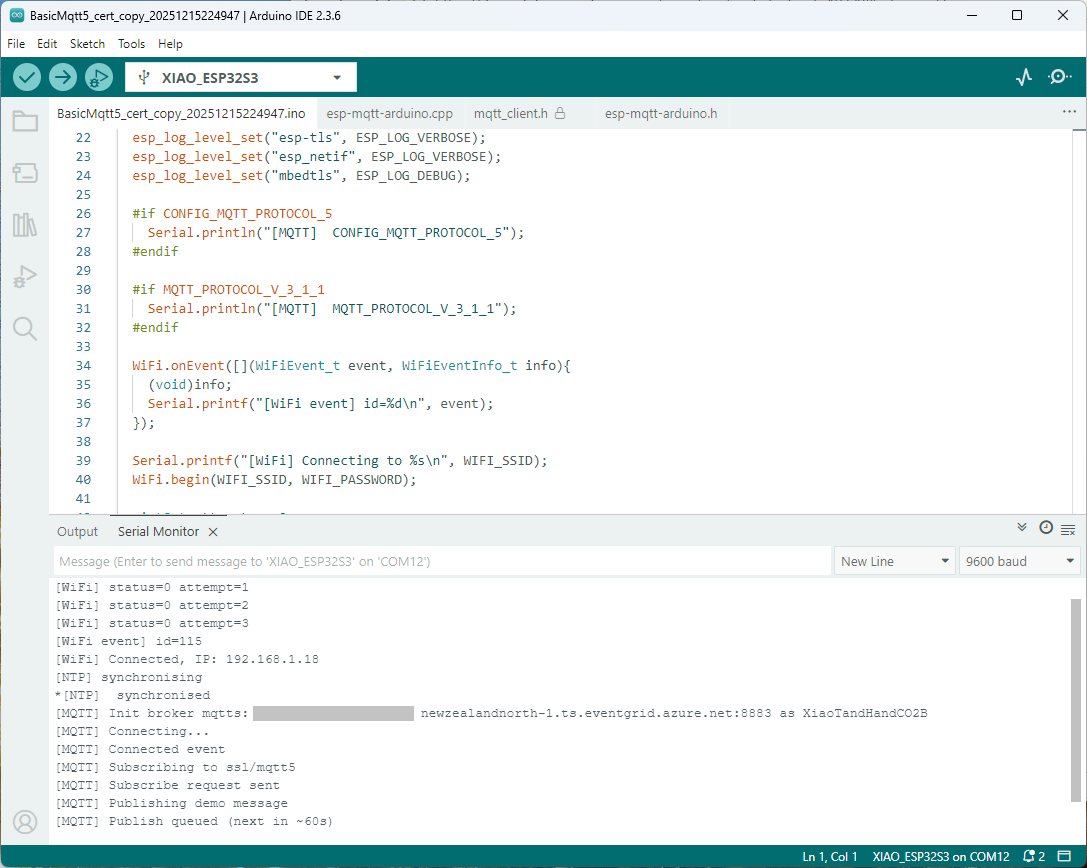
Paying close attention to the logging I noticed the “Subscribing to ssl/mqtts” followed by “Subscribe request sent”

I checked the sample application and found that if the connect was successful the application would then try and subscribe to a topic that didn’t exist.

mqtt.onConnected([]{
  Serial.println("[MQTT] Connected event");

   mqttReady = true;
/*
Serial.println("[MQTT] Subscribing to ssl/mqtt5");
if (mqtt.subscribe("ssl/mqtt5", 1, true)) {
  Serial.println("[MQTT] Subscribe request sent");
} else {
  Serial.println("[MQTT] Subscribe request failed");
}
*/

I commented out that code and the application started without any messages

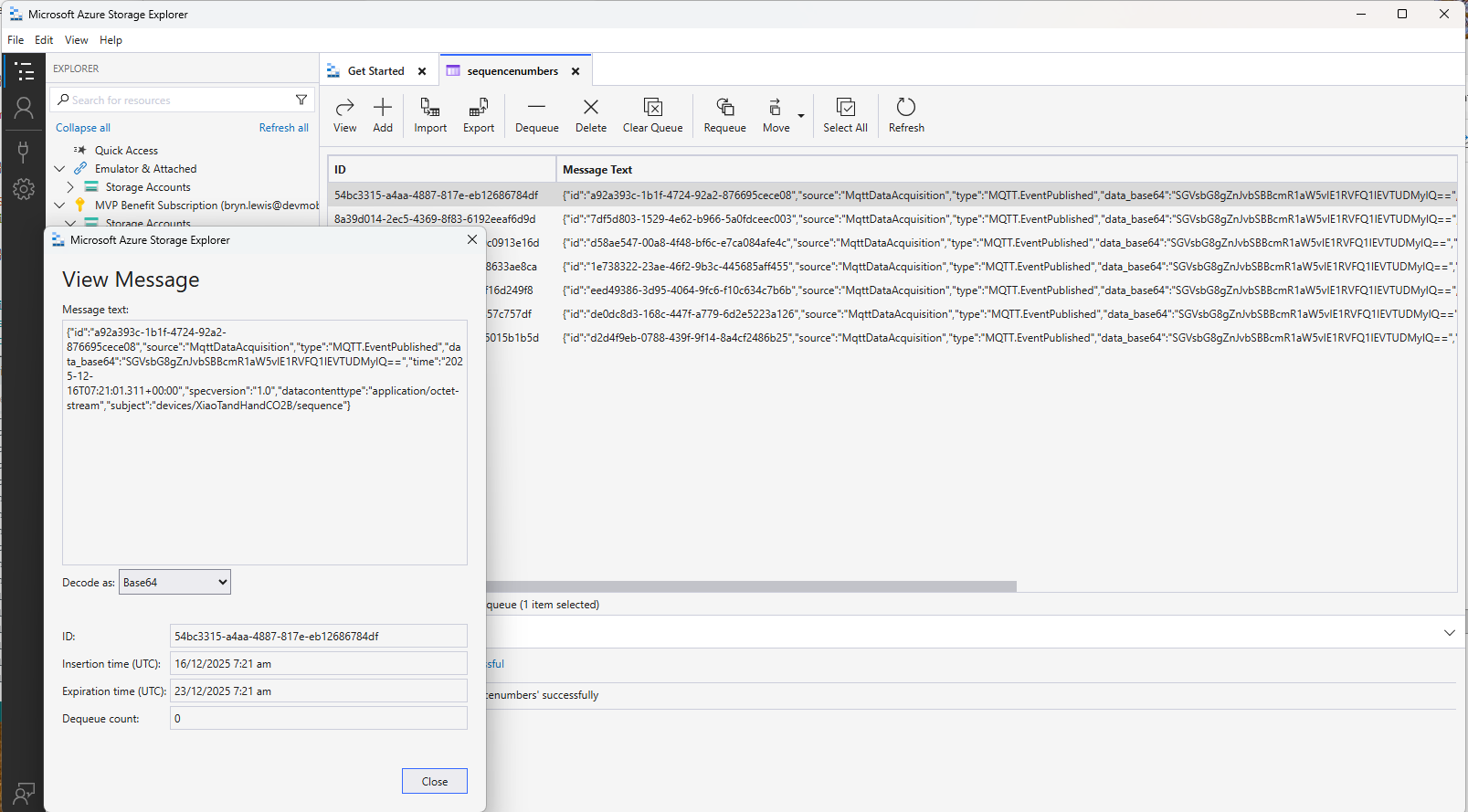
Just to make sure I checked that the message count in the Azure Storage Queue was increasing and the payload client ID matched my device

Yet again a couple of hours lost from my life which I can never get back

Azure Event Grid YoloV8- Basic MQTT Client Pose Estimation

The Azure.EventGrid.Image.YoloV8.Pose application downloads images from a security camera, processes them with the default YoloV8(by Ultralytics) Pose Estimation model then publishes the results to an Azure Event Grid MQTT broker topic.

private async void ImageUpdateTimerCallback(object? state)
{
   DateTime requestAtUtc = DateTime.UtcNow;

   // Just incase - stop code being called while photo or prediction already in progress
   if (_ImageProcessing)
   {
      return;
   }
   _ImageProcessing = true;

   try
   {
      _logger.LogDebug("Camera request start");

      PoseResult result;

      using (Stream cameraStream = await _httpClient.GetStreamAsync(_applicationSettings.CameraUrl))
      {
         result = await _predictor.PoseAsync(cameraStream);
      }

      _logger.LogInformation("Speed Preprocess:{Preprocess} Postprocess:{Postprocess}", result.Speed.Preprocess, result.Speed.Postprocess);


      if (_logger.IsEnabled(LogLevel.Debug))
      {
         _logger.LogDebug("Pose results");

         foreach (var box in result.Boxes)
         {
            _logger.LogDebug(" Class:{box.Class} Confidence:{Confidence:f1}% X:{X} Y:{Y} Width:{Width} Height:{Height}", box.Class.Name, box.Confidence * 100.0, box.Bounds.X, box.Bounds.Y, box.Bounds.Width, box.Bounds.Height);

            foreach (var keypoint in box.Keypoints)
            {
               Model.PoseMarker poseMarker = (Model.PoseMarker)keypoint.Index;

               _logger.LogDebug("  Class:{Class} Confidence:{Confidence:f1}% X:{X} Y:{Y}", Enum.GetName(poseMarker), keypoint.Confidence * 100.0, keypoint.Point.X, keypoint.Point.Y);
            }
         }
      }

      var message = new MQTT5PublishMessage
      {
         Topic = string.Format(_applicationSettings.PublishTopic, _applicationSettings.UserName),
         Payload = Encoding.ASCII.GetBytes(JsonSerializer.Serialize(new
         {
            result.Boxes
         })),
         QoS = _applicationSettings.PublishQualityOfService,
      };

      _logger.LogDebug("HiveMQ.Publish start");

      var resultPublish = await _mqttclient.PublishAsync(message);

      _logger.LogDebug("HiveMQ.Publish done");
   }
   catch (Exception ex)
   {
      _logger.LogError(ex, "Camera image download, processing, or telemetry failed");
   }
   finally
   {
      _ImageProcessing = false;
   }

   TimeSpan duration = DateTime.UtcNow - requestAtUtc;

   _logger.LogDebug("Camera Image download, processing and telemetry done {TotalSeconds:f2} sec", duration.TotalSeconds);
}

The application uses a Timer(with configurable Due and Period times) to poll the security camera, detect objects in the image then publish a JavaScript Object Notation(JSON) representation of the results to Azure Event Grid MQTT broker topic using a HiveMQ client.

Utralytics Pose Model input image

The Unv ADZK-10 camera used in this sample has a Hypertext Transfer Protocol (HTTP) Uniform Resource Locator(URL) for downloading the current image. Like the YoloV8.Detect.SecurityCamera.Stream sample the image “streamed” using the HttpClient.GetStreamAsync to the YoloV8 PoseAsync method.

Azure.EventGrid.Image.YoloV8.Pose application console output

The same approach as the YoloV8.Detect.SecurityCamera.Stream sample is used because the image doesn’t have to be saved on the local filesystem.

Utralytics Pose Model marked-up image

To check the results, I put a breakpoint in the timer just after PoseAsync method is called and then used the Visual Studio 2022 Debugger QuickWatch functionality to inspect the contents of the PoseResult object.

Visual Studio 2022 Debugger PoseResult Quickwatch

For testing I configured a single Azure Event Grid custom topic subscription an Azure Storage Queue.

Azure Event Grid Topic Metrics

An Azure Storage Queue is an easy way to store messages while debugging/testing an application.

Azure Storage Explorer messages list

Azure Storage Explorer is a good tool for listing recent messages, then inspecting their payloads.

Azure Storage Explorer Message Details

The Azure Event Grid custom topic message text(in data_base64) contains the JavaScript Object Notation(JSON) of the pose detection result.

{"Boxes":[{"Keypoints":[{"Index":0,"Point":{"X":744,"Y":58,"IsEmpty":false},"Confidence":0.6334442},{"Index":1,"Point":{"X":746,"Y":33,"IsEmpty":false},"Confidence":0.759928},{"Index":2,"Point":{"X":739,"Y":46,"IsEmpty":false},"Confidence":0.19036674},{"Index":3,"Point":{"X":784,"Y":8,"IsEmpty":false},"Confidence":0.8745915},{"Index":4,"Point":{"X":766,"Y":45,"IsEmpty":false},"Confidence":0.086735755},{"Index":5,"Point":{"X":852,"Y":50,"IsEmpty":false},"Confidence":0.9166329},{"Index":6,"Point":{"X":837,"Y":121,"IsEmpty":false},"Confidence":0.85815763},{"Index":7,"Point":{"X":888,"Y":31,"IsEmpty":false},"Confidence":0.6234426},{"Index":8,"Point":{"X":871,"Y":205,"IsEmpty":false},"Confidence":0.37670398},{"Index":9,"Point":{"X":799,"Y":21,"IsEmpty":false},"Confidence":0.3686208},{"Index":10,"Point":{"X":768,"Y":205,"IsEmpty":false},"Confidence":0.21734264},{"Index":11,"Point":{"X":912,"Y":364,"IsEmpty":false},"Confidence":0.98523325},{"Index":12,"Point":{"X":896,"Y":382,"IsEmpty":false},"Confidence":0.98377174},{"Index":13,"Point":{"X":888,"Y":637,"IsEmpty":false},"Confidence":0.985927},{"Index":14,"Point":{"X":849,"Y":645,"IsEmpty":false},"Confidence":0.9834709},{"Index":15,"Point":{"X":951,"Y":909,"IsEmpty":false},"Confidence":0.96191007},{"Index":16,"Point":{"X":921,"Y":894,"IsEmpty":false},"Confidence":0.9618156}],"Class":{"Id":0,"Name":"person"},"Bounds":{"X":690,"Y":3,"Width":315,"Height":1001,"Location":{"X":690,"Y":3,"IsEmpty":false},"Size":{"Width":315,"Height":1001,"IsEmpty":false},"IsEmpty":false,"Top":3,"Right":1005,"Bottom":1004,"Left":690},"Confidence":0.8341071}]}

Myriota device Uplink Serialisation

The Myriota Developer documentation has some sample webhook data payloads so I used JSON2csharp to generate a Data Transfer Object(DTO) to deserialise payload. The format of the message is a bit “odd”, the “Data “Value” contains an “escaped” JSON object.

{
  "EndpointRef": "ksnb8GB_TuGj:__jLfs2BQJ2d",
  "Timestamp": 1692928585,
  "Data": "{"Packets": [{"Timestamp": 1692927646796, "TerminalId": "0001020304", "Value": "00008c9512e624cce066adbae764cccccccccccc"}]}",
  "Id": "a5c1bffe-4b62-4233-bbe9-d4ecc4f8b6cb",
  "CertificateUrl": "https://security.myriota.com/data-13f7751f3c5df569a6c9c42a9ce73a8a.crt",
  "Signature": "FDJpQdWHwCY+tzCN/WvQdnbyjgu4BmP/t3cJIOEF11sREGtt7AH2L9vMUDji6X/lxWBYa4K8tmI0T914iPyFV36i+GtjCO4UHUGuFPJObCtiugVV8934EBM+824xgaeW8Hvsqj9eDeyJoXH2S6C1alcAkkZCVt0pUhRZSZZ4jBJGGEEQ1Gm+SOlYjC2exUOf0mCrI5Pct+qyaDHbtiHRd/qNGW0LOMXrB/9difT+/2ZKE1xvDv9VdxylXi7W0/mARCfNa0J6aWtQrpvEXJ5w22VQqKBYuj3nlGtL1oOuXCZnbFYFf4qkysPaXON31EmUBeB4WbZMyPaoyFK0wG3rwA=="
}
namespace devMobile.IoT.myriotaAzureIoTConnector.myriota.UplinkWebhook.Models
{
    public class UplinkPayloadWebDto
    {
        public string EndpointRef { get; set; }
        public long Timestamp { get; set; } 
        public string Data { get; set; } // Embedded JSON ?
        public string Id { get; set; }
        public string CertificateUrl { get; set; }
        public string Signature { get; set; }
    }
}

The UplinkWebhook controller “automagically” deserialises the message, then in code the embedded JSON is deserialised and “unpacked”, finally the processed message is inserted into an Azure Storage queue.

namespace devMobile.IoT.myriotaAzureIoTConnector.myriota.UplinkWebhook.Controllers
{
    [Route("[controller]")]
    [ApiController]
    public class UplinkController : ControllerBase
    {
        private readonly Models.ApplicationSettings _applicationSettings;
        private readonly ILogger<UplinkController> _logger;
        private readonly QueueServiceClient _queueServiceClient;

        public UplinkController(IOptions<Models.ApplicationSettings> applicationSettings, QueueServiceClient queueServiceClient, ILogger<UplinkController> logger)
        {
            _applicationSettings = applicationSettings.Value;
            _queueServiceClient = queueServiceClient;
            _logger = logger;
        }

        [HttpPost]
        public async Task<IActionResult> Post([FromBody] Models.UplinkPayloadWebDto payloadWeb)
        {
            _logger.LogInformation("SendAsync queue name:{QueueName}", _applicationSettings.QueueName);

            QueueClient queueClient = _queueServiceClient.GetQueueClient(_applicationSettings.QueueName);

            var serializeOptions = new JsonSerializerOptions
            {
                WriteIndented = true,
                Encoder = System.Text.Encodings.Web.JavaScriptEncoder.UnsafeRelaxedJsonEscaping
            };

            await queueClient.SendMessageAsync(Convert.ToBase64String(JsonSerializer.SerializeToUtf8Bytes(payloadWeb, serializeOptions)));

            return this.Ok();
        }
    }
}

The webhook application uses the QueueClientBuilderExtensions and AddServiceClient so a QueueServiceClient can be injected into the webhook controller.

namespace devMobile.IoT.myriotaAzureIoTConnector.myriota.UplinkWebhook
{
    public class Program
    {
        public static void Main(string[] args)
        {
            var builder = WebApplication.CreateBuilder(args);

            // Add services to the container.
            builder.Services.AddControllers();

            builder.Services.AddApplicationInsightsTelemetry(i => i.ConnectionString = builder.Configuration.GetConnectionString("ApplicationInsights"));

            builder.Services.Configure<Models.ApplicationSettings>(builder.Configuration.GetSection("Application"));

            builder.Services.AddAzureClients(azureClient =>
            {
                azureClient.AddQueueServiceClient(builder.Configuration.GetConnectionString("AzureWebApi"));
            });

            var app = builder.Build();

            // Configure the HTTP request pipeline.

            app.UseHttpsRedirection();

            app.MapControllers();

            app.Run();
        }
    }
}

After debugging the application on my desktop with Telerik fiddler I deployed the application to one of my Azure subscriptions.

Azure Resource Group for the myriota Azure IoT Connector
Adding a new Destination in the myriota device manager

As part of configuring a new device test messages can be sent to the configured destinations.

Testing a new Destination in the myriota device manager
{
  "EndpointRef": "N_HlfTNgRsqe:uyXKvYTmTAO5",
  "Timestamp": 1563521870,
  "Data": "{"Packets": [{"Timestamp": 1563521870359,
    "TerminalId": "f74636ec549f9bde50cf765d2bcacbf9",
    "Value": "0101010101010101010101010101010101010101"}]}",
  "Id": "fe77e2c7-8e9c-40d0-8980-43720b9dab75",
  "CertificateUrl":    "https://security.myriota.com/data-13f7751f3c5df569a6c9c42a9ce73a8a.crt",
  "Signature": "k2OIBppMRmBT520rUlIvMxNg+h9soJYBhQhOGSIWGdzkppdT1Po2GbFr7jbg..."
}

The DTO generated with JSON2csharp needed some manual “tweaking” after examining how a couple of the sample messages were deserialised.

Azure Storage Explorer messages

I left the Myriota Developer Toolkit device (running the tracker sample) outside overnight and the following day I could see with Azure Storage Explorer a couple of messages in the Azure Storage Queue

Myriota device configuration

For a couple of weeks Myriota Developer Toolkit has been sitting under my desk and today I got some time to setup a device, register it, then upload some data.

Myriota Developer Toolkit

The first step was to download and install the Myriota Configurator so I could get the device registration information and install the tracker example application.

Using Windows File Explorer to “unblock” the downloaded file

After “unblocking” the zip file and upgrading my pip install the install script worked.

Myriota Configurator installation script

The application had to be run from the command line with “python MyriotaConfigurator.py”

Myriota Configurator main menu
Myriota Configurator retrieving device registration code

On the device I’m using the Tracker sample application to generate some sample payloads.

Myriota Configurator downloading tracker sample to device

The next step was to “register” my device and configure the destination(s) for its messages.

Myriota Device Manager Device configuration

Once the device and device manager configuration were sorted, I put the Tracker out on the back lawn on top of a large flowerpot.

Device Manager Access Times

On the “Access Times” page I could see that there were several periods when a satellite was overhead and overnight a couple of messages were uploaded.

Swarm Space – Asset Tracker Payload Formatter

After writing Swarm Space – Payload Formatter Debugging I then tested it creating a new payload formatter for my new Swarm Asset Tracker.

Swarm Asset Tracker device

The Swarm Asset Tracker has a slightly different payload to the Swarm Eval Kit which is detailed in the product manual.

Swarm Asset Tracker JSON payload

The first message sent shortly after I powered up the device had the latitude and longitude of Null Island

The Asset Tracker UserApplicationId is 65002 and the payload is similar to the Swarm Eval Kit. I created some message payloads (location of Christchurch Cathedral) for testing.

The JSON payload sent by my Swarm Asset Tracker

{
  "dt": 1677396395,
  "lt": -43.5333,
  "ln": 172.6333,
  "al": 25,
  "sp": 0,
  "hd": 126,
  "gj": 92,
  "gs": 1,
  "bv": 4103,
  "tp": 20,
  "rs": -110,
  "tr": -107,
  "ts": 3,
  "td": 1677396357,
  "hp": 166,
  "vp": 187,
  "tf": 36526
}

The Base64 representation of the payload sent by my Swarm Asset Tracker

ew0KICAiZHQiOiAxNjc3Mzk2Mzk1LA0KICAibHQiOiAtNDMuNTMzMywNCiAgImxuIjogMTcyLjYzMzMsDQogICJhbCI6IDI1LA0KICAic3AiOiAwLA0KICAiaGQiOiAxMjYsDQogICJnaiI6IDkyLA0KICAiZ3MiOiAxLA0KICAiYnYiOiA0MTAzLA0KICAidHAiOiAyMCwNCiAgInJzIjogLTExMCwNCiAgInRyIjogLTEwNywNCiAgInRzIjogMywNCiAgInRkIjogMTY3NzM5NjM1NywNCiAgImhwIjogMTY2LA0KICAidnAiOiAxODcsDQogICJ0ZiI6IDM2NTI2DQp9

The initial version of my payload formatter

using System;
using System.Collections.Generic;
using System.Globalization;
using Newtonsoft.Json.Linq;

public class FormatterUplink : PayloadFormatter.IFormatterUplink
{
    public JObject Evaluate(IDictionary<string, string> properties, uint organisationId, uint deviceId, byte deviceType, ushort userApplicationId, JObject payloadJson, string payloadText, byte[] payloadBytes)
    {
        JObject telemetryEvent = new JObject();

        if ((payloadText != "") && (payloadJson != null))
        {
            JObject location = new JObject();

            location.Add("lat", payloadJson.GetValue("lt"));
            location.Add("lon", payloadJson.GetValue("ln"));
            location.Add("alt", payloadJson.GetValue("al"));

            telemetryEvent.Add("DeviceLocation", location);
        }

        // Course & speed
        telemetryEvent.Add("Course", payloadJson.GetValue("hd"));
        telemetryEvent.Add("Speed", payloadJson.GetValue("sp"));

        // Battery voltage
        telemetryEvent.Add("BatteryVoltage", payloadJson.GetValue("bv"));

        // RSSI
        telemetryEvent.Add("RSSI", payloadJson.GetValue("rs"));

        properties.Add("iothub-creation-time-utc", DateTimeOffset.FromUnixTimeSeconds((long)payloadJson.GetValue("dt")).ToString("s", CultureInfo.InvariantCulture));

        return telemetryEvent;
    }
}

The PayloadFormatterMaintenanceApplication command line I used for testing my Swarm Asset Tracker payload formatter

The console output of my Swarm Asset Tracker payload formatter

The PayloadFormatterMaintenanceApplication is better than trying to debug a payload formatter in a staging/production environment.

Currently the payload formatters still have to be manually uploaded to the application’s Azure Blob Storage for final testing.

Swarm Space – Payload Formatter Debugging

After Swarm Space – Uplink Payload Formatters revisited I wrote a couple of payload formatters and they were easy to get wrong and the Azure Application Insights error messages were unhelpful.

namespace PayloadFormatter // Additional namespace for shortening interface when usage in formatter code
{
    using System.Collections.Generic;

    using Newtonsoft.Json.Linq;

    public interface IFormatterUplink
    {
        public JObject Evaluate(IDictionary<string, string> properties, uint organisationId, uint deviceId, byte deviceType, ushort userApplicationId, JObject payloadJson, string payloadText, byte[] payloadBytes);
    }

    public interface IFormatterDownlink
    {
        public byte[] Evaluate(IDictionary<string, string> properties, uint organisationId, uint deviceId, byte deviceType, ushort userApplicationId, JObject payloadJson, string payloadText, byte[] payloadBytes);
    }
}

The definitions of the uplink & downlink payload formatter evaluator interfaces have been updated and shifted to a new project.

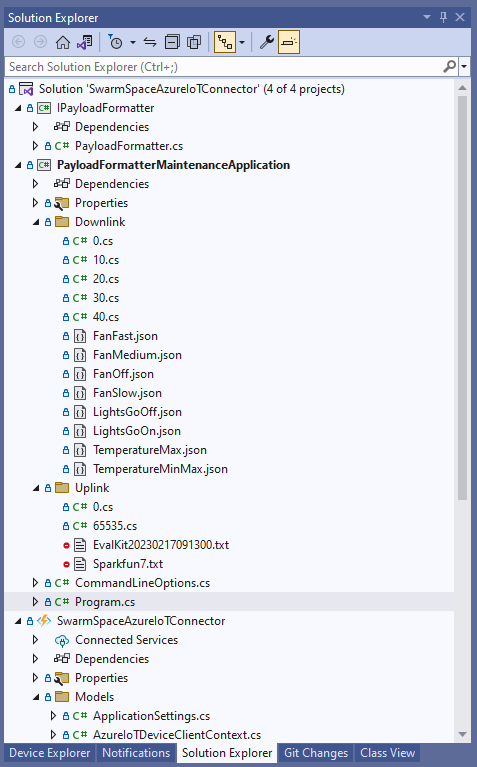
Visual Studio 2022 Solution with payloadformatter maintenance application

I built a console application to help with developing and debugging uplink or downlink formatters. The application has a number of command line parameters which specify the formatter to be used, UserApplicationId, OrganizationId, DeviceType etc.

public class CommandLineOptions
{
    [Option('d', "Direction", Required = true, HelpText = "Test Uplink or DownLink formatter")]
	public string Direction { get; set; }

    [Option('p', "filename", HelpText = "Uplink or Downlink Payload file name")]
    public string PayloadFilename { get; set; } = string.Empty;

    [Option('o', "OrganisationId", Required = true, HelpText = "Organisation unique identifier")]
    public uint OrganizationId { get; set; }

    [Option('i', "DeviceId", Required = true, HelpText = "Device unique identitifer")]
    public uint DeviceId { get; set; }

    [Option('t', "DeviceType", Required = true, HelpText = "Device type number")]
    public byte DeviceType { get; set; }

    [Option('u', "UserApplicationId", Required = true, HelpText = "User Application Id")]
    public ushort UserApplicationId { get; set; }

    [Option('h', "SwarmHiveReceivedAtUtc", HelpText = "Swarm Hive received at time UTC")]
    public DateTime? SwarmHiveReceivedAtUtc { get; set; }

    [Option('w', "UplinkWebHookReceivedAtUtc", HelpText = "Webhook received at time UTC")]
    public DateTime? UplinkWebHookReceivedAtUtc { get; set; }

    [Option('s', "Status", HelpText = "Uplink local file system file name")]
    public byte? Status { get; set; }

    [Option('c', "Client", HelpText = "Uplink local file system file name")]
    public string Client { get; set; } 
 }

The downlink formatter (similar approach for uplink) loads the sample file as an array of bytes, then tries to convert it to text, and finally to JSON. Then the formatter code is “compiled” and the executed with the file payload and command line parameters.

private static async Task DownlinkFormatterCore(CommandLineOptions options)
{
    Dictionary<string, string> properties = new Dictionary<string, string>();

    string formatterFolder = Path.Combine(Environment.CurrentDirectory, "downlink");
    Console.WriteLine($"Downlink- uplinkFormatterFolder: {formatterFolder}");

    string formatterFile = Path.Combine(formatterFolder, $"{options.UserApplicationId}.cs");
    Console.WriteLine($"Downlink- UserApplicationId: {options.UserApplicationId}");
    Console.WriteLine($"Downlink- Payload formatter file: {formatterFile}");

    PayloadFormatter.IFormatterDownlink evalulator;
    try
    {
        evalulator = CSScript.Evaluator.LoadFile<PayloadFormatter.IFormatterDownlink>(formatterFile);
     }
    catch (CSScriptLib.CompilerException cex)
    {
        Console.Write($"Loading or compiling file:{formatterFile} failed Exception:{cex}");
        return;
    }

    string payloadFilename = Path.Combine(formatterFolder, options.PayloadFilename);
    Console.WriteLine($"Downlink- payloadFilename:{payloadFilename}");
    byte[] uplinkBytes;

    try
    {
        uplinkBytes = File.ReadAllBytes(payloadFilename);
    }
    catch (DirectoryNotFoundException dex)
    {
        Console.WriteLine($"Uplink payload filename directory {formatterFolder} not found:{dex}");
        return;
    }
    catch (FileNotFoundException fnfex)
    {
        Console.WriteLine($"Uplink payload filename {payloadFilename} not found:{fnfex}");
        return;
    }
    catch (FormatException fex)
    {
        Console.WriteLine($"Uplink payload file invalid format {payloadFilename} not found:{fex}");
        return;
    }

    // See if payload can be converted to a string
    string uplinkText = string.Empty;
    try
    {
        uplinkText = Encoding.UTF8.GetString(uplinkBytes);
    }
    catch (FormatException fex)
    {
        Console.WriteLine("Encoding.UTF8.GetString failed:{0}", fex.Message);
    }

    // See if payload can be converted to JSON
    JObject uplinkJson;
    try
    {
        uplinkJson = JObject.Parse(uplinkText);
    }
    catch (JsonReaderException jrex)
    {
        Console.WriteLine("JObject.Parse failed Exception:{1}", jrex);

        uplinkJson = new JObject();
    }

    Console.WriteLine("Properties");
    foreach (var property in properties)
    {
        Console.WriteLine($"{property.Key}:{property.Value}");
    }

    // Transform the byte and optional text and JSON payload
    Byte[] payload;
    try
    {
        payload = evalulator.Evaluate(properties, options.OrganizationId, options.DeviceId, options.DeviceType, options.UserApplicationId, uplinkJson, uplinkText, uplinkBytes);
    }
    catch (Exception ex)
    {
        Console.WriteLine($"evalulatorUplink.Evaluate failed Exception:{ex}");
        return;
    }

    Console.WriteLine("Payload");
    Console.WriteLine(Convert.ToBase64String(payload));
}

The sample JSON payload is what would be sent by Azure IoT Central to a device to configure the fan speed

Azure IoT Central M138 Breakout device template with the Fan Status command selected
{
  "FanStatus": 2
}

If the downlink payload formatter is compiled and executes successfully the Base64 representation output is displayed

using System;
using System.Collections.Generic;
using Newtonsoft.Json.Linq;

public class FormatterDownlink : PayloadFormatter.IFormatterDownlink
{
    public byte[] Evaluate(IDictionary<string, string> properties, uint organisationId, uint deviceId, byte deviceType, ushort userApplicationId, JObject payloadJson, string payloadText, byte[] payloadBytes)
    {
        byte? status = payloadJson.Value<byte?>("FanStatus");

        if ( status.HasValue ) 
        { 
            return new byte[] { status.Value };
        }

        return new byte[]{};
    }
}

If the downlink payload formatter syntax is incorrect e.g. { status.Value ; }; an error message with the line and column is displayed.

using System;
using System.Collections.Generic;
using Newtonsoft.Json.Linq;

public class FormatterDownlink : PayloadFormatter.IFormatterDownlink
{
    public byte[] Evaluate(IDictionary<string, string> properties, uint organisationId, uint deviceId, byte deviceType, ushort userApplicationId, JObject payloadJson, string payloadText, byte[] payloadBytes)
    {
        byte? status = payloadJson.Value<byte?>("FanStatus");

        if ( status.HasValue ) 
        {
            return new byte[] { status.Value ; };
        }

        return new byte[]{};
    }
}

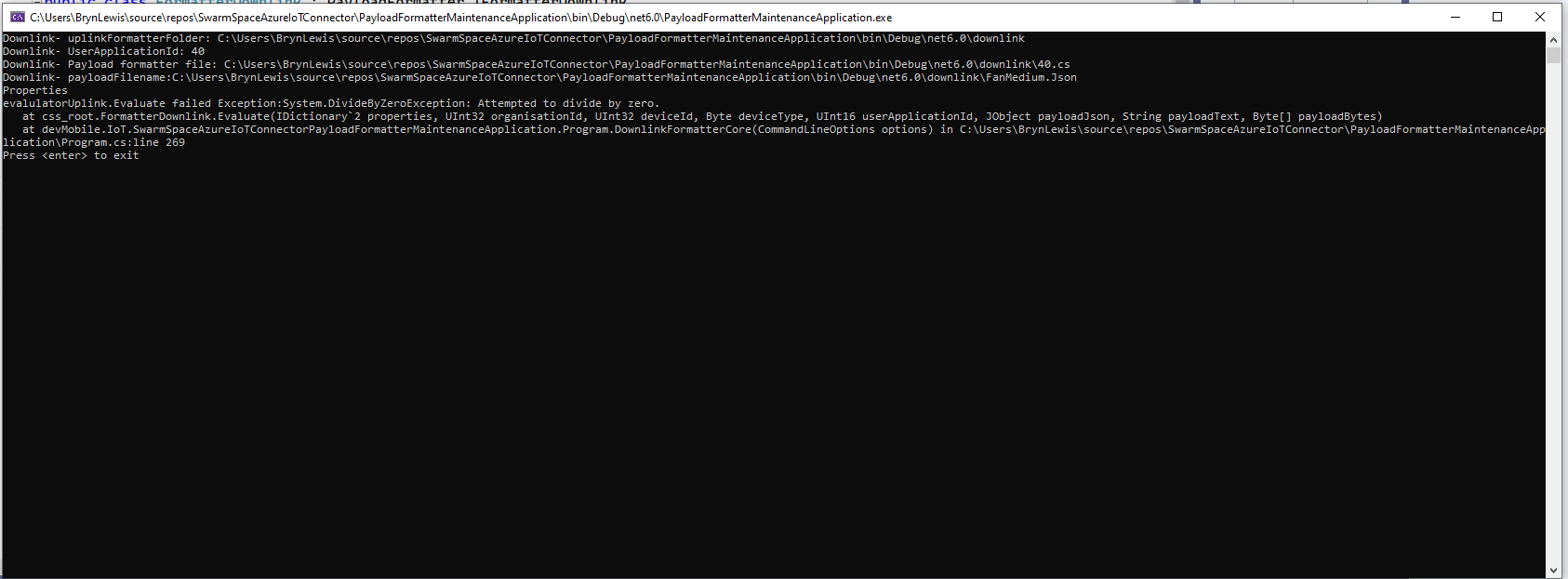
If the downlink payload formatter syntax is correct but execution fails (in the example code division by zero) an error message is displayed.

using System;
using System.Collections.Generic;
using Newtonsoft.Json.Linq;

public class FormatterDownlink : PayloadFormatter.IFormatterDownlink
{
    public byte[] Evaluate(IDictionary<string, string> properties, uint organisationId, uint deviceId, byte deviceType, ushort userApplicationId, JObject payloadJson, string payloadText, byte[] payloadBytes)
    {
        byte? status = payloadJson.Value<byte?>("FanStatus");

        if ( status.HasValue ) 
        {
            int divideByZero = 10;

            divideByZero = divideByZero / 0;

            return new byte[] { status.Value };
        }

        return new byte[]{};
    }
}

The PayloadFormatterMaintenanceApplication makes it significantly easier to develop formatters. Currently the payload formatters have to be manually uploaded to the application’s Azure Blob Storage for final testing.

Swarm Space – Replacing the OpenAPI Client

At the start of this project I used NSwag and Open API Swagger definition file (provided by Swarm Space technical support) to generate a Swarm Space Bumble bee hive client and the core of a simulator.

Swarm Space Bumble hive classes in Visual Studio 2022

My SwarmSpaceAzureIoTConnector project only needed to login, get a list of devices and send messages so all the additional functionality was never going to be used. The method to send a message didn’t work, the class used for the payload (UserMessage) appears to be wrong.

OpenAPI Swagger docs for sending a message

The Open API Swagger definition for sending a message to a device

"post": {
        "tags": [ "messages" ],
        "summary": "POST user messages",
        "description": "<p>This endpoint submits a JSON formatted UserMessage object for delivery to a Swarm device. A JSON object is returned with a newly assigned <code>packetId</code> and <code>status</code> of<code>OK</code> on success, or <code>ERROR</code> (with a description of the error) on failure.</p><p>The current user must have access to the <code>userApplicationId</code> and <code>device</code> given inside the UserMessage JSON. The device must also have the ability to receive messages from the Hive (\"two-way communication\") enabled. If these conditions are not met, a response with status code 403 (Forbidden) will be returned.</p><p>Note that the <code>data</code> field is the <b>Base64-encoded</b> version of the data to be sent. This allows the sending of binary, as well as text, data.</p>",
        "operationId": "addApplicationMessage",
        "requestBody": {
          "content": { "application/json": { "schema": { "$ref": "#/components/schemas/UserMessage" } } },
          "required": true
        },
        "responses": {
          "401": {
            "description": "Unauthorized",
            "content": { "*/*": { "schema": { "$ref": "#/components/schemas/ApiError" } } }
          },
          "403": {
            "description": "Forbidden",
            "content": { "*/*": { "schema": { "$ref": "#/components/schemas/ApiError" } } }
          },
          "400": {
            "description": "Bad Request",
            "content": { "*/*": { "schema": { "$ref": "#/components/schemas/ApiError" } } }
          },
          "200": {
            "description": "OK",
            "content": { "application/json": { "schema": { "$ref": "#/components/schemas/PacketPostReturn" } } }
          }
        }
      }
    },

The Open API Swagger definition for a UserMessage

[System.CodeDom.Compiler.GeneratedCode("NJsonSchema", "13.17.0.0 (NJsonSchema v10.8.0.0 (Newtonsoft.Json v13.0.0.0))")]
    public partial class UserMessage
    {
        /// <summary>
        /// Swarm packet ID
        /// </summary>
        [Newtonsoft.Json.JsonProperty("packetId", Required = Newtonsoft.Json.Required.Always)]
        public long PacketId { get; set; }

        /// <summary>
        /// Swarm message ID. There may be multiple messages for a single message ID. A message ID represents an intent to send a message, but there may be multiple Swarm packets that are required to fulfill that intent. For example, if a Hive -&gt; device message fails to reach its destination, automatic retry attempts to send that message will have the same message ID.
        /// </summary>
        [Newtonsoft.Json.JsonProperty("messageId", Required = Newtonsoft.Json.Required.DisallowNull, NullValueHandling = Newtonsoft.Json.NullValueHandling.Ignore)]
        public long MessageId { get; set; }

        /// <summary>
        /// Swarm device type
        /// </summary>
        [Newtonsoft.Json.JsonProperty("deviceType", Required = Newtonsoft.Json.Required.Always)]
        public int DeviceType { get; set; }

        /// <summary>
        /// Swarm device ID
        /// </summary>
        [Newtonsoft.Json.JsonProperty("deviceId", Required = Newtonsoft.Json.Required.Always)]
        public int DeviceId { get; set; }

        /// <summary>
        /// Swarm device name
        /// </summary>
        [Newtonsoft.Json.JsonProperty("deviceName", Required = Newtonsoft.Json.Required.DisallowNull, NullValueHandling = Newtonsoft.Json.NullValueHandling.Ignore)]
        public string DeviceName { get; set; }

        /// <summary>
        /// Direction of message
        /// </summary>
        [Newtonsoft.Json.JsonProperty("direction", Required = Newtonsoft.Json.Required.Always)]
        public int Direction { get; set; }

        /// <summary>
        /// Message data type, always = 6
        /// </summary>
        [Newtonsoft.Json.JsonProperty("dataType", Required = Newtonsoft.Json.Required.Always)]
        public int DataType { get; set; }

        /// <summary>
        /// Application ID
        /// </summary>
        [Newtonsoft.Json.JsonProperty("userApplicationId", Required = Newtonsoft.Json.Required.Always)]
        public int UserApplicationId { get; set; }

        /// <summary>
        /// Organization ID
        /// </summary>
        [Newtonsoft.Json.JsonProperty("organizationId", Required = Newtonsoft.Json.Required.Always)]
        public int OrganizationId { get; set; }

        /// <summary>
        /// Length of data (in bytes) before base64 encoding
        /// </summary>
        [Newtonsoft.Json.JsonProperty("len", Required = Newtonsoft.Json.Required.DisallowNull, NullValueHandling = Newtonsoft.Json.NullValueHandling.Ignore)]
        public int Len { get; set; }

        /// <summary>
        /// Base64 encoded data string
        /// </summary>
        [Newtonsoft.Json.JsonProperty("data", Required = Newtonsoft.Json.Required.Always)]
        [System.ComponentModel.DataAnnotations.Required(AllowEmptyStrings = true)]
        public byte[] Data { get; set; }

        /// <summary>
        /// Swarm packet ID of acknowledging packet from device
        /// </summary>
        [Newtonsoft.Json.JsonProperty("ackPacketId", Required = Newtonsoft.Json.Required.DisallowNull, NullValueHandling = Newtonsoft.Json.NullValueHandling.Ignore)]
        public long AckPacketId { get; set; }

        /// <summary>
        /// Message status. Possible values:
        /// <br/>0 = incoming message (from a device)
        /// <br/>1 = outgoing message (to a device)
        /// <br/>2 = incoming message, acknowledged as seen by customer. OR a outgoing message packet is on groundstation
        /// <br/>3 = outgoing message, packet is on satellite
        /// <br/>-1 = error
        /// <br/>-3 = failed to deliver, retrying
        /// <br/>-4 = failed to deliver, will not re-attempt
        /// <br/>
        /// </summary>
        [Newtonsoft.Json.JsonProperty("status", Required = Newtonsoft.Json.Required.DisallowNull, NullValueHandling = Newtonsoft.Json.NullValueHandling.Ignore)]
        public int Status { get; set; }

        /// <summary>
        /// Time that the message was received by the Hive
        /// </summary>
        [Newtonsoft.Json.JsonProperty("hiveRxTime", Required = Newtonsoft.Json.Required.Always)]
        [System.ComponentModel.DataAnnotations.Required(AllowEmptyStrings = true)]
        public System.DateTimeOffset HiveRxTime { get; set; }

        private System.Collections.Generic.IDictionary<string, object> _additionalProperties;

        [Newtonsoft.Json.JsonExtensionData]
        public System.Collections.Generic.IDictionary<string, object> AdditionalProperties
        {
            get { return _additionalProperties ?? (_additionalProperties = new System.Collections.Generic.Dictionary<string, object>()); }
            set { _additionalProperties = value; }
        }

    }

After several attempts I gave up and have rebuilt the required Bumble bee hive integration with RestSharp

public async Task SendAsync(uint organisationId, uint deviceId, byte deviceType, ushort userApplicationId, byte[] data, CancellationToken cancellationToken)
{
    await TokenRefresh(cancellationToken);

    _logger.LogInformation("SendAsync: OrganizationId:{0} DeviceType:{1} DeviceId:{2} UserApplicationId:{3} Data:{4} Enabled:{5}", organisationId, deviceType, deviceId, userApplicationId, Convert.ToBase64String(data), _bumblebeeHiveSettings.DownlinkEnabled);

    Models.MessageSendRequest message = new Models.MessageSendRequest()
    {
        OrganizationId = (int)organisationId,
        DeviceType = deviceType,
        DeviceId = (int)deviceId,
        UserApplicationId = userApplicationId,
        Data = data,
    };

    RestClientOptions restClientOptions = new RestClientOptions()
    {
        BaseUrl = new Uri(_bumblebeeHiveSettings.BaseUrl),
        ThrowOnAnyError = true,
    };

    using (RestClient client = new RestClient(restClientOptions))
    {
        RestRequest request = new RestRequest("api/v1/messages", Method.Post);

        request.AddBody(message);

        request.AddHeader("Authorization", $"bearer {_token}");

        // To save the limited monthly allocation of mesages downlinks can be disabled
        if (_bumblebeeHiveSettings.DownlinkEnabled)
        {
           var response = await client.PostAsync<Models.MessageSendResponse>(request, cancellationToken);

            _logger.LogInformation("SendAsync-Result:{Status} PacketId:{PacketId}", response.Status, response.PacketId);
        }
    }
}

The new Data Transfer Objects(DTOs) were “inspired” by the NSwag generated ones.

public partial class MessageSendRequest
{
    /// <summary>
    /// Swarm device type
    /// </summary>
    [Newtonsoft.Json.JsonProperty("deviceType", Required = Newtonsoft.Json.Required.Always)]
    public int DeviceType { get; set; }

    /// <summary>
    /// Swarm device ID
    /// </summary>
    [Newtonsoft.Json.JsonProperty("deviceId", Required = Newtonsoft.Json.Required.Always)]
    public int DeviceId { get; set; }

    /// <summary>
    /// Application ID
    /// </summary>
    [Newtonsoft.Json.JsonProperty("userApplicationId", Required = Newtonsoft.Json.Required.Always)]
    public int UserApplicationId { get; set; }

    /// <summary>
    /// Organization ID
    /// </summary>
    [Newtonsoft.Json.JsonProperty("organizationId", Required = Newtonsoft.Json.Required.Always)]
    public int OrganizationId { get; set; }

    /// <summary>
    /// Base64 encoded data string
    /// </summary>
    [Newtonsoft.Json.JsonProperty("data", Required = Newtonsoft.Json.Required.Always)]
    [System.ComponentModel.DataAnnotations.Required(AllowEmptyStrings = true)]
    public byte[] Data { get; set; }
}

public class MessageSendResponse
{
    /// <summary>
    /// Swarm packet ID.
    /// </summary>
    [Newtonsoft.Json.JsonProperty("packetId", Required = Newtonsoft.Json.Required.Always)]
    public long PacketId { get; set; }

    /// <summary>
    /// Submission status, "OK" or "ERROR" with a description of the error.
    /// </summary>
    [Newtonsoft.Json.JsonProperty("status", Required = Newtonsoft.Json.Required.Always)]
    [System.ComponentModel.DataAnnotations.Required(AllowEmptyStrings = true)]
    public string Status { get; set; }
}

The RestSharp based approach is significantly smaller and less complex….

Swarm Space – Underlying Architecture sorted

After figuring out that calling an Azure Http Trigger function to load the cache wasn’t going to work reliably, I have revisited the architecture one last time and significantly refactored the SwarmSpaceAzuureIoTConnector project.

Visual Studio 2022 solution

The application now has a StartUpService which loads the Azure DeviceClient cache (Lazy Cache) in the background as the application starts up. If an uplink message is received from a SwarmDevice before, it has been loaded by the FunctionsStartup the DeviceClient information is cached and another connection to the Azure IoT Hub is not established.

...
using Microsoft.Azure.Functions.Extensions.DependencyInjection;

[assembly: FunctionsStartup(typeof(devMobile.IoT.SwarmSpaceAzureIoTConnector.Connector.StartUpService))]
namespace devMobile.IoT.SwarmSpaceAzureIoTConnector.Connector
{
...
    public class StartUpService : BackgroundService
    {
        private readonly ILogger<StartUpService> _logger;
        private readonly ISwarmSpaceBumblebeeHive _swarmSpaceBumblebeeHive;
        private readonly Models.ApplicationSettings _applicationSettings;
        private readonly IAzureDeviceClientCache _azureDeviceClientCache;

        public StartUpService(ILogger<StartUpService> logger, IAzureDeviceClientCache azureDeviceClientCache, ISwarmSpaceBumblebeeHive swarmSpaceBumblebeeHive, IOptions<Models.ApplicationSettings> applicationSettings)//, IOptions<Models.AzureIoTSettings> azureIoTSettings)
        {
            _logger = logger;
            _azureDeviceClientCache = azureDeviceClientCache;
            _swarmSpaceBumblebeeHive = swarmSpaceBumblebeeHive;
            _applicationSettings = applicationSettings.Value;
        }

        protected override async Task ExecuteAsync(CancellationToken cancellationToken)
        {
            await Task.Yield();

            _logger.LogInformation("StartUpService.ExecuteAsync start");

            try
            {
                _logger.LogInformation("BumblebeeHiveCacheRefresh start");

                foreach (SwarmSpace.BumblebeeHiveClient.Device device in await _swarmSpaceBumblebeeHive.DeviceListAsync(cancellationToken))
                {
                    _logger.LogInformation("BumblebeeHiveCacheRefresh DeviceId:{DeviceId} DeviceName:{DeviceName}", device.DeviceId, device.DeviceName);

                    Models.AzureIoTDeviceClientContext context = new Models.AzureIoTDeviceClientContext()
                    {
                        OrganisationId = _applicationSettings.OrganisationId,
                        DeviceType = (byte)device.DeviceType,
                        DeviceId = (uint)device.DeviceId,
                    };

                    await _azureDeviceClientCache.GetOrAddAsync(context.DeviceId, context);
                }

                _logger.LogInformation("BumblebeeHiveCacheRefresh finish");
            }
            catch (Exception ex)
            {
                _logger.LogError(ex, "StartUpService.ExecuteAsync error");

                throw;
            }

            _logger.LogInformation("StartUpService.ExecuteAsync finish");
        }
    }
}

The uplink and downlink payload formatters are stored in Azure Blob Storage are compiled (CS-Script) as they are loaded then cached (Lazy Cache)

Azure Storage explorer displaying list of uplink payload formatter blobs.
Azure Storage explorer displaying list of downlink payload formatter blobs.
private async Task<IFormatterDownlink> DownlinkLoadAsync(int userApplicationId)
{
    BlobClient blobClient = new BlobClient(_payloadFormatterConnectionString, _applicationSettings.PayloadFormattersDownlinkContainer, $"{userApplicationId}.cs");

    if (!await blobClient.ExistsAsync())
    {
        _logger.LogInformation("PayloadFormatterDownlink- UserApplicationId:{0} Container:{1} not found using default:{2}", userApplicationId, _applicationSettings.PayloadFormattersUplinkContainer, _applicationSettings.PayloadFormatterUplinkBlobDefault);

        blobClient = new BlobClient(_payloadFormatterConnectionString, _applicationSettings.PayloadFormatterDownlinkBlobDefault, _applicationSettings.PayloadFormatterDownlinkBlobDefault);
    }

    BlobDownloadResult downloadResult = await blobClient.DownloadContentAsync();

    return CSScript.Evaluator.LoadCode<PayloadFormatter.IFormatterDownlink>(downloadResult.Content.ToString());
}

The uplink and downlink formatters can be edited in Visual Studio 2022 with syntax highlighting (currently they have to be manually uploaded).

The SwarmSpaceBumbleebeehive module no longer has public login or logout methods.

    public interface ISwarmSpaceBumblebeeHive
    {
        public Task<ICollection<Device>> DeviceListAsync(CancellationToken cancellationToken);

        public Task SendAsync(uint organisationId, uint deviceId, byte deviceType, ushort userApplicationId, byte[] payload);
    }

The DeviceListAsync and SendAsync methods now call the BumblebeeHive login method after configurable period of inactivity.

public async Task<ICollection<Device>> DeviceListAsync(CancellationToken cancellationToken)
{
        if ((_TokenActivityAtUtC + _bumblebeeHiveSettings.TokenValidFor) < DateTime.UtcNow)
        {
            await Login();
        }

        using (HttpClient httpClient = _httpClientFactory.CreateClient())
       {
            Client client = new Client(httpClient);

            client.BaseUrl = _bumblebeeHiveSettings.BaseUrl;

            httpClient.DefaultRequestHeaders.Add("Authorization", $"bearer {_token}");

            return await client.GetDevicesAsync(null, null, null, null, null, null, null, null, null, cancellationToken);
        }
}

I’m looking at building a webby user interface where users an interactivity list, create, edit, delete formatters with syntax highlighter support, and the executing the formatter with sample payloads.

Swarm Space Azure IoT Connector Identity Translation Gateway Architecture

This approach uses most of the existing building blocks, and that’s it no more changes.

Swarm Space – DeviceClient Cache warming with HTTPTrigger

For C2D messaging to work a device must have a DeviceClient “connection” established to the Azure IoT Hub which is a problem for irregularly connect devices. Sometimes establishing a connection on the first D2C messages is sufficient, especially for devices which only support D2C messaging. An Identity Translation Gateway establishes a connection for each device (see discussion about AMQP Connection multiplexing) so that C2D messages can be sent immediately.

I initially tried building a cache loader with BackgroundService so that the DeviceClient cache would start loading as the application started but interdependencies became problem.

public partial class Connector
{
    [Function("BumblebeeHiveCacheRefresh")]
    public async Task<IActionResult> BumblebeeHiveCacheRefreshRun([HttpTrigger(AuthorizationLevel.Function, "get")] CancellationToken cancellationToken)
    {
        _logger.LogInformation("BumblebeeHiveCacheRefresh start");

        await _swarmSpaceBumblebeeHive.Login(cancellationToken);

        foreach (SwarmSpace.BumblebeeHiveClient.Device device in await _swarmSpaceBumblebeeHive.DeviceListAsync(cancellationToken))
        {
            _logger.LogInformation("BumblebeeHiveCacheRefresh DeviceId:{DeviceId} DeviceName:{DeviceName}", device.DeviceId, device.DeviceName);

            Models.AzureIoTDeviceClientContext context = new Models.AzureIoTDeviceClientContext()
            {
                // TODO seems a bit odd getting this from application settings
                OrganisationId = _applicationSettings.OrganisationId, 
                //UserApplicationId = device.UserApplicationId, deprecated
                DeviceType = (byte)device.DeviceType,
                DeviceId = (uint)device.DeviceId,
            };

            switch (_azureIoTSettings.ApplicationType)
            {
                case Models.ApplicationType.AzureIotHub:
                    switch (_azureIoTSettings.AzureIotHub.ConnectionType)
                    {
                        case Models.AzureIotHubConnectionType.DeviceConnectionString:
                             await _azureDeviceClientCache.GetOrAddAsync<DeviceClient>(device.DeviceId.ToString(), (ICacheEntry x) => AzureIoTHubDeviceConnectionStringConnectAsync(device.DeviceId.ToString(), context));
                            break;
                        case Models.AzureIotHubConnectionType.DeviceProvisioningService:
                             await _azureDeviceClientCache.GetOrAddAsync<DeviceClient>(device.DeviceId.ToString(), (ICacheEntry x) => AzureIoTHubDeviceProvisioningServiceConnectAsync(device.DeviceId.ToString(), context, _azureIoTSettings.AzureIotHub.DeviceProvisioningService));
                            break;
                        default:

                        _logger.LogError("Azure IoT Hub ConnectionType unknown {0}", _azureIoTSettings.AzureIotHub.ConnectionType);

                            throw new NotImplementedException("AzureIoT Hub unsupported ConnectionType");
                    }
                    break;

                case Models.ApplicationType.AzureIoTCentral:
                    await _azureDeviceClientCache.GetOrAddAsync<DeviceClient>(device.DeviceId.ToString(), (ICacheEntry x) => AzureIoTHubDeviceProvisioningServiceConnectAsync(device.DeviceId.ToString(), context, _azureIoTSettings.AzureIoTCentral.DeviceProvisioningService));
                break;

                default:
                    _logger.LogError("AzureIoT application type unknown {0}", _azureIoTSettings.ApplicationType);

                    throw new NotImplementedException("AzureIoT unsupported ApplicationType");
            }
        }

        _logger.LogInformation("BumblebeeHiveCacheRefresh finish");

        return new OkResult();
    }
}

The HTTP WEBSITE_WARMUP_PATH environment variable is used to call the Azure HTTPTrigger Function and this is secured with an x-functions-key header.

Azure Function App Configuration

In the short-term loading the cache with a call to an Azure HTTPTrigger Function works but may timeout issues. When I ran the connector with my 100’s of devices simulator the function timed out every so often.

Swarm Space – Uplink with WebAPI Revisited again

After reviewing my ASP .NET Core WebAPI Swarm Space Delivery Method webhook implementation I have made a final round of changes.

There are now separate Data Transfer Objects(DTO) for the uplink and queue message payloads mainly, because the UplinkPayloadQueueDto has additional fields for the client (based on the x-api-key) and when the webhook was called.

public class UplinkPayloadQueueDto
{
    public ulong PacketId { get; set; }
    public byte DeviceType { get; set; }
    public uint DeviceId { get; set; }
    public ushort UserApplicationId { get; set; }
    public uint OrganizationId { get; set; }
    public string Data { get; set; } = string.Empty;
    public byte Length { get; set; }
    public int Status { get; set; }
    public DateTime SwarmHiveReceivedAtUtc { get; set; }
    public DateTime UplinkWebHookReceivedAtUtc { get; set; }
    public string Client { get; set; } = string.Empty;
 }

public class UplinkPayloadWebDto
{
    public ulong PacketId { get; set; }
    public byte DeviceType { get; set; }
    public uint DeviceId { get; set; }
    public ushort UserApplicationId { get; set; }
    public uint OrganizationId { get; set; }
    public string Data { get; set; } = string.Empty;

    [Range(Constants.PayloadLengthMinimum, Constants.PayloadLengthMaximum)]
    public byte Len { get; set; }
    public int Status { get; set; }

    public DateTime HiveRxTime { get; set; }
}

I did consider using AutoMapper to copy the values from the UplinkPayloadWebDto to the UplinkPayloadQueueDto but the additional complexity/configuration required for one mapping wasn’t worth it.

The UplinkController has a single POST method, which has a JSON payload(FromBody) and a single header (FromHeader) “x-api-key” which is to secure the method and identify the caller.

[HttpPost]
public async Task<IActionResult> Post([FromHeader(Name = "x-api-key")] string xApiKeyValue, [FromBody] Models.UplinkPayloadWebDto payloadWeb)
{
    if (!_applicationSettings.XApiKeys.TryGetValue(xApiKeyValue, out string apiKeyName))
    {
        _logger.LogWarning("Authentication unsuccessful X-API-KEY value:{xApiKeyValue}", xApiKeyValue);

        return this.Unauthorized("Unauthorized client");
    }

    _logger.LogInformation("Authentication successful X-API-KEY value:{apiKeyName}", apiKeyName);

    // Could of used AutoMapper but didn't seem worth it for one place
    Models.UplinkPayloadQueueDto payloadQueue = new()
    {
        PacketId = payloadWeb.PacketId,
        DeviceType = payloadWeb.DeviceType,
        DeviceId = payloadWeb.DeviceId,
        UserApplicationId = payloadWeb.UserApplicationId,
        OrganizationId = payloadWeb.OrganizationId,
        Data = payloadWeb.Data,
        Length = payloadWeb.Len,
        Status = payloadWeb.Status,
        SwarmHiveReceivedAtUtc = payloadWeb.HiveRxTime,
        UplinkWebHookReceivedAtUtc = DateTime.UtcNow,
        Client = apiKeyName,
    };

    _logger.LogInformation("SendAsync queue name:{QueueName}", _applicationSettings.QueueName);

    QueueClient queueClient = _queueServiceClient.GetQueueClient(_applicationSettings.QueueName);

    await queueClient.SendMessageAsync(Convert.ToBase64String(JsonSerializer.SerializeToUtf8Bytes(payloadQueue)));

    return this.Ok();
 }
I’ve also used dependency injection (DI) to get a QueueClient just because “it’s always better with DI”.

Azure Web App Application settings with x-api-key configuration

The “x-api-key” values can also be updated without having to redeploy the application.