Mistral AI ASP Net CORE MinimalAPI Experiment

Over the last couple of months, I’ve been experimenting with a range of AI coding tools starting with GitHub Copilot, then Anthropic Claude, and more recently, Mistral (I was looking for an on-prem solution). Mistral is a French company so is covered by the General Data Protect Regulation(GDPR) rules of the European Union(EU) which is way better than the regulations the other providers have to comply with.

Like many .NET developers, I started with Copilot as a natural extension of my workflow, expecting it to streamline repetitive tasks and accelerate development. When I started using Building Edge AI with Github Copilot- Security Camera HTTP(Jan 2025) the experience wasn’t great. Especially when I was using it for the “niche” areas I work-in it was pretty hopeless (sometimes even referred me to my own blog posts).

After a while I started trialing the other tools in my workflow and though they were better, sometimes F2-Replace or intellisense were faster and used a lot less tokens. I would also get the different tools to review the code of the others. I especially liked the Claude “Irony stack” when using it review Co-Pilot generated code.

While the other tools certainly helped (especially after adding custom skills files), I often found myself spending as much time going “down rabbit holes”(not the tool’s problem, though I hopefully learnt some useful stuff) and correcting or restructuring or debugging generated code that I could have written faster from scratch.

That’s what made my “out of box” experience with Mistral stand out. With a relatively simple prompt, it produced code that was not only concise but surprisingly accurate with just a single compile time error and no warnings on the first pass.

NOTE: This was using the webby interface, but I now have a paid for subscription.
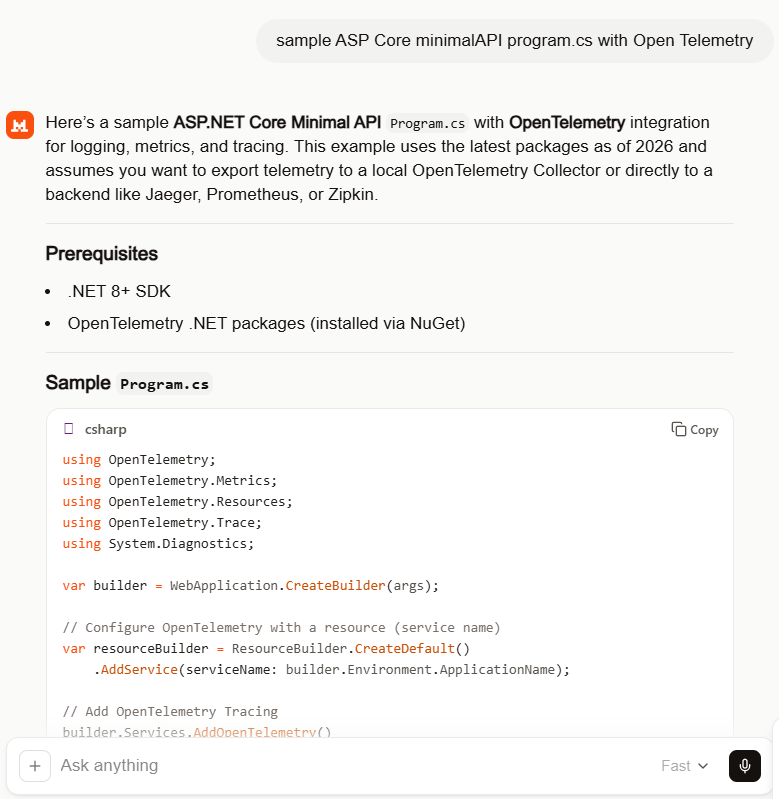
The instructions which included .NET 8 (bit retro) and “dotnet add package”(pretty good) meant the code compiled on second attempt. The issue was a syntax error initialising OpenTelemetry which was quickly fixed, somewhat ironically with GitHub Copilot.

.ConfigureResource(resourceBuilder) rather than .ConfigureResource(rb => rb = resourceBuilder)

//dotnet add package OpenTelemetry 
//dotnet add package OpenTelemetry.Extensions.Hosting
//dotnet add package OpenTelemetry.Instrumentation.AspNetCore
//dotnet add package OpenTelemetry.Instrumentation.Http
//dotnet add package OpenTelemetry.Exporter.Console
//dotnet add package OpenTelemetry.Exporter.OpenTelemetryProtocol
//
//using OpenTelemetry;
using OpenTelemetry.Metrics;
using OpenTelemetry.Resources;
using OpenTelemetry.Trace;
using System.Diagnostics;

var builder = WebApplication.CreateBuilder(args);

// Configure OpenTelemetry with a resource (service name)
var resourceBuilder = ResourceBuilder.CreateDefault()
    .AddService(serviceName: builder.Environment.ApplicationName);

// Add OpenTelemetry Tracing
builder.Services.AddOpenTelemetry()
    //.ConfigureResource(resourceBuilder) /**** This was the only compile time issue
    .ConfigureResource(rb => rb = resourceBuilder)
    .WithTracing(tracerProviderBuilder =>
    {
       tracerProviderBuilder
           .AddSource("MinimalApiSample")
           .AddAspNetCoreInstrumentation(options =>
           {
              options.RecordException = true;
           })
           .AddHttpClientInstrumentation()
           .AddConsoleExporter(); // For demo: export to console
           //.AddOtlpExporter(); // Uncomment to export to OpenTelemetry Collector

    })
    .WithMetrics(metricsProviderBuilder =>
    {
       metricsProviderBuilder
           .AddAspNetCoreInstrumentation()
           .AddHttpClientInstrumentation()
           .AddConsoleExporter(); // For demo: export to console
           //.AddOtlpExporter(); // Uncomment to export to OpenTelemetry Collector
    });

var app = builder.Build();

// Example of a custom activity for tracing
var activitySource = new ActivitySource("MinimalApiSample");

app.MapGet("/", () =>
{
   using var activity = activitySource.StartActivity("RootEndpoint");
   activity?.SetTag("custom.tag", "Hello, OpenTelemetry!");
   return Results.Ok("Hello, OpenTelemetry!");
});

app.MapGet("/metrics", () =>
{
   // This endpoint is just for demo; metrics are exported automatically
   return Results.Ok("Metrics are being collected in the background.");
});

app.Run();
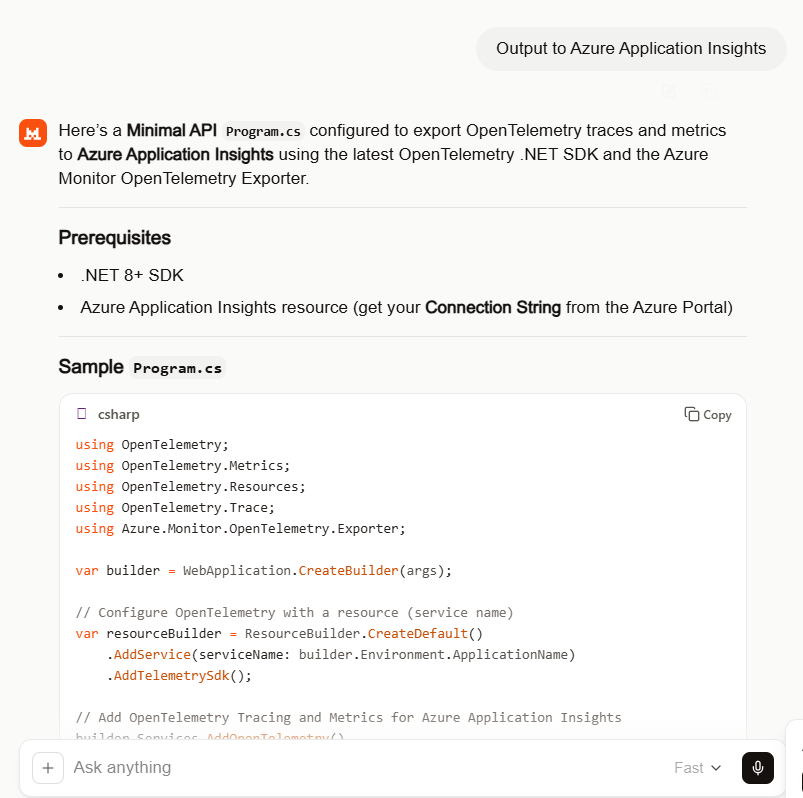
//dotnet add package OpenTelemetry
//dotnet add package OpenTelemetry.Extensions.Hosting
//dotnet add package OpenTelemetry.Instrumentation.AspNetCore
//dotnet add package OpenTelemetry.Instrumentation.Http
//dotnet add package Azure.Monitor.OpenTelemetry.Exporter
//
using Azure.Monitor.OpenTelemetry.Exporter; 
//using OpenTelemetry; 
using OpenTelemetry.Metrics;
using OpenTelemetry.Resources;
using OpenTelemetry.Trace;
using System.Diagnostics;

var builder = WebApplication.CreateBuilder(args);

// Configure OpenTelemetry with a resource (service name)
var resourceBuilder = ResourceBuilder.CreateDefault()
    .AddService(serviceName: builder.Environment.ApplicationName)
    .AddTelemetrySdk();

// Add OpenTelemetry Tracing and Metrics for Azure Application Insights
builder.Services.AddOpenTelemetry()
    //.ConfigureResource(resourceBuilder)
    .ConfigureResource(rb => rb = resourceBuilder) //*****
    .WithTracing(tracerProviderBuilder =>
    {
       tracerProviderBuilder
           .AddSource("MinimalApiSample")
           .AddAspNetCoreInstrumentation(options =>
           {
              options.RecordException = true;
           })
           .AddHttpClientInstrumentation()
           .AddAzureMonitorTraceExporter(options =>
           {
              options.ConnectionString = builder.Configuration["APPLICATIONINSIGHTS_CONNECTION_STRING"];
           });
    })
    .WithMetrics(metricsProviderBuilder =>
    {
       metricsProviderBuilder
           .AddAspNetCoreInstrumentation()
           .AddHttpClientInstrumentation()
           .AddAzureMonitorMetricExporter(options =>
           {
              options.ConnectionString = builder.Configuration["APPLICATIONINSIGHTS_CONNECTION_STRING"];
           });
    });

var app = builder.Build();

// Example of a custom activity for tracing
var activitySource = new ActivitySource("MinimalApiSample");

app.MapGet("/", () =>
{
   using var activity = activitySource.StartActivity("RootEndpoint");
   activity?.SetTag("custom.tag", "Hello, Azure Application Insights!");
   return Results.Ok("Hello, Azure Application Insights!");
});

app.MapGet("/metrics", () =>
{
   return Results.Ok("Metrics and traces are being sent to Azure Application Insights.");
});

app.Run();
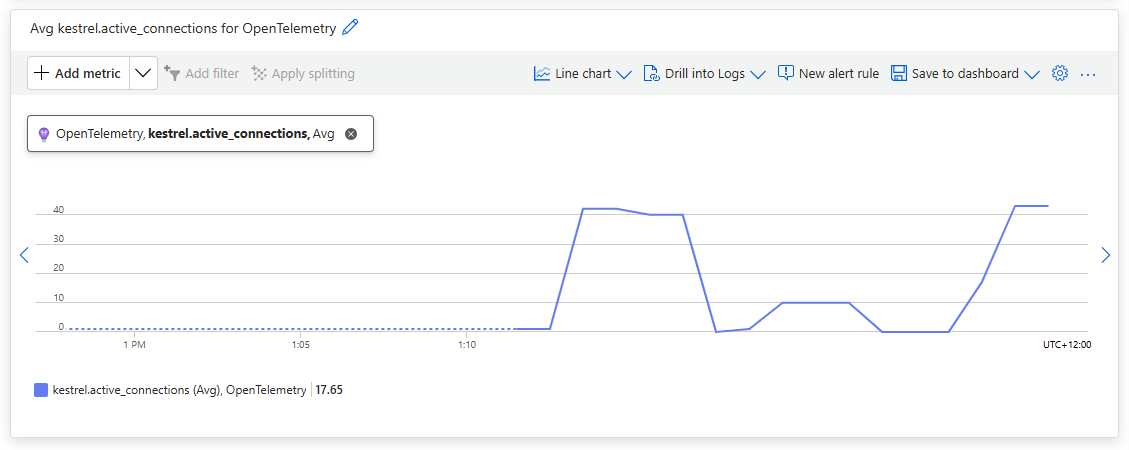
Using Application Insights metrics the Kestral.active_connections graphs to shows some of the additional telemetry emitted by the application.
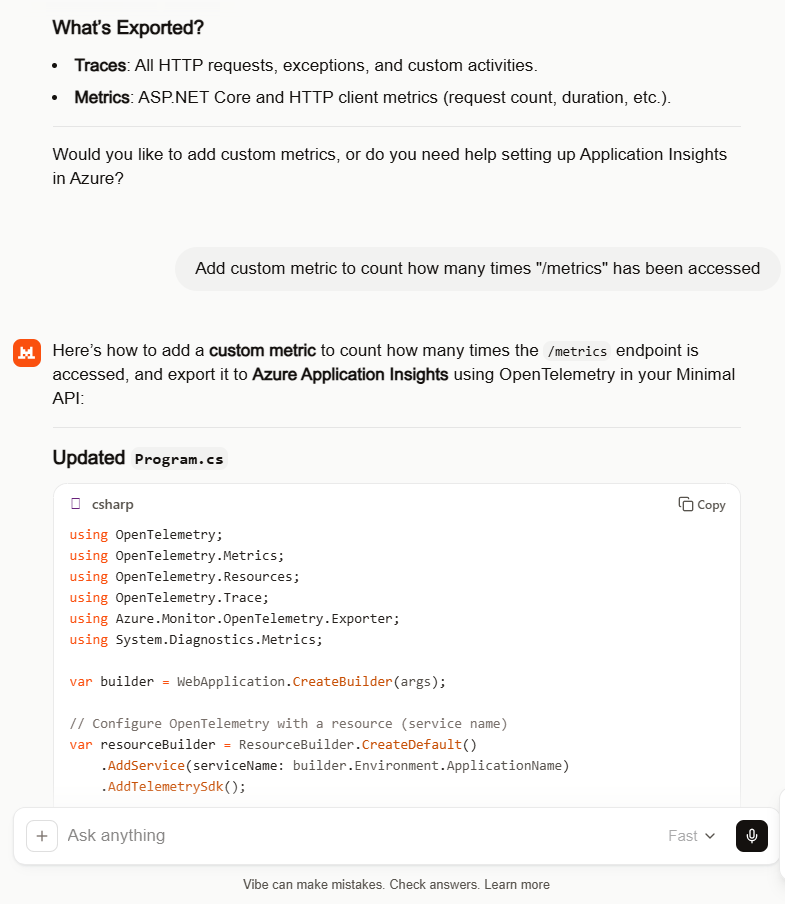
//dotnet add package OpenTelemetry
//dotnet add package OpenTelemetry.Extensions.Hosting
//dotnet add package OpenTelemetry.Instrumentation.AspNetCore
//dotnet add package OpenTelemetry.Instrumentation.Http
//dotnet add package Azure.Monitor.OpenTelemetry.Exporter
//
using Azure.Monitor.OpenTelemetry.Exporter;
//using OpenTelemetry;  
using OpenTelemetry.Metrics;
using OpenTelemetry.Resources;
using OpenTelemetry.Trace;
using System.Diagnostics;
using System.Diagnostics.Metrics;

var builder = WebApplication.CreateBuilder(args);

// Configure OpenTelemetry with a resource (service name)
var resourceBuilder = ResourceBuilder.CreateDefault()
    .AddService(serviceName: builder.Environment.ApplicationName)
    .AddTelemetrySdk();

// Create a meter for custom metrics
var meter = new Meter("MinimalApiSample.Metrics");
var metricsCounter = meter.CreateCounter<int>("MetricsEndpointAccessCount");

// Add OpenTelemetry Tracing and Metrics for Azure Application Insights
builder.Services.AddOpenTelemetry()
    //.ConfigureResource(resourceBuilder) /**** This is the only compile time issue
    .ConfigureResource(rb=>rb =  resourceBuilder)
    .WithTracing(tracerProviderBuilder =>
    {
       tracerProviderBuilder
           .AddSource("MinimalApiSample")
           .AddAspNetCoreInstrumentation(options =>
           {
              options.RecordException = true;
           })
           .AddHttpClientInstrumentation()
           .AddAzureMonitorTraceExporter(options =>
           {
              options.ConnectionString = builder.Configuration["APPLICATIONINSIGHTS_CONNECTION_STRING"];
           });
    })
    .WithMetrics(metricsProviderBuilder =>
    {
       metricsProviderBuilder
           .AddAspNetCoreInstrumentation()
           .AddHttpClientInstrumentation()
           .AddMeter("MinimalApiSample.Metrics") // Add your custom meter
           .AddAzureMonitorMetricExporter(options =>
           {
              options.ConnectionString = builder.Configuration["APPLICATIONINSIGHTS_CONNECTION_STRING"];
           });
    });

var app = builder.Build();

// Example of a custom activity for tracing
var activitySource = new ActivitySource("MinimalApiSample");

app.MapGet("/", () =>
{
   using var activity = activitySource.StartActivity("RootEndpoint");
   activity?.SetTag("custom.tag", "Hello, Azure Application Insights!");
   return Results.Ok("Hello, Azure Application Insights!");
});

app.MapGet("/metrics", () =>
{
   // Increment custom metric on each access
   metricsCounter.Add(1);
   return Results.Ok("Metrics and traces are being sent to Azure Application Insights.");
});

app.Run();
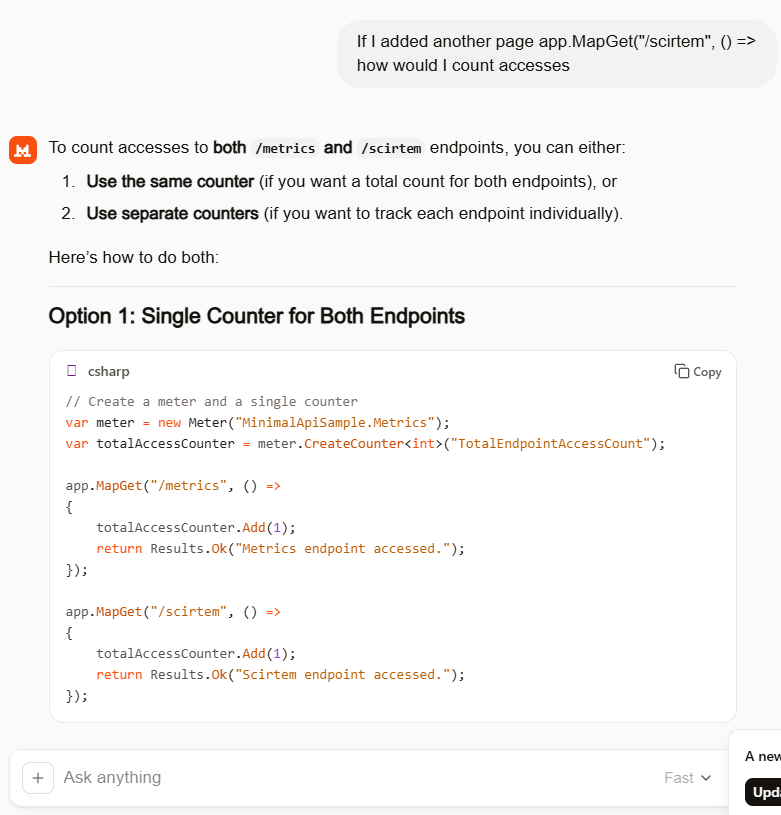
I by pleasantly surprised by suggestion of a counter for each endpoint which was my original intent.
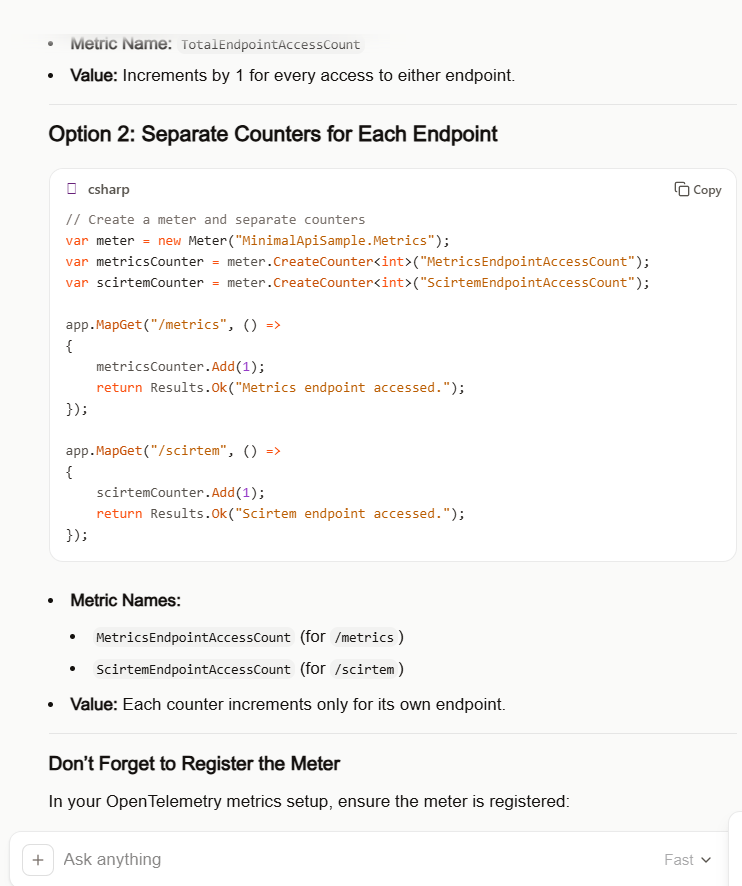
Couldn’t think of a better name “scirtem” is “metrics” backwards. The way Meter and CreateCount are global would not be a good idea in a more complex system but this is fine for a hacky PoC.

//dotnet add package OpenTelemetry
//dotnet add package OpenTelemetry.Extensions.Hosting
//dotnet add package OpenTelemetry.Instrumentation.AspNetCore
//dotnet add package OpenTelemetry.Instrumentation.Http
//dotnet add package Azure.Monitor.OpenTelemetry.Exporter
//
using Azure.Monitor.OpenTelemetry.Exporter;
//using OpenTelemetry;  //***** Unnecessary with OpenTelemetry.Extensions.Hosting
using OpenTelemetry.Metrics;
using OpenTelemetry.Resources;
using OpenTelemetry.Trace;
using System.Diagnostics;
using System.Diagnostics.Metrics;

var builder = WebApplication.CreateBuilder(args);

// Configure OpenTelemetry with a resource (service name)
var resourceBuilder = ResourceBuilder.CreateDefault()
    .AddService(serviceName: builder.Environment.ApplicationName)
    .AddTelemetrySdk();

// Create a meter for custom metrics
var meter = new Meter("MinimalApiSample.Metrics");
var metricsCounter = meter.CreateCounter<int>("MetricsEndpointAccessCount");
var scirtemCounter = meter.CreateCounter<int>("ScirtemEndpointAccessCount");

// Add OpenTelemetry Tracing and Metrics for Azure Application Insights
builder.Services.AddOpenTelemetry()
    //.ConfigureResource(resourceBuilder) /**** This is the only compile time issue
    .ConfigureResource(rb=>rb =  resourceBuilder)
    .WithTracing(tracerProviderBuilder =>
    {
       tracerProviderBuilder
           .AddSource("MinimalApiSample")
           .AddAspNetCoreInstrumentation(options =>
           {
              options.RecordException = true;
           })
           .AddHttpClientInstrumentation()
           .AddAzureMonitorTraceExporter(options =>
           {
              options.ConnectionString = builder.Configuration["APPLICATIONINSIGHTS_CONNECTION_STRING"];
           });
    })
    .WithMetrics(metricsProviderBuilder =>
    {
       metricsProviderBuilder
           .AddAspNetCoreInstrumentation()
           .AddHttpClientInstrumentation()
           .AddMeter("MinimalApiSample.Metrics") // Add your custom meter
           .AddAzureMonitorMetricExporter(options =>
           {
              options.ConnectionString = builder.Configuration["APPLICATIONINSIGHTS_CONNECTION_STRING"];
           });
    });

var app = builder.Build();

// Example of a custom activity for tracing
var activitySource = new ActivitySource("MinimalApiSample");

app.MapGet("/", () =>
{
   using var activity = activitySource.StartActivity("RootEndpoint");
   activity?.SetTag("custom.tag", "Hello, Azure Application Insights!");
   return Results.Ok("Hello, Azure Application Insights!");
});

app.MapGet("/metrics", () =>
{
   // Increment custom metric on each access
   metricsCounter.Add(1);
   return Results.Ok("Metrics and traces are being sent to Azure Application Insights.");
});

app.MapGet("/scirtem", () =>
{
   scirtemCounter.Add(1);
   return Results.Ok("Scirtem endpoint accessed.");
});

app.Run();
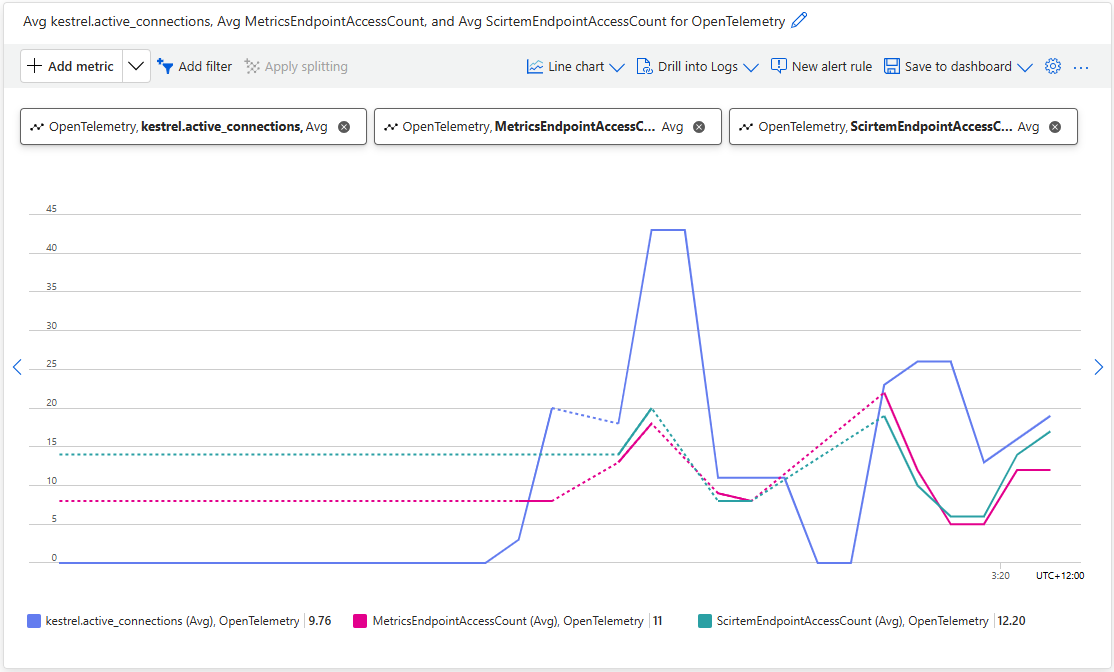
Using Application Insights metrics the MetricsEndPointAccesCount, and ScirtemEndPointAccesCount, plots to show the OLTP telemetry emitted by the application.
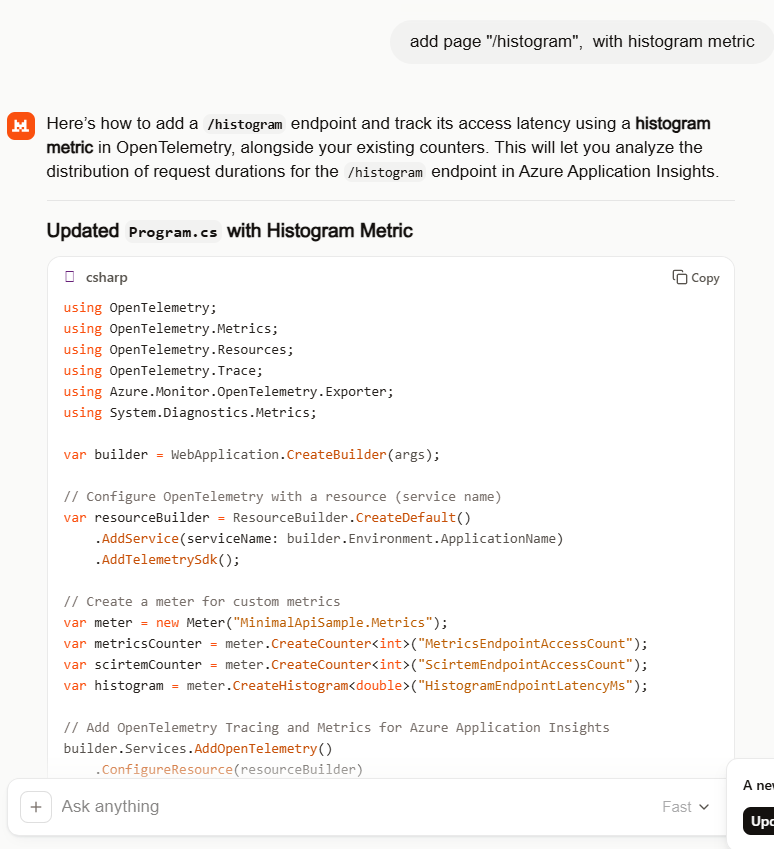
Mistral generated the code for the endpoint latency histogram without any prompting.

//dotnet add package OpenTelemetry
//dotnet add package OpenTelemetry.Extensions.Hosting
//dotnet add package OpenTelemetry.Instrumentation.AspNetCore
//dotnet add package OpenTelemetry.Instrumentation.Http
//dotnet add package Azure.Monitor.OpenTelemetry.Exporter
//
using Azure.Monitor.OpenTelemetry.Exporter;
//using OpenTelemetry;
using OpenTelemetry.Metrics;
using OpenTelemetry.Resources;
using OpenTelemetry.Trace;
using System.Diagnostics;
using System.Diagnostics.Metrics;

var builder = WebApplication.CreateBuilder(args);

// Configure OpenTelemetry with a resource (service name)
var resourceBuilder = ResourceBuilder.CreateDefault()
    .AddService(serviceName: builder.Environment.ApplicationName)
    .AddTelemetrySdk();

// Create a meter for custom metrics
var meter = new Meter("MinimalApiSample.Metrics");
var metricsCounter = meter.CreateCounter<int>("MetricsEndpointAccessCount");
var scirtemCounter = meter.CreateCounter<int>("ScirtemEndpointAccessCount");
var histogram = meter.CreateHistogram<double>("HistogramEndpointLatencyMs");

// Add OpenTelemetry Tracing and Metrics for Azure Application Insights
builder.Services.AddOpenTelemetry()
    //.ConfigureResource(resourceBuilder) /**** This is the only compile time issue
    .ConfigureResource(rb=>rb =  resourceBuilder)
    .WithTracing(tracerProviderBuilder =>
    {
       tracerProviderBuilder
           .AddSource("MinimalApiSample")
           .AddAspNetCoreInstrumentation(options =>
           {
              options.RecordException = true;
           })
           .AddHttpClientInstrumentation()
           .AddAzureMonitorTraceExporter(options =>
           {
              options.ConnectionString = builder.Configuration["APPLICATIONINSIGHTS_CONNECTION_STRING"];
           });
    })
    .WithMetrics(metricsProviderBuilder =>
    {
       metricsProviderBuilder
           .AddAspNetCoreInstrumentation()
           .AddHttpClientInstrumentation()
           .AddMeter("MinimalApiSample.Metrics") // Register your custom meter
           .AddAzureMonitorMetricExporter(options =>
           {
              options.ConnectionString = builder.Configuration["APPLICATIONINSIGHTS_CONNECTION_STRING"];
           });
    });

var app = builder.Build();

// Example of a custom activity for tracing
var activitySource = new ActivitySource("MinimalApiSample");

app.MapGet("/", () =>
{
   using var activity = activitySource.StartActivity("RootEndpoint");
   activity?.SetTag("custom.tag", "Hello, Azure Application Insights!");
   return Results.Ok("Hello, Azure Application Insights!");
});

app.MapGet("/metrics", () =>
{
   metricsCounter.Add(1);
   return Results.Ok("Metrics endpoint accessed.");
});

app.MapGet("/scirtem", () =>
{
   scirtemCounter.Add(1);
   return Results.Ok("Scirtem endpoint accessed.");
});

app.MapGet("/histogram", async () =>
{
   // Simulate some work
   var startTime = Stopwatch.GetTimestamp();
   await Task.Delay(Random.Shared.Next(50, 200)); // Random delay between 50-200ms
   var endTime = Stopwatch.GetTimestamp();

   // Calculate latency in milliseconds
   var latencyMs = (endTime - startTime) * 1000.0 / Stopwatch.Frequency;
   histogram.Record(latencyMs);

   return Results.Ok($"Histogram endpoint accessed. Latency: {latencyMs:F2}ms");
});

app.Run();
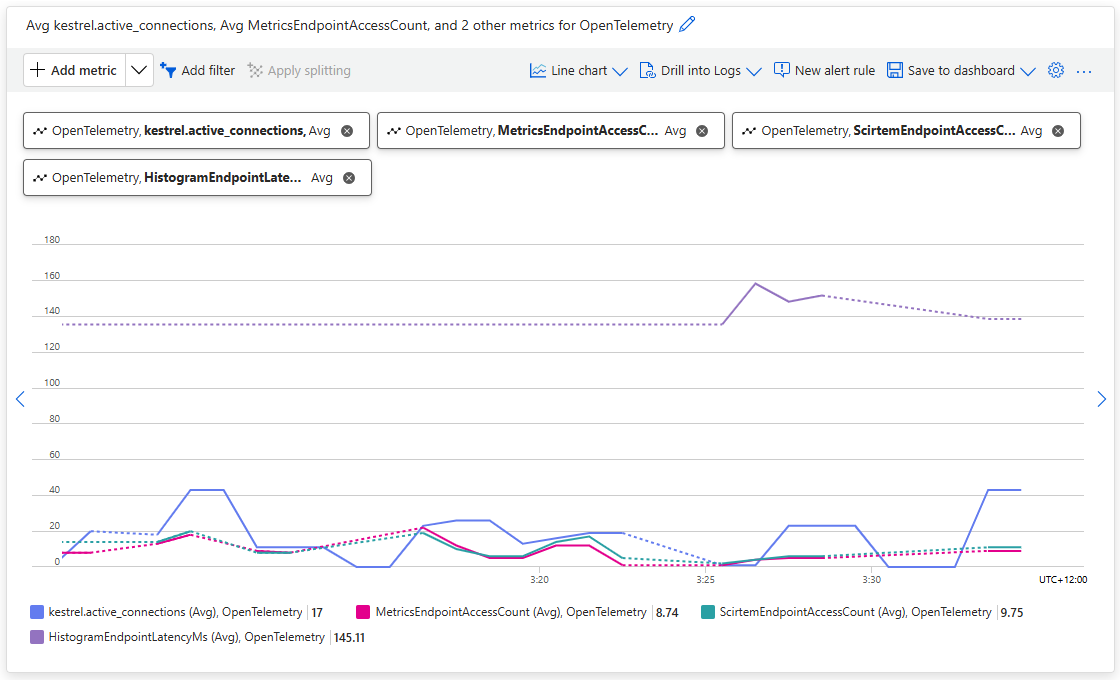
Using Application Insights metrics the OpenTelemetry.HistogramEndpointLatencyMs plot to show the OLTP telemetry emitted by the application.

Even with my relatively trivial OTLP learning applications, Mistral consistently produced clean and usable code with my simple prompts (maybe, I have got better and prompting). The generated code was straightforward, required only minor fixes, and avoided much of the over-complexity I’d seen in earlier experiments with other tools (looking at you mid/late 2025 Copilot). For my simple OTLP observability learning scenarios, that translated into faster iteration and less time spent refactoring and debugging generated code.

Airbnb Dataset – JSON Long Integer Issue

The Inside Airbnb London dataset has 87946 listings and the id column (which is the primary key) has a minimum value of 13913 and maximum of 973895808066047620 in the database.

Back in the early 90’s I used to live next to the Ealing Lawn Tennis Club in London

I used “Ealing” as the SearchText for my initial testing and tried different page numbers and sizes

Testing the search functionality with SwaggerUI

The listings search results JSON looked good but I missed one important detail…

[
  {
    "id": 32458423,
    "name": "Bed and breakfast in Ealing  · ★5.0 · 1 bedroom · 1 bed · 1 private bath",
    "listingURL": "https://www.airbnb.com/rooms/32458423"
  },
  {
    "id": 7905935,
    "name": "Guest suite in Ealing Broadway · ★4.93 · 1 bedroom · 1 bed · 1 private bath",
    "listingURL": "https://www.airbnb.com/rooms/7905935"
  },
  {
    "id": 5262733,
    "name": "Home in Ealing · ★4.97 · 1 bedroom · 1 shared bath",
    "listingURL": "https://www.airbnb.com/rooms/5262733"
  },
  {
    "id": 685148830257321200,
    "name": "Home in Ealing London · ★5.0 · 4 bedrooms · 8 beds · 2.5 baths",
    "listingURL": "https://www.airbnb.com/rooms/685148830257321258"
  },
  {
    "id": 10704599,
    "name": "Home in ealing, london · ★4.47 · 3 bedrooms · 4 beds · 1 bath",
    "listingURL": "https://www.airbnb.com/rooms/10704599"
  }
]

To “smoke test” to the lookup functionality I tried a couple of the listing ids

Swagger user interface successful lookup listing 7905935
Swagger user interface unsuccessful lookup of listing 685148830257321200

The HTTP GET method routing parameter and the response Data Transfer Object(DTO) the Airbnb listing Id properties are long values (ulong might have been a better choice) which should have sufficient range

string LookupByIdSql = @"SELECT Id, [Name], Listing_URL AS ListingURL
                     FROM ListingsHosts
                     WHERE id = @Id";

public record ListingLookupDto
{
   public long Id { get; set; }
   public string? Name { get; set; }
   public string? ListingURL { get; set; }
};

//...

app.MapGet("/Listing/Results/{id:long}", async (long id, IDapperContext dappperContext) =>
{
   using (var connection = dappperContext.ConnectionCreate())
   {
      ListingLookupDto result = await connection.QuerySingleOrDefaultWithRetryAsync<ListingLookupDto>(LookupByIdSql, new { id });
      if (result is null)
      {
         return Results.Problem($"Listing {id} not found", statusCode: StatusCodes.Status404NotFound);
      }

      return Results.Ok(result);
   }
})
.Produces<ListingLookupDto>(StatusCodes.Status200OK)
.Produces<ProblemDetails>(StatusCodes.Status404NotFound)
.WithOpenApi();

The id values in the search response and lookup DTOs were correct

Visual Studio 2022 Debugger inspecting listing id value

I had missed the clue in the search response JSON the listing id and the listingURL id didn’t match.

{
 "id": 685148830257321200,
 "name": "Home in Ealing London · ★5.0 · 4 bedrooms · 8 beds · 2.5 baths",
 "listingURL": "https://www.airbnb.com/rooms/685148830257321258"
},

The JavaScript Object Notation (JSON) Data Interchange Format(RFC7159) specification for numbers explains the discrepancy.

This specification allows implementations to set limits on the range
and precision of numbers accepted. Since software that implements
IEEE 754-2008 binary64 (double precision) numbers [IEEE754] is
generally available and widely used, good interoperability can be
achieved by implementations that expect no more precision or range
than these provide, in the sense that implementations will
approximate JSON numbers within the expected precision.
Airbnb listing from listingURL

Airbnb Dataset – Querying the Raw Listings

My initial ASP.NET Core Minimal AP exploration uses the Inside Airbnb London dataset which has 87946 listings. The data is pretty “nasty” with lots of nullable and wide columns so it took several attempts to import.

CREATE TABLE [dbo].[listingsRaw](
	[id] [bigint] NOT NULL,
	[listing_url] [nvarchar](50) NOT NULL,
	[scrape_id] [datetime2](7) NOT NULL,
	[last_scraped] [date] NOT NULL,
	[source] [nvarchar](50) NOT NULL,
	[name] [nvarchar](max) NOT NULL,
	[description] [nvarchar](max) NULL,
	[neighborhood_overview] [nvarchar](1050) NULL,
	[picture_url] [nvarchar](150) NULL,
	[host_id] [int] NOT NULL,
	[host_url] [nvarchar](50) NOT NULL,
	[host_name] [nvarchar](50) NULL,
	[host_since] [date] NULL,
	[host_location] [nvarchar](100) NULL,
	[host_about] [nvarchar](max) NULL,
	[host_response_time] [nvarchar](50) NULL,
	[host_response_rate] [nvarchar](50) NULL,
	[host_acceptance_rate] [nvarchar](50) NULL,
	[host_is_superhost] [bit] NULL,
	[host_thumbnail_url] [nvarchar](150) NULL,
	[host_picture_url] [nvarchar](150) NULL,
	[host_neighbourhood] [nvarchar](50) NULL,
	[host_listings_count] [int] NULL,
	[host_total_listings_count] [int] NULL,
	[host_verifications] [nvarchar](50) NOT NULL,
	[host_has_profile_pic] [bit] NULL,
	[host_identity_verified] [bit] NULL,
	[neighbourhood] [nvarchar](100) NULL,
	[neighbourhood_cleansed] [nvarchar](50) NOT NULL,
	[neighbourhood_group_cleansed] [nvarchar](1) NULL,
	[latitude] [float] NOT NULL,
	[longitude] [float] NOT NULL,
	[property_type] [nvarchar](50) NOT NULL,
	[room_type] [nvarchar](50) NOT NULL,
	[accommodates] [tinyint] NOT NULL,
	[bathrooms] [nvarchar](1) NULL,
	[bathrooms_text] [nvarchar](50) NULL,
	[bedrooms] [tinyint] NULL,
	[beds] [tinyint] NULL,
	[amenities] [nvarchar](max) NOT NULL,
	[price] [money] NOT NULL,
	[minimum_nights] [smallint] NOT NULL,
	[maximum_nights] [int] NOT NULL,
	[minimum_minimum_nights] [smallint] NULL,
	[maximum_minimum_nights] [int] NULL,
	[minimum_maximum_nights] [int] NULL,
	[maximum_maximum_nights] [int] NULL,
	[minimum_nights_avg_ntm] [float] NULL,
	[maximum_nights_avg_ntm] [float] NULL,
	[calendar_updated] [nvarchar](1) NULL,
	[has_availability] [bit] NOT NULL,
	[availability_30] [tinyint] NOT NULL,
	[availability_60] [tinyint] NOT NULL,
	[availability_90] [tinyint] NOT NULL,
	[availability_365] [smallint] NOT NULL,
	[calendar_last_scraped] [date] NOT NULL,
	[number_of_reviews] [smallint] NOT NULL,
	[number_of_reviews_ltm] [int] NOT NULL,
	[number_of_reviews_l30d] [tinyint] NOT NULL,
	[first_review] [date] NULL,
	[last_review] [date] NULL,
	[review_scores_rating] [float] NULL,
	[review_scores_accuracy] [float] NULL,
	[review_scores_cleanliness] [float] NULL,
	[review_scores_checkin] [float] NULL,
	[review_scores_communication] [float] NULL,
	[review_scores_location] [float] NULL,
	[review_scores_value] [float] NULL,
	[license] [nvarchar](max) NULL,
	[instant_bookable] [bit] NOT NULL,
	[calculated_host_listings_count] [int] NULL,
	[calculated_host_listings_count_entire_homes] [int] NOT NULL,
	[calculated_host_listings_count_private_rooms] [int] NOT NULL,
	[calculated_host_listings_count_shared_rooms] [int] NOT NULL,
	[reviews_per_month] [float] NULL
) ON [PRIMARY] TEXTIMAGE_ON [PRIMARY]

There are other data quality issues e.g. the host information is duplicated in each of their Listings e.g. host_id, host_name, host_since, host_* etc. which will need to be tidied up.

Swagger user interface for Raw Listings search functionality.

I have implemented basic (“incomplete”) OpenAPI support for functionality and stress testing.

Swagger user interface parameterised search functionality.

The search results are paginated and individual listings can be retrieved using the Airbnb listing “id”.

const string SearchPaginatedSql = @"SELECT Uid,Id,[Name], neighbourhood
                     FROM listings
                     WHERE[Name] LIKE N'%' + @SearchText + N'%'
                     ORDER By[Name] 
                     OFFSET @PageSize *(@PageNumber - 1) ROWS FETCH NEXT @PageSize ROWS ONLY";

public record ListingListDto
{
   public long Id { get; set; }
   public string? Name { get; set; }
   public string? Neighbourhood { get; set; }
};
Swagger user interface search functionality with untyped response.

The first HTTP GET implementation returns an untyped result-set which was not very helpful.

app.MapGet("/Listing/Search", async (string searchText, int pageNumber, int pageSize, [FromServices] IDapperContext dappperContext) =>
{
   using (var connection = dappperContext.ConnectionCreate())
   {
      return await connection.QueryWithRetryAsync(SearchPaginatedSql, new { searchText, pageNumber, pageSize });
   }
})
.WithOpenApi();
Swagger user interface search functionality with typed response

The second HTTP GET implementation returns a typed result-set which improved the “usability” of clients generated from the OpenAPI definition file.

app.MapGet("/Listing/Search/Typed", async (string searchText, int pageNumber, int pageSize, [FromServices] IDapperContext dappperContext) =>
{
   using (var connection = dappperContext.ConnectionCreate())
   {
      return await connection.QueryWithRetryAsync<ListingListDto>(SearchPaginatedSql, new { searchText, pageNumber, pageSize });
   }
})
.Produces<IList<ListingListDto>>(StatusCodes.Status200OK)
.WithOpenApi();

The third HTTP GET method uses the Listing id specified in a routing parameter to lookup a Listing

string LookupByIdSql = @"SELECT Id,[Name], neighbourhood
FROM ListingsHosts
WHERE id = @Id";

public record ListingLookupDto
{
public long Id { get; set; }
public string? Name { get; set; }
public string? Neighbourhood { get; set; }
};
Swagger user interface Listing lookup functionality
app.MapGet("/Listing/{id:long}", async (long id, IDapperContext dappperContext) =>
{
   using (var connection = dappperContext.ConnectionCreate())
   {
      ListingLookupDto result = await connection.QuerySingleOrDefaultWithRetryAsync<ListingLookupDto>(LookupByIdSql, new { id });
      if (result is null)
      {
         return Results.Problem($"Listing {id} not found", statusCode: StatusCodes.Status404NotFound);
      }

      return Results.Ok(result);
   }
})
.Produces<ListingLookupDto>(StatusCodes.Status200OK)
.Produces<ProblemDetails>(StatusCodes.Status404NotFound)
.WithOpenApi();

The lack of validation of the SearchText, PageSize and PageNumber parameters allow uses to enter invalid values which caused searches to fail.

Swagger user interface search functionality with an invalid page number

My initial approach was to decorate the parameters of the ValidatedQuery method with DataAnnotations to ensure only valid values were accepted.

const byte SearchTextMinimumLength = 3;
const byte SearchTextMaximumLength = 20;
const byte PageNumberMinimum = 1;
const byte PageNumberMaximum = 100;
const byte PageSizeMinimum = 5;
const byte PageSizeMaximum = 50;

app.MapGet("/Listing/Search/ValidatedQuery", async (
   [FromQuery,Required, MinLength(SearchTextMinimumLength, ErrorMessage = "SearchTextMaximumLength"), MaxLength(SearchTextMaximumLength, ErrorMessage = "SearchTextMaximumLegth")]
   string searchText,
   [FromQuery, Range(PageNumberMinimum, PageNumberMaximum, ErrorMessage = "PageNumberMinimum PageNumberMaximum")]
   int pageNumber,
   [FromQuery, Range(PageSizeMinimum, PageSizeMaximum, ErrorMessage = "PageSizeMinimum PageSizeMaximum")]
   int pageSize,
   [FromServices] IDapperContext dappperContext) =>
{
   using (var connection = dappperContext.ConnectionCreate())
   {
      return await connection.QueryWithRetryAsync<ListingListDto>(SearchPaginatedSql, new { searchText, pageNumber, pageSize });
   }
})
.Produces<IList<ListingListDto>>(StatusCodes.Status200OK)
.Produces<ProblemDetails>(StatusCodes.Status400BadRequest)
.WithOpenApi();

This wasn’t a great solution because the validation of the parameters was declared as part of the user interface and would have to be repeated everywhere listing search functionality was provided.

Swagger user interface search functionality with parameter validation

The final HTTP GET method uses DataAnnotations on the SearchParameter(DTO) and AsParameters to bind the query string values.

app.MapGet("/Listing/Search/Parameters", async ([AsParameters] SearchParameters searchParameters,
   [FromServices] IDapperContext dappperContext) =>
{
   using (var connection = dappperContext.ConnectionCreate())
   {
      return await connection.QueryWithRetryAsync<ListingListDto>(SearchPaginatedSql, new { searchText = searchParameters.SearchText, searchParameters.PageNumber, searchParameters.PageSize });
   }
})
.Produces<IList<ListingListDto>>(StatusCodes.Status200OK)
.Produces<ProblemDetails>(StatusCodes.Status400BadRequest)
.WithOpenApi();

public record SearchParameters
{
   // https://github.com/domaindrivendev/Swashbuckle.AspNetCore/issues/2658 possibly related?
   public const byte SearchTextMinimumLength = 3;
   public const byte SearchTextMaximumLength = 15;
   public const int PageNumberMinimum = 1;
   public const int PageNumberMaximum = 100;
   public const byte PageSizeMinimum = 5;
   public const byte PageSizeMaximum = 50;

   //[FromQuery, Required, MinLength(SearchTextMinimumLength, ErrorMessage = "SearchTextMinimumLegth"), MaxLength(SearchTextMaximumLength, ErrorMessage = "SearchTextMaximumLegth")]
   //[Required, MinLength(SearchTextMinimumLength, ErrorMessage = "SearchTextMinimumLegth"), MaxLength(SearchTextMaximumLength, ErrorMessage = "SearchTextMaximumLegth")]
   [MinLength(SearchTextMinimumLength, ErrorMessage = "SearchTextMinimumLegth"), MaxLength(SearchTextMaximumLength, ErrorMessage = "SearchTextMaximumLegth")]
   public string SearchText { get; set; }

   //[FromQuery, Range(PageNumberMinimum, PageNumberMaximum, ErrorMessage = "PageNumberMinimum PageNumberMaximum")]
   //[Required, Range(PageNumberMinimum, PageNumberMaximum, ErrorMessage = "PageNumberMinimum PageNumberMaximum")]
   [Range(PageNumberMinimum, PageNumberMaximum, ErrorMessage = "PageNumberMinimum PageNumberMaximum")]
   public int PageNumber { get; set; }

   [Range(PageSizeMinimum, PageSizeMaximum, ErrorMessage = "PageSizeMinimum PageSizeMaximum")]
   public int PageSize { get; set; }
}
Swagger user interface search functionality with parameter validation

This last two implementations worked though the error messages I had embedded in the code were not displayed I think this is related to this Swashbuckle Issue.

There is also an issue looking up some listings with larger listing ids which I will need some investigation.

Myriota device Uplink Serialisation

The Myriota Developer documentation has some sample webhook data payloads so I used JSON2csharp to generate a Data Transfer Object(DTO) to deserialise payload. The format of the message is a bit “odd”, the “Data “Value” contains an “escaped” JSON object.

{
  "EndpointRef": "ksnb8GB_TuGj:__jLfs2BQJ2d",
  "Timestamp": 1692928585,
  "Data": "{"Packets": [{"Timestamp": 1692927646796, "TerminalId": "0001020304", "Value": "00008c9512e624cce066adbae764cccccccccccc"}]}",
  "Id": "a5c1bffe-4b62-4233-bbe9-d4ecc4f8b6cb",
  "CertificateUrl": "https://security.myriota.com/data-13f7751f3c5df569a6c9c42a9ce73a8a.crt",
  "Signature": "FDJpQdWHwCY+tzCN/WvQdnbyjgu4BmP/t3cJIOEF11sREGtt7AH2L9vMUDji6X/lxWBYa4K8tmI0T914iPyFV36i+GtjCO4UHUGuFPJObCtiugVV8934EBM+824xgaeW8Hvsqj9eDeyJoXH2S6C1alcAkkZCVt0pUhRZSZZ4jBJGGEEQ1Gm+SOlYjC2exUOf0mCrI5Pct+qyaDHbtiHRd/qNGW0LOMXrB/9difT+/2ZKE1xvDv9VdxylXi7W0/mARCfNa0J6aWtQrpvEXJ5w22VQqKBYuj3nlGtL1oOuXCZnbFYFf4qkysPaXON31EmUBeB4WbZMyPaoyFK0wG3rwA=="
}
namespace devMobile.IoT.myriotaAzureIoTConnector.myriota.UplinkWebhook.Models
{
    public class UplinkPayloadWebDto
    {
        public string EndpointRef { get; set; }
        public long Timestamp { get; set; } 
        public string Data { get; set; } // Embedded JSON ?
        public string Id { get; set; }
        public string CertificateUrl { get; set; }
        public string Signature { get; set; }
    }
}

The UplinkWebhook controller “automagically” deserialises the message, then in code the embedded JSON is deserialised and “unpacked”, finally the processed message is inserted into an Azure Storage queue.

namespace devMobile.IoT.myriotaAzureIoTConnector.myriota.UplinkWebhook.Controllers
{
    [Route("[controller]")]
    [ApiController]
    public class UplinkController : ControllerBase
    {
        private readonly Models.ApplicationSettings _applicationSettings;
        private readonly ILogger<UplinkController> _logger;
        private readonly QueueServiceClient _queueServiceClient;

        public UplinkController(IOptions<Models.ApplicationSettings> applicationSettings, QueueServiceClient queueServiceClient, ILogger<UplinkController> logger)
        {
            _applicationSettings = applicationSettings.Value;
            _queueServiceClient = queueServiceClient;
            _logger = logger;
        }

        [HttpPost]
        public async Task<IActionResult> Post([FromBody] Models.UplinkPayloadWebDto payloadWeb)
        {
            _logger.LogInformation("SendAsync queue name:{QueueName}", _applicationSettings.QueueName);

            QueueClient queueClient = _queueServiceClient.GetQueueClient(_applicationSettings.QueueName);

            var serializeOptions = new JsonSerializerOptions
            {
                WriteIndented = true,
                Encoder = System.Text.Encodings.Web.JavaScriptEncoder.UnsafeRelaxedJsonEscaping
            };

            await queueClient.SendMessageAsync(Convert.ToBase64String(JsonSerializer.SerializeToUtf8Bytes(payloadWeb, serializeOptions)));

            return this.Ok();
        }
    }
}

The webhook application uses the QueueClientBuilderExtensions and AddServiceClient so a QueueServiceClient can be injected into the webhook controller.

namespace devMobile.IoT.myriotaAzureIoTConnector.myriota.UplinkWebhook
{
    public class Program
    {
        public static void Main(string[] args)
        {
            var builder = WebApplication.CreateBuilder(args);

            // Add services to the container.
            builder.Services.AddControllers();

            builder.Services.AddApplicationInsightsTelemetry(i => i.ConnectionString = builder.Configuration.GetConnectionString("ApplicationInsights"));

            builder.Services.Configure<Models.ApplicationSettings>(builder.Configuration.GetSection("Application"));

            builder.Services.AddAzureClients(azureClient =>
            {
                azureClient.AddQueueServiceClient(builder.Configuration.GetConnectionString("AzureWebApi"));
            });

            var app = builder.Build();

            // Configure the HTTP request pipeline.

            app.UseHttpsRedirection();

            app.MapControllers();

            app.Run();
        }
    }
}

After debugging the application on my desktop with Telerik fiddler I deployed the application to one of my Azure subscriptions.

Azure Resource Group for the myriota Azure IoT Connector
Adding a new Destination in the myriota device manager

As part of configuring a new device test messages can be sent to the configured destinations.

Testing a new Destination in the myriota device manager
{
  "EndpointRef": "N_HlfTNgRsqe:uyXKvYTmTAO5",
  "Timestamp": 1563521870,
  "Data": "{"Packets": [{"Timestamp": 1563521870359,
    "TerminalId": "f74636ec549f9bde50cf765d2bcacbf9",
    "Value": "0101010101010101010101010101010101010101"}]}",
  "Id": "fe77e2c7-8e9c-40d0-8980-43720b9dab75",
  "CertificateUrl":    "https://security.myriota.com/data-13f7751f3c5df569a6c9c42a9ce73a8a.crt",
  "Signature": "k2OIBppMRmBT520rUlIvMxNg+h9soJYBhQhOGSIWGdzkppdT1Po2GbFr7jbg..."
}

The DTO generated with JSON2csharp needed some manual “tweaking” after examining how a couple of the sample messages were deserialised.

Azure Storage Explorer messages

I left the Myriota Developer Toolkit device (running the tracker sample) outside overnight and the following day I could see with Azure Storage Explorer a couple of messages in the Azure Storage Queue

Myriota device configuration

For a couple of weeks Myriota Developer Toolkit has been sitting under my desk and today I got some time to setup a device, register it, then upload some data.

Myriota Developer Toolkit

The first step was to download and install the Myriota Configurator so I could get the device registration information and install the tracker example application.

Using Windows File Explorer to “unblock” the downloaded file

After “unblocking” the zip file and upgrading my pip install the install script worked.

Myriota Configurator installation script

The application had to be run from the command line with “python MyriotaConfigurator.py”

Myriota Configurator main menu
Myriota Configurator retrieving device registration code

On the device I’m using the Tracker sample application to generate some sample payloads.

Myriota Configurator downloading tracker sample to device

The next step was to “register” my device and configure the destination(s) for its messages.

Myriota Device Manager Device configuration

Once the device and device manager configuration were sorted, I put the Tracker out on the back lawn on top of a large flowerpot.

Device Manager Access Times

On the “Access Times” page I could see that there were several periods when a satellite was overhead and overnight a couple of messages were uploaded.

ASP.NET Core authentication – In the beginning

While building my ASP.NET Core identity, Dapper Custom storage provider I found there wasn’t a lot of discussion of the ASPNETUserClaims functionality for fine “grained permissions”.

ASP.NET Core identity initial data model

ASP.NET Core identity Roles can also have individual claims but with the authorisation model of the legacy application I work on this functionality hasn’t been useful. We use role based authentication with a few user claims to minimise the size of our Java Web Tokens(JWT)

Visual Studio 2022 ASP.NET Core Web Application template options

The first step was to create a “bare-bones” ASP.NET Core Razor pages Web Application with Individual Accounts Authentication project

Default ASP.NET Core identity Web application Homepage

I tried to minimise the modifications to the application. I added EnableRetryOnFailure, some changes to names spaces etc. I also added support for email address confirmation with SendGrid and “authentication” link to the navabar in _Layout.cshtml.

@page
@model RolesModel
@{
    <table class="table">
        <thead>
            <tr>
                <th>Role</th>
            </tr>
        </thead>
        <tbody>
            @foreach (var role in Model.Roles)
            {
                <tr>
                    <td>
                        @Html.DisplayFor(modelItem => role.Value)
                    </td>
                </tr>
            }
        </tbody>
    </table>
    <br/>
        <table class="table">
        <thead>
            <tr>
                <th>Claim Subject</th>
                <th>Value</th>
            </tr>
        </thead>

        <tbody>
            @foreach (var claim in Model.Claims)
            {
                <tr>
                    <td>
                        @Html.DisplayFor(modelItem => claim.Type)
                    </td>
                    <td>
                        @Html.DisplayFor(modelItem => claim.Value)
                    </td>
                </tr>
            }
        </tbody>
    </table>
}

The “Authentication” page displays the logged in User’s Role and Claims.

namespace devMobile.AspNetCore.Identity.WebApp.EFCore.Pages
{
    [Authorize()]
    public class RolesModel : PageModel
    {
        private readonly ILogger<RolesModel> _logger;

        public List<Claim> Roles { get; set; }
        public List<Claim> Claims { get; set; }

        public RolesModel(ILogger<RolesModel> logger)
        {
            _logger = logger;
        }

        public void OnGet()
        {
            Roles = User.Claims.Where(c => c.Type == ClaimTypes.Role).ToList();

            Claims = User.Claims.Where(c => c.Type != ClaimTypes.Role).ToList();
        }
    }
}

Each user can have role(s), with optional claims, and some optional individual claims.

ASP.NET Core identity application Authentication information page

The WebApp.EFCore project is intended to be the starting point for a series of posts about ASP.NET Core identity so I have not included Cross-Origin Resource Sharing (CORS), Cross Site Request Forgery (CSRF) etc. functionality.

.NET ASP.NET Core Custom Identity Provider Sample Update

As part of some security updates to one of the ASP.NET Core applications I work on there were changes to how users are authorised and authenticated(A&A). As part of this we were looking at replacing custom A&A (login names & passwords+ existing database) with ASP.NET Core Identity and a Custom Storage Provider. I downloaded the sample code from the Github AspNetCore.Docs repository and opened the project in Visual Studio 2022.

The Custom Storage Provider sample hasn’t been updated for years and used .NET Core 1.1 which was released Q4 2016.

When I opened the project there were errors and many of the NuGets were deprecated.

The sample code uses Dapper (micro ORM) to access tables in a custom Microsoft SQL Server database but there was also NuGets and code that referenced Entity Framework Core.

After several unsuccessful attempts at updating the NuGets packages I started again from scratch

The code wouldn’t compile so I started fixing issues (The first couple of attempts were very “hacky”). The UseDatabaseErrorPage method was from EF Core so it was commented out. The UseBrowserLink method was from the Browser Link support which I decided not to use etc.

...
namespace CustomIdentityProviderSample
{
    public class Startup
    {
        public Startup(IHostingEnvironment env)
        {
            var builder = new ConfigurationBuilder()
                .SetBasePath(env.ContentRootPath)
                .AddJsonFile("appsettings.json", optional: false, reloadOnChange: true)
                .AddJsonFile($"appsettings.{env.EnvironmentName}.json", optional: true);

            if (env.IsDevelopment())
            {
                // For more details on using the user secret store see https://go.microsoft.com/fwlink/?LinkID=532709
                builder.AddUserSecrets<Startup>();
            }

            builder.AddEnvironmentVariables();
            Configuration = builder.Build();
        }

        public IConfigurationRoot Configuration { get; }

        // This method gets called by the runtime. Use this method to add services to the container.
        public void ConfigureServices(IServiceCollection services)
        {
            // Add identity types
            services.AddIdentity<ApplicationUser, ApplicationRole>()
                .AddDefaultTokenProviders();

            // Identity Services
            services.AddTransient<IUserStore<ApplicationUser>, CustomUserStore>();
            services.AddTransient<IRoleStore<ApplicationRole>, CustomRoleStore>();
            string connectionString = Configuration.GetConnectionString("DefaultConnection");
            services.AddTransient<SqlConnection>(e => new SqlConnection(connectionString));
            services.AddTransient<DapperUsersTable>();

            services.AddMvc();

            // Add application services.
            services.AddTransient<IEmailSender, AuthMessageSender>();
            services.AddTransient<ISmsSender, AuthMessageSender>();
        }

        // This method gets called by the runtime. Use this method to configure the HTTP request pipeline.
        public void Configure(IApplicationBuilder app, IHostingEnvironment env, ILoggerFactory loggerFactory)
        {
            // loggerFactory.AddConsole(Configuration.GetSection("Logging"));
            // loggerFactory.AddDebug();

            if (env.IsDevelopment())
            {
                app.UseDeveloperExceptionPage();
                // app.UseDatabaseErrorPage(); BHL
                // app.UseBrowserLink(); BHL
            }
            else
            {
                app.UseExceptionHandler("/Home/Error");
            }

            app.UseStaticFiles();

            app.UseRouting(); // BHL

            // app.UseIdentity(); BHL
            app.UseAuthentication();
            app.UseAuthorization();

            // Add external authentication middleware below. To configure them please see https://go.microsoft.com/fwlink/?LinkID=532715
            app.UseMvc(routes =>
            {
                routes.MapRoute(
                    name: "default",
                    template: "{controller=Home}/{action=Index}/{id?}");
            });
        }
    }
}

This process was repeated many times until the Custom Storage Provider sample compiled so I could run it in the Visual Studio 2022 debugger.

The Custom Storage Provider sample then failed because of changes to routing etc.

The Custom Storage Provider sample then failed because of changes to A&A middleware

The Custom Storage Provider sample then failed because the database creation script and the code didn’t match.

CREATE TABLE [dbo].[CustomUser](
	[Id] [uniqueidentifier] NOT NULL,
	[Email] [nvarchar](256) NULL,
	[EmailConfirmed] [bit] NOT NULL,
	[PasswordHash] [nvarchar](max) NULL,
	[UserName] [nvarchar](256) NOT NULL,
 CONSTRAINT [PK_dbo.CustomUsers] PRIMARY KEY CLUSTERED 
(
	[Id] ASC
)WITH (PAD_INDEX = OFF, STATISTICS_NORECOMPUTE = OFF, IGNORE_DUP_KEY = OFF, ALLOW_ROW_LOCKS = ON, ALLOW_PAGE_LOCKS = ON) ON [PRIMARY]
) ON [PRIMARY] TEXTIMAGE_ON [PRIMARY]

Finally, the Custom Storage Provider sample worked but the page layout was broken

I then worked through the Razor views adding stylesheets where necessary.

@inject Microsoft.ApplicationInsights.AspNetCore.JavaScriptSnippet JavaScriptSnippet
<!DOCTYPE html>
<html>
<head>
    <meta charset="utf-8" />
    <meta name="viewport" content="width=device-width, initial-scale=1.0" />
    <title>@ViewData["Title"] - CustomIdentityProviderSample</title>
    @* BHL *@
    <link rel="stylesheet" href="https://ajax.aspnetcdn.com/ajax/bootstrap/3.3.7/css/bootstrap.css"
          asp-fallback-href="~/lib/bootstrap/dist/css/bootstrap.css"
          asp-fallback-test-class="sr-only" asp-fallback-test-property="position" asp-fallback-test-value="absolute" />

    <environment names="Development">
        <link rel="stylesheet" href="~/lib/bootstrap/dist/css/bootstrap.css" />
    </environment>
    <environment names="Staging,Production">
        <link rel="stylesheet" href="https://ajax.aspnetcdn.com/ajax/bootstrap/3.3.7/css/bootstrap.css"
              asp-fallback-href="~/lib/bootstrap/dist/css/bootstrap.css"
              asp-fallback-test-class="sr-only" asp-fallback-test-property="position" asp-fallback-test-value="absolute" />
    </environment>
    @Html.Raw(JavaScriptSnippet.FullScript)
</head>
...

The Custom Storage Provider sample subset of pages then rendered better.

The Custom Storage Provider sample then failed when functionality like user phone number was used.

This required the addition of implementations (many just throw NotImplementedException exceptions) for IUserPhoneNumberStore, IUserTwoFactorStore, and IUserLoginStore etc.

using Microsoft.AspNetCore.Identity;
using System;
using System.Threading.Tasks;
using System.Threading;
using System.Collections.Generic;

namespace CustomIdentityProviderSample.CustomProvider
{
    /// <summary>
    /// This store is only partially implemented. It supports user creation and find methods.
    /// </summary>
    public class CustomUserStore : IUserStore<ApplicationUser>, 
        IUserPasswordStore<ApplicationUser>,
        IUserPhoneNumberStore<ApplicationUser>,
        IUserTwoFactorStore<ApplicationUser>,
        IUserLoginStore<ApplicationUser>
    {
        private readonly DapperUsersTable _usersTable;

        public CustomUserStore(DapperUsersTable usersTable)
        {
            _usersTable = usersTable;
        }

        public Task AddLoginAsync(ApplicationUser user, UserLoginInfo login, CancellationToken cancellationToken)
        {
            throw new NotImplementedException();
        }

        public async Task<IdentityResult> CreateAsync(ApplicationUser user, 
            CancellationToken cancellationToken = default(CancellationToken))
        {
            cancellationToken.ThrowIfCancellationRequested();
            if (user == null) throw new ArgumentNullException(nameof(user));

            return await _usersTable.CreateAsync(user);
        }

        public async Task<IdentityResult> DeleteAsync(ApplicationUser user, 
            CancellationToken cancellationToken = default(CancellationToken))
        {
            cancellationToken.ThrowIfCancellationRequested();
            if (user == null) throw new ArgumentNullException(nameof(user));

            return await _usersTable.DeleteAsync(user);

        }

        public async Task<ApplicationUser> FindByIdAsync(string userId, 
            CancellationToken cancellationToken = default(CancellationToken))
        {
            cancellationToken.ThrowIfCancellationRequested();
            if (userId == null) throw new ArgumentNullException(nameof(userId));
            Guid idGuid;
            if(!Guid.TryParse(userId, out idGuid))
            {
                throw new ArgumentException("Not a valid Guid id", nameof(userId));
            }

            return await _usersTable.FindByIdAsync(idGuid);

        }

        public Task<ApplicationUser> FindByLoginAsync(string loginProvider, string providerKey, CancellationToken cancellationToken)
        {
            throw new NotImplementedException();
        }

        public async Task<ApplicationUser> FindByNameAsync(string userName, 
            CancellationToken cancellationToken = default(CancellationToken))
        {
            cancellationToken.ThrowIfCancellationRequested();
            if (userName == null) throw new ArgumentNullException(nameof(userName));

            return await _usersTable.FindByNameAsync(userName);
        }

        public async Task<IList<UserLoginInfo>> GetLoginsAsync(ApplicationUser user, CancellationToken cancellationToken)
        {
            cancellationToken.ThrowIfCancellationRequested();
            if (user == null) throw new ArgumentNullException(nameof(user));

            return await _usersTable.GetLoginsAsync(user.Id);
        }
... 
}

This also required extensions to the DapperUsersTable.cs.

public async Task<IdentityResult> UpdateAsync(ApplicationUser user)
{
   string sql = "UPDATE dbo.AspNetUsers " + // BHL
                     "SET [Id] = @Id, [Email]= @Email, [EmailConfirmed] = @EmailConfirmed, [PasswordHash] = @PasswordHash, [UserName] = @UserName " +
                     "WHERE Id = @Id;";


   int rows = await _connection.ExecuteAsync(sql, new { user.Id, user.Email, user.EmailConfirmed, user.PasswordHash, user.UserName });

   if (rows == 1)
   {
      return IdentityResult.Success;
   }

return IdentityResult.Failed(new IdentityError { Description = $"Could not update user {user.Email}." });
}

After many failed attempts my very nasty Custom Storage Provider refresh works (with many warnings and messages). I now understand how they work well enough that I am going to start again from scratch.