Random wanderings through Microsoft Azure esp. PaaS plumbing, the IoT bits, AI on Micro controllers, AI on Edge Devices, .NET nanoFramework, .NET Core on *nix and ML.NET+ONNX
One of the easiest ways to create read-only replicas of an Azure SQL Database database is with Active geo-replication(it’s also useful for disaster recovery with geo-failure to a geo-secondary in a different Azure Region).
I then created replicas in the same region (if the application had a global customer base creating read only geo replicas in regions close to users might be worth considering) for the read-only queries.
Azure SQL Database no replicas configured
Azure Portal Create Geo Replica
I created four replicas which is the maximum number supported. If more replicas were required a secondary of a secondary (a process known as chaining) could be use to create additional geo-replicas
Azure Portal Primary Database and four Geo-replicas
Azure Application Insights showing multiple Geo-Replicas being used.
The Azure Database Geo-replication was pretty easy to setup. For a production scenario where only a portion of the database (e.g. shaped by Customer or Geography) is required it might not be the “right hammer”.
WebAPI Dapper Azure Resource Group
The other limitation I encountered was the resources used by the replication of “transaction processing” tables (in the World Wide Importers database tables like the Sales.OrderLines, Sales.CustomerTransactions etc.) which often wouldn’t be required for read-only applications.
The company builds a Software as a Service(Saas) product for managing portfolios of foreign currency forwards, options, swaps etc. Part of the solution has an application which customers use to get an “aggregated” view of their purchases.
The database queries to lookup reference data (forward curves etc.), return a shaped dataset for each supported instrument type, then “aggregating” the information with C# code consumes significant database and processing resources.
The configuration strings of the read-only replicas are loaded as the application starts.
// This method gets called by the runtime. Use this method to add services to the container.
public void ConfigureServices(IServiceCollection services)
{
	services.AddControllers();

	var errorHandlerSettings = Configuration.GetSection(nameof(ErrorHandlerSettings));
	services.Configure<ErrorHandlerSettings>(errorHandlerSettings);

	var readonlyReplicaServersConnectionStringSettings = Configuration.GetSection("ReadonlyReplicaServersConnectionStringSettings");
	services.Configure<List<string>>(readonlyReplicaServersConnectionStringSettings);

	services.AddResponseCaching();

	services.AddDapperForMSSQL();
#if DAPPER_EXTENSIONS_CACHE_MEMORY
	services.AddDapperCachingInMemory(new MemoryConfiguration
	{
		AllMethodsEnableCache = false
 	});
#endif
#if DAPPER_EXTENSIONS_CACHE_REDIS
	services.AddDapperCachingInRedis(new RedisConfiguration
	{
		AllMethodsEnableCache = false,
		KeyPrefix = Configuration.GetValue<string>("RedisKeyPrefix"),
		ConnectionString = Configuration.GetConnectionString("RedisConnection")
	});
#endif
	services.AddApplicationInsightsTelemetry();
}
Then code was added to the controller to randomly select which read-only replica to use. More complex approaches were considered but not implemented for the initial version.
[ApiController]
[Route("api/[controller]")]
public class StockItemsReadonlyReplicasController : ControllerBase
{
    private readonly ILogger<StockItemsReadonlyReplicasController> logger;
    private readonly List<string> readonlyReplicasConnectionStrings;

    public StockItemsReadonlyReplicasController(ILogger<StockItemsReadonlyReplicasController> logger, IOptions<List<string>> readonlyReplicasServerConnectionStrings)
    {
        this.logger = logger;

        this.readonlyReplicasConnectionStrings = readonlyReplicasServerConnectionStrings.Value;
    }

    [HttpGet]
    public async Task<ActionResult<IEnumerable<Model.StockItemListDtoV1>>> Get()
    {
        IEnumerable<Model.StockItemListDtoV1> response = null;

        if (readonlyReplicasConnectionStrings.Count == 0)
        {
            logger.LogError("No readonly replica server Connection strings configured");

            return this.StatusCode(StatusCodes.Status500InternalServerError);
        }

        Random random = new Random(); // maybe this should be instantiated ever call, but "danger here by thy threading"

        string connectionString = readonlyReplicasConnectionStrings[random.Next(0, readonlyReplicasConnectionStrings.Count)];

        logger.LogTrace("Connection string {connectionString}", connectionString);

        using (SqlConnection db = new SqlConnection(connectionString))
        {
            response = await db.QueryAsync<Model.StockItemListDtoV1>(sql: @"SELECT [StockItemID] as ""ID"", [StockItemName] as ""Name"", [RecommendedRetailPrice], [TaxRate] FROM [Warehouse].[StockItems]", commandType: CommandType.Text);
        }

        return this.Ok(response);
    }
}
The Read-only replica server connection string setup template in appsettings.Development.json.
The Manage UserSecrets(Secrets.json) functionality was used for testing on my development machine. In production Azure App Service the array of connections strings was configured with ReadonlyReplicaServersConnectionStringSettings:0, ReadonlyReplicaServersConnectionStringSettings:1 etc. syntax
Sample application Azure App Service Configuration
Azure Application Insights with connections to different read-only replicas highlighted
I had incorrectly configured the firewall on one of the read-only replica database servers so roughly one in four connection attempts failed.
For some historical reason I can’t remember my controllers often had an outer try/catch and associated logging. I think may have been ensure no “sensitive” information was returned to the caller even if the application was incorrectly deployed. So I could revisit my approach I added a controller with two methods one which returns an HTTP 500 error and another which has un-caught exception.
[Route("api/[controller]")]
[ApiController]
public class StockItemsNok500Controller : ControllerBase
{
	private readonly string connectionString;
	private readonly ILogger<StockItemsNok500Controller> logger;

	public StockItemsNok500Controller(IConfiguration configuration, ILogger<StockItemsNok500Controller> logger)
	{
		this.connectionString = configuration.GetConnectionString("WorldWideImportersDatabase");

		this.logger = logger;
	}

	public async Task<ActionResult<IEnumerable<Model.StockItemListDtoV1>>> Get500()
	{
		IEnumerable<Model.StockItemListDtoV1> response = null;

		try
		{
			using (SqlConnection db = new SqlConnection(this.connectionString))
			{
				response = await db.QueryWithRetryAsync<Model.StockItemListDtoV1>(sql: @"SELECT [StockItemID] as ""ID"", [StockItemName] as ""Name"", [RecommendedRetailPrice], [TaxRate] FROM [Warehouse].[StockItem500]", commandType: CommandType.Text);
			}
		}
		catch (SqlException ex)
		{
			logger.LogError(ex, "Retrieving list of StockItems");

			return this.StatusCode(StatusCodes.Status500InternalServerError);
		}

		return this.Ok(response);
	}
}
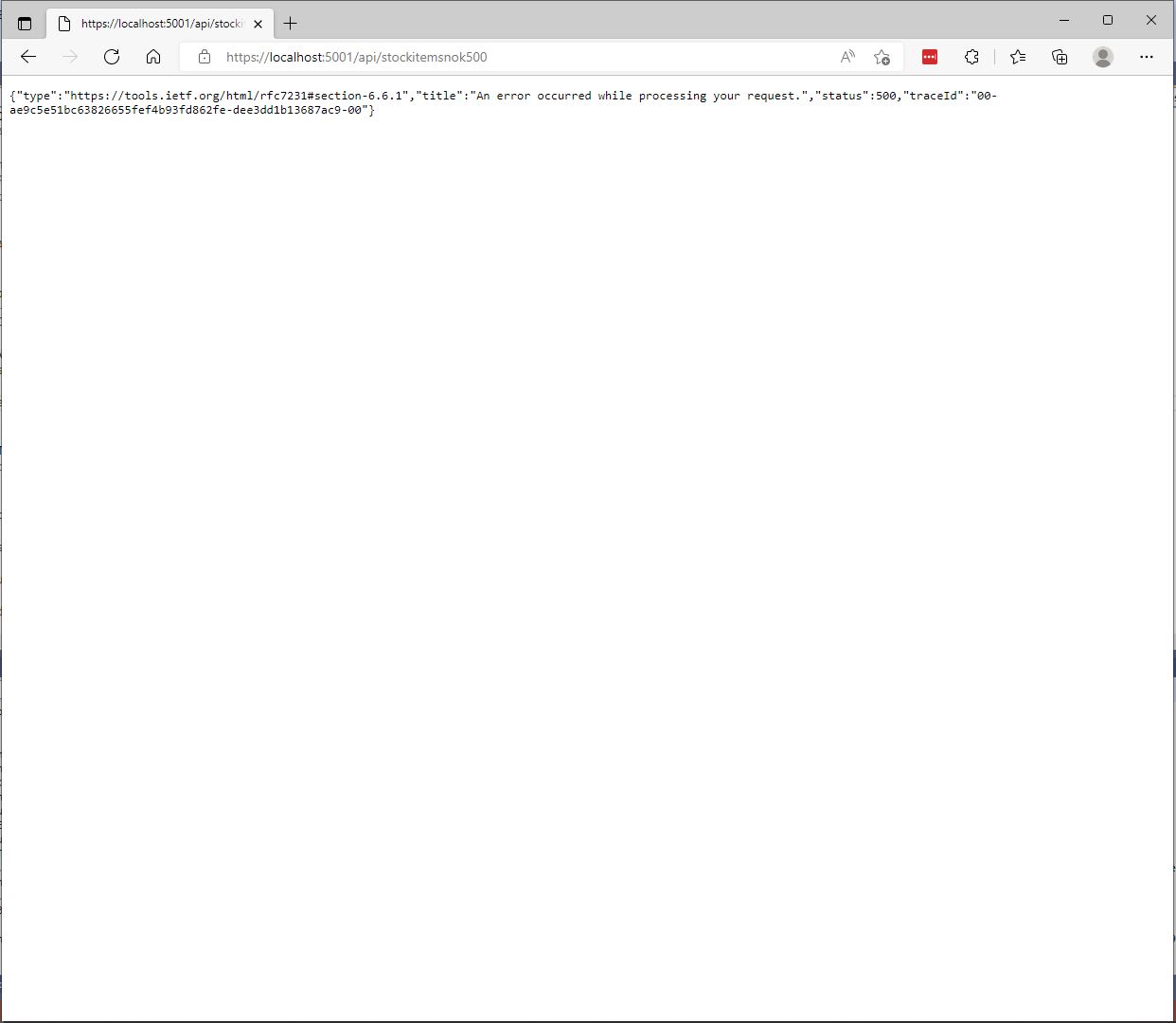
The information returned to a caller was generic and the only useful information was the “traceId”.
StockItemsNok500Controller error page
[Route("api/[controller]")]
[ApiController]
public class StockItemsNokExceptionController : ControllerBase
{
	private readonly string connectionString;

	public StockItemsNokExceptionController(IConfiguration configuration)
	{
		this.connectionString = configuration.GetConnectionString("WorldWideImportersDatabase");
	}

	public async Task<ActionResult<IEnumerable<Model.StockItemListDtoV1>>> GetException()
	{
		IEnumerable<Model.StockItemListDtoV1> response = null;

		using (SqlConnection db = new SqlConnection(this.connectionString))
		{
			response = await db.QueryWithRetryAsync<Model.StockItemListDtoV1>(sql: @"SELECT [StockItemID] as ""ID"", [StockItemName] as ""Name"", [RecommendedRetailPrice], [TaxRate] FROM [Warehouse].[StockItemsException]", commandType: CommandType.Text);
		}

		return this.Ok(response);
	}
}
In “Development” mode the information returned to the caller contains a detailed stack trace that reveals implementation details which are useful for debugging but would also be useful to an attacker.
Developer StockItemsNok Controller Exception page
When not in “Development” mode no additional information is returned (not even a TraceId).
Production StockItemsNok500Controller Exception
The diagnostic stacktrace information logged by the two different controllers was essentially the same
System.Data.SqlClient.SqlException:
   at System.Data.SqlClient.SqlCommand+<>c.<ExecuteDbDataReaderAsync>b__126_0 (System.Data.SqlClient, Version=4.6.1.3, Culture=neutral, PublicKeyToken=b03f5f7f11d50a3a)
   at System.Threading.Tasks.ContinuationResultTaskFromResultTask`2.InnerInvoke (System.Private.CoreLib, Version=6.0.0.0, Culture=neutral, PublicKeyToken=7cec85d7bea7798e)
   at System.Threading.Tasks.Task+<>c.<.cctor>b__272_0 (System.Private.CoreLib, Version=6.0.0.0, Culture=neutral, PublicKeyToken=7cec85d7bea7798e)
   at System.Threading.ExecutionContext.RunInternal (System.Private.CoreLib, Version=6.0.0.0, Culture=neutral, PublicKeyToken=7cec85d7bea7798e)
   at System.Runtime.ExceptionServices.ExceptionDispatchInfo.Throw (System.Private.CoreLib, Version=6.0.0.0, Culture=neutral, PublicKeyToken=7cec85d7bea7798e)
   at System.Threading.ExecutionContext.RunInternal (System.Private.CoreLib, Version=6.0.0.0, Culture=neutral, PublicKeyToken=7cec85d7bea7798e)
   at System.Threading.Tasks.Task.ExecuteWithThreadLocal (System.Private.CoreLib, Version=6.0.0.0, Culture=neutral, PublicKeyToken=7cec85d7bea7798e)
   at System.Runtime.ExceptionServices.ExceptionDispatchInfo.Throw (System.Private.CoreLib, Version=6.0.0.0, Culture=neutral, PublicKeyToken=7cec85d7bea7798e)
   at System.Runtime.CompilerServices.TaskAwaiter.ThrowForNonSuccess (System.Private.CoreLib, Version=6.0.0.0, Culture=neutral, PublicKeyToken=7cec85d7bea7798e)
   at System.Runtime.CompilerServices.TaskAwaiter.HandleNonSuccessAndDebuggerNotification (System.Private.CoreLib, Version=6.0.0.0, Culture=neutral, PublicKeyToken=7cec85d7bea7798e)
   at Dapper.SqlMapper+<QueryAsync>d__33`1.MoveNext (Dapper, Version=2.0.0.0, Culture=neutral, PublicKeyToken=null: /_/Dapper/SqlMapper.Async.cs:418)
   at System.Runtime.ExceptionServices.ExceptionDispatchInfo.Throw (System.Private.CoreLib, Version=6.0.0.0, Culture=neutral, PublicKeyToken=7cec85d7bea7798e)
   at System.Runtime.CompilerServices.TaskAwaiter.ThrowForNonSuccess (System.Private.CoreLib, Version=6.0.0.0, Culture=neutral, PublicKeyToken=7cec85d7bea7798e)
   at System.Runtime.CompilerServices.TaskAwaiter.HandleNonSuccessAndDebuggerNotification (System.Private.CoreLib, Version=6.0.0.0, Culture=neutral, PublicKeyToken=7cec85d7bea7798e)
   at Polly.Retry.AsyncRetryEngine+<ImplementationAsync>d__0`1.MoveNext (Polly, Version=7.0.0.0, Culture=neutral, PublicKeyToken=c8a3ffc3f8f825cc)
   at System.Runtime.ExceptionServices.ExceptionDispatchInfo.Throw (System.Private.CoreLib, Version=6.0.0.0, Culture=neutral, PublicKeyToken=7cec85d7bea7798e)
   at System.Runtime.CompilerServices.TaskAwaiter.ThrowForNonSuccess (System.Private.CoreLib, Version=6.0.0.0, Culture=neutral, PublicKeyToken=7cec85d7bea7798e)
   at System.Runtime.CompilerServices.TaskAwaiter.HandleNonSuccessAndDebuggerNotification (System.Private.CoreLib, Version=6.0.0.0, Culture=neutral, PublicKeyToken=7cec85d7bea7798e)
   at System.Runtime.CompilerServices.ConfiguredTaskAwaitable`1+ConfiguredTaskAwaiter.GetResult (System.Private.CoreLib, Version=6.0.0.0, Culture=neutral, PublicKeyToken=7cec85d7bea7798e)
   at Polly.AsyncPolicy+<ExecuteAsync>d__21`1.MoveNext (Polly, Version=7.0.0.0, Culture=neutral, PublicKeyToken=c8a3ffc3f8f825cc)
   at System.Runtime.ExceptionServices.ExceptionDispatchInfo.Throw (System.Private.CoreLib, Version=6.0.0.0, Culture=neutral, PublicKeyToken=7cec85d7bea7798e)
   at System.Runtime.CompilerServices.TaskAwaiter.ThrowForNonSuccess (System.Private.CoreLib, Version=6.0.0.0, Culture=neutral, PublicKeyToken=7cec85d7bea7798e)
   at System.Runtime.CompilerServices.TaskAwaiter.HandleNonSuccessAndDebuggerNotification (System.Private.CoreLib, Version=6.0.0.0, Culture=neutral, PublicKeyToken=7cec85d7bea7798e)
   at System.Runtime.CompilerServices.TaskAwaiter`1.GetResult (System.Private.CoreLib, Version=6.0.0.0, Culture=neutral, PublicKeyToken=7cec85d7bea7798e)
   at devMobile.WebAPIDapper.Lists.Controllers.StockItemsNokController+<Get500>d__4.MoveNext (ListsClassic, Version=1.0.0.0, Culture=neutral, PublicKeyToken=null: C:\Users\BrynLewis\source\repos\WebAPIDapper\Lists\Controllers\14.StockItemsNokController.cs:70)
One customer wanted their client application to display a corporate help desk number for staff to call for support. This information was made configurable
namespace devMobile.WebAPIDapper.Lists
{
	public class ErrorHandlerSettings
	{
		public string Detail { get; set; } = "devMobile Lists Classic API failure";

		public string Title { get; set; } = "System Error";
	}
}
{
 ...
  },
  "ErrorHandlerSettings": {
    "Title": "Webpage has died",
    "Detail": "Something has gone wrong call the help desk on 0800-RebootIt"
  },
...
}
namespace devMobile.WebAPIDapper.Lists.Controllers
{
	using Microsoft.AspNetCore.Mvc;
	using Microsoft.Extensions.Hosting;
	using Microsoft.Extensions.Options;


	[ApiController]
	public class ErrorController : Controller
	{
		private readonly ErrorHandlerSettings errorHandlerSettings;

		public ErrorController(IOptions<ErrorHandlerSettings> errorHandlerSettings)
		{
			this.errorHandlerSettings = errorHandlerSettings.Value;
		}

		[Route("/error")]
		public IActionResult HandleError([FromServices] IHostEnvironment hostEnvironment)
		{
			return Problem(detail: errorHandlerSettings.Detail, title: errorHandlerSettings.Title);
		}
	}
}
StockItemsNok Controller Error page with configurable title and details
Another customer wanted their client application to display a corporate help desk number based on the source hostname.
ClientA.SaasApplicationProvider.co.nz
ClientB.SaasApplicationProvider.co.nz
ClientC.SaasApplicationProvider.co.nz
SaasApplication.ClientD.co.nz
This information was also made configurable
namespace devMobile.WebAPIDapper.Lists
{
	using System.Collections.Generic;

	public class UrlSpecificSetting
	{
		public string Title { get; set; } = "";

		public string Detail { get; set; } = "";

		public UrlSpecificSetting()
		{
		}

		public UrlSpecificSetting(string title, string detail)
		{
			this.Title = title;
			this.Detail = detail;
		}
	}

	public class ErrorHandlerSettings
	{
		public string Title { get; set; } = "System Error";

		public string Detail { get; set; } = "devMobile Lists Classic API failure";

		public Dictionary<string, UrlSpecificSetting> UrlSpecificSettings { get; set; }

		public ErrorHandlerSettings()
		{
		}

		public ErrorHandlerSettings(string title, string detail, Dictionary<string, UrlSpecificSetting> urlSpecificSettings )
		{
			Title = title;

			Detail = detail;

			UrlSpecificSettings = urlSpecificSettings;
		}
	}
}
We considered storing the title and details message in the database but that approach was discounted as we wanted to minimise dependencies.
{
 ...
  "ErrorHandlerSettings": {
    "Detail": "Default detail",
    "Title": "Default title",
    "UrlSpecificSettings": {
      "localhost": {
        "Title": "Title for localhost",
        "Detail": "Detail for localhost"
      },
      "127.0.0.1": {
        "Title": "Title for 127.0.0.1",
        "Detail": "Detail for 127.0.0.1"
      }
    }
  }
}
namespace devMobile.WebAPIDapper.Lists.Controllers
{
	using Microsoft.AspNetCore.Mvc;
	using Microsoft.Extensions.Hosting;
	using Microsoft.Extensions.Options;


	[ApiController]
	public class ErrorController : Controller
	{
		private readonly ErrorHandlerSettings errorHandlerSettings;

		public ErrorController(IOptions<ErrorHandlerSettings> errorHandlerSettings)
		{
			this.errorHandlerSettings = errorHandlerSettings.Value;
		}

		[Route("/error")]
		public IActionResult HandleError([FromServices] IHostEnvironment hostEnvironment)
		{
			if (!this.errorHandlerSettings.UrlSpecificSettings.ContainsKey(this.Request.Host.Host))
			{
				return Problem(detail: errorHandlerSettings.Detail, title: errorHandlerSettings.Title);
			}

			return Problem(errorHandlerSettings.UrlSpecificSettings[this.Request.Host.Host].Title, errorHandlerSettings.UrlSpecificSettings[this.Request.Host.Host].Detail);
		}
	}
}
The sample configuration has custom title and details text for localhost and 127.0.0.1 with a default title and details text for all other hostnames.
StockItemsNok Controller Error page with 127.0.0.1 specific title and details
StockItemsNok Controller Error page with localhost specific title and details
One customer had a staff member who would take a photo of the client application error page with their mobile and email it to us which made it really easy to track down issues. This was especially usefully as they were in an awkward timezone.
Application Insights TraceId search
Application Insights TraceId search result with exception details
With a customisable error page my approach with the outer try/catch has limited benefit and just adds complexity.
Sometimes there is no easy way to build a “list of lists” using the contents of multiple database tables. I have run into this problem a few times especially when building webby services which query the database of a “legacy” (aka. production) system.
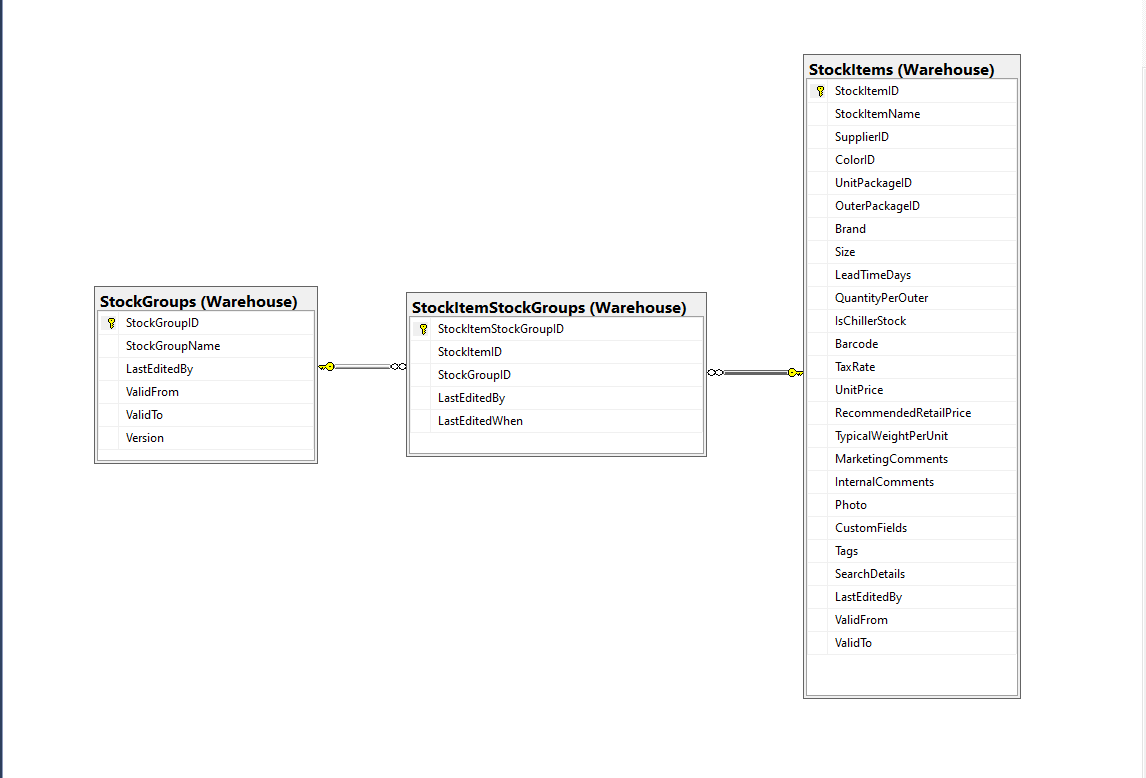
Retrieving a list of StockGroups and their StockItems from the World Wide Importers database was one of the better “real world” examples I could come up with.
SQL Server Management Studio Diagram showing relationships of tables
There is a fair bit of duplication (StockGroupID, StockGroupName) in the results set
SQL Server Management Studio StockItems-StockItemStockGroups-StockGroups query and results
There were 442 rows in the results set and 227 StockItems in the database so I ordered the query results by StockItemID and confirmed that there were many StockItems in several StockGroups.
public class StockItemListDtoV1
{
	public int Id { get; set; }

	public string Name { get; set; }

	public decimal RecommendedRetailPrice { get; set; }

	public decimal TaxRate { get; set; }
}

public class StockGroupStockItemsListDto
{
	StockGroupStockItemsListDto()
	{
		StockItems = new List<StockItemListDto>();
	}

	public int StockGroupID { get; set; }

	public string StockGroupName { get; set; }

	public List<StockItemListDto> StockItems { get; set; }
}
My initial version uses a Generic List for a StockGroup’s StockItems which is most probably not a good idea.
[Route("api/[controller]")]
[ApiController]
public class InvoiceQuerySplitOnController : ControllerBase
{
	private readonly string connectionString;
	private readonly ILogger<InvoiceQuerySplitOnController> logger;

	public InvoiceQuerySplitOnController(IConfiguration configuration, ILogger<InvoiceQuerySplitOnController> logger)
	{
		this.connectionString = configuration.GetConnectionString("WorldWideImportersDatabase");

		this.logger = logger;
	}

	[HttpGet]
	public async Task<ActionResult<IEnumerable<StockGroupStockItemsListDto>>> Get()
	{
		IEnumerable<StockGroupStockItemsListDto> response = null;

		try
		{
			using (SqlConnection db = new SqlConnection(this.connectionString))
			{
				var stockGroups = await db.QueryAsync<StockGroupStockItemsListDto, StockItemListDto, StockGroupStockItemsListDto>(
					sql: @"SELECT [StockGroups].[StockGroupID] as 'StockGroupID'" +
								",[StockGroups].[StockGroupName]" +
								",[StockItems].StockItemID as 'ID'" +
								",[StockItems].StockItemName as 'Name'" +
								",[StockItems].TaxRate" +
								",[StockItems].RecommendedRetailPrice " +
							"FROM [Warehouse].[StockGroups] " +
							"INNER JOIN[Warehouse].[StockItemStockGroups] ON ([StockGroups].[StockGroupID] = [StockItemStockGroups].[StockGroupID])" +
							"INNER JOIN[Warehouse].[StockItems] ON ([Warehouse].[StockItemStockGroups].[StockItemID] = [StockItems].[StockItemID])",
					(stockGroup, stockItem) =>
					{
						// Not certain I think using a List<> here is a good idea...
						stockGroup.StockItems.Add(stockItem);
						return stockGroup;
					},
				splitOn: "ID",
				commandType: CommandType.Text);

			response = stockGroups.GroupBy(p => p.StockGroupID).Select(g =>
			{
				var groupedStockGroup = g.First();
				groupedStockGroup.StockItems = g.Select(p => p.StockItems.Single()).ToList();
				return groupedStockGroup;
			});
		}
	}
	catch (SqlException ex)
	{
		logger.LogError(ex, "Retrieving S, Invoice Lines or Stock Item Transactions");

		return this.StatusCode(StatusCodes.Status500InternalServerError);
	}

	return this.Ok(response);
}
The MultiMapper syntax always trips me up and it usually takes a couple of attempts to get it to work.
List of StockGroups with StockItems
I have extended my DapperTransient module adding WithRetry versions of the 14 MultiMapper methods.
My current “day job” is building applications for managing portfolios of foreign currency instruments. A portfolio can contain many different types of instrument (Forwards, Options, Swaps etc.). One of the “optimisations” we use is retrieving all the different types of instruments in a portfolio with one stored procedure call.
SQL Server Management Studio Dependency viewer
The closest scenario I could come up with using the World Wide Importers database was retrieving a summary of all the information associated with an Invoice for display on a single screen.
CREATE PROCEDURE [Sales].[InvoiceSummaryGetV1](@InvoiceID as int)
AS
BEGIN

SELECT [InvoiceID]
--        ,[CustomerID]
--        ,[BillToCustomerID]
		,[OrderID]
		,[Invoices].[DeliveryMethodID]
		,[DeliveryMethodName]
--        ,[ContactPersonID]
--        ,[AccountsPersonID]
		,[SalespersonPersonID] as SalesPersonID
		,[SalesPerson].[PreferredName] as SalesPersonName
--        ,[PackedByPersonID]
		,[InvoiceDate]
		,[CustomerPurchaseOrderNumber]
		,[IsCreditNote]
		,[CreditNoteReason]
		,[Comments]
		,[DeliveryInstructions]
--        ,[InternalComments]
--        ,[TotalDryItems]
--        ,[TotalChillerItems]
		,[DeliveryRun]
		,[RunPosition] as DeliveryRunPosition
		,[ReturnedDeliveryData] as DeliveryData
		,[ConfirmedDeliveryTime] as DeliveredAt
		,[ConfirmedReceivedBy] as DeliveredTo
--        ,[LastEditedBy]
--        ,[LastEditedWhen]
	FROM [Sales].[Invoices]
	INNER JOIN [Application].[People] as SalesPerson ON (Invoices.[SalespersonPersonID] = [SalesPerson].[PersonID])
	INNER JOIN [Application].[DeliveryMethods] as DeliveryMethod ON (Invoices.[DeliveryMethodID] = DeliveryMethod.[DeliveryMethodID])
WHERE ([Invoices].[InvoiceID] = @InvoiceID)

SELECT [InvoiceLineID]
      ,[InvoiceID]
      ,[StockItemID]
      ,[Description] as StockItemDescription
      ,[InvoiceLines].[PackageTypeID]
	  ,[PackageType].[PackageTypeName]
      ,[Quantity]
      ,[UnitPrice]
      ,[TaxRate]
      ,[TaxAmount]
--      ,[LineProfit]
      ,[ExtendedPrice]
--      ,[LastEditedBy]
--      ,[LastEditedWhen]
	FROM [Sales].[InvoiceLines]
		INNER JOIN [Warehouse].[PackageTypes] as PackageType ON ([PackageType].[PackageTypeID] = [InvoiceLines].[PackageTypeID])
WHERE ([InvoiceLines].[InvoiceID] = @InvoiceID)

SELECT [StockItemTransactionID]
      ,[StockItemTransactions].[StockItemID]
      ,StockItem.[StockItemName] as StockItemName
      ,[StockItemTransactions].[TransactionTypeID]
      ,[TransactionType].[TransactionTypeName]
--      ,[CustomerID]
--      ,[InvoiceID]
--      ,[SupplierID]
--      ,[PurchaseOrderID]
      ,[TransactionOccurredWhen] as TransactionAt
      ,[Quantity]
--      ,[LastEditedBy]
--      ,[LastEditedWhen]
	FROM [Warehouse].[StockItemTransactions]
	INNER JOIN [Warehouse].[StockItems] as StockItem ON ([StockItemTransactions].StockItemID = [StockItem].StockItemID)
	INNER JOIN [Application].[TransactionTypes] as TransactionType ON ([StockItemTransactions].[TransactionTypeID] = TransactionType.[TransactionTypeID])
	WHERE ([StockItemTransactions].[InvoiceID] = @InvoiceID)

END
The stored procedure returns 3 recordsets, a “summary” of the Order, a summary of the associated OrderLines and a summary of the associated StockItemTransactions.
public async Task<ActionResult<Model.InvoiceSummaryGetDtoV1>>Get([Range(1, int.MaxValue, ErrorMessage = "Invoice id must greater than 0")] int id)
{
	Model.InvoiceSummaryGetDtoV1 response = null;

	try
	{
		using (SqlConnection db = new SqlConnection(this.connectionString))
		{
			var invoiceSummary = await db.QueryMultipleWithRetryAsync("[Sales].[InvoiceSummaryGetV1]", param: new { InvoiceId = id }, commandType: CommandType.StoredProcedure);

			response = await invoiceSummary.ReadSingleOrDefaultWithRetryAsync<Model.InvoiceSummaryGetDtoV1>();
			if (response == default)
			{
				logger.LogInformation("Invoice:{0} not found", id);

				return this.NotFound($"Invoice:{id} not found");
			}

			response.InvoiceLines = (await invoiceSummary.ReadWithRetryAsync<Model.InvoiceLineSummaryListDtoV1>()).ToArray();

			response.StockItemTransactions = (await invoiceSummary.ReadWithRetryAsync<Model.StockItemTransactionSummaryListDtoV1>()).ToArray();
		}
	}
	catch (SqlException ex)
	{
		logger.LogError(ex, "Retrieving Invoice, Invoice Lines or Stock Item Transactions");

		return this.StatusCode(StatusCodes.Status500InternalServerError);
	}

	return this.Ok(response);
}
I started again, but kept the first section as it covers one of the simplest possible approaches to caching using the [ResponseCache] attribute and VaryByQueryKeys.
[HttpGet("Response")]
[ResponseCache(Duration = StockItemsListResponseCacheDuration)]
public async Task<ActionResult<IEnumerable<Model.StockItemListDtoV1>>> GetResponse()
{
	IEnumerable<Model.StockItemListDtoV1> response = null;

	logger.LogInformation("Response cache load");

	try
	{
		response = await dapper.QueryAsync<Model.StockItemListDtoV1>(sql: @"SELECT [StockItemID] as ""ID"", [StockItemName] as ""Name"", [RecommendedRetailPrice], [TaxRate] FROM [Warehouse].[StockItems]", commandType: CommandType.Text);
	}
	catch (SqlException ex)
	{
		logger.LogError(ex, "Retrieving list of StockItems");

		return this.StatusCode(StatusCodes.Status500InternalServerError);
	}

	return this.Ok(response);
}

[HttpGet("ResponseVarying")]
[ResponseCache(Duration = StockItemsListResponseCacheDuration, VaryByQueryKeys = new string[] { "id" })]
public async Task<ActionResult<Model.StockItemGetDtoV1>> Get([FromQuery(Name = "id"), Range(1, int.MaxValue, ErrorMessage = "Stock item id must greater than 0")] int id)
{
	Model.StockItemGetDtoV1 response = null;

	logger.LogInformation("Response cache varying load id:{0}", id);

	try
	{
		response = await dapper.QuerySingleOrDefaultAsync<Model.StockItemGetDtoV1>(sql: "[Warehouse].[StockItemsStockItemLookupV1]", param: new { stockItemId = id }, commandType: CommandType.StoredProcedure);
		if (response == default)
		{
			logger.LogInformation("StockItem:{0} not found", id);

			return this.NotFound($"StockItem:{id} not found");
		}
	}
	catch (SqlException ex)
	{
		logger.LogError(ex, "Looking up StockItem with Id:{0}", id);

		return this.StatusCode(StatusCodes.Status500InternalServerError);
	}

	return this.Ok(response);
}
All the browsers appeared to respect the cache control headers but Firefox was the only one which did not initiate a new request when I pressed return in the Uniform Resource Locator(URL) field.
[HttpGet("DapperMemory")]
public async Task<ActionResult<IEnumerable<Model.StockItemListDtoV1>>> GetDapper()
{
	List<Model.StockItemListDtoV1> response;

	logger.LogInformation("Dapper cache load");

	try
	{
		response = await dapper.QueryAsync<Model.StockItemListDtoV1>(
							sql: @"SELECT [StockItemID] as ""ID"", [StockItemName] as ""Name"", [RecommendedRetailPrice], [TaxRate] FROM [Warehouse].[StockItems]",
							commandType: CommandType.Text,
							enableCache: true,
							cacheExpire: TimeSpan.Parse(this.Configuration.GetValue<string>("DapperCachingDuration"))
					);

	}
	catch (SqlException ex)
	{
		logger.LogError(ex, "Retrieving list of StockItems");

		return this.StatusCode(StatusCodes.Status500InternalServerError);
	}

	return this.Ok(response);
}

[HttpGet("DapperMemoryVarying")]
public async Task<ActionResult<Model.StockItemGetDtoV1>> GetDapperVarying([FromQuery(Name = "id"), Range(1, int.MaxValue, ErrorMessage = "Stock item id must greater than 0")] int id)
{
	Model.StockItemGetDtoV1 response = null;

	logger.LogInformation("Dapper cache varying load id:{0}", id);

	try
	{
		response = await dapper.QuerySingleOrDefaultAsync<Model.StockItemGetDtoV1>(
					sql: "[Warehouse].[StockItemsStockItemLookupV1]",
					param: new { stockItemId = id },
					commandType: CommandType.StoredProcedure,
					cacheKey: $"StockItem:{id}",
					enableCache: true,
					cacheExpire: TimeSpan.Parse(this.Configuration.GetValue<string>("DapperCachingDuration"))
							);
		if (response == default)
		{
			logger.LogInformation("StockItem:{0} not found", id);

			return this.NotFound($"StockItem:{id} not found");
		}
	}
	catch (SqlException ex)
	{
		logger.LogError(ex, "Looking up StockItem with Id:{0}", id);

		return this.StatusCode(StatusCodes.Status500InternalServerError);
	}

	return this.Ok(response);
}
Both the Dapper.Extensions In-Memory and Redis cache reduced the number of database requests to the bare minimum. In a larger application the formatting of the cacheKey (cacheKey: “StockItems” & cacheKey: $”StockItem:{id}”) would be important to stop database query result collisions.
SQL Server Profiler displaying the list and single record requests.
Memurai running as a Windows Service on my development machine
When the Web API project was restarted the contents in-memory cache were lost. The Redis cache contents survive a restart and can be access from multiple clients.
Fiddler Composer with the image field name and upload file button highlighted
The currentimplementation only supports the uploading of one image at a time in a field called “image”.
Fiddler console after succesfull upload
This implementation supports a “Content-Type” of “application/octet-stream” or “image/jpeg”.
[HttpPost("{id}/image")]
public async Task<ActionResult> Upload([FromRoute(Name = "id")][Range(1, int.MaxValue, ErrorMessage = "StockItem id must greater than 0")] int id, [FromForm] IFormFile image)
{
	if (image == null)
	{
		return this.BadRequest("Image image file missing");
	}

	if (image.Length == 0)
	{
		return this.BadRequest("Image image file is empty");
	}

	if ((string.Compare(image.ContentType, "application/octet-stream",true) != 0) && (string.Compare(image.ContentType, "image/jpeg", true) != 0))
	{
		return this.BadRequest("Image image file content-type is not application/octet-stream or image/jpeg");
	}

	try
	{
		using (MemoryStream ms = new MemoryStream())
		{
			await image.CopyToAsync(ms);

			ms.Seek(0, SeekOrigin.Begin);

			using (SqlConnection db = new SqlConnection(this.connectionString))
			{
				DynamicParameters parameters = new DynamicParameters();

				parameters.Add("StockItemId", id);
				parameters.Add("photo", ms, DbType.Binary, ParameterDirection.Input);

				await db.ExecuteAsync(sql: @"UPDATE [WareHouse].[StockItems] SET [Photo]=@Photo WHERE StockItemID=@StockItemId", param: parameters, commandType: CommandType.Text);
			}
		}
	}
	catch (SqlException ex)
	{
		logger.LogError(ex, "Updating photo of StockItem with ID:{0}", id);

		return this.StatusCode(StatusCodes.Status500InternalServerError);
	}

	return this.Ok();
}
After uploading the image I could download it as either a stream of bytes(displayed in Fiddler) or Base64 encoded (this had to be converted to an image)
Fiddler displaying downloaded jpeg image
This implementation doesn’t support the uploading of multiple images or the streaming of larger images but would be sufficient for uploading thumbnails etc.
I needed to add some code using Dapper to retrieve images stored in a database for a webby client. The stockItems table has a column for a photo but they were all null…
CREATE TABLE [Warehouse].[StockItems](
	[StockItemID] [int] NOT NULL,
	[StockItemName] [nvarchar](100) NOT NULL,
	[SupplierID] [int] NOT NULL,
	[ColorID] [int] NULL,
	[UnitPackageID] [int] NOT NULL,
	[OuterPackageID] [int] NOT NULL,
	[Brand] [nvarchar](50) NULL,
	[Size] [nvarchar](20) NULL,
	[LeadTimeDays] [int] NOT NULL,
	[QuantityPerOuter] [int] NOT NULL,
	[IsChillerStock] [bit] NOT NULL,
	[Barcode] [nvarchar](50) NULL,
	[TaxRate] [decimal](18, 3) NOT NULL,
	[UnitPrice] [decimal](18, 2) NOT NULL,
	[RecommendedRetailPrice] [decimal](18, 2) NULL,
	[TypicalWeightPerUnit] [decimal](18, 3) NOT NULL,
	[MarketingComments] [nvarchar](max) NULL,
	[InternalComments] [nvarchar](max) NULL,
	[Photo] [varbinary](max) NULL,
	[CustomFields] [nvarchar](max) NULL,
	[Tags]  AS (json_query([CustomFields],N'$.Tags')),
	[SearchDetails]  AS (concat([StockItemName],N' ',[MarketingComments])),
	[LastEditedBy] [int] NOT NULL,
	[ValidFrom] [datetime2](7) GENERATED ALWAYS AS ROW START NOT NULL,
	[ValidTo] [datetime2](7) GENERATED ALWAYS AS ROW END NOT NULL,
 CONSTRAINT [PK_Warehouse_StockItems] PRIMARY KEY CLUSTERED
(
	[StockItemID] ASC
)
I uploaded images of three different colours of sellotape dispensers with the following SQL
UPDATE Warehouse.StockItems
SET [Photo] =(SELECT * FROM Openrowset( Bulk 'C:\Users\BrynLewis\Pictures\TapeDispenserBlue.jpg', Single_Blob) as  MyImage) where StockItemID =

-- 203	Tape dispenser (Black)
-- 204	Tape dispenser (Red)
-- 205	Tape dispenser (Blue)
There are two options for downloading the image. The first is as a stream of bytes
[HttpGet("{id}/image")]
public async Task<ActionResult> GetImage([Range(1, int.MaxValue, ErrorMessage = "StockItem id must greater than 0")] int id)
{
	Byte[] response;

	try
	{
		using (SqlConnection db = new SqlConnection(this.connectionString))
		{
			response = await db.ExecuteScalarAsync<byte[]>(sql: @"SELECT [Photo] as ""photo"" FROM [Warehouse].[StockItems] WHERE StockItemID=@StockItemId", param: new { StockItemId = id }, commandType: CommandType.Text);
		}

		if (response == default)
		{
			logger.LogInformation("StockItem:{0} image not found", id);

			return this.NotFound($"StockItem:{id} image not found");
		}
	}
	catch (SqlException ex)
	{
		logger.LogError(ex, "Looking up a StockItem:{0} image", id);

		return this.StatusCode(StatusCodes.Status500InternalServerError);
	}

	return File(response, "image/jpeg");
}
[HttpGet("{id}/base64")]
public async Task<ActionResult> GetBase64([Range(1, int.MaxValue, ErrorMessage = "Stock item id must greater than 0")] int id)
{
	Byte[] response;

	try
	{
		using (SqlConnection db = new SqlConnection(this.connectionString))
		{
			response = await db.ExecuteScalarAsync<byte[]>(sql: @"SELECT [Photo] as ""photo"" FROM [Warehouse].[StockItems] WHERE StockItemID=@StockItemId", param: new { StockItemId = id }, commandType: CommandType.Text);
		}

		if (response == default)
		{
			logger.LogInformation("StockItem:{0} Base64 not found", id);

			return this.NotFound($"StockItem:{id} image not found");
		}
	}
	catch (SqlException ex)
	{
		logger.LogError(ex, "Looking up a StockItem withID:{0} base64", id);

		return this.StatusCode(StatusCodes.Status500InternalServerError);
	}

	return Ok("data:image/jpeg;base64," + Convert.ToBase64String(response));
}
I lost an hour from my life I will never get back figuring out that a correctly formatted/spelt content types “image/jpeg” and “data:image/jpeg;base64” were key to getting the webby client to render image.
It’s not uncommon for SQL Azure servers and databases to suffer from “transient failures”. In application logs I have seen these occur during scale up/down events, periods where my application’s performance has been temporarily impacted (but its throughput has not changed), which I assume has been some load balancing going on in the background and when network connectivity has been a bit flakey.
Now I’m using The Polly Project which builds on the concepts of TOPAZ but has been thoroughly re-engineered with lots of extensibility, an active community and modern codebase. Inspired by Ben Hyrman and several other developers I have built a minimalist wrapper for the Dapper Async methods which detects transient errors using the same approach as the Entity Framework Core library.
I did think about retry functionality for async methods which returned object/dynamic but have only implemented strongly typed ones for the initial version.
[HttpGet]
public async Task<ActionResult<IEnumerable<Model.StockItemListDtoV1>>> Get()
{
	IEnumerable<Model.StockItemListDtoV1> response = null;

	try
	{
		using (SqlConnection db = new SqlConnection(this.connectionString))
		{
			response = await db.QueryWithRetryAsync<Model.StockItemListDtoV1>(sql: @"SELECT [StockItemID] as ""ID"", [StockItemName] as ""Name"", [RecommendedRetailPrice], [TaxRate] FROM [Warehouse].[StockItems]", commandType: CommandType.Text);
		}
	}
	catch (SqlException ex)
	{
		logger.LogError(ex, "Retrieving list of StockItems");

		return this.StatusCode(StatusCodes.Status500InternalServerError);
	}

	return this.Ok(response);
}
I have struggled to get reproduceable transient failures without pausing execution in the Visual Studio debugger and tinkering with variables or scaling up/down my databases (limit to how often this can be done) or unplugging the network cable at the wrong time.
In the post net Core web API + Dapper -Web Caching I wondered why the GET returned a detailed 400 error and the HEAD didn’t when the eTag was invalid. I added a new controller to test this for .ASP.NET CoreFromHeader, FromQuery and FromRoute attributes and the responses were consistent. The GET methods returned a detailed 400 error and the HEAD methods returned a simple 400 error when a value was invalid.
/*
	http://localhost:36739/api/FromHeaderFromQueryFromRoute/FromHeaderValidation
	User-Agent: Fiddler
	Host: localhost:36739
	eTag: USB456


	HTTP/1.1 400 Bad Request
	Content-Type: application/problem+json; charset=utf-8
	Server: Microsoft-IIS/10.0
	X-Powered-By: ASP.NET
	Date: Sun, 27 Jun 2021 05:39:06 GMT
	Content-Length: 257

	{
		"type":"https://tools.ietf.org/html/rfc7231#section-6.5.1",
		"title":"One or more validation errors occurred.",
		"status":400,
		"traceId":"00-82b38ed4019b004282e49c70489a76e0-d3674e4952022949-00",
		"errors":
		{
			"eTag":["eTagMust be not more than 5 characters long"]
		}
	}
*/
[HttpGet("FromHeaderValidation")]
public ActionResult GetHeaderValidation([FromHeader(Name = "eTag")][MinLength(3, ErrorMessage = "The eTag header text must be at least 3 characters long")][MaxLength(5, ErrorMessage = "eTagMust be not more than 5 characters long")][Required(ErrorMessage ="The eTag field is required")] string request)
{
	return this.Ok(request);
}

/*
	http://localhost:36739/api/FromHeaderFromQueryFromRoute/FromHeaderValidation
	User-Agent: Fiddler
	Host: localhost:36739
	eTag: USB456


	HTTP/1.1 400 Bad Request
	Content-Length: 257
	Content-Type: application/problem+json; charset=utf-8
	Server: Microsoft-IIS/10.0
	X-Powered-By: ASP.NET
	Date: Sun, 27 Jun 2021 05:41:26 GMT
*/
[HttpHead("FromHeaderValidation")]
public ActionResult HeadHeaderValidation([FromHeader(Name = "eTag")][MinLength(3, ErrorMessage = "The eTag header text must be at least 3 characters long")][MaxLength(5, ErrorMessage = "eTagMust be not more than 5 characters long")][Required(ErrorMessage = "The eTag field is required")] string request)
{
	return this.Ok(request);
}
I was having a virtual coffee with a co-worker and they commented that a HEAD method doesn’t return a body so I went and checked the relevant Internet Engineering Task Force(IETF) Request For Comments(RFC) documentation.
RFC 2616                        HTTP/1.1                       June 1999


9.4 HEAD

   The HEAD method is identical to GET except that the server MUST NOT
   return a message-body in the response. The metainformation contained
   in the HTTP headers in response to a HEAD request SHOULD be identical
   to the information sent in response to a GET request. This method can
   be used for obtaining metainformation about the entity implied by the
   request without transferring the entity-body itself. This method is
   often used for testing hypertext links for validity, accessibility,
   and recent modification.

   The response to a HEAD request MAY be cacheable in the sense that the
   information contained in the response MAY be used to update a
   previously cached entity from that resource. If the new field values
   indicate that the cached entity differs from the current entity (as
   would be indicated by a change in Content-Length, Content-MD5, ETag
   or Last-Modified), then the cache MUST treat the cache entry as
   stale.
The short answer is I’m stupid, the longer answer is above.






 devMobile's blog