.NET nanoFramework Seeedstudio HM3301 library on Github

The source code of my .NET nanoFramework Seeedstudio Grove – Laser PM2.5 Dust Sensor HM3301 library is now available on GitHub. I have tested the library and sample application with Sparkfun Thing Plus and ST Micro STM32F7691 Discovery devices. (I can validate on more platform configurations if there is interest).

Important: make sure you setup the I2C pins especially on ESP32 Devices before creating the I2cDevice,
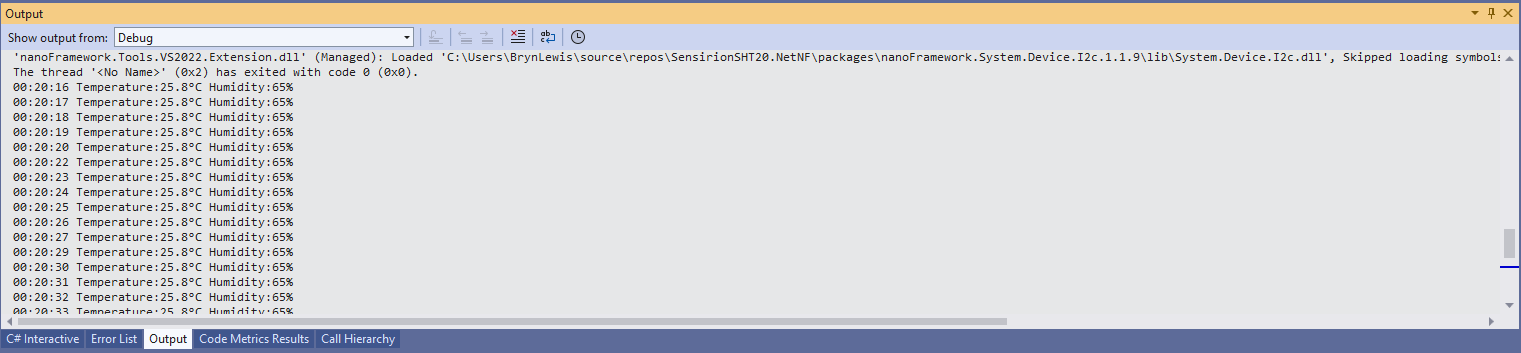
SHT20 +STM32F769 Discovery test rig

The .NET nanoFramework device libraries use a TryGet… pattern to retrieve sensor values, this library throws an exception if reading a sensor value fails. I’m not certain which approach is “better” as reading the Seeedstudio Grove – Laser PM2.5 Dust Sensor has never failed. The only time reading the “values” buffer failed was when I unplugged the device which I think is “exceptional”.

//---------------------------------------------------------------------------------
// Copyright (c) April 2023, devMobile Software
//
// Licensed under the Apache License, Version 2.0 (the "License");
// you may not use this file except in compliance with the License.
// You may obtain a copy of the License at
//
//     http://www.apache.org/licenses/LICENSE-2.0
//
// Unless required by applicable law or agreed to in writing, software
// distributed under the License is distributed on an "AS IS" BASIS,
// WITHOUT WARRANTIES OR CONDITIONS OF ANY KIND, either express or implied.
// See the License for the specific language governing permissions and
// limitations under the License.
//
// nanoff --target ST_STM32F769I_DISCOVERY --update 
// nanoff --platform ESP32 --serialport COM7 --update
//
//---------------------------------------------------------------------------------
#define ST_STM32F769I_DISCOVERY 
//#define  SPARKFUN_ESP32_THING_PLUS
namespace devMobile.IoT.Device.SeeedstudioHM3301
{
    using System;
    using System.Device.I2c;
    using System.Threading;

#if SPARKFUN_ESP32_THING_PLUS
    using nanoFramework.Hardware.Esp32;
#endif

    class Program
    {
        static void Main(string[] args)
        {
            const int busId = 1;

            Thread.Sleep(5000);

#if SPARKFUN_ESP32_THING_PLUS
            Configuration.SetPinFunction(Gpio.IO23, DeviceFunction.I2C1_DATA);
            Configuration.SetPinFunction(Gpio.IO22, DeviceFunction.I2C1_CLOCK);
#endif
            I2cConnectionSettings i2cConnectionSettings = new(busId, SeeedstudioHM3301.DefaultI2cAddress);

            using I2cDevice i2cDevice = I2cDevice.Create(i2cConnectionSettings);
            {
                using (SeeedstudioHM3301 seeedstudioHM3301 = new SeeedstudioHM3301(i2cDevice))
                {
                    while (true)
                    {
                        SeeedstudioHM3301.ParticulateMeasurements particulateMeasurements = seeedstudioHM3301.Read();

                        Console.WriteLine($"Standard PM1.0: {particulateMeasurements.Standard.PM1_0} ug/m3   PM2.5: {particulateMeasurements.Standard.PM2_5} ug/m3  PM10.0: {particulateMeasurements.Standard.PM10_0} ug/m3 ");
                        Console.WriteLine($"Atmospheric PM1.0: {particulateMeasurements.Atmospheric.PM1_0} ug/m3   PM2.5: {particulateMeasurements.Atmospheric.PM2_5} ug/m3  PM10.0: {particulateMeasurements.Standard.PM10_0} ug/m3");

                        // Always 0, checked payload so not a conversion issue. will check in Seeedstudio forums
                        // Console.WriteLine($"Count 0.3um: {particulateMeasurements.Count.Diameter0_3}/l 0.5um: {particulateMeasurements.Count.Diameter0_5} /l 1.0um : {particulateMeasurements.Count.Diameter1_0}/l 2.5um : {particulateMeasurements.Count.Diameter2_5}/l 5.0um : {particulateMeasurements.Count.Diameter5_0}/l 10.0um : {particulateMeasurements.Count.Diameter10_0}/l");

                        Thread.Sleep(new TimeSpan(0,1,0));
                    }
                }
            }
        }
    }
}

I’m going to soak test the library for a week to check that is working okay, then most probably refactor the code so it can be added to the nanoFramework IoT.Device Library repository.

.NET nanoFramework SHT20 library on Github

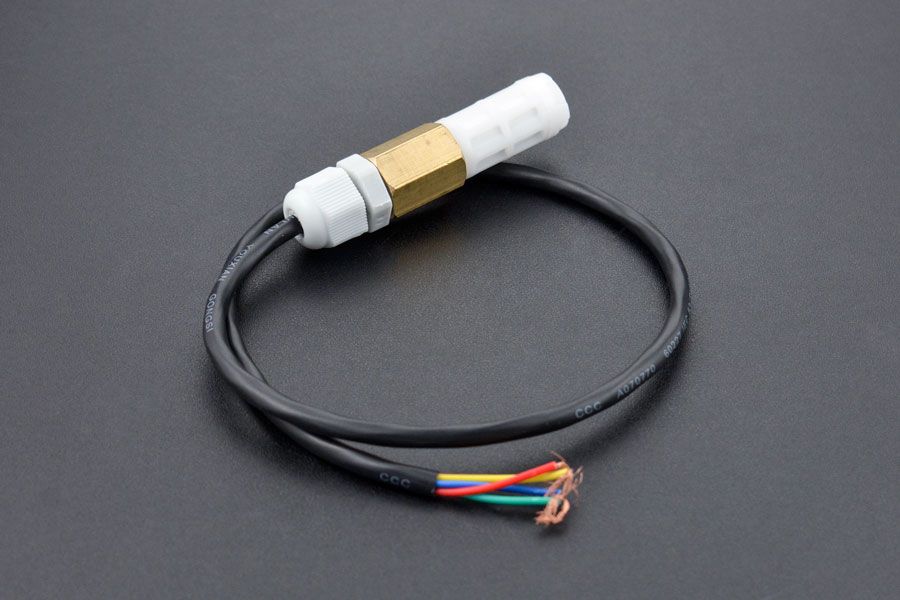
The full source code (just need to do readme) of my .NET nanoFramework Sensirion SHT20 temperature and humidity(Waterproof) library is now available on GitHub. I have tested the library and sample application with Sparkfun Thing Plus and ST Micro STM32F7691 Discovery devices. (I can validate on more platform configurations if there is interest).

Important: make sure you setup the I2C pins especially on ESP32 Devices before creating the I2cDevice,

SHT20 +STM32F769 Discovery test rig

The .NET nanoFramework device libraries use a TryGet… pattern to retrieve sensor value, this library throws an exception if reading a sensor value fails. I’m not certain which approach is “better” as reading Sensirion SHT20 temperature and humidity(Waterproof) has never failed The only time reading a value failed was when I unplugged the device which I think is “exceptional”.

//---------------------------------------------------------------------------------
// Copyright (c) March 2023, devMobile Software
//
// Licensed under the Apache License, Version 2.0 (the "License");
// you may not use this file except in compliance with the License.
// You may obtain a copy of the License at
//
//     http://www.apache.org/licenses/LICENSE-2.0
//
// Unless required by applicable law or agreed to in writing, software
// distributed under the License is distributed on an "AS IS" BASIS,
// WITHOUT WARRANTIES OR CONDITIONS OF ANY KIND, either express or implied.
// See the License for the specific language governing permissions and
// limitations under the License.
//
// nanoff --target ST_STM32F769I_DISCOVERY --update 
// nanoff --platform ESP32 --serialport COM7 --update
//
//---------------------------------------------------------------------------------
#define ST_STM32F769I_DISCOVERY 
//#define  SPARKFUN_ESP32_THING_PLUS
namespace devMobile.IoT.Device.Sht20
{
    using System;
    using System.Device.I2c;
    using System.Threading;

#if SPARKFUN_ESP32_THING_PLUS
    using nanoFramework.Hardware.Esp32;
#endif

    class Program
    {
        static void Main(string[] args)
        {
            const int busId = 1;

            Thread.Sleep(5000);

#if SPARKFUN_ESP32_THING_PLUS
            Configuration.SetPinFunction(Gpio.IO23, DeviceFunction.I2C1_DATA);
            Configuration.SetPinFunction(Gpio.IO22, DeviceFunction.I2C1_CLOCK);
#endif

            I2cConnectionSettings i2cConnectionSettings = new(busId, Sht20.DefaultI2cAddress);

            using I2cDevice i2cDevice = I2cDevice.Create(i2cConnectionSettings);
            {
                using (Sht20 sht20 = new Sht20(i2cDevice))
                {
                    sht20.Reset();

                    while (true)
                    {
                        double temperature = sht20.Temperature();
                        double humidity = sht20.Humidity();
#if HEATER_ON_OFF
					    sht20.HeaterOn();
					    Console.WriteLine($"{DateTime.Now:HH:mm:ss} HeaterOn:{sht20.IsHeaterOn()}");
#endif
                        Console.WriteLine($"{DateTime.UtcNow:HH:mm:ss} Temperature:{temperature:F1}°C Humidity:{humidity:F0}% HeaterOn:{sht20.IsHeaterOn()}");
#if HEATER_ON_OFF
					    sht20.HeaterOff();
					    Console.WriteLine($"{DateTime.Now:HH:mm:ss} HeaterOn:{sht20.IsHeaterOn()}");
#endif
                        Thread.Sleep(1000);
                    }
                }
            }
        }
    }
}

I’m going to soak test the library for a week to check that is working okay, then most probably refactor the code so it can be added to the nanoFramework IoT.Device Library repository.
.NET nanoFramework Seeedstudio HM3301 Basic connectivity

This is a “throw away” .NET nanoFramework application for investigating how Seeedstudio Grove HM3301 Inter Integrated Circuit bus(I²C) connectivity works.

Seeedstudio Grove HM3301 Sensor

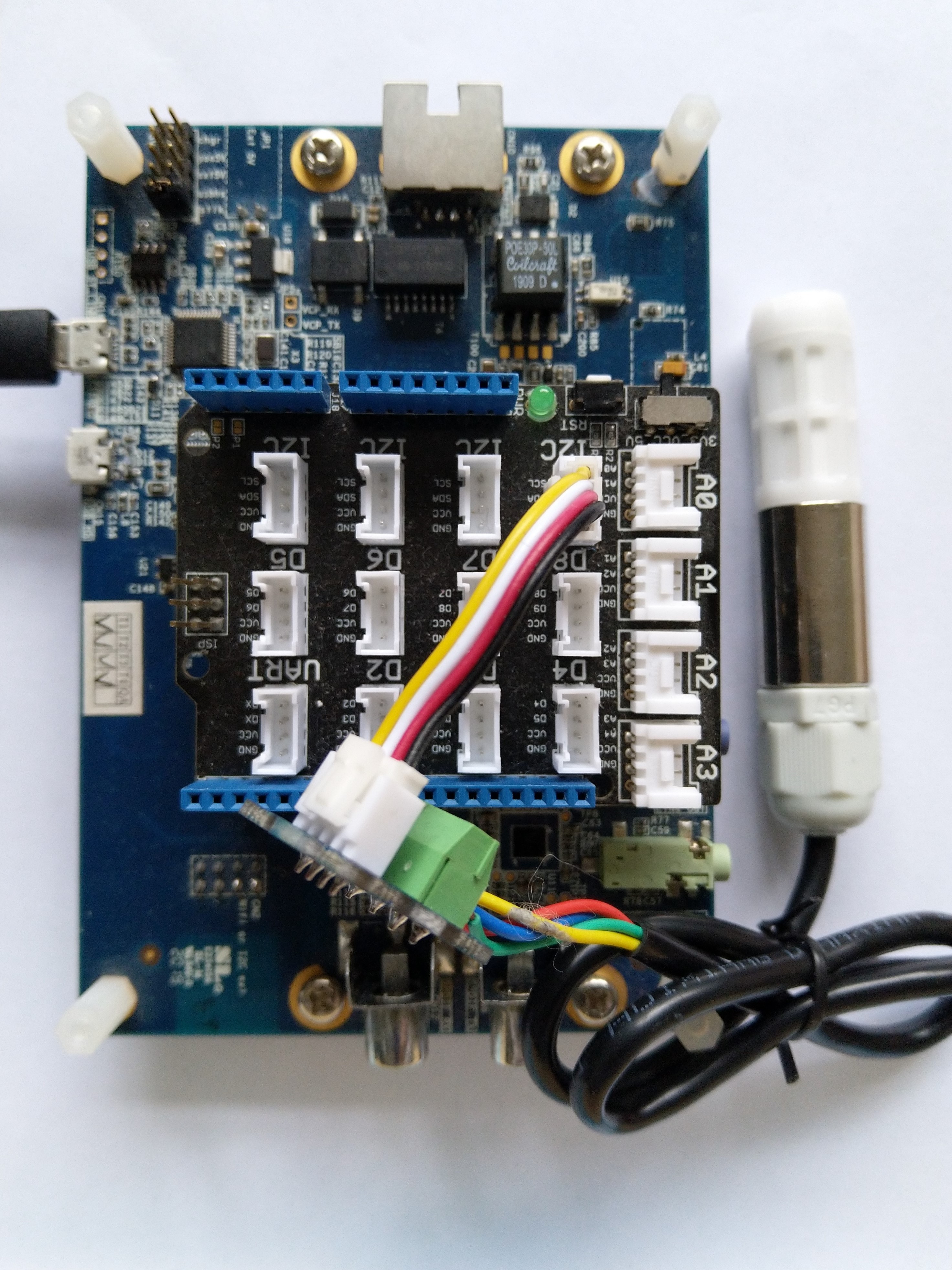
My test setup is a simple .NET nanoFramework console application running on an STM32F7691 Discovery board.

Seeedstudio Grove HM3301 + STM32F769 Discovery test rig

The HM3301I2C application has lots of magic numbers from the HM3301 datasheet and is just a tool for exploring how the sensor works.

public static void Main()
{
    I2cConnectionSettings i2cConnectionSettings = new(1, 0x40);

    // i2cDevice.Dispose
    I2cDevice i2cDevice = I2cDevice.Create(i2cConnectionSettings);

    while (true)
    {
        byte[] writeBuffer = new byte[1];
        byte[] readBuffer = new byte[29];

        writeBuffer[0] = 0x88;

        i2cDevice.WriteRead(writeBuffer, readBuffer);

        //i2cDevice.WriteByte(0x88);
        //i2cDevice.Read(readBuffer);

        ushort standardParticulatePm1 = (ushort)(readBuffer[4] << 8);
        standardParticulatePm1 |= readBuffer[5];

        ushort standardParticulatePm25 = (ushort)(readBuffer[6] << 8);
        standardParticulatePm25 |= readBuffer[7];

        ushort standardParticulatePm10 = (ushort)(readBuffer[8] << 8);
                standardParticulatePm10 |= readBuffer[9];

        Console.WriteLine($"{DateTime.UtcNow:HH:mm:ss} Standard particulate    PM 1.0: {standardParticulatePm1}  PM 2.5: {standardParticulatePm25}  PM 10.0: {standardParticulatePm10} ug/m3");

        ushort atmosphericPm1 = (ushort)(readBuffer[10] << 8);
        atmosphericPm1 |= readBuffer[11];

        ushort atmosphericPm25 = (ushort)(readBuffer[12] << 8);
        atmosphericPm25 |= readBuffer[13];

        ushort atmosphericPm10 = (ushort)(readBuffer[14] << 8);
        atmosphericPm10 |= readBuffer[15];

        Console.WriteLine($"{DateTime.UtcNow:HH:mm:ss} Atmospheric particulate PM 1.0: {atmosphericPm1:3}  PM 2.5: {atmosphericPm25}  PM 10.0: {atmosphericPm10} ug/m3");


        ushort particulateCountPm03 = (ushort)(readBuffer[16] << 8);
        particulateCountPm03 |= readBuffer[17];

        ushort particulateCountPm05 = (ushort)(readBuffer[18] << 8);
        particulateCountPm05 |= readBuffer[19];

        ushort particulateCountPm1 = (ushort)(readBuffer[20] << 8);
        particulateCountPm1 |= readBuffer[21];

        Console.WriteLine($"{DateTime.UtcNow:HH:mm:ss} Particulate count       PM 0.3: {particulateCountPm03:3}  PM 0.5: {particulateCountPm05}  PM 1.0: {particulateCountPm1} ug/m3");


        ushort particleCountPm25 = (ushort)(readBuffer[22] << 8);
        particleCountPm25 |= readBuffer[23];

        ushort particleCountPm5 = (ushort)(readBuffer[24] << 8);
        particleCountPm5 |= readBuffer[25];

        ushort particleCountPm10 = (ushort)(readBuffer[26] << 8);
        particleCountPm10 |= readBuffer[27];

        Console.WriteLine($"{DateTime.UtcNow:HH:mm:ss} Particle count/0.1L     PM 2.5: {particleCountPm25}  PM 5.0: {particleCountPm5}  PM 10.0: {particleCountPm10} particles/0.1L");


        byte checksum = 0;
        for (int i = 0; i < readBuffer.Length - 1; i++)
        {
            checksum += readBuffer[i];
        }
        Console.WriteLine($"{DateTime.UtcNow:HH:mm:ss} Checksum payload:{readBuffer[28]} calculated:{checksum}");
        Console.WriteLine("");

        Thread.Sleep(5000);
    }
}

The unpacking of the value standard particulate, particulate count and particle count values is fairly repetitive, but I will fix it in the next version.

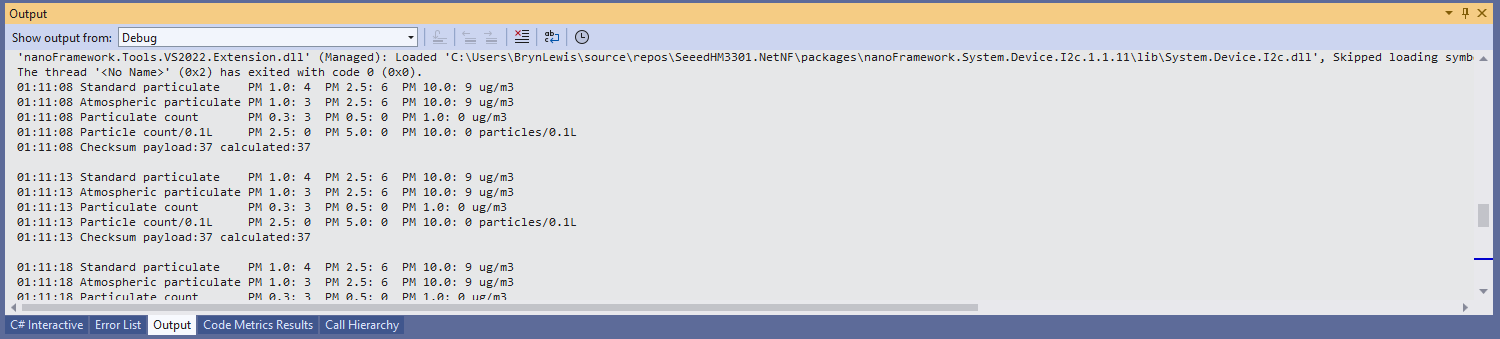
Visual Studio 2022 Debug output

The checksum calculation isn’t great even a simple cyclic redundancy check(CRC) would be an improvement on summing the 28 bytes of the payload.

.NET nanoFramework SHT20 Basic connectivity

A couple of years ago I wrote a .NET Core library for the Sensirion SHT20 temperature and humidity(Waterproof) sensor from DFRobot. This .NET nanoFramework version was “inspired” by the .NET Core library version, though I have added some message validation functionality.

DF Robot SHT20 Waterproof sensor

My test setup is a simple .NET nanoFramework console application running on an STM32F7691 Discovery board.

Discovery STM32F769 + SHT20 Testrig

The SH20DeviceI2C application has lots of magic numbers from the SHT20 datasheet and was just a tool for exploring how the sensor works.

 public static void Main()
{
    I2cConnectionSettings i2cConnectionSettings = new(1, 0x40);

    // i2cDevice.Dispose in final program
    I2cDevice i2cDevice = I2cDevice.Create(i2cConnectionSettings);

    while (true)
    {
        byte[] readBuffer = new byte[3] { 0, 0, 0 };

        // First temperature
        i2cDevice.WriteByte(0xF3);

        //Thread.Sleep(50); // no go -46.8
        //Thread.Sleep(60);
        Thread.Sleep(70);
        //Thread.Sleep(90);
        //Thread.Sleep(110);

        i2cDevice.Read(readBuffer);

        ushort temperatureRaw = (ushort)(readBuffer[0] << 8);
        temperatureRaw += readBuffer[1];

        //Debug.WriteLine($"Raw {temperatureRaw}");

        double temperature = temperatureRaw * (175.72 / 65536.0) - 46.85;

        // Then read the Humidity
        i2cDevice.WriteByte(0xF5);

        //Thread.Sleep(50);  
        //Thread.Sleep(60);  
        Thread.Sleep(70);  
        //Thread.Sleep(90);  
        //Thread.Sleep(110);   
                
        i2cDevice.Read(readBuffer);

        ushort humidityRaw = (ushort)(readBuffer[0] << 8);
        humidityRaw += readBuffer[1];

        //Debug.WriteLine($"Raw {humidityRaw}");

        double humidity = humidityRaw * (125.0 / 65536.0) - 6.0;

        //Console.WriteLine($"{DateTime.UtcNow:HH:mm:ss} Temperature:{temperature:F1}°C");
        //Console.WriteLine($"{DateTime.UtcNow:HH:mm:ss} Humidity:{humidity:F0}%");
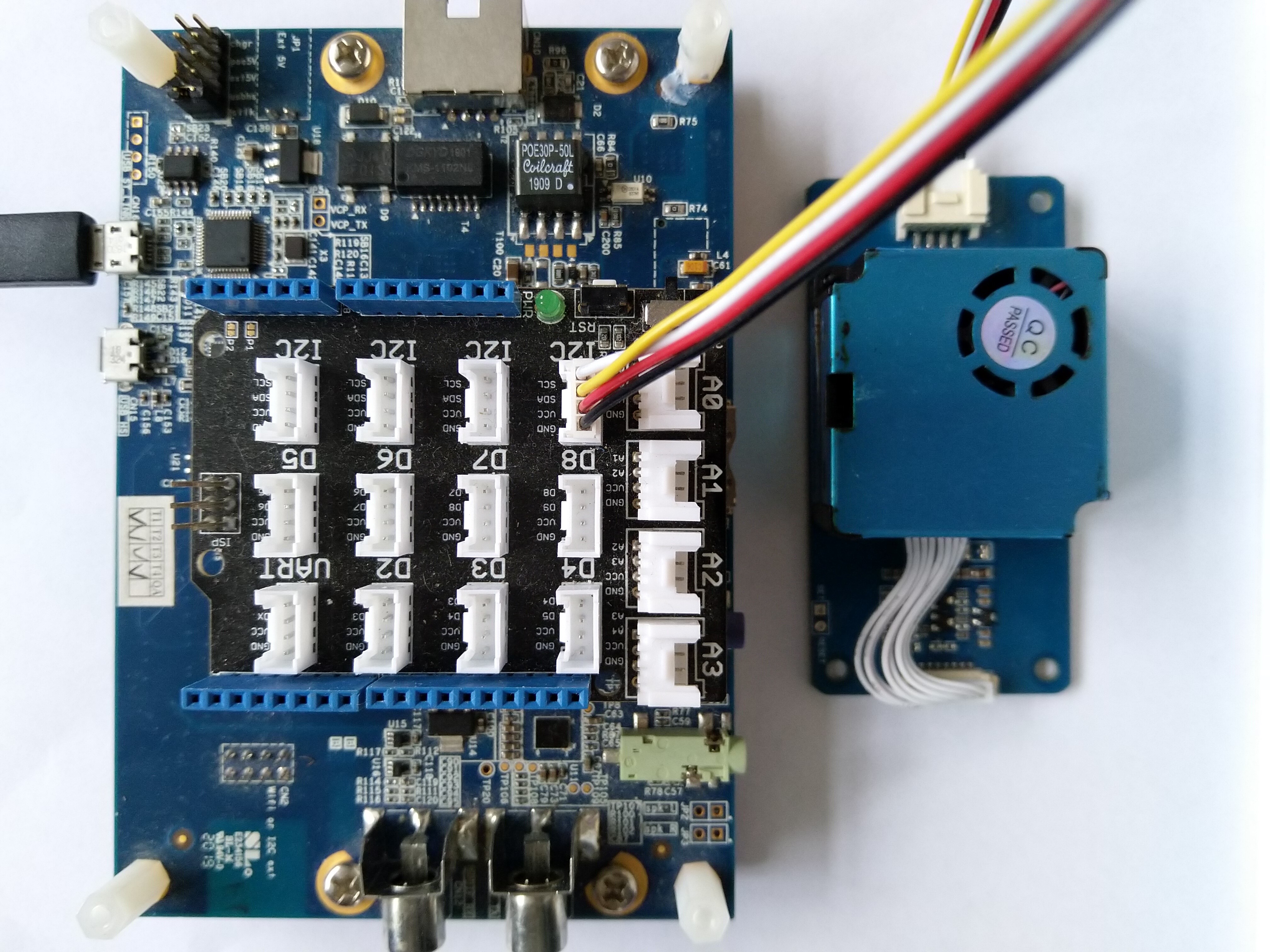
        Console.WriteLine($"{DateTime.UtcNow:HH:mm:ss} Temperature:{temperature:F1}°C Humidity:{humidity:F0}%");

        Thread.Sleep(1000);
    }
}

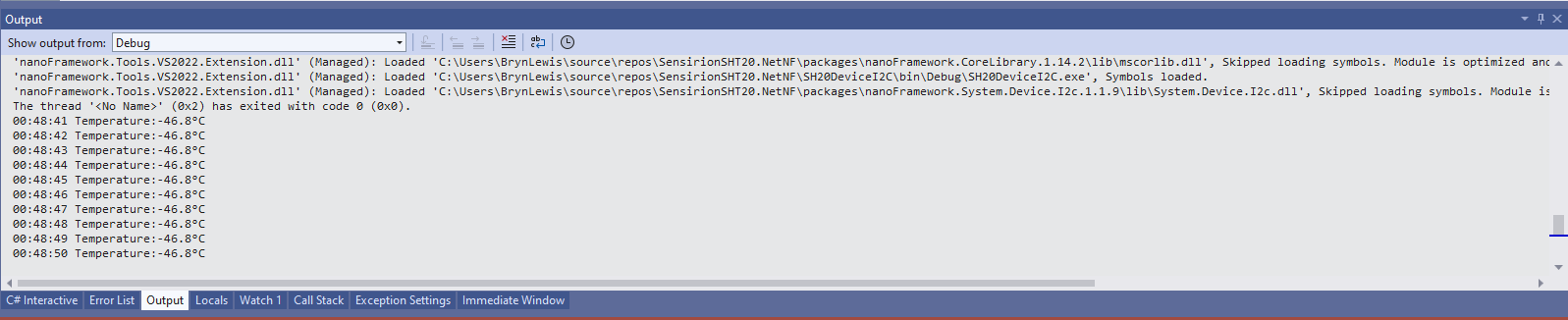
While tinkering with the sensor I found that having a short delay between initiating the temperature reading (TemperatureNoHold = 0xF3 was used so as not to hang up the I2C bus) and reading the value was important.

Temperature value without Thread.Sleep

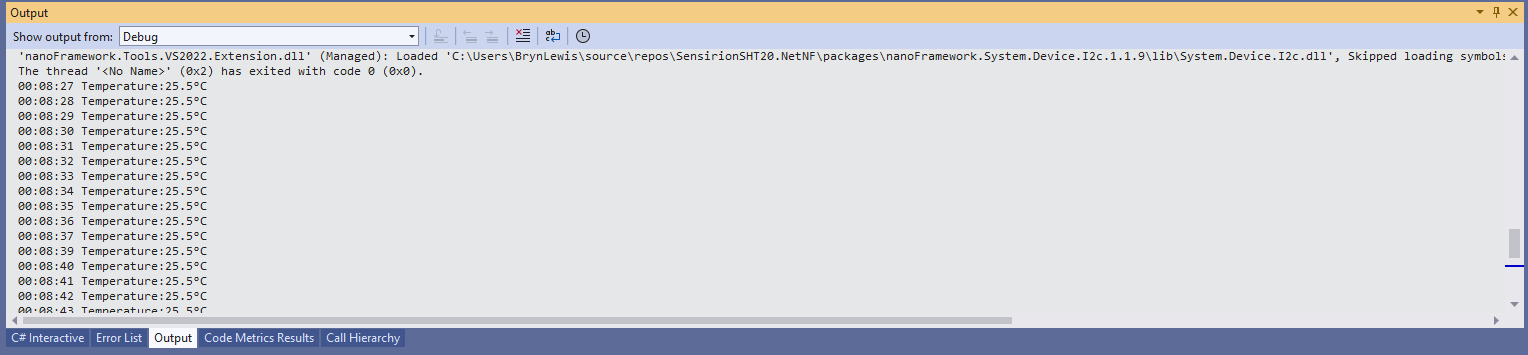
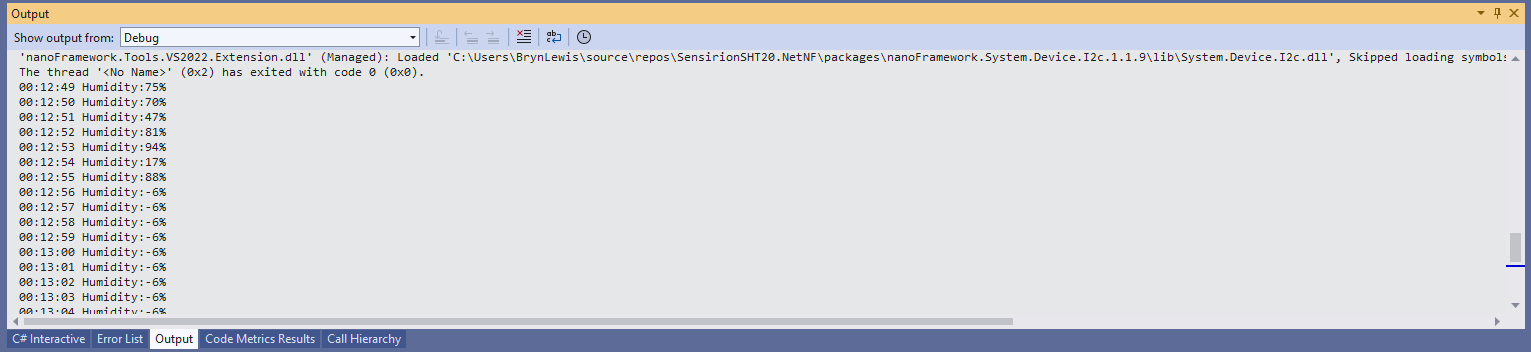
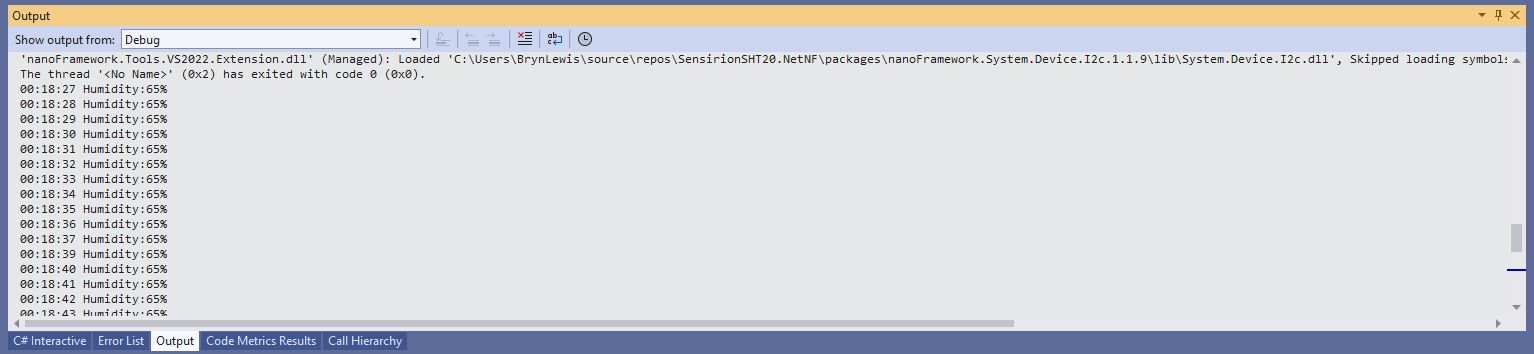
When I ran the application without a Thread.Sleep(70) the temperature and/or humidity the values were incorrect and sometimes quite random.

Temperature value with Thread.Sleep(70)
Humidity value without Thread.Sleep
Humidity value with Thread.Sleep(70)
Temperature and Humidity values with Thread.Sleep(70)

The .NET Core library didn’t validate the message payload Cyclic Redundancy Check (CRC) so I have added that in this version

void CheckCrc(byte[] bytes, byte bytesLen, byte checksum)
{
    var crc = 0;

    for (var i = 0; i < bytesLen; i++)
    {
        crc ^= bytes[i];
        for (var bit = 8; bit > 0; --bit)
        {
            crc = ((crc & 0x80) == 0x80) ? ((crc << 1) ^ CrcPolynomial) : (crc << 1);
        }
    }

    if (crc != checksum)
    {
        throw new Exception("CRC Error");
    }
}

The CheckCrc is called in Temperature and Humidity methods.

public double Temperature()
{
    byte[] readBuffer = new byte[3] { 0, 0, 0 };
    if (_i2cDevice == null)
    {
        throw new ArgumentNullException(nameof(_i2cDevice));
    }

    _i2cDevice.WriteByte(TemperatureNoHold);

    Thread.Sleep(ReadingWaitmSec);

    _i2cDevice.Read(readBuffer);

    CheckCrc(readBuffer, 2, readBuffer[2]);

    ushort temperatureRaw = (ushort)(readBuffer[0] << 8);
    temperatureRaw += readBuffer[1];

    double temperature = temperatureRaw * (175.72 / 65536.0) - 46.85;

    return temperature;
}

I’m going to soak test the library for a week to check that is working okay, then refactor the code so it can be added to the nanoFramework IoT.Device Library repository.
Carbon Dioxide Sensor(MH-Z16) library comparison

The first library I looked at was for the DFRobot Gravity: UART Infrared CO2 Sensor (0-50000ppm). There was sample code provided on the associated wiki page. The code worked first time I ran it but I didn’t use this library due to the lack of checksum & packet header/footer validation.

/***************************************************
* Infrared CO2 Sensor 0-50000ppm(Wide Range)
* ****************************************************
* The follow example is used to detect CO2 concentration.
  
* @author lg.gang(lg.gang@qq.com)
* @version  V1.0
* @date  2016-6-6
  
* GNU Lesser General Public License.
* See <http://www.gnu.org/licenses/> for details.
* All above must be included in any redistribution
* ****************************************************/ 
#include <SoftwareSerial.h>
SoftwareSerial mySerial(10, 11); // RX, TX
unsigned char hexdata[9] = {0xFF,0x01,0x86,0x00,0x00,0x00,0x00,0x00,0x79}; //Read the gas density command /Don't change the order
void setup() {
  
  Serial.begin(9600);
  while (!Serial) {

  }
  mySerial.begin(9600);

}

void loop() {
   mySerial.write(hexdata,9);
   delay(500);

 for(int i=0,j=0;i<9;i++)
 {
  if (mySerial.available()>0)
  {
     long hi,lo,CO2;
     int ch=mySerial.read();

    if(i==2){     hi=ch;   }   //High concentration
    if(i==3){     lo=ch;   }   //Low concentration
    if(i==8) {
               CO2=hi*256+lo;  //CO2 concentration
      Serial.print("CO2 concentration: ");
      Serial.print(CO2);
      Serial.println("ppm");      
      }
    }   
  } 
}

After some GitHub searching the second library I looked at was abbozza_CO2_MHZ16_arduino by Michael Brinkmeier. This library appears to be “plug-in” module for the abbozza! framework. I didn’t use this library due to the lack of checksum & packet header/footer validation.

/**
 * @license
 * abbozza! Calliope plugin for the MH-Z16 CO2 sensor
 * 
 * The sensor has to be connected to a serial connection with 9600 baud.
 *
 * Copyright 2015 Michael Brinkmeier ( michael.brinkmeier@uni-osnabrueck.de )
 *
 * Licensed under the Apache License, Version 2.0 (the "License");
 * you may not use this file except in compliance with the License.
 * You may obtain a copy of the License at
 *
 *   http://www.apache.org/licenses/LICENSE-2.0
 *
 * Unless required by applicable law or agreed to in writing, software
 * distributed under the License is distributed on an "AS IS" BASIS,
 * WITHOUT WARRANTIES OR CONDITIONS OF ANY KIND, either express or implied.
 * See the License for the specific language governing permissions and
 * limitations under the License.
 */

#include "SoftwareSerial.h"
#include "MHZ16.h"
#include "Arduino.h"

MHZ16::MHZ16(int tx, int rx) {
    this->serial = new SoftwareSerial(rx,tx,false);
    this->serial->begin(9600);
}


void MHZ16::calibrate() {
    int idx;
    for (idx = 0; idx < 9; idx++) {
        serial->write(cal[idx]);
    }
    delay(10);
}

void MHZ16::doMeasurement() {
    int idx;
    int bu;

    for (idx = 0; idx < 9; idx++) {
        serial->write(cmd[idx]);
    }
    delay(10);

    while (serial->available()) {
        do {
            bu = serial->read();
        } while (bu != 255);
        buf[0] = bu;

        idx = 1;
        while (serial->available() && (idx < 9)) {
            bu = serial->read();
            buf[idx] = bu;
            idx++;
        }

        if (idx == 9) {
            PPM = ((int) buf[2]) *256 + ((int) buf[3]);
        }
    }
}

int MHZ16::getPPM() {
    return PPM;
}

The third library was produced by Sandbox electronics for their selection of 10,000PPM thru 100,000PPM MH-Z16 sensors. Their datasheet looked similar(maybe newer?) to the Seeedstudio one and the packet format was the same.

Their library had checksum & packet header/footer validation but I didn’t use it because the carbon dioxide concentration was calculated using 4 bytes (maybe this was to support the different range sensors?)

/*
Description:
This is a example code for Sandbox Electronics NDIR CO2 sensor module.
You can get one of those products on
http://sandboxelectronics.com

Version:
V1.2

Release Date:
2019-01-10

Author:
Tiequan Shao          support@sandboxelectronics.com

Lisence:
CC BY-NC-SA 3.0

Please keep the above information when you use this code in your project.
*/

#include <SoftwareSerial.h>
#include <NDIR_SoftwareSerial.h>
#define  RECEIVE_TIMEOUT  (100)

#if ARDUINO >= 100
    #include "Arduino.h"
#else
    #include "WProgram.h"
#endif

class SoftwareSerial;

uint8_t NDIR_SoftwareSerial::cmd_measure[9]                = {0xFF,0x01,0x9C,0x00,0x00,0x00,0x00,0x00,0x63};
uint8_t NDIR_SoftwareSerial::cmd_calibrateZero[9]          = {0xFF,0x01,0x87,0x00,0x00,0x00,0x00,0x00,0x78};
uint8_t NDIR_SoftwareSerial::cmd_enableAutoCalibration[9]  = {0xFF,0x01,0x79,0xA0,0x00,0x00,0x00,0x00,0xE6};
uint8_t NDIR_SoftwareSerial::cmd_disableAutoCalibration[9] = {0xFF,0x01,0x79,0x00,0x00,0x00,0x00,0x00,0x86};

NDIR_SoftwareSerial::NDIR_SoftwareSerial(uint8_t rx_pin, uint8_t tx_pin) : serial(rx_pin, tx_pin, false)
{
}


uint8_t NDIR_SoftwareSerial::begin()
{
    serial.begin(9600);

    if (measure()) {
        return true;
    } else {
        return false;
    }
}

uint8_t NDIR_SoftwareSerial::measure()
{
    uint8_t i;
    uint8_t buf[9];
    uint32_t start = millis();

    serial.flush();

    for (i=0; i<9; i++) {
        serial.write(cmd_measure[i]);
    }

    for (i=0; i<9;) {
        if (serial.available()) {
            buf[i++] = serial.read();
        }

        if (millis() - start > RECEIVE_TIMEOUT) {
            return false;
        }
    }

    if (parse(buf)) {
        return true;
    }

    return false;
}


void NDIR_SoftwareSerial::calibrateZero()
{
    uint8_t i;

    for (i=0; i<9; i++) {
        serial.write(cmd_calibrateZero[i]);
    }
}


void NDIR_SoftwareSerial::enableAutoCalibration()
{
    uint8_t i;

    for (i=0; i<9; i++) {
        serial.write(cmd_enableAutoCalibration[i]);
    }
}


void NDIR_SoftwareSerial::disableAutoCalibration()
{
    uint8_t i;

    for (i=0; i<9; i++) {
        serial.write(cmd_disableAutoCalibration[i]);
    }
}


uint8_t NDIR_SoftwareSerial::parse(uint8_t *pbuf)
{
    uint8_t i;
    uint8_t checksum = 0;

    for (i=0; i<9; i++) {
        checksum += pbuf[i];
    }

    if (pbuf[0] == 0xFF && pbuf[1] == 0x9C && checksum == 0xFF) {
        ppm = (uint32_t)pbuf[2] << 24 | (uint32_t)pbuf[3] << 16 | (uint32_t)pbuf[4] << 8 | pbuf[5];
        return true;
    } else {
        return false;
    }
}

The forth library I looked at was MHZ-Z-C02-Sensors by Tobias Schürg this library was for different series of MHZ sensors. With re-synching, configurable timeouts and checksum validation it looked like the code could easily be adapted for the MH-Z16.

/* MHZ library

    By Tobias Schürg
*/

#include "MHZ.h"

const int MHZ14A = 14;
const int MHZ19B = 19;

const int MHZ14A_RESPONSE_TIME = 60;
const int MHZ19B_RESPONSE_TIME = 120;

const int STATUS_NO_RESPONSE = -2;
const int STATUS_CHECKSUM_MISMATCH = -3;
const int STATUS_INCOMPLETE = -4;
const int STATUS_NOT_READY = -5;

unsigned long lastRequest = 0;

MHZ::MHZ(uint8_t rxpin, uint8_t txpin, uint8_t pwmpin, uint8_t type)
    : co2Serial(rxpin, txpin) {
  _rxpin = rxpin;
  _txpin = txpin;
  _pwmpin = pwmpin;
  _type = type;

  co2Serial.begin(9600);
}

/**
 * Enables or disables the debug mode (more logging).
 */
void MHZ::setDebug(boolean enable) {
  debug = enable;
  if (debug) {
    Serial.println(F("MHZ: debug mode ENABLED"));
  } else {
    Serial.println(F("MHZ: debug mode DISABLED"));
  }
}

boolean MHZ::isPreHeating() {
  if (_type == MHZ14A) {
    return millis() < (3 * 60 * 1000);
  } else if (_type == MHZ19B) {
    return millis() < (3 * 60 * 1000);
  } else {
    Serial.println(F("MHZ::isPreHeating() => UNKNOWN SENSOR"));
    return false;
  }
}

boolean MHZ::isReady() {
  if (isPreHeating()) return false;
  if (_type == MHZ14A)
    return lastRequest < millis() - MHZ14A_RESPONSE_TIME;
  else if (_type == MHZ19B)
    return lastRequest < millis() - MHZ19B_RESPONSE_TIME;
  else {
    Serial.print(F("MHZ::isReady() => UNKNOWN SENSOR \""));
    Serial.print(_type);
    Serial.println(F("\""));
    return true;
  }
}

int MHZ::readCO2UART() {
  if (!isReady()) return STATUS_NOT_READY;
  if (debug) Serial.println(F("-- read CO2 uart ---"));
  byte cmd[9] = {0xFF, 0x01, 0x86, 0x00, 0x00, 0x00, 0x00, 0x00, 0x79};
  byte response[9];  // for answer

  if (debug) Serial.print(F("  >> Sending CO2 request"));
  co2Serial.write(cmd, 9);  // request PPM CO2
  lastRequest = millis();

  // clear the buffer
  memset(response, 0, 9);

  int waited = 0;
  while (co2Serial.available() == 0) {
    if (debug) Serial.print(".");
    delay(100);  // wait a short moment to avoid false reading
    if (waited++ > 10) {
      if (debug) Serial.println(F("No response after 10 seconds"));
      co2Serial.flush();
      return STATUS_NO_RESPONSE;
    }
  }
  if (debug) Serial.println();

  // The serial stream can get out of sync. The response starts with 0xff, try
  // to resync.
  // TODO: I think this might be wrong any only happens during initialization?
  boolean skip = false;
  while (co2Serial.available() > 0 && (unsigned char)co2Serial.peek() != 0xFF) {
    if (!skip) {
      Serial.print(F("MHZ: - skipping unexpected readings:"));
      skip = true;
    }
    Serial.print(" ");
    Serial.print(co2Serial.peek(), HEX);
    co2Serial.read();
  }
  if (skip) Serial.println();

  if (co2Serial.available() > 0) {
    int count = co2Serial.readBytes(response, 9);
    if (count < 9) {
      co2Serial.flush();
      return STATUS_INCOMPLETE;
    }
  } else {
    co2Serial.flush();
    return STATUS_INCOMPLETE;
  }

  if (debug) {
    // print out the response in hexa
    Serial.print(F("  << "));
    for (int i = 0; i < 9; i++) {
      Serial.print(response[i], HEX);
      Serial.print(F("  "));
    }
    Serial.println(F(""));
  }

  // checksum
  byte check = getCheckSum(response);
  if (response[8] != check) {
    Serial.println(F("MHZ: Checksum not OK!"));
    Serial.print(F("MHZ: Received: "));
    Serial.println(response[8], HEX);
    Serial.print(F("MHZ: Should be: "));
    Serial.println(check, HEX);
    temperature = STATUS_CHECKSUM_MISMATCH;
    co2Serial.flush();
    return STATUS_CHECKSUM_MISMATCH;
  }

  int ppm_uart = 256 * (int)response[2] + response[3];

  temperature = response[4] - 44;  // - 40;

  byte status = response[5];
  if (debug) {
    Serial.print(F(" # PPM UART: "));
    Serial.println(ppm_uart);
    Serial.print(F(" # Temperature? "));
    Serial.println(temperature);
  }

  // Is always 0 for version 14a  and 19b
  // Version 19a?: status != 0x40
  if (debug && status != 0) {
    Serial.print(F(" ! Status maybe not OK ! "));
    Serial.println(status, HEX);
  } else if (debug) {
    Serial.print(F(" Status  OK: "));
    Serial.println(status, HEX);
  }

  co2Serial.flush();
  return ppm_uart;
}

uint8_t MHZ::getLastTemperature() {
  if (isPreHeating()) return STATUS_NOT_READY;
  return temperature;
}

byte MHZ::getCheckSum(byte* packet) {
  if (debug) Serial.println(F("  getCheckSum()"));
  byte i;
  unsigned char checksum = 0;
  for (i = 1; i < 8; i++) {
    checksum += packet[i];
  }
  checksum = 0xff - checksum;
  checksum += 1;
  return checksum;
}

int MHZ::readCO2PWM() {
  // if (!isReady()) return STATUS_NOT_READY; not needed?
  if (debug) Serial.print(F("-- reading CO2 from pwm "));
  unsigned long th, tl, ppm_pwm = 0;
  do {
    if (debug) Serial.print(".");
    th = pulseIn(_pwmpin, HIGH, 1004000) / 1000;
    tl = 1004 - th;
    ppm_pwm = 5000 * (th - 2) / (th + tl - 4);
  } while (th == 0);
  if (debug) {
    Serial.print(F("\n # PPM PWM: "));
    Serial.println(ppm_pwm);
  }
  return ppm_pwm;
}

The forth library I looked at was MHZ16_uart by Intar it had been updated recently, was quite lightweight, had timeouts, checksum & packet header/footer validation.

/*
  MHZ16_uart.cpp - MH-Z16 CO2 sensor library for ESP-32
  by Intar BV
  version 0.1
  
  License MIT
*/

#include "MHZ16_uart.h"
#include "Arduino.h"


#define WAIT_READ_TIMES	100
#define WAIT_READ_DELAY	10

// public

MHZ16_uart::MHZ16_uart(){
}
MHZ16_uart::MHZ16_uart(int rx, int tx){
	begin(rx,tx);
}

MHZ16_uart::~MHZ16_uart(){
}

#ifdef ARDUINO_ARCH_ESP32
void MHZ16_uart::begin(int rx, int tx, int s){
	_rx_pin = rx;
	_tx_pin = tx;
	_start_millis = millis();
	_serialno = s;
}
#else
void MHZ16_uart::begin(int rx, int tx){
	_rx_pin = rx;
	_start_millis = millis();
	_tx_pin = tx;
}
#endif

void MHZ16_uart::calibrateZero() {
	writeCommand( zerocalib );
}

void MHZ16_uart::calibrateSpan(int ppm) {
	if( ppm < 1000 )	return;

	uint8_t com[MHZ16_uart::REQUEST_CNT];
	for(int i=0; i<MHZ16_uart::REQUEST_CNT; i++) {
		com[i] = spancalib[i];
	}
	com[3] = (uint8_t)(ppm/256);
	com[4] = (uint8_t)(ppm%256);
	writeCommand( com );
}

int MHZ16_uart::getPPM() {
	return getSerialData();
}

boolean MHZ16_uart::isWarming(){
	return millis() <= _start_millis + PREHEAT_MS;
}

//protected
void MHZ16_uart::writeCommand(uint8_t cmd[]) {
	writeCommand(cmd,NULL);
}

void MHZ16_uart::writeCommand(uint8_t cmd[], uint8_t* response) {
#ifdef ARDUINO_ARCH_ESP32
	HardwareSerial hserial(_serialno);
	hserial.begin(9600, SERIAL_8N1, _rx_pin, _tx_pin);
#else
	SoftwareSerial hserial(_rx_pin, _tx_pin);
	hserial.begin(9600);
#endif
    hserial.write(cmd, REQUEST_CNT);
	hserial.write(MHZ16_checksum(cmd));
	hserial.flush();
	
	if (response != NULL) {
		int i = 0;
		while(hserial.available() <= 0) {
			if( ++i > WAIT_READ_TIMES ) {
				Serial.println("error: can't get MH-Z16 response.");
				return;
			}
			yield();
			delay(WAIT_READ_DELAY);
		}
		hserial.readBytes(response, MHZ16_uart::RESPONSE_CNT);
	}

}

//private

int MHZ16_uart::getSerialData() {
	uint8_t buf[MHZ16_uart::RESPONSE_CNT];
	for( int i=0; i<MHZ16_uart::RESPONSE_CNT; i++){
		buf[i]=0x0;
	}

	writeCommand(getppm, buf);
	int co2 = 0, co2temp = 0, co2status =  0;

	// parse
	if (buf[0] == 0xff && buf[1] == 0x86 && MHZ16_checksum(buf) == buf[MHZ16_uart::RESPONSE_CNT-1]) {
		co2 = buf[2] * 256 + buf[3];
	} else {
		co2 = co2temp = co2status = -1;
	}
	return co2;
}	

uint8_t MHZ16_uart::MHZ16_checksum( uint8_t com[] ) {
	uint8_t sum = 0x00;
	for ( int i = 1; i < MHZ16_uart::REQUEST_CNT; i++) {
		sum += com[i];
	}
	sum = 0xff - sum + 0x01;
	return sum;
}

It ran second time on one of my Arduino devices (after I figured out how to configure the serial port pins) and though intended for an ESP8266 device this is the library I will field test.

#include <MHZ16_uart.h>

//Select 2 digital pins as SoftwareSerial's Rx and Tx. For example, Rx=2 Tx=3
MHZ16_uart mySensor(4,5);

void setup()
{
  Serial.begin(9600);

  mySensor.begin(4,5); 
}


void loop() 
{
  if ( !mySensor.isWarming())
  {
    Serial.print("CO2 Concentration is ");
    Serial.print(mySensor.getPPM());
    Serial.println("ppm");
  }
  else
{
    Serial.println("isWarming");
  }
  
  delay(10000);
}

This was just a sample of the libraries I found on GitHub if I missed a good a library contact me via the comments.

Azure Meetup Christchurch notes

For the people who came to my Azure meetup session this evening

Sources of sensors and development boards

http://www.adafruit.com
http://www.elecrow.com (watering kits)
http://www.ingenuitymicro.com (NZ based dev boards)
http://www.netduino.com (.NetMF development boards)
http://www.makerfabs.com
http://www.seeedstudio.com
http://www.tindie.com

nRF24Shields for RPI devices
http://www.tindie.com/products/ceech/new-raspberry-pi-to-nrf24l01-shield/

nRF24Shields for *duino devices in AU
embeddedcoolness.com

Raspberry PI Source in CHC
http://www.wavetech.co.nz

RFM69 & LoRa Modules
http://www.wisen.com.au

local sensor and device resellers quick turnaround
http://www.mindkits.co.nz
http://www.nicegear.co.nz

http://www.diyelectricskateboard.com

The watch development platform
http://www.hexiwear.com

http://www.gowifi.co.nz (Antennas & other wireless kit based in Rangiora)

my projects
http://www.hackster.io/KiwiBryn
io.adafruit.com/BrynHLewis/dashboards/home-environment

Mikrobus.Net Quail, Weather & nRF-C clicks and xively

My next proof of concept uses a Weather click and nRF C click to upload temperature and humidity data to a Xively gateway running on a spare Netduino 2 Plus. I have a couple of Azure Event hub gateways (direct & queued) which require a Netduino 3 Wifi (for TLS/AMQPS support) and I’ll build a client for them in a coming post.

I initially purchased an nRF T click but something wasn’t quite right with its interrupt output. The interrupt line wasn’t getting pulled low at all so there were no send success/failure events. If I disabled the pull up resistor and strobed the interrupt pin on start-up the device would work for a while.


using (OutputPort Int = new OutputPort(socket.Int, true))
{
 Int.Write(true);
};

...

_irqPin = new InterruptPort(socket.Int, false, Port.ResistorMode.Disabled, Port.InterruptMode.InterruptEdgeLow);

The code sends a reading every 10 seconds and has been running for a couple of days. It strobes Led1 for each successful send and turns on Led2 when a send fails.

private static readonly byte[] deviceAddress = Encoding.UTF8.GetBytes(&quot;Quail&quot;);
private static readonly byte[] gatewayAddress = Encoding.UTF8.GetBytes(&quot;12345&quot;);
private const byte gatewayChannel = 10;
private const NRFC.DataRate gatewayDataRate = NRFC.DataRate.DR1Mbps;
private const int XivelyUpdateDelay = 10000;
private const char XivelyGatewayChannelIdTemperature = 'J';
private const char XivelyGatewayChannelIdHumidity = 'K';

public static void Main()
{
   NRFC nRF24Click = new NRFC(Hardware.SocketFour);
   nRF24Click.Configure(deviceAddress, gatewayChannel, gatewayDataRate);
   nRF24Click.OnTransmitFailed += nRF24Click_OnTransmitFailed;
   nRF24Click.OnTransmitSuccess += nRF24Click_OnTransmitSuccess;
   nRF24Click.Enable();

   // Configure the weather click
   WeatherClick weatherClick = new WeatherClick(Hardware.SocketOne, WeatherClick.I2CAddresses.Address0);
   weatherClick.SetRecommendedMode(WeatherClick.RecommendedModes.WeatherMonitoring);

   Thread.Sleep(XivelyUpdateDelay);

   while (true)
   {
      string temperatureMessage = XivelyGatewayChannelIdTemperature + weatherClick.ReadTemperature().ToString("F1");
      Debug.Print(temperatureMessage);
      MBN.Hardware.Led1.Write(true);
      nRF24Click.SendTo(gatewayAddress, Encoding.UTF8.GetBytes(temperatureMessage));

      Thread.Sleep(XivelyUpdateDelay);

      string humidityMessage = XivelyGatewayChannelIdHumidity + weatherClick.ReadHumidity().ToString("F1");
      Debug.Print(humidityMessage);
      MBN.Hardware.Led1.Write(true);
      nRF24Click.SendTo(gatewayAddress, Encoding.UTF8.GetBytes(humidityMessage));

      Thread.Sleep(XivelyUpdateDelay);
   }
}

static void nRF24Click_OnTransmitSuccess()
{
   MBN.Hardware.Led1.Write(false);
   if (MBN.Hardware.Led2.Read())
   {
      MBN.Hardware.Led2.Write(false);
   }

   Debug.Print("nRF24Click_OnTransmitSuccess");
}

static void nRF24Click_OnTransmitFailed()
{
   MBN.Hardware.Led2.Write(true);

   Debug.Print("nRF24Click_OnTransmitFailed");
}

I need to have a look at interfacing some more sensors and soak testing the solution.

The MikroBus.Net team have done a great job with the number & quality of the drivers they have available.

Mikrobus.Net Quail and Weather Click

In my second batch of MikroElektronika Mikrobus sensors I had purchased a Weather click because I was interested to see how the temperature and humidity values it returned compared with the Silicon labs Si7005 devices I use with my Arduino and Netduino devices. (I was a bit suspicious of the Si7005 humidity values)

I downloaded the Mikrobus.Net driver for the BME280 and created a simple console application to see how well the sensor and driver worked

public class Program
{
   public static void Main()
   {
      WeatherClick weatherClick = new WeatherClick(Hardware.SocketOne, WeatherClick.I2CAddresses.Address0);

      weatherClick.SetRecommendedMode(WeatherClick.RecommendedModes.WeatherMonitoring);

      while (true)
      {
         Debug.Print("T " + weatherClick.ReadTemperature().ToString(" F1 ") +
" H " + weatherClick.ReadHumidity().ToString("F1") +
" P " + weatherClick.ReadPressure(PressureCompensationModes.Uncompensated).ToString("F1"));

         Thread.Sleep(30000);
      }
   }
}

The temperature values looked pretty good but the humidity values were rough half of what I was getting from the SI7005 connected to a devDuino V2 on the desk next to my Quail board

The thread ‘<No Name>’ (0x2) has exited with code 0 (0x0).
T 24.9 H 49.3 P 1014.8
T 25.0 H 49.4 P 1014.9
T 25.0 H 49.1 P 1014.8
T 25.0 H 49.9 P 1014.8
T 24.9 H 49.1 P 1014.9
T 25.0 H 50.8 P 1014.9
T 25.0 H 49.2 P 1015.0

The code for doing the conversions looked pretty complex so I modified a Netduino BME280 driver (uses a different approach for conversions) I have used on another projects to work on the Quail/Mikrobus architecture.

The modified driver returned roughly the same values so it looks like the problem is most probably with the SI7005 code.(or my understand of the humidity values it returns)

Netduino 3 Wifi pollution Sensor Part 2

In a previous post I had started building a driver for the Seeedstudio Grove Dust Sensor. It was a proof of concept and it didn’t handle some edge cases well.

While building the pollution monitor with a student we started by simulating the negative occupancy of the Shinyei PPD42NJ Particle sensor with the Netduino’s on-board button. This worked and reduced initial complexity. But it also made it harder to simulate the button being pressed as the program launches (the on-board button is also the reset button), or simulate if the button was pressed at the start or end of the period.

Dust sensor simulation with button

Netduino 3 Wifi Test Harness

The first sample code processes button press interrupts and displays the values of the data1 & data2 parameters

public class Program
{
   public static void Main()
   {
      InterruptPort button = new InterruptPort(Pins.GPIO_PIN_D5, false, Port.ResistorMode.Disabled, Port.InterruptMode.InterruptEdgeBoth);
      button.OnInterrupt += button_OnInterrupt;

      Thread.Sleep(Timeout.Infinite);
   }

   static void button_OnInterrupt(uint data1, uint data2, DateTime time)
   {
      Debug.Print(time.ToString("hh:mm:ss.fff") + " data1 =" + data1.ToString() + " data2 = " + data2.ToString());
   }
}

Using the debugging output from this application we worked out that data1 was the Microcontroller Pin number and data2 was the button state.

12:00:14.389 data1 =24 data2 = 0
12:00:14.389 data1 =24 data2 = 1
12:00:14.389 data1 =24 data2 = 0
12:00:15.851 data1 =24 data2 = 1
12:00:16.078 data1 =24 data2 = 0

We then extended the code to record the duration of each button press.

public class Program
{
   static DateTime buttonLastPressedAtUtc = DateTime.UtcNow;

   public static void Main()
   {
      InterruptPort button = new InterruptPort(Pins.ONBOARD_BTN, false, Port.ResistorMode.Disabled, Port.InterruptMode.InterruptEdgeBoth);
      button.OnInterrupt += button_OnInterrupt;

      Thread.Sleep(Timeout.Infinite);
   }

   static void button_OnInterrupt(uint data1, uint data2, DateTime time)
   {
      if (data2 == 0)
      {
         TimeSpan duration = time - buttonLastPressedAtUtc;

         Debug.Print(duration.ToString());
      }
      else
      {
         buttonLastPressedAtUtc = time;
      }
   }
}

The thread ” (0x4) has exited with code 0 (0x0).
00:00:00.2031790
00:00:00.1954150
00:00:00.1962350

The next step was to keep track of the total duration of the button presses since the program started executing.

public class Program
{
   static DateTime buttonLastPressedAtUtc = DateTime.UtcNow;
   static TimeSpan buttonPressedDurationTotal;

   public static void Main()
   {
      InterruptPort button = new InterruptPort(Pins.ONBOARD_BTN, false, Port.ResistorMode.Disabled, Port.InterruptMode.InterruptEdgeBoth);
      button.OnInterrupt += button_OnInterrupt;

      Thread.Sleep(Timeout.Infinite);
   }

   static void button_OnInterrupt(uint data1, uint data2, DateTime time)
   {
      if (data2 == 0)
      {
         TimeSpan duration = time - buttonLastPressedAtUtc;

         buttonPressedDurationTotal += duration;
          Debug.Print(duration.ToString() + " " + buttonPressedDurationTotal.ToString());
      }
      else
      {
         buttonLastPressedAtUtc = time;
      }
   }
}

The thread ” (0x4) has exited with code 0 (0x0).
00:00:00.2476460 00:00:00.2476460
00:00:00.2193600 00:00:00.4670060
00:00:00.2631400 00:00:00.7301460
00:00:00.0001870 00:00:00.7303330

We then added a timer to display the amount of time the button was pressed in the configured period.

public class Program
{
   static TimeSpan measurementDueTime = new TimeSpan(0, 0, 30);
   static TimeSpan measurementperiodTime = new TimeSpan(0, 0, 30);
   static DateTime buttonLastPressedAtUtc = DateTime.UtcNow;
   static TimeSpan buttonPressedDurationTotal;


   public static void Main()
   {
      InterruptPort button = new InterruptPort(Pins.GPIO_PIN_D5, false, Port.ResistorMode.Disabled, Port.InterruptMode.InterruptEdgeBoth);
      button.OnInterrupt += button_OnInterrupt;

      Timer periodTimer = new Timer(periodTimerProc, button, measurementDueTime, measurementperiodTime);

      Thread.Sleep(Timeout.Infinite);
   }

   static void periodTimerProc(object status)
   {
      InterruptPort button = (InterruptPort)status;

      if (button.Read())
      {
         TimeSpan duration = DateTime.UtcNow - buttonLastPressedAtUtc;

         buttonPressedDurationTotal += duration; 
      }

      Debug.Print(buttonPressedDurationTotal.ToString());

      buttonPressedDurationTotal = new TimeSpan(0, 0, 0);
      buttonLastPressedAtUtc = DateTime.UtcNow;
   }

   static void button_OnInterrupt(uint data1, uint data2, DateTime time)
   {
      if (data2 == 0)
      {
         TimeSpan duration = time - buttonLastPressedAtUtc;

         buttonPressedDurationTotal += duration;

         Debug.Print(duration.ToString() + " " + buttonPressedDurationTotal.ToString());
      }
      else
      {
         buttonLastPressedAtUtc = time;
      }
   }
}

The thread ” (0x4) has exited with code 0 (0x0).
00:00:00
00:00:00
00:00:00.2299050 00:00:00.2299050
00:00:00.1956980 00:00:00.4256030
00:00:00.1693190 00:00:00.5949220
00:00:00.5949220

After some testing we identified that the handling of button presses at the period boundaries was problematic and revised the code some more. We added a timer for the startup period to simplify the interrupt handling code.

public class Program
{
   static TimeSpan measurementDueTime = new TimeSpan(0, 0, 60);
   static TimeSpan measurementperiodTime = new TimeSpan(0, 0, 30);
   static DateTime buttonLastPressedAtUtc = DateTime.UtcNow;
   static TimeSpan buttonPressedDurationTotal;

   public static void Main()
   {
      InterruptPort button = new InterruptPort(Pins.GPIO_PIN_D5, false, Port.ResistorMode.Disabled, Port.InterruptMode.InterruptEdgeBoth);
      button.OnInterrupt += button_OnInterrupt;

      Timer periodTimer = new Timer(periodTimerProc, button, Timeout.Infinite, Timeout.Infinite);

      Timer startUpTImer = new Timer(startUpTimerProc, periodTimer, measurementDueTime.Milliseconds, Timeout.Infinite);

      Thread.Sleep(Timeout.Infinite);
   }

   static void startUpTimerProc(object status)
   {
      Timer periodTimer = (Timer)status;

      Debug.Print( DateTime.UtcNow.ToString("hh:mm:ss") + " -Startup complete");

      buttonLastPressedAtUtc = DateTime.UtcNow;
      periodTimer.Change(measurementDueTime, measurementperiodTime);
   }

   static void periodTimerProc(object status)
   {
      InterruptPort button = (InterruptPort)status;
      Debug.Print(DateTime.UtcNow.ToString("hh:mm:ss") + " -Period timer");

      if (button.Read())
      {
         TimeSpan duration = DateTime.UtcNow - buttonLastPressedAtUtc;

         buttonPressedDurationTotal += duration;
      }

      Debug.Print(buttonPressedDurationTotal.ToString());

      buttonPressedDurationTotal = new TimeSpan(0, 0, 0);
      buttonLastPressedAtUtc = DateTime.UtcNow;
   }

   static void button_OnInterrupt(uint data1, uint data2, DateTime time)
   {
      Debug.Print(DateTime.UtcNow.ToString("hh:mm:ss") + " -OnInterrupt");

      if (data2 == 0)
      {
         TimeSpan duration = time - buttonLastPressedAtUtc;

         buttonPressedDurationTotal += duration;

         Debug.Print(duration.ToString() + " " + buttonPressedDurationTotal.ToString());
      }
      else
      {
         buttonLastPressedAtUtc = time;
      }
   }
}

The debugging output looked positive, but more testing is required.

The thread ” (0x2) has exited with code 0 (0x0).
12:00:13 -Startup complete
12:01:13 -Period timer
00:00:00
12:01:43 -Period timer
00:00:00
12:01:46 -OnInterrupt
12:01:48 -OnInterrupt
00:00:01.2132510 00:00:01.2132510
12:01:49 -OnInterrupt
12:01:50 -OnInterrupt
00:00:01.3001240 00:00:02.5133750
12:01:53 -OnInterrupt
12:01:54 -OnInterrupt
00:00:01.1216510 00:00:03.6350260
12:02:13 -Period timer
00:00:03.6350260

Next steps – multi threading, extract code into a device driver and extend to support sensors like the SeeedStudio Smart dust Sensor which has two digital outputs, one for small particles (e.g. smoke) the other for larger particles (e.g. dust).

Netduino 3 Wifi pollution Sensor Part 1

I am working on a Netduino 3 Wifi based version for my original concept as a STEM project for high school students. I wanted to be able to upload data to a Microsoft Azure Eventhub or other HTTPS secured RESTful endpoint (e.g. xivelyIOT) to show how to build a securable solution. This meant a Netduino 3 Wifi device with the TI C3100 which does all the crypto processing was necessary.

The aim was to (over a number of blog posts) build a plug ‘n play box that initially was for measuring airborne particulates and then overtime add more sensors e.g. atmospheric gas concentrations, (Grove multichannel gas sensor), an accelerometer for earthquake early warning/monitoring (Grove 3-Axis Digital Accelerometer) etc.

Netduino 3 Wifi based pollution sensor

Bill of materials for prototype as at (October 2015)

  • Netduino 3 Wifi USD69.95
  • Seeedstudio Grove base shield V2 USD8.90
  • Seeedstudio Grove smart dust sensor USD16.95
  • Seeedstudio Grove Temperature & Humidity Sensor pro USD14.90
  • Seeedstudio ABS outdoor waterproof case USD1.65
  • Seeedstudio Grove 4 pin female to Grove 4 pin conversion cable USD3.90
  • Seeedstudio Grove 4 pin buckled 5CM cabed USD1.90

After the first assembly I have realised the box is a bit small. There is not a lot of clearance around the Netduino board (largely due to the go!bus connectors on the end making it a bit larger than a standard *duino board) and the space for additional sensors is limited so I will need to source a larger enclosure.

The dust sensor doesn’t come with a cable so I used the conversion cable instead. NOTE – The pins on the sensor are numbered right->Left rather than left->right.

The first step is to get the temperature and humidity sensor working with my driver code, then adapt the Seeedstudio Grove-Dust sensor code for the dual outputs of the SM-PWM-01 device.

According to the SM-PWM-01A device datasheet The P1 output is for small particles < 1uM (smoke) and P2 output is for large particles > 2uM (dust). The temperature & humidity sensor is included in the first iteration as other researchers have indicated that humidity levels can impact on the accuracy of optical particle counters.

Then, once the sensors are working as expected I will integrate a cut back version of the AMQPNetLite code and configuration storage code I wrote for my Netduino 3 wifi Azure EventHub Field Gateway.