Random wanderings through Microsoft Azure esp. PaaS plumbing, the IoT bits, AI on Micro controllers, AI on Edge Devices, .NET nanoFramework, .NET Core on *nix and ML.NET+ONNX
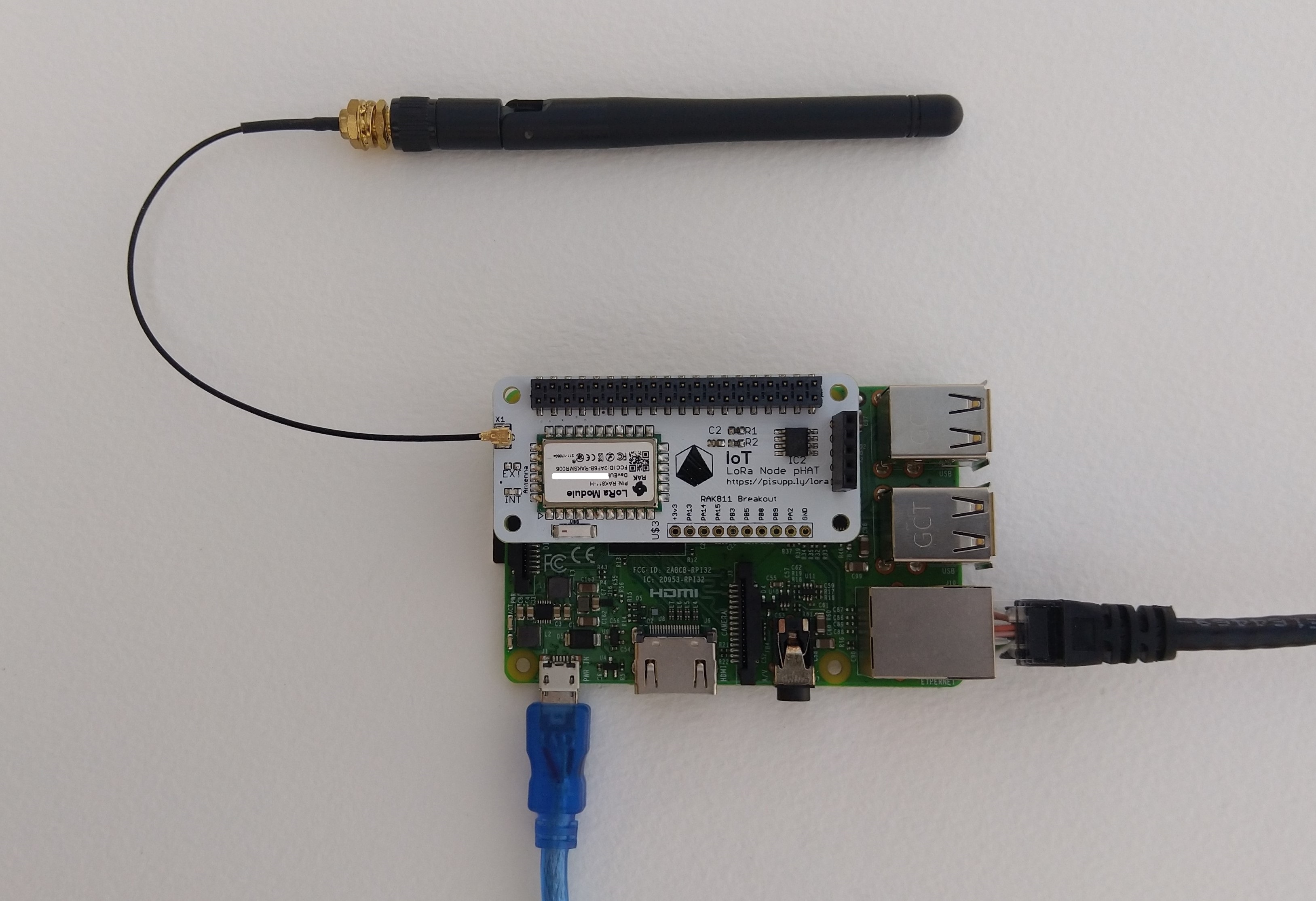
IoT LoRa Node pHAT for Raspberry Pi mounted on a Raspberry PI3
My Over the Air Activation (OTAA) implementation is very “nasty” I have assumed that there would be no timeouts or failures and I only send one BCD message “48656c6c6f204c6f526157414e” which is “hello LoRaWAN”.
The code just sequentially steps through the necessary configuration to join the TTN network with a suitable delay after each command is sent. I had some problems with re-opening the serial port if my application had previously failed with an uncaught exception. After some experimentation I added some code to ensure the port was closed when an exception occurred.
//---------------------------------------------------------------------------------
// Copyright (c) September 2021, devMobile Software
//
// Licensed under the Apache License, Version 2.0 (the "License");
// you may not use this file except in compliance with the License.
// You may obtain a copy of the License at
//
//     http://www.apache.org/licenses/LICENSE-2.0
//
// Unless required by applicable law or agreed to in writing, software
// distributed under the License is distributed on an "AS IS" BASIS,
// WITHOUT WARRANTIES OR CONDITIONS OF ANY KIND, either express or implied.
// See the License for the specific language governing permissions and
// limitations under the License.
//
//---------------------------------------------------------------------------------
namespace devMobile.IoT.NetCore.Rak811.NetworkJoinOTAA
{
	using System;
	using System.Diagnostics;
	using System.IO.Ports;
	using System.Threading;

	public class Program
	{
		private const string SerialPortId = "/dev/ttyS0";
		private const string AppEui = "...";
		private const string AppKey = "...";
		private const byte MessagePort = 1;
		private const string Payload = "A0EEE456D02AFF4AB8BAFD58101D2A2A"; // Hello LoRaWAN

		public static void Main()
		{
			string response;

			Debug.WriteLine("devMobile.IoT.NetCore.Rak811.NetworkJoinOTAA starting");

			Debug.WriteLine(String.Join(",", SerialPort.GetPortNames()));

			try
			{
				using (SerialPort serialPort = new SerialPort(SerialPortId))
				{
					// set parameters
					serialPort.BaudRate = 9600;
					serialPort.DataBits = 8;
					serialPort.Parity = Parity.None;
					serialPort.StopBits = StopBits.One;
					serialPort.Handshake = Handshake.None;

					serialPort.ReadTimeout = 5000;

					serialPort.NewLine = "\r\n";

					serialPort.Open();

					// clear out the RX buffer
					response = serialPort.ReadExisting();
					Debug.WriteLine($"RX :{response.Trim()} bytes:{response.Length}");
					Thread.Sleep(500);

					// Set the Working mode to LoRaWAN
					Console.WriteLine("Set Work mode");
					serialPort.WriteLine("at+set_config=lora:work_mode:0");
					Thread.Sleep(5000);
					response = serialPort.ReadExisting();
					response = response.Trim('\0');
					Debug.WriteLine($"RX :{response.Trim()} bytes:{response.Length}");

					// Set the Region to AS923
					Console.WriteLine("Set Region");
					serialPort.WriteLine("at+set_config=lora:region:AS923");
					response = serialPort.ReadLine();
					Debug.WriteLine($"RX :{response.Trim()} bytes:{response.Length}");

					// Set the JoinMode
					Console.WriteLine("Set Join mode");
					serialPort.WriteLine("at+set_config=lora:join_mode:0");
					response = serialPort.ReadLine();
					Debug.WriteLine($"RX :{response.Trim()} bytes:{response.Length}");

					// Set the appEUI
					Console.WriteLine("Set App Eui");
					serialPort.WriteLine($"at+set_config=lora:app_eui:{AppEui}");
					response = serialPort.ReadLine();
					Debug.WriteLine($"RX :{response.Trim()} bytes:{response.Length}");

					// Set the appKey
					Console.WriteLine("Set App Key");
					serialPort.WriteLine($"at+set_config=lora:app_key:{AppKey}");
					response = serialPort.ReadLine();
					Debug.WriteLine($"RX :{response.Trim()} bytes:{response.Length}");

					// Set the Confirm flag
					Console.WriteLine("Set Confirm off");
					serialPort.WriteLine("at+set_config=lora:confirm:0");
					response = serialPort.ReadLine();
					Debug.WriteLine($"RX :{response.Trim()} bytes:{response.Length}");

					// Join the network
					Console.WriteLine("Start Join");
					serialPort.WriteLine("at+join");
					Thread.Sleep(10000);
					response = serialPort.ReadLine();
					Debug.WriteLine($"RX :{response.Trim()} bytes:{response.Length}");

					while (true)
					{
						Console.WriteLine("Sending");
						serialPort.WriteLine($"at+send=lora:{MessagePort}:{Payload}");
						Thread.Sleep(1000);

						// The OK
						Console.WriteLine("Send result");
						response = serialPort.ReadLine();
						Debug.WriteLine($"RX :{response.Trim()} bytes:{response.Length}");

						// The Signal strength information etc.
						Console.WriteLine("Network confirmation");
						response = serialPort.ReadLine();
						Debug.WriteLine($"RX :{response.Trim()} bytes:{response.Length}");

						Thread.Sleep(20000);
					}
				}
			}
			catch (Exception ex)
			{
				Debug.WriteLine(ex.Message);
			}
		}
	}
}
The code is not suitable for production but it confirmed my software and hardware configuration worked.
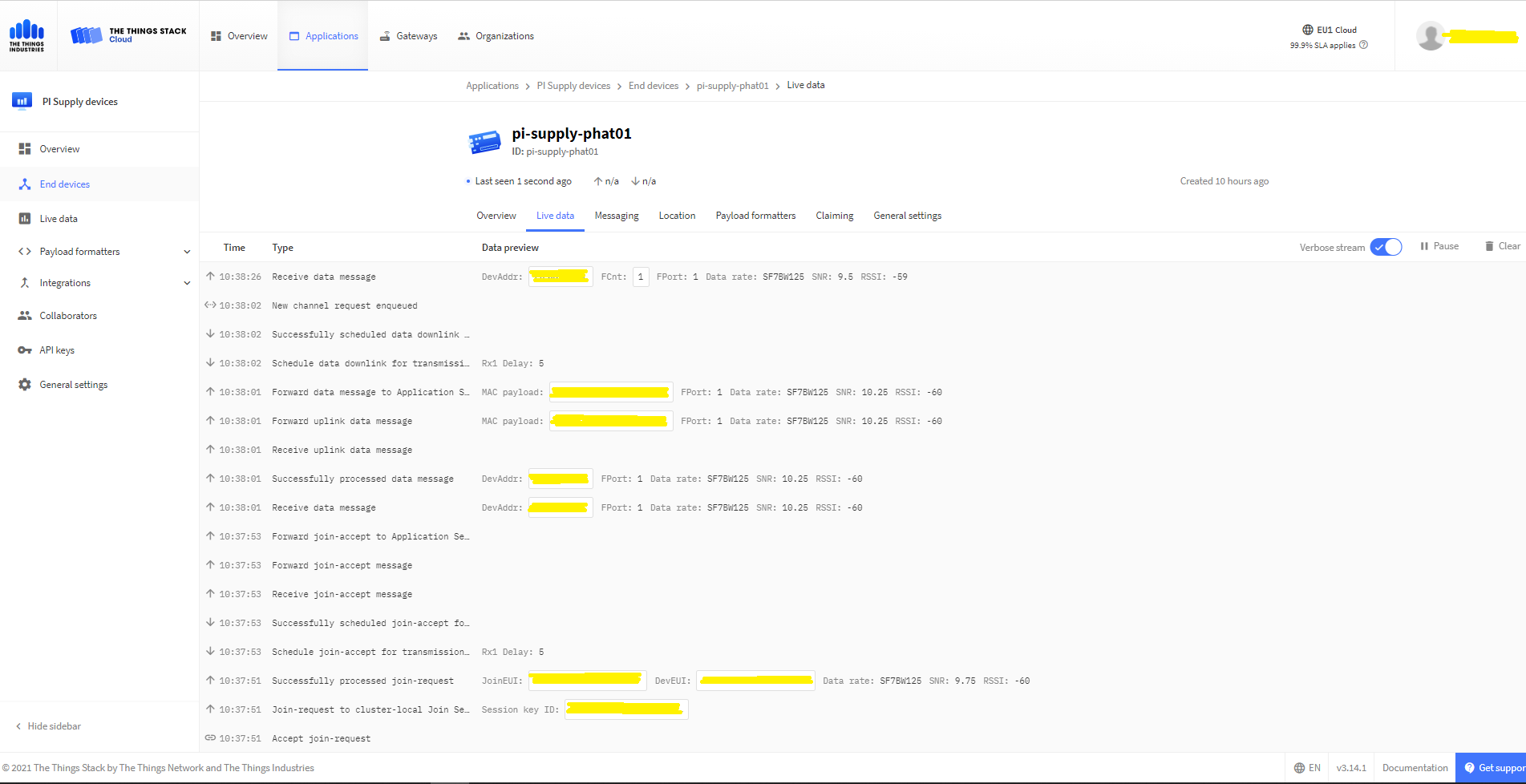
In the Visual Studio 2019 debug output I could see messages getting sent and then after a short delay they were visible in the TTN console.
The Things Industries Live Data Tab showing my device connecting and sending messages
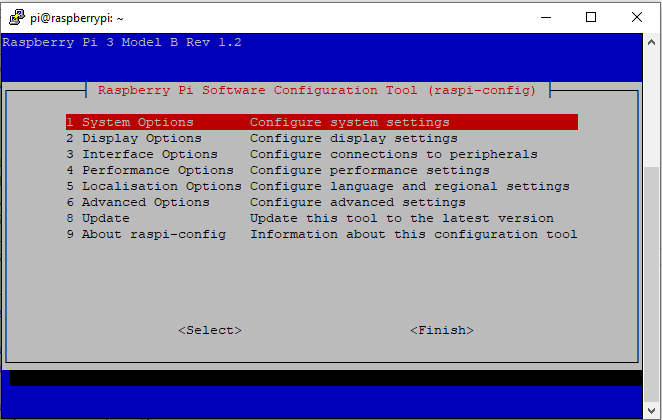
RaspberyPI OS Software Configuration tool mains screen
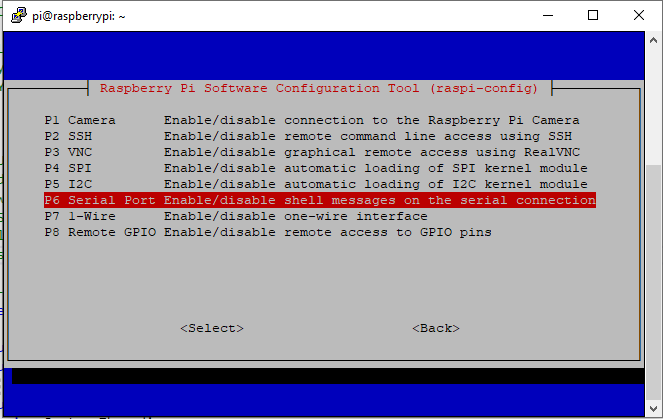
RaspberryPI OS IO Serial Port configuration
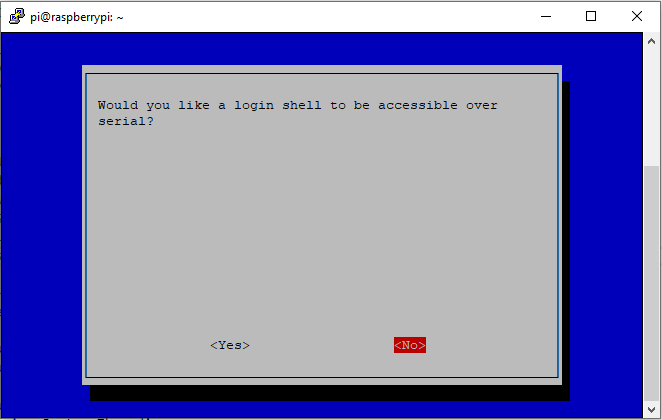
Raspberry PI OS disabling remote serial login shell
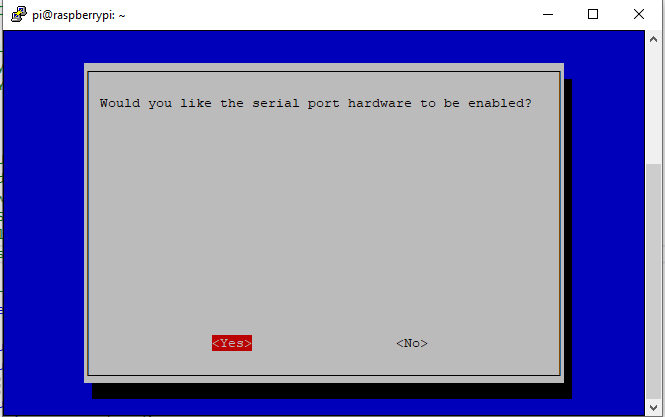
RaspberryPI OS enabling serial port access
Once serial port access was enabled I could enumerate them with SerialPort.GetPortNames() which is in the System.IO.PortsNuGet package. The code has compile time options for synchronous and asynchronous operation.
//---------------------------------------------------------------------------------
// Copyright (c) September 2021, devMobile Software
//
// Licensed under the Apache License, Version 2.0 (the "License");
// you may not use this file except in compliance with the License.
// You may obtain a copy of the License at
//
//     http://www.apache.org/licenses/LICENSE-2.0
//
// Unless required by applicable law or agreed to in writing, software
// distributed under the License is distributed on an "AS IS" BASIS,
// WITHOUT WARRANTIES OR CONDITIONS OF ANY KIND, either express or implied.
// See the License for the specific language governing permissions and
// limitations under the License.
//
//---------------------------------------------------------------------------------
namespace devMobile.IoT.NetCore.Rak811.pHatSerial
{
	using System;
	using System.Diagnostics;

	using System.IO.Ports;
	using System.Threading;

	public class Program
	{
		private const string SerialPortId = "/dev/ttyS0";

		public static void Main()
		{
			SerialPort serialPort;

			Debug.WriteLine("devMobile.IoT.NetCore.Rak811.pHatSerial starting");

			Debug.WriteLine(String.Join(",", SerialPort.GetPortNames()));

			try
			{
				serialPort = new SerialPort(SerialPortId);

				// set parameters
#if DEFAULT_BAUDRATE
				serialDevice.BaudRate = 115200;
#else
            serialPort.BaudRate = 9600;
#endif
				serialPort.Parity = Parity.None;
				serialPort.DataBits = 8;
				serialPort.StopBits = StopBits.One;
				serialPort.Handshake = Handshake.None;

				serialPort.ReadTimeout = 1000;

				serialPort.NewLine = "\r\n";

				serialPort.Open();

#if DEFAULT_BAUDRATE
				Debug.WriteLine("RAK811 baud rate set to 9600");
				serialDevice.Write("at+set_config=device:uart:1:9600");
#endif

#if SERIAL_ASYNC_READ
				serialPort.DataReceived += SerialDevice_DataReceived;
#endif

				while (true)
				{
					serialPort.WriteLine("at+version");

#if SERIAL_SYNC_READ
					string response = serialPort.ReadLine();

					Debug.WriteLine($"RX:{response.Trim()} bytes:{response.Length}");
#endif

					Thread.Sleep(20000);
				}
			}
			catch (Exception ex)
			{
				Debug.WriteLine(ex.Message);
			}
		}

#if SERIAL_ASYNC_READ
		private static void SerialDevice_DataReceived(object sender, SerialDataReceivedEventArgs e)
		{
			SerialPort serialPort = (SerialPort)sender;

			switch (e.EventType)
			{
				case SerialData.Chars:
					string response = serialPort.ReadExisting();

					Debug.WriteLine($"RX:{response.Trim()} bytes:{response.Length}");
					break;

				case SerialData.Eof:
					Debug.WriteLine("RX :EoF");
					break;
				default:
					Debug.Assert(false, $"e.EventType {e.EventType} unknown");
					break;
			}
		}
#endif
	}
}
The first step was to change the RAK811 serial port speed from 115200 to 9600 baud.
Changing RAK811 serial port from 115200 to 9600 baud
Then I requested the RAK811 version information with the at+version command.
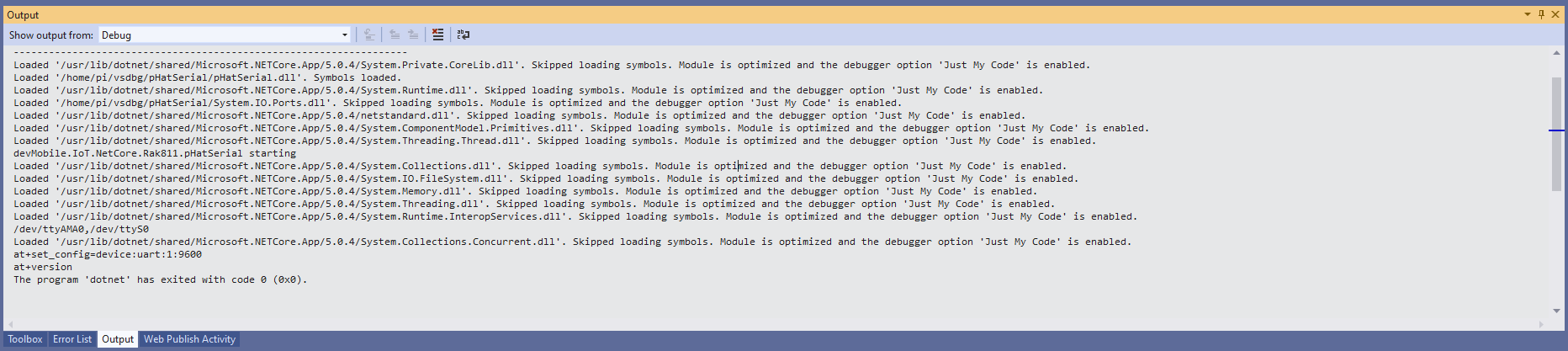
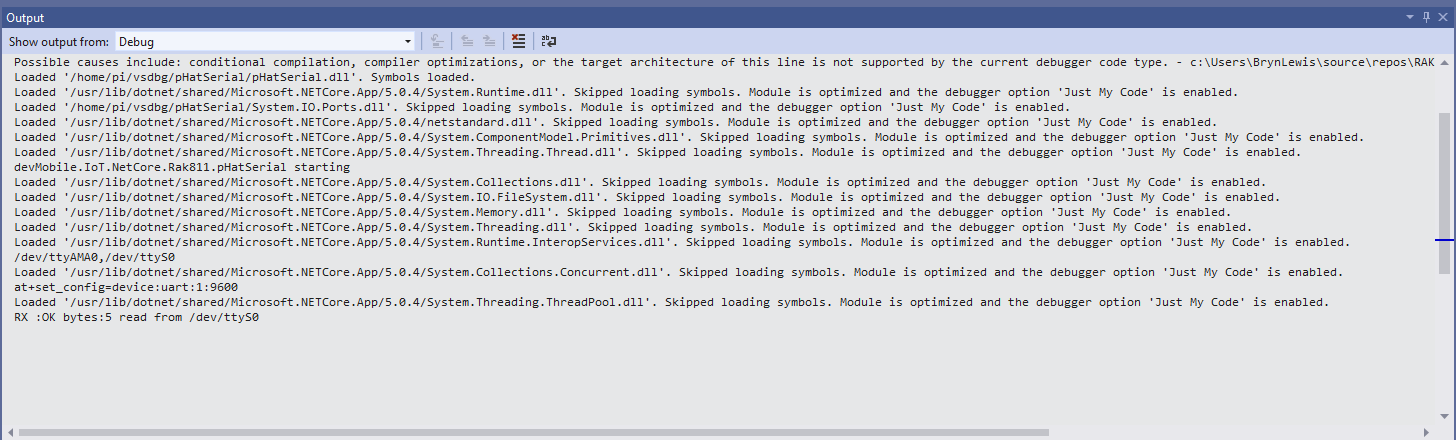
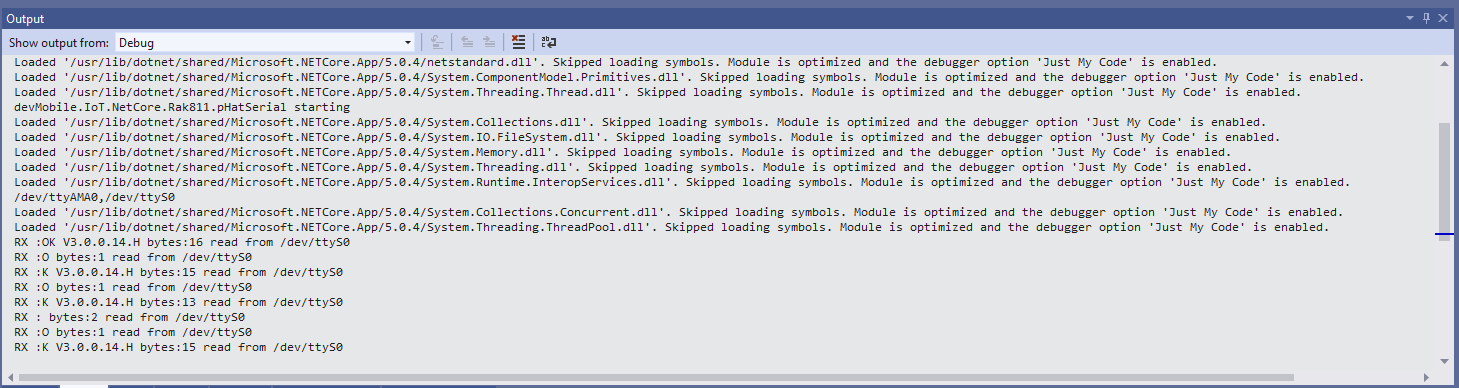
Synchronously reading characters from the RAK811 partial response
I had to add a short delay between sending the command and reading the response.
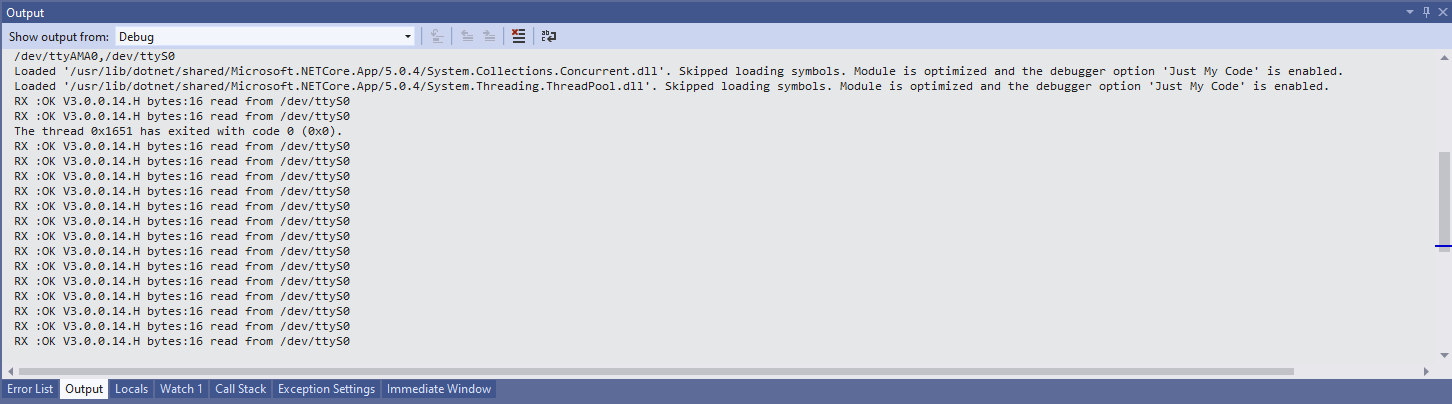
Synchronously reading characters from the RAK811 complete command responses
The asynchronous version of the application displays character(s) as they arrive so a response could be split across multiple SerialDataReceived events
The arduino-LoRa library LoRaDuplex sample is the basis for the last in this series of posts. The LoRaDuplex sample implements a basic protocol for addressed messages. The message payload starts with the destination address(byte), source address(byte), message counter(byte), payload length(byte), and then the payload(array of bytes).
LoRaDuplex
The sample code has configuration settings for the local address and destination (address).
#include <SPI.h>              // include libraries
#include <LoRa.h>

const int csPin = 10;          // LoRa radio chip select
const int resetPin = 9;       // LoRa radio reset
const int irqPin = 2;         // change for your board; must be a hardware interrupt pin

String outgoing;              // outgoing message

byte msgCount = 0;            // count of outgoing messages
byte localAddress = 0xAA;     // address of this device
byte destination = 0x0;      // destination to send to
long lastSendTime = 0;        // last send time
int interval = 2000;          // interval between sends

void setup() {
  Serial.begin(9600);                   // initialize serial
  while (!Serial);

  Serial.println("LoRa Duplex");

  // override the default CS, reset, and IRQ pins (optional)
  LoRa.setPins(csPin, resetPin, irqPin);// set CS, reset, IRQ pin

  if (!LoRa.begin(915E6)) {             // initialize ratio at 915 MHz
    Serial.println("LoRa init failed. Check your connections.");
    while (true);                       // if failed, do nothing
  }

  LoRa.enableCrc();

  Serial.println("LoRa init succeeded.");
}

void loop() {
  if (millis() - lastSendTime > interval) {
    String message = "HeLoRa World!";   // send a message
    sendMessage(message);
    Serial.println("Sending " + message);
    lastSendTime = millis();            // timestamp the message
    interval = random(2000) + 29000;    // 2-3 seconds
  }

  // parse for a packet, and call onReceive with the result:
  onReceive(LoRa.parsePacket());
}

void sendMessage(String outgoing) {
  LoRa.beginPacket();                   // start packet
  LoRa.write(destination);              // add destination address
  LoRa.write(localAddress);             // add sender address
  LoRa.write(msgCount);                 // add message ID
  LoRa.write(outgoing.length());        // add payload length
  LoRa.print(outgoing);                 // add payload
  LoRa.endPacket();                     // finish packet and send it
  msgCount++;                           // increment message ID
}

void onReceive(int packetSize) {
  if (packetSize == 0) return;          // if there's no packet, return

  // read packet header bytes:
  int recipient = LoRa.read();          // recipient address
  byte sender = LoRa.read();            // sender address
  byte incomingMsgId = LoRa.read();     // incoming msg ID
  byte incomingLength = LoRa.read();    // incoming msg length

  String incoming = "";

  while (LoRa.available()) {
    incoming += (char)LoRa.read();
  }

  if (incomingLength != incoming.length()) {   // check length for error
    Serial.println("error: message length does not match length");
    return;                             // skip rest of function
  }

  // if the recipient isn't this device or broadcast,
  if (recipient != localAddress && recipient != 0xFF) {
    Serial.println("This message is not for me.");
    return;                             // skip rest of function
  }

  // if message is for this device, or broadcast, print details:
  Serial.println("Received from: 0x" + String(sender, HEX));
  Serial.println("Sent to: 0x" + String(recipient, HEX));
  Serial.println("Message ID: " + String(incomingMsgId));
  Serial.println("Message length: " + String(incomingLength));
  Serial.println("Message: " + incoming);
  Serial.println("RSSI: " + String(LoRa.packetRssi()));
  Serial.println("Snr: " + String(LoRa.packetSnr()));
  Serial.println();
}
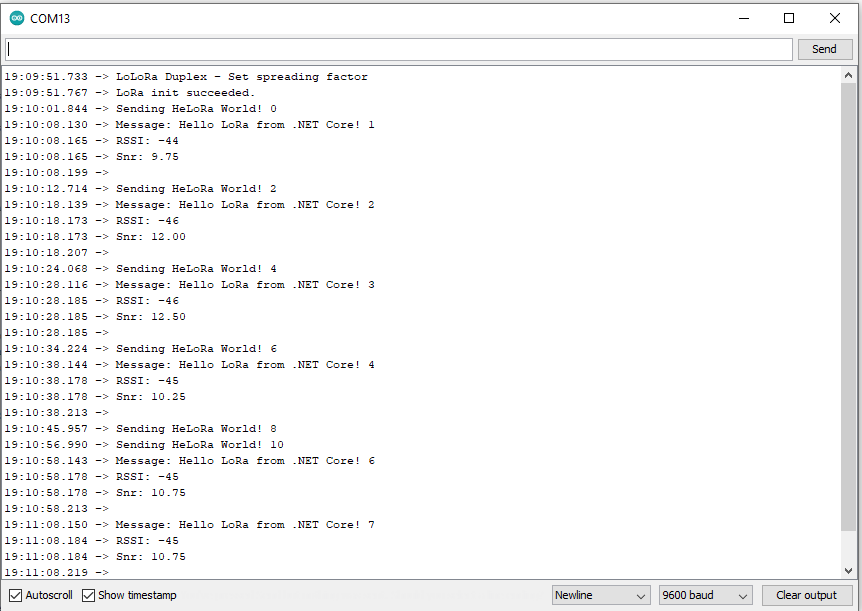
Arduino Monitor displaying information about the messages sent and received by the Duplex sample
static void Main(string[] args)
{
	int messageCount = 1;

	sX127XDevice.Initialise(
			SX127XDevice.RegOpModeMode.ReceiveContinuous,
			915000000.0,
			powerAmplifier: SX127XDevice.PowerAmplifier.PABoost,
#if LORA_SENDER // From the Arduino point of view
			rxDoneignoreIfCrcMissing: false
#endif
#if LORA_RECEIVER // From the Arduino point of view, don't actually need this as already inverted
			invertIQTX: true
#endif

#if LORA_SET_SYNCWORD
			syncWord: 0xF3,
			invertIQTX: true,
			rxDoneignoreIfCrcMissing: false
#endif
#if LORA_SET_SPREAD
			spreadingFactor: SX127XDevice.RegModemConfig2SpreadingFactor._256ChipsPerSymbol,
			invertIQTX: true,
			rxDoneignoreIfCrcMissing: false
#endif
#if LORA_SIMPLE_NODE // From the Arduino point of view
			invertIQTX: false,
			rxDoneignoreIfCrcMissing: false
#endif
#if LORA_SIMPLE_GATEWAY // From the Arduino point of view
			invertIQRX: true,
			rxDoneignoreIfCrcMissing: false
#endif
#if LORA_DUPLEX
			rxPayloadCrcOn: true
#endif
			);

#if DEBUG
	sX127XDevice.RegisterDump();
#endif

#if !LORA_RECEIVER
	sX127XDevice.OnReceive += SX127XDevice_OnReceive;
	sX127XDevice.Receive();
#endif
#if !LORA_SENDER
	sX127XDevice.OnTransmit += SX127XDevice_OnTransmit;
#endif

#if LORA_SENDER
	Thread.Sleep(-1);
#else
	Thread.Sleep(5000);
#endif

	while (true)
	{
		string messageText = "Hello LoRa from .NET Core! " + messageCount.ToString();

#if LORA_DUPLEX
		byte[] messageBytes = new byte[messageText.Length+4];

		messageBytes[0] = 0xaa;
		messageBytes[1] = 0x00;
		messageBytes[2] = (byte)messageCount;
		messageBytes[3] = (byte)messageText.Length;

		Array.Copy(UTF8Encoding.UTF8.GetBytes(messageText), 0, messageBytes, 4, messageBytes[3]);

		Console.WriteLine($"{DateTime.Now:HH:mm:ss}-TX to 0x{messageBytes[0]:X2} from 0x{messageBytes[1]:X2} count {messageBytes[2]} length {messageBytes[3]} \"{messageText}\"");
#else
		byte[] messageBytes = UTF8Encoding.UTF8.GetBytes(messageText);

		Console.WriteLine($"{DateTime.Now:HH:mm:ss}- Length {messageBytes.Length} \"{messageText}\"");
#endif

		messageCount += 1;

		sX127XDevice.Send(messageBytes);

		Thread.Sleep(10000);
	}
}

private static void SX127XDevice_OnReceive(object sender, SX127XDevice.OnDataReceivedEventArgs e)
{
	string messageText;

#if LORA_DUPLEX
	if ((e.Data[0] != 0x00) && (e.Data[0] != 0xFF))
	{
#if DEBUG
		Console.WriteLine($"{DateTime.UtcNow:hh:mm:ss}-RX to 0x{e.Data[0]:X2} from 0x{e.Data[1]:X2} invalid address");
#endif
		return;
	}

	// check payload not to long/short
	if  ((e.Data[3] + 4) != e.Data.Length)
	{
		Console.WriteLine($"{DateTime.UtcNow:hh:mm:ss}-RX Invalid payload");

		return;
	}

	try
	{
		messageText = UTF8Encoding.UTF8.GetString(e.Data, 4, e.Data[3]);

		Console.WriteLine($"{DateTime.Now:HH:mm:ss}-RX to 0x{e.Data[0]:X2} from 0x{e.Data[1]:X2} count {e.Data[2]} length {e.Data[3]} \"{messageText}\" snr {e.PacketSnr:0.0} packet rssi {e.PacketRssi}dBm rssi {e.Rssi}dBm ");
	}
	catch (Exception ex)
	{
		Console.WriteLine(ex.Message);
	}
#else
	try
	{
		messageText = UTF8Encoding.UTF8.GetString(e.Data);

		Console.WriteLine($"{DateTime.Now:HH:mm:ss}-RX length {e.Data.Length} \"{messageText}\" snr {e.PacketSnr:0.0} packet rssi {e.PacketRssi}dBm rssi {e.Rssi}dBm ");
	}
	catch (Exception ex)
	{
		Console.WriteLine(ex.Message);
	}
#endif
}
The inbound messages have to have a valid Cyclic Redundancy Check(CRC) and I ignore messages with an invalid payload length. The message protocol is insecure (but fine for demos) as the messages are sent as “plain text”, and the message headers/payload can be tampered with.
Summary
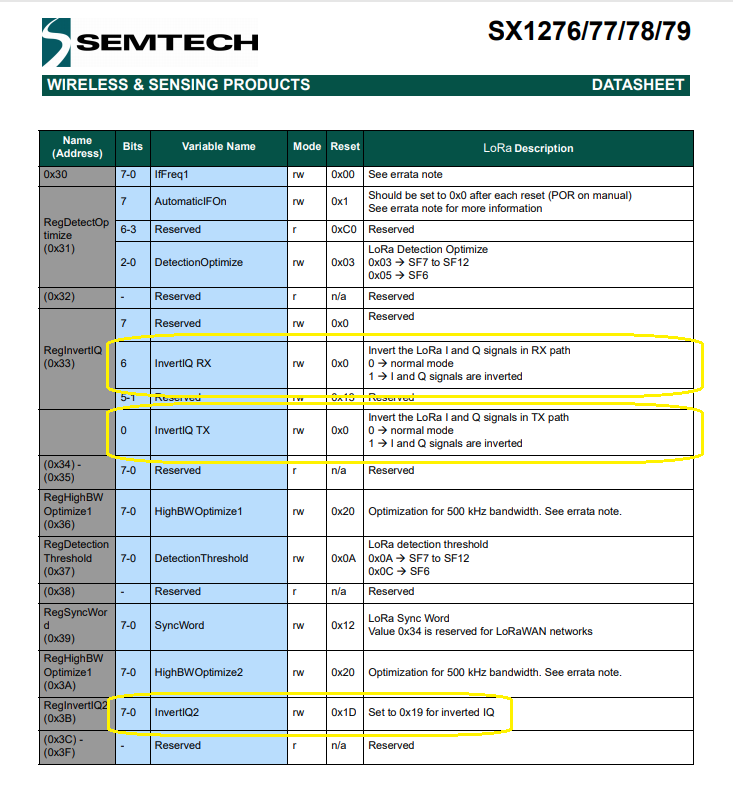
While testing the LoRaDuplex sample I found a problem with how my code managed the invertIQRX & invertIQTX flags in RegInvertIQ. I noticed the even though I was setting the InvertIQRX(bit6) and invertIQTX(bit0) flags correctly messages weren’t getting delivered.
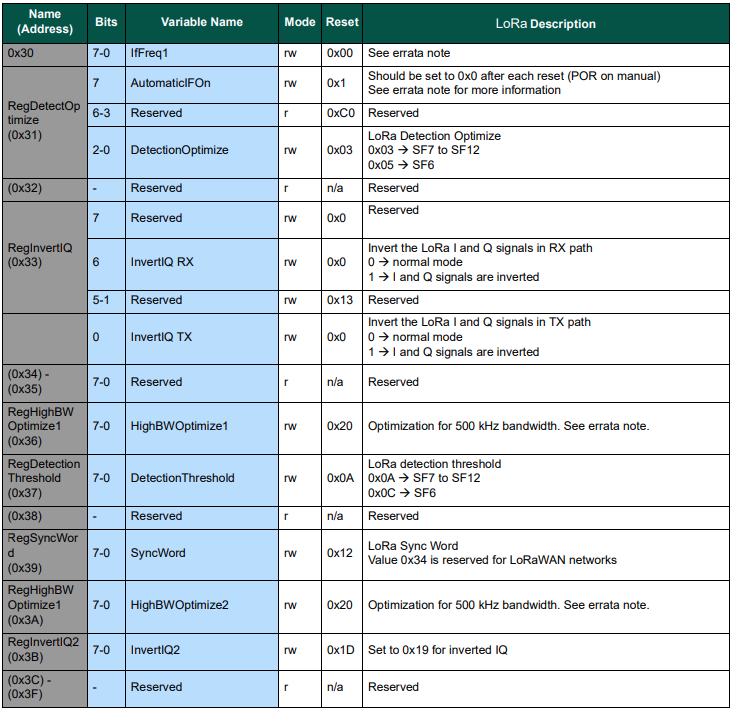
Semtech SX127X data sheet RegInvertQ and RegInvertQ2 documetnation
After looking at my code I realised I wasn’t configuring the RegInvertIQ properly because bits 1-5 were getting set to 0x0 (initially I had byte regInvertIQValue = 0) rather than 0x13(regInvertIQValue = RegInvertIdDefault)
int messageCount = 1;

sX127XDevice.Initialise(
		SX127XDevice.RegOpModeMode.ReceiveContinuous,
		915000000.0,
		powerAmplifier: SX127XDevice.PowerAmplifier.PABoost,
		// outputPower: 5, outputPower: 20, outputPower:23,
		//powerAmplifier: SX127XDevice.PowerAmplifier.Rfo,
		//outputPower:-1, outputPower: 14,
#if LORA_SENDER // From the Arduino point of view
		rxDoneignoreIfCrcMissing: false
#endif
#if LORA_RECEIVER // From the Arduino point of view, don't actually need this as already inverted
		invertIQTX: true
#endif

#if LORA_SET_SYNCWORD
		syncWord: 0xF3,
		invertIQTX: true,
		rxDoneignoreIfCrcMissing: false
#endif
#if LORA_SET_SPREAD
		spreadingFactor: SX127XDevice.RegModemConfig2SpreadingFactor._256ChipsPerSymbol,
		invertIQTX: true,
		rxDoneignoreIfCrcMissing: false
#endif
#if LORA_SIMPLE_NODE // From the Arduino point of view
		invertIQTX: false,
		rxDoneignoreIfCrcMissing: false
#endif
#if LORA_SIMPLE_GATEWAY // From the Arduino point of view
		invertIQRX: true,
		rxDoneignoreIfCrcMissing: false
#endif
		);

#if DEBUG
		sX127XDevice.RegisterDump();
#endif

#if !LORA_RECEIVER
		sX127XDevice.OnReceive += SX127XDevice_OnReceive;
		sX127XDevice.Receive();
#endif
#if !LORA_SENDER
		sX127XDevice.OnTransmit += SX127XDevice_OnTransmit;
#endif

#if LORA_SENDER
		Thread.Sleep(-1);
#else
		Thread.Sleep(5000);
#endif

		while (true)
		{
			string messageText = "Hello LoRa from .NET Core! " + messageCount.ToString();

			byte[] messageBytes = UTF8Encoding.UTF8.GetBytes(messageText);

			Console.WriteLine($"{DateTime.Now:HH:mm:ss}- Length {messageBytes.Length} \"{messageText}\"");

			messageCount += 1;

			sX127XDevice.Send(messageBytes);

			Thread.Sleep(10000);
		}
	}
Summary
While testing the LoRaReceiver sample I found a problem with how my code managed the transmit power by accidentally commenting out the “paBoost: true” parameter of the initialise method. When I did this the Seeeduino V4.2 and Dragino Shield stopped receiving messages.
I had assumed a user could configure the the output power using the initialise method but that was difficult/possible. After some digging I found that I needed to use RegPAConfigPADac and PABoost (I need to find a device which uses RFO for testing). So I removed several of the configuration parameters from the Intialise method and replaced them with one called outputPower. I then re-read the SX127X data sheet and had a look at some other libraries.
void RH_RF95::setTxPower(int8_t power, bool useRFO)
{
    // Sigh, different behaviours depending on whther the module use PA_BOOST or the RFO pin
    // for the transmitter output
    if (useRFO)
    {
	if (power > 14)
	    power = 14;
	if (power < -1)
	    power = -1;
	spiWrite(RH_RF95_REG_09_PA_CONFIG, RH_RF95_MAX_POWER | (power + 1));
    }
    else
    {
	if (power > 23)
	    power = 23;
	if (power < 5)
	    power = 5;

	// For RH_RF95_PA_DAC_ENABLE, manual says '+20dBm on PA_BOOST when OutputPower=0xf'
	// RH_RF95_PA_DAC_ENABLE actually adds about 3dBm to all power levels. We will us it
	// for 21, 22 and 23dBm
	if (power > 20)
	{
	    spiWrite(RH_RF95_REG_4D_PA_DAC, RH_RF95_PA_DAC_ENABLE);
	    power -= 3;
	}
	else
	{
	    spiWrite(RH_RF95_REG_4D_PA_DAC, RH_RF95_PA_DAC_DISABLE);
	}

	// RFM95/96/97/98 does not have RFO pins connected to anything. Only PA_BOOST
	// pin is connected, so must use PA_BOOST
	// Pout = 2 + OutputPower.
	// The documentation is pretty confusing on this topic: PaSelect says the max power is 20dBm,
	// but OutputPower claims it would be 17dBm.
	// My measurements show 20dBm is correct
	spiWrite(RH_RF95_REG_09_PA_CONFIG, RH_RF95_PA_SELECT | (power-5));
    }
}
The LoRa Shield Arduino library has two methods setPower(char p) and setPowerNum(uint8_t pow)
/*
 Function: Sets the signal power indicated as input to the module.
 Returns: Integer that determines if there has been any error
   state = 2  --> The command has not been executed
   state = 1  --> There has been an error while executing the command
   state = 0  --> The command has been executed with no errors
   state = -1 --> Forbidden command for this protocol
 Parameters:
   pow: power option to set in configuration. The input value range is from
   0 to 14 dBm.
*/
int8_t SX1278::setPowerNum(uint8_t pow)
{
  byte st0;
  int8_t state = 2;
  byte value = 0x00;

  #if (SX1278_debug_mode > 1)
	  Serial.println();
	  Serial.println(F("Starting 'setPower'"));
  #endif

  st0 = readRegister(REG_OP_MODE);	  // Save the previous status
  if( _modem == LORA )
  { // LoRa Stdby mode to write in registers
	  writeRegister(REG_OP_MODE, LORA_STANDBY_MODE);
  }
  else
  { // FSK Stdby mode to write in registers
	  writeRegister(REG_OP_MODE, FSK_STANDBY_MODE);
  }

  if ( (pow >= 2) && (pow <= 20) )
  { // Pout= 17-(15-OutputPower) = OutputPower+2
	  if ( pow <= 17 ) {
		writeRegister(REG_PA_DAC, 0x84);
	  	pow = pow - 2;
	  } else { // Power > 17dbm -> Power = 20dbm
		writeRegister(REG_PA_DAC, 0x87);
		pow = 15;
	  }
	  _power = pow;
  }
  else
  {
	  state = -1;
	  #if (SX1278_debug_mode > 1)
		  Serial.println(F("## Power value is not valid ##"));
		  Serial.println();
	  #endif
  }

  writeRegister(REG_PA_CONFIG, _power);	// Setting output power value
  value = readRegister(REG_PA_CONFIG);

  if( value == _power )
  {
	  state = 0;
	  #if (SX1278_debug_mode > 1)
		  Serial.println(F("## Output power has been successfully set ##"));
		  Serial.println();
	  #endif
  }
  else
  {
	  state = 1;
  }

  writeRegister(REG_OP_MODE, st0);	// Getting back to previous status
  return state;
}
The SEMTECH library(V2.1.0) manages sleeping the device, reading the existing configuration and updating it as required which was a bit more functionality that I wanted.
All the of the examples I looked at were different and some had manual tweaks, others I have not included were just wrong. I have based my beta version on a hybrid of the Arduino-LoRa, RadioHead and Semtech libraries. I need to test my code and confirm that I have the limits and offsets correct for the PABoost and RFO modes.
// RegPaDac more power
[Flags]
public enum RegPaDac
{
	Normal = 0b01010100,
	Boost = 0b01010111,
}
private const byte RegPaDacPABoostThreshold = 20;
// Validate the OutputPower
if (powerAmplifier == PowerAmplifier.Rfo)
{
	if ((outputPower < OutputPowerRfoMin) || (outputPower > OutputPowerRfoMax))
	{
		throw new ArgumentException($"outputPower must be between {OutputPowerRfoMin} and {OutputPowerRfoMax}", nameof(outputPower));
	}
}
if (powerAmplifier == PowerAmplifier.PABoost)
{
	if ((outputPower < OutputPowerPABoostMin) || (outputPower > OutputPowerPABoostMax))
	{
		throw new ArgumentException($"outputPower must be between {OutputPowerPABoostMin} and {OutputPowerPABoostMax}", nameof(outputPower));
	}
}

if (( powerAmplifier != PowerAmplifierDefault) || (outputPower != OutputPowerDefault))
{
	byte regPAConfigValue = RegPAConfigMaxPowerMax;

	if (powerAmplifier == PowerAmplifier.Rfo)
	{
		regPAConfigValue |= RegPAConfigPASelectRfo;

		regPAConfigValue |= (byte)(outputPower + 1);

		this.WriteByte((byte)Registers.RegPAConfig, regPAConfigValue);
	}

	if (powerAmplifier == PowerAmplifier.PABoost)
	{
		regPAConfigValue |= RegPAConfigPASelectPABoost;

		if (outputPower > RegPaDacPABoostThreshold)
		{
			this.WriteByte((byte)Registers.RegPaDac, (byte)RegPaDac.Boost);

			regPAConfigValue |= (byte)(outputPower - 8);

			this.WriteByte((byte)Registers.RegPAConfig, regPAConfigValue);
		}
		else
		{
			this.WriteByte((byte)Registers.RegPaDac, (byte)RegPaDac.Normal);

			regPAConfigValue |= (byte)(outputPower - 5);

			this.WriteByte((byte)Registers.RegPAConfig, regPAConfigValue);
		}
	}
}
The arduino-LoRa library comes with a number of samples showing how to use its functionality. The LoRaSender and LoRaReceiver samples show the bare minimum of code required to send and receive messages.
LoRaSender
This sample uses all default settings except for frequency
static void Main(string[] args)
{
	int messageCount = 1;

	sX127XDevice.Initialise(
			SX127XDevice.RegOpModeMode.ReceiveContinuous,
			915000000.0,
			powerAmplifier: SX127XDevice.PowerAmplifier.PABoost,
#if LORA_SENDER // From the Arduino point of view
			rxDoneignoreIfCrcMissing: false
#endif
#if LORA_RECEIVER // From the Arduino point of view, don't actually need this as already inverted
			invertIQTX: true
#endif

#if LORA_SET_SYNCWORD
			syncWord: 0xF3,
			invertIQTX: true,
			rxDoneignoreIfCrcMissing: false
#endif
#if LORA_SET_SPREAD
			spreadingFactor: SX127XDevice.RegModemConfig2SpreadingFactor._256ChipsPerSymbol,
			invertIQTX: true,
			rxDoneignoreIfCrcMissing: false
#endif
	);

#if DEBUG
	sX127XDevice.RegisterDump();
#endif

#if LORA_SENDER
	sX127XDevice.OnReceive += SX127XDevice_OnReceive;
	sX127XDevice.Receive();
#endif
#if LORA_RECEIVER
	sX127XDevice.OnTransmit += SX127XDevice_OnTransmit;
#endif

#if LORA_SENDER
	Thread.Sleep(-1);
#else
	Thread.Sleep(5000);
#endif

	while (true)
	{
		string messageText = "Hello LoRa from .NET Core! " + messageCount.ToString();

		byte[] messageBytes = UTF8Encoding.UTF8.GetBytes(messageText);

		Console.WriteLine($"{DateTime.Now:HH:mm:ss}- Length {messageBytes.Length} \"{messageText}\"");

		sX127XDevice.Send(messageBytes);

		messageCount += 1;

		Thread.Sleep(10000);
	}
}
Summary
While testing the LoRaReceiver sample I found a problem with how my code managed the RegOpMode register LoRa status value. In previous versions of the code I used RegOpModeModeDefault to manage status when the ProcessTxDone(byte IrqFlags) method completed and Receive() was called.
I had assumed that that the device would always be set with SetMode(RegOpModeModeDefault) but RegOpModeModeDefault was always RegOpModeMode.Sleep.
The arduino-LoRa library comes with a number of samples showing how to configure a SX127X device. The LoRaSetSpread sample sets the RegModemtConfig2 (masking out previous CodingRate and ImplicitHeaderModeOn with 0xFF) to configure spreading Factor (bits 4-7) to 8 which is 256 chips/symbol.
..
void setup() {
  Serial.begin(9600);                   // initialize serial
  while (!Serial);

  Serial.println("LoRa Duplex - Set spreading factor");

  // override the default CS, reset, and IRQ pins (optional)
  LoRa.setPins(csPin, resetPin, irqPin); // set CS, reset, IRQ pin

  if (!LoRa.begin(915E6)) {             // initialize ratio at 915 MHz
    Serial.println("LoRa init failed. Check your connections.");
    while (true);                       // if failed, do nothing
  }

  LoRa.setSpreadingFactor(8);           // ranges from 6-12,default 7 see API docs
  Serial.println("LoRa init succeeded.");
}
In my library I use an enumeration to represent the different spreading factors to make configuration easier for humans. (the _ prefix is due to the C# language syntax)
The SX127X.NetCore only sets the spreadingFactor, symbolTimeout, txContinuousMode, or rxPayloadCrcOn registers if any of them is different from their defaults.
// Set regModemConfig2 if any of the settings not defaults
if ((spreadingFactor != RegModemConfig2SpreadingFactorDefault) || (txContinuousMode != false) | (rxPayloadCrcOn != false) || (symbolTimeout != SymbolTimeoutDefault))
{
	byte RegModemConfig2Value = (byte)spreadingFactor;
	if (txContinuousMode)
	{
		RegModemConfig2Value |= RegModemConfig2TxContinuousModeOn;
	}
	if (rxPayloadCrcOn)
	{
		RegModemConfig2Value |= RegModemConfig2RxPayloadCrcOn;
	}
	// Get the MSB of SymbolTimeout
	byte[] symbolTimeoutBytes = BitConverter.GetBytes(symbolTimeout);

	// Only the zeroth & second bit of byte matter
	symbolTimeoutBytes[1] &= SymbolTimeoutMsbMask;
	RegModemConfig2Value |= symbolTimeoutBytes[1];
	this.WriteByte((byte)Registers.RegModemConfig2, RegModemConfig2Value);
}
I modified the SX127X.NetCoreSX127XLoRaDeviceClient to change the SpreadingFactor to _256ChipsPerSymbol (0b10000000) to match the Arduino client.
Register dump
Register 0x01 - Value 0X85 - Bits 10000101
Register 0x02 - Value 0X1a - Bits 00011010
Register 0x03 - Value 0X0b - Bits 00001011
Register 0x04 - Value 0X00 - Bits 00000000
Register 0x05 - Value 0X52 - Bits 01010010
Register 0x06 - Value 0Xe4 - Bits 11100100
Register 0x07 - Value 0Xc0 - Bits 11000000
Register 0x08 - Value 0X00 - Bits 00000000
Register 0x09 - Value 0Xcf - Bits 11001111
Register 0x0a - Value 0X09 - Bits 00001001
Register 0x0b - Value 0X2b - Bits 00101011
Register 0x0c - Value 0X20 - Bits 00100000
Register 0x0d - Value 0X00 - Bits 00000000
Register 0x0e - Value 0X80 - Bits 10000000
Register 0x0f - Value 0X00 - Bits 00000000
Register 0x10 - Value 0X00 - Bits 00000000
Register 0x11 - Value 0X00 - Bits 00000000
Register 0x12 - Value 0X00 - Bits 00000000
Register 0x13 - Value 0X00 - Bits 00000000
Register 0x14 - Value 0X00 - Bits 00000000
Register 0x15 - Value 0X00 - Bits 00000000
Register 0x16 - Value 0X00 - Bits 00000000
Register 0x17 - Value 0X00 - Bits 00000000
Register 0x18 - Value 0X04 - Bits 00000100
Register 0x19 - Value 0X00 - Bits 00000000
Register 0x1a - Value 0X00 - Bits 00000000
Register 0x1b - Value 0X3d - Bits 00111101
Register 0x1c - Value 0X00 - Bits 00000000
Register 0x1d - Value 0X72 - Bits 01110010
Register 0x1e - Value 0X80 - Bits 10000000
Register 0x1f - Value 0X64 - Bits 01100100
Register 0x20 - Value 0X00 - Bits 00000000
Register 0x21 - Value 0X08 - Bits 00001000
Register 0x22 - Value 0X01 - Bits 00000001
Register 0x23 - Value 0Xff - Bits 11111111
Register 0x24 - Value 0X00 - Bits 00000000
Register 0x25 - Value 0X00 - Bits 00000000
Register 0x26 - Value 0X04 - Bits 00000100
Register 0x27 - Value 0X00 - Bits 00000000
Register 0x28 - Value 0X00 - Bits 00000000
Register 0x29 - Value 0X00 - Bits 00000000
Register 0x2a - Value 0X00 - Bits 00000000
Register 0x2b - Value 0X00 - Bits 00000000
Register 0x2c - Value 0X0d - Bits 00001101
Register 0x2d - Value 0X50 - Bits 01010000
Register 0x2e - Value 0X14 - Bits 00010100
Register 0x2f - Value 0X45 - Bits 01000101
Register 0x30 - Value 0X55 - Bits 01010101
Register 0x31 - Value 0Xc3 - Bits 11000011
Register 0x32 - Value 0X05 - Bits 00000101
Register 0x33 - Value 0X37 - Bits 00110111
Register 0x34 - Value 0X1c - Bits 00011100
Register 0x35 - Value 0X0a - Bits 00001010
Register 0x36 - Value 0X03 - Bits 00000011
Register 0x37 - Value 0X0a - Bits 00001010
Register 0x38 - Value 0X42 - Bits 01000010
Register 0x39 - Value 0X12 - Bits 00010010
Register 0x3a - Value 0X49 - Bits 01001001
Register 0x3b - Value 0X19 - Bits 00011001
Register 0x3c - Value 0X00 - Bits 00000000
Register 0x3d - Value 0Xaf - Bits 10101111
Register 0x3e - Value 0X00 - Bits 00000000
Register 0x3f - Value 0X00 - Bits 00000000
Register 0x40 - Value 0X00 - Bits 00000000
Register 0x41 - Value 0X00 - Bits 00000000
Register 0x42 - Value 0X12 - Bits 00010010

Loaded '/usr/lib/dotnet/shared/Microsoft.NETCore.App/5.0.4/System.Text.Encoding.Extensions.dll'. Skipped loading symbols. Module is optimized and the debugger option 'Just My Code' is enabled.
Loaded '/usr/lib/dotnet/shared/Microsoft.NETCore.App/5.0.4/Microsoft.Win32.Primitives.dll'. Skipped loading symbols. Module is optimized and the debugger option 'Just My Code' is enabled.
10:04:22-RX PacketSnr 11.8 Packet RSSI -45dBm RSSI -109dBm 15 byte message "HeLoRa World! 2"
10:04:31-RX PacketSnr 11.5 Packet RSSI -45dBm RSSI -104dBm 15 byte message "HeLoRa World! 4"
10:04:32-TX To 0x48 From 0x65 Count 108 28 bytes message Hello LoRa from .NET Core! 1
10:04:32-TX Done
10:04:41-RX PacketSnr 12.0 Packet RSSI -45dBm RSSI -104dBm 15 byte message "HeLoRa World! 6"
10:04:42-TX To 0x48 From 0x65 Count 108 28 bytes message Hello LoRa from .NET Core! 2
10:04:42-TX Done
This matched the Arduino serial monitor output.
Summary
The LoRaSetSpread sample illustrates how the SX127X.NetCore library modifies register(s) only if a value specified in the Initialise method parameter list is different from the default.
The arduino-LoRa library comes with a number of samples showing how to configure a SX127X device. The LoRaSetSyncWord sample sets the RegSyncWord register to 0x53
SX127X registers including RegSyncWord
...
void setup() {
  Serial.begin(9600);                   // initialize serial
  while (!Serial);

  Serial.println("LoRa Duplex - Set sync word");

  // override the default CS, reset, and IRQ pins (optional)
  LoRa.setPins(csPin, resetPin, irqPin);// set CS, reset, IRQ pin

  if (!LoRa.begin(915E6)) {             // initialize ratio at 915 MHz
    Serial.println("LoRa init failed. Check your connections.");
    while (true);                       // if failed, do nothing
  }

  LoRa.setSyncWord(0xF3);           // ranges from 0-0xFF, default 0x34, see API docs
  Serial.println("LoRa init succeeded.");
}
...
In the Visual Studio output window I could see that RegSyncWord(0x39) was set to 0x53.
...
Loaded '/usr/lib/dotnet/shared/Microsoft.NETCore.App/5.0.4/System.Memory.dll'. Skipped loading symbols. Module is optimized and the debugger option 'Just My Code' is enabled.
Register dump
Register 0x01 - Value 0X85 - Bits 10000101
Register 0x02 - Value 0X1a - Bits 00011010
Register 0x03 - Value 0X0b - Bits 00001011
Register 0x04 - Value 0X00 - Bits 00000000
Register 0x05 - Value 0X52 - Bits 01010010
Register 0x06 - Value 0Xe4 - Bits 11100100
Register 0x07 - Value 0Xc0 - Bits 11000000
Register 0x08 - Value 0X00 - Bits 00000000
Register 0x09 - Value 0Xcf - Bits 11001111
Register 0x0a - Value 0X09 - Bits 00001001
Register 0x0b - Value 0X2b - Bits 00101011
Register 0x0c - Value 0X20 - Bits 00100000
Register 0x0d - Value 0X00 - Bits 00000000
Register 0x0e - Value 0X80 - Bits 10000000
Register 0x0f - Value 0X00 - Bits 00000000
Register 0x10 - Value 0X00 - Bits 00000000
Register 0x11 - Value 0X00 - Bits 00000000
Register 0x12 - Value 0X00 - Bits 00000000
Register 0x13 - Value 0X00 - Bits 00000000
Register 0x14 - Value 0X00 - Bits 00000000
Register 0x15 - Value 0X00 - Bits 00000000
Register 0x16 - Value 0X00 - Bits 00000000
Register 0x17 - Value 0X00 - Bits 00000000
Register 0x18 - Value 0X04 - Bits 00000100
Register 0x19 - Value 0X00 - Bits 00000000
Register 0x1a - Value 0X00 - Bits 00000000
Register 0x1b - Value 0X39 - Bits 00111001
Register 0x1c - Value 0X00 - Bits 00000000
Register 0x1d - Value 0X72 - Bits 01110010
Register 0x1e - Value 0X74 - Bits 01110100
Register 0x1f - Value 0X64 - Bits 01100100
Register 0x20 - Value 0X00 - Bits 00000000
Register 0x21 - Value 0X08 - Bits 00001000
Register 0x22 - Value 0X01 - Bits 00000001
Register 0x23 - Value 0Xff - Bits 11111111
Register 0x24 - Value 0X00 - Bits 00000000
Register 0x25 - Value 0X00 - Bits 00000000
Register 0x26 - Value 0X04 - Bits 00000100
Register 0x27 - Value 0X00 - Bits 00000000
Register 0x28 - Value 0X00 - Bits 00000000
Register 0x29 - Value 0X00 - Bits 00000000
Register 0x2a - Value 0X00 - Bits 00000000
Register 0x2b - Value 0X00 - Bits 00000000
Register 0x2c - Value 0X1a - Bits 00011010
Register 0x2d - Value 0X50 - Bits 01010000
Register 0x2e - Value 0X14 - Bits 00010100
Register 0x2f - Value 0X45 - Bits 01000101
Register 0x30 - Value 0X55 - Bits 01010101
Register 0x31 - Value 0Xc3 - Bits 11000011
Register 0x32 - Value 0X05 - Bits 00000101
Register 0x33 - Value 0X37 - Bits 00110111
Register 0x34 - Value 0X1c - Bits 00011100
Register 0x35 - Value 0X0a - Bits 00001010
Register 0x36 - Value 0X03 - Bits 00000011
Register 0x37 - Value 0X0a - Bits 00001010
Register 0x38 - Value 0X42 - Bits 01000010
Register 0x39 - Value 0X53 - Bits 01010011
Register 0x3a - Value 0X49 - Bits 01001001
Register 0x3b - Value 0X19 - Bits 00011001
Register 0x3c - Value 0X00 - Bits 00000000
Register 0x3d - Value 0Xaf - Bits 10101111
Register 0x3e - Value 0X00 - Bits 00000000
Register 0x3f - Value 0X00 - Bits 00000000
Register 0x40 - Value 0X00 - Bits 00000000
Register 0x41 - Value 0X00 - Bits 00000000
Register 0x42 - Value 0X12 - Bits 00010010

Loaded '/usr/lib/dotnet/shared/Microsoft.NETCore.App/5.0.4/System.Text.Encoding.Extensions.dll'. Skipped loading symbols. Module is optimized and the debugger option 'Just My Code' is enabled.
Loaded '/usr/lib/dotnet/shared/Microsoft.NETCore.App/5.0.4/Microsoft.Win32.Primitives.dll'. Skipped loading symbols. Module is optimized and the debugger option 'Just My Code' is enabled.
18:22:42-RX PacketSnr 10.0 Packet RSSI -48dBm RSSI -104dBm 15 byte message "HeLoRa World! 0"
Sending 28 bytes message Hello LoRa from .NET Core! 1
18:22:42-TX Done
Sending 28 bytes message Hello LoRa from .NET Core! 2
18:22:52-TX Done
18:22:53-RX PacketSnr 9.8 Packet RSSI -46dBm RSSI -103dBm 15 byte message "HeLoRa World! 2"
Sending 28 bytes message Hello LoRa from .NET Core! 3
18:23:02-TX Done
18:23:04-RX PacketSnr 10.0 Packet RSSI -46dBm RSSI -104dBm 15 byte message "HeLoRa World! 4"
Sending 28 bytes message Hello LoRa from .NET Core! 4
18:23:12-TX Done
18:23:14-RX PacketSnr 9.5 Packet RSSI -46dBm RSSI -104dBm 15 byte message "HeLoRa World! 6"
Sending 28 bytes message Hello LoRa from .NET Core! 5
18:23:22-TX Done
18:23:26-RX PacketSnr 10.0 Packet RSSI -47dBm RSSI -105dBm 15 byte message "HeLoRa World! 8"
Sending 28 bytes message Hello LoRa from .NET Core! 6
18:23:32-TX Done
18:23:37-RX PacketSnr 10.0 Packet RSSI -48dBm RSSI -104dBm 16 byte message "HeLoRa World! 10"
Sending 28 bytes message Hello LoRa from .NET Core! 7
18:23:42-TX Done
18:23:48-RX PacketSnr 9.8 Packet RSSI -48dBm RSSI -104dBm 16 byte message "HeLoRa World! 12"
Sending 28 bytes message Hello LoRa from .NET Core! 8
18:23:52-TX Done
18:24:00-RX PacketSnr 12.5 Packet RSSI -48dBm RSSI -104dBm 16 byte message "HeLoRa World! 14"
Sending 28 bytes message Hello LoRa from .NET Core! 9
18:24:02-TX Done
18:24:11-RX PacketSnr 10.0 Packet RSSI -47dBm RSSI -104dBm 16 byte message "HeLoRa World! 16"
Sending 29 bytes message Hello LoRa from .NET Core! 10
18:24:12-TX Done
Sending 29 bytes message Hello LoRa from .NET Core! 11
18:24:22-TX Done
18:24:23-RX PacketSnr 9.3 Packet RSSI -49dBm RSSI -104dBm 16 byte message "HeLoRa World! 18"
Sending 29 bytes message Hello LoRa from .NET Core! 12
18:24:32-TX Done
18:24:34-RX PacketSnr 9.5 Packet RSSI -49dBm RSSI -104dBm 16 byte message "HeLoRa World! 20"
Sending 29 bytes message Hello LoRa from .NET Core! 13
18:24:42-TX Done
18:24:45-RX PacketSnr 9.3 Packet RSSI -49dBm RSSI -104dBm 16 byte message "HeLoRa World! 22"
Sending 29 bytes message Hello LoRa from .NET Core! 14
18:24:52-TX Done
The thread 0x74ab has exited with code 0 (0x0).
18:24:55-RX PacketSnr 9.5 Packet RSSI -49dBm RSSI -103dBm 16 byte message "HeLoRa World! 24"
The program 'dotnet' has exited with code 0 (0x0).
This matched the Arduino serial monitor output.
Arduino-Lora LoRaSetSyncWord serial monitor
Summary
Usually the SX127X.NetCore library modifies register(s) only if a value specified in the Initialise method parameter list is different from the default.
Some values span multiple registers e.g. frequency uses RegFrMsb, RegFrMid & RegFrLsb, and multiple options can be specified in a single register e.g. RegOpMode which complicates the code.
This was a huge (and tedious) task. I went thru the SX127X datasheet and created enumerations, masks, flags, defaults, and constants for most of the LoRa mode configuration options. The list of LoRa registers with a brief overview of each one starts on page 108 and finishes on page 115 of the datasheet.
SX127X data sheet page 108 Register 0x0 to 0x07
The registers enumeration is approximately fifty lines long, some of which I have ignored because I don’t need them or I can’t figure out what they do.
For each register I worked out from the documentation what it was used for, did I need to implement it and if so how. For example RegOpMode controls the operating mode of the module and has a state machine as well
Some of the documentation is incredibly detailed but has little impact on my use case. (If someone needs this sort of functionality I will add it)
Some operations have state machines which add even more implementation complexity
State transition diagram for transmitting messages in LoRa mode
In my library I reset the SX127X then configure any “non-default” settings as the application starts. My applications ten to change only a limited number of registers once they are running. For any register(s) that can be changed while the application is running I have a “shadow” variable for each of them so I don’t have to read the register before writing it.
There are a huge number of configuration options for an SX127X device so my library exposes the ones required for common use cases. If a scenario is not supported the ReadByte, ReadBytes, ReadWordMsbLsb, WriteByte, WriteBytes, WriteWordMsbLsb and RegisterDump methods are available. But, beware the SX127X is complex to configure and operate.
In RegInvertIQ the sixth bit is the RX flag and the zeroth bit is the TX flag, in the enable method the zeroth bit was not set(even number) and in the disable method it was set (odd number). The enable and disable method were “inverting” both the TX and RX lines.
When I did a RegisterDump the initial value of RegInvertIQ was 0x27 which is a bit odd as datasheet indicated the default value of the zeroth bit is 0.
My code supports the toggling of the RegInvertIQ “InvertIQ RX” and “InvertIQ TX” flags independently so users of the SX127X.NetCore library will need to pay attention to the configuration settings of the libraries used on other client devices.






 devMobile's blog