Random wanderings through Microsoft Azure esp. PaaS plumbing, the IoT bits, AI on Micro controllers, AI on Edge Devices, .NET nanoFramework, .NET Core on *nix and ML.NET+ONNX
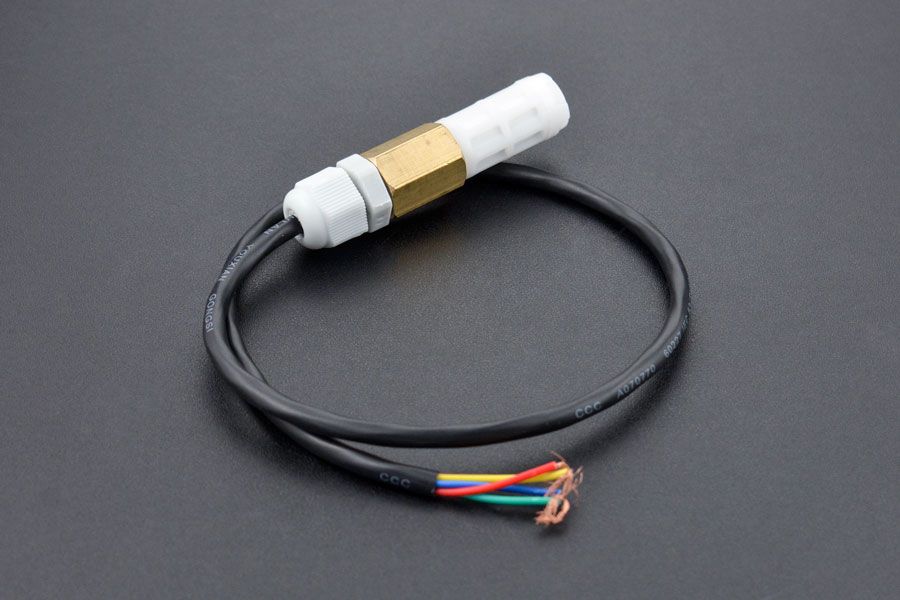
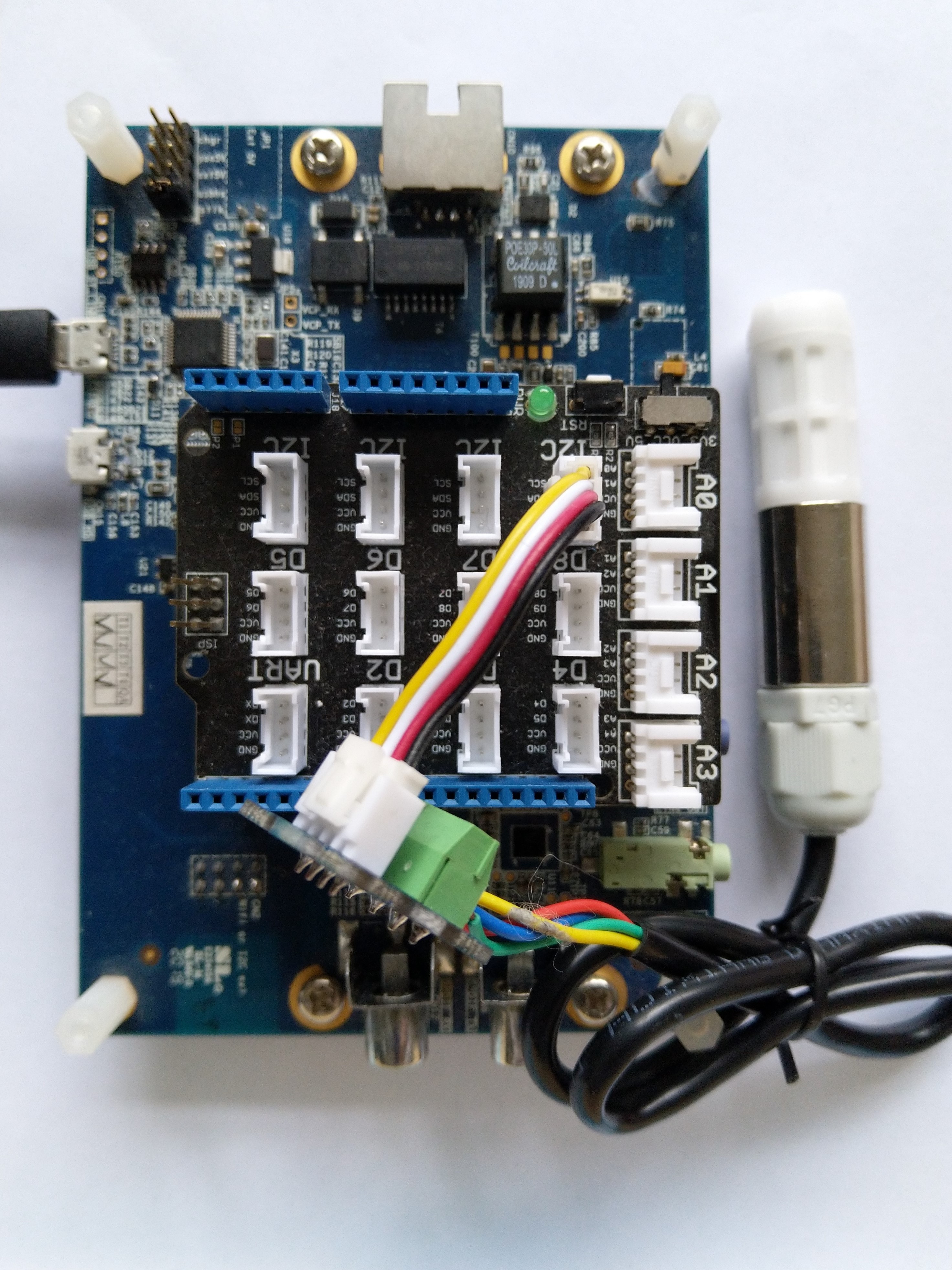
The SH20DeviceI2C application has lots of magic numbers from the SHT20 datasheet and was just a tool for exploring how the sensor works.
 public static void Main()
{
    I2cConnectionSettings i2cConnectionSettings = new(1, 0x40);

    // i2cDevice.Dispose in final program
    I2cDevice i2cDevice = I2cDevice.Create(i2cConnectionSettings);

    while (true)
    {
        byte[] readBuffer = new byte[3] { 0, 0, 0 };

        // First temperature
        i2cDevice.WriteByte(0xF3);

        //Thread.Sleep(50); // no go -46.8
        //Thread.Sleep(60);
        Thread.Sleep(70);
        //Thread.Sleep(90);
        //Thread.Sleep(110);

        i2cDevice.Read(readBuffer);

        ushort temperatureRaw = (ushort)(readBuffer[0] << 8);
        temperatureRaw += readBuffer[1];

        //Debug.WriteLine($"Raw {temperatureRaw}");

        double temperature = temperatureRaw * (175.72 / 65536.0) - 46.85;

        // Then read the Humidity
        i2cDevice.WriteByte(0xF5);

        //Thread.Sleep(50);
        //Thread.Sleep(60);
        Thread.Sleep(70);
        //Thread.Sleep(90);
        //Thread.Sleep(110);

        i2cDevice.Read(readBuffer);

        ushort humidityRaw = (ushort)(readBuffer[0] << 8);
        humidityRaw += readBuffer[1];

        //Debug.WriteLine($"Raw {humidityRaw}");

        double humidity = humidityRaw * (125.0 / 65536.0) - 6.0;

        //Console.WriteLine($"{DateTime.UtcNow:HH:mm:ss} Temperature:{temperature:F1}°C");
        //Console.WriteLine($"{DateTime.UtcNow:HH:mm:ss} Humidity:{humidity:F0}%");
        Console.WriteLine($"{DateTime.UtcNow:HH:mm:ss} Temperature:{temperature:F1}°C Humidity:{humidity:F0}%");

        Thread.Sleep(1000);
    }
}
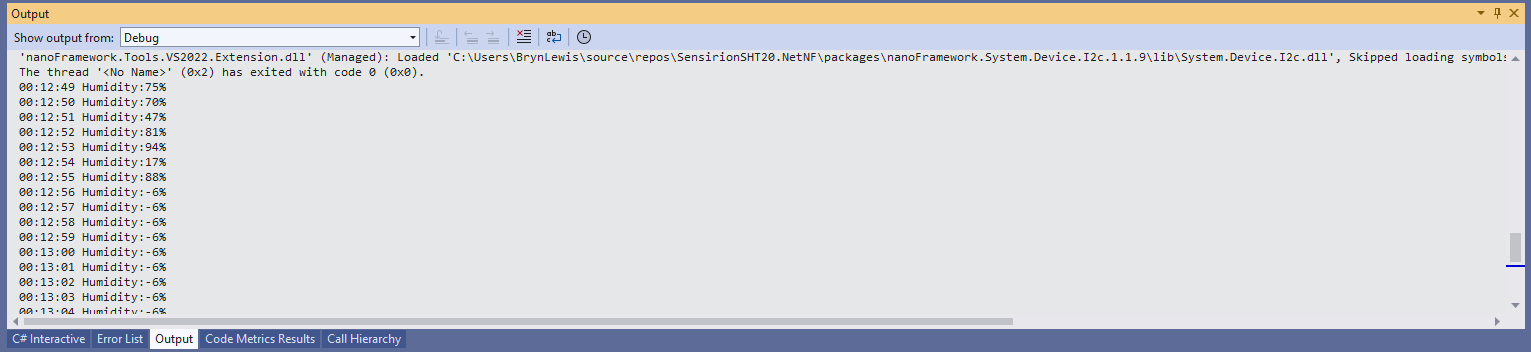
While tinkering with the sensor I found that having a short delay between initiating the temperature reading (TemperatureNoHold = 0xF3 was used so as not to hang up the I2C bus) and reading the value was important.
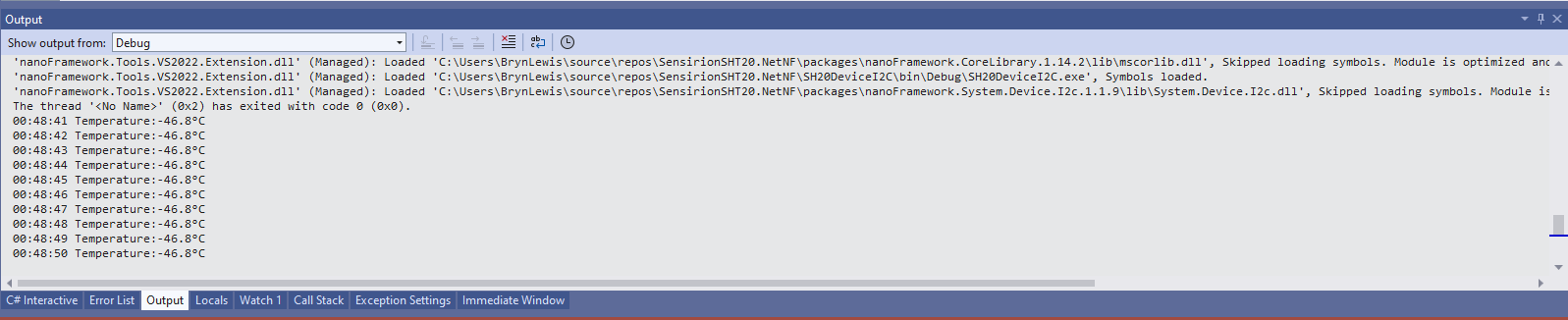
Temperature value without Thread.Sleep
When I ran the application without a Thread.Sleep(70) the temperature and/or humidity the values were incorrect and sometimes quite random.
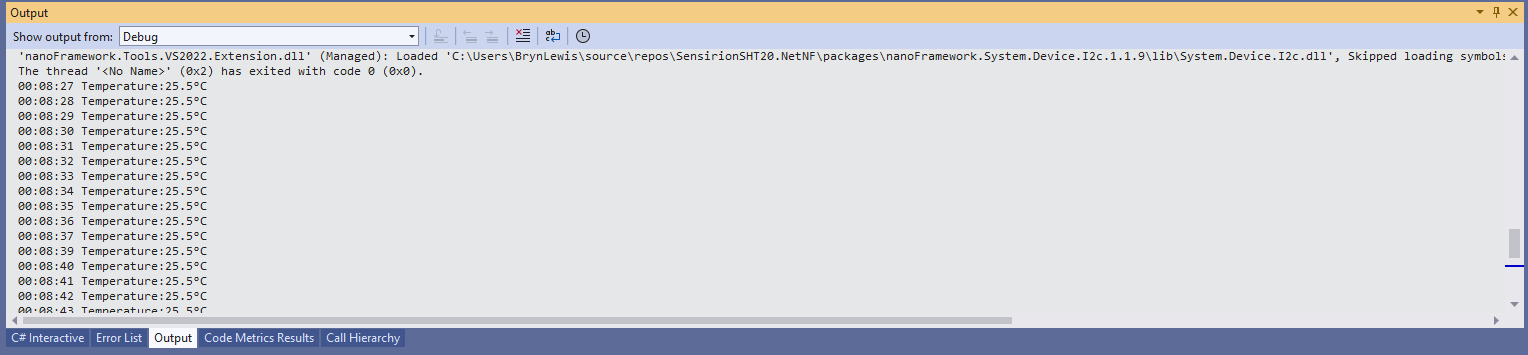
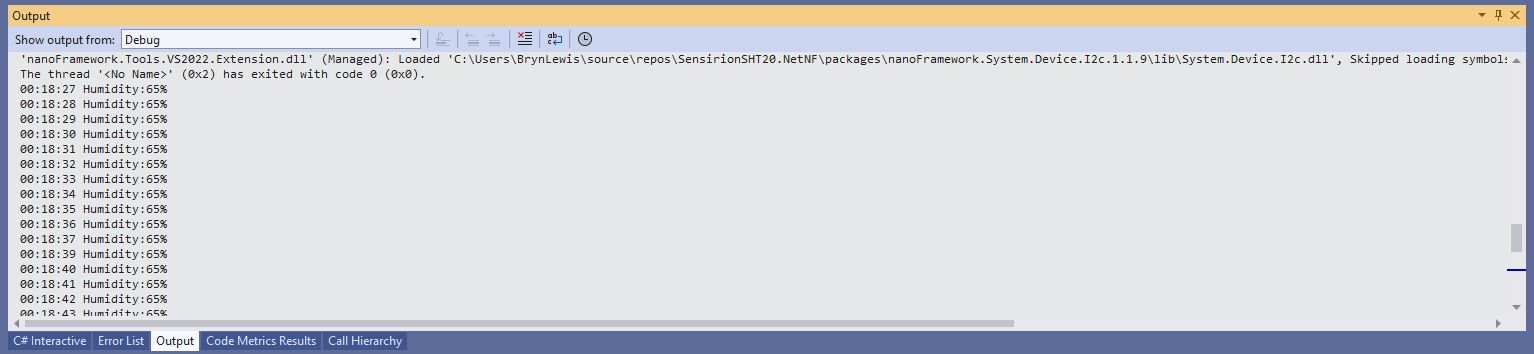
Temperature value with Thread.Sleep(70)
Humidity value without Thread.Sleep
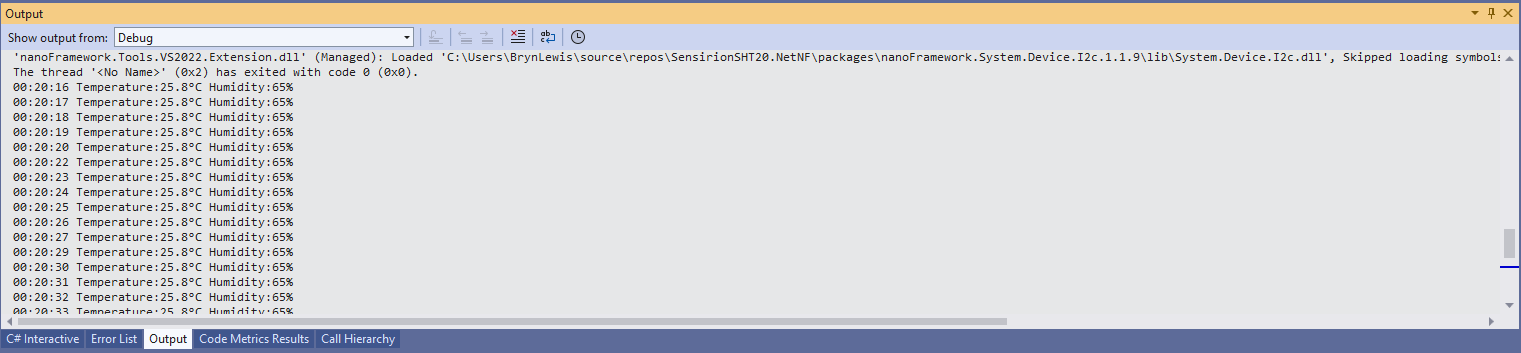
Humidity value with Thread.Sleep(70)
Temperature and Humidity values with Thread.Sleep(70)
I’m going to soak test the library for a week to check that is working okay, then refactor the code so it can be added to the nanoFramework IoT.Device Library repository.
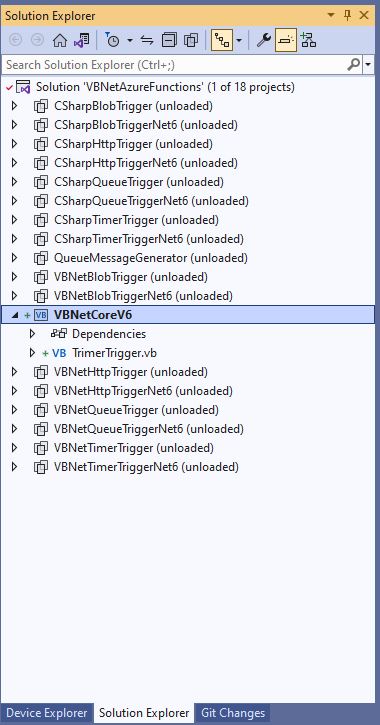
Visual Studio Solution explorer Azure Functions projects
All of the examples now have a program.vb which initialises the Trigger.
Namespace VBNet....TriggerIsolated
    Friend Class Program
        Public Shared Sub Main(ByVal args As String())
            Call FunctionsDebugger.Enable()

            Dim host = New HostBuilder().ConfigureFunctionsWorkerDefaults().Build()

            host.Run()
        End Sub
    End Class
End Namespace
Namespace devMobile.Azure.VBNetBlobTriggerIsolated
    Public Class BlobTrigger
        Private ReadOnly _logger As ILogger

        Public Sub New(ByVal loggerFactory As ILoggerFactory)
            _logger = loggerFactory.CreateLogger(Of BlobTrigger)()
        End Sub

        <[Function]("vbnetblobtriggerisolated")>
        Public Sub Run(
        <BlobTrigger("vbnetblobtriggerisolated/{name}", Connection:="blobendpoint")> ByVal myBlob As String, ByVal name As String)

            _logger.LogInformation($"VB.Net NET 4.8 Isolated Blob trigger function Processed blob Name: {name}  Data: {myBlob}")
        End Sub
    End Class
End Namespace
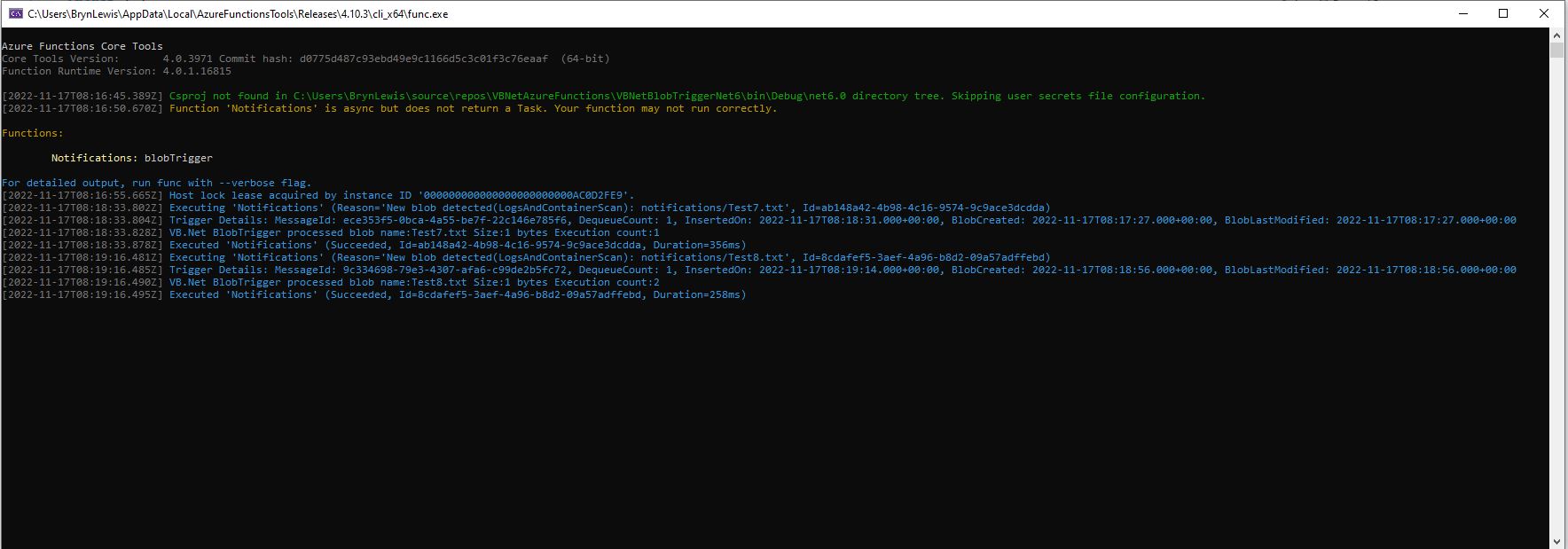
Azure BlobTrigger function running in the desktop emulator
Azure BlobTrigger Function logging in Application Insights
I used Telerik Fiddler to POST messages to the desktop emulator and Azure endpoints.
Namespace VBNetHttpTriggerIsolated
    Public Class HttpTrigger
        Private Shared executionCount As Int32
        Private ReadOnly _logger As ILogger

        Public Sub New(ByVal loggerFactory As ILoggerFactory)
            _logger = loggerFactory.CreateLogger(Of HttpTrigger)()
        End Sub

        <[Function]("Notifications")>
        Public Function Run(
        <HttpTrigger(AuthorizationLevel.Anonymous, "get", "post")> ByVal req As HttpRequestData) As HttpResponseData
            Interlocked.Increment(executionCount)

            _logger.LogInformation("VB.Net NET 4.8 Isolated HTTP trigger Execution count:{executionCount} Method:{req.Method}", executionCount, req.Method)

            Dim response = req.CreateResponse(HttpStatusCode.OK)
            response.Headers.Add("Content-Type", "text/plain; charset=utf-8")

            Return response
        End Function
    End Class
End Namespace
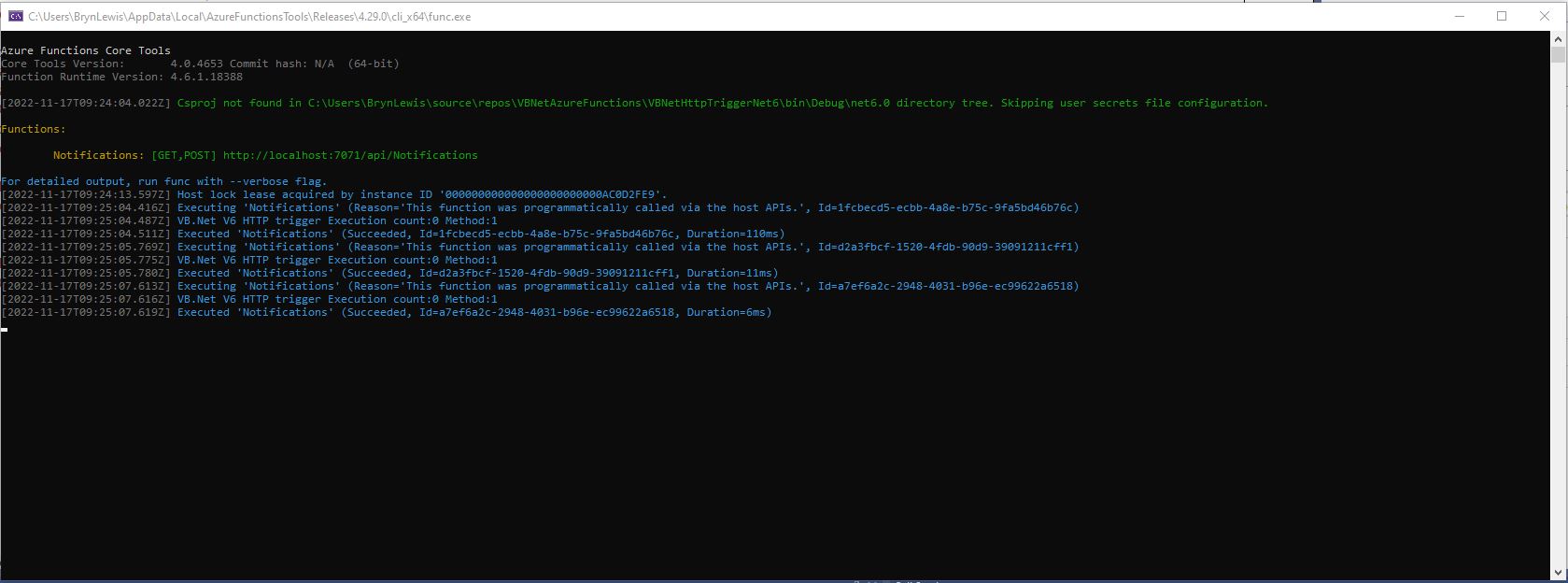
Azure HttpTrigger Function running in the desktop emulator
Azure HttpTrigger Function logging in Application Insights
Namespace devMobile.Azure.VBNetQueueTriggerIsolated

    Public Class QueueTrigger
        Private Shared _logger As ILogger
        Private Shared _concurrencyCount As Integer = 0
        Private Shared _executionCount As Integer = 0

        Public Sub New(ByVal loggerFactory As ILoggerFactory)
            _logger = loggerFactory.CreateLogger(Of QueueTrigger)()
        End Sub

        <[Function]("VBNetQueueTriggerIsolated")>
        Public Sub Run(
        <QueueTrigger("vbnetqueuetriggerisolated", Connection:="QueueEndpoint")> ByVal message As String)
            Interlocked.Increment(_concurrencyCount)
            Interlocked.Increment(_executionCount)

            _logger.LogInformation("VB.Net .NET 4.8 Isolated Queue Trigger Concurrency:{_concurrencyCount} ExecutionCount:{_executionCount} Message:{message}", _concurrencyCount, _executionCount, message)

            Interlocked.Decrement(_concurrencyCount)
        End Sub
    End Class
End Namespace
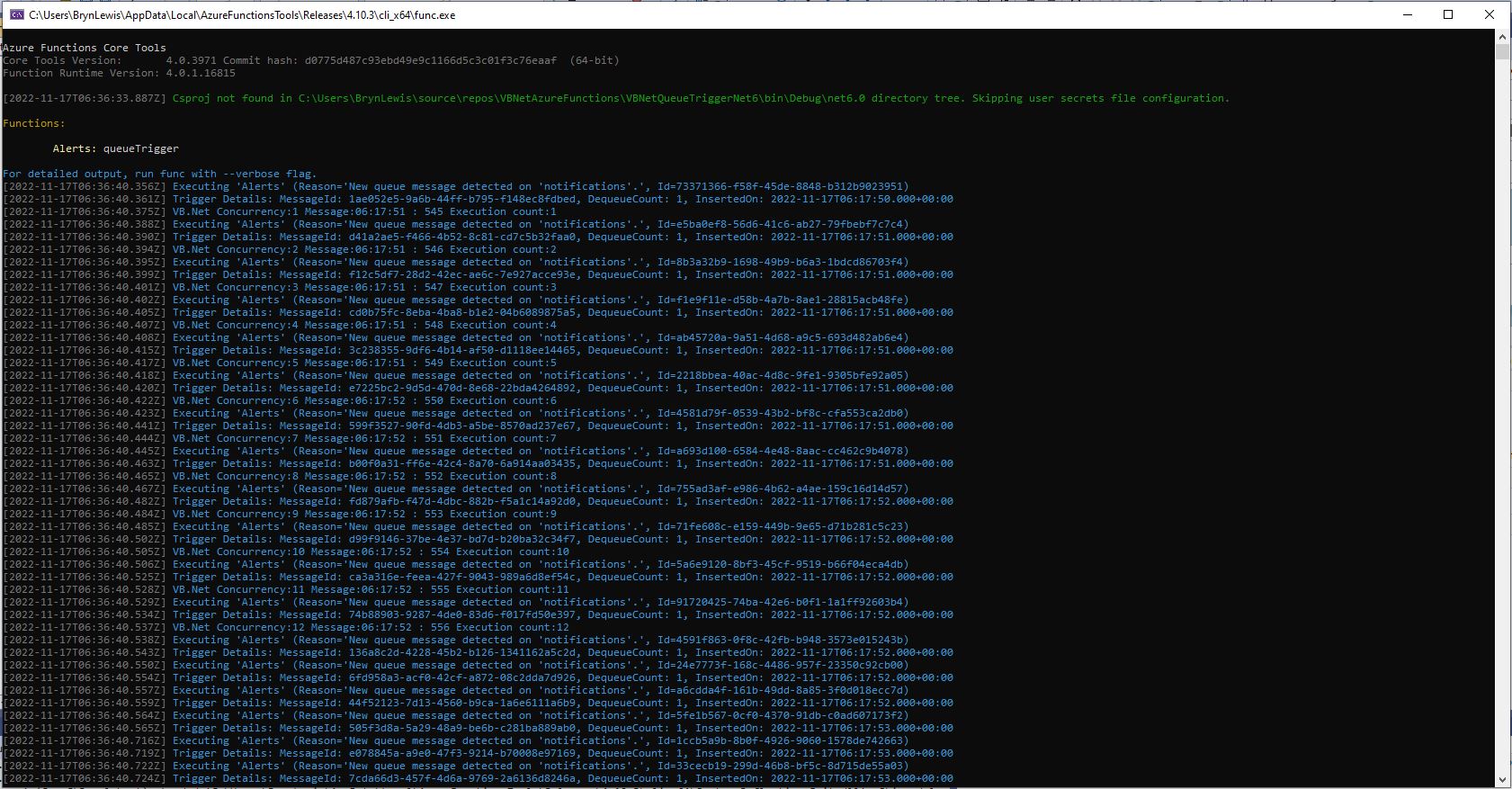
Azure QueueTrigger Function running in the desktop emulator
Azure QueueTrigger Function logging in Application Insights
Namespace devMobile.Azure.VBNetTimerTriggerIsolated
    Public Class TimerTrigger
        Private Shared _logger As ILogger
        Private Shared _executionCount As Integer = 0

        Public Sub New(ByVal loggerFactory As ILoggerFactory)
            _logger = loggerFactory.CreateLogger(Of TimerTrigger)()
        End Sub

        <[Function]("Timer")>
        Public Sub Run(
        <TimerTrigger("0 */1 * * * *")> ByVal myTimer As MyInfo)

            Interlocked.Increment(_executionCount)
            _logger.LogInformation("VB.Net Isolated TimerTrigger next trigger:{0} Execution count:{1}", myTimer.ScheduleStatus.Next, _executionCount)
        End Sub
    End Class
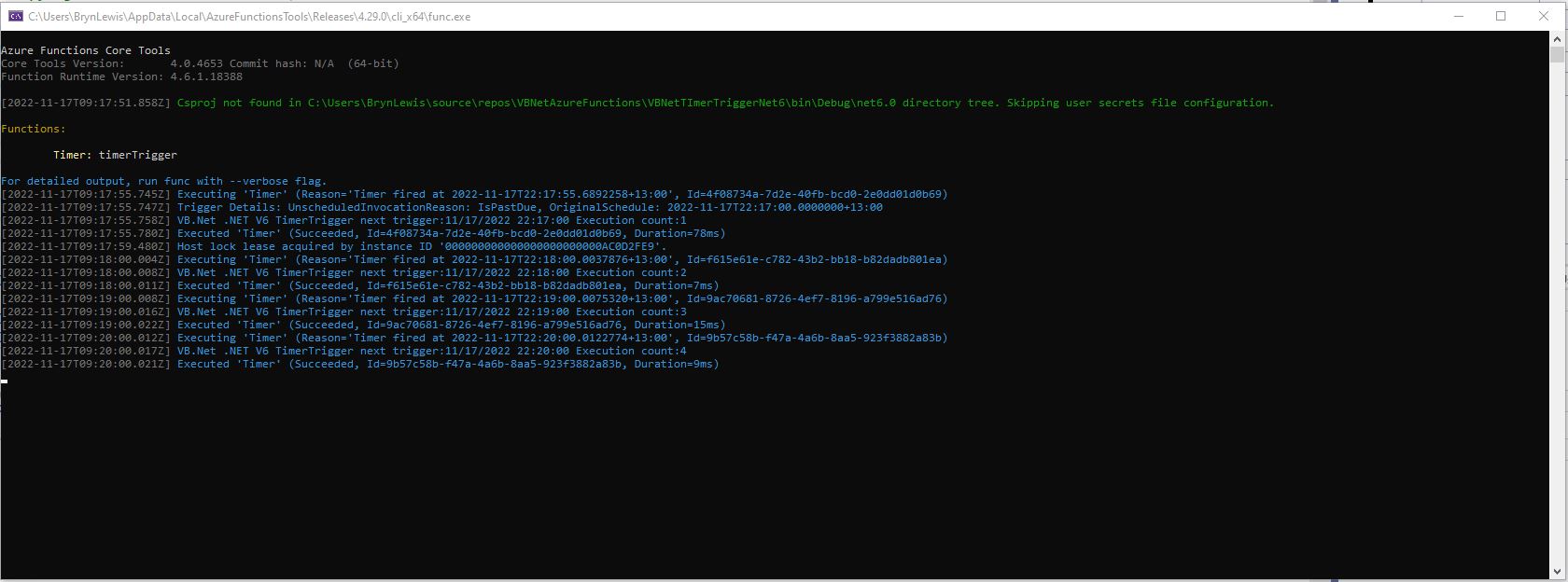
Azure TimerTrigger Function running in the desktop emulator
Azure TimerTrigger Function logging in Application Insights
'---------------------------------------------------------------------------------
' Copyright (c) November 2022, devMobile Software
'
' Licensed under the Apache License, Version 2.0 (the "License");
' you may Not use this file except in compliance with the License.
' You may obtain a copy of the License at
'
'     http://www.apache.org/licenses/LICENSE-2.0
'
' Unless required by applicable law Or agreed to in writing, software
' distributed under the License Is distributed on an "AS IS" BASIS,
' WITHOUT WARRANTIES Or CONDITIONS OF ANY KIND, either express Or implied.
' See the License for the specific language governing permissions And
' limitations under the License.
'
'---------------------------------------------------------------------------------
Imports System.Threading

Imports Microsoft.Azure.WebJobs
Imports Microsoft.Extensions.Logging


Public Class TimerTrigger
    Shared executionCount As Int32

    <FunctionName("Timer")>
    Public Shared Sub Run(<TimerTrigger("0 */1 * * * *")> myTimer As TimerInfo, log As ILogger)
        Interlocked.Increment(executionCount)

        log.LogInformation("VB.Net .NET V6 TimerTrigger next trigger:{0} Execution count:{1}", myTimer.ScheduleStatus.Next, executionCount)

    End Sub
End Class
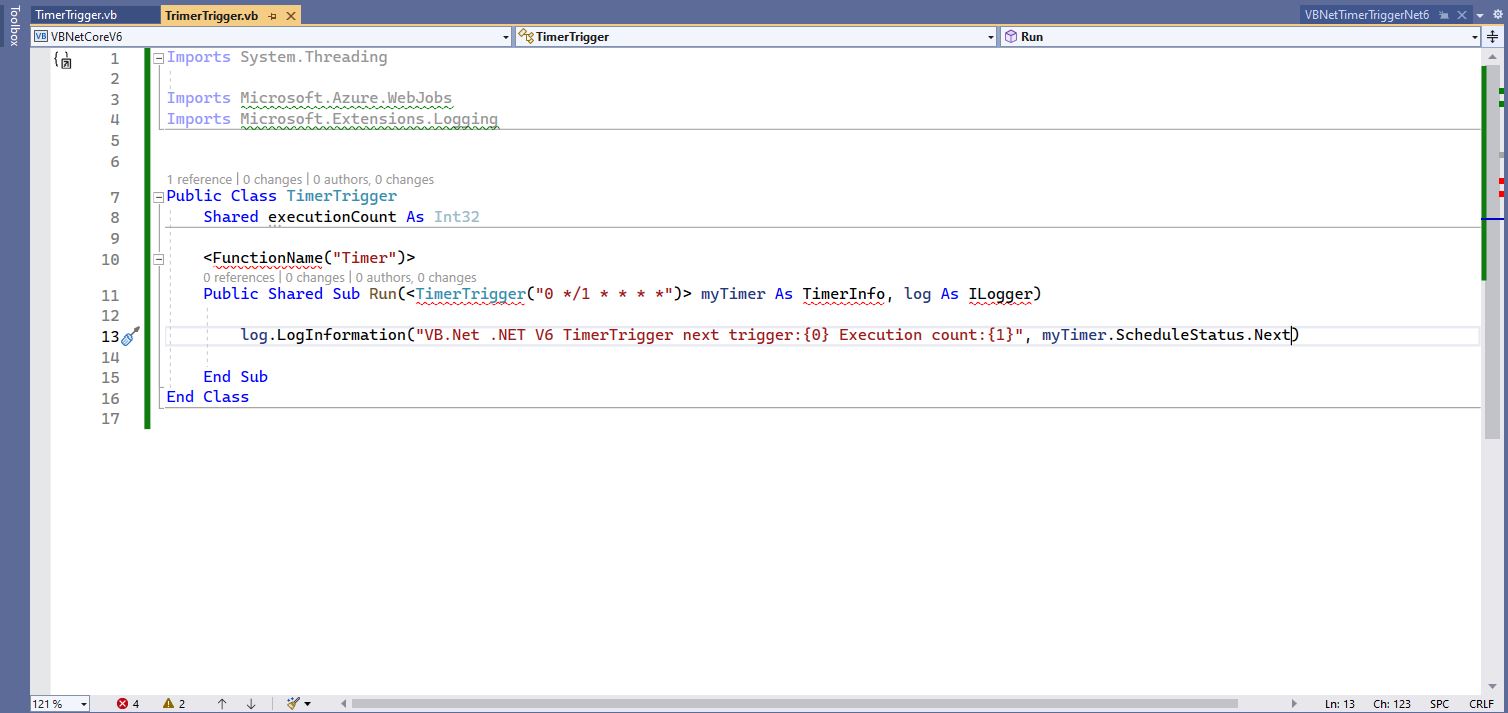
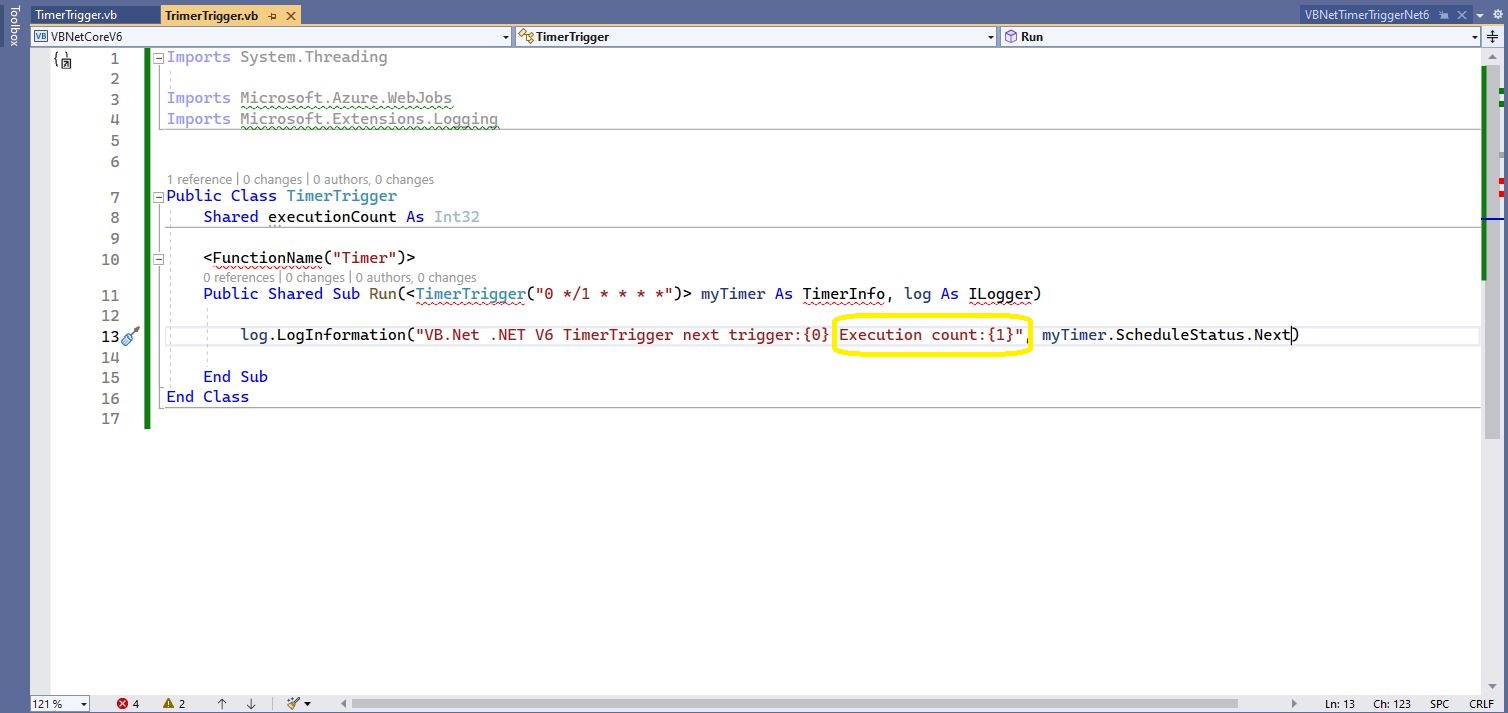
Visual Studio 2022 highlighting missing libraries
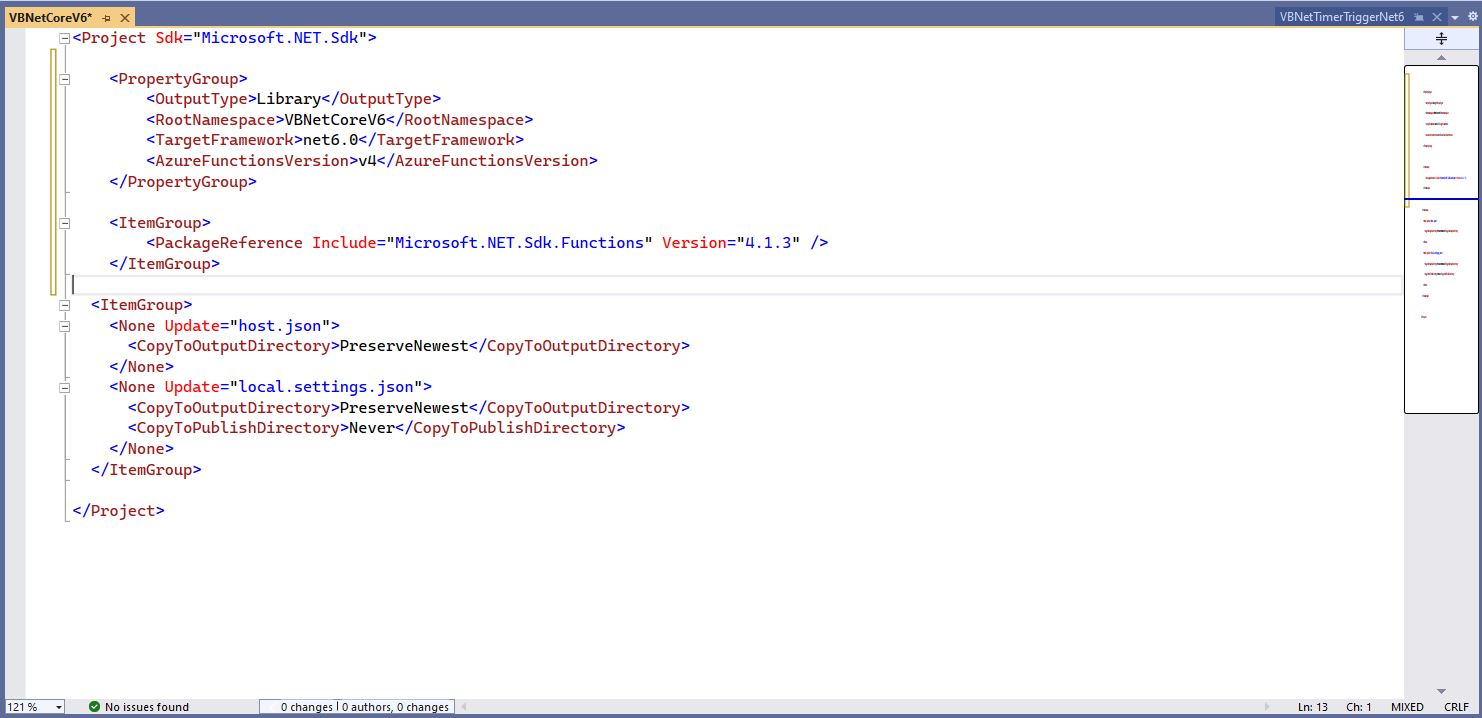
Visual Studio 2022 with additional function SDK references
The next step is to add the hosts.json(empty for timer tigger) and localsettings.json to configure the function
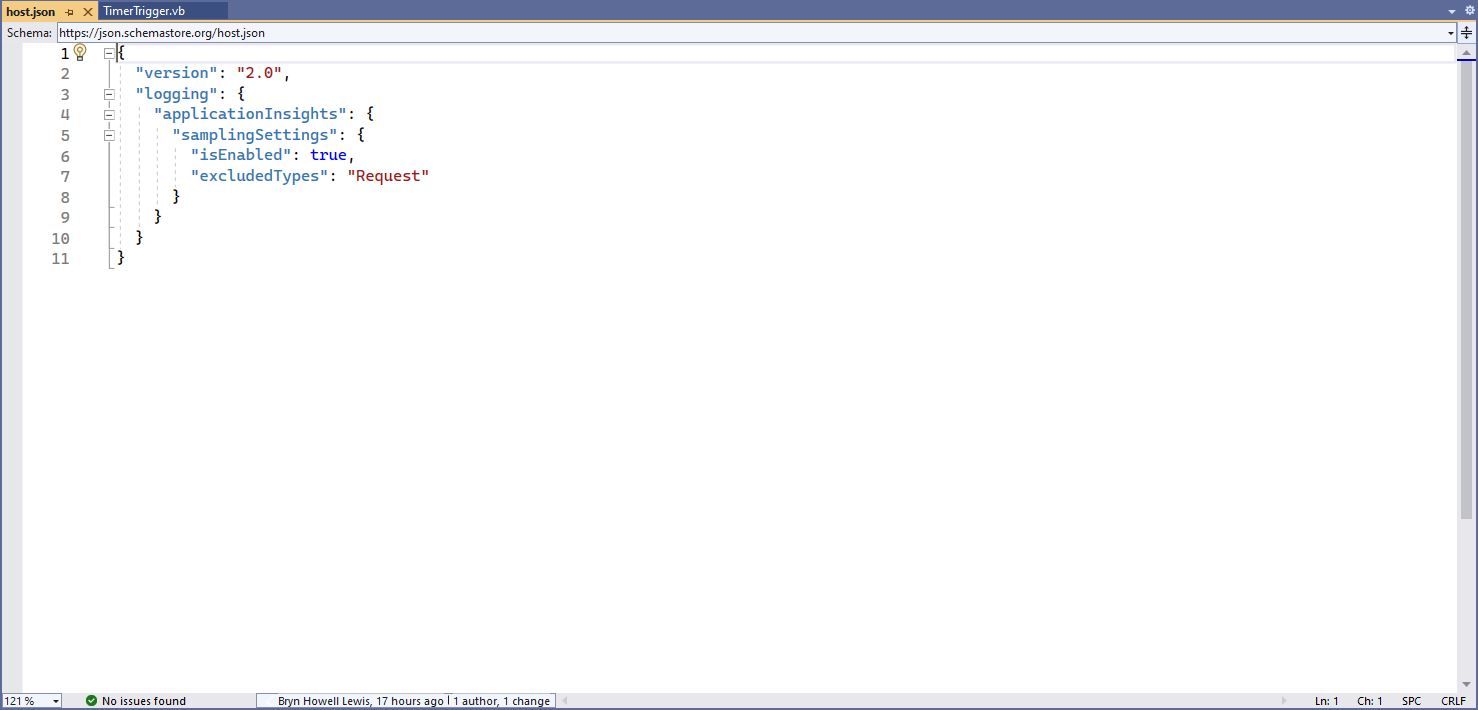
Visual 2022 Hosts.json file
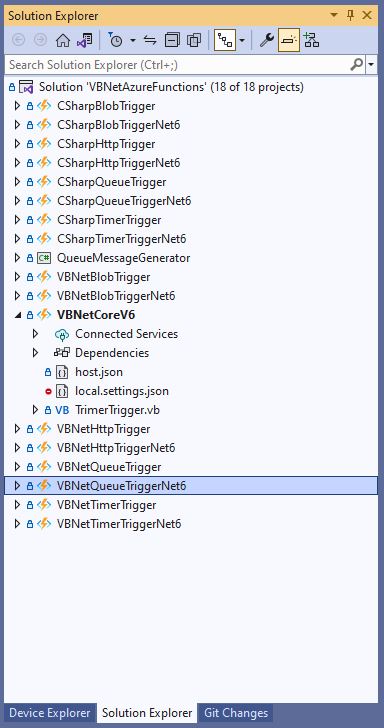
Visual Studio 2022 showing hosts.json & local.settings.json
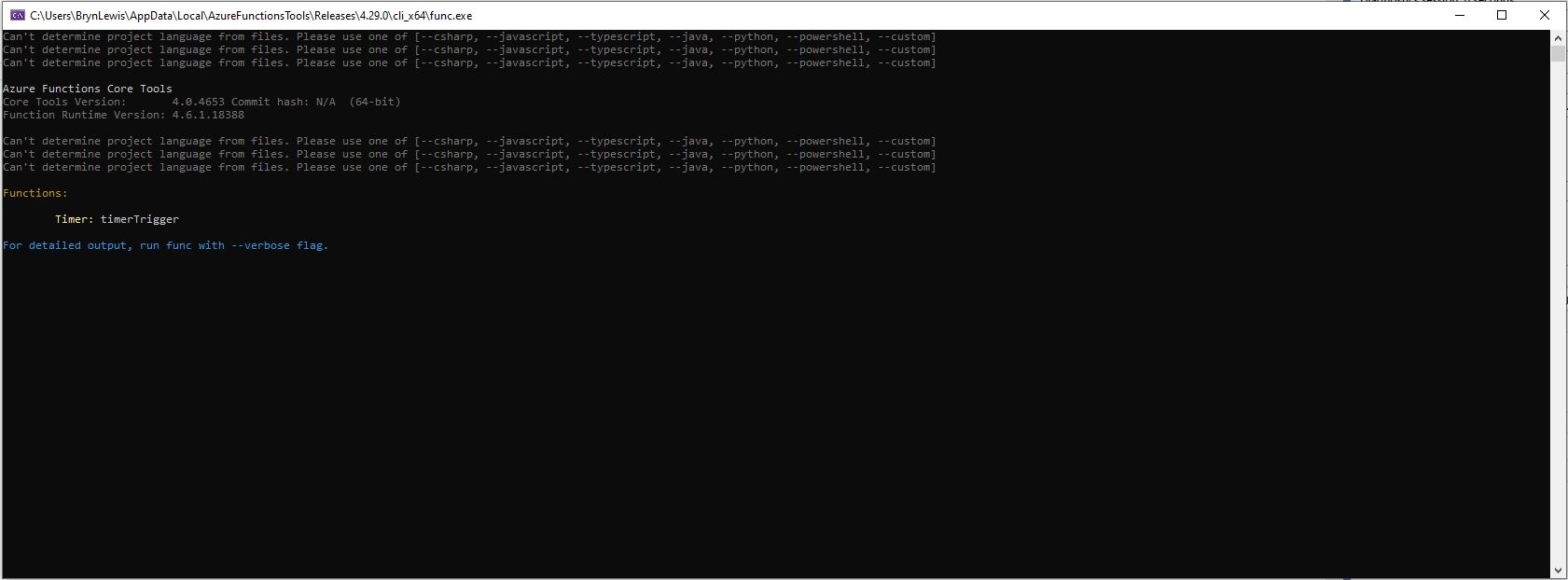
“Can’t determine project language from files. Please add one of [–csharp, –javascript, –typescript, –java, –powershell, –customer]
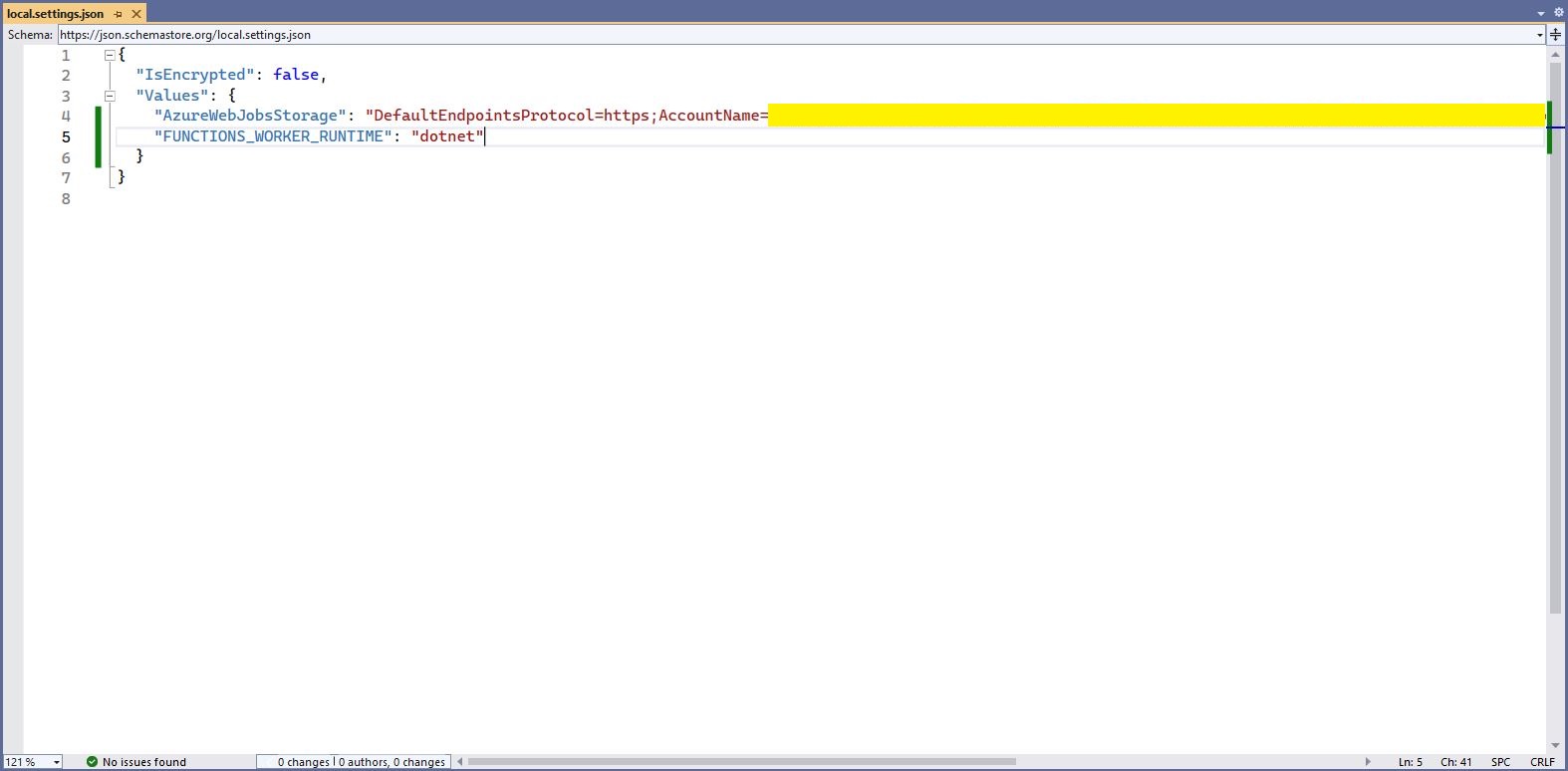
Check “FUNCTIONS_WORKER_RUNTIME” in the local.settings.json file.
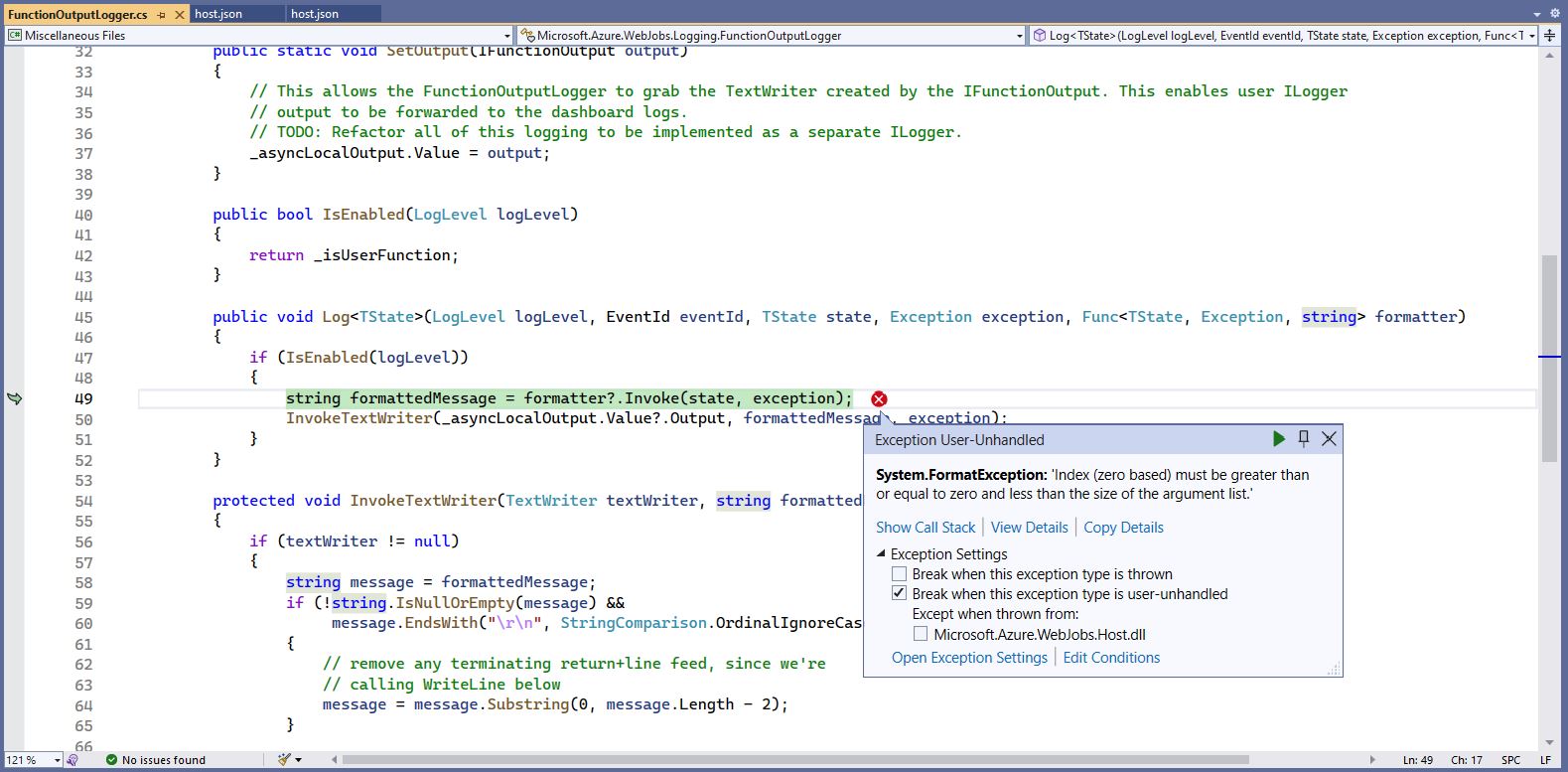
The baked in error logging doesn’t handle broken message formats very well. Look at the call stack or single step through the application to find the message format that is broken
Visual Studio 2022 editor with malformed message highlighted
The theme of this post is controlling users’ ability to read and write rows in a table. The best scenario I could come up with using the World Wide Importers database was around controlling access to Customer information.
This would be a representative set of “project requirements”…
Salespeople tend to look after categories of Customers
Kayla – Novelty Shops
Hudson – Supermarkets
Issabella – Computer Stores
Sophia – Gift Stores, Novelty Shops
Amy – Corporates
Anthony – Novelty Stores
Alica – Coporates
Stella – Supermarkets
But some Salespeople have direct relationships with Customers
No changes to the database which could break the existing solution
In a previous engagement we added CustomerCategoryPerson and CustomerPerson like tables to the database to control read/write access to Customers’ information.
The CustomerCategoryPerson table links the CustomerCategory and Person tables with a flag (IsWritable) which indicates whether the Person can read/write Customer information for all the Customers in a CustomerCategory.
CREATE TABLE [Sales].[CustomerCategoryPerson](
	[CustomerCategoryPersonID] [int] IDENTITY(1,1) NOT NULL,
	[CustomerCategoryId] [int] NOT NULL,
	[PersonId] [int] NOT NULL,
	[IsWritable] [bit] NOT NULL,
	[LastUpdatedBy] [int] NOT NULL,
 CONSTRAINT [PK_CustomerCategoryPerson] PRIMARY KEY CLUSTERED
(
	[CustomerCategoryPersonID] ASC
)...
The CustomerPerson table links the Customer and Person tables with a flag (IsWritable) which indicates whether a Person can read/write a Customer’s information.
CREATE TABLE [Sales].[CustomerPerson](
	[CustomerPersonId] [int] IDENTITY(1,1) NOT NULL,
	[CustomerID] [int] NOT NULL,
	[PersonId] [int] NOT NULL,
	[IsWritable] [bit] NOT NULL,
	[LastEditedBy] [int] NOT NULL,
 CONSTRAINT [PK_CustomerPerson] PRIMARY KEY CLUSTERED
(
	[CustomerPersonId] ASC
)...
Users can do “wildcard” searches for Customers and the results set has to be limited to “their” customers and customers in the customer categories they are assigned too.
ALTER PROCEDURE [Sales].[CustomersNameSearchUnionV1]
@UserId as int,
@SearchText nvarchar(20),
@MaximumRowsToReturn int
AS
BEGIN
	-- Individual assignment
    SELECT TOP(@MaximumRowsToReturn) [Customers].[CustomerID] as "ID", [Customers].[CustomerName] as "Name", [Customers].[IsOnCreditHold] as "IsOnCreditHold"
    FROM Sales.Customers
	INNER JOIN [Sales].[CustomerPerson] ON ([Sales].[Customers].[CustomerId] = [Sales].[CustomerPerson].[CustomerId])
    WHERE ((CustomerName LIKE N'%' + @SearchText + N'%')
		AND ([Sales].[CustomerPerson].PersonId = @UserId))
    --ORDER BY [CustomerName]

	UNION

	-- group assignment
   SELECT TOP(@MaximumRowsToReturn) [Customers].[CustomerID] as "ID", [Customers].[CustomerName] as "Name", [Customers].[IsOnCreditHold] as "IsOnCreditHold"
   FROM [Sales].[Customers]
      INNER JOIN [Sales].[CustomerCategories] ON ([Sales].[Customers].[CustomerCategoryID] = [Sales].[CustomerCategories].[CustomerCategoryID])
      INNER JOIN [Sales].[CustomerCategoryPerson] ON ([Sales].[Customers].[CustomerCategoryID] = [CustomerCategoryPerson].[CustomerCategoryID])
    WHERE ((CustomerName LIKE N'%' + @SearchText + N'%')
		AND ([Sales].[CustomerCategoryPerson].PersonId = @UserId))

END;
This approach increases the complexity and reduces the maintainability of stored procedures which have to control the reading/writing of Customer information. Several times I have extracted customer information read\write controls to a couple of database views, one for controlling read access.
CREATE VIEW [Sales].[CustomerPersonReadV1]
AS
-- Individual assignment
   SELECT [Sales].[Customers].[CustomerID], [Sales].[CustomerPerson].[PersonID], [Sales].[Customers].[CustomerCategoryID]
   FROM [Sales].[Customers]
      INNER JOIN [Sales].[CustomerPerson] ON ( [Sales].[Customers].[CustomerID] = CustomerPerson.CustomerID)

UNION -- Takes care of duplicates

-- Group assignment
   SELECT [Sales].[Customers].[CustomerID], [Sales].[CustomerCategoryPerson].[PersonID], [Sales].[Customers].[CustomerCategoryID]
   FROM [Sales].[Customers]
      --INNER JOIN [Sales].[CustomerCategories] ON ([Sales].[Customers].[CustomerCategoryID] = [Sales].[CustomerCategories].[CustomerCategoryID])
      INNER JOIN [Sales].[CustomerCategoryPerson] ON ([Sales].[Customers].[CustomerCategoryID] = [CustomerCategoryPerson].[CustomerCategoryID])
The other database for controlling write access
CREATE VIEW [Sales].[CustomerPersonWriteV1]
AS
-- Individual assignment
   SELECT [Sales].[Customers].[CustomerID], [Sales].[CustomerPerson].[PersonID], [Sales].[Customers].[CustomerCategoryID]
   FROM [Sales].[Customers]
      INNER JOIN [Sales].[CustomerPerson] ON (([Sales].[Customers].[CustomerID] = [CustomerPerson].[CustomerID]) AND ([Sales].[CustomerPerson].[IsWritable] = 1))

UNION -- Takes care of duplicates

-- Group assignment
   SELECT [Sales].[Customers].[CustomerID], [Sales].[CustomerCategoryPerson].[PersonID], [Sales].[Customers].[CustomerCategoryID]
   FROM [Sales].[Customers]
      INNER JOIN [Sales].[CustomerCategories] ON ([Sales].[Customers].[CustomerCategoryID] = [Sales].[CustomerCategories].[CustomerCategoryID])
      INNER JOIN [Sales].[CustomerCategoryPerson] ON ([Sales].[Customers].[CustomerCategoryID] = [CustomerCategoryPerson].[CustomerCategoryID] AND ([Sales].[CustomerCategoryPerson].[IsWritable] = 1))
The versioning of database views uses the same approach as stored procedures. When a view is updated (the columns returned changes , updated constraints etc.) the version number is incremented. Then we work through the dependencies list checking and updating the view version used and re-testing.
SQL Server Management Studio displaying objects which depend on the view
These two views are the UNION of the users individual and group access permissions. (If a user has Write they also have Read access). This reduces the complexity of stored procedures used for reading from and writing to the Customer table.
CREATE PROCEDURE [Sales].[CustomersListV1]
@UserId as int
AS
BEGIN
SELECT [Customers].[CustomerID] as "ID", [Customers].[CustomerName] as "Name", [Customers].[IsOnCreditHold] as "IsOnCreditHold"
	FROM [Sales].[Customers]
		INNER JOIN [Sales].[CustomerPersonReadV1] ON ([Sales].[Customers].[CustomerID] = [Sales].[CustomerPersonReadV1].CustomerID)
    WHERE ([Sales].[CustomerPersonReadV1].PersonId = @UserId)
	ORDER BY Name
END
The GET method of the Customer controller returns a list of all the Customers the current user has read only access to using their individual and group assignment.
[HttpGet(), Authorize(Roles = "SalesPerson,SalesAdministrator")]
[ProducesResponseType(StatusCodes.Status200OK, Type = typeof(List<Models.CustomerListDtoV1>))]
public async Task<ActionResult<IEnumerable<Models.CustomerListDtoV1>>> Get()
{
      IEnumerable<Models.CustomerListDtoV1> response;

      using (SqlConnection db = new SqlConnection(this.connectionString))
      {
         response = await db.QueryWithRetryAsync<Models.CustomerListDtoV1>(sql: "[Sales].[CustomersListV1]", param: new { userId = HttpContext.PersonId() }, commandType: CommandType.StoredProcedure);
      }

   return this.Ok(response);
}
The CustomerPersonWriteV1 view is used to stop users without IsWritable set (individual or group) updating a Customers IsOnCreditHold flag.
CREATE PROCEDURE [Sales].[CustomerCreditHoldStatusUpdateV1]
@UserID int,
@CustomerId int,
@IsOnCreditHold Bit
AS
BEGIN
    UPDATE [Sales].[Customers]
    SET IsOnCreditHold = @IsOnCreditHold, LastEditedBy = @UserID
	FROM [Sales].[Customers]
		INNER JOIN [Sales].[CustomerPersonWriteV1] ON ([Sales].[Customers].[CustomerID] = [Sales].[CustomerPersonWriteV1].CustomerID)
    WHERE (([Sales].[CustomerPersonWriteV1].PersonId = @UserId)
		AND ([Sales].[Customers].[CustomerID] = @CustomerId )
		AND (IsOnCreditHold <> @IsOnCreditHold))

END
The PUT CreditHold method uses a combination of roles (Aministrator,SalesAdministrator,SalesPerson) and database views (CustomerPersonWriteV1) to control the updating of customer data.
[HttpPut("{customerId}/CreditStatus", Name ="CreditHold")]
[Authorize(Roles = "Aministrator,SalesAdministrator,SalesPerson")]
[ProducesResponseType(StatusCodes.Status200OK)]
[ProducesResponseType(StatusCodes.Status409Conflict)]
public async Task<IActionResult> CustomerCeditHold(int customerId, [FromBody] Models.CustomerCreditHoldUpdateV1 request )
{
    request.UserId = HttpContext.PersonId();
    request.CustomerId = customerId;

    using (SqlConnection db = new SqlConnection(connectionString))
    {
        if (await db.ExecuteWithRetryAsync("[Sales].[CustomerCreditHoldStatusUpdateV1]", param: request, commandType: CommandType.StoredProcedure) != 1)
        {
            logger.LogWarning("Person {UserId} Customer {CustomerId} IsOnCreditHold {IsOnCreditHold} update failed", request.UserId, request.CustomerId, request.IsOnCreditHold);

            return this.Conflict();
        }
    }

    return this.Ok();
}
My customers usually don’t have a lot of automated testing so minimising the impact of changes across the database and codebase is critical. Sometimes we duplicate code (definitely not DRY) so that the amount of functionality that has to be retested is reduced. We ensure this is time allocated for revisiting these decisions and remediating as required.
The permissions required for an on-premises system running in a trusted environment are often minimalist. The World Wide Importers database People table has IsSystemUser, IsEmployee, IsSalesperson which is representative of the granularity of permissions I have encountered in Windows Forms .NET, ASP.NET Web Forms and other “legacy” applications.
CREATE TABLE [Application].[People](
    [PersonID] [int] NOT NULL,
    [FullName] nvarchar NOT NULL,
    [PreferredName] nvarchar NOT NULL,
    [SearchName] AS (concat([PreferredName],N' ',[FullName])) PERSISTED NOT NULL,
    [IsPermittedToLogon] [bit] NOT NULL,
    [LogonName] nvarchar NULL,
    [IsExternalLogonProvider] [bit] NOT NULL,
    [HashedPassword] varbinary NULL,
    [IsSystemUser] [bit] NOT NULL,
    [IsEmployee] [bit] NOT NULL,
    [IsSalesperson] [bit] NOT NULL,
    [UserPreferences] nvarchar NULL,
    [PhoneNumber] nvarchar NULL,
    [FaxNumber] nvarchar NULL,
    [EmailAddress] nvarchar NULL,
    [Photo] varbinary NULL,
    [CustomFields] nvarchar NULL,
    [OtherLanguages] AS (json_query([CustomFields],N'$.OtherLanguages')),
    [LastEditedBy] [int] NOT NULL,
    [ValidFrom] datetime2 GENERATED ALWAYS AS ROW START NOT NULL,
    [ValidTo] datetime2 GENERATED ALWAYS AS ROW END NOT NULL,
CONSTRAINT [PK_Application_People] PRIMARY KEY CLUSTERED
(
    [PersonID] ASC
)
The existing application appears to have a method for a Person to change their password which calls the [Website].[ChangePassword] stored procedure (I was surprised that the stored procedure didn’t set the LastEditedBy value).
CREATE PROCEDURE [Website].[ChangePassword]
@PersonID int,
@OldPassword nvarchar(40),
@NewPassword nvarchar(40)
WITH EXECUTE AS OWNER
AS
BEGIN
    SET NOCOUNT ON;
    SET XACT_ABORT ON;

    UPDATE [Application].People
    SET IsPermittedToLogon = 1,
        HashedPassword = HASHBYTES(N'SHA2_256', @NewPassword + FullName)
    WHERE PersonID = @PersonID
    AND PersonID <> 1
    AND HashedPassword = HASHBYTES(N'SHA2_256', @OldPassword + FullName);

    IF @@ROWCOUNT = 0
    BEGIN
        PRINT N'The PersonID must be valid, and the old password must be valid.';
        PRINT N'If the user has also changed name, please contact the IT staff to assist.';
        THROW 51000, N'Invalid Password Change', 1;
        RETURN -1;
    END;
END;
The new version removes the PersonId special case (Assumed that PersonId 1 can’t logon and the use of Throw). I think the use of Throw can add significant complexity to the exception handling of the WebAPI controller that calls the stored procedure
ALTER PROCEDURE [Website].[PersonPasswordChangeV1]
	@UserID int,
	@PasswordOld nvarchar(40),
	@PasswordNew nvarchar(40)
WITH EXECUTE AS OWNER
AS
BEGIN
    UPDATE [Application].People
    SET IsPermittedToLogon = 1
        ,HashedPassword = HASHBYTES(N'SHA2_256', @PasswordNew + FullName)
		,LastEditedBy = @UserID
    WHERE ((PersonID = @UserID )
		AND (HashedPassword = HASHBYTES(N'SHA2_256', @PasswordOld + FullName)))
END;
The PasswordChange method of the Person Controller only requires the caller to be authenticated.
/// <summary>
/// Changes current user's password.
/// </summary>
/// <param name="request">Current password and new password</param>
/// <response code="200">Password changed.</response>
/// <response code="401">Unauthorised, bearer token missing or expired.</response>
/// <response code="409">Previous password invalid or User name has changed.</response>
[Authorize()]
[HttpPut(Name = "PasswordChange")]
public async Task<ActionResult> PasswordChange([FromBody] Models.PersonPasswordChangeRequest request)
{
    request.UserID = HttpContext.PersonId();

    using (SqlConnection db = new SqlConnection(connectionString))
    {
        if (await db.ExecuteWithRetryAsync("[WebSite].[PersonPasswordChangeV1]", param: request, commandType: CommandType.StoredProcedure) != 1)
        {
            logger.LogWarning("Person {0} password change failed", request.UserID);

            return this.Conflict();
        }
    }

    return this.Ok();
}
The new application will have functionality for resetting a Person’s password. Access to this functionality will be restricted to people with the “Administrator” and “PasswordReset” roles.
CREATE PROCEDURE [Website].[PersonPasswordResetV1]
@UserID int,
@PersonID int,
@Password nvarchar(40)
WITH EXECUTE AS OWNER
AS
BEGIN
    UPDATE [Application].People
    SET IsPermittedToLogon = 1
        ,HashedPassword = HASHBYTES(N'SHA2_256', @Password + FullName)
		,LastEditedBy = @UserID
    WHERE PersonID = @PersonID
END;
One of the conventions we often use, is that the first parameter of any stored procedure that is called once a User has logged on is their unique identifier which is used for data access permissions and change tracking.
[Authorize(Roles = "Administrator")]
[HttpPut("{personId:int}", Name = "PasswordReset")]
public async Task<ActionResult> PasswordReset([Range(1, int.MaxValue, ErrorMessage = "Person id must greater than 1")] int personId, [FromBody] Models.PersonPasswordResetRequest request)
{
    request.UserId = HttpContext.PersonId();
    request.PersonID = personId;

    using (SqlConnection db = new SqlConnection(connectionString))
    {
        if (await db.ExecuteWithRetryAsync("[WebSite].[PersonPasswordResetV1]", param: request, commandType: CommandType.StoredProcedure) != 1)
        {
            logger.LogWarning("Person {0} password change failed", request.PersonID);

            return this.Conflict();
        }
    }

    return this.Ok();
}
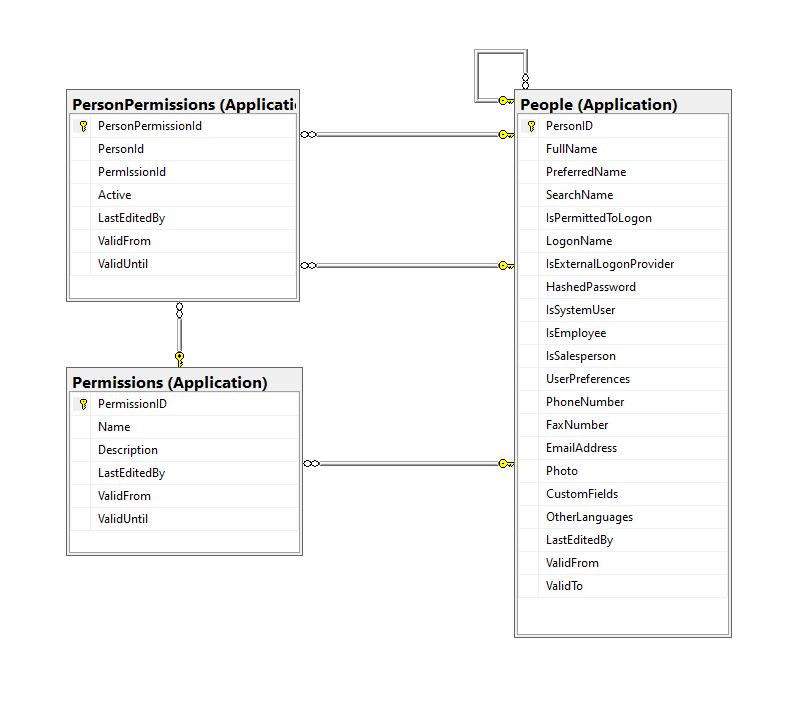
For a couple of applications, we have added “Permissions” and “PersonPermissions” tables alongside the existing authorisation functionality to reduce the likely hood of any unintended side effects.
CREATE TABLE [Application].[Permissions](
	[PermissionID] [int] IDENTITY(1,1) NOT NULL,
	[Name] [nvarchar](20) NOT NULL,
	[Description] [nvarchar](50) NOT NULL,
	[LastEditedBy] [int] NOT NULL,
	[ValidFrom] [datetime2](7) GENERATED ALWAYS AS ROW START HIDDEN NOT NULL,
	[ValidUntil] [datetime2](7) GENERATED ALWAYS AS ROW END HIDDEN NOT NULL,
 CONSTRAINT [PK_Permissions] PRIMARY KEY CLUSTERED
(
	[PermissionID] ASC
)...
CREATE TABLE [Application].[PersonPermissions](
	[PersonPermissionId] [int] IDENTITY(1,1) NOT NULL,
	[PersonId] [int] NOT NULL,
	[PermIssionId] [int] NOT NULL,
	[Active] [bit] NOT NULL,
	[ValidFrom] [datetime2](7) GENERATED ALWAYS AS ROW START HIDDEN NOT NULL,
	[ValidUntil] [datetime2](7) GENERATED ALWAYS AS ROW END HIDDEN NOT NULL,
 CONSTRAINT [PK_PersonPermissions] PRIMARY KEY CLUSTERED
(
	[PersonPermissionId] ASC
)...
Permissions, PersonPermissions and People with Foreign Keys
The additional permissions (from the Person record) and the PersonPermissions table required some modifications to the PersonAuthenticateLookupByLogonNameV1 stored procedure and the addition of the PersonPermissionsByPersonIdV1 stored procedure.
ALTER PROCEDURE [Website].[PersonAuthenticateLookupByLogonNameV2]
@LogonName nvarchar(50),
@Password nvarchar(40)
AS
BEGIN
	SELECT PersonID
		,FullName
		,EmailAddress
		,IsSystemUser
		,IsEmployee
		,IsSalesPerson
	FROM [Application].[People]
	WHERE (( LogonName = @LogonName)
		AND (IsPermittedToLogon = 1)
		AND (HASHBYTES(N'SHA2_256', @Password + FullName) = HashedPassword))
The IsSystemUser, IsEmployee and IsSalesPerson bit flags were added to the stored procedure and Data Transfer Object(DTO)
private class PersonAuthenticateLogonDetailsDto
{
    public int PersonID { get; set; }

    public string FullName { get; set; }

    public string EmailAddress { get; set; }

    public bool IsSystemUser { get; set; }

    public bool IsEmployee { get; set; }

    public bool IsSalesPerson { get; set; }
}
The PersonPermissionsByPersonIdV1 retrieves a list of the permissions of the User who has been authenticated.
ALTER PROCEDURE [Website].[PersonPermissionsByPersonIdV1]
	@PersonId AS int
AS
BEGIN

	SELECT [Application].[Permissions].[Name]
	FROM [Application].[Permissions]
		INNER JOIN [Application].[PersonPermissions] ON ([Application].[Permissions].PermissionID = [Application].[PersonPermissions].[PermissionId] )
	WHERE [Application].[PersonPermissions].[PersonId] = @PersonId
	ORDER BY [Application].[Permissions].[Name]

END
The Person’s permissions(effectively roles) are added as claims, the IsSystemUser, IsEmployee and IsSalesPerson flags are also added to the list of claims so they can be used in the new application.
[HttpPost("logon")]
public async Task<ActionResult> Logon([FromBody] Models.LogonRequest request )
{
    PersonAuthenticateLogonDetailsDto userLogonUserDetails;
    IEnumerable<string> permissions;
    var claims = new List<Claim>();

    using (SqlConnection db = new SqlConnection(configuration.GetConnectionString("WorldWideImportersDatabase")))
    {
        userLogonUserDetails = await db.QuerySingleOrDefaultWithRetryAsync<PersonAuthenticateLogonDetailsDto>("[Website].[PersonAuthenticateLookupByLogonNameV2]", param: request, commandType: CommandType.StoredProcedure);
        if (userLogonUserDetails == null)
        {
            logger.LogWarning("Login attempt by user {0} failed", request.LogonName);

           return this.Unauthorized();
        }

        // Lookup the Person's permissions
        permissions = await db.QueryWithRetryAsync<string>("[Website].[PersonPermissionsByPersonIdV1]", new { userLogonUserDetails.PersonID }, commandType: CommandType.StoredProcedure);
    }

    // Setup the primary SID + name info
    claims.Add(new Claim(ClaimTypes.PrimarySid, userLogonUserDetails.PersonID.ToString()));
    if (userLogonUserDetails.IsSystemUser)
    {
       claims.Add(new Claim(ClaimTypes.Role, "SystemUser"));
    }
    if (userLogonUserDetails.IsEmployee)
    {
       claims.Add(new Claim(ClaimTypes.Role, "Employee"));
    }
    if (userLogonUserDetails.IsSalesPerson)
    {
        claims.Add(new Claim(ClaimTypes.Role, "SalesPerson"));
    }

    foreach(string permission in permissions)
    {
        claims.Add(new Claim(ClaimTypes.Role, permission));
    }

    var authSigningKey = new SymmetricSecurityKey(Encoding.UTF8.GetBytes(jwtIssuerOptions.SecretKey));

    var token = new JwtSecurityToken(
         issuer: jwtIssuerOptions.Issuer,
          audience: jwtIssuerOptions.Audience,
          expires: DateTime.UtcNow.Add(jwtIssuerOptions.TokenExpiresAfter),
          claims: claims,
          signingCredentials: new SigningCredentials(authSigningKey, SecurityAlgorithms.HmacSha256));

    return this.Ok(new
   {
        token = new JwtSecurityTokenHandler().WriteToken(token),
        expiration = token.ValidTo,
    });
}
We try to reduce the number of roles a User requires by having core roles (Administrator, Sales consultant, Warehouse administrator etc.) with additional roles for each task that can be added as required (ResetPassword, CustomerIsOnCreditHold Set/Clear etc.)
/// <summary>
/// Gets a list of the current User's roles.
/// </summary>
/// <response code="200">List of claims returned.</response>
/// <response code="401">Unauthorised, bearer token missing or expired.</response>
/// <returns>list of claims.</returns>
[HttpGet]
[ProducesResponseType(StatusCodes.Status200OK, Type = typeof(List<string>))]
public List<string> Get()
{
    List<string> claimNames = new List<string>();

    foreach (var claim in this.User.Claims.Where(c => c.Type == ClaimTypes.Role))
    {
        claimNames.Add(claim.Value);
    }

    return claimNames;
}
We have found this approach to be a robust way to add granular authorisation for new functionality to a “legacy’ application without breaking the existing solution. I have ignored a user being disabled after a number of failed logins, password complexity rules etc. as these tend to be application specific and not really related to the use of Dapper.
Most blog posts talk about building “green fields” applications, I have found hardly any cover “muddy fields” development where you have to deal with “legacy” code.
Not all “legacy” code is bad, I work on one code base which is nearly 20years old. It started as a spreadsheet plug-in and has grown of time to a SaaS application. There is very little of the original code left it has just been carefully re-factored over the years with time allocated to chip away at technical debt.
A couple of recent contracts have been maintaining and “remediating” legacy codebases which have been in production for upto a decade. The applications are delivering business value (can’t stop working) and the customer’s budgets are limited (they can only afford incremental change). As a result of this we end up making tactical decisions to keep the application working and longer-term ones to improve the “ilities“(taking into account the customer’s priorities).
It is rare to have a “green fields” project, so my plan was to use the next couple of WebAPI + Dapper posts to illustrate the sort of challenges we have encountered.
Customer: “we want to put a nice webby frontend on our existing bespoke solution” (“putting lipstick on a pig”).
Customer: The user’s login details are stored in the database and we can’t change the login process as the help desk won’t cope.
The remediation of Authentication and Authorisation(A&A) functionality can be particularly painful and is often driven by compliance issues e.g. EU GDPR, The Privacy Act 202 etc.
Lots of NULL values which often makes application code more complex
Duplicates in LoginName column e.g. “NO LOGON”
Some “magic” values e.g. “NO LOGON”
Why does the “Data Conversion Only” person have a photo?
The IsExternalLogonProvider is always false.
The UserPreferences, CustomFields and OtherLanguages columns contain Java Script Object Notation(JSON), need to see how these a generated, updated and used.
The application must have an existing external user provisioning process. It looks like a Person record is created by an Administrator then the User sets their password on first Logon. (not certain if there are any password complexity rules enforced)
An application I worked on didn’t have any enforcement of password complexity and minimum length in earlier versions. This caused issues when a number of their clients couldn’t logon to the new application because their existing password was too short. We updated the logon field rules and retained minimum complexity and length rules on change and reset password field validation. We then forced 5-10% of users per month (so the helpdesk wasn’t overwhelmed by support calls) to update their passwords.
ALTER PROCEDURE [Website].[ActivateWebsiteLogon]
@PersonID int,
@LogonName nvarchar(50),
@InitialPassword nvarchar(40)
WITH EXECUTE AS OWNER
AS
BEGIN
    SET NOCOUNT ON;
    SET XACT_ABORT ON;

    UPDATE [Application].People
    SET IsPermittedToLogon = 1,
        LogonName = @LogonName,
        HashedPassword = HASHBYTES(N'SHA2_256', @InitialPassword + FullName),
        UserPreferences = (SELECT UserPreferences FROM [Application].People WHERE PersonID = 1) -- Person 1 has User Preferences template
    WHERE PersonID = @PersonID
    AND PersonID <> 1
    AND IsPermittedToLogon = 0;

    IF @@ROWCOUNT = 0
    BEGIN
        PRINT N'The PersonID must be valid, must not be person 1, and must not already be enabled';
        THROW 51000, N'Invalid PersonID', 1;
        RETURN -1;
    END;
END;
The password hash is seeded with the persons FullName, this could be a problem if a user changes their name.
The user selects their LoginName, this needs further investigate as duplicates could be an issue
XACT_ABORT ON + THROW for validation and state management is odd, need to check how SqlExceptions are handled in application code.
PersonID magic number handling adds complexity and needs further investigation.
EXECUTE AS OWNER caught my attention, checked only one Database user for application.
The LastEditBy isn’t set to the PersonID which seems a bit odd.
Based on the [Website].[ActivateWebsiteLogon] (couldn’t find Logon so reviewed ChangePassword) this is my first attempt at a stored procedure which validates a user’s LogonName and Password.
CREATE PROCEDURE [Application].[PersonAuthenticateLookupByLogonNameV1]
@LogonName nvarchar(50),
@Password nvarchar(40)
AS
BEGIN
	SELECT PersonID, FullName, EmailAddress
	FROM [Application].[People]
	WHERE (( LogonName = @LogonName)
		AND (IsPermittedToLogon = 1)
		AND (HASHBYTES(N'SHA2_256', @Password + FullName) = HashedPassword))
END
GO
We use the ..VX approach to reduce issues when doing canary and rolling deployments. If the parameter list or return dataset of a stored procedure changes (even if we think it is backwards compatible) the version number is incremented so that different versions of the application can be run concurrently and backing out application updates is less fraught.
public class LogonRequest
{
    [JsonRequired]
    [MinLength(Constants.LogonNameLengthMinimum)]
    [MaxLength(Constants.LogonNameLengthMaximum)]
    public string LogonName { get; set; }

    [JsonRequired]
    [MinLength(Constants.PasswordLengthMinimum)]
    [MaxLength(Constants.PasswordLengthMaximum)]
    public string Password { get; set; }
}
Then a Proof of Concept (PoC) AuthenticationController to process a login request.
Swagger Docs Authentication controller Login
The Logon method calls the PersonAuthenticateLookupByLogonNameV1 stored procedure to validate the LoginName and password. In this iteration the only claim added to the JSON Web Token(JWT) is the PersonId. We try and keep the JWTs small as possible as one customer’s application failed randomly because a couple of user’s JWTs were so large (lots of roles) that some versions of browsers choked.
public AuthenticationController(IConfiguration configuration, ILogger<AuthenticationController> logger, IOptions<Model.JwtIssuerOptions> jwtIssuerOptions)
{
    this.configuration = configuration;
    this.logger = logger;
    this.jwtIssuerOptions = jwtIssuerOptions.Value;
 }

[HttpPost("login")]
public async Task<ActionResult> Login([FromBody] Model.LoginRequest request )
{
    var claims = new List<Claim>();

    using (SqlConnection db = new SqlConnection(configuration.GetConnectionString("WorldWideImportersDatabase")))
    {
        UserLogonUserDetailsDto userLogonUserDetails = await db.QuerySingleOrDefaultWithRetryAsync<UserLogonUserDetailsDto>("[Application].[PersonAuthenticateLookupByLogonNameV1]", param: request, commandType: CommandType.StoredProcedure);
        if (userLogonUserDetails == null)
        {
             logger.LogWarning("Login attempt by user {0} failed", request.LogonName);

             return this.Unauthorized();
        }

        // Setup the primary SID + name info
        claims.Add(new Claim(ClaimTypes.PrimarySid, userLogonUserDetails.PersonID.ToString()));
    }

    var authSigningKey = new SymmetricSecurityKey(Encoding.UTF8.GetBytes(jwtIssuerOptions.SecretKey));

    var token = new JwtSecurityToken(
              issuer: jwtIssuerOptions.Issuer,
              audience: jwtIssuerOptions.Audience,
              expires: DateTime.UtcNow.Add(jwtIssuerOptions.TokenExpiresAfter),
              claims: claims,
              signingCredentials: new SigningCredentials(authSigningKey, SecurityAlgorithms.HmacSha256));

        return this.Ok(new
        {
            token = new JwtSecurityTokenHandler().WriteToken(token),
            expiration = token.ValidTo,
        });
    }
}
After a successful logon the Token has to be copied (I regularly miss the first or the last character) from the response payload to the Authorisation form.
The Swagger UI Authentication method after a successful Logon with the bearer token highlighted
I decorated the SystemController DeploymentVersion deployment with the [Authorize] attribute to force a check that the user is authenticated.
/// <summary>
/// WebAPI controller for handling System Dapper functionality.
/// </summary>
[Route("api/[controller]")]
[ApiController]
public class SystemController : ControllerBase
{
    /// <summary>
    /// Returns the Application version in [Major].[Minor].[Build].Revision] format.
    /// </summary>
    /// <response code="200">List of claims returned.</response>
    /// <response code="401">Unauthorised, bearer token missing or expired.</response>
    /// <returns>Returns the Application version in [Major].[Minor].[Build].Revision] format.</returns>
    [HttpGet("DeploymentVersion"), Authorize]
    public string DeploymentVersion()
    {
        return Assembly.GetExecutingAssembly().GetName().Version.ToString();
    }
}
If the bearer token is missing, invalid (I accidentally didn’t copy either the first or last character) or expired the method call will fail with a 401 Unauthorized error.
Swagger UI System Controller DeploymentVersion method failing because the JWT is missing, invalid or expired
Controlling access to controllers and methods of controllers is probably not granular for most applications so adding “coarse” and “fine grained” authorisation to an existing application and the configuration of Swashbuckle and application request processing middleware to support JWTs will be covered in a couple of future posts.
For remediation projects we try to keep the code as simple as possible (but no simpler), by minimising the plumbing and only using advanced language features etc. where it adds value.
I’m leaning towards using Dependency Injection for configuration information, so the way connection strings and jwtIssuerOptions is going to be harmonised. In a future version of the application the jwtIssuerOptions will be migrated to an Azure Key Vault.
// Extract application info for Swagger docs from assembly info
var fileVersionInfo = System.Diagnostics.FileVersionInfo.GetVersionInfo(Assembly.GetEntryAssembly().Location);

builder.Services.AddSwaggerGen(c =>
{
    c.SwaggerDoc("v1",
    new OpenApiInfo
    {
        Title = fileVersionInfo.ProductName,
        Version = $"{fileVersionInfo.FileMajorPart}.{fileVersionInfo.FileMinorPart}",
        Description = fileVersionInfo.Comments,

        License = new OpenApiLicense
        {
             Name = fileVersionInfo.LegalCopyright,
             //Url = new Uri(""),
        },
        //TermsOfService = new Uri(""),

        Contact = new OpenApiContact
        {
            Name = fileVersionInfo.CompanyName,
            //Url = new Uri(""),
        }
    });
    c.OperationFilter<AddResponseHeadersFilter>();
    c.IncludeXmlComments(string.Format(@"{0}\WebAPIDapper.xml", System.AppDomain.CurrentDomain.BaseDirectory));
});
This worked okay but there were still some fields which I had to manually update (or there was no matching property in the assembly information), so I abandoned this approach. I still use the version information property as this changes regularly as part of my build management process.
var version = Assembly.GetEntryAssembly().GetName().Version;

builder.Services.AddSwaggerGen(c =>
{
    c.SwaggerDoc("v1",
    new OpenApiInfo
    {
        Title = ".NET Core web API + Dapper + Swagger",
        Version = $"{version.Major}.{version.Minor}",

        Description = "This sample application shows how .NET Core and Dapper can be used to build lightweight Web APIs described with Swagger",
        Contact = new()
        {
            //Email = "", // Not certain this is a good idea
            Name = "Bryn Lewis",
            Url = new Uri("https://blog.devMobile.co.nz")
        },
        License = new()
        {
            Name = "MIT License",
            Url = new Uri("https://opensource.org/licenses/MIT"),
        }
    });
    c.OperationFilter<AddResponseHeadersFilter>();
    c.IncludeXmlComments(string.Format(@"{0}\WebAPIDapper.xml", System.AppDomain.CurrentDomain.BaseDirectory));
});
The first time I tried to edit one of the image files the “this file comes from and untrusted source..” warning was displayed.
Using File Properties to unblock contents.
I “unblocked” the downloaded zip file and extracted the contents again rather than having to unblock each file individually. I then launched the website in the Visual Studio 2002 debugger and the favicon was not displayed. I had forgotten to configure copying of the image files when the application was compiled.
Configuring the favicon images to be copied to the website root.
public static void Main()
{
    Debug.WriteLine($"{DateTime.UtcNow:HH:mm:ss} devMobile.IoT.RAK.Wisblock.AzureIoTHub.RAK11200.PowerSleep starting");

    Thread.Sleep(5000);

    try
    {
        Configuration.SetPinFunction(Gpio.IO04, DeviceFunction.I2C1_DATA);
        Configuration.SetPinFunction(Gpio.IO05, DeviceFunction.I2C1_CLOCK);

        Debug.WriteLine($"{DateTime.UtcNow:HH:mm:ss} Wifi connecting");

        if (!WifiNetworkHelper.ConnectDhcp(Config.Ssid, Config.Password, requiresDateTime: true))
       {
            if (NetworkHelper.HelperException != null)
            {
                 Debug.WriteLine($"{DateTime.UtcNow:HH:mm:ss} WifiNetworkHelper.ConnectDhcp failed {NetworkHelper.HelperException}");
            }

            Sleep.EnableWakeupByTimer(Config.FailureRetryInterval);
            Sleep.StartDeepSleep();
        }

        Debug.WriteLine($"{DateTime.UtcNow:HH:mm:ss} Wifi connected");

        // Configure the SHTC3
        I2cConnectionSettings settings = new(I2cDeviceBusID, Shtc3.DefaultI2cAddress);
        I2cDevice device = I2cDevice.Create(settings);
        Shtc3 shtc3 = new(device);

        // Assuming that if TryGetTemperatureAndHumidity fails accessing temperature or relativeHumidity will cause an exception
        shtc3.TryGetTemperatureAndHumidity(out var temperature, out var relativeHumidity);

#if SLEEP_SHT3C
        shtc3.Sleep();
#endif

        // Configure Analog input (AIN0) port then read the "battery charge"
        AdcController adcController = new AdcController();
        AdcChannel batteryChargeAdcChannel = adcController.OpenChannel(AdcControllerChannel);

        double batteryCharge = batteryChargeAdcChannel.ReadRatio() * 100.0;

        Debug.WriteLine($" Temperature {temperature.DegreesCelsius:F1}°C Humidity {relativeHumidity.Value:F0}% BatteryCharge {batteryCharge:F1}");

        // Assemble the JSON payload, should use nanoFramework.Json
        string payload = $"{{\"RelativeHumidity\":{relativeHumidity.Value:F0},\"Temperature\":{temperature.DegreesCelsius.ToString("F1")}, \"BatteryCharge\":{batteryCharge:F1}}}";

        // Configure the HttpClient uri, certificate, and authorization
        string uri = $"{Config.AzureIoTHubHostName}.azure-devices.net/devices/{Config.DeviceID}";

        HttpClient httpClient = new HttpClient()
        {
            SslProtocols = System.Net.Security.SslProtocols.Tls12,
            HttpsAuthentCert = new X509Certificate(Config.DigiCertBaltimoreCyberTrustRoot),
            BaseAddress = new Uri($"https://{uri}/messages/events?api-version=2020-03-13"),
        };
        httpClient.DefaultRequestHeaders.Add("Authorization", SasTokenGenerate(uri, Config.Key, DateTime.UtcNow.Add(Config.SasTokenRenewFor)));

        Debug.WriteLine($"{DateTime.UtcNow:HH:mm:ss} Azure IoT Hub device {Config.DeviceID} telemetry update start");

        HttpResponseMessage response = httpClient.Post("", new StringContent(payload));

        Debug.WriteLine($"{DateTime.UtcNow:HH:mm:ss} Response code:{response.StatusCode}");

        response.EnsureSuccessStatusCode();
    }
    catch (Exception ex)
    {
        Debug.WriteLine($"{DateTime.UtcNow:HH:mm:ss} Azure IoT Hub telemetry update failed:{ex.Message} {ex?.InnerException?.Message}");

        Sleep.EnableWakeupByTimer(Config.FailureRetryInterval);
        Sleep.StartDeepSleep();
    }

    Sleep.EnableWakeupByTimer(Config.TelemetryUploadInterval);
#if SLEEP_LIGHT
    Sleep.StartLightSleep();
#endif
#if SLEEP_DEEP
    Sleep.StartDeepSleep();
#endif
 }
The LightSleep or DeepSleep based code is significantly less complex because the allocation and deallocation of resources does not have to be managed because the application is restarted when the WakeUp Timer triggers.
RAK1702 Schematic with voltage divider to ADC_VBAT connection highlighted
RAK1701 Schematic with ADC_VBAT to CPU slot connection highlighted
The RAK19007 WisBlock Base Board has a voltage divider (R3&R4 with output ADC_VBAT) which is connected (via R7) to pin 21(AIN0) on the CPU slot connector.
RAK11200 schematic with CPU Slot to ESP32-WROVER-B connection highlighted
 public class Program
 {
     private const int I2cDeviceBusID = 1;
     private const int AdcControllerChannel = 0;

     public static void Main()
     {
         DateTime sasTokenValidUntilUtc = DateTime.UtcNow;

         Debug.WriteLine($"{DateTime.UtcNow:HH:mm:ss} devMobile.IoT.RAK.Wisblock.AzureIoTHub.RAK11200.PowerBaseline starting");

         Configuration.SetPinFunction(Gpio.IO04, DeviceFunction.I2C1_DATA);
         Configuration.SetPinFunction(Gpio.IO05, DeviceFunction.I2C1_CLOCK);

         if (!WifiNetworkHelper.ConnectDhcp(Config.Ssid, Config.Password, requiresDateTime: true))
         {
             if (NetworkHelper.HelperException != null)
             {
                 Debug.WriteLine($"{DateTime.UtcNow:HH:mm:ss} WifiNetworkHelper.ConnectDhcp failed {NetworkHelper.HelperException}");
             }

             Thread.Sleep(Timeout.Infinite);
         }

         string uri = $"{Config.AzureIoTHubHostName}.azure-devices.net/devices/{Config.DeviceID}";

         // not setting Authorization here as it will change as SAS Token refreshed
         HttpClient httpClient = new HttpClient
         {
             SslProtocols = System.Net.Security.SslProtocols.Tls12,
             HttpsAuthentCert = new X509Certificate(Config.DigiCertBaltimoreCyberTrustRoot),
             BaseAddress = new Uri($"https://{uri}/messages/events?api-version=2020-03-13"),
         };

         I2cConnectionSettings settings = new(I2cDeviceBusID, Shtc3.DefaultI2cAddress);
         I2cDevice device = I2cDevice.Create(settings);
         Shtc3 shtc3 = new(device);

         AdcController adcController = new AdcController();
         AdcChannel batteryChargeAdcChannel = adcController.OpenChannel(AdcControllerChannel);

         string sasToken = "";

         while (true)
         {
             DateTime standardisedUtcNow = DateTime.UtcNow;

             Debug.WriteLine($"{DateTime.UtcNow:HH:mm:ss} Azure IoT Hub device {Config.DeviceID} telemetry update start");

             if (sasTokenValidUntilUtc <= standardisedUtcNow)
             {
                 sasTokenValidUntilUtc = standardisedUtcNow.Add(Config.SasTokenRenewEvery);

                 sasToken = SasTokenGenerate(uri, Config.Key, sasTokenValidUntilUtc);

                 Debug.WriteLine($" Renewing SAS token for {Config.SasTokenRenewFor} valid until {sasTokenValidUntilUtc:HH:mm:ss dd-MM-yy}");
             }

             if (!shtc3.TryGetTemperatureAndHumidity(out var temperature, out var relativeHumidity))
             {
                 Debug.WriteLine($" Temperature and Humidity read failed");

                 continue;
             }

             double batteryCharge = batteryChargeAdcChannel.ReadRatio() * 100.0;

             Debug.WriteLine($" Temperature {temperature.DegreesCelsius:F1}°C Humidity {relativeHumidity.Value:F0}% BatteryCharge {batteryCharge:F1}%");

             string payload = $"{{\"RelativeHumidity\":{relativeHumidity.Value:F0},\"Temperature\":{temperature.DegreesCelsius.ToString("F1")}, \"BatteryCharge\":{batteryCharge:F1}}}";

             try
             {
                 using (HttpContent content = new StringContent(payload))
                 {
                     content.Headers.Add("Authorization", sasToken);

                     using (HttpResponseMessage response = httpClient.Post("", content))
                     {
                         Console.WriteLine($"{DateTime.UtcNow:HH:mm:ss} Response code:{response.StatusCode}");

                         response.EnsureSuccessStatusCode();
                     }
                 }
             }
             catch (Exception ex)
             {
                 Debug.WriteLine($"{DateTime.UtcNow:HH:mm:ss} Azure IoT Hub POST failed:{ex.Message} {ex?.InnerException?.Message}");
             }

             Debug.WriteLine($"{DateTime.UtcNow:HH:mm:ss} Azure IoT Hub telemetry update done");

             Thread.Sleep(Config.TelemetryUploadInterval);
         }
     }
...
}
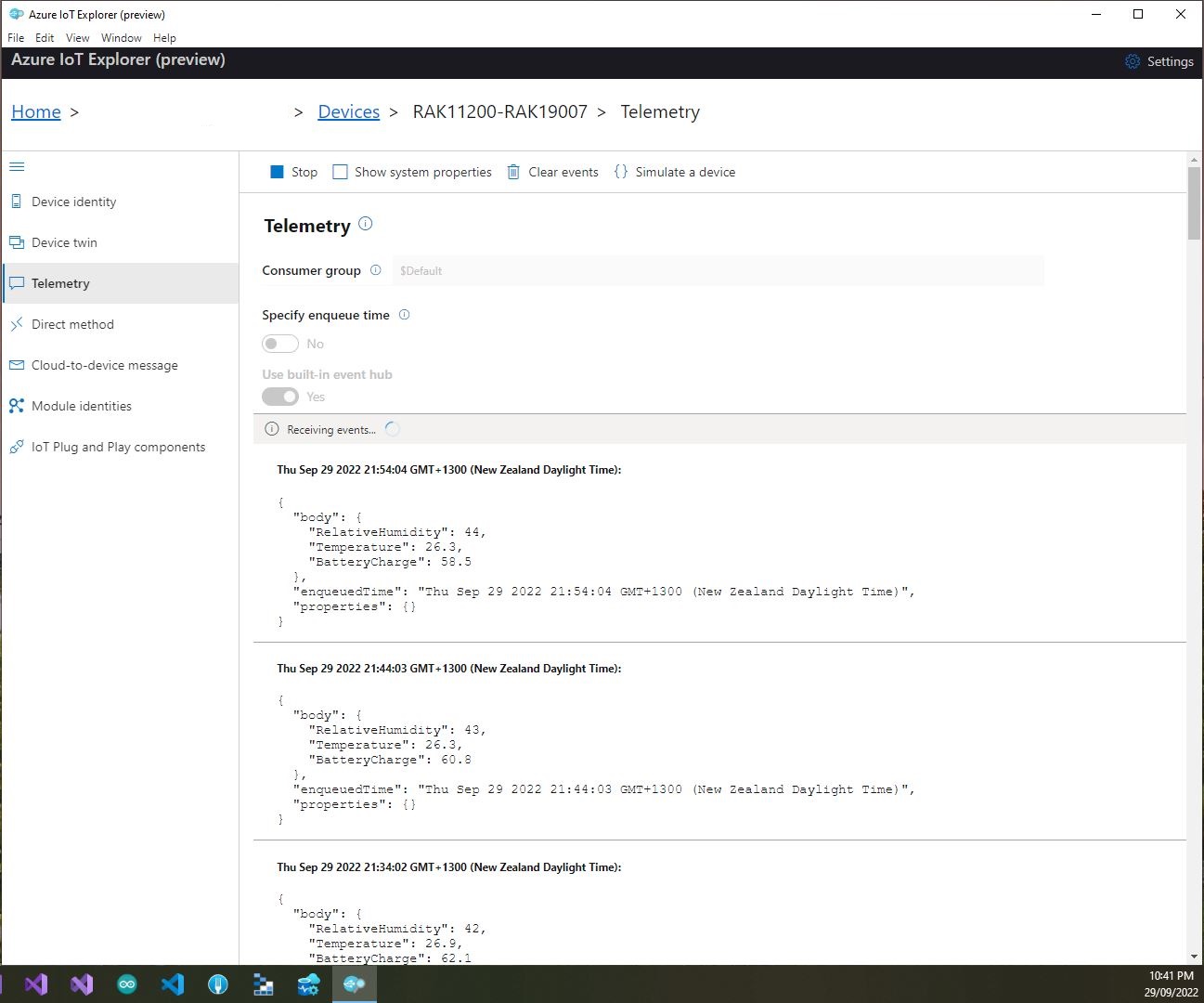
I used Azure IoT Explorer to monitor the Azure IoT Hub device telemetry to see how BatteryCharge value decreased to a level where the device wouldn’t transmit.
Azure IoT Explorer telemetry – device connected to a USB charger (11:01:19) then un-plugged (11:02:02)
Azure IoT Explorer telemetry – Last two messages sent by the device
With no use of the “power conservation” functionality of the ESP32-WROVER-B powered by a 1200mAH battery the device ran for approximately 11hrs (11:00am – 10:00pm).
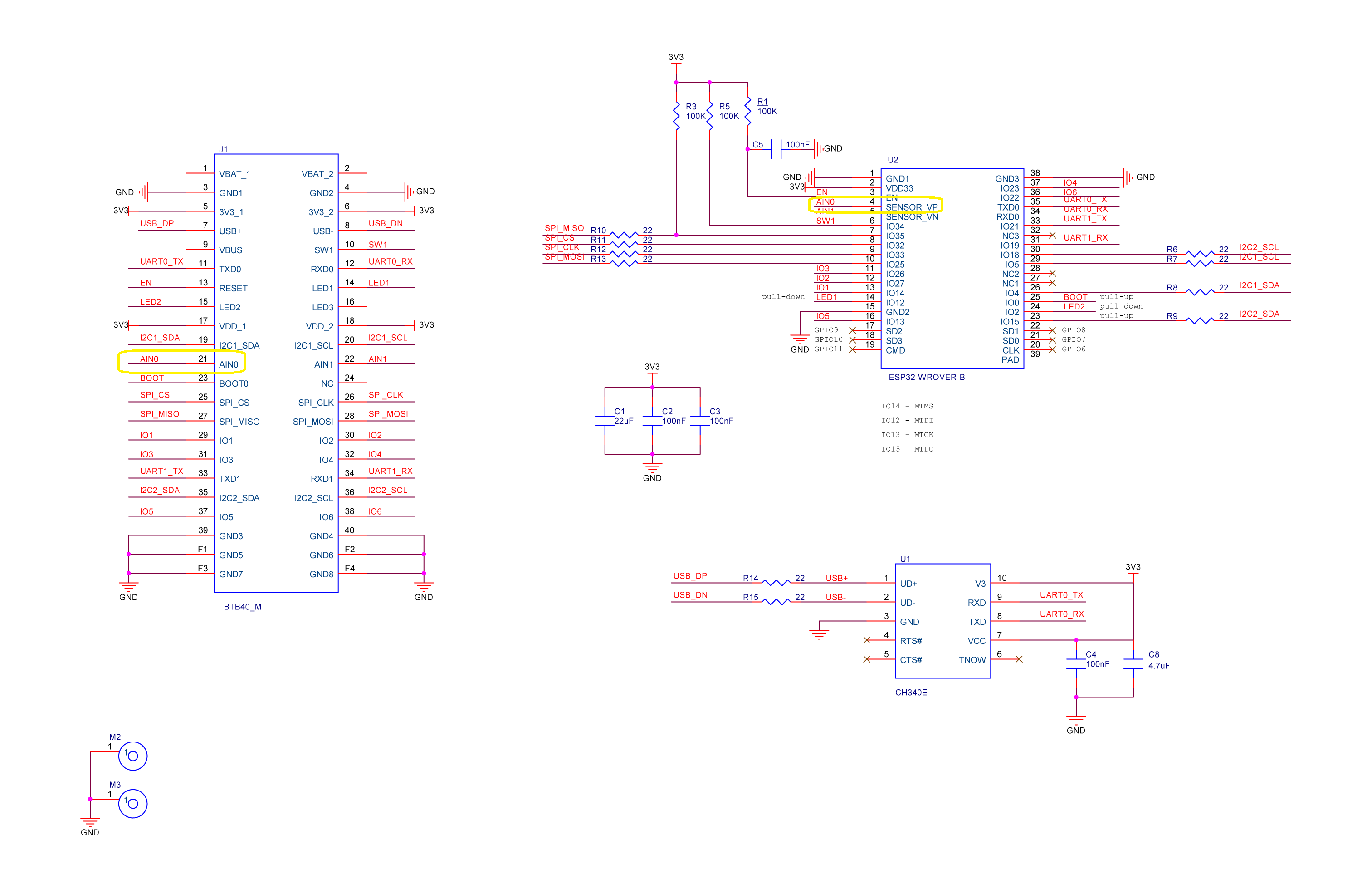
RAK2305 Wisblock AIN0 pin highlighted
I think the RAK2305 will not be able to measure “battery charge” as the SENSOR_VP pin on the Espressif ESP32-WROVER-B is not connected to AIN0.
public class Config
{
   public const string DeviceID = "RAK11200-RAK19001";
   public const string SasSignature = "..."; // sig
   public const string SasExpiryTime = "..."; // se

   public const string AzureIoTHubHostName = "..";
   public const string Ssid = "...";
   public const string Password = "..";
   ...
}
 _httpClient = new HttpClient
{
   SslProtocols = System.Net.Security.SslProtocols.Tls12,
   HttpsAuthentCert = new X509Certificate(Config.DigiCertBaltimoreCyberTrustRoot),
   BaseAddress = new Uri($"https://{Config.AzureIoTHubHostName}.azure-devices.net/devices/{Config.DeviceID}/messages/events?api-version=2020-03-13"),
};

string sasKey = $"SharedAccessSignature sr={Config.AzureIoTHubHostName}.azure-devices.net%2Fdevices%2F{Config.DeviceID}&sig={Config.SasSignature}&se={Config.SasExpiryTime}";

_httpClient.DefaultRequestHeaders.Add("Authorization", sasKey);










 devMobile's blog