Random wanderings through Microsoft Azure esp. PaaS plumbing, the IoT bits, AI on Micro controllers, AI on Edge Devices, .NET nanoFramework, .NET Core on *nix and ML.NET+ONNX
The Inside AirbnbLondon dataset has 87946 listings and the id column (which is the primary key) has a minimum value of 13913 and maximum of 973895808066047620 in the database.
Back in the early 90’s I used to live next to the Ealing Lawn Tennis Club in London
I used “Ealing” as the SearchText for my initial testing and tried different page numbers and sizes
Testing the search functionality with SwaggerUI
The listings search results JSON looked good but I missed one important detail…
string LookupByIdSql = @"SELECT Id, [Name], Listing_URL AS ListingURL
FROM ListingsHosts
WHERE id = @Id";
public record ListingLookupDto
{
public long Id { get; set; }
public string? Name { get; set; }
public string? ListingURL { get; set; }
};
//...
app.MapGet("/Listing/Results/{id:long}", async (long id, IDapperContext dappperContext) =>
{
using (var connection = dappperContext.ConnectionCreate())
{
ListingLookupDto result = await connection.QuerySingleOrDefaultWithRetryAsync<ListingLookupDto>(LookupByIdSql, new { id });
if (result is null)
{
return Results.Problem($"Listing {id} not found", statusCode: StatusCodes.Status404NotFound);
}
return Results.Ok(result);
}
})
.Produces<ListingLookupDto>(StatusCodes.Status200OK)
.Produces<ProblemDetails>(StatusCodes.Status404NotFound)
.WithOpenApi();
The id values in the search response and lookup DTOs were correct
Visual Studio 2022 Debugger inspecting listing id value
I had missed the clue in the search response JSON the listing id and the listingURL id didn’t match.
This specification allows implementations to set limits on the range
and precision of numbers accepted. Since software that implements
IEEE 754-2008 binary64 (double precision) numbers [IEEE754] is
generally available and widely used, good interoperability can be
achieved by implementations that expect no more precision or range
than these provide, in the sense that implementations will
approximate JSON numbers within the expected precision.
My initial ASP.NET Core Minimal AP exploration uses the Inside AirbnbLondon dataset which has 87946 listings. The data is pretty “nasty” with lots of nullable and wide columns so it took several attempts to import.
CREATE TABLE [dbo].[listingsRaw](
[id] [bigint] NOT NULL,
[listing_url] [nvarchar](50) NOT NULL,
[scrape_id] [datetime2](7) NOT NULL,
[last_scraped] [date] NOT NULL,
[source] [nvarchar](50) NOT NULL,
[name] [nvarchar](max) NOT NULL,
[description] [nvarchar](max) NULL,
[neighborhood_overview] [nvarchar](1050) NULL,
[picture_url] [nvarchar](150) NULL,
[host_id] [int] NOT NULL,
[host_url] [nvarchar](50) NOT NULL,
[host_name] [nvarchar](50) NULL,
[host_since] [date] NULL,
[host_location] [nvarchar](100) NULL,
[host_about] [nvarchar](max) NULL,
[host_response_time] [nvarchar](50) NULL,
[host_response_rate] [nvarchar](50) NULL,
[host_acceptance_rate] [nvarchar](50) NULL,
[host_is_superhost] [bit] NULL,
[host_thumbnail_url] [nvarchar](150) NULL,
[host_picture_url] [nvarchar](150) NULL,
[host_neighbourhood] [nvarchar](50) NULL,
[host_listings_count] [int] NULL,
[host_total_listings_count] [int] NULL,
[host_verifications] [nvarchar](50) NOT NULL,
[host_has_profile_pic] [bit] NULL,
[host_identity_verified] [bit] NULL,
[neighbourhood] [nvarchar](100) NULL,
[neighbourhood_cleansed] [nvarchar](50) NOT NULL,
[neighbourhood_group_cleansed] [nvarchar](1) NULL,
[latitude] [float] NOT NULL,
[longitude] [float] NOT NULL,
[property_type] [nvarchar](50) NOT NULL,
[room_type] [nvarchar](50) NOT NULL,
[accommodates] [tinyint] NOT NULL,
[bathrooms] [nvarchar](1) NULL,
[bathrooms_text] [nvarchar](50) NULL,
[bedrooms] [tinyint] NULL,
[beds] [tinyint] NULL,
[amenities] [nvarchar](max) NOT NULL,
[price] [money] NOT NULL,
[minimum_nights] [smallint] NOT NULL,
[maximum_nights] [int] NOT NULL,
[minimum_minimum_nights] [smallint] NULL,
[maximum_minimum_nights] [int] NULL,
[minimum_maximum_nights] [int] NULL,
[maximum_maximum_nights] [int] NULL,
[minimum_nights_avg_ntm] [float] NULL,
[maximum_nights_avg_ntm] [float] NULL,
[calendar_updated] [nvarchar](1) NULL,
[has_availability] [bit] NOT NULL,
[availability_30] [tinyint] NOT NULL,
[availability_60] [tinyint] NOT NULL,
[availability_90] [tinyint] NOT NULL,
[availability_365] [smallint] NOT NULL,
[calendar_last_scraped] [date] NOT NULL,
[number_of_reviews] [smallint] NOT NULL,
[number_of_reviews_ltm] [int] NOT NULL,
[number_of_reviews_l30d] [tinyint] NOT NULL,
[first_review] [date] NULL,
[last_review] [date] NULL,
[review_scores_rating] [float] NULL,
[review_scores_accuracy] [float] NULL,
[review_scores_cleanliness] [float] NULL,
[review_scores_checkin] [float] NULL,
[review_scores_communication] [float] NULL,
[review_scores_location] [float] NULL,
[review_scores_value] [float] NULL,
[license] [nvarchar](max) NULL,
[instant_bookable] [bit] NOT NULL,
[calculated_host_listings_count] [int] NULL,
[calculated_host_listings_count_entire_homes] [int] NOT NULL,
[calculated_host_listings_count_private_rooms] [int] NOT NULL,
[calculated_host_listings_count_shared_rooms] [int] NOT NULL,
[reviews_per_month] [float] NULL
) ON [PRIMARY] TEXTIMAGE_ON [PRIMARY]
There are other data quality issues e.g. the host information is duplicated in each of their Listings e.g. host_id, host_name, host_since, host_* etc. which will need to be tidied up.
Swagger user interface for Raw Listings search functionality.
I have implemented basic (“incomplete”) OpenAPI support for functionality and stress testing.
Swagger user interface parameterised search functionality.
The search results are paginated and individual listings can be retrieved using the Airbnb listing “id”.
const string SearchPaginatedSql = @"SELECT Uid,Id,[Name], neighbourhood
FROM listings
WHERE[Name] LIKE N'%' + @SearchText + N'%'
ORDER By[Name]
OFFSET @PageSize *(@PageNumber - 1) ROWS FETCH NEXT @PageSize ROWS ONLY";
public record ListingListDto
{
public long Id { get; set; }
public string? Name { get; set; }
public string? Neighbourhood { get; set; }
};
Swagger user interface search functionality with untyped response.
The first HTTP GET implementation returns an untyped result-set which was not very helpful.
app.MapGet("/Listing/Search", async (string searchText, int pageNumber, int pageSize, [FromServices] IDapperContext dappperContext) =>
{
using (var connection = dappperContext.ConnectionCreate())
{
return await connection.QueryWithRetryAsync(SearchPaginatedSql, new { searchText, pageNumber, pageSize });
}
})
.WithOpenApi();
Swagger user interface search functionality with typed response
The second HTTP GET implementation returns a typed result-set which improved the “usability” of clients generated from the OpenAPI definition file.
app.MapGet("/Listing/Search/Typed", async (string searchText, int pageNumber, int pageSize, [FromServices] IDapperContext dappperContext) =>
{
using (var connection = dappperContext.ConnectionCreate())
{
return await connection.QueryWithRetryAsync<ListingListDto>(SearchPaginatedSql, new { searchText, pageNumber, pageSize });
}
})
.Produces<IList<ListingListDto>>(StatusCodes.Status200OK)
.WithOpenApi();
string LookupByIdSql = @"SELECT Id,[Name], neighbourhood
FROM ListingsHosts
WHERE id = @Id";
public record ListingLookupDto
{
public long Id { get; set; }
public string? Name { get; set; }
public string? Neighbourhood { get; set; }
};
Swagger user interface Listing lookup functionality
app.MapGet("/Listing/{id:long}", async (long id, IDapperContext dappperContext) =>
{
using (var connection = dappperContext.ConnectionCreate())
{
ListingLookupDto result = await connection.QuerySingleOrDefaultWithRetryAsync<ListingLookupDto>(LookupByIdSql, new { id });
if (result is null)
{
return Results.Problem($"Listing {id} not found", statusCode: StatusCodes.Status404NotFound);
}
return Results.Ok(result);
}
})
.Produces<ListingLookupDto>(StatusCodes.Status200OK)
.Produces<ProblemDetails>(StatusCodes.Status404NotFound)
.WithOpenApi();
The lack of validation of the SearchText, PageSize and PageNumber parameters allow uses to enter invalid values which caused searches to fail.
Swagger user interface search functionality with an invalid page number
My initial approach was to decorate the parameters of the ValidatedQuery method with DataAnnotations to ensure only valid values were accepted.
This wasn’t a great solution because the validation of the parameters was declared as part of the user interface and would have to be repeated everywhere listing search functionality was provided.
Swagger user interface search functionality with parameter validation
app.MapGet("/Listing/Search/Parameters", async ([AsParameters] SearchParameters searchParameters,
[FromServices] IDapperContext dappperContext) =>
{
using (var connection = dappperContext.ConnectionCreate())
{
return await connection.QueryWithRetryAsync<ListingListDto>(SearchPaginatedSql, new { searchText = searchParameters.SearchText, searchParameters.PageNumber, searchParameters.PageSize });
}
})
.Produces<IList<ListingListDto>>(StatusCodes.Status200OK)
.Produces<ProblemDetails>(StatusCodes.Status400BadRequest)
.WithOpenApi();
public record SearchParameters
{
// https://github.com/domaindrivendev/Swashbuckle.AspNetCore/issues/2658 possibly related?
public const byte SearchTextMinimumLength = 3;
public const byte SearchTextMaximumLength = 15;
public const int PageNumberMinimum = 1;
public const int PageNumberMaximum = 100;
public const byte PageSizeMinimum = 5;
public const byte PageSizeMaximum = 50;
//[FromQuery, Required, MinLength(SearchTextMinimumLength, ErrorMessage = "SearchTextMinimumLegth"), MaxLength(SearchTextMaximumLength, ErrorMessage = "SearchTextMaximumLegth")]
//[Required, MinLength(SearchTextMinimumLength, ErrorMessage = "SearchTextMinimumLegth"), MaxLength(SearchTextMaximumLength, ErrorMessage = "SearchTextMaximumLegth")]
[MinLength(SearchTextMinimumLength, ErrorMessage = "SearchTextMinimumLegth"), MaxLength(SearchTextMaximumLength, ErrorMessage = "SearchTextMaximumLegth")]
public string SearchText { get; set; }
//[FromQuery, Range(PageNumberMinimum, PageNumberMaximum, ErrorMessage = "PageNumberMinimum PageNumberMaximum")]
//[Required, Range(PageNumberMinimum, PageNumberMaximum, ErrorMessage = "PageNumberMinimum PageNumberMaximum")]
[Range(PageNumberMinimum, PageNumberMaximum, ErrorMessage = "PageNumberMinimum PageNumberMaximum")]
public int PageNumber { get; set; }
[Range(PageSizeMinimum, PageSizeMaximum, ErrorMessage = "PageSizeMinimum PageSizeMaximum")]
public int PageSize { get; set; }
}
Swagger user interface search functionality with parameter validation
This last two implementations worked though the error messages I had embedded in the code were not displayed I think this is related to this Swashbuckle Issue.
There is also an issue looking up some listings with larger listing ids which I will need some investigation.
The Method Callback Delegate has different parameters, so I had to update the downlink formatter interface and update all of the sample downlink payload formatters.
public interface IFormatterDownlink
{
public byte[] Evaluate(string terminalId, string methodName, JObject? payloadJson, byte[] payloadBytes);
}
How direct methods will be processed is configured in the application settings. For each direct method name the downlink payload formatter to be invoked and an optional Javascript Object Notation(JSON) payload can be configured.
If there is no configuration for the direct method name, the payload formatter specified in Myriota device “DownlinkDefault” Attribute is used, and if that is not configured the default formatter in the payloadFormatters section of the application settings is used.
namespace devMobile.IoT.MyriotaAzureIoTConnector.Connector
{
internal class IoTHubDownlink(ILogger<IoTHubDownlink> _logger, IOptions<Models.AzureIoT> azureIoTSettings, IPayloadFormatterCache _payloadFormatterCache, IMyriotaModuleAPI _myriotaModuleAPI) : IIoTHubDownlink
{
private readonly Models.AzureIoT _azureIoTSettings = azureIoTSettings.Value;
public async Task<MethodResponse> IotHubMethodHandler(MethodRequest methodRequest, object userContext)
{
// DIY request identifier so processing progress can be tracked in Application Insights
string requestId = Guid.NewGuid().ToString();
Models.DeviceConnectionContext context = (Models.DeviceConnectionContext)userContext;
try
{
_logger.LogInformation("Downlink- TerminalId:{TerminalId} RequestId:{requestId} Name:{Name}", context.TerminalId, requestId, methodRequest.Name);
// Lookup payload formatter name, none specified use context one which is from device attributes or the default in configuration
string payloadFormatterName;
if (_azureIoTSettings.IoTHub.Methods.TryGetValue(methodRequest.Name, out Models.AzureIoTHubMethod? method) && !string.IsNullOrEmpty(method.Formatter))
{
payloadFormatterName = method.Formatter;
_logger.LogInformation("Downlink- IoT Hub TerminalID:{TermimalId} RequestID:{requestId} Method formatter:{payloadFormatterName} ", context.TerminalId, requestId, payloadFormatterName);
}
else
{
payloadFormatterName = context.PayloadFormatterDownlink;
_logger.LogInformation("Downlink- IoT Hub TerminalID:{TermimalId} RequestID:{requestId} Context formatter:{payloadFormatterName} ", context.TerminalId, requestId, payloadFormatterName);
}
// Display methodRequest.Data as Hex
if (methodRequest.Data is not null)
{
_logger.LogInformation("Downlink- IoT Hub TerminalID:{TerminalId} RequestID:{requestId} Data:{Data}", context.TerminalId, requestId, BitConverter.ToString(methodRequest.Data));
}
else
{
_logger.LogInformation("Downlink- IoT Hub TerminalID:{TerminalId} RequestID:{requestId} Data:null", context.TerminalId, requestId);
}
JObject? requestJson = null;
if ((method is not null) && !string.IsNullOrWhiteSpace(method.Payload))
{
// There is a matching method with a possible JSON payload
string payload = method.Payload.Trim();
if ((payload.StartsWith('{') && payload.EndsWith('}')) || (payload.StartsWith('[') && payload.EndsWith(']')))
{
// The payload is could be JSON
try
{
requestJson = JObject.Parse(payload);
}
catch (JsonReaderException jex)
{
_logger.LogWarning(jex, "Downlink- IoT Hub TerminalID:{TerminalId} RequestID:{requestId} Method Payload is not valid JSON", context.TerminalId, requestId);
return new MethodResponse(Encoding.ASCII.GetBytes($"{{\"message\":\"RequestID:{requestId} Method payload is not valid JSON.\"}}"), (int)HttpStatusCode.UnprocessableEntity);
}
}
else
{
// The payload couldn't be JSON
_logger.LogWarning("Downlink- IoT Hub TerminalID:{TerminalId} RequestID:{requestId} Method Payload is definitely not valid JSON", context.TerminalId, requestId);
return new MethodResponse(Encoding.ASCII.GetBytes($"{{\"message\":\"RequestID:{requestId} Method payload is definitely not valid JSON.\"}}"), (int)HttpStatusCode.UnprocessableEntity);
}
_logger.LogInformation("Downlink- IoT Hub TerminalID:{TerminalId} RequestID:{requestId} Method Payload:{requestJson}", context.TerminalId, requestId, JsonConvert.SerializeObject(requestJson, Formatting.Indented));
}
else
{
// If there was not matching method or the payload was "empty" see if the method request payload is valid
if (!string.IsNullOrWhiteSpace(methodRequest.DataAsJson))
{
string payload = methodRequest.DataAsJson.Trim();
if ((payload.StartsWith('{') && payload.EndsWith('}')) || (payload.StartsWith('[') && payload.EndsWith(']')))
{
// The payload is could be JSON
try
{
requestJson = JObject.Parse(payload);
_logger.LogInformation("Downlink- IoT Hub TerminalID:{TerminalId} RequestID:{requestId} DataAsJson:{requestJson}", context.TerminalId, requestId, JsonConvert.SerializeObject(requestJson, Formatting.Indented));
}
catch (JsonReaderException jex)
{
_logger.LogInformation(jex, "Downlink- IoT Hub TerminalID:{TerminalId} RequestID:{requestId} DataAsJson is not valid JSON", context.TerminalId, requestId);
}
}
}
}
// This "shouldn't" fail, but it could for invalid path to blob, timeout retrieving blob, payload formatter syntax error etc.
IFormatterDownlink payloadFormatter = await _payloadFormatterCache.DownlinkGetAsync(payloadFormatterName);
if ( requestJson is null )
{
requestJson = new JObject();
}
// This also "shouldn't" fail, but the payload formatters can throw runtime exceptions like null reference, divide by zero, index out of range etc.
byte[] payloadBytes = payloadFormatter.Evaluate(context.TerminalId, methodRequest.Name, requestJson, methodRequest.Data);
// Validate payload before calling Myriota control message send API method
if (payloadBytes is null)
{
_logger.LogWarning("Downlink- IoT Hub TerminalID:{TerminalId} Request:{requestId} Evaluate returned null", context.TerminalId, requestId);
return new MethodResponse(Encoding.ASCII.GetBytes($"{{\"message\":\"RequestID:{requestId} payload evaluate returned null.\"}}"), (int)HttpStatusCode.UnprocessableEntity);
}
if ((payloadBytes.Length < Constants.DownlinkPayloadMinimumLength) || (payloadBytes.Length > Constants.DownlinkPayloadMaximumLength))
{
_logger.LogWarning("Downlink- IoT Hub TerminalID:{TerminalId} RequestID:{requestId} PayloadBytes:{payloadBytes} length:{Length} invalid, must be {DownlinkPayloadMinimumLength} to {DownlinkPayloadMaximumLength} bytes", context.TerminalId, requestId, BitConverter.ToString(payloadBytes), payloadBytes.Length, Constants.DownlinkPayloadMinimumLength, Constants.DownlinkPayloadMaximumLength); ;
return new MethodResponse(Encoding.ASCII.GetBytes($"{{\"message\":\"RequestID:{requestId} payload evaluation length invalid.\"}}"), (int)HttpStatusCode.UnprocessableEntity);
}
// Finally send Control Message to device using the Myriota API
_logger.LogInformation("Downlink- IoT Hub TerminalID:{TerminalId} RequestID:{requestID} PayloadBytes:{payloadBytes} Length:{Length} sending", context.TerminalId, requestId, BitConverter.ToString(payloadBytes), payloadBytes.Length);
string messageId = await _myriotaModuleAPI.SendAsync(context.TerminalId, payloadBytes);
_logger.LogInformation("Downlink- IoT Hub TerminalID:{TerminalId} RequestID:{requestId} Myriota MessageID:{messageId} sent", context.TerminalId, requestId, messageId);
}
catch (Exception ex)
{
_logger.LogError(ex, "Downlink- IoT Hub TerminalID:{TerminalId} RequestID:{requestId} IotHubMethodHandler processing failed", context.TerminalId, requestId);
return new MethodResponse(Encoding.ASCII.GetBytes($"{{\"message\":\"TerminalID:{context.TerminalId} RequestID:{requestId} method handler failed.\"}}"), (int)HttpStatusCode.InternalServerError);
}
return new MethodResponse(Encoding.ASCII.GetBytes($"{{\"message\":\"TerminalID:{context.TerminalId} RequestID:{requestId} Message sent successfully.\"}}"), (int)HttpStatusCode.OK);
}
}
}
public class FormatterDownlink : PayloadFormatter.IFormatterDownlink
{
public byte[] Evaluate(string terminalId, string methodName, JObject payloadJson, byte[] payloadBytes)
{
byte? status = payloadJson.GetValue("FanSpeed", StringComparison.OrdinalIgnoreCase)?.Value<byte>();
if (!status.HasValue)
{
return new byte[] { };
}
return new byte[] { 1, status.Value };
}
}
The FanSpeed.cs payload formatter extracts the FanSpeed value from the JSON payload and returns a two byte array containing the message type and speed of the fan.
Azure Function application displaying Diagnostic information for control message
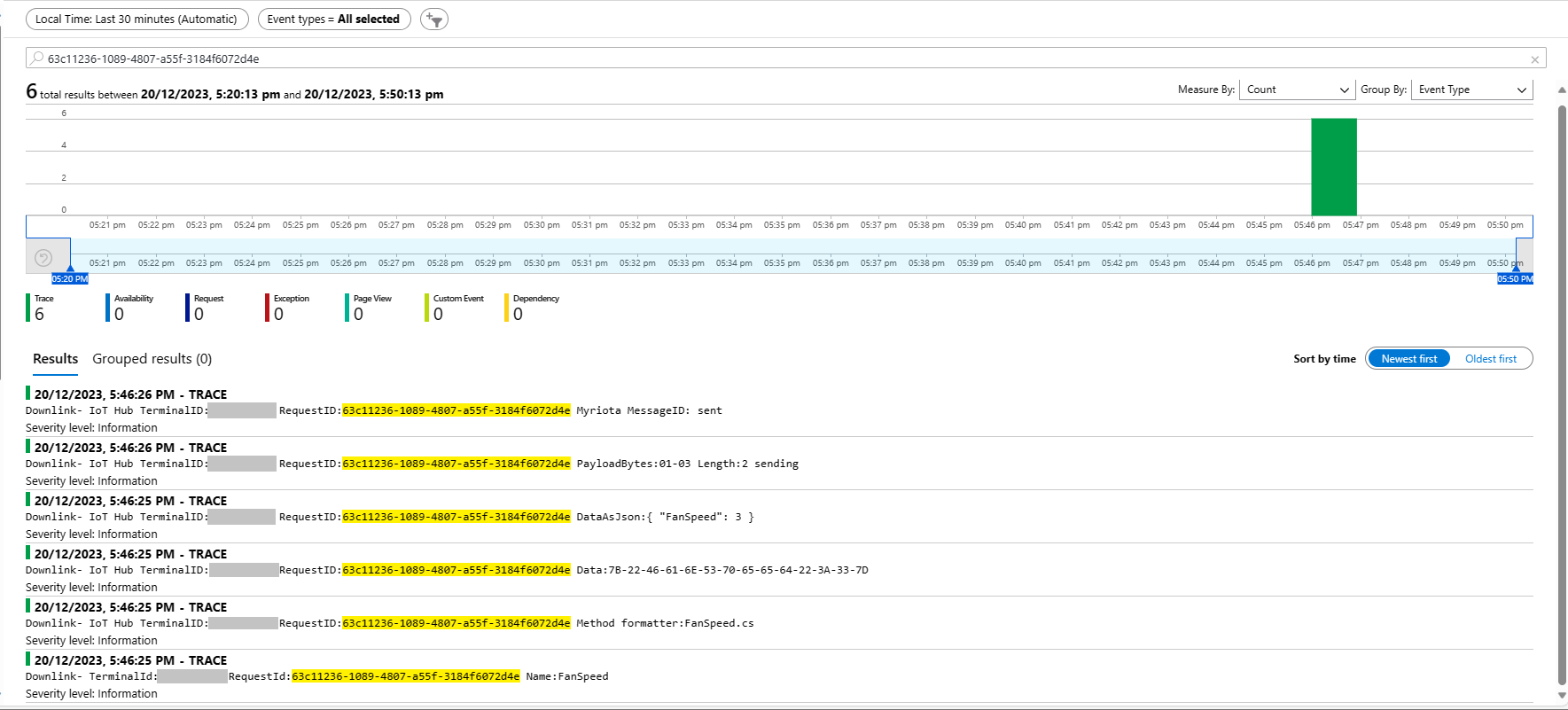
Each logging message starts with the TerminalID (to simplify searching for all the direct methods invoked on a device) and the requestId a Globally Unique Identifier (GUID) to simplify searching for all the “steps” associated with sending a message) with the rest of the logging message containing “step” specific diagnostic information.
Azure Application Insights displaying information diagnostic information
Myriota Device manager control message history displaying pending control message
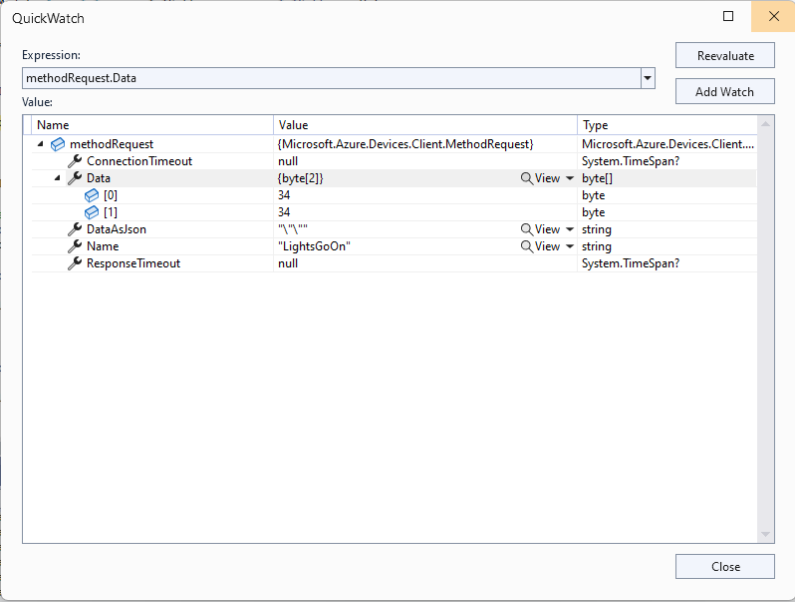
The Azure IoT Explorer payload for an empty message contained two ” characters which is a bit odd. I will have to build a test application which uses the Azure IoT Hub C2D direct method API to see if this is a “feature”.
Each logging message starts with the TerminalID (to simplify searching for all the messages sent to a device) and the message LockToken (to simplify searching for all the “steps” associated with sending a message) with the rest of the logging message containing “step” specific diagnostic information.
Successful Azure IoT Explorer C2D JSON Message
If there is no PayloadFormatter attribute the default in the PayloadFormatters section of the function configuration is used.
using System;
using System.Collections.Generic;
using Newtonsoft.Json;
using Newtonsoft.Json.Linq;
public class FormatterDownlink : PayloadFormatter.IFormatterDownlink
{
public byte[] Evaluate(IDictionary<string, string> properties, string terminalId, JObject payloadJson, byte[] payloadBytes)
{
byte? status = payloadJson.Value<byte?>("FanSpeed");
if (!status.HasValue)
{
return new byte[] { };
}
return new byte[] { 1, status.Value };
}
}
The FanSpeed.cs payload formatter extracts the FanSpeed value from the JSON payload and returns a two byte array containing the message type and speed of the fan.
Azure IoT Function running waiting for a C2D message
After re-reading the SetMethodHandlerAync documentation I refactored the code (back to the approach used a couple of branches ago) with the “using” wrapping the try/catch.
public async Task AzureIoTHubMessageHandler(Message message, object userContext)
{
Models.DeviceConnectionContext context = (Models.DeviceConnectionContext)userContext;
_logger.LogInformation("Downlink- IoT Hub TerminalId:{TermimalId} LockToken:{LockToken}", context.TerminalId, message.LockToken);
using (message) // https://learn.microsoft.com/en-us/dotnet/api/microsoft.azure.devices.client.deviceclient.setreceivemessagehandlerasync?view=azure-dotnet
{
try
{
// Replace default formatter with message specific formatter if configured.
if (!message.Properties.TryGetValue(Constants.IoTHubDownlinkPayloadFormatterProperty, out string? payloadFormatterName) || string.IsNullOrEmpty(payloadFormatterName))
{
_logger.LogInformation("Downlink- IoT Hub TerminalID:{TermimalId} LockToken:{LockToken} Context formatter:{payloadFormatterName} ", context.TerminalId, message.LockToken, payloadFormatterName);
payloadFormatterName = context.PayloadFormatterDownlink;
}
else
{
_logger.LogInformation("Downlink- IoT Hub TerminalID:{TermimalId} LockToken:{LockToken} Property formatter:{payloadFormatterName} ", context.TerminalId, message.LockToken, payloadFormatterName);
}
// If GetBytes fails payload really badly broken
byte[] messageBytes = message.GetBytes();
_logger.LogInformation("Downlink- IoT Hub TerminalID:{TerminalId} LockToken:{LockToken} Message bytes:{messageBytes}", context.TerminalId, message.LockToken, BitConverter.ToString(messageBytes));
// Try converting the bytes to text then to JSON
JObject? messageJson = null;
try
{
// These will fail for some messages, payload formatter gets bytes only
string messageText = Encoding.UTF8.GetString(messageBytes);
try
{
messageJson = JObject.Parse(messageText);
_logger.LogInformation("Downlink- IoT Hub TerminalID:{TerminalId} LockToken:{LockToken} JSON:{messageJson}", context.TerminalId, message.LockToken, JsonConvert.SerializeObject(messageJson, Formatting.Indented));
}
catch (JsonReaderException jex)
{
_logger.LogInformation(jex, "Downlink- IoT Hub TerminalID:{TerminalId} LockToken:{LockToken} not valid JSON", context.TerminalId, message.LockToken);
}
}
catch (ArgumentException aex)
{
_logger.LogInformation(aex, "Downlink- IoT Hub TerminalID:{TerminalId} LockToken:{LockToken} message bytes not valid text", context.TerminalId, message.LockToken);
}
// This shouldn't fail, but it could for invalid path to blob, timeout retrieving blob, payload formatter syntax error etc.
IFormatterDownlink payloadFormatter = await _payloadFormatterCache.DownlinkGetAsync(payloadFormatterName);
// This will fail if payload formatter throws runtime exceptions like null reference, divide by zero, index out of range etc.
byte[] payloadBytes = payloadFormatter.Evaluate(message.Properties, context.TerminalId, messageJson, messageBytes);
// Validate payload before calling Myriota control message send API method
if (payloadBytes is null)
{
_logger.LogWarning("Downlink- IoT Hub TerminalID:{TerminalId} LockToken:{LockToken} payload formatter:{payloadFormatter} Evaluate returned null", context.TerminalId, message.LockToken, payloadFormatterName);
await context.DeviceClient.RejectAsync(message);
return;
}
if ((payloadBytes.Length < Constants.DownlinkPayloadMinimumLength) || (payloadBytes.Length > Constants.DownlinkPayloadMaximumLength))
{
_logger.LogWarning("Downlink- IoT Hub TerminalID:{TerminalId} LockToken:{LockToken} PayloadBytes:{payloadBytes} length:{Length} invalid must be {DownlinkPayloadMinimumLength} to {DownlinkPayloadMaximumLength} bytes", context.TerminalId, message.LockToken, Convert.ToHexString(payloadBytes), payloadBytes.Length, Constants.DownlinkPayloadMinimumLength, Constants.DownlinkPayloadMaximumLength);
await context.DeviceClient.RejectAsync(message);
return;
}
// Finally send Control Message to device using the Myriota API
_logger.LogInformation("Downlink- IoT Hub TerminalID:{TerminalId} LockToken:{LockToken} PayloadBytes:{payloadBytes} Length:{Length} sending", context.TerminalId, message.LockToken, BitConverter.ToString(payloadBytes), payloadBytes.Length);
string messageId = await _myriotaModuleAPI.SendAsync(context.TerminalId, payloadBytes);
_logger.LogInformation("Downlink- IoT Hub TerminalID:{TerminalId} LockToken:{LockToken} MessageID:{messageId} sent", context.TerminalId, message.LockToken, messageId);
await context.DeviceClient.CompleteAsync(message);
}
catch (Exception ex)
{
_logger.LogError(ex, "Downlink- IoT Hub TerminalID:{TerminalId} LockToken:{LockToken} MessageHandler processing failed", context.TerminalId, message.LockToken);
await context.DeviceClient.RejectAsync(message);
}
}
}
...
// Finally send Control Message to device using the Myriota API
_logger.LogInformation("Downlink- IoT Hub TerminalID:{TerminalId} LockToken:{LockToken} PayloadBytes:{payloadBytes} Length:{Length} sending", context.TerminalId, message.LockToken, BitConverter.ToString(payloadBytes), payloadBytes.Length);
string messageId = await _myriotaModuleAPI.SendAsync(context.TerminalId, payloadBytes);
...
Azure IoT Function successfully sending downlink message.
The Encoding.UTF8.GetString and JObject.Parse are processed in a single Try with a specialised catch for when the payload cannot be converted to text. If the payload cannot be converted to JSON only the payloadBytes parameter of payload formatter is populated.
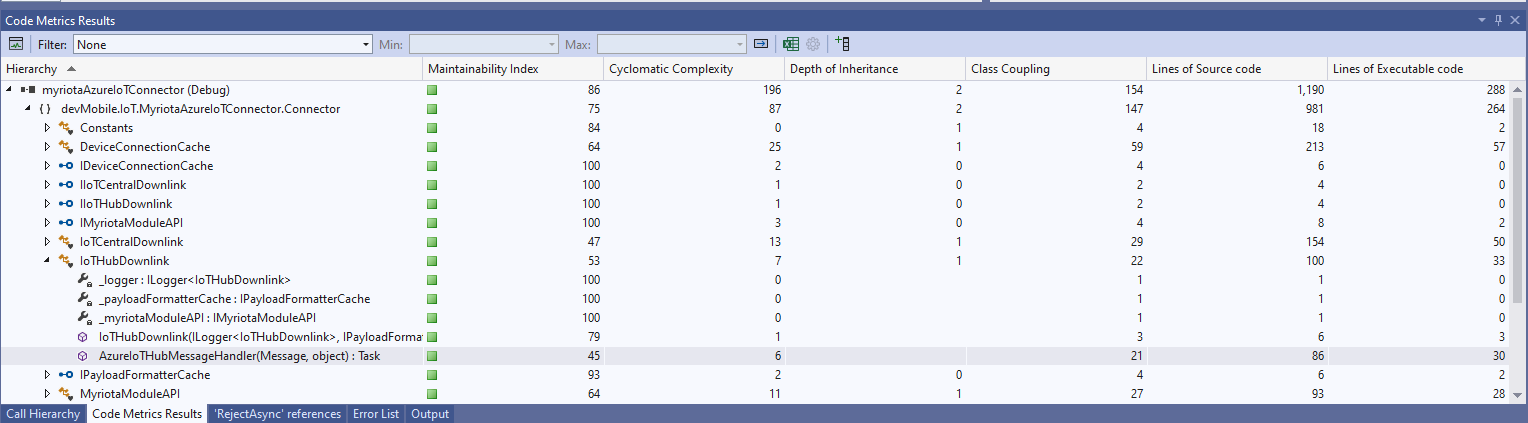
The Azure IoT Hub downlink message handler was a partial class and part of implementation of the IDeviceConnectionCache which was a hangover from one of the initial versions.
The myriotaAzure IoT Hub Cloud Identity Translation Gateway uplink message handler Azure Storage Queue Trigger Function wasn’t processing “transient” vs. “permanent” failures well. Sometimes a “permanent” failure message would be retried multiple times by the function runtime before getting moved to the poison queue.
After some experimentation using an Azure Storage Queue Function Output binding to move messages to the poison queue looked like a reasonable approach. (Though, returning null to indicate the message should be removed from the queue was not obvious from the documentation)
[Function("UplinkMessageProcessor")]
[QueueOutput(queueName: "uplink-poison", Connection = "UplinkQueueStorage")]
public async Task<Models.UplinkPayloadQueueDto> UplinkMessageProcessor([QueueTrigger(queueName: "uplink", Connection = "UplinkQueueStorage")] Models.UplinkPayloadQueueDto payload, CancellationToken cancellationToken)
{
...
// Process each packet in the payload. Myriota docs say only one packet per payload but just incase...
foreach (Models.QueuePacket packet in payload.Data.Packets)
{
// Lookup the device client in the cache or create a new one
Models.DeviceConnectionContext context;
try
{
context = await _deviceConnectionCache.GetOrAddAsync(packet.TerminalId, cancellationToken);
}
catch (DeviceNotFoundException dnfex)
{
_logger.LogError(dnfex, "Uplink- PayloadId:{0} TerminalId:{1} terminal not found", payload.Id, packet.TerminalId);
return payload;
}
catch (Exception ex) // Maybe just send to poison queue or figure if transient error?
{
_logger.LogError(ex, "Uplink- PayloadId:{0} TerminalId:{1} ", payload.Id, packet.TerminalId);
throw;
}
...
// Proccessing successful, message can be deleted by QueueTrigger plumbing
return null;
}
After building and testing an Azure Storage Queue Function Output binding implementation I’m not certain that it is a good approach. The code is a bit “chunky” and I have had to implement more of the retry process logic.
The myriotaAzure IoT Hub Cloud Identity Translation Gateway downlink message handler was getting a bit “chunky”. So, I started by stripping the code back to the absolute bare minimum that would “work”.
Then the code was then extended so it worked for “sunny day” scenarios. The payload formatter was successfully retrieved from the configured Azure Storage Blob, CS-Script successfully compiled the payload formatter, the message payload was valid text, the message text was valid Javascript Object Notation(JSON), the JSON was successfully processed by the compiled payload formatter, and finally the payload was accepted by the Myriota Cloud API.
Then finally the code was modified to gracefully handle broken payloads returned by the payload formatter evaluation, some comments were added, and the non-managed resources of the DeviceClient.Message disposed.
public async Task AzureIoTHubMessageHandler(Message message, object userContext)
{
Models.DeviceConnectionContext context = (Models.DeviceConnectionContext)userContext;
_logger.LogInformation("Downlink- IoT Hub TerminalId:{termimalId} LockToken:{LockToken}", context.TerminalId, message.LockToken);
// Use default formatter and replace with message specific formatter if configured.
string payloadFormatter;
if (!message.Properties.TryGetValue(Constants.IoTHubDownlinkPayloadFormatterProperty, out payloadFormatter) || string.IsNullOrEmpty(payloadFormatter))
{
payloadFormatter = context.PayloadFormatterDownlink;
}
_logger.LogInformation("Downlink- IoT Hub TerminalID:{termimalId} LockToken:{LockToken} Payload formatter:{payloadFormatter} ", context.TerminalId, message.LockToken, payloadFormatter);
try
{
// If this fails payload broken
byte[] messageBytes = message.GetBytes();
// This will fail for some messages, payload formatter gets bytes only
string messageText = string.Empty;
try
{
messageText = Encoding.UTF8.GetString(messageBytes);
}
catch (ArgumentException aex)
{
_logger.LogInformation("Downlink- IoT Hub TerminalID:{TerminalId} LockToken:{LockToken} messageBytes:{2} not valid Text", context.TerminalId, message.LockToken, BitConverter.ToString(messageBytes));
}
// This will fail for some messages, payload formatter gets bytes only
JObject? messageJson = null;
try
{
messageJson = JObject.Parse(messageText);
}
catch ( JsonReaderException jex)
{
_logger.LogInformation("Downlink- IoT Hub TerminalID:{TerminalId} LockToken:{LockToken} messageText:{2} not valid json", context.TerminalId, message.LockToken, BitConverter.ToString(messageBytes));
}
// This shouldn't fail, but it could for lots of diffent reasons, invalid path to blob, syntax error, interface broken etc.
IFormatterDownlink payloadFormatterDownlink = await _payloadFormatterCache.DownlinkGetAsync(payloadFormatter);
// This shouldn't fail, but it could for lots of different reasons, null references, divide by zero, out of range etc.
byte[] payloadBytes = payloadFormatterDownlink.Evaluate(message.Properties, context.TerminalId, messageJson, messageBytes);
// Validate payload before calling Myriota control message send API method
if (payloadBytes is null)
{
_logger.LogWarning("Downlink- IoT Hub TerminalID:{terminalId} LockToken:{LockToken} payload formatter:{payloadFormatter} Evaluate returned null", context.TerminalId, message.LockToken, payloadFormatter);
await context.DeviceClient.RejectAsync(message);
return;
}
if ((payloadBytes.Length < Constants.DownlinkPayloadMinimumLength) || (payloadBytes.Length > Constants.DownlinkPayloadMaximumLength))
{
_logger.LogWarning("Downlink- IoT Hub TerminalID:{terminalId} LockToken:{LockToken} payloadData length:{Length} invalid must be {DownlinkPayloadMinimumLength} to {DownlinkPayloadMaximumLength} bytes", context.TerminalId, message.LockToken, payloadBytes.Length, Constants.DownlinkPayloadMinimumLength, Constants.DownlinkPayloadMaximumLength);
await context.DeviceClient.RejectAsync(message);
return;
}
// This shouldn't fail, but it could few reasons mainly connectivity & message queuing etc.
_logger.LogInformation("Downlink- IoT Hub TerminalID:{TerminalId} LockToken:{LockToken} PayloadData:{payloadData} Length:{Length} sending", context.TerminalId, message.LockToken, Convert.ToHexString(payloadBytes), payloadBytes.Length);
// Finally send the message using Myriota API
string messageId = await _myriotaModuleAPI.SendAsync(context.TerminalId, payloadBytes);
_logger.LogInformation("Downlink- IoT Hub TerminalID:{TerminalId} LockToken:{LockToken} MessageID:{messageId} sent", context.TerminalId, message.LockToken, messageId);
await context.DeviceClient.CompleteAsync(message);
_logger.LogInformation("Downlink- IoT Hub TerminalID:{terminalId} LockToken:{LockToken} MessageID:{messageId} sent", context.TerminalId, message.LockToken, messageId);
}
catch (Exception ex)
{
await context.DeviceClient.RejectAsync(message);
_logger.LogError(ex, "Downlink- IoT Hub TerminalID:{terminalId} LockToken:{LockToken} failed", context.TerminalId, message.LockToken);
}
finally
{
// Mop up the non managed resources of message
message.Dispose();
}
}
As the code was being extended, I tested different failures to make sure the Application Insights logging messages were useful. The first failure mode tested was the Azure Storage Blob, path was broken or the blob was missing.
Visual Studio 2022 Debugger blob not found exception message
Application Insights blob not found exception logging
Then a series of “broken” payload formatters were created to test CS-Script compile time failures.
// Broken interface implementation
using System;
using System.Collections.Generic;
using Newtonsoft.Json;
using Newtonsoft.Json.Linq;
public class FormatterDownlink : PayloadFormatter.IFormatterDownlink
{
public byte[] Evaluate(IDictionary<string, string> properties, string terminalId, byte[] payloadBytes)
{
return payloadBytes;
}
}
Visual Studio 2022 Debugger interface implementation broken exception message
// Broken syntax
using System;
using System.Collections.Generic;
using Newtonsoft.Json;
using Newtonsoft.Json.Linq;
public class FormatterDownlink : PayloadFormatter.IFormatterDownlink
{
public byte[] Evaluate(IDictionary<string, string> properties, string terminalId, JObject payloadJson, byte[] payloadBytes)
{
return payloadBytes
}
}
Visual Studio 2022 Debugger syntax error exception message
The final test was sending a downlink message which was valid JSON, contained the correct information for the specified payload formatter and was successfully processed by the Myriota Cloud API.
Azure IoT Explorer with valid JSON payload and payload formatter name
Azure function output of successful downlink message
The myriotaAzure IoT Hub Cloud Identity Translation Gateway payload formatters use compiled C# code to convert uplink/downlink packet payloads to JSON/byte array. While trying out different formatters I had “compile” and “evaluation” errors which would have been a lot easier to debug if there was more diagnostic information in the Azure Application Insights logging.
namespace PayloadFormatter // Additional namespace for shortening interface when usage in formatter code
{
using System.Collections.Generic;
using Newtonsoft.Json.Linq;
public interface IFormatterUplink
{
public JObject Evaluate(IDictionary<string, string> properties, string terminalId, DateTime timestamp, byte[] payloadBytes);
}
public interface IFormatterDownlink
{
public byte[] Evaluate(IDictionary<string, string> properties, string terminalId, JObject? payloadJson, byte[] payloadBytes);
}
}
// Process the payload with configured formatter
Dictionary<string, string> properties = new Dictionary<string, string>();
JObject telemetryEvent;
try
{
telemetryEvent = formatterUplink.Evaluate(properties, packet.TerminalId, packet.Timestamp, payloadBytes);
}
catch (Exception ex)
{
_logger.LogError(ex, "Uplink- PayloadId:{0} TerminalId:{1} Value:{2} Bytes:{3} payload formatter evaluate failed", payload.Id, packet.TerminalId, packet.Value, Convert.ToHexString(payloadBytes));
return payload;
}
if (telemetryEvent is null)
{
_logger.LogError("Uplink- PayloadId:{0} TerminalId:{1} Value:{2} Bytes:{3} payload formatter evaluate failed returned null", payload.Id, packet.TerminalId, packet.Value, Convert.ToHexString(payloadBytes));
return payload;
}
The Evaluate method can return many different types of exception so in the initial version only the “generic” exception is caught and logged.
using System;
using System.Collections.Generic;
using Newtonsoft.Json;
using Newtonsoft.Json.Linq;
public class FormatterUplink : PayloadFormatter.IFormatterUplink
{
public JObject Evaluate(IDictionary<string, string> properties, string terminalId, DateTime timestamp, byte[] payloadBytes)
{
JObject telemetryEvent = new JObject();
telemetryEvent.Add("Bytes", BitConverter.ToString(payloadBytes));
return telemetryEvent;
}
}
There are a number (which should grow over time) of test uplink/downlink payload formatters for testing different compile and execution failures.
Azure IoT Storage Explorer container with sample formatter blobs.
When writing payload formatters, the Visual Studio 2022 syntax highlighting is really useful for spotting syntax errors and with the “Downlink Payload Formatter Test Harness” application payload formatters can be executed and debugged before deployment with Azure Storage Explorer.
namespace PayloadFormattercode
{
using System.Collections.Generic;
using Newtonsoft.Json.Linq;
public interface IFormatterUplink
{
public JObject Evaluate(IDictionary<string, string> properties, string application, string terminalId, DateTime timestamp, JObject payloadJson, string payloadText, byte[] payloadBytes);
}
..
}
The myriota uplink packet payload is only 20 bytes long so it is very unlikely that the payloadText and payloadJSON parameters would ever be populated so I removed them from the interface. The uplink message handler interface has been updated and the code to convert (if possible) the payload bytes to text and then to JSON deleted.
namespace PayloadFormatter
{
using System.Collections.Generic;
using Newtonsoft.Json.Linq;
public interface IFormatterUplink
{
public JObject Evaluate(IDictionary<string, string> properties, string application, string terminalId, DateTime timestamp, byte[] payloadBytes);
}
...
}
All of the sample payload formatters have been updated to reflect the updated parameters. The sample Tracker.cs payload formatter unpacks a message from Myriota Dev Kit running the Tracker sample and returns an Azure IoT Central compatible location telemetry payload.
/*
myriota tracker payload format
typedef struct {
uint16_t sequence_number;
int32_t latitude; // scaled by 1e7, e.g. -891234567 (south 89.1234567)
int32_t longitude; // scaled by 1e7, e.g. 1791234567 (east 179.1234567)
uint32_t time; // epoch timestamp of last fix
} __attribute__((packed)) tracker_message;
*/
using System;
using System.Collections.Generic;
using System.Globalization;
using Newtonsoft.Json;
using Newtonsoft.Json.Linq;
public class FormatterUplink : PayloadFormatter.IFormatterUplink
{
public JObject Evaluate(IDictionary<string, string> properties, string application, string terminalId, DateTime timestamp, byte[] payloadBytes)
{
JObject telemetryEvent = new JObject();
if (payloadBytes is null)
{
return telemetryEvent;
}
telemetryEvent.Add("SequenceNumber", BitConverter.ToUInt16(payloadBytes));
JObject location = new JObject();
double latitude = BitConverter.ToInt32(payloadBytes, 2) / 10000000.0;
location.Add("lat", latitude);
double longitude = BitConverter.ToInt32(payloadBytes, 6) / 10000000.0;
location.Add("lon", longitude);
location.Add("alt", 0);
telemetryEvent.Add("DeviceLocation", location);
UInt32 packetimestamp = BitConverter.ToUInt32(payloadBytes, 10);
DateTime fixAtUtc = DateTime.UnixEpoch.AddSeconds(packetimestamp);
telemetryEvent.Add("FixAtUtc", fixAtUtc);
properties.Add("iothub-creation-time-utc", fixAtUtc.ToString("s", CultureInfo.InvariantCulture));
return telemetryEvent;
}
}
If a message payload is text or JSON it can still be converted in the payload formatter.