.NET Core RAK811 LoRaWAN library Part2

Nasty OTAA connect

After getting basic connectivity for my IoT LoRa Node pHAT for Raspberry Pi test rig sorted I wanted to see if I could get the device connected to The Things Network(TTN) via the RAK7246G LPWAN Developer Gateway on my bookcase.

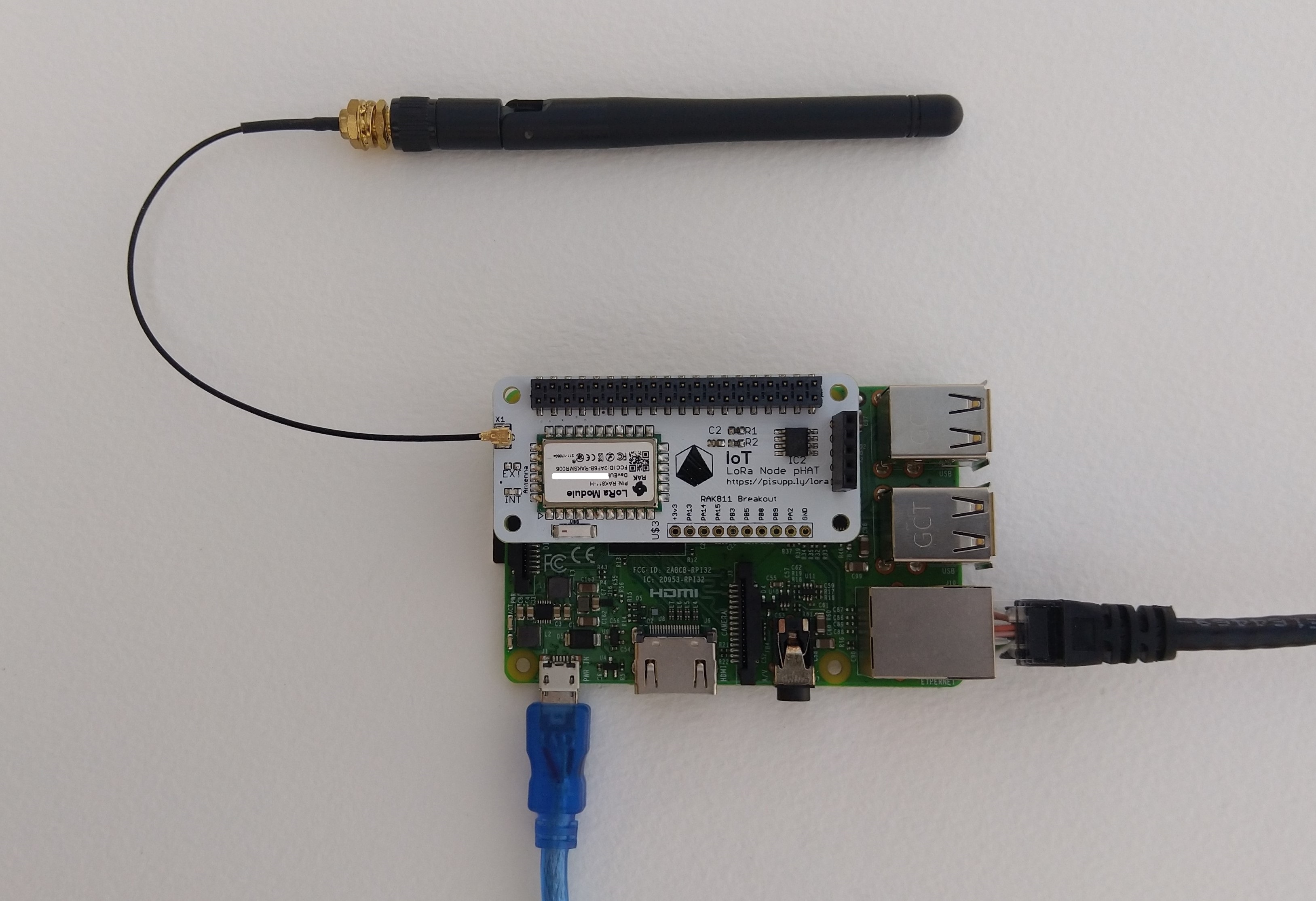
IoT LoRa Node pHAT for Raspberry Pi mounted on a Raspberry PI3

My Over the Air Activation (OTAA) implementation is very “nasty” I have assumed that there would be no timeouts or failures and I only send one BCD message “48656c6c6f204c6f526157414e” which is “hello LoRaWAN”.

The code just sequentially steps through the necessary configuration to join the TTN network with a suitable delay after each command is sent. I had some problems with re-opening the serial port if my application had previously failed with an uncaught exception. After some experimentation I added some code to ensure the port was closed when an exception occurred.

//---------------------------------------------------------------------------------
// Copyright (c) September 2021, devMobile Software
//
// Licensed under the Apache License, Version 2.0 (the "License");
// you may not use this file except in compliance with the License.
// You may obtain a copy of the License at
//
//     http://www.apache.org/licenses/LICENSE-2.0
//
// Unless required by applicable law or agreed to in writing, software
// distributed under the License is distributed on an "AS IS" BASIS,
// WITHOUT WARRANTIES OR CONDITIONS OF ANY KIND, either express or implied.
// See the License for the specific language governing permissions and
// limitations under the License.
//
//---------------------------------------------------------------------------------
namespace devMobile.IoT.NetCore.Rak811.NetworkJoinOTAA
{
	using System;
	using System.Diagnostics;
	using System.IO.Ports;
	using System.Threading;

	public class Program
	{
		private const string SerialPortId = "/dev/ttyS0";
		private const string AppEui = "...";
		private const string AppKey = "...";
		private const byte MessagePort = 1;
		private const string Payload = "A0EEE456D02AFF4AB8BAFD58101D2A2A"; // Hello LoRaWAN

		public static void Main()
		{
			string response;

			Debug.WriteLine("devMobile.IoT.NetCore.Rak811.NetworkJoinOTAA starting");

			Debug.WriteLine(String.Join(",", SerialPort.GetPortNames()));

			try
			{
				using (SerialPort serialPort = new SerialPort(SerialPortId))
				{
					// set parameters
					serialPort.BaudRate = 9600;
					serialPort.DataBits = 8;
					serialPort.Parity = Parity.None;
					serialPort.StopBits = StopBits.One;
					serialPort.Handshake = Handshake.None;

					serialPort.ReadTimeout = 5000;

					serialPort.NewLine = "\r\n";

					serialPort.Open();

					// clear out the RX buffer
					response = serialPort.ReadExisting();
					Debug.WriteLine($"RX :{response.Trim()} bytes:{response.Length}");
					Thread.Sleep(500);

					// Set the Working mode to LoRaWAN
					Console.WriteLine("Set Work mode");
					serialPort.WriteLine("at+set_config=lora:work_mode:0");
					Thread.Sleep(5000);
					response = serialPort.ReadExisting();
					response = response.Trim('\0');
					Debug.WriteLine($"RX :{response.Trim()} bytes:{response.Length}");

					// Set the Region to AS923
					Console.WriteLine("Set Region");
					serialPort.WriteLine("at+set_config=lora:region:AS923");
					response = serialPort.ReadLine();
					Debug.WriteLine($"RX :{response.Trim()} bytes:{response.Length}");

					// Set the JoinMode
					Console.WriteLine("Set Join mode");
					serialPort.WriteLine("at+set_config=lora:join_mode:0");
					response = serialPort.ReadLine();
					Debug.WriteLine($"RX :{response.Trim()} bytes:{response.Length}");

					// Set the appEUI
					Console.WriteLine("Set App Eui");
					serialPort.WriteLine($"at+set_config=lora:app_eui:{AppEui}");
					response = serialPort.ReadLine();
					Debug.WriteLine($"RX :{response.Trim()} bytes:{response.Length}");

					// Set the appKey
					Console.WriteLine("Set App Key");
					serialPort.WriteLine($"at+set_config=lora:app_key:{AppKey}");
					response = serialPort.ReadLine();
					Debug.WriteLine($"RX :{response.Trim()} bytes:{response.Length}");

					// Set the Confirm flag
					Console.WriteLine("Set Confirm off");
					serialPort.WriteLine("at+set_config=lora:confirm:0");
					response = serialPort.ReadLine();
					Debug.WriteLine($"RX :{response.Trim()} bytes:{response.Length}");
					
					// Join the network
					Console.WriteLine("Start Join");
					serialPort.WriteLine("at+join");
					Thread.Sleep(10000);
					response = serialPort.ReadLine();
					Debug.WriteLine($"RX :{response.Trim()} bytes:{response.Length}");

					while (true)
					{
						Console.WriteLine("Sending");
						serialPort.WriteLine($"at+send=lora:{MessagePort}:{Payload}");
						Thread.Sleep(1000);

						// The OK
						Console.WriteLine("Send result");
						response = serialPort.ReadLine();
						Debug.WriteLine($"RX :{response.Trim()} bytes:{response.Length}");

						// The Signal strength information etc.
						Console.WriteLine("Network confirmation");
						response = serialPort.ReadLine();
						Debug.WriteLine($"RX :{response.Trim()} bytes:{response.Length}");

						Thread.Sleep(20000);
					}
				}
			}
			catch (Exception ex)
			{
				Debug.WriteLine(ex.Message);
			}
		}
	}
}

The code is not suitable for production but it confirmed my software and hardware configuration worked.

In the Visual Studio 2019 debug output I could see messages getting sent and then after a short delay they were visible in the TTN console.
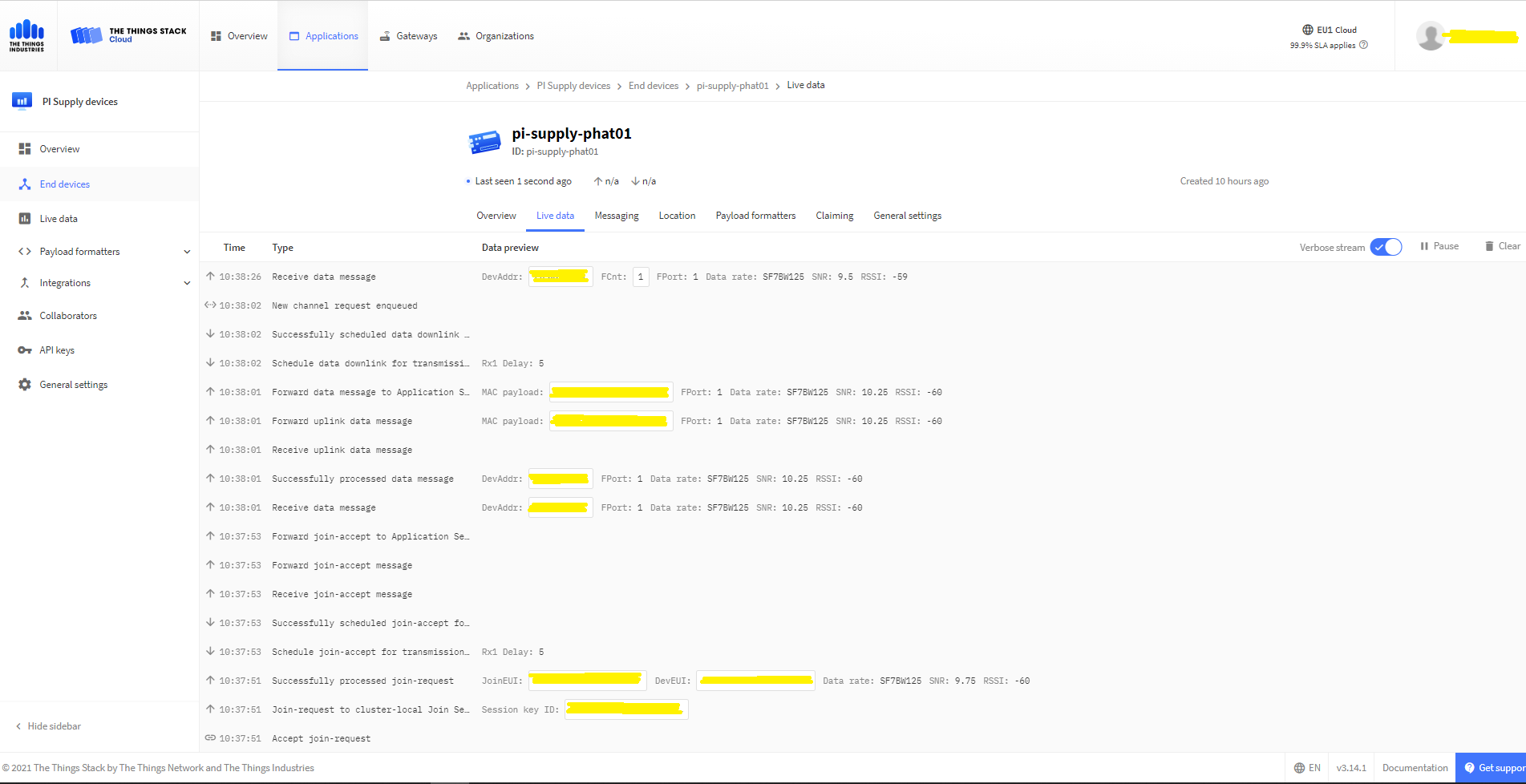
The Things Industries Live Data Tab showing my device connecting and sending messages

The RAK811 doesn’t fully implement the AS923 specification but I have a work around detailed in another post.
.NET Core RAK811 LoRaWAN library Part1

Basic connectivity

In my spare time over the last couple of days I have been working on a .Net Core C# library for a RAKWireless RAK811 based PiSupply IoT LoRa Node pHat for Raspberry PI.

Raspberry Pi3 with PI Supply RAK811 based IoT node LoRaWAN pHat

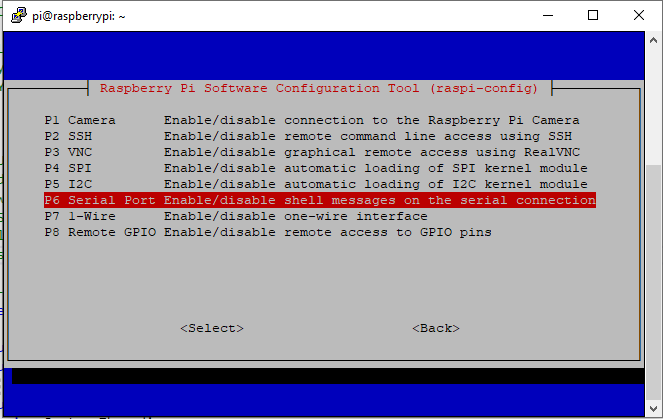
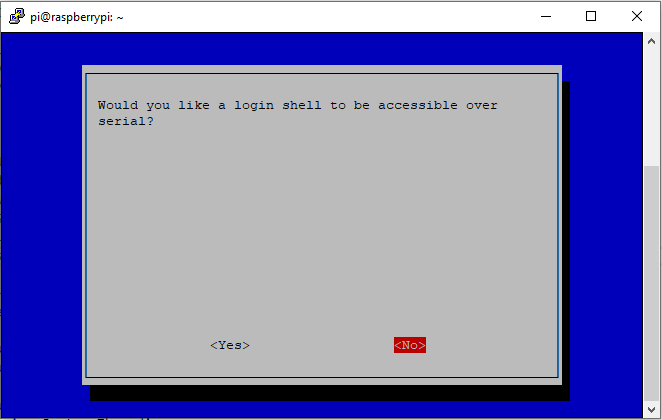
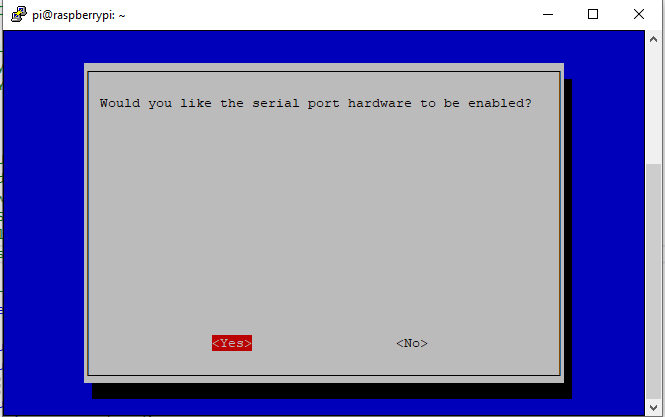
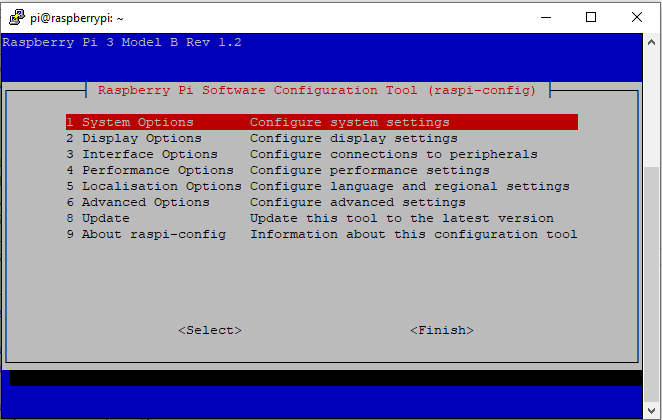
The RaspberryPI OS is a bit more strict than the other devices I use about port access. To allow my .Net Core application to access a serial port I connected to the device with ExtraPutty, then ran the RaspberyPI configuration tool, from the command prompt with “sudo raspi-config”

RaspberyPI OS Software Configuration tool mains screen
RaspberryPI OS IO Serial Port configuration
Raspberry PI OS disabling remote serial login shell
RaspberryPI OS enabling serial port access

Once serial port access was enabled I could enumerate them with SerialPort.GetPortNames() which is in the System.IO.Ports NuGet package. The code has compile time options for synchronous and asynchronous operation.

//---------------------------------------------------------------------------------
// Copyright (c) September 2021, devMobile Software
//
// Licensed under the Apache License, Version 2.0 (the "License");
// you may not use this file except in compliance with the License.
// You may obtain a copy of the License at
//
//     http://www.apache.org/licenses/LICENSE-2.0
//
// Unless required by applicable law or agreed to in writing, software
// distributed under the License is distributed on an "AS IS" BASIS,
// WITHOUT WARRANTIES OR CONDITIONS OF ANY KIND, either express or implied.
// See the License for the specific language governing permissions and
// limitations under the License.
//
//---------------------------------------------------------------------------------
namespace devMobile.IoT.NetCore.Rak811.pHatSerial
{
	using System;
	using System.Diagnostics;

	using System.IO.Ports;
	using System.Threading;

	public class Program
	{
		private const string SerialPortId = "/dev/ttyS0";

		public static void Main()
		{
			SerialPort serialPort;

			Debug.WriteLine("devMobile.IoT.NetCore.Rak811.pHatSerial starting");

			Debug.WriteLine(String.Join(",", SerialPort.GetPortNames()));

			try
			{
				serialPort = new SerialPort(SerialPortId);

				// set parameters
#if DEFAULT_BAUDRATE
				serialDevice.BaudRate = 115200;
#else
            serialPort.BaudRate = 9600;
#endif
				serialPort.Parity = Parity.None;
				serialPort.DataBits = 8;
				serialPort.StopBits = StopBits.One;
				serialPort.Handshake = Handshake.None;

				serialPort.ReadTimeout = 1000;

				serialPort.NewLine = "\r\n";

				serialPort.Open();

#if DEFAULT_BAUDRATE
				Debug.WriteLine("RAK811 baud rate set to 9600");
				serialDevice.Write("at+set_config=device:uart:1:9600");
#endif

#if SERIAL_ASYNC_READ
				serialPort.DataReceived += SerialDevice_DataReceived;
#endif

				while (true)
				{
					serialPort.WriteLine("at+version");

#if SERIAL_SYNC_READ
					string response = serialPort.ReadLine();

					Debug.WriteLine($"RX:{response.Trim()} bytes:{response.Length}");
#endif

					Thread.Sleep(20000);
				}
			}
			catch (Exception ex)
			{
				Debug.WriteLine(ex.Message);
			}
		}

#if SERIAL_ASYNC_READ
		private static void SerialDevice_DataReceived(object sender, SerialDataReceivedEventArgs e)
		{
			SerialPort serialPort = (SerialPort)sender;

			switch (e.EventType)
			{
				case SerialData.Chars:
					string response = serialPort.ReadExisting();

					Debug.WriteLine($"RX:{response.Trim()} bytes:{response.Length}");
					break;

				case SerialData.Eof:
					Debug.WriteLine("RX :EoF");
					break;
				default:
					Debug.Assert(false, $"e.EventType {e.EventType} unknown");
					break;
			}
		}
#endif
	}
}

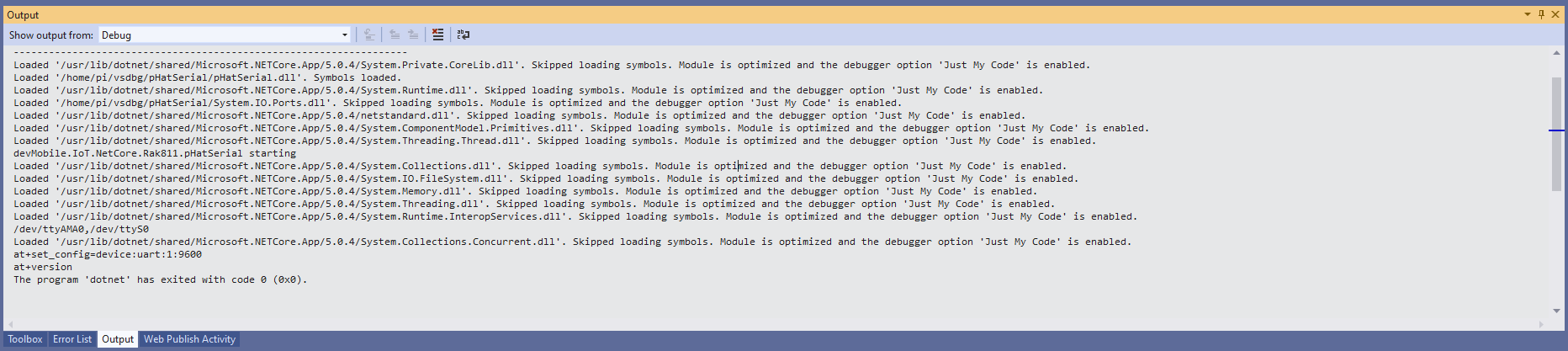
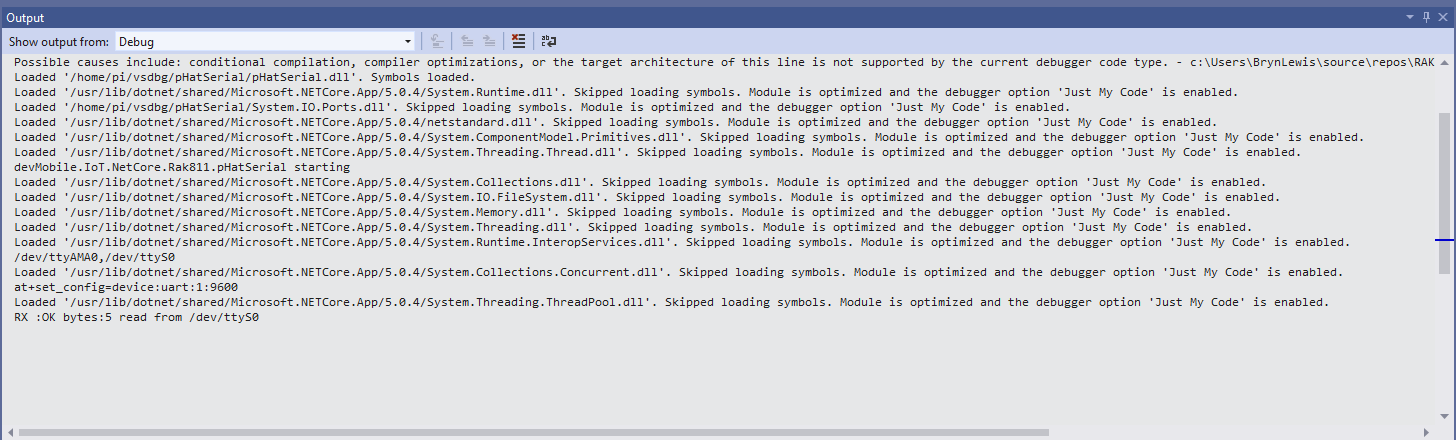
The first step was to change the RAK811 serial port speed from 115200 to 9600 baud.

Changing RAK811 serial port from 115200 to 9600 baud

Then I requested the RAK811 version information with the at+version command.

Synchronously reading characters from the RAK811 partial response

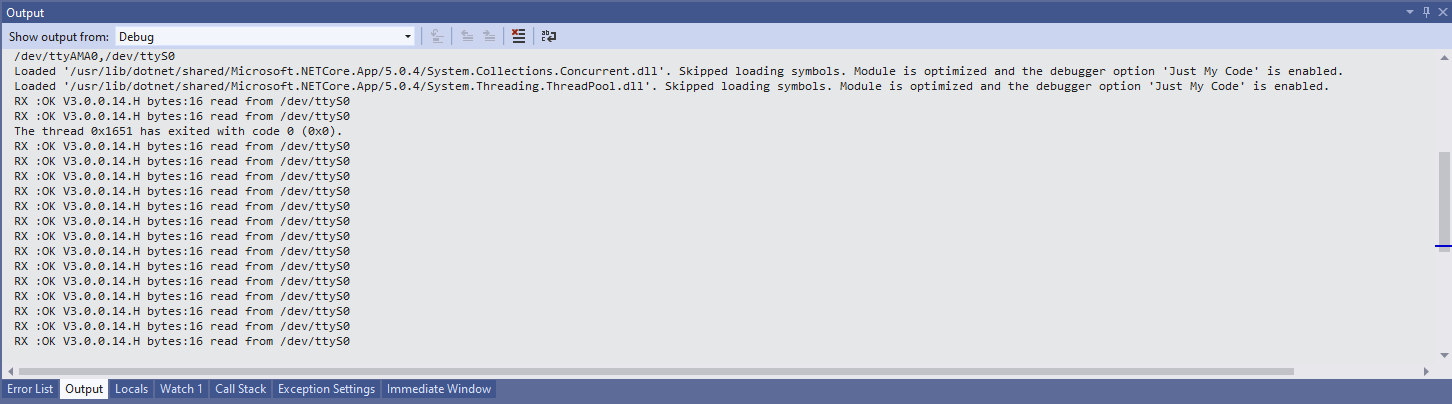
I had to add a short delay between sending the command and reading the response.

Synchronously reading characters from the RAK811 complete command responses

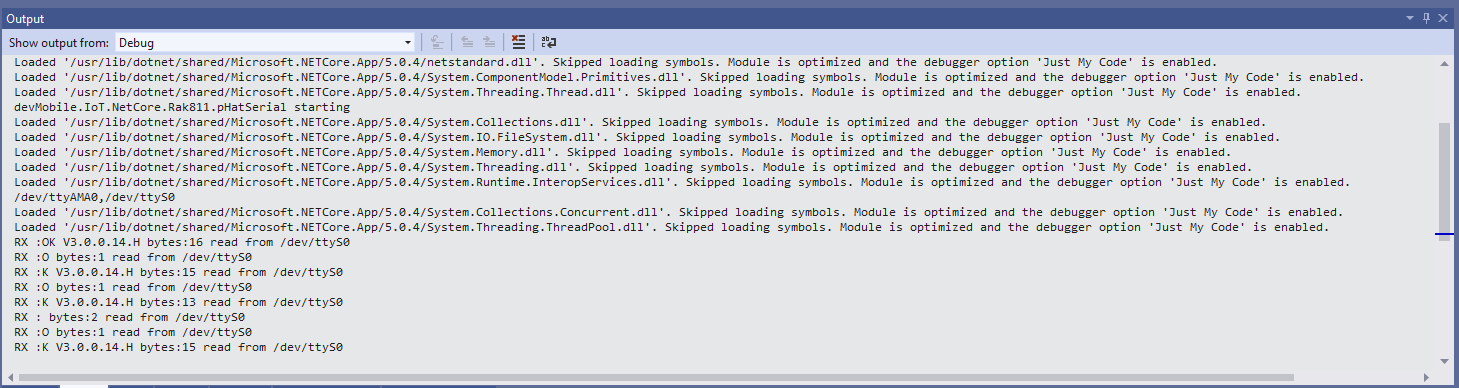
The asynchronous version of the application displays character(s) as they arrive so a response could be split across multiple SerialDataReceived events

Asynchronous versions displaying partial responses

I use the excellent RaspberryDebugger to download the application and debug it on my Raspberry PI 3.

Seeed LoRa-E5 LowPower problem fix

I had been soak testing Seeed LoRa-E5 equipped TinyCLR and netNF devices for the last couple of weeks and after approximately two days they would stop sending data.

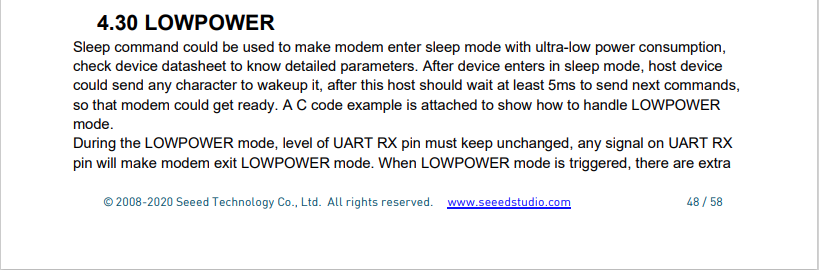
After a pointer to the LowPower section of the Seeed LoRa-E5 manual I realised my code could send the next command within 5ms.

Seeeduino LoRa-E5 AT Command document

I added a 5msec Sleep after the wakeup command had been sent

public Result Wakeup()
{
   // Wakeup the E5 Module
#if DIAGNOSTICS
   Debug.WriteLine($" {DateTime.UtcNow:hh:mm:ss} AT+LOWPOWER: WAKEUP");
#endif
   Result result = SendCommand("+LOWPOWER: WAKEUP", $"A", CommandTimeoutDefault);
   if (result != Result.Success)
   {
#if DIAGNOSTICS
      Debug.WriteLine($" {DateTime.UtcNow:hh:mm:ss} AT+LOWPOWER: WAKEUP failed {result}");
#endif
      return result;
   }

   // Thanks AndrewL for pointing out delay required in section 4.30 LOWPOWER
   Thread.Sleep(5);

   return Result.Success;
}

The updated code is has been reliably running on TinyCLR and netNF devices connected to The Things Industries for the last 4 days.

Seeed LoRa-E5 LowPower problem

I have been soak testing Seeed LoRa-E5 equipped TinyCLR and netNF devices for the last couple of weeks and after approximately two days they would stop sending data. The code is still running but The Things Industries device live data tab is empty.

I have reviewed the code line by line and it looks okay. When I run the application on the device with the debugger attached the device does not stop transmitting (a heisenbug) which is a problem.

First step was to disable the sleep/wakeup power conservation calls and see what happens

#if PAYLOAD_COUNTER
   Debug.WriteLine($"{DateTime.UtcNow:hh:mm:ss} Send Timeout:{SendTimeout.TotalSeconds} Seconds payload Counter:{PayloadCounter}");
#if CONFIRMED
   result = device.Send(BitConverter.GetBytes(PayloadCounter), true, SendTimeout);
#else
   result = device.Send(BitConverter.GetBytes(PayloadCounter), false, SendTimeout);
#endif
   PayloadCounter += 1;
#endif

   if (result != Result.Success)
   {
      Debug.WriteLine($"Send failed {result}");
   }

   /*
   Debug.WriteLine($"{DateTime.UtcNow:hh:mm:ss} Sleep");
   result = device.Sleep();
   if (result != Result.Success)
   {
      Debug.WriteLine($"Sleep failed {result}");
      return;
   }
   */
   Thread.Sleep(60000);
   /*
   Debug.WriteLine($"{DateTime.UtcNow:hh:mm:ss} Wakeup");
   result = device.Wakeup();
   if (result != Result.Success)
   {
      Debug.WriteLine($"Wakeup failed {result}");
      return;
   }
   */

The devices have now been running fine for 4.5 days so it looks like it might be something todo with entering and/or exiting low power mode.

nanoFramework Seeed LoRa-E5 on Github

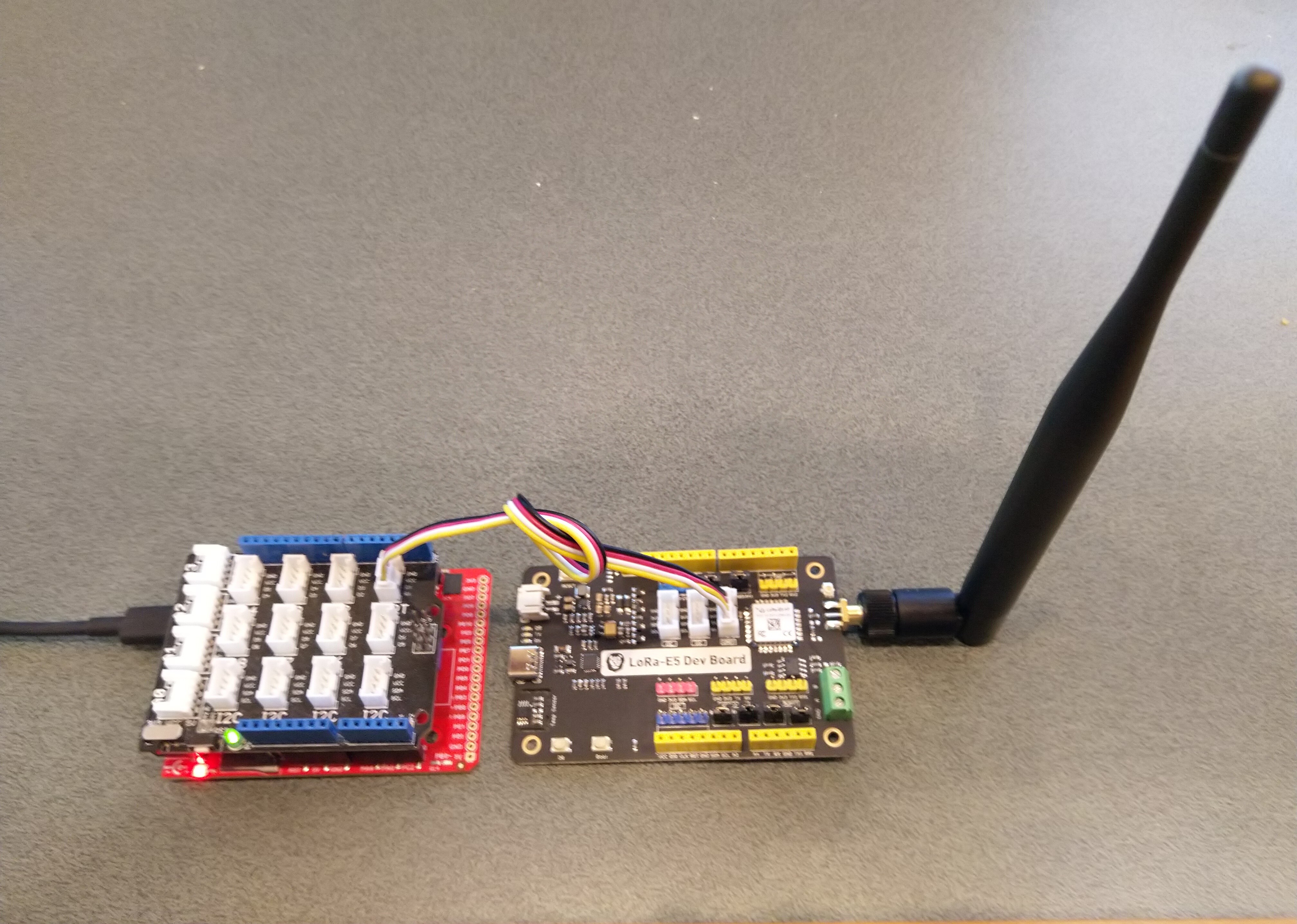
The source code of my nanoFramework C# Seeed LoRa-E5 library is live on GitHub. My initial test rig was based on an STM32F691DISCOVERY board which has an Arduino Uno R3 format socket for a Grove Base Shield V2.0. I then connected it to my LoRa-E5 Development Kit with a Grove – Universal 4 Pin 20cm Unbuckled Cable(TX/RX reversed)

STM32F769I test rig with Seeedstudio Grove Base shield V2 and LoRa-E5 Development Kit

So far the demo application has been running for a couple of weeks

The thread '<No Name>' (0x2) has exited with code 0 (0x0).
devMobile.IoT.SeeedE5LoRaWANDeviceClient starting
12:00:01 Join start Timeout:25 Seconds
12:00:07 Join finish
12:00:07 Send Timeout:10 Seconds payload BCD:010203040506070809
12:00:13 Sleep
12:05:13 Wakeup
12:05:13 Send Timeout:10 Seconds payload BCD:010203040506070809
12:05:20 Sleep
12:10:20 Wakeup
12:10:20 Send Timeout:10 Seconds payload BCD:010203040506070809
12:10:27 Sleep
12:15:27 Wakeup
12:15:27 Send Timeout:10 Seconds payload BCD:010203040506070809
12:15:34 Sleep
...
11:52:40 Wakeup
11:52:40 Send Timeout:10 Seconds payload BCD:010203040506070809
11:52:45 Sleep
11:57:45 Wakeup
11:57:45 Send Timeout:10 Seconds payload BCD:010203040506070809
11:57:52 Sleep
12:02:52 Wakeup
12:02:52 Send Timeout:10 Seconds payload BCD:010203040506070809
12:02:59 Sleep
12:07:59 Wakeup
12:07:59 Send Timeout:10 Seconds payload BCD:010203040506070809
12:08:07 Sleep
12:13:07 Wakeup
12:13:07 Send Timeout:10 Seconds payload BCD:010203040506070809
12:13:14 Sleep

I have tested the Over The Air Activation(OTAA) code and will work on testing the other functionality over the coming week,

public static void Main()
{
   Result result;

   Debug.WriteLine("devMobile.IoT.SeeedE5LoRaWANDeviceClient starting");

   try
   {
      using (SeeedE5LoRaWANDevice device = new SeeedE5LoRaWANDevice())
      {
         result = device.Initialise(SerialPortId, 9600, UartParity.None, 8, UartStopBitCount.One);
         if (result != Result.Success)
         {
            Debug.WriteLine($"Initialise failed {result}");
            return;
         }

#if CONFIRMED
         device.OnMessageConfirmation += OnMessageConfirmationHandler;
#endif
         device.OnReceiveMessage += OnReceiveMessageHandler;

#if RESET
         Debug.WriteLine($"{DateTime.UtcNow:hh:mm:ss} Reset");
         result = device.Reset();
         if (result != Result.Success)
         {
            Debug.WriteLine($"Reset failed {result}");
            return;
          }
#endif

         Debug.WriteLine($"{DateTime.UtcNow:hh:mm:ss} Region {Region}");
         result = device.Region(Region);
         if (result != Result.Success)
         {
            Debug.WriteLine($"Region failed {result}");
            return;
         }

         Debug.WriteLine($"{DateTime.UtcNow:hh:mm:ss} ADR On");
         result = device.AdrOn();
         if (result != Result.Success)
         {
            Debug.WriteLine($"ADR on failed {result}");
            return;
         }

               Debug.WriteLine($"{DateTime.UtcNow:hh:mm:ss} Port");
               result = device.Port(MessagePort);
               if (result != Result.Success)
               {
                  Debug.WriteLine($"Port on failed {result}");
                  return;
               }

#if OTAA
               Debug.WriteLine($"{DateTime.UtcNow:hh:mm:ss} OTAA");
               result = device.OtaaInitialise(Config.AppEui, Config.AppKey);
               if (result != Result.Success)
               {
                  Debug.WriteLine($"OTAA Initialise failed {result}");
                  return;
               }
#endif

#if ABP
               Debug.WriteLine($"{DateTime.UtcNow:hh:mm:ss} ABP");
               result = device.AbpInitialise(DevAddress, NwksKey, AppsKey);
               if (result != Result.Success)
               {
                  Debug.WriteLine($"ABP Initialise failed {result}");
                  return;
               }
#endif

               Debug.WriteLine($"{DateTime.UtcNow:hh:mm:ss} Join start Timeout:{JoinTimeOut.TotalSeconds} Seconds");
               result = device.Join(true, JoinTimeOut);
               if (result != Result.Success)
               {
                  Debug.WriteLine($"Join failed {result}");
                  return;
               }
               Debug.WriteLine($"{DateTime.UtcNow:hh:mm:ss} Join finish");

               while (true)
               {
#if PAYLOAD_BCD
                  Debug.WriteLine($"{DateTime.UtcNow:hh:mm:ss} Send Timeout:{SendTimeout.TotalSeconds} Seconds payload BCD:{PayloadBcd}");
#if CONFIRMED
                  result = device.Send(PayloadBcd, true, SendTimeout);
#else
                  result = device.Send(PayloadBcd, false, SendTimeout);
#endif
#endif

#if PAYLOAD_BYTES
                  Debug.WriteLine($"{DateTime.UtcNow:hh:mm:ss} Send Timeout:{SendTimeout.TotalSeconds} Seconds payload Bytes:{BitConverter.ToString(PayloadBytes)}");
#if CONFIRMED
                  result = device.Send(PayloadBytes, true, SendTimeout);
#else
                  result = device.Send(PayloadBytes, false, SendTimeout);
#endif
#endif
                  if (result != Result.Success)
                  {
                     Debug.WriteLine($"Send failed {result}");
                  }

                  Debug.WriteLine($"{DateTime.UtcNow:hh:mm:ss} Sleep");
                  result = device.Sleep();
                  if (result != Result.Success)
                  {
                     Debug.WriteLine($"Sleep failed {result}");
                     return;
                  }

                  Thread.Sleep(300000);

                  Debug.WriteLine($"{DateTime.UtcNow:hh:mm:ss} Wakeup");
                  result = device.Wakeup();
                  if (result != Result.Success)
                  {
                     Debug.WriteLine($"Wakeup failed {result}");
                     return;
                  }
               }
            }
         }
         catch (Exception ex)
         {
            Debug.WriteLine(ex.Message);
         }
      }

The Region, ADR and OtaaInitialise methods only need to be called when the device is first powered up and after a reset.

The library works but should be treated as late beta.

Seeed LoRa-E5 Wakeup

Over the last week I have been working on GHI Electronics TinyCLR-0SV2RC1 and nanoFramework and C# libraries for the LoRa-E5 module from Seeedstudio.

The initial test rigs were based on an Arduino Uno R3 format socket for a Grove Base Shield V2.0 which I then connected to my LoRa-E5 Development Kit with a Grove – Universal 4 Pin 20cm Unbuckled Cable(TX/RX reversed)

Fezduino device with Seeedstudio Grove base shield and LoRa-E5 development Kit

While testing I noticed that every so often that when I restarted the test application application, rebooted or power cycled the nanoFramework or Fezduino device the Seeed LoRa-E5 wouldn’t connect.

After some trial and error manually entering commands in Terraterm I found that if the LoRa-E5 had been put to sleep (AT+LOWPOWER) the response to the first command (usually setting the region with AT+DR=AS923) would be unexpected. The problem was more obvious when I used devices that were configured for “soak testing” because the gap between messages was much longer (5min vs. 30 seconds)

AT+VER
+VER: 4.0.11

AT+UART=TIMEOUT, 30000 
+UART: TIMEOUT, 30000

AT+LOWPOWER
+LOWPOWER: SLEEP

AT+DR=AS923
AT+LOWPOWER: WAKEUP

AT+DR=AS923
+DR: AS923

AT+JOIN FORCE
+JOIN: Start
+JOIN: FORCE
+JOIN: Network joined
+JOIN: NetID 000013 DevAddr 26:08:46:70
+JOIN: Done

AT+CMSGHEX="00 01 02 03 04"
+CMSGHEX: Start
+CMSGHEX: Wait ACK
+CMSGHEX: FPENDING
+CMSGHEX: ACK Received
+CMSGHEX: RXWIN1, RSSI -29, SNR 9.0
+CMSGHEX: Done

After trying several different approaches which weren’t very robust I settled on sending a wakeup command (AT+LOWPOWER: WAKEUP with an expected response of +LOWPOWER: WAKEUP) and ignoring the result.

public Result Initialise(string serialPortId, int baudRate, UartParity serialParity, int dataBits, UartStopBitCount stopBitCount)
{
    if ((serialPortId == null) || (serialPortId == ""))
    {
       throw new ArgumentException("Invalid SerialPortId", "serialPortId");
    }
    if ((baudRate < BaudRateMinimum) || (baudRate > BaudRateMaximum))
    {
       throw new ArgumentException("Invalid BaudRate", "baudRate");
    }

   serialDevice = UartController.FromName(serialPortId);

   // set parameters
   serialDevice.SetActiveSettings(new UartSetting()
   {
      BaudRate = baudRate,
      Parity = serialParity,
      StopBits = stopBitCount,
      Handshaking = UartHandshake.None,
      DataBits = dataBits
   });

   serialDevice.Enable();

   atCommandExpectedResponse = string.Empty;

   serialDevice.DataReceived += SerialDevice_DataReceived;

   // Ignoring the return from this is intentional
   this.SendCommand("+LOWPOWER: WAKEUP", "AT+LOWPOWER: WAKEUP", SendTimeoutMinimum);

   return Result.Success;
}

This modification has been applied to both libraries. I will also check that the RAK811 nanoFramework and TinyCLR libraries don’t have the same issue.

nanoFramework Seeed LoRa-E5 LoRaWAN library Part2

Nasty OTAA connect

After getting basic connectivity for my Seeedstudio LoRa-E5 Development Kit and STM32F691DISCOVERY test rig working I wanted to see if I could get the device connected to The Things Industries(TTI).

My Over the Air Activation (OTAA) implementation is very “nasty” as it is assumed that there are no timeouts or failures and it only sends one BCD message “01020304”.

   public class Program
   {
      private const string SerialPortId = "COM6";

      private const string AppKey = "................................";
      private const string AppEui = "................";

      private const byte MessagePort = 15;

      //private const string Payload = "48656c6c6f204c6f526157414e"; // Hello LoRaWAN
      private const string Payload = "01020304"; // AQIDBA==
      //private const string Payload = "04030201"; // BAMCAQ==

   public static void Main()
   {
      SerialDevice serialDevice;
      uint bytesWritten;
      uint txByteCount;
      uint bytesRead;

      Debug.WriteLine("devMobile.IoT.SeeedLoRaE5.NetworkJoinOTAA starting");

      Debug.WriteLine($"Ports available: {Windows.Devices.SerialCommunication.SerialDevice.GetDeviceSelector()}");

      try
      {
         serialDevice = SerialDevice.FromId(SerialPortId);

         // set parameters
         serialDevice.BaudRate = 9600;
         serialDevice.Parity = SerialParity.None;
         serialDevice.StopBits = SerialStopBitCount.One;
         serialDevice.Handshake = SerialHandshake.None;
         serialDevice.DataBits = 8;

         serialDevice.ReadTimeout = new TimeSpan(0, 0, 5);
         serialDevice.WriteTimeout = new TimeSpan(0, 0, 4);

         DataWriter outputDataWriter = new DataWriter(serialDevice.OutputStream);
         DataReader inputDataReader = new DataReader(serialDevice.InputStream);

         // set a watch char to be notified when it's available in the input stream
         serialDevice.WatchChar = '\n';

         // clear out the RX buffer
         bytesRead = inputDataReader.Load(128);
         while (bytesRead > 0)
         {
            string response = inputDataReader.ReadString(bytesRead);
            Debug.WriteLine($"RX :{response}");

            bytesRead = inputDataReader.Load(128);
         }

         // Set the Region to AS923
         bytesWritten = outputDataWriter.WriteString("AT+DR=AS923\r\n");
         Debug.WriteLine($"TX: region {outputDataWriter.UnstoredBufferLength} bytes to output stream.");
         txByteCount = outputDataWriter.Store();
         Debug.WriteLine($"TX: {txByteCount} bytes via {serialDevice.PortName}");

         // Read the response
         bytesRead = inputDataReader.Load(128);
         if (bytesRead > 0)
         {
            String response = inputDataReader.ReadString(bytesRead);
            Debug.WriteLine($"RX :{response}");
         }

         // Set the Join mode
         bytesWritten = outputDataWriter.WriteString("AT+MODE=LWOTAA\r\n");
         Debug.WriteLine($"TX: mode {outputDataWriter.UnstoredBufferLength} bytes to output stream.");
         txByteCount = outputDataWriter.Store();
         Debug.WriteLine($"TX: {txByteCount} bytes via {serialDevice.PortName}");

         // Read the response
         bytesRead = inputDataReader.Load(128);
         if (bytesRead > 0)
         {
            string response = inputDataReader.ReadString(bytesRead);
            Debug.WriteLine($"RX :{response}");
         }

         // Set the appEUI
         bytesWritten = outputDataWriter.WriteString($"AT+ID=AppEui,\"{AppEui}\"\r\n");
         Debug.WriteLine($"TX: AppEui {outputDataWriter.UnstoredBufferLength} bytes to output stream.");
         txByteCount = outputDataWriter.Store();
         Debug.WriteLine($"TX: {txByteCount} bytes via {serialDevice.PortName}");

         // Read the response
         bytesRead = inputDataReader.Load(128);
         if (bytesRead > 0)
         {
            String response = inputDataReader.ReadString(bytesRead);
            Debug.WriteLine($"RX :{response}");
         }

         // Set the appKey
         bytesWritten = outputDataWriter.WriteString($"AT+KEY=APPKEY,{AppKey}\r\n");
         Debug.WriteLine($"TX: AppKey {outputDataWriter.UnstoredBufferLength} bytes to output stream.");
         txByteCount = outputDataWriter.Store();
         Debug.WriteLine($"TX: {txByteCount} bytes via {serialDevice.PortName}");

         // Read the response
         bytesRead = inputDataReader.Load(128);
         if (bytesRead > 0)
         {
            String response = inputDataReader.ReadString(bytesRead);
            Debug.WriteLine($"RX :{response}");
         }

         // Set the port number
         bytesWritten = outputDataWriter.WriteString($"AT+PORT={MessagePort}\r\n");
         Debug.WriteLine($"TX: port {outputDataWriter.UnstoredBufferLength} bytes to output stream.");
         txByteCount = outputDataWriter.Store();
         Debug.WriteLine($"TX: {txByteCount} bytes via {serialDevice.PortName}");

         // Read the response
         bytesRead = inputDataReader.Load(128);
         if (bytesRead > 0)
         {
            String response = inputDataReader.ReadString(bytesRead);
            Debug.WriteLine($"RX :{response}");
         }

         // Join the network
         bytesWritten = outputDataWriter.WriteString("AT+JOIN\r\n");
         Debug.WriteLine($"TX: join {outputDataWriter.UnstoredBufferLength} bytes to output stream.");
         txByteCount = outputDataWriter.Store();
         Debug.WriteLine($"TX: {txByteCount} bytes via {serialDevice.PortName}");

         // Read the response, need loop as multi line response
         bytesRead = inputDataReader.Load(128);
         while (bytesRead > 0)
         {
            String response = inputDataReader.ReadString(bytesRead);
            Debug.WriteLine($"RX :{response}");

            bytesRead = inputDataReader.Load(128);
         }

         while (true)
         {
            bytesWritten = outputDataWriter.WriteString($"AT+MSGHEX=\"{Payload}\"\r\n");
            Debug.WriteLine($"TX: send {outputDataWriter.UnstoredBufferLength} bytes to output stream.");

            txByteCount = outputDataWriter.Store();
            Debug.WriteLine($"TX: {txByteCount} bytes via {serialDevice.PortName}");

            // Read the response, need loop as multi line response
            bytesRead = inputDataReader.Load(128);
            while (bytesRead > 0)
            {
               String response = inputDataReader.ReadString(bytesRead);
               Debug.WriteLine($"RX :{response}");

               bytesRead = inputDataReader.Load(128);
            }

            Thread.Sleep(300000);
         }
      }
      catch (Exception ex)
      {
         Debug.WriteLine(ex.Message);
      }
}

The code is not suitable for production but it confirmed my software and hardware configuration worked.

The thread '<No Name>' (0x2) has exited with code 0 (0x0).
devMobile.IoT.SeeedE5.NetworkJoinOTAA starting
TX: DR 13 bytes
RX :+DR: AS923

TX: MODE 16 bytes
RX :+MODE: LWOTAA

TX: ID=AppEui 40 bytes
RX :+ID: AppEui, ..:..:.:.:.:.:.:.

TX: KEY=APPKEY 48 bytes
RX :+KEY: APPKEY ................................

TX: PORT 11 bytes
RX :+PORT: 1

TX: JOIN 9 bytes
RX :+JOIN: Start
+JOIN: NORMAL
+JOIN: Network joined
+JOIN: NetID 000013 DevAddr ..:..:..:..
+JOIN: Done

TX: MSGHEX 22 bytes
RX :+MSGHEX: Start
+MSGHEX: FPENDING
+MSGHEX: RXWIN1, RSSI -41, SNR 9.0
+MSGHEX: Done

TX: MSGHEX 22 bytes
RX :+MSGHEX: Start
+MSGHEX: Done

In the Visual Studio 2019 debug output I could see messages getting sent and then after a short delay they were visible in the TTI console.

Seeed E5 LoRaWAN dev Kit connecting in The Things Industries Device Live data tab

nanoFramework Seeed LoRa-E5 LoRaWAN library Part1

Basic connectivity

Over the weekend I have been working on a nanoFramework C# library for my LoRa-E5 Development Kit from Seeedstudio. My initial test rig is based on an STM32F691DISCOVERY board which has an Arduino Uno R3 format socket for a Grove Base Shield V2.0, which I then connected to my LoRa-E5 Development Kit with a Grove – Universal 4 Pin 20cm Unbuckled Cable(TX/RX reversed)

STM32F769I test rig with Seeedstudio Grove Base shield V2 and LoRa-E5 Development Kit

The code has compile time options for synchronous and asynchronous operation.

public class Program
{
   private const string SerialPortId = "COM6";

   public static void Main()
   {
      SerialDevice serialDevice;

      Debug.WriteLine("devMobile.IoT.SeeedLoRaE5.ShieldSerial starting");

      Debug.WriteLine(Windows.Devices.SerialCommunication.SerialDevice.GetDeviceSelector());

      try
      {
         serialDevice = SerialDevice.FromId(SerialPortId);

         // set parameters
         serialDevice.BaudRate = 9600;
         serialDevice.Parity = SerialParity.None;
         serialDevice.StopBits = SerialStopBitCount.One;
         serialDevice.Handshake = SerialHandshake.None;
         serialDevice.DataBits = 8;

         serialDevice.ReadTimeout = new TimeSpan(0, 0, 30);
         serialDevice.WriteTimeout = new TimeSpan(0, 0, 4);

         DataWriter outputDataWriter = new DataWriter(serialDevice.OutputStream);

#if SERIAL_SYNC_READ
         DataReader inputDataReader = new DataReader(serialDevice.InputStream);
#else
         serialDevice.DataReceived += SerialDevice_DataReceived;
#endif

         // set a watch char to be notified when it's available in the input stream
         // This doesn't appear to work with synchronous calls
         serialDevice.WatchChar = '\n';

         while (true)
         {
            uint bytesWritten = outputDataWriter.WriteString("AT+VER\r\n");
            Debug.WriteLine($"TX: {outputDataWriter.UnstoredBufferLength} bytes to output stream.");

            // calling the 'Store' method on the data writer actually sends the data
            uint txByteCount = outputDataWriter.Store();
            Debug.WriteLine($"TX: {txByteCount} bytes via {serialDevice.PortName}");

#if SERIAL_SYNC_READ
            uint bytesRead = inputDataReader.Load(50);

            Debug.WriteLine($"RXs :{bytesRead} bytes read from {serialDevice.PortName}");

            if (bytesRead > 0)
            {
               String response = inputDataReader.ReadString(bytesRead);
               Debug.WriteLine($"RX sync:{response}");
            }
#endif

            Thread.Sleep(20000);
         }
      }
      catch (Exception ex)
      {
         Debug.WriteLine(ex.Message);
      }
   }

   private static void SerialDevice_DataReceived(object sender, SerialDataReceivedEventArgs e)
   {
      switch (e.EventType)
      {
         case SerialData.Chars:
            //Debug.WriteLine("RX SerialData.Chars");
            break;

         case SerialData.WatchChar:
             Debug.WriteLine("RX: SerialData.WatchChar");
             SerialDevice serialDevice = (SerialDevice)sender;

            using (DataReader inputDataReader = new DataReader(serialDevice.InputStream))
            {
               inputDataReader.InputStreamOptions = InputStreamOptions.Partial;

               // read all available bytes from the Serial Device input stream
               uint bytesRead = inputDataReader.Load(serialDevice.BytesToRead);

               Debug.WriteLine($"RXa: {bytesRead} bytes read from {serialDevice.PortName}");

               if (bytesRead > 0)
               {
                  String response = inputDataReader.ReadString(bytesRead);
                  Debug.WriteLine($"RX:{response}");
               }
            }
            break;
         default:
            Debug.Assert(false, $"e.EventType {e.EventType} unknown");
            break;
      }
   }
}

I have reused a significant amount of code built for my nanoFramework RAK811 LoRaWAN library Part1 post.

The thread '<No Name>' (0x2) has exited with code 0 (0x0).
devMobile.IoT.SeeedLoRaE5.ShieldSerial starting
Ports available: COM5,COM6
TX: 8 bytes to output stream.
TX: 8 bytes via COM6
TX: 8 bytes to output stream.
TX: 8 bytes via COM6
RX: SerialData.WatchChar
RXa: 28 bytes read from COM6
RX:+VER: 4.0.11
+VER: 4.0.11

TX: 8 bytes to output stream.
TX: 8 bytes via COM6
RX: SerialData.WatchChar
RXa: 14 bytes read from COM6
RX:+VER: 4.0.11

TX: 8 bytes to output stream.
TX: 8 bytes via COM6
RX: SerialData.WatchChar
RXa: 14 bytes read from COM6
RX:+VER: 4.0.11

TX: 8 bytes to output stream.
TX: 8 bytes via COM6
RX: SerialData.WatchChar
RXa: 14 bytes read from COM6
RX:+VER: 4.0.11

The test rig confirmed that I had the right configuration for the hardware (TX-RX twist) and LoRa-E5 connection (serial port, baud rate, parity etc.)

TinyCLR OS V2 Seeed LoRa-E5 on Github

The source code of my GHI Electronics TinyCLR-0SV2RC1 Seeed LoRa-E5 library is live on GitHub. The initial test harness uses a Fezduinoand a LoRa-E5 Development Kit.

Fezduino device with Seeedstudio Grove base shield and LoRa-E5 development Kit

So far the demo application has been running for 24 hours

The thread '<No Name>' (0x2) has exited with code 0 (0x0).
devMobile.IoT.SeeedE5LoRaWANDeviceClient starting
12:00:01 Join start Timeout:25 Seconds
12:00:07 Join finish
12:00:07 Send Timeout:10 Seconds payload BCD:010203040506070809
12:00:13 Sleep
12:05:13 Wakeup
12:05:13 Send Timeout:10 Seconds payload BCD:010203040506070809
12:05:20 Sleep
12:10:20 Wakeup
12:10:20 Send Timeout:10 Seconds payload BCD:010203040506070809
12:10:27 Sleep
12:15:27 Wakeup
12:15:27 Send Timeout:10 Seconds payload BCD:010203040506070809
12:15:34 Sleep
...
11:52:40 Wakeup
11:52:40 Send Timeout:10 Seconds payload BCD:010203040506070809
11:52:45 Sleep
11:57:45 Wakeup
11:57:45 Send Timeout:10 Seconds payload BCD:010203040506070809
11:57:52 Sleep
12:02:52 Wakeup
12:02:52 Send Timeout:10 Seconds payload BCD:010203040506070809
12:02:59 Sleep
12:07:59 Wakeup
12:07:59 Send Timeout:10 Seconds payload BCD:010203040506070809
12:08:07 Sleep
12:13:07 Wakeup
12:13:07 Send Timeout:10 Seconds payload BCD:010203040506070809
12:13:14 Sleep

I have tested the Over The Air Activation(OTAA) code and will work on testing the other functionality over the coming week,

public static void Main()
{
   Result result;

   Debug.WriteLine("devMobile.IoT.SeeedE5LoRaWANDeviceClient starting");

   try
   {
      using (SeeedE5LoRaWANDevice device = new SeeedE5LoRaWANDevice())
      {
         result = device.Initialise(SerialPortId, 9600, UartParity.None, 8, UartStopBitCount.One);
         if (result != Result.Success)
         {
            Debug.WriteLine($"Initialise failed {result}");
            return;
         }

#if CONFIRMED
         device.OnMessageConfirmation += OnMessageConfirmationHandler;
#endif
         device.OnReceiveMessage += OnReceiveMessageHandler;

#if RESET
         Debug.WriteLine($"{DateTime.UtcNow:hh:mm:ss} Reset");
         result = device.Reset();
         if (result != Result.Success)
         {
            Debug.WriteLine($"Reset failed {result}");
            return;
          }
#endif

         Debug.WriteLine($"{DateTime.UtcNow:hh:mm:ss} Region {Region}");
         result = device.Region(Region);
         if (result != Result.Success)
         {
            Debug.WriteLine($"Region failed {result}");
            return;
         }

         Debug.WriteLine($"{DateTime.UtcNow:hh:mm:ss} ADR On");
         result = device.AdrOn();
         if (result != Result.Success)
         {
            Debug.WriteLine($"ADR on failed {result}");
            return;
         }

               Debug.WriteLine($"{DateTime.UtcNow:hh:mm:ss} Port");
               result = device.Port(MessagePort);
               if (result != Result.Success)
               {
                  Debug.WriteLine($"Port on failed {result}");
                  return;
               }

#if OTAA
               Debug.WriteLine($"{DateTime.UtcNow:hh:mm:ss} OTAA");
               result = device.OtaaInitialise(Config.AppEui, Config.AppKey);
               if (result != Result.Success)
               {
                  Debug.WriteLine($"OTAA Initialise failed {result}");
                  return;
               }
#endif

#if ABP
               Debug.WriteLine($"{DateTime.UtcNow:hh:mm:ss} ABP");
               result = device.AbpInitialise(DevAddress, NwksKey, AppsKey);
               if (result != Result.Success)
               {
                  Debug.WriteLine($"ABP Initialise failed {result}");
                  return;
               }
#endif

               Debug.WriteLine($"{DateTime.UtcNow:hh:mm:ss} Join start Timeout:{JoinTimeOut.TotalSeconds} Seconds");
               result = device.Join(true, JoinTimeOut);
               if (result != Result.Success)
               {
                  Debug.WriteLine($"Join failed {result}");
                  return;
               }
               Debug.WriteLine($"{DateTime.UtcNow:hh:mm:ss} Join finish");

               while (true)
               {
#if PAYLOAD_BCD
                  Debug.WriteLine($"{DateTime.UtcNow:hh:mm:ss} Send Timeout:{SendTimeout.TotalSeconds} Seconds payload BCD:{PayloadBcd}");
#if CONFIRMED
                  result = device.Send(PayloadBcd, true, SendTimeout);
#else
                  result = device.Send(PayloadBcd, false, SendTimeout);
#endif
#endif

#if PAYLOAD_BYTES
                  Debug.WriteLine($"{DateTime.UtcNow:hh:mm:ss} Send Timeout:{SendTimeout.TotalSeconds} Seconds payload Bytes:{BitConverter.ToString(PayloadBytes)}");
#if CONFIRMED
                  result = device.Send(PayloadBytes, true, SendTimeout);
#else
                  result = device.Send(PayloadBytes, false, SendTimeout);
#endif
#endif
                  if (result != Result.Success)
                  {
                     Debug.WriteLine($"Send failed {result}");
                  }

                  Debug.WriteLine($"{DateTime.UtcNow:hh:mm:ss} Sleep");
                  result = device.Sleep();
                  if (result != Result.Success)
                  {
                     Debug.WriteLine($"Sleep failed {result}");
                     return;
                  }

                  Thread.Sleep(300000);

                  Debug.WriteLine($"{DateTime.UtcNow:hh:mm:ss} Wakeup");
                  result = device.Wakeup();
                  if (result != Result.Success)
                  {
                     Debug.WriteLine($"Wakeup failed {result}");
                     return;
                  }
               }
            }
         }
         catch (Exception ex)
         {
            Debug.WriteLine(ex.Message);
         }
      }

The Region, ADR and OtaaInitialise methods only need to be called when the device is first powered up and after a reset.

The library works but should be treated as late beta.

TinyCLR OS V2 Seeed LoRa-E5 LoRaWAN library Part5

Receive of two parts

After getting basic connectivity for my Seeedstudio LoRa-E5 Development Kit and Fezduino test rig working I started to build a general purpose library for GHI Electronics TinyCLR powered devices.

The code wasn’t very robust so when I sent messages from The Things Network (TTN) EndDevice messaging tab my first implementation didn’t work.

In the Visual Studio 2019 Debug output window

The thread '<No Name>' (0x2) has exited with code 0 (0x0).
devMobile.IoT.SeeedE5.NetworkJoinOTAA starting
TX: DR 13 bytes
RX :+DR: AS923

TX: MODE 16 bytes
RX :+MODE: LWOTAA

TX: ID=AppEui 40 bytes
RX :+ID: AppEui, 00:00:00:00:00:00:00:00

TX: KEY=APPKEY 48 bytes
RX :+KEY: APPKEY 12345678901234567890123456789012

TX: PORT 11 bytes
RX :+PORT: 1

TX: JOIN 9 bytes
RX :+JOIN: Start
+JOIN: NORMAL
+JOIN: Network joined
+JOIN: NetID 000013 DevAddr 00:00:00:00
+JOIN: Done

TX: MSGHEX 22 bytes
RX :+MSGHEX: Start
+MSGHEX: FPENDING
+MSGHEX: RXWIN1, RSSI -31, SNR 8.0
+MSGHEX: Done

TX: MSGHEX 22 bytes
RX :+MSGHEX: Start
+MSGHEX: PORT: 10; RX: "0102030405"
+MSGHEX: RXWIN1, RSSI -31, SNR 15.0
+MSGHEX: Done

TX: MSGHEX 22 bytes
RX :+MSGHEX: Start
+MSGHEX: FPENDING
+MSGHEX: PORT: 20; RX: "0504030201"
+MSGHEX: RXWIN1, RSSI -31, SNR 14.0
+MSGHEX: Done

TX: MSGHEX 22 bytes
RX :+MSGHEX: Start
+MSGHEX: Done

After going back and looking at the module documentation and the diagnostic output I realised that the downlink message and confirmation were sent in two responses.

The first (optional) part of the response had the port number and message payload

+MSGHEX: PORT: 20; RX: "0504030201"

The second had the signal strength information

+MSGHEX: RXWIN1, RSSI -31, SNR 14.0

I had to add some code to the SerialDevice_DataReceived method for assembling the two responses. It would be good if the Seeedstudio LoRa-E5 only used one response. (Sample below based on RAK811)

at+send=lora:1:5A00
OK
at+recv=1,-105,-12,0

at+send=lora:1:5A00
OK
at+recv=0,-105,-12,8,00010203

The other LoRa-E5 implementation detail which frustrated me was the inclusion of labels for values e.g. PORT, RSSI, SNR etc.

 +MSGHEX: RXWIN1, RSSI -31, SNR 14.0 

It would be simpler if the first parameter was the receive window, the second Received Signal Strength Indication(RSSI) and third Signal to Noise Ratio(SNR) etc..

The inconsistent use of separators also made unpacking messages more complex (esp. ‘;’ vs ‘:’ which was hard to see)

+MSGHEX: PORT: 20; RX: “0504030201” uses ‘:’ + ‘;’ + ‘”” + ‘ ‘

+MSGHEX: RXWIN1, RSSI -31, SNR 14.0 uses ‘:’ + ‘,’ + ‘ ‘

Now that I have a proof of concept library I need to functionality and soak test it.