The time to open the home page of one of the “legacy” applications I was working on was slowly increasing over time. After a quick investigation it looked like there a couple of Azure SQL stored procedures which were called many times as the home page was opening were the problem.
The application used a combination of ADO.Net and Dapper to access the Azure SQL database, so Stack Overflow MiniProfiler looked like a good option.
There were quite a few samples online like the one below which “inspired” my approach.
using (SqlConnection connection = new SqlConnection(_configuration.GetConnectionString("default")))
{
   using (ProfiledDbConnection connection = new ProfiledDbConnection((IDbConnection)connection, MiniProfiler.Current))
   {
      await connection.OpenAsync();

      using (ProfiledDbCommand command = (ProfiledDbCommand)connection.CreateCommand())
      {
         command.CommandText = @"SELECT [StockItemID] as ""ID"", [StockItemName] as ""Name"", [RecommendedRetailPrice], [TaxRate] FROM [Warehouse].[StockItems];
         command.CommandType = CommandType.Text;

                 using (ProfiledDbDataReader reader = (ProfiledDbDataReader)await command.ExecuteReaderAsync())
                 {
                     var rowParser = reader.GetRowParser<Model.StockItemListDtoV1>();

                     while (await reader.ReadAsync())
                     {
                         response.Add(rowParser(reader));
                     }

                     await reader.CloseAsync();
                 }
             }

             await connection.CloseAsync();
       }
}
A simple modification of the WebAPI Dapper PerformanceProfiling project program.cs file enabled MiniProfiler for the project.
public static void Main(string[] args)
{
    var builder = WebApplication.CreateBuilder(args);

    // Add services to the container.
    builder.Services.AddTransient<IDapperContext>(s => new DapperContext(builder.Configuration));

    builder.Services.AddControllers();

    builder.Services.AddMiniProfiler(options =>
    {
        options.RouteBasePath = "/profiler";
        //options.SqlFormatter = new StackExchange.Profiling.SqlFormatters.InlineFormatter();
        options.TrackConnectionOpenClose = true;
        //options.PopupShowTrivial = false
    });

    var app = builder.Build();

    app.UseMiniProfiler();

    // Configure the HTTP request pipeline.

    app.UseHttpsRedirection();

    app.MapControllers();

    app.Run();
}
For simple Dapper calls, the modifications to WebAPI controllers were minimal, and could be done largely with Visual Studio 2022 “search & replace.”
[HttpGet("Dapper")]
public async Task<ActionResult<IEnumerable<Model.StockItemListDtoV1>>> GetDapper()
{
    IEnumerable<Model.StockItemListDtoV1> response;

    using (IDbConnection db = dapperContext.ConnectionCreate())
    {
        response = await db.QueryAsync<Model.StockItemListDtoV1>(sql: sqlCommandText, commandType: CommandType.Text);
    }

    return this.Ok(response);
}

The World Wide Importers database has approximately 250 StockItems which was representative of one of the problematic queries.
[HttpGet("DapperProfiled")]
public async Task<ActionResult<IEnumerable<Model.StockItemListDtoV1>>> GetDapperProfiled()
{
    IEnumerable<Model.StockItemListDtoV1> response;

    using (IDbConnection db = new ProfiledDbConnection((DbConnection)dapperContext.ConnectionCreate(), MiniProfiler.Current))
    {
        response = await db.QueryAsync<Model.StockItemListDtoV1>(sql: sqlCommandText, commandType: CommandType.Text);
    }

    return this.Ok(response);
 }
When I executed the GetDapperProfiler() method of the StockItems controller on my development box it took roughly 2.4 seconds.

I sometimes ran the website on my development box so when I used “toggle trivial gaps” it was easier to see what where the delays were.
When I executed the GetDapperProfiler() method of the StockItems controller running in an Azure AppService it took roughly 20 mSec.

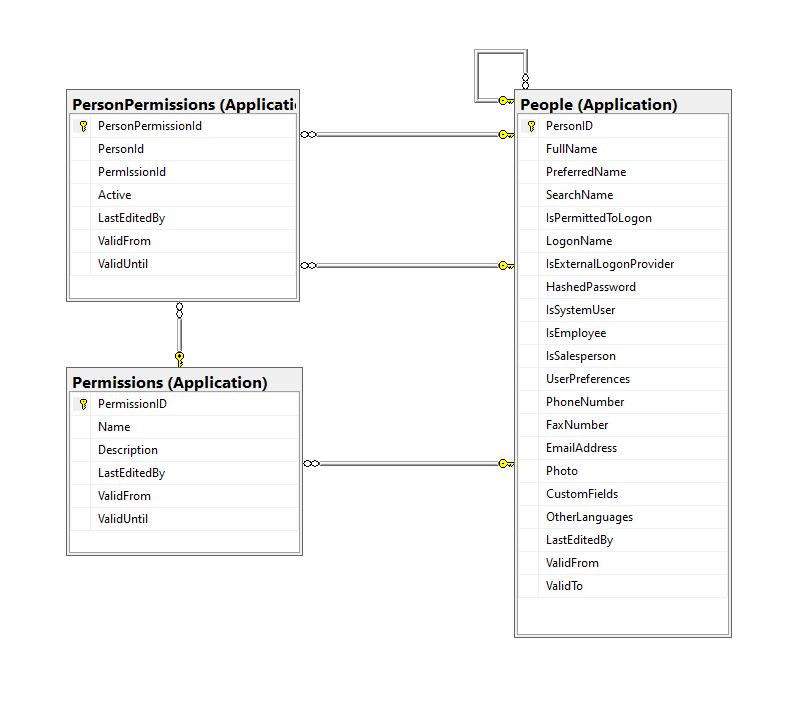
In one application a QueryMultipleAsync is used to retrieve information about a product and a list of its attributes. The World Wide Importers database has Invoices which have invoice lines and Transactions which was representative of another problematic query.
[HttpGet("DapperProfiledQueryMultiple")]
public async Task<ActionResult<IEnumerable<Model.StockItemListDtoV1>>> GetDapperProfiledQueryMultiple([Required][Range(1, int.MaxValue, ErrorMessage = "Invoice id must greater than 0")] int id)
{
    Model.InvoiceSummaryGetDtoV1 response = null;

    using (ProfiledDbConnection db = new ProfiledDbConnection((DbConnection)dapperContext.ConnectionCreate(), MiniProfiler.Current))
    {
        var invoiceSummary = await db.QueryMultipleAsync("[Sales].[InvoiceSummaryGetV1]", param: new { InvoiceId = id }, commandType: CommandType.StoredProcedure);

        response = await invoiceSummary.ReadSingleOrDefaultAsync<Model.InvoiceSummaryGetDtoV1>();
        if (response == default)
        {
            return this.NotFound($"Invoice:{id} not found");
        }

        response.InvoiceLines = await invoiceSummary.ReadAsync<Model.InvoiceLineSummaryListDtoV1>();

        response.StockItemTransactions = await invoiceSummary.ReadAsync<Model.StockItemTransactionSummaryListDtoV1>();
    }

    return this.Ok(response);
}


I couldn’t see any results for reading the StockItem Invoice lines and Transactions so I wrapped each ReadAsync with a MiniProfiler.Current.Step.
[HttpGet("DapperProfiledQueryMultipleStep")]
public async Task<ActionResult<IEnumerable<Model.StockItemListDtoV1>>> GetDapperProfiledQueryMultipleStep([Required][Range(1, int.MaxValue, ErrorMessage = "Invoice id must greater than 0")] int id)
{
    Model.InvoiceSummaryGetDtoV1 response = null;

    using (IDbConnection db = new ProfiledDbConnection((DbConnection)dapperContext.ConnectionCreate(), MiniProfiler.Current))
    {
        SqlMapper.GridReader invoiceSummary;

        using (MiniProfiler.Current.Step("db.QueryMultipleAsync"))
        {
            invoiceSummary = await db.QueryMultipleAsync("[Sales].[InvoiceSummaryGetV1]", param: new { InvoiceId = id }, commandType: CommandType.StoredProcedure);
        }

        using (MiniProfiler.Current.Step("invoiceSummary.ReadSingleOrDefaultAsync"))
        {
            response = await invoiceSummary.ReadSingleOrDefaultAsync<Model.InvoiceSummaryGetDtoV1>();
        }
        if (response == default)
        {
            return this.NotFound($"Invoice:{id} not found");
        }

        using (MiniProfiler.Current.Step("invoiceSummaryLine.ReadAsync"))
        {
            response.InvoiceLines = await invoiceSummary.ReadAsync<Model.InvoiceLineSummaryListDtoV1>();
        }

        using (MiniProfiler.Current.Step("TransactionSummary.ReadAsync"))
        {
            response.StockItemTransactions = await invoiceSummary.ReadAsync<Model.StockItemTransactionSummaryListDtoV1>();
        }
    }

    return this.Ok(response);
}

With larger lists every so often there were ReadAsync calls that took a more than a “trivial” amount of time. I surmise was some sort of batching done by the underlying ReadAsync + NextResultAsync methods of a SqlDataReader.
Need to investigate the use of
using (IDbConnection db = new ProfiledDbConnection(new SqlConnection(_configuration.GetConnectionString("default"), MiniProfiler.Current))
{
//...
}








 devMobile's blog