Myriota device Uplink Serialisation

The Myriota Developer documentation has some sample webhook data payloads so I used JSON2csharp to generate a Data Transfer Object(DTO) to deserialise payload. The format of the message is a bit “odd”, the “Data “Value” contains an “escaped” JSON object.

{
  "EndpointRef": "ksnb8GB_TuGj:__jLfs2BQJ2d",
  "Timestamp": 1692928585,
  "Data": "{"Packets": [{"Timestamp": 1692927646796, "TerminalId": "0001020304", "Value": "00008c9512e624cce066adbae764cccccccccccc"}]}",
  "Id": "a5c1bffe-4b62-4233-bbe9-d4ecc4f8b6cb",
  "CertificateUrl": "https://security.myriota.com/data-13f7751f3c5df569a6c9c42a9ce73a8a.crt",
  "Signature": "FDJpQdWHwCY+tzCN/WvQdnbyjgu4BmP/t3cJIOEF11sREGtt7AH2L9vMUDji6X/lxWBYa4K8tmI0T914iPyFV36i+GtjCO4UHUGuFPJObCtiugVV8934EBM+824xgaeW8Hvsqj9eDeyJoXH2S6C1alcAkkZCVt0pUhRZSZZ4jBJGGEEQ1Gm+SOlYjC2exUOf0mCrI5Pct+qyaDHbtiHRd/qNGW0LOMXrB/9difT+/2ZKE1xvDv9VdxylXi7W0/mARCfNa0J6aWtQrpvEXJ5w22VQqKBYuj3nlGtL1oOuXCZnbFYFf4qkysPaXON31EmUBeB4WbZMyPaoyFK0wG3rwA=="
}
namespace devMobile.IoT.myriotaAzureIoTConnector.myriota.UplinkWebhook.Models
{
    public class UplinkPayloadWebDto
    {
        public string EndpointRef { get; set; }
        public long Timestamp { get; set; } 
        public string Data { get; set; } // Embedded JSON ?
        public string Id { get; set; }
        public string CertificateUrl { get; set; }
        public string Signature { get; set; }
    }
}

The UplinkWebhook controller “automagically” deserialises the message, then in code the embedded JSON is deserialised and “unpacked”, finally the processed message is inserted into an Azure Storage queue.

namespace devMobile.IoT.myriotaAzureIoTConnector.myriota.UplinkWebhook.Controllers
{
    [Route("[controller]")]
    [ApiController]
    public class UplinkController : ControllerBase
    {
        private readonly Models.ApplicationSettings _applicationSettings;
        private readonly ILogger<UplinkController> _logger;
        private readonly QueueServiceClient _queueServiceClient;

        public UplinkController(IOptions<Models.ApplicationSettings> applicationSettings, QueueServiceClient queueServiceClient, ILogger<UplinkController> logger)
        {
            _applicationSettings = applicationSettings.Value;
            _queueServiceClient = queueServiceClient;
            _logger = logger;
        }

        [HttpPost]
        public async Task<IActionResult> Post([FromBody] Models.UplinkPayloadWebDto payloadWeb)
        {
            _logger.LogInformation("SendAsync queue name:{QueueName}", _applicationSettings.QueueName);

            QueueClient queueClient = _queueServiceClient.GetQueueClient(_applicationSettings.QueueName);

            var serializeOptions = new JsonSerializerOptions
            {
                WriteIndented = true,
                Encoder = System.Text.Encodings.Web.JavaScriptEncoder.UnsafeRelaxedJsonEscaping
            };

            await queueClient.SendMessageAsync(Convert.ToBase64String(JsonSerializer.SerializeToUtf8Bytes(payloadWeb, serializeOptions)));

            return this.Ok();
        }
    }
}

The webhook application uses the QueueClientBuilderExtensions and AddServiceClient so a QueueServiceClient can be injected into the webhook controller.

namespace devMobile.IoT.myriotaAzureIoTConnector.myriota.UplinkWebhook
{
    public class Program
    {
        public static void Main(string[] args)
        {
            var builder = WebApplication.CreateBuilder(args);

            // Add services to the container.
            builder.Services.AddControllers();

            builder.Services.AddApplicationInsightsTelemetry(i => i.ConnectionString = builder.Configuration.GetConnectionString("ApplicationInsights"));

            builder.Services.Configure<Models.ApplicationSettings>(builder.Configuration.GetSection("Application"));

            builder.Services.AddAzureClients(azureClient =>
            {
                azureClient.AddQueueServiceClient(builder.Configuration.GetConnectionString("AzureWebApi"));
            });

            var app = builder.Build();

            // Configure the HTTP request pipeline.

            app.UseHttpsRedirection();

            app.MapControllers();

            app.Run();
        }
    }
}

After debugging the application on my desktop with Telerik fiddler I deployed the application to one of my Azure subscriptions.

Azure Resource Group for the myriota Azure IoT Connector
Adding a new Destination in the myriota device manager

As part of configuring a new device test messages can be sent to the configured destinations.

Testing a new Destination in the myriota device manager
{
  "EndpointRef": "N_HlfTNgRsqe:uyXKvYTmTAO5",
  "Timestamp": 1563521870,
  "Data": "{"Packets": [{"Timestamp": 1563521870359,
    "TerminalId": "f74636ec549f9bde50cf765d2bcacbf9",
    "Value": "0101010101010101010101010101010101010101"}]}",
  "Id": "fe77e2c7-8e9c-40d0-8980-43720b9dab75",
  "CertificateUrl":    "https://security.myriota.com/data-13f7751f3c5df569a6c9c42a9ce73a8a.crt",
  "Signature": "k2OIBppMRmBT520rUlIvMxNg+h9soJYBhQhOGSIWGdzkppdT1Po2GbFr7jbg..."
}

The DTO generated with JSON2csharp needed some manual “tweaking” after examining how a couple of the sample messages were deserialised.

Azure Storage Explorer messages

I left the Myriota Developer Toolkit device (running the tracker sample) outside overnight and the following day I could see with Azure Storage Explorer a couple of messages in the Azure Storage Queue

Myriota device configuration

For a couple of weeks Myriota Developer Toolkit has been sitting under my desk and today I got some time to setup a device, register it, then upload some data.

Myriota Developer Toolkit

The first step was to download and install the Myriota Configurator so I could get the device registration information and install the tracker example application.

Using Windows File Explorer to “unblock” the downloaded file

After “unblocking” the zip file and upgrading my pip install the install script worked.

Myriota Configurator installation script

The application had to be run from the command line with “python MyriotaConfigurator.py”

Myriota Configurator main menu
Myriota Configurator retrieving device registration code

On the device I’m using the Tracker sample application to generate some sample payloads.

Myriota Configurator downloading tracker sample to device

The next step was to “register” my device and configure the destination(s) for its messages.

Myriota Device Manager Device configuration

Once the device and device manager configuration were sorted, I put the Tracker out on the back lawn on top of a large flowerpot.

Device Manager Access Times

On the “Access Times” page I could see that there were several periods when a satellite was overhead and overnight a couple of messages were uploaded.

Swarm Space – Replacing the OpenAPI Client

At the start of this project I used NSwag and Open API Swagger definition file (provided by Swarm Space technical support) to generate a Swarm Space Bumble bee hive client and the core of a simulator.

Swarm Space Bumble hive classes in Visual Studio 2022

My SwarmSpaceAzureIoTConnector project only needed to login, get a list of devices and send messages so all the additional functionality was never going to be used. The method to send a message didn’t work, the class used for the payload (UserMessage) appears to be wrong.

OpenAPI Swagger docs for sending a message

The Open API Swagger definition for sending a message to a device

"post": {
        "tags": [ "messages" ],
        "summary": "POST user messages",
        "description": "<p>This endpoint submits a JSON formatted UserMessage object for delivery to a Swarm device. A JSON object is returned with a newly assigned <code>packetId</code> and <code>status</code> of<code>OK</code> on success, or <code>ERROR</code> (with a description of the error) on failure.</p><p>The current user must have access to the <code>userApplicationId</code> and <code>device</code> given inside the UserMessage JSON. The device must also have the ability to receive messages from the Hive (\"two-way communication\") enabled. If these conditions are not met, a response with status code 403 (Forbidden) will be returned.</p><p>Note that the <code>data</code> field is the <b>Base64-encoded</b> version of the data to be sent. This allows the sending of binary, as well as text, data.</p>",
        "operationId": "addApplicationMessage",
        "requestBody": {
          "content": { "application/json": { "schema": { "$ref": "#/components/schemas/UserMessage" } } },
          "required": true
        },
        "responses": {
          "401": {
            "description": "Unauthorized",
            "content": { "*/*": { "schema": { "$ref": "#/components/schemas/ApiError" } } }
          },
          "403": {
            "description": "Forbidden",
            "content": { "*/*": { "schema": { "$ref": "#/components/schemas/ApiError" } } }
          },
          "400": {
            "description": "Bad Request",
            "content": { "*/*": { "schema": { "$ref": "#/components/schemas/ApiError" } } }
          },
          "200": {
            "description": "OK",
            "content": { "application/json": { "schema": { "$ref": "#/components/schemas/PacketPostReturn" } } }
          }
        }
      }
    },

The Open API Swagger definition for a UserMessage

[System.CodeDom.Compiler.GeneratedCode("NJsonSchema", "13.17.0.0 (NJsonSchema v10.8.0.0 (Newtonsoft.Json v13.0.0.0))")]
    public partial class UserMessage
    {
        /// <summary>
        /// Swarm packet ID
        /// </summary>
        [Newtonsoft.Json.JsonProperty("packetId", Required = Newtonsoft.Json.Required.Always)]
        public long PacketId { get; set; }

        /// <summary>
        /// Swarm message ID. There may be multiple messages for a single message ID. A message ID represents an intent to send a message, but there may be multiple Swarm packets that are required to fulfill that intent. For example, if a Hive -&gt; device message fails to reach its destination, automatic retry attempts to send that message will have the same message ID.
        /// </summary>
        [Newtonsoft.Json.JsonProperty("messageId", Required = Newtonsoft.Json.Required.DisallowNull, NullValueHandling = Newtonsoft.Json.NullValueHandling.Ignore)]
        public long MessageId { get; set; }

        /// <summary>
        /// Swarm device type
        /// </summary>
        [Newtonsoft.Json.JsonProperty("deviceType", Required = Newtonsoft.Json.Required.Always)]
        public int DeviceType { get; set; }

        /// <summary>
        /// Swarm device ID
        /// </summary>
        [Newtonsoft.Json.JsonProperty("deviceId", Required = Newtonsoft.Json.Required.Always)]
        public int DeviceId { get; set; }

        /// <summary>
        /// Swarm device name
        /// </summary>
        [Newtonsoft.Json.JsonProperty("deviceName", Required = Newtonsoft.Json.Required.DisallowNull, NullValueHandling = Newtonsoft.Json.NullValueHandling.Ignore)]
        public string DeviceName { get; set; }

        /// <summary>
        /// Direction of message
        /// </summary>
        [Newtonsoft.Json.JsonProperty("direction", Required = Newtonsoft.Json.Required.Always)]
        public int Direction { get; set; }

        /// <summary>
        /// Message data type, always = 6
        /// </summary>
        [Newtonsoft.Json.JsonProperty("dataType", Required = Newtonsoft.Json.Required.Always)]
        public int DataType { get; set; }

        /// <summary>
        /// Application ID
        /// </summary>
        [Newtonsoft.Json.JsonProperty("userApplicationId", Required = Newtonsoft.Json.Required.Always)]
        public int UserApplicationId { get; set; }

        /// <summary>
        /// Organization ID
        /// </summary>
        [Newtonsoft.Json.JsonProperty("organizationId", Required = Newtonsoft.Json.Required.Always)]
        public int OrganizationId { get; set; }

        /// <summary>
        /// Length of data (in bytes) before base64 encoding
        /// </summary>
        [Newtonsoft.Json.JsonProperty("len", Required = Newtonsoft.Json.Required.DisallowNull, NullValueHandling = Newtonsoft.Json.NullValueHandling.Ignore)]
        public int Len { get; set; }

        /// <summary>
        /// Base64 encoded data string
        /// </summary>
        [Newtonsoft.Json.JsonProperty("data", Required = Newtonsoft.Json.Required.Always)]
        [System.ComponentModel.DataAnnotations.Required(AllowEmptyStrings = true)]
        public byte[] Data { get; set; }

        /// <summary>
        /// Swarm packet ID of acknowledging packet from device
        /// </summary>
        [Newtonsoft.Json.JsonProperty("ackPacketId", Required = Newtonsoft.Json.Required.DisallowNull, NullValueHandling = Newtonsoft.Json.NullValueHandling.Ignore)]
        public long AckPacketId { get; set; }

        /// <summary>
        /// Message status. Possible values:
        /// <br/>0 = incoming message (from a device)
        /// <br/>1 = outgoing message (to a device)
        /// <br/>2 = incoming message, acknowledged as seen by customer. OR a outgoing message packet is on groundstation
        /// <br/>3 = outgoing message, packet is on satellite
        /// <br/>-1 = error
        /// <br/>-3 = failed to deliver, retrying
        /// <br/>-4 = failed to deliver, will not re-attempt
        /// <br/>
        /// </summary>
        [Newtonsoft.Json.JsonProperty("status", Required = Newtonsoft.Json.Required.DisallowNull, NullValueHandling = Newtonsoft.Json.NullValueHandling.Ignore)]
        public int Status { get; set; }

        /// <summary>
        /// Time that the message was received by the Hive
        /// </summary>
        [Newtonsoft.Json.JsonProperty("hiveRxTime", Required = Newtonsoft.Json.Required.Always)]
        [System.ComponentModel.DataAnnotations.Required(AllowEmptyStrings = true)]
        public System.DateTimeOffset HiveRxTime { get; set; }

        private System.Collections.Generic.IDictionary<string, object> _additionalProperties;

        [Newtonsoft.Json.JsonExtensionData]
        public System.Collections.Generic.IDictionary<string, object> AdditionalProperties
        {
            get { return _additionalProperties ?? (_additionalProperties = new System.Collections.Generic.Dictionary<string, object>()); }
            set { _additionalProperties = value; }
        }

    }

After several attempts I gave up and have rebuilt the required Bumble bee hive integration with RestSharp

public async Task SendAsync(uint organisationId, uint deviceId, byte deviceType, ushort userApplicationId, byte[] data, CancellationToken cancellationToken)
{
    await TokenRefresh(cancellationToken);

    _logger.LogInformation("SendAsync: OrganizationId:{0} DeviceType:{1} DeviceId:{2} UserApplicationId:{3} Data:{4} Enabled:{5}", organisationId, deviceType, deviceId, userApplicationId, Convert.ToBase64String(data), _bumblebeeHiveSettings.DownlinkEnabled);

    Models.MessageSendRequest message = new Models.MessageSendRequest()
    {
        OrganizationId = (int)organisationId,
        DeviceType = deviceType,
        DeviceId = (int)deviceId,
        UserApplicationId = userApplicationId,
        Data = data,
    };

    RestClientOptions restClientOptions = new RestClientOptions()
    {
        BaseUrl = new Uri(_bumblebeeHiveSettings.BaseUrl),
        ThrowOnAnyError = true,
    };

    using (RestClient client = new RestClient(restClientOptions))
    {
        RestRequest request = new RestRequest("api/v1/messages", Method.Post);

        request.AddBody(message);

        request.AddHeader("Authorization", $"bearer {_token}");

        // To save the limited monthly allocation of mesages downlinks can be disabled
        if (_bumblebeeHiveSettings.DownlinkEnabled)
        {
           var response = await client.PostAsync<Models.MessageSendResponse>(request, cancellationToken);

            _logger.LogInformation("SendAsync-Result:{Status} PacketId:{PacketId}", response.Status, response.PacketId);
        }
    }
}

The new Data Transfer Objects(DTOs) were “inspired” by the NSwag generated ones.

public partial class MessageSendRequest
{
    /// <summary>
    /// Swarm device type
    /// </summary>
    [Newtonsoft.Json.JsonProperty("deviceType", Required = Newtonsoft.Json.Required.Always)]
    public int DeviceType { get; set; }

    /// <summary>
    /// Swarm device ID
    /// </summary>
    [Newtonsoft.Json.JsonProperty("deviceId", Required = Newtonsoft.Json.Required.Always)]
    public int DeviceId { get; set; }

    /// <summary>
    /// Application ID
    /// </summary>
    [Newtonsoft.Json.JsonProperty("userApplicationId", Required = Newtonsoft.Json.Required.Always)]
    public int UserApplicationId { get; set; }

    /// <summary>
    /// Organization ID
    /// </summary>
    [Newtonsoft.Json.JsonProperty("organizationId", Required = Newtonsoft.Json.Required.Always)]
    public int OrganizationId { get; set; }

    /// <summary>
    /// Base64 encoded data string
    /// </summary>
    [Newtonsoft.Json.JsonProperty("data", Required = Newtonsoft.Json.Required.Always)]
    [System.ComponentModel.DataAnnotations.Required(AllowEmptyStrings = true)]
    public byte[] Data { get; set; }
}

public class MessageSendResponse
{
    /// <summary>
    /// Swarm packet ID.
    /// </summary>
    [Newtonsoft.Json.JsonProperty("packetId", Required = Newtonsoft.Json.Required.Always)]
    public long PacketId { get; set; }

    /// <summary>
    /// Submission status, "OK" or "ERROR" with a description of the error.
    /// </summary>
    [Newtonsoft.Json.JsonProperty("status", Required = Newtonsoft.Json.Required.Always)]
    [System.ComponentModel.DataAnnotations.Required(AllowEmptyStrings = true)]
    public string Status { get; set; }
}

The RestSharp based approach is significantly smaller and less complex….

Azure Functions Isolated Worker support for VB.Net 4.8

As part of my “day job” I spend a bit of time working with VB.Net 4.X “legacy” projects doing upgrades, and bug fixes. Currently I am updating a number of Windows Service applications to run as Microsoft Azure Functions. With the release of the Azure functions runtime V4 Isolated Worker Processes with .NET Framework V4.8 support this is the last post in my Azure Functions with VB.Net 4.X and Azure Functions with VB.Net on .NET Core V6 series.

I have published source code for Azure Storage BlobTrigger, Azure Storage QueueTrigger, and TimerTriggers.

Visual Studio Solution explorer Azure Functions projects

All of the examples now have a program.vb which initialises the Trigger.

Namespace VBNet....TriggerIsolated
    Friend Class Program
        Public Shared Sub Main(ByVal args As String())
            Call FunctionsDebugger.Enable()

            Dim host = New HostBuilder().ConfigureFunctionsWorkerDefaults().Build()

            host.Run()
        End Sub
    End Class
End Namespace

All of the Isolated worker process Triggers displayed this message which appeared to be benign.

Csproj not found in C:\Users\..\VBNetHttpTriggerIsolated\bin\Debug\net48 directory tree. Skipping user secrets file configuration.

There were a lot of articles about problems building Docker images but the only relevant ones appeared to talk about getting F# and other .NET Core languages to work in Azure Functions.

Namespace devMobile.Azure.VBNetBlobTriggerIsolated
    Public Class BlobTrigger
        Private ReadOnly _logger As ILogger

        Public Sub New(ByVal loggerFactory As ILoggerFactory)
            _logger = loggerFactory.CreateLogger(Of BlobTrigger)()
        End Sub

        <[Function]("vbnetblobtriggerisolated")>
        Public Sub Run(
        <BlobTrigger("vbnetblobtriggerisolated/{name}", Connection:="blobendpoint")> ByVal myBlob As String, ByVal name As String)

            _logger.LogInformation($"VB.Net NET 4.8 Isolated Blob trigger function Processed blob Name: {name}  Data: {myBlob}")
        End Sub
    End Class
End Namespace

I used Azure Storage Explorer to upload files containing Lorem Ipsum for testing the BlobTrigger.

Azure BlobTrigger function running in the desktop emulator
Azure BlobTrigger Function logging in Application Insights

I used Telerik Fiddler to POST messages to the desktop emulator and Azure endpoints.

Namespace VBNetHttpTriggerIsolated
    Public Class HttpTrigger
        Private Shared executionCount As Int32
        Private ReadOnly _logger As ILogger

        Public Sub New(ByVal loggerFactory As ILoggerFactory)
            _logger = loggerFactory.CreateLogger(Of HttpTrigger)()
        End Sub

        <[Function]("Notifications")>
        Public Function Run(
        <HttpTrigger(AuthorizationLevel.Anonymous, "get", "post")> ByVal req As HttpRequestData) As HttpResponseData
            Interlocked.Increment(executionCount)

            _logger.LogInformation("VB.Net NET 4.8 Isolated HTTP trigger Execution count:{executionCount} Method:{req.Method}", executionCount, req.Method)

            Dim response = req.CreateResponse(HttpStatusCode.OK)
            response.Headers.Add("Content-Type", "text/plain; charset=utf-8")

            Return response
        End Function
    End Class
End Namespace
Azure HttpTrigger Function running in the desktop emulator
Azure HttpTrigger Function logging in Application Insights

I used Azure Storage Explorer to create messages for testing the QueueTrigger

Namespace devMobile.Azure.VBNetQueueTriggerIsolated

    Public Class QueueTrigger
        Private Shared _logger As ILogger
        Private Shared _concurrencyCount As Integer = 0
        Private Shared _executionCount As Integer = 0

        Public Sub New(ByVal loggerFactory As ILoggerFactory)
            _logger = loggerFactory.CreateLogger(Of QueueTrigger)()
        End Sub

        <[Function]("VBNetQueueTriggerIsolated")>
        Public Sub Run(
        <QueueTrigger("vbnetqueuetriggerisolated", Connection:="QueueEndpoint")> ByVal message As String)
            Interlocked.Increment(_concurrencyCount)
            Interlocked.Increment(_executionCount)

            _logger.LogInformation("VB.Net .NET 4.8 Isolated Queue Trigger Concurrency:{_concurrencyCount} ExecutionCount:{_executionCount} Message:{message}", _concurrencyCount, _executionCount, message)

            Interlocked.Decrement(_concurrencyCount)
        End Sub
    End Class
End Namespace
Azure QueueTrigger Function running in the desktop emulator
Azure QueueTrigger Function logging in Application Insights
Namespace devMobile.Azure.VBNetTimerTriggerIsolated
    Public Class TimerTrigger
        Private Shared _logger As ILogger
        Private Shared _executionCount As Integer = 0

        Public Sub New(ByVal loggerFactory As ILoggerFactory)
            _logger = loggerFactory.CreateLogger(Of TimerTrigger)()
        End Sub

        <[Function]("Timer")>
        Public Sub Run(
        <TimerTrigger("0 */1 * * * *")> ByVal myTimer As MyInfo)

            Interlocked.Increment(_executionCount)
            _logger.LogInformation("VB.Net Isolated TimerTrigger next trigger:{0} Execution count:{1}", myTimer.ScheduleStatus.Next, _executionCount)
        End Sub
    End Class
Azure TimerTrigger Function running in the desktop emulator
Azure TimerTrigger Function logging in Application Insights

The development, debugging and deployment of these functions took a lot of time. Initially Azure Application Insights didn’t work when the Azure Isolated Worker triggers were deployed to Azure. After some experimentation I found that Application Insights Connection Strings worked and Application Instrumentation Keys did not.

With the Microsoft: ‘We Do Not Plan to Evolve Visual Basic as a Language this should hopefully be my last post about VB.Net ever.

Swarm Space – Underlying Architecture sorted

After figuring out that calling an Azure Http Trigger function to load the cache wasn’t going to work reliably, I have revisited the architecture one last time and significantly refactored the SwarmSpaceAzuureIoTConnector project.

Visual Studio 2022 solution

The application now has a StartUpService which loads the Azure DeviceClient cache (Lazy Cache) in the background as the application starts up. If an uplink message is received from a SwarmDevice before, it has been loaded by the FunctionsStartup the DeviceClient information is cached and another connection to the Azure IoT Hub is not established.

...
using Microsoft.Azure.Functions.Extensions.DependencyInjection;

[assembly: FunctionsStartup(typeof(devMobile.IoT.SwarmSpaceAzureIoTConnector.Connector.StartUpService))]
namespace devMobile.IoT.SwarmSpaceAzureIoTConnector.Connector
{
...
    public class StartUpService : BackgroundService
    {
        private readonly ILogger<StartUpService> _logger;
        private readonly ISwarmSpaceBumblebeeHive _swarmSpaceBumblebeeHive;
        private readonly Models.ApplicationSettings _applicationSettings;
        private readonly IAzureDeviceClientCache _azureDeviceClientCache;

        public StartUpService(ILogger<StartUpService> logger, IAzureDeviceClientCache azureDeviceClientCache, ISwarmSpaceBumblebeeHive swarmSpaceBumblebeeHive, IOptions<Models.ApplicationSettings> applicationSettings)//, IOptions<Models.AzureIoTSettings> azureIoTSettings)
        {
            _logger = logger;
            _azureDeviceClientCache = azureDeviceClientCache;
            _swarmSpaceBumblebeeHive = swarmSpaceBumblebeeHive;
            _applicationSettings = applicationSettings.Value;
        }

        protected override async Task ExecuteAsync(CancellationToken cancellationToken)
        {
            await Task.Yield();

            _logger.LogInformation("StartUpService.ExecuteAsync start");

            try
            {
                _logger.LogInformation("BumblebeeHiveCacheRefresh start");

                foreach (SwarmSpace.BumblebeeHiveClient.Device device in await _swarmSpaceBumblebeeHive.DeviceListAsync(cancellationToken))
                {
                    _logger.LogInformation("BumblebeeHiveCacheRefresh DeviceId:{DeviceId} DeviceName:{DeviceName}", device.DeviceId, device.DeviceName);

                    Models.AzureIoTDeviceClientContext context = new Models.AzureIoTDeviceClientContext()
                    {
                        OrganisationId = _applicationSettings.OrganisationId,
                        DeviceType = (byte)device.DeviceType,
                        DeviceId = (uint)device.DeviceId,
                    };

                    await _azureDeviceClientCache.GetOrAddAsync(context.DeviceId, context);
                }

                _logger.LogInformation("BumblebeeHiveCacheRefresh finish");
            }
            catch (Exception ex)
            {
                _logger.LogError(ex, "StartUpService.ExecuteAsync error");

                throw;
            }

            _logger.LogInformation("StartUpService.ExecuteAsync finish");
        }
    }
}

The uplink and downlink payload formatters are stored in Azure Blob Storage are compiled (CS-Script) as they are loaded then cached (Lazy Cache)

Azure Storage explorer displaying list of uplink payload formatter blobs.
Azure Storage explorer displaying list of downlink payload formatter blobs.
private async Task<IFormatterDownlink> DownlinkLoadAsync(int userApplicationId)
{
    BlobClient blobClient = new BlobClient(_payloadFormatterConnectionString, _applicationSettings.PayloadFormattersDownlinkContainer, $"{userApplicationId}.cs");

    if (!await blobClient.ExistsAsync())
    {
        _logger.LogInformation("PayloadFormatterDownlink- UserApplicationId:{0} Container:{1} not found using default:{2}", userApplicationId, _applicationSettings.PayloadFormattersUplinkContainer, _applicationSettings.PayloadFormatterUplinkBlobDefault);

        blobClient = new BlobClient(_payloadFormatterConnectionString, _applicationSettings.PayloadFormatterDownlinkBlobDefault, _applicationSettings.PayloadFormatterDownlinkBlobDefault);
    }

    BlobDownloadResult downloadResult = await blobClient.DownloadContentAsync();

    return CSScript.Evaluator.LoadCode<PayloadFormatter.IFormatterDownlink>(downloadResult.Content.ToString());
}

The uplink and downlink formatters can be edited in Visual Studio 2022 with syntax highlighting (currently they have to be manually uploaded).

The SwarmSpaceBumbleebeehive module no longer has public login or logout methods.

    public interface ISwarmSpaceBumblebeeHive
    {
        public Task<ICollection<Device>> DeviceListAsync(CancellationToken cancellationToken);

        public Task SendAsync(uint organisationId, uint deviceId, byte deviceType, ushort userApplicationId, byte[] payload);
    }

The DeviceListAsync and SendAsync methods now call the BumblebeeHive login method after configurable period of inactivity.

public async Task<ICollection<Device>> DeviceListAsync(CancellationToken cancellationToken)
{
        if ((_TokenActivityAtUtC + _bumblebeeHiveSettings.TokenValidFor) < DateTime.UtcNow)
        {
            await Login();
        }

        using (HttpClient httpClient = _httpClientFactory.CreateClient())
       {
            Client client = new Client(httpClient);

            client.BaseUrl = _bumblebeeHiveSettings.BaseUrl;

            httpClient.DefaultRequestHeaders.Add("Authorization", $"bearer {_token}");

            return await client.GetDevicesAsync(null, null, null, null, null, null, null, null, null, cancellationToken);
        }
}

I’m looking at building a webby user interface where users an interactivity list, create, edit, delete formatters with syntax highlighter support, and the executing the formatter with sample payloads.

Swarm Space Azure IoT Connector Identity Translation Gateway Architecture

This approach uses most of the existing building blocks, and that’s it no more changes.

Swarm Space – DeviceClient Cache warming with HTTPTrigger

For C2D messaging to work a device must have a DeviceClient “connection” established to the Azure IoT Hub which is a problem for irregularly connect devices. Sometimes establishing a connection on the first D2C messages is sufficient, especially for devices which only support D2C messaging. An Identity Translation Gateway establishes a connection for each device (see discussion about AMQP Connection multiplexing) so that C2D messages can be sent immediately.

I initially tried building a cache loader with BackgroundService so that the DeviceClient cache would start loading as the application started but interdependencies became problem.

public partial class Connector
{
    [Function("BumblebeeHiveCacheRefresh")]
    public async Task<IActionResult> BumblebeeHiveCacheRefreshRun([HttpTrigger(AuthorizationLevel.Function, "get")] CancellationToken cancellationToken)
    {
        _logger.LogInformation("BumblebeeHiveCacheRefresh start");

        await _swarmSpaceBumblebeeHive.Login(cancellationToken);

        foreach (SwarmSpace.BumblebeeHiveClient.Device device in await _swarmSpaceBumblebeeHive.DeviceListAsync(cancellationToken))
        {
            _logger.LogInformation("BumblebeeHiveCacheRefresh DeviceId:{DeviceId} DeviceName:{DeviceName}", device.DeviceId, device.DeviceName);

            Models.AzureIoTDeviceClientContext context = new Models.AzureIoTDeviceClientContext()
            {
                // TODO seems a bit odd getting this from application settings
                OrganisationId = _applicationSettings.OrganisationId, 
                //UserApplicationId = device.UserApplicationId, deprecated
                DeviceType = (byte)device.DeviceType,
                DeviceId = (uint)device.DeviceId,
            };

            switch (_azureIoTSettings.ApplicationType)
            {
                case Models.ApplicationType.AzureIotHub:
                    switch (_azureIoTSettings.AzureIotHub.ConnectionType)
                    {
                        case Models.AzureIotHubConnectionType.DeviceConnectionString:
                             await _azureDeviceClientCache.GetOrAddAsync<DeviceClient>(device.DeviceId.ToString(), (ICacheEntry x) => AzureIoTHubDeviceConnectionStringConnectAsync(device.DeviceId.ToString(), context));
                            break;
                        case Models.AzureIotHubConnectionType.DeviceProvisioningService:
                             await _azureDeviceClientCache.GetOrAddAsync<DeviceClient>(device.DeviceId.ToString(), (ICacheEntry x) => AzureIoTHubDeviceProvisioningServiceConnectAsync(device.DeviceId.ToString(), context, _azureIoTSettings.AzureIotHub.DeviceProvisioningService));
                            break;
                        default:

                        _logger.LogError("Azure IoT Hub ConnectionType unknown {0}", _azureIoTSettings.AzureIotHub.ConnectionType);

                            throw new NotImplementedException("AzureIoT Hub unsupported ConnectionType");
                    }
                    break;

                case Models.ApplicationType.AzureIoTCentral:
                    await _azureDeviceClientCache.GetOrAddAsync<DeviceClient>(device.DeviceId.ToString(), (ICacheEntry x) => AzureIoTHubDeviceProvisioningServiceConnectAsync(device.DeviceId.ToString(), context, _azureIoTSettings.AzureIoTCentral.DeviceProvisioningService));
                break;

                default:
                    _logger.LogError("AzureIoT application type unknown {0}", _azureIoTSettings.ApplicationType);

                    throw new NotImplementedException("AzureIoT unsupported ApplicationType");
            }
        }

        _logger.LogInformation("BumblebeeHiveCacheRefresh finish");

        return new OkResult();
    }
}

The HTTP WEBSITE_WARMUP_PATH environment variable is used to call the Azure HTTPTrigger Function and this is secured with an x-functions-key header.

Azure Function App Configuration

In the short-term loading the cache with a call to an Azure HTTPTrigger Function works but may timeout issues. When I ran the connector with my 100’s of devices simulator the function timed out every so often.

Swarm Space – Uplink with WebAPI Revisited again

After reviewing my ASP .NET Core WebAPI Swarm Space Delivery Method webhook implementation I have made a final round of changes.

There are now separate Data Transfer Objects(DTO) for the uplink and queue message payloads mainly, because the UplinkPayloadQueueDto has additional fields for the client (based on the x-api-key) and when the webhook was called.

public class UplinkPayloadQueueDto
{
    public ulong PacketId { get; set; }
    public byte DeviceType { get; set; }
    public uint DeviceId { get; set; }
    public ushort UserApplicationId { get; set; }
    public uint OrganizationId { get; set; }
    public string Data { get; set; } = string.Empty;
    public byte Length { get; set; }
    public int Status { get; set; }
    public DateTime SwarmHiveReceivedAtUtc { get; set; }
    public DateTime UplinkWebHookReceivedAtUtc { get; set; }
    public string Client { get; set; } = string.Empty;
 }

public class UplinkPayloadWebDto
{
    public ulong PacketId { get; set; }
    public byte DeviceType { get; set; }
    public uint DeviceId { get; set; }
    public ushort UserApplicationId { get; set; }
    public uint OrganizationId { get; set; }
    public string Data { get; set; } = string.Empty;

    [Range(Constants.PayloadLengthMinimum, Constants.PayloadLengthMaximum)]
    public byte Len { get; set; }
    public int Status { get; set; }

    public DateTime HiveRxTime { get; set; }
}

I did consider using AutoMapper to copy the values from the UplinkPayloadWebDto to the UplinkPayloadQueueDto but the additional complexity/configuration required for one mapping wasn’t worth it.

The UplinkController has a single POST method, which has a JSON payload(FromBody) and a single header (FromHeader) “x-api-key” which is to secure the method and identify the caller.

[HttpPost]
public async Task<IActionResult> Post([FromHeader(Name = "x-api-key")] string xApiKeyValue, [FromBody] Models.UplinkPayloadWebDto payloadWeb)
{
    if (!_applicationSettings.XApiKeys.TryGetValue(xApiKeyValue, out string apiKeyName))
    {
        _logger.LogWarning("Authentication unsuccessful X-API-KEY value:{xApiKeyValue}", xApiKeyValue);

        return this.Unauthorized("Unauthorized client");
    }

    _logger.LogInformation("Authentication successful X-API-KEY value:{apiKeyName}", apiKeyName);

    // Could of used AutoMapper but didn't seem worth it for one place
    Models.UplinkPayloadQueueDto payloadQueue = new()
    {
        PacketId = payloadWeb.PacketId,
        DeviceType = payloadWeb.DeviceType,
        DeviceId = payloadWeb.DeviceId,
        UserApplicationId = payloadWeb.UserApplicationId,
        OrganizationId = payloadWeb.OrganizationId,
        Data = payloadWeb.Data,
        Length = payloadWeb.Len,
        Status = payloadWeb.Status,
        SwarmHiveReceivedAtUtc = payloadWeb.HiveRxTime,
        UplinkWebHookReceivedAtUtc = DateTime.UtcNow,
        Client = apiKeyName,
    };

    _logger.LogInformation("SendAsync queue name:{QueueName}", _applicationSettings.QueueName);

    QueueClient queueClient = _queueServiceClient.GetQueueClient(_applicationSettings.QueueName);

    await queueClient.SendMessageAsync(Convert.ToBase64String(JsonSerializer.SerializeToUtf8Bytes(payloadQueue)));

    return this.Ok();
 }

I’ve also used dependency injection (DI) to get a QueueClient just because “it’s always better with DI”.

Azure Web App Application settings with x-api-key configuration

The “x-api-key” values can also be updated without having to redeploy the application.

TTI V3 Connector Azure Storage Queues Paused

After running my The Things Industries(TTI) V3 HTTPStorageQueueOutput application for a week I think there are some problems with my approach so I have paused development while I build another HTTPTrigger Azure Functions based Proof of Concept(PoC).

The HTTPTrigger and Azure Storage Queue OutputBinding based code which inserts messages into an Azure Storage Queue was minimal

[StorageAccount("AzureWebJobsStorage")]
public static class Webhooks
{
	[Function("Uplink")]
	public static async Task<HttpTriggerUplinkOutputBindingType> Uplink([HttpTrigger(AuthorizationLevel.Function, "post")] HttpRequestData req, FunctionContext context)
	{
		var logger = context.GetLogger("UplinkMessage");

		logger.LogInformation("Uplink processed");
			
		var response = req.CreateResponse(HttpStatusCode.OK);

		return new HttpTriggerUplinkOutputBindingType()
		{
			Name = await req.ReadAsStringAsync(),
			HttpReponse = response
		};
	}
}

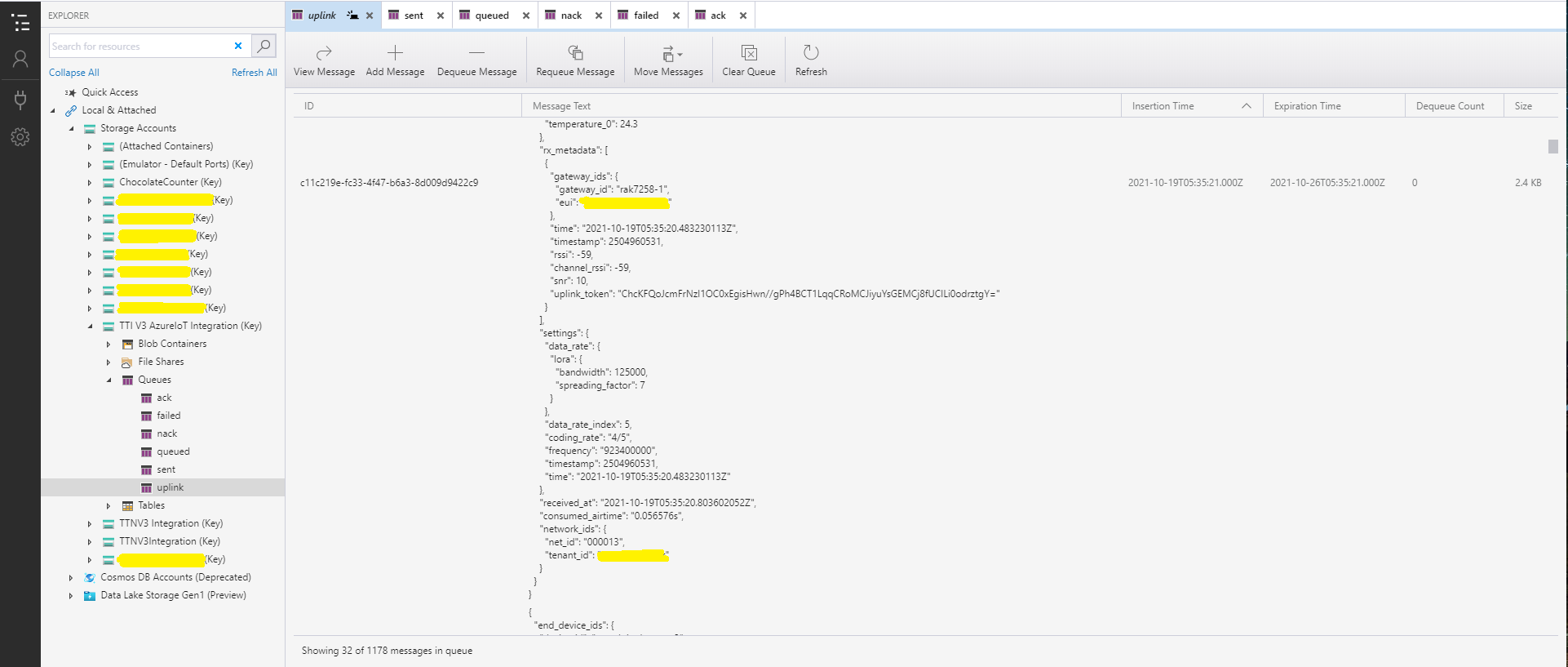
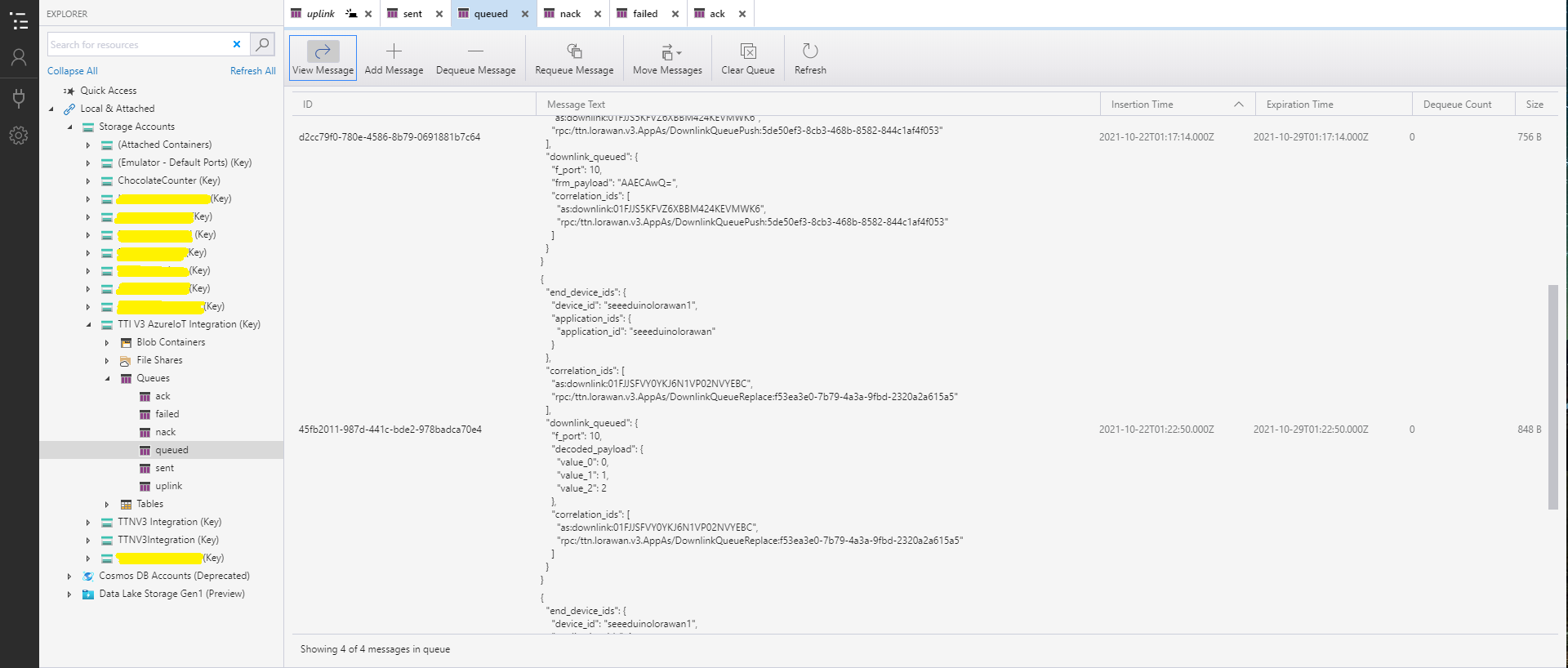
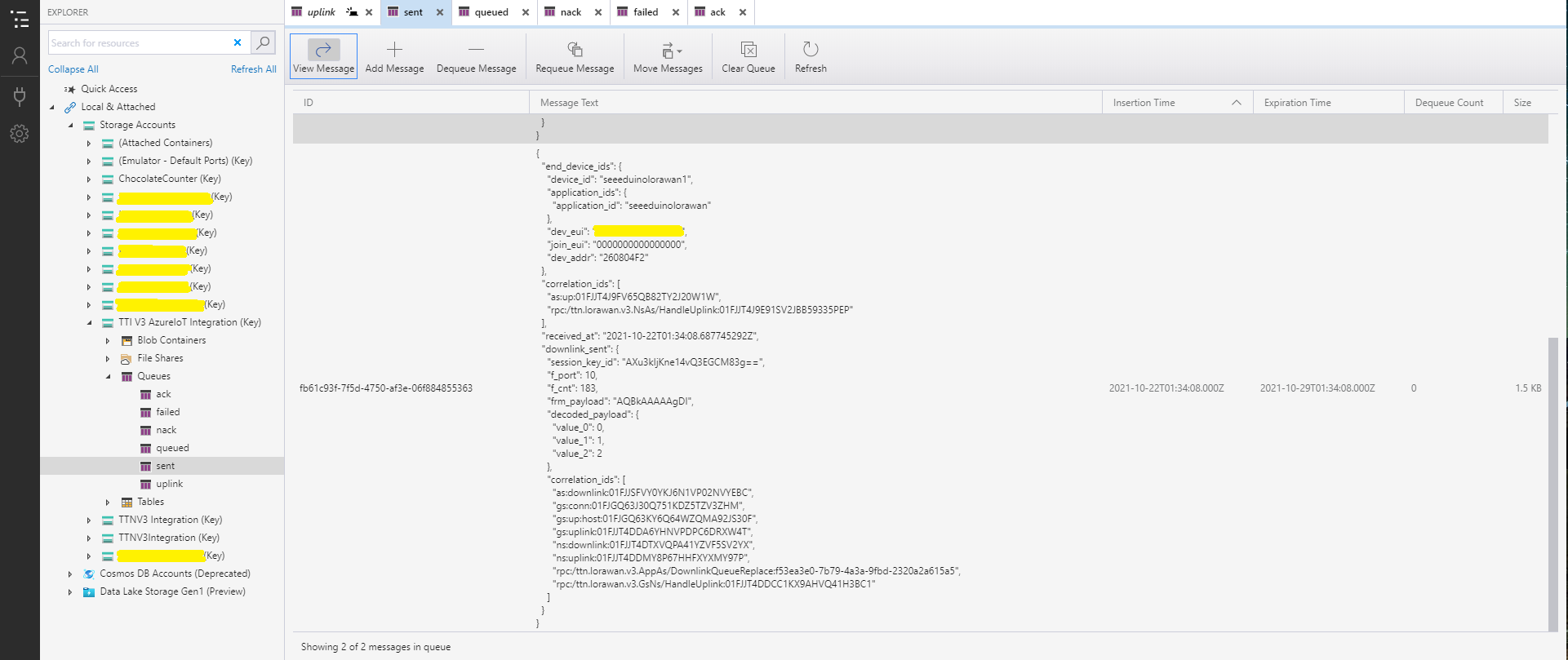
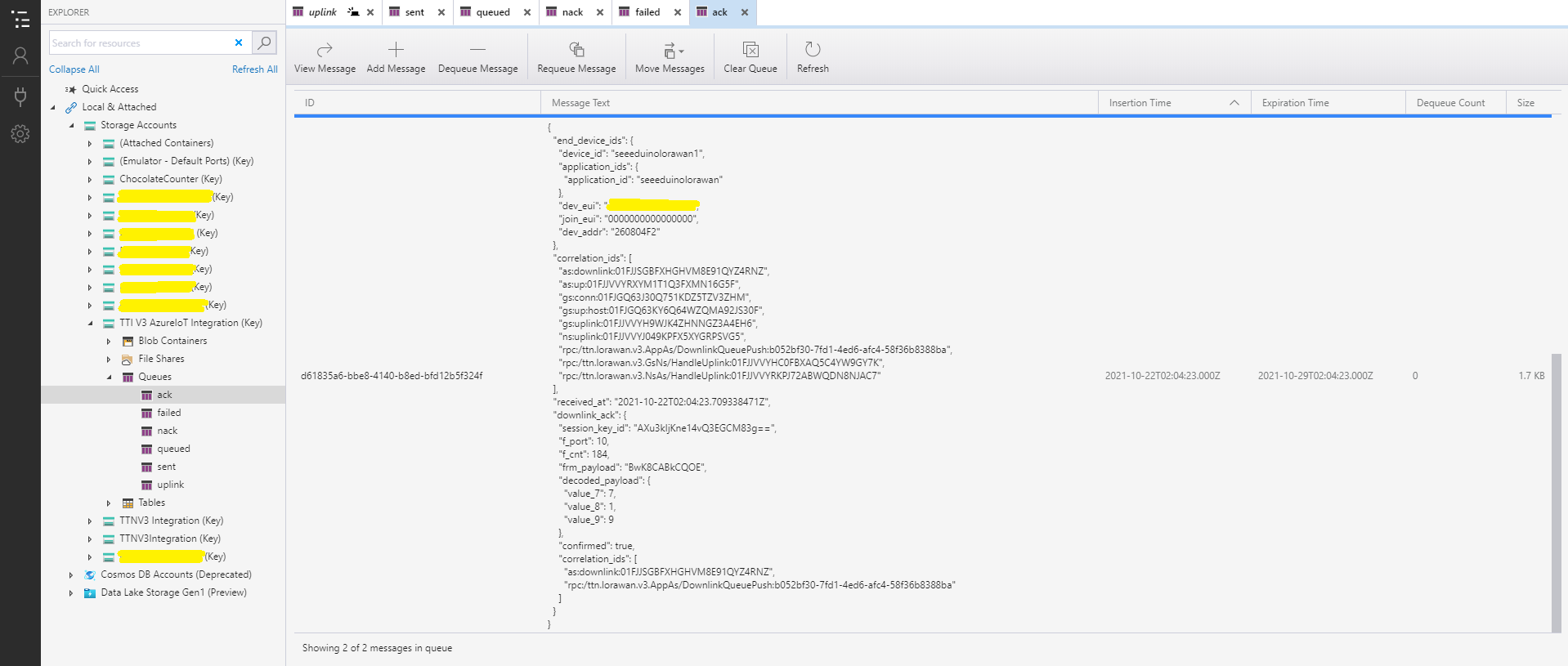
With Azure Storage Explorer I could inspect uplink, queued, sent, and acknowledgment(ACK) messages. It was difficult to generate failed and Negative Acknowledgement (Nack) and failed messages

Azure Storage Explorer displaying Uplink messages
Azure Storage Explorer displaying queued messages
Azure Storage Explorer displaying sent messages
Azure Storage Explorer Displaying Ack messages

After some experimentation I realised that I had forgotten that the order of message processing was important e.g. a TTI Queued message should be processed before the associated Ack. This could (and did happen) because I had a queue for each message type and in addition the Azure Queue Storage trigger binding would use parallel execution to process backlogs of messages. My approach caused issues with both intra and inter queue message ordering

Azure HTTP Trigger Functions with .NET Core 5

Updated .NET Core V6 Version

My updated The Things Industries(TTI) connector will use a number of Azure Functions to process Application Integration webhooks (with HTTP Triggers) and Azure Storage Queue messages(with Output Bindings & QueueTriggers).

On a couple of customer projects we had been updating Azure Functions from .NET 4.X to .NET Core 3.1, and most recently .NET Core 5. This process has been surprisingly painful so I decided to build a series of small proof of concept (PoC) projects to explore the problem.

Visual Studio Azure Function Trigger type selector

I started with the Visual Studio 2019 Azure Function template and created a plain HTTPTrigger.

public static class Function1
{
   [Function("Function1")]
   public static HttpResponseData Run([HttpTrigger(AuthorizationLevel.Function, "get", "post")] HttpRequestData req,
      FunctionContext executionContext)
   {
      var logger = executionContext.GetLogger("Function1");
      logger.LogInformation("C# HTTP trigger function processed a request.");

      var response = req.CreateResponse(HttpStatusCode.OK);
      response.Headers.Add("Content-Type", "text/plain; charset=utf-8");

      response.WriteString("Welcome to Azure Functions!");

      return response;
   }
}

I changed the AuthorizationLevel to Anonymous to make testing in Azure with Telerik Fiddler easier

public static class Function1
{
	[Function("PlainAsync")]
	public static async Task<IActionResult> Run([HttpTrigger(AuthorizationLevel.Anonymous, "get", "post", Route = null)] HttpRequestData request, FunctionContext executionContext)
	{
		var logger = executionContext.GetLogger("UplinkMessage");

		logger.LogInformation("C# HTTP trigger function processed a request.");

		var response = request.CreateResponse(HttpStatusCode.OK);

		response.Headers.Add("Content-Type", "text/plain; charset=utf-8");

		response.WriteString("Welcome to Azure Functions!");

		return new OkResult();
	}
}

With not a lot of work I had an Azure Function I could run in the Visual Studio debugger

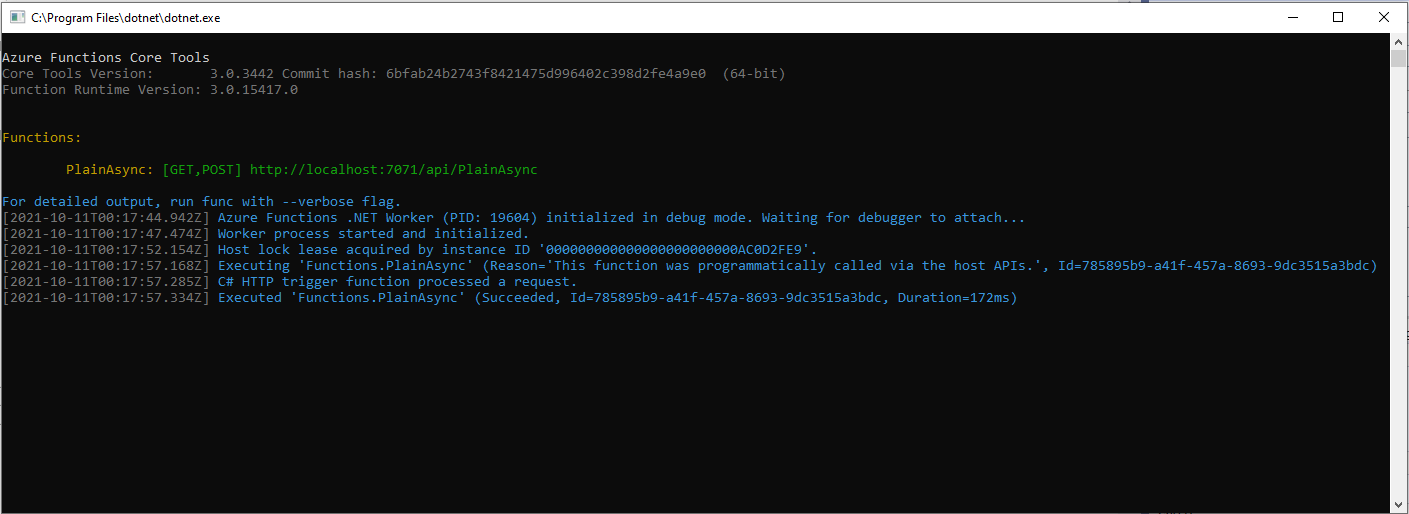
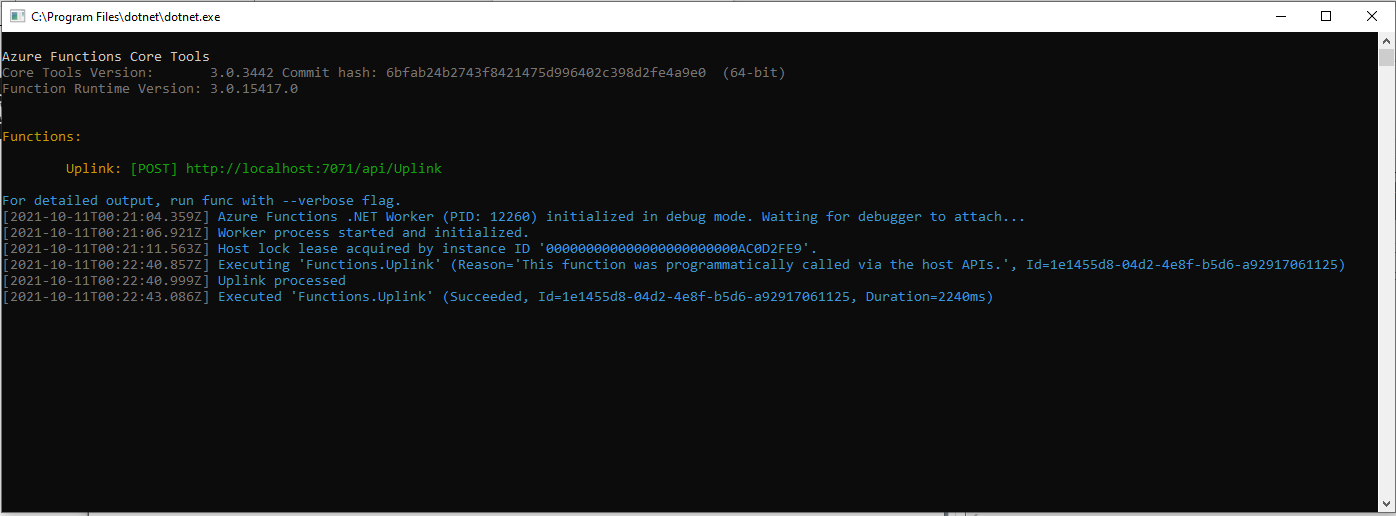
Azure Functions Debug Diagnostic Output

I could invoke the function using the endpoint displayed as debugging environment started.

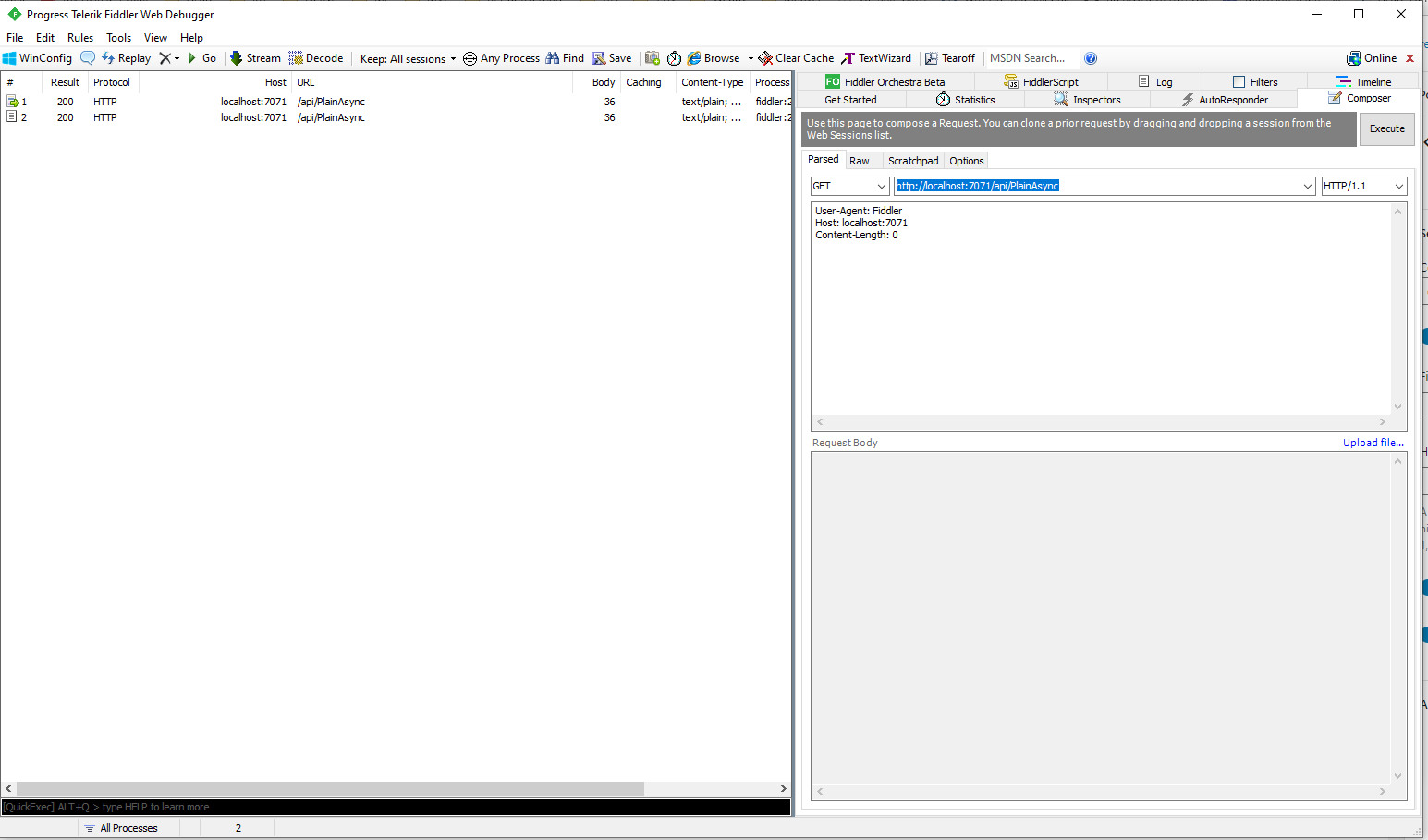
Telerik Fiddler Composer invoking Azure Function running locally

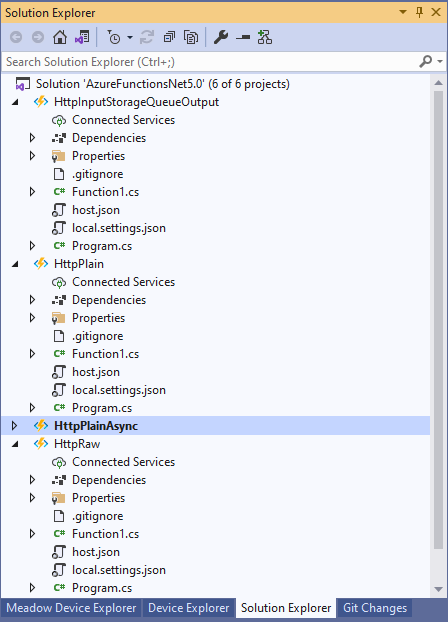
I then added more projects to explore asynchronicity, and output bindings

Azure Functions Solution PoC Projects

After a bit of “trial and error” I had an HTTPTrigger Function that inserted a message containing the payload of an HTTP POST into an Azure Storage Queue.

[StorageAccount("AzureWebJobsStorage")]
public static class Function1
{
	[Function("Uplink")]
	public static async Task<HttpTriggerUplinkOutputBindingType> Uplink([HttpTrigger(AuthorizationLevel.Function, "post")] HttpRequestData req, FunctionContext context)
	{
		var logger = context.GetLogger("UplinkMessage");

		logger.LogInformation("Uplink processed");
			
		var response = req.CreateResponse(HttpStatusCode.OK);

		return new HttpTriggerUplinkOutputBindingType()
		{
			Name = await req.ReadAsStringAsync(),
			HttpReponse = response
		};
	}

	public class HttpTriggerUplinkOutputBindingType
	{
		[QueueOutput("uplink")]
		public string Name { get; set; }

		public HttpResponseData HttpReponse { get; set; }
	}
}

The key was Multiple Output Bindings so the function could return a result for both the HttpResponseData and Azure Storage Queue operations

Azure Functions Debug Diagnostic Output

After getting the function running locally I deployed it to a Function App running in an App Service plan

Azure HTTP Trigger function Host Key configuration

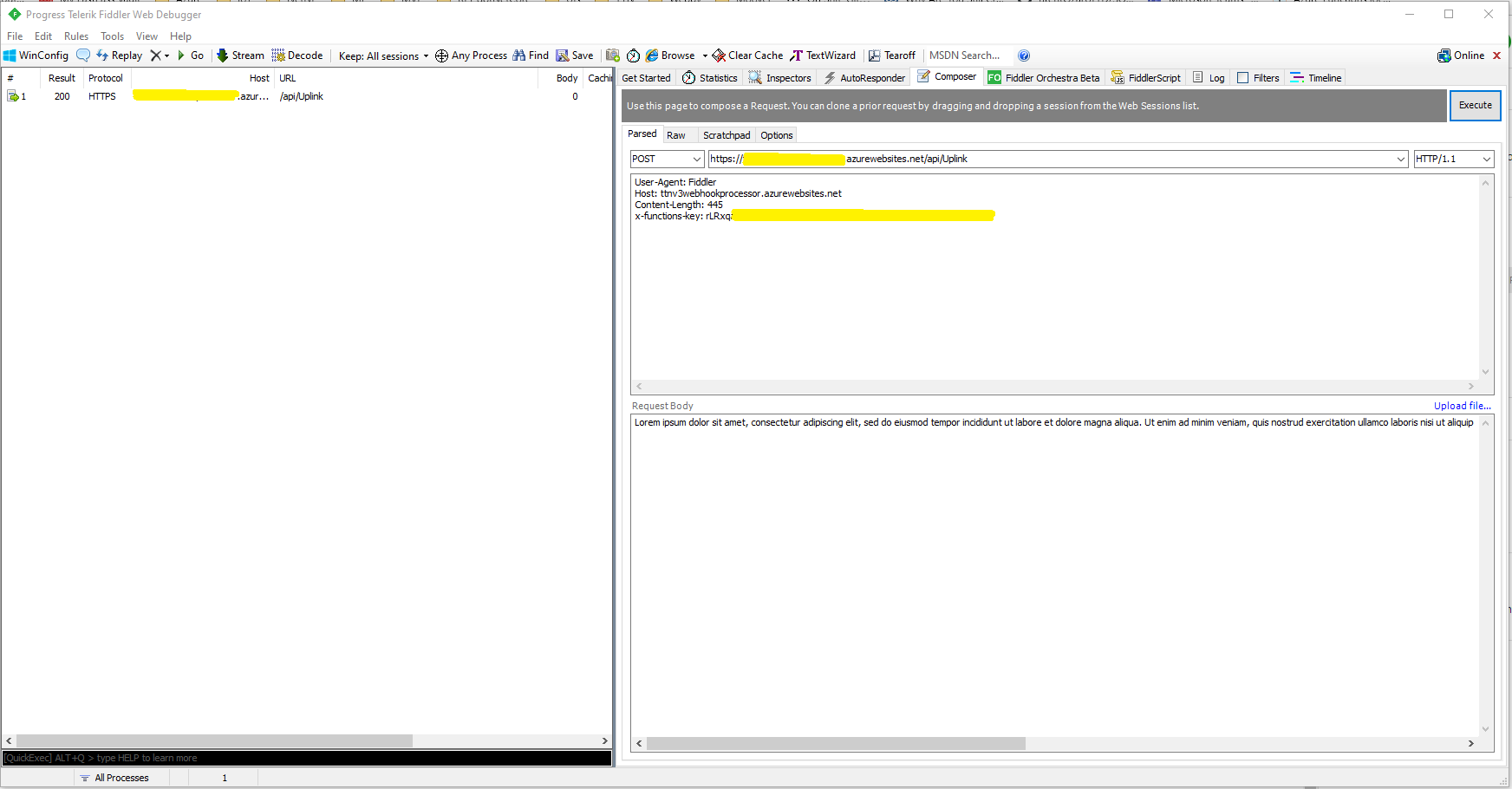
Using the Azure Portal I configured an x-functions-key which I could use in Telerik Fiddler

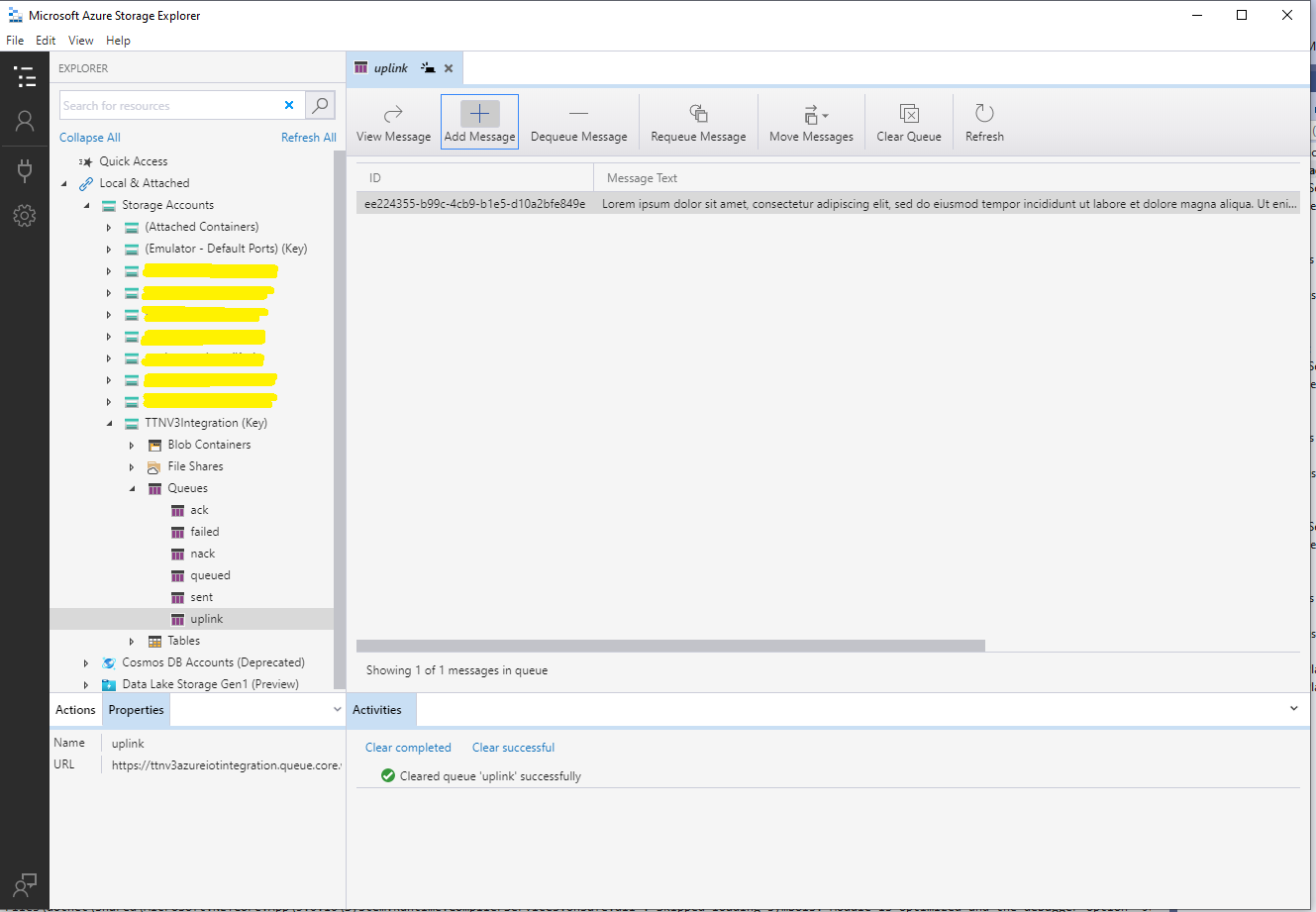
After fixing an accidental truncation of the x-functions-key a message with the body of the POST was created in the Azure Storage Queue.

Azure Storage Queue Message containing HTTP Post Payload

The aim of this series of PoCs was to have an Azure function that securely (x-functions-key) processed an Hyper Text Transfer Protocol(HTTP) POST with an HTTPTrigger and inserted a message containing the payload into an Azure Storage Queue using an OutputBinding.

Use the contents of this blog post with care as it may not age well.

Azure Functions with VB.Net 4.X

Updated .NET Core V6 Version

As part of my “day job” I spend a lot of time working with C# and VB.Net 4.X “legacy” projects doing upgrades, bugs fixes and moving applications to Azure. For the last couple of months I have been working on a project replacing Microsoft message queue(MSMQ) queues with Azure Storage Queues so the solution is easier to deploy in Azure.

The next phase of the project is to replace a number of Windows Services with Azure Queue Trigger and Timer Trigger functions. The aim is a series of small steps which we can test before deployment rather than major changes, hence the use of V1 Azure functions for the first release.
Silver Fox systems sells a Visual Studio extension which generates an HTTP Trigger VB.Net project. I needed Timer and Queue Trigger functions so I created C# examples and then used them to figure out how to build VB.Net equivalents
Visual Studio Solution Explorer

After quite a few failed attempts I found this sequence worked for me

Add a new VB.Net class library
Provide a name for new class library
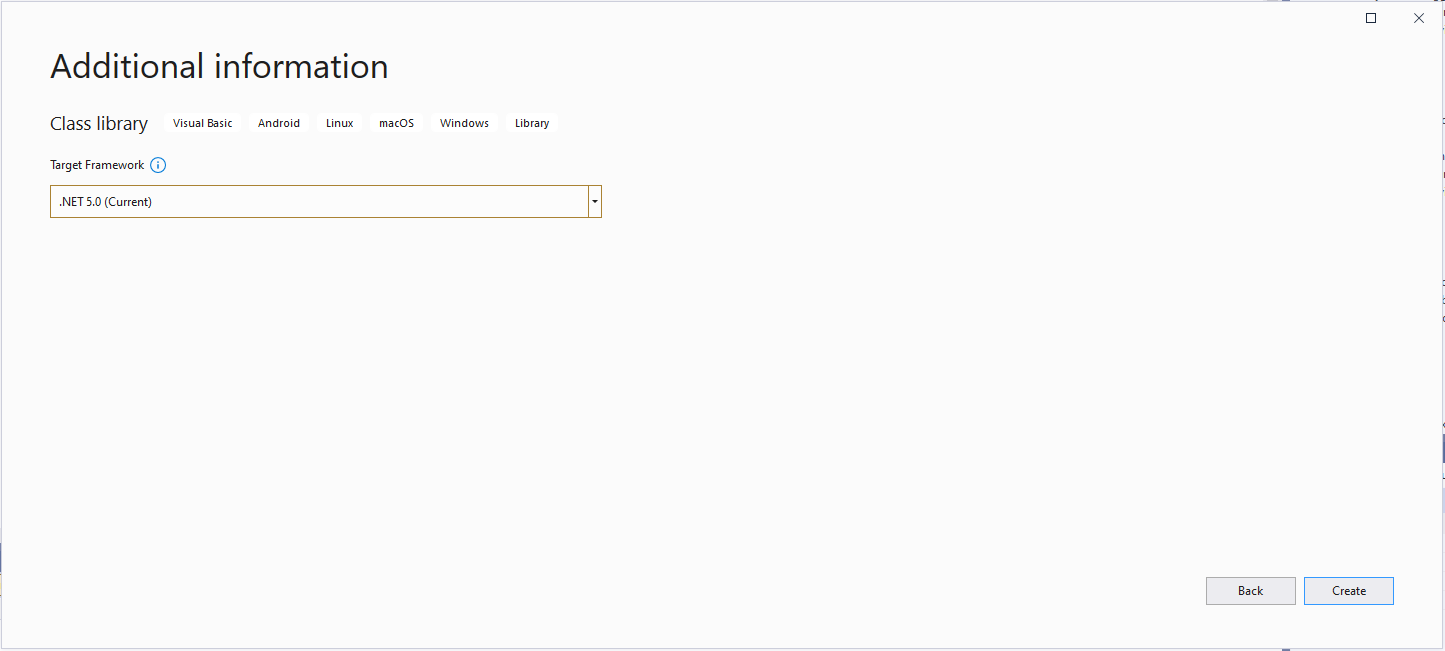
Select target framework

Even though the target platform is not .NET 5.0 ignore this and continue.

Microsoft.NET.Sdk.Functions

Added Microsoft.NET.Sdk.Functions (make sure version 1.0.38)

Visual Studio project with Azure Function Icon.

Then unload the project and open the file.

<Project Sdk="Microsoft.NET.Sdk">

  <PropertyGroup>
    <RootNamespace>TimerClass</RootNamespace>
    <TargetFramework>net5.0</TargetFramework>
  </PropertyGroup>

  <ItemGroup>
    <PackageReference Include="Microsoft.NET.Sdk.Functions" Version="1.0.38" />
  </ItemGroup>

</Project>

Add the TargetFramework and AzureFunctionsVersion lines

<Project Sdk="Microsoft.NET.Sdk">

  <PropertyGroup>
    <RootNamespace>TimerClass</RootNamespace>
    <TargetFramework>net48</TargetFramework>
    <AzureFunctionsVersion>v1</AzureFunctionsVersion>
  </PropertyGroup>
  <ItemGroup>
    <PackageReference Include="Microsoft.NET.Sdk.Functions" Version="1.0.38" />
  </ItemGroup>

</Project>

At this point the project should compile but won’t do much, so update the class to look like the code below.

Imports System.Threading

Imports Microsoft.Azure.WebJobs
Imports Microsoft.Extensions.Logging


Public Class TimerTrigger
   Shared executionCount As Int32

   <FunctionName("Timer")>
   Public Shared Sub Run(<TimerTrigger("0 */1 * * * *")> myTimer As TimerInfo, log As ILogger)
      Interlocked.Increment(executionCount)

      log.LogInformation("VB.Net TimerTrigger next trigger:{0} Execution count:{1}", myTimer.ScheduleStatus.Next, executionCount)

   End Sub
End Class

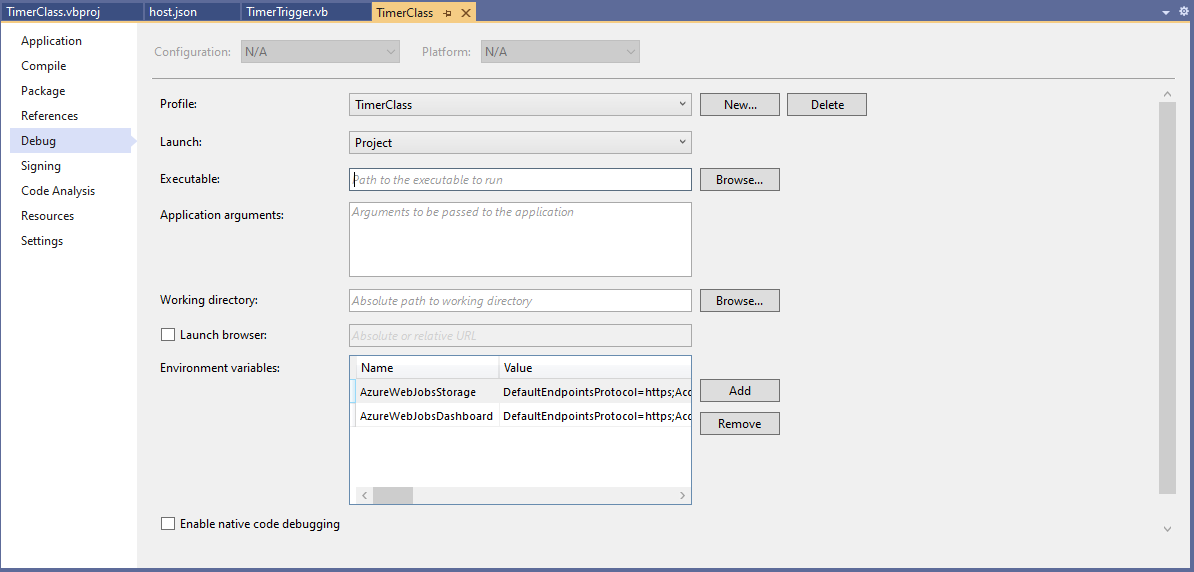
Then add an empty hosts.json file (make sure “copy if newer” is configured in properties) to the project directory, then depending on deployment model configure the AzureWebJobsStorage and AzureWebJobsDashboard connection strings via environment variables or a local.settings.json file.

Visual Studio Environment variables for AzureWebJobsStorage and AzureWebJobsDashboard connection strings

Blob Trigger Sample code

Imports System.IO
Imports System.Threading

Imports Microsoft.Azure.WebJobs
Imports Microsoft.Extensions.Logging


Public Class BlobTrigger
   Shared executionCount As Int32

   ' This function will get triggered/executed when a new message is written on an Azure Queue called events.
   <FunctionName("Notifications")>
   Public Shared Async Sub Run(<BlobTrigger("notifications/{name}", Connection:="BlobEndPoint")> payload As Stream, name As String, log As ILogger)
      Interlocked.Increment(executionCount)

      log.LogInformation("VB.Net BlobTrigger processed blob name:{0} Size:{1} bytes Execution count:{2}", name, payload.Length, executionCount)
   End Sub
End Class

HTTP Trigger Sample code

Imports System.Net
Imports System.Net.Http
Imports System.Threading

Imports Microsoft.Azure.WebJobs
Imports Microsoft.Azure.WebJobs.Extensions.Http
Imports Microsoft.Extensions.Logging


Public Class HttpTrigger
   Shared executionCount As Int32

   <FunctionName("Notifications")>
   Public Shared Async Function Run(<HttpTrigger(AuthorizationLevel.Anonymous, "get", "post", Route:=Nothing)> req As HttpRequestMessage, log As ILogger) As Task(Of HttpResponseMessage)
      Interlocked.Increment(executionCount)

      log.LogInformation($"VB.Net HTTP trigger Execution count:{0} Method:{1}", executionCount, req.Method)

      Return New HttpResponseMessage(HttpStatusCode.OK)
   End Function
End Class

Queue Trigger Sample Code

Imports System.Threading

Imports Microsoft.Azure.WebJobs
Imports Microsoft.Extensions.Logging


Public Class QueueTrigger
   Shared ConcurrencyCount As Long
   Shared ExecutionCount As Long

   <FunctionName("Alerts")>
   Public Shared Sub ProcessQueueMessage(<QueueTrigger("notifications", Connection:="QueueEndpoint")> message As String, log As ILogger)
      Interlocked.Increment(ConcurrencyCount)
      Interlocked.Increment(ExecutionCount)

      log.LogInformation("VB.Net Concurrency:{0} Message:{1} Execution count:{2}", ConcurrencyCount, message, ExecutionCount)

      ' Wait for a bit to force some consurrency
      Thread.Sleep(5000)

      Interlocked.Decrement(ConcurrencyCount)
   End Sub
End Class

As well as counting the number of executions I also wanted to check that >1 instances were started to process messages when the queues had many messages. I added a “queues” section to the hosts.json file so I could tinker with the options.

{
  "queues": {
    "maxPollingInterval": 100,
    "visibilityTimeout": "00:00:05",
    "batchSize": 16,
    "maxDequeueCount": 5,
    "newBatchThreshold": 8
  }
}

The QueueMessageGenerator application inserts many messages into a queue for processing.
When I started the QueueTrigger function I could see the concurrency count was > 0

Timer Trigger Sample Code

Imports System.Threading

Imports Microsoft.Azure.WebJobs
Imports Microsoft.Extensions.Logging


Public Class TimerTrigger
   Shared executionCount As Int32

   <FunctionName("Timer")>
   Public Shared Sub Run(<TimerTrigger("0 */1 * * * *")> myTimer As TimerInfo, log As ILogger)
      Interlocked.Increment(executionCount)

      log.LogInformation("VB.Net TimerTrigger next trigger:{0} Execution count:{1}", myTimer.ScheduleStatus.Next, executionCount)

   End Sub
End Class

The source code for the C# and VB.Net functions is available on GitHub