Random wanderings through Microsoft Azure esp. PaaS plumbing, the IoT bits, AI on Micro controllers, AI on Edge Devices, .NET nanoFramework, .NET Core on *nix and ML.NET+ONNX
The Inside AirbnbLondon dataset has 87946 listings and the id column (which is the primary key) has a minimum value of 13913 and maximum of 973895808066047620 in the database.
Back in the early 90’s I used to live next to the Ealing Lawn Tennis Club in London
I used “Ealing” as the SearchText for my initial testing and tried different page numbers and sizes
Testing the search functionality with SwaggerUI
The listings search results JSON looked good but I missed one important detail…
string LookupByIdSql = @"SELECT Id, [Name], Listing_URL AS ListingURL
                     FROM ListingsHosts
                     WHERE id = @Id";

public record ListingLookupDto
{
   public long Id { get; set; }
   public string? Name { get; set; }
   public string? ListingURL { get; set; }
};

//...

app.MapGet("/Listing/Results/{id:long}", async (long id, IDapperContext dappperContext) =>
{
   using (var connection = dappperContext.ConnectionCreate())
   {
      ListingLookupDto result = await connection.QuerySingleOrDefaultWithRetryAsync<ListingLookupDto>(LookupByIdSql, new { id });
      if (result is null)
      {
         return Results.Problem($"Listing {id} not found", statusCode: StatusCodes.Status404NotFound);
      }

      return Results.Ok(result);
   }
})
.Produces<ListingLookupDto>(StatusCodes.Status200OK)
.Produces<ProblemDetails>(StatusCodes.Status404NotFound)
.WithOpenApi();
The id values in the search response and lookup DTOs were correct
Visual Studio 2022 Debugger inspecting listing id value
I had missed the clue in the search response JSON the listing id and the listingURL id didn’t match.
This specification allows implementations to set limits on the range
and precision of numbers accepted. Since software that implements
IEEE 754-2008 binary64 (double precision) numbers [IEEE754] is
generally available and widely used, good interoperability can be
achieved by implementations that expect no more precision or range
than these provide, in the sense that implementations will
approximate JSON numbers within the expected precision.
My initial ASP.NET Core Minimal AP exploration uses the Inside AirbnbLondon dataset which has 87946 listings. The data is pretty “nasty” with lots of nullable and wide columns so it took several attempts to import.
CREATE TABLE [dbo].[listingsRaw](
	[id] [bigint] NOT NULL,
	[listing_url] [nvarchar](50) NOT NULL,
	[scrape_id] [datetime2](7) NOT NULL,
	[last_scraped] [date] NOT NULL,
	[source] [nvarchar](50) NOT NULL,
	[name] [nvarchar](max) NOT NULL,
	[description] [nvarchar](max) NULL,
	[neighborhood_overview] [nvarchar](1050) NULL,
	[picture_url] [nvarchar](150) NULL,
	[host_id] [int] NOT NULL,
	[host_url] [nvarchar](50) NOT NULL,
	[host_name] [nvarchar](50) NULL,
	[host_since] [date] NULL,
	[host_location] [nvarchar](100) NULL,
	[host_about] [nvarchar](max) NULL,
	[host_response_time] [nvarchar](50) NULL,
	[host_response_rate] [nvarchar](50) NULL,
	[host_acceptance_rate] [nvarchar](50) NULL,
	[host_is_superhost] [bit] NULL,
	[host_thumbnail_url] [nvarchar](150) NULL,
	[host_picture_url] [nvarchar](150) NULL,
	[host_neighbourhood] [nvarchar](50) NULL,
	[host_listings_count] [int] NULL,
	[host_total_listings_count] [int] NULL,
	[host_verifications] [nvarchar](50) NOT NULL,
	[host_has_profile_pic] [bit] NULL,
	[host_identity_verified] [bit] NULL,
	[neighbourhood] [nvarchar](100) NULL,
	[neighbourhood_cleansed] [nvarchar](50) NOT NULL,
	[neighbourhood_group_cleansed] [nvarchar](1) NULL,
	[latitude] [float] NOT NULL,
	[longitude] [float] NOT NULL,
	[property_type] [nvarchar](50) NOT NULL,
	[room_type] [nvarchar](50) NOT NULL,
	[accommodates] [tinyint] NOT NULL,
	[bathrooms] [nvarchar](1) NULL,
	[bathrooms_text] [nvarchar](50) NULL,
	[bedrooms] [tinyint] NULL,
	[beds] [tinyint] NULL,
	[amenities] [nvarchar](max) NOT NULL,
	[price] [money] NOT NULL,
	[minimum_nights] [smallint] NOT NULL,
	[maximum_nights] [int] NOT NULL,
	[minimum_minimum_nights] [smallint] NULL,
	[maximum_minimum_nights] [int] NULL,
	[minimum_maximum_nights] [int] NULL,
	[maximum_maximum_nights] [int] NULL,
	[minimum_nights_avg_ntm] [float] NULL,
	[maximum_nights_avg_ntm] [float] NULL,
	[calendar_updated] [nvarchar](1) NULL,
	[has_availability] [bit] NOT NULL,
	[availability_30] [tinyint] NOT NULL,
	[availability_60] [tinyint] NOT NULL,
	[availability_90] [tinyint] NOT NULL,
	[availability_365] [smallint] NOT NULL,
	[calendar_last_scraped] [date] NOT NULL,
	[number_of_reviews] [smallint] NOT NULL,
	[number_of_reviews_ltm] [int] NOT NULL,
	[number_of_reviews_l30d] [tinyint] NOT NULL,
	[first_review] [date] NULL,
	[last_review] [date] NULL,
	[review_scores_rating] [float] NULL,
	[review_scores_accuracy] [float] NULL,
	[review_scores_cleanliness] [float] NULL,
	[review_scores_checkin] [float] NULL,
	[review_scores_communication] [float] NULL,
	[review_scores_location] [float] NULL,
	[review_scores_value] [float] NULL,
	[license] [nvarchar](max) NULL,
	[instant_bookable] [bit] NOT NULL,
	[calculated_host_listings_count] [int] NULL,
	[calculated_host_listings_count_entire_homes] [int] NOT NULL,
	[calculated_host_listings_count_private_rooms] [int] NOT NULL,
	[calculated_host_listings_count_shared_rooms] [int] NOT NULL,
	[reviews_per_month] [float] NULL
) ON [PRIMARY] TEXTIMAGE_ON [PRIMARY]
There are other data quality issues e.g. the host information is duplicated in each of their Listings e.g. host_id, host_name, host_since, host_* etc. which will need to be tidied up.
Swagger user interface for Raw Listings search functionality.
I have implemented basic (“incomplete”) OpenAPI support for functionality and stress testing.
Swagger user interface parameterised search functionality.
The search results are paginated and individual listings can be retrieved using the Airbnb listing “id”.
const string SearchPaginatedSql = @"SELECT Uid,Id,[Name], neighbourhood
                     FROM listings
                     WHERE[Name] LIKE N'%' + @SearchText + N'%'
                     ORDER By[Name]
                     OFFSET @PageSize *(@PageNumber - 1) ROWS FETCH NEXT @PageSize ROWS ONLY";

public record ListingListDto
{
   public long Id { get; set; }
   public string? Name { get; set; }
   public string? Neighbourhood { get; set; }
};
Swagger user interface search functionality with untyped response.
The first HTTP GET implementation returns an untyped result-set which was not very helpful.
app.MapGet("/Listing/Search", async (string searchText, int pageNumber, int pageSize, [FromServices] IDapperContext dappperContext) =>
{
   using (var connection = dappperContext.ConnectionCreate())
   {
      return await connection.QueryWithRetryAsync(SearchPaginatedSql, new { searchText, pageNumber, pageSize });
   }
})
.WithOpenApi();
Swagger user interface search functionality with typed response
The second HTTP GET implementation returns a typed result-set which improved the “usability” of clients generated from the OpenAPI definition file.
app.MapGet("/Listing/Search/Typed", async (string searchText, int pageNumber, int pageSize, [FromServices] IDapperContext dappperContext) =>
{
   using (var connection = dappperContext.ConnectionCreate())
   {
      return await connection.QueryWithRetryAsync<ListingListDto>(SearchPaginatedSql, new { searchText, pageNumber, pageSize });
   }
})
.Produces<IList<ListingListDto>>(StatusCodes.Status200OK)
.WithOpenApi();
string LookupByIdSql = @"SELECT Id,[Name], neighbourhood
FROM ListingsHosts
WHERE id = @Id";

public record ListingLookupDto
{
public long Id { get; set; }
public string? Name { get; set; }
public string? Neighbourhood { get; set; }
};
Swagger user interface Listing lookup functionality
app.MapGet("/Listing/{id:long}", async (long id, IDapperContext dappperContext) =>
{
   using (var connection = dappperContext.ConnectionCreate())
   {
      ListingLookupDto result = await connection.QuerySingleOrDefaultWithRetryAsync<ListingLookupDto>(LookupByIdSql, new { id });
      if (result is null)
      {
         return Results.Problem($"Listing {id} not found", statusCode: StatusCodes.Status404NotFound);
      }

      return Results.Ok(result);
   }
})
.Produces<ListingLookupDto>(StatusCodes.Status200OK)
.Produces<ProblemDetails>(StatusCodes.Status404NotFound)
.WithOpenApi();
The lack of validation of the SearchText, PageSize and PageNumber parameters allow uses to enter invalid values which caused searches to fail.
Swagger user interface search functionality with an invalid page number
My initial approach was to decorate the parameters of the ValidatedQuery method with DataAnnotations to ensure only valid values were accepted.
This wasn’t a great solution because the validation of the parameters was declared as part of the user interface and would have to be repeated everywhere listing search functionality was provided.
Swagger user interface search functionality with parameter validation
app.MapGet("/Listing/Search/Parameters", async ([AsParameters] SearchParameters searchParameters,
   [FromServices] IDapperContext dappperContext) =>
{
   using (var connection = dappperContext.ConnectionCreate())
   {
      return await connection.QueryWithRetryAsync<ListingListDto>(SearchPaginatedSql, new { searchText = searchParameters.SearchText, searchParameters.PageNumber, searchParameters.PageSize });
   }
})
.Produces<IList<ListingListDto>>(StatusCodes.Status200OK)
.Produces<ProblemDetails>(StatusCodes.Status400BadRequest)
.WithOpenApi();

public record SearchParameters
{
   // https://github.com/domaindrivendev/Swashbuckle.AspNetCore/issues/2658 possibly related?
   public const byte SearchTextMinimumLength = 3;
   public const byte SearchTextMaximumLength = 15;
   public const int PageNumberMinimum = 1;
   public const int PageNumberMaximum = 100;
   public const byte PageSizeMinimum = 5;
   public const byte PageSizeMaximum = 50;

   //[FromQuery, Required, MinLength(SearchTextMinimumLength, ErrorMessage = "SearchTextMinimumLegth"), MaxLength(SearchTextMaximumLength, ErrorMessage = "SearchTextMaximumLegth")]
   //[Required, MinLength(SearchTextMinimumLength, ErrorMessage = "SearchTextMinimumLegth"), MaxLength(SearchTextMaximumLength, ErrorMessage = "SearchTextMaximumLegth")]
   [MinLength(SearchTextMinimumLength, ErrorMessage = "SearchTextMinimumLegth"), MaxLength(SearchTextMaximumLength, ErrorMessage = "SearchTextMaximumLegth")]
   public string SearchText { get; set; }

   //[FromQuery, Range(PageNumberMinimum, PageNumberMaximum, ErrorMessage = "PageNumberMinimum PageNumberMaximum")]
   //[Required, Range(PageNumberMinimum, PageNumberMaximum, ErrorMessage = "PageNumberMinimum PageNumberMaximum")]
   [Range(PageNumberMinimum, PageNumberMaximum, ErrorMessage = "PageNumberMinimum PageNumberMaximum")]
   public int PageNumber { get; set; }

   [Range(PageSizeMinimum, PageSizeMaximum, ErrorMessage = "PageSizeMinimum PageSizeMaximum")]
   public int PageSize { get; set; }
}
Swagger user interface search functionality with parameter validation
This last two implementations worked though the error messages I had embedded in the code were not displayed I think this is related to this Swashbuckle Issue.
There is also an issue looking up some listings with larger listing ids which I will need some investigation.
Swarm Space Bumble hive classes in Visual Studio 2022
My SwarmSpaceAzureIoTConnector project only needed to login, get a list of devices and send messages so all the additional functionality was never going to be used. The method to send a message didn’t work, the class used for the payload (UserMessage) appears to be wrong.
"post": {
        "tags": [ "messages" ],
        "summary": "POST user messages",
        "description": "<p>This endpoint submits a JSON formatted UserMessage object for delivery to a Swarm device. A JSON object is returned with a newly assigned <code>packetId</code> and <code>status</code> of<code>OK</code> on success, or <code>ERROR</code> (with a description of the error) on failure.</p><p>The current user must have access to the <code>userApplicationId</code> and <code>device</code> given inside the UserMessage JSON. The device must also have the ability to receive messages from the Hive (\"two-way communication\") enabled. If these conditions are not met, a response with status code 403 (Forbidden) will be returned.</p><p>Note that the <code>data</code> field is the <b>Base64-encoded</b> version of the data to be sent. This allows the sending of binary, as well as text, data.</p>",
        "operationId": "addApplicationMessage",
        "requestBody": {
          "content": { "application/json": { "schema": { "$ref": "#/components/schemas/UserMessage" } } },
          "required": true
        },
        "responses": {
          "401": {
            "description": "Unauthorized",
            "content": { "*/*": { "schema": { "$ref": "#/components/schemas/ApiError" } } }
          },
          "403": {
            "description": "Forbidden",
            "content": { "*/*": { "schema": { "$ref": "#/components/schemas/ApiError" } } }
          },
          "400": {
            "description": "Bad Request",
            "content": { "*/*": { "schema": { "$ref": "#/components/schemas/ApiError" } } }
          },
          "200": {
            "description": "OK",
            "content": { "application/json": { "schema": { "$ref": "#/components/schemas/PacketPostReturn" } } }
          }
        }
      }
    },
[System.CodeDom.Compiler.GeneratedCode("NJsonSchema", "13.17.0.0 (NJsonSchema v10.8.0.0 (Newtonsoft.Json v13.0.0.0))")]
public partial class UserMessage
{
/// <summary>
/// Swarm packet ID
/// </summary>
[Newtonsoft.Json.JsonProperty("packetId", Required = Newtonsoft.Json.Required.Always)]
public long PacketId { get; set; }
/// <summary>
/// Swarm message ID. There may be multiple messages for a single message ID. A message ID represents an intent to send a message, but there may be multiple Swarm packets that are required to fulfill that intent. For example, if a Hive -> device message fails to reach its destination, automatic retry attempts to send that message will have the same message ID.
/// </summary>
[Newtonsoft.Json.JsonProperty("messageId", Required = Newtonsoft.Json.Required.DisallowNull, NullValueHandling = Newtonsoft.Json.NullValueHandling.Ignore)]
public long MessageId { get; set; }
/// <summary>
/// Swarm device type
/// </summary>
[Newtonsoft.Json.JsonProperty("deviceType", Required = Newtonsoft.Json.Required.Always)]
public int DeviceType { get; set; }
/// <summary>
/// Swarm device ID
/// </summary>
[Newtonsoft.Json.JsonProperty("deviceId", Required = Newtonsoft.Json.Required.Always)]
public int DeviceId { get; set; }
/// <summary>
/// Swarm device name
/// </summary>
[Newtonsoft.Json.JsonProperty("deviceName", Required = Newtonsoft.Json.Required.DisallowNull, NullValueHandling = Newtonsoft.Json.NullValueHandling.Ignore)]
public string DeviceName { get; set; }
/// <summary>
/// Direction of message
/// </summary>
[Newtonsoft.Json.JsonProperty("direction", Required = Newtonsoft.Json.Required.Always)]
public int Direction { get; set; }
/// <summary>
/// Message data type, always = 6
/// </summary>
[Newtonsoft.Json.JsonProperty("dataType", Required = Newtonsoft.Json.Required.Always)]
public int DataType { get; set; }
/// <summary>
/// Application ID
/// </summary>
[Newtonsoft.Json.JsonProperty("userApplicationId", Required = Newtonsoft.Json.Required.Always)]
public int UserApplicationId { get; set; }
/// <summary>
/// Organization ID
/// </summary>
[Newtonsoft.Json.JsonProperty("organizationId", Required = Newtonsoft.Json.Required.Always)]
public int OrganizationId { get; set; }
/// <summary>
/// Length of data (in bytes) before base64 encoding
/// </summary>
[Newtonsoft.Json.JsonProperty("len", Required = Newtonsoft.Json.Required.DisallowNull, NullValueHandling = Newtonsoft.Json.NullValueHandling.Ignore)]
public int Len { get; set; }
/// <summary>
/// Base64 encoded data string
/// </summary>
[Newtonsoft.Json.JsonProperty("data", Required = Newtonsoft.Json.Required.Always)]
[System.ComponentModel.DataAnnotations.Required(AllowEmptyStrings = true)]
public byte[] Data { get; set; }
/// <summary>
/// Swarm packet ID of acknowledging packet from device
/// </summary>
[Newtonsoft.Json.JsonProperty("ackPacketId", Required = Newtonsoft.Json.Required.DisallowNull, NullValueHandling = Newtonsoft.Json.NullValueHandling.Ignore)]
public long AckPacketId { get; set; }
/// <summary>
/// Message status. Possible values:
/// <br/>0 = incoming message (from a device)
/// <br/>1 = outgoing message (to a device)
/// <br/>2 = incoming message, acknowledged as seen by customer. OR a outgoing message packet is on groundstation
/// <br/>3 = outgoing message, packet is on satellite
/// <br/>-1 = error
/// <br/>-3 = failed to deliver, retrying
/// <br/>-4 = failed to deliver, will not re-attempt
/// <br/>
/// </summary>
[Newtonsoft.Json.JsonProperty("status", Required = Newtonsoft.Json.Required.DisallowNull, NullValueHandling = Newtonsoft.Json.NullValueHandling.Ignore)]
public int Status { get; set; }
/// <summary>
/// Time that the message was received by the Hive
/// </summary>
[Newtonsoft.Json.JsonProperty("hiveRxTime", Required = Newtonsoft.Json.Required.Always)]
[System.ComponentModel.DataAnnotations.Required(AllowEmptyStrings = true)]
public System.DateTimeOffset HiveRxTime { get; set; }
private System.Collections.Generic.IDictionary<string, object> _additionalProperties;
[Newtonsoft.Json.JsonExtensionData]
public System.Collections.Generic.IDictionary<string, object> AdditionalProperties
{
get { return _additionalProperties ?? (_additionalProperties = new System.Collections.Generic.Dictionary<string, object>()); }
set { _additionalProperties = value; }
}
}
After several attempts I gave up and have rebuilt the required Bumble bee hive integration with RestSharp
public async Task SendAsync(uint organisationId, uint deviceId, byte deviceType, ushort userApplicationId, byte[] data, CancellationToken cancellationToken)
{
    await TokenRefresh(cancellationToken);

    _logger.LogInformation("SendAsync: OrganizationId:{0} DeviceType:{1} DeviceId:{2} UserApplicationId:{3} Data:{4} Enabled:{5}", organisationId, deviceType, deviceId, userApplicationId, Convert.ToBase64String(data), _bumblebeeHiveSettings.DownlinkEnabled);

    Models.MessageSendRequest message = new Models.MessageSendRequest()
    {
        OrganizationId = (int)organisationId,
        DeviceType = deviceType,
        DeviceId = (int)deviceId,
        UserApplicationId = userApplicationId,
        Data = data,
    };

    RestClientOptions restClientOptions = new RestClientOptions()
    {
        BaseUrl = new Uri(_bumblebeeHiveSettings.BaseUrl),
        ThrowOnAnyError = true,
    };

    using (RestClient client = new RestClient(restClientOptions))
    {
        RestRequest request = new RestRequest("api/v1/messages", Method.Post);

        request.AddBody(message);

        request.AddHeader("Authorization", $"bearer {_token}");

        // To save the limited monthly allocation of mesages downlinks can be disabled
        if (_bumblebeeHiveSettings.DownlinkEnabled)
        {
           var response = await client.PostAsync<Models.MessageSendResponse>(request, cancellationToken);

            _logger.LogInformation("SendAsync-Result:{Status} PacketId:{PacketId}", response.Status, response.PacketId);
        }
    }
}
So, I can simulate lots of devices and test more complex configurations I have started build a Swarm Bumble Bee Hive emulator based on the API and Delivery-APIOpenAPI files.
NSwagStudio configuration for generating ASP.NET Core web API
As well as generating clients NSwagStudio can also generate ASP.NET Core web APIs. To test my approach, I built the simplest possible client I could which calls the generated PostLoginAsync and GetDeviceCountAsync.
Swagger UI for NSwagStudio generated ASP.NET Core web API
BumblebeeHiveBasicClientConsole application 415 Unsupported Media Type error
After some trial and error, I modified the HiveController.cs and HiveControllerImplementation.cs Login method signatures so the payload was “application/x-www-form-urlencoded” rather than “application/json” by changing FromBody to FromForm
Modifying code generated by a tool like NSwagStudio should be avoided but I couldn’t work out a simpler solution
/// <summary>
/// POST login
/// </summary>
/// <remarks>
/// <p>Use username and password to log in.</p><p>On success: returns status code 200. The response body is the JSON <code>{"token": "&lt;token&gt;"}</code>, along with the header <code>Set-Cookie: JSESSIONID=&lt;token&gt;; Path=/; Secure; HttpOnly;</code>. The tokens in the return value and the <code>Set-Cookie</code> header are the same. The token is a long string of letters, numbers, and punctuation.</p><p>On failure: returns status code 401.</p><p>To make authenticated requests, there are two ways: <ul><li>(Preferred) Use the token as a Bearer Authentication token by including the HTTP header <code>Authorization: Bearer &lt;token&gt;</code> in further requests.</li><li>(Deprecated) Use the token as the JSESSIONID cookie in further requests.</li></ul></p>
/// </remarks>
/// <returns>Login success</returns>
[Microsoft.AspNetCore.Mvc.HttpPost, Microsoft.AspNetCore.Mvc.Route("login")]
public System.Threading.Tasks.Task<Response> PostLogin([Microsoft.AspNetCore.Mvc.FromForm] LoginForm body)
{
return _implementation.PostLoginAsync(body);
}
BumblebeeHiveBasicCLientConsole application calling the simulator
BumblebeeHiveBasicClientConsole application calling the production system
After some initial problems with content-types the Swarm Hive API (not tried the Delivery-API yet) appears to be documented and easy to use. Though, some of the variable type choices do seem a bit odd.
public virtual async System.Threading.Tasks.Task<string> GetDeviceCountAsync(int? devicetype, System.Threading.CancellationToken cancellationToken)
I have started with a “nasty” Proof of Concept(PoC) to figure out how to connect to the Swarm Hive API.
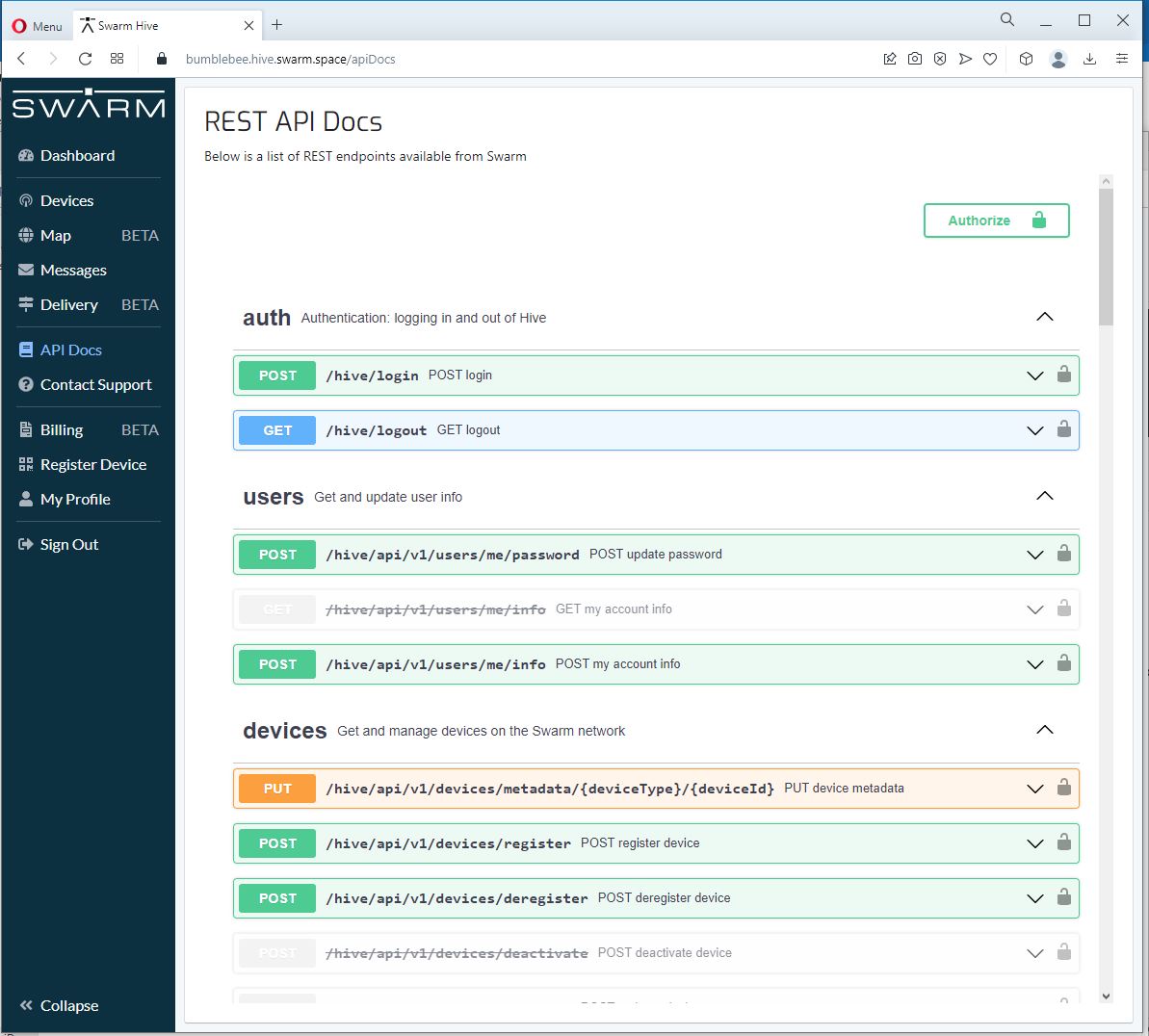
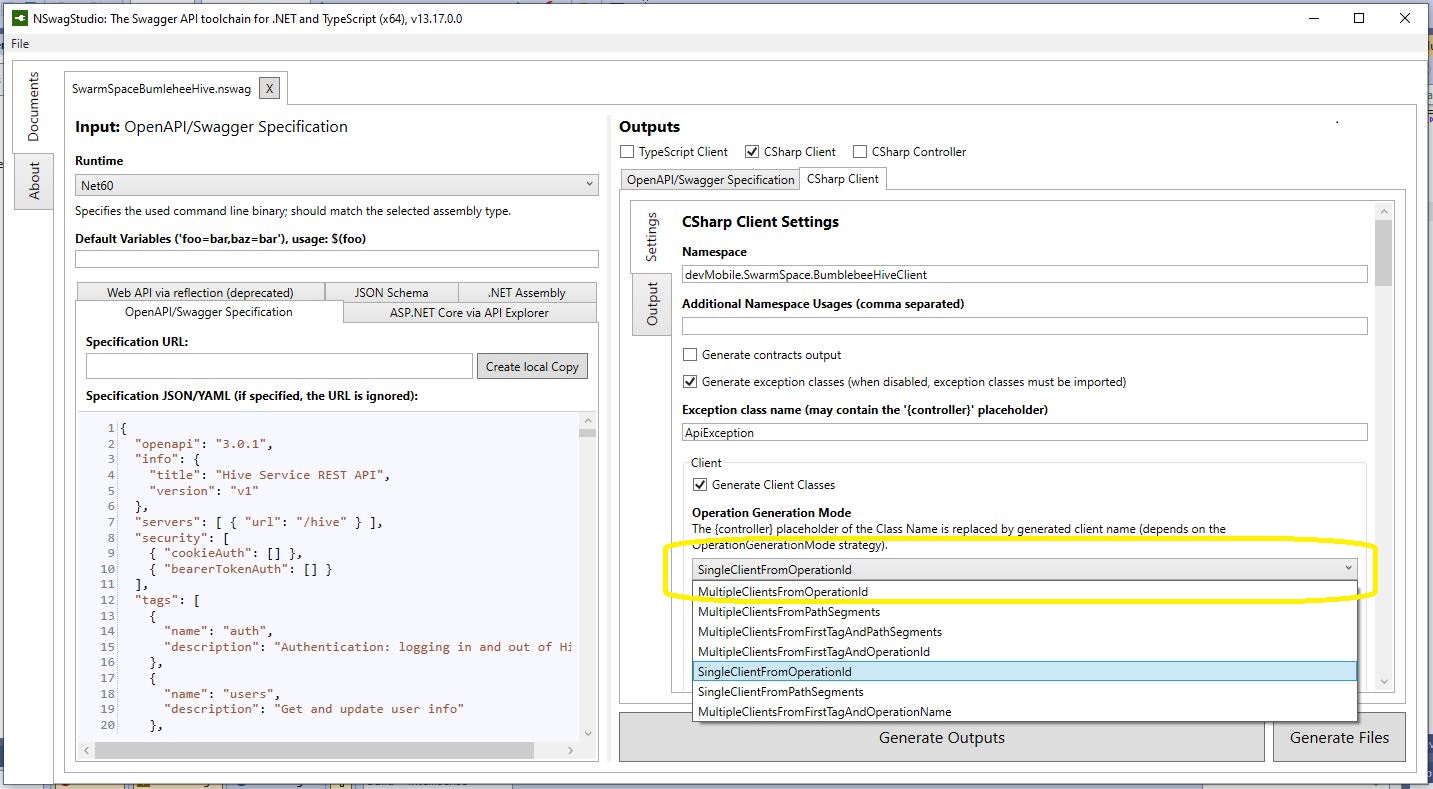
The Swarm Hive API has been published with Swagger/OpenAPI which is really simple to use. I used NSwagStudio to generate a C# client to I didn’t have to “handcraft” one.
Initially the code would compile but I found a clue in a Github Issue from September 2017 which was to change the “Operation Generation Model” to SingleClientFromOperationId.(The setting is highlighted above).
I tried a couple of ways to attach the Swarm Hive API authorisation token (returned by the Login method) to client requests. After a couple for failed attempts, I “realised” that adding the “Authorization” header to the HttpClientdefaultRequestHeaders was by far the simplest approach.
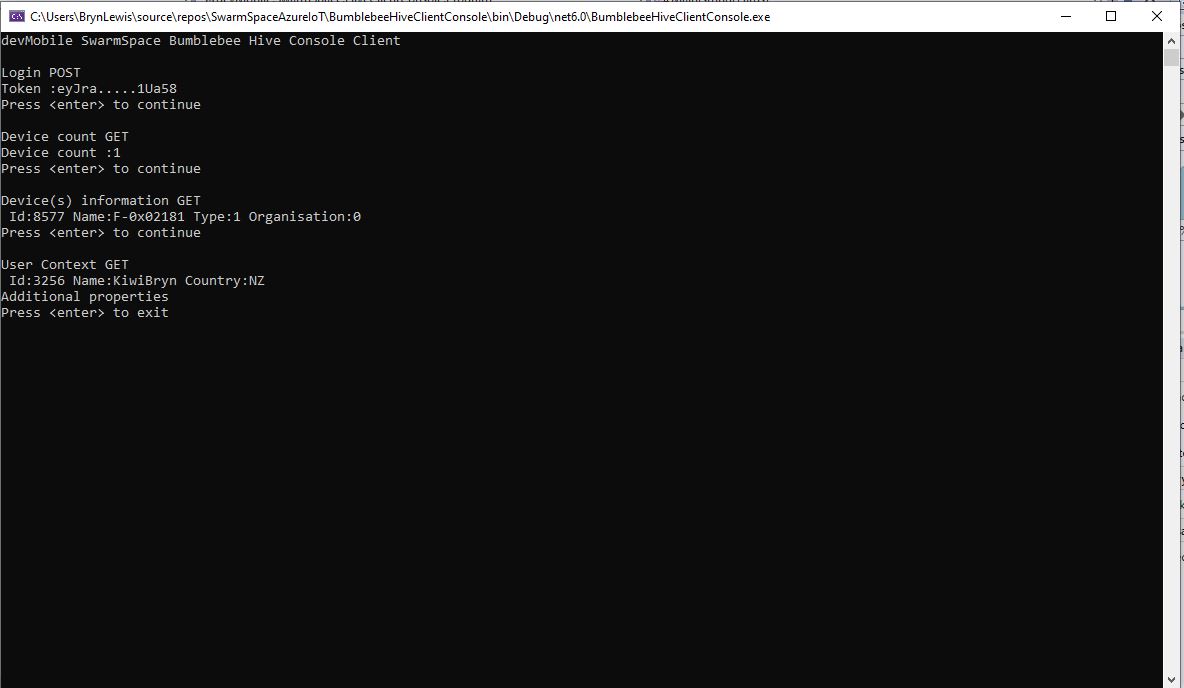
My “nasty” console application calls the Login method, then requests the number of devices (I only have one), gets a list of the properties of all the devices(very short list) then gets the User Context and displays their ID, Name and Country.
After some research I found references to the underlying problem in TTN and OpenAPI forums. The Dev_addr and Dev_eui fields are Base16(Hexidecimal) encoded binary but are being processed as if they were Base64(mime) encoded.
The TTI connector only displays the Device EUI so I changed the Dev_eui property to a string
Now the DeviceEUI values are displayed correctly and searching for EndDevices in Azure Application Insights is easier
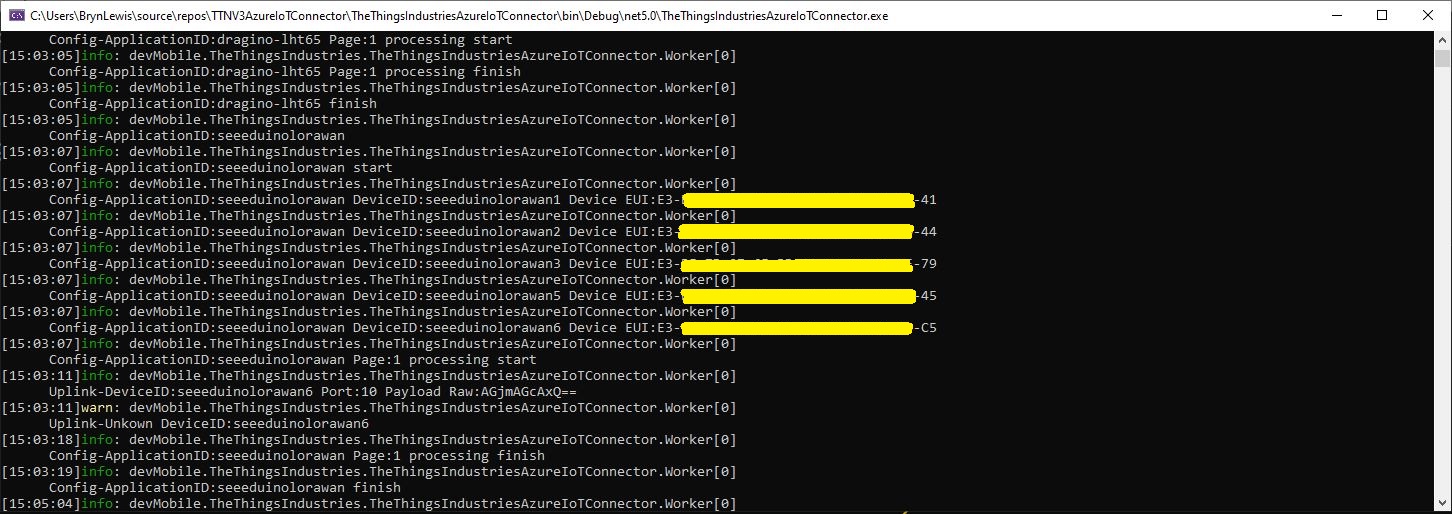
TTI V3 Connector application running as a console application showing correct DeviceEUIs
Modifying the nSwag generated classes is a really nasty way of fixing the problem but I think this approach is okay as it’s only one field and any other solution I could find was significantly more complex.
The next step was to enumerate all the EndDevices of a The Things Network(TTN) Application and display their attributes. I have to establish an Azure DeviceClient connection to an Azure IoT Hub for each TTN EndDevice to get downlink messages. To do this I will have to enumerate the TTN Applications in the instance then enumerate the LoRaWAN EndDevices.
using (HttpClient httpClient = new HttpClient())
{
	EndDeviceRegistryClient endDeviceRegistryClient = new EndDeviceRegistryClient(baseUrl, httpClient)
	{
		ApiKey = apiKey
	};

	try
	{
#if FIELDS_MINIMUM
		string[] fieldMaskPathsDevice = { "attributes" }; // think this is the bare minimum required for integration
#else
		string[] fieldMaskPathsDevice = { "name", "description", "attributes" };
#endif
		V3EndDevices endDevices = await endDeviceRegistryClient.ListAsync(applicationID, field_mask_paths:fieldMaskPathsDevice);
		if ((endDevices != null) && (endDevices.End_devices != null)) // If there are no devices returns null rather than empty list
		{
			foreach (V3EndDevice endDevice in endDevices.End_devices)
			{
#if FIELDS_MINIMUM
				Console.WriteLine($"EndDevice ID:{endDevice.Ids.Device_id}");
#else
				Console.WriteLine($"Device ID:{endDevice.Ids.Device_id} Name:{endDevice.Name} Description:{endDevice.Description}");
				Console.WriteLine($"  CreatedAt: {endDevice.Created_at:dd-MM-yy HH:mm:ss} UpdatedAt: {endDevice.Updated_at:dd-MM-yy HH:mm:ss}");
#endif
				if (endDevice.Attributes != null)
				{
					Console.WriteLine("  EndDevice attributes");

					foreach (KeyValuePair<string, string> attribute in endDevice.Attributes)
					{
						Console.WriteLine($"    Key: {attribute.Key} Value: {attribute.Value}");
					}
				}
				Console.WriteLine();
			}
		}
	}
	catch (Exception ex)
	{
		Console.WriteLine(ex.Message);
	}

	Console.WriteLine("Press <enter> to exit");
	Console.ReadLine();
}
Like the applicationRegistryClient.ListAsync call the endDeviceRegistryClient.ListAsync also returns null rather than an empty list.
The next step was to enumerate The Things Network(TTN) Applications so I could connect only to the required Azure IoT hub(s). There would also be a single configuration setting for the client (establish a connection for every TTN application, or don’t establish a connection for any) and this could be overridden with a TTN application attribute
long pageSize = long.Parse(args[3]);
Console.WriteLine($"Page size: {pageSize}");

Console.WriteLine();

using (HttpClient httpClient = new HttpClient())
{
	ApplicationRegistryClient applicationRegistryClient = new ApplicationRegistryClient(baseUrl, httpClient)
	{
		ApiKey = apiKey
	};

	try
	{
		int page = 1;

		string[] fieldMaskPathsApplication = { "attributes" }; // think this is the bare minimum required for integration

		V3Applications applications = await applicationRegistryClient.ListAsync(collaborator, field_mask_paths: fieldMaskPathsApplication, limit: pageSize, page: page);
		while ((applications != null) && (applications.Applications != null))
		{
			Console.WriteLine($"Applications:{applications.Applications.Count} Page:{page} Page size:{pageSize}");
			foreach (V3Application application in applications.Applications)
			{
				bool applicationIntegration = ApplicationAzureintegrationDefault;

				Console.WriteLine($"Application ID:{application.Ids.Application_id}");
				if (application.Attributes != null)
				{
					string ApplicationAzureIntegrationValue = string.Empty;
					if (application.Attributes.TryGetValue(ApplicationAzureIntegrationField, out ApplicationAzureIntegrationValue))
					{
						bool.TryParse(ApplicationAzureIntegrationValue, out applicationIntegration);
					}

					if (applicationIntegration)
					{
						Console.WriteLine("  Application attributes");

						foreach (KeyValuePair<string, string> attribute in application.Attributes)
						{
							Console.WriteLine($"   Key: {attribute.Key} Value: {attribute.Value}");
						}
					}
				}
				Console.WriteLine();
			}
			page += 1;
			applications = await applicationRegistryClient.ListAsync(collaborator, field_mask_paths: fieldMaskPathsApplication, limit: pageSize, page: page);
		};
	}
	catch (Exception ex)
	{
		Console.WriteLine(ex.Message);
	}

	Console.WriteLine("Press <enter> to exit");
	Console.ReadLine();
}
I Used the field_mask_paths parameter (don’t need created_at, updated_at, name etc.) to minimise the data returned to my client.
I was hoping that there would be a away to further “shape” the returned data, but in the NSwag generated code the construction of the URL with field_mask_paths, order, limit, and page parameters meant this appears not to be possible.
For each LoraWAN client I have to have an open connection to the Azure IoT hub to get Cloud to Device (C2D) messages so I’m looking at using connection pooling to reduce the overall number of connections.
I think the Azure ClientDevice library supports up to 995 devices per connection and has quiet a lot of additional functionality.
/// <summary>
/// contains Amqp Connection Pool settings for DeviceClient
/// </summary>
public sealed class AmqpConnectionPoolSettings
{
   private static readonly TimeSpan s_defaultConnectionIdleTimeout = TimeSpan.FromMinutes(2);
    private uint _maxPoolSize;
    internal const uint MaxDevicesPerConnection = 995; // IotHub allows upto 999 tokens per connection. Setting the threshold just below that.

    /// <summary>
    /// The default size of the pool
    /// </summary>
    /// <remarks>
    /// Allows up to 100,000 devices
    /// </remarks>
    private const uint DefaultPoolSize = 100;

    /// <summary>
    /// The maximum value that can be used for the MaxPoolSize property
    /// </summary>
     public const uint AbsoluteMaxPoolSize = ushort.MaxValue;

    /// <summary>
    /// Creates an instance of AmqpConnecitonPoolSettings with default properties
    /// </summary>
    public AmqpConnectionPoolSettings()
    {
       _maxPoolSize = DefaultPoolSize;
       Pooling = false;
    }
Whereas I think AMQPNetLite may support more, but will require me to implement more of the Azure IoT client interface
/// <summary>
/// The default maximum frame size used by the library.
/// </summary>
public const uint DefaultMaxFrameSize = 64 * 1024;
internal const ushort DefaultMaxConcurrentChannels = 8 * 1024;
internal const uint DefaultMaxLinkHandles = 256 * 1024;
internal const uint DefaultHeartBeatInterval = 90000;
internal const uint MinimumHeartBeatIntervalMs = 5 * 1000;
I have got todo some more research to see which library is easier/requires more code/complex/scales better.
After reviewing the initial implementation I found I had to have one connection per The Things Network(TTN) device. Todo this I first have to enumerate the LoRaWAN Devices for each Application in my instance. First I had to add the TTN APIKey to the application and device registry requests.
namespace devMobile.TheThingsNetwork.API
{
	public partial class EndDeviceRegistryClient
	{
		public string ApiKey { set; get; }

		partial void PrepareRequest(System.Net.Http.HttpClient client, System.Net.Http.HttpRequestMessage request, string url)
		{
			if (!client.DefaultRequestHeaders.Contains("Authorization"))
			{
				client.DefaultRequestHeaders.Add("Authorization", $"Bearer {ApiKey}");
			}
		}
	}

	public partial class ApplicationRegistryClient
	{
		public string ApiKey { set; get; }

		partial void PrepareRequest(System.Net.Http.HttpClient client, System.Net.Http.HttpRequestMessage request, string url)
		{
			if (!client.DefaultRequestHeaders.Contains("Authorization"))
			{
				client.DefaultRequestHeaders.Add("Authorization", $"Bearer {ApiKey}");
			}
		}
	}
}
The first step was to enumerate Applications and their attributes
#if FIELDS_MINIMUM
	string[] fieldMaskPathsApplication = { "attributes" }; // think this is the bare minimum required for integration
#else
	string[] fieldMaskPathsApplication = { "name", "description", "attributes" };
#endif

	V3Applications applications = await applicationRegistryClient.ListAsync(collaborator, field_mask_paths: fieldMaskPathsApplication);
	if ((applications != null) && (applications.Applications != null)) // If there are no applications returns null rather than empty list
	{
		foreach (V3Application application in applications.Applications)
		{
#if FIELDS_MINIMUM
			Console.WriteLine($"Application ID:{application.Ids.Application_id}");
#else
			Console.WriteLine($"Application ID:{application.Ids.Application_id} Name:{application.Name} Description:{application.Description}");
			Console.WriteLine($"  CreatedAt: {application.Created_at:dd-MM-yy HH:mm:ss} UpdatedAt: {application.Updated_at:dd-MM-yy HH:mm:ss}");
#endif
			if (application.Attributes != null)
			{
				Console.WriteLine("  Application attributes");

				foreach (KeyValuePair<string, string> attribute in application.Attributes)
				{
					Console.WriteLine($"    Key: {attribute.Key} Value: {attribute.Value}");
				}
			}
			Console.WriteLine();
		}
	}
}
The applicationRegistryClient.ListAsync call returns null rather than an empty list which tripped me up. I only found this when I deleted all the applications in my instance and started from scratch.



 devMobile's blog