.NET nanoFramework RAK2305 – RAK4200 Basic connectivity

After some experimentation could get a RAK2305 WisBlock Wifi Interface Module running the .NET nanoFramework plugged into the IO Slot of RAK4200 Evaluation Board to send AT Commands to the RAK4200 Module.

RAK4200 EVB with FTDI Adaptor

After reviewing the RAK4200 Evaluation Board and RAK2305 WisBlock Wifi Interface Module schematics I realised that the Universal Asynchronous Receiver-Transmistted(UART) transmit and receive pins had to be reversed the with the nanoFramwork ESP32 specific Configuration.SetPinFunction.

namespace devMobile.IoT.LoRaWAN.nanoFramework.RAK4200
{
	using System;
	using System.Diagnostics;
	using System.IO.Ports;
	using System.Threading;
   using global::nanoFramework.Hardware.Esp32; //need NuGet nanoFramework.Hardware.Esp32

   public class Program
	{
		private static SerialPort _SerialPort;
        private const string SerialPortId = "COM2";

        public static void Main()
		{
			Thread.Sleep(5000);

#if SERIAL_THREADED_READ
			Thread readThread = new Thread(SerialPortProcessor);
#endif

			Debug.WriteLine("devMobile.IoT.LoRaWAN.nanoFramework.RAK4200 BreakoutSerial starting");

			try
			{
            // set GPIO functions for COM2 (this is UART1 on ESP32)
            Configuration.SetPinFunction(Gpio.IO21, DeviceFunction.COM2_TX);
			Configuration.SetPinFunction(Gpio.IO19, DeviceFunction.COM2_RX);

            Debug.Write("Ports:");
				foreach (string port in SerialPort.GetPortNames())
				{
					Debug.Write($" {port}");
				}
				Debug.WriteLine("");

				using (_SerialPort = new SerialPort(SerialPortId))
				{
					// set parameters
					//_SerialPort.BaudRate = 9600;
					_SerialPort.BaudRate = 115200;
					_SerialPort.Parity = Parity.None;
					_SerialPort.DataBits = 8;
					_SerialPort.StopBits = StopBits.One;
					_SerialPort.Handshake = Handshake.None;
					_SerialPort.NewLine = "\r\n";

					//_SerialPort.ReadBufferSize = 128; 
					//_SerialPort.ReadBufferSize = 256; 
					_SerialPort.ReadBufferSize = 512; 
					//_SerialPort.ReadBufferSize = 1024;
					_SerialPort.ReadTimeout = 1000;

					//_SerialPort.WatchChar = '\n'; // May 2022 WatchChar event didn't fire github issue https://github.com/nanoframework/Home/issues/1035

					_SerialPort.DataReceived += SerialDevice_DataReceived;

					_SerialPort.Open();

					_SerialPort.WatchChar = '\n';

					for (int i = 0; i < 5; i++)
					{
						string atCommand;
						atCommand = "at+version";
						//atCommand = "at+set_config=device:uart:1:9600";
						//atCommand = "at+get_config=lora:status";
						//atCommand = "at+get_config=device:status";
						//atCommand = "at+get_config=lora:channel";
						//atCommand = "at+help";
						//atCommand = "at+set_config=device:restart";
						//atCommand = "at+set_config=lora:default_parameters";
						//atCommand = "at+set_config=lora:work_mode:0";
						Debug.WriteLine("");
						Debug.WriteLine($"{i} TX:{atCommand} bytes:{atCommand.Length}--------------------------------");
						_SerialPort.WriteLine(atCommand);

						Thread.Sleep(5000);
					}
				}
				Debug.WriteLine("Done");
			}
			catch (Exception ex)
			{
				Debug.WriteLine(ex.Message);
			}
		}

		private static void SerialDevice_DataReceived(object sender, SerialDataReceivedEventArgs e)
		{
			SerialPort serialPort = (SerialPort)sender;

			switch (e.EventType)
			{
				case SerialData.Chars:
					break;

				case SerialData.WatchChar:
					string response = serialPort.ReadExisting();
					Debug.Write(response);
					break;
				default:
					Debug.Assert(false, $"e.EventType {e.EventType} unknown");
					break;
			}
		}
	}
}

When I requested the version information with “at+version” the RAK4200 Module responded with version information.

RAK4200 EVB Debug Output

RAK811/RAK4200 AS923 Join Channels

When running an application which used my TinyCLR V2 RAK811 Module library on a FezDuino with a modified RAK811 LPWAN Evaluation Board(EVB) most join attempts on my Things Industries(TTI) instance would fail. This was a bit odd as connecting to The Things Network(TTN) was pretty reliable.

The thread '<No Name>' (0x2) has exited with code 0 (0x0).
devMobile.IoT.Rak811LoRaWanDeviceClient starting
12:00:12 Region AS923
12:00:12 ADR On
12:00:12 Unconfirmed
12:00:12 OTAA
12:00:13 Join start Timeout:30Sec
Join failed 26
The thread '<No Name>' (0x1) has exited with code 0 (0x0).
Done.

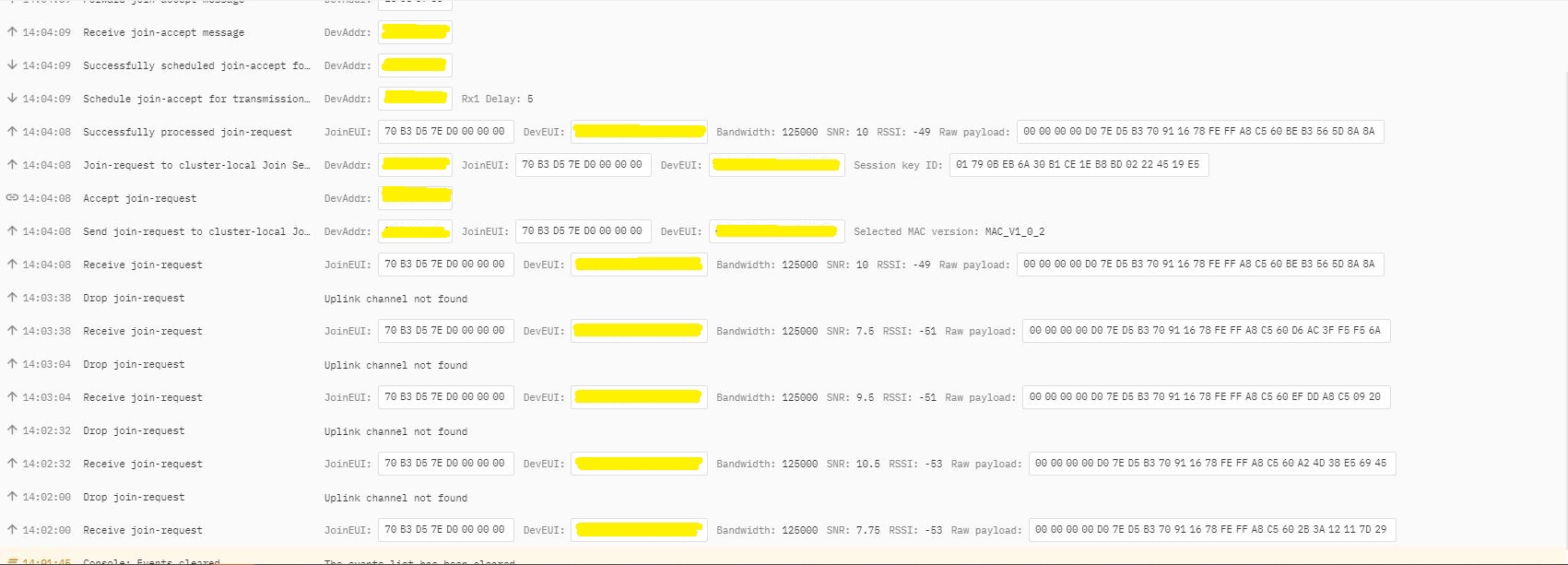
In TTI end device live data tab I could see the the joins attempts were failing with “Uplink channel Not found”

The Things Industries device live data tab “uplink channel not found” failures
The Things Industries device live data tab “uplink channel not found” detail

Initially I assumed this was an issue with my configuration of the RAKwireless RAK7258 gateway in my office that I was using for testing. After some discussions with a helpful TTI support person they suggested that I try disabling all bar the first two channels the RAK811 module was configured to use then see if worked.

I modified the intialise method of my TinyCLR V2 RAK811 Module library to disable all bar the first two channels

result = SendCommand("OK", "at+set_config=lora:ch_mask:2:0", CommandTimeoutDefault);
if (result != Result.Success)
{
#if DIAGNOSTICS
   Debug.WriteLine($" {DateTime.UtcNow:hh:mm:ss} at+set_config=lora:ch_mask:2:0 {result}");
#endif
   return result;
}

result = SendCommand("OK", "at+set_config=lora:ch_mask:3:0", CommandTimeoutDefault);
if (result != Result.Success)
{
#if DIAGNOSTICS
   Debug.WriteLine($" {DateTime.UtcNow:hh:mm:ss} at+set_config=lora:ch_mask:3:0 {result}");
#endif
   return result;
}

result = SendCommand("OK", "at+set_config=lora:ch_mask:4:0", CommandTimeoutDefault);
if (result != Result.Success)
{
#if DIAGNOSTICS
   Debug.WriteLine($" {DateTime.UtcNow:hh:mm:ss} at+set_config=lora:ch_mask:4:0 {result}");
#endif
   return result;
}

result = SendCommand("OK", "at+set_config=lora:ch_mask:5:0", CommandTimeoutDefault);
if (result != Result.Success)
{
#if DIAGNOSTICS
    Debug.WriteLine($" {DateTime.UtcNow:hh:mm:ss} at+set_config=lora:ch_mask:5:0 {result}");
#endif
   return result;
}

result = SendCommand("OK", "at+set_config=lora:ch_mask:6:0", CommandTimeoutDefault);
if (result != Result.Success)
{
#if DIAGNOSTICS
   Debug.WriteLine($" {DateTime.UtcNow:hh:mm:ss} at+set_config=lora:ch_mask:6:0 {result}");
#endif
   return result;
}

result = SendCommand("OK", "at+set_config=lora:ch_mask:7:0", CommandTimeoutDefault);
if (result != Result.Success)
{
#if DIAGNOSTICS
   Debug.WriteLine($" {DateTime.UtcNow:hh:mm:ss} at+set_config=lora:ch_mask:7:0 {result}");
#endif
   return result;
}

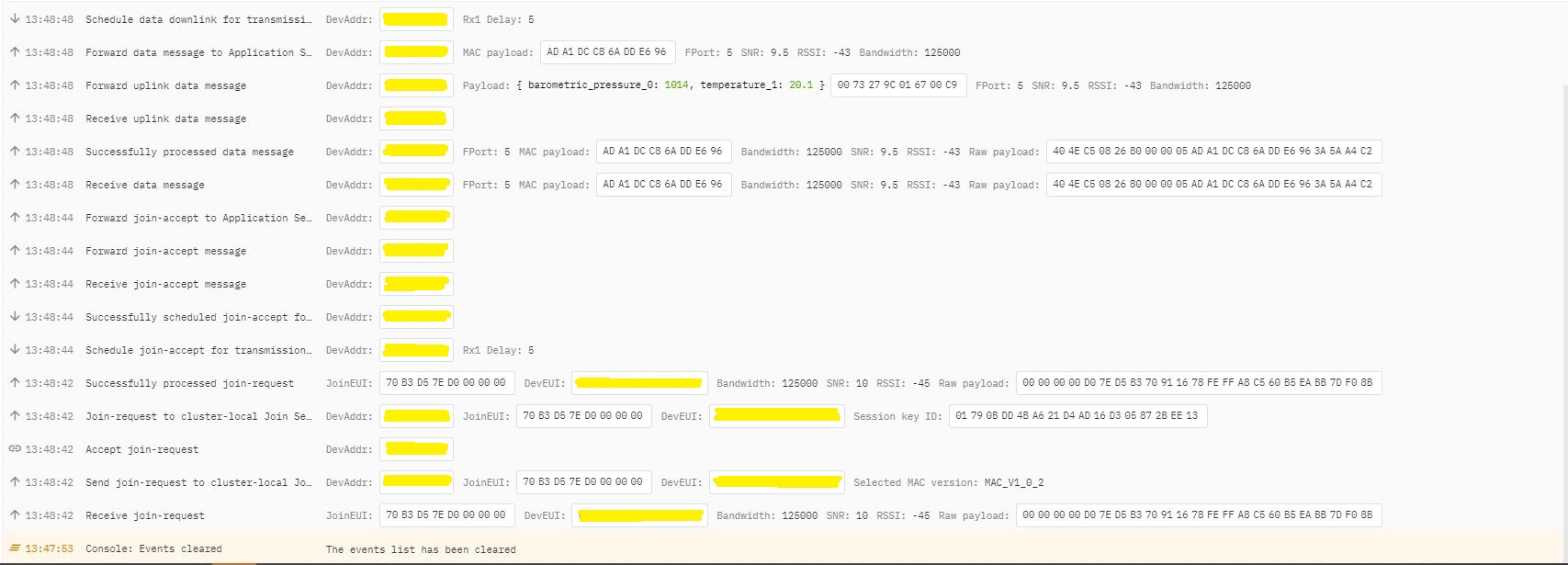
After modifying the code my Fezduino joined reliably.

The thread ” (0x2) has exited with code 0 (0x0).
devMobile.IoT.Rak811LoRaWanDeviceClient starting
12:00:12 Region AS923
12:00:12 ADR On
12:00:12 Unconfirmed
12:00:12 OTAA
12:00:13 Join start Timeout:30Sec
12:00:18 Join finish
Temperature : 19.9 °C
Pressure : 1014.0 HPa
Altitude : 143 meters
12:00:19 port:5 payload BCD:0073279C016700C8
12:00:44 Sleep
12:01:44 Wakeup
Temperature : 20.1 °C
Pressure : 1014.0 HPa
Altitude : 143 meters
12:01:44 port:5 payload BCD:0073279C016700C9
12:02:09 Sleep

The Things Industries device live data tab successful join.

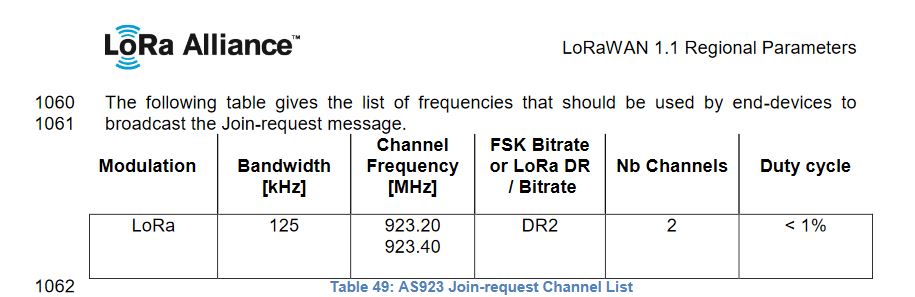
After some further discussion with TTI support it looks like the RAK811 module doesn’t send join requests on the frequencies specified for the AS923 region in the LoRaWAN™1.1Regional Parameters.

LoRaWAN Regional Parameters AS923 Join-request frequencies

After confirming the join-request channel issue I went back to the RAKwireless forums with some new terms to search for and found that others were having a similar issue but with RAK4200 modules. My “best guess” is that the TTI implementation is more strict about join-request frequencies than the TTN