The Things Network HTTP Integration Part8

Logging and the start of simplification

While testing the processing of queued The Things Network(TTN) uplink messages I had noticed that some of the Azure Application Insights events from my Log4Net setup were missing. I could see the MessagesProcessed counter was correct but there weren’t enough events.

public static class UplinkMessageProcessor
{
   const string RunTag = "Log4Net001";
   static readonly ILog log = log4net.LogManager.GetLogger(System.Reflection.MethodBase.GetCurrentMethod().DeclaringType);
   static readonly ConcurrentDictionary<string, PayloadV5> DevicesSeen = new ConcurrentDictionary<string, PayloadV5>();
   static int ConcurrentThreadCount = 0;
   static int MessagesProcessed = 0;

   [FunctionName("UplinkMessageProcessor")]
   public static void Run([QueueTrigger("%UplinkQueueName%", Connection = "AzureStorageConnectionString")] string myQueueItem, Microsoft.Azure.WebJobs.ExecutionContext executionContext)
   {
      try
      {
         var logRepository = LogManager.GetRepository(Assembly.GetEntryAssembly());
         XmlConfigurator.Configure(logRepository, new FileInfo(Path.Combine(executionContext.FunctionAppDirectory, "log4net.config")));

         PayloadV5 payloadMessage = (PayloadV5)JsonSerializer.Deserialize(myQueueItem, typeof(PayloadV5));
         PayloadV5 payload = (PayloadV5)DevicesSeen.GetOrAdd(payloadMessage.dev_id, payloadMessage);

         Interlocked.Increment(ref ConcurrentThreadCount);
         Interlocked.Increment(ref MessagesProcessed);

         log.Info($"{MessagesProcessed} {RunTag} DevEui:{payload.dev_id} Threads:{ConcurrentThreadCount} First:{payload.metadata.time} Current:{payloadMessage.metadata.time} PayloadRaw:{payload.payload_raw}");

         Thread.Sleep(2000);

         Interlocked.Decrement(ref ConcurrentThreadCount);
      }
      catch (Exception ex)
      {
         log.Error("Processing of Uplink message failed", ex);

         throw;
      }
   }
}
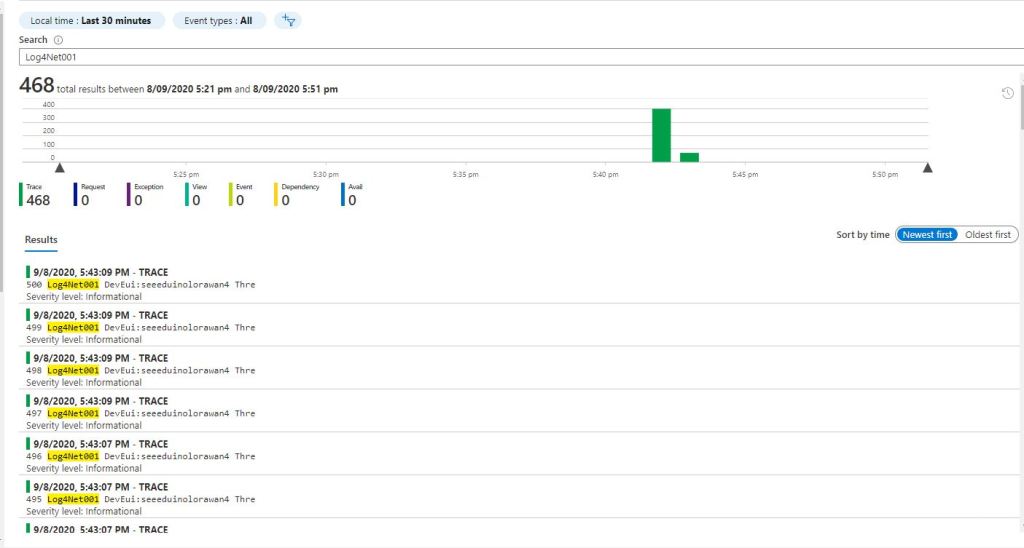
Log4Net in Application Insights Event viewer

I assume the missing events were because I wasn’t flushing at the end of the Run method. There was also a lot of “plumbing” code (including loading configuration files) to setup Log4Net.

I then built another Azure function using the Application Insights API

public static class UplinkMessageProcessor
{
   const string RunTag = "Insights001";
   static readonly ConcurrentDictionary<string, PayloadV5> DevicesSeen = new ConcurrentDictionary<string, PayloadV5>();
   static int ConcurrentThreadCount = 0;
   static int MessagesProcessed = 0;

   [FunctionName("UplinkMessageProcessor")]
   public static void Run([QueueTrigger("%UplinkQueueName%", Connection = "AzureStorageConnectionString")] string myQueueItem, Microsoft.Azure.WebJobs.ExecutionContext executionContext)
   {
      using (TelemetryConfiguration telemetryConfiguration = TelemetryConfiguration.CreateDefault())
      {
         TelemetryClient telemetryClient = new TelemetryClient(telemetryConfiguration);

         try
         {
            PayloadV5 payloadMessage = (PayloadV5)JsonSerializer.Deserialize(myQueueItem, typeof(PayloadV5));
            PayloadV5 payload = (PayloadV5)DevicesSeen.GetOrAdd(payloadMessage.dev_id, payloadMessage);

            Interlocked.Increment(ref ConcurrentThreadCount);
            Interlocked.Increment(ref MessagesProcessed);

            telemetryClient.TrackEvent($"{MessagesProcessed} {RunTag} DevEui:{payload.dev_id} Threads:{ConcurrentThreadCount} First:{payload.metadata.time} Current:{payloadMessage.metadata.time} PayloadRaw:{payload.payload_raw}");

            Thread.Sleep(2000);

            Interlocked.Decrement(ref ConcurrentThreadCount);
         }
         catch (Exception ex)
         {
            telemetryClient.TrackException(ex);
            throw;
         }
      }
   }
}
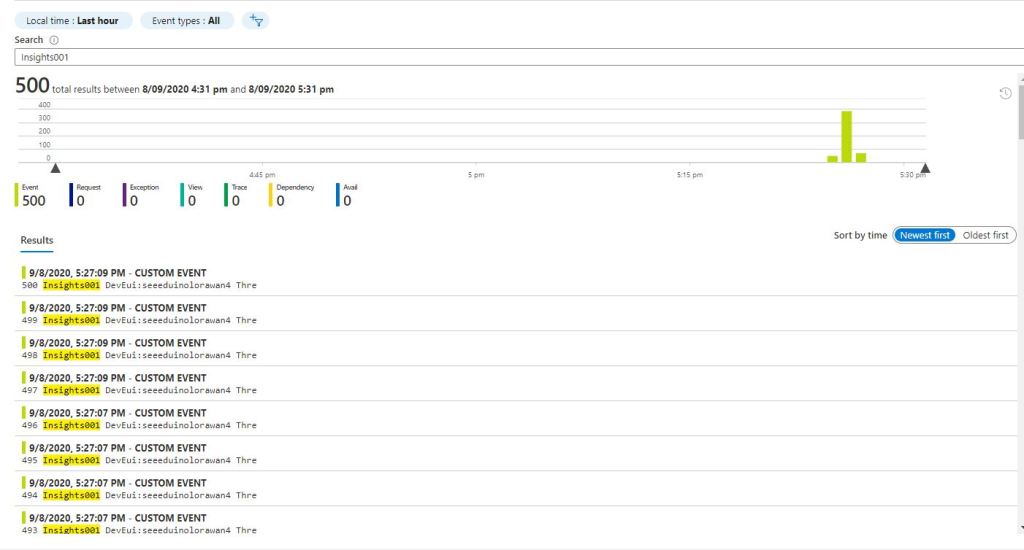
Application Insights API in Application Insights Event viewer

I assume there were no missing events because the using statement was “flushing” every time the Run method completed. There was still a bit of “plumbing” code and which it would be good to get rid of.

When I generated Azure Function stubs there was an ILogger parameter which the Dependency Injection (DI) infrastructure setup.

public static class UplinkMessageProcessor
{
  const string RunTag = "Logger002";
   static readonly ConcurrentDictionary<string, PayloadV5> DevicesSeen = new ConcurrentDictionary<string, PayloadV5>();
   static int ConcurrentThreadCount = 0;
   static int MessagesProcessed = 0;

   [FunctionName("UplinkMessageProcessor")]
   public static void Run([QueueTrigger("%UplinkQueueName%", Connection = "AzureStorageConnectionString")] string myQueueItem, ILogger log)
   {
      try
      {
            PayloadV5 payloadMessage = (PayloadV5)JsonSerializer.Deserialize(myQueueItem, typeof(PayloadV5));
         PayloadV5 payload = (PayloadV5)DevicesSeen.GetOrAdd(payloadMessage.dev_id, payloadMessage);

         Interlocked.Increment(ref ConcurrentThreadCount);
         Interlocked.Increment(ref MessagesProcessed);

         log.LogInformation($"{MessagesProcessed} {RunTag} DevEui:{payload.dev_id} Threads:{ConcurrentThreadCount} First:{payload.metadata.time} Current:{payloadMessage.metadata.time} PayloadRaw:{payload.payload_raw}");

         Thread.Sleep(2000);

         Interlocked.Decrement(ref ConcurrentThreadCount);
      }
      catch (Exception ex)
      { 
         log.LogError(ex,"Processing of Uplink message failed");

         throw;
      }
   }
}
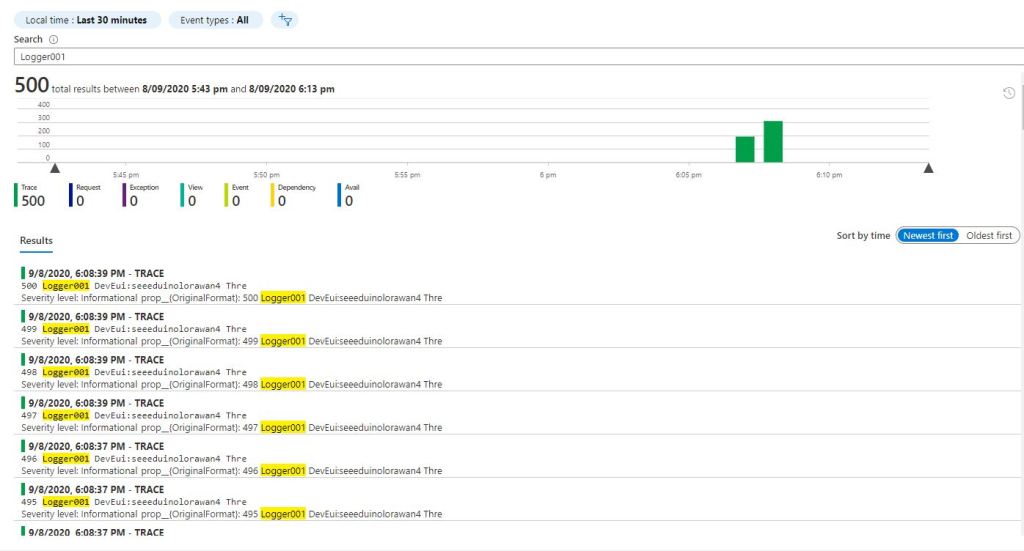
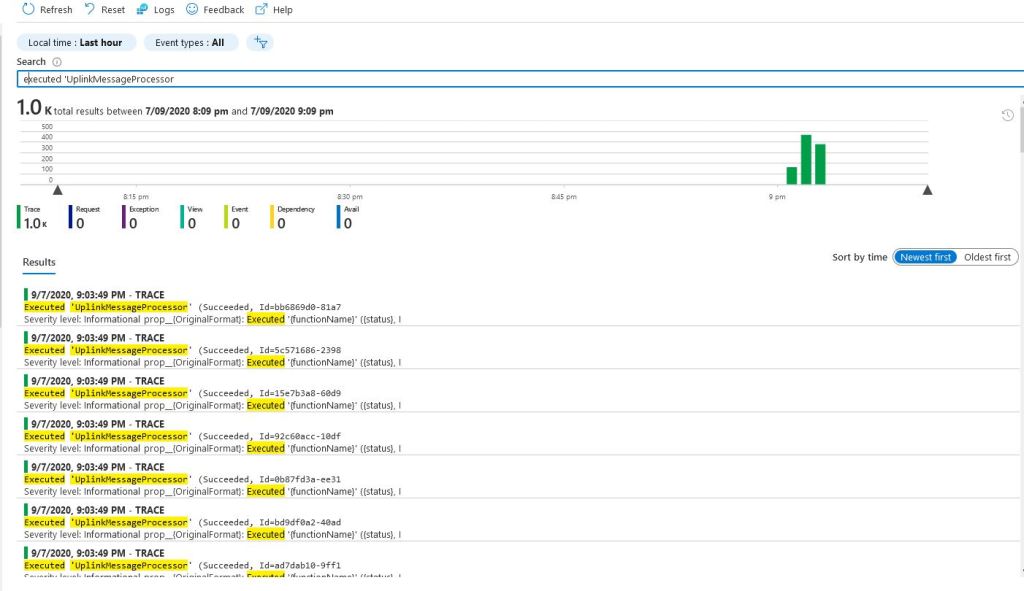
ILogger in Application Insights Event viewer

This implementation had even less code and all the messages were visible in the Azure Application Insights event viewer.
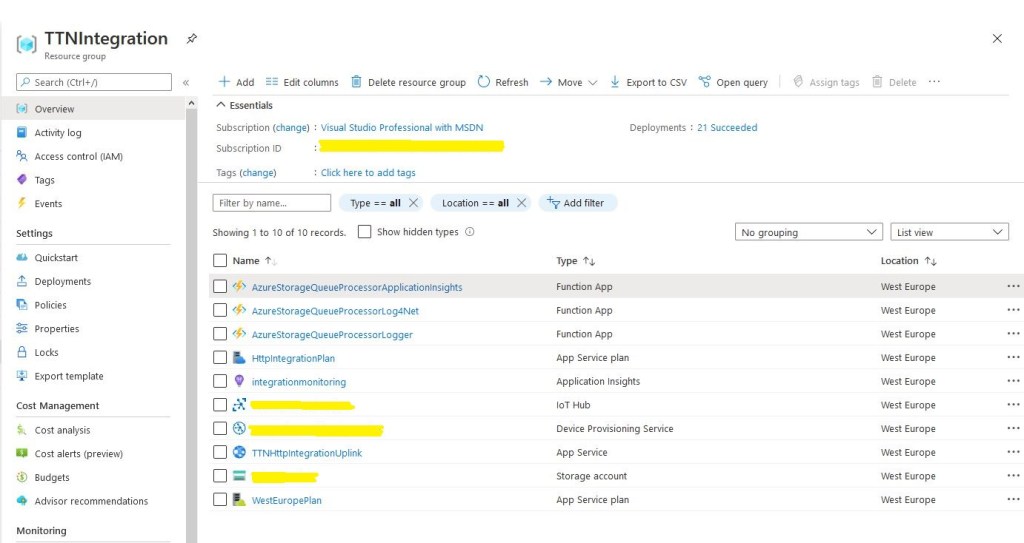
All the Azure functions for logging

While built the Proof of Concept(PoC) implementations I added the configurable “runtag” so I could search for the messages relating to a session in the Azure Application Insights event viewer. The queue name and storage account were “automagically” loaded by the runtime which also reduced the amount of code.

[QueueTrigger("%UplinkQueueName%", Connection = "AzureStorageConnectionString")]

At this point I had minimised the amount and complexity of the code required to process messages in the ttnuplinkmessages queue. Reducing the amount of “startup” required should make my QueueTrigger Azure function faster. But there was still a lot of boilerplate code for serialising the body of the message which added complexity.

At this point I realised I had a lot of code across multiple projects which had helped me breakdown the problem into manageable chunks but didn’t add a lot of value.
The Things Network HTTP Integration Part7

Queuing uplink messages

For my HTTP Integration I need to reliably forward messages to an Azure IoT Hub or Azure IoT Central. This solution needs to be robust and not lose any messages even when portions of the system are unavailable because of failures or sudden spikes in inbound traffic.

I added yet another controller, it receives an uplink messages from The Things Network(TTN) and puts them into an Azure Storage Queue.

[Route("[controller]")]
[ApiController]
public class Queued : ControllerBase
{
   private readonly string storageConnectionString;
   private readonly string queueName;
   private static readonly ILog log = log4net.LogManager.GetLogger(System.Reflection.MethodBase.GetCurrentMethod().DeclaringType);

   public Queued( IConfiguration configuration)
   {
      this.storageConnectionString = configuration.GetSection("AzureStorageConnectionString").Value;
      this.queueName = configuration.GetSection("UplinkQueueName").Value;
   }

   public string Index()
   {
      return "Queued move along nothing to see";
   }

   [HttpPost]
   public async Task<IActionResult> Post([FromBody] PayloadV5 payload)
   {
      string payloadFieldsUnpacked = string.Empty;

      // Check that the post data is good
      if (!this.ModelState.IsValid)
      {
         log.WarnFormat("QueuedController validation failed {0}", this.ModelState.Messages());

         return this.BadRequest(this.ModelState);
      }

      try
      {
         QueueClient queueClient = new QueueClient(storageConnectionString, queueName);

         await queueClient.CreateIfNotExistsAsync();

         await queueClient.SendMessageAsync(Convert.ToBase64String(JsonSerializer.SerializeToUtf8Bytes(payload)));
      }
      catch( Exception ex)
      {
         log.Error("Unable to open/create queue or send message", ex);

         return this.Problem("Unable to open queue (creating if it doesn't exist) or send message", statusCode:500, title:"Uplink payload not sent" );
      }

      return this.Ok();
   }
}

An Azure Function with a Queue Trigger processes the messages and for this test pauses for 2 seconds (simulating a call to the Device Provisioning Service(DPS) ). It keeps track of the number of concurrent processing threads and when the first message for each device was received since the program was started.

public static class UplinkMessageProcessor
{
   static readonly ILog log = log4net.LogManager.GetLogger(System.Reflection.MethodBase.GetCurrentMethod().DeclaringType);
   static ConcurrentDictionary<string, PayloadV5> DevicesSeen = new ConcurrentDictionary<string, PayloadV5>();
   static int ConcurrentThreadCount = 0;

   [FunctionName("UplinkMessageProcessor")]
   public static void Run([QueueTrigger("%UplinkQueueName%", Connection = "AzureStorageConnectionString")] string myQueueItem, Microsoft.Azure.WebJobs.ExecutionContext executionContext)
   {
      Interlocked.Increment(ref ConcurrentThreadCount);
      var logRepository = LogManager.GetRepository(Assembly.GetEntryAssembly());
      XmlConfigurator.Configure(logRepository, new FileInfo(Path.Combine(executionContext.FunctionAppDirectory, "log4net.config")));

      log.Info($"Uplink message function triggered: {myQueueItem}");

      PayloadV5 payloadMessage = (PayloadV5)JsonSerializer.Deserialize(myQueueItem, typeof(PayloadV5));
      PayloadV5 payload = (PayloadV5)DevicesSeen.GetOrAdd(payloadMessage.dev_id, payloadMessage);

      log.Info($"Uplink message DevEui:{payload.dev_id} Threads:{ConcurrentThreadCount} First:{payload.metadata.time} Current:{payloadMessage.metadata.time} PayloadRaw:{payload.payload_raw}");

      Thread.Sleep(2000);

      Interlocked.Decrement(ref ConcurrentThreadCount);
   }
}

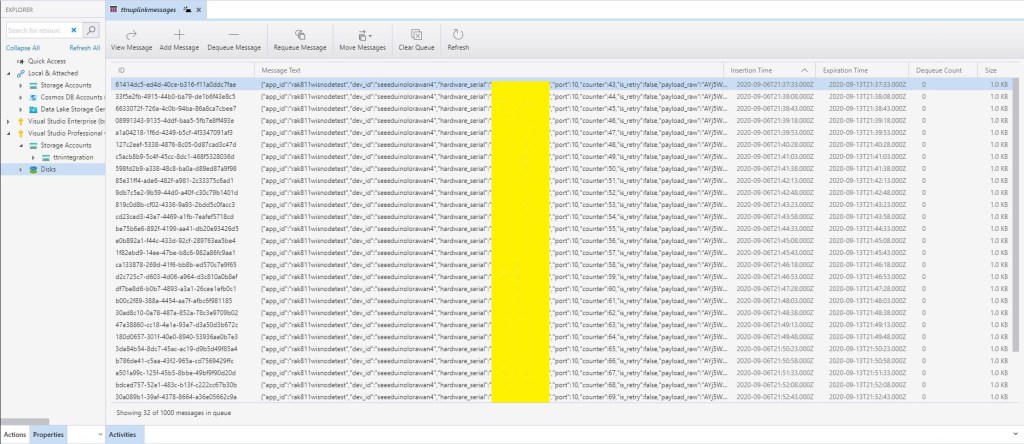
To explore how this processing worked I sent 1000 uplink messages from my Seeeduino LoRaWAN devices which were buffered in a queue.

Azure storage Explorer 1000 queued messages
Application insights 1000 events

I processed 1000’s of messages with the Azure Function but every so often 10-20% of the logging messages wouldn’t turn up in the logs. I’m using Log4Net and I think it is most probably caused by not flushing the messages before the function finishes

The Things Network HTTP Integration Part5

First TTN payload to the cloud

For my HTTP Integration I need to securely forward messages to an Azure IoT Hub or Azure IoT Central. This “nasty” console application loads a sample The Things Network(TTN) message from a file, connects the specified Azure IOT Hub, reformats the payload and sends it.

I couldn’t use System.Text.Json to construct the message payload as JsonDocument is not modifable(Sept2020). I had to rewrite my code to use Json.Net from Newtonsoft instead.

static async Task Main(string[] args)
{
   string filename ;
   string azureIoTHubconnectionString;
   DeviceClient azureIoTHubClient;
   Payload payload;
   JObject telemetryDataPoint = new JObject();

...
   filename = args[0];
   azureIoTHubconnectionString = args[1];

   try
   {
      payload = JsonConvert.DeserializeObject<Payload>(File.ReadAllText(filename));

      JObject payloadFields = (JObject)payload.payload_fields;

      using (azureIoTHubClient = DeviceClient.CreateFromConnectionString(azureIoTHubconnectionString, TransportType.Amqp))
      {
         await azureIoTHubClient.OpenAsync();

         foreach (JProperty child in payloadFields.Children())
         {
            EnumerateChildren(telemetryDataPoint, child);
         }
               
         using (Message message = new Message(Encoding.ASCII.GetBytes(JsonConvert.SerializeObject(telemetryDataPoint))))
         {
            Console.WriteLine(" {0:HH:mm:ss} AzureIoTHubDeviceClient SendEventAsync start", DateTime.UtcNow);
            await azureIoTHubClient.SendEventAsync(message);
            Console.WriteLine(" {0:HH:mm:ss} AzureIoTHubDeviceClient SendEventAsync finish", DateTime.UtcNow);
         }

         await azureIoTHubClient.CloseAsync();
      }
   }
   catch (Exception ex)
   {            
      Console.WriteLine(ex.Message);
   }

   Console.WriteLine("Press <enter> to exit");
   Console.ReadLine();
   return;
}

static void EnumerateChildren(JObject jobject, JToken token)
{
   if (token is JProperty property)
   {
      if (token.First is JValue)
      {
         jobject.Add(property.Name, property.Value);
      }
      else
      {
         JObject parentObject = new JObject();
         foreach (JToken token2 in token.Children())
         {
            EnumerateChildren(parentObject, token2);
            jobject.Add(property.Name, parentObject);
          }
     }
   }
   else
   {
      foreach (JToken token2 in token.Children())
      {
         EnumerateChildren(jobject, token2);
      }
   }
}

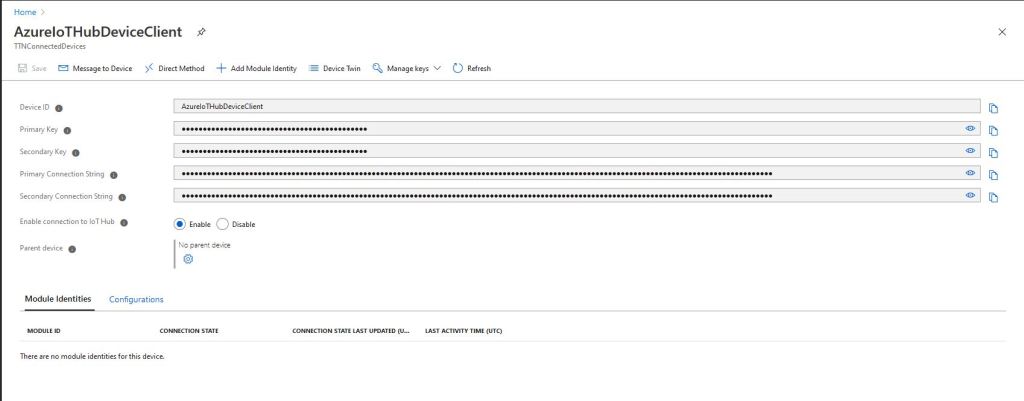
To connect to an Azure IoT Hub I copied the connection string from the portal.

Azure IoT Hub connection string components

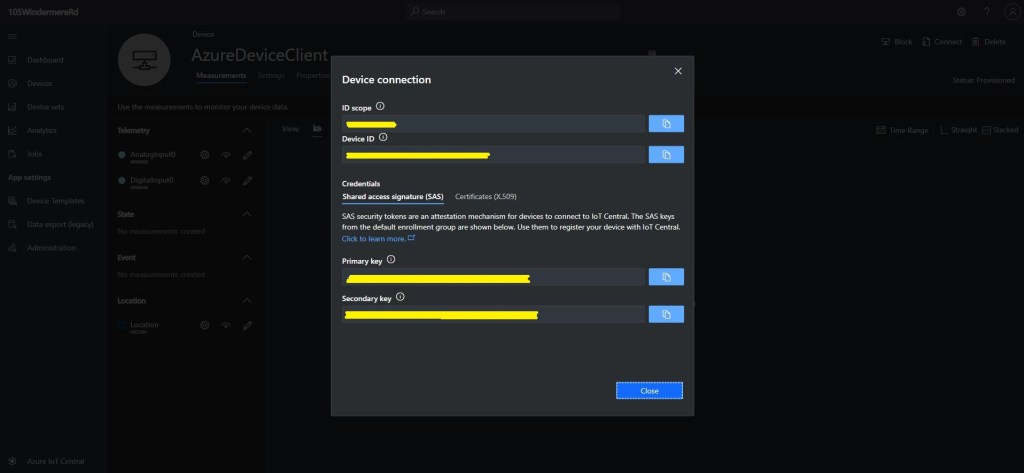
Retrieving a connection string for a device connected to Azure IoT Central (without using the Device Provisioning Service(DPS)) is a bit more involved. There is a deprecated command line application dps-keygen which calls the DPS with a device ID , device SAS key and scope ID and returns a connection string.

Azure IoT Central Device Connection Information
Azure DPS-Keygen command-line

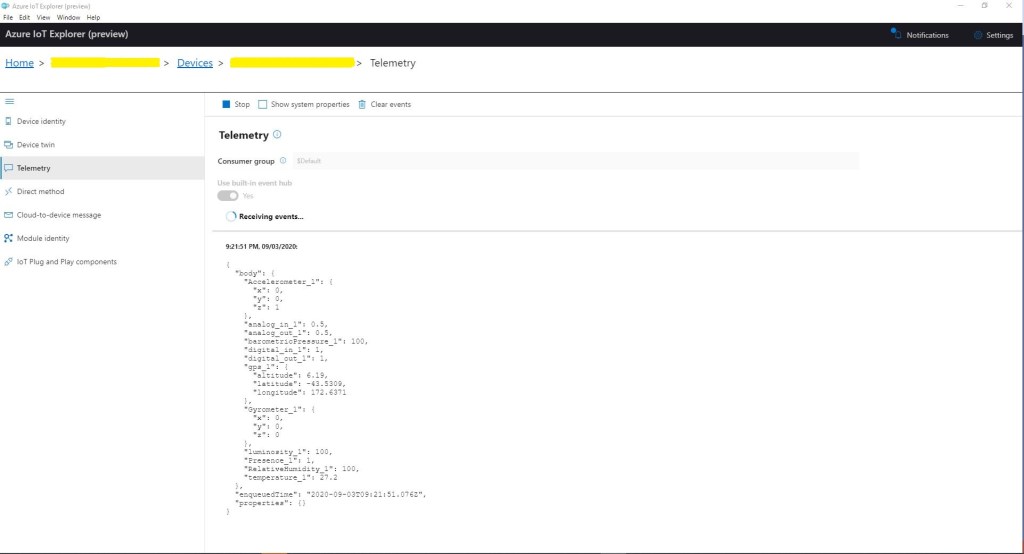
Using Azure IoT Explorer I could see reformatted JSON messages from my client application.

Azure IoT Explorer displaying message payload

These two approaches are fine for testing but wouldn’t scale well and would be painful to use it there were 1000s, 100s or even 10s of devices.

Some fun with a Netduino Plus and the icndb

A chat with some co-workers about displaying the status of the team’s Jenkins build process led to bit of research into calling RESTful services and JSON support on NetMF devices. Previously this had required a bit of hand crafted code but now it looks like the library support has matured a bit. I don’t run Jenkins at home so I decided to build a NetduinoPlus client for the internet Chuck Norris database which has a RESTful API.

This API returns Chuck Norris “facts”…

“Chuck Norris doesn’t read books. He stares them down until he gets the information he wants.”
“There is no theory of evolution, just a list of creatures Chuck Norris allows to live.”
“Some people wear Superman pajamas. Superman wears Chuck Norris pajamas.”
“Chuck Norris can slam a revolving door.”

The icndb API returns JSON

{ "type": "success", "value": { "id": 109, "joke": "It takes Chuck Norris 20 minutes to watch 60 Minutes.", "categories": [] } }

I used the NetMF system.HTTP libraries to initiate the request and Json.NetMF to unpack the response. This snippet illustrates how I processed the request/response

using (HttpWebRequest request = (HttpWebRequest)WebRequest.Create(@"http://api.icndb.com/jokes/random"))
{
   //request.Proxy = proxy;
   request.Method = "GET";
   request.KeepAlive = false;
   request.Timeout = 5000;
   request.ReadWriteTimeout = 5000;

   using (var response = (HttpWebResponse)request.GetResponse())
   {
      if (response.StatusCode == HttpStatusCode.OK)
      {
         byte[] buffer = new byte[response.ContentLength];

         using (Stream stream = response.GetResponseStream())
         {
            stream.Read(buffer, 0, (int)response.ContentLength);

            string json = new string(Encoding.UTF8.GetChars(buffer));

            Hashtable jsonPayload = JsonSerializer.DeserializeString(json) as Hashtable;

            Hashtable value = jsonPayload["value"] as Hashtable ;
            Debug.Print(value["joke"].ToString());
         }
      }
   }
}

icndb Netduino client

Bill of materials