Random wanderings through Microsoft Azure esp. PaaS plumbing, the IoT bits, AI on Micro controllers, AI on Edge Devices, .NET nanoFramework, .NET Core on *nix and ML.NET+ONNX
This controller method returns a limited number of records(pageSize) from a position(pageNumber) in a database query resultset to reduce the size of the response payload.
The SQL command uses the ROWS FETCH NEXT … ROWS ONLY syntax, The use of this approach is not really highlighted in official developer documentation (though I maybe missing the obvious).
There is some discussion in the ORDER BY clause syntax documentation.
Using OFFSET and FETCH to limit the rows returned.
“We recommend that you use the OFFSET and FETCH clauses instead of the TOP clause to implement a query paging solution and limit the number of rows sent to a client application.
Using OFFSET and FETCH as a paging solution requires running the query one time for each “page” of data returned to the client application. For example, to return the results of a query in 10-row increments, you must execute the query one time to return rows 1 to 10 and then run the query again to return rows 11 to 20 and so on. Each query is independent and not related to each other in any way. This means that, unlike using a cursor in which the query is executed once and state is maintained on the server, the client application is responsible for tracking state.”
[HttpGet]
public async Task<ActionResult<IEnumerable<Model.StockItemListDtoV1>>> Get([FromQuery] Model.StockItemPagingDtoV1 request)
{
	IEnumerable<Model.StockItemListDtoV1> response = null;

	var parameters = new DynamicParameters();

	parameters.Add("@PageNumber", request.PageNumber);
	parameters.Add("@PageSize", request.PageSize);

	using (SqlConnection db = new SqlConnection(this.connectionString))
	{
			response = await db.QueryAsync<Model.StockItemListDtoV1>(sql: @"SELECT [StockItemID] as ""ID"", [StockItemName] as ""Name"", [RecommendedRetailPrice], [TaxRate] FROM[Warehouse].[StockItems] ORDER BY ID OFFSET @PageSize * (@PageNumber-1) ROWS FETCH NEXT @PageSize ROWS ONLY", param: parameters, commandType: CommandType.Text);
	}
	return this.Ok(response);
}
	public class StockItemPagingDtoV1
	{
		[Required]
		[Range(1, int.MaxValue, ErrorMessage = "PageSize must be present and greater than 0")]
		public int PageSize { get; set; }

		[Required]
		[Range(1, int.MaxValue, ErrorMessage = "PageNumber must be present and greater than 0")]
		public int PageNumber { get; set; }
	}
The request DTO properties have Data Annotations to ensure the values are valid and suitable error messages are displayed if they are not. The controller GET method will not even be called if the DTO is missing or the values are incorrect. I would use constants for the lengths etc. and the attribute value error messages can be loaded from resource files for multiple language support.
ols.ietf.org/html/rfc7231#section-6.5.1″,”title”:”One or more validation errors occurred.”,”status”:400,”traceId”:”00-917b6336aa8828468c6d78fb73dbe446-f72fc74b22ce724b-00″,”errors”:{“PageSize”:[“PageSize must be present and greater than 0”],”PageNumber”:[“PageNumber must be present and greater than 0”]}}
{“type”:”https://tools.ietf.org/html/rfc7231#section-6.5.1″,”title”:”One or more validation errors occurred.”,”status”:400,”traceId”:”00-dd5f2683c6d7dc4a84bb04949703fc34-0c3658e2e54c2648-00″,”errors”:{“PageNumber”:[“PageNumber must be present and greater than 0”]}}
{“type”:”https://tools.ietf.org/html/rfc7231#section-6.5.1″,”title”:”One or more validation errors occurred.”,”status”:400,”traceId”:”00-63f591ee3bfdc7418a83afbdba2faf7f-3d2ea994eb0c5c49-00″,”errors”:{“PageSize”:[“PageSize must be present and greater than 0”]}}
The amount of code can be reduced a bit further by dropping the dynamic parameter and passing the StockItemListDtoV1 object is as a parameter.
[HttpGet]
public async Task<ActionResult<IEnumerable<Model.StockItemListDtoV1>>> Get([FromQuery] Model.StockItemPagingDtoV1 request)
{
	IEnumerable<Model.StockItemListDtoV1> response = null;

	using (SqlConnection db = new SqlConnection(this.connectionString))
	{
		response = await db.QueryAsync<Model.StockItemListDtoV1>(sql: @"SELECT [StockItemID] as ""ID"", [StockItemName] as ""Name"", [RecommendedRetailPrice], [TaxRate] FROM[Warehouse].[StockItems] ORDER BY ID OFFSET @PageSize * (@PageNumber-1) ROWS FETCH NEXT @PageSize ROWS ONLY", param: request, commandType: CommandType.Text);
	}

	return this.Ok(response);
}
I use both approaches, for example if database fields or parameters have quite a different naming convention to C# properties (with query DTOs then can often be fixed with attributes) I would use the explicit approach .The later approach also had slightly better code metrics
For a trivial controller like the one below the difference between synchronous and asynchronous calls is most probably negligible, the asynchronous versions may even be slightly slower. ASP.NET Core web API applications should be designed to process many requests concurrently.
The Dapper library has the following asynchronous methods
These asynchronous methods enable a small pool of threads to process thousands of concurrent requests by not waiting on blocking database calls. Rather than waiting on a long-running synchronous database call to complete, the thread can work on another request.
namespace devMobile.WebAPIDapper.Lists.Controllers
{
	[ApiController]
	[Route("api/[controller]")]
	public class StockItemsAsyncController : ControllerBase
	{
		private readonly string connectionString;
		private readonly ILogger<StockItemsAsyncController> logger;

		public StockItemsAsyncController(IConfiguration configuration, ILogger<StockItemsAsyncController> logger)
		{
			this.connectionString = configuration.GetSection("ConnectionStrings").GetSection("WideWorldImportersDatabase").Value;

			this.logger = logger;
		}

		[HttpGet]
		public async Task<ActionResult<IAsyncEnumerable<Model.StockItemListDtoV1>>> Get()
		{
			IEnumerable<Model.StockItemListDtoV1> response = null;

			try
			{
				using (SqlConnection db = new SqlConnection(this.connectionString))
				{
					response = await db.QueryAsync<Model.StockItemListDtoV1>(sql: @"SELECT [StockItemID] as ""ID"", [StockItemName] as ""Name"", [RecommendedRetailPrice], [TaxRate] FROM [Warehouse].[StockItems]", commandType: CommandType.Text);
				}
			}
			catch (SqlException ex)
			{
				logger.LogError(ex, "Retrieving list of StockItems");

				return this.StatusCode(StatusCodes.Status500InternalServerError);
			}

			return this.Ok(response);
		}
	}
}
This sample controller method returns a small number of records (approximate 230) in one request so performance is unlikely to be a consideration. A controller method which returns many (1000s or even 10000s) records could cause performance and scalability issues. In a future post I will add pagination and then do some stress testing of the application to compare the different implementations.
With no error handling the code was a bit fragile so I modified the program.cs file and added support for the built in logging and Debug provider. To reduce the amount of code in the controller I have also moved the DTO to a separate file in the “models” folder.
namespace devMobile.WebAPIDapper.Lists
{
	public class Program
	{
		public static void Main(string[] args)
		{
			CreateHostBuilder(args).Build().Run();
		}

		public static IHostBuilder CreateHostBuilder(string[] args) =>
			 Host.CreateDefaultBuilder(args)
				.ConfigureLogging(logging =>
				{
					logging.ClearProviders();
					logging.AddDebug();
				})
				.ConfigureWebHostDefaults(webBuilder =>
				{
					webBuilder.UseStartup<Startup>();
				});
	}
}
To test the exception handling I “broke” the Dapper query embedded SQL.
namespace devMobile.WebAPIDapper.Lists.Controllers
{
	[Route("api/[controller]")]
	[ApiController]
	public class StockItemsFailureController: ControllerBase
	{
		private readonly string connectionString;
		private readonly ILogger<StockItemsFailureController> logger;

		public StockItemsFailureController(IConfiguration configuration, ILogger<StockItemsFailureController> logger)
		{
			this.connectionString = configuration.GetSection("ConnectionStrings").GetSection("WideWorldImportersDatabase").Value;

			this.logger = logger;
		}

		[HttpGet]
		public ActionResult<IEnumerable<Model.StockItemListDtoV1>> Get()
		{
			IEnumerable<Model.StockItemListDtoV1> response = null;

			try
			{
				using (SqlConnection db = new SqlConnection(this.connectionString))
				{
					response = db.Query<Model.StockItemListDtoV1>(sql: @"SELECTx [StockItemID] as ""ID"", [StockItemName] as ""Name"", [RecommendedRetailPrice], [TaxRate] FROM [Warehouse].[StockItems]", commandType: CommandType.Text);
				}
			}
			catch( SqlException ex)
			{
				logger.LogError(ex, "Retrieving list of StockItems");

				return this.StatusCode(StatusCodes.Status500InternalServerError);
			}

			return this.Ok(response);
		}
	}
The controller failed and the following error was displayed in the Visual Studio output window
devMobile.WebAPIDapper.Lists.Controllers.StockItemsFailureController: Error: Retrieving list of StockItems

System.Data.SqlClient.SqlException (0x80131904): Incorrect syntax near the keyword 'as'.
   at System.Data.SqlClient.SqlConnection.OnError(SqlException exception, Boolean breakConnection, Action`1 wrapCloseInAction)
   at System.Data.SqlClient.SqlInternalConnection.OnError(SqlException exception, Boolean breakConnection, Action`1 wrapCloseInAction)
   at System.Data.SqlClient.TdsParser.ThrowExceptionAndWarning(TdsParserStateObject stateObj, Boolean callerHasConnectionLock, Boolean asyncClose)
   at System.Data.SqlClient.TdsParser.TryRun(RunBehavior runBehavior, SqlCommand cmdHandler, SqlDataReader dataStream, BulkCopySimpleResultSet bulkCopyHandler, TdsParserStateObject stateObj, Boolean& dataReady)
   at System.Data.SqlClient.SqlDataReader.TryConsumeMetaData()
   at System.Data.SqlClient.SqlDataReader.get_MetaData()
   at System.Data.SqlClient.SqlCommand.FinishExecuteReader(SqlDataReader ds, RunBehavior runBehavior, String resetOptionsString)
   at System.Data.SqlClient.SqlCommand.RunExecuteReaderTds(CommandBehavior cmdBehavior, RunBehavior runBehavior, Boolean returnStream, Boolean async, Int32 timeout, Task& task, Boolean asyncWrite, SqlDataReader ds)
   at System.Data.SqlClient.SqlCommand.RunExecuteReader(CommandBehavior cmdBehavior, RunBehavior runBehavior, Boolean returnStream, TaskCompletionSource`1 completion, Int32 timeout, Task& task, Boolean asyncWrite, String method)
   at System.Data.SqlClient.SqlCommand.RunExecuteReader(CommandBehavior cmdBehavior, RunBehavior runBehavior, Boolean returnStream, String method)
   at System.Data.SqlClient.SqlCommand.ExecuteReader(CommandBehavior behavior)
   at System.Data.SqlClient.SqlCommand.ExecuteDbDataReader(CommandBehavior behavior)
   at System.Data.Common.DbCommand.System.Data.IDbCommand.ExecuteReader(CommandBehavior behavior)
   at Dapper.SqlMapper.ExecuteReaderWithFlagsFallback(IDbCommand cmd, Boolean wasClosed, CommandBehavior behavior) in /_/Dapper/SqlMapper.cs:line 1055
   at Dapper.SqlMapper.QueryImpl[T](IDbConnection cnn, CommandDefinition command, Type effectiveType)+MoveNext() in /_/Dapper/SqlMapper.cs:line 1083
   at System.Collections.Generic.List`1..ctor(IEnumerable`1 collection)
   at System.Linq.Enumerable.ToList[TSource](IEnumerable`1 source)
   at Dapper.SqlMapper.Query[T](IDbConnection cnn, String sql, Object param, IDbTransaction transaction, Boolean buffered, Nullable`1 commandTimeout, Nullable`1 commandType) in /_/Dapper/SqlMapper.cs:line 725
   at devMobile.WebAPIDapper.Lists.Controllers.StockItemsFailureController.Get() in C:\Users\BrynLewis\source\repos\WebAPIDapper\Lists\Controllers\03.StockItemsFailureController.cs:line 53
ClientConnectionId:f37eb089-a560-406d-8c24-cf904bb17d8a
Error Number:156,State:1,Class:15
The program '[16996] iisexpress.exe: Program Trace' has exited with code 0 (0x0).
The program '[16996] iisexpress.exe' has exited with code -1 (0xffffffff).
In a couple of future posts I will add support for Log4Net, nLog, Serilog and a couple other libraries.
Over the last few months I have been working on a series of .Net CoreWeb API projects for customers which have been connecting to existing on premises Microsoft SQL Server or Azure SQL databases I didn’t want to use the term “legacy” databases as they are part of large systems which are providing useful functionality to my customers and their clients.
One of the systems has in operation for a decade and the evolution of the database has been thoughtfully managed by the developers. They have always had to balance the business’s requirements, while trying to minimise new, and chip away at any existing technical debt.
Often the applications had large existing code bases in VB.Net, C# or C++ which used ADO.Net and/or other Object Relational Mappers(ORMs) like Entity Framework(EF) and nHibernate. Over the years as developers had “come and gone” the mix of technologies had grown to the point where the codebases were difficult to maintain and to understand how the technologies interacted in production.
In a couple of organisations access to database(s) was managed by a Database Administrator(DBA) who defined the approach used (often with stored procedures) and vetted all access to data for performance, compliance and/or security considerations.
Unless it is something important these posts won’t have lots of screen grabs from Visual Studio with buttons to press highlighted, or details of how to use app.settings.json files etc.
In the beginning
The first step was creating a Visual Studio 2019 solution, adding an empty Web API project then adding an “API Controller with read/write actions.(most of which I have deleted).
using Microsoft.AspNetCore.Mvc;
using System;
using System.Collections.Generic;
using System.Linq;
using System.Threading.Tasks;

// For more information on enabling Web API for empty projects, visit https://go.microsoft.com/fwlink/?LinkID=397860

namespace devMobile.WebAPIDapper.Lists.Controllers
{
	[ApiController]
	[Route("api/[controller]")]
	public class ReadWriteController : ControllerBase
	{
		// GET: api/<ReadWriteController>
		[HttpGet]
		public IEnumerable<string> Get()
		{
			return new string[] { "value1", "value2" };
		}

		// GET api/<ReadWriteController>/5
		[HttpGet("{id}")]
		public string Get(int id)
		{
			return "value";
		}

		// POST api/<ReadWriteController>
		[HttpPost]
		public void Post([FromBody] string value)
		{
		}

		// PUT api/<ReadWriteController>/5
		[HttpPut("{id}")]
		public void Put(int id, [FromBody] string value)
		{
		}

		// DELETE api/<ReadWriteController>/5
		[HttpDelete("{id}")]
		public void Delete(int id)
		{
		}
	}
}
Several of the existing codebases used ADO.Net so Dapper the lightweight ORM(NuGet) developed by the Stackoverflow team has been a good fit. The developers were comfortable with ADO.Net unlike EF which has a pretty steep learning curve especially when retrofitting it to an existing database.
using System.Collections.Generic;
using System.Data;
using System.Data.SqlClient;

using Microsoft.AspNetCore.Mvc;
using Microsoft.Extensions.Configuration;

using Dapper;

namespace devMobile.WebAPIDapper.SimpleList.Controllers
{
	public class StockItemListDto
	{
		public int Id { get; set; }
		public string Name { get; set; }
		public decimal RecommendedRetailPrice { get; set; }
		public decimal TaxRate { get; set; }
	}

	[Route("api/[controller]")]
	[ApiController]
	public class StockItemController : ControllerBase
	{
		private readonly string connectionString;

		public StockItemController(IConfiguration configuration)
		{
			this.connectionString = configuration.GetSection("ConnectionStrings").GetSection("WideWorldImportersDatabase").Value;
		}

		public IEnumerable<StockItemListDto> Get()
		{
			IEnumerable<StockItemListDto> response = null;

			using (SqlConnection db = new SqlConnection(this.connectionString))
			{
				response = db.Query<StockItemListDto>(sql: @"SELECT [StockItemID] as ""ID"", [StockItemName] as ""Name"", [RecommendedRetailPrice], [TaxRate] FROM [Warehouse].[StockItems]", commandType: CommandType.Text);
			}

			return response;
		}
	}
}
To keep the code as small and simple as practical I have used embedded SQL (I’ll cover stored procedures in depth in future posts), the request is synchronous, the “baked in” appsettings.json configuration file support is used, the Data Transfer Object(DTO) is included with the controller implementation, the names of the columns returned by the SQL query match the DTO properties, and there is no logging or error handling.
[{"id":1,"name":"USB missile launcher (Green)","recommendedRetailPrice":37.38,"taxRate":15.000,"validFrom":"2016-05-31T23:11:00"}, {"id":2,"name":"USB rocket launcher (Gray)","recommendedRetailPrice":37.38,"taxRate":15.000,"validFrom":"2016-05-31T23:11:00"},{"id":3,"name":"Office cube periscope (Black)","recommendedRetailPrice":27.66,"taxRate":15.000,"validFrom":"2016-05-31T23:00:00"},{"id":4,"name":"USB food flash drive - sushi roll","recommendedRetailPrice":47.84,"taxRate":15.000,"validFrom":"2016-05-31T23:11:00"},{"id":5,"name":"USB food flash drive - hamburger","recommendedRetailPrice":47.84,"taxRate":15.000,"validFrom":"2016-05-31T23:11:00"},{"id":6,"name":"USB food flash drive - hot dog","recommendedRetailPrice":47.84,"taxRate":15.000,"validFrom":"2016-05-31T23:11:00"},{"id":7,"name":"USB food flash drive - pizza slice","recommendedRetailPrice":47.84,"taxRate":15.000,"validFrom":"2016-05-31T23:11:00"},{"id":8,"name":"USB food flash drive - dim sum 10 drive variety pack","recommendedRetailPrice":358.80,"taxRate":15.000,"validFrom":"2016-05-31T23:11:00"},{"id":9,"name":"USB food flash drive - banana","recommendedRetailPrice":47.84,"taxRate":15.000,"validFrom":"2016-05-31T23:11:00"},
...
{"id":217,"name":"Void fill 200 L bag (White) 200L","recommendedRetailPrice":37.38,"taxRate":15.000,"validFrom":"2016-05-31T23:12:00"},{"id":218,"name":"Void fill 300 L bag (White) 300L","recommendedRetailPrice":56.06,"taxRate":15.000,"validFrom":"2016-05-31T23:12:00"},{"id":219,"name":"Void fill 400 L bag (White) 400L","recommendedRetailPrice":74.75,"taxRate":15.000,"validFrom":"2016-05-31T23:12:00"},{"id":220,"name":"Novelty chilli chocolates 250g","recommendedRetailPrice":12.23,"taxRate":10.000,"validFrom":"2016-05-31T23:00:00"},{"id":221,"name":"Novelty chilli chocolates 500g","recommendedRetailPrice":20.74,"taxRate":10.000,"validFrom":"2016-05-31T23:00:00"},{"id":222,"name":"Chocolate beetles 250g","recommendedRetailPrice":12.23,"taxRate":10.000,"validFrom":"2016-05-31T23:00:00"},{"id":223,"name":"Chocolate echidnas 250g","recommendedRetailPrice":12.23,"taxRate":10.000,"validFrom":"2016-05-31T23:00:00"},{"id":224,"name":"Chocolate frogs 250g","recommendedRetailPrice":12.23,"taxRate":10.000,"validFrom":"2016-05-31T23:00:00"},{"id":225,"name":"Chocolate sharks 250g","recommendedRetailPrice":12.23,"taxRate":10.000,"validFrom":"2016-05-31T23:00:00"},{"id":226,"name":"White chocolate snow balls 250g","recommendedRetailPrice":12.23,"taxRate":10.000,"validFrom":"2016-05-31T23:00:00"},{"id":227,"name":"White chocolate moon rocks 250g","recommendedRetailPrice":12.23,"taxRate":10.000,"validFrom":"2016-05-31T23:00:00"}]
This code was written to solve a problem I had debugging and testing an application which processed data from sensors attached to The Things Network(TTN) and I figured others might find it useful.
As part of my series of TTN projects I wanted to verify that the data from a number of LoRaWAN sensors connected to TTN was reasonable and complete. I’m familiar with Microsoft SQL Server so I built a .Net Core console application which uses the TTN Message Queue Telemetry Transport(MQTT) Data API (so it can run alongside my existing TTN integration) to receive messages from the all devices in a TTN application and store them in a database for post processing.
The console application uses MQTTNet to connect to TTN MQTT Data API. It subscribes to an application device uplink topic, then uses a combination of Stackoverflow Dapper with Microsoft SQL Server tables and stored procedures to store the device data points. I re-generated the classes I had used in my other projects, added any obvious missing fields and fine tuned the data types by delving into the TTN V2GO code.
The core of the application is in the MQTTNet application message received handler.
private static void MqttClient_ApplicationMessageReceived(MqttApplicationMessageReceivedEventArgs e)
{
   PayloadUplinkV2 payload;

   log.InfoFormat($"Receive Start Topic:{e.ApplicationMessage.Topic}");

   string connectionString = configuration.GetSection("TTNDatabase").Value;

   try
   {
      payload = JsonConvert.DeserializeObject<PayloadUplinkV2>(e.ApplicationMessage.ConvertPayloadToString());
   }
   catch (Exception ex)
   {
      log.Error("DeserializeObject failed", ex);
      return;
   }

   try
   {
      if (payload.PayloadFields != null)
      {
         var parameters = new DynamicParameters();

         EnumerateChildren(parameters, payload.PayloadFields);

         log.Debug($"Parameters:{parameters.ParameterNames.Aggregate((i, j) => i + ',' + j)}");

         foreach (string storedProcedure in storedProcedureMappings.Keys)
         {
            if (Enumerable.SequenceEqual(parameters.ParameterNames, storedProcedureMappings[storedProcedure].Split(',', StringSplitOptions.RemoveEmptyEntries), StringComparer.InvariantCultureIgnoreCase))
            {
               log.Info($"Payload fields processing with:{storedProcedure}");

               using (SqlConnection db = new SqlConnection(connectionString))
               {
                  parameters.Add("@ReceivedAtUtc", payload.Metadata.ReceivedAtUtc);
                  parameters.Add("@DeviceID", payload.DeviceId);
                  parameters.Add("@DeviceEui", payload.DeviceEui);
                  parameters.Add("@ApplicationID", payload.ApplicationId);
                  parameters.Add("@IsConfirmed", payload.IsConfirmed);
                  parameters.Add("@IsRetry", payload.IsRetry);
                  parameters.Add("@Port", payload.Port);

                  db.Execute(sql: storedProcedure, param: parameters, commandType: CommandType.StoredProcedure);
               }
            }
         }
      }
      else
      {
         foreach (string storedProcedure in storedProcedureMappings.Keys)
         {
            if (string.Compare(storedProcedureMappings[storedProcedure], "payload_raw", true) == 0)
            {
               log.Info($"Payload raw processing with:{storedProcedure}");

               using (SqlConnection db = new SqlConnection(connectionString))
               {
                  var parameters = new DynamicParameters();

                  parameters.Add("@ReceivedAtUtc", payload.Metadata.ReceivedAtUtc);
                  parameters.Add("@DeviceID", payload.DeviceId);
                  parameters.Add("@DeviceEui", payload.DeviceEui);
                  parameters.Add("@ApplicationID", payload.ApplicationId);
                  parameters.Add("@IsConfirmed", payload.IsConfirmed);
                  parameters.Add("@IsRetry", payload.IsRetry);
                  parameters.Add("@Port", payload.Port);
                  parameters.Add("@Payload", payload.PayloadRaw);

                  db.Execute(sql: storedProcedure, param: parameters, commandType: CommandType.StoredProcedure);
               }
            }
         }
      }
   }
   catch (Exception ex)
   {
      log.Error("Message processing failed", ex);
   }
}
For messages with payload fields the code attempts to match the list of field names (there maybe more than one match) with the parameter list for stored procedures in the AppSettings.json file. The Enumerable.SequenceEqual uses a case insensitive comparison but order is important. I did consider sorting the two lists of parameters but wasn’t certain the added complexity was worth it.
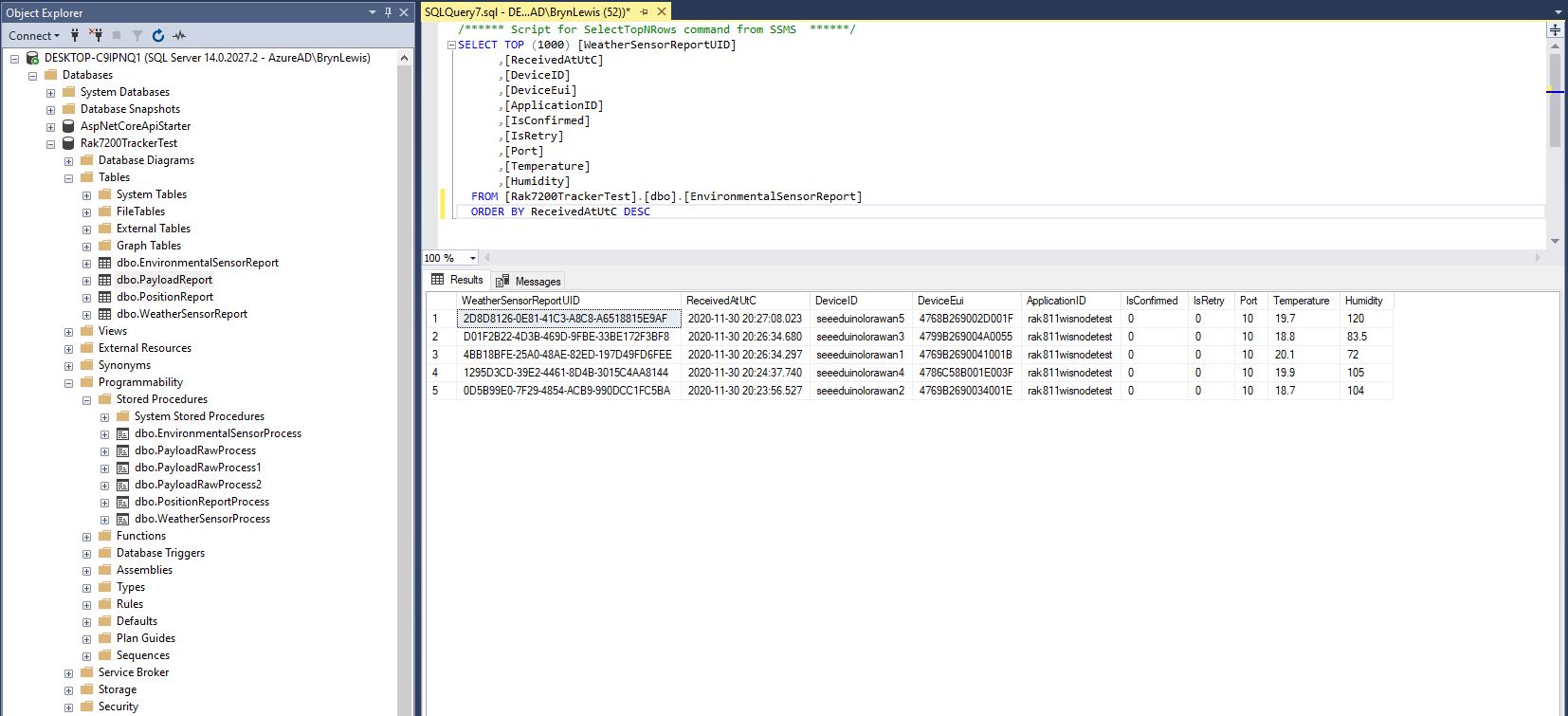
I created a database table to store the temperature and humidity values.
CREATE TABLE [dbo].[EnvironmentalSensorReport](
	[WeatherSensorReportUID] [UNIQUEIDENTIFIER] NOT NULL,
	[ReceivedAtUtC] [DATETIME] NOT NULL,
	[DeviceID] [NVARCHAR](32) NOT NULL,
	[DeviceEui] [NVARCHAR](32) NOT NULL,
	[ApplicationID] [NVARCHAR](32) NOT NULL,
	[IsConfirmed] [BIT] NOT NULL,
	[IsRetry] [BIT] NOT NULL,
	[Port] [SMALLINT] NOT NULL,
	[Temperature] [FLOAT] NOT NULL,
	[Humidity] [FLOAT] NOT NULL,
CONSTRAINT [PK_EnvironmentalSensorReport] PRIMARY KEY CLUSTERED
(
	[WeatherSensorReportUID] ASC
)WITH (PAD_INDEX = OFF, STATISTICS_NORECOMPUTE = OFF, IGNORE_DUP_KEY = OFF, ALLOW_ROW_LOCKS = ON, ALLOW_PAGE_LOCKS = ON) ON [PRIMARY]
) ON [PRIMARY]
GO

ALTER TABLE [dbo].[EnvironmentalSensorReport] ADD  CONSTRAINT [DF_EnvironmentalSensorReport_EnvironmentalSensorReporttUID]  DEFAULT (NEWID()) FOR [WeatherSensorReportUID]
GO
The stored procedure must have the parameters @ReceivedAtUtc, @DeviceID, @DeviceEui, @ApplicationID, @IsRetry, @IsConfirmed and @Port. In this example the payload specific fields generated by the Low Power Protocol(LPP) decoder are @Temperature_0 and @relative_humidity_0
CREATE PROCEDURE [dbo].[EnvironmentalSensorProcess]
   @ReceivedAtUtc AS DATETIME,
   @DeviceID AS NVARCHAR(32),
   @DeviceEui AS NVARCHAR(32),
   @ApplicationID AS NVARCHAR(32),
   @IsRetry AS BIT,
   @IsConfirmed AS BIT,
   @Port AS SMALLINT,
   @Temperature_0 AS FLOAT,
   @relative_humidity_0 AS FLOAT
AS
BEGIN
   SET NOCOUNT ON;

   INSERT INTO [dbo].[EnvironmentalSensorReport]
           ([PositionReportUID]
	   .[ReceivedAtUtc]
           ,[DeviceID]
           ,[DeviceEui]
           ,[ApplicationID]
           ,[IsConfirmed]
           ,[IsRetry]
           ,[Port]
	   ,Temperature
	   ,Humidity)
   VALUES
   (
      @ReceivedAtUtc,
      @DeviceID,
      @DeviceEui,
      @ApplicationID,
      @IsConfirmed,
      @IsRetry,
      @port,
      @Temperature_0,
      @relative_humidity_0)
END
Environmental sensor data displayed in SQL Server Management Studio(SSMS)
To store more complex nest payload fields (e.g. latitude, longitude and altitude values), I flattened the the hierarchy.
private static void EnumerateChildren(DynamicParameters parameters, JToken token, string prefix ="")
{
   if (token is JProperty)
      if (token.First is JValue)
      {
         JProperty property = (JProperty)token;
         parameters.Add($"@{prefix}{property.Name}", property.Value.ToString());
      }
      else
      {
         JProperty property = (JProperty)token;
         prefix += property.Name;
      }

   foreach (JToken token2 in token.Children())
   {
      EnumerateChildren(parameters,token2, prefix);
   }
}
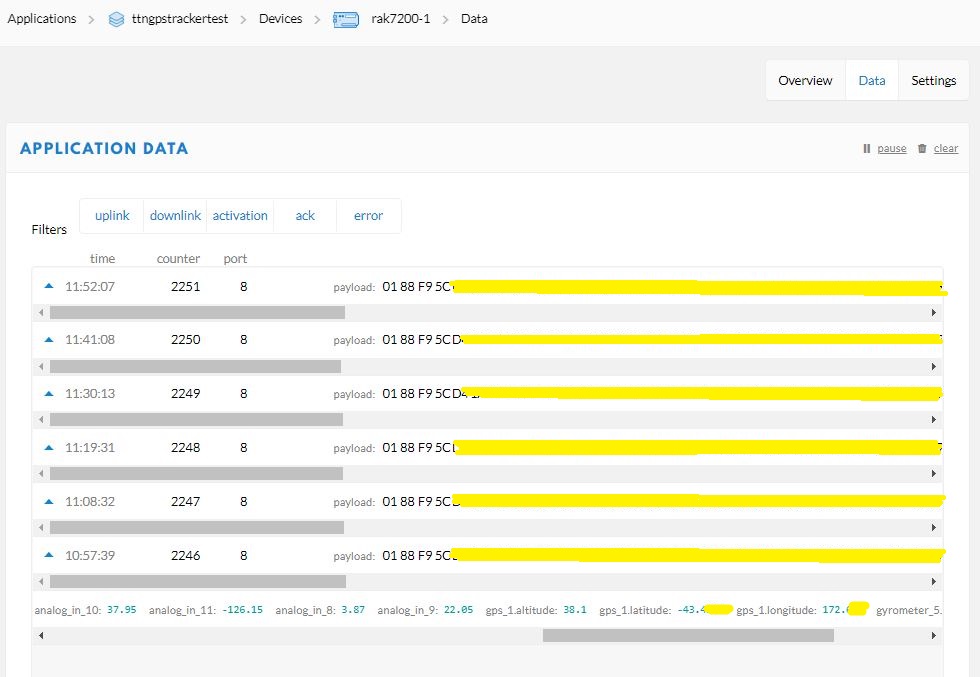
Unpacked LPP payload from GPS tracker displayed in TTN application data viewFlattened location, acceleration and rotation information
CREATE TABLE [dbo].[PositionReport](
      [PositionReportUID] [UNIQUEIDENTIFIER] NOT NULL,
      [ReceivedAtUtC] [DATETIME] NOT NULL,
      [DeviceID] [NVARCHAR](32) NOT NULL,
      [DeviceEui] [NVARCHAR](32) NOT NULL,
      [ApplicationID] [NVARCHAR](32) NOT NULL,
      [IsConfirmed] [BIT] NOT NULL,
      [IsRetry] [BIT] NOT NULL,
      [Port] [SMALLINT] NOT NULL,
      [Latitude] [FLOAT] NOT NULL,
      [Longitude] [FLOAT] NOT NULL,
      [Altitude] [FLOAT] NOT NULL,
 CONSTRAINT [PK_PositionReport] PRIMARY KEY CLUSTERED
(
	[PositionReportUID] ASC
)WITH (PAD_INDEX = OFF, STATISTICS_NORECOMPUTE = OFF, IGNORE_DUP_KEY = OFF, ALLOW_ROW_LOCKS = ON, ALLOW_PAGE_LOCKS = ON) ON [PRIMARY]
) ON [PRIMARY]
GO
I created a database table to store values of only the fields I cared about.
CREATE PROCEDURE [dbo].[PositionReportProcess]
      @ReceivedAtUtc AS DATETIME,
      @DeviceID AS NVARCHAR(32),
      @DeviceEui AS NVARCHAR(32),
      @ApplicationID AS NVARCHAR(32),
      @IsRetry AS Bit,
      @IsConfirmed AS BIT,
      @Port AS SMALLINT,
      @accelerometer_3x AS FLOAT,
      @accelerometer_3y AS FLOAT,
      @accelerometer_3z AS FLOAT,
      @analog_in_8 AS FLOAT,
      @analog_in_9 AS FLOAT,
      @analog_in_10 AS FLOAT,
      @analog_in_11 AS FLOAT,
      @gps_1Latitude AS FLOAT,
      @gps_1Longitude AS FLOAT,
      @gps_1Altitude AS FLOAT,
      @gyrometer_5x  AS FLOAT,
      @gyrometer_5y  AS FLOAT,
      @gyrometer_5z  AS FLOAT
AS
BEGIN
   SET NOCOUNT ON;

   INSERT INTO [dbo].[PositionReport]
      ([PositionReportUID]
      .[ReceivedAtUtc]
      ,[DeviceID]
      ,[DeviceEui]
      ,[ApplicationID]
      ,[IsConfirmed]
      ,[IsRetry]
      ,[Port]
      ,Latitude
      ,Longitude
      ,Altitude)
   VALUES
   (
      @ReceivedAtUtc,
      @DeviceID,
      @DeviceEui,
      @ApplicationID,
      @IsConfirmed,
      @IsRetry,
      @port,
      @gps_1Latitude,
      @gps_1Longitude,
      @gps_1Altitude)
END
The stored procedure for storing the GPS tracker payload has to have parameters matching each payload field but some of the fields are not used.
Location data displayed in SQL Server Management Studio(SSMS)
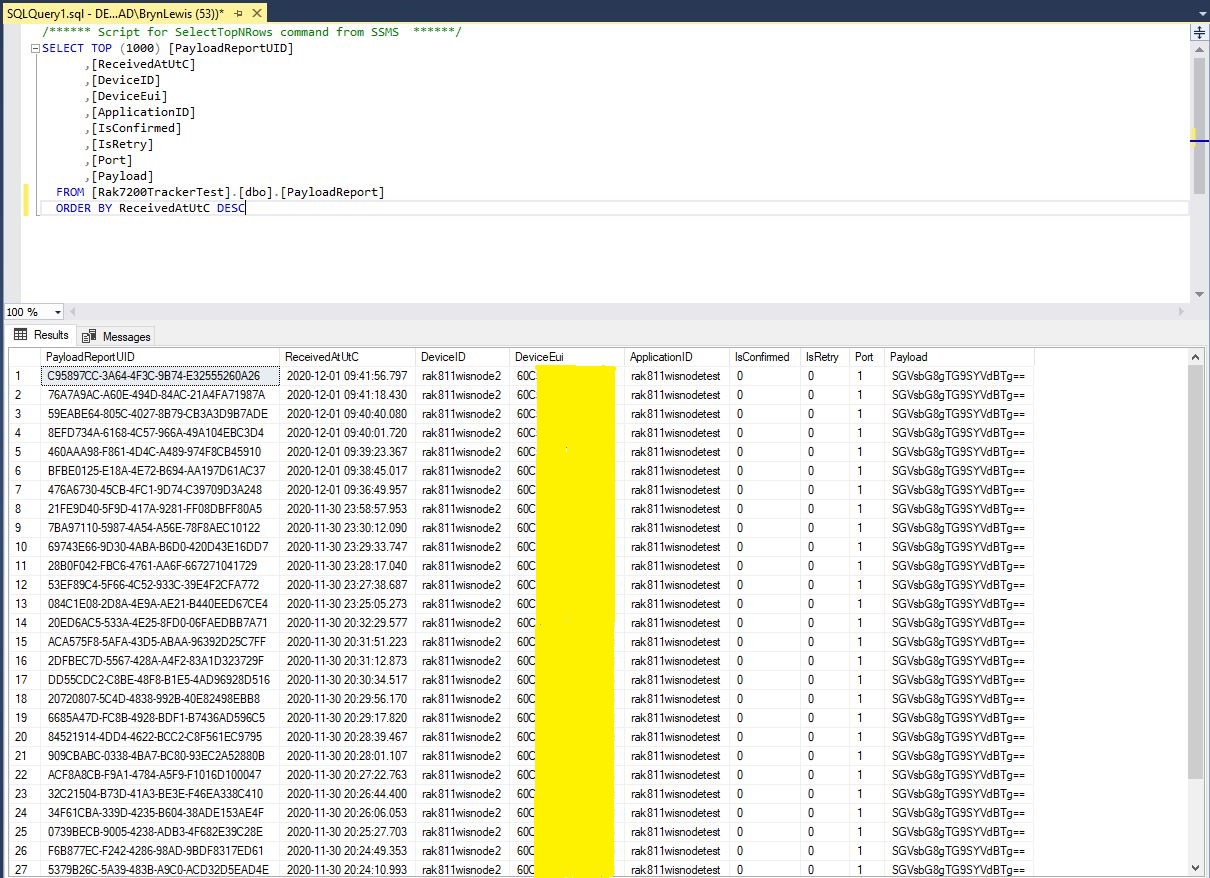
For uplink messages with no payload fields the message processor looks for a stored procedure with a single parameter called “payload_raw”.(there maybe more than one match)
CREATE TABLE [dbo].[PayloadReport](
      [PayloadReportUID] [UNIQUEIDENTIFIER] NOT NULL,
      [ReceivedAtUtC] [DATETIME] NOT NULL,
      [DeviceID] [NVARCHAR](32) NOT NULL,
      [DeviceEui] [NVARCHAR](32) NOT NULL,
      [ApplicationID] [NVARCHAR](32) NOT NULL,
      [IsConfirmed] [BIT] NOT NULL,
      [IsRetry] [BIT] NOT NULL,
      [Port] [SMALLINT] NOT NULL,
      [Payload] [NVARCHAR](128) NOT NULL,
CONSTRAINT [PK_PayloadReport] PRIMARY KEY CLUSTERED
(
      [PayloadReportUID] ASC
)WITH (PAD_INDEX = OFF, STATISTICS_NORECOMPUTE = OFF, IGNORE_DUP_KEY = OFF, ALLOW_ROW_LOCKS = ON, ALLOW_PAGE_LOCKS = ON) ON [PRIMARY]
) ON [PRIMARY]
GO

ALTER TABLE [dbo].[PayloadReport] ADD  CONSTRAINT [DF_PayloadReport_PositionReportUID]  DEFAULT (NEWID()) FOR [PayloadReportUID]
GO
ALTER PROCEDURE [dbo].[PayloadRawProcess]
      @ReceivedAtUtc AS DATETIME,
      @DeviceID AS NVARCHAR(32),
      @DeviceEui AS NVARCHAR(32),
      @ApplicationID AS NVARCHAR(32),
      @IsRetry AS Bit,
      @IsConfirmed AS BIT,
      @Port AS SMALLINT,
      @Payload AS NVARCHAR(128)
AS
BEGIN
      SET NOCOUNT ON;

      INSERT INTO [dbo].[PayloadReport]
         ([PositionReportUID]
         .[ReceivedAtUtc]
         ,[DeviceID]
         ,[DeviceEui]
         ,[ApplicationID]
         ,[IsConfirmed]
         ,[IsRetry]
         ,[Port]
         ,[Payload])
     VALUES(@ReceivedAtUtc,
         @DeviceID,
         @DeviceEui,
         @ApplicationID,
         @IsConfirmed,
         @IsRetry,
         @port,
         @Payload)
END
Raw payload data displayed in SQL Server Management Studio(SSMS)
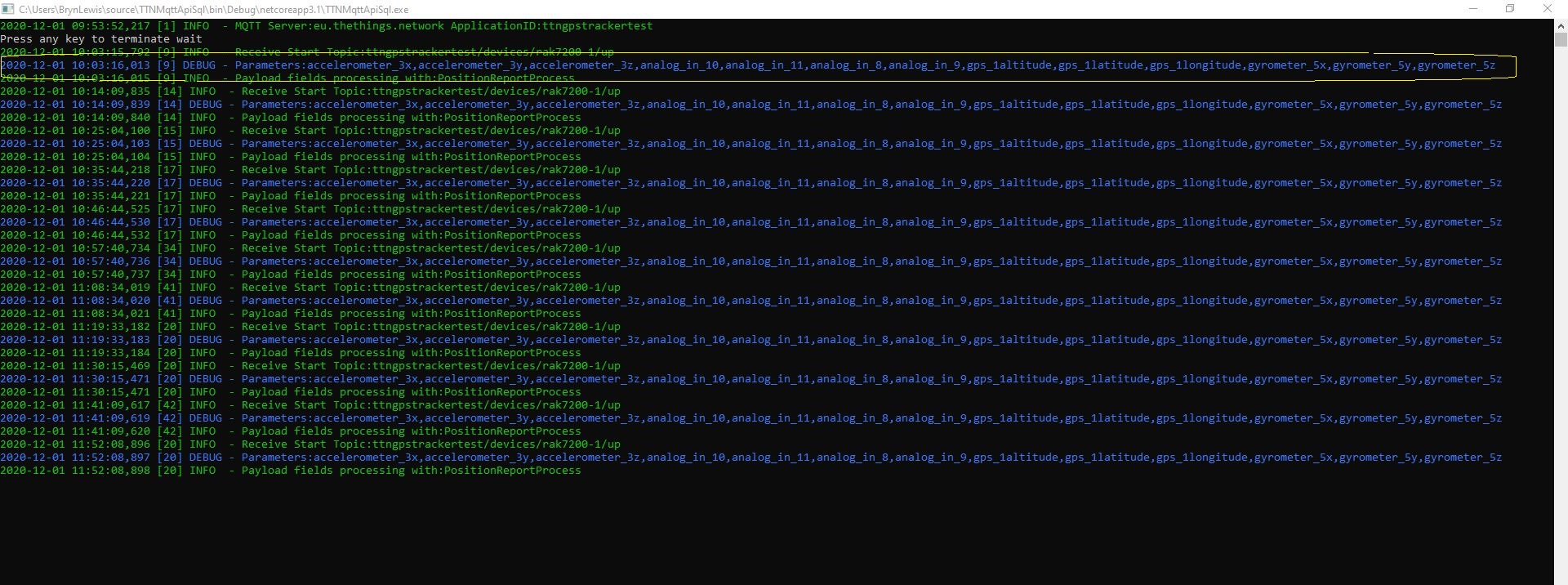
Initially the application just used Console.Writeline for logging, then I added Log4Net because it would be useful to persist information about failures and so I could copy n paste parameter lists to the appSettings.json file.



 devMobile's blog