The Things Network HTTP Integration Part4

Out stupiding myself

This is the forth in a series of posts about building an HTTP Integration for a The Things Network(TTN) application.

Unpacking the payload_fields property was causing me some issues. I tried many different approaches but they all failed.

public class PayloadV4
{
   public string app_id { get; set; }
   public string dev_id { get; set; }
   public string hardware_serial { get; set; }
   public int port { get; set; }
   public int counter { get; set; }
   public bool is_retry { get; set; }
   public string payload_raw { get; set; }
   //public JsonObject payload_fields { get; set; }
   //public JObject payload_fields { get; set; }
   //public JToken payload_fields { get; set; }
   //public JContainer payload_fields { get; set; }
   //public dynamic payload_fields { get; set; }
   public Object payload_fields { get; set; }
   public MetadataV4 metadata { get; set; }
   public string downlink_url { get; set; }
}

I tried using the excellent JsonSubTypes library to build a polymorphic convertor, which failed.

...
public class PolymorphicJsonConverter : JsonConverter
{
   public override object ReadJson(JsonReader reader, Type objectType, object existingValue, JsonSerializer serializer)
   {
      JObject item = JObject.Load(reader);
      var type = item["type"].Value<string>();

      if (type == "PayloadFieldDigitalInput")
      {
         return item.ToObject<PayloadFieldDigitalInput>();
      }
      else if (type == "PayloadFieldDigitalInput")
      {
         return item.ToObject<PayloadFieldDigitalOutput>();
      }
      else if (type == "PayloadFieldAnalogInput")
      {
         return item.ToObject<PayloadFieldDigitalOutput>();
      }
      else if (type == "PayloadFieldAnalogInput")
      {
         return item.ToObject<PayloadFieldDigitalOutput>();
      }
      else
      {
         return null;
      }
    }
...
}

It was about this point I figured that I was down a very deep rabbit hole and I should just embrace my “stupid”.

I realised I shouldn’t unpack the payload as the number of generated classes required and the complexity of other approaches was going to rapidly get out of hand. Using an Object and recursively traversing its contents with System.Text.Json looked like a viable approach.

public class GatewayV4 
{
   public string gtw_id { get; set; }
   public ulong timestamp { get; set; }
   public DateTime time { get; set; }
   public int channel { get; set; }
   public int rssi { get; set; }
   public double snr { get; set; }
   public int rf_chain { get; set; }
   public double latitude { get; set; }
   public double longitude { get; set; }
   public int altitude { get; set; }
}

public class MetadataV4
{
   public string time { get; set; }
   public double frequency { get; set; }
   public string modulation { get; set; }
   public string data_rate { get; set; }
   public string coding_rate { get; set; }
   public List<GatewayV4> gateways { get; set; }
}

public class PayloadV4
{
   public string app_id { get; set; }
   public string dev_id { get; set; }
   public string hardware_serial { get; set; }
   public int port { get; set; }
   public int counter { get; set; }
   public bool is_retry { get; set; }
   public string payload_raw { get; set; }
   // finally settled on an Object
   public Object payload_fields { get; set; }
   public MetadataV4 metadata { get; set; }
   public string downlink_url { get; set; }
}

So, I added yet another new to controller to my application to deserialise the body of the POST from the TTN Application Integration.

[Route("[controller]")]
[ApiController]
public class ClassSerialisationV4Fields : ControllerBase
{
   private static readonly ILog log = log4net.LogManager.GetLogger(System.Reflection.MethodBase.GetCurrentMethod().DeclaringType);

   public string Index()
   {
      return "move along nothing to see";
   }

   [HttpPost]
   public IActionResult Post([FromBody] PayloadV4 payload)
   {
      string payloadFieldsUnpacked = string.Empty;
         
      // Check that the post data is good
      if (!this.ModelState.IsValid)
      {
         log.WarnFormat("ClassSerialisationV4Fields validation failed {0}", this.ModelState.Messages());

         return this.BadRequest(this.ModelState);
      }

      JsonElement jsonElement = (JsonElement)payload.payload_fields;
      foreach (var property in jsonElement.EnumerateObject())
      {
         // Special handling for nested properties
         if (property.Name.StartsWith("gps_") || property.Name.StartsWith("accelerometer_") || property.Name.StartsWith("gyrometer_"))
         {
            payloadFieldsUnpacked += $"Property Name:{property.Name}\r\n";
            JsonElement gpsElement = (JsonElement)property.Value;
            foreach (var gpsProperty in gpsElement.EnumerateObject())
            {
               payloadFieldsUnpacked += $" Property Name:{gpsProperty.Name} Property Value:{gpsProperty.Value}\r\n";
            }
         }
         else
         {
            payloadFieldsUnpacked += $"Property Name:{property.Name} Property Value:{property.Value}\r\n";
         }
      }

      log.Info(payloadFieldsUnpacked);

      return this.Ok();
   }
}

In the body of the events in Azure Application Insights I could see messages and the format looked fine for simple payloads

Property Name:analog_in_1 Property Value:0.5
Property Name:digital_in_1 Property Value:1
Property Name:gps_1
 Property Name:altitude Property Value:755
 Property Name:latitude Property Value:4.34
 Property Name:longitude Property Value:40.22
Property Name:luminosity_1 Property Value:100
Property Name:temperature_1 Property Value:27.2

Then with payloads with lots of nested fields.

Property Name:accelerometer_0
 Property Name:x Property Value:0
 Property Name:y Property Value:0
 Property Name:z Property Value:1
Property Name:gps_1
 Property Name:alt Property Value:6.19
 Property Name:lat Property Value:-43.5309
 Property Name:lon Property Value:172.6371
Property Name:gyrometer_1
 Property Name:x Property Value:0
 Property Name:y Property Value:0
 Property Name:z Property Value:0

To make it faster to debug the unpacking of messages I built another “nasty” console application.

class Program
{
   static void Main(string[] args)
   {
      try
      {
         using (StreamReader r = new StreamReader(args[0]))
         {
            Payload payload = JsonConvert.DeserializeObject<Payload>(File.ReadAllText(args[0]));

            JObject payloadFields = (JObject)payload.payload_fields;

            foreach (JProperty child in payloadFields.Children())
            {
               EnumerateChildren(0, child);
            }
         }
      }
      catch (Exception ex)
      {
         Console.WriteLine(ex.Message);
      }

      Console.WriteLine();
      Console.WriteLine("Press <enter> to exit");

      Console.ReadLine();
   }

   static void EnumerateChildren(int indent, JToken token)
   {
      string prepend = string.Empty.PadLeft(indent);

      if (token is JProperty)
         if (token.First is JValue)
         {
            JProperty property = (JProperty)token;
            Console.WriteLine($"{prepend} Name:{property.Name} Value:{property.Value}");
         }
         else
         {
            JProperty property = (JProperty)token;
            Console.WriteLine($"{prepend}Name:{property.Name}");
            indent = indent + 3;
         }

      foreach (JToken token2 in token.Children())
      {
         EnumerateChildren(indent, token2);
      }
   }
}

The application displayed the structure of the object nicely indented so it was easier to visualise.
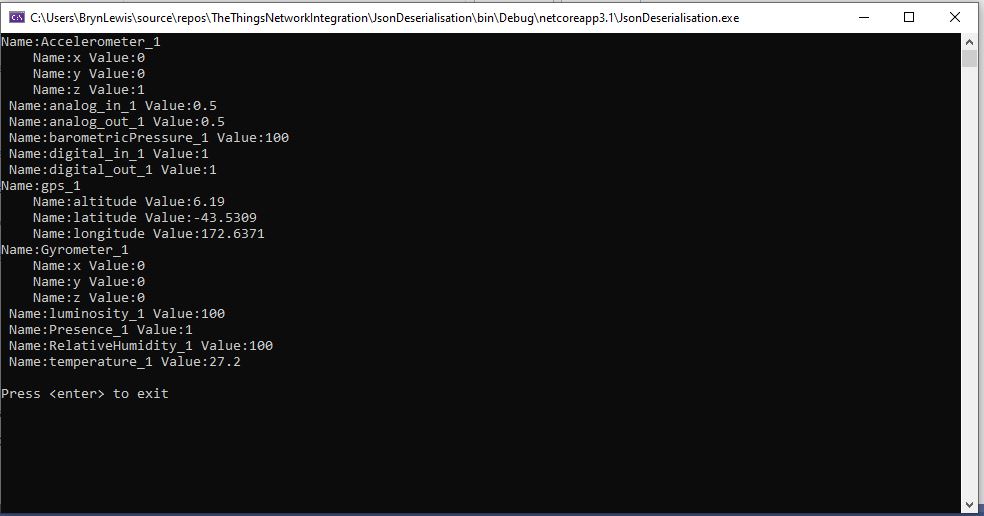
JSON Deserialisation test harness

This application was largely re-written as part of the next post as a result of a System.Text.Json limitation.
The Things Network HTTP Integration Part3

When Serialisation goes bad- payload_fields

This is the third in a series of posts about building an HTTP Integration for a The Things Network(TTN) application.

In part 1 & part 2 I had been ignoring the payload_fields property of the Payload class. The documentation indicates that payload_fields property is populated when an uplink message is Decoded.

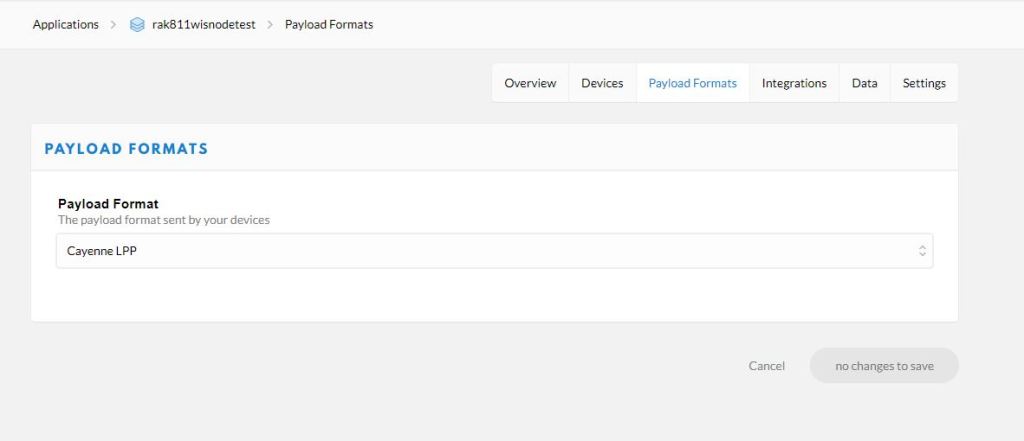
There is a built in decoder for Low Power Payload(LPP) which looked like the simplest option to start with.

TTN Application integration payload decoder selection

I modified the Seeeduino LoRaWAN Over The Air Activation(OTAA) sample application and added the LPP library from Electronic Cats.

#include <LoRaWan.h>

LPP lpp(64);
char buffer[256];

void setup(void)
{
    SerialUSB.begin(9600);
    while(!SerialUSB);

    lora.init();

    memset(buffer, 0, 256);
    lora.getVersion(buffer, 256, 1);
    SerialUSB.print("Ver:");
    SerialUSB.print(buffer); 
 
    memset(buffer, 0, 256);
    lora.getId(buffer, 256, 1);
    SerialUSB.print("ID:");
    SerialUSB.println(buffer);

    lora.setKey(NULL, NULL, "12345678901234567890123456789012");
    lora.setId(NULL, "1234567890123456", "1234567890123456");

    lora.setPort(10);
        
    lora.setDeciveMode(LWOTAA);
    lora.setDataRate(DR0, AS923);

    lora.setDutyCycle(false);
    lora.setJoinDutyCycle(false);
 
    lora.setPower(14);

    while(!lora.setOTAAJoin(JOIN, 10));
}
 
void loop(void)
{   
    bool result = false;

    lpp.reset ();

    // Original LPPv1 data types only these work
    //
    lpp.addAnalogInput( 0, 0.01234) ;
    lpp.addAnalogOutput( 0, 0.56789);
    lpp.addDigitalInput(0, false);    
    lpp.addDigitalInput(1, true);    
    
    lpp.addGPS (1, -43.5309, 172.6371, 6.192);
    lpp.addAccelerometer(0, 0.0, 0.0, 1.0);
    lpp.addGyrometer(1, 0.0,0.0,0.0);
    
    lpp.addLuminosity(0, 0);    // Pitch black
    lpp.addLuminosity(1, 8000); // 40w fluro   
    lpp.addPresence(0, 0);
    lpp.addPresence(1, 1);

    lpp.addBarometricPressure(0,0.0);
    lpp.addBarometricPressure(0,1013.25);
    lpp.addRelativeHumidity (0, 50.0);
    lpp.addRelativeHumidity (1, 60.0);
    lpp.addTemperature (0, -273.00);
    lpp.addTemperature (1, 0.0);
    lpp.addTemperature (2, 100.0);

    // Additional data types don't think any of these worked
    //lpp.addUnixTime(1, millis()); 
    //lpp.addGenericSensor(1, 1.23456);
    //lpp.addVoltage(1, 4.5);
    //lpp.addCurrent(0, 1.0);
    //lpp.addFrequency (1, 50); 
    //lpp.addPercentage(1, 50);
    //lpp.addAltitude(1, 20.5);
    //lpp.addPower(1, 1500);
    //lpp.addDistance(1, 120.0);
    //lpp.addEnergy(1, 2.345);
    //lpp.addDirection(1, -98.76);
    //lpp.addSwitch(0, 1);
    //lpp.addConcentration(0, 10);
    //lpp.addColour(1, 255, 255, 255);

    uint8_t *lppBuffer = lpp.getBuffer();
    uint8_t lppLen = lpp.getSize();

    SerialUSB.print("Length is: ");
    SerialUSB.println(lppLen);

    // Dump buffer content for debugging
    PrintHexBuffer (lppBuffer, lppLen);    

    //result = lora.transferPacket("Hello World!", 10);
    result = lora.transferPacket(lppBuffer, lppLen);

    if(result)
    {
        short length;
        short rssi;
 
        memset(buffer, 0, sizeof(buffer));
        length = lora.receivePacket(buffer, 256, &rssi);
 
        if(length)
        {
            SerialUSB.print("Length is: ");
            SerialUSB.println(length);
            SerialUSB.print("RSSI is: ");
            SerialUSB.println(rssi);
            SerialUSB.print("Data is: ");
            for(unsigned char i = 0; i < length; i ++)
            {
                SerialUSB.print("0x");
                SerialUSB.print(buffer[i], HEX);
                SerialUSB.print(" ");
            }
            SerialUSB.println();
        }
    }
    delay( 30000);
}

void PrintHexBuffer( uint8_t *buffer, uint8_t size )
{

    for( uint8_t i = 0; i < size; i++ )
    {
        if(buffer[i] < 0x10)
        {
            Serial.print('0');
        }
        SerialUSB.print( buffer[i], HEX );
        Serial.print(" ");
    }
    SerialUSB.println( );
}

I then copied and saved to files the payloads from the Azure Application Insights events generated when an uplink messages were processed.

{
   "app_id": "rak811wisnodetest",
   "dev_id": "seeeduinolorawan4",
   "hardware_serial": "1234567890123456",
   "port": 10,
   "counter": 1,
   "is_retry": true,
   "payload_raw": "AWcBEAFlAGQBAAEBAgAyAYgAqYgGIxgBJuw=",
   "payload_fields": {
      "analog_in_1": 0.5,
      "digital_in_1": 1,
      "gps_1": {
         "altitude": 755,
         "latitude": 4.34,
         "longitude": 40.22
      },
      "luminosity_1": 100,
      "temperature_1": 27.2
   },
   "metadata": {
      "time": "2020-08-28T10:41:04.496594225Z",
      "frequency": 923.4,
      "modulation": "LORA",
      "data_rate": "SF12BW125",
      "coding_rate": "4/5",
      "gateways": [
         {
            "gtw_id": "eui-b827ebfffe6c279d",
            "timestamp": 3971612260,
            "time": "2020-08-28T10:41:03.313471Z",
            "channel": 1,
            "rssi": -53,
            "snr": 11.2,
            "rf_chain": 0,
            "latitude": -43.49885,
            "longitude": 172.60095,
            "altitude": 25
         }
      ]
   },
   "downlink_url": "https://integrations.thethingsnetwork.org/ttn-eu/api/v2/down/rak811wisnodetest/azure-webapi-endpoint?key=ttn-account-v2.12345678901234567_12345_1234567-dduo"
}

I used JSON2Csharp to generate C# classes which would deserialise the above uplink message.

// Third version of classes for unpacking HTTP payload 
public class Gps1V3
{
   public int altitude { get; set; }
   public double latitude { get; set; }
   public double longitude { get; set; }
}

public class PayloadFieldsV3
{
   public double analog_in_1 { get; set; }
   public int digital_in_1 { get; set; }
   public Gps1V3 gps_1 { get; set; }
   public int luminosity_1 { get; set; }
   public double temperature_1 { get; set; }
}

public class GatewayV3 
{
   public string gtw_id { get; set; }
   public ulong timestamp { get; set; }
   public DateTime time { get; set; }
   public int channel { get; set; }
   public int rssi { get; set; }
   public double snr { get; set; }
   public int rf_chain { get; set; }
   public double latitude { get; set; }
   public double longitude { get; set; }
   public int altitude { get; set; }
}

public class MetadataV3
{
   public string time { get; set; }
   public double frequency { get; set; }
   public string modulation { get; set; }
   public string data_rate { get; set; }
   public string coding_rate { get; set; }
   public List<GatewayV3> gateways { get; set; }
}

public class PayloadV3
{
   public string app_id { get; set; }
   public string dev_id { get; set; }
   public string hardware_serial { get; set; }
   public int port { get; set; }
   public int counter { get; set; }
   public bool is_retry { get; set; }
   public string payload_raw { get; set; }
   public PayloadFieldsV3 payload_fields { get; set; }
   public MetadataV3 metadata { get; set; }
   public string downlink_url { get; set; }
}

I added a new to controller to my application which used the generated classes to deserialise the body of the POST from the TTN Application Integration.

[Route("[controller]")]
[ApiController]
public class ClassSerialisationV3Fields : ControllerBase
{
   private static readonly ILog log = log4net.LogManager.GetLogger(System.Reflection.MethodBase.GetCurrentMethod().DeclaringType);

   public string Index()
   {
      return "move along nothing to see";
   }

   [HttpPost]
   public IActionResult Post([FromBody] PayloadV3 payload)
   {
      // Check that the post data is good
      if (!this.ModelState.IsValid)
      {
         log.WarnFormat("ClassSerialisationV3Fields validation failed {0}", this.ModelState.Messages());

         return this.BadRequest(this.ModelState);
      }

      log.Info($"DevEUI:{payload.hardware_serial} Payload Base64:{payload.payload_raw} analog_in_1:{payload.payload_fields.analog_in_1} digital_in_1:{payload.payload_fields.digital_in_1} gps_1:{payload.payload_fields.gps_1.latitude},{payload.payload_fields.gps_1.longitude},{payload.payload_fields.gps_1.altitude} luminosity_1:{payload.payload_fields.luminosity_1} temperature_1:{payload.payload_fields.temperature_1}");

      return this.Ok();
   }
}

I then updated the TTN application integration to send messages to my new endpoint. In the body of the Application Insights events I could see the devEUI, port, and the payload fields had been extracted from the message.

DevEUI:1234567890123456 Payload Base64:AWcBEAFlAGQBAAEBAgAyAYgAqYgGIxgBJuw= analog_in_1:0.5 digital_in_1:1 gps_1:4.34,40.22,755 luminosity_1:100 temperature_1:27.2

This arrangement was pretty nasty and sort of worked but in the “real world” would not have been viable. I would need to generate lots of custom classes for each application taking into account the channel numbers (e,g, analog_in_1,analog_in_2) and datatypes used.

I also explored which datatypes were supported by the TTN decoder, after some experimentation (Aug 2019) it looks like only the LPPV1 ones are.

  • AnalogInput
  • AnalogOutput
  • DigitalInput
  • DigitalOutput
  • GPS
  • Accelerometer
  • Gyrometer
  • Luminosity
  • Presence
  • BarometricPressure
  • RelativeHumidity
  • Temperature

What I need is a more flexible way to stored and decode payload_fields property..

The Things Network HTTP Integration Part2

Basic JSON Deserialisation

This is the second in a series of posts about building an HTTP Integration for a The Things Network(TTN) application.

I used JSON2Csharp and a payload I downloaded in Part 1 to generate C# classes which would deserialise my minimalist messages.

// First version of classes for unpacking HTTP payload https://json2csharp.com/
public class GatewayV1
{
   public string gtw_id { get; set; }
   public int timestamp { get; set; }
   public DateTime time { get; set; }
   public int channel { get; set; }
   public int rssi { get; set; }
   public double snr { get; set; }
   public int rf_chain { get; set; }
   public double latitude { get; set; }
   public double longitude { get; set; }
   public int altitude { get; set; }
}

public class MetadataV1
{
   public string time { get; set; }
   public double frequency { get; set; }
   public string modulation { get; set; }
   public string data_rate { get; set; }
   public string coding_rate { get; set; }
   public List<GatewayV1> gateways { get; set; }
}

public class PayloadV1
{
   public string app_id { get; set; }
   public string dev_id { get; set; }
   public string hardware_serial { get; set; }
   public int port { get; set; }
   public int counter { get; set; }
   public bool confirmed { get; set; }
   public string payload_raw { get; set; }
   public MetadataV1 metadata { get; set; }
   public string downlink_url { get; set; }
}

I added a new to controller to my application which used the generated classes to deserialise the body of the POST from the TTN Application Integration.

[Route("[controller]")]
[ApiController]
public class ClassSerialisationV1 : ControllerBase
{
   private static readonly ILog log = log4net.LogManager.GetLogger(System.Reflection.MethodBase.GetCurrentMethod().DeclaringType);

   public string Index()
   {
      return "move along nothing to see";
   }

   [HttpPost]
   public IActionResult Post([FromBody] PayloadV1 payload)
   {
      // Check that the post data is good
      if (!this.ModelState.IsValid)
      {
         log.WarnFormat("ClassSerialisationV1 validation failed {0}", this.ModelState.Messages());

         return this.BadRequest(this.ModelState);
      }
      log.Info($"DevEUI:{payload.hardware_serial} Payload Base64:{payload.payload_raw}");

      return this.Ok();
   }
}

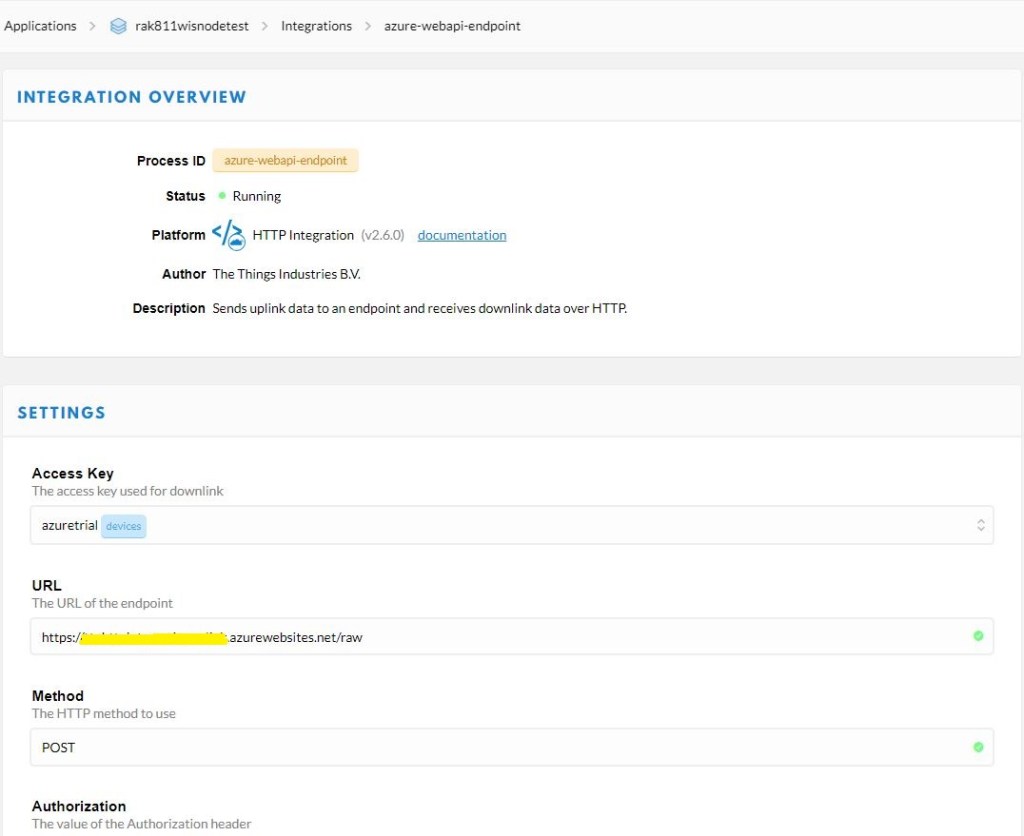
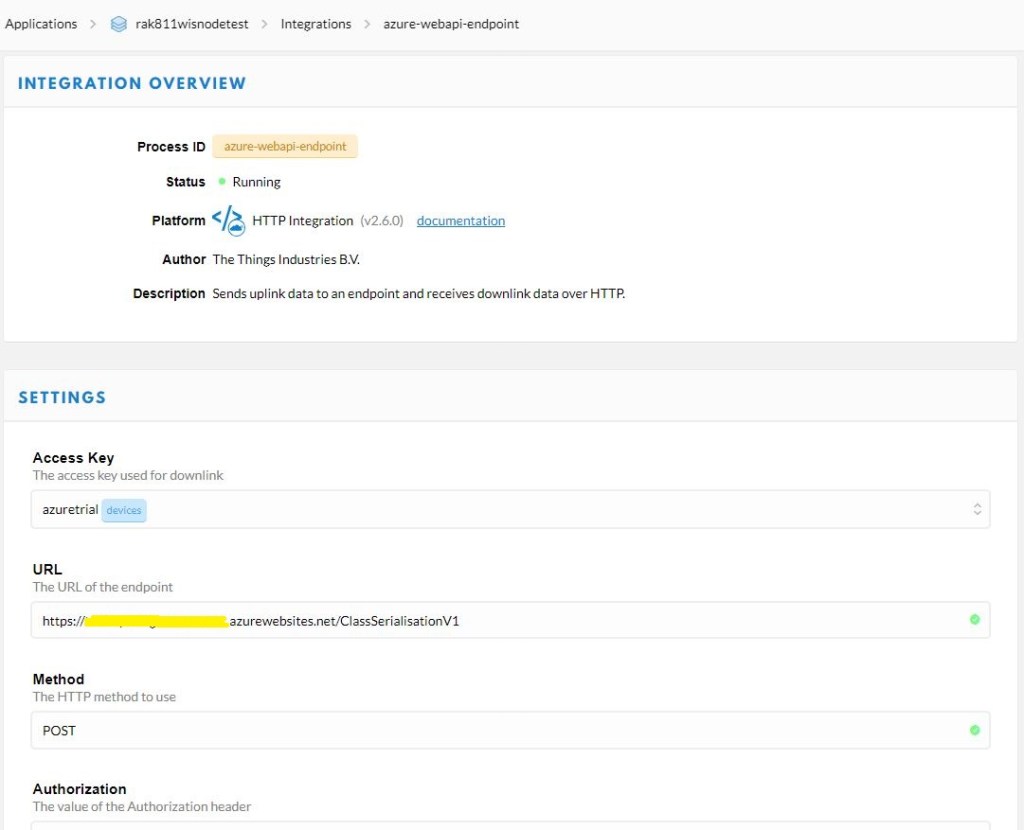
I then updated the TTN application integration to send messages to my new endpoint.

TTN Application configuration overview

In the body of the Application Insights events I could see the devEUI, port, and the raw payload had been extracted from the message.

DevEUI:1234567890123456 Port:1 Payload Base64:VGlueUNMUiBMb1JhV0FO

I then added another controller which decoded the Base64 encoded payload_raw.

[Route("[controller]")]
[ApiController]
public class ClassSerialisationV2Base64Decoded : ControllerBase
{
   private static readonly ILog log = log4net.LogManager.GetLogger(System.Reflection.MethodBase.GetCurrentMethod().DeclaringType);

   public string Index()
   {
      return "move along nothing to see";
   }

   [HttpPost]
   public IActionResult Post([FromBody] PayloadV2 payload)
   {
      // Check that the post data is good
      if (!this.ModelState.IsValid)
      {
         log.WarnFormat("ClassSerialisationV2BCDDecoded validation failed {0}", this.ModelState.Messages());

         return this.BadRequest(this.ModelState);
      }

      log.Info($"DevEUI:{payload.hardware_serial} Port:{payload.port} Payload:{ Encoding.UTF8.GetString(Convert.FromBase64String(payload.payload_raw))}");

      return this.Ok();
   }
}
DevEUI:1234567890123456 Port:1 Payload:TinyCLR LoRaWAN

Then after a while the deserialisation started to fail with an HTTP 400-Bad request. When I ran the same request with Telerik Fiddler on my desktop the raw response was

HTTP/1.1 400 Bad Request
Transfer-Encoding: chunked
Content-Type: application/problem+json; charset=utf-8
Server: Microsoft-IIS/10.0
Request-Context: appId=cid-v1:f4f72f2e-1144-4578-923f-d3ebdcfb7766
X-Powered-By: ASP.NET
Date: Mon, 31 Aug 2020 09:07:30 GMT

17a
{"type":"https://tools.ietf.org/html/rfc7231#section-6.5.1",
"title":"One or more validation errors occurred.",
"status":400,
"traceId":"00-45033ec030b63d4ebb82b95b67cb8142-9fc52a18be202848-00",
"errors":{
"$.metadata.gateways[0].timestamp":["The JSON value could not be converted to System.Int32. 
Path: $.metadata.gateways[0].timestamp | LineNumber: 21 | BytePositionInLine: 35."]}}
0

The line in the payload was the gateway timestamp. The value was 2,426,973,100 which larger than 2,147,483,647 the maximum number that can be stored in a signed 32 bit integer. The JSON2CSharp generator had made a reasonable choice of datatype but in this case the range was not sufficient.

public class GatewayV2 
{
   public string gtw_id { get; set; }
   public ulong timestamp { get; set; }
   public DateTime time { get; set; }
   public int channel { get; set; }
   public int rssi { get; set; }
   public double snr { get; set; }
   public int rf_chain { get; set; }
   public double latitude { get; set; }
   public double longitude { get; set; }
   public int altitude { get; set; }
}

I checked the TTN code where the variable was declared as an unsigned 64 bit integer.

This issue could occur for other variables so I need to manually check all the generated classes.

The Things Network HTTP Integration Part1

Infrastructure and payloads

This is the first in a series of posts about building an HTTP Integration for a The Things Network(TTN) application. I have assumed that readers are familiar with the configuration and operation of a TTN instance so I’m not going to cover that in detail.

I’m using a Seeeduino LoRaWAN device as a client so I configured the sample Over the Air Activation(OTAA) application to connect to my local RAK7246 Developer gateway.

#include <LoRaWan.h>

unsigned char data[] = {0x53, 0x65, 0x65, 0x65, 0x64, 0x75, 0x69, 0x6E, 0x6F, 0x20, 0x4C, 0x6F, 0x52, 0x61, 0x57, 0x41, 0x4E};
char buffer[256];

void setup(void)
{
  SerialUSB.begin(9600);
  while (!SerialUSB);

  lora.init();

  memset(buffer, 0, 256);
  lora.getVersion(buffer, 256, 1);
  SerialUSB.print("Ver:");
  SerialUSB.print(buffer);

  memset(buffer, 0, 256);
  lora.getId(buffer, 256, 1);
  SerialUSB.print(buffer);
  SerialUSB.print("ID:");

  lora.setKey(NULL, NULL, "12345678901234567890123456789012");
  lora.setId(NULL, "1234567890123456", "1234567890123456");

  lora.setPort(10);

  lora.setDeciveMode(LWOTAA);
  lora.setDataRate(DR0, AS923);

  lora.setDutyCycle(false);
  lora.setJoinDutyCycle(false);

  lora.setPower(14);


  while (!lora.setOTAAJoin(JOIN, 10))
  {
    SerialUSB.println("");
  }
    SerialUSB.println( "Joined");
}

void loop(void)
{
  bool result = false;

  //result = lora.transferPacket("Hello World!", 10);
  result = lora.transferPacket(data, sizeof(data));

  if (result)
  {
    short length;
    short rssi;

    memset(buffer, 0, 256);
    length = lora.receivePacket(buffer, 256, &rssi);

    if (length)
    {
      SerialUSB.print("Length is: ");
      SerialUSB.println(length);
      SerialUSB.print("RSSI is: ");
      SerialUSB.println(rssi);
      SerialUSB.print("Data is: ");
      for (unsigned char i = 0; i < length; i ++)
      {
        SerialUSB.print("0x");
        SerialUSB.print(buffer[i], HEX);
        SerialUSB.print(" ");
      }
      SerialUSB.println();
    }
  }
  delay( 10000);
}

The SetKey and SetId parameters are not obvious and it would be much easier if there were two methods one for OTTA and the other for Activation by-Personalization(ABP).
I then built an Net Core 3.1 Web API application which had a single controller to receive messages from TTN.

[Route("[controller]")]
[ApiController]
public class Raw : ControllerBase
{
   private static readonly ILog log = log4net.LogManager.GetLogger(System.Reflection.MethodBase.GetCurrentMethod().DeclaringType);

   [HttpGet]
   public string Index()
   {
      return "move along nothing to see";
   }

   [HttpPost]
   public void PostRaw([FromBody]JsonElement body)
   {
      string json = JsonSerializer.Serialize(body);

      log.Info(json);
   }
}

I then configured my TTN application integration to send messages to my shinny new endpoint

TTN Application configuration overview

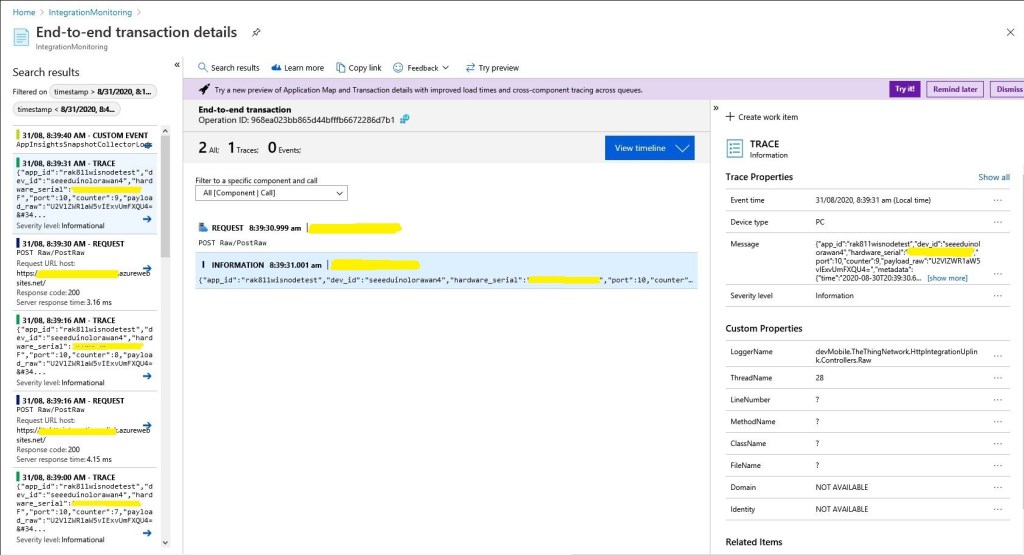
My controller logged events to Azure application Insights so I could see if there were any errors and inspect message payloads. The TTN developers provide sample payloads to illustrate the message format but they were a bit chunky for my initial testing.

Application Insights event list

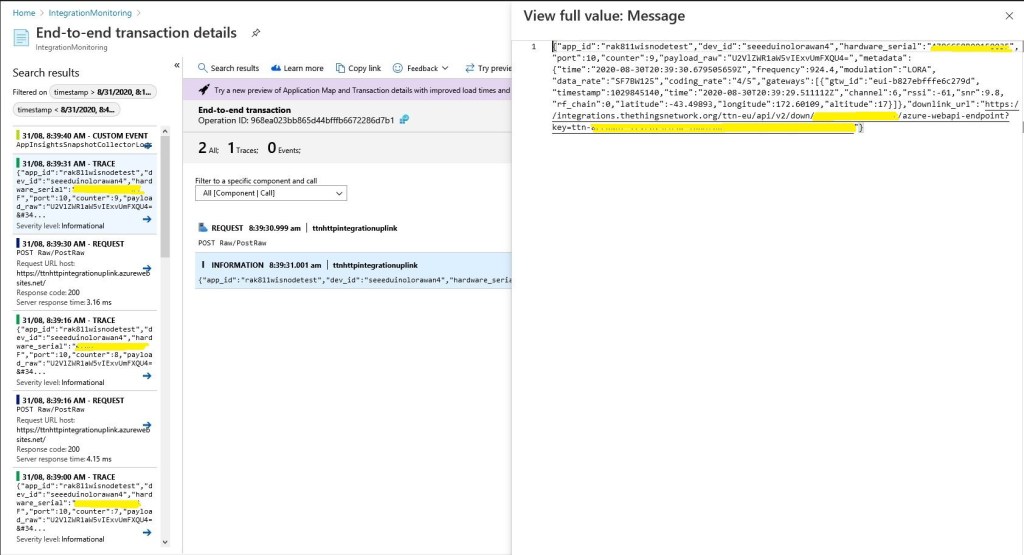
I could then inspect individual events and payloads

Application Insights event display

At this point I could download message payloads and save them locally.

{
   "app_id": "rak811wisnodetest",
   "dev_id": "rak811wisnode1",
   "hardware_serial": "1234567890123456",
   "port": 1,
   "counter": 2,
   "confirmed": true,
   "payload_raw": "VGlueUNMUiBMb1JhV0FO",
   "metadata": {
      "time": "2020-08-26T00:50:36.182774822Z",
      "frequency": 924.2,
      "modulation": "LORA",
      "data_rate": "SF7BW125",
      "coding_rate": "4/5",
      "gateways": [
         {
            "gtw_id": "eui-b827ebfffe6c279d",
            "timestamp": 1584148244,
            "time": "2020-08-26T00:50:35.012774Z",
            "channel": 5,
            "rssi": -63,
            "snr": 9.2,
            "rf_chain": 0,
            "latitude": -43.49889,
            "longitude": 172.60104,
            "altitude": 16
         }
      ]
   },
   "downlink_url": "https://integrations.thethingsnetwork.org/ttn-eu/api/v2/down/rak811wisnodetest/azure-webapi-endpoint?key=ttn-account-v2.12345678901234567_12345_1234567-dduo"

}

These were useful because I could then use a tool like Telerik Fiddler to submit messages to my application when it was running locally in the Visual Studio 2019 debugger.

The Things Network Client Part2

MQTT connectivity

In a previous post I couldn’t add a TTN V3EndDevice to an application (I’m going try again soon) using the REST API so I figured would try out the MQTT API. My aim was to get notifications of when a Device was created/updated/deleted in an Application.

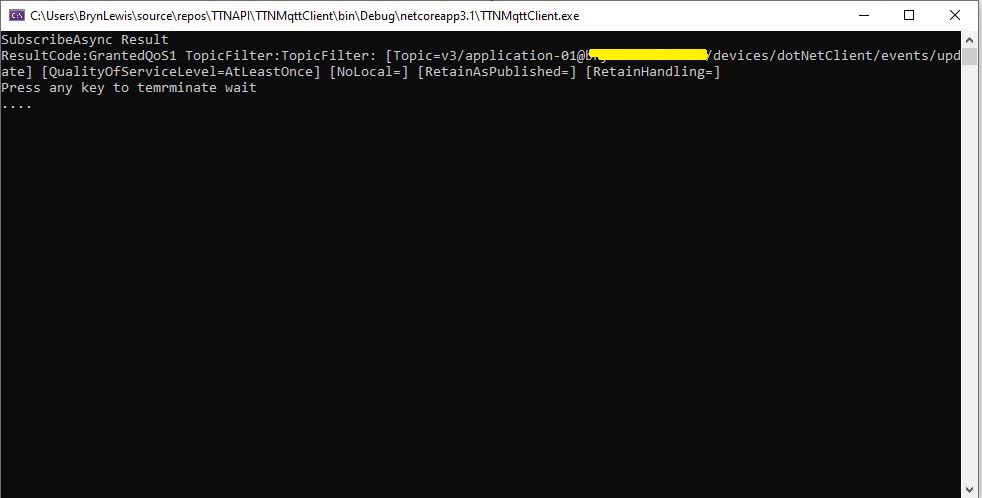
After some tinkering with the format of MQTT usernames and passwords I can connect to my V3 instance and successfully subscribe to topics. But, currently(Aug 2020) I’m not receiving any messages when I create, update or delete a Device. I have tried different Quality of Service QoS settings etc. and I wonder if my topic names aren’t quite right.

.Net Core MQTT Client

I wanted notifications so I could “automagically” provision a device in an Azure IoT Hub (maybe with a tag indicating it’s an “orphan” so it is discoverable) or in Azure IoT Central when a Device was created in TTN.

This looked like a good approach as my Azure IoT Hub applications have other devices which are not connected via LoRaWAN, and there are many specialised LoRaWAN settings which would need to be validated, stored etc. by my software. (maybe TTN device templates would make this easier). The TTN software is pretty good at managing devices so why would I “re-invent the wheel”.

I built a “nasty” console application using MQTTNet so that I could figure out how to connect to my V3 setup and subscribe to topics.

namespace devMobile.TheThingsNetwork.MqttClient
{
   using System;
   using System.Diagnostics;
   using System.Threading;
   using System.Threading.Tasks;

   using MQTTnet;
   using MQTTnet.Client;
   using MQTTnet.Client.Disconnecting;
   using MQTTnet.Client.Options;
   using MQTTnet.Client.Receiving;
   using MQTTnet.Client.Subscribing;

   class Program
   {
      private static IMqttClient mqttClient = null;
      private static IMqttClientOptions mqttOptions = null;
      private static string server;
      private static string username;
      private static string password;
      private static string clientId;

      static async Task Main(string[] args)
      {
         MqttFactory factory = new MqttFactory();
         mqttClient = factory.CreateMqttClient();

         if (args.Length != 4)
         {
            Console.WriteLine("[MQTT Server] [UserName] [Password] [ClientID]");
            Console.WriteLine("Press <enter> to exit");
            Console.ReadLine();
            return;
         }

         server = args[0];
         username = args[1];
         password = args[2];
         clientId = args[3];

         mqttOptions = new MqttClientOptionsBuilder()
            .WithTcpServer(server)
            .WithCredentials(username, password)
            .WithClientId(clientId)
            .WithTls()
            .Build();

         mqttClient.UseDisconnectedHandler(new MqttClientDisconnectedHandlerDelegate(e => MqttClient_Disconnected(e)));
         mqttClient.UseApplicationMessageReceivedHandler(new MqttApplicationMessageReceivedHandlerDelegate(e => MqttClient_ApplicationMessageReceived(e)));
         await mqttClient.ConnectAsync(mqttOptions);

         // Different topics I have tried
         string topic;
         topic = $"v3/{username}/devices/{clientId}/events/update";
         //topic = $"v3/{username}/devices/{clientId}/events/create";
         //topic = $"v3/{username}/devices/{clientId}/events/delete";
         //topic = $"v3/{username}/devices/+/events/+";
         //topic = $"v3/{username}/devices/+/events/create";
         //topic = $"v3/{username}/devices/+/events/update";
         //topic = $"v3/{username}/devices/+/events/delete";
         //topic = $"v3/{username}/devices/+/events/+";

         MqttClientSubscribeResult result;

         // Different QoS I have tried
         //result = await mqttClient.SubscribeAsync(topic, MQTTnet.Protocol.MqttQualityOfServiceLevel.AtMostOnce);
         result = await mqttClient.SubscribeAsync(topic, MQTTnet.Protocol.MqttQualityOfServiceLevel.AtLeastOnce);
         //result = await mqttClient.SubscribeAsync(topic, MQTTnet.Protocol.MqttQualityOfServiceLevel.ExactlyOnce);

         Console.WriteLine("SubscribeAsync Result");
         foreach ( var resultItem in result.Items)
         {
            Console.WriteLine($"ResultCode:{resultItem.ResultCode} TopicFilter:{resultItem.TopicFilter}");
         }                     

         Console.WriteLine("Press any key to temrminate wait");
         while (!Console.KeyAvailable)
         {
            Console.Write(".");

            Thread.Sleep(30100);
         }

         Console.WriteLine("Press <enter> to exit");
         Console.ReadLine();
         return;
      }

      private static void MqttClient_ApplicationMessageReceived(MqttApplicationMessageReceivedEventArgs e)
      {
         Console.WriteLine($"ClientId:{e.ClientId} Topic:{e.ApplicationMessage.Topic} Payload:{e.ApplicationMessage.ConvertPayloadToString()}");
      }

      private static async void MqttClient_Disconnected(MqttClientDisconnectedEventArgs e)
      {
         Debug.WriteLine("Disconnected");
         await Task.Delay(TimeSpan.FromSeconds(5));

         try
         {
            await mqttClient.ConnectAsync(mqttOptions);
         }
         catch (Exception ex)
         {
            Debug.WriteLine("Reconnect failed {0}", ex.Message);
         }
      }
   }
}

I’m going to post some questions on the TTN forums and Slack community to see if what I’m trying to do is supported/possible.

I got some helpful responses on the TTN forums and it looks like what I want todo is not supported by the V3 stack (Aug2020) and I will have to use gRPC.

The Things Network Client Part1

Basic connectivity

Over the last few months I have been using the community version of The Things Network(TTN) to test my LoRaWAN RakWireless RAK811 EVB based nanoFramework and TinyCLR clients.

As I was manually configuring TTN clients references to an application programming interface(API) caught my attention. In my day job I use tools from SmartBear and RicoSuter to generate .Net Core clients (for APSP.NET Core Web APIs I have build) from their OpenAPI descriptions.

The first step was to download the API swagger from The Things Network Github repository.

Things Network Github repository

I then used nSwagStudio to generate a C# client from a local copy of the API swagger (in the future I will use download the swagger and use the command line tools).

nSwag User Interface

At this point I had a basic client for the TTN network stack API which lacked support for the TTN security model etc. After looking at the TTN API documentation I figured out I need to add a header which contained an API Key from the TTN application configuration.

namespace TheThingsNetwork.API
{
	public partial class EndDeviceRegistryClient
	{
		public string ApiKey { set; get; }

		partial void PrepareRequest(System.Net.Http.HttpClient client, System.Net.Http.HttpRequestMessage request, string url)
		{
			if (!client.DefaultRequestHeaders.Contains("Authorization"))
			{
				client.DefaultRequestHeaders.Add("Authorization", $"Bearer {ApiKey}");
			}
		}
	}
}

In the TTN console on the overview page for my application I created an Access Key.

I then added some attributes to one of my devices so I had some addition device configuration data to display(I figured these could be useful for Azure IoT Hub configuration parameters etc. more about this later..)

Basic Device configuration in TTN Enterprise

I built a nasty console application which displayed some basic device configuration information to confirm I could authenticate and enumerate.

//---------------------------------------------------------------------------------
// Copyright (c) August 2020, devMobile Software
//
// Licensed under the Apache License, Version 2.0 (the "License");
// you may not use this file except in compliance with the License.
// You may obtain a copy of the License at
//
//     http://www.apache.org/licenses/LICENSE-2.0
//
// Unless required by applicable law or agreed to in writing, software
// distributed under the License is distributed on an "AS IS" BASIS,
// WITHOUT WARRANTIES OR CONDITIONS OF ANY KIND, either express or implied.
// See the License for the specific language governing permissions and
// limitations under the License.
//
// SECURITY_ANONYMISE
//---------------------------------------------------------------------------------
namespace TheThingsNetwork.EndDeviceClient
{
	using System;
	using System.Collections.Generic;
	using System.Net.Http;
	using TheThingsNetwork.API;

	class Program
	{
		static void Main(string[] args)
		{
			Console.WriteLine("TheThingsNetwork.EndDeviceClient starting");

			if (args.Length != 3)
			{
				Console.WriteLine("EndDeviceClient <baseURL> <applicationId> <apiKey>");
				Console.WriteLine("Press <enter> to exit");
				Console.ReadLine();
				return;
			}
			string baseUrl = args[0];
#if !SECURITY_ANONYMISE
			Console.WriteLine($"baseURL: {baseUrl}");
#endif
			string applicationId = args[1];
#if !SECURITY_ANONYMISE
			Console.WriteLine($"applicationId: {applicationId}");
#endif
			string apiKey = args[2];
#if !SECURITY_ANONYMISE
			Console.WriteLine($"apiKey: {apiKey}");
			Console.WriteLine();
#endif

			using (HttpClient httpClient = new HttpClient())
			{
				EndDeviceRegistryClient endDeviceRegistryClient = new EndDeviceRegistryClient(baseUrl, httpClient);
				endDeviceRegistryClient.ApiKey = apiKey;

				try
				{
					V3EndDevices endDevices = endDeviceRegistryClient.ListAsync(applicationId).GetAwaiter().GetResult();

					foreach (V3EndDevice v3EndDevice in endDevices.End_devices)
					{
#if SECURITY_ANONYMISE
						v3EndDevice.Ids.Dev_eui[7] = 0x0;
						v3EndDevice.Ids.Dev_eui[8] = 0x0;
						v3EndDevice.Ids.Dev_eui[9] = 0x0;
						v3EndDevice.Ids.Dev_eui[10] = 0x0;
						v3EndDevice.Ids.Dev_eui[11] = 0x0;
#endif
						Console.WriteLine($"Device ID:{v3EndDevice.Ids.Device_id} DevEUI:{Convert.ToBase64String(v3EndDevice.Ids.Dev_eui)}");
						Console.WriteLine($"   CreatedAt: {v3EndDevice.Created_at:dd-MM-yy HH:mm:ss} UpdatedAt: {v3EndDevice.Updated_at:dd-MM-yy HH:mm:ss}");

						string[] fieldMaskPaths = { "name", "description", "attributes" };

						var endDevice = endDeviceRegistryClient.GetAsync(applicationId, v3EndDevice.Ids.Device_id, field_mask_paths: fieldMaskPaths).GetAwaiter().GetResult();

						Console.WriteLine($"   Name: {endDevice.Name}");
						Console.WriteLine($"   Description: {endDevice.Description}");
						if (endDevice.Attributes != null)
						{
							foreach (KeyValuePair<string, string> attribute in endDevice.Attributes)
							{
								Console.WriteLine($"      Key: {attribute.Key} Name: {attribute.Value}");
							}
						}
						Console.WriteLine();
					}
				}
				catch (Exception ex)
				{
					Console.WriteLine(ex.Message);
				}

				Console.WriteLine("Press <enter> to exit");
				Console.ReadLine();
			}
		}
	}
}

I added some code so I could anonymise the displayed configuration so I could take screen grabs without revealing any sensitive information.

TTN API Client V1

Initially I struggled with versioning issues as the TTN community network is running V2 and the github repository was for V3. I approached TTN and they gave me access to a “limited” account on the enterprise network.

I also struggled with the number of blank fields in responses and spent some time learning GO (the programming language TTN is built with) to figure out how to use fieldMaskPaths etc.

string[] fieldMaskPaths = { "name", "description", "attributes" };

V3EndDevice endDevice = endDeviceRegistryClient.GetAsync(applicationId, v3EndDevice.Ids.Device_id, field_mask_paths: fieldMaskPaths).GetAwaiter().GetResult();

Overall things went pretty well but I expect to basic GO programing skills one this project is finished.

As hinted at earlier in this post the end goal of this project is to build an Azure IoT hub integration.

Azure IoT Hub MQTT+TLS Overheads

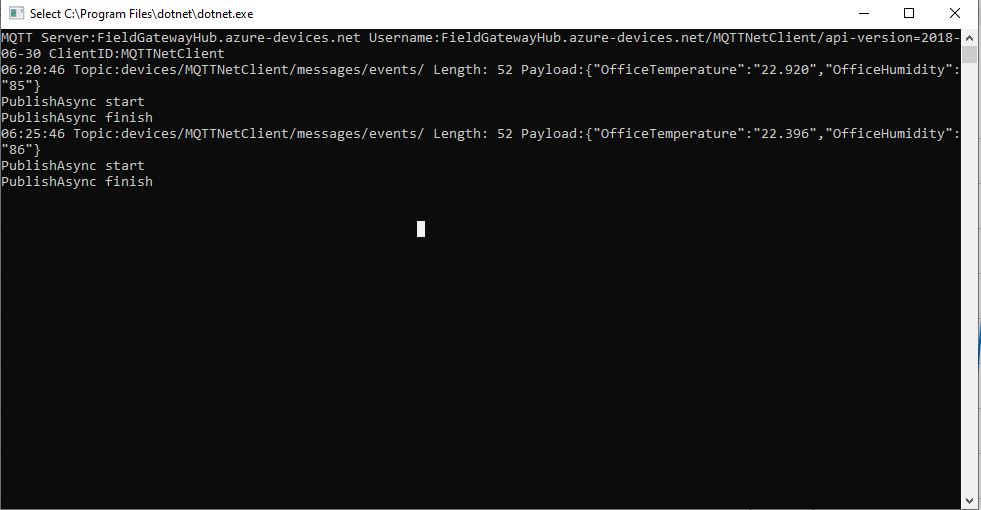
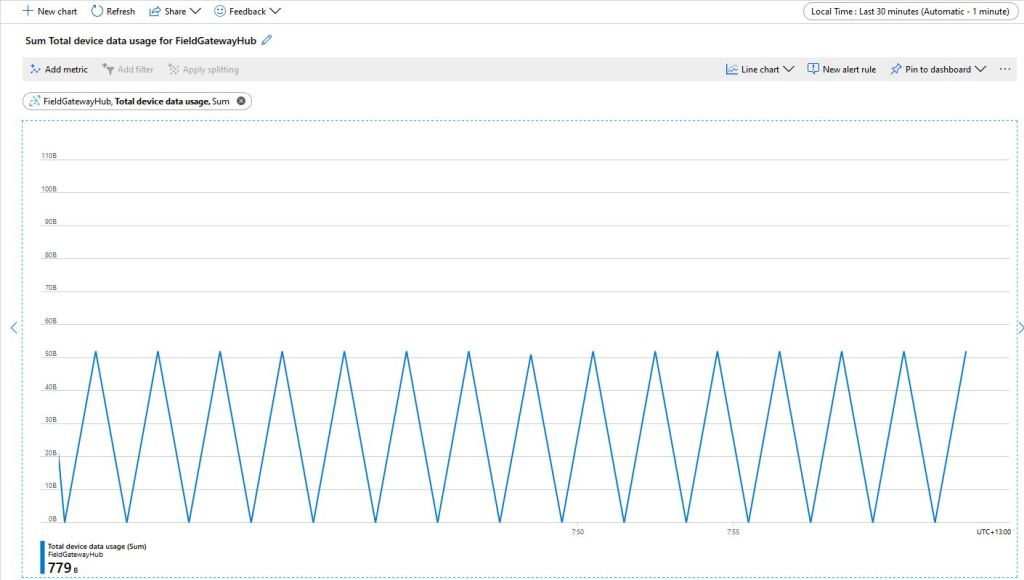
An Azure IoT Hub has a series of metrics and one I had been using was “Total Device Data Usage”. To better understand what it was displaying I modified my Azure IoT Hub MQTT Test Application to display the size of the JOSN payload.

MQTTNet based client displaying payload length

The size of the packets sent and the total device data appeared to map pretty well but I was also interested in the Transport Layer Security (TLS) and Messaging Queuing Telemetry Transport (MQTT) overheads.

Azure IoT Hub Metrics

To get an idea of the overheads I fired up LiveTcpUdpWatch by Nirsoft and noted down the traffic measure on port 8883.

Conenction LiveTcpUdpWatch main screen

Launching the MQTTNet client sending every 30 seconds resulted in traffic like this

4179b - Establishing connection
4284b - 105b
4317b - 33b
4386b - 69b
4455b - 69b
4524b - 69b
4593b - 69b
4662b - 69b
4731b - 69b
4800b - 69b
4869b - 69b
4938b - 69b
5007b - 69b
5076b - 69b
5145b - 69b
5214b - 69b
5288b - 69b

So it looks like my very rough numbers are close to the numbers discussed in the above article. I need to explore the impact of keep-alive messages and other background operations.