Myriota Connector – Uplink Payload formatters revisited

The myriota Azure IoT Hub Cloud Identity Translation Gateway payload formatters use compiled C# code to convert uplink packet payloads to JSON.

namespace PayloadFormattercode
{
    using System.Collections.Generic;

    using Newtonsoft.Json.Linq;

    public interface IFormatterUplink
    {
        public JObject Evaluate(IDictionary<string, string> properties, string application, string terminalId, DateTime timestamp, JObject payloadJson, string payloadText, byte[] payloadBytes);
    }
..
}

The myriota uplink packet payload is only 20 bytes long so it is very unlikely that the payloadText and payloadJSON parameters would ever be populated so I removed them from the interface. The uplink message handler interface has been updated and the code to convert (if possible) the payload bytes to text and then to JSON deleted.

namespace PayloadFormatter
{
    using System.Collections.Generic;

    using Newtonsoft.Json.Linq;

    public interface IFormatterUplink
    {
        public JObject Evaluate(IDictionary<string, string> properties, string application, string terminalId, DateTime timestamp, byte[] payloadBytes);
    }
...
}

All of the sample payload formatters have been updated to reflect the updated parameters. The sample Tracker.cs payload formatter unpacks a message from Myriota Dev Kit running the Tracker sample and returns an Azure IoT Central compatible location telemetry payload.

/*
myriota tracker payload format

typedef struct {
  uint16_t sequence_number;
  int32_t latitude;   // scaled by 1e7, e.g. -891234567 (south 89.1234567)
  int32_t longitude;  // scaled by 1e7, e.g. 1791234567 (east 179.1234567)
  uint32_t time;      // epoch timestamp of last fix
} __attribute__((packed)) tracker_message; 

*/ 
using System;
using System.Collections.Generic;
using System.Globalization;

using Newtonsoft.Json;
using Newtonsoft.Json.Linq;


public class FormatterUplink : PayloadFormatter.IFormatterUplink
{
    public JObject Evaluate(IDictionary<string, string> properties, string application, string terminalId, DateTime timestamp, byte[] payloadBytes)
    {
        JObject telemetryEvent = new JObject();

        if (payloadBytes is null)
        {
            return telemetryEvent;
        }

        telemetryEvent.Add("SequenceNumber", BitConverter.ToUInt16(payloadBytes));

        JObject location = new JObject();

        double latitude = BitConverter.ToInt32(payloadBytes, 2) / 10000000.0;
        location.Add("lat", latitude);

        double longitude = BitConverter.ToInt32(payloadBytes, 6) / 10000000.0;
        location.Add("lon", longitude);

        location.Add("alt", 0);

        telemetryEvent.Add("DeviceLocation", location);

        UInt32 packetimestamp = BitConverter.ToUInt32(payloadBytes, 10);

        DateTime fixAtUtc = DateTime.UnixEpoch.AddSeconds(packetimestamp);

        telemetryEvent.Add("FixAtUtc", fixAtUtc);

        properties.Add("iothub-creation-time-utc", fixAtUtc.ToString("s", CultureInfo.InvariantCulture));

        return telemetryEvent;
    }
}

If a message payload is text or JSON it can still be converted in the payload formatter.

Myriota Connector – Azure IoT Hub DTDL Support

The Myriota connector supports the use of Digital Twin Definition Language(DTDL) for Azure IoT Hub Connection Strings and the Azure IoT Hub Device Provisioning Service(DPS).

{
  "ConnectionStrings": {
    "ApplicationInsights": "...",
    "UplinkQueueStorage": "...",
    "PayloadFormattersStorage": "..."
  },
  "AzureIoT": {
   ...
 "ApplicationToDtdlModelIdMapping": {
   "tracker": "dtmi:myriotaconnector:Tracker_2lb;1",
     }
  }
 ...    
}

The Digital Twin Definition Language(DTDL) configuration used when a device is provisioned or when it connects is determined by the payload application which is based on the Myriota Destination endpoint.

The Azure Function Configuration of Application to DTDL Model ID

BEWARE – They application in ApplicationToDtdlModelIdMapping is case sensitive!

Azure IoT Central Device Template Configuration

I used Azure IoT Central Device Template functionality to create my Azure Digital Twin definitions.

Azure IoT Hub Device Connection String

The DeviceClient CreateFromConnectionString method has an optional ClientOptions parameter which specifies the DTLDL model ID for the duration of the connection.

private async Task<DeviceClient> AzureIoTHubDeviceConnectionStringConnectAsync(string terminalId, string application, object context)
{
    DeviceClient deviceClient;

    if (_azureIoTSettings.ApplicationToDtdlModelIdMapping.TryGetValue(application, out string? modelId))
    {
        ClientOptions clientOptions = new ClientOptions()
        {
            ModelId = modelId
        };

        deviceClient = DeviceClient.CreateFromConnectionString(_azureIoTSettings.AzureIoTHub.ConnectionString, terminalId, TransportSettings, clientOptions);
    }
    else
    { 
        deviceClient = DeviceClient.CreateFromConnectionString(_azureIoTSettings.AzureIoTHub.ConnectionString, terminalId, TransportSettings);
    }

    await deviceClient.OpenAsync();

    return deviceClient;
}
Azure IoT Explorer Telemetry message with DTDL Model ID

Azure IoT Hub Device Provisioning Service

The ProvisioningDeviceClient RegisterAsync method has an optional ProvisionRegistrationAdditionalData parameter. The PnpConnection CreateDpsPayload is used to generate the JsonData property which specifies the DTLDL model ID used when the device is initially provisioned.

private async Task<DeviceClient> AzureIoTHubDeviceProvisioningServiceConnectAsync(string terminalId, string application, object context)
{
    DeviceClient deviceClient;

    string deviceKey;
    using (var hmac = new HMACSHA256(Convert.FromBase64String(_azureIoTSettings.AzureIoTHub.DeviceProvisioningService.GroupEnrollmentKey)))
    {
        deviceKey = Convert.ToBase64String(hmac.ComputeHash(Encoding.UTF8.GetBytes(terminalId)));
    }

    using (var securityProvider = new SecurityProviderSymmetricKey(terminalId, deviceKey, null))
    {
        using (var transport = new ProvisioningTransportHandlerAmqp(TransportFallbackType.TcpOnly))
        {
            DeviceRegistrationResult result;

            ProvisioningDeviceClient provClient = ProvisioningDeviceClient.Create(
                _azureIoTSettings.AzureIoTHub.DeviceProvisioningService.GlobalDeviceEndpoint,
                _azureIoTSettings.AzureIoTHub.DeviceProvisioningService.IdScope,
                securityProvider,
            transport);

            if (_azureIoTSettings.ApplicationToDtdlModelIdMapping.TryGetValue(application, out string? modelId))
            {
                ClientOptions clientOptions = new ClientOptions()
                {
                    ModelId = modelId
                };

                ProvisioningRegistrationAdditionalData provisioningRegistrationAdditionalData = new ProvisioningRegistrationAdditionalData()
                {
                    JsonData = PnpConvention.CreateDpsPayload(modelId)
                };
                result = await provClient.RegisterAsync(provisioningRegistrationAdditionalData);
            }
            else
            {
                result = await provClient.RegisterAsync();
            }
  
            if (result.Status != ProvisioningRegistrationStatusType.Assigned)
            {
                _logger.LogWarning("Uplink-DeviceID:{0} RegisterAsync status:{1} failed ", terminalId, result.Status);

                throw new ApplicationException($"Uplink-DeviceID:{0} RegisterAsync status:{1} failed");
            }

            IAuthenticationMethod authentication = new DeviceAuthenticationWithRegistrySymmetricKey(result.DeviceId, (securityProvider as SecurityProviderSymmetricKey).GetPrimaryKey());

            deviceClient = DeviceClient.Create(result.AssignedHub, authentication, TransportSettings);
        }
    }

    await deviceClient.OpenAsync();

    return deviceClient;
}
Azure IoT Central Device Connection Group configuration

An Azure IoT Central Device connection groups can be configured to “automagically” provision devices.

Myriota Connector – Azure IoT Hub Connectivity

The Myriota connector supports the use of Azure IoT Hub Connection Strings and the Azure IoT Hub Device Provisioning Service(DPS) for device management. I use Alastair Crabtree’s LazyCache to store Azure IoT Hub connections which are opened the first time they are used.

 public async Task<DeviceClient> GetOrAddAsync(string terminalId, object context)
 {
     DeviceClient deviceClient;

     switch (_azureIoTSettings.AzureIoTHub.ConnectionType)
     {
         case Models.AzureIotHubConnectionType.DeviceConnectionString:
             deviceClient = await _azuredeviceClientCache.GetOrAddAsync(terminalId, (ICacheEntry x) => AzureIoTHubDeviceConnectionStringConnectAsync(terminalId, context));
             break;
         case Models.AzureIotHubConnectionType.DeviceProvisioningService:
             deviceClient = await _azuredeviceClientCache.GetOrAddAsync(terminalId, (ICacheEntry x) => AzureIoTHubDeviceProvisioningServiceConnectAsync(terminalId, context));
             break;
         default:
             _logger.LogError("Uplink- Azure IoT Hub ConnectionType unknown {0}", _azureIoTSettings.AzureIoTHub.ConnectionType);

             throw new NotImplementedException("AzureIoT Hub unsupported ConnectionType");
     }

     return deviceClient;
 }

The IAzureDeviceClientCache.GetOrAddAsync method returns an open Azure IoT Hub DeviceClient connection or uses the method specified in the application configuration.

Azure IoT Hub Device Connection String

The Azure IoT Hub delegate uses a Device Connection String which is retrieved from the application configuration.

{
  "ConnectionStrings": {
    "ApplicationInsights": "...",
    "UplinkQueueStorage": "...",
    "PayloadFormattersStorage": "..."
  },
  "AzureIoT": {
    "AzureIoTHub": {
      "ConnectionType": "DeviceConnectionString",
      "connectionString": "HostName=....azure-devices.net;SharedAccessKeyName=device;SharedAccessKey=...",
        }
   }
 ...    
}
Azure Function with IoT Hub Device connection string configuration
private async Task<DeviceClient> AzureIoTHubDeviceConnectionStringConnectAsync(string terminalId, object context)
{
    DeviceClient deviceClient = DeviceClient.CreateFromConnectionString(_azureIoTSettings.AzureIoTHub.ConnectionString, terminalId, TransportSettings);

    await deviceClient.OpenAsync();

    return deviceClient;
 }
Azure IoT Hub Device Shared Access Policy for Device Connection String

One of my customers uses an Azure Logic Application to manage Myriota and Azure IoT Connector configuration.

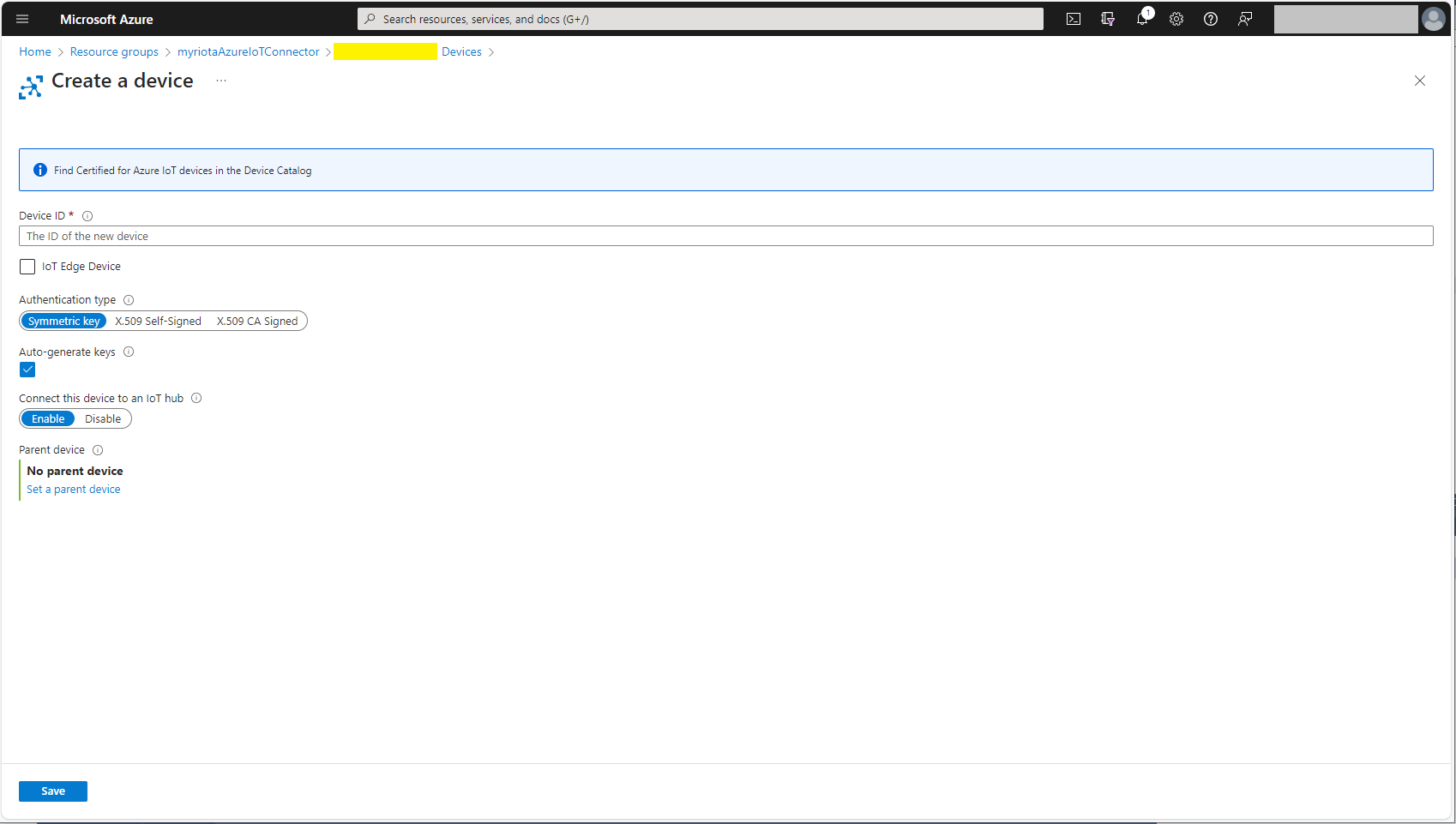
Azure IoT Hub manual Device configuration

Azure IoT Hub Device Provisioning Service

The Azure IoT Hub Device Provisioning Service(DPS) delegate uses Symmetric Key Attestation with the Global Device Endpoint, ID Scope and Group Enrollment Key retrieved from the application configuration.

{
  "ConnectionStrings": {
    "ApplicationInsights": "...",
    "UplinkQueueStorage": "...",
    "PayloadFormattersStorage": "..."
  },
  "AzureIoT": {
      "ConnectionType": "DeviceProvisioningService",
      "DeviceProvisioningServiceIoTHub": {
        "GlobalDeviceEndpoint": "global.azure-devices-provisioning.net",
        "IDScope": ".....",
        "GroupEnrollmentKey": "...."
      }
   }
}
Azure IoT Function with Azure IoT Hub Device Provisioning Service(DPS) configuration

Symmetric key attestation with the Azure IoT Hub Device Provisioning Service(DPS) is performed using the same security tokens supported by Azure IoT Hubs to securely connect devices. The symmetric key of an enrollment group isn’t used directly by devices in the provisioning process. Instead, devices that provision through an enrollment group do so using a derived device key.

private async Task<DeviceClient> AzureIoTHubDeviceProvisioningServiceConnectAsync(string terminalId, object context)
{
    DeviceClient deviceClient;

    string deviceKey;
    using (var hmac = new HMACSHA256(Convert.FromBase64String(_azureIoTSettings.AzureIoTHub.DeviceProvisioningService.GroupEnrollmentKey)))
    {
        deviceKey = Convert.ToBase64String(hmac.ComputeHash(Encoding.UTF8.GetBytes(terminalId)));
    }

    using (var securityProvider = new SecurityProviderSymmetricKey(terminalId, deviceKey, null))
    {
        using (var transport = new ProvisioningTransportHandlerAmqp(TransportFallbackType.TcpOnly))
        {
            DeviceRegistrationResult result;

            ProvisioningDeviceClient provClient = ProvisioningDeviceClient.Create(
                _azureIoTSettings.AzureIoTHub.DeviceProvisioningService.GlobalDeviceEndpoint,
                _azureIoTSettings.AzureIoTHub.DeviceProvisioningService.IdScope,
                securityProvider,
                transport);

            result = await provClient.RegisterAsync();
  
            if (result.Status != ProvisioningRegistrationStatusType.Assigned)
            {
                _logger.LogWarning("Uplink-DeviceID:{0} RegisterAsync status:{1} failed ", terminalId, result.Status);

                throw new ApplicationException($"Uplink-DeviceID:{0} RegisterAsync status:{1} failed");
            }

            IAuthenticationMethod authentication = new DeviceAuthenticationWithRegistrySymmetricKey(result.DeviceId, (securityProvider as SecurityProviderSymmetricKey).GetPrimaryKey());

            deviceClient = DeviceClient.Create(result.AssignedHub, authentication, TransportSettings);
        }
    }

    await deviceClient.OpenAsync();

    return deviceClient;
}

The derived device key is a hash of the device’s registration ID and is computed using the symmetric key of the enrollment group. The device can then use its derived device key to sign the SAS token it uses to register with DPS.

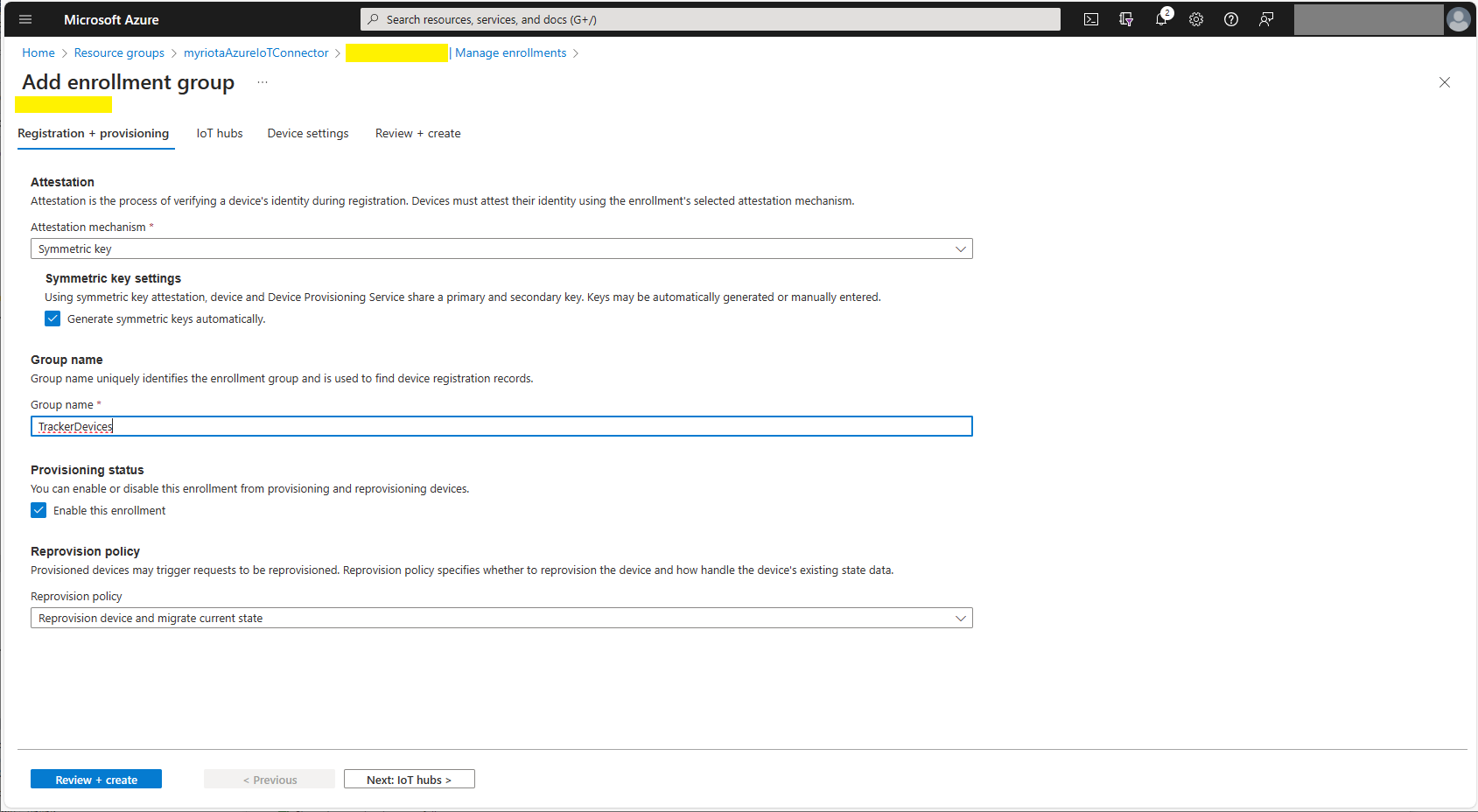
Azure Device Provisioning Service Adding Enrollment Group Attestation
Azure Device Provisioning Service Add Enrollment Group IoT Hub(s) selection.
Azure Device Provisioning Service Manager Enrollments

For initial development and testing I ran the function application in the desktop emulator and simulated Myriota Device Manager webhook calls with Azure Storage Explorer and modified sample payloads.

Azure Storage Explorer Storage Account Queued Messages

I then used Azure IoT Explorer to configure devices, view uplink traffic etc.

Azure IoT Explorer Devices

When I connected to my Azure IoT Hub shortly after starting the Myriota Azure IoT Connector Function my test devices started connecting as messages arrived.

Azure IoT Explorer Device Telemetry

I then deployed my function to Azure and configured the Azure IoT Hub connection string, Azure Application Insights connection string etc.

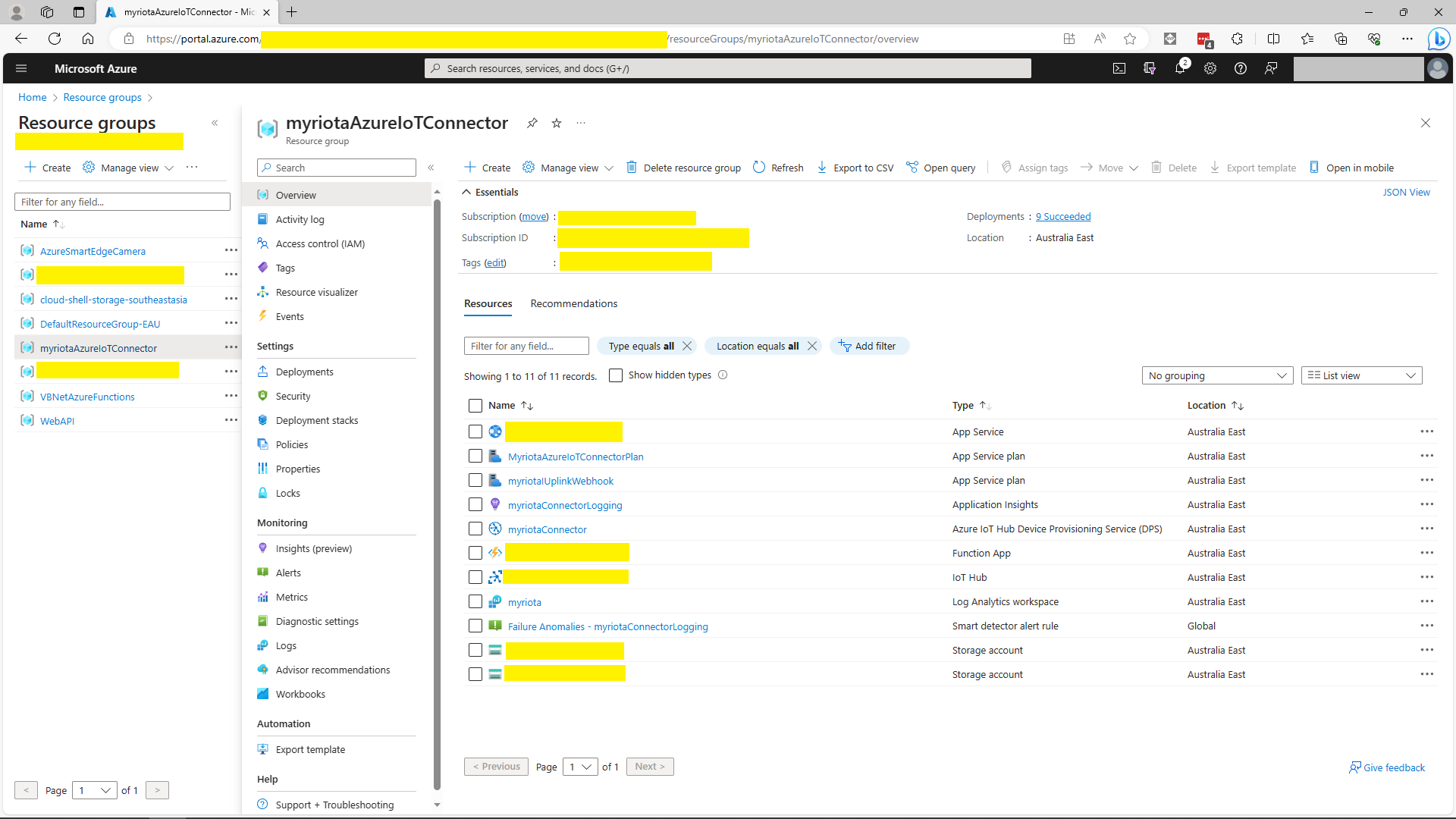
Azure Portal Myriota Resource Group
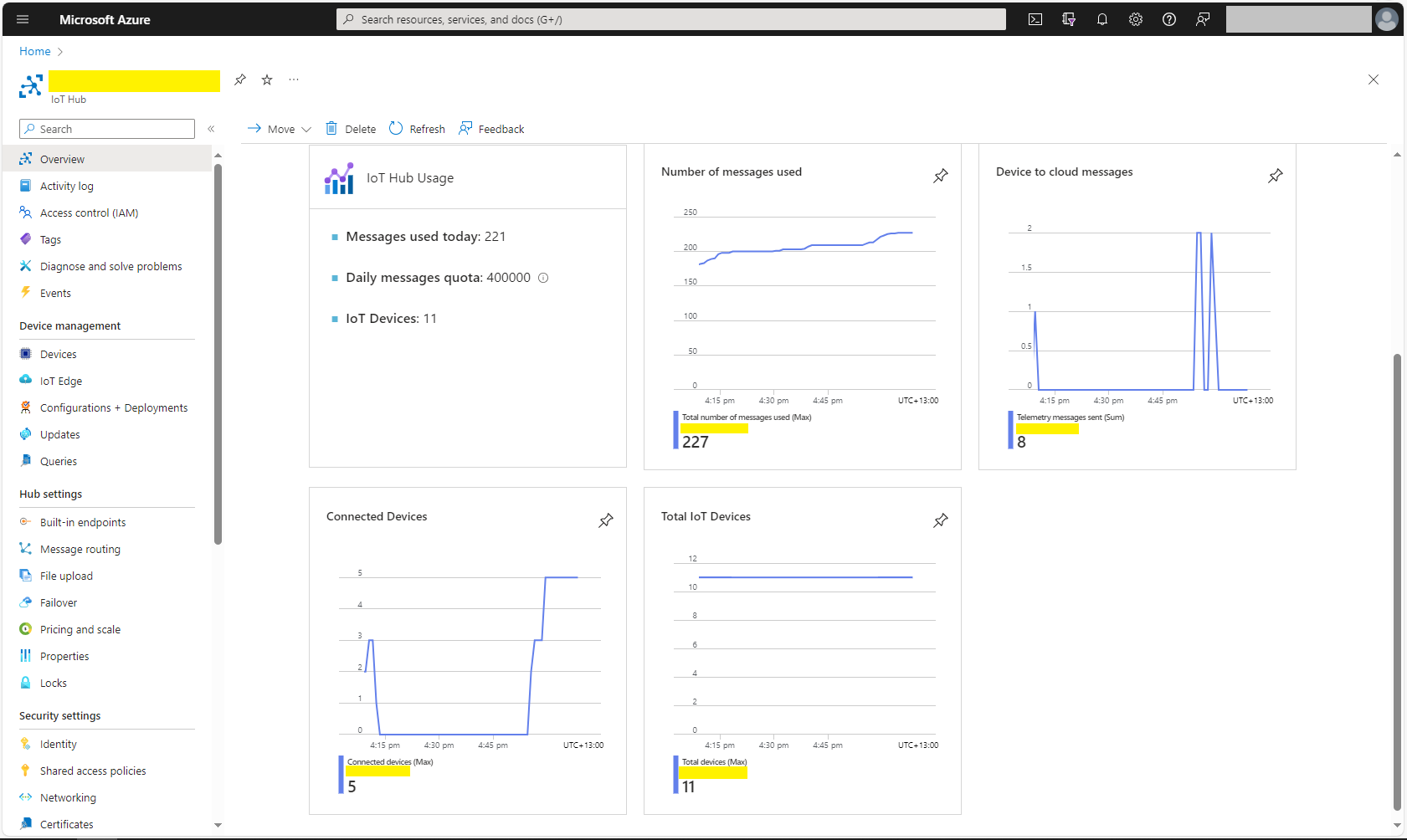
Azure Portal Myriota IoT Hub Metrics

There was often a significant delay for the Device Status to update. which shouldn’t be a problem.

.NET Core web API + Dapper – Redis Cache

The IDistributedCache has Memory, SQL Server and Redis implementations so I wanted to explore how the Stack Exchange Redis library works. The ConnectionMultiplexer class in the Stack Exchange Redis library hides the details of managing connections to multiple Redis servers, connection timeouts etc. The object is fairly “chunky” so it should be initialized once and reused for the lifetime of the program.

public static void Main(string[] args)
{
    var builder = WebApplication.CreateBuilder(args);

    // Add services to the container.
    builder.Services.AddApplicationInsightsTelemetry();

    // Add services to the container.
    builder.Services.AddTransient<IDapperContext>(s => new DapperContext(builder.Configuration));

    builder.Services.AddControllers();

    builder.Services.AddSingleton<IConnectionMultiplexer>(s => ConnectionMultiplexer.Connect(builder.Configuration.GetConnectionString("Redis")));

    var app = builder.Build();

    // Configure the HTTP request pipeline.
    app.UseHttpsRedirection();
    app.MapControllers();

    app.Run();
}

I trialed the initial versions of my Redis project with Memurai on my development machine, then configured an Azure Cache for Redis. I then load tested the project with several Azure AppService client and there was a significant improvement in response time.

[ApiController]
[Route("api/[controller]")]
public class StockItemsController : ControllerBase
{
    private const int StockItemSearchMaximumRowsToReturn = 15;
    private readonly TimeSpan StockItemListExpiration = new TimeSpan(0, 5, 0);

    private const string sqlCommandText = @"SELECT [StockItemID] as ""ID"", [StockItemName] as ""Name"", [RecommendedRetailPrice], [TaxRate] FROM [Warehouse].[StockItems]";
    //private const string sqlCommandText = @"SELECT [StockItemID] as ""ID"", [StockItemName] as ""Name"", [RecommendedRetailPrice], [TaxRate] FROM [Warehouse].[StockItems]; WAITFOR DELAY '00:00:02'";

    private readonly ILogger<StockItemsController> logger;
    private readonly IDbConnection dbConnection;
    private readonly IDatabase redisCache;

    public StockItemsController(ILogger<StockItemsController> logger, IDapperContext dapperContext, IConnectionMultiplexer connectionMultiplexer)
    {
        this.logger = logger;
        this.dbConnection = dapperContext.ConnectionCreate();
        this.redisCache = connectionMultiplexer.GetDatabase();
    }

        [HttpGet]
    public async Task<ActionResult<IEnumerable<Model.StockItemListDtoV1>>> Get()
    {
        var cached = await redisCache.StringGetAsync("StockItems");
        if (cached.HasValue)
        {
            return Content(cached, "application/json");
        }

        var stockItems = await dbConnection.QueryWithRetryAsync<Model.StockItemListDtoV1>(sql: sqlCommandText, commandType: CommandType.Text);

#if SERIALISER_SOURCE_GENERATION
        string json = JsonSerializer.Serialize(stockItems, typeof(List<Model.StockItemListDtoV1>), Model.StockItemListDtoV1GenerationContext.Default);
#else
        string json = JsonSerializer.Serialize(stockItems);
#endif

        await redisCache.StringSetAsync("StockItems", json, expiry: StockItemListExpiration);

        return Content(json, "application/json");
    }

...

    [HttpDelete()]
    public async Task<ActionResult> ListCacheDelete()
    {
        await redisCache.KeyDeleteAsync("StockItems");

        logger.LogInformation("StockItems list removed");

        return this.Ok();
    }
}

Like Regular Expressions in .NET, the System.Test.Json object serialisations can be compiled to MSIL code instead of high-level internal instructions. This allows .NET’s just-in-time (JIT) compiler to convert the serialisation to native machine code for higher performance.

public class StockItemListDtoV1
{
    public int Id { get; set; }

    public string Name { get; set; }

    public decimal RecommendedRetailPrice { get; set; }

    public decimal TaxRate { get; set; }
}

[JsonSourceGenerationOptions(PropertyNamingPolicy = JsonKnownNamingPolicy.CamelCase)]
[JsonSerializable(typeof(List<StockItemListDtoV1>))]
public partial class StockItemListDtoV1GenerationContext : JsonSerializerContext
{
}

The cost of constructing the Serialiser may be higher, but the cost of performing serialisation with it is much smaller.

[HttpGet]
public async Task<ActionResult<IEnumerable<Model.StockItemListDtoV1>>> Get()
{
    var cached = await redisCache.StringGetAsync("StockItems");
    if (cached.HasValue)
    {
        return Content(cached, "application/json");
    }

    var stockItems = await dbConnection.QueryWithRetryAsync<Model.StockItemListDtoV1>(sql: sqlCommandText, commandType: CommandType.Text);

#if SERIALISER_SOURCE_GENERATION
    string json = JsonSerializer.Serialize(stockItems, typeof(List<Model.StockItemListDtoV1>), Model.StockItemListDtoV1GenerationContext.Default);
#else
    string json = JsonSerializer.Serialize(stockItems);
#endif

    await redisCache.StringSetAsync("StockItems", json, expiry: StockItemListExpiration);

    return Content(json, "application/json");
}

I used Telerik Fiddler to empty the cache then load the StockItems list 10 times (more tests would improve the quality of the results). The first trial was with the “conventional” serialiser

The average time for the conventional serialiser was 0.028562 seconds

The average time for the generated version was 0.030546 seconds. But, if the initial compilation step was ignored the average duration dropped to 0.000223 seconds a significant improvement.

Myriota – Uplink Payload formatters and caching

My myriota Azure IoT Hub Cloud Identity Translation Gateway payload formatters uses C# code (compiled with CS-Script cached with Alastair Crabtrees’s LazyCache) to convert uplink packet payloads to JSON.

I have found that putting the C/C++ structure for the uplink payload at the top of the convertor really helpful.

/*
myriota tracker payload format

typedef struct {
  uint16_t sequence_number;
  int32_t latitude;   // scaled by 1e7, e.g. -891234567 (south 89.1234567)
  int32_t longitude;  // scaled by 1e7, e.g. 1791234567 (east 179.1234567)
  uint32_t time;      // epoch timestamp of last fix
} __attribute__((packed)) tracker_message; 

*/ 
using System;
using System.Collections.Generic;

using Newtonsoft.Json;
using Newtonsoft.Json.Linq;


public class FormatterUplink : PayloadFormatter.IFormatterUplink
{
    public JObject Evaluate(IDictionary<string, string> properties, string application, string terminalId, DateTime timestamp, JObject payloadJson, string payloadText, byte[] payloadBytes)
    {
        JObject telemetryEvent = new JObject();

        telemetryEvent.Add("SequenceNumber", BitConverter.ToUInt16(payloadBytes));

        double latitude = BitConverter.ToInt32(payloadBytes, 2) / 10000000.0;
        telemetryEvent.Add("Latitude", latitude);

        double longitude = BitConverter.ToInt32(payloadBytes, 6) / 10000000.0;
        telemetryEvent.Add("Longitude", longitude);

        UInt32 packetimestamp = BitConverter.ToUInt32(payloadBytes, 10);
        DateTime lastFix = DateTime.UnixEpoch.AddSeconds(packetimestamp);

       properties.Add("iothub-creation-time-utc", lastFix .ToString("s", CultureInfo.InvariantCulture));

       return telemetryEvent;
    }
}

The sample Tracker.cs payload formatter unpacks a message from Myriota Dev Kit running the Tracker sample and returns an Azure IoT Central compatible location telemetry payload.

BEWARE : I think the Azure IoT Central Position lat, lon + alt values might be case sensitive.

Azure IoT Explorer displaying Tracker.cs payload formatter output

The identity payload formatter to use is configured as part of the Destination webhook Uniform Resource Locator (URL).

Myriota Destination configuration application name URL configuration
namespace devMobile.IoT.MyriotaAzureIoTConnector.Connector.Models
{
    public class UplinkPayloadQueueDto
    {
        public string Application { get; set; }
        public string EndpointRef { get; set; }
        public DateTime PayloadReceivedAtUtc { get; set; }
        public DateTime PayloadArrivedAtUtc { get; set; }
        public QueueData Data { get; set; }
        public string Id { get; set; }
        public Uri CertificateUrl { get; set; }
        public string Signature { get; set; }
    }

    public class QueueData
    {
        public List<QueuePacket> Packets { get; set; }
    }

    public class QueuePacket
    {
        public string TerminalId { get; set; }

        public DateTime Timestamp { get; set; }

        public string Value { get; set; }
    }
}

A pair of Azure Blob Storage containers are used to store the uplink/downlink (coming soon) formatter files. The compiled payload formatters are cached with Uplink/Downlink + Application (from the UplinkPayloadQueueDto) as the key.

Azure IoT Storage Explorer uplink payload formatters

The default uplink and downlink formatters used when there is no payload formatter for “Application” are configured in the application settings.

Myriota device Uplink Serialisation

The Myriota Developer documentation has some sample webhook data payloads so I used JSON2csharp to generate a Data Transfer Object(DTO) to deserialise payload. The format of the message is a bit “odd”, the “Data “Value” contains an “escaped” JSON object.

{
  "EndpointRef": "ksnb8GB_TuGj:__jLfs2BQJ2d",
  "Timestamp": 1692928585,
  "Data": "{"Packets": [{"Timestamp": 1692927646796, "TerminalId": "0001020304", "Value": "00008c9512e624cce066adbae764cccccccccccc"}]}",
  "Id": "a5c1bffe-4b62-4233-bbe9-d4ecc4f8b6cb",
  "CertificateUrl": "https://security.myriota.com/data-13f7751f3c5df569a6c9c42a9ce73a8a.crt",
  "Signature": "FDJpQdWHwCY+tzCN/WvQdnbyjgu4BmP/t3cJIOEF11sREGtt7AH2L9vMUDji6X/lxWBYa4K8tmI0T914iPyFV36i+GtjCO4UHUGuFPJObCtiugVV8934EBM+824xgaeW8Hvsqj9eDeyJoXH2S6C1alcAkkZCVt0pUhRZSZZ4jBJGGEEQ1Gm+SOlYjC2exUOf0mCrI5Pct+qyaDHbtiHRd/qNGW0LOMXrB/9difT+/2ZKE1xvDv9VdxylXi7W0/mARCfNa0J6aWtQrpvEXJ5w22VQqKBYuj3nlGtL1oOuXCZnbFYFf4qkysPaXON31EmUBeB4WbZMyPaoyFK0wG3rwA=="
}
namespace devMobile.IoT.myriotaAzureIoTConnector.myriota.UplinkWebhook.Models
{
    public class UplinkPayloadWebDto
    {
        public string EndpointRef { get; set; }
        public long Timestamp { get; set; } 
        public string Data { get; set; } // Embedded JSON ?
        public string Id { get; set; }
        public string CertificateUrl { get; set; }
        public string Signature { get; set; }
    }
}

The UplinkWebhook controller “automagically” deserialises the message, then in code the embedded JSON is deserialised and “unpacked”, finally the processed message is inserted into an Azure Storage queue.

namespace devMobile.IoT.myriotaAzureIoTConnector.myriota.UplinkWebhook.Controllers
{
    [Route("[controller]")]
    [ApiController]
    public class UplinkController : ControllerBase
    {
        private readonly Models.ApplicationSettings _applicationSettings;
        private readonly ILogger<UplinkController> _logger;
        private readonly QueueServiceClient _queueServiceClient;

        public UplinkController(IOptions<Models.ApplicationSettings> applicationSettings, QueueServiceClient queueServiceClient, ILogger<UplinkController> logger)
        {
            _applicationSettings = applicationSettings.Value;
            _queueServiceClient = queueServiceClient;
            _logger = logger;
        }

        [HttpPost]
        public async Task<IActionResult> Post([FromBody] Models.UplinkPayloadWebDto payloadWeb)
        {
            _logger.LogInformation("SendAsync queue name:{QueueName}", _applicationSettings.QueueName);

            QueueClient queueClient = _queueServiceClient.GetQueueClient(_applicationSettings.QueueName);

            var serializeOptions = new JsonSerializerOptions
            {
                WriteIndented = true,
                Encoder = System.Text.Encodings.Web.JavaScriptEncoder.UnsafeRelaxedJsonEscaping
            };

            await queueClient.SendMessageAsync(Convert.ToBase64String(JsonSerializer.SerializeToUtf8Bytes(payloadWeb, serializeOptions)));

            return this.Ok();
        }
    }
}

The webhook application uses the QueueClientBuilderExtensions and AddServiceClient so a QueueServiceClient can be injected into the webhook controller.

namespace devMobile.IoT.myriotaAzureIoTConnector.myriota.UplinkWebhook
{
    public class Program
    {
        public static void Main(string[] args)
        {
            var builder = WebApplication.CreateBuilder(args);

            // Add services to the container.
            builder.Services.AddControllers();

            builder.Services.AddApplicationInsightsTelemetry(i => i.ConnectionString = builder.Configuration.GetConnectionString("ApplicationInsights"));

            builder.Services.Configure<Models.ApplicationSettings>(builder.Configuration.GetSection("Application"));

            builder.Services.AddAzureClients(azureClient =>
            {
                azureClient.AddQueueServiceClient(builder.Configuration.GetConnectionString("AzureWebApi"));
            });

            var app = builder.Build();

            // Configure the HTTP request pipeline.

            app.UseHttpsRedirection();

            app.MapControllers();

            app.Run();
        }
    }
}

After debugging the application on my desktop with Telerik fiddler I deployed the application to one of my Azure subscriptions.

Azure Resource Group for the myriota Azure IoT Connector
Adding a new Destination in the myriota device manager

As part of configuring a new device test messages can be sent to the configured destinations.

Testing a new Destination in the myriota device manager
{
  "EndpointRef": "N_HlfTNgRsqe:uyXKvYTmTAO5",
  "Timestamp": 1563521870,
  "Data": "{"Packets": [{"Timestamp": 1563521870359,
    "TerminalId": "f74636ec549f9bde50cf765d2bcacbf9",
    "Value": "0101010101010101010101010101010101010101"}]}",
  "Id": "fe77e2c7-8e9c-40d0-8980-43720b9dab75",
  "CertificateUrl":    "https://security.myriota.com/data-13f7751f3c5df569a6c9c42a9ce73a8a.crt",
  "Signature": "k2OIBppMRmBT520rUlIvMxNg+h9soJYBhQhOGSIWGdzkppdT1Po2GbFr7jbg..."
}

The DTO generated with JSON2csharp needed some manual “tweaking” after examining how a couple of the sample messages were deserialised.

Azure Storage Explorer messages

I left the Myriota Developer Toolkit device (running the tracker sample) outside overnight and the following day I could see with Azure Storage Explorer a couple of messages in the Azure Storage Queue

Myriota device configuration

For a couple of weeks Myriota Developer Toolkit has been sitting under my desk and today I got some time to setup a device, register it, then upload some data.

Myriota Developer Toolkit

The first step was to download and install the Myriota Configurator so I could get the device registration information and install the tracker example application.

Using Windows File Explorer to “unblock” the downloaded file

After “unblocking” the zip file and upgrading my pip install the install script worked.

Myriota Configurator installation script

The application had to be run from the command line with “python MyriotaConfigurator.py”

Myriota Configurator main menu
Myriota Configurator retrieving device registration code

On the device I’m using the Tracker sample application to generate some sample payloads.

Myriota Configurator downloading tracker sample to device

The next step was to “register” my device and configure the destination(s) for its messages.

Myriota Device Manager Device configuration

Once the device and device manager configuration were sorted, I put the Tracker out on the back lawn on top of a large flowerpot.

Device Manager Access Times

On the “Access Times” page I could see that there were several periods when a satellite was overhead and overnight a couple of messages were uploaded.

ASP.NET Core authentication – In the beginning

While building my ASP.NET Core identity, Dapper Custom storage provider I found there wasn’t a lot of discussion of the ASPNETUserClaims functionality for fine “grained permissions”.

ASP.NET Core identity initial data model

ASP.NET Core identity Roles can also have individual claims but with the authorisation model of the legacy application I work on this functionality hasn’t been useful. We use role based authentication with a few user claims to minimise the size of our Java Web Tokens(JWT)

Visual Studio 2022 ASP.NET Core Web Application template options

The first step was to create a “bare-bones” ASP.NET Core Razor pages Web Application with Individual Accounts Authentication project

Default ASP.NET Core identity Web application Homepage

I tried to minimise the modifications to the application. I added EnableRetryOnFailure, some changes to names spaces etc. I also added support for email address confirmation with SendGrid and “authentication” link to the navabar in _Layout.cshtml.

@page
@model RolesModel
@{
    <table class="table">
        <thead>
            <tr>
                <th>Role</th>
            </tr>
        </thead>
        <tbody>
            @foreach (var role in Model.Roles)
            {
                <tr>
                    <td>
                        @Html.DisplayFor(modelItem => role.Value)
                    </td>
                </tr>
            }
        </tbody>
    </table>
    <br/>
        <table class="table">
        <thead>
            <tr>
                <th>Claim Subject</th>
                <th>Value</th>
            </tr>
        </thead>

        <tbody>
            @foreach (var claim in Model.Claims)
            {
                <tr>
                    <td>
                        @Html.DisplayFor(modelItem => claim.Type)
                    </td>
                    <td>
                        @Html.DisplayFor(modelItem => claim.Value)
                    </td>
                </tr>
            }
        </tbody>
    </table>
}

The “Authentication” page displays the logged in User’s Role and Claims.

namespace devMobile.AspNetCore.Identity.WebApp.EFCore.Pages
{
    [Authorize()]
    public class RolesModel : PageModel
    {
        private readonly ILogger<RolesModel> _logger;

        public List<Claim> Roles { get; set; }
        public List<Claim> Claims { get; set; }

        public RolesModel(ILogger<RolesModel> logger)
        {
            _logger = logger;
        }

        public void OnGet()
        {
            Roles = User.Claims.Where(c => c.Type == ClaimTypes.Role).ToList();

            Claims = User.Claims.Where(c => c.Type != ClaimTypes.Role).ToList();
        }
    }
}

Each user can have role(s), with optional claims, and some optional individual claims.

ASP.NET Core identity application Authentication information page

The WebApp.EFCore project is intended to be the starting point for a series of posts about ASP.NET Core identity so I have not included Cross-Origin Resource Sharing (CORS), Cross Site Request Forgery (CSRF) etc. functionality.

.NET Core web API + Dapper – MiniProfiler Revisited

While exploring some of the functionality of MiniProfiler there were some 3rd party examples which caught my attention.

using (SqlConnection connection = new SqlConnection(@"Data Source=...; Initial Catalog=SyncDB; Trusted_Connection=Yes"))
{
    using (ProfiledDbConnection profiledDbConnection = new ProfiledDbConnection(connection, MiniProfiler.Current))
    {
    if (profiledDbConnection.State != System.Data.ConnectionState.Open)
        profiledDbConnection.Open();
    using (SqlCommand command = new SqlCommand("Select * From Authors", connection))
    {
        using (ProfiledDbCommand profiledDbCommand = new ProfiledDbCommand(command, connection, MiniProfiler.Current))
        {                               
            var data = profiledDbCommand.ExecuteReader();

            //Write code here to populate the list of Authors
        }
    }
}                  

“Inspired” by code like this my first attempt to retrieve a list of stock items didn’t look right.

[HttpGet("AdoProfiledOtt")]
public async Task<ActionResult<IEnumerable<Model.StockItemListDtoV1>>> GetAdoProfiledOtt()
{
    List<Model.StockItemListDtoV1> response = new List<Model.StockItemListDtoV1>();

    using (SqlConnection connection = new SqlConnection(configuration.GetConnectionString("default")))
    {
        using (ProfiledDbConnection profiledDbConnection = new ProfiledDbConnection(connection, MiniProfiler.Current))
        {
            await profiledDbConnection.OpenAsync();

            using (SqlCommand command = new SqlCommand(sqlCommandText, connection))
            {
                using (ProfiledDbCommand profiledDbCommand = new ProfiledDbCommand(command, profiledDbConnection, MiniProfiler.Current))
                {
                    using (SqlDataReader reader = await command.ExecuteReaderAsync())
                    {
                        using (ProfiledDbDataReader profiledDbDataReader = new ProfiledDbDataReader(reader, MiniProfiler.Current))
                        {
                            var rowParser = profiledDbDataReader.GetRowParser<Model.StockItemListDtoV1>();

                            while (await profiledDbDataReader.ReadAsync())
                            {
                                response.Add(rowParser(profiledDbDataReader));
                            }
                        }
                    }
                }
            }

            await profiledDbConnection.CloseAsync();
        }
    }
}

Often Dapper has functionality like closing the connection if it needed to open it to reduce the amount of code required and this code looked verbose.

[HttpGet]
public async Task<ActionResult<IEnumerable<Model.StockItemListDtoV1>>> Get()
{
	IEnumerable<Model.StockItemListDtoV1> response = null;

	using (SqlConnection db = new SqlConnection(this.connectionString))
	{
		response = await db.QueryWithRetryAsync<Model.StockItemListDtoV1>(sql: @"SELECT [StockItemID] as ""ID"", [StockItemName] as ""Name"", [RecommendedRetailPrice], [TaxRate] FROM [Warehouse].[StockItems]", commandType: CommandType.Text);
	}
	return this.Ok(response);
}

It seemed a bit odd that so many “usings” were needed so I had a look at ProfiledDBConnection.cs

/// <summary>
/// Initializes a new instance of the <see cref="ProfiledDbConnection"/> class.
/// Returns a new <see cref="ProfiledDbConnection"/> that wraps <paramref name="connection"/>,
/// providing query execution profiling. If profiler is null, no profiling will occur.
/// </summary>
/// <param name="connection"><c>Your provider-specific flavour of connection, e.g. SqlConnection, OracleConnection</c></param>
/// <param name="profiler">The currently started <see cref="MiniProfiler"/> or null.</param>
/// <exception cref="ArgumentNullException">Throws when <paramref name="connection"/> is <c>null</c>.</exception>
public ProfiledDbConnection(DbConnection connection, IDbProfiler? profiler)
{
    _connection = connection ?? throw new ArgumentNullException(nameof(connection));
    _connection.StateChange += StateChangeHandler;

    if (profiler != null)
    {
        _profiler = profiler;
    }
}
...
/// <summary>
/// Dispose the underlying connection.
/// </summary>
/// <param name="disposing">false if preempted from a <c>finalizer</c></param>
protected override void Dispose(bool disposing)
{
    if (disposing && _connection != null)
    {
        _connection.StateChange -= StateChangeHandler;
        _connection.Dispose();
    }
    base.Dispose(disposing);
    _connection = null!;
    _profiler = null;
}

One less “using” required as ProfiledDbConnection “automagically” disposes the SqlConnection. It also seemed a bit odd that the SqlCommand had a “using” so I had a look at ProfiledDbCommand.cs

 /// <summary>
/// Initializes a new instance of the <see cref="ProfiledDbCommand"/> class.
/// </summary>
/// <param name="command">The command.</param>
/// <param name="connection">The connection.</param>
/// <param name="profiler">The profiler.</param>
/// <exception cref="ArgumentNullException">Throws when <paramref name="command"/> is <c>null</c>.</exception>
public ProfiledDbCommand(DbCommand command, DbConnection? connection, IDbProfiler? profiler)
{
    _command = command ?? throw new ArgumentNullException(nameof(command));

    if (connection != null)
    {
        _connection = connection;
        UnwrapAndAssignConnection(connection);
    }

    if (profiler != null)
    {
        _profiler = profiler;
    }
}
...
/// <summary>
/// Releases all resources used by this command.
/// </summary>
/// <param name="disposing">false if this is being disposed in a <c>finalizer</c>.</param>
protected override void Dispose(bool disposing)
{
   if (disposing && _command != null)
   {
       _command.Dispose();
    }
    _command = null!;
    base.Dispose(disposing);
}

Another “using” not required as ProfiledDbCommand “automagically” disposes the SqlCommand as well. It also seemed a bit odd that the SqlDataReader had a using so I had a look at profileDbDataReader.cs

/// <summary>
/// Initializes a new instance of the <see cref="ProfiledDbDataReader"/> class (with <see cref="CommandBehavior.Default"/>).
/// </summary>
/// <param name="reader">The reader.</param>
/// <param name="profiler">The profiler.</param>
public ProfiledDbDataReader(DbDataReader reader, IDbProfiler profiler) : this(reader, CommandBehavior.Default, profiler) { }

/// <summary>
/// Initializes a new instance of the <see cref="ProfiledDbDataReader"/> class.
/// </summary>
/// <param name="reader">The reader.</param>
/// <param name="behavior">The behavior specified during command execution.</param>
/// <param name="profiler">The profiler.</param>
public ProfiledDbDataReader(DbDataReader reader, CommandBehavior behavior, IDbProfiler? profiler)
{
    WrappedReader = reader;
    Behavior = behavior;
    _profiler = profiler;
}
...
/// <summary>
/// The <see cref="DbDataReader"/> that is being used.
/// </summary>
public DbDataReader WrappedReader { get; }

/// <inheritdoc cref="DbDataReader.Dispose(bool)"/>
protected override void Dispose(bool disposing)
{
    // reader can be null when we're not profiling, but we've inherited from ProfiledDbCommand and are returning a
    // an unwrapped reader from the base command
    WrappedReader?.Dispose();
    base.Dispose(disposing);
}

Another “using” not required as ProfiledDbDataReader “automagically” disposes the SqlDataReader. This was my final version of profiling the System.Data.SqlClient code to retrieve a list of stock items.

[HttpGet("AdoProfiled")]
public async Task<ActionResult<IEnumerable<Model.StockItemListDtoV1>>> GetProfiledAdo()
{
    List<Model.StockItemListDtoV1> response = new List<Model.StockItemListDtoV1>();

    using (ProfiledDbConnection profiledDbConnection = new ProfiledDbConnection((SqlConnection)dapperContext.ConnectionCreate(), MiniProfiler.Current))
    {
        await profiledDbConnection.OpenAsync();

        using (ProfiledDbCommand profiledDbCommand = new ProfiledDbCommand(new SqlCommand(sqlCommandText), profiledDbConnection, MiniProfiler.Current))
        {
            DbDataReader reader = await profiledDbCommand.ExecuteReaderAsync();

            using (ProfiledDbDataReader profiledDbDataReader = new ProfiledDbDataReader(reader, MiniProfiler.Current))
            {
                var rowParser = profiledDbDataReader.GetRowParser<Model.StockItemListDtoV1>();

                while (await profiledDbDataReader.ReadAsync())
                {
                    response.Add(rowParser(profiledDbDataReader));
                }
            }
        }
    }

    return this.Ok(response);
}

The profileDbDataReader.cs implementation was “sparse” and when loading a longer list of stock items there were some ReadAsync calls which took a bit longer.

/// <summary>
/// The profiled database data reader.
/// </summary>
public class ProfiledDbDataReader : DbDataReader
{
    private readonly IDbProfiler? _profiler;

    /// <summary>
    /// Initializes a new instance of the <see cref="ProfiledDbDataReader"/> class (with <see cref="CommandBehavior.Default"/>).
    /// </summary>
    /// <param name="reader">The reader.</param>
    /// <param name="profiler">The profiler.</param>
    public ProfiledDbDataReader(DbDataReader reader, IDbProfiler profiler) : this(reader, CommandBehavior.Default, profiler) { }

    /// <summary>
    /// Initializes a new instance of the <see cref="ProfiledDbDataReader"/> class.
    /// </summary>
    /// <param name="reader">The reader.</param>
    /// <param name="behavior">The behavior specified during command execution.</param>
    /// <param name="profiler">The profiler.</param>
    public ProfiledDbDataReader(DbDataReader reader, CommandBehavior behavior, IDbProfiler? profiler)
    {
        WrappedReader = reader;
        Behavior = behavior;
        _profiler = profiler;
    }

    /// <summary>Gets the behavior specified during command execution.</summary>
    public CommandBehavior Behavior { get; }

    /// <inheritdoc cref="DbDataReader.Depth"/>
    public override int Depth => WrappedReader.Depth;

    /// <inheritdoc cref="DbDataReader.FieldCount"/>
    public override int FieldCount => WrappedReader.FieldCount;

    /// <inheritdoc cref="DbDataReader.HasRows"/>
    public override bool HasRows => WrappedReader.HasRows;

    /// <inheritdoc cref="DbDataReader.IsClosed"/>
    public override bool IsClosed => WrappedReader.IsClosed;

    /// <inheritdoc cref="DbDataReader.RecordsAffected"/>
    public override int RecordsAffected => WrappedReader.RecordsAffected;

    /// <summary>
    /// The <see cref="DbDataReader"/> that is being used.
    /// </summary>
    public DbDataReader WrappedReader { get; }

    /// <inheritdoc cref="DbDataReader.this[string]"/>
    public override object this[string name] => WrappedReader[name];

    /// <inheritdoc cref="DbDataReader.this[int]"/>
    public override object this[int ordinal] => WrappedReader[ordinal];
...
    /// <inheritdoc cref="DbDataReader.GetString(int)"/>
    public override string GetString(int ordinal) => WrappedReader.GetString(ordinal);

    /// <inheritdoc cref="DbDataReader.GetValue(int)"/>
    public override object GetValue(int ordinal) => WrappedReader.GetValue(ordinal);

    /// <inheritdoc cref="DbDataReader.GetValues(object[])"/>
    public override int GetValues(object[] values) => WrappedReader.GetValues(values);

    /// <inheritdoc cref="DbDataReader.IsDBNull(int)"/>
    public override bool IsDBNull(int ordinal) => WrappedReader.IsDBNull(ordinal);

    /// <inheritdoc cref="DbDataReader.IsDBNullAsync(int, CancellationToken)"/>
    public override Task<bool> IsDBNullAsync(int ordinal, CancellationToken cancellationToken) => WrappedReader.IsDBNullAsync(ordinal, cancellationToken);

    /// <inheritdoc cref="DbDataReader.NextResult()"/>
    public override bool NextResult() => WrappedReader.NextResult();

    /// <inheritdoc cref="DbDataReader.NextResultAsync(CancellationToken)"/>
    public override Task<bool> NextResultAsync(CancellationToken cancellationToken) => WrappedReader.NextResultAsync(cancellationToken);

    /// <inheritdoc cref="DbDataReader.Read()"/>
    public override bool Read() => WrappedReader.Read();

    /// <inheritdoc cref="DbDataReader.ReadAsync(CancellationToken)"/>
    public override Task<bool> ReadAsync(CancellationToken cancellationToken) => WrappedReader.ReadAsync(cancellationToken);

    /// <inheritdoc cref="DbDataReader.Close()"/>
    public override void Close()
    {
        // reader can be null when we're not profiling, but we've inherited from ProfiledDbCommand and are returning a
        // an unwrapped reader from the base command
        WrappedReader?.Close();
        _profiler?.ReaderFinish(this);
    }

    /// <inheritdoc cref="DbDataReader.GetSchemaTable()"/>
    public override DataTable? GetSchemaTable() => WrappedReader.GetSchemaTable();

    /// <inheritdoc cref="DbDataReader.Dispose(bool)"/>
    protected override void Dispose(bool disposing)
    {
        // reader can be null when we're not profiling, but we've inherited from ProfiledDbCommand and are returning a
        // an unwrapped reader from the base command
        WrappedReader?.Dispose();
        base.Dispose(disposing);
    }
}

In the [HttpGet(“DapperProfiledQueryMultipleStep”)] method I wrapped ReadAsync and could see in the profiling that every so often a call did take significantly longer.

using (MiniProfiler.Current.Step("invoiceSummaryLine.ReadAsync"))
{
   response.InvoiceLines = await invoiceSummary.ReadAsync<Model.InvoiceLineSummaryListDtoV1>();
}

I did consider modifying profileDbDataReader.cs to add some instrumentation to the Read… and Get… methods but, the authors of miniprofiler are way way smarter than me so there must be a reason why they didn’t.

.NET Core web API + Dapper – Distributed Cache

I have used LazyCache for several projects (The Things Network V2 HTTP, The Things Industries V2 MQTT The Things Industries V3 and Swarm Space Azure IoT Connector etc.) to cache Azure IoT Hub DeviceClient and other object instances.

The note on the wiki page For LazyCache v2+ users, you should consider switching away from LazyCache to IDistributedCache. More information at #59 caught my attention.

I have written other posts about caching Dapper query results with the Dapper Extension Library which worked well but had some configuration limitations. I also have posts about off-loading read-only workloads with Azure Active geo-replication or SQL Data Sync for Azure, which worked well in some scenarios but had limitations (performance and operational costs).

The IDistributedCache has Memory, SQL Server and Redis implementations so I built an Azure AppService to explore the functionality in more detail. In another project I had been working with the Azure SignalR Service and the use of the MessagePack library(rather than serialised JSON) caught my attention so I have added basic support for that as well.

I explored the in-memory implementation (AddDistributedMemoryCache) on my development machine and found “tinkering” with the configuration options had little impact on the performance of my trivial sample application.

public static void Main(string[] args)
{
    var builder = WebApplication.CreateBuilder(args);

    // Add services to the container.
    builder.Services.AddApplicationInsightsTelemetry();

    // Add services to the container.
    builder.Services.AddSingleton<IDapperContext>(s => new DapperContext(builder.Configuration));

    builder.Services.AddControllers();

#if SERIALISATION_MESSAGE_PACK
    //MessagePackSerializer.DefaultOptions = MessagePack.Resolvers.ContractlessStandardResolver.Options;
    //MessagePackSerializer.DefaultOptions = MessagePack.Resolvers.ContractlessStandardResolver.Options.WithCompression(MessagePackCompression.Lz4Block);
    MessagePackSerializer.DefaultOptions = MessagePack.Resolvers.ContractlessStandardResolver.Options.WithCompression(MessagePackCompression.Lz4BlockArray);
#endif

#if DISTRIBUTED_CACHE_MEMORY
    builder.Services.AddDistributedMemoryCache(options =>
    {
       options.SizeLimit = 1000 * 1024 * 1024; // 1000MB
    });
    builder.Services.AddDistributedMemoryCache();
#endif

#if DISTRIBUTED_CACHE_REDIS
    var configurationOptions = new ConfigurationOptions
    {
        EndPoints = { builder.Configuration.GetSection("RedisConnection").GetValue<string>("EndPoints") },
        AllowAdmin = true,
        Password = builder.Configuration.GetSection("RedisConnection").GetValue<string>("Password"),
        Ssl = true,
        ConnectRetry = 5,
        ConnectTimeout = 10000,
        SslProtocols = System.Security.Authentication.SslProtocols.Tls12,
        AbortOnConnectFail = false,
    };

    builder.Services.AddStackExchangeRedisCache(options =>
    {
        options.InstanceName = "Dapper WebAPI Instance";
        options.ConfigurationOptions = configurationOptions;
    });
#endif

#if DISTRIBUTED_CACHE_SQL_SERVER
    builder.Services.AddDistributedSqlServerCache(options =>
    {
        options.ConnectionString = builder.Configuration.GetConnectionString("CacheDatabase");
        options.SchemaName = "dbo";
        options.TableName = "StockItemsCache";
    });
#endif

    var app = builder.Build();

    // Configure the HTTP request pipeline.
    app.UseHttpsRedirection();
    app.MapControllers();
    app.Run();
}

I tested the SQL Server implementation (AddDistributedSqlServerCached) using the SQL Server on my development machine, and Azure SQL as a backing store. I did consider using SQL Azure In-Memory OLTP but the performance improvement with my trivial example would most probably not worth the additional cost of the required SKU.

CREATE TABLE [dbo].[StockItemsCache](
	[Id] [nvarchar](449) NOT NULL,
	[Value] [varbinary](max) NOT NULL,
	[ExpiresAtTime] [datetimeoffset](7) NOT NULL,
	[SlidingExpirationInSeconds] [bigint] NULL,
	[AbsoluteExpiration] [datetimeoffset](7) NULL,
PRIMARY KEY CLUSTERED 
(
	[Id] ASC
)WITH (PAD_INDEX = OFF, STATISTICS_NORECOMPUTE = OFF, IGNORE_DUP_KEY = OFF, ALLOW_ROW_LOCKS = ON, ALLOW_PAGE_LOCKS = ON, OPTIMIZE_FOR_SEQUENTIAL_KEY = OFF) ON [PRIMARY]
) ON [PRIMARY] TEXTIMAGE_ON [PRIMARY]
GO

The table used to store the data wasn’t very complex and I could view the data associated with a cache key in SQL Server Mangement studio.

SQL Server Managment Studio displaying cache table contents

One of the applications I work on uses a complex SQL Server Stored procedure to load reference data (updated daily) and being able to purge the cache at the end of this process like this might be useful. For a geographically distributed application putting the Azure SQL instance “closer” to the application’s users might be worth considering.

I trialed the Redis implementation with Memurai (on my development machine) and Azure Cache for Redis with multiple Azure AppService clients and there was a significant improvement in performance.

[HttpGet]
public async Task<ActionResult<IEnumerable<Model.StockItemListDtoV1>>> Get()
{
    var utcNow = DateTime.UtcNow;

    var cached = await distributedCache.GetAsync("StockItems");
    if (cached != null)
    {
#if SERIALISATION_JSON
        return this.Ok(JsonSerializer.Deserialize<List<Model.StockItemListDtoV1>>(cached));
#endif
#if SERIALISATION_MESSAGE_PACK
        return this.Ok(MessagePackSerializer.Deserialize<List<Model.StockItemListDtoV1>>(cached));
#endif
    }

    var stockItems = await dbConnection.QueryWithRetryAsync<Model.StockItemListDtoV1>(sql: sqlCommandText, commandType: CommandType.Text);

#if SERIALISATION_JSON
    await distributedCache.SetAsync("StockItems", JsonSerializer.SerializeToUtf8Bytes(stockItems), new DistributedCacheEntryOptions()
#endif
#if SERIALISATION_MESSAGE_PACK
    await distributedCache.SetAsync("StockItems", MessagePackSerializer.Serialize(stockItems), new DistributedCacheEntryOptions()
#endif
    {
        AbsoluteExpiration = new DateTime(utcNow.Year, utcNow.Month, DateTime.DaysInMonth(utcNow.Year, utcNow.Month), StockItemListAbsoluteExpiration.Hours, StockItemListAbsoluteExpiration.Minutes, StockItemListAbsoluteExpiration.Seconds)
    });

    return this.Ok(stockItems);
}

[HttpGet("NoLoad")]
public async Task<ActionResult<IEnumerable<Model.StockItemListDtoV1>>> GetNoLoad()
{
    var cached = await distributedCache.GetAsync("StockItems");
    if (cached == null)
    {
        return this.NoContent();
    }

#if SERIALISATION_JSON
    return this.Ok(JsonSerializer.Deserialize<List<Model.StockItemListDtoV1>>(cached));
#endif
#if SERIALISATION_MESSAGE_PACK
        return this.Ok(MessagePackSerializer.Deserialize<List<Model.StockItemListDtoV1>>(cached));
#endif
}

In my test environment the JSON payload for a list of stock items was a bit “chunky” at 25K bytes, so I added compile time configurable support for the MessagePack library. This significantly reduced the size of the payload LZ4Block (5K bytes) and LZ4BlockArray (5K2 bytes) which should reduce network traffic.

Assuming the overheads of JSON vs. MessagePack serialisation are similar and the much smaller MessagePack library payload I would most probably use MessagePack and LZ4BlockArray (For improved compatibility with other implementations) compression.