Swarm Space – Azure IoT FromDevice with webhooks

The initial versions of the Swarm Space Azure Cloud Identity Gateway were based on my The Things Industries(TTI) Azure IoT Connector which used six HTTP Triggered Azure Functions. My Swarm Space Azure IoT connector only has one webhook endpoint so a .NET Core WebAPI with controllers based solution appeared to be more practical. The first step was to get some sample JavaScript Object Notation(JSON) uplink message payloads with the SwarmSpace-From Device with Webhooks project.

{
  "packetId": 0,
  "deviceType": 1,
  "deviceId": 0,
  "userApplicationId": 0,
  "organizationId": 65760,
  "data": "VGhpcyBpcyBhIHRlc3QgbWVzc2FnZS4gVGhlIHBhY2tldElkIGFuZCBkZXZpY2VJZCBhcmUgbm90IHBvcHVsYXRlZCwgYnV0IHdpbGwgYmUgZm9yIGEgcmVhbCBtZXNzYWdlLg==",
  "len": 100,
  "status": 0,
  "hiveRxTime": "2022-11-29T04:52:06"
}

I used JSON2CSharp to generate an initial version of a Plain Old CLR(ComonLanguage Runtime) Object(POCO) to deserialise the Delivery Webhook payload.

 https://json2csharp.com/
    
    // Root myDeserializedClass = JsonConvert.DeserializeObject<Root>(myJsonResponse);
    public class Root
    {
        public int packetId { get; set; }
        public int deviceType { get; set; }
        public int deviceId { get; set; }
        public int userApplicationId { get; set; }
        public int organizationId { get; set; }
        public string data { get; set; }
        public int len { get; set; }
        public int status { get; set; }
        public DateTime hiveRxTime { get; set; }
    }
*/

I then “tweaked” the JSON2CSharp class

 public class UplinkPayload
    {
        [JsonProperty("packetId")]
        public int PacketId { get; set; }

        [JsonProperty("deviceType")]
        public int DeviceType { get; set; }

        [JsonProperty("deviceId")]
        public int DeviceId { get; set; }

        [JsonProperty("userApplicationId")]
        public int UserApplicationId { get; set; }

        [JsonProperty("organizationId")]
        public int OrganizationId { get; set; }

        [JsonProperty("data")]
        [JsonRequired]
        public string Data { get; set; }

        [JsonProperty("len")]
        public int Len { get; set; }

        [JsonProperty("status")]
        public int Status { get; set; }

        [JsonProperty("hiveRxTime")]
        public DateTime HiveRxTime { get; set; }
    }

This class is used to “automagically” deserialise Delivery Webhook payloads. There is also some additional payload validation which discards test messages (not certain this is a good idea) etc.

//---------------------------------------------------------------------------------
// Copyright (c) December 2022, devMobile Software
//
// Licensed under the Apache License, Version 2.0 (the "License");
// you may not use this file except in compliance with the License.
// You may obtain a copy of the License at
//
//     http://www.apache.org/licenses/LICENSE-2.0
//
// Unless required by applicable law or agreed to in writing, software
// distributed under the License is distributed on an "AS IS" BASIS,
// WITHOUT WARRANTIES OR CONDITIONS OF ANY KIND, either express or implied.
// See the License for the specific language governing permissions and
// limitations under the License.
//
//---------------------------------------------------------------------------------
namespace devMobile.IoT.SwarmSpace.AzureIoT.Connector.Controllers
{
    using System.Globalization;
    using System.Text;
    using System.Threading.Tasks;

    using Microsoft.AspNetCore.Mvc;
    using Microsoft.Azure.Devices.Client;
    using Microsoft.Extensions.Logging;

    using Newtonsoft.Json;
    using Newtonsoft.Json.Linq;

    [ApiController]
    [Route("api/[controller]")]
    public class UplinkController : ControllerBase
    {
        private readonly ILogger<UplinkController> _logger;
        private readonly IAzureIoTDeviceClientCache _azureIoTDeviceClientCache;

        public UplinkController(ILogger<UplinkController> logger, IAzureIoTDeviceClientCache azureIoTDeviceClientCache)
        {
            _logger = logger;
            _azureIoTDeviceClientCache = azureIoTDeviceClientCache;
        }

        [HttpPost]
        public async Task<IActionResult> Uplink([FromBody] Models.UplinkPayload payload)
        {
            DeviceClient deviceClient;

            _logger.LogDebug("Payload {0}", JsonConvert.SerializeObject(payload, Formatting.Indented));

            if (payload.PacketId == 0)
            {
                _logger.LogWarning("Uplink-payload simulated DeviceId:{DeviceId}", payload.DeviceId);

                return this.Ok();
            }

            if ((payload.UserApplicationId < Constants.UserApplicationIdMinimum) || (payload.UserApplicationId > Constants.UserApplicationIdMaximum))
            {
                _logger.LogWarning("Uplink-payload invalid User Application Id:{UserApplicationId}", payload.UserApplicationId);

                return this.BadRequest($"Invalid User Application Id {payload.UserApplicationId}");
            }

            if ((payload.Len < Constants.PayloadLengthMinimum) || string.IsNullOrEmpty(payload.Data))
            {
                _logger.LogWarning("Uplink-payload.Data is empty PacketId:{PacketId}", payload.PacketId);

                return this.Ok("payload.Data is empty");
            }

            Models.AzureIoTDeviceClientContext context = new Models.AzureIoTDeviceClientContext()
            {
                OrganisationId = payload.OrganizationId,
                UserApplicationId = payload.UserApplicationId,
                DeviceType = payload.DeviceType,
                DeviceId = payload.DeviceId,
            };

            deviceClient = await _azureIoTDeviceClientCache.GetOrAddAsync(payload.DeviceId.ToString(), context);

            JObject telemetryEvent = new JObject
            {
                { "packetId", payload.PacketId},
                { "deviceType" , payload.DeviceType},
                { "DeviceID", payload.DeviceId },
                { "organizationId", payload.OrganizationId },
                { "ApplicationId", payload.UserApplicationId},
                { "ReceivedAtUtc", payload.HiveRxTime.ToString("s", CultureInfo.InvariantCulture) },
                { "DataLength", payload.Len },
                { "Data", payload.Data },
                { "Status", payload.Status },
            };

            // Send the message to Azure IoT Hub
            using (Message ioTHubmessage = new Message(Encoding.ASCII.GetBytes(JsonConvert.SerializeObject(telemetryEvent))))
            {
                // Ensure the displayed time is the acquired time rather than the uploaded time. 
                ioTHubmessage.Properties.Add("iothub-creation-time-utc", payload.HiveRxTime.ToString("s", CultureInfo.InvariantCulture));
                ioTHubmessage.Properties.Add("OrganizationId", payload.OrganizationId.ToString());
                ioTHubmessage.Properties.Add("ApplicationId", payload.UserApplicationId.ToString());
                ioTHubmessage.Properties.Add("DeviceId", payload.DeviceId.ToString());
                ioTHubmessage.Properties.Add("deviceType", payload.DeviceType.ToString());

                await deviceClient.SendEventAsync(ioTHubmessage);

                _logger.LogInformation("Uplink-DeviceID:{deviceId} SendEventAsync success", payload.DeviceId);
            }

            return this.Ok();
        }
    }
}

I initially debugged and tested the Uplink controller with Telerik Fiddler using sample payloads captured with the SwarmSpace-From Device with Webhooks project.

Using Telerik Fiddler to make test delivery webhook calls

Which I could then inspect with Azure IoT Explorer as they arrived
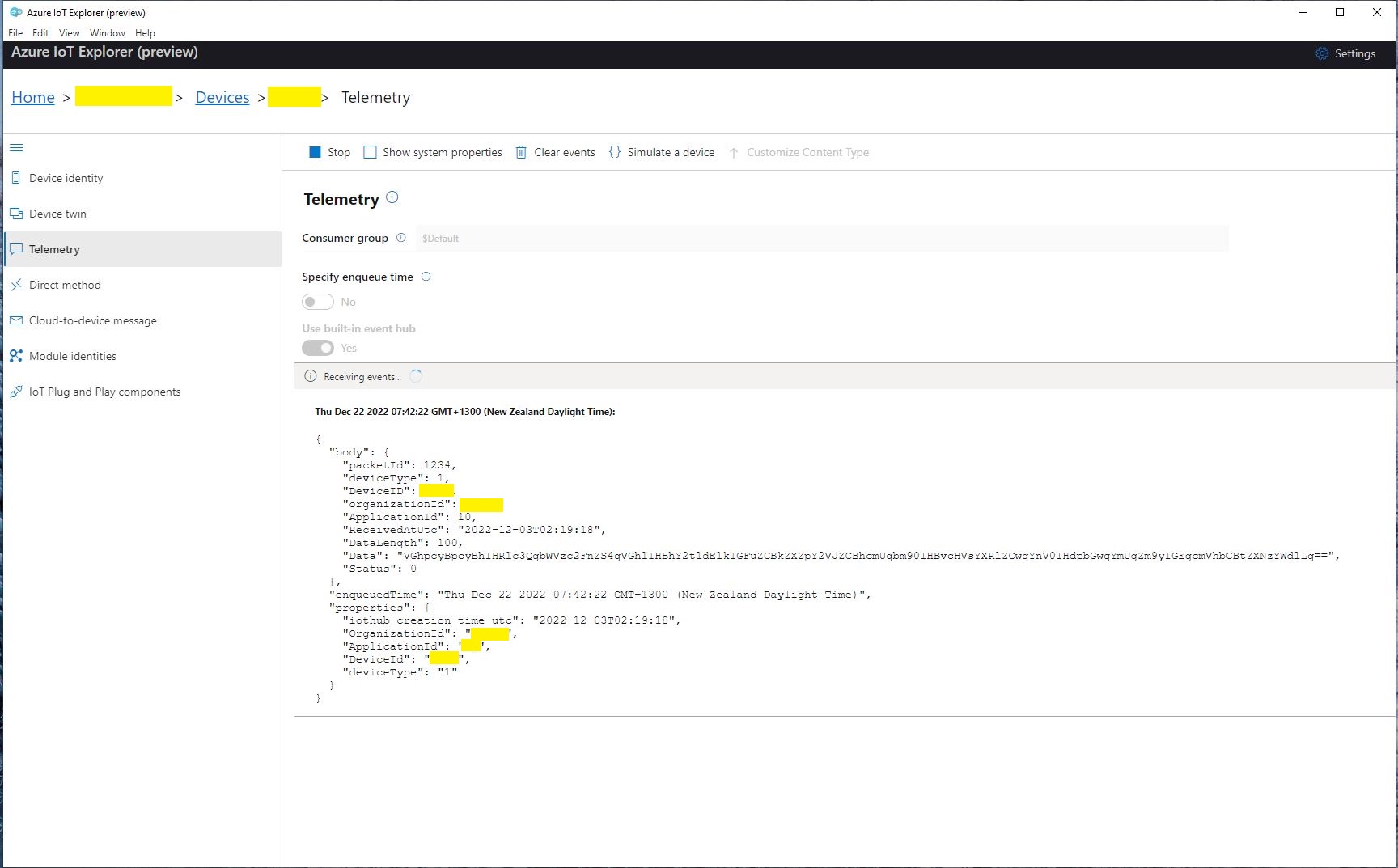
Azure IoT Explorer displaying a test message

The next step was to create a new Delivery Method
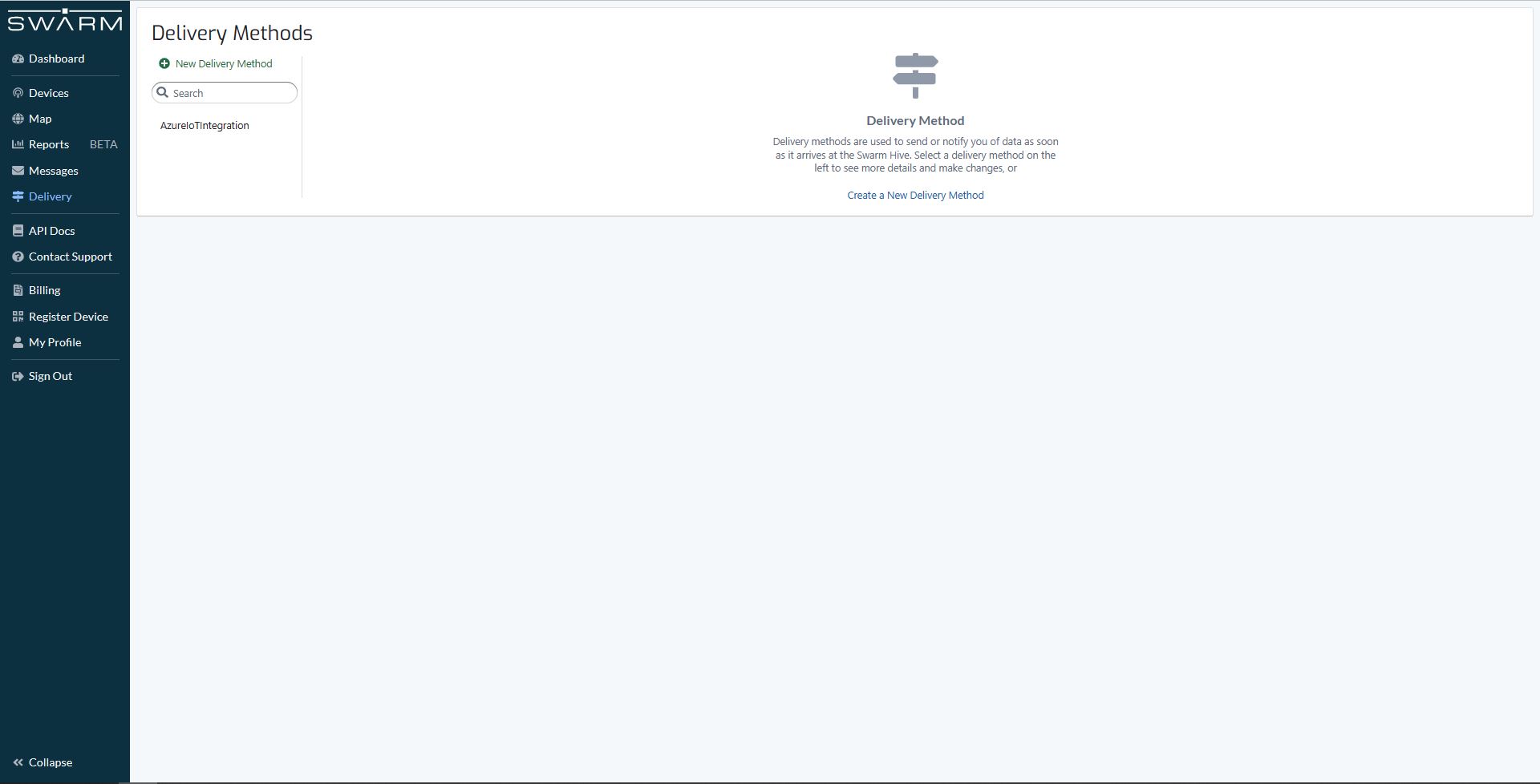
Swarm delivery webhook creation

Configured to call my Uplink controller endpoint.

Swarm delivery webhook configuration

The webhook was configured to “acknowledge messages on successful delivery”. I then checked my Delivery Method configuration with a couple of “Test” messages.

My Swarm Space Eval Kit arrived md-week and after some issues with jumper settings it started reporting position and status information.
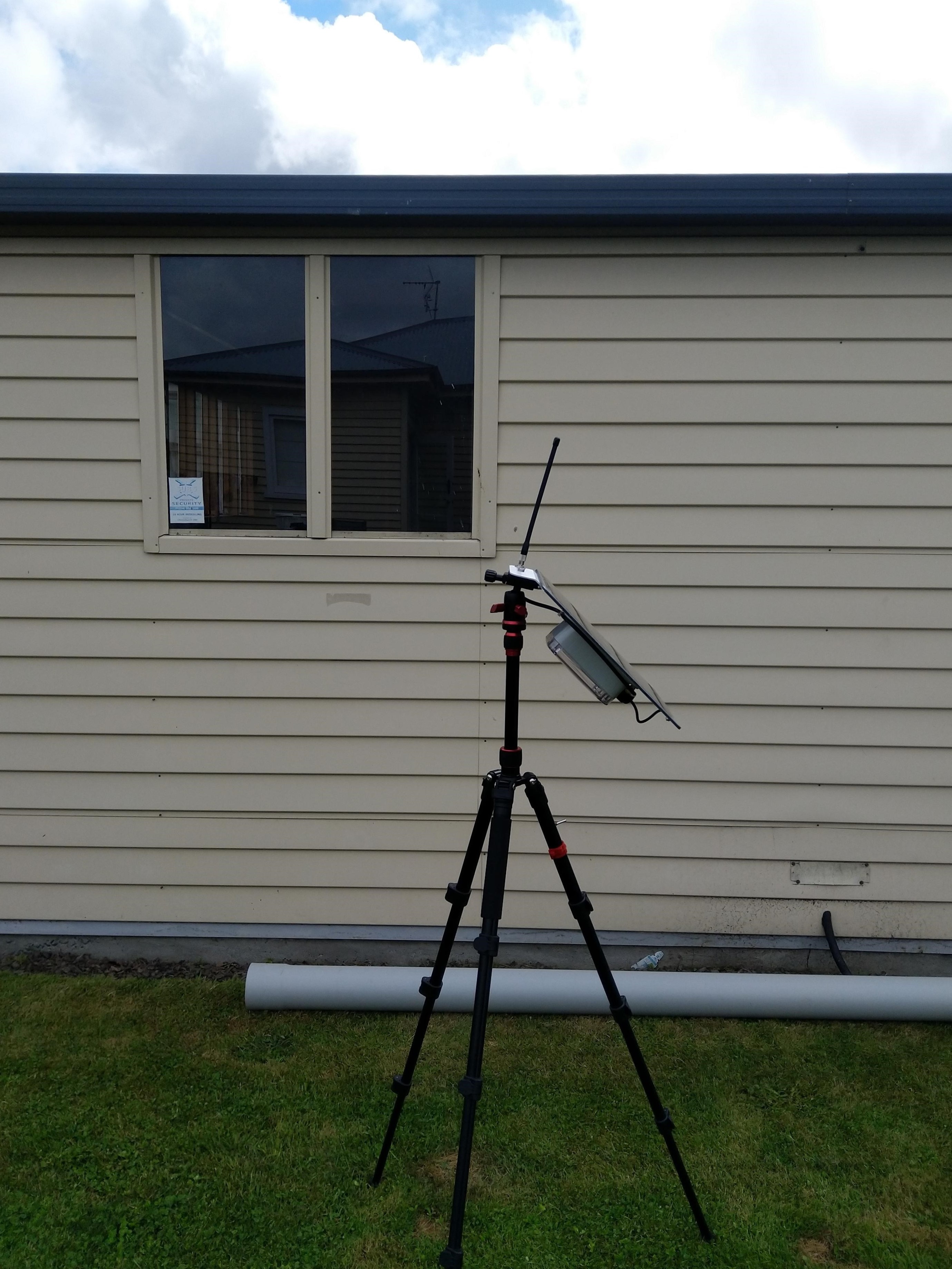
Swarm Eval Kit in my backyard

The first position was just of the coast of West Africa(null island)

Swarm Map centered on Null Island

After the Global Positioning System(GPS) receiver got a good fix the location of the Eval Kit was in the middle of my backyard.

Azure IoT Explorer displaying payload with good latitude and longitude
Swarm Map displaying the location of my device (zoomed out)

Swarm Space – FromDevice with webhooks

I modified my TTI V3 Connector Azure Storage Queues project which uses Azure Functions HTTP Triggers to put messages into Azure Storage Queues to process Swarm FromDevice Webhook messages.

First step was to configure a webhook with the Swarm dashboard

Swarm dashboard webhooks configuration

I configured the webhook, and to “acknowledge messages on successful delivery”. Then checked my configuration with a couple of “Test” messages.

Swarm dashboard webhook configuration

The Swagger API documentation has methods for configuring endpoints which can be called by an application.

Swagger API Documentation for managing endpoints

I queued a couple of messages on my Satellite Transceiver Breakout and when the next satellite passed overhead, shortly after they were visible in the Swarm Dashboard Messages tab.

Swarm Dashboard with test and live fromdevice messages

The messages were also delivered to an Azure Storage Queue, and I could view them with Azure Storage Explorer.

Azure Storage Explorer displaying a webhook message payload

Swarm Space – Azure IoT Basic Client

To figure out how to poll the Swarm Hive API I have built yet another “nasty” Proof of Concept (PoC) which gets ToDevice and FromDevice messages. Initially I have focused on polling as the volume of messages from my single device is pretty low (WebHooks will be covered in a future post).

Like my Azure IoT The Things Industry connector I use Alastair Crabtrees’s LazyCache to store Azured IoT Hub DeviceClient instances.

NOTE: Swarm Space technical support clarified the parameter values required to get FromDevice and ToDevice messages using the Bumbleebee Hive API.

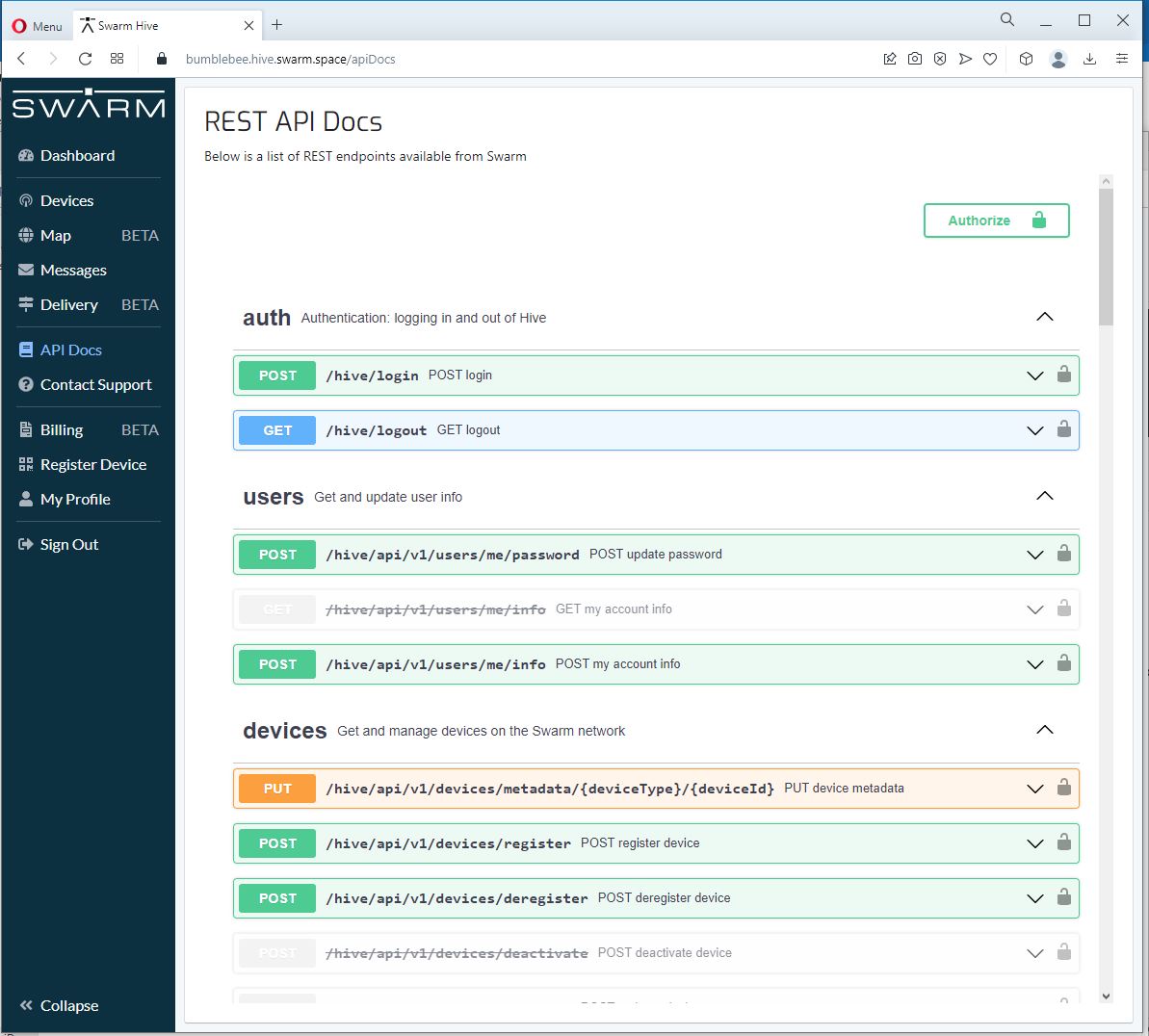
Swarm API Docs messages functionality

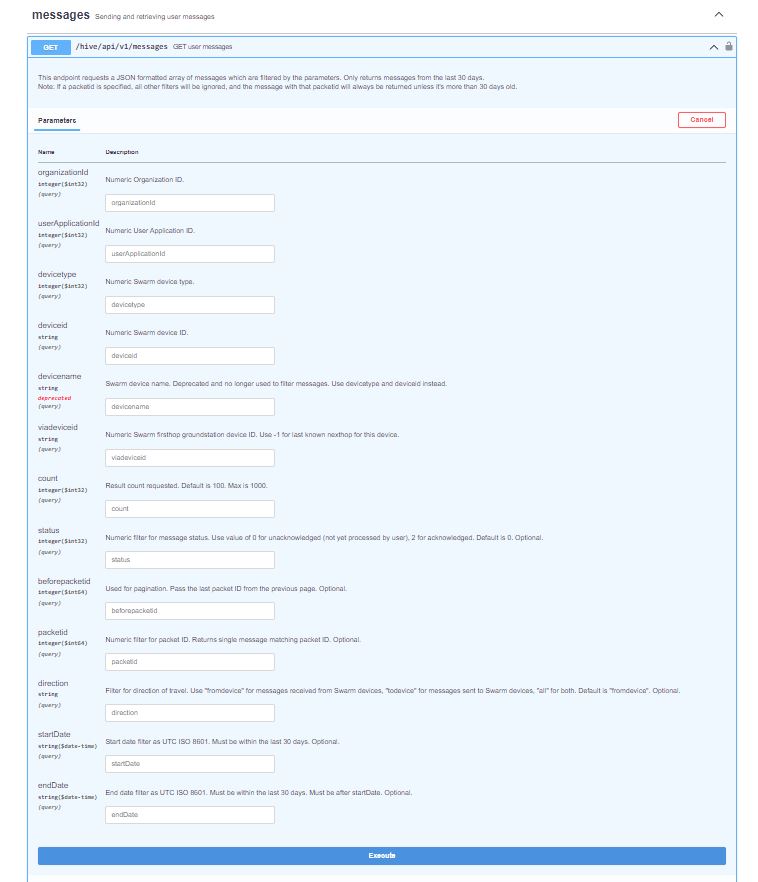
The Messages Get method has a lot of parameters for filtering and paging the response message lists. Many of the parameters have default values so can be null or left blank.

Swarm API Get User Message filters

I started off by seeing if I could duplicate the functionality of the user interface and get a list of all ToDevice and FromDevice messages.

Swarm Dashboard messages list

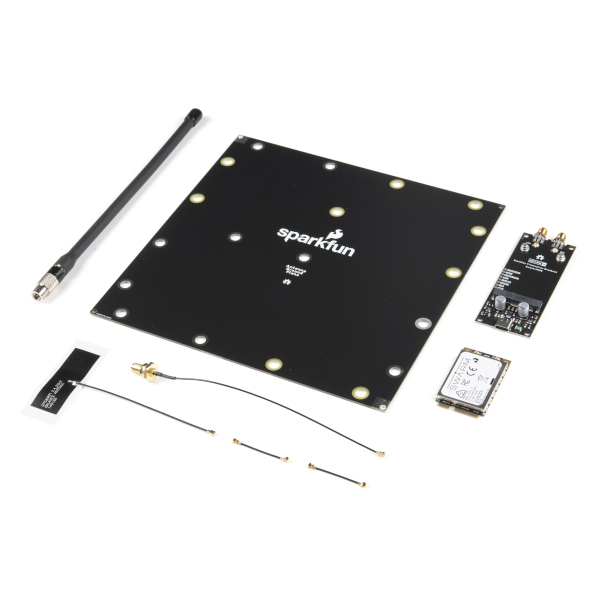
I first called the Messages Get method with the direction set to “fromdevice” (Odd this is a string rather than an enumeration) and the messages I had sent from my Sparkfun Satellite Transceiver Breakout – Swarm M138 were displayed.
Swarm API Docs displaying “fromdevice” messages

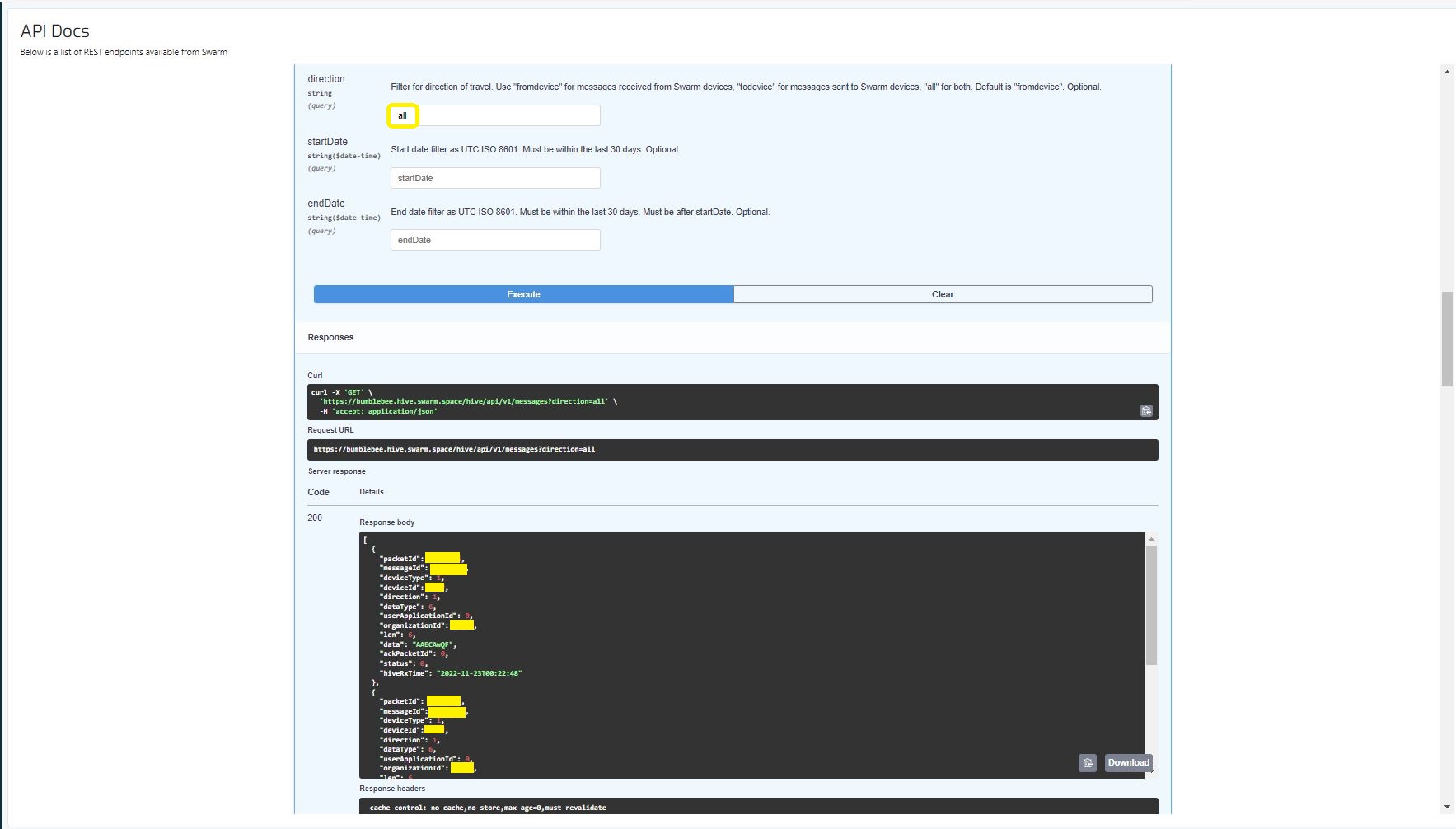
I then called the Messages Get method with the direction set to “all” and only the FromDevice messages were displayed which I wasn’t expecting.
Swarm API Docs displaying ToDevice and FromDevices messages

I then called the Messages Get method with the direction set to “FromDevice and no messages were displayed which I wasn’t expecting

Swarm API Docs displaying “todevice” messages

I then called the Message Get method with the messageId of a ToDevice message and the detailed message information was displayed.

Swarm API Docs displaying the details of a specific inbound message

For testing I configured 5 devices (a real device and the others simulated) in my Azure IoT Hub with the Swarm Device ID ued as the Azure IoT Hub device ID.

Devices configured in Azure IoT Hub

My console application calls the Swarm Bumblebee Hive API Login method, then uses Azure IoT Hub DeviceClient SendEventAsync upload device telemetry.

Nasty console application processing the three “fromdevice” messages which have not been acknowledged.

The console application stores the Swarm Hive API username, password and the Azure IoT Hub Device Connection string locally using the UserSecretsConfigurationExtension.

internal class Program
{
    private static string AzureIoTHubConnectionString = "";
    private readonly static IAppCache _DeviceClients = new CachingService();

    static async Task Main(string[] args)
    {
        Debug.WriteLine("devMobile.SwarmSpace.Hive.AzureIoTHubBasicClient starting");

        IConfiguration configuration = new ConfigurationBuilder()
            .SetBasePath(Directory.GetCurrentDirectory())
            .AddJsonFile("appsettings.json")
            .AddUserSecrets("b4073481-67e9-41bd-bf98-7d2029a0b391").Build();

        AzureIoTHubConnectionString = configuration.GetConnectionString("AzureIoTHub");

        using (HttpClient httpClient = new HttpClient())
        {
            BumblebeeHiveClient.Client client = new BumblebeeHiveClient.Client(httpClient);

            client.BaseUrl = configuration.GetRequiredSection("SwarmConnection").GetRequiredSection("BaseURL").Value;

            BumblebeeHiveClient.LoginForm loginForm = new BumblebeeHiveClient.LoginForm();

            loginForm.Username = configuration.GetRequiredSection("SwarmConnection").GetRequiredSection("UserName").Value;
            loginForm.Password = configuration.GetRequiredSection("SwarmConnection").GetRequiredSection("Password").Value;

            BumblebeeHiveClient.Response response = await client.PostLoginAsync(loginForm);

            Debug.WriteLine($"Token :{response.Token[..5]}.....{response.Token[^5..]}");

            string apiKey = "bearer " + response.Token;
            httpClient.DefaultRequestHeaders.Add("Authorization", apiKey);

            var devices = await client.GetDevicesAsync(null, null, null, null, null, null, null, null, null);

            foreach (BumblebeeHiveClient.Device device in devices)
            {
                Debug.WriteLine($" Id:{device.DeviceId} Name:{device.DeviceName} Type:{device.DeviceType} Organisation:{device.OrganizationId}");

                DeviceClient deviceClient = await _DeviceClients.GetOrAddAsync<DeviceClient>(device.DeviceId.ToString(), (ICacheEntry x) => IoTHubConnectAsync(device.DeviceId.ToString()), memoryCacheEntryOptions);
            }

            foreach (BumblebeeHiveClient.Device device in devices)
            {
                DeviceClient deviceClient = await _DeviceClients.GetAsync<DeviceClient>(device.DeviceId.ToString());

                var messages = await client.GetMessagesAsync(null, null, null, device.DeviceId.ToString(), null, null, null, null, null, null, "all", null, null);
                foreach (var message in messages)
                {
                    Debug.WriteLine($" PacketId:{message.PacketId} Status:{message.Status} Direction:{message.Direction} Length:{message.Len} Data: {BitConverter.ToString(message.Data)}");

                    JObject telemetryEvent = new JObject
                    {
                        { "DeviceID", device.DeviceId },
                        { "ReceivedAtUtc", DateTime.UtcNow.ToString("s", CultureInfo.InvariantCulture) },
                    };

                    telemetryEvent.Add("Payload",BitConverter.ToString(message.Data));

                    using (Message telemetryMessage = new Message(Encoding.ASCII.GetBytes(JsonConvert.SerializeObject(telemetryEvent))))
                    {
                        telemetryMessage.Properties.Add("iothub-creation-time-utc", message.HiveRxTime.ToString("s", CultureInfo.InvariantCulture));

                        await deviceClient.SendEventAsync(telemetryMessage);
                    };

                    //BumblebeeHiveClient.PacketPostReturn packetPostReturn = await client.AckRxMessageAsync(message.PacketId, null);
                }
            }

            foreach (BumblebeeHiveClient.Device device in devices)
            {
                DeviceClient deviceClient = await _DeviceClients.GetAsync<DeviceClient>(device.DeviceId.ToString());

                await deviceClient.CloseAsync();
            }
        }
    }

    private static async Task<DeviceClient> IoTHubConnectAsync(string deviceId)
    {
        DeviceClient deviceClient;

        deviceClient = DeviceClient.CreateFromConnectionString(AzureIoTHubConnectionString, deviceId, TransportSettings);

        await deviceClient.OpenAsync();

        return deviceClient;
    }

    private static readonly MemoryCacheEntryOptions memoryCacheEntryOptions = new MemoryCacheEntryOptions()
    {
        Priority = CacheItemPriority.NeverRemove
    };

    private static readonly ITransportSettings[] TransportSettings = new ITransportSettings[]
    {
        new AmqpTransportSettings(TransportType.Amqp_Tcp_Only)
        {
            AmqpConnectionPoolSettings = new AmqpConnectionPoolSettings()
            {
                Pooling = true,
            }
        }
    };
}

While testing I disabled the message RxAck functionality so I could repeatedly call the MessagesGet method so I didn’t have to send new messages and burn through my 50 free messages.

Azure IoT Explorer telemetry displaying the three messages processed by my console application.

.

Updated parameters based on feedback from Swarm technical support

Need to have status set to -1

Swarm Space – Bumblebee Hive Basic Emulator

One of the main problems building a Cloud Identity Translation Gateway (like my TTIV3AzureIoTConnector) is getting enough devices to make testing (esp. scalability) realistic. This is a problem because I have only got two devices, a Sparkfun Satellite Transceiver Breakout – Swarm M138 and a Swarm Asset Tracker. (Considering buying a Swarm Eval Kit)

Satellite Transceiver Breakout – Swarm M138
Swarm Asset Tracker

So, I can simulate lots of devices and test more complex configurations I have started build a Swarm Bumble Bee Hive emulator based on the API and Delivery-API OpenAPI files.

NSwagStudio configuration for generating ASP.NET Core web API

As well as generating clients NSwagStudio can also generate ASP.NET Core web APIs. To test my approach, I built the simplest possible client I could which calls the generated PostLoginAsync and GetDeviceCountAsync.

Swagger UI for NSwagStudio generated ASP.NET Core web API

Initially the BumblebeeHiveBasicClientConsole login method would fail with an HTTP 415 Unsupported Media Type error.

BumblebeeHiveBasicClientConsole application 415 Unsupported Media Type error

After some trial and error, I modified the HiveController.cs and HiveControllerImplementation.cs Login method signatures so the payload was “application/x-www-form-urlencoded” rather than “application/json” by changing FromBody to FromForm

Task<Response> IAuthController.PostLoginAsync([FromForm] LoginForm body)
{
     return Task.FromResult(new Response()
    {
        Token = Guid.NewGuid().ToString()
    });
}

Modifying code generated by a tool like NSwagStudio should be avoided but I couldn’t work out a simpler solution

/// <summary>
/// POST login
/// </summary>
/// <remarks>
/// &lt;p&gt;Use username and password to log in.&lt;/p&gt;&lt;p&gt;On success: returns status code 200. The response body is the JSON &lt;code&gt;{"token": "&amp;lt;token&amp;gt;"}&lt;/code&gt;, along with the header &lt;code&gt;Set-Cookie: JSESSIONID=&amp;lt;token&amp;gt;; Path=/; Secure; HttpOnly;&lt;/code&gt;. The tokens in the return value and the &lt;code&gt;Set-Cookie&lt;/code&gt; header are the same. The token is a long string of letters, numbers, and punctuation.&lt;/p&gt;&lt;p&gt;On failure: returns status code 401.&lt;/p&gt;&lt;p&gt;To make authenticated requests, there are two ways: &lt;ul&gt;&lt;li&gt;(Preferred) Use the token as a Bearer Authentication token by including the HTTP header &lt;code&gt;Authorization: Bearer &amp;lt;token&amp;gt;&lt;/code&gt; in further requests.&lt;/li&gt;&lt;li&gt;(Deprecated) Use the token as the JSESSIONID cookie in further requests.&lt;/li&gt;&lt;/ul&gt;&lt;/p&gt;
/// </remarks>
/// <returns>Login success</returns>
[Microsoft.AspNetCore.Mvc.HttpPost, Microsoft.AspNetCore.Mvc.Route("login")]
public System.Threading.Tasks.Task<Response> PostLogin([Microsoft.AspNetCore.Mvc.FromForm] LoginForm body)
{

    return _implementation.PostLoginAsync(body);
}

BumblebeeHiveBasicCLientConsole application calling the simulator
BumblebeeHiveBasicClientConsole application calling the production system

After some initial problems with content-types the Swarm Hive API (not tried the Delivery-API yet) appears to be documented and easy to use. Though, some of the variable type choices do seem a bit odd.

public virtual async System.Threading.Tasks.Task<string> GetDeviceCountAsync(int? devicetype, System.Threading.CancellationToken cancellationToken)

Swarm Space – Bumblebee Hive API Basic client

Back in July I purchased a Satellite Transceiver Breakout – Swarm M138 from SparkFun and it has been sitting on the shelf since then. I want to get telemetry from a sensor to an Azure IoT Hub or Azure IoT Central over a Swarm Space link for a project I am working on.

I’ll need to solder on some headers and cut a couple of tracks on the breakout board so my device (most probably a SparkFun – ESP32-S2 WROOM) can connect to the Swarm-M1138 modem. The NET nanoFramework team have an IoT.Device Swarm Tile NuGet package which I will use to interface the device to the modem.

I have started with a “nasty” Proof of Concept(PoC) to figure out how to connect to the Swarm Hive API.

The Swarm Hive API has been published with Swagger/OpenAPI which is really simple to use. I used NSwagStudio to generate a C# client to I didn’t have to “handcraft” one.

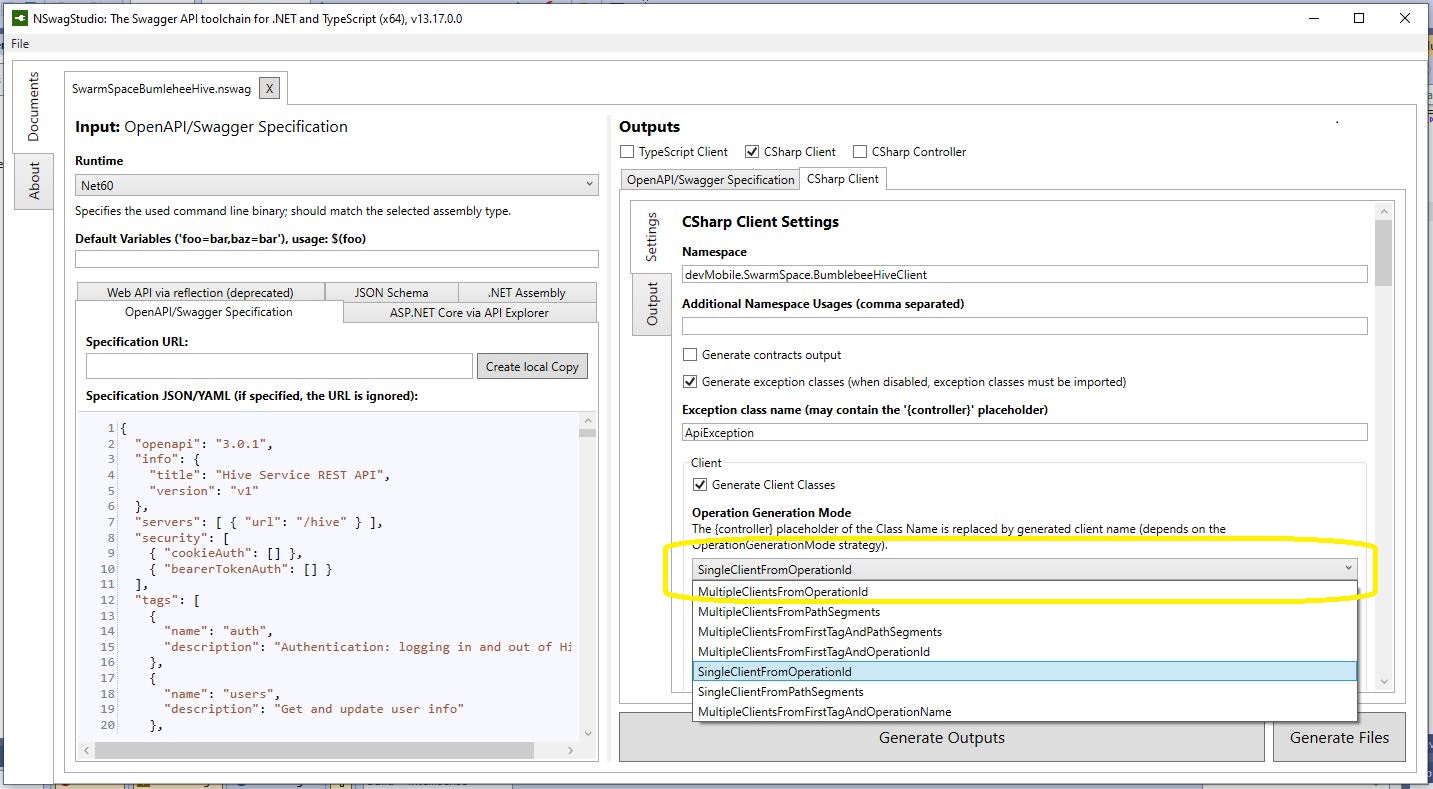
Initially the code would compile but I found a clue in a Github Issue from September 2017 which was to change the “Operation Generation Model” to SingleClientFromOperationId.(The setting is highlighted above).

static async Task Main(string[] args)
{
    using (HttpClient httpClient = new HttpClient())
    {
        BumblebeeHiveClient.Client client = new BumblebeeHiveClient.Client(httpClient);

        client.BaseUrl = "https://bumblebee.hive.swarm.space/hive/";

        BumblebeeHiveClient.LoginForm loginForm = new BumblebeeHiveClient.LoginForm();

        // https://bumblebee.hive.swarm.space/login/
        loginForm.Username = "...";
        loginForm.Password = "...";

        Console.WriteLine($"devMobile SwarmSpace Bumblebee Hive Console Client");
        Console.WriteLine("");

        Console.WriteLine($"Login POST");
        BumblebeeHiveClient.Response response = await client.PostLoginAsync(loginForm);

        Console.WriteLine($"Token :{response.Token[..5]}.....{response.Token[^5..]}");
        Console.WriteLine($"Press <enter> to continue");
        Console.ReadLine();

        string apiKey = "bearer " + response.Token;

        httpClient.DefaultRequestHeaders.Add("Authorization", apiKey);


        Console.WriteLine($"Device count GET");

        string count = await client.GetDeviceCountAsync(1);

        Console.WriteLine($"Device count :{count}");
        Console.WriteLine($"Press <enter> to continue");
        Console.ReadLine();

        Console.WriteLine($"Device(s) information GET");

        var devices = await client.GetDevicesAsync(1, null, null, null, null, null, null, null, null);

        foreach (var device in devices)
        {
            Console.WriteLine($" Id:{device.DeviceId} Name:{device.DeviceName} Type:{device.DeviceType} Organisation:{device.OrganizationId}");
        }

        Console.WriteLine($"Press <enter> to continue");
        Console.ReadLine();

        Console.WriteLine($"User Context GET");
        var userContext = await client.GetUserContextAsync();

        Console.WriteLine($" Id:{userContext.UserId} Name:{userContext.Username} Country:{userContext.Country}");

        Console.WriteLine("Additional properties");
        foreach ( var additionalProperty in userContext.AdditionalProperties)
        {
            Console.WriteLine($" Id:{additionalProperty.Key} Value:{additionalProperty.Value}");
        }

        Console.WriteLine($"Press <enter> to exit");
        Console.ReadLine();
    }
}

I tried a couple of ways to attach the Swarm Hive API authorisation token (returned by the Login method) to client requests. After a couple for failed attempts, I “realised” that adding the “Authorization” header to the HttpClient defaultRequestHeaders was by far the simplest approach.

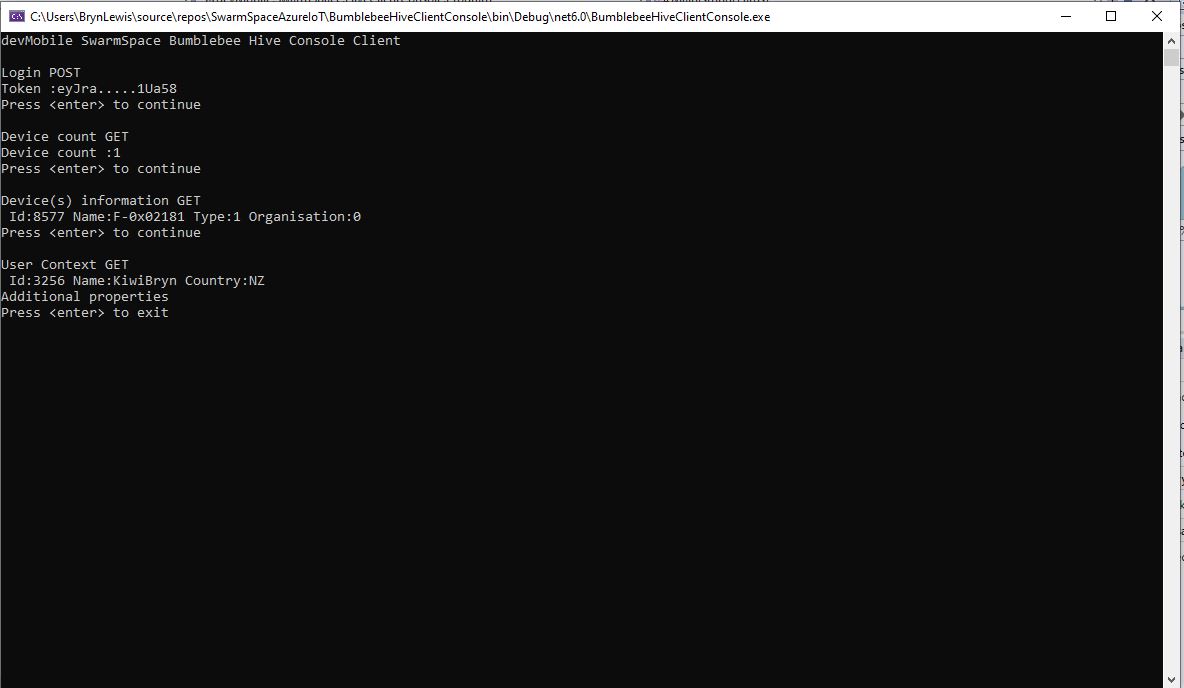
My “nasty” console application calls the Login method, then requests the number of devices (I only have one), gets a list of the properties of all the devices(very short list) then gets the User Context and displays their ID, Name and Country.

The Things Network MQTT & Azure IoT Part3A

Cloud to Device with frm_payload no confirmation

An Azure IoT Hub supports three kinds for Cloud to Device(C2D) messaging and my gateway will initially support only Direct Methods and Cloud-to-device messages.

The first step was to add the The Things Network(TTN) V3 Tennant ID to the context information as it is required for the downlink Message Queue Telemetry Transport (MQTT) publish topic.

namespace devMobile.TheThingsNetwork.Models
{
   public class AzureIoTHubReceiveMessageHandlerContext
   {
      public string TenantId { get; set; }
      public string DeviceId { get; set; }
      public string ApplicationId { get; set; }
   }
}

The object is passed as the context parameter of the SetReceiveMessageHandlerAsync method.

try
{
	DeviceClient deviceClient = DeviceClient.CreateFromConnectionString(
		options.AzureIoTHubconnectionString,
		endDevice.Ids.Device_id,
		TransportType.Amqp_Tcp_Only);

	await deviceClient.OpenAsync();

	AzureIoTHubReceiveMessageHandlerContext context = new AzureIoTHubReceiveMessageHandlerContext()
	{
		TenantId = options.Tenant,
		DeviceId = endDevice.Ids.Device_id,
		ApplicationId = options.ApiApplicationID,
	};

	await deviceClient.SetReceiveMessageHandlerAsync(AzureIoTHubClientReceiveMessageHandler, context);
	
	DeviceClients.Add(endDevice.Ids.Device_id, deviceClient, cacheItemPolicy);
}
catch( Exception ex)
{
	Console.WriteLine($"Azure IoT Hub OpenAsync failed {ex.Message}");
}

To send a message to a LoRaWAN device in addition to the payload, TTN needs the port number and optionally a confirmation required flag, message priority, queueing type and correlation ids.

With my implementation the confirmation required flag, message priority, and queueing type are Azure IoT Hub message properties and the messageid is used as a correlation id.

private async static Task AzureIoTHubClientReceiveMessageHandler(Message message, object userContext)
{
	bool confirmed;
	byte port;
	DownlinkPriority priority;
	string downlinktopic;

	try
	{
		AzureIoTHubReceiveMessageHandlerContext receiveMessageHandlerConext = (AzureIoTHubReceiveMessageHandlerContext)userContext;

		DeviceClient deviceClient = (DeviceClient)DeviceClients.Get(receiveMessageHandlerConext.DeviceId);
		if (deviceClient == null)
		{
			Console.WriteLine($" UplinkMessageReceived unknown DeviceID: {receiveMessageHandlerConext.DeviceId}");
			await deviceClient.RejectAsync(message);
			return;
		}

		using (message)
		{
			Console.WriteLine();
			Console.WriteLine();
			Console.WriteLine($"{DateTime.UtcNow:HH:mm:ss} Azure IoT Hub downlink message");
			Console.WriteLine($" ApplicationID: {receiveMessageHandlerConext.ApplicationId}");
			Console.WriteLine($" DeviceID: {receiveMessageHandlerConext.DeviceId}");
#if DIAGNOSTICS_AZURE_IOT_HUB
			Console.WriteLine($" Cached: {DeviceClients.Contains(receiveMessageHandlerConext.DeviceId)}");
			Console.WriteLine($" MessageID: {message.MessageId}");
			Console.WriteLine($" DeliveryCount: {message.DeliveryCount}");
			Console.WriteLine($" EnqueuedTimeUtc: {message.EnqueuedTimeUtc}");
			Console.WriteLine($" SequenceNumber: {message.SequenceNumber}");
			Console.WriteLine($" To: {message.To}");
#endif
			string messageBody = Encoding.UTF8.GetString(message.GetBytes());
			Console.WriteLine($" Body: {messageBody}");
#if DOWNLINK_MESSAGE_PROPERTIES_DISPLAY
			foreach (var property in message.Properties)
			{
				Console.WriteLine($"   Key:{property.Key} Value:{property.Value}");
			}
#endif
			if (!message.Properties.ContainsKey("Confirmed"))
			{
				Console.WriteLine(" UplinkMessageReceived missing confirmed property");
				await deviceClient.RejectAsync(message);
				return;
			}

			if (!bool.TryParse(message.Properties["Confirmed"], out confirmed))
			{
				Console.WriteLine(" UplinkMessageReceived confirmed property invalid");
				await deviceClient.RejectAsync(message);
				return;
			}

			if (!message.Properties.ContainsKey("Priority"))
			{
				Console.WriteLine(" UplinkMessageReceived missing priority property");
				await deviceClient.RejectAsync(message);
				return;
			}

			if (!Enum.TryParse(message.Properties["Priority"], true, out priority))
			{
				Console.WriteLine(" UplinkMessageReceived priority property invalid");
				await deviceClient.RejectAsync(message);
				return;
			}

			if (priority == DownlinkPriority.Undefined)
			{
				Console.WriteLine(" UplinkMessageReceived priority property undefined value invalid");
				await deviceClient.RejectAsync(message);
				return;
			}

			if (!message.Properties.ContainsKey("Port"))
			{
				Console.WriteLine(" UplinkMessageReceived missing port number property");
				await deviceClient.RejectAsync(message);
				return;
			}

			if (!byte.TryParse( message.Properties["Port"], out port))
			{
				Console.WriteLine(" UplinkMessageReceived port number property invalid");
				await deviceClient.RejectAsync(message);
				return;
			}

			if ((port < Constants.PortNumberMinimum) || port > (Constants.PortNumberMaximum))
			{
				Console.WriteLine($" UplinkMessageReceived port number property invalid value must be between {Constants.PortNumberMinimum} and {Constants.PortNumberMaximum}");
				await deviceClient.RejectAsync(message);
				return;
			}

			if (!message.Properties.ContainsKey("Queue"))
			{
				Console.WriteLine(" UplinkMessageReceived missing queue property");
				await deviceClient.RejectAsync(message);
				return;
			}

			switch(message.Properties["Queue"].ToLower())
			{
				case "push":
					downlinktopic = $"v3/{receiveMessageHandlerConext.ApplicationId}@{receiveMessageHandlerConext.TenantId}/devices/{receiveMessageHandlerConext.DeviceId}/down/push";
					break;
				case "replace":
					downlinktopic = $"v3/{receiveMessageHandlerConext.ApplicationId}@{receiveMessageHandlerConext.TenantId}/devices/{receiveMessageHandlerConext.DeviceId}/down/replace";
					break;
				default:
					Console.WriteLine(" UplinkMessageReceived missing queue property invalid value");
					await deviceClient.RejectAsync(message);
					return;
               }

			DownlinkPayload Payload = new DownlinkPayload()
			{
				Downlinks = new List<Downlink>()
				{ 
					new Downlink()
					{
						Confirmed = confirmed,
						PayloadRaw = messageBody,
						Priority = priority,
						Port = port,
						CorrelationIds = new List<string>()
						{
							message.MessageId
						}
					}
				}
			};

			var mqttMessage = new MqttApplicationMessageBuilder()
					.WithTopic(downlinktopic)
					.WithPayload(JsonConvert.SerializeObject(Payload))
					.WithAtLeastOnceQoS()
					.Build();

			await mqttClient.PublishAsync(mqttMessage);

			// Need to look at confirmation requirement ack, nack maybe failed & sent
			await deviceClient.CompleteAsync(message);

			Console.WriteLine();
		}
	}
	catch (Exception ex)
	{
		Debug.WriteLine("UplinkMessageReceived failed: {0}", ex.Message);
	}
}

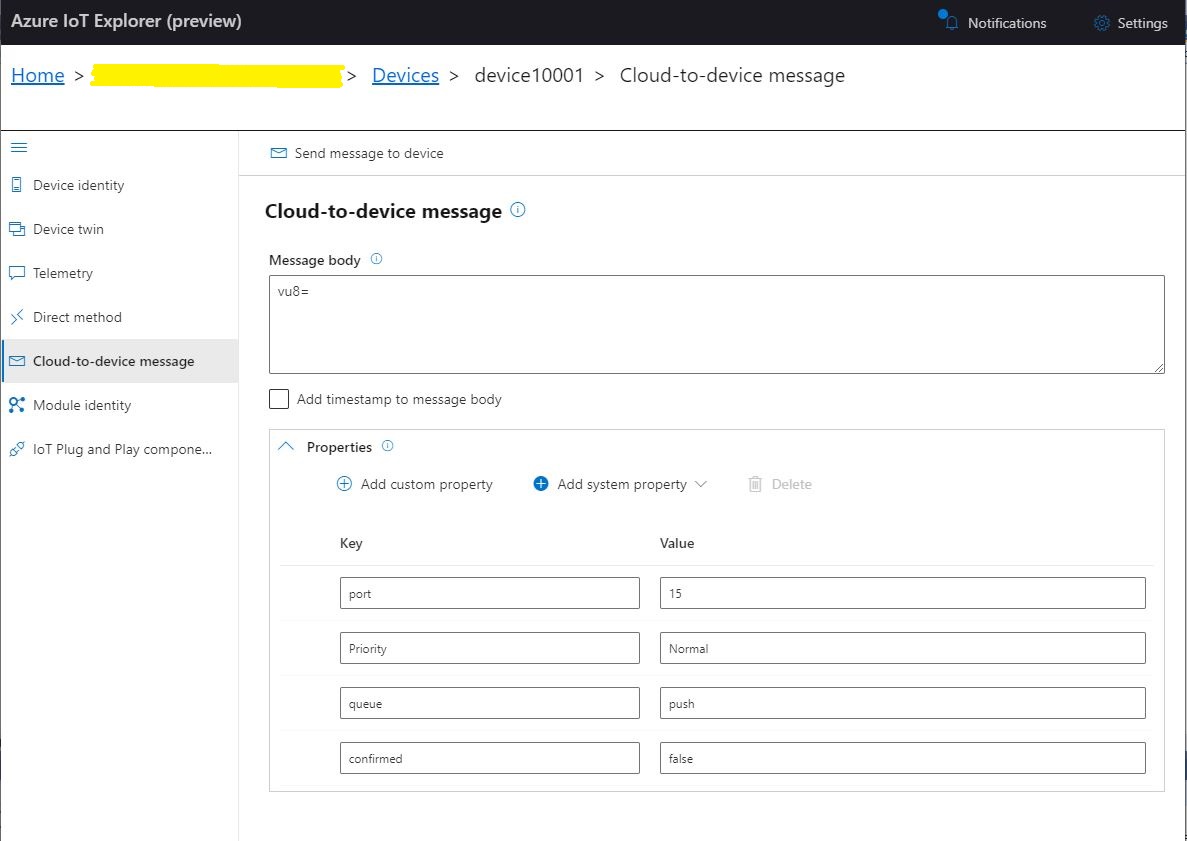
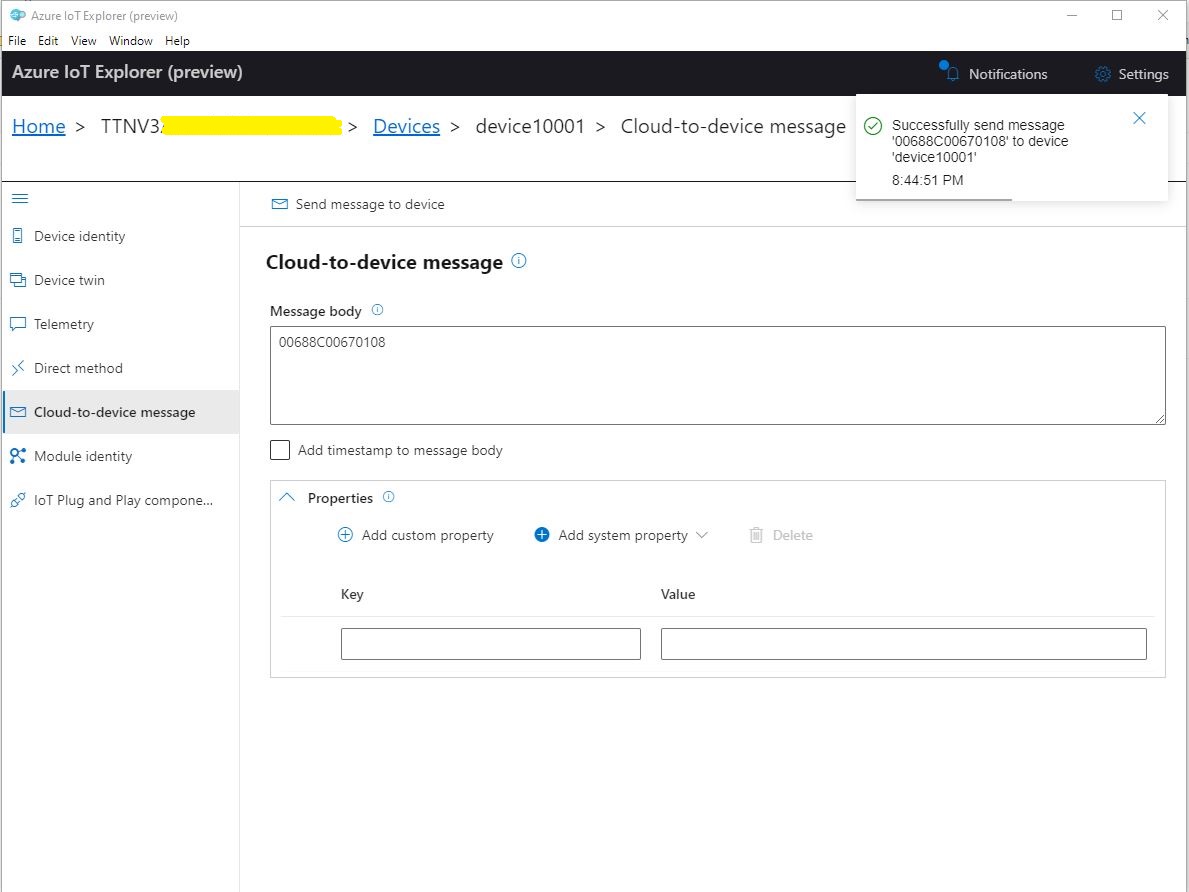
To “smoke test”” my implementation I used Azure IoT Explorer to send a C2D telemetry message

Azure IoT Hub Explorer send message form with payload and message properties

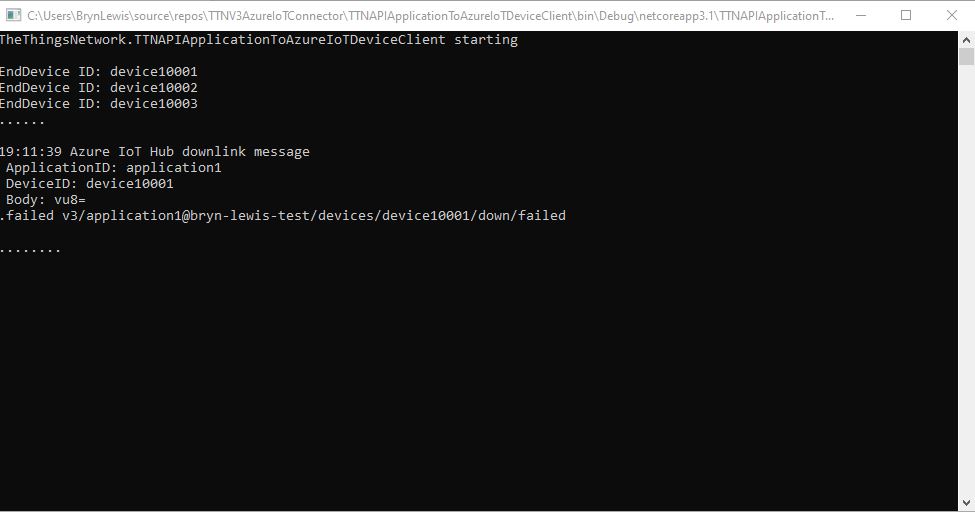
The PoC console application then forwarded the message to TTN using MQTT to be sent(which fails)

PoC application sending message then displaying result

The TTN live data display shows the message couldn’t be delivered because my test LoRaWAN device has not been activiated.

TTN Live Data display with message delivery failure

Now that my PoC application can receive and transmit message to devices I need to reconfigure my RAK Wisgate Developer D+ gateway and Seeeduino LoRaWAN and RAK Wisnode 7200 Track Lite devices on The Things Industries Network so I can test my approach with more realistic setup.

The Things Network MQTT & Azure IoT Part2

Uplink with decoded_payload & frm_payload

The next functionality added to my Proof of Concept(PoC) Azure IoT Hub, The Things Network(TTN) V3 Hypertext Transfer Protocol(HTTP) client API Integration, and Message Queue Telemetry Transport (MQTT) Data API Integration is sending of raw and decoded uplink messages to an Azure IoT Hub.

// At this point all the AzureIoT Hub deviceClients setup and ready to go so can enable MQTT receive
mqttClient.UseApplicationMessageReceivedHandler(new MqttApplicationMessageReceivedHandlerDelegate(e => MqttClientApplicationMessageReceived(e)));

// This may shift to individual device subscriptions
string uplinkTopic = $"v3/{options.MqttApplicationID}/devices/+/up";
await mqttClient.SubscribeAsync(uplinkTopic, MQTTnet.Protocol.MqttQualityOfServiceLevel.AtLeastOnce);

//string queuedTopic = $"v3/{options.MqttApplicationID}/devices/+/queued";
//await mqttClient.SubscribeAsync(queuedTopic, MQTTnet.Protocol.MqttQualityOfServiceLevel.AtLeastOnce);

The additional commented out subscriptions are for the processing of downlink messages

The MQTTNet received message handler uses the last segment of the topic to route messages to a method for processing

private static async void MqttClientApplicationMessageReceived(MqttApplicationMessageReceivedEventArgs e)
{
	if (e.ApplicationMessage.Topic.EndsWith("/up", StringComparison.InvariantCultureIgnoreCase))
	{
		await UplinkMessageReceived(e);
	}

	/*
	if (e.ApplicationMessage.Topic.EndsWith("/queued", StringComparison.InvariantCultureIgnoreCase))
	{
		await DownlinkMessageQueued(e);
	}
	...			
	*/
}

The UplinkMessageReceived method deserialises the message payload, retrieves device context information from the local ObjectCache, adds relevant uplink messages fields (including the raw payload), then if the message has been unpacked by a TTN Decoder, the message fields are added as well.

static async Task UplinkMessageReceived(MqttApplicationMessageReceivedEventArgs e)
{
	try
	{
		PayloadUplinkV3 payload = JsonConvert.DeserializeObject<PayloadUplinkV3>(e.ApplicationMessage.ConvertPayloadToString());
		string applicationId = payload.EndDeviceIds.ApplicationIds.ApplicationId;
		string deviceId = payload.EndDeviceIds.DeviceId;
		int port = payload.UplinkMessage.Port;
...
		DeviceClient deviceClient = (DeviceClient)DeviceClients.Get(deviceId);
		if (deviceClient == null)
		{
			Console.WriteLine($" UplinkMessageReceived unknown DeviceID: {deviceId}");
			return;
		}

		JObject telemetryEvent = new JObject();
		telemetryEvent.Add("DeviceID", deviceId);
		telemetryEvent.Add("ApplicationID", applicationId);
		telemetryEvent.Add("Port", port);
		telemetryEvent.Add("PayloadRaw", payload.UplinkMessage.PayloadRaw);

		// If the payload has been unpacked in TTN backend add fields to telemetry event payload
		if (payload.UplinkMessage.PayloadDecoded != null)
		{
			EnumerateChildren(telemetryEvent, payload.UplinkMessage.PayloadDecoded);
		}

		// Send the message to Azure IoT Hub/Azure IoT Central
		using (Message ioTHubmessage = new Message(Encoding.ASCII.GetBytes(JsonConvert.SerializeObject(telemetryEvent))))
		{
			// Ensure the displayed time is the acquired time rather than the uploaded time. 
			//ioTHubmessage.Properties.Add("iothub-creation-time-utc", payloadObject.Metadata.ReceivedAtUtc.ToString("s", CultureInfo.InvariantCulture));
			ioTHubmessage.Properties.Add("ApplicationId", applicationId);
			ioTHubmessage.Properties.Add("DeviceId", deviceId);
			ioTHubmessage.Properties.Add("port", port.ToString());

			await deviceClient.SendEventAsync(ioTHubmessage);
		}
	}
	catch( Exception ex)
	{
		Debug.WriteLine("UplinkMessageReceived failed: {0}", ex.Message);
	}
}

private static void EnumerateChildren(JObject jobject, JToken token)
{
	if (token is JProperty property)
	{
		if (token.First is JValue)
		{
			// Temporary dirty hack for Azure IoT Central compatibility
			if (token.Parent is JObject possibleGpsProperty)
			{
				if (possibleGpsProperty.Path.StartsWith("GPS_", StringComparison.OrdinalIgnoreCase))
				{
					if (string.Compare(property.Name, "Latitude", true) == 0)
					{
						jobject.Add("lat", property.Value);
					}
					if (string.Compare(property.Name, "Longitude", true) == 0)
					{
						jobject.Add("lon", property.Value);
					}
					if (string.Compare(property.Name, "Altitude", true) == 0)
					{
						jobject.Add("alt", property.Value);
					}
				}
			}
			jobject.Add(property.Name, property.Value);
		}
		else
		{
			JObject parentObject = new JObject();
			foreach (JToken token2 in token.Children())
			{
				EnumerateChildren(parentObject, token2);
				jobject.Add(property.Name, parentObject);
			}
		}
	}
	else
	{
		foreach (JToken token2 in token.Children())
		{
			EnumerateChildren(jobject, token2);
		}
	}
}

There is also some basic reformatting of the messages for Azure IoT Central

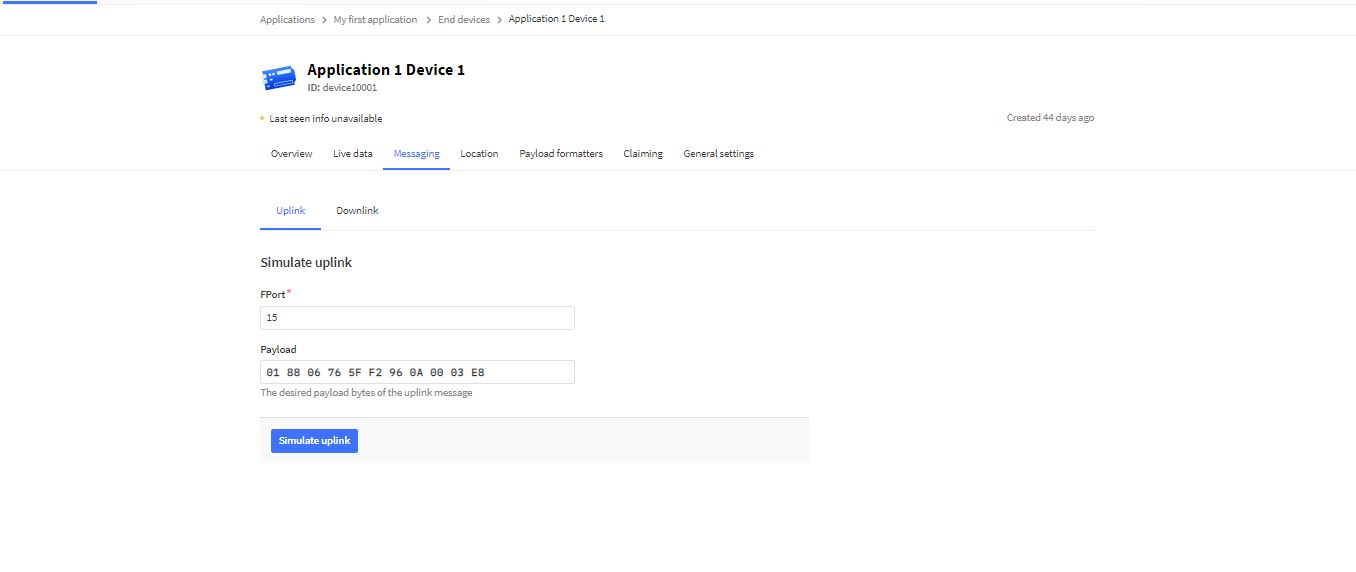
TTN Simulate uplink message with GPS location payload.
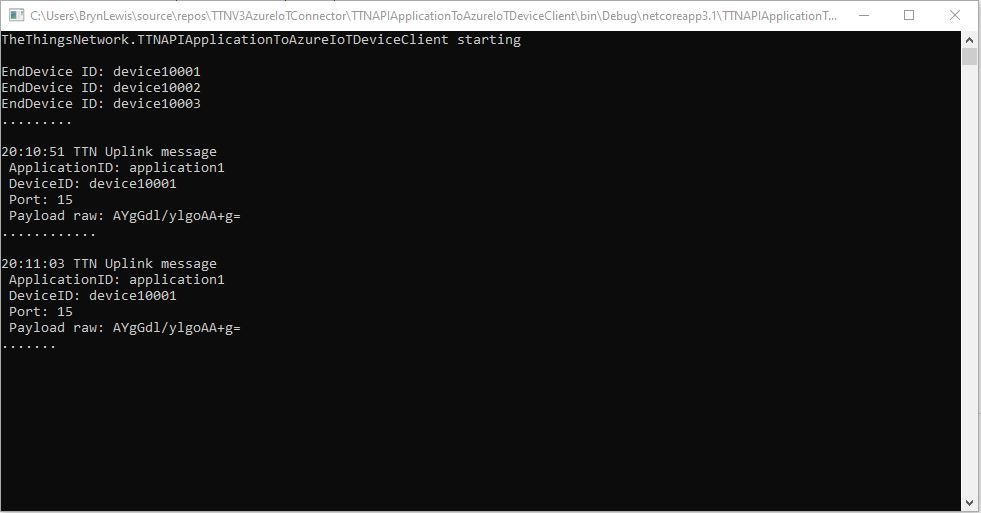
Nasty console application processing uplink message
Message from LoRaWAN device displayed in Azure IoT Explorer

Currently the code has a lots of diagnostic Console.Writeline statements, doesn’t support Uplink messages, has no Advanced Message Queuing Protocol(AMQP) client connection pooling, can’t run as an Azure Webjob, and a number of other features which I plan on adding in future blog posts.

The Things Network MQTT & Azure IoT Part1

Side by Side

In my last few posts I have built Proof of Concept(PoC) The Things Network(TTN) V3 Hypertext Transfer Protocol(HTTP) API Integration and Message Queue Telemetry Transport (MQTT) Data API Integrations.

While building these PoCs I have learnt a lot about the way that the TTN V3 RESTful and MQTT APIs work and this is the first in a series of posts about linking them together. My plan is to start with yet another .NetCore Console application which hosts both the MQTT and Azure IoT Hub DeviceClient (using the Advanced Message Queueing Protocol(AMQP)) client implementations. I’m using MQTTnet to build my data API client and used NSwag by Richo Suter to generate my RESTful client from the TTN provided swagger file.

In this PoC I’m using the commandlineParser NuGet package to the reduce the amount of code required to process command line parameters and make it more robust. This PoC has a lot of command line parameters which would have been painful to manually parse and validate.

public class CommandLineOptions
{
	[Option('u', "APIbaseURL", Required = false, HelpText = "TTN Restful API URL.")]
	public string ApiBaseUrl { get; set; }

	[Option('K', "APIKey", Required = true, HelpText = "TTN Restful API APIkey")]
	public string ApiKey { get; set; }

	[Option('P', "APIApplicationID", Required = true, HelpText = "TTN Restful API ApplicationID")]
	public string ApiApplicationID { get; set; }

	[Option('D', "DeviceListPageSize", Required = true, HelpText = "The size of the pages used to retrieve EndDevice configuration")]
	public int DevicePageSize { get; set; }

	[Option('S', "MQTTServerName", Required = true, HelpText = "TTN MQTT API server name")]
	public string MqttServerName { get; set; }

	[Option('A', "MQTTAccessKey", Required = true, HelpText = "TTN MQTT API access key")]
	public string MqttAccessKey { get; set; }

	[Option('Q', "MQTTApplicationID", Required = true, HelpText = "TTN MQTT API ApplicationID")]
	public string MqttApplicationID { get; set; }

	[Option('C', "MQTTClientName", Required = true, HelpText = "TTN MQTT API Client ID")]
	public string MqttClientID { get; set; }

	[Option('Z', "AzureIoTHubConnectionString", Required = true, HelpText = "Azure IoT Hub Connection string")]
	public string AzureIoTHubconnectionString { get; set; }
}

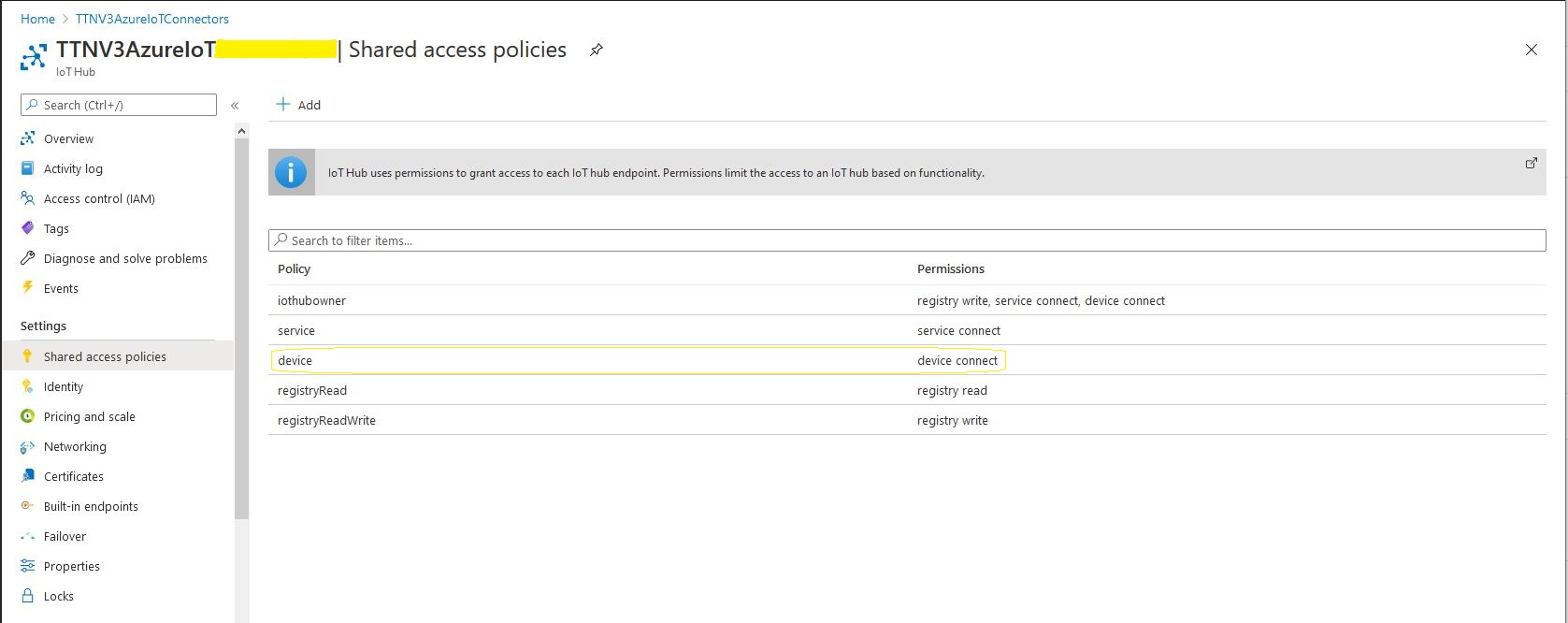
To keep things simple in this PoC I’m using an Azure IoT Hub specific (rather than a device specific connection string)

Azure IoT Hub Device shared access policy selection

After some trial and error I found the order of execution was important

  • Open MQTTnet connection to TTN host (but don’t configure any subscriptions)
  • Configure connection to TTN RESTful API
  • Retrieve list of V3EndDevices (paginated), then for each V3EndDevice
    • Open connection to Azure IoT Hub using command line connection string + TTN Device ID
    • Call DeviceClient.SetReceiveMessageHandlerAsync to specify ReceiveMessageCallback and additional context information for processing Azure IoT Hub downlink messages.
    • Store DeviceClient instance in ObjectCache using DeviceID as key
  • Configure the MQTTnet recived message handler
  • Subscribe to uplink messages from all the V3EndDevices in the specified application.
private static async Task ApplicationCore(CommandLineOptions options)
{
	MqttFactory factory = new MqttFactory();
	mqttClient = factory.CreateMqttClient();

#if DIAGNOSTICS
	Console.WriteLine($"baseURL: {options.ApiBaseUrl}");
	Console.WriteLine($"APIKey: {options.ApiKey}");
	Console.WriteLine($"ApplicationID: {options.ApiApplicationID}");
	Console.WriteLine($"AazureIoTHubconnectionString: {options.AzureIoTHubconnectionString}");
	Console.WriteLine();
#endif

	try
	{
		// First configure MQTT, open connection and wire up disconnection handler. 
		// Can't wire up MQTT received handler as at this stage AzureIoTHub devices not connected.
		mqttOptions = new MqttClientOptionsBuilder()
			.WithTcpServer(options.MqttServerName)
			.WithCredentials(options.MqttApplicationID, options.MqttAccessKey)
			.WithClientId(options.MqttClientID)
			.WithTls()
			.Build();

		mqttClient.UseDisconnectedHandler(new MqttClientDisconnectedHandlerDelegate(e => MqttClientDisconnected(e)));

		await mqttClient.ConnectAsync(mqttOptions);

		// Prepare the HTTP client to be used in the TTN device enumeration
		using (HttpClient httpClient = new HttpClient())
		{
			EndDeviceRegistryClient endDeviceRegistryClient = new EndDeviceRegistryClient(options.ApiBaseUrl, httpClient)
			{
				ApiKey = options.ApiKey
			};

			// Retrieve list of devices page by page
			V3EndDevices endDevices = await endDeviceRegistryClient.ListAsync(
				options.ApiApplicationID, 
				field_mask_paths: DevicefieldMaskPaths, 
				limit: options.DevicePageSize);
			if ((endDevices != null) && (endDevices.End_devices != null)) // If no devices returns null rather than empty list
			{
				foreach (V3EndDevice endDevice in endDevices.End_devices)
				{
					// Display the device info+attributes then connect device to Azure IoT Hub
#if DEVICE_FIELDS_MINIMUM
					Console.WriteLine($"EndDevice ID: {endDevice.Ids.Device_id}");
#else
					Console.WriteLine($"Device ID: {endDevice.Ids.Device_id} Name: {endDevice.Name} Description: {endDevice.Description}");
					Console.WriteLine($"  CreatedAt: {endDevice.Created_at:dd-MM-yy HH:mm:ss} UpdatedAt: {endDevice.Updated_at:dd-MM-yy HH:mm:ss}");
#endif

#if DEVICE_ATTRIBUTES_DISPLAY
					if (endDevice.Attributes != null)
					{
						Console.WriteLine("  EndDevice attributes");

						foreach (KeyValuePair<string, string> attribute in endDevice.Attributes)
						{
							Console.WriteLine($"    Key: {attribute.Key} Value: {attribute.Value}");
						}
					}
#endif
					try
					{
						DeviceClient deviceClient = DeviceClient.CreateFromConnectionString(
							options.AzureIoTHubconnectionString, 
							endDevice.Ids.Device_id, 
							TransportType.Amqp_Tcp_Only);

						await deviceClient.OpenAsync();

						await deviceClient.SetReceiveMessageHandlerAsync(
							AzureIoTHubClientReceiveMessageHandler,
							new AzureIoTHubReceiveMessageHandlerContext()
							{
								DeviceId = endDevice.Ids.Device_id,
								ApplicationId = endDevice.Ids.Application_ids.Application_id,
							});

						DeviceClients.Add(endDevice.Ids.Device_id, deviceClient, cacheItemPolicy);
					}
					catch( Exception ex)
					{
						Console.WriteLine($"Azure IoT Hub OpenAsync failed {ex.Message}");
					}
				}
			}
		}

		// At this point all the AzureIoT Hub deviceClients setup and ready to go so can enable MQTT receive
		mqttClient.UseApplicationMessageReceivedHandler(new MqttApplicationMessageReceivedHandlerDelegate(e => MqttClientApplicationMessageReceived(e)));

		// This may shift to individual device subscriptions
		string uplinktopic = $"v3/{options.MqttApplicationID}/devices/+/up";

		await mqttClient.SubscribeAsync(uplinktopic, MQTTnet.Protocol.MqttQualityOfServiceLevel.AtLeastOnce);
	}
	catch(Exception ex)
	{
		Console.WriteLine($"Main {ex.Message}");
		Console.WriteLine("Press any key to exit");
		Console.ReadLine();
		return;
	}

	while (!Console.KeyAvailable)
	{
		Console.Write(".");
		await Task.Delay(1000);
	}

	// Consider ways to mop up connections

	Console.WriteLine("Press any key to exit");
	Console.ReadLine();
}

When I was initially looking at Azure Deviceclient I would of had to have created a thread (which would have been blocked most of the time) for each device. This implementation issued was removed by the introduction of the DeviceClient SetReceiveMessageHandlerAsync method in release 1.33.0.

Currently the application just displays the Cloud to Device(C2D) message payload plus diagnostic information, and the CompleteAsync method is called so the message is dequeued.

private async static Task AzureIoTHubClientReceiveMessageHandler(Message message, object userContext)
{
	AzureIoTHubReceiveMessageHandlerContext receiveMessageHandlerConext = (AzureIoTHubReceiveMessageHandlerContext)userContext;

	DeviceClient deviceClient = (DeviceClient)DeviceClients.Get(receiveMessageHandlerConext.DeviceId);

	using (message)
	{
		Console.WriteLine();
		Console.WriteLine();
		Console.WriteLine($"{DateTime.UtcNow:HH:mm:ss} Azure IoT Hub downlink message");
		Console.WriteLine($" ApplicationID: {receiveMessageHandlerConext.ApplicationId}");
		Console.WriteLine($" DeviceID: {receiveMessageHandlerConext.DeviceId}");
#if DIAGNOSTICS_AZURE_IOT_HUB
		Console.WriteLine($" Cached: {DeviceClients.Contains(receiveMessageHandlerConext.DeviceId)}");
		Console.WriteLine($" MessageID: {message.MessageId}");
		Console.WriteLine($" DeliveryCount: {message.DeliveryCount}");
		Console.WriteLine($" EnqueuedTimeUtc: {message.EnqueuedTimeUtc}");
		Console.WriteLine($" SequenceNumber: {message.SequenceNumber}");
		Console.WriteLine($" To: {message.To}");
#endif
		string messageBody = Encoding.UTF8.GetString(message.GetBytes());
		Console.WriteLine($" Body: {messageBody}");
#if DOWNLINK_MESSAGE_PROPERTIES_DISPLAY
		foreach (var property in message.Properties)
		{
			Console.WriteLine($"   Key:{property.Key} Value:{property.Value}");
		}
#endif

		await deviceClient.CompleteAsync(message);

		Console.WriteLine();
	}
}

Currently the application just displays the Cloud to Device(D2C) message payload plus diagnostic information, displaying the payload fields if the message format has been configured and successfully processed.

private static void MqttClientApplicationMessageReceived(MqttApplicationMessageReceivedEventArgs e)
{
	if (e.ApplicationMessage.Topic.EndsWith("/up"))
	{
		PayloadUplinkV3 payload = JsonConvert.DeserializeObject<PayloadUplinkV3>(e.ApplicationMessage.ConvertPayloadToString());

		Console.WriteLine();
		Console.WriteLine();
		Console.WriteLine($"{DateTime.UtcNow:HH:mm:ss} TTN Uplink message");
#if DIAGNOSTICS_MQTT
		Console.WriteLine($" ClientId:{e.ClientId} Topic:{e.ApplicationMessage.Topic}");
		Console.WriteLine($" Cached: {DeviceClients.Contains(payload.EndDeviceIds.DeviceId)}");
#endif
		Console.WriteLine($" ApplicationID: {payload.EndDeviceIds.ApplicationIds.ApplicationId}");
		Console.WriteLine($" DeviceID: {payload.EndDeviceIds.DeviceId}");
		Console.WriteLine($" Port: {payload.UplinkMessage.Port} ");
		Console.WriteLine($" Payload raw: {payload.UplinkMessage.PayloadRaw}");

		if (payload.UplinkMessage.PayloadDecoded != null)
		{
			Console.WriteLine($" Payload decoded: {payload.UplinkMessage.PayloadRaw}");
			EnumerateChildren(1, payload.UplinkMessage.PayloadDecoded);
		}

		Console.WriteLine();
	}
	else
	{
		Console.WriteLine($"{DateTime.UtcNow:HH:mm:ss} ClientId: {e.ClientId} Topic: {e.ApplicationMessage.Topic}");
	}
}
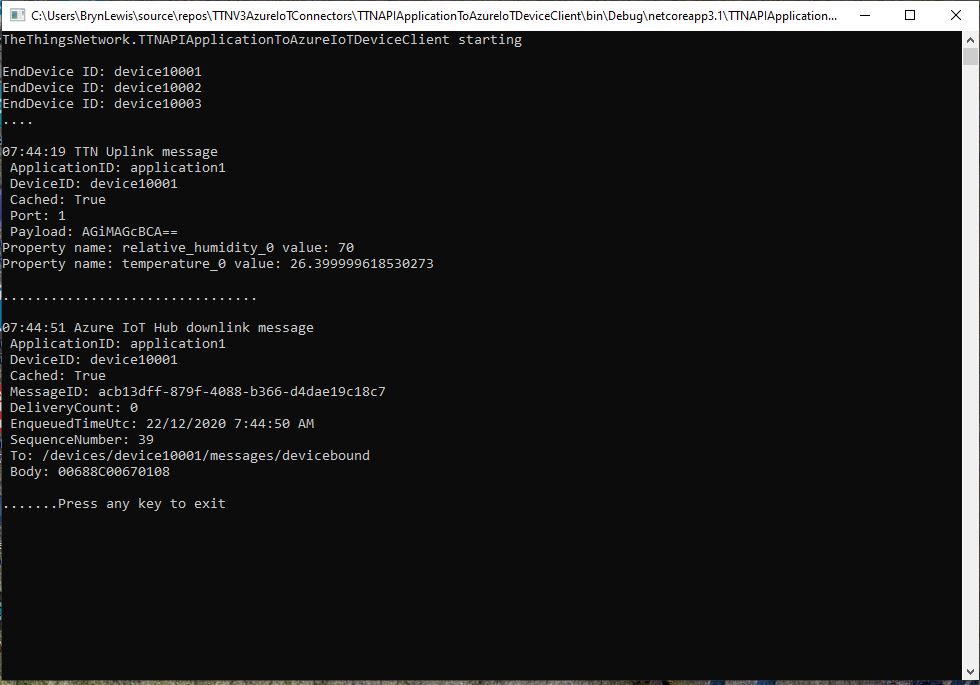
dotNet Core Console application displaying simulated uplink and downlink messages.
Simulating C2D messages with AzureIoTExplorer
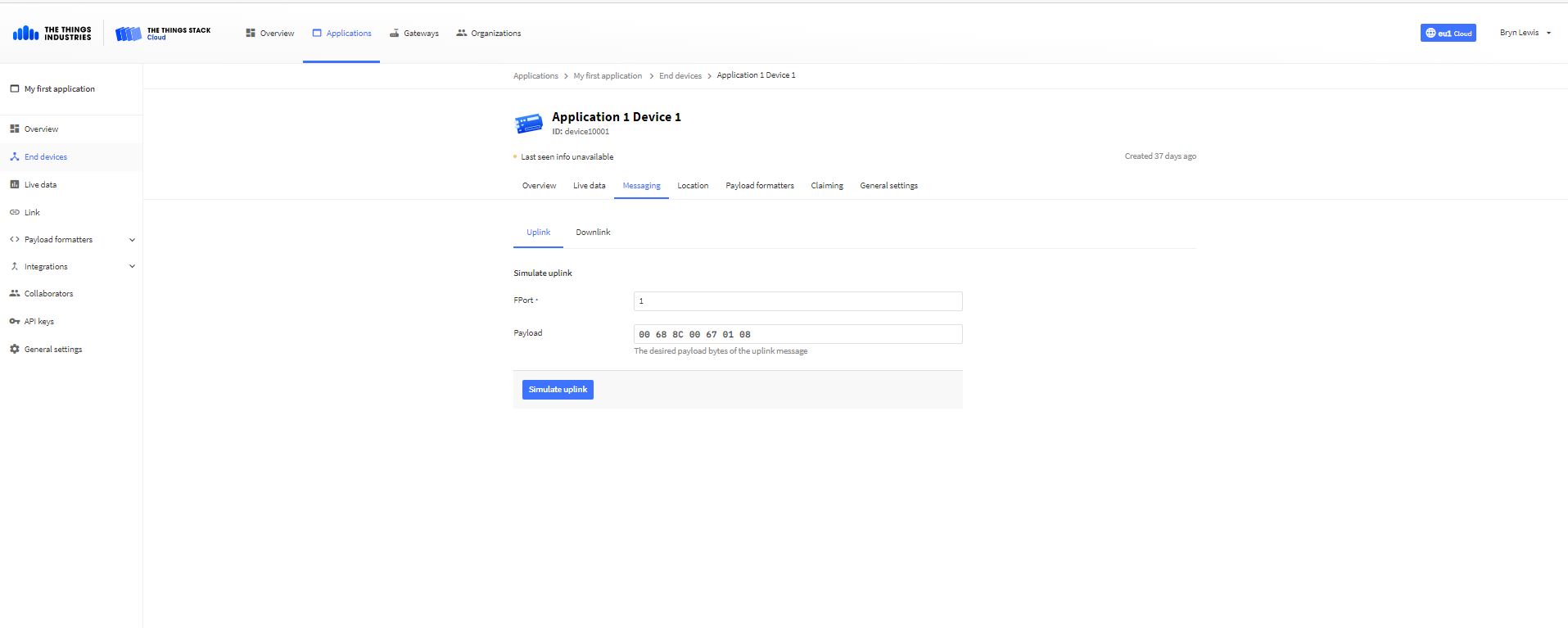
Simulating D2C messages with TTN Device console

In the MQTT received message handler.

Console.WriteLine($" Cached: {DeviceClients.Contains(receiveMessageHandlerConext.DeviceId)}");

and Azure DeviceClient received message handler.

Console.WriteLine($" Cached: {DeviceClients.Contains(receiveMessageHandlerConext.DeviceId)}");

check that the specified TTN device ID is in the DeviceClients ObjectCache