.NET Core web API + Dapper – Redis Cache

The IDistributedCache has Memory, SQL Server and Redis implementations so I wanted to explore how the Stack Exchange Redis library works. The ConnectionMultiplexer class in the Stack Exchange Redis library hides the details of managing connections to multiple Redis servers, connection timeouts etc. The object is fairly “chunky” so it should be initialized once and reused for the lifetime of the program.

public static void Main(string[] args)
{
    var builder = WebApplication.CreateBuilder(args);

    // Add services to the container.
    builder.Services.AddApplicationInsightsTelemetry();

    // Add services to the container.
    builder.Services.AddTransient<IDapperContext>(s => new DapperContext(builder.Configuration));

    builder.Services.AddControllers();

    builder.Services.AddSingleton<IConnectionMultiplexer>(s => ConnectionMultiplexer.Connect(builder.Configuration.GetConnectionString("Redis")));

    var app = builder.Build();

    // Configure the HTTP request pipeline.
    app.UseHttpsRedirection();
    app.MapControllers();

    app.Run();
}

I trialed the initial versions of my Redis project with Memurai on my development machine, then configured an Azure Cache for Redis. I then load tested the project with several Azure AppService client and there was a significant improvement in response time.

[ApiController]
[Route("api/[controller]")]
public class StockItemsController : ControllerBase
{
    private const int StockItemSearchMaximumRowsToReturn = 15;
    private readonly TimeSpan StockItemListExpiration = new TimeSpan(0, 5, 0);

    private const string sqlCommandText = @"SELECT [StockItemID] as ""ID"", [StockItemName] as ""Name"", [RecommendedRetailPrice], [TaxRate] FROM [Warehouse].[StockItems]";
    //private const string sqlCommandText = @"SELECT [StockItemID] as ""ID"", [StockItemName] as ""Name"", [RecommendedRetailPrice], [TaxRate] FROM [Warehouse].[StockItems]; WAITFOR DELAY '00:00:02'";

    private readonly ILogger<StockItemsController> logger;
    private readonly IDbConnection dbConnection;
    private readonly IDatabase redisCache;

    public StockItemsController(ILogger<StockItemsController> logger, IDapperContext dapperContext, IConnectionMultiplexer connectionMultiplexer)
    {
        this.logger = logger;
        this.dbConnection = dapperContext.ConnectionCreate();
        this.redisCache = connectionMultiplexer.GetDatabase();
    }

        [HttpGet]
    public async Task<ActionResult<IEnumerable<Model.StockItemListDtoV1>>> Get()
    {
        var cached = await redisCache.StringGetAsync("StockItems");
        if (cached.HasValue)
        {
            return Content(cached, "application/json");
        }

        var stockItems = await dbConnection.QueryWithRetryAsync<Model.StockItemListDtoV1>(sql: sqlCommandText, commandType: CommandType.Text);

#if SERIALISER_SOURCE_GENERATION
        string json = JsonSerializer.Serialize(stockItems, typeof(List<Model.StockItemListDtoV1>), Model.StockItemListDtoV1GenerationContext.Default);
#else
        string json = JsonSerializer.Serialize(stockItems);
#endif

        await redisCache.StringSetAsync("StockItems", json, expiry: StockItemListExpiration);

        return Content(json, "application/json");
    }

...

    [HttpDelete()]
    public async Task<ActionResult> ListCacheDelete()
    {
        await redisCache.KeyDeleteAsync("StockItems");

        logger.LogInformation("StockItems list removed");

        return this.Ok();
    }
}

Like Regular Expressions in .NET, the System.Test.Json object serialisations can be compiled to MSIL code instead of high-level internal instructions. This allows .NET’s just-in-time (JIT) compiler to convert the serialisation to native machine code for higher performance.

public class StockItemListDtoV1
{
    public int Id { get; set; }

    public string Name { get; set; }

    public decimal RecommendedRetailPrice { get; set; }

    public decimal TaxRate { get; set; }
}

[JsonSourceGenerationOptions(PropertyNamingPolicy = JsonKnownNamingPolicy.CamelCase)]
[JsonSerializable(typeof(List<StockItemListDtoV1>))]
public partial class StockItemListDtoV1GenerationContext : JsonSerializerContext
{
}

The cost of constructing the Serialiser may be higher, but the cost of performing serialisation with it is much smaller.

[HttpGet]
public async Task<ActionResult<IEnumerable<Model.StockItemListDtoV1>>> Get()
{
    var cached = await redisCache.StringGetAsync("StockItems");
    if (cached.HasValue)
    {
        return Content(cached, "application/json");
    }

    var stockItems = await dbConnection.QueryWithRetryAsync<Model.StockItemListDtoV1>(sql: sqlCommandText, commandType: CommandType.Text);

#if SERIALISER_SOURCE_GENERATION
    string json = JsonSerializer.Serialize(stockItems, typeof(List<Model.StockItemListDtoV1>), Model.StockItemListDtoV1GenerationContext.Default);
#else
    string json = JsonSerializer.Serialize(stockItems);
#endif

    await redisCache.StringSetAsync("StockItems", json, expiry: StockItemListExpiration);

    return Content(json, "application/json");
}

I used Telerik Fiddler to empty the cache then load the StockItems list 10 times (more tests would improve the quality of the results). The first trial was with the “conventional” serialiser

The average time for the conventional serialiser was 0.028562 seconds

The average time for the generated version was 0.030546 seconds. But, if the initial compilation step was ignored the average duration dropped to 0.000223 seconds a significant improvement.

.NET Core web API + Dapper – Distributed Cache

I have used LazyCache for several projects (The Things Network V2 HTTP, The Things Industries V2 MQTT The Things Industries V3 and Swarm Space Azure IoT Connector etc.) to cache Azure IoT Hub DeviceClient and other object instances.

The note on the wiki page For LazyCache v2+ users, you should consider switching away from LazyCache to IDistributedCache. More information at #59 caught my attention.

I have written other posts about caching Dapper query results with the Dapper Extension Library which worked well but had some configuration limitations. I also have posts about off-loading read-only workloads with Azure Active geo-replication or SQL Data Sync for Azure, which worked well in some scenarios but had limitations (performance and operational costs).

The IDistributedCache has Memory, SQL Server and Redis implementations so I built an Azure AppService to explore the functionality in more detail. In another project I had been working with the Azure SignalR Service and the use of the MessagePack library(rather than serialised JSON) caught my attention so I have added basic support for that as well.

I explored the in-memory implementation (AddDistributedMemoryCache) on my development machine and found “tinkering” with the configuration options had little impact on the performance of my trivial sample application.

public static void Main(string[] args)
{
    var builder = WebApplication.CreateBuilder(args);

    // Add services to the container.
    builder.Services.AddApplicationInsightsTelemetry();

    // Add services to the container.
    builder.Services.AddSingleton<IDapperContext>(s => new DapperContext(builder.Configuration));

    builder.Services.AddControllers();

#if SERIALISATION_MESSAGE_PACK
    //MessagePackSerializer.DefaultOptions = MessagePack.Resolvers.ContractlessStandardResolver.Options;
    //MessagePackSerializer.DefaultOptions = MessagePack.Resolvers.ContractlessStandardResolver.Options.WithCompression(MessagePackCompression.Lz4Block);
    MessagePackSerializer.DefaultOptions = MessagePack.Resolvers.ContractlessStandardResolver.Options.WithCompression(MessagePackCompression.Lz4BlockArray);
#endif

#if DISTRIBUTED_CACHE_MEMORY
    builder.Services.AddDistributedMemoryCache(options =>
    {
       options.SizeLimit = 1000 * 1024 * 1024; // 1000MB
    });
    builder.Services.AddDistributedMemoryCache();
#endif

#if DISTRIBUTED_CACHE_REDIS
    var configurationOptions = new ConfigurationOptions
    {
        EndPoints = { builder.Configuration.GetSection("RedisConnection").GetValue<string>("EndPoints") },
        AllowAdmin = true,
        Password = builder.Configuration.GetSection("RedisConnection").GetValue<string>("Password"),
        Ssl = true,
        ConnectRetry = 5,
        ConnectTimeout = 10000,
        SslProtocols = System.Security.Authentication.SslProtocols.Tls12,
        AbortOnConnectFail = false,
    };

    builder.Services.AddStackExchangeRedisCache(options =>
    {
        options.InstanceName = "Dapper WebAPI Instance";
        options.ConfigurationOptions = configurationOptions;
    });
#endif

#if DISTRIBUTED_CACHE_SQL_SERVER
    builder.Services.AddDistributedSqlServerCache(options =>
    {
        options.ConnectionString = builder.Configuration.GetConnectionString("CacheDatabase");
        options.SchemaName = "dbo";
        options.TableName = "StockItemsCache";
    });
#endif

    var app = builder.Build();

    // Configure the HTTP request pipeline.
    app.UseHttpsRedirection();
    app.MapControllers();
    app.Run();
}

I tested the SQL Server implementation (AddDistributedSqlServerCached) using the SQL Server on my development machine, and Azure SQL as a backing store. I did consider using SQL Azure In-Memory OLTP but the performance improvement with my trivial example would most probably not worth the additional cost of the required SKU.

CREATE TABLE [dbo].[StockItemsCache](
	[Id] [nvarchar](449) NOT NULL,
	[Value] [varbinary](max) NOT NULL,
	[ExpiresAtTime] [datetimeoffset](7) NOT NULL,
	[SlidingExpirationInSeconds] [bigint] NULL,
	[AbsoluteExpiration] [datetimeoffset](7) NULL,
PRIMARY KEY CLUSTERED 
(
	[Id] ASC
)WITH (PAD_INDEX = OFF, STATISTICS_NORECOMPUTE = OFF, IGNORE_DUP_KEY = OFF, ALLOW_ROW_LOCKS = ON, ALLOW_PAGE_LOCKS = ON, OPTIMIZE_FOR_SEQUENTIAL_KEY = OFF) ON [PRIMARY]
) ON [PRIMARY] TEXTIMAGE_ON [PRIMARY]
GO

The table used to store the data wasn’t very complex and I could view the data associated with a cache key in SQL Server Mangement studio.

SQL Server Managment Studio displaying cache table contents

One of the applications I work on uses a complex SQL Server Stored procedure to load reference data (updated daily) and being able to purge the cache at the end of this process like this might be useful. For a geographically distributed application putting the Azure SQL instance “closer” to the application’s users might be worth considering.

I trialed the Redis implementation with Memurai (on my development machine) and Azure Cache for Redis with multiple Azure AppService clients and there was a significant improvement in performance.

[HttpGet]
public async Task<ActionResult<IEnumerable<Model.StockItemListDtoV1>>> Get()
{
    var utcNow = DateTime.UtcNow;

    var cached = await distributedCache.GetAsync("StockItems");
    if (cached != null)
    {
#if SERIALISATION_JSON
        return this.Ok(JsonSerializer.Deserialize<List<Model.StockItemListDtoV1>>(cached));
#endif
#if SERIALISATION_MESSAGE_PACK
        return this.Ok(MessagePackSerializer.Deserialize<List<Model.StockItemListDtoV1>>(cached));
#endif
    }

    var stockItems = await dbConnection.QueryWithRetryAsync<Model.StockItemListDtoV1>(sql: sqlCommandText, commandType: CommandType.Text);

#if SERIALISATION_JSON
    await distributedCache.SetAsync("StockItems", JsonSerializer.SerializeToUtf8Bytes(stockItems), new DistributedCacheEntryOptions()
#endif
#if SERIALISATION_MESSAGE_PACK
    await distributedCache.SetAsync("StockItems", MessagePackSerializer.Serialize(stockItems), new DistributedCacheEntryOptions()
#endif
    {
        AbsoluteExpiration = new DateTime(utcNow.Year, utcNow.Month, DateTime.DaysInMonth(utcNow.Year, utcNow.Month), StockItemListAbsoluteExpiration.Hours, StockItemListAbsoluteExpiration.Minutes, StockItemListAbsoluteExpiration.Seconds)
    });

    return this.Ok(stockItems);
}

[HttpGet("NoLoad")]
public async Task<ActionResult<IEnumerable<Model.StockItemListDtoV1>>> GetNoLoad()
{
    var cached = await distributedCache.GetAsync("StockItems");
    if (cached == null)
    {
        return this.NoContent();
    }

#if SERIALISATION_JSON
    return this.Ok(JsonSerializer.Deserialize<List<Model.StockItemListDtoV1>>(cached));
#endif
#if SERIALISATION_MESSAGE_PACK
        return this.Ok(MessagePackSerializer.Deserialize<List<Model.StockItemListDtoV1>>(cached));
#endif
}

In my test environment the JSON payload for a list of stock items was a bit “chunky” at 25K bytes, so I added compile time configurable support for the MessagePack library. This significantly reduced the size of the payload LZ4Block (5K bytes) and LZ4BlockArray (5K2 bytes) which should reduce network traffic.

Assuming the overheads of JSON vs. MessagePack serialisation are similar and the much smaller MessagePack library payload I would most probably use MessagePack and LZ4BlockArray (For improved compatibility with other implementations) compression.

.NET Core web API + Dapper – Distributed Cache Redis HMGET Error

Initially, I was running the WebAPI Dapper DistributedCache application on my development box and it ran third/forth time after sorting out the Azure Cache for Redis connection string and firewall configuration.

StockItems list served from the cache running on my Desktop
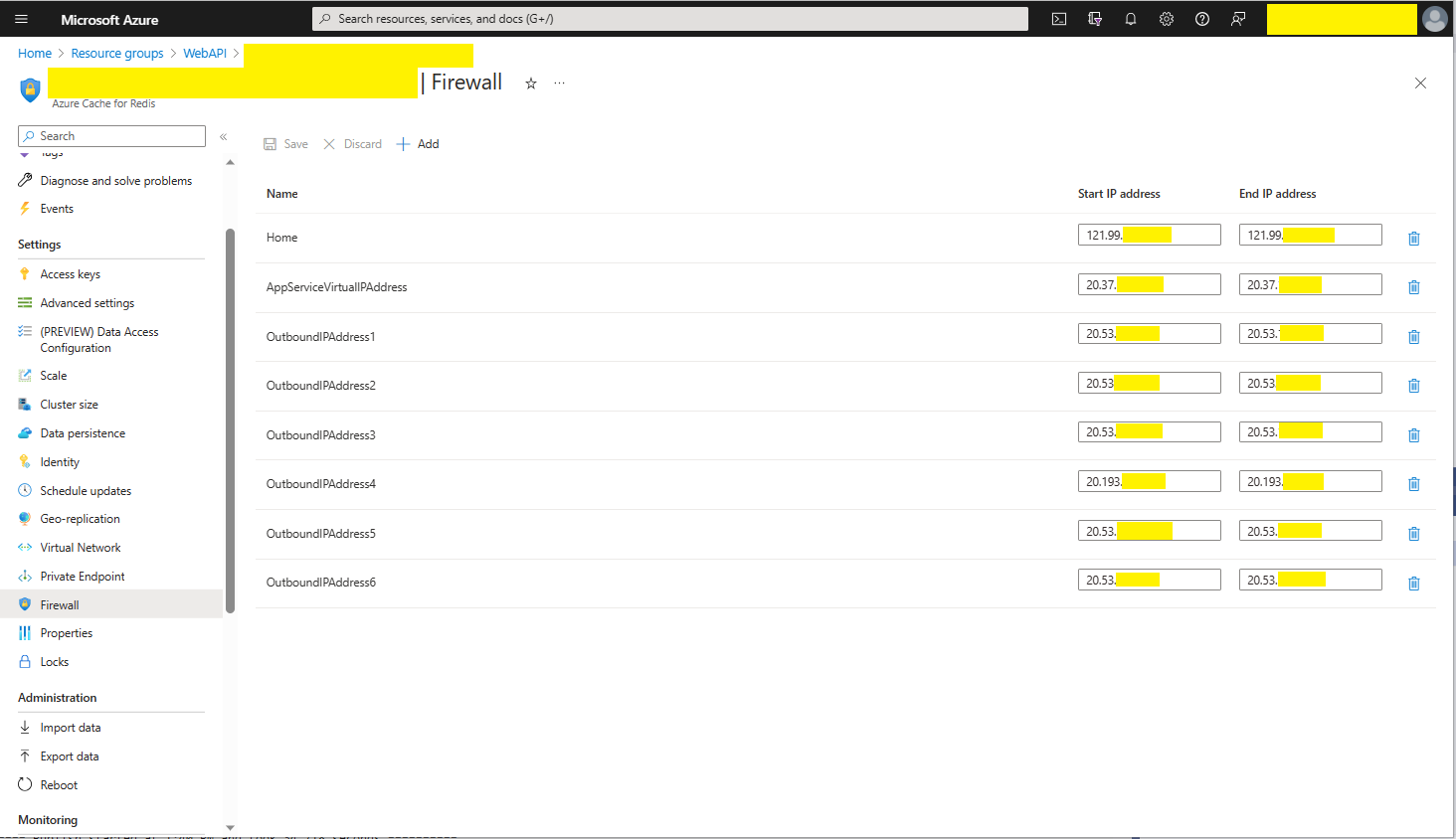
The Azure Cache for Redis firewall configuration for my home office

I then deployed the WebAPI Dapper DistributedCache application to an Azure AppService and it failed (spoiler alert it wasn’t DNS).

Azure AppService hosted StockItems list code failing in web browser

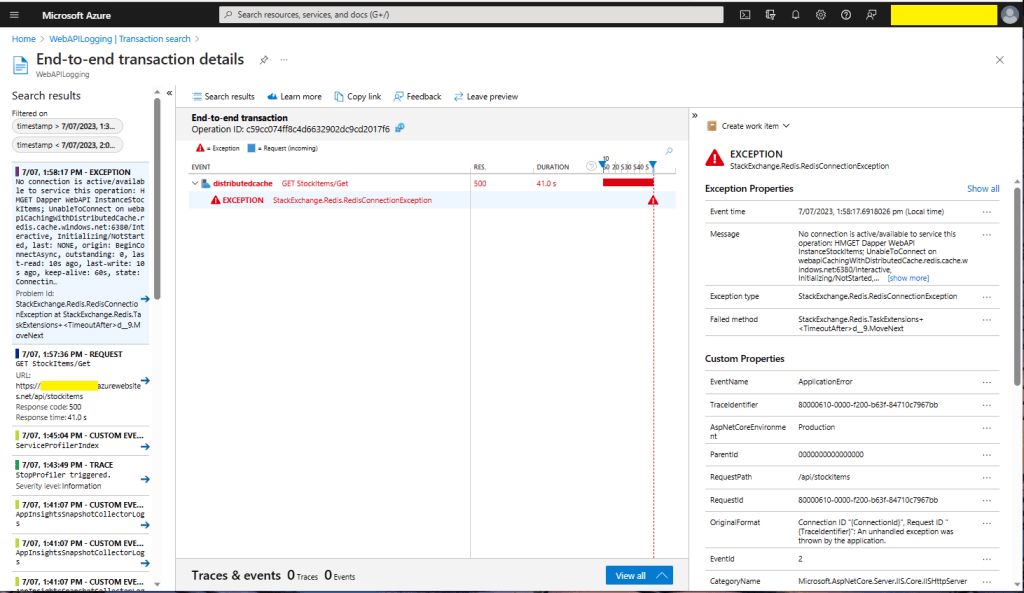
I then fired up Azure Application Insights to look at the logging information.

Azure Application Insights diagnostic information

There were many questions and tentative answers on stackoverflow some of them I tried, and which didn’t work in my scenario.

No connection is active/available to service this operation: HMGET Dapper WebAPI InstanceStockItems; 
UnableToConnect on xxxxxxxxxxxxxxxxxxxxxxxxxxx.redis.cache.windows.net:6380/Interactive, 
Initializing/NotStarted, 
last: NONE, 
origin: BeginConnectAsync, 
outstanding: 0, 
last-read: 10s ago, last-write: 10s ago, keep-alive: 60s, 
state: Connecting, 
mgr: 10 of 10 available, 
last-heartbeat: never, global: 10s ago, 
v: 2.2.4.27433, 
mc: 1/1/0, mgr: 10 of 10 available, 
clientName: XXXXXXXXXXXX, <----------------------This was important
IOCP: (Busy=0,Free=1000,Min=1,Max=1000), 
WORKER: (Busy=5,Free=1018,Min=1,Max=1023), 
v: 2.2.4.27433 
UnableToConnect on xxxxxxxxxxxxxxxxxxxxxxxxxxx.cache.windows.net:6380/Interactive, 
Initializing/NotStarted, 
last: NONE, 
origin: BeginConnectAsync, 
outstanding: 0, 
last-read: 10s ago, last-write: 10s ago, keep-alive: 60s, 
state: Connecting, 
mgr: 10 of 10 available, 
last-heartbeat: never, global: 10s ago, 
v: 2.2.4.27433 

I then recreated my configuration from scratch so none of my random changes based on stackoverflow posts would mess my next round of debugging.

Azure AppService Virtual, Outbound and Additional Outbound IP Addresses

The error appeared to be a networking issue, most probably the firewall blocking connections so I added the Azure AppService Virtual IP Address which didn’t work…

Firewall configuration for Azure AppService Virtual IP Address

I then went back and re-read the error message and noticed “clientName: XXXXXXXXXXXX,”. The Azure AppService client name wasn’t the default domain…

Firewall configuration for Azure AppService Virtual and outbound IP Addresses

I then added the Outbound IP addresses to the firewall and the Azure AppService could connect to my Azure Cache for Redis instance.

StockItems list served from the cache running in an AppService

As soon as I realised it wasn’t DNS I should have “stopped counted to ten”, debugged the issue carefully and not immediately gone to stackoverflow.

.NET Core web API + Dapper – Caching

Response Cache

In the beginning this was long long post about In-memory caching, distributed caching, Response caching, Response caching with middleware and Object reuse with ObjectPool. As I was re-reading the post before publishing it I came to the realisation that these different caching approaches didn’t require Dapper.

I started again, but kept the first section as it covers one of the simplest possible approaches to caching using the [ResponseCache] attribute and VaryByQueryKeys.

[HttpGet("Response")]
[ResponseCache(Duration = StockItemsListResponseCacheDuration)]
public async Task<ActionResult<IEnumerable<Model.StockItemListDtoV1>>> GetResponse()
{
	IEnumerable<Model.StockItemListDtoV1> response = null;

	logger.LogInformation("Response cache load");

	try
	{
		response = await dapper.QueryAsync<Model.StockItemListDtoV1>(sql: @"SELECT [StockItemID] as ""ID"", [StockItemName] as ""Name"", [RecommendedRetailPrice], [TaxRate] FROM [Warehouse].[StockItems]", commandType: CommandType.Text);
	}
	catch (SqlException ex)
	{
		logger.LogError(ex, "Retrieving list of StockItems");

		return this.StatusCode(StatusCodes.Status500InternalServerError);
	}

	return this.Ok(response);
}

[HttpGet("ResponseVarying")]
[ResponseCache(Duration = StockItemsListResponseCacheDuration, VaryByQueryKeys = new string[] { "id" })]
public async Task<ActionResult<Model.StockItemGetDtoV1>> Get([FromQuery(Name = "id"), Range(1, int.MaxValue, ErrorMessage = "Stock item id must greater than 0")] int id)
{
	Model.StockItemGetDtoV1 response = null;

	logger.LogInformation("Response cache varying load id:{0}", id);

	try
	{
		response = await dapper.QuerySingleOrDefaultAsync<Model.StockItemGetDtoV1>(sql: "[Warehouse].[StockItemsStockItemLookupV1]", param: new { stockItemId = id }, commandType: CommandType.StoredProcedure);
		if (response == default)
		{
			logger.LogInformation("StockItem:{0} not found", id);

			return this.NotFound($"StockItem:{id} not found");
		}
	}
	catch (SqlException ex)
	{
		logger.LogError(ex, "Looking up StockItem with Id:{0}", id);

		return this.StatusCode(StatusCodes.Status500InternalServerError);
	}

	return this.Ok(response);
}

I use Google Chrome, Mozilla Firefox, Microsoft Edgeium, and Opera but the screen captures have been done with FireFox mainly because it formats the Java Script Object Notation(JSON) response payloads nicely.

All the browsers appeared to respect the cache control headers but Firefox was the only one which did not initiate a new request when I pressed return in the Uniform Resource Locator(URL) field.

Firefox displaying list of stock items

I used Telerik Fiddler and FiddlerFox to capture the HTTP GET method request and response payloads.

Fiddler Fox extension details
Response payload for a list of StockItems with cache control headers highlighted
Firefox displaying single stock item
Response payload for a single StockItem with cache control headers highlighted

Dapper Cache

The Dapper Extensions Library has built in support for In-memory and Redis caching. The Dapper.Extensions Library extends Dapper’s functionality. It requires minimal configuration but I was tripped up by the default connection string requirement because I was using Dependency Injection

Dapper.Extensions NuGet package configuration

The configuration code in the application startup.cs supports in-memory and Redis caches.

// This method gets called by the runtime. Use this method to add services to the container.
public void ConfigureServices(IServiceCollection services)
{
	services.AddControllers();

	services.AddResponseCaching();

	services.AddDapperForMSSQL();

#if DAPPER_EXTENSIONS_CACHE_MEMORY
	services.AddDapperCachingInMemory(new MemoryConfiguration
	{
		AllMethodsEnableCache = false
	});
#endif
#if DAPPER_EXTENSIONS_CACHE_REDIS
	services.AddDapperCachingInRedis(new RedisConfiguration
	{
		AllMethodsEnableCache = false,
		KeyPrefix = Configuration.GetValue<string>("RedisKeyPrefix"),
		ConnectionString = Configuration.GetConnectionString("RedisConnection")
	}); 
#endif
	services.AddApplicationInsightsTelemetry();
}

The StockItemsCachingController was rewritten with the Dapper.Extensions QueryAsync and QuerySingleOrDefaultAsync methods.

[HttpGet("DapperMemory")]
public async Task<ActionResult<IEnumerable<Model.StockItemListDtoV1>>> GetDapper()
{
	List<Model.StockItemListDtoV1> response;

	logger.LogInformation("Dapper cache load");

	try
	{
		response = await dapper.QueryAsync<Model.StockItemListDtoV1>(
							sql: @"SELECT [StockItemID] as ""ID"", [StockItemName] as ""Name"", [RecommendedRetailPrice], [TaxRate] FROM [Warehouse].[StockItems]",
							commandType: CommandType.Text,
							enableCache: true,
							cacheExpire: TimeSpan.Parse(this.Configuration.GetValue<string>("DapperCachingDuration"))
					);

	}
	catch (SqlException ex)
	{
		logger.LogError(ex, "Retrieving list of StockItems");

		return this.StatusCode(StatusCodes.Status500InternalServerError);
	}

	return this.Ok(response);
}

[HttpGet("DapperMemoryVarying")]
public async Task<ActionResult<Model.StockItemGetDtoV1>> GetDapperVarying([FromQuery(Name = "id"), Range(1, int.MaxValue, ErrorMessage = "Stock item id must greater than 0")] int id)
{
	Model.StockItemGetDtoV1 response = null;

	logger.LogInformation("Dapper cache varying load id:{0}", id);

	try
	{
		response = await dapper.QuerySingleOrDefaultAsync<Model.StockItemGetDtoV1>(
					sql: "[Warehouse].[StockItemsStockItemLookupV1]",
					param: new { stockItemId = id },
					commandType: CommandType.StoredProcedure,
					cacheKey: $"StockItem:{id}",
					enableCache: true,
					cacheExpire: TimeSpan.Parse(this.Configuration.GetValue<string>("DapperCachingDuration"))
							);
		if (response == default)
		{
			logger.LogInformation("StockItem:{0} not found", id);

			return this.NotFound($"StockItem:{id} not found");
		}
	}
	catch (SqlException ex)
	{
		logger.LogError(ex, "Looking up StockItem with Id:{0}", id);

		return this.StatusCode(StatusCodes.Status500InternalServerError);
	}

	return this.Ok(response);
}

Both the Dapper.Extensions In-Memory and Redis cache reduced the number of database requests to the bare minimum. In a larger application the formatting of the cacheKey (cacheKey: “StockItems” & cacheKey: $”StockItem:{id}”) would be important to stop database query result collisions.

SQL Server Profiler displaying the list and single record requests.

I used Memurai which is a Microsoft Windows version of Redis for testing on my development machine before deploying to Microsoft Azure and using Azure Cache for Redis. Memurai runs as a Windows Service and supports master, replica, cluster node or sentinel roles.

Memurai running as a Windows Service on my development machine

When the Web API project was restarted the contents in-memory cache were lost. The Redis cache contents survive a restart and can be access from multiple clients.

The Dapper.Extensions Query, QueryAsync, QueryFirstOrDefaultAsync, QuerySingleOrDefault, QuerySingleOrDefaultAsync, QueryMultiple, QueryMultipleAsync, ExecuteReader, ExecuteReaderAsync, QueryPageAsync, QueryPageAsync, QueryPlainPage, QueryPlainPageAsync, Execute, ExecuteAsync, ExecuteScalar, ExecuteScalarAsync, BeginTransaction, CommitTransactionm and RollbackTransaction do not appear to a versions which “Retry” actions when there is a “Transient” failure. If there is no solution available I will build one using the approach in my DapperTransient module.

NOTE : Error Handling approach has been updated