Myriota Connector – Azure IoT Hub Downlink Methods

The Azure IoT Hub Cloud to Device(C2D) messaging approach didn’t work at all well with the Myriota Application Programming Interface(API). A downlink message can take up to 24hrs to be delivered and the Myriota (API) doesn’t currently queue control messages. Also, the Myriota (API) control message send method responds with 400 Bad Request if there is already a message being sent to a device. Azure IoT Hubs also support Direct Methods which provide immediate confirmation of the result of a request.

The Method Callback Delegate has different parameters, so I had to update the downlink formatter interface and update all of the sample downlink payload formatters.

public interface IFormatterDownlink
{
   public byte[] Evaluate(string terminalId, string methodName, JObject? payloadJson, byte[] payloadBytes);
}

How direct methods will be processed is configured in the application settings. For each direct method name the downlink payload formatter to be invoked and an optional Javascript Object Notation(JSON) payload can be configured.

"IoTHub": {
   ...
   "Methods": {
      "LightsGoOn": {
         "Formatter": "LightsOffOn.cs",
         "Payload": "{\"Light\": true}"
      },
      "LightsGoOff": {
         "Formatter": "LightsOffOn.cs",
         "Payload": "{\"Light\": false}"
      },
      "FanSpeed": {
         "Formatter": "FanSpeed.cs",
         "Payload": ""
      },
...
}

If there is no configuration for the direct method name, the payload formatter specified in Myriota device “DownlinkDefault” Attribute is used, and if that is not configured the default formatter in the payloadFormatters section of the application settings is used.

namespace devMobile.IoT.MyriotaAzureIoTConnector.Connector
{
   internal class IoTHubDownlink(ILogger<IoTHubDownlink> _logger, IOptions<Models.AzureIoT> azureIoTSettings, IPayloadFormatterCache _payloadFormatterCache, IMyriotaModuleAPI _myriotaModuleAPI) : IIoTHubDownlink
   {
      private readonly Models.AzureIoT _azureIoTSettings = azureIoTSettings.Value;

      public async Task<MethodResponse> IotHubMethodHandler(MethodRequest methodRequest, object userContext)
      {
         // DIY request identifier so processing progress can be tracked in Application Insights
         string requestId = Guid.NewGuid().ToString();

         Models.DeviceConnectionContext context = (Models.DeviceConnectionContext)userContext;

         try
         {
            _logger.LogInformation("Downlink- TerminalId:{TerminalId} RequestId:{requestId} Name:{Name}", context.TerminalId, requestId, methodRequest.Name);

            // Lookup payload formatter name, none specified use context one which is from device attributes or the default in configuration
            string payloadFormatterName;
            if (_azureIoTSettings.IoTHub.Methods.TryGetValue(methodRequest.Name, out Models.AzureIoTHubMethod? method) && !string.IsNullOrEmpty(method.Formatter))
            {
               payloadFormatterName = method.Formatter;

               _logger.LogInformation("Downlink- IoT Hub TerminalID:{TermimalId} RequestID:{requestId} Method formatter:{payloadFormatterName} ", context.TerminalId, requestId, payloadFormatterName);
            }
            else
            {
               payloadFormatterName = context.PayloadFormatterDownlink;

               _logger.LogInformation("Downlink- IoT Hub TerminalID:{TermimalId} RequestID:{requestId} Context formatter:{payloadFormatterName} ", context.TerminalId, requestId, payloadFormatterName);
            }

            // Display methodRequest.Data as Hex
            if (methodRequest.Data is not null)
            {
               _logger.LogInformation("Downlink- IoT Hub TerminalID:{TerminalId} RequestID:{requestId} Data:{Data}", context.TerminalId, requestId, BitConverter.ToString(methodRequest.Data));
            }
            else
            {
               _logger.LogInformation("Downlink- IoT Hub TerminalID:{TerminalId} RequestID:{requestId} Data:null", context.TerminalId, requestId);
            }

            JObject? requestJson = null;

            if ((method is not null) && !string.IsNullOrWhiteSpace(method.Payload))
            {
               // There is a matching method with a possible JSON payload
               string payload = method.Payload.Trim();

               if ((payload.StartsWith('{') && payload.EndsWith('}')) || (payload.StartsWith('[') && payload.EndsWith(']')))
               {
                  // The payload is could be JSON
                  try
                  {
                     requestJson = JObject.Parse(payload);
                  }
                  catch (JsonReaderException jex)
                  {
                     _logger.LogWarning(jex, "Downlink- IoT Hub TerminalID:{TerminalId} RequestID:{requestId} Method Payload is not valid JSON", context.TerminalId, requestId);

                     return new MethodResponse(Encoding.ASCII.GetBytes($"{{\"message\":\"RequestID:{requestId} Method payload is not valid JSON.\"}}"), (int)HttpStatusCode.UnprocessableEntity);
                  }
               }
               else
               {
                  // The payload couldn't be JSON
                  _logger.LogWarning("Downlink- IoT Hub TerminalID:{TerminalId} RequestID:{requestId} Method Payload is definitely not valid JSON", context.TerminalId, requestId);

                  return new MethodResponse(Encoding.ASCII.GetBytes($"{{\"message\":\"RequestID:{requestId} Method payload is definitely not valid JSON.\"}}"), (int)HttpStatusCode.UnprocessableEntity);
               }

               _logger.LogInformation("Downlink- IoT Hub TerminalID:{TerminalId} RequestID:{requestId} Method Payload:{requestJson}", context.TerminalId, requestId, JsonConvert.SerializeObject(requestJson, Formatting.Indented));
            }
            else
            {
               // If there was not matching method or the payload was "empty" see if the method request payload is valid
               if (!string.IsNullOrWhiteSpace(methodRequest.DataAsJson))
               {
                  string payload = methodRequest.DataAsJson.Trim();

                  if ((payload.StartsWith('{') && payload.EndsWith('}')) || (payload.StartsWith('[') && payload.EndsWith(']')))
                  {
                     // The payload is could be JSON
                     try
                     {
                        requestJson = JObject.Parse(payload);

                        _logger.LogInformation("Downlink- IoT Hub TerminalID:{TerminalId} RequestID:{requestId} DataAsJson:{requestJson}", context.TerminalId, requestId, JsonConvert.SerializeObject(requestJson, Formatting.Indented));
                     }
                     catch (JsonReaderException jex)
                     {
                        _logger.LogInformation(jex, "Downlink- IoT Hub TerminalID:{TerminalId} RequestID:{requestId} DataAsJson is not valid JSON", context.TerminalId, requestId);
                     }
                  }
               }
            }

            // This "shouldn't" fail, but it could for invalid path to blob, timeout retrieving blob, payload formatter syntax error etc.
            IFormatterDownlink payloadFormatter = await _payloadFormatterCache.DownlinkGetAsync(payloadFormatterName);

            if ( requestJson is null ) 
            { 
               requestJson = new JObject();
            }

            // This also "shouldn't" fail, but the payload formatters can throw runtime exceptions like null reference, divide by zero, index out of range etc.
            byte[] payloadBytes = payloadFormatter.Evaluate(context.TerminalId, methodRequest.Name, requestJson, methodRequest.Data);

            // Validate payload before calling Myriota control message send API method
            if (payloadBytes is null)
            {
               _logger.LogWarning("Downlink- IoT Hub TerminalID:{TerminalId} Request:{requestId} Evaluate returned null", context.TerminalId, requestId);

               return new MethodResponse(Encoding.ASCII.GetBytes($"{{\"message\":\"RequestID:{requestId} payload evaluate returned null.\"}}"), (int)HttpStatusCode.UnprocessableEntity);
            }

            if ((payloadBytes.Length < Constants.DownlinkPayloadMinimumLength) || (payloadBytes.Length > Constants.DownlinkPayloadMaximumLength))
            {
               _logger.LogWarning("Downlink- IoT Hub TerminalID:{TerminalId} RequestID:{requestId} PayloadBytes:{payloadBytes} length:{Length} invalid, must be {DownlinkPayloadMinimumLength} to {DownlinkPayloadMaximumLength} bytes", context.TerminalId, requestId, BitConverter.ToString(payloadBytes), payloadBytes.Length, Constants.DownlinkPayloadMinimumLength, Constants.DownlinkPayloadMaximumLength); ;

               return new MethodResponse(Encoding.ASCII.GetBytes($"{{\"message\":\"RequestID:{requestId} payload evaluation length invalid.\"}}"), (int)HttpStatusCode.UnprocessableEntity);
            }

            // Finally send Control Message to device using the Myriota API
            _logger.LogInformation("Downlink- IoT Hub TerminalID:{TerminalId} RequestID:{requestID} PayloadBytes:{payloadBytes} Length:{Length} sending", context.TerminalId, requestId, BitConverter.ToString(payloadBytes), payloadBytes.Length);

            string messageId = await _myriotaModuleAPI.SendAsync(context.TerminalId, payloadBytes);

            _logger.LogInformation("Downlink- IoT Hub TerminalID:{TerminalId} RequestID:{requestId} Myriota MessageID:{messageId} sent", context.TerminalId, requestId, messageId);
         }
         catch (Exception ex)
         {
            _logger.LogError(ex, "Downlink- IoT Hub TerminalID:{TerminalId} RequestID:{requestId} IotHubMethodHandler processing failed", context.TerminalId, requestId);

            return new MethodResponse(Encoding.ASCII.GetBytes($"{{\"message\":\"TerminalID:{context.TerminalId} RequestID:{requestId} method handler failed.\"}}"), (int)HttpStatusCode.InternalServerError);
         }

         return new MethodResponse(Encoding.ASCII.GetBytes($"{{\"message\":\"TerminalID:{context.TerminalId} RequestID:{requestId} Message sent successfully.\"}}"), (int)HttpStatusCode.OK);
      }
   }
}

The validation of Direct Method MessageRequest DataAsJson and the method configuration payload is a three-step process, first any leading or trailing whitespace is removed, then the first and last characters are checked as a JSON payload has to enclosed in {}(an object) or [] (an array) characters, then finally JObject.Parse is used to populate a JObject.

If the method configuration payload is “broken” an HTTP 422 Unprocessable content is returned. If the MessageRequest DataAsJson is “broken” only the Direct Method MessageRequest Payload passed to the evaluator.

Azure IoT Explorer Invoking FanSpeed method with correct JSON payload

I used Azure IoT Explorer to invoke C2D methods with optional “hand-crafted” JavaScript Object Notation(JSON) payloads.

public class FormatterDownlink : PayloadFormatter.IFormatterDownlink
{
   public byte[] Evaluate(string terminalId, string methodName, JObject payloadJson, byte[] payloadBytes)
   {
      byte? status = payloadJson.GetValue("FanSpeed", StringComparison.OrdinalIgnoreCase)?.Value<byte>();

      if (!status.HasValue)
      {
         return new byte[] { };
      }

      return new byte[] { 1, status.Value };
   }
}

The FanSpeed.cs payload formatter extracts the FanSpeed value from the JSON payload and returns a two byte array containing the message type and speed of the fan.

Azure Function application displaying Diagnostic information for control message

Each logging message starts with the TerminalID (to simplify searching for all the direct methods invoked on a device) and the requestId a Globally Unique Identifier (GUID) to simplify searching for all the “steps” associated with sending a message) with the rest of the logging message containing “step” specific diagnostic information.
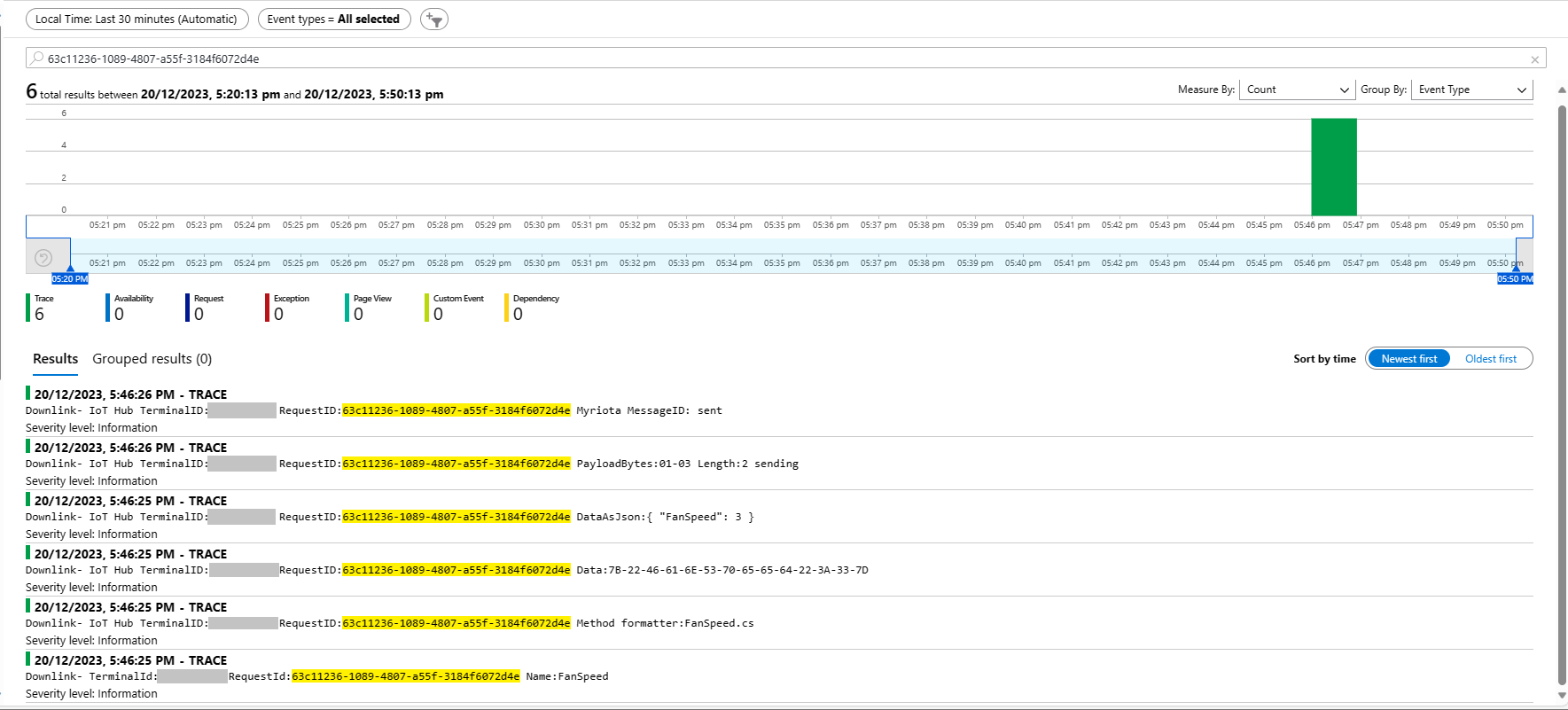
Azure Application Insights displaying information diagnostic information
Myriota Device manager control message history displaying pending control message

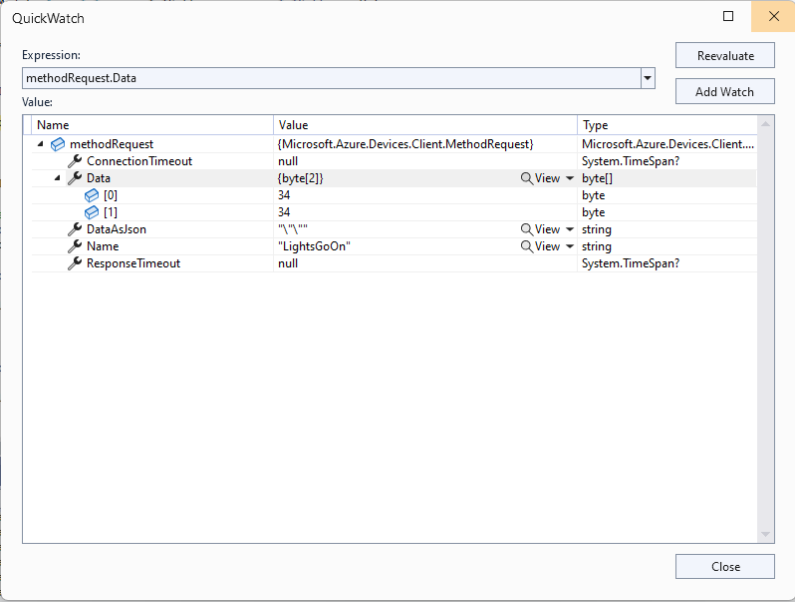
The Azure IoT Explorer payload for an empty message contained two ” characters which is a bit odd. I will have to build a test application which uses the Azure IoT Hub C2D direct method API to see if this is a “feature”.
Myriota Connector – Azure IoT Hub Downlink refactoring

The myriota Azure IoT Hub Cloud Identity Translation Gateway downlink message handler was getting a bit “chunky”. So, I started by stripping the code back to the absolute bare minimum that would “work”.

public async Task AzureIoTHubMessageHandler(Message message, object userContext)
{
   Models.DeviceConnectionContext context = (Models.DeviceConnectionContext)userContext;

   _logger.LogInformation("Downlink- IoT Hub TerminalId:{termimalId} LockToken:{LockToken}", context.TerminalId, message.LockToken);

   try
   {

      await context.DeviceClient.CompleteAsync(message);
   }
   catch (Exception ex)
   {
      await context.DeviceClient.RejectAsync(message);

      _logger.LogError(ex, "Downlink- IoT Hub TerminalID:{terminalId} LockToken:{LockToken} failed", context.TerminalId, message.LockToken );
   }
}

Then the code was then extended so it worked for “sunny day” scenarios. The payload formatter was successfully retrieved from the configured Azure Storage Blob, CS-Script successfully compiled the payload formatter, the message payload was valid text, the message text was valid Javascript Object Notation(JSON), the JSON was successfully processed by the compiled payload formatter, and finally the payload was accepted by the Myriota Cloud API.

public async Task AzureIoTHubMessageHandler(Message message, object userContext)
{
   Models.DeviceConnectionContext context = (Models.DeviceConnectionContext)userContext;

   _logger.LogInformation("Downlink- IoT Hub TerminalId:{termimalId} LockToken:{LockToken}", context.TerminalId, message.LockToken);

   string payloadFormatter;

   // Use default formatter and replace with message specific formatter if configured.
   if (!message.Properties.TryGetValue(Constants.IoTHubDownlinkPayloadFormatterProperty, out payloadFormatter) || string.IsNullOrEmpty(payloadFormatter))
   {
      payloadFormatter = context.PayloadFormatterDownlink;
   }

   _logger.LogInformation("Downlink- IoT Hub TerminalID:{termimalId} LockToken:{LockToken} Payload formatter:{payloadFormatter} ", context.TerminalId, message.LockToken, payloadFormatter);

   try
   {
      IFormatterDownlink payloadFormatterDownlink = await _payloadFormatterCache.DownlinkGetAsync(payloadFormatter);

      byte[] messageBytes = message.GetBytes();

      string messageText = Encoding.UTF8.GetString(messageBytes);

      JObject messageJson = JObject.Parse(messageText);

      byte[] payloadBytes = payloadFormatterDownlink.Evaluate(message.Properties, context.TerminalId, messageJson, messageBytes);

      string messageId = await _myriotaModuleAPI.SendAsync(context.TerminalId, payloadBytes);

      _logger.LogInformation("Downlink- IoT Hub TerminalID:{terminalId} LockToken:{LockToken} MessageID:{messageId} sent", context.TerminalId, message.LockToken, messageId);
      
      await context.DeviceClient.CompleteAsync(message);
   }
   catch (Exception ex)
   {
      await context.DeviceClient.RejectAsync(message);

      _logger.LogError(ex, "Downlink- IoT Hub TerminalID:{terminalId} LockToken:{LockToken} failed", context.TerminalId, message.LockToken);
   }
}

Then code was then extended to handle message payloads which were problematic but not “failures”

public async Task AzureIoTHubMessageHandler(Message message, object userContext)
{
   Models.DeviceConnectionContext context = (Models.DeviceConnectionContext)userContext;

   _logger.LogInformation("Downlink- IoT Hub TerminalId:{termimalId} LockToken:{LockToken}", context.TerminalId, message.LockToken);

   string payloadFormatter;

   // Use default formatter and replace with message specific formatter if configured.
   if (!message.Properties.TryGetValue(Constants.IoTHubDownlinkPayloadFormatterProperty, out payloadFormatter) || string.IsNullOrEmpty(payloadFormatter))
   {
      payloadFormatter = context.PayloadFormatterDownlink;
   }

   _logger.LogInformation("Downlink- IoT Hub TerminalID:{termimalId} LockToken:{LockToken} Payload formatter:{payloadFormatter} ", context.TerminalId, message.LockToken, payloadFormatter);

   try
   {
      // If this fails payload broken
      byte[] messageBytes = message.GetBytes();

      string messageText = string.Empty;
      JObject messageJson = null;

      // These will fail for some messages, gets bytes only
      try
      {
         messageText = Encoding.UTF8.GetString(messageBytes);

         messageJson = JObject.Parse(messageText);
      }
      catch (ArgumentException aex)
      {
         _logger.LogInformation("Downlink-DeviceID:{DeviceId} LockToken:{LockToken} messageBytes:{2} not valid Text", context.TerminalId, message.LockToken, BitConverter.ToString(messageBytes));
      }
      catch( JsonReaderException jex)
      {
         _logger.LogInformation("Downlink-DeviceID:{DeviceId} LockToken:{LockToken} messageText:{2} not valid json", context.TerminalId, message.LockToken, BitConverter.ToString(messageBytes));
      }

      IFormatterDownlink payloadFormatterDownlink = await _payloadFormatterCache.DownlinkGetAsync(payloadFormatter);

      byte[] payloadBytes = payloadFormatterDownlink.Evaluate(message.Properties, context.TerminalId, messageJson, messageBytes);

      string messageId = await _myriotaModuleAPI.SendAsync(context.TerminalId, payloadBytes);

      await context.DeviceClient.CompleteAsync(message);

      _logger.LogInformation("Downlink- IoT Hub TerminalID:{terminalId} LockToken:{LockToken} MessageID:{messageId} sent", context.TerminalId, message.LockToken, messageId);
   }
   catch (Exception ex)
   {
      await context.DeviceClient.RejectAsync(message);

      _logger.LogError(ex, "Downlink- IoT Hub TerminalID:{terminalId} LockToken:{LockToken} failed", context.TerminalId, message.LockToken);
   }
   finally
   {
      message.Dispose();
   }
}

Then finally the code was modified to gracefully handle broken payloads returned by the payload formatter evaluation, some comments were added, and the non-managed resources of the DeviceClient.Message disposed.

public async Task AzureIoTHubMessageHandler(Message message, object userContext)
{
   Models.DeviceConnectionContext context = (Models.DeviceConnectionContext)userContext;

   _logger.LogInformation("Downlink- IoT Hub TerminalId:{termimalId} LockToken:{LockToken}", context.TerminalId, message.LockToken);

   // Use default formatter and replace with message specific formatter if configured.
   string payloadFormatter;
   if (!message.Properties.TryGetValue(Constants.IoTHubDownlinkPayloadFormatterProperty, out payloadFormatter) || string.IsNullOrEmpty(payloadFormatter))
   {
      payloadFormatter = context.PayloadFormatterDownlink;
   }

   _logger.LogInformation("Downlink- IoT Hub TerminalID:{termimalId} LockToken:{LockToken} Payload formatter:{payloadFormatter} ", context.TerminalId, message.LockToken, payloadFormatter);

   try
   {
      // If this fails payload broken
      byte[] messageBytes = message.GetBytes();

      // This will fail for some messages, payload formatter gets bytes only
      string messageText = string.Empty;
      try
      {
         messageText = Encoding.UTF8.GetString(messageBytes);
      }
      catch (ArgumentException aex)
      {
         _logger.LogInformation("Downlink- IoT Hub TerminalID:{TerminalId} LockToken:{LockToken} messageBytes:{2} not valid Text", context.TerminalId, message.LockToken, BitConverter.ToString(messageBytes));
      }

      // This will fail for some messages, payload formatter gets bytes only
      JObject? messageJson = null;
      try
      {
         messageJson = JObject.Parse(messageText);
      }
      catch ( JsonReaderException jex)
      {
         _logger.LogInformation("Downlink- IoT Hub TerminalID:{TerminalId} LockToken:{LockToken} messageText:{2} not valid json", context.TerminalId, message.LockToken, BitConverter.ToString(messageBytes));
      }

      // This shouldn't fail, but it could for lots of diffent reasons, invalid path to blob, syntax error, interface broken etc.
      IFormatterDownlink payloadFormatterDownlink = await _payloadFormatterCache.DownlinkGetAsync(payloadFormatter);

      // This shouldn't fail, but it could for lots of different reasons, null references, divide by zero, out of range etc.
      byte[] payloadBytes = payloadFormatterDownlink.Evaluate(message.Properties, context.TerminalId, messageJson, messageBytes);

      // Validate payload before calling Myriota control message send API method
      if (payloadBytes is null)
      {
         _logger.LogWarning("Downlink- IoT Hub TerminalID:{terminalId} LockToken:{LockToken} payload formatter:{payloadFormatter} Evaluate returned null", context.TerminalId, message.LockToken, payloadFormatter);

         await context.DeviceClient.RejectAsync(message);

         return;
      }

      if ((payloadBytes.Length < Constants.DownlinkPayloadMinimumLength) || (payloadBytes.Length > Constants.DownlinkPayloadMaximumLength))
      {
         _logger.LogWarning("Downlink- IoT Hub TerminalID:{terminalId} LockToken:{LockToken} payloadData length:{Length} invalid must be {DownlinkPayloadMinimumLength} to {DownlinkPayloadMaximumLength} bytes", context.TerminalId, message.LockToken, payloadBytes.Length, Constants.DownlinkPayloadMinimumLength, Constants.DownlinkPayloadMaximumLength);

         await context.DeviceClient.RejectAsync(message);

         return;
      }

      // This shouldn't fail, but it could few reasons mainly connectivity & message queuing etc.
      _logger.LogInformation("Downlink- IoT Hub TerminalID:{TerminalId} LockToken:{LockToken} PayloadData:{payloadData} Length:{Length} sending", context.TerminalId, message.LockToken, Convert.ToHexString(payloadBytes), payloadBytes.Length);

      // Finally send the message using Myriota API
      string messageId = await _myriotaModuleAPI.SendAsync(context.TerminalId, payloadBytes);

      _logger.LogInformation("Downlink- IoT Hub TerminalID:{TerminalId} LockToken:{LockToken} MessageID:{messageId} sent", context.TerminalId, message.LockToken, messageId);

      await context.DeviceClient.CompleteAsync(message);

      _logger.LogInformation("Downlink- IoT Hub TerminalID:{terminalId} LockToken:{LockToken} MessageID:{messageId} sent", context.TerminalId, message.LockToken, messageId);
   }
   catch (Exception ex)
   {
      await context.DeviceClient.RejectAsync(message);

      _logger.LogError(ex, "Downlink- IoT Hub TerminalID:{terminalId} LockToken:{LockToken} failed", context.TerminalId, message.LockToken);
   }
   finally
   {
      // Mop up the non managed resources of message
      message.Dispose();
   }
}

As the code was being extended, I tested different failures to make sure the Application Insights logging messages were useful. The first failure mode tested was the Azure Storage Blob, path was broken or the blob was missing.

Visual Studio 2022 Debugger blob not found exception message
Application Insights blob not found exception logging

Then a series of “broken” payload formatters were created to test CS-Script compile time failures.

// Broken interface implementation
using System;
using System.Collections.Generic;

using Newtonsoft.Json;
using Newtonsoft.Json.Linq;

public class FormatterDownlink : PayloadFormatter.IFormatterDownlink
{
   public byte[] Evaluate(IDictionary<string, string> properties, string terminalId, byte[] payloadBytes)
   {
      return payloadBytes;
   }
}
Visual Studio 2022 Debugger interface implementation broken exception message
Application Insights interface implementation broken exception logging
// Broken syntax
using System;
using System.Collections.Generic;

using Newtonsoft.Json;
using Newtonsoft.Json.Linq;

public class FormatterDownlink : PayloadFormatter.IFormatterDownlink
{
   public byte[] Evaluate(IDictionary<string, string> properties, string terminalId, JObject payloadJson, byte[] payloadBytes)
   {
      return payloadBytes
   }
}
Visual Studio 2022 Debugger syntax error exception message
Application Insights syntax error exception logging
// Runtime error
using System;
using System.Collections.Generic;

using Newtonsoft.Json;
using Newtonsoft.Json.Linq;

public class FormatterDownlink : PayloadFormatter.IFormatterDownlink
{
   public byte[] Evaluate(IDictionary<string, string> properties, string terminalId, JObject payloadJson, byte[] payloadBytes)
   {
      payloadBytes[20] = 0;

      return payloadBytes;
   }
}
Visual Studio 2022 Debugger runtime error exception message
Application Insights syntax error exception logging

Invalid Myriota Cloud API send control message payload

Visual Studio 2022 Debugger Myriota send failure exception message
Application Insights Myriota send failure exception logging

The final test was sending a downlink message which was valid JSON, contained the correct information for the specified payload formatter and was successfully processed by the Myriota Cloud API.

Azure IoT Explorer with valid JSON payload and payload formatter name
Azure function output of successful downlink message
Application Insights successful downlink message logging

After a couple of hours the I think the downlink messageHandler implementation was significantly improved.

Myriota Connector – Payload formatters revisited again

The myriota Azure IoT Hub Cloud Identity Translation Gateway payload formatters use compiled C# code to convert uplink/downlink packet payloads to JSON/byte array. While trying out different formatters I had “compile” and “evaluation” errors which would have been a lot easier to debug if there was more diagnostic information in the Azure Application Insights logging.

namespace PayloadFormatter // Additional namespace for shortening interface when usage in formatter code
{
    using System.Collections.Generic;

    using Newtonsoft.Json.Linq;

    public interface IFormatterUplink
    {
        public JObject Evaluate(IDictionary<string, string> properties, string terminalId, DateTime timestamp, byte[] payloadBytes);
    }

    public interface IFormatterDownlink
    {
        public byte[] Evaluate(IDictionary<string, string> properties, string terminalId, JObject? payloadJson, byte[] payloadBytes);
    }
}

An uplink payload formatter is loaded from Azure Storage Blob, compiled with Oleg Shilo’s CS-Script then cached in memory with Alastair Crabtree’s LazyCache.

// Get the payload formatter from Azure Storage container, compile, and then cache binary.
IFormatterUplink formatterUplink;

try
{
   formatterUplink = await _payloadFormatterCache.UplinkGetAsync(context.PayloadFormatterUplink, cancellationToken);
}
catch (Azure.RequestFailedException aex)
{
   _logger.LogError(aex, "Uplink- PayloadID:{0} payload formatter load failed", payload.Id);

   return payload;
}
catch (NullReferenceException nex)
{
   _logger.LogError(nex, "Uplink- PayloadID:{id} formatter:{formatter} compilation failed missing interface", payload.Id, context.PayloadFormatterUplink);

   return payload;
}
catch (CSScriptLib.CompilerException cex)
{
   _logger.LogError(cex, "Uplink- PayloadID:{id} formatter:{formatter} compiler failed", payload.Id, context.PayloadFormatterUplink);

   return payload;
}
catch (Exception ex)
{
   _logger.LogError(ex, "Uplink- PayloadID:{id} formatter:{formatter} compilation failed", payload.Id, context.PayloadFormatterUplink);

   return payload;
}

If the Azure Storage blob is missing or the payload formatter code incorrect an exception is thrown. I added specialised exception handers for Azure.RequestFailedException, NullReferenceException and CSScriptLib.CompilerException to add more detail to the Azure Application Insights logging.

// Process the payload with configured formatter
Dictionary<string, string> properties = new Dictionary<string, string>();
JObject telemetryEvent;

try
{
   telemetryEvent = formatterUplink.Evaluate(properties, packet.TerminalId, packet.Timestamp, payloadBytes);
}
catch (Exception ex)
{
   _logger.LogError(ex, "Uplink- PayloadId:{0} TerminalId:{1} Value:{2} Bytes:{3} payload formatter evaluate failed", payload.Id, packet.TerminalId, packet.Value, Convert.ToHexString(payloadBytes));

   return payload;
}

if (telemetryEvent is null)
{
   _logger.LogError("Uplink- PayloadId:{0} TerminalId:{1} Value:{2} Bytes:{3} payload formatter evaluate failed returned null", payload.Id, packet.TerminalId, packet.Value, Convert.ToHexString(payloadBytes));

   return payload;
}

The Evaluate method can return many different types of exception so in the initial version only the “generic” exception is caught and logged.

using System;
using System.Collections.Generic;

using Newtonsoft.Json;
using Newtonsoft.Json.Linq;

public class FormatterUplink : PayloadFormatter.IFormatterUplink
{
    public JObject Evaluate(IDictionary<string, string> properties, string terminalId, DateTime timestamp, byte[] payloadBytes)
    {
        JObject telemetryEvent = new JObject();

        telemetryEvent.Add("Bytes", BitConverter.ToString(payloadBytes));
        telemetryEvent.Add("Bytes", BitConverter.ToString(payloadBytes));

        return telemetryEvent;
    }
}

There are a number (which should grow over time) of test uplink/downlink payload formatters for testing different compile and execution failures.

Azure IoT Storage Explorer container with sample formatter blobs.

I used Azure Storage Explorer to upload my test payload formatters to the uplink/downlink Azure Storage containers.

Myriota Connector – Uplink Payload formatters revisited

The myriota Azure IoT Hub Cloud Identity Translation Gateway payload formatters use compiled C# code to convert uplink packet payloads to JSON.

namespace PayloadFormattercode
{
    using System.Collections.Generic;

    using Newtonsoft.Json.Linq;

    public interface IFormatterUplink
    {
        public JObject Evaluate(IDictionary<string, string> properties, string application, string terminalId, DateTime timestamp, JObject payloadJson, string payloadText, byte[] payloadBytes);
    }
..
}

The myriota uplink packet payload is only 20 bytes long so it is very unlikely that the payloadText and payloadJSON parameters would ever be populated so I removed them from the interface. The uplink message handler interface has been updated and the code to convert (if possible) the payload bytes to text and then to JSON deleted.

namespace PayloadFormatter
{
    using System.Collections.Generic;

    using Newtonsoft.Json.Linq;

    public interface IFormatterUplink
    {
        public JObject Evaluate(IDictionary<string, string> properties, string application, string terminalId, DateTime timestamp, byte[] payloadBytes);
    }
...
}

All of the sample payload formatters have been updated to reflect the updated parameters. The sample Tracker.cs payload formatter unpacks a message from Myriota Dev Kit running the Tracker sample and returns an Azure IoT Central compatible location telemetry payload.

/*
myriota tracker payload format

typedef struct {
  uint16_t sequence_number;
  int32_t latitude;   // scaled by 1e7, e.g. -891234567 (south 89.1234567)
  int32_t longitude;  // scaled by 1e7, e.g. 1791234567 (east 179.1234567)
  uint32_t time;      // epoch timestamp of last fix
} __attribute__((packed)) tracker_message; 

*/ 
using System;
using System.Collections.Generic;
using System.Globalization;

using Newtonsoft.Json;
using Newtonsoft.Json.Linq;


public class FormatterUplink : PayloadFormatter.IFormatterUplink
{
    public JObject Evaluate(IDictionary<string, string> properties, string application, string terminalId, DateTime timestamp, byte[] payloadBytes)
    {
        JObject telemetryEvent = new JObject();

        if (payloadBytes is null)
        {
            return telemetryEvent;
        }

        telemetryEvent.Add("SequenceNumber", BitConverter.ToUInt16(payloadBytes));

        JObject location = new JObject();

        double latitude = BitConverter.ToInt32(payloadBytes, 2) / 10000000.0;
        location.Add("lat", latitude);

        double longitude = BitConverter.ToInt32(payloadBytes, 6) / 10000000.0;
        location.Add("lon", longitude);

        location.Add("alt", 0);

        telemetryEvent.Add("DeviceLocation", location);

        UInt32 packetimestamp = BitConverter.ToUInt32(payloadBytes, 10);

        DateTime fixAtUtc = DateTime.UnixEpoch.AddSeconds(packetimestamp);

        telemetryEvent.Add("FixAtUtc", fixAtUtc);

        properties.Add("iothub-creation-time-utc", fixAtUtc.ToString("s", CultureInfo.InvariantCulture));

        return telemetryEvent;
    }
}

If a message payload is text or JSON it can still be converted in the payload formatter.

Myriota – Uplink Payload formatters and caching

My myriota Azure IoT Hub Cloud Identity Translation Gateway payload formatters uses C# code (compiled with CS-Script cached with Alastair Crabtrees’s LazyCache) to convert uplink packet payloads to JSON.

I have found that putting the C/C++ structure for the uplink payload at the top of the convertor really helpful.

/*
myriota tracker payload format

typedef struct {
  uint16_t sequence_number;
  int32_t latitude;   // scaled by 1e7, e.g. -891234567 (south 89.1234567)
  int32_t longitude;  // scaled by 1e7, e.g. 1791234567 (east 179.1234567)
  uint32_t time;      // epoch timestamp of last fix
} __attribute__((packed)) tracker_message; 

*/ 
using System;
using System.Collections.Generic;

using Newtonsoft.Json;
using Newtonsoft.Json.Linq;


public class FormatterUplink : PayloadFormatter.IFormatterUplink
{
    public JObject Evaluate(IDictionary<string, string> properties, string application, string terminalId, DateTime timestamp, JObject payloadJson, string payloadText, byte[] payloadBytes)
    {
        JObject telemetryEvent = new JObject();

        telemetryEvent.Add("SequenceNumber", BitConverter.ToUInt16(payloadBytes));

        double latitude = BitConverter.ToInt32(payloadBytes, 2) / 10000000.0;
        telemetryEvent.Add("Latitude", latitude);

        double longitude = BitConverter.ToInt32(payloadBytes, 6) / 10000000.0;
        telemetryEvent.Add("Longitude", longitude);

        UInt32 packetimestamp = BitConverter.ToUInt32(payloadBytes, 10);
        DateTime lastFix = DateTime.UnixEpoch.AddSeconds(packetimestamp);

       properties.Add("iothub-creation-time-utc", lastFix .ToString("s", CultureInfo.InvariantCulture));

       return telemetryEvent;
    }
}

The sample Tracker.cs payload formatter unpacks a message from Myriota Dev Kit running the Tracker sample and returns an Azure IoT Central compatible location telemetry payload.

BEWARE : I think the Azure IoT Central Position lat, lon + alt values might be case sensitive.

Azure IoT Explorer displaying Tracker.cs payload formatter output

The identity payload formatter to use is configured as part of the Destination webhook Uniform Resource Locator (URL).

Myriota Destination configuration application name URL configuration
namespace devMobile.IoT.MyriotaAzureIoTConnector.Connector.Models
{
    public class UplinkPayloadQueueDto
    {
        public string Application { get; set; }
        public string EndpointRef { get; set; }
        public DateTime PayloadReceivedAtUtc { get; set; }
        public DateTime PayloadArrivedAtUtc { get; set; }
        public QueueData Data { get; set; }
        public string Id { get; set; }
        public Uri CertificateUrl { get; set; }
        public string Signature { get; set; }
    }

    public class QueueData
    {
        public List<QueuePacket> Packets { get; set; }
    }

    public class QueuePacket
    {
        public string TerminalId { get; set; }

        public DateTime Timestamp { get; set; }

        public string Value { get; set; }
    }
}

A pair of Azure Blob Storage containers are used to store the uplink/downlink (coming soon) formatter files. The compiled payload formatters are cached with Uplink/Downlink + Application (from the UplinkPayloadQueueDto) as the key.

Azure IoT Storage Explorer uplink payload formatters

The default uplink and downlink formatters used when there is no payload formatter for “Application” are configured in the application settings.

.NET Core web API + Dapper – LazyCache

I have used Alastair Crabtree’s LazyCache (read-through in-memory cache) on a couple of other projects e.g. The Things Industries V3 Connector (DeviceClient instances) and Swarm Space Azure IoT Connector (DeviceClient Instances and CS-Script binaries).

Adding LazyCache support to an ASP.Net Core WebAPI application is one line of code.

public static void Main(string[] args)
{
    var builder = WebApplication.CreateBuilder(args);

    // Add services to the container.
    builder.Services.AddApplicationInsightsTelemetry();

    // Add services to the container.
    builder.Services.AddTransient<IDapperContext>(s => new DapperContext(builder.Configuration));

    builder.Services.AddControllers();

    // Register IAppCache as a singleton CachingService
    builder.Services.AddLazyCache();

    var app = builder.Build();

    // Configure the HTTP request pipeline.

    app.UseHttpsRedirection();

    app.MapControllers();

    app.Run();
}

One of the applications I work uses a lot of “reference” data which is effectively static e.g. national/regional holidays in countries where they have customers, and data which is updated on a schedule e.g. exchange rates downloaded at a known time every day.

//...
 private readonly TimeSpan StockItemListAbsoluteExpirationTime = new TimeSpan(23, 59, 59);
//....

private async Task<IEnumerable<Model.StockItemListDtoV1>> GetStockItemsAsync()
{
    return await dbConnection.QueryWithRetryAsync<Model.StockItemListDtoV1>(sql: sqlCommandText, commandType: CommandType.Text);
}

[HttpGet]
public async Task<ActionResult<IEnumerable<Model.StockItemListDtoV1>>> Get()
{
    MemoryCacheEntryOptions memoryCacheEntryOptions = new MemoryCacheEntryOptions()
    {
        Priority = CacheItemPriority.NeverRemove,
        AbsoluteExpiration = DateTime.UtcNow.Date.Add(StockItemListAbsoluteExpirationTime)
    };

    return this.Ok(await cache.GetOrAddAsync("StockItems", () => GetStockItemsAsync(), memoryCacheEntryOptions));
}

[HttpDelete()]
public ActionResult Delete()
{
    cache.Remove("StockItems");

    return this.Ok();
}

For the holiday information updates, the dataset could be deleted(“burped”) then refreshed the next time it is referenced or deleted then re-loaded. For exchange rate updates the cache could automatically expire the dataset shortly after the scheduled download.

When I deployed my demo application to an Azure AppService the requests (using the composer tab of Telerik Fiddler) took longer than when the application was running on my development box which was unexpected. I think this was because the JavaScript Object Notation(JSON) response payload was larger than the AzureSQL Tabular Data Stream(TDS) payload.

The LazyCache source code hasn’t been updated for quite a while (but it is quite stable and works well) and moving to other libraries has been recommended in the wiki.

Swarm Space – Uplink Payload formatter caching and files

The payload formatters of my Azure IoT Hub Cloud Identity Translation Gateway use CS-Script and even a simple one was taking more than half a second to compile each time it was called.

using System;
using System.Globalization;

using Newtonsoft.Json.Linq;

public class FormatterUplink : PayloadFormatter.IFormatterUplink
{
    public JObject Evaluate(JObject telemetryEvent, string payloadBase64, byte[] payloadBytes, string payloadText, JObject payloadJson)
    {
        if ((payloadText != "" ) && ( payloadJson != null))
        {
            JObject location = new JObject();

            location.Add("lat", payloadJson.GetValue("lt"));
            location.Add("lon", payloadJson.GetValue("ln"));
            location.Add("alt", payloadJson.GetValue("a"));

            telemetryEvent.Add("Location", location);
        };

        return telemetryEvent;
    }
}

The Swarm Eval Kit default message has a userApplicationId of 65335

{"ln":123.456,"si":0.0,"bi":0.2,"sv":0.152,"lt":-12.345,"bv":4.032,"d":1671704370,"n":2,"a":9.0,"s":1.0,"c":208.0,"r":-94,"ti":0.032}

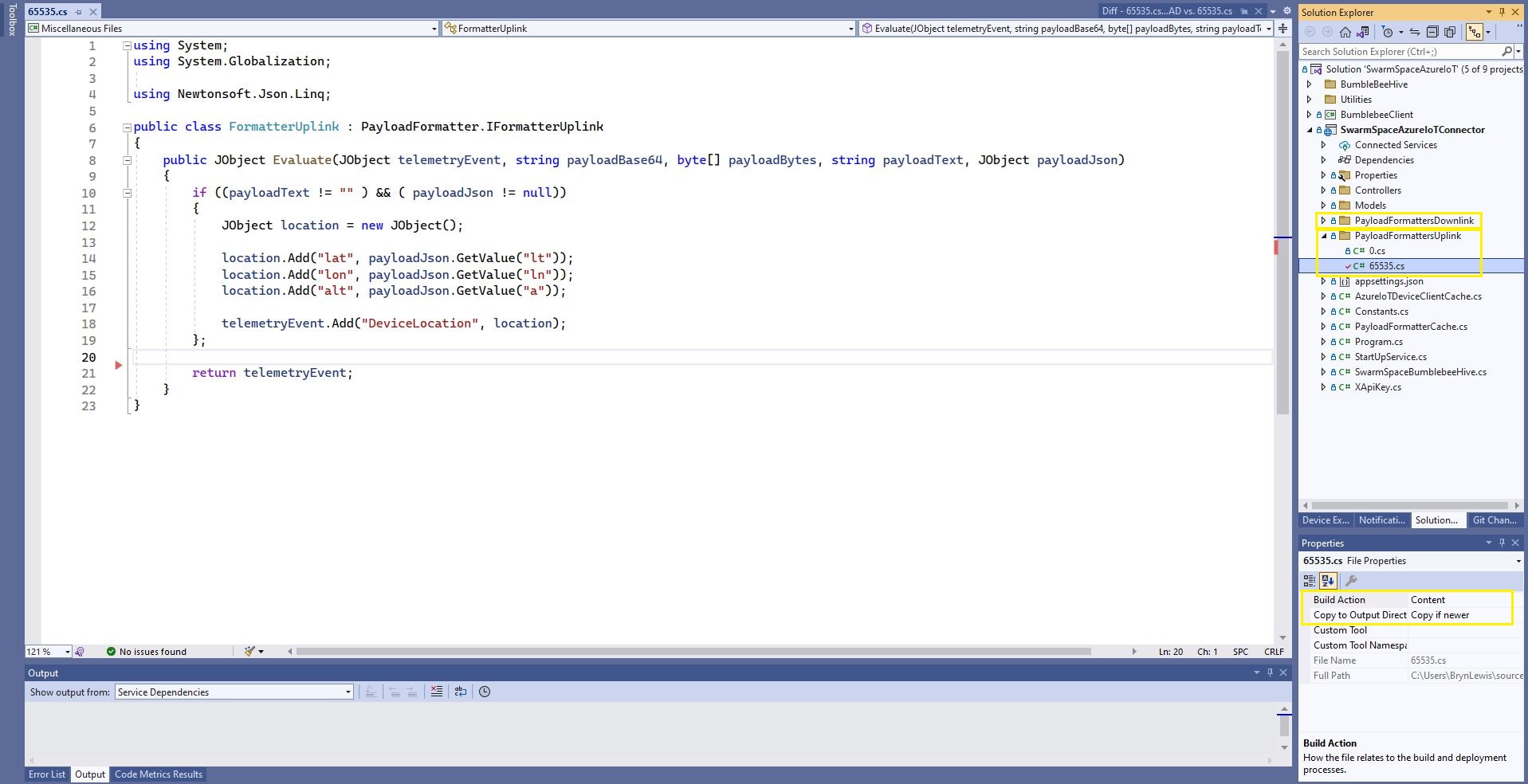
The 65355.cs payload formatter adds an Azure IoT Central compatible location to the telemetry payload.

Azure IoT Central uplink telemetry message payload

The formatter files are currently part of the SwarmSpaceAzureIoTConnector project (moving to Azure Blob Storage) so are configured as “content” (bonus syntax highlighting works) and “copy if newer” so they are included in the deployment package.

Visual Studio 2022 Sample payload formatter

I used Alastair Crabtrees’s LazyCache to store compiled payload formatters with Uplink/Downlink + UserApplicationId as the cache key.

public class FormatterCache : IFormatterCache
{
    private readonly ILogger<FormatterCache> _logger;
    private readonly Models.ApplicationSettings _applicationSettings;
    private readonly static IAppCache _payloadFormatters = new CachingService();

    public FormatterCache(ILogger<FormatterCache>logger, IOptions<Models.ApplicationSettings> applicationSettings)
    {
        _logger = logger;
        _applicationSettings = applicationSettings.Value;
    }

    public async Task<IFormatterUplink> UplinkGetAsync(int userApplicationId)
    {
        IFormatterUplink payloadFormatterUplink = await _payloadFormatters.GetOrAddAsync<PayloadFormatter.IFormatterUplink>($"U{userApplicationId}", (ICacheEntry x) => UplinkLoadAsync(userApplicationId), memoryCacheEntryOptions);

        return payloadFormatterUplink;
    }

    private async Task<IFormatterUplink> UplinkLoadAsync(int userApplicationId)
    {
        string payloadformatterFilePath = $"{_applicationSettings.PayloadFormattersUplinkFilePath}\\{userApplicationId}.cs";

        if (!File.Exists(payloadformatterFilePath))
        {
            _logger.LogInformation("PayloadFormatterUplink- UserApplicationId:{0} PayloadFormatterPath:{1} not found using default:{2}", userApplicationId, payloadformatterFilePath, _applicationSettings.PayloadFormatterUplinkDefault);

            return CSScript.Evaluator.LoadFile<PayloadFormatter.IFormatterUplink>(_applicationSettings.PayloadFormatterUplinkDefault);
        }

        _logger.LogInformation("PayloadFormatterUplink- UserApplicationId:{0} loading PayloadFormatterPath:{1}", userApplicationId, payloadformatterFilePath);

        return CSScript.Evaluator.LoadFile<PayloadFormatter.IFormatterUplink>(payloadformatterFilePath);
    }
...
}

The default uplink and downlink formatters are configured in application settings and are used when a UserApplicationId specific formatter is not configured.

Fiddler Composer illustrating compiled formatter timings before and after caching