In preparation for the impending(delayed) deployment of The Things Network(TTN) V3 I wanted to build a new Message Queue Telemetry Transport(MQTT) integration. As per my usual approach I build a .Net Core console application which sends and receives messages
The console application uses MQTTNet to connect to TTN. It subscribes to to the TTN application device uplink topic (did try subscribing to the uplink messages for all the devices in the application, and the downlink message scheduled, sent and acknowledged topics.
I tried a lot of topic formats with and without wildcards to see which worked best
//downlinkTopic = $"v3/{applicationId}/devices/{deviceId}/down/push";
//uplinkTopic = $"v3/+";
//uplinkTopic = $"v3/#";
//uplinkTopic = $"v3/{applicationId}/+"; //exception
//uplinkTopic = $"v3/{applicationId}/*";
//uplinkTopic = $"v3/devices/+";
//uplinkTopic = $"v3/devices/#";
//uplinkTopic = $"v3/devices/+/events/+";
//uplinkTopic = $"v3/{applicationId}/devices/+/events/+";
//uplinkTopic = $"v3/{applicationId}/devices/{deviceId}/events/update";
//uplinkTopic = $"v3/{applicationId}/devices/{deviceId}/events/create";
//uplinkTopic = $"v3/{applicationId}/devices/{deviceId}/events/delete";
//uplinkTopic = $"v3/{applicationId}/devices/+/events/+";
//uplinkTopic = $"v3/{applicationId}/devices/+/events/create";
//uplinkTopic = $"v3/{applicationId}/devices/+/events/update";
//uplinkTopic = $"v3/{applicationId}/devices/+/events/delete";
//uplinkTopic = $"v3/{applicationId}/devices/+/events/+";
//uplinkTopic = $"v3/{applicationId}/devices/{deviceId}/up";

string downlinkTopic = $"v3/{applicationId}/devices/{deviceId}/down/push";
string downlinkQueuedTopic = $"v3/{applicationId}/devices/{deviceId}/down/queued";
string downlinkSentTopic = $"v3/{applicationId}/devices/{deviceId}/down/sent";
string downlinkAckTopic = $"v3/{applicationId}/devices/{ deviceId}/down/ack";
string downlinkNakTopic = $"v3/{applicationId}/devices/{ deviceId}/down/nack";
string downlinkFailedTopic = $"v3/{applicationId}/devices/{deviceId}/down/sent";
I generated new classes from the ones provided in the documentation then added any obvious missing fields and fine tuned the data types by delving into the TTN V3 GO code.
The new messages payloads have significant differences to the V2 ones. I have refactored the generated classes to reduce the duplication of code and fix up datatypes e.g. int32 vs. ulong where JSON2Charp couldn’t infer the size of the number.
namespace devMobile.TheThingsNetwork.Models
{
   public class ApplicationIds
   {
      public string application_id { get; set; }
   }

   public class EndDeviceIds
   {
      public string device_id { get; set; }
      public ApplicationIds application_ids { get; set; }
      public string dev_eui { get; set; }
      public string join_eui { get; set; }
      public string dev_addr { get; set; }
   }
}
I wonder about the naming of the applicationIds class as it appears that it could only ever contain single applicationId.
I installed the tooling for GO support into Visual Studio Code and went looking for the uplink message definition which I think is in messages.pb.go (still learning go and how the TTN GO source is structured).
type ApplicationUplink struct {
	// Join Server issued identifier for the session keys used by this uplink.
	SessionKeyID []byte `protobuf:"bytes,1,opt,name=session_key_id,json=sessionKeyId,proto3" json:"session_key_id,omitempty"`
	FPort        uint32 `protobuf:"varint,2,opt,name=f_port,json=fPort,proto3" json:"f_port,omitempty"`
	FCnt         uint32 `protobuf:"varint,3,opt,name=f_cnt,json=fCnt,proto3" json:"f_cnt,omitempty"`
	// The frame payload of the uplink message.
	// The payload is still encrypted if the skip_payload_crypto field of the EndDevice
	// is true, which is indicated by the presence of the app_s_key field.
	FRMPayload []byte `protobuf:"bytes,4,opt,name=frm_payload,json=frmPayload,proto3" json:"frm_payload,omitempty"`
	// The decoded frame payload of the uplink message.
	// This field is set by the message processor that is configured for the end device (see formatters) or application (see default_formatters).
	DecodedPayload *types.Struct `protobuf:"bytes,5,opt,name=decoded_payload,json=decodedPayload,proto3" json:"decoded_payload,omitempty"`
	// Warnings generated by the message processor while decoding the frm_payload.
	DecodedPayloadWarnings []string `protobuf:"bytes,12,rep,name=decoded_payload_warnings,json=decodedPayloadWarnings,proto3" json:"decoded_payload_warnings,omitempty"`
	// A list of metadata for each antenna of each gateway that received this message.
	RxMetadata []*RxMetadata `protobuf:"bytes,6,rep,name=rx_metadata,json=rxMetadata,proto3" json:"rx_metadata,omitempty"`
	// Settings for the transmission.
	Settings TxSettings `protobuf:"bytes,7,opt,name=settings,proto3" json:"settings"`
	// Server time when the Network Server received the message.
	ReceivedAt time.Time `protobuf:"bytes,8,opt,name=received_at,json=receivedAt,proto3,stdtime" json:"received_at"`
	// The AppSKey of the current session.
	// This field is only present if the skip_payload_crypto field of the EndDevice
	// is true.
	// Can be used to decrypt uplink payloads and encrypt downlink payloads.
	AppSKey *KeyEnvelope `protobuf:"bytes,9,opt,name=app_s_key,json=appSKey,proto3" json:"app_s_key,omitempty"`
	// The last AFCntDown of the current session.
	// This field is only present if the skip_payload_crypto field of the EndDevice
	// is true.
	// Can be used with app_s_key to encrypt downlink payloads.
	LastAFCntDown uint32 `protobuf:"varint,10,opt,name=last_a_f_cnt_down,json=lastAFCntDown,proto3" json:"last_a_f_cnt_down,omitempty"`
	Confirmed     bool   `protobuf:"varint,11,opt,name=confirmed,proto3" json:"confirmed,omitempty"`
	// Consumed airtime for the transmission of the uplink message. Calculated by Network Server using the RawPayload size and the transmission settings.
	ConsumedAirtime *time.Duration `protobuf:"bytes,13,opt,name=consumed_airtime,json=consumedAirtime,proto3,stdduration" json:"consumed_airtime,omitempty"`
	// End device location metadata, set by the Application Server while handling the message.
	Locations            map[string]*Location `protobuf:"bytes,14,rep,name=locations,proto3" json:"locations,omitempty" protobuf_key:"bytes,1,opt,name=key,proto3" protobuf_val:"bytes,2,opt,name=value,proto3"`
	XXX_NoUnkeyedLiteral struct{}             `json:"-"`
	XXX_sizecache        int32                `json:"-"`
}
I also need to deploy some more gateways and devices to check that I haven’t missed any fields available in more realistic environments.
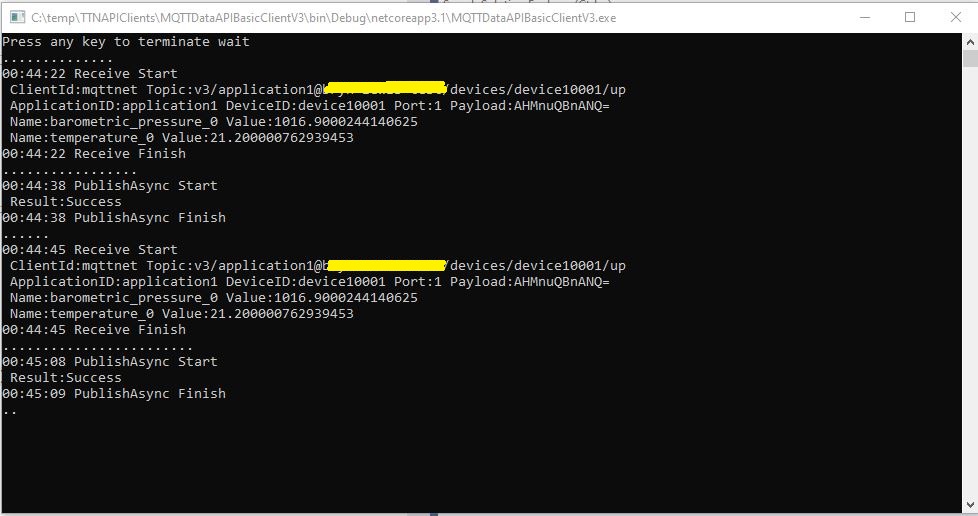
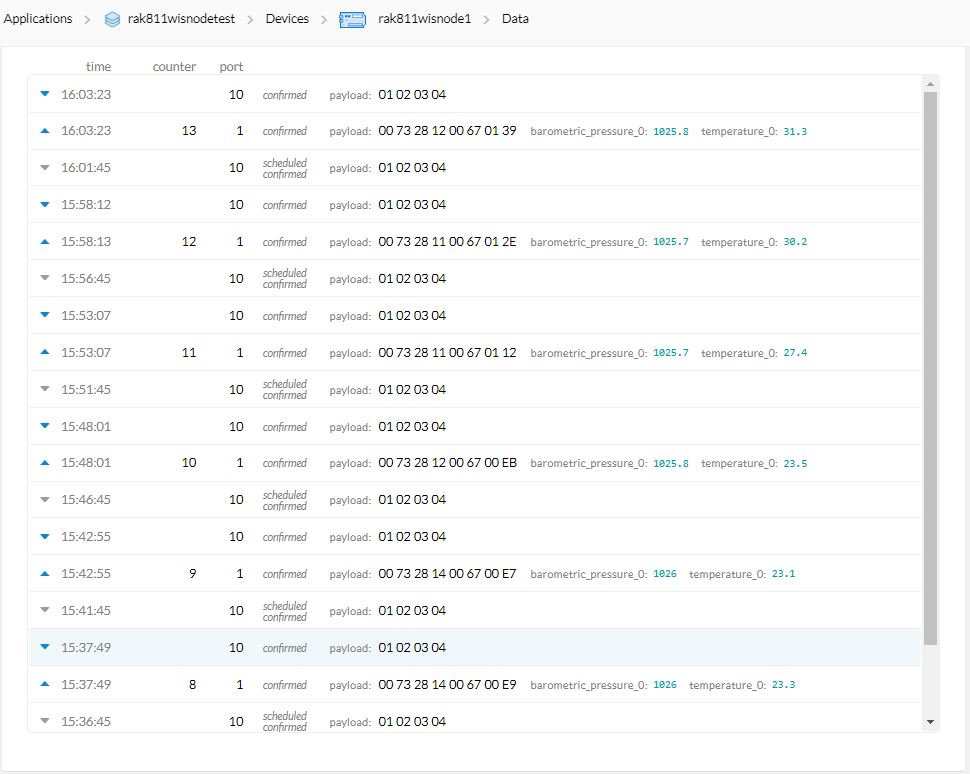
In the TTN Device data tab I could see messages being sent, to and received from from the simulated device.

The next step is to get downlink messages working, then connect up a couple of gateways and trial with some real devices.

 devMobile's blog