.NET Core web API + Dapper – Dependency Injection

So far, to keep the code really obvious (tends to be more verbose) I have limited the use Dependency Injection(DI). I have been “injecting” an instance of an IConfiguration interface then retrieving the database connection string and other configuration. This isn’t a great approach as the database connection string name is in multiple files etc.

public CustomerController(IConfiguration configuration, ILogger<CustomerController> logger)
{
    this.connectionString = configuration.GetConnectionString("WorldWideImportersDatabase");
    this.logger = logger;
}

I wanted to explore the impact(s) of different DI approaches on ADO.Net connection pooling. With the system idle I used exec sp_who to see how many connections there were to my SQL Azure database.

SQL Server Management Studio(SSMS) sp_who query – Idle

Dapper Context approach

The application I’m currently working on uses a Command and Query Responsibility Segregation(CQRS) like approach. The application is largely “read only” so we have replicas of the database to improve the performance of queries hence the ConnectionReadCreate and ConnectionWriteCreate methods.

namespace devMobile.WebAPIDapper.ListsDIBasic
{
   using System.Data;
   using System.Data.SqlClient;

   using Microsoft.Extensions.Configuration;

   public interface IDapperContext 
   {
      public IDbConnection ConnectionCreate();
      public IDbConnection ConnectionCreate(string connectionStringName);

      public IDbConnection ConnectionReadCreate();
      public IDbConnection ConnectionWriteCreate();
   }

   public class DapperContext : IDapperContext
   {
      private readonly IConfiguration _configuration;

      public DapperContext(IConfiguration configuration)
      {
         _configuration = configuration;
      }

      public IDbConnection ConnectionCreate()
      { 
         return new SqlConnection(_configuration.GetConnectionString("default"));
      }

      public IDbConnection ConnectionCreate(string connectionStringName)
      {
         return new SqlConnection(_configuration.GetConnectionString(connectionStringName));
      }

      public IDbConnection ConnectionReadCreate()
      {
         return new SqlConnection(_configuration.GetConnectionString("default-read"));
      }

      public IDbConnection ConnectionWriteCreate()
      {
         return new SqlConnection(_configuration.GetConnectionString("default-write"));
      }
   }
}

I have experimented with how the IDapperContext context is constructed in the application startup with builder.Services.AddSingleton, builder.Services.AddScopedand and builder.Services.AddTransient.

public class Program
{
    public static void Main(string[] args)
    {
        var builder = WebApplication.CreateBuilder(args);

        // Add services to the container.
        //builder.Services.AddSingleton<IDapperContext>(s => new DapperContext(builder.Configuration));
        //builder.Services.AddTransient<IDapperContext>(s => new DapperContext(builder.Configuration));
        //builder.Services.AddScoped<IDapperContext>(s => new DapperContext(builder.Configuration));

        builder.Services.AddControllers();

        var app = builder.Build();

        // Configure the HTTP request pipeline.

        app.UseHttpsRedirection();

        app.MapControllers();

        app.Run();
    }
}

Then in the StockItems controller the IDapperContext interface implementation is used to create an IDbConnection for Dapper operations to use. I also added “WAITFOR DELAY ’00:00:02″ to the query to extend the duration of the requests.

[ApiController]
[Route("api/[controller]")]
public class StockItemsController : ControllerBase
{
   private readonly ILogger<StockItemsController> logger;
   private readonly IDapperContext dapperContext;

   public StockItemsController(ILogger<StockItemsController> logger, IDapperContext dapperContext)
   {
      this.logger = logger;

      this.dapperContext = dapperContext;
   }

   [HttpGet]
   public async Task<ActionResult<IEnumerable<Model.StockItemListDtoV1>>> Get()
   {
      IEnumerable<Model.StockItemListDtoV1> response;

      using (IDbConnection db = dapperContext.ConnectionCreate())
      {
         //response = await db.QueryWithRetryAsync<Model.StockItemListDtoV1>(sql: @"SELECT [StockItemID] as ""ID"", [StockItemName] as ""Name"", [RecommendedRetailPrice], [TaxRate] FROM [Warehouse].[StockItems]", commandType: CommandType.Text);
         response = await db.QueryWithRetryAsync<Model.StockItemListDtoV1>(sql: @"SELECT [StockItemID] as ""ID"", [StockItemName] as ""Name"", [RecommendedRetailPrice], [TaxRate] FROM [Warehouse].[StockItems]; WAITFOR DELAY '00:00:02'", commandType: CommandType.Text);
      }

      return this.Ok(response);
   }
...
}

I ran a stress testing application which simulated 50 concurrent users. When the stress test rig was stopped all the connections in the pool were closed after roughly 5 minutes.

SQL Server Management Studio(SSMS) sp_who query – stress test

Nasty approach

I then tried using DI to create a new connection for each request using builder.Services.AddScoped

public class Program
{
    public static void Main(string[] args)
    {
        var builder = WebApplication.CreateBuilder(args);

        // Add services to the container.

        //builder.Services.AddSingleton<IDbConnection>(s => new SqlConnection(builder.Configuration.GetConnectionString("default")));
        //builder.Services.AddScoped<IDbConnection>(s => new SqlConnection(builder.Configuration.GetConnectionString("default")));
        //builder.Services.AddTransient<IDbConnection>(s => new SqlConnection(builder.Configuration.GetConnectionString("default")));

        builder.Services.AddControllers();

        var app = builder.Build();

        app.UseHttpsRedirection();

        app.MapControllers();

        app.Run();
    }
}

The code in the get method was reduced. I also added “WAITFOR DELAY ’00:00:02″ to the query to extend the duration of the requests.

public class StockItemsController : ControllerBase
{
   private readonly ILogger<StockItemsController> logger;
   private readonly IDbConnection dbConnection;

   public StockItemsController(ILogger<StockItemsController> logger, IDbConnection dbConnection)
   {
      this.logger = logger;

      this.dbConnection = dbConnection;
   }

   [HttpGet]
   public async Task<ActionResult<IEnumerable<Model.StockItemListDtoV1>>> Get()
   {
      // return this.Ok(await dbConnection.QueryWithRetryAsync<Model.StockItemListDtoV1>(sql: @"SELECT [StockItemID] as ""ID"", [StockItemName] as ""Name"", [RecommendedRetailPrice], [TaxRate] FROM [Warehouse].[StockItems]; WAITFOR DELAY '00:00:02';", commandType: CommandType.Text));
      return this.Ok(await dbConnection.QueryWithRetryAsync<Model.StockItemListDtoV1>(sql: @"SELECT [StockItemID] as ""ID"", [StockItemName] as ""Name"", [RecommendedRetailPrice], [TaxRate] FROM [Warehouse].[StockItems]", commandType: CommandType.Text));
    }
...
}

With the stress test rig running the number of active connections was roughly the same as the DapperContext based implementation.

I don’t like this approach so will stick with DapperContext

.NET Core web API + Dapper – Authorisation of Data Access

The theme of this post is controlling users’ ability to read and write rows in a table. The best scenario I could come up with using the World Wide Importers database was around controlling access to Customer information.

This would be a representative set of “project requirements”…

  • Salespeople tend to look after categories of Customers
    • Kayla – Novelty Shops
    • Hudson – Supermarkets
    • Issabella – Computer Stores
    • Sophia – Gift Stores, Novelty Shops
    • Amy – Corporates
    • Anthony – Novelty Stores
    • Alica – Coporates
    • Stella – Supermarkets
  • But some Salespeople have direct relationships with Customers
    • Kayla – Corporate customers Eric Torres & Cosmina
    • Hudson – Tailspin Toys Head Office
    • Issabell – Tailspin Toys (Sylvanite, MT), Tailspin Toys (Sun River, MT), Tailspin Toys (Sylvanite, MT)
  • No changes to the database which could break the existing solution

In a previous engagement we added CustomerCategoryPerson and CustomerPerson like tables to the database to control read/write access to Customers’ information.

The CustomerCategoryPerson table links the CustomerCategory and Person tables with a flag (IsWritable) which indicates whether the Person can read/write Customer information for all the Customers in a CustomerCategory.

CREATE TABLE [Sales].[CustomerCategoryPerson](
	[CustomerCategoryPersonID] [int] IDENTITY(1,1) NOT NULL,
	[CustomerCategoryId] [int] NOT NULL,
	[PersonId] [int] NOT NULL,
	[IsWritable] [bit] NOT NULL,
	[LastUpdatedBy] [int] NOT NULL,
 CONSTRAINT [PK_CustomerCategoryPerson] PRIMARY KEY CLUSTERED 
(
	[CustomerCategoryPersonID] ASC
)...

The CustomerPerson table links the Customer and Person tables with a flag (IsWritable) which indicates whether a Person can read/write a Customer’s information.

CREATE TABLE [Sales].[CustomerPerson](
	[CustomerPersonId] [int] IDENTITY(1,1) NOT NULL,
	[CustomerID] [int] NOT NULL,
	[PersonId] [int] NOT NULL,
	[IsWritable] [bit] NOT NULL,
	[LastEditedBy] [int] NOT NULL,
 CONSTRAINT [PK_CustomerPerson] PRIMARY KEY CLUSTERED 
(
	[CustomerPersonId] ASC
)...

Users can do “wildcard” searches for Customers and the results set has to be limited to “their” customers and customers in the customer categories they are assigned too.

ALTER PROCEDURE [Sales].[CustomersNameSearchUnionV1]
@UserId as int,
@SearchText nvarchar(20),
@MaximumRowsToReturn int
AS
BEGIN
	-- Individual assignment
    SELECT TOP(@MaximumRowsToReturn) [Customers].[CustomerID] as "ID", [Customers].[CustomerName] as "Name", [Customers].[IsOnCreditHold] as "IsOnCreditHold"
    FROM Sales.Customers
	INNER JOIN [Sales].[CustomerPerson] ON ([Sales].[Customers].[CustomerId] = [Sales].[CustomerPerson].[CustomerId])
    WHERE ((CustomerName LIKE N'%' + @SearchText + N'%')
		AND ([Sales].[CustomerPerson].PersonId = @UserId))
    --ORDER BY [CustomerName]

	UNION 
	
	-- group assignment
   SELECT TOP(@MaximumRowsToReturn) [Customers].[CustomerID] as "ID", [Customers].[CustomerName] as "Name", [Customers].[IsOnCreditHold] as "IsOnCreditHold"
   FROM [Sales].[Customers]
      INNER JOIN [Sales].[CustomerCategories] ON ([Sales].[Customers].[CustomerCategoryID] = [Sales].[CustomerCategories].[CustomerCategoryID])
      INNER JOIN [Sales].[CustomerCategoryPerson] ON ([Sales].[Customers].[CustomerCategoryID] = [CustomerCategoryPerson].[CustomerCategoryID])
    WHERE ((CustomerName LIKE N'%' + @SearchText + N'%')
		AND ([Sales].[CustomerCategoryPerson].PersonId = @UserId))

END;

This approach increases the complexity and reduces the maintainability of stored procedures which have to control the reading/writing of Customer information. Several times I have extracted customer information read\write controls to a couple of database views, one for controlling read access.

CREATE VIEW [Sales].[CustomerPersonReadV1]
AS
-- Individual assignment
   SELECT [Sales].[Customers].[CustomerID], [Sales].[CustomerPerson].[PersonID], [Sales].[Customers].[CustomerCategoryID]
   FROM [Sales].[Customers]
      INNER JOIN [Sales].[CustomerPerson] ON ( [Sales].[Customers].[CustomerID] = CustomerPerson.CustomerID)

UNION -- Takes care of duplicates

-- Group assignment
   SELECT [Sales].[Customers].[CustomerID], [Sales].[CustomerCategoryPerson].[PersonID], [Sales].[Customers].[CustomerCategoryID]
   FROM [Sales].[Customers]
      --INNER JOIN [Sales].[CustomerCategories] ON ([Sales].[Customers].[CustomerCategoryID] = [Sales].[CustomerCategories].[CustomerCategoryID])
      INNER JOIN [Sales].[CustomerCategoryPerson] ON ([Sales].[Customers].[CustomerCategoryID] = [CustomerCategoryPerson].[CustomerCategoryID])

The other database for controlling write access

CREATE VIEW [Sales].[CustomerPersonWriteV1]
AS
-- Individual assignment
   SELECT [Sales].[Customers].[CustomerID], [Sales].[CustomerPerson].[PersonID], [Sales].[Customers].[CustomerCategoryID]
   FROM [Sales].[Customers]
      INNER JOIN [Sales].[CustomerPerson] ON (([Sales].[Customers].[CustomerID] = [CustomerPerson].[CustomerID]) AND ([Sales].[CustomerPerson].[IsWritable] = 1))

UNION -- Takes care of duplicates

-- Group assignment
   SELECT [Sales].[Customers].[CustomerID], [Sales].[CustomerCategoryPerson].[PersonID], [Sales].[Customers].[CustomerCategoryID]
   FROM [Sales].[Customers]
      INNER JOIN [Sales].[CustomerCategories] ON ([Sales].[Customers].[CustomerCategoryID] = [Sales].[CustomerCategories].[CustomerCategoryID])
      INNER JOIN [Sales].[CustomerCategoryPerson] ON ([Sales].[Customers].[CustomerCategoryID] = [CustomerCategoryPerson].[CustomerCategoryID] AND ([Sales].[CustomerCategoryPerson].[IsWritable] = 1))

The versioning of database views uses the same approach as stored procedures. When a view is updated (the columns returned changes , updated constraints etc.) the version number is incremented. Then we work through the dependencies list checking and updating the view version used and re-testing.

SQL Server Management Studio displaying objects which depend on the view

These two views are the UNION of the users individual and group access permissions. (If a user has Write they also have Read access). This reduces the complexity of stored procedures used for reading from and writing to the Customer table.

CREATE PROCEDURE [Sales].[CustomersListV1]
@UserId as int
AS
BEGIN
SELECT [Customers].[CustomerID] as "ID", [Customers].[CustomerName] as "Name", [Customers].[IsOnCreditHold] as "IsOnCreditHold"
	FROM [Sales].[Customers]
		INNER JOIN [Sales].[CustomerPersonReadV1] ON ([Sales].[Customers].[CustomerID] = [Sales].[CustomerPersonReadV1].CustomerID)
    WHERE ([Sales].[CustomerPersonReadV1].PersonId = @UserId)
	ORDER BY Name
END

The GET method of the Customer controller returns a list of all the Customers the current user has read only access to using their individual and group assignment.

[HttpGet(), Authorize(Roles = "SalesPerson,SalesAdministrator")]
[ProducesResponseType(StatusCodes.Status200OK, Type = typeof(List<Models.CustomerListDtoV1>))]
public async Task<ActionResult<IEnumerable<Models.CustomerListDtoV1>>> Get()
{
      IEnumerable<Models.CustomerListDtoV1> response;

      using (SqlConnection db = new SqlConnection(this.connectionString))
      {
         response = await db.QueryWithRetryAsync<Models.CustomerListDtoV1>(sql: "[Sales].[CustomersListV1]", param: new { userId = HttpContext.PersonId() }, commandType: CommandType.StoredProcedure);
      }

   return this.Ok(response);
}

The CustomerPersonWriteV1 view is used to stop users without IsWritable set (individual or group) updating a Customers IsOnCreditHold flag.

CREATE PROCEDURE [Sales].[CustomerCreditHoldStatusUpdateV1]
@UserID int,
@CustomerId int,
@IsOnCreditHold Bit
AS
BEGIN
    UPDATE [Sales].[Customers]
    SET IsOnCreditHold = @IsOnCreditHold, LastEditedBy = @UserID
	FROM [Sales].[Customers]
		INNER JOIN [Sales].[CustomerPersonWriteV1] ON ([Sales].[Customers].[CustomerID] = [Sales].[CustomerPersonWriteV1].CustomerID)
    WHERE (([Sales].[CustomerPersonWriteV1].PersonId = @UserId) 
		AND ([Sales].[Customers].[CustomerID] = @CustomerId )
		AND (IsOnCreditHold <> @IsOnCreditHold))
	
END

The PUT CreditHold method uses a combination of roles (Aministrator,SalesAdministrator,SalesPerson) and database views (CustomerPersonWriteV1) to control the updating of customer data.

[HttpPut("{customerId}/CreditStatus", Name ="CreditHold")]
[Authorize(Roles = "Aministrator,SalesAdministrator,SalesPerson")]
[ProducesResponseType(StatusCodes.Status200OK)]
[ProducesResponseType(StatusCodes.Status409Conflict)]
public async Task<IActionResult> CustomerCeditHold(int customerId, [FromBody] Models.CustomerCreditHoldUpdateV1 request )
{
    request.UserId = HttpContext.PersonId();
    request.CustomerId = customerId;

    using (SqlConnection db = new SqlConnection(connectionString))
    {
        if (await db.ExecuteWithRetryAsync("[Sales].[CustomerCreditHoldStatusUpdateV1]", param: request, commandType: CommandType.StoredProcedure) != 1)
        {
            logger.LogWarning("Person {UserId} Customer {CustomerId} IsOnCreditHold {IsOnCreditHold} update failed", request.UserId, request.CustomerId, request.IsOnCreditHold);

            return this.Conflict();
        }
    }

    return this.Ok();
}

My customers usually don’t have a lot of automated testing so minimising the impact of changes across the database and codebase is critical. Sometimes we duplicate code (definitely not DRY) so that the amount of functionality that has to be retested is reduced. We ensure this is time allocated for revisiting these decisions and remediating as required.

.NET Core web API + Dapper – Authorisation Permissions

The permissions required for an on-premises system running in a trusted environment are often minimalist. The World Wide Importers database People table has IsSystemUser, IsEmployee, IsSalesperson which is representative of the granularity of permissions I have encountered in Windows Forms .NET, ASP.NET Web Forms and other “legacy” applications.

CREATE TABLE [Application].[People](
    [PersonID] [int] NOT NULL,
    [FullName] nvarchar NOT NULL,
    [PreferredName] nvarchar NOT NULL,
    [SearchName] AS (concat([PreferredName],N' ',[FullName])) PERSISTED NOT NULL,
    [IsPermittedToLogon] [bit] NOT NULL,
    [LogonName] nvarchar NULL,
    [IsExternalLogonProvider] [bit] NOT NULL,
    [HashedPassword] varbinary NULL,
    [IsSystemUser] [bit] NOT NULL,
    [IsEmployee] [bit] NOT NULL,
    [IsSalesperson] [bit] NOT NULL,
    [UserPreferences] nvarchar NULL,
    [PhoneNumber] nvarchar NULL,
    [FaxNumber] nvarchar NULL,
    [EmailAddress] nvarchar NULL,
    [Photo] varbinary NULL,
    [CustomFields] nvarchar NULL,
    [OtherLanguages] AS (json_query([CustomFields],N'$.OtherLanguages')),
    [LastEditedBy] [int] NOT NULL,
    [ValidFrom] datetime2 GENERATED ALWAYS AS ROW START NOT NULL,
    [ValidTo] datetime2 GENERATED ALWAYS AS ROW END NOT NULL,
CONSTRAINT [PK_Application_People] PRIMARY KEY CLUSTERED
(
    [PersonID] ASC
)

The existing application appears to have a method for a Person to change their password which calls the [Website].[ChangePassword] stored procedure (I was surprised that the stored procedure didn’t set the LastEditedBy value).

CREATE PROCEDURE [Website].[ChangePassword]
@PersonID int,
@OldPassword nvarchar(40),
@NewPassword nvarchar(40)
WITH EXECUTE AS OWNER
AS
BEGIN
    SET NOCOUNT ON;
    SET XACT_ABORT ON;

    UPDATE [Application].People
    SET IsPermittedToLogon = 1,
        HashedPassword = HASHBYTES(N'SHA2_256', @NewPassword + FullName)
    WHERE PersonID = @PersonID
    AND PersonID <> 1
    AND HashedPassword = HASHBYTES(N'SHA2_256', @OldPassword + FullName);

    IF @@ROWCOUNT = 0
    BEGIN
        PRINT N'The PersonID must be valid, and the old password must be valid.';
        PRINT N'If the user has also changed name, please contact the IT staff to assist.';
        THROW 51000, N'Invalid Password Change', 1;
        RETURN -1;
    END;
END;

The new version removes the PersonId special case (Assumed that PersonId 1 can’t logon and the use of Throw). I think the use of Throw can add significant complexity to the exception handling of the WebAPI controller that calls the stored procedure

ALTER PROCEDURE [Website].[PersonPasswordChangeV1]
	@UserID int,
	@PasswordOld nvarchar(40),
	@PasswordNew nvarchar(40)
WITH EXECUTE AS OWNER
AS
BEGIN
    UPDATE [Application].People
    SET IsPermittedToLogon = 1
        ,HashedPassword = HASHBYTES(N'SHA2_256', @PasswordNew + FullName)
		,LastEditedBy = @UserID
    WHERE ((PersonID = @UserID )
		AND (HashedPassword = HASHBYTES(N'SHA2_256', @PasswordOld + FullName)))
END;

The PasswordChange method of the Person Controller only requires the caller to be authenticated.

/// <summary>
/// Changes current user's password.
/// </summary>
/// <param name="request">Current password and new password</param>
/// <response code="200">Password changed.</response>
/// <response code="401">Unauthorised, bearer token missing or expired.</response>
/// <response code="409">Previous password invalid or User name has changed.</response>
[Authorize()]
[HttpPut(Name = "PasswordChange")]
public async Task<ActionResult> PasswordChange([FromBody] Models.PersonPasswordChangeRequest request)
{
    request.UserID = HttpContext.PersonId();

    using (SqlConnection db = new SqlConnection(connectionString))
    {
        if (await db.ExecuteWithRetryAsync("[WebSite].[PersonPasswordChangeV1]", param: request, commandType: CommandType.StoredProcedure) != 1)
        {
            logger.LogWarning("Person {0} password change failed", request.UserID);

            return this.Conflict();
        }
    }

    return this.Ok();
}

The new application will have functionality for resetting a Person’s password. Access to this functionality will be restricted to people with the “Administrator” and “PasswordReset” roles.

CREATE PROCEDURE [Website].[PersonPasswordResetV1]
@UserID int,
@PersonID int,
@Password nvarchar(40)
WITH EXECUTE AS OWNER
AS
BEGIN
    UPDATE [Application].People
    SET IsPermittedToLogon = 1
        ,HashedPassword = HASHBYTES(N'SHA2_256', @Password + FullName)
		,LastEditedBy = @UserID
    WHERE PersonID = @PersonID
END;

One of the conventions we often use, is that the first parameter of any stored procedure that is called once a User has logged on is their unique identifier which is used for data access permissions and change tracking.

[Authorize(Roles = "Administrator")]
[HttpPut("{personId:int}", Name = "PasswordReset")]
public async Task<ActionResult> PasswordReset([Range(1, int.MaxValue, ErrorMessage = "Person id must greater than 1")] int personId, [FromBody] Models.PersonPasswordResetRequest request)
{
    request.UserId = HttpContext.PersonId();
    request.PersonID = personId;

    using (SqlConnection db = new SqlConnection(connectionString))
    {
        if (await db.ExecuteWithRetryAsync("[WebSite].[PersonPasswordResetV1]", param: request, commandType: CommandType.StoredProcedure) != 1)
        {
            logger.LogWarning("Person {0} password change failed", request.PersonID);

            return this.Conflict();
        }
    }

    return this.Ok();
}

For a couple of applications, we have added “Permissions” and “PersonPermissions” tables alongside the existing authorisation functionality to reduce the likely hood of any unintended side effects.

CREATE TABLE [Application].[Permissions](
	[PermissionID] [int] IDENTITY(1,1) NOT NULL,
	[Name] [nvarchar](20) NOT NULL,
	[Description] [nvarchar](50) NOT NULL,
	[LastEditedBy] [int] NOT NULL,
	[ValidFrom] [datetime2](7) GENERATED ALWAYS AS ROW START HIDDEN NOT NULL,
	[ValidUntil] [datetime2](7) GENERATED ALWAYS AS ROW END HIDDEN NOT NULL,
 CONSTRAINT [PK_Permissions] PRIMARY KEY CLUSTERED 
(
	[PermissionID] ASC
)...

We try and keep the names of the permissions short, so the token doesn’t get too large.

CREATE TABLE [Application].[PersonPermissions](
	[PersonPermissionId] [int] IDENTITY(1,1) NOT NULL,
	[PersonId] [int] NOT NULL,
	[PermIssionId] [int] NOT NULL,
	[Active] [bit] NOT NULL,
	[ValidFrom] [datetime2](7) GENERATED ALWAYS AS ROW START HIDDEN NOT NULL,
	[ValidUntil] [datetime2](7) GENERATED ALWAYS AS ROW END HIDDEN NOT NULL,
 CONSTRAINT [PK_PersonPermissions] PRIMARY KEY CLUSTERED 
(
	[PersonPermissionId] ASC
)...
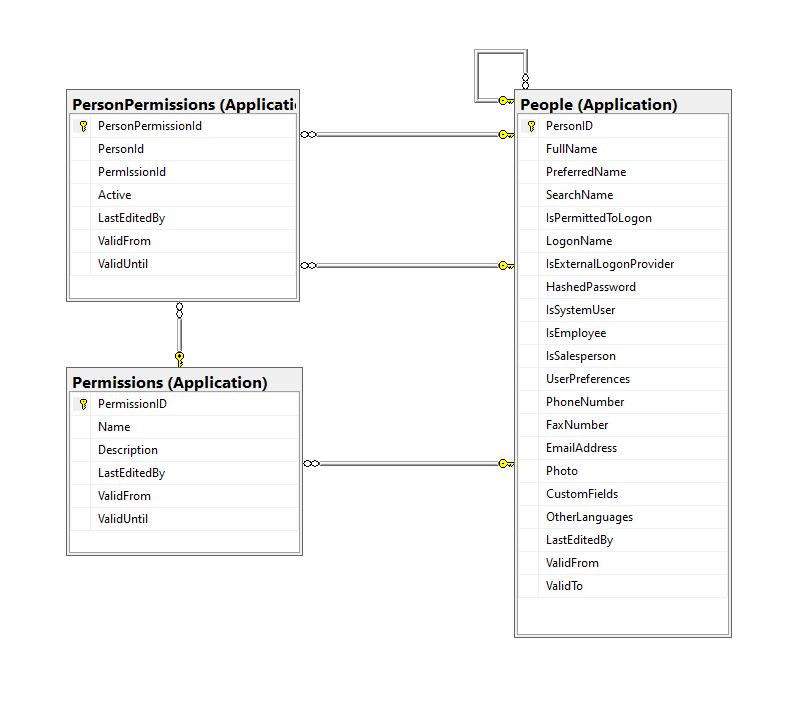
Permissions, PersonPermissions and People with Foreign Keys

The additional permissions (from the Person record) and the PersonPermissions table required some modifications to the PersonAuthenticateLookupByLogonNameV1 stored procedure and the addition of the PersonPermissionsByPersonIdV1 stored procedure.

ALTER PROCEDURE [Website].[PersonAuthenticateLookupByLogonNameV2]
@LogonName nvarchar(50),
@Password nvarchar(40)
AS
BEGIN
	SELECT PersonID
		,FullName
		,EmailAddress
		,IsSystemUser
		,IsEmployee
		,IsSalesPerson
	FROM [Application].[People]
	WHERE (( LogonName = @LogonName)
		AND (IsPermittedToLogon = 1)
		AND (HASHBYTES(N'SHA2_256', @Password + FullName) = HashedPassword))

The IsSystemUser, IsEmployee and IsSalesPerson bit flags were added to the stored procedure and Data Transfer Object(DTO)

private class PersonAuthenticateLogonDetailsDto
{
    public int PersonID { get; set; }    

    public string FullName { get; set; }

    public string EmailAddress { get; set; }

    public bool IsSystemUser { get; set; }

    public bool IsEmployee { get; set; }

    public bool IsSalesPerson { get; set; }
}

The PersonPermissionsByPersonIdV1 retrieves a list of the permissions of the User who has been authenticated.

ALTER PROCEDURE [Website].[PersonPermissionsByPersonIdV1]
	@PersonId AS int
AS
BEGIN

	SELECT [Application].[Permissions].[Name]
	FROM [Application].[Permissions]
		INNER JOIN [Application].[PersonPermissions] ON ([Application].[Permissions].PermissionID = [Application].[PersonPermissions].[PermissionId] )
	WHERE [Application].[PersonPermissions].[PersonId] = @PersonId
	ORDER BY [Application].[Permissions].[Name]

END

The Person’s permissions(effectively roles) are added as claims, the IsSystemUser, IsEmployee and IsSalesPerson flags are also added to the list of claims so they can be used in the new application.

[HttpPost("logon")]
public async Task<ActionResult> Logon([FromBody] Models.LogonRequest request )
{
    PersonAuthenticateLogonDetailsDto userLogonUserDetails;
    IEnumerable<string> permissions;
    var claims = new List<Claim>();

    using (SqlConnection db = new SqlConnection(configuration.GetConnectionString("WorldWideImportersDatabase")))
    {
        userLogonUserDetails = await db.QuerySingleOrDefaultWithRetryAsync<PersonAuthenticateLogonDetailsDto>("[Website].[PersonAuthenticateLookupByLogonNameV2]", param: request, commandType: CommandType.StoredProcedure);
        if (userLogonUserDetails == null)
        {
            logger.LogWarning("Login attempt by user {0} failed", request.LogonName);

           return this.Unauthorized();
        }

        // Lookup the Person's permissions
        permissions = await db.QueryWithRetryAsync<string>("[Website].[PersonPermissionsByPersonIdV1]", new { userLogonUserDetails.PersonID }, commandType: CommandType.StoredProcedure);
    }

    // Setup the primary SID + name info
    claims.Add(new Claim(ClaimTypes.PrimarySid, userLogonUserDetails.PersonID.ToString()));
    if (userLogonUserDetails.IsSystemUser)
    {
       claims.Add(new Claim(ClaimTypes.Role, "SystemUser"));
    }
    if (userLogonUserDetails.IsEmployee)
    {
       claims.Add(new Claim(ClaimTypes.Role, "Employee"));
    }
    if (userLogonUserDetails.IsSalesPerson)
    {
        claims.Add(new Claim(ClaimTypes.Role, "SalesPerson"));
    }

    foreach(string permission in permissions)
    {
        claims.Add(new Claim(ClaimTypes.Role, permission));
    }

    var authSigningKey = new SymmetricSecurityKey(Encoding.UTF8.GetBytes(jwtIssuerOptions.SecretKey));

    var token = new JwtSecurityToken(
         issuer: jwtIssuerOptions.Issuer,
          audience: jwtIssuerOptions.Audience, 
          expires: DateTime.UtcNow.Add(jwtIssuerOptions.TokenExpiresAfter),
          claims: claims,
          signingCredentials: new SigningCredentials(authSigningKey, SecurityAlgorithms.HmacSha256));
                
    return this.Ok(new
   {
        token = new JwtSecurityTokenHandler().WriteToken(token),
        expiration = token.ValidTo,
    });
}

We try to reduce the number of roles a User requires by having core roles (Administrator, Sales consultant, Warehouse administrator etc.) with additional roles for each task that can be added as required (ResetPassword, CustomerIsOnCreditHold Set/Clear etc.)

The Get Method of Authorisation controller returns a list of the User’s Roles which can be used to enable/disable functionality of the user interface.

/// <summary>
/// Gets a list of the current User's roles.
/// </summary>
/// <response code="200">List of claims returned.</response>
/// <response code="401">Unauthorised, bearer token missing or expired.</response>
/// <returns>list of claims.</returns>
[HttpGet]
[ProducesResponseType(StatusCodes.Status200OK, Type = typeof(List<string>))]
public List<string> Get()
{
    List<string> claimNames = new List<string>();

    foreach (var claim in this.User.Claims.Where(c => c.Type == ClaimTypes.Role))
    {
        claimNames.Add(claim.Value);
    }

    return claimNames;
}

We have found this approach to be a robust way to add granular authorisation for new functionality to a “legacy’ application without breaking the existing solution. I have ignored a user being disabled after a number of failed logins, password complexity rules etc. as these tend to be application specific and not really related to the use of Dapper.

Most blog posts talk about building “green fields” applications, I have found hardly any cover “muddy fields” development where you have to deal with “legacy” code.

Not all “legacy” code is bad, I work on one code base which is nearly 20years old. It started as a spreadsheet plug-in and has grown of time to a SaaS application. There is very little of the original code left it has just been carefully re-factored over the years with time allocated to chip away at technical debt.

.NET Core web API + Dapper – Authentication

A couple of recent contracts have been maintaining and “remediating” legacy codebases which have been in production for upto a decade. The applications are delivering business value (can’t stop working) and the customer’s budgets are limited (they can only afford incremental change). As a result of this we end up making tactical decisions to keep the application working and longer-term ones to improve the “ilities“(taking into account the customer’s priorities).

It is rare to have a “green fields” project, so my plan was to use the next couple of WebAPI + Dapper posts to illustrate the sort of challenges we have encountered.

Customer: “we want to put a nice webby frontend on our existing bespoke solution” (“putting lipstick on a pig”).

Customer: The user’s login details are stored in the database and we can’t change the login process as the help desk won’t cope.

The remediation of Authentication and Authorisation(A&A) functionality can be particularly painful and is often driven by compliance issues e.g. EU GDPR, The Privacy Act 202 etc.

The World Wide Importers database would be a representative example of databases we have worked with.

CREATE TABLE [Application].[People](
	[PersonID] [int] NOT NULL,
	[FullName] [nvarchar](50) NOT NULL,
	[PreferredName] [nvarchar](50) NOT NULL,
	[SearchName]  AS (concat([PreferredName],N' ',[FullName])) PERSISTED NOT NULL,
	[IsPermittedToLogon] [bit] NOT NULL,
	[LogonName] [nvarchar](50) NULL,
	[IsExternalLogonProvider] [bit] NOT NULL,
	[HashedPassword] [varbinary](max) NULL,
	[IsSystemUser] [bit] NOT NULL,
	[IsEmployee] [bit] NOT NULL,
	[IsSalesperson] [bit] NOT NULL,
	[UserPreferences] [nvarchar](max) NULL,
	[PhoneNumber] [nvarchar](20) NULL,
	[FaxNumber] [nvarchar](20) NULL,
	[EmailAddress] [nvarchar](256) NULL,
	[Photo] [varbinary](max) NULL,
	[CustomFields] [nvarchar](max) NULL,
	[OtherLanguages]  AS (json_query([CustomFields],N'$.OtherLanguages')),
	[LastEditedBy] [int] NOT NULL,
	[ValidFrom] [datetime2](7) GENERATED ALWAYS AS ROW START NOT NULL,
	[ValidTo] [datetime2](7) GENERATED ALWAYS AS ROW END NOT NULL,
 CONSTRAINT [PK_Application_People] PRIMARY KEY CLUSTERED 
(
	[PersonID] ASC
)WITH (PAD_INDEX = OFF, STATISTICS_NORECOMPUTE = OFF, IGNORE_DUP_KEY = OFF, ALLOW_ROW_LOCKS = ON, ALLOW_PAGE_LOCKS = ON, OPTIMIZE_FOR_SEQUENTIAL_KEY = OFF) ON [USERDATA],
	PERIOD FOR SYSTEM_TIME ([ValidFrom], [ValidTo])
) ON [USERDATA] TEXTIMAGE_ON [USERDATA]
WITH
(
SYSTEM_VERSIONING = ON (HISTORY_TABLE = [Application].[People_Archive])
)

Initial observations

  • The LogonName column doesn’t have an index and uniqueness is not enforced which is a bit odd.
  • The table has SYSTEM_VERSIONING enabled so any structural changes are going to be hard work.
  • There are a couple of computed columns, so we need to be careful with any changes.
  • A password hash is a varbinary max column, so we need to figure out how this is generated and updated
  • Surprising number of nullable columns
  • The code associated with IsExternalLogonProvider needs to be investigated.
  • Looks like the granularity of permissions i.e. IsSystemUser, IsEmployee, IsSalesperson is low.
  • The database must be old there is a FaxNumber column.
  • Looks like there are internal and external (maybe IsSystemUser, IsEmployee, IsSalesperson are all false) people.
  • The PersonId is a Sequence rather than an Identity column which is unusual.
  • IsPermittedToLogin indicates that login process might be a bit more complex than expected
  • The terms Login and Logon appear to be used interchangeably.
  • No lockout after several failed logon attempts, lockout until etc. functionality.
  • No concurrency control (optimistic or pessimistic) for updates (with TimeStamp or Version column) so last update wins.

The next step would be to have a look at the contents of the People table with SQL Server Management Studio(SSMS)

SQL Server Management Studio [Application].[Person] table

Initial observations

  • Looks like the system administrators are in the first couple of rows. (makes Indirect Object Reference Attack easier).
  • Lots of NULL values which often makes application code more complex
  • Duplicates in LoginName column e.g. “NO LOGON”
  • Some “magic” values e.g. “NO LOGON”
  • Why does the “Data Conversion Only” person have a photo?
  • The IsExternalLogonProvider is always false.
  • The UserPreferences, CustomFields and OtherLanguages columns contain Java Script Object Notation(JSON), need to see how these a generated, updated and used.

The application must have an existing external user provisioning process. It looks like a Person record is created by an Administrator then the User sets their password on first Logon. (not certain if there are any password complexity rules enforced)

An application I worked on didn’t have any enforcement of password complexity and minimum length in earlier versions. This caused issues when a number of their clients couldn’t logon to the new application because their existing password was too short. We updated the logon field rules and retained minimum complexity and length rules on change and reset password field validation. We then forced 5-10% of users per month (so the helpdesk wasn’t overwhelmed by support calls) to update their passwords.

ALTER PROCEDURE [Website].[ActivateWebsiteLogon]
@PersonID int,
@LogonName nvarchar(50),
@InitialPassword nvarchar(40)
WITH EXECUTE AS OWNER
AS
BEGIN
    SET NOCOUNT ON;
    SET XACT_ABORT ON;

    UPDATE [Application].People
    SET IsPermittedToLogon = 1,
        LogonName = @LogonName,
        HashedPassword = HASHBYTES(N'SHA2_256', @InitialPassword + FullName),
        UserPreferences = (SELECT UserPreferences FROM [Application].People WHERE PersonID = 1) -- Person 1 has User Preferences template
    WHERE PersonID = @PersonID
    AND PersonID <> 1
    AND IsPermittedToLogon = 0;

    IF @@ROWCOUNT = 0
    BEGIN
        PRINT N'The PersonID must be valid, must not be person 1, and must not already be enabled';
        THROW 51000, N'Invalid PersonID', 1;
        RETURN -1;
    END;
END;

Initial observations

  • The password hashing uses SHA2_256 which is good
  • The password hash is seeded with the persons FullName, this could be a problem if a user changes their name.
  • The user selects their LoginName, this needs further investigate as duplicates could be an issue
  • XACT_ABORT ON + THROW for validation and state management is odd, need to check how SqlExceptions are handled in application code.
  • PersonID magic number handling adds complexity and needs further investigation.
  • EXECUTE AS OWNER caught my attention, checked only one Database user for application.
  • The LastEditBy isn’t set to the PersonID which seems a bit odd.

Based on the [Website].[ActivateWebsiteLogon] (couldn’t find Logon so reviewed ChangePassword) this is my first attempt at a stored procedure which validates a user’s LogonName and Password.

CREATE PROCEDURE [Application].[PersonAuthenticateLookupByLogonNameV1]
@LogonName nvarchar(50),
@Password nvarchar(40)
AS
BEGIN
	SELECT PersonID, FullName, EmailAddress
	FROM [Application].[People]
	WHERE (( LogonName = @LogonName)
		AND (IsPermittedToLogon = 1)
		AND (HASHBYTES(N'SHA2_256', @Password + FullName) = HashedPassword))
END
GO

We use the ..VX approach to reduce issues when doing canary and rolling deployments. If the parameter list or return dataset of a stored procedure changes (even if we think it is backwards compatible) the version number is incremented so that different versions of the application can be run concurrently and backing out application updates is less fraught.

The next step was to create a Data Transfer Object(DTO) for the Logon request payload

public class LogonRequest
{
    [JsonRequired]
    [MinLength(Constants.LogonNameLengthMinimum)]
    [MaxLength(Constants.LogonNameLengthMaximum)]
    public string LogonName { get; set; }

    [JsonRequired]
    [MinLength(Constants.PasswordLengthMinimum)]
    [MaxLength(Constants.PasswordLengthMaximum)]
    public string Password { get; set; }
}

Then a Proof of Concept (PoC) AuthenticationController to process a login request.

Swagger Docs Authentication controller Login

The Logon method calls the PersonAuthenticateLookupByLogonNameV1 stored procedure to validate the LoginName and password. In this iteration the only claim added to the JSON Web Token(JWT) is the PersonId. We try and keep the JWTs small as possible as one customer’s application failed randomly because a couple of user’s JWTs were so large (lots of roles) that some versions of browsers choked.

public AuthenticationController(IConfiguration configuration, ILogger<AuthenticationController> logger, IOptions<Model.JwtIssuerOptions> jwtIssuerOptions)
{
    this.configuration = configuration;
    this.logger = logger;
    this.jwtIssuerOptions = jwtIssuerOptions.Value;
 }

[HttpPost("login")]
public async Task<ActionResult> Login([FromBody] Model.LoginRequest request )
{
    var claims = new List<Claim>();

    using (SqlConnection db = new SqlConnection(configuration.GetConnectionString("WorldWideImportersDatabase")))
    {
        UserLogonUserDetailsDto userLogonUserDetails = await db.QuerySingleOrDefaultWithRetryAsync<UserLogonUserDetailsDto>("[Application].[PersonAuthenticateLookupByLogonNameV1]", param: request, commandType: CommandType.StoredProcedure);
        if (userLogonUserDetails == null)
        {
             logger.LogWarning("Login attempt by user {0} failed", request.LogonName);

             return this.Unauthorized();
        }

        // Setup the primary SID + name info
        claims.Add(new Claim(ClaimTypes.PrimarySid, userLogonUserDetails.PersonID.ToString()));
    }

    var authSigningKey = new SymmetricSecurityKey(Encoding.UTF8.GetBytes(jwtIssuerOptions.SecretKey));

    var token = new JwtSecurityToken(
              issuer: jwtIssuerOptions.Issuer,
              audience: jwtIssuerOptions.Audience, 
              expires: DateTime.UtcNow.Add(jwtIssuerOptions.TokenExpiresAfter),
              claims: claims,
              signingCredentials: new SigningCredentials(authSigningKey, SecurityAlgorithms.HmacSha256));
                
        return this.Ok(new
        {
            token = new JwtSecurityTokenHandler().WriteToken(token),
            expiration = token.ValidTo,
        });
    }
}

After a successful logon the Token has to be copied (I regularly miss the first or the last character) from the response payload to the Authorisation form.

The Swagger UI Authentication method after a successful Logon with the bearer token highlighted

I decorated the SystemController DeploymentVersion deployment with the [Authorize] attribute to force a check that the user is authenticated.

/// <summary>
/// WebAPI controller for handling System Dapper functionality.
/// </summary>
[Route("api/[controller]")]
[ApiController]
public class SystemController : ControllerBase
{
    /// <summary>
    /// Returns the Application version in [Major].[Minor].[Build].Revision] format.
    /// </summary>
    /// <response code="200">List of claims returned.</response>
    /// <response code="401">Unauthorised, bearer token missing or expired.</response>
    /// <returns>Returns the Application version in [Major].[Minor].[Build].Revision] format.</returns>
    [HttpGet("DeploymentVersion"), Authorize]
    public string DeploymentVersion()
    {
        return Assembly.GetExecutingAssembly().GetName().Version.ToString();
    }
}

If the bearer token is missing, invalid (I accidentally didn’t copy either the first or last character) or expired the method call will fail with a 401 Unauthorized error.

Swagger UI System Controller DeploymentVersion method failing because the JWT is missing, invalid or expired

Controlling access to controllers and methods of controllers is probably not granular for most applications so adding “coarse” and “fine grained” authorisation to an existing application and the configuration of Swashbuckle and application request processing middleware to support JWTs will be covered in a couple of future posts.

For remediation projects we try to keep the code as simple as possible (but no simpler), by minimising the plumbing and only using advanced language features etc. where it adds value.

I’m leaning towards using Dependency Injection for configuration information, so the way connection strings and jwtIssuerOptions is going to be harmonised. In a future version of the application the jwtIssuerOptions will be migrated to an Azure Key Vault.

Downlink messages NahYeah

While running my The Things IndustriesTTI) gateway I noticed an exception in the logs every so often

Exception of type 'Microsoft.Azure.Devices.Client.Exceptions.DeviceMessageLockLostException' was thrown.

My client subscribes to Message Queue Telemetry Transport Topics(MQTT) (using MQTTNet) for each TTI Application and establishes a connection (using an Azure DeviceClient) for each TTI Device to an Azure IoT Hub(s).

  • v3/{application id}@{tenant id}/devices/{device id}/up
  • v3/{application id}@{tenant id}/devices/{device id}/down/queued
  • v3/{application id}@{tenant id}/devices/{device id}/down/sent
  • v3/{application id}@{tenant id}/devices/{device id}/down/ack
  • v3/{application id}@{tenant id}/devices/{device id}/down/nack
  • v3/{application id}@{tenant id}/devices/{device id}/down/failed

The application subscribes to the queued, ack, nack, and failed topics so the progress of a downlink message can be monitored. For downlink messages the correlation_id “az:LockToken:” contains the message.LockToken so that they can be Abandoned, Completed or Rejected in the MQTT receive messageHandler.

Below is the logging from my application for an odd sequence of messages

*****Nothing much happening for a couple of hours the .'s represent approx 1 second. Wisnode 4 sends roughly every 5 minues

.....................................................................................................................................................................................................................................................................................................................
03:36:08 TTN Uplink message
 ApplicationID: application1
 DeviceID: wisnodetest04
 Port: 5
.....................................................................................................................................................................................................................................................................................................................
03:41:18 TTN Uplink message
 ApplicationID: application1
 DeviceID: wisnodetest04
 Port: 5
...........................................................................
03:42:34 Azure IoT Hub downlink message
 ApplicationID: application1
 DeviceID: wisnodetest04
 LockToken: 57ea0fad-b6b3-492e-b194-10c4ff3e53cb
 Body: vu8=

*****I then started sending 5 messages to Wisnode 5 same payload vu8=, port 71 thru 75 

***** 71 Queued
03:42:34 Queued: v3/application1@tenant1/devices/wisnodetest04/down/queued
 payload: {"end_device_ids":{"device_id":"wisnodetest04","application_ids":{"application_id":"application1"}},
	"correlation_ids":[
"az:LockToken:57ea0fad-b6b3-492e-b194-10c4ff3e53cb",
"as:downlink:01EXX9B1CA4DB68PKCDAK4SS4H"],
	"downlink_queued":{"f_port":71,"frm_payload":"vu8=","confirmed":true,"priority":"NORMAL",
	"correlation_ids":[
"az:LockToken:57ea0fad-b6b3-492e-b194-10c4ff3e53cb",
"as:downlink:01EXX9B1CA4DB68PKCDAK4SS4H"]}}
...
03:42:37 Azure IoT Hub downlink message
 ApplicationID: application1
 DeviceID: wisnodetest04
 LockToken: e2fef28c-fb1f-42cd-bb40-3ad8e6051da9
 Body: vu8=
.

***** 72 Queued
03:42:38 Queued: v3/application1@tenant1/devices/wisnodetest04/down/queued
 payload: {"end_device_ids":{"device_id":"wisnodetest04","application_ids":{"application_id":"application1"}},
	"correlation_ids":[
"az:LockToken:e2fef28c-fb1f-42cd-bb40-3ad8e6051da9",
"as:downlink:01EXX9B4RGSCJ4BN21GHPM85W5"],
	"downlink_queued":{"f_port":72,"frm_payload":"vu8=",
"confirmed":true,"priority":"NORMAL",
	"correlation_ids":[
"az:LockToken:e2fef28c-fb1f-42cd-bb40-3ad8e6051da9",
"as:downlink:01EXX9B4RGSCJ4BN21GHPM85W5"]}}
...
03:42:41 Azure IoT Hub downlink message
 ApplicationID: application1
 DeviceID: wisnodetest04
 LockToken: 70d61d71-9b24-44d2-b54b-7cc08da4d072
 Body: vu8=

***** 73 Queued
03:42:41 Queued: v3/application1@tenant1/devices/wisnodetest04/down/queued
 payload: {"end_device_ids":{"device_id":"wisnodetest04","application_ids":{"application_id":"application1"}},
	"correlation_ids":[
"az:LockToken:70d61d71-9b24-44d2-b54b-7cc08da4d072","as:downlink:01EXX9B800WF7FEP56J3EZ3M8A"],
	"downlink_queued":{"f_port":73,"frm_payload":"vu8=",
"confirmed":true,"priority":"NORMAL",
	"correlation_ids":[
"az:LockToken:70d61d71-9b24-44d2-b54b-7cc08da4d072",
"as:downlink:01EXX9B800WF7FEP56J3EZ3M8A"]}}
...

***** 74 Queued
03:42:45 Azure IoT Hub downlink message
 ApplicationID: application1
 DeviceID: wisnodetest04
 LockToken: 12537728-de4a-4489-ace5-92923e49b8e4
 Body: vu8=
.
03:42:45 Queued: v3/application1@tenant1/devices/wisnodetest04/down/queued
 payload: {"end_device_ids":{"device_id":"wisnodetest04","application_ids":{"application_id":"application1"}},
	"correlation_ids":[
"az:LockToken:12537728-de4a-4489-ace5-92923e49b8e4",
"as:downlink:01EXX9BBWA2YNCN2DFE5FC3BP3"],
	"downlink_queued":{
"f_port":74,"frm_payload":"vu8=",
"confirmed":true,"priority":"NORMAL",
	"correlation_ids":[
"az:LockToken:12537728-de4a-4489-ace5-92923e49b8e4",
"as:downlink:01EXX9BBWA2YNCN2DFE5FC3BP3"]}}
...

***** 75 Queued
03:42:48 Azure IoT Hub downlink message
 ApplicationID: application1
 DeviceID: wisnodetest04
 LockToken: 388efc11-4514-406e-8147-9109289095f4
 Body: vu8=

03:42:49 Queued: v3/application1@tenant1/devices/wisnodetest04/down/queued
 payload: {"end_device_ids":{"device_id":"wisnodetest04","application_ids":{"application_id":"application1"}},
	"correlation_ids":[
"az:LockToken:388efc11-4514-406e-8147-9109289095f4",
"as:downlink:01EXX9BFCM2G51EPYNWGDWPS0N"],
	"downlink_queued":{"f_port":75,"frm_payload":"vu8=",
"confirmed":true,"priority":"NORMAL",
	"correlation_ids":[
"az:LockToken:388efc11-4514-406e-8147-9109289095f4",
"as:downlink:01EXX9BFCM2G51EPYNWGDWPS0N"]}}

***** Waiting for Wisniode
..........................................................................................................................................................................
03:47:18 TTN Uplink message
 ApplicationID: application1
 DeviceID: wisnodetest04
 Port: 5

***** Waiting for Wisniode again, I think might have been such a long delay becuase TTI didn't get
..........................................................................................................................................................................................................................................................................................................................................................................................................................................................................................................................................................................................
***** 71 Nack'd
03:56:52 Nack: v3/application1@tenant1/devices/wisnodetest04/down/nack
 payload: {"end_device_ids":{"device_id":"wisnodetest04","application_ids":{"application_id":"application1"},
	"dev_eui":"60C5A8FFFE781691","join_eui":"70B3D57ED0000000","dev_addr":"26083BE1"},
	"correlation_ids":[
"as:downlink:01EXX9B1CA4DB68PKCDAK4SS4H",
"as:up:01EXXA572VHN7X7G5KFTHBQPNG",
"az:LockToken:57ea0fad-b6b3-492e-b194-10c4ff3e53cb",
"gs:conn:01EXRPTTFGFNTRGH7V8FTC3R0S",
"gs:up:host:01EXRPTTFTEXBNV87KZFYFWP5V",
"gs:uplink:01EXXA56VPK14XG5S8JB9Q0V0X",
"ns:uplink:01EXXA56VYCHGGPPN1K77REMNM",
"rpc:/ttn.lorawan.v3.GsNs/HandleUplink:01EXXA56VRG6811HRCF803VJ34"],
	"received_at":"2021-02-07T03:56:53.211893610Z",
	"downlink_nack":{
"session_key_id":"AXd6GPmneD3dKVoArcS36g==",
"f_port":71,"f_cnt":35,
"frm_payload":"vu8=",
"confirmed":true,"priority":"NORMAL",
	"correlation_ids":[
"az:LockToken:57ea0fad-b6b3-492e-b194-10c4ff3e53cb",
"as:downlink:01EXX9B1CA4DB68PKCDAK4SS4H"]}}

 Found az:LockToken:

03:56:52 TTN Uplink message
 ApplicationID: application1
 DeviceID: wisnodetest04
 Port: 5

03:56:52 Azure IoT Hub downlink message
 ApplicationID: application1
 DeviceID: wisnodetest04
 LockToken: 856f5a9b-bc37-435c-8de9-19d2213999f8
 Body: vu8=

03:56:53 Queued: v3/application1@tenant1/devices/wisnodetest04/down/queued
 payload: {
"end_device_ids":{"device_id":"wisnodetest04","application_ids":{"application_id":"application1"},
	"correlation_ids":[
"az:LockToken:856f5a9b-bc37-435c-8de9-19d2213999f8",
"as:downlink:01EXXA57JJWWYEDX3Z55TNSTP5"],
	"downlink_queued":{"f_port":71,
"frm_payload":"vu8=",
"confirmed":true,"priority":"NORMAL",
	"correlation_ids":
["az:LockToken:856f5a9b-bc37-435c-8de9-19d2213999f8",
"as:downlink:01EXXA57JJWWYEDX3Z55TNSTP5"]}}

......
***** 71 Ack'd
03:56:58 Ack: v3/application1@tenant1/devices/wisnodetest04/down/ack
 payload: {"end_device_ids":{"device_id":"wisnodetest04","application_ids":{"application_id":"application1"},
	"dev_eui":"60C5A8FFFE781691","join_eui":"70B3D57ED0000000","dev_addr":"26083BE1"},
	"correlation_ids":[
"as:downlink:01EXX9B1CA4DB68PKCDAK4SS4H",
"as:up:01EXXA5D45E77S19TXEV1E4GAJ",
"az:LockToken:57ea0fad-b6b3-492e-b194-10c4ff3e53cb",
"gs:conn:01EXRPTTFGFNTRGH7V8FTC3R0S",
"gs:up:host:01EXRPTTFTEXBNV87KZFYFWP5V",
"gs:uplink:01EXXA5CV73THH2RKEAC2T9MDP",
"ns:uplink:01EXXA5CVDCWPFBTXGGGB3T02W",
"rpc:/ttn.lorawan.v3.GsNs/HandleUplink:01EXXA5CVDEXDFBPYXC0J01Q3E"],
	"received_at":"2021-02-07T03:56:59.397330003Z",
	"downlink_ack":{
"session_key_id":"AXd6GPmneD3dKVoArcS36g==",
"f_port":71,"f_cnt":36,"frm_payload":"vu8=",
"confirmed":true,"priority":"NORMAL",
	"correlation_ids":[
"az:LockToken:57ea0fad-b6b3-492e-b194-10c4ff3e53cb",
"as:downlink:01EXX9B1CA4DB68PKCDAK4SS4H"]}}

 Found az:LockToken:
Exception of type 'Microsoft.Azure.Devices.Client.Exceptions.DeviceMessageLockLostException' was thrown.

03:56:59 TTN Uplink message
 ApplicationID: application1
 DeviceID: wisnodetest04
 Port: 0
......
03:57:04 Ack: v3/application1@tenant1/devices/wisnodetest04/down/ack
 payload: {"end_device_ids":{"device_id":"wisnodetest04","application_ids":{"application_id":"application1"},
"dev_eui":"60C5A8FFFE781691","join_eui":"70B3D57ED0000000","dev_addr":"26083BE1"},
"correlation_ids":[
"as:downlink:01EXX9B4RGSCJ4BN21GHPM85W5",
"as:up:01EXXA5K2FWGP9DGD7THWZ8HNR",
"az:LockToken:e2fef28c-fb1f-42cd-bb40-3ad8e6051da9",
"gs:conn:01EXRPTTFGFNTRGH7V8FTC3R0S",
"gs:up:host:01EXRPTTFTEXBNV87KZFYFWP5V",
"gs:uplink:01EXXA5JVDR102TKCWQ77P4YYF",
"ns:uplink:01EXXA5JVGNGMZN33FNT47G6PF",
"rpc:/ttn.lorawan.v3.GsNs/HandleUplink:01EXXA5JVGJFFQVEWX2M1XSFKK"],
"received_at":"2021-02-07T03:57:05.487910418Z","downlink_ack":{"session_key_id":"AXd6GPmneD3dKVoArcS36g==",
"f_port":72,"f_cnt":37,
"frm_payload":"vu8=",
"confirmed":true,"priority":"NORMAL","correlation_ids":
["az:LockToken:e2fef28c-fb1f-42cd-bb40-3ad8e6051da9","as:downlink:01EXX9B4RGSCJ4BN21GHPM85W5"]}}

The sequence of messages is a bit odd, in the Azure DeviceClient ReceiveMessageHandler a downlink message is published, then a queued message is received, then a nak and finally an ack, The exception was because my client was trying to Complete the delivery of a message that had already been Abandoned.

Application Insights & Configuration

As part of my The Things IndustriesTTI) Integration my current approach is to use an Azure web job and configure the Azure App Service host so it doesn’t get shutdown after a period of inactivity. This so my application won’t have to repeatedly use the TTI API to request the Application and Device configuration information to reload the cache (still not certain if this is going to be implemented with a ConcurrentDictionary or ObjectCache).

namespace devMobile.TheThingsNetwork.WorkerService
{
   using System.Collections.Generic;

   public class AzureDeviceProvisiongServiceSettings
   {
      public string IdScope { get; set; }
      public string GroupEnrollmentKey { get; set; }
   }

   public class AzureSettings
   {
      public string IoTHubConnectionString { get; set; }
      public AzureDeviceProvisiongServiceSettings DeviceProvisioningServiceSettings { get; set; }
   }

   public class ApplicationSetting
   {
      public AzureSettings AzureSettings { get; set; }

      public string MQTTAccessKey { get; set; }

      public byte? ApplicationPageSize { get; set; }

      public bool? DeviceIntegrationDefault { get; set; }
      public byte? DevicePageSize { get; set; }
   }

   public class TheThingsIndustries
   {
      public string MqttServerName { get; set; }
      public string MqttClientName { get; set; }

      public string Tennant { get; set; }
      public string ApiBaseUrl { get; set; }
      public string ApiKey { get; set; }

      public bool ApplicationIntegrationDefault { get; set; }
      public byte ApplicationPageSize { get; set; }

      public bool DeviceIntegrationDefault { get; set; }
      public byte DevicePageSize { get; set; }
   }

   public class ProgramSettings
   {
      public TheThingsIndustries TheThingsIndustries { get; set; }

      public AzureSettings AzureSettingsDefault { get; set; }

      public Dictionary<string, ApplicationSetting> Applications { get; set; }
   }
}

The amount of configuration required to support multiple TTI Applications containing many Devices is also starting to get out of hand.

I need to subscribe to a Message Queue Telemetry Transport Topics(MQTT using MQTTNet) for each Application and establish a connection (using an Azure DeviceClient) for each TTI Device to the configured Azure IoT Hub(s).

  • v3/{application id}@{tenant id}/devices/{device id}/up
  • v3/{application id}@{tenant id}/devices/{device id}/down/queued
  • v3/{application id}@{tenant id}/devices/{device id}/down/sent
  • v3/{application id}@{tenant id}/devices/{device id}/down/ack
  • v3/{application id}@{tenant id}/devices/{device id}/down/nack
  • v3/{application id}@{tenant id}/devices/{device id}/down/failed

The Azure DeviceClient has to be configured and OpenAsync called just before/after subscribing to the TTI Application /up topic so the SendEventAsync method can be called to send messages to the configured Azure IoT Hub(s). For downlink messages the SetReceiveMessageHandler method will need to be called just before/after subscribing to ../down/queued, ../down/sent,../down/ack,…/down/nack and ,…/down/failed downlink topics.

The ordering of downloading the Application and Device configuration so downlink messages can be sent and uplink message received as soon as possible (so no messages are lost) is important. I have considered making the downlink process multi-threaded so API calls are made concurrently but I’m not certain the additional complexity would be worth it, especially in initial versions.

I’m also currently not certain about how to register my program for Application and Device registry changes so it doesn’t have to be restarted when configuration changes. I have also considered reverting to an HTTP Integration so that I could use Azure Storage queues to buffer uplink and downlink messages. This may also introduce ordering issues when multiple threads are created for Azure Queue Trigger functions to process a message backlog.

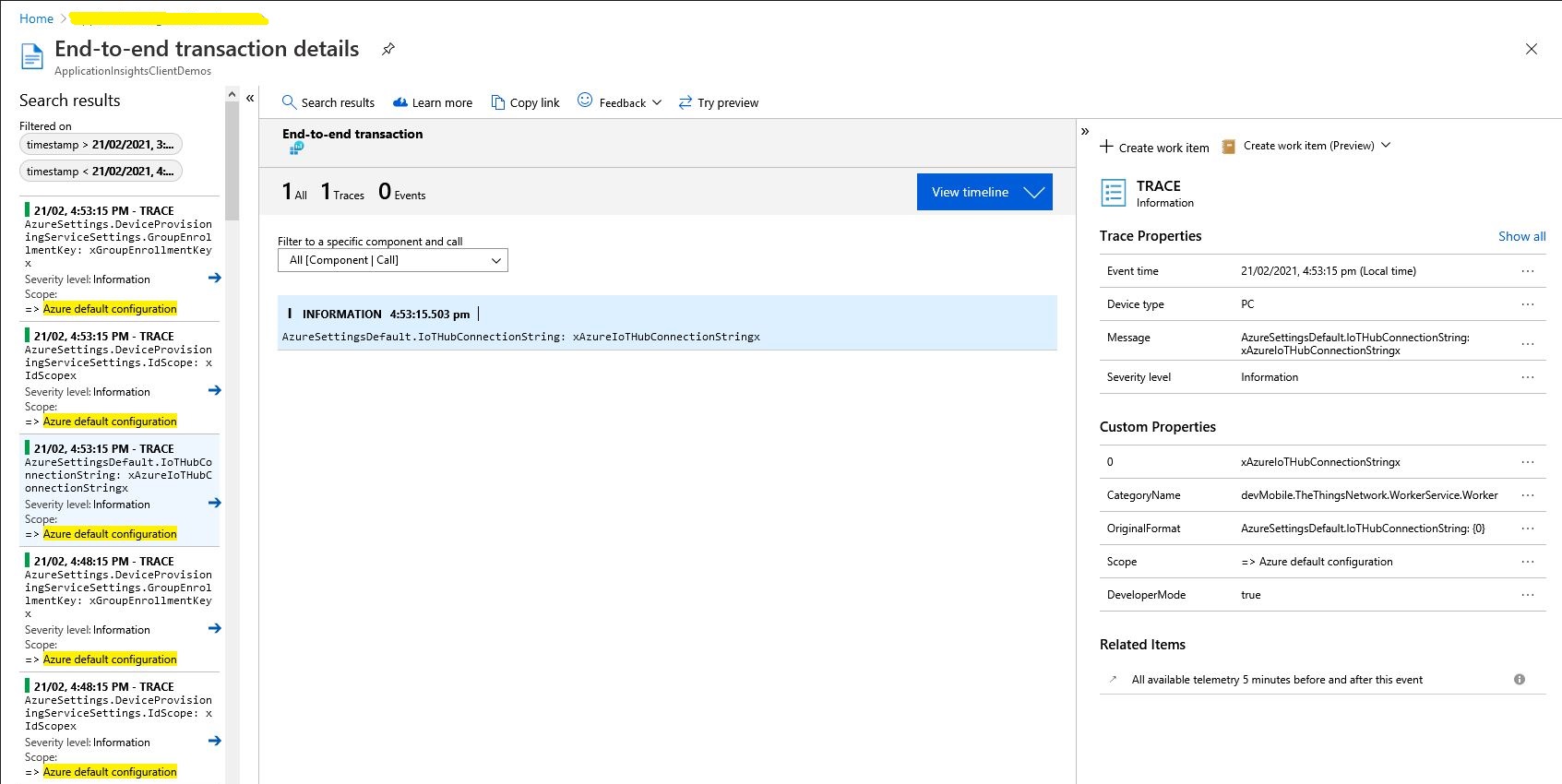
For debugging the application and monitoring in production I was planning on using the Apache Log4Net library but now I’m not certain the additional configuration complexity and dependencies are worth it. The built in Microsoft.Extensions.Logging library with Azure Application Insights integration looks like a “light weight” alternative with sufficient functionality .

protected override async Task ExecuteAsync(CancellationToken stoppingToken)
{
   while (!stoppingToken.IsCancellationRequested)
   {
      _logger.LogDebug("Debug worker running at: {time}", DateTimeOffset.Now);
      _logger.LogInformation("Info worker running at: {time}", DateTimeOffset.Now);
      _logger.LogWarning("Warning worker running at: {time}", DateTimeOffset.Now);
      _logger.LogError("Error running at: {time}", DateTimeOffset.Now);

      using (_logger.BeginScope("TheThingsIndustries configuration"))
      {
         _logger.LogInformation("Tennant: {0}", _programSettings.TheThingsIndustries.Tennant);
         _logger.LogInformation("ApiBaseUrl: {0}", _programSettings.TheThingsIndustries.ApiBaseUrl);
         _logger.LogInformation("ApiKey: {0}", _programSettings.TheThingsIndustries.ApiKey);

         _logger.LogInformation("ApplicationPageSize: {0}", _programSettings.TheThingsIndustries.ApplicationPageSize);
         _logger.LogInformation("DevicePageSize: {0}", _programSettings.TheThingsIndustries.DevicePageSize);

         _logger.LogInformation("ApplicationIntegrationDefault: {0}", _programSettings.TheThingsIndustries.ApplicationIntegrationDefault);
         _logger.LogInformation("DeviceIntegrationDefault: {0}", _programSettings.TheThingsIndustries.DeviceIntegrationDefault);

         _logger.LogInformation("MQTTServerName: {0}", _programSettings.TheThingsIndustries.MqttServerName);
         _logger.LogInformation("MQTTClientName: {0}", _programSettings.TheThingsIndustries.MqttClientName);
      }

      using (_logger.BeginScope("Azure default configuration"))
      {
         if (_programSettings.AzureSettingsDefault.IoTHubConnectionString != null)
         {
            _logger.LogInformation("AzureSettingsDefault.IoTHubConnectionString: {0}", _programSettings.AzureSettingsDefault.IoTHubConnectionString);
         }

         if (_programSettings.AzureSettingsDefault.DeviceProvisioningServiceSettings != null)
         {
            _logger.LogInformation("AzureSettings.DeviceProvisioningServiceSettings.IdScope: {0}", _programSettings.AzureSettingsDefault.DeviceProvisioningServiceSettings.IdScope);
            _logger.LogInformation("AzureSettings.DeviceProvisioningServiceSettings.GroupEnrollmentKey: {0}", _programSettings.AzureSettingsDefault.DeviceProvisioningServiceSettings.GroupEnrollmentKey);
         }
      }
    
      foreach (var application in _programSettings.Applications)
      {
         using (_logger.BeginScope(new[] { new KeyValuePair<string, object>("Application", application.Key)}))
         {
            _logger.LogInformation("MQTTAccessKey: {0} ", application.Value.MQTTAccessKey);

            if (application.Value.ApplicationPageSize.HasValue)
            {
               _logger.LogInformation("ApplicationPageSize: {0} ", application.Value.ApplicationPageSize.Value);
            }

            if (application.Value.DeviceIntegrationDefault.HasValue)
            {
               _logger.LogInformation("DeviceIntegation: {0} ", application.Value.DeviceIntegrationDefault.Value);
            }

            if (application.Value.DevicePageSize.HasValue)
            {
               _logger.LogInformation("DevicePageSize: {0} ", application.Value.DevicePageSize.Value);
            }

            if (application.Value.AzureSettings.IoTHubConnectionString != null)
            {
               _logger.LogInformation("AzureSettings.IoTHubConnectionString: {0} ", application.Value.AzureSettings.IoTHubConnectionString);
            }

            if (application.Value.AzureSettings.DeviceProvisioningServiceSettings != null)
            {
               _logger.LogInformation("AzureSettings.DeviceProvisioningServiceSettings.IdScope: {0} ", application.Value.AzureSettings.DeviceProvisioningServiceSettings.IdScope);
               _logger.LogInformation("AzureSettings.DeviceProvisioningServiceSettings.GroupEnrollmentKey: {0} ", application.Value.AzureSettings.DeviceProvisioningServiceSettings.GroupEnrollmentKey);
            }
         }
      }

      await Task.Delay(300000, stoppingToken);
   }
}

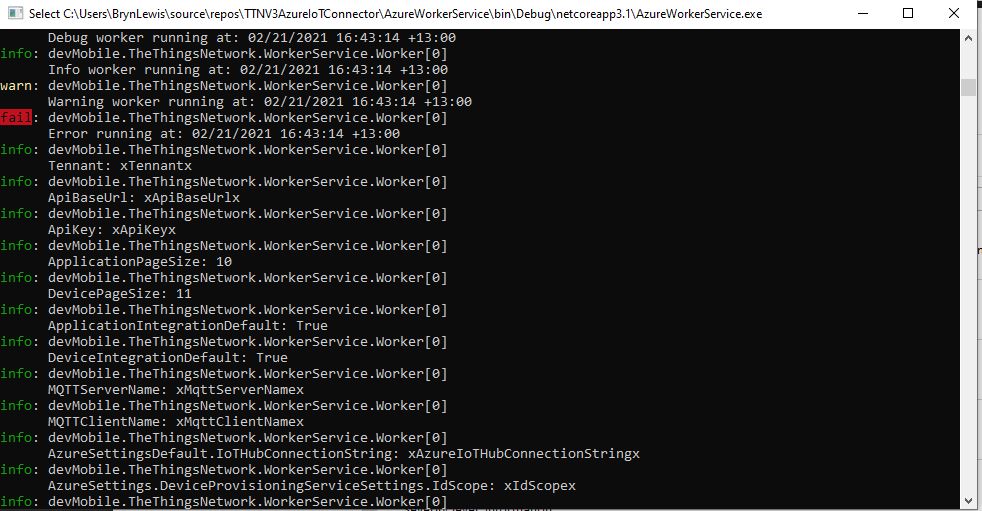
The logging information formatting is sufficiently readable when running locally

Extensive use of the BeginScope method to include additional meta-data on logged records should make debugging easier.

This long post is to explain some of my design decisions and which ones are still to be decided