Myriota Connector – Azure IoT Hub Downlink final refactoring

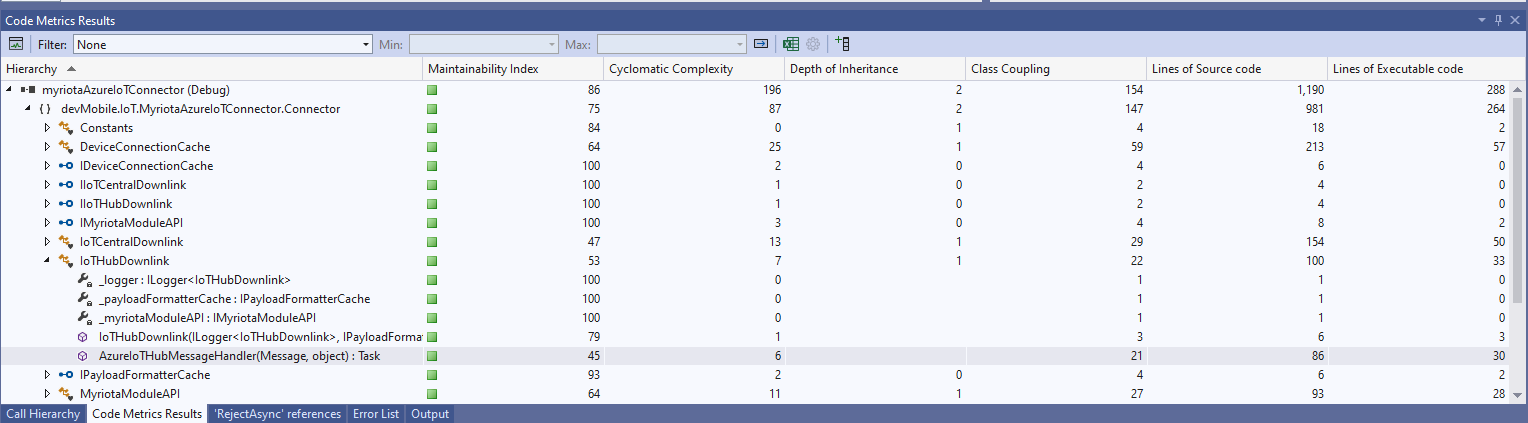
I often print code and review it away from a computer. I can’t be distracted by “tinkering” with the code and I find that drawing on it helps me visualise what is going on. The payload formatters are retrieved from Azure Storage blob which have a default retry policy, the Azure IoT Hub DeviceClient methods have a default retry policy, the Myriota Cloud API SendMessage has retries (Implemented with Polly) and if the CS-Script compilation fails there is nothing that can be done so the code could be simplified.

The Azure IoT Hub downlink message handler was a partial class and part of implementation of the IDeviceConnectionCache which was a hangover from one of the initial versions.

internal partial class DeviceConnectionCache : IDeviceConnectionCache
{
   public async Task AzureIoTHubMessageHandler(Message message, object userContext)
   {
      Models.DeviceConnectionContext context = (Models.DeviceConnectionContext)userContext;

      _logger.LogInformation("Downlink- IoT Hub TerminalId:{termimalId} LockToken:{LockToken}", context.TerminalId, message.LockToken);

I replaced the IDeviceConnectionCache interface with IIoTHubDownlink which was declare in a new file in the interfaces folder.

namespace devMobile.IoT.MyriotaAzureIoTConnector.Connector
{
   public interface IIoTHubDownlink
   {
      public Task AzureIoTHubMessageHandler(Message message, object userContext);
   }
}

Then had to inject all the required dependencies which had been implemented in one of the other partial class files.

internal class IoTHubDownlink : IIoTHubDownlink
{
   private readonly ILogger<IoTHubDownlink> _logger;
   private readonly IPayloadFormatterCache _payloadFormatterCache;
   private readonly IMyriotaModuleAPI _myriotaModuleAPI;

   public IoTHubDownlink(ILogger<IoTHubDownlink> logger, IPayloadFormatterCache payloadFormatterCache, IMyriotaModuleAPI myriotaModuleAPI)
   {
      _logger = logger;
      _payloadFormatterCache = payloadFormatterCache;
      _myriotaModuleAPI = myriotaModuleAPI;
   }
...
}

The implementation had been extracted to a separate class so it had to be constructed by the Dependency Injection plumbing.

...
services.AddSingleton<IPayloadFormatterCache, PayloadFormatterCache>();
services.AddSingleton<IIoTHubDownlink, IoTHubDownlink>();
services.AddSingleton<IIoTCentralDownlink, IoTCentralDownlink>();
services.AddOptions<Models.MyriotaSettings>().Configure<IConfiguration>((settings, configuration) =>
{
    configuration.GetSection("Myriota").Bind(settings);
 });
 services.AddSingleton<IMyriotaModuleAPI, MyriotaModuleAPI>();
...

The lifetime of the Microsoft.Azure.Devices.Client.Message was being managed manually which seemed a bit odd.

public async Task AzureIoTHubMessageHandler(Message message, object userContext)
{
   Models.DeviceConnectionContext context = (Models.DeviceConnectionContext)userContext;

   _logger.LogInformation("Downlink- IoT Hub TerminalId:{termimalId} LockToken:{LockToken}", context.TerminalId, message.LockToken);

   // Use default formatter and replace with message specific formatter if configured.
   string payloadFormatter;
   if (!message.Properties.TryGetValue(Constants.IoTHubDownlinkPayloadFormatterProperty, out payloadFormatter) || string.IsNullOrEmpty(payloadFormatter))
   {
      payloadFormatter = context.PayloadFormatterDownlink;
   }

   _logger.LogInformation("Downlink- IoT Hub TerminalID:{termimalId} LockToken:{LockToken} Payload formatter:{payloadFormatter} ", context.TerminalId, message.LockToken, payloadFormatter);

   try
   {
   ...
   }
   finally
   {
      // Mop up the non managed resources of message
      message.Dispose();
   }
}

I replaced this with a with a “using” which “automagically” manages the lifetime of any non-managed resources. I also added string Locktoken variable for DeviceClient.RejectAsync and DeviceClient.CompletedAsync so that the “using” could be inside the try/catch (there is scope to reduce the amount of code in the “using”)

public async Task AzureIoTHubMessageHandler(Message message, object userContext)
{
   Models.DeviceConnectionContext context = (Models.DeviceConnectionContext)userContext;

   _logger.LogInformation("Downlink- IoT Hub TerminalId:{TermimalId} LockToken:{lockToken}", context.TerminalId, message.LockToken);

   // broken out so using for message only has to be inside try
   string lockToken = message.LockToken; 

   try
   {
      using (message)
      {
...
      }
      catch (Exception ex)
      {
         _logger.LogError(ex, "Downlink- IoT Hub TerminalID:{TerminalId} LockToken:{lockToken} MessageHandler processing failed", context.TerminalId, lockToken);

         await context.DeviceClient.RejectAsync(lockToken);
      }
   }
}

The handling of the Encoding.UTF8.GetString and JObject.Parse payload was broken. If the Encoding.UTF8.GetString threw an exception there was no point in calling the JObject.Parse

// If this fails payload broken
byte[] messageBytes = message.GetBytes();

// This will fail for some messages, payload formatter gets bytes only
string messageText = string.Empty;
try
{
   messageText = Encoding.UTF8.GetString(messageBytes);
}
catch (ArgumentException aex)
{
   _logger.LogInformation("Downlink- IoT Hub TerminalID:{TerminalId} LockToken:{LockToken} messageBytes:{2} not valid Text", context.TerminalId, message.LockToken, BitConverter.ToString(messageBytes));
}

// This will fail for some messages, payload formatter gets bytes only
JObject? messageJson = null;
try
{
   messageJson = JObject.Parse(messageText);
}
catch ( JsonReaderException jex)
{
   _logger.LogInformation("Downlink- IoT Hub TerminalID:{TerminalId} LockToken:{LockToken} messageText:{2} not valid json", context.TerminalId, message.LockToken, BitConverter.ToString(messageBytes));
}

The Encoding.UTF8.GetString and JObject.Parse are now processed in a single Try with a specialised catch handling.

// These will fail for some messages, then payload formatter gets bytes only
string messageText = string.Empty;
JObject? messageJson = null;
try
{
   messageText = Encoding.UTF8.GetString(messageBytes);

   messageJson = JObject.Parse(messageText);
 }
catch (ArgumentException aex)
{
   _logger.LogInformation("Downlink- IoT Hub TerminalID:{TerminalId} LockToken:{lockToken} messageBytes:{messageBytes} not valid text exception:{Message}", context.TerminalId, lockToken, BitConverter.ToString(messageBytes), aex.Message);
}
catch (JsonReaderException jex)
{
   _logger.LogInformation("Downlink- IoT Hub TerminalID:{TerminalId} LockToken:{lockToken} messageText:{messageText} not valid json exception:{Message}", context.TerminalId, lockToken, messageText, jex.Message);
}

// This shouldn't fail, but it could for lots of different reasons, invalid path to blob, syntax error, interface broken etc.
IFormatterDownlink payloadFormatter = await _payloadFormatterCache.DownlinkGetAsync(payloadFormatterName);

This refactored code now looks an awful lot like the “sunny days” code checked in on the 3rd of November.
Myriota Connector – Azure IoT Hub DTDL Support

The Myriota connector supports the use of Digital Twin Definition Language(DTDL) for Azure IoT Hub Connection Strings and the Azure IoT Hub Device Provisioning Service(DPS).

{
  "ConnectionStrings": {
    "ApplicationInsights": "...",
    "UplinkQueueStorage": "...",
    "PayloadFormattersStorage": "..."
  },
  "AzureIoT": {
   ...
 "ApplicationToDtdlModelIdMapping": {
   "tracker": "dtmi:myriotaconnector:Tracker_2lb;1",
     }
  }
 ...    
}

The Digital Twin Definition Language(DTDL) configuration used when a device is provisioned or when it connects is determined by the payload application which is based on the Myriota Destination endpoint.

The Azure Function Configuration of Application to DTDL Model ID

BEWARE – They application in ApplicationToDtdlModelIdMapping is case sensitive!

Azure IoT Central Device Template Configuration

I used Azure IoT Central Device Template functionality to create my Azure Digital Twin definitions.

Azure IoT Hub Device Connection String

The DeviceClient CreateFromConnectionString method has an optional ClientOptions parameter which specifies the DTLDL model ID for the duration of the connection.

private async Task<DeviceClient> AzureIoTHubDeviceConnectionStringConnectAsync(string terminalId, string application, object context)
{
    DeviceClient deviceClient;

    if (_azureIoTSettings.ApplicationToDtdlModelIdMapping.TryGetValue(application, out string? modelId))
    {
        ClientOptions clientOptions = new ClientOptions()
        {
            ModelId = modelId
        };

        deviceClient = DeviceClient.CreateFromConnectionString(_azureIoTSettings.AzureIoTHub.ConnectionString, terminalId, TransportSettings, clientOptions);
    }
    else
    { 
        deviceClient = DeviceClient.CreateFromConnectionString(_azureIoTSettings.AzureIoTHub.ConnectionString, terminalId, TransportSettings);
    }

    await deviceClient.OpenAsync();

    return deviceClient;
}
Azure IoT Explorer Telemetry message with DTDL Model ID

Azure IoT Hub Device Provisioning Service

The ProvisioningDeviceClient RegisterAsync method has an optional ProvisionRegistrationAdditionalData parameter. The PnpConnection CreateDpsPayload is used to generate the JsonData property which specifies the DTLDL model ID used when the device is initially provisioned.

private async Task<DeviceClient> AzureIoTHubDeviceProvisioningServiceConnectAsync(string terminalId, string application, object context)
{
    DeviceClient deviceClient;

    string deviceKey;
    using (var hmac = new HMACSHA256(Convert.FromBase64String(_azureIoTSettings.AzureIoTHub.DeviceProvisioningService.GroupEnrollmentKey)))
    {
        deviceKey = Convert.ToBase64String(hmac.ComputeHash(Encoding.UTF8.GetBytes(terminalId)));
    }

    using (var securityProvider = new SecurityProviderSymmetricKey(terminalId, deviceKey, null))
    {
        using (var transport = new ProvisioningTransportHandlerAmqp(TransportFallbackType.TcpOnly))
        {
            DeviceRegistrationResult result;

            ProvisioningDeviceClient provClient = ProvisioningDeviceClient.Create(
                _azureIoTSettings.AzureIoTHub.DeviceProvisioningService.GlobalDeviceEndpoint,
                _azureIoTSettings.AzureIoTHub.DeviceProvisioningService.IdScope,
                securityProvider,
            transport);

            if (_azureIoTSettings.ApplicationToDtdlModelIdMapping.TryGetValue(application, out string? modelId))
            {
                ClientOptions clientOptions = new ClientOptions()
                {
                    ModelId = modelId
                };

                ProvisioningRegistrationAdditionalData provisioningRegistrationAdditionalData = new ProvisioningRegistrationAdditionalData()
                {
                    JsonData = PnpConvention.CreateDpsPayload(modelId)
                };
                result = await provClient.RegisterAsync(provisioningRegistrationAdditionalData);
            }
            else
            {
                result = await provClient.RegisterAsync();
            }
  
            if (result.Status != ProvisioningRegistrationStatusType.Assigned)
            {
                _logger.LogWarning("Uplink-DeviceID:{0} RegisterAsync status:{1} failed ", terminalId, result.Status);

                throw new ApplicationException($"Uplink-DeviceID:{0} RegisterAsync status:{1} failed");
            }

            IAuthenticationMethod authentication = new DeviceAuthenticationWithRegistrySymmetricKey(result.DeviceId, (securityProvider as SecurityProviderSymmetricKey).GetPrimaryKey());

            deviceClient = DeviceClient.Create(result.AssignedHub, authentication, TransportSettings);
        }
    }

    await deviceClient.OpenAsync();

    return deviceClient;
}
Azure IoT Central Device Connection Group configuration

An Azure IoT Central Device connection groups can be configured to “automagically” provision devices.

Myriota Connector – Azure IoT Hub Connectivity

The Myriota connector supports the use of Azure IoT Hub Connection Strings and the Azure IoT Hub Device Provisioning Service(DPS) for device management. I use Alastair Crabtree’s LazyCache to store Azure IoT Hub connections which are opened the first time they are used.

 public async Task<DeviceClient> GetOrAddAsync(string terminalId, object context)
 {
     DeviceClient deviceClient;

     switch (_azureIoTSettings.AzureIoTHub.ConnectionType)
     {
         case Models.AzureIotHubConnectionType.DeviceConnectionString:
             deviceClient = await _azuredeviceClientCache.GetOrAddAsync(terminalId, (ICacheEntry x) => AzureIoTHubDeviceConnectionStringConnectAsync(terminalId, context));
             break;
         case Models.AzureIotHubConnectionType.DeviceProvisioningService:
             deviceClient = await _azuredeviceClientCache.GetOrAddAsync(terminalId, (ICacheEntry x) => AzureIoTHubDeviceProvisioningServiceConnectAsync(terminalId, context));
             break;
         default:
             _logger.LogError("Uplink- Azure IoT Hub ConnectionType unknown {0}", _azureIoTSettings.AzureIoTHub.ConnectionType);

             throw new NotImplementedException("AzureIoT Hub unsupported ConnectionType");
     }

     return deviceClient;
 }

The IAzureDeviceClientCache.GetOrAddAsync method returns an open Azure IoT Hub DeviceClient connection or uses the method specified in the application configuration.

Azure IoT Hub Device Connection String

The Azure IoT Hub delegate uses a Device Connection String which is retrieved from the application configuration.

{
  "ConnectionStrings": {
    "ApplicationInsights": "...",
    "UplinkQueueStorage": "...",
    "PayloadFormattersStorage": "..."
  },
  "AzureIoT": {
    "AzureIoTHub": {
      "ConnectionType": "DeviceConnectionString",
      "connectionString": "HostName=....azure-devices.net;SharedAccessKeyName=device;SharedAccessKey=...",
        }
   }
 ...    
}
Azure Function with IoT Hub Device connection string configuration
private async Task<DeviceClient> AzureIoTHubDeviceConnectionStringConnectAsync(string terminalId, object context)
{
    DeviceClient deviceClient = DeviceClient.CreateFromConnectionString(_azureIoTSettings.AzureIoTHub.ConnectionString, terminalId, TransportSettings);

    await deviceClient.OpenAsync();

    return deviceClient;
 }
Azure IoT Hub Device Shared Access Policy for Device Connection String

One of my customers uses an Azure Logic Application to manage Myriota and Azure IoT Connector configuration.

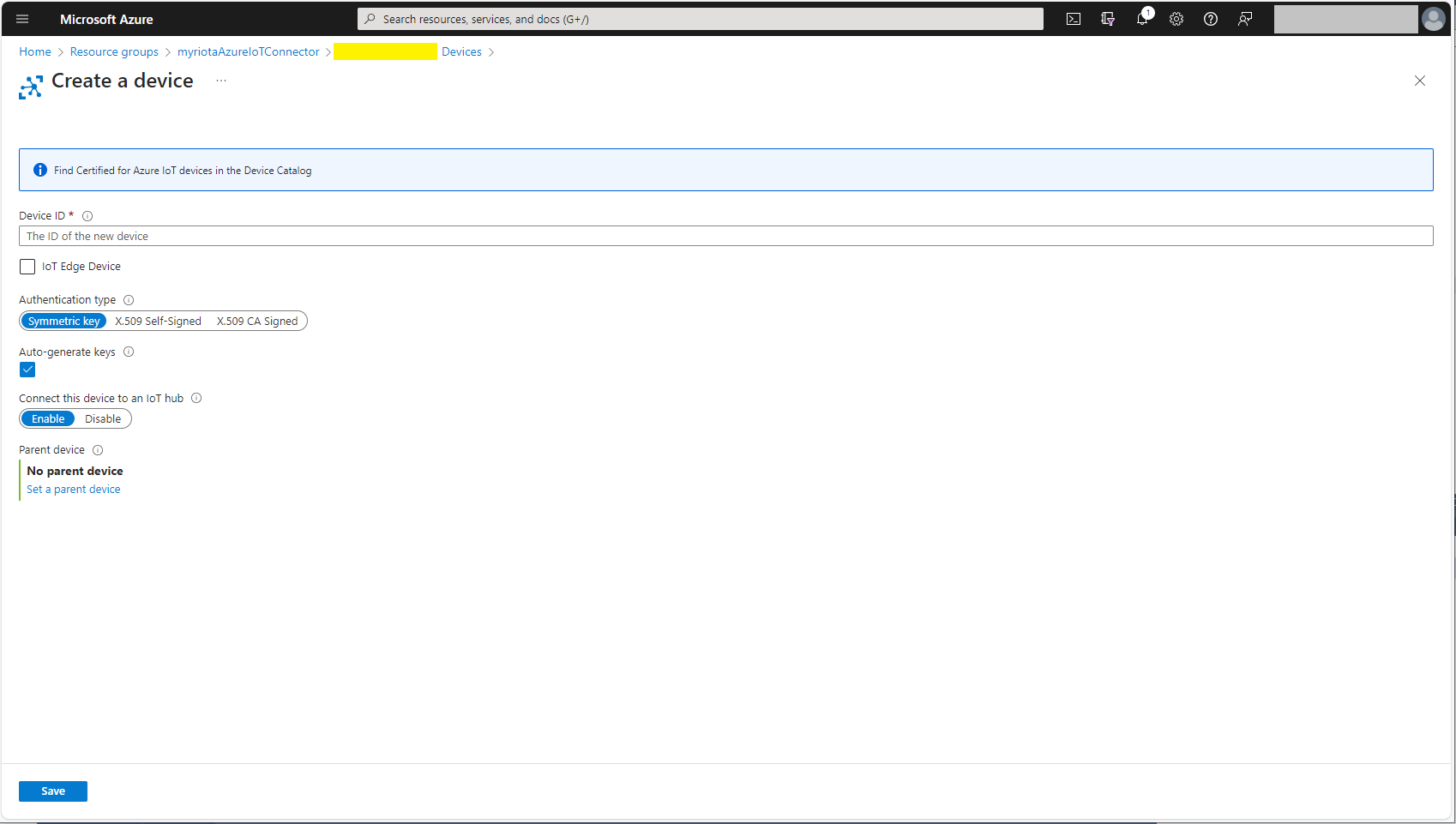
Azure IoT Hub manual Device configuration

Azure IoT Hub Device Provisioning Service

The Azure IoT Hub Device Provisioning Service(DPS) delegate uses Symmetric Key Attestation with the Global Device Endpoint, ID Scope and Group Enrollment Key retrieved from the application configuration.

{
  "ConnectionStrings": {
    "ApplicationInsights": "...",
    "UplinkQueueStorage": "...",
    "PayloadFormattersStorage": "..."
  },
  "AzureIoT": {
      "ConnectionType": "DeviceProvisioningService",
      "DeviceProvisioningServiceIoTHub": {
        "GlobalDeviceEndpoint": "global.azure-devices-provisioning.net",
        "IDScope": ".....",
        "GroupEnrollmentKey": "...."
      }
   }
}
Azure IoT Function with Azure IoT Hub Device Provisioning Service(DPS) configuration

Symmetric key attestation with the Azure IoT Hub Device Provisioning Service(DPS) is performed using the same security tokens supported by Azure IoT Hubs to securely connect devices. The symmetric key of an enrollment group isn’t used directly by devices in the provisioning process. Instead, devices that provision through an enrollment group do so using a derived device key.

private async Task<DeviceClient> AzureIoTHubDeviceProvisioningServiceConnectAsync(string terminalId, object context)
{
    DeviceClient deviceClient;

    string deviceKey;
    using (var hmac = new HMACSHA256(Convert.FromBase64String(_azureIoTSettings.AzureIoTHub.DeviceProvisioningService.GroupEnrollmentKey)))
    {
        deviceKey = Convert.ToBase64String(hmac.ComputeHash(Encoding.UTF8.GetBytes(terminalId)));
    }

    using (var securityProvider = new SecurityProviderSymmetricKey(terminalId, deviceKey, null))
    {
        using (var transport = new ProvisioningTransportHandlerAmqp(TransportFallbackType.TcpOnly))
        {
            DeviceRegistrationResult result;

            ProvisioningDeviceClient provClient = ProvisioningDeviceClient.Create(
                _azureIoTSettings.AzureIoTHub.DeviceProvisioningService.GlobalDeviceEndpoint,
                _azureIoTSettings.AzureIoTHub.DeviceProvisioningService.IdScope,
                securityProvider,
                transport);

            result = await provClient.RegisterAsync();
  
            if (result.Status != ProvisioningRegistrationStatusType.Assigned)
            {
                _logger.LogWarning("Uplink-DeviceID:{0} RegisterAsync status:{1} failed ", terminalId, result.Status);

                throw new ApplicationException($"Uplink-DeviceID:{0} RegisterAsync status:{1} failed");
            }

            IAuthenticationMethod authentication = new DeviceAuthenticationWithRegistrySymmetricKey(result.DeviceId, (securityProvider as SecurityProviderSymmetricKey).GetPrimaryKey());

            deviceClient = DeviceClient.Create(result.AssignedHub, authentication, TransportSettings);
        }
    }

    await deviceClient.OpenAsync();

    return deviceClient;
}

The derived device key is a hash of the device’s registration ID and is computed using the symmetric key of the enrollment group. The device can then use its derived device key to sign the SAS token it uses to register with DPS.

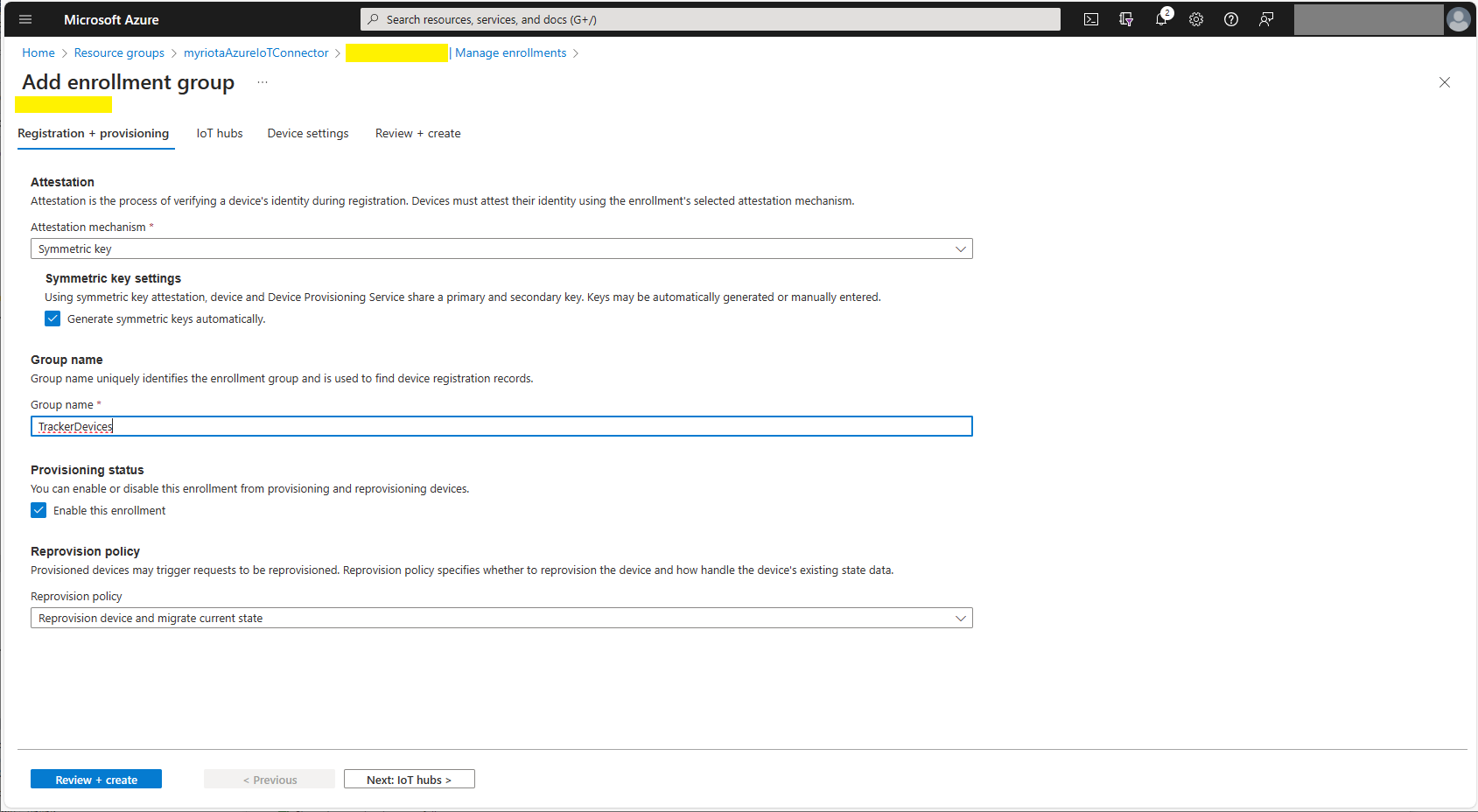
Azure Device Provisioning Service Adding Enrollment Group Attestation
Azure Device Provisioning Service Add Enrollment Group IoT Hub(s) selection.
Azure Device Provisioning Service Manager Enrollments

For initial development and testing I ran the function application in the desktop emulator and simulated Myriota Device Manager webhook calls with Azure Storage Explorer and modified sample payloads.

Azure Storage Explorer Storage Account Queued Messages

I then used Azure IoT Explorer to configure devices, view uplink traffic etc.

Azure IoT Explorer Devices

When I connected to my Azure IoT Hub shortly after starting the Myriota Azure IoT Connector Function my test devices started connecting as messages arrived.

Azure IoT Explorer Device Telemetry

I then deployed my function to Azure and configured the Azure IoT Hub connection string, Azure Application Insights connection string etc.

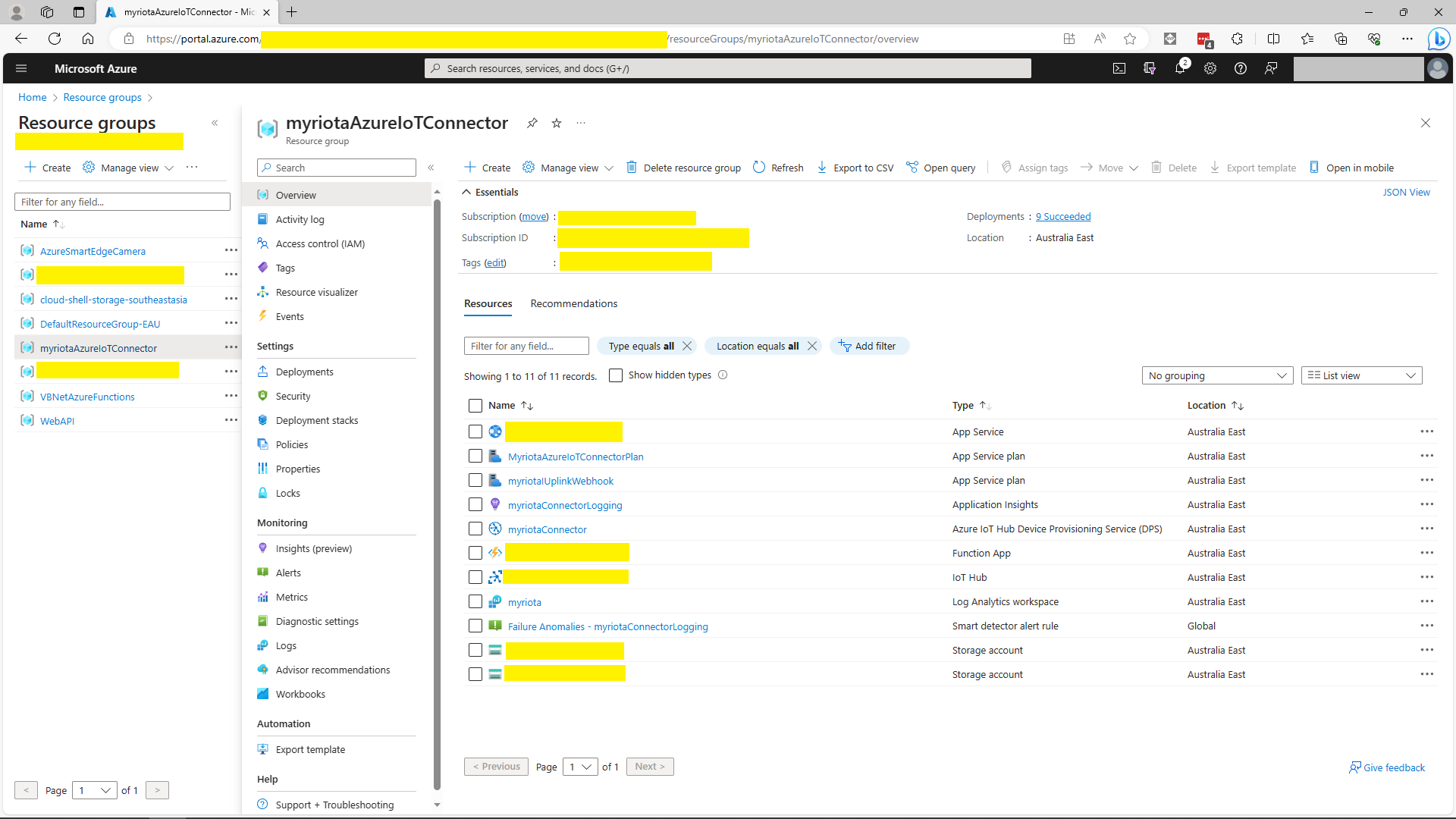
Azure Portal Myriota Resource Group
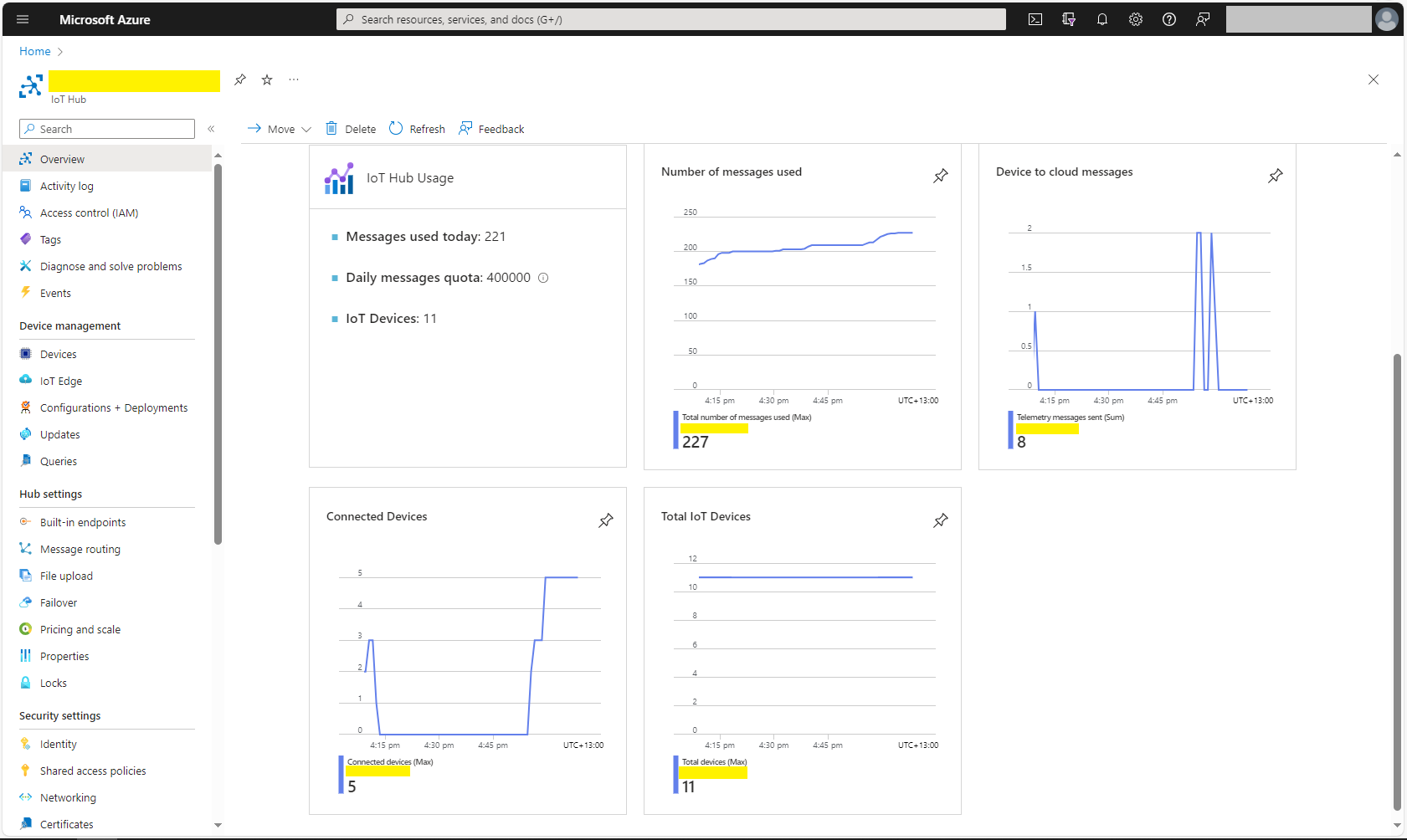
Azure Portal Myriota IoT Hub Metrics

There was often a significant delay for the Device Status to update. which shouldn’t be a problem.

Smartish Edge Camera – Azure IoT Central

This post builds on Smartish Edge Camera – Azure Hub Part 1 using the Azure IoT Hub Device Provisioning Service(DPS) to connect to Azure IoT Central.

The list of object classes is in the YoloCocoP5Model.cs file in the mentalstack/yolov5-net repository.

public override List<YoloLabel> Labels { get; set; } = new List<YoloLabel>()
{
    new YoloLabel { Id = 1, Name = "person" },
    new YoloLabel { Id = 2, Name = "bicycle" },
    new YoloLabel { Id = 3, Name = "car" },
    new YoloLabel { Id = 4, Name = "motorcycle" },
    new YoloLabel { Id = 5, Name = "airplane" },
    new YoloLabel { Id = 6, Name = "bus" },
    new YoloLabel { Id = 7, Name = "train" },
    new YoloLabel { Id = 8, Name = "truck" },
    new YoloLabel { Id = 9, Name = "boat" },
    new YoloLabel { Id = 10, Name = "traffic light" },
    new YoloLabel { Id = 11, Name = "fire hydrant" },
    new YoloLabel { Id = 12, Name = "stop sign" },
    new YoloLabel { Id = 13, Name = "parking meter" },
    new YoloLabel { Id = 14, Name = "bench" },
    new YoloLabel { Id = 15, Name = "bird" },
    new YoloLabel { Id = 16, Name = "cat" },
    new YoloLabel { Id = 17, Name = "dog" },
    new YoloLabel { Id = 18, Name = "horse" },
    new YoloLabel { Id = 19, Name = "sheep" },
    new YoloLabel { Id = 20, Name = "cow" },
    new YoloLabel { Id = 21, Name = "elephant" },
    new YoloLabel { Id = 22, Name = "bear" },
    new YoloLabel { Id = 23, Name = "zebra" },
    new YoloLabel { Id = 24, Name = "giraffe" },
    new YoloLabel { Id = 25, Name = "backpack" },
    new YoloLabel { Id = 26, Name = "umbrella" },
    new YoloLabel { Id = 27, Name = "handbag" },
    new YoloLabel { Id = 28, Name = "tie" },
    new YoloLabel { Id = 29, Name = "suitcase" },
    new YoloLabel { Id = 30, Name = "frisbee" },
    new YoloLabel { Id = 31, Name = "skis" },
    new YoloLabel { Id = 32, Name = "snowboard" },
    new YoloLabel { Id = 33, Name = "sports ball" },
    new YoloLabel { Id = 34, Name = "kite" },
    new YoloLabel { Id = 35, Name = "baseball bat" },
    new YoloLabel { Id = 36, Name = "baseball glove" },
    new YoloLabel { Id = 37, Name = "skateboard" },
    new YoloLabel { Id = 38, Name = "surfboard" },
    new YoloLabel { Id = 39, Name = "tennis racket" },
    new YoloLabel { Id = 40, Name = "bottle" },
    new YoloLabel { Id = 41, Name = "wine glass" },
    new YoloLabel { Id = 42, Name = "cup" },
    new YoloLabel { Id = 43, Name = "fork" },
    new YoloLabel { Id = 44, Name = "knife" },
    new YoloLabel { Id = 45, Name = "spoon" },
    new YoloLabel { Id = 46, Name = "bowl" },
    new YoloLabel { Id = 47, Name = "banana" },
    new YoloLabel { Id = 48, Name = "apple" },
    new YoloLabel { Id = 49, Name = "sandwich" },
    new YoloLabel { Id = 50, Name = "orange" },
    new YoloLabel { Id = 51, Name = "broccoli" },
    new YoloLabel { Id = 52, Name = "carrot" },
    new YoloLabel { Id = 53, Name = "hot dog" },
    new YoloLabel { Id = 54, Name = "pizza" },
    new YoloLabel { Id = 55, Name = "donut" },
    new YoloLabel { Id = 56, Name = "cake" },
    new YoloLabel { Id = 57, Name = "chair" },
    new YoloLabel { Id = 58, Name = "couch" },
    new YoloLabel { Id = 59, Name = "potted plant" },
    new YoloLabel { Id = 60, Name = "bed" },
    new YoloLabel { Id = 61, Name = "dining table" },
    new YoloLabel { Id = 62, Name = "toilet" },
    new YoloLabel { Id = 63, Name = "tv" },
    new YoloLabel { Id = 64, Name = "laptop" },
    new YoloLabel { Id = 65, Name = "mouse" },
    new YoloLabel { Id = 66, Name = "remote" },
    new YoloLabel { Id = 67, Name = "keyboard" },
    new YoloLabel { Id = 68, Name = "cell phone" },
    new YoloLabel { Id = 69, Name = "microwave" },
    new YoloLabel { Id = 70, Name = "oven" },
    new YoloLabel { Id = 71, Name = "toaster" },
    new YoloLabel { Id = 72, Name = "sink" },
    new YoloLabel { Id = 73, Name = "refrigerator" },
    new YoloLabel { Id = 74, Name = "book" },
    new YoloLabel { Id = 75, Name = "clock" },
    new YoloLabel { Id = 76, Name = "vase" },
    new YoloLabel { Id = 77, Name = "scissors" },
    new YoloLabel { Id = 78, Name = "teddy bear" },
    new YoloLabel { Id = 79, Name = "hair drier" },
    new YoloLabel { Id = 80, Name = "toothbrush" }
};

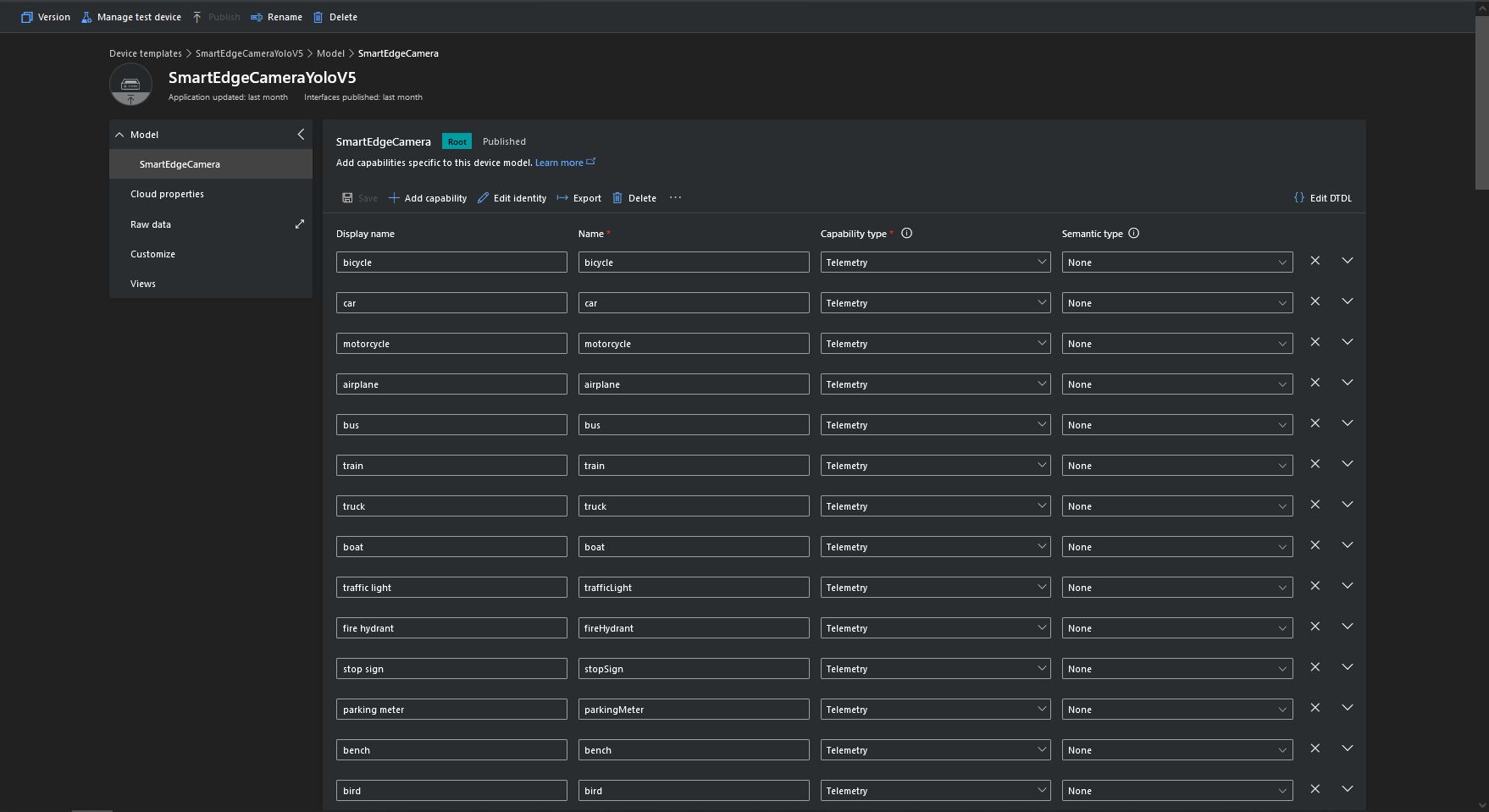
Some of the label choices seem a bit arbitrary(frisbee, surfboard) and American(fire hydrant, baseball bat, baseball glove) It was quite tedious configuring the 80 labels in my Azure IoT Central template.

Azure IoT Central Template with all the YoloV5 labels configured

If there is an object with a label in the PredictionLabelsOfInterest list, a tally of each of the different object classes in the image is sent to an Azure IoT Hub/ Azure IoT Central.

"Application": {
  "DeviceID": "",
  "ImageTimerDue": "0.00:00:15",
  "ImageTimerPeriod": "0.00:00:30",

  "ImageCameraFilepath": "ImageCamera.jpg",
  "ImageMarkedUpFilepath": "ImageMarkedup.jpg",

  "YoloV5ModelPath": "YoloV5/yolov5s.onnx",

  "PredictionScoreThreshold": 0.7,
  "PredictionLabelsOfInterest": [
    "bicycle",
    "person"
  ],
  "PredictionLabelsMinimum": [
    "bicycle",
    "car",
    "person"
  ]
}
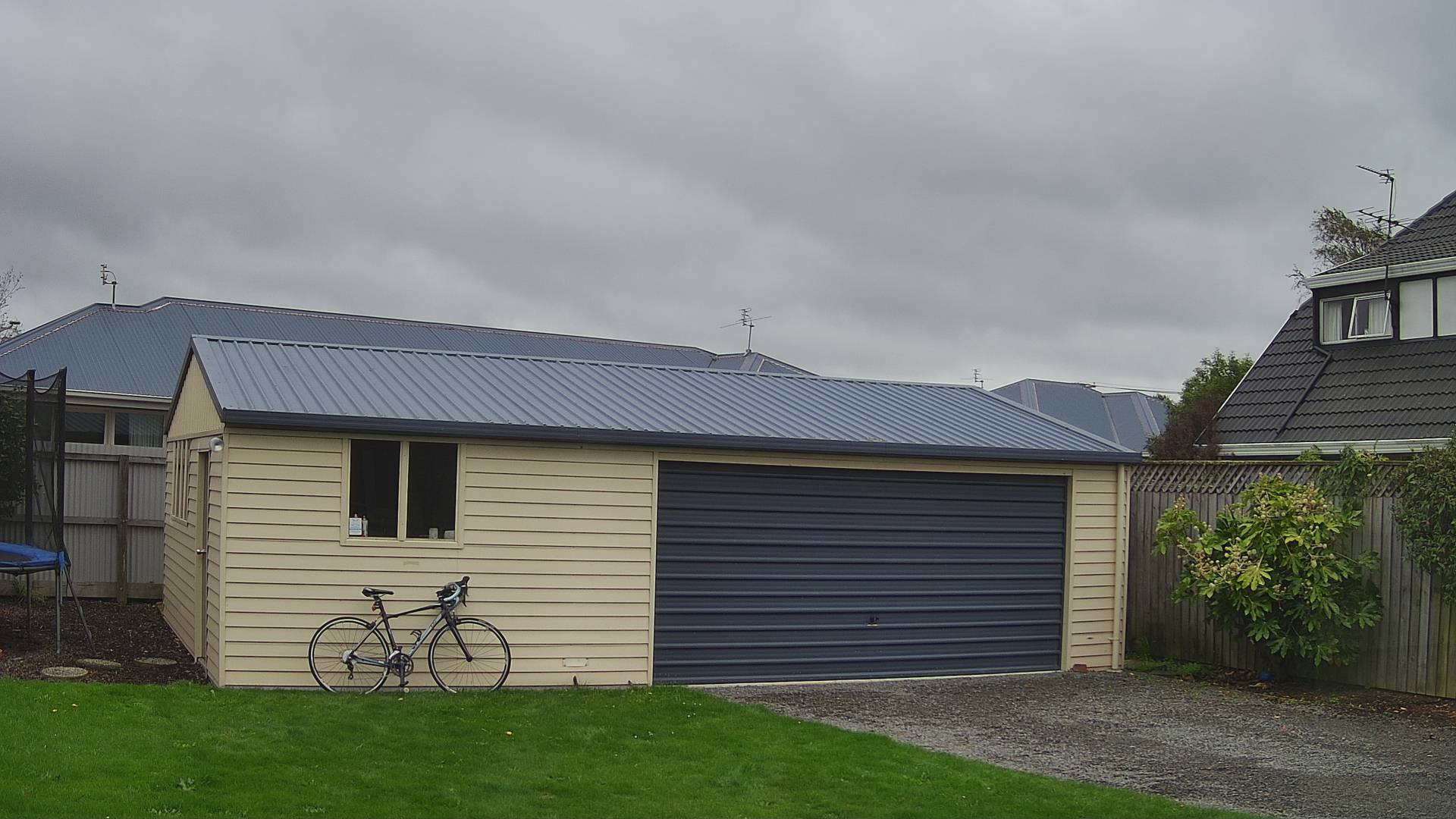
My backyard just after the car left (the dry patch in shingle on the right)
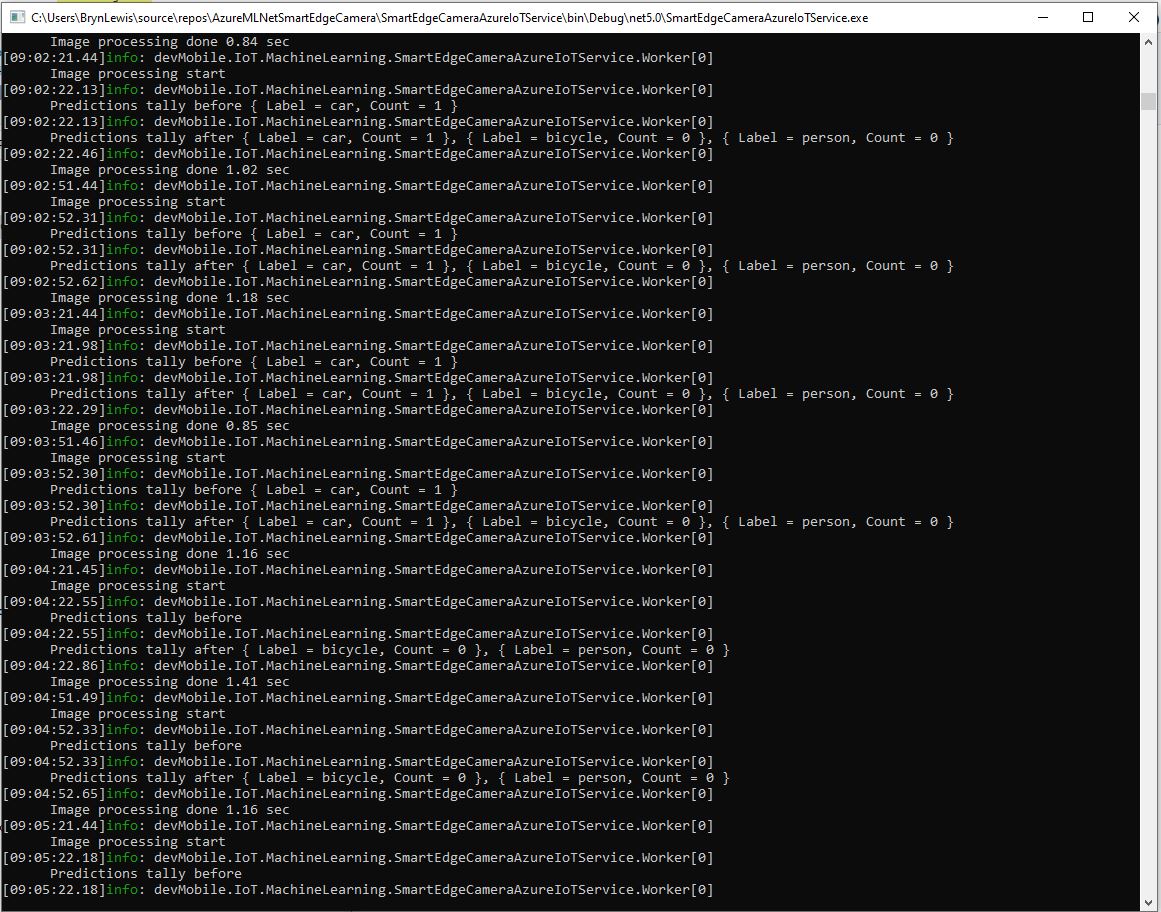
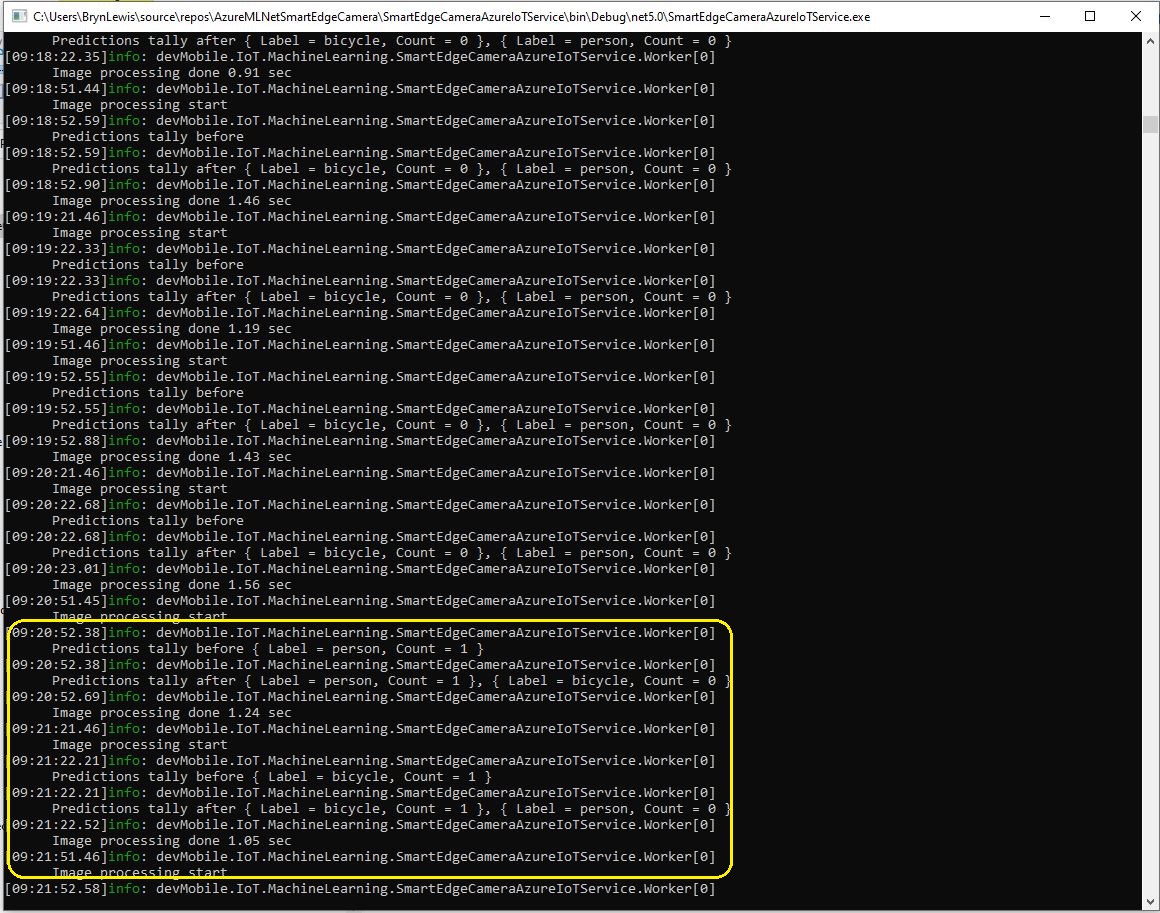
Smartish Edge Camera Service console just after car left
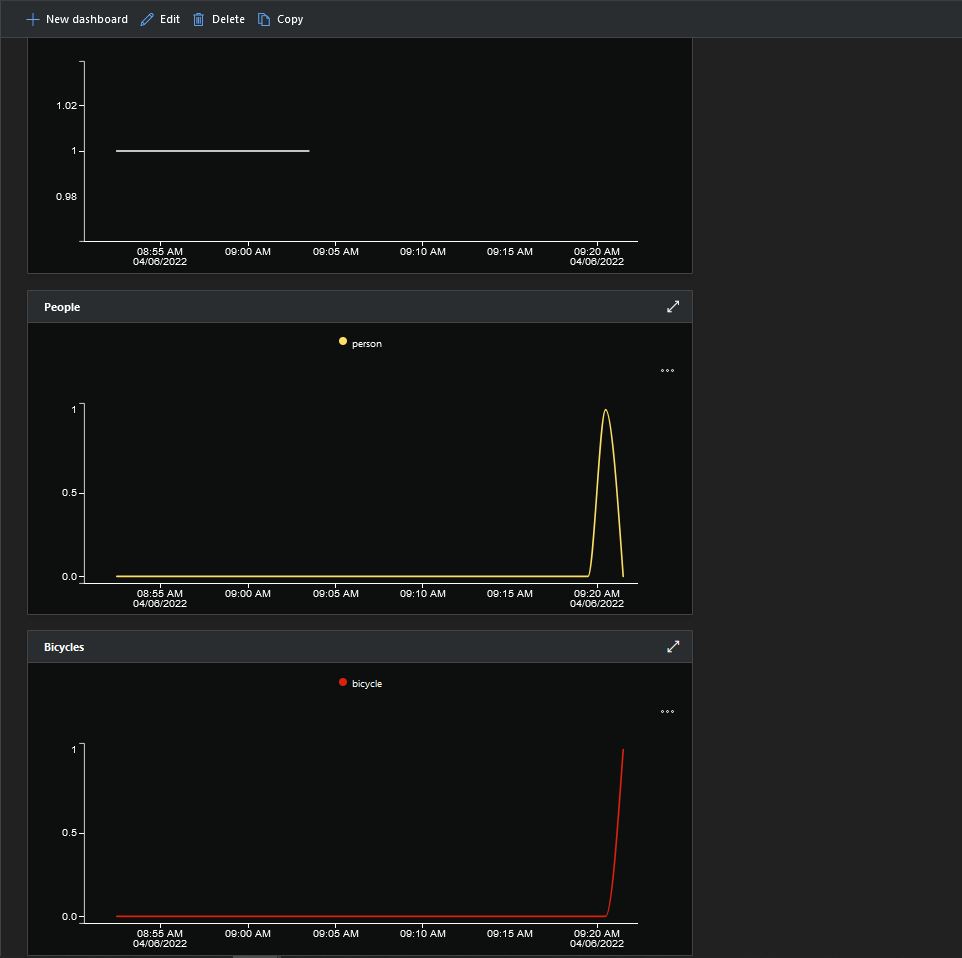
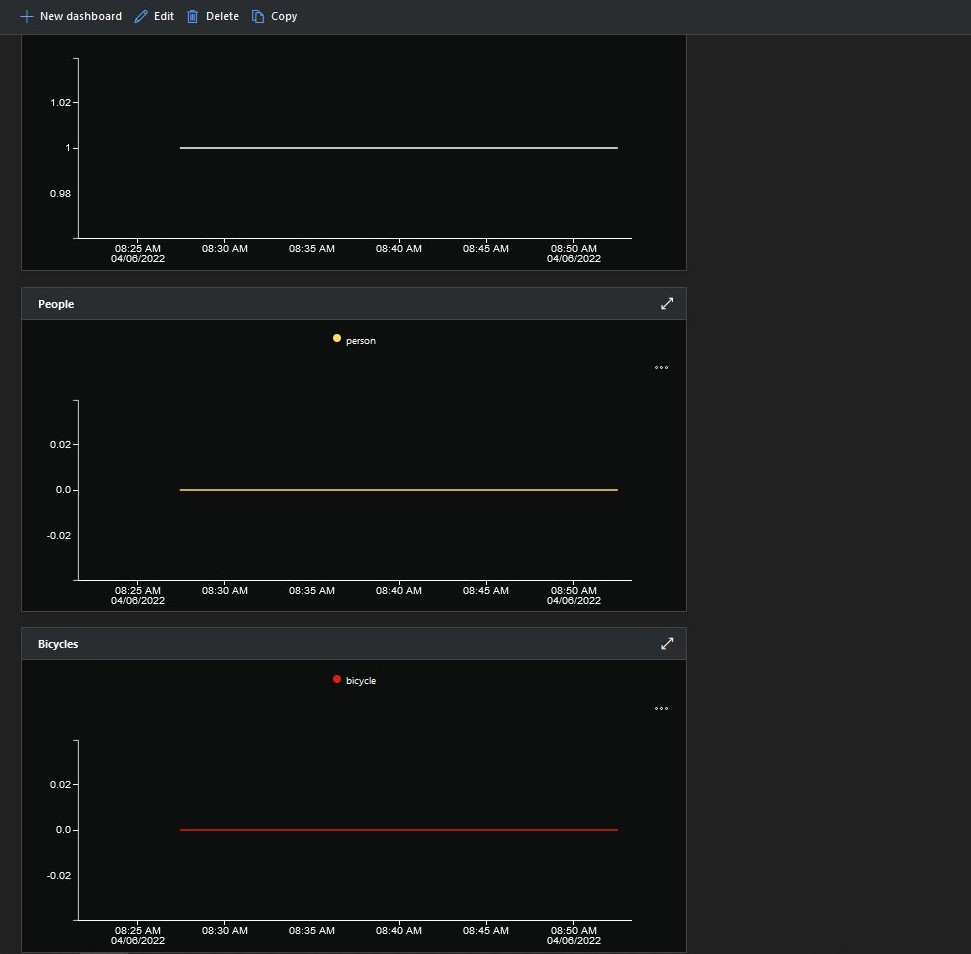
Smartish Edge Camera Azure IoT Central graphs showing missing data points

After the You Only Look Once(YOLOV5)+ML.Net+Open Neural Network Exchange(ONNX) plumbing has loaded a timer with a configurable due time and period is started.

private async void ImageUpdateTimerCallback(object state)
{
	DateTime requestAtUtc = DateTime.UtcNow;

	// Just incase - stop code being called while photo already in progress
	if (_cameraBusy)
	{
		return;
	}
	_cameraBusy = true;

	_logger.LogInformation("Image processing start");

	try
	{
#if CAMERA_RASPBERRY_PI
		RaspberryPIImageCapture();
#endif
#if CAMERA_SECURITY
		SecurityCameraImageCapture();
#endif
		List<YoloPrediction> predictions;

		using (Image image = Image.FromFile(_applicationSettings.ImageCameraFilepath))
		{
			_logger.LogTrace("Prediction start");
			predictions = _scorer.Predict(image);
			_logger.LogTrace("Prediction done");

			OutputImageMarkup(image, predictions, _applicationSettings.ImageMarkedUpFilepath);
		}

		if (_logger.IsEnabled(LogLevel.Trace))
		{
			_logger.LogTrace("Predictions {0}", predictions.Select(p => new { p.Label.Name, p.Score }));
		}

		var predictionsValid = predictions.Where(p => p.Score >= _applicationSettings.PredictionScoreThreshold).Select(p => p.Label.Name);

		// Count up the number of each class detected in the image
		var predictionsTally = predictionsValid.GroupBy(p => p)
				.Select(p => new
				{
					Label = p.Key,
					Count = p.Count()
				});

		if (_logger.IsEnabled(LogLevel.Information))
		{
			_logger.LogInformation("Predictions tally before {0}", predictionsTally.ToList());
		}

		// Add in any missing counts the cloudy side is expecting
		if (_applicationSettings.PredictionLabelsMinimum != null)
		{
			foreach( String label in _applicationSettings.PredictionLabelsMinimum)
			{
				if (!predictionsTally.Any(c=>c.Label == label ))
				{
					predictionsTally = predictionsTally.Append(new {Label = label, Count = 0 });
				}
			}
		}

		if (_logger.IsEnabled(LogLevel.Information))
		{
			_logger.LogInformation("Predictions tally after {0}", predictionsTally.ToList());
		}

		if ((_applicationSettings.PredictionLabelsOfInterest == null) || (predictionsValid.Select(c => c).Intersect(_applicationSettings.PredictionLabelsOfInterest, StringComparer.OrdinalIgnoreCase).Any()))
		{
			JObject telemetryDataPoint = new JObject();

			foreach (var predictionTally in predictionsTally)
			{
				telemetryDataPoint.Add(predictionTally.Label, predictionTally.Count);
			}

			using (Message message = new Message(Encoding.ASCII.GetBytes(JsonConvert.SerializeObject(telemetryDataPoint))))
			{
				message.Properties.Add("iothub-creation-time-utc", requestAtUtc.ToString("s", CultureInfo.InvariantCulture));

				await _deviceClient.SendEventAsync(message);
			}
		}
	}
	catch (Exception ex)
	{
		_logger.LogError(ex, "Camera image download, post processing, or telemetry failed");
	}
	finally
	{
		_cameraBusy = false;
	}

	TimeSpan duration = DateTime.UtcNow - requestAtUtc;

	_logger.LogInformation("Image processing done {0:f2} sec", duration.TotalSeconds);
}

Using some Language Integrated Query (LINQ) code any predictions with a score < PredictionScoreThreshold are discarded. A count of the instances of each class is generated with some more LINQ code.

The PredictionLabelsMinimum(optional) is then used to add additional labels with a count of 0 to PredictionsTally so there are no missing datapoints. This is specifically for Azure IoT Central Dashboard so the graph lines are continuous.

Smartish Edge Camera Service console just after put bike in-front of the garage

If any of the list of valid predictions labels is in the PredictionLabelsOfInterest list (if the PredictionLabelsOfInterest is empty any label is a label of interest) the list of prediction class counts is used to populate a Newtonsoft JObject which is serialised to generate a Java Script Object Notation(JSON) Azure IoT Hub message payload.

The “automagic” graph scaling can be sub-optimal

The mentalstack/yolov5-net and NuGet have been incredibly useful and MentalStack team have done a marvelous job building and supporting this project.

The test-rig consisted of a Unv ADZK-10 Security Camera, Power over Ethernet(PoE) and my HP Prodesk 400G4 DM (i7-8700T).

Smartish Edge Camera – Azure IoT Hub

The SmartEdgeCameraAzureIoTService application uses the same You Only Look Once(YOLOV5) + ML.Net + Open Neural Network Exchange(ONNX) plumbing as the SmartEdgeCameraAzureStorageService.

If there is an object with a label in the PredictionLabelsOfInterest list, a tally of each of the different object classes is sent to an Azure IoT Hub.

"Application": {
  "DeviceID": "",
  "ImageTimerDue": "0.00:00:15",
  "ImageTimerPeriod": "0.00:00:30",

  "ImageCameraFilepath": "ImageCamera.jpg",

  "YoloV5ModelPath": "YoloV5/yolov5s.onnx",

  "PredicitionScoreThreshold": 0.7,
  "PredictionLabelsOfInterest": [
    "person"
  ],
}

The Azure IoT hub can configured via a Shared Access Signature(SAS) device policy connection string or the Azure IoT Hub Device Provisioning Service(DPS)

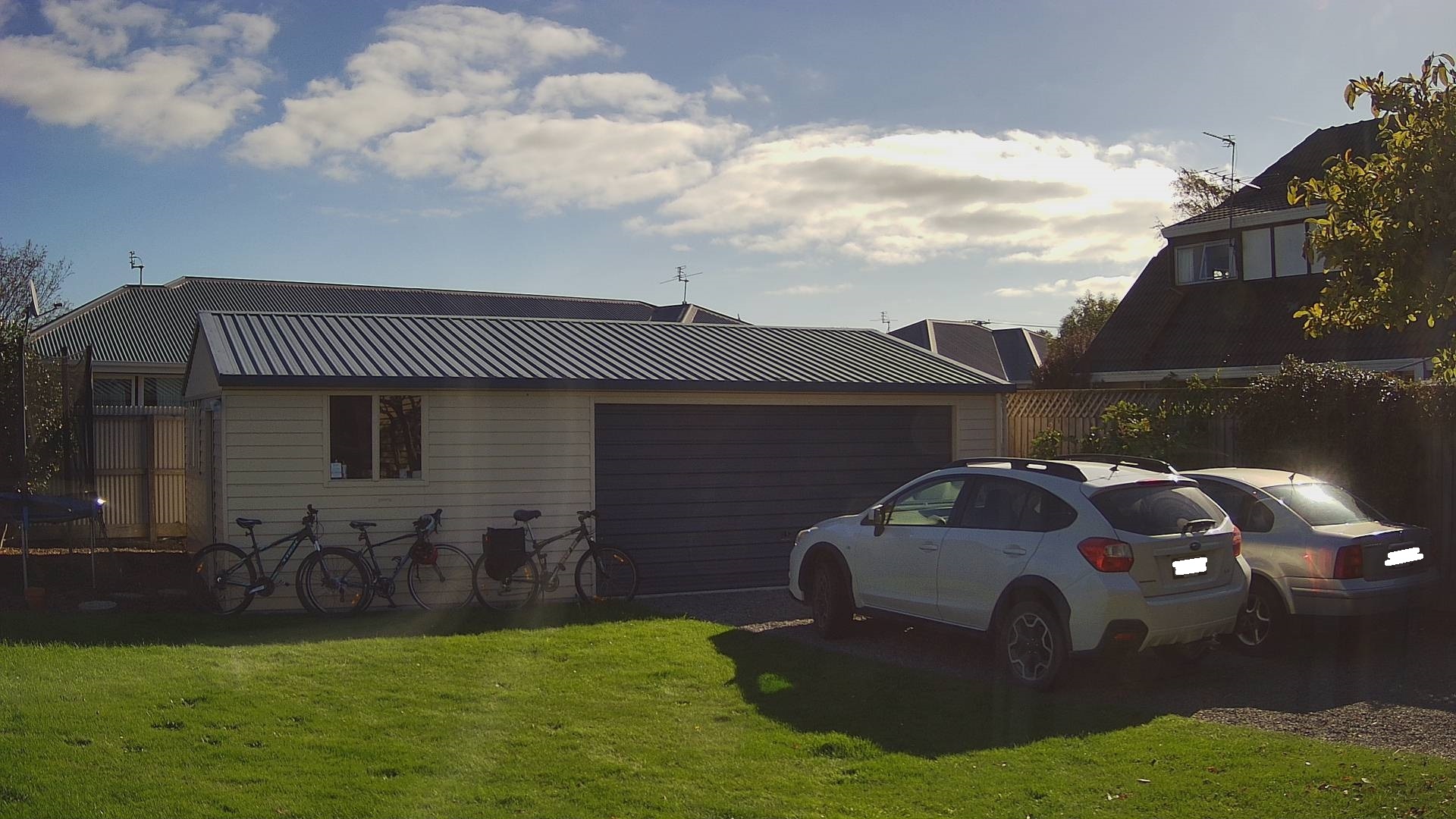
Cars and bicycles in my backyard with no object(s) of interest
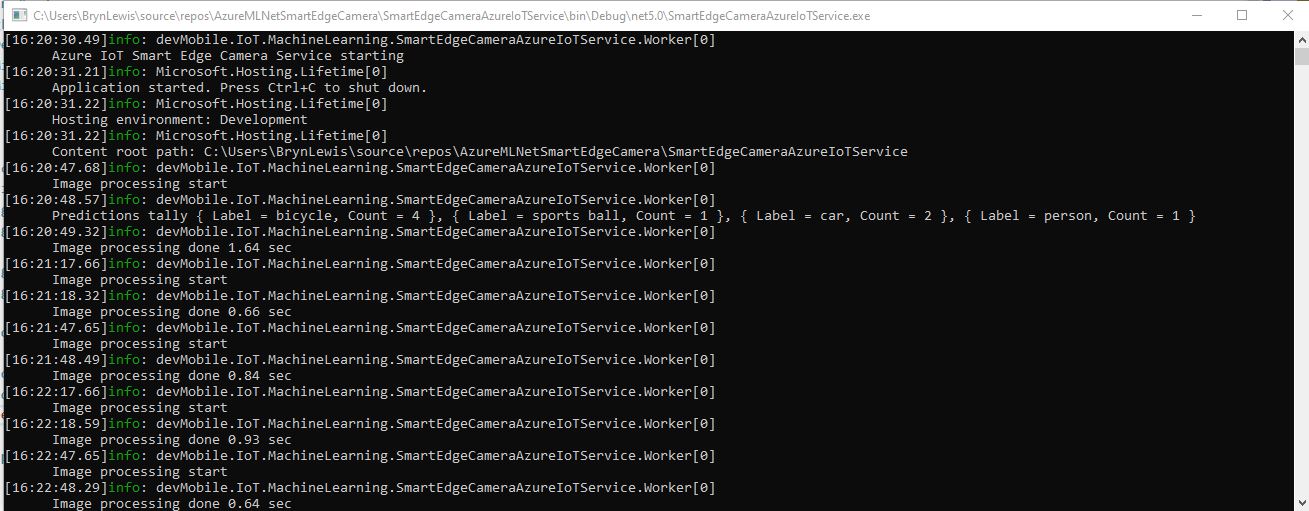
SmartEdgeCameraAzureIoTService no object(s) of interest
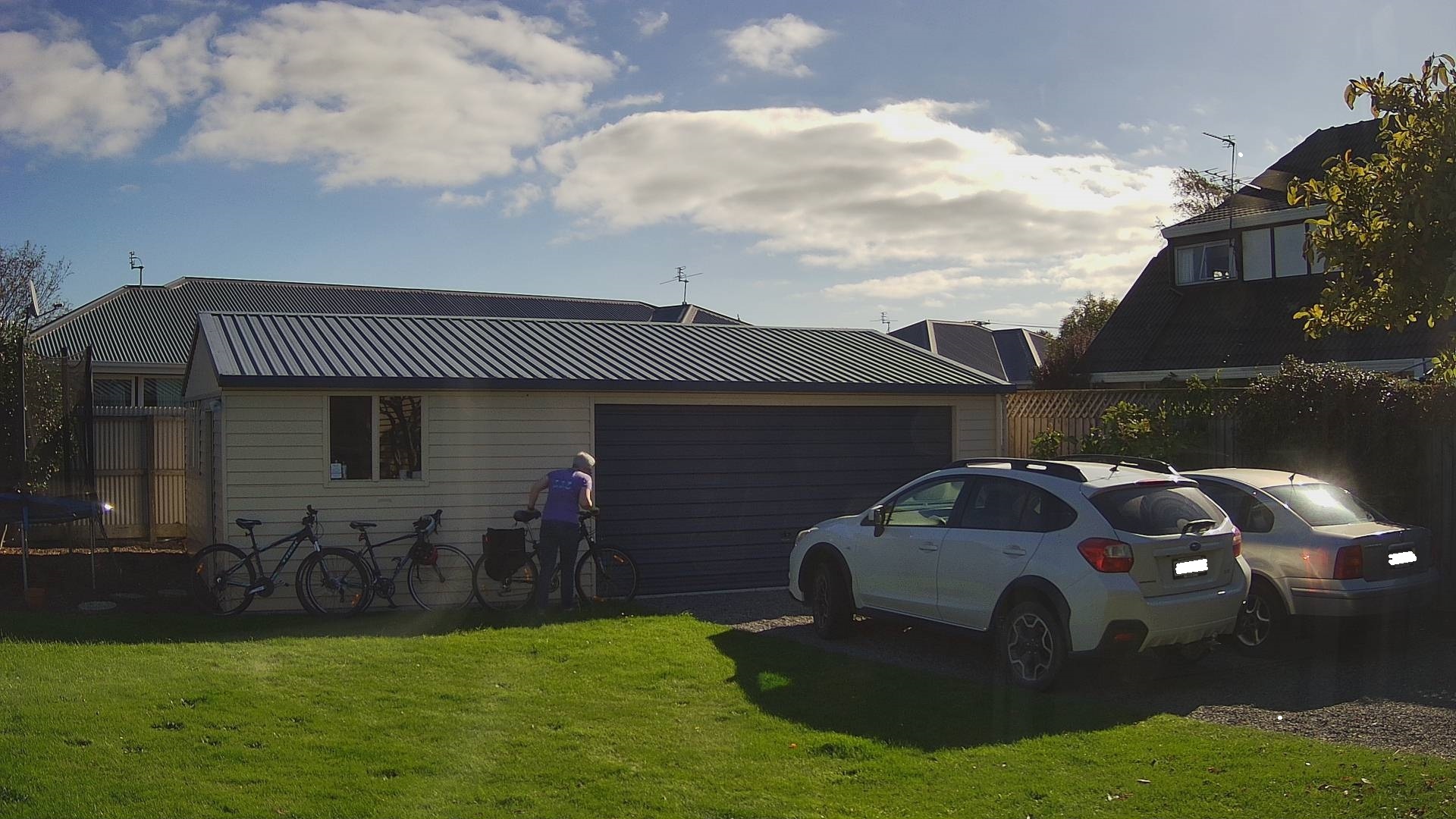
Cars and bicycles in my backyard with one object of interest
SmartEdgeCameraAzureIoTService one object of interest
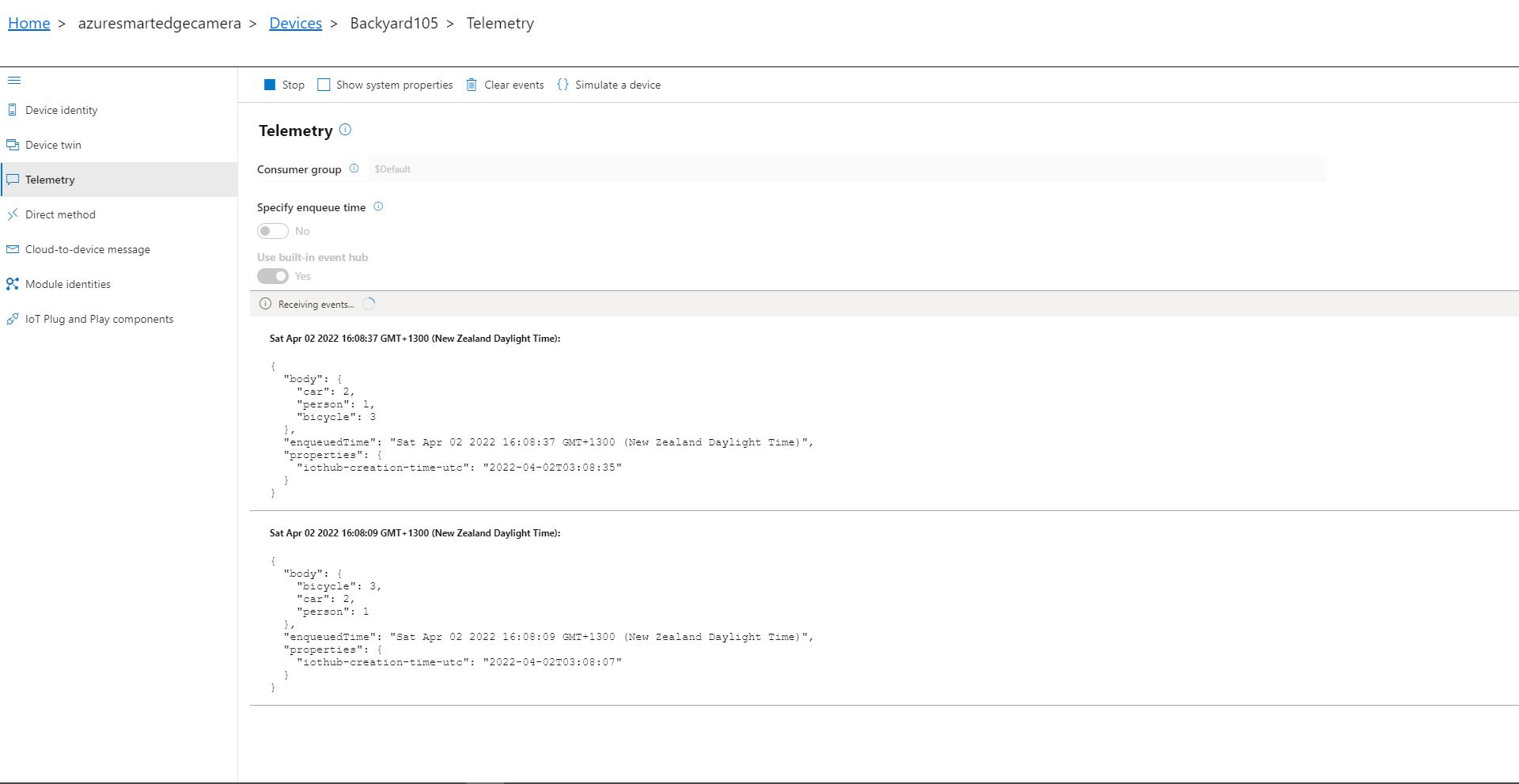
Azure IoT Explorer Telemetry with one object of interest

After the You Only Look Once(YOLOV5)+ML.Net+Open Neural Network Exchange(ONNX) plumbing has loaded a timer with a configurable due time and period is started. Using some Language Integrated Query (LINQ) code any predictions with a score < PredictionScoreThreshold are discarded, then the list of predictions is checked to see if there are any in the PredictionLabelsOfInterest. If there are any matching predictions a count of the instances of each class is generated with more LINQ code.

private async void ImageUpdateTimerCallback(object state)
{
	DateTime requestAtUtc = DateTime.UtcNow;

	// Just incase - stop code being called while photo already in progress
	if (_cameraBusy)
	{
		return;
	}
	_cameraBusy = true;

	_logger.LogInformation("Image processing start");

	try
	{
#if CAMERA_RASPBERRY_PI
		RaspberryPIImageCapture();
#endif
#if CAMERA_SECURITY
		SecurityCameraImageCapture();
#endif
		List<YoloPrediction> predictions;

		using (Image image = Image.FromFile(_applicationSettings.ImageCameraFilepath))
		{
			_logger.LogTrace("Prediction start");
			predictions = _scorer.Predict(image);
			_logger.LogTrace("Prediction done");
		}

		if (_logger.IsEnabled(LogLevel.Trace))
		{
			_logger.LogTrace("Predictions {0}", predictions.Select(p => new { p.Label.Name, p.Score }));
		}

		var predictionsOfInterest = predictions.Where(p => p.Score > _applicationSettings.PredicitionScoreThreshold)
										.Select(c => c.Label.Name)
										.Intersect(_applicationSettings.PredictionLabelsOfInterest, StringComparer.OrdinalIgnoreCase);

		if (predictionsOfInterest.Any())
		{
			if (_logger.IsEnabled(LogLevel.Trace))
			{
				_logger.LogTrace("Predictions of interest {0}", predictionsOfInterest.ToList());
			}

			var predictionsTally = predictions.GroupBy(p => p.Label.Name)
									.Select(p => new
									{
										Label = p.Key,
										Count = p.Count()
									});

			if (_logger.IsEnabled(LogLevel.Information))
			{
				_logger.LogInformation("Predictions tally {0}", predictionsTally.ToList());
			}

			JObject telemetryDataPoint = new JObject();

			foreach (var predictionTally in predictionsTally)
			{
				telemetryDataPoint.Add(predictionTally.Label, predictionTally.Count);
			}

			using (Message message = new Message(Encoding.ASCII.GetBytes(JsonConvert.SerializeObject(telemetryDataPoint))))
			{
				message.Properties.Add("iothub-creation-time-utc", requestAtUtc.ToString("s", CultureInfo.InvariantCulture));

				await _deviceClient.SendEventAsync(message);
			}
		}
	}
	catch (Exception ex)
	{
		_logger.LogError(ex, "Camera image download, post processing, telemetry failed");
	}
	finally
	{
		_cameraBusy = false;
	}

	TimeSpan duration = DateTime.UtcNow - requestAtUtc;

	_logger.LogInformation("Image processing done {0:f2} sec", duration.TotalSeconds);
}

The list of prediction class counts is used to populate a Newtonsoft JObject which serialised to generate a Java Script Object Notation(JSON) payload for an Azure IoT Hub message.

The test-rig consisted of a Unv ADZK-10 Security Camera, Power over Ethernet(PoE) and my HP Prodesk 400G4 DM (i7-8700T)