.NET nanoFramework RAK3172 LoRaWAN library OTAA Join

When I first tried Over The Air Activation(OTAA) to connect to The Things Network(TTN) with my RAKwireless RAK3172 module it didn’t work. I had flashed my Sparkfun Thing plus ESP32 WROOM with the ESP32 PSRAM binaries (Thanks AlbertK on the nanoFramework Discord).

nanoff --target ESP32_REV0 --serialport COM17 --update
RAK3172 Sparkfun ESP32 WROOM Testrig

I modified the NetworkJoinOTAA sample (based on the asynchronous version of BreakOutSerial) to send the sequence of AT commands to join The Things Network(TTN) and display the responses.

#define ST_STM32F769I_DISCOVERY      // nanoff --target ST_STM32F769I_DISCOVERY --update 
//#define ESP32_WROOM   //nanoff --target ESP32_REV0 --serialport COM17 --update

namespace devMobile.IoT.LoRaWAN.nanoFramework.RAK3172
{
	using System;
	using System.Diagnostics;
	using System.IO.Ports;
	using System.Threading;
#if ESP32_WROOM
	using global::nanoFramework.Hardware.Esp32; //need NuGet nanoFramework.Hardware.Esp32
#endif

	public class Program
	{
#if ESP32_WROOM
		private const string SerialPortId = "COM2";
#endif
#if ST_STM32F769I_DISCOVERY
		private const string SerialPortId = "COM6";
#endif
		private const string DevEui = "...";
		private const string AppEui = "...";
		private const string AppKey = "...";
		private const byte MessagePort = 1;
		private const string Payload = "A0EEE456D02AFF4AB8BAFD58101D2A2A"; // Hello LoRaWAN

		public static void Main()
		{
			Debug.WriteLine("devMobile.IoT.LoRaWAN.nanoFramework.RAK3172 NetworkJoinOTAA starting");

			try
			{
				// set GPIO functions for COM2 (this is UART1 on ESP32)
#if ESP32_WROOM
				Configuration.SetPinFunction(Gpio.IO17, DeviceFunction.COM2_TX);
				Configuration.SetPinFunction(Gpio.IO16, DeviceFunction.COM2_RX);
#endif

				Debug.Write("Ports:");
				foreach (string port in SerialPort.GetPortNames())
				{
					Debug.Write($" {port}");
				}
				Debug.WriteLine("");

				using (SerialPort serialPort = new SerialPort(SerialPortId))
				{
					// set parameters
					serialPort.BaudRate = 115200;
					serialPort.Parity = Parity.None;
					serialPort.DataBits = 8;
					serialPort.StopBits = StopBits.One;
					serialPort.Handshake = Handshake.None;
					serialPort.NewLine = "\r\n";
					serialPort.ReadTimeout = 1000;

					serialPort.DataReceived += SerialDevice_DataReceived;

					serialPort.Open();

					serialPort.WatchChar = '\n';

					serialPort.ReadExisting(); // Running at 115K2 this was necessary

					// Set the devEUI
					Console.WriteLine("Set Dev Eui");
					serialPort.WriteLine($"AT+DEVEUI={DevEui}");

					// Set the Working mode to LoRaWAN
					Console.WriteLine("Set Work mode");
					serialPort.WriteLine("AT+NWM=1");

					// Set the Region to AS923
					Console.WriteLine("Set Region");
					serialPort.WriteLine("AT+BAND=8");

					// Set the JoinMode
					Console.WriteLine("Set Join mode");
					serialPort.WriteLine("AT+NJM=1");

					// Set the appEUI
					Console.WriteLine("Set App Eui");
					serialPort.WriteLine($"AT+APPEUI={AppEui}");

					// Set the appKey
					Console.WriteLine("Set App Key");
					serialPort.WriteLine($"AT+APPKEY={AppKey}");

					// Set the Confirm flag
					Console.WriteLine("Set Confirm off");
					serialPort.WriteLine("AT+CFM=0");

					// Join the network
					Console.WriteLine("Start Join");
					serialPort.WriteLine("AT+JOIN=1:0:10:2");

					// Wait for the +EVT:JOINED

					while (true)
					{
						Console.WriteLine("Sending");
						serialPort.WriteLine($"AT+SEND={MessagePort}:{Payload}");

						Thread.Sleep(300000);
					}
				}
			}
			catch (Exception ex)
			{
				Debug.WriteLine(ex.Message);
			}
		}

		private static void SerialDevice_DataReceived(object sender, SerialDataReceivedEventArgs e)
		{
			SerialPort serialPort = (SerialPort)sender;

			switch (e.EventType)
			{
				case SerialData.Chars:
					break;
 
				case SerialData.WatchChar:
					string response = serialPort.ReadExisting();
					Debug.Write(response);
					break;
				default:
					Debug.Assert(false, $"e.EventType {e.EventType} unknown");
					break;
			}
		}
	}
}
Visual Studio Debug Output displaying Configuration-Join-Send
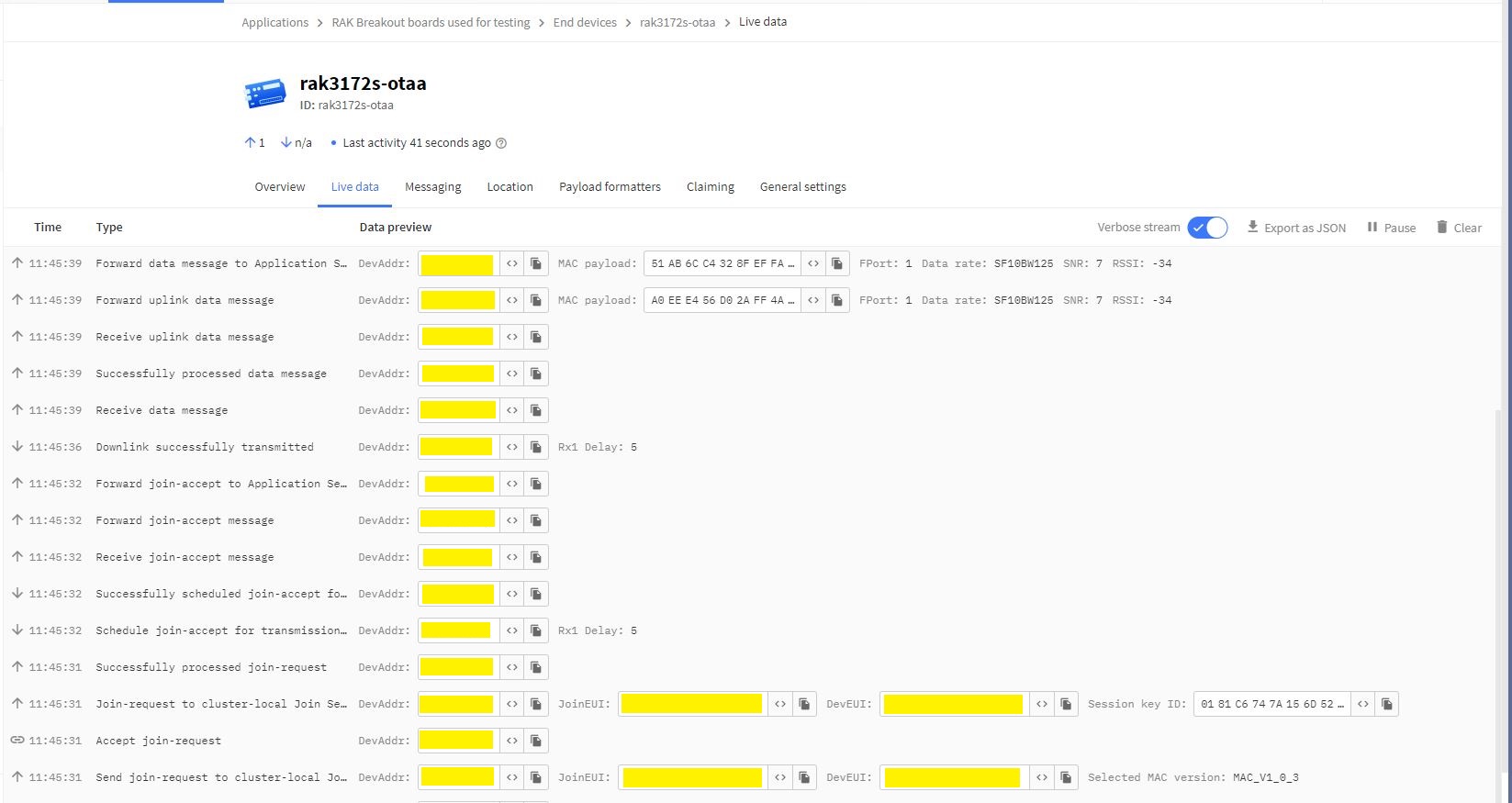
Things Network(TTN) Live Data tab display successful join then D2C message

The NetworkJoinOTAA application assumes that all of the AT commands succeed. I usually step though the application in the debugger so I can monitor progress.

.NET nanoFramework RAK4200 Factory Reset

The RAKwireless RAK4200 module has a really useful “reset to factory” AT Command

at+set_config=lora:default_parameters

To see what settings were erased I modified the BreakOutSerial application to send additional AT commands and display the responses.

public static void Main()
{
...
	Debug.WriteLine("devMobile.IoT.LoRaWAN.nanoFramework.RAK4200 BreakoutSerial starting");

	try
	{
		// set GPIO functions for COM2 (this is UART1 on ESP32)
#if ESP32_WROOM
		Configuration.SetPinFunction(Gpio.IO16, DeviceFunction.COM2_TX);
		Configuration.SetPinFunction(Gpio.IO17, DeviceFunction.COM2_RX);
#endif

		Debug.Write("Ports:");
		foreach (string port in SerialPort.GetPortNames())
		{
			Debug.Write($" {port}");
		}
		Debug.WriteLine("");

		using (_SerialPort = new SerialPort(SerialPortId))
		{
			// set parameters
			_SerialPort.BaudRate = 9600;
			//_SerialPort.BaudRate = 115200;
			_SerialPort.Parity = Parity.None;
			_SerialPort.DataBits = 8;
			_SerialPort.StopBits = StopBits.One;
			_SerialPort.Handshake = Handshake.None;
			_SerialPort.NewLine = "\r\n";

			//_SerialPort.ReadBufferSize = 128; 
			//_SerialPort.ReadBufferSize = 256; 
			_SerialPort.ReadBufferSize = 512; 
			//_SerialPort.ReadBufferSize = 1024;
			_SerialPort.ReadTimeout = 1000;

			//_SerialPort.WatchChar = '\n'; // May 2022 WatchChar event didn't fire github issue https://github.com/nanoframework/Home/issues/1035

#if SERIAL_ASYNC_READ
			_SerialPort.DataReceived += SerialDevice_DataReceived;
#endif

			_SerialPort.Open();

			_SerialPort.WatchChar = '\n';
...
			for (int i = 0; i < 5; i++)
			{
				string atCommand;
				atCommand = "at+version";
				//atCommand = "at+set_config=device:uart:1:9600";
				atCommand = "at+get_config=lora:status";
				//atCommand = "at+get_config=device:status";
				//atCommand = "at+get_config=lora:channel";
				//atCommand = "at+help";
				//atCommand = "at+set_config=device:restart";
				//atCommand = "at+set_config=lora:default_parameters";
				Debug.WriteLine("");
				Debug.WriteLine($"{i} TX:{atCommand} bytes:{atCommand.Length}--------------------------------");
				_SerialPort.WriteLine(atCommand);

				Thread.Sleep(5000);
			}
		}
		Debug.WriteLine("Done");
	}
	catch (Exception ex)
	{
		Debug.WriteLine(ex.Message);
	}
}

#if SERIAL_ASYNC_READ
private static void SerialDevice_DataReceived(object sender, SerialDataReceivedEventArgs e)
{
	SerialPort serialPort = (SerialPort)sender;

	switch (e.EventType)
	{
		case SerialData.Chars:
			break;

		case SerialData.WatchChar:
			string response = serialPort.ReadExisting();
			Debug.Write(response);
			break;
		default:
			Debug.Assert(false, $"e.EventType {e.EventType} unknown");
			break;
	}
}
#endif
...
}

After configuring my Sparkfun Thing Plus ESP32 WROOM + RAK42000 Breakout Board test rig the RAK4200LoRaWANDeviceClient application could successfully connect to The Things Network .

The thread '' (0x2) has exited with code 0 (0x0).
devMobile.IoT.LoRaWAN.nanoFramework.RAK4200 BreakoutSerial starting
0 TX:at+get_config=lora:status bytes:25--------------------------------
OK Work Mode: LoRaWAN
Region: AS923
MulticastEnable: false
DutycycleEnable: false
Send_repeat_cnt: 0
Join_mode: OTAA
DevEui:  6..............9
AppEui: 7..............4
AppKey: A.............................9
Class: A
Joined Network:false
IsConfirm: unconfirm
AdrEnable: true
EnableRepeaterSupport: false
RX2_CHANNEL_FREQUENCY: 923200000, RX2_CHANNEL_DR:2
RX_WINDOW_DURATION: 3000ms
RECEIVE_DELAY_1: 1000ms
RECEIVE_DELAY_2: 2000ms
JOIN_ACCEPT_DELAY_1: 5000ms
JOIN_ACCEPT_DELAY_2: 6000ms
Current Datarate: 5
Primeval Datarate: 5
ChannelsTxPower: 0
UpLinkCounter: 0
DownLinkCounter: 0

I then reset the RAK4200 device to “factory defaults”

The thread '<No Name>' (0x2) has exited with code 0 (0x0).
devMobile.IoT.LoRaWAN.nanoFramework.RAK4200 BreakoutSerial starting
Ports: COM5 COM6

0 TX:at+set_config=lora:default_parameters bytes:37--------------------------------
OK

The testrig would no longer connect as the device and network settings were invalid.

The thread '<No Name>' (0x2) has exited with code 0 (0x0).
devMobile.IoT.LoRaWAN.nanoFramework.RAK4200 BreakoutSerial starting
Ports: COM5 COM6

0 TX:at+get_config=lora:status bytes:25--------------------------------
OK Work Mode: LoRaWAN
Region: AS923
MulticastEnable: false
DutycycleEnable: false
Send_repeat_cnt: 0
Join_mode: OTAA
DevEui: 0000000000000000
AppEui: 0000000000000000
AppKey: 00000000000000000000000000000000
Class: A
Joined Network:false
IsConfirm: unconfirm
AdrEnable: true
EnableRepeaterSupport: false
RX2_CHANNEL_FREQUENCY: 923200000, RX2_CHANNEL_DR:2
RX_WINDOW_DURATION: 3000ms
RECEIVE_DELAY_1: 1000ms
RECEIVE_DELAY_2: 2000ms
JOIN_ACCEPT_DELAY_1: 5000ms
JOIN_ACCEPT_DELAY_2: 6000ms
Current Datarate: 5
Primeval Datarate: 5
ChannelsTxPower: 0
UpLinkCounter: 0
DownLinkCounter: 0

To “restore” the device configuration I ran the RAK4200LoRaWANDeviceClient application with DEVICE_DEVEUI_SET, OTAA, UNCONFIRMED, REGION_SET and ADR_SET defined.

The thread '<No Name>' (0x2) has exited with code 0 (0x0).
devMobile.IoT.LoRaWAN.nanoFramework.RAK4200 BreakoutSerial starting
Ports: COM2 COM3

0 TX:at+get_config=lora:status bytes:25--------------------------------
OK Work Mode: LoRaWAN
Region: AS923
MulticastEnable: false
DutycycleEnable: false
Send_repeat_cnt: 0
Join_mode: OTAA
DevEui: 6..............9
AppEui: 7.............4
AppKey: A.............................9
Class: A
Joined Network:false
IsConfirm: unconfirm
AdrEnable: true
EnableRepeaterSupport: false
RX2_CHANNEL_FREQUENCY: 923200000, RX2_CHANNEL_DR:2
RX_WINDOW_DURATION: 3000ms
RECEIVE_DELAY_1: 1000ms
RECEIVE_DELAY_2: 2000ms
JOIN_ACCEPT_DELAY_1: 5000ms
JOIN_ACCEPT_DELAY_2: 6000ms
Current Datarate: 5
Primeval Datarate: 5
ChannelsTxPower: 0
UpLinkCounter: 0
DownLinkCounter: 0

The testrig would then successfully connect to The Things Network. When the testrig was power cycled the device the configuration was retained.

.NET nanoFramework RAK4200 LoRaWAN library ABP Join

After getting my RAKwireless RAK4200 module to reliably connect to The Things Network(TTN) using Over The Air Activation(OTAA) the next step was to built an Activation By Personalisation(ABP) sample application.

I modified the NetworkJoinOTAA sample(based on the asynchronous version of BreakOutSerial) to send the required sequence of AT commands and display the responses.

namespace devMobile.IoT.LoRaWAN.nanoFramework.RAK4200
{
   using System;
   using System.Diagnostics;
   using System.IO.Ports;
   using System.Text;
   using System.Threading;
#if ESP32_WROOM
   using global::nanoFramework.Hardware.Esp32; ///need NuGet nanoFramework.Hardware.Esp32
#endif

   public class Program
   {
#if ST_STM32F769I_DISCOVERY
      private const string SerialPortId = "COM6";
#endif
#if ESP32_WROOM
      private const string SerialPortId = "COM2";
#endif
      private const string DevEui = "...";
      private const string AppEui = "...";
      private const string AppKey = "...";
      private const byte MessagePort = 1;
      private const string Payload = "01020304"; // Is AQIDBA==

      public static void Main()
      {
         string response;

         Debug.WriteLine("devMobile.IoT.Rak4200.NetworkJoinOTAA starting");

         try
         {
#if ESP32_WROOM
            Configuration.SetPinFunction(Gpio.IO16, DeviceFunction.COM2_TX);
            Configuration.SetPinFunction(Gpio.IO17, DeviceFunction.COM2_RX);
#endif

            Debug.Write("Ports:");
            foreach (string port in SerialPort.GetPortNames())
            {
               Debug.Write($" {port}");
            }
            Debug.WriteLine("");

            using (SerialPort serialDevice = new SerialPort(SerialPortId))
            {
               // set parameters
               serialDevice.BaudRate = 9600;
               //_SerialPort.BaudRate = 115200;
               serialDevice.Parity = Parity.None;
               serialDevice.StopBits = StopBits.One;
               serialDevice.Handshake = Handshake.None;
               serialDevice.DataBits = 8;

               serialDevice.ReadTimeout = 10000;
               //serialDevice.ReadBufferSize = 128; 
               //serialDevice.ReadBufferSize = 256; 
               serialDevice.ReadBufferSize = 512;
               //serialDevice.ReadBufferSize = 1024;

               serialDevice.NewLine = "\r\n";

               serialDevice.DataReceived += SerialDevice_DataReceived;

               serialDevice.Open();

               serialDevice.WatchChar = '\n';

               // clear out the RX buffer
               serialDevice.ReadExisting();
               response = serialDevice.ReadExisting();
               Debug.WriteLine($"Response :{response.Trim()} bytes:{response.Length}");
               Thread.Sleep(500);

               // Set the Working mode to LoRaWAN
               Debug.WriteLine("lora:work_mode:0");
               serialDevice.WriteLine("at+set_config=lora:work_mode:0");
               Thread.Sleep(1500);

               // Set the JoinMode
               Debug.WriteLine("lora:join_mode");
               serialDevice.WriteLine("at+set_config=lora:join_mode:0");
               Thread.Sleep(500);

               // Set the Class
               Debug.WriteLine("lora:class");
               serialDevice.WriteLine("at+set_config=lora:class:0");
               Thread.Sleep(500);

               // Set the Region to AS923
               Debug.WriteLine("lora:region");
               serialDevice.WriteLine("at+set_config=lora:region:AS923");
               Thread.Sleep(500);

               // Set the devEUI
               Debug.WriteLine("lora:dev_eui");
               serialDevice.WriteLine($"at+set_config=lora:dev_eui:{DevEui}");
               Thread.Sleep(500);

               // Set the appEUI
               Debug.WriteLine("lora:app_eui");
               serialDevice.WriteLine($"at+set_config=lora:app_eui:{AppEui}");
               Thread.Sleep(500);

               // Set the appKey
               Debug.WriteLine("lora:app_key");
               serialDevice.WriteLine($"at+set_config=lora:app_key:{AppKey}");
               Thread.Sleep(500);

               // Set the Confirm flag
               Debug.WriteLine("lora:confirm");
               serialDevice.WriteLine("at+set_config=lora:confirm:0");
               Thread.Sleep(500);

               Debug.WriteLine("lora:adr");
               serialDevice.WriteLine("at+set_config=lora:adr:1");
               Thread.Sleep(500);

               // Join the network
               Debug.WriteLine("at+join");
               serialDevice.WriteLine("at+join");
               Thread.Sleep(10000);

               byte counter = 1;
               while (true)
               {
                  // Send the BCD messages
                  string payload = $"{Payload}{counter:X2}";
                  Debug.WriteLine($"at+send=lora:{MessagePort}:{payload}");
                  serialDevice.WriteLine($"at+send=lora:{MessagePort}:{payload}");

                  counter += 1;

                  Thread.Sleep(300000);
               }
            }
         }
         catch (Exception ex)
         {
            Debug.WriteLine(ex.Message);
         }
      }

      private static void SerialDevice_DataReceived(object sender, SerialDataReceivedEventArgs e)
      {
         SerialPort serialPort = (SerialPort)sender;
         string response;

         switch (e.EventType)
         {
            case SerialData.Chars:
               break;

            case SerialData.WatchChar:
               response = serialPort.ReadExisting();
               Debug.Write(response);
               break;
            default:
               Debug.Assert(false, $"e.EventType {e.EventType} unknown");
               break;
         }
      }
   }
}
The NetworkJoinABP application assumes that all of the AT commands succeed.

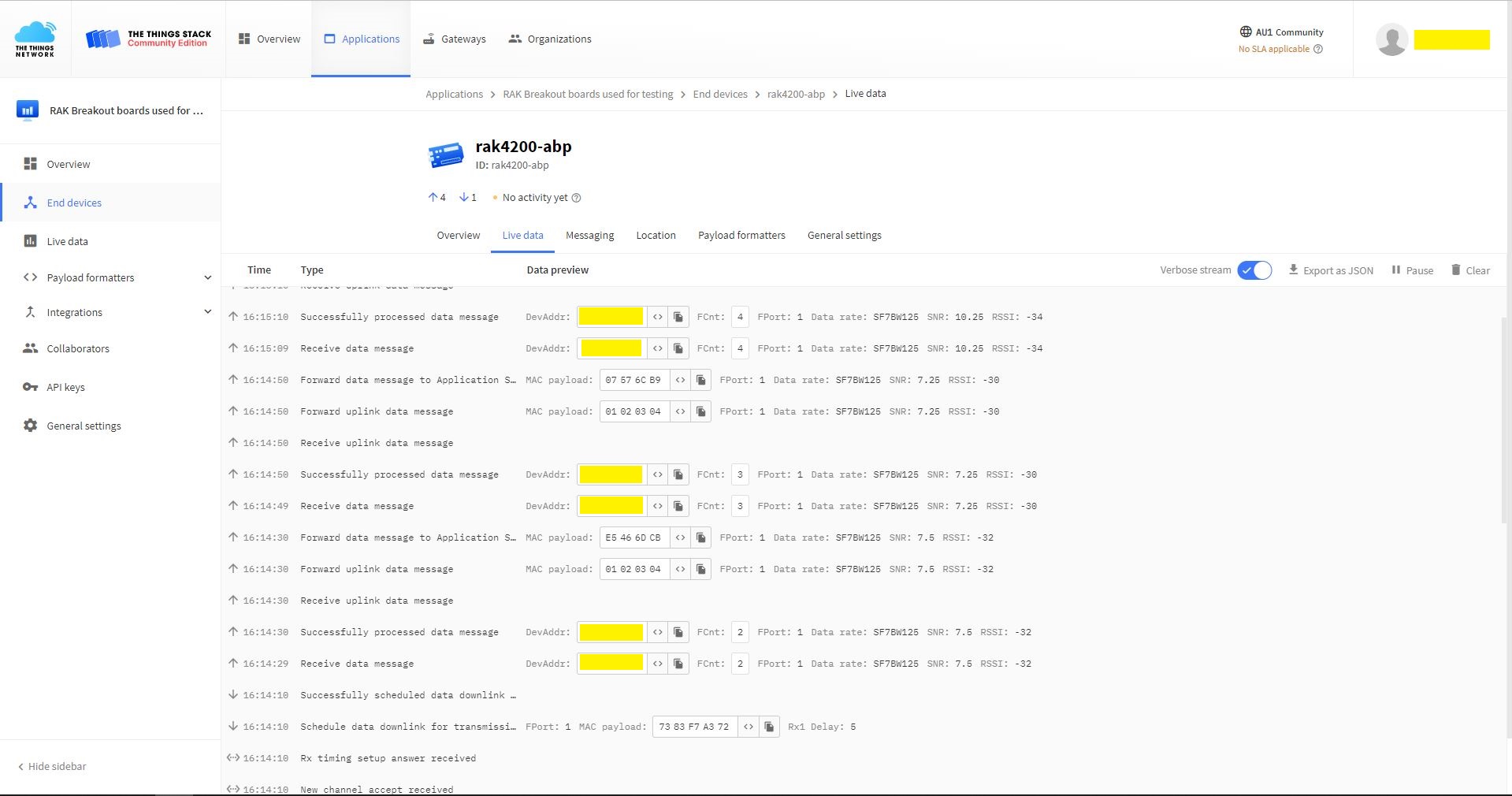
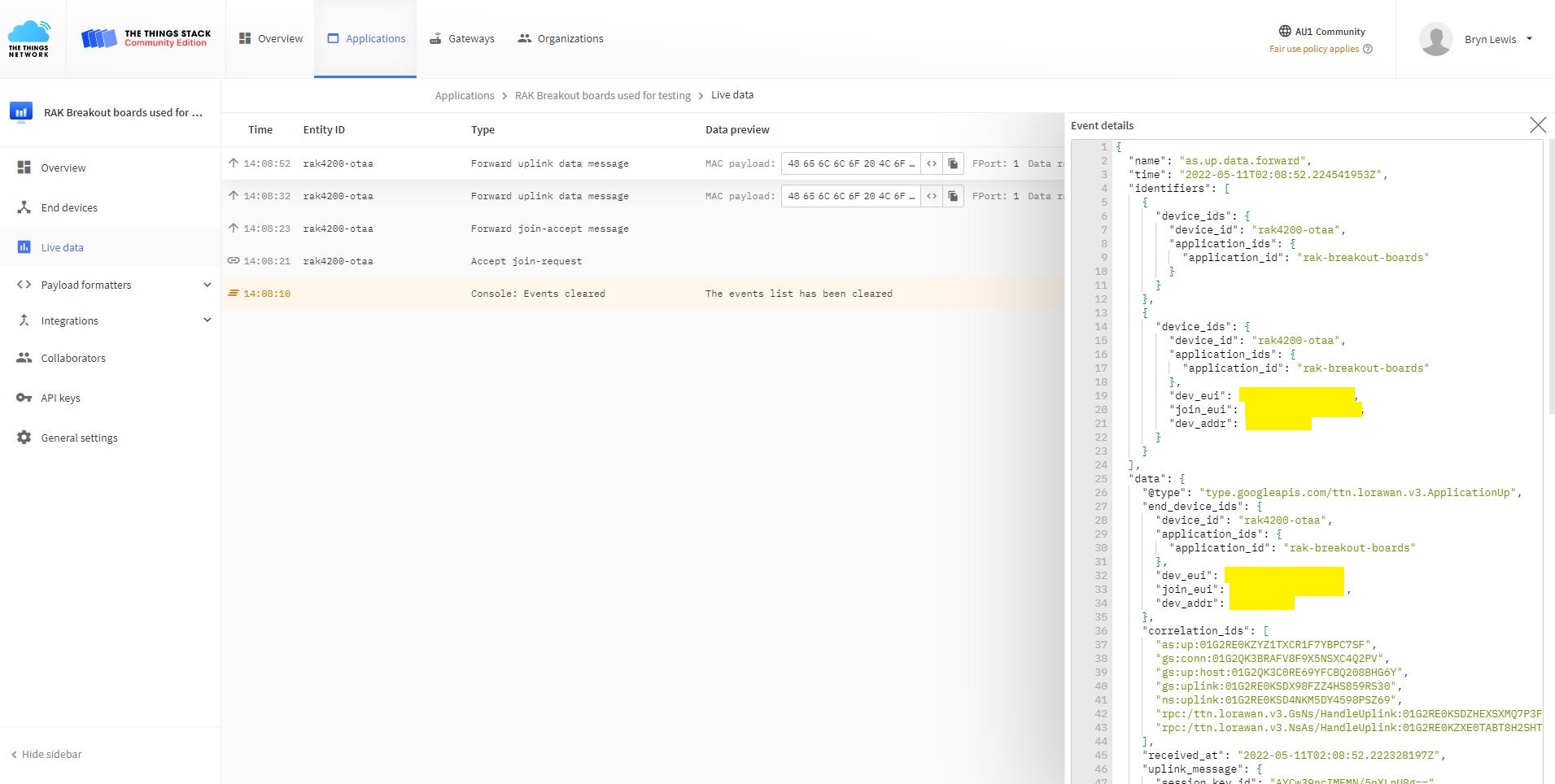
TTN Console live data tab connection process
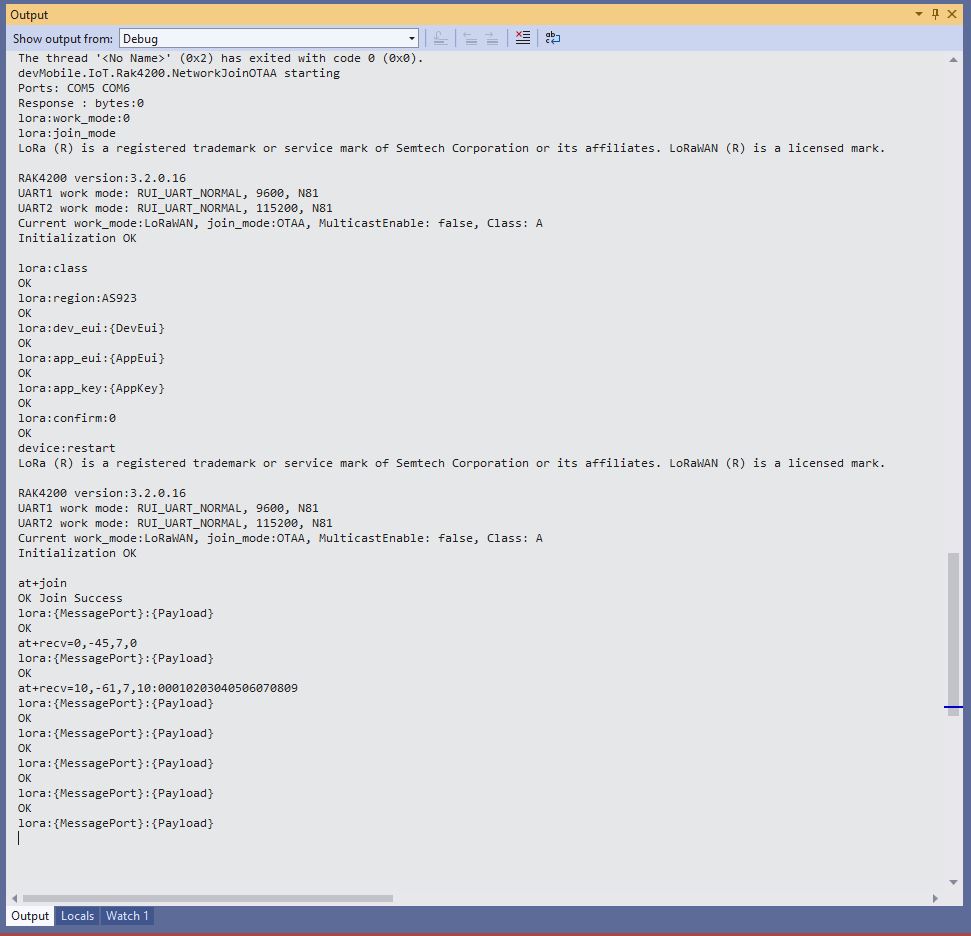
Visual Studio Output windows displaying connection process and a D2C message

I have been using at+set_config=lora:default_parameters set the WisDuo RAK4200 back to factory settings so I can figure out what settings are persisted by a “at+set_config=device:restart” and which ones need to be set every time the application is run.

.NET nanoFramework RAK4200 LoRaWAN library OTAA Join

When I first tried Over The Air Activation(OTAA) to connect to The Things Network(TTN) with my RAKwireless RAK4200 module it didn’t work. I built another test harness with an FTDI module so I could send AT commands with the RAK Serial Port Tool to my RAK4200 module.

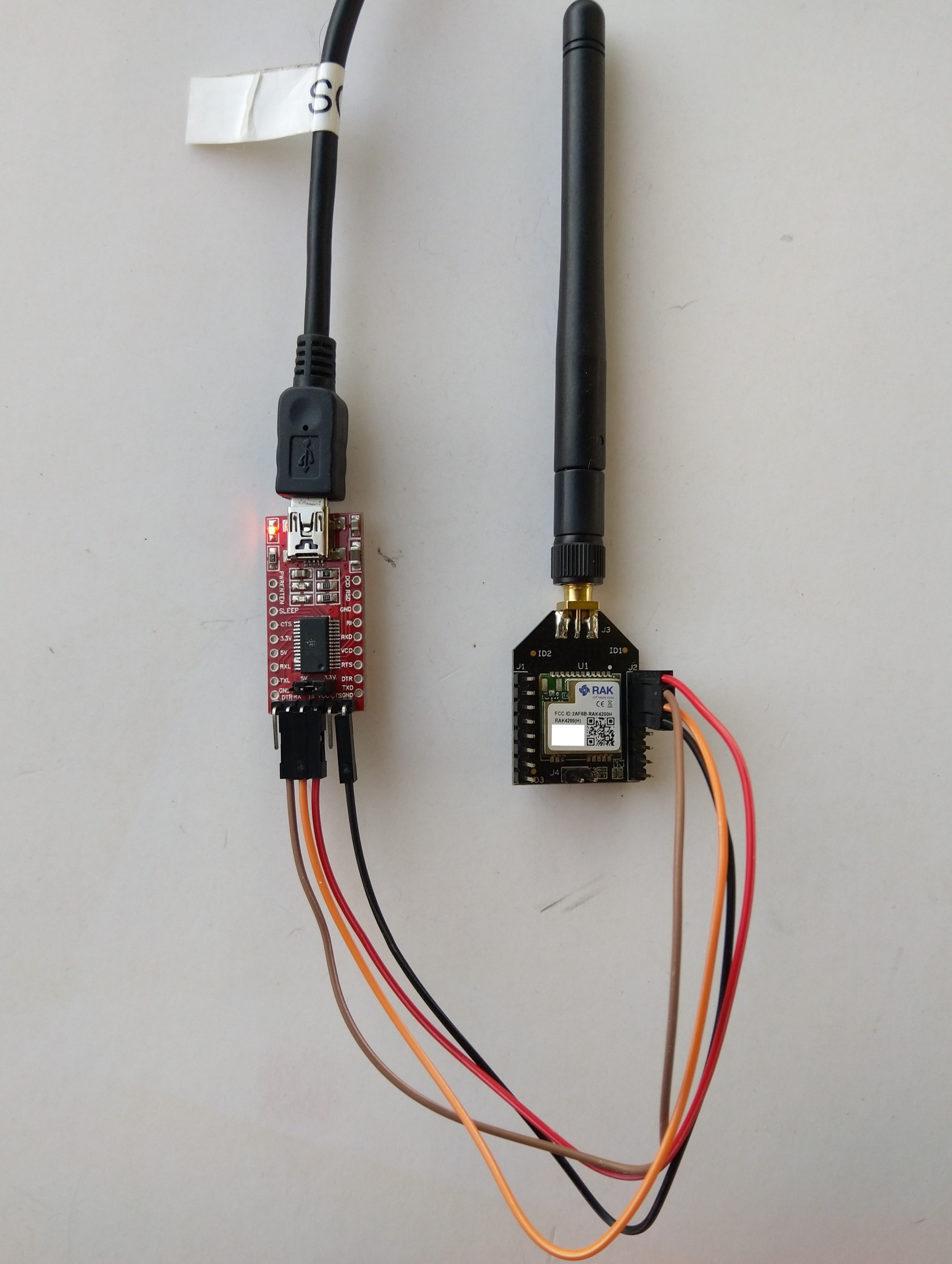
RAK4200 -> FTDI -? PC test harness

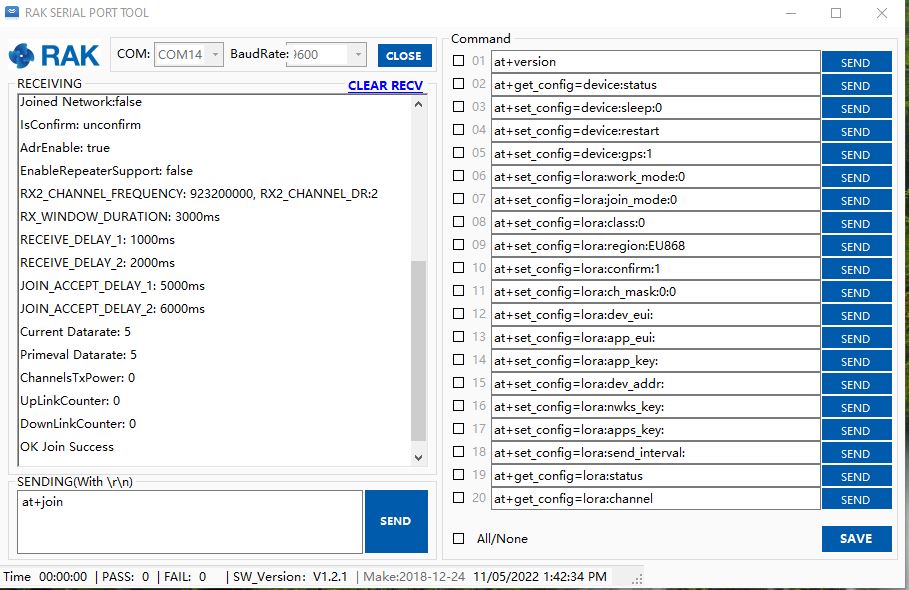
The default baud rate is 115200 but I sent “at+set_config=device:uart:1:9600” to the RAK4200 module.

RAK Serial Port Tool initiating at+join command

With the RAK Serial Port Tool I could get the RAK4200 connected to TTN and send unconfirmed messages. The sequence of commands I used was

at+set_config=lora:join_mode:0
at+set_config=lora:class:0
at+set_config=lora:region:AS923
at+set_config=lora:dev_eui:XXXX
at+set_config=lora:app_eui:XXXX
at+set_config=lora:app_key:XXXX
at+set_config=device:restart
at+join
at+send=lora:2:48656c6c6f204c6f526157414e

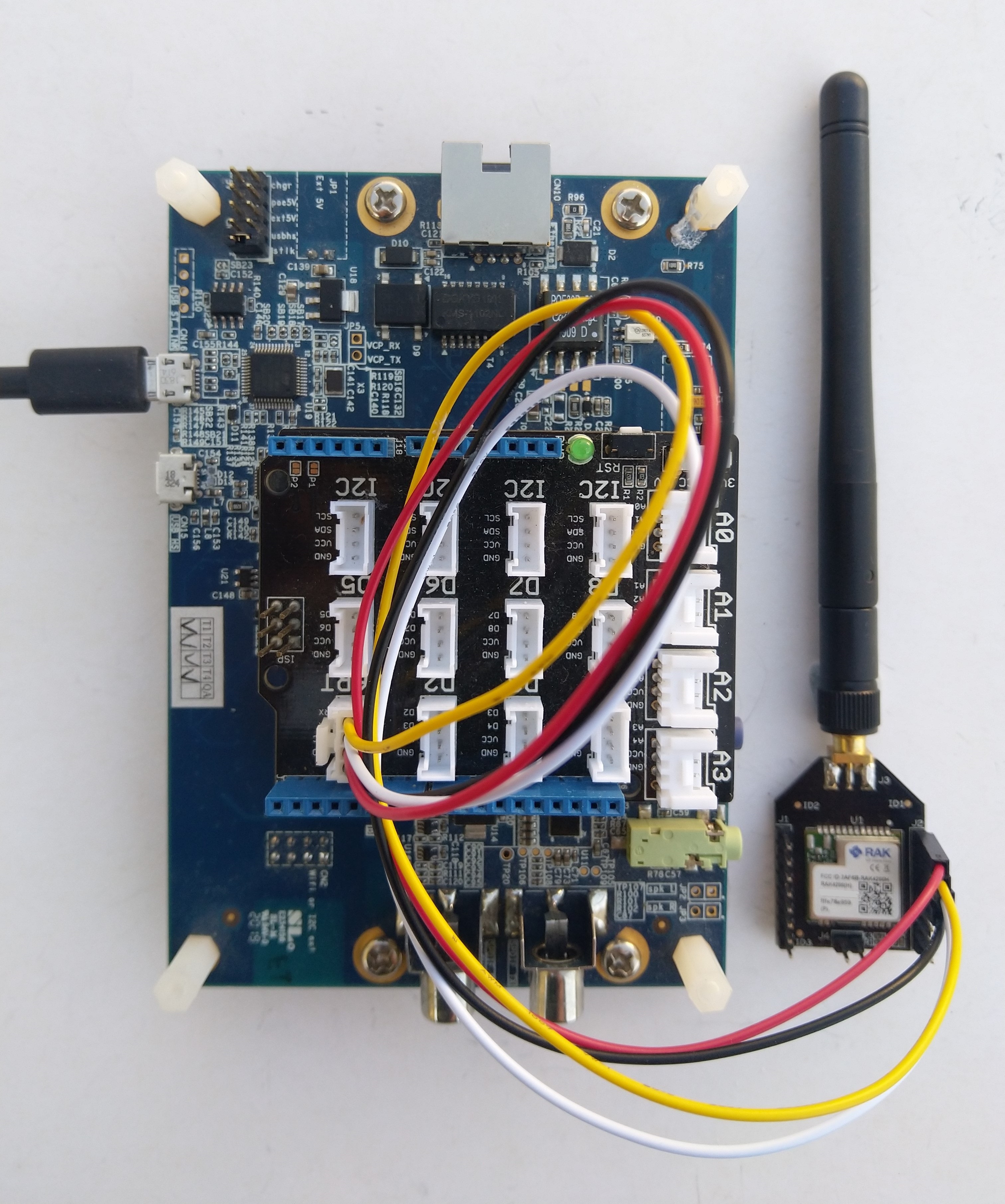
I then returned to my STM32F769I Discovery, RAK4200 Breakoutboard, Seeedstudio Grove Base Shield for Arduino and a Seeedstudio Grove-4 pin Female Jumper to Grove 4 pin Conversion Cable based test harness.

RAK4200, STM32F769I Discovery test harness

I modified the NetworkJoinOTAA sample(based on the asynchronous version of BreakOutSerial) to send the same sequence of AT commands and display the responses.

namespace devMobile.IoT.LoRaWAN.nanoFramework.RAK4200
{
   using System;
	using System.Diagnostics;
   using System.IO.Ports;
   using System.Threading;

   public class Program
	{
      private const string SerialPortId = "COM6";
      private const string DevEui = "...";
      private const string AppEui = "...";
      private const string AppKey = "...";
      private const byte MessagePort = 1;
      private const string Payload = "48656c6c6f204c6f526157414e"; // Hello LoRaWAN

      public static void Main()
      {
         string response;

         Debug.WriteLine("devMobile.IoT.Rak4200.NetworkJoinOTAA starting");

         Debug.Write("Ports:");
         foreach (string port in SerialPort.GetPortNames())
         {
            Debug.Write($" {port}");
         }
         Debug.WriteLine("");

         try
         {
            using (SerialPort serialDevice = new SerialPort(SerialPortId))
            {
               // set parameters
               serialDevice.BaudRate = 9600;
               //_SerialPort.BaudRate = 115200;
               serialDevice.Parity = Parity.None;
               serialDevice.StopBits = StopBits.One;
               serialDevice.Handshake = Handshake.None;
               serialDevice.DataBits = 8;

               serialDevice.ReadTimeout = 10000;

               serialDevice.NewLine = "\r\n";

               serialDevice.DataReceived += SerialDevice_DataReceived;

               serialDevice.Open();

               serialDevice.WatchChar = '\n';

               // clear out the RX buffer
               serialDevice.ReadExisting();
               response = serialDevice.ReadExisting();
               Debug.WriteLine($"Response :{response.Trim()} bytes:{response.Length}");
               Thread.Sleep(500);

               // Set the Working mode to LoRaWAN
               Console.WriteLine("lora:work_mode:0");
               serialDevice.WriteLine("at+set_config=lora:work_mode:0");

               // Set the JoinMode
               Console.WriteLine("lora:join_mode");
               serialDevice.WriteLine("at+set_config=lora:join_mode:0");
               Thread.Sleep(500);

               // Set the Class
               Console.WriteLine("lora:class");
               serialDevice.WriteLine("at+set_config=lora:class:0");
               Thread.Sleep(500);

               // Set the Region to AS923
               Console.WriteLine("lora:region:AS923");
               serialDevice.WriteLine("at+set_config=lora:region:AS923");
               Thread.Sleep(500);

               // Set the devEUI
               Console.WriteLine("lora:dev_eui:{DevEui}");
               serialDevice.WriteLine($"at+set_config=lora:dev_eui:{DevEui}");
               Thread.Sleep(500);

               // Set the appEUI
               Console.WriteLine("lora:app_eui:{AppEui}");
               serialDevice.WriteLine($"at+set_config=lora:app_eui:{AppEui}");
               Thread.Sleep(500);

               // Set the appKey
               Console.WriteLine("lora:app_key:{AppKey}");
               serialDevice.WriteLine($"at+set_config=lora:app_key:{AppKey}");
               Thread.Sleep(500);

               // Set the Confirm flag
               Console.WriteLine("lora:confirm:0");
               serialDevice.WriteLine("at+set_config=lora:confirm:0");
               Thread.Sleep(500);

               // Reset the device
               Console.WriteLine("device:restart");
               serialDevice.WriteLine($"at+set_config=device:restart");
               Thread.Sleep(10000);

               // Join the network
               Console.WriteLine("at+join");
               serialDevice.WriteLine("at+join");
               Thread.Sleep(10000);

               while (true)
               {
                  // Send the BCD messages
                  Console.WriteLine("lora:{MessagePort}:{Payload}");
                  serialDevice.WriteLine($"at+send=lora:{MessagePort}:{Payload}");

                  Thread.Sleep(20000);
               }
            }
         }
         catch (Exception ex)
         {
            Debug.WriteLine(ex.Message);
         }
      }

      private static void SerialDevice_DataReceived(object sender, SerialDataReceivedEventArgs e)
      {
         SerialPort serialPort = (SerialPort)sender;
         string response;

         switch (e.EventType)
         {
            case SerialData.Chars:
               break;

            case SerialData.WatchChar:
               response = serialPort.ReadExisting();
               Debug.Write(response);
               break;
            default:
               Debug.Assert(false, $"e.EventType {e.EventType} unknown");
               break;
         }
      }
   }
}

The NetworkJoinOTAA application assumes that all of the AT commands succeed

Visual Studio Output windows displaying connection process and a D2C message
TTN Console live data tab connection process
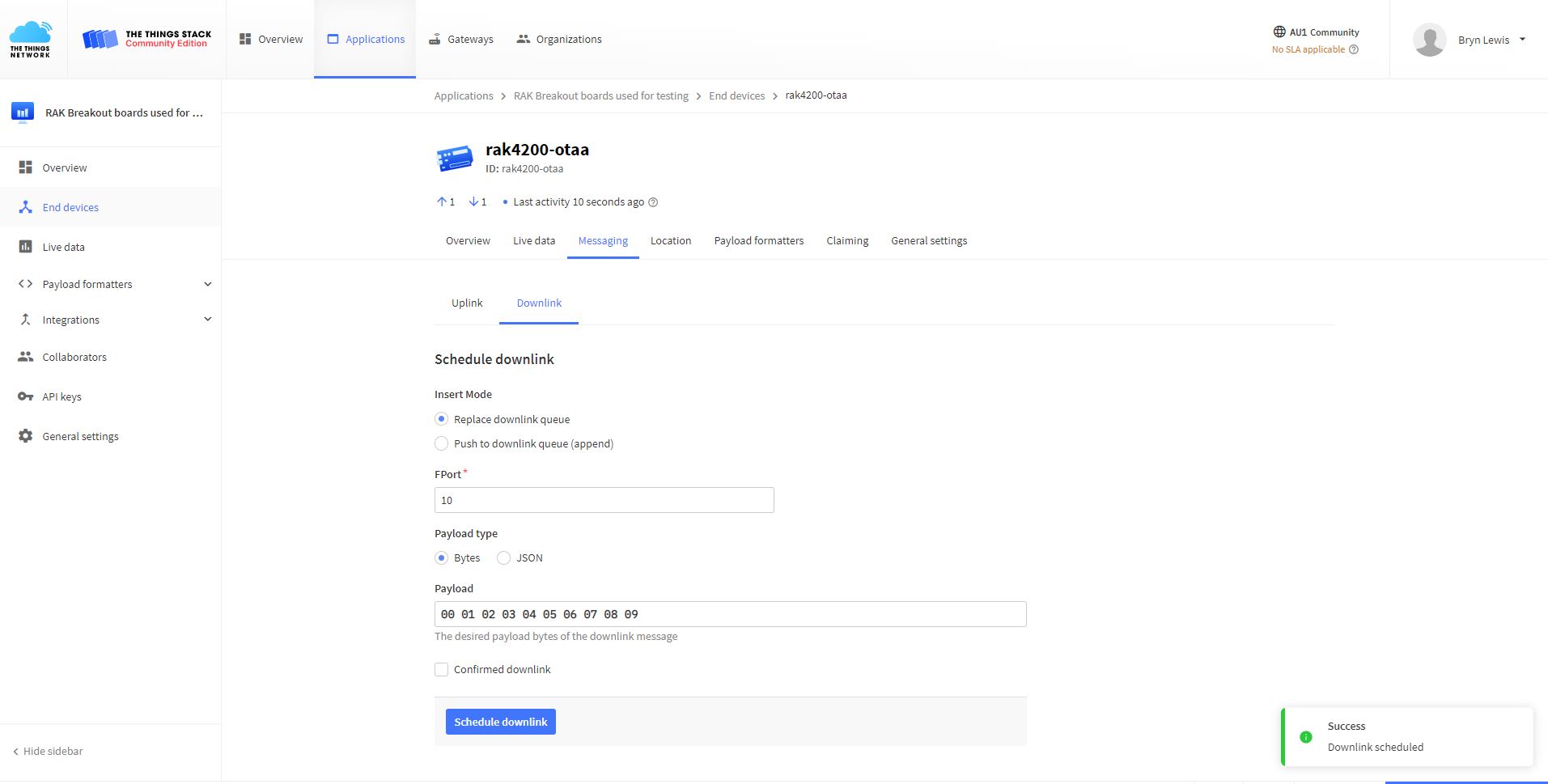
TTN Console live messaging tab C2D message

I need to find a way to set the RAK4200 back to factory settings so I can figure out what settings are persisted by the “at+set_config=device:restart” and which ones need to be set every time the application is run.