The Things Network HTTP Integration Part1

Infrastructure and payloads

This is the first in a series of posts about building an HTTP Integration for a The Things Network(TTN) application. I have assumed that readers are familiar with the configuration and operation of a TTN instance so I’m not going to cover that in detail.

I’m using a Seeeduino LoRaWAN device as a client so I configured the sample Over the Air Activation(OTAA) application to connect to my local RAK7246 Developer gateway.

#include <LoRaWan.h>

unsigned char data[] = {0x53, 0x65, 0x65, 0x65, 0x64, 0x75, 0x69, 0x6E, 0x6F, 0x20, 0x4C, 0x6F, 0x52, 0x61, 0x57, 0x41, 0x4E};
char buffer[256];

void setup(void)
{
  SerialUSB.begin(9600);
  while (!SerialUSB);

  lora.init();

  memset(buffer, 0, 256);
  lora.getVersion(buffer, 256, 1);
  SerialUSB.print("Ver:");
  SerialUSB.print(buffer);

  memset(buffer, 0, 256);
  lora.getId(buffer, 256, 1);
  SerialUSB.print(buffer);
  SerialUSB.print("ID:");

  lora.setKey(NULL, NULL, "12345678901234567890123456789012");
  lora.setId(NULL, "1234567890123456", "1234567890123456");

  lora.setPort(10);

  lora.setDeciveMode(LWOTAA);
  lora.setDataRate(DR0, AS923);

  lora.setDutyCycle(false);
  lora.setJoinDutyCycle(false);

  lora.setPower(14);


  while (!lora.setOTAAJoin(JOIN, 10))
  {
    SerialUSB.println("");
  }
    SerialUSB.println( "Joined");
}

void loop(void)
{
  bool result = false;

  //result = lora.transferPacket("Hello World!", 10);
  result = lora.transferPacket(data, sizeof(data));

  if (result)
  {
    short length;
    short rssi;

    memset(buffer, 0, 256);
    length = lora.receivePacket(buffer, 256, &rssi);

    if (length)
    {
      SerialUSB.print("Length is: ");
      SerialUSB.println(length);
      SerialUSB.print("RSSI is: ");
      SerialUSB.println(rssi);
      SerialUSB.print("Data is: ");
      for (unsigned char i = 0; i < length; i ++)
      {
        SerialUSB.print("0x");
        SerialUSB.print(buffer[i], HEX);
        SerialUSB.print(" ");
      }
      SerialUSB.println();
    }
  }
  delay( 10000);
}

The SetKey and SetId parameters are not obvious and it would be much easier if there were two methods one for OTTA and the other for Activation by-Personalization(ABP).
I then built an Net Core 3.1 Web API application which had a single controller to receive messages from TTN.

[Route("[controller]")]
[ApiController]
public class Raw : ControllerBase
{
   private static readonly ILog log = log4net.LogManager.GetLogger(System.Reflection.MethodBase.GetCurrentMethod().DeclaringType);

   [HttpGet]
   public string Index()
   {
      return "move along nothing to see";
   }

   [HttpPost]
   public void PostRaw([FromBody]JsonElement body)
   {
      string json = JsonSerializer.Serialize(body);

      log.Info(json);
   }
}

I then configured my TTN application integration to send messages to my shinny new endpoint
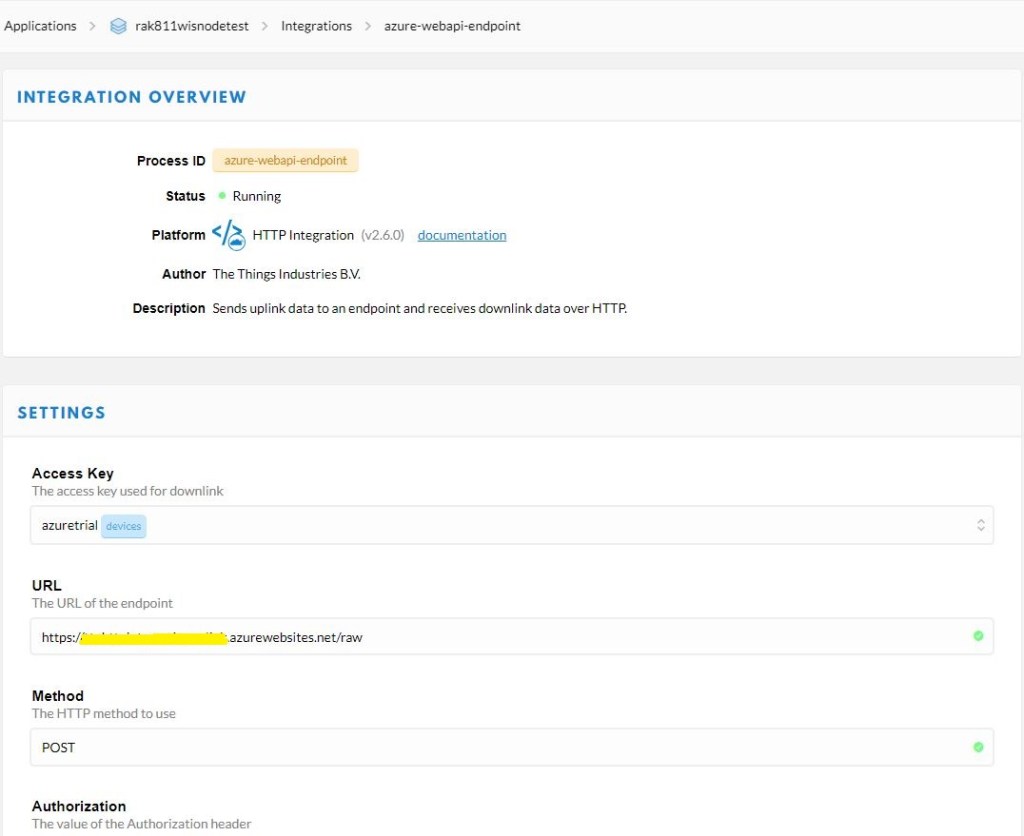
TTN Application configuration overview

My controller logged events to Azure application Insights so I could see if there were any errors and inspect message payloads. The TTN developers provide sample payloads to illustrate the message format but they were a bit chunky for my initial testing.
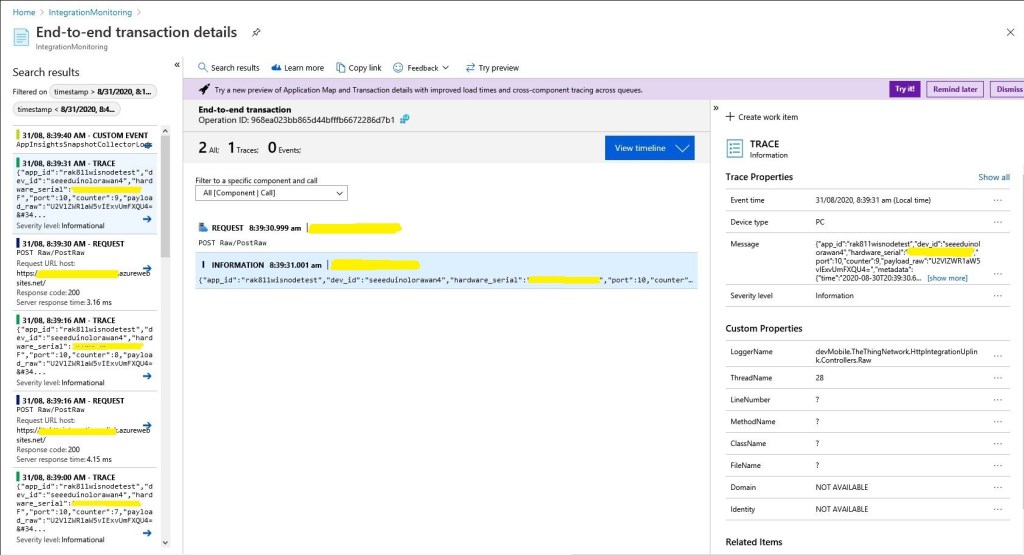
Application Insights event list

I could then inspect individual events and payloads
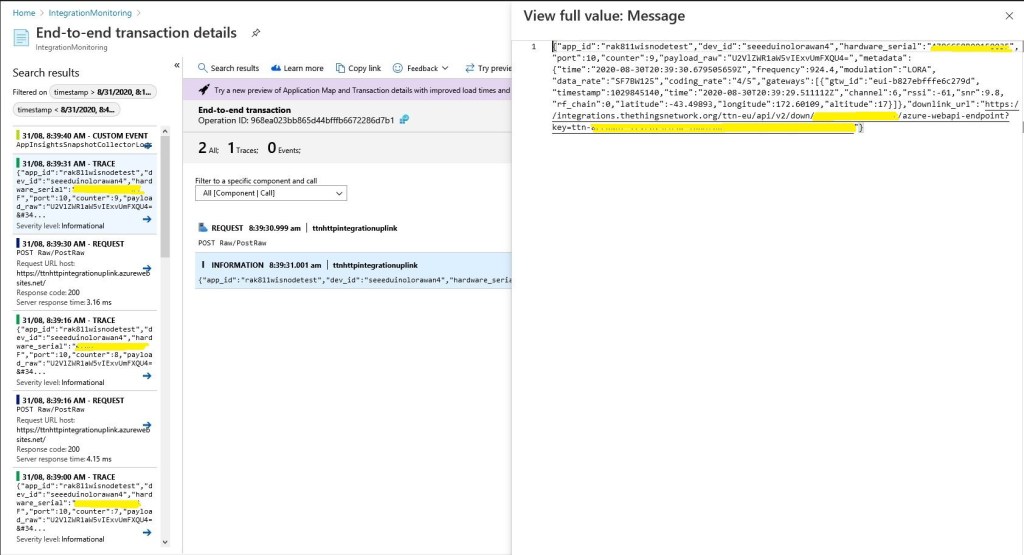
Application Insights event display

At this point I could download message payloads and save them locally.

{
   "app_id": "rak811wisnodetest",
   "dev_id": "rak811wisnode1",
   "hardware_serial": "1234567890123456",
   "port": 1,
   "counter": 2,
   "confirmed": true,
   "payload_raw": "VGlueUNMUiBMb1JhV0FO",
   "metadata": {
      "time": "2020-08-26T00:50:36.182774822Z",
      "frequency": 924.2,
      "modulation": "LORA",
      "data_rate": "SF7BW125",
      "coding_rate": "4/5",
      "gateways": [
         {
            "gtw_id": "eui-b827ebfffe6c279d",
            "timestamp": 1584148244,
            "time": "2020-08-26T00:50:35.012774Z",
            "channel": 5,
            "rssi": -63,
            "snr": 9.2,
            "rf_chain": 0,
            "latitude": -43.49889,
            "longitude": 172.60104,
            "altitude": 16
         }
      ]
   },
   "downlink_url": "https://integrations.thethingsnetwork.org/ttn-eu/api/v2/down/rak811wisnodetest/azure-webapi-endpoint?key=ttn-account-v2.12345678901234567_12345_1234567-dduo"

}

These were useful because I could then use a tool like Telerik Fiddler to submit messages to my application when it was running locally in the Visual Studio 2019 debugger.
The Things Network Client Part2

MQTT connectivity

In a previous post I couldn’t add a TTN V3EndDevice to an application (I’m going try again soon) using the REST API so I figured would try out the MQTT API. My aim was to get notifications of when a Device was created/updated/deleted in an Application.

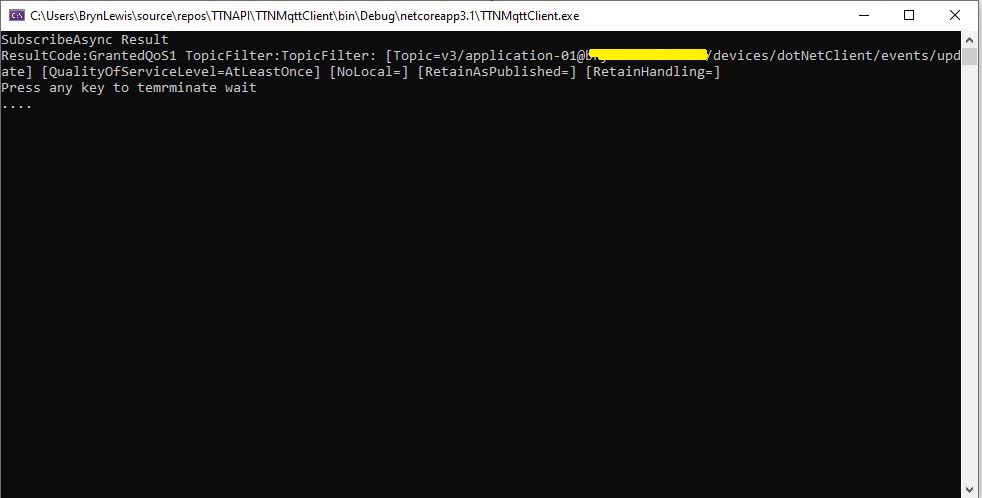
After some tinkering with the format of MQTT usernames and passwords I can connect to my V3 instance and successfully subscribe to topics. But, currently(Aug 2020) I’m not receiving any messages when I create, update or delete a Device. I have tried different Quality of Service QoS settings etc. and I wonder if my topic names aren’t quite right.

.Net Core MQTT Client

I wanted notifications so I could “automagically” provision a device in an Azure IoT Hub (maybe with a tag indicating it’s an “orphan” so it is discoverable) or in Azure IoT Central when a Device was created in TTN.

This looked like a good approach as my Azure IoT Hub applications have other devices which are not connected via LoRaWAN, and there are many specialised LoRaWAN settings which would need to be validated, stored etc. by my software. (maybe TTN device templates would make this easier). The TTN software is pretty good at managing devices so why would I “re-invent the wheel”.

I built a “nasty” console application using MQTTNet so that I could figure out how to connect to my V3 setup and subscribe to topics.

namespace devMobile.TheThingsNetwork.MqttClient
{
   using System;
   using System.Diagnostics;
   using System.Threading;
   using System.Threading.Tasks;

   using MQTTnet;
   using MQTTnet.Client;
   using MQTTnet.Client.Disconnecting;
   using MQTTnet.Client.Options;
   using MQTTnet.Client.Receiving;
   using MQTTnet.Client.Subscribing;

   class Program
   {
      private static IMqttClient mqttClient = null;
      private static IMqttClientOptions mqttOptions = null;
      private static string server;
      private static string username;
      private static string password;
      private static string clientId;

      static async Task Main(string[] args)
      {
         MqttFactory factory = new MqttFactory();
         mqttClient = factory.CreateMqttClient();

         if (args.Length != 4)
         {
            Console.WriteLine("[MQTT Server] [UserName] [Password] [ClientID]");
            Console.WriteLine("Press <enter> to exit");
            Console.ReadLine();
            return;
         }

         server = args[0];
         username = args[1];
         password = args[2];
         clientId = args[3];

         mqttOptions = new MqttClientOptionsBuilder()
            .WithTcpServer(server)
            .WithCredentials(username, password)
            .WithClientId(clientId)
            .WithTls()
            .Build();

         mqttClient.UseDisconnectedHandler(new MqttClientDisconnectedHandlerDelegate(e => MqttClient_Disconnected(e)));
         mqttClient.UseApplicationMessageReceivedHandler(new MqttApplicationMessageReceivedHandlerDelegate(e => MqttClient_ApplicationMessageReceived(e)));
         await mqttClient.ConnectAsync(mqttOptions);

         // Different topics I have tried
         string topic;
         topic = $"v3/{username}/devices/{clientId}/events/update";
         //topic = $"v3/{username}/devices/{clientId}/events/create";
         //topic = $"v3/{username}/devices/{clientId}/events/delete";
         //topic = $"v3/{username}/devices/+/events/+";
         //topic = $"v3/{username}/devices/+/events/create";
         //topic = $"v3/{username}/devices/+/events/update";
         //topic = $"v3/{username}/devices/+/events/delete";
         //topic = $"v3/{username}/devices/+/events/+";

         MqttClientSubscribeResult result;

         // Different QoS I have tried
         //result = await mqttClient.SubscribeAsync(topic, MQTTnet.Protocol.MqttQualityOfServiceLevel.AtMostOnce);
         result = await mqttClient.SubscribeAsync(topic, MQTTnet.Protocol.MqttQualityOfServiceLevel.AtLeastOnce);
         //result = await mqttClient.SubscribeAsync(topic, MQTTnet.Protocol.MqttQualityOfServiceLevel.ExactlyOnce);

         Console.WriteLine("SubscribeAsync Result");
         foreach ( var resultItem in result.Items)
         {
            Console.WriteLine($"ResultCode:{resultItem.ResultCode} TopicFilter:{resultItem.TopicFilter}");
         }                     

         Console.WriteLine("Press any key to temrminate wait");
         while (!Console.KeyAvailable)
         {
            Console.Write(".");

            Thread.Sleep(30100);
         }

         Console.WriteLine("Press <enter> to exit");
         Console.ReadLine();
         return;
      }

      private static void MqttClient_ApplicationMessageReceived(MqttApplicationMessageReceivedEventArgs e)
      {
         Console.WriteLine($"ClientId:{e.ClientId} Topic:{e.ApplicationMessage.Topic} Payload:{e.ApplicationMessage.ConvertPayloadToString()}");
      }

      private static async void MqttClient_Disconnected(MqttClientDisconnectedEventArgs e)
      {
         Debug.WriteLine("Disconnected");
         await Task.Delay(TimeSpan.FromSeconds(5));

         try
         {
            await mqttClient.ConnectAsync(mqttOptions);
         }
         catch (Exception ex)
         {
            Debug.WriteLine("Reconnect failed {0}", ex.Message);
         }
      }
   }
}

I’m going to post some questions on the TTN forums and Slack community to see if what I’m trying to do is supported/possible.

I got some helpful responses on the TTN forums and it looks like what I want todo is not supported by the V3 stack (Aug2020) and I will have to use gRPC.

The Things Network Client Part1

Basic connectivity

Over the last few months I have been using the community version of The Things Network(TTN) to test my LoRaWAN RakWireless RAK811 EVB based nanoFramework and TinyCLR clients.

As I was manually configuring TTN clients references to an application programming interface(API) caught my attention. In my day job I use tools from SmartBear and RicoSuter to generate .Net Core clients (for APSP.NET Core Web APIs I have build) from their OpenAPI descriptions.

The first step was to download the API swagger from The Things Network Github repository.

Things Network Github repository

I then used nSwagStudio to generate a C# client from a local copy of the API swagger (in the future I will use download the swagger and use the command line tools).

nSwag User Interface

At this point I had a basic client for the TTN network stack API which lacked support for the TTN security model etc. After looking at the TTN API documentation I figured out I need to add a header which contained an API Key from the TTN application configuration.

namespace TheThingsNetwork.API
{
	public partial class EndDeviceRegistryClient
	{
		public string ApiKey { set; get; }

		partial void PrepareRequest(System.Net.Http.HttpClient client, System.Net.Http.HttpRequestMessage request, string url)
		{
			if (!client.DefaultRequestHeaders.Contains("Authorization"))
			{
				client.DefaultRequestHeaders.Add("Authorization", $"Bearer {ApiKey}");
			}
		}
	}
}

In the TTN console on the overview page for my application I created an Access Key.

I then added some attributes to one of my devices so I had some addition device configuration data to display(I figured these could be useful for Azure IoT Hub configuration parameters etc. more about this later..)

Basic Device configuration in TTN Enterprise

I built a nasty console application which displayed some basic device configuration information to confirm I could authenticate and enumerate.

//---------------------------------------------------------------------------------
// Copyright (c) August 2020, devMobile Software
//
// Licensed under the Apache License, Version 2.0 (the "License");
// you may not use this file except in compliance with the License.
// You may obtain a copy of the License at
//
//     http://www.apache.org/licenses/LICENSE-2.0
//
// Unless required by applicable law or agreed to in writing, software
// distributed under the License is distributed on an "AS IS" BASIS,
// WITHOUT WARRANTIES OR CONDITIONS OF ANY KIND, either express or implied.
// See the License for the specific language governing permissions and
// limitations under the License.
//
// SECURITY_ANONYMISE
//---------------------------------------------------------------------------------
namespace TheThingsNetwork.EndDeviceClient
{
	using System;
	using System.Collections.Generic;
	using System.Net.Http;
	using TheThingsNetwork.API;

	class Program
	{
		static void Main(string[] args)
		{
			Console.WriteLine("TheThingsNetwork.EndDeviceClient starting");

			if (args.Length != 3)
			{
				Console.WriteLine("EndDeviceClient <baseURL> <applicationId> <apiKey>");
				Console.WriteLine("Press <enter> to exit");
				Console.ReadLine();
				return;
			}
			string baseUrl = args[0];
#if !SECURITY_ANONYMISE
			Console.WriteLine($"baseURL: {baseUrl}");
#endif
			string applicationId = args[1];
#if !SECURITY_ANONYMISE
			Console.WriteLine($"applicationId: {applicationId}");
#endif
			string apiKey = args[2];
#if !SECURITY_ANONYMISE
			Console.WriteLine($"apiKey: {apiKey}");
			Console.WriteLine();
#endif

			using (HttpClient httpClient = new HttpClient())
			{
				EndDeviceRegistryClient endDeviceRegistryClient = new EndDeviceRegistryClient(baseUrl, httpClient);
				endDeviceRegistryClient.ApiKey = apiKey;

				try
				{
					V3EndDevices endDevices = endDeviceRegistryClient.ListAsync(applicationId).GetAwaiter().GetResult();

					foreach (V3EndDevice v3EndDevice in endDevices.End_devices)
					{
#if SECURITY_ANONYMISE
						v3EndDevice.Ids.Dev_eui[7] = 0x0;
						v3EndDevice.Ids.Dev_eui[8] = 0x0;
						v3EndDevice.Ids.Dev_eui[9] = 0x0;
						v3EndDevice.Ids.Dev_eui[10] = 0x0;
						v3EndDevice.Ids.Dev_eui[11] = 0x0;
#endif
						Console.WriteLine($"Device ID:{v3EndDevice.Ids.Device_id} DevEUI:{Convert.ToBase64String(v3EndDevice.Ids.Dev_eui)}");
						Console.WriteLine($"   CreatedAt: {v3EndDevice.Created_at:dd-MM-yy HH:mm:ss} UpdatedAt: {v3EndDevice.Updated_at:dd-MM-yy HH:mm:ss}");

						string[] fieldMaskPaths = { "name", "description", "attributes" };

						var endDevice = endDeviceRegistryClient.GetAsync(applicationId, v3EndDevice.Ids.Device_id, field_mask_paths: fieldMaskPaths).GetAwaiter().GetResult();

						Console.WriteLine($"   Name: {endDevice.Name}");
						Console.WriteLine($"   Description: {endDevice.Description}");
						if (endDevice.Attributes != null)
						{
							foreach (KeyValuePair<string, string> attribute in endDevice.Attributes)
							{
								Console.WriteLine($"      Key: {attribute.Key} Name: {attribute.Value}");
							}
						}
						Console.WriteLine();
					}
				}
				catch (Exception ex)
				{
					Console.WriteLine(ex.Message);
				}

				Console.WriteLine("Press <enter> to exit");
				Console.ReadLine();
			}
		}
	}
}

I added some code so I could anonymise the displayed configuration so I could take screen grabs without revealing any sensitive information.

TTN API Client V1

Initially I struggled with versioning issues as the TTN community network is running V2 and the github repository was for V3. I approached TTN and they gave me access to a “limited” account on the enterprise network.

I also struggled with the number of blank fields in responses and spent some time learning GO (the programming language TTN is built with) to figure out how to use fieldMaskPaths etc.

string[] fieldMaskPaths = { "name", "description", "attributes" };

V3EndDevice endDevice = endDeviceRegistryClient.GetAsync(applicationId, v3EndDevice.Ids.Device_id, field_mask_paths: fieldMaskPaths).GetAwaiter().GetResult();

Overall things went pretty well but I expect to basic GO programing skills one this project is finished.

As hinted at earlier in this post the end goal of this project is to build an Azure IoT hub integration.

ASP MVC Core V2.1 and Cross-Origin Resource Sharing

I’m working on an project for a customer which implements a number of application programming Interfaces(API) for a Single Page Application(SPA) and other clients. We are using entity tags (ETags) for versioning and the front end developers found the couldn’t access them from javascipt running in mainstream browser clients (June 2018).

The problems was understanding how Cross-Origin Resource Sharing (CORS) worked and how it interacted with our security model (API key and OAuth2.0 depending on the client)

In our scenario we first found the pre-flight check wasn’t working because in the HyperText Transfer Protocol (HTTP) OPTIONS method our X-API-KEY check was failing

OPTIONS http://xyz.azurewebsites.net/api/portfolio HTTP/1.1
...
Access-Control-Request-Headers: x-api-key
Access-Control-Request-Method: GET
Accept-Encoding: gzip, deflate
Content-Length: 0
Host: xyz.azurewebsites.net
Connection: Keep-Alive
Pragma: no-cache

HTTP/1.1 400 Bad Request
Transfer-Encoding: chunked
Server: Kestrel
X-Powered-By: ASP.NET
...
Date: Sun, 24 Jun 2018 05:48:30 GMT

13
API Key is invalid.
0

So I disabled X-API-KEY validation in startup.cs

public async Task Invoke(HttpContext context)
{
   if (context.Request.Method == "OPTIONS")
   {
      await this.next.Invoke(context);
      return;
   }

   var claims = new List();
…

OPTIONS then worked

OPTIONS http://xyz.azurewebsites.net/api/portfolio HTTP/1.1
...
Access-Control-Request-Headers: x-api-key
Access-Control-Request-Method: GET
Accept-Encoding: gzip, deflate
Content-Length: 0
Host: xyz.azurewebsites.net
Connection: Keep-Alive
Pragma: no-cache

HTTP/1.1 404 Not Found
Server: Kestrel
X-Powered-By: ASP.NET
...
Date: Sun, 24 Jun 2018 05:52:20 GMT
Content-Length: 0

I then turned on CORS allowing pretty much anything

public void ConfigureServices(IServiceCollection services)
{
   services.AddCors(options =>
   {
      options.AddPolicy("CorsPolicy",
      builder => builder.AllowAnyOrigin()
         .AllowAnyMethod()
         .AllowAnyHeader()
         .AllowCredentials());
   });
   services.AddMvc();
}

public void Configure(IApplicationBuilder app, IHostingEnvironment env, ILoggerFactory loggerFactory)
{
   if (env.IsDevelopment())
   {
      app.UseDeveloperExceptionPage();
   }

   TelemetryConfiguration.Active.InstrumentationKey = this.configuration.GetSection("ApplicationInsights").GetSection("InstrumentationKey").Value;

   loggerFactory.AddLog4Net();
   this.log.Info("Startup.Configure called");

   app.ApplyUserKeyValidation();
   app.UseCors("CorsPolicy");
   app.UseMvc();
   }
}

OPTIONS then worked

OPTIONS http://xyz.azurewebsites.net/api/portfolio HTTP/1.1
...
Access-Control-Request-Headers: x-api-key
Access-Control-Request-Method: GET
Accept-Encoding: gzip, deflate
Content-Length: 0
Host: xyz.azurewebsites.net
Connection: Keep-Alive
Pragma: no-cache

HTTP/1.1 204 No Content
Vary: Origin
Server: Kestrel
Access-Control-Allow-Credentials: true
Access-Control-Allow-Headers: x-api-key
Access-Control-Allow-Origin: file://
X-Powered-By: ASP.NET
...
Date: Sun, 24 Jun 2018 05:57:33 GMT

GET then worked

GET http://xyz.azurewebsites.net/api/portfolio HTTP/1.1
...
X-API-KEY: ABCDEFGHIJKLMNOPQRSTUVWXYZ
Accept-Language: en-NZ
Accept-Encoding: gzip, deflate
If-None-Match: 00-00-00-00-00-00-00-76
Host: xyz.azurewebsites.net
Connection: Keep-Alive

HTTP/1.1 200 OK
Content-Type: application/json; charset=utf-8
ETag: 00-00-00-00-00-00-00-76
Vary: Origin,Accept-Encoding
Server: Kestrel
Access-Control-Allow-Credentials: true
Access-Control-Allow-Origin: file://
X-Powered-By: ASP.NET
...
Date: Sun, 24 Jun 2018 05:57:34 GMT
Content-Length: 2216

[{"...."}}

But HEAD didn’t work

HEAD http://xyz.azurewebsites.net/api/portfolio HTTP/1.1
...
X-API-KEY: ABCDEFGHIJKLMNOPQRSTUVWXYZ
Accept-Language: en-NZ
Accept-Encoding: gzip, deflate
If-None-Match: 00-00-00-00-00-00-00-76
Host: xyz.azurewebsites.net
Connection: Keep-Alive

HTTP/1.1 400 Bad Request
Content-Length: 0
Vary: Origin
Server: Kestrel
Access-Control-Allow-Credentials: true
Access-Control-Allow-Origin: file://
X-Powered-By: ASP.NET
...
Date: Sun, 24 Jun 2018 05:59:55 GMT

From the Application Insights logging and RestTest client (which I ran locally and remotely) I could see that the client side code couldn’t access the value of our eTag.  It had to be “exposed”

public void ConfigureServices(IServiceCollection services)
{
   services.AddCors(options =>
   {
      options.AddPolicy("CorsPolicy",
            builder => builder.AllowAnyOrigin()
            .AllowAnyMethod()
            .AllowAnyHeader()
            .WithExposedHeaders("etag")
            .AllowCredentials()
         );
      });
      services.AddMvc();
   }
...

GET then worked

GET http://xyz.azurewebsites.net/api/portfolio HTTP/1.1
...
X-API-KEY: ABCDEFGHIJKLMNOPQRSTUVWXYZ
ETag: 00-00-00-00-00-00-00-76
Accept-Language: en-NZ
Accept-Encoding: gzip, deflate
If-None-Match: 00-00-00-00-00-00-00-76
Host: xyz.azurewebsites.net
Connection: Keep-Alive

HTTP/1.1 200 OK
Transfer-Encoding: chunked
Content-Type: application/json; charset=utf-8
Content-Encoding: gzip
ETag: 00-00-00-00-00-00-00-76
Vary: Origin,Accept-Encoding
Server: Kestrel
Access-Control-Allow-Credentials: true
Access-Control-Allow-Origin: file://
X-Powered-By: ASP.NET
...
Date: Sun, 24 Jun 2018 07:53:41 GMT

[{"...."}}

HEAD then worked

OPTIONS http://xyz.azurewebsites.net/api/portfolio HTTP/1.1
...
Access-Control-Request-Headers: x-api-key,etag
Access-Control-Request-Method: HEAD
Accept-Encoding: gzip, deflate
Content-Length: 0
Host: xyz.azurewebsites.net
Connection: Keep-Alive
Pragma: no-cache

HTTP/1.1 204 No Content
Vary: Origin
Server: Kestrel
Access-Control-Allow-Credentials: true
Access-Control-Allow-Headers: x-api-key,etag
Access-Control-Allow-Origin: file://
X-Powered-By: ASP.NET
...
Date: Sun, 24 Jun 2018 07:57:31 GMT

HEAD http://xyz.azurewebsites.net/api/portfolio HTTP/1.1
...
X-API-KEY: ABCDEFGHIJKLMNOPQRSTUVWXYZ
ETag: 00-00-00-00-00-00-00-76
Accept-Language: en-NZ
Accept-Encoding: gzip, deflate
Host: xyz.azurewebsites.net
Connection: Keep-Alive
Pragma: no-cache

HTTP/1.1 304 Not Modified
Vary: Origin
Server: Kestrel
Access-Control-Allow-Credentials: true
Access-Control-Allow-Origin: file://
X-Powered-By: ASP.NET
...
Date: Sun, 24 Jun 2018 07:57:31 GMT

I had some oddness with releasing code updates which I think was down to caching of pre-flight request responses.
Next steps tidy up the headers etc. and lock the CORS configuration down to expose the minimum necessary required for the application to work.