Random wanderings through Microsoft Azure esp. PaaS plumbing, the IoT bits, AI on Micro controllers, AI on Edge Devices, .NET nanoFramework, .NET Core on *nix and ML.NET+ONNX
The Inside AirbnbLondon dataset has 87946 listings and the id column (which is the primary key) has a minimum value of 13913 and maximum of 973895808066047620 in the database.
Back in the early 90’s I used to live next to the Ealing Lawn Tennis Club in London
I used “Ealing” as the SearchText for my initial testing and tried different page numbers and sizes
Testing the search functionality with SwaggerUI
The listings search results JSON looked good but I missed one important detail…
string LookupByIdSql = @"SELECT Id, [Name], Listing_URL AS ListingURL
                     FROM ListingsHosts
                     WHERE id = @Id";

public record ListingLookupDto
{
   public long Id { get; set; }
   public string? Name { get; set; }
   public string? ListingURL { get; set; }
};

//...

app.MapGet("/Listing/Results/{id:long}", async (long id, IDapperContext dappperContext) =>
{
   using (var connection = dappperContext.ConnectionCreate())
   {
      ListingLookupDto result = await connection.QuerySingleOrDefaultWithRetryAsync<ListingLookupDto>(LookupByIdSql, new { id });
      if (result is null)
      {
         return Results.Problem($"Listing {id} not found", statusCode: StatusCodes.Status404NotFound);
      }

      return Results.Ok(result);
   }
})
.Produces<ListingLookupDto>(StatusCodes.Status200OK)
.Produces<ProblemDetails>(StatusCodes.Status404NotFound)
.WithOpenApi();
The id values in the search response and lookup DTOs were correct
Visual Studio 2022 Debugger inspecting listing id value
I had missed the clue in the search response JSON the listing id and the listingURL id didn’t match.
This specification allows implementations to set limits on the range
and precision of numbers accepted. Since software that implements
IEEE 754-2008 binary64 (double precision) numbers [IEEE754] is
generally available and widely used, good interoperability can be
achieved by implementations that expect no more precision or range
than these provide, in the sense that implementations will
approximate JSON numbers within the expected precision.
My initial ASP.NET Core Minimal AP exploration uses the Inside AirbnbLondon dataset which has 87946 listings. The data is pretty “nasty” with lots of nullable and wide columns so it took several attempts to import.
CREATE TABLE [dbo].[listingsRaw](
	[id] [bigint] NOT NULL,
	[listing_url] [nvarchar](50) NOT NULL,
	[scrape_id] [datetime2](7) NOT NULL,
	[last_scraped] [date] NOT NULL,
	[source] [nvarchar](50) NOT NULL,
	[name] [nvarchar](max) NOT NULL,
	[description] [nvarchar](max) NULL,
	[neighborhood_overview] [nvarchar](1050) NULL,
	[picture_url] [nvarchar](150) NULL,
	[host_id] [int] NOT NULL,
	[host_url] [nvarchar](50) NOT NULL,
	[host_name] [nvarchar](50) NULL,
	[host_since] [date] NULL,
	[host_location] [nvarchar](100) NULL,
	[host_about] [nvarchar](max) NULL,
	[host_response_time] [nvarchar](50) NULL,
	[host_response_rate] [nvarchar](50) NULL,
	[host_acceptance_rate] [nvarchar](50) NULL,
	[host_is_superhost] [bit] NULL,
	[host_thumbnail_url] [nvarchar](150) NULL,
	[host_picture_url] [nvarchar](150) NULL,
	[host_neighbourhood] [nvarchar](50) NULL,
	[host_listings_count] [int] NULL,
	[host_total_listings_count] [int] NULL,
	[host_verifications] [nvarchar](50) NOT NULL,
	[host_has_profile_pic] [bit] NULL,
	[host_identity_verified] [bit] NULL,
	[neighbourhood] [nvarchar](100) NULL,
	[neighbourhood_cleansed] [nvarchar](50) NOT NULL,
	[neighbourhood_group_cleansed] [nvarchar](1) NULL,
	[latitude] [float] NOT NULL,
	[longitude] [float] NOT NULL,
	[property_type] [nvarchar](50) NOT NULL,
	[room_type] [nvarchar](50) NOT NULL,
	[accommodates] [tinyint] NOT NULL,
	[bathrooms] [nvarchar](1) NULL,
	[bathrooms_text] [nvarchar](50) NULL,
	[bedrooms] [tinyint] NULL,
	[beds] [tinyint] NULL,
	[amenities] [nvarchar](max) NOT NULL,
	[price] [money] NOT NULL,
	[minimum_nights] [smallint] NOT NULL,
	[maximum_nights] [int] NOT NULL,
	[minimum_minimum_nights] [smallint] NULL,
	[maximum_minimum_nights] [int] NULL,
	[minimum_maximum_nights] [int] NULL,
	[maximum_maximum_nights] [int] NULL,
	[minimum_nights_avg_ntm] [float] NULL,
	[maximum_nights_avg_ntm] [float] NULL,
	[calendar_updated] [nvarchar](1) NULL,
	[has_availability] [bit] NOT NULL,
	[availability_30] [tinyint] NOT NULL,
	[availability_60] [tinyint] NOT NULL,
	[availability_90] [tinyint] NOT NULL,
	[availability_365] [smallint] NOT NULL,
	[calendar_last_scraped] [date] NOT NULL,
	[number_of_reviews] [smallint] NOT NULL,
	[number_of_reviews_ltm] [int] NOT NULL,
	[number_of_reviews_l30d] [tinyint] NOT NULL,
	[first_review] [date] NULL,
	[last_review] [date] NULL,
	[review_scores_rating] [float] NULL,
	[review_scores_accuracy] [float] NULL,
	[review_scores_cleanliness] [float] NULL,
	[review_scores_checkin] [float] NULL,
	[review_scores_communication] [float] NULL,
	[review_scores_location] [float] NULL,
	[review_scores_value] [float] NULL,
	[license] [nvarchar](max) NULL,
	[instant_bookable] [bit] NOT NULL,
	[calculated_host_listings_count] [int] NULL,
	[calculated_host_listings_count_entire_homes] [int] NOT NULL,
	[calculated_host_listings_count_private_rooms] [int] NOT NULL,
	[calculated_host_listings_count_shared_rooms] [int] NOT NULL,
	[reviews_per_month] [float] NULL
) ON [PRIMARY] TEXTIMAGE_ON [PRIMARY]
There are other data quality issues e.g. the host information is duplicated in each of their Listings e.g. host_id, host_name, host_since, host_* etc. which will need to be tidied up.
Swagger user interface for Raw Listings search functionality.
I have implemented basic (“incomplete”) OpenAPI support for functionality and stress testing.
Swagger user interface parameterised search functionality.
The search results are paginated and individual listings can be retrieved using the Airbnb listing “id”.
const string SearchPaginatedSql = @"SELECT Uid,Id,[Name], neighbourhood
                     FROM listings
                     WHERE[Name] LIKE N'%' + @SearchText + N'%'
                     ORDER By[Name]
                     OFFSET @PageSize *(@PageNumber - 1) ROWS FETCH NEXT @PageSize ROWS ONLY";

public record ListingListDto
{
   public long Id { get; set; }
   public string? Name { get; set; }
   public string? Neighbourhood { get; set; }
};
Swagger user interface search functionality with untyped response.
The first HTTP GET implementation returns an untyped result-set which was not very helpful.
app.MapGet("/Listing/Search", async (string searchText, int pageNumber, int pageSize, [FromServices] IDapperContext dappperContext) =>
{
   using (var connection = dappperContext.ConnectionCreate())
   {
      return await connection.QueryWithRetryAsync(SearchPaginatedSql, new { searchText, pageNumber, pageSize });
   }
})
.WithOpenApi();
Swagger user interface search functionality with typed response
The second HTTP GET implementation returns a typed result-set which improved the “usability” of clients generated from the OpenAPI definition file.
app.MapGet("/Listing/Search/Typed", async (string searchText, int pageNumber, int pageSize, [FromServices] IDapperContext dappperContext) =>
{
   using (var connection = dappperContext.ConnectionCreate())
   {
      return await connection.QueryWithRetryAsync<ListingListDto>(SearchPaginatedSql, new { searchText, pageNumber, pageSize });
   }
})
.Produces<IList<ListingListDto>>(StatusCodes.Status200OK)
.WithOpenApi();
string LookupByIdSql = @"SELECT Id,[Name], neighbourhood
FROM ListingsHosts
WHERE id = @Id";

public record ListingLookupDto
{
public long Id { get; set; }
public string? Name { get; set; }
public string? Neighbourhood { get; set; }
};
Swagger user interface Listing lookup functionality
app.MapGet("/Listing/{id:long}", async (long id, IDapperContext dappperContext) =>
{
   using (var connection = dappperContext.ConnectionCreate())
   {
      ListingLookupDto result = await connection.QuerySingleOrDefaultWithRetryAsync<ListingLookupDto>(LookupByIdSql, new { id });
      if (result is null)
      {
         return Results.Problem($"Listing {id} not found", statusCode: StatusCodes.Status404NotFound);
      }

      return Results.Ok(result);
   }
})
.Produces<ListingLookupDto>(StatusCodes.Status200OK)
.Produces<ProblemDetails>(StatusCodes.Status404NotFound)
.WithOpenApi();
The lack of validation of the SearchText, PageSize and PageNumber parameters allow uses to enter invalid values which caused searches to fail.
Swagger user interface search functionality with an invalid page number
My initial approach was to decorate the parameters of the ValidatedQuery method with DataAnnotations to ensure only valid values were accepted.
This wasn’t a great solution because the validation of the parameters was declared as part of the user interface and would have to be repeated everywhere listing search functionality was provided.
Swagger user interface search functionality with parameter validation
app.MapGet("/Listing/Search/Parameters", async ([AsParameters] SearchParameters searchParameters,
   [FromServices] IDapperContext dappperContext) =>
{
   using (var connection = dappperContext.ConnectionCreate())
   {
      return await connection.QueryWithRetryAsync<ListingListDto>(SearchPaginatedSql, new { searchText = searchParameters.SearchText, searchParameters.PageNumber, searchParameters.PageSize });
   }
})
.Produces<IList<ListingListDto>>(StatusCodes.Status200OK)
.Produces<ProblemDetails>(StatusCodes.Status400BadRequest)
.WithOpenApi();

public record SearchParameters
{
   // https://github.com/domaindrivendev/Swashbuckle.AspNetCore/issues/2658 possibly related?
   public const byte SearchTextMinimumLength = 3;
   public const byte SearchTextMaximumLength = 15;
   public const int PageNumberMinimum = 1;
   public const int PageNumberMaximum = 100;
   public const byte PageSizeMinimum = 5;
   public const byte PageSizeMaximum = 50;

   //[FromQuery, Required, MinLength(SearchTextMinimumLength, ErrorMessage = "SearchTextMinimumLegth"), MaxLength(SearchTextMaximumLength, ErrorMessage = "SearchTextMaximumLegth")]
   //[Required, MinLength(SearchTextMinimumLength, ErrorMessage = "SearchTextMinimumLegth"), MaxLength(SearchTextMaximumLength, ErrorMessage = "SearchTextMaximumLegth")]
   [MinLength(SearchTextMinimumLength, ErrorMessage = "SearchTextMinimumLegth"), MaxLength(SearchTextMaximumLength, ErrorMessage = "SearchTextMaximumLegth")]
   public string SearchText { get; set; }

   //[FromQuery, Range(PageNumberMinimum, PageNumberMaximum, ErrorMessage = "PageNumberMinimum PageNumberMaximum")]
   //[Required, Range(PageNumberMinimum, PageNumberMaximum, ErrorMessage = "PageNumberMinimum PageNumberMaximum")]
   [Range(PageNumberMinimum, PageNumberMaximum, ErrorMessage = "PageNumberMinimum PageNumberMaximum")]
   public int PageNumber { get; set; }

   [Range(PageSizeMinimum, PageSizeMaximum, ErrorMessage = "PageSizeMinimum PageSizeMaximum")]
   public int PageSize { get; set; }
}
Swagger user interface search functionality with parameter validation
This last two implementations worked though the error messages I had embedded in the code were not displayed I think this is related to this Swashbuckle Issue.
There is also an issue looking up some listings with larger listing ids which I will need some investigation.
public static void Main(string[] args)
{
    var builder = WebApplication.CreateBuilder(args);

    // Add services to the container.
    builder.Services.AddApplicationInsightsTelemetry();

    // Add services to the container.
    builder.Services.AddTransient<IDapperContext>(s => new DapperContext(builder.Configuration));

    builder.Services.AddControllers();

    builder.Services.AddSingleton<IConnectionMultiplexer>(s => ConnectionMultiplexer.Connect(builder.Configuration.GetConnectionString("Redis")));

    var app = builder.Build();

    // Configure the HTTP request pipeline.
    app.UseHttpsRedirection();
    app.MapControllers();

    app.Run();
}
I trialed the initial versions of my Redis project with Memurai on my development machine, then configured an Azure Cache for Redis. I then load tested the project with several Azure AppService client and there was a significant improvement in response time.
[ApiController]
[Route("api/[controller]")]
public class StockItemsController : ControllerBase
{
    private const int StockItemSearchMaximumRowsToReturn = 15;
    private readonly TimeSpan StockItemListExpiration = new TimeSpan(0, 5, 0);

    private const string sqlCommandText = @"SELECT [StockItemID] as ""ID"", [StockItemName] as ""Name"", [RecommendedRetailPrice], [TaxRate] FROM [Warehouse].[StockItems]";
    //private const string sqlCommandText = @"SELECT [StockItemID] as ""ID"", [StockItemName] as ""Name"", [RecommendedRetailPrice], [TaxRate] FROM [Warehouse].[StockItems]; WAITFOR DELAY '00:00:02'";

    private readonly ILogger<StockItemsController> logger;
    private readonly IDbConnection dbConnection;
    private readonly IDatabase redisCache;

    public StockItemsController(ILogger<StockItemsController> logger, IDapperContext dapperContext, IConnectionMultiplexer connectionMultiplexer)
    {
        this.logger = logger;
        this.dbConnection = dapperContext.ConnectionCreate();
        this.redisCache = connectionMultiplexer.GetDatabase();
    }

        [HttpGet]
    public async Task<ActionResult<IEnumerable<Model.StockItemListDtoV1>>> Get()
    {
        var cached = await redisCache.StringGetAsync("StockItems");
        if (cached.HasValue)
        {
            return Content(cached, "application/json");
        }

        var stockItems = await dbConnection.QueryWithRetryAsync<Model.StockItemListDtoV1>(sql: sqlCommandText, commandType: CommandType.Text);

#if SERIALISER_SOURCE_GENERATION
        string json = JsonSerializer.Serialize(stockItems, typeof(List<Model.StockItemListDtoV1>), Model.StockItemListDtoV1GenerationContext.Default);
#else
        string json = JsonSerializer.Serialize(stockItems);
#endif

        await redisCache.StringSetAsync("StockItems", json, expiry: StockItemListExpiration);

        return Content(json, "application/json");
    }

...

    [HttpDelete()]
    public async Task<ActionResult> ListCacheDelete()
    {
        await redisCache.KeyDeleteAsync("StockItems");

        logger.LogInformation("StockItems list removed");

        return this.Ok();
    }
}
public class StockItemListDtoV1
{
    public int Id { get; set; }

    public string Name { get; set; }

    public decimal RecommendedRetailPrice { get; set; }

    public decimal TaxRate { get; set; }
}

[JsonSourceGenerationOptions(PropertyNamingPolicy = JsonKnownNamingPolicy.CamelCase)]
[JsonSerializable(typeof(List<StockItemListDtoV1>))]
public partial class StockItemListDtoV1GenerationContext : JsonSerializerContext
{
}
The cost of constructing the Serialiser may be higher, but the cost of performing serialisation with it is much smaller.
I used Telerik Fiddler to empty the cache then load the StockItems list 10 times (more tests would improve the quality of the results). The first trial was with the “conventional” serialiser
The average time for the conventional serialiser was 0.028562 seconds
The average time for the generated version was 0.030546 seconds. But, if the initial compilation step was ignored the average duration dropped to 0.000223 seconds a significant improvement.
While exploring some of the functionality of MiniProfiler there were some 3rd party examples which caught my attention.
using (SqlConnection connection = new SqlConnection(@"Data Source=...; Initial Catalog=SyncDB; Trusted_Connection=Yes"))
{
    using (ProfiledDbConnection profiledDbConnection = new ProfiledDbConnection(connection, MiniProfiler.Current))
    {
    if (profiledDbConnection.State != System.Data.ConnectionState.Open)
        profiledDbConnection.Open();
    using (SqlCommand command = new SqlCommand("Select * From Authors", connection))
    {
        using (ProfiledDbCommand profiledDbCommand = new ProfiledDbCommand(command, connection, MiniProfiler.Current))
        {
            var data = profiledDbCommand.ExecuteReader();

            //Write code here to populate the list of Authors
        }
    }
}
“Inspired” by code like this my first attempt to retrieve a list of stock items didn’t look right.
[HttpGet("AdoProfiledOtt")]
public async Task<ActionResult<IEnumerable<Model.StockItemListDtoV1>>> GetAdoProfiledOtt()
{
    List<Model.StockItemListDtoV1> response = new List<Model.StockItemListDtoV1>();

    using (SqlConnection connection = new SqlConnection(configuration.GetConnectionString("default")))
    {
        using (ProfiledDbConnection profiledDbConnection = new ProfiledDbConnection(connection, MiniProfiler.Current))
        {
            await profiledDbConnection.OpenAsync();

            using (SqlCommand command = new SqlCommand(sqlCommandText, connection))
            {
                using (ProfiledDbCommand profiledDbCommand = new ProfiledDbCommand(command, profiledDbConnection, MiniProfiler.Current))
                {
                    using (SqlDataReader reader = await command.ExecuteReaderAsync())
                    {
                        using (ProfiledDbDataReader profiledDbDataReader = new ProfiledDbDataReader(reader, MiniProfiler.Current))
                        {
                            var rowParser = profiledDbDataReader.GetRowParser<Model.StockItemListDtoV1>();

                            while (await profiledDbDataReader.ReadAsync())
                            {
                                response.Add(rowParser(profiledDbDataReader));
                            }
                        }
                    }
                }
            }

            await profiledDbConnection.CloseAsync();
        }
    }
}
/// <summary>
/// Initializes a new instance of the <see cref="ProfiledDbDataReader"/> class (with <see cref="CommandBehavior.Default"/>).
/// </summary>
/// <param name="reader">The reader.</param>
/// <param name="profiler">The profiler.</param>
public ProfiledDbDataReader(DbDataReader reader, IDbProfiler profiler) : this(reader, CommandBehavior.Default, profiler) { }

/// <summary>
/// Initializes a new instance of the <see cref="ProfiledDbDataReader"/> class.
/// </summary>
/// <param name="reader">The reader.</param>
/// <param name="behavior">The behavior specified during command execution.</param>
/// <param name="profiler">The profiler.</param>
public ProfiledDbDataReader(DbDataReader reader, CommandBehavior behavior, IDbProfiler? profiler)
{
    WrappedReader = reader;
    Behavior = behavior;
    _profiler = profiler;
}
...
/// <summary>
/// The <see cref="DbDataReader"/> that is being used.
/// </summary>
public DbDataReader WrappedReader { get; }

/// <inheritdoc cref="DbDataReader.Dispose(bool)"/>
protected override void Dispose(bool disposing)
{
    // reader can be null when we're not profiling, but we've inherited from ProfiledDbCommand and are returning a
    // an unwrapped reader from the base command
    WrappedReader?.Dispose();
    base.Dispose(disposing);
}
Another “using” not required as ProfiledDbDataReader “automagically” disposes the SqlDataReader. This was my final version of profiling the System.Data.SqlClient code to retrieve a list of stock items.
[HttpGet("AdoProfiled")]
public async Task<ActionResult<IEnumerable<Model.StockItemListDtoV1>>> GetProfiledAdo()
{
    List<Model.StockItemListDtoV1> response = new List<Model.StockItemListDtoV1>();

    using (ProfiledDbConnection profiledDbConnection = new ProfiledDbConnection((SqlConnection)dapperContext.ConnectionCreate(), MiniProfiler.Current))
    {
        await profiledDbConnection.OpenAsync();

        using (ProfiledDbCommand profiledDbCommand = new ProfiledDbCommand(new SqlCommand(sqlCommandText), profiledDbConnection, MiniProfiler.Current))
        {
            DbDataReader reader = await profiledDbCommand.ExecuteReaderAsync();

            using (ProfiledDbDataReader profiledDbDataReader = new ProfiledDbDataReader(reader, MiniProfiler.Current))
            {
                var rowParser = profiledDbDataReader.GetRowParser<Model.StockItemListDtoV1>();

                while (await profiledDbDataReader.ReadAsync())
                {
                    response.Add(rowParser(profiledDbDataReader));
                }
            }
        }
    }

    return this.Ok(response);
}
The profileDbDataReader.cs implementation was “sparse” and when loading a longer list of stock items there were some ReadAsync calls which took a bit longer.
/// <summary>
/// The profiled database data reader.
/// </summary>
public class ProfiledDbDataReader : DbDataReader
{
    private readonly IDbProfiler? _profiler;

    /// <summary>
    /// Initializes a new instance of the <see cref="ProfiledDbDataReader"/> class (with <see cref="CommandBehavior.Default"/>).
    /// </summary>
    /// <param name="reader">The reader.</param>
    /// <param name="profiler">The profiler.</param>
    public ProfiledDbDataReader(DbDataReader reader, IDbProfiler profiler) : this(reader, CommandBehavior.Default, profiler) { }

    /// <summary>
    /// Initializes a new instance of the <see cref="ProfiledDbDataReader"/> class.
    /// </summary>
    /// <param name="reader">The reader.</param>
    /// <param name="behavior">The behavior specified during command execution.</param>
    /// <param name="profiler">The profiler.</param>
    public ProfiledDbDataReader(DbDataReader reader, CommandBehavior behavior, IDbProfiler? profiler)
    {
        WrappedReader = reader;
        Behavior = behavior;
        _profiler = profiler;
    }

    /// <summary>Gets the behavior specified during command execution.</summary>
    public CommandBehavior Behavior { get; }

    /// <inheritdoc cref="DbDataReader.Depth"/>
    public override int Depth => WrappedReader.Depth;

    /// <inheritdoc cref="DbDataReader.FieldCount"/>
    public override int FieldCount => WrappedReader.FieldCount;

    /// <inheritdoc cref="DbDataReader.HasRows"/>
    public override bool HasRows => WrappedReader.HasRows;

    /// <inheritdoc cref="DbDataReader.IsClosed"/>
    public override bool IsClosed => WrappedReader.IsClosed;

    /// <inheritdoc cref="DbDataReader.RecordsAffected"/>
    public override int RecordsAffected => WrappedReader.RecordsAffected;

    /// <summary>
    /// The <see cref="DbDataReader"/> that is being used.
    /// </summary>
    public DbDataReader WrappedReader { get; }

    /// <inheritdoc cref="DbDataReader.this[string]"/>
    public override object this[string name] => WrappedReader[name];

    /// <inheritdoc cref="DbDataReader.this[int]"/>
    public override object this[int ordinal] => WrappedReader[ordinal];
...
    /// <inheritdoc cref="DbDataReader.GetString(int)"/>
    public override string GetString(int ordinal) => WrappedReader.GetString(ordinal);

    /// <inheritdoc cref="DbDataReader.GetValue(int)"/>
    public override object GetValue(int ordinal) => WrappedReader.GetValue(ordinal);

    /// <inheritdoc cref="DbDataReader.GetValues(object[])"/>
    public override int GetValues(object[] values) => WrappedReader.GetValues(values);

    /// <inheritdoc cref="DbDataReader.IsDBNull(int)"/>
    public override bool IsDBNull(int ordinal) => WrappedReader.IsDBNull(ordinal);

    /// <inheritdoc cref="DbDataReader.IsDBNullAsync(int, CancellationToken)"/>
    public override Task<bool> IsDBNullAsync(int ordinal, CancellationToken cancellationToken) => WrappedReader.IsDBNullAsync(ordinal, cancellationToken);

    /// <inheritdoc cref="DbDataReader.NextResult()"/>
    public override bool NextResult() => WrappedReader.NextResult();

    /// <inheritdoc cref="DbDataReader.NextResultAsync(CancellationToken)"/>
    public override Task<bool> NextResultAsync(CancellationToken cancellationToken) => WrappedReader.NextResultAsync(cancellationToken);

    /// <inheritdoc cref="DbDataReader.Read()"/>
    public override bool Read() => WrappedReader.Read();

    /// <inheritdoc cref="DbDataReader.ReadAsync(CancellationToken)"/>
    public override Task<bool> ReadAsync(CancellationToken cancellationToken) => WrappedReader.ReadAsync(cancellationToken);

    /// <inheritdoc cref="DbDataReader.Close()"/>
    public override void Close()
    {
        // reader can be null when we're not profiling, but we've inherited from ProfiledDbCommand and are returning a
        // an unwrapped reader from the base command
        WrappedReader?.Close();
        _profiler?.ReaderFinish(this);
    }

    /// <inheritdoc cref="DbDataReader.GetSchemaTable()"/>
    public override DataTable? GetSchemaTable() => WrappedReader.GetSchemaTable();

    /// <inheritdoc cref="DbDataReader.Dispose(bool)"/>
    protected override void Dispose(bool disposing)
    {
        // reader can be null when we're not profiling, but we've inherited from ProfiledDbCommand and are returning a
        // an unwrapped reader from the base command
        WrappedReader?.Dispose();
        base.Dispose(disposing);
    }
}
In the [HttpGet(“DapperProfiledQueryMultipleStep”)] method I wrapped ReadAsync and could see in the profiling that every so often a call did take significantly longer.
using (MiniProfiler.Current.Step("invoiceSummaryLine.ReadAsync"))
{
   response.InvoiceLines = await invoiceSummary.ReadAsync<Model.InvoiceLineSummaryListDtoV1>();
}
I did consider modifying profileDbDataReader.cs to add some instrumentation to the Read… and Get… methods but, the authors of miniprofiler are way way smarter than me so there must be a reason why they didn’t.
The note on the wiki page“For LazyCache v2+ users, you should consider switching away from LazyCache to IDistributedCache. More information at #59“ caught my attention.
I have written other posts about caching Dapper query results with the Dapper Extension Library which worked well but had some configuration limitations. I also have posts about off-loading read-only workloads with Azure Active geo-replication or SQL Data Sync for Azure, which worked well in some scenarios but had limitations (performance and operational costs).
I explored the in-memory implementation (AddDistributedMemoryCache) on my development machine and found “tinkering” with the configuration options had little impact on the performance of my trivial sample application.
CREATE TABLE [dbo].[StockItemsCache](
	[Id] [nvarchar](449) NOT NULL,
	[Value] [varbinary](max) NOT NULL,
	[ExpiresAtTime] [datetimeoffset](7) NOT NULL,
	[SlidingExpirationInSeconds] [bigint] NULL,
	[AbsoluteExpiration] [datetimeoffset](7) NULL,
PRIMARY KEY CLUSTERED
(
	[Id] ASC
)WITH (PAD_INDEX = OFF, STATISTICS_NORECOMPUTE = OFF, IGNORE_DUP_KEY = OFF, ALLOW_ROW_LOCKS = ON, ALLOW_PAGE_LOCKS = ON, OPTIMIZE_FOR_SEQUENTIAL_KEY = OFF) ON [PRIMARY]
) ON [PRIMARY] TEXTIMAGE_ON [PRIMARY]
GO
The table used to store the data wasn’t very complex and I could view the data associated with a cache key in SQL Server Mangement studio.
SQL Server Managment Studio displaying cache table contents
One of the applications I work on uses a complex SQL Server Stored procedure to load reference data (updated daily) and being able to purge the cache at the end of this process like this might be useful. For a geographically distributed application putting the Azure SQL instance “closer” to the application’s users might be worth considering.
[HttpGet]
public async Task<ActionResult<IEnumerable<Model.StockItemListDtoV1>>> Get()
{
    var utcNow = DateTime.UtcNow;

    var cached = await distributedCache.GetAsync("StockItems");
    if (cached != null)
    {
#if SERIALISATION_JSON
        return this.Ok(JsonSerializer.Deserialize<List<Model.StockItemListDtoV1>>(cached));
#endif
#if SERIALISATION_MESSAGE_PACK
        return this.Ok(MessagePackSerializer.Deserialize<List<Model.StockItemListDtoV1>>(cached));
#endif
    }

    var stockItems = await dbConnection.QueryWithRetryAsync<Model.StockItemListDtoV1>(sql: sqlCommandText, commandType: CommandType.Text);

#if SERIALISATION_JSON
    await distributedCache.SetAsync("StockItems", JsonSerializer.SerializeToUtf8Bytes(stockItems), new DistributedCacheEntryOptions()
#endif
#if SERIALISATION_MESSAGE_PACK
    await distributedCache.SetAsync("StockItems", MessagePackSerializer.Serialize(stockItems), new DistributedCacheEntryOptions()
#endif
    {
        AbsoluteExpiration = new DateTime(utcNow.Year, utcNow.Month, DateTime.DaysInMonth(utcNow.Year, utcNow.Month), StockItemListAbsoluteExpiration.Hours, StockItemListAbsoluteExpiration.Minutes, StockItemListAbsoluteExpiration.Seconds)
    });

    return this.Ok(stockItems);
}

[HttpGet("NoLoad")]
public async Task<ActionResult<IEnumerable<Model.StockItemListDtoV1>>> GetNoLoad()
{
    var cached = await distributedCache.GetAsync("StockItems");
    if (cached == null)
    {
        return this.NoContent();
    }

#if SERIALISATION_JSON
    return this.Ok(JsonSerializer.Deserialize<List<Model.StockItemListDtoV1>>(cached));
#endif
#if SERIALISATION_MESSAGE_PACK
        return this.Ok(MessagePackSerializer.Deserialize<List<Model.StockItemListDtoV1>>(cached));
#endif
}
In my test environment the JSON payload for a list of stock items was a bit “chunky” at 25K bytes, so I added compile time configurable support for the MessagePack library. This significantly reduced the size of the payload LZ4Block (5K bytes) and LZ4BlockArray (5K2 bytes) which should reduce network traffic.
Assuming the overheads of JSON vs. MessagePack serialisation are similar and the much smaller MessagePack library payload I would most probably use MessagePack and LZ4BlockArray (For improved compatibility with other implementations) compression.
Initially, I was running the WebAPI Dapper DistributedCache application on my development box and it ran third/forth time after sorting out the Azure Cache for Redis connection string and firewall configuration.
StockItems list served from the cache running on my Desktop
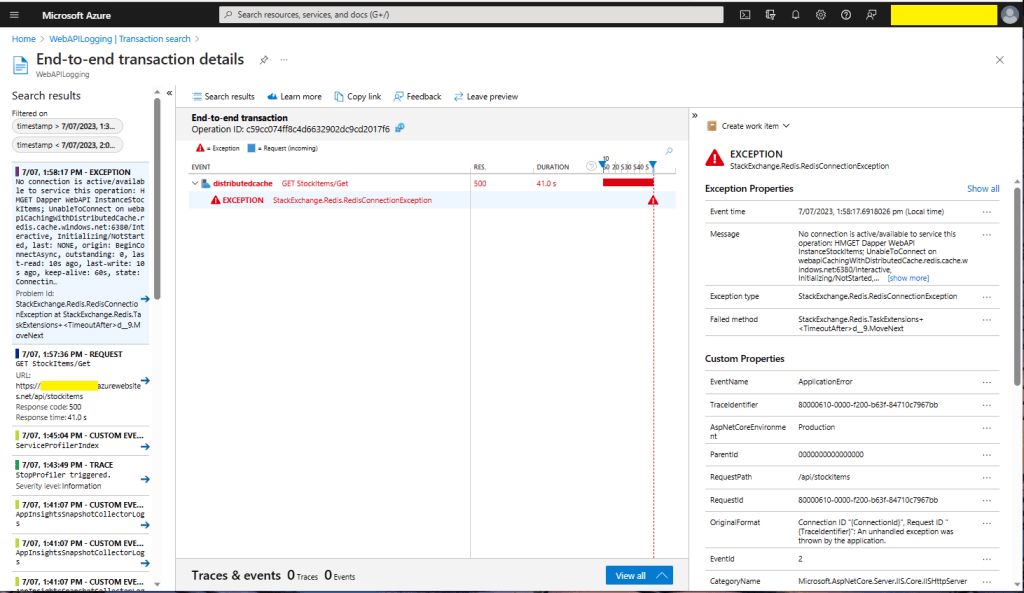
There were many questions and tentative answers on stackoverflow some of them I tried, and which didn’t work in my scenario.
No connection is active/available to service this operation: HMGET Dapper WebAPI InstanceStockItems;
UnableToConnect on xxxxxxxxxxxxxxxxxxxxxxxxxxx.redis.cache.windows.net:6380/Interactive,
Initializing/NotStarted,
last: NONE,
origin: BeginConnectAsync,
outstanding: 0,
last-read: 10s ago, last-write: 10s ago, keep-alive: 60s,
state: Connecting,
mgr: 10 of 10 available,
last-heartbeat: never, global: 10s ago,
v: 2.2.4.27433,
mc: 1/1/0, mgr: 10 of 10 available,
clientName: XXXXXXXXXXXX, <----------------------This was important
IOCP: (Busy=0,Free=1000,Min=1,Max=1000),
WORKER: (Busy=5,Free=1018,Min=1,Max=1023),
v: 2.2.4.27433
UnableToConnect on xxxxxxxxxxxxxxxxxxxxxxxxxxx.cache.windows.net:6380/Interactive,
Initializing/NotStarted,
last: NONE,
origin: BeginConnectAsync,
outstanding: 0,
last-read: 10s ago, last-write: 10s ago, keep-alive: 60s,
state: Connecting,
mgr: 10 of 10 available,
last-heartbeat: never, global: 10s ago,
v: 2.2.4.27433
I then recreated my configuration from scratch so none of my random changes based on stackoverflow posts would mess my next round of debugging.
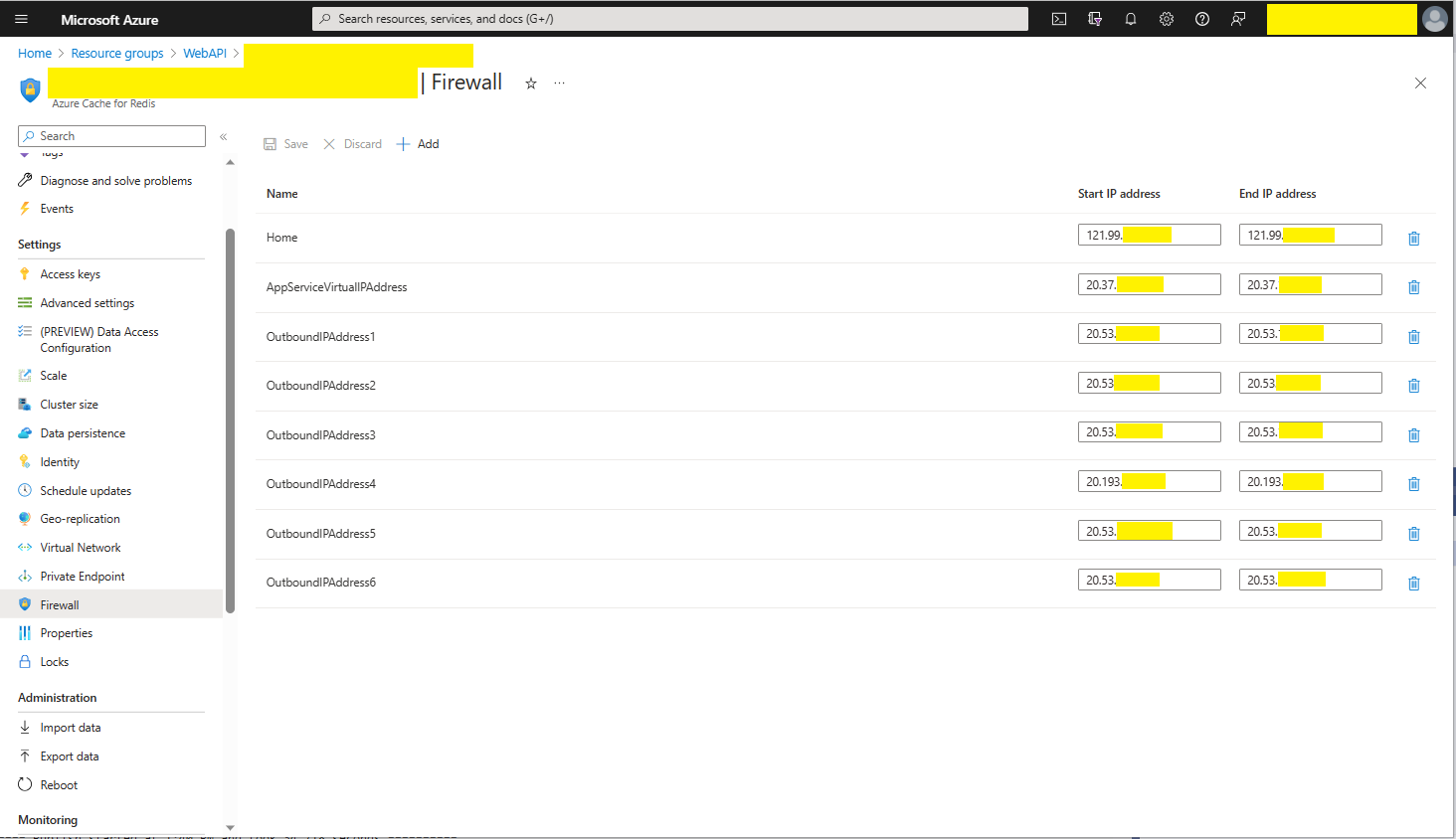
Azure AppService Virtual, Outbound and Additional Outbound IP Addresses
The error appeared to be a networking issue, most probably the firewall blocking connections so I added the Azure AppService Virtual IP Address which didn’t work…
public static void Main(string[] args)
{
    var builder = WebApplication.CreateBuilder(args);

    // Add services to the container.
    builder.Services.AddApplicationInsightsTelemetry();

    // Add services to the container.
    builder.Services.AddTransient<IDapperContext>(s => new DapperContext(builder.Configuration));

    builder.Services.AddControllers();

    // Register IAppCache as a singleton CachingService
    builder.Services.AddLazyCache();

    var app = builder.Build();

    // Configure the HTTP request pipeline.

    app.UseHttpsRedirection();

    app.MapControllers();

    app.Run();
}
One of the applications I work uses a lot of “reference” data which is effectively static e.g. national/regional holidays in countries where they have customers, and data which is updated on a schedule e.g. exchange rates downloaded at a known time every day.
For the holiday information updates, the dataset could be deleted(“burped”) then refreshed the next time it is referenced or deleted then re-loaded. For exchange rate updates the cache could automatically expire the dataset shortly after the scheduled download.
The time to open the home page of one of the “legacy” applications I was working on was slowly increasing over time. After a quick investigation it looked like there a couple of Azure SQL stored procedures which were called many times as the home page was opening were the problem.
[HttpGet("Dapper")]
public async Task<ActionResult<IEnumerable<Model.StockItemListDtoV1>>> GetDapper()
{
    IEnumerable<Model.StockItemListDtoV1> response;

    using (IDbConnection db = dapperContext.ConnectionCreate())
    {
        response = await db.QueryAsync<Model.StockItemListDtoV1>(sql: sqlCommandText, commandType: CommandType.Text);
    }

    return this.Ok(response);
}
World Wide Importers database list of stockitems
The World Wide Importers database has approximately 250 StockItems which was representative of one of the problematic queries.
[HttpGet("DapperProfiled")]
public async Task<ActionResult<IEnumerable<Model.StockItemListDtoV1>>> GetDapperProfiled()
{
    IEnumerable<Model.StockItemListDtoV1> response;

    using (IDbConnection db = new ProfiledDbConnection((DbConnection)dapperContext.ConnectionCreate(), MiniProfiler.Current))
    {
        response = await db.QueryAsync<Model.StockItemListDtoV1>(sql: sqlCommandText, commandType: CommandType.Text);
    }

    return this.Ok(response);
 }
When I executed the GetDapperProfiler() method of the StockItems controller on my development box it took roughly 2.4 seconds.
MiniProfiler results for StockItems query running on my desktop
I sometimes ran the website on my development box so when I used “toggle trivial gaps” it was easier to see what where the delays were.
When I executed the GetDapperProfiler() method of the StockItems controller running in an Azure AppService it took roughly 20 mSec.
MiniProfiler results for StockItems query running in an Azure AppService
In one application a QueryMultipleAsync is used to retrieve information about a product and a list of its attributes. The World Wide Importers database has Invoices which have invoice lines and Transactions which was representative of another problematic query.
[HttpGet("DapperProfiledQueryMultiple")]
public async Task<ActionResult<IEnumerable<Model.StockItemListDtoV1>>> GetDapperProfiledQueryMultiple([Required][Range(1, int.MaxValue, ErrorMessage = "Invoice id must greater than 0")] int id)
{
    Model.InvoiceSummaryGetDtoV1 response = null;

    using (ProfiledDbConnection db = new ProfiledDbConnection((DbConnection)dapperContext.ConnectionCreate(), MiniProfiler.Current))
    {
        var invoiceSummary = await db.QueryMultipleAsync("[Sales].[InvoiceSummaryGetV1]", param: new { InvoiceId = id }, commandType: CommandType.StoredProcedure);

        response = await invoiceSummary.ReadSingleOrDefaultAsync<Model.InvoiceSummaryGetDtoV1>();
        if (response == default)
        {
            return this.NotFound($"Invoice:{id} not found");
        }

        response.InvoiceLines = await invoiceSummary.ReadAsync<Model.InvoiceLineSummaryListDtoV1>();

        response.StockItemTransactions = await invoiceSummary.ReadAsync<Model.StockItemTransactionSummaryListDtoV1>();
    }

    return this.Ok(response);
}
World Wide Importers database list of invoice lines and transactions for a StockItem
MiniProfiler results for Invoice Item Query Multiple running in an Azure AppService
I couldn’t see any results for reading the StockItem Invoice lines and Transactions so I wrapped each ReadAsync with a MiniProfiler.Current.Step.
[HttpGet("DapperProfiledQueryMultipleStep")]
public async Task<ActionResult<IEnumerable<Model.StockItemListDtoV1>>> GetDapperProfiledQueryMultipleStep([Required][Range(1, int.MaxValue, ErrorMessage = "Invoice id must greater than 0")] int id)
{
    Model.InvoiceSummaryGetDtoV1 response = null;

    using (IDbConnection db = new ProfiledDbConnection((DbConnection)dapperContext.ConnectionCreate(), MiniProfiler.Current))
    {
        SqlMapper.GridReader invoiceSummary;

        using (MiniProfiler.Current.Step("db.QueryMultipleAsync"))
        {
            invoiceSummary = await db.QueryMultipleAsync("[Sales].[InvoiceSummaryGetV1]", param: new { InvoiceId = id }, commandType: CommandType.StoredProcedure);
        }

        using (MiniProfiler.Current.Step("invoiceSummary.ReadSingleOrDefaultAsync"))
        {
            response = await invoiceSummary.ReadSingleOrDefaultAsync<Model.InvoiceSummaryGetDtoV1>();
        }
        if (response == default)
        {
            return this.NotFound($"Invoice:{id} not found");
        }

        using (MiniProfiler.Current.Step("invoiceSummaryLine.ReadAsync"))
        {
            response.InvoiceLines = await invoiceSummary.ReadAsync<Model.InvoiceLineSummaryListDtoV1>();
        }

        using (MiniProfiler.Current.Step("TransactionSummary.ReadAsync"))
        {
            response.StockItemTransactions = await invoiceSummary.ReadAsync<Model.StockItemTransactionSummaryListDtoV1>();
        }
    }

    return this.Ok(response);
}
With larger lists every so often there were ReadAsync calls that took a more than a “trivial” amount of time. I surmise was some sort of batching done by the underlying ReadAsync + NextResultAsync methods of a SqlDataReader.
Need to investigate the use of
using (IDbConnection db = new ProfiledDbConnection(new SqlConnection(_configuration.GetConnectionString("default"), MiniProfiler.Current))
{
//...
}
The application I’m currently working on has some tables with many columns and these were proving painful to update with HTTP PUT methods. Over the last couple of releases, I have been extending the customer facing API with PATCH methods so the client can specify only the values to changed.
The JSON Patch is a format for specifying updates to be applied to a resource.
Stock Items list before HTTP Patch operation
A JSON Patch document has an array of operations which identify a particular type of change.
Using Telerik Fiddler Composer functionality to apply an HTTP PATCH
Stock Items list after HTTP Patch operation
The StockItemPatchDtoV1 class is decorated with DataAnnotations to ensure the contents are valid.
public class StockItemPatchDtoV1
{
    [Required]
    [StringLength(100, MinimumLength = 1, ErrorMessage = "The name text must be at least {2} and no more than {1} characters long")]  // These would be constants in a real application
    public string Name { get; set; }

    [Required]
    [Range(0.0, 100.0)] // These would be constants in a real application
    public decimal UnitPrice { get; set; }

    [Required]
    [Range(0.0, 1000000.0)] // These would be constants in a real application
    public decimal RecommendedRetailPrice { get; set; }
}
The StockItemsController [HttpPatch(“{id}”)] method retrieves the stock item to be updated, then uses ApplyTo method and TryValidateModel to update only the specified fields.
[HttpPatch("{id}")]
public async Task<ActionResult<Model.StockItemGetDtoV1>> Patch([FromBody] JsonPatchDocument<Model.StockItemPatchDtoV1> stockItemPatch, int id)
{
    Model.StockItemGetDtoV1 stockItem;

    using (IDbConnection db = dapperContext.ConnectionCreate())
    {
        stockItem = await db.QuerySingleOrDefaultWithRetryAsync<Model.StockItemGetDtoV1>(sql: "[Warehouse].[StockItemsStockItemLookupV1]", param: new { stockItemId = id }, commandType: CommandType.StoredProcedure);

        if (stockItem == default)
        {
            logger.LogInformation("StockItem:{id} not found", id);

            return this.NotFound($"StockItem:{id} not found");
        }

        Model.StockItemPatchDtoV1 stockItemPatchDto = mapper.Map<Model.StockItemPatchDtoV1>(stockItem);

        stockItemPatch.ApplyTo(stockItemPatchDto, ModelState);

        if (!ModelState.IsValid || !TryValidateModel(stockItemPatchDto))
        {
            logger.LogInformation("stockItemPatchDto invalid {0}", string.Join(Environment.NewLine, ModelState.Values.SelectMany(v => v.Errors).Select(v => v.ErrorMessage + " " + v.Exception))); // would extract this out into shared module

            return BadRequest(ModelState);
        }

        mapper.Map(stockItemPatchDto, stockItem);

        await db.ExecuteWithRetryAsync(sql: "UPDATE Warehouse.StockItems SET StockItemName=@Name, UnitPrice=@UnitPrice, RecommendedRetailPrice=@RecommendedRetailPrice WHERE StockItemId=@Id", param: stockItem, commandType: CommandType.Text);
    }

    return this.Ok();
}
Initially the HTTP Patch method returned this error message.
HTTP/1.1 400 Bad Request
Content-Type: application/problem+json; charset=utf-8
Date: Tue, 27 Jun 2023 09:20:30 GMT
Server: Kestrel
Transfer-Encoding: chunked

1d7
{"type":"https://tools.ietf.org/html/rfc7231#section-6.5.1","title":"One or more validation errors occurred.","status":400,"traceId":"00-665a6ee9ed1105a105237c421793af5d-1719bda40c0b7d5d-00","errors":{"$":["The JSON value could not be converted to Microsoft.AspNetCore.JsonPatch.JsonPatchDocument`1[devMobile.WebAPIDapper.HttpPatch.Model.StockItemPatchDtoV1]. Path: $ | LineNumber: 0 | BytePositionInLine: 1."],"stockItemPatch":["The stockItemPatch field is required."]}}
0
So far, to keep the code really obvious (tends to be more verbose) I have limited the use Dependency Injection(DI). I have been “injecting” an instance of an IConfiguration interface then retrieving the database connection string and other configuration. This isn’t a great approach as the database connection string name is in multiple files etc.
namespace devMobile.WebAPIDapper.ListsDIBasic
{
   using System.Data;
   using System.Data.SqlClient;

   using Microsoft.Extensions.Configuration;

   public interface IDapperContext
   {
      public IDbConnection ConnectionCreate();
      public IDbConnection ConnectionCreate(string connectionStringName);

      public IDbConnection ConnectionReadCreate();
      public IDbConnection ConnectionWriteCreate();
   }

   public class DapperContext : IDapperContext
   {
      private readonly IConfiguration _configuration;

      public DapperContext(IConfiguration configuration)
      {
         _configuration = configuration;
      }

      public IDbConnection ConnectionCreate()
      {
         return new SqlConnection(_configuration.GetConnectionString("default"));
      }

      public IDbConnection ConnectionCreate(string connectionStringName)
      {
         return new SqlConnection(_configuration.GetConnectionString(connectionStringName));
      }

      public IDbConnection ConnectionReadCreate()
      {
         return new SqlConnection(_configuration.GetConnectionString("default-read"));
      }

      public IDbConnection ConnectionWriteCreate()
      {
         return new SqlConnection(_configuration.GetConnectionString("default-write"));
      }
   }
}
public class Program
{
    public static void Main(string[] args)
    {
        var builder = WebApplication.CreateBuilder(args);

        // Add services to the container.
        //builder.Services.AddSingleton<IDapperContext>(s => new DapperContext(builder.Configuration));
        //builder.Services.AddTransient<IDapperContext>(s => new DapperContext(builder.Configuration));
        //builder.Services.AddScoped<IDapperContext>(s => new DapperContext(builder.Configuration));

        builder.Services.AddControllers();

        var app = builder.Build();

        // Configure the HTTP request pipeline.

        app.UseHttpsRedirection();

        app.MapControllers();

        app.Run();
    }
}
Then in the StockItems controller the IDapperContext interface implementation is used to create an IDbConnection for Dapper operations to use. I also added “WAITFOR DELAY ’00:00:02″ to the query to extend the duration of the requests.
[ApiController]
[Route("api/[controller]")]
public class StockItemsController : ControllerBase
{
   private readonly ILogger<StockItemsController> logger;
   private readonly IDapperContext dapperContext;

   public StockItemsController(ILogger<StockItemsController> logger, IDapperContext dapperContext)
   {
      this.logger = logger;

      this.dapperContext = dapperContext;
   }

   [HttpGet]
   public async Task<ActionResult<IEnumerable<Model.StockItemListDtoV1>>> Get()
   {
      IEnumerable<Model.StockItemListDtoV1> response;

      using (IDbConnection db = dapperContext.ConnectionCreate())
      {
         //response = await db.QueryWithRetryAsync<Model.StockItemListDtoV1>(sql: @"SELECT [StockItemID] as ""ID"", [StockItemName] as ""Name"", [RecommendedRetailPrice], [TaxRate] FROM [Warehouse].[StockItems]", commandType: CommandType.Text);
         response = await db.QueryWithRetryAsync<Model.StockItemListDtoV1>(sql: @"SELECT [StockItemID] as ""ID"", [StockItemName] as ""Name"", [RecommendedRetailPrice], [TaxRate] FROM [Warehouse].[StockItems]; WAITFOR DELAY '00:00:02'", commandType: CommandType.Text);
      }

      return this.Ok(response);
   }
...
}
I ran a stress testing application which simulated 50 concurrent users. When the stress test rig was stopped all the connections in the pool were closed after roughly 5 minutes.
SQL Server Management Studio(SSMS) sp_who query – stress test
public class Program
{
    public static void Main(string[] args)
    {
        var builder = WebApplication.CreateBuilder(args);

        // Add services to the container.

        //builder.Services.AddSingleton<IDbConnection>(s => new SqlConnection(builder.Configuration.GetConnectionString("default")));
        //builder.Services.AddScoped<IDbConnection>(s => new SqlConnection(builder.Configuration.GetConnectionString("default")));
        //builder.Services.AddTransient<IDbConnection>(s => new SqlConnection(builder.Configuration.GetConnectionString("default")));

        builder.Services.AddControllers();

        var app = builder.Build();

        app.UseHttpsRedirection();

        app.MapControllers();

        app.Run();
    }
}
The code in the get method was reduced. I also added “WAITFOR DELAY ’00:00:02″ to the query to extend the duration of the requests.
public class StockItemsController : ControllerBase
{
   private readonly ILogger<StockItemsController> logger;
   private readonly IDbConnection dbConnection;

   public StockItemsController(ILogger<StockItemsController> logger, IDbConnection dbConnection)
   {
      this.logger = logger;

      this.dbConnection = dbConnection;
   }

   [HttpGet]
   public async Task<ActionResult<IEnumerable<Model.StockItemListDtoV1>>> Get()
   {
      // return this.Ok(await dbConnection.QueryWithRetryAsync<Model.StockItemListDtoV1>(sql: @"SELECT [StockItemID] as ""ID"", [StockItemName] as ""Name"", [RecommendedRetailPrice], [TaxRate] FROM [Warehouse].[StockItems]; WAITFOR DELAY '00:00:02';", commandType: CommandType.Text));
      return this.Ok(await dbConnection.QueryWithRetryAsync<Model.StockItemListDtoV1>(sql: @"SELECT [StockItemID] as ""ID"", [StockItemName] as ""Name"", [RecommendedRetailPrice], [TaxRate] FROM [Warehouse].[StockItems]", commandType: CommandType.Text));
    }
...
}
With the stress test rig running the number of active connections was roughly the same as the DapperContext based implementation.
I don’t like this approach so will stick with DapperContext






 devMobile's blog