Random wanderings through Microsoft Azure esp. PaaS plumbing, the IoT bits, AI on Micro controllers, AI on Edge Devices, .NET nanoFramework, .NET Core on *nix and ML.NET+ONNX
As part of some scale testing of my WebAPIDapper and WebMinimalAPIDapper i have been “cleaning up” a portion of the Inside AirbnbLondon dataset. To make the scale testing results more realistic I wanted at least one table with lots of rows.
CREATE TABLE [dbo].[CalendarRawDetailed](
	[listing_id] [bigint] NOT NULL,
	[Date] [date] NOT NULL,
	[Xavailable] [bit] NULL,
	[available] [nvarchar](5) NOT NULL,
	[Xprice] [money] NULL,
	[price] [nvarchar](30) NOT NULL,
	[Xadjusted_price] [money] NULL,
	[adjusted_price] [nvarchar](30) NOT NULL,
	[Xminimum_nights] [smallint] NULL,
	[minimum_nights] [nvarchar](30) NOT NULL,
	[Xmaximum_nights] [smallint] NULL,
	[maximum_nights] [nvarchar](30) NOT NULL
) ON [PRIMARY]
The CalendarRawDetailed had some invalid values which were most probably due formatting inconsistencies on the AirBnb website
SELECT COUNT(*) FROM CalendarRawDetailed WHERE Xminimum_nights IS NULL
SELECT * FROM CalendarRawDetailed WHERE Xminimum_nights IS NULL

SELECT COUNT(*) FROM CalendarRawDetailed WHERE Xmaximum_nights IS NULL
SELECT * FROM CalendarRawDetailed WHERE Xmaximum_nights IS NULL

SELECT COUNT(*) FROM CalendarRawDetailed WHERE Xadjusted_price IS NULL
SELECT * FROM CalendarRawDetailed WHERE Xadjusted_price IS NULL

SELECT COUNT(*) FROM CalendarRawDetailed WHERE Xprice IS NULL
SELECT * FROM CalendarRawDetailed WHERE Xprice IS NULL
Where possible I recovered the values with an “incorrect” format, but some rows had to be deleted.
UPDATE CalendarRawDetailed SET Xmaximum_nights =  TRY_CONVERT(smallint,  RTRIM(maximum_nights, '"')) WHERE Xmaximum_nights IS NULL

UPDATE CalendarRawDetailed SET XmINimum_nights =  TRY_CONVERT(smallint,  RTRIM(mINimum_nights, '"')) WHERE Xminimum_nights IS NULL

UPDATE CalendarRawDetailed SET Xadjusted_price =  TRY_CONVERT(money,  LTRIM(adjusted_price, '$')) --WHERE Xmaximum_nights IS NULL

SELECT *
FROM CalendarRawDetailed
WHERE Xadjusted_price IS NULL
DELETE FROM CalendarRawDetailed WHERE Xmaximum_nights IS NULL

UPDATE CalendarRawDetailed set Xavailable = 1 where available = 't'
The Calendar table has 365 rows for each listing, and I will update Calendar dates, so they are in the “future”.
CREATE TABLE [dbo].[Calendar](
   [listing_id] [bigint] NOT NULL,
   [date] [date] NOT NULL,
   [available] [bit] NOT NULL,
   [price] [money] NOT NULL,
   [adjusted_price] [money] NOT NULL,
   [minimum_nights] [smallint] NOT NULL,
   [maximum_nights] [smallint] NOT NULL
) ON [PRIMARY]
The Calendar table as approximately 31 million rows which should be plenty for my scale testing.
CREATE PROCEDURE [dbo].[ListingsSpatialNearbyNTSLocation]
	@Origin AS GEOGRAPHY,
	@distance AS INTEGER
AS
BEGIN
DECLARE @Circle AS GEOGRAPHY = @Origin.STBuffer(@distance);

SELECT TOP(50) UID AS ListingUID
	,[Name]
	,listing_url as ListingUrl
	,Listing.Location.STDistance(@Origin) as Distance
	,Listing.Location
FROM Listing
WHERE (Listing.Location.STWithin(@Circle) = 1)
ORDER BY Distance
END
NetTopology Suite Microsoft.SqlServer.Types library load exception
CREATE PROCEDURE [dbo].[ListingsSpatialNearbyNTSSerialize]
	@Origin AS GEOGRAPHY,
	@distance AS INTEGER
AS
BEGIN
DECLARE @Circle AS GEOGRAPHY = @Origin.STBuffer(@distance);

SELECT TOP(50) UID AS ListingUID
	,[Name]
	,listing_url as ListingUrl
	,Listing.Location.STDistance(@Origin) as Distance
	,Location.Serialize() as Location
FROM [listing]
WHERE (Location.STWithin(@Circle) = 1)
ORDER BY Distance
END
class PointHandlerSerialise : SqlMapper.TypeHandler<Point>
{
   public override Point Parse(object value)
   {
      var reader = new SqlServerBytesReader { IsGeography = true };

      return (Point)reader.Read((byte[])value);
   }

   public override void SetValue(IDbDataParameter parameter, Point? value)
   {
      ((SqlParameter)parameter).SqlDbType = SqlDbType.Udt;  // @Origin parameter?
      ((SqlParameter)parameter).UdtTypeName = "GEOGRAPHY";

      var writer = new SqlServerBytesWriter { IsGeography = true };

      parameter.Value = writer.Write(value);
   }
}
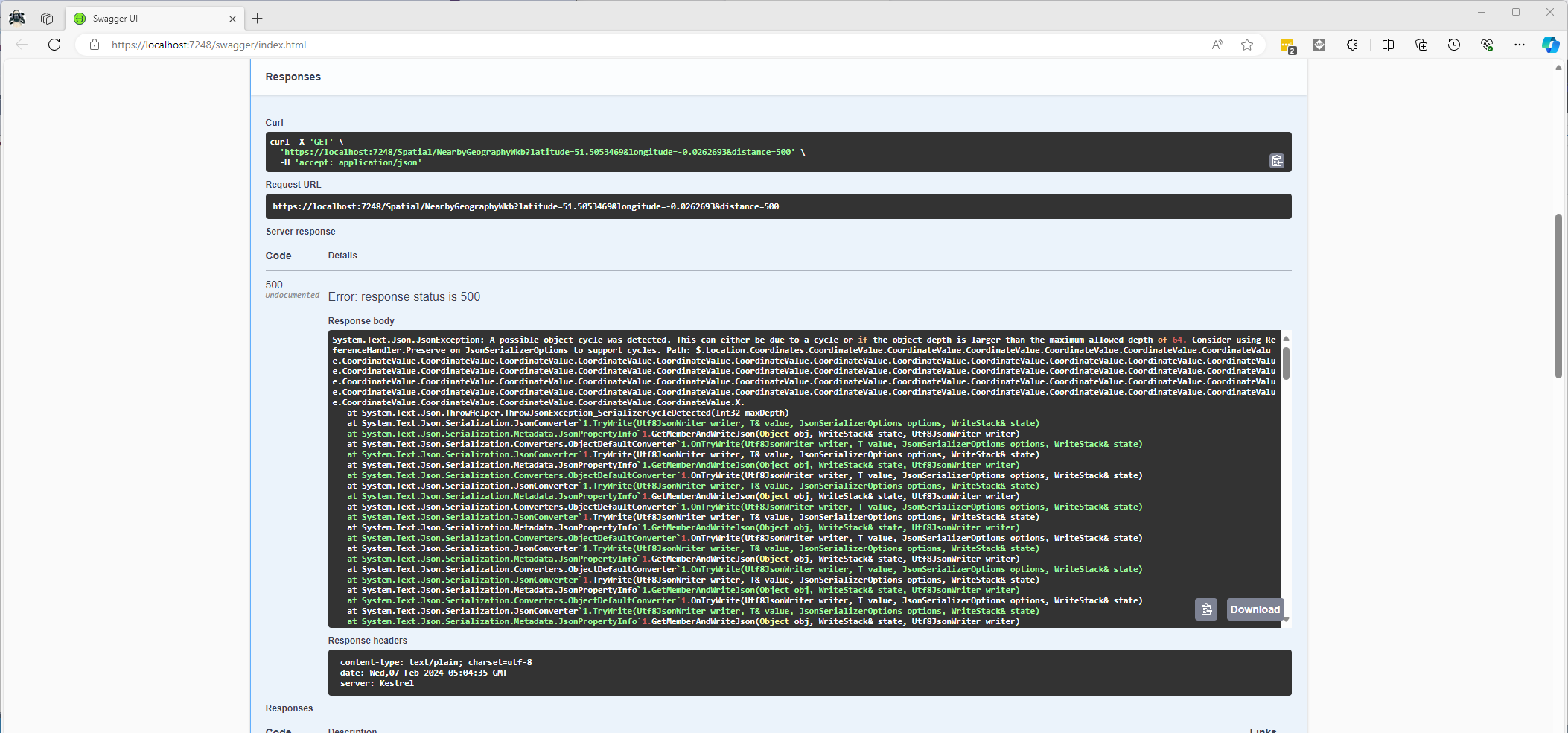
Once the location column serialisation was working (I could see a valid response in the debugger) the generation of the response was failing with a “System.Text.Json.JsonException: A possible object cycle was detected. This can either be due to a cycle or if the object depth is larger than the maximum allowed depth of 64″.
NetTopology Suite serialisation “possible object cycle detection” exception
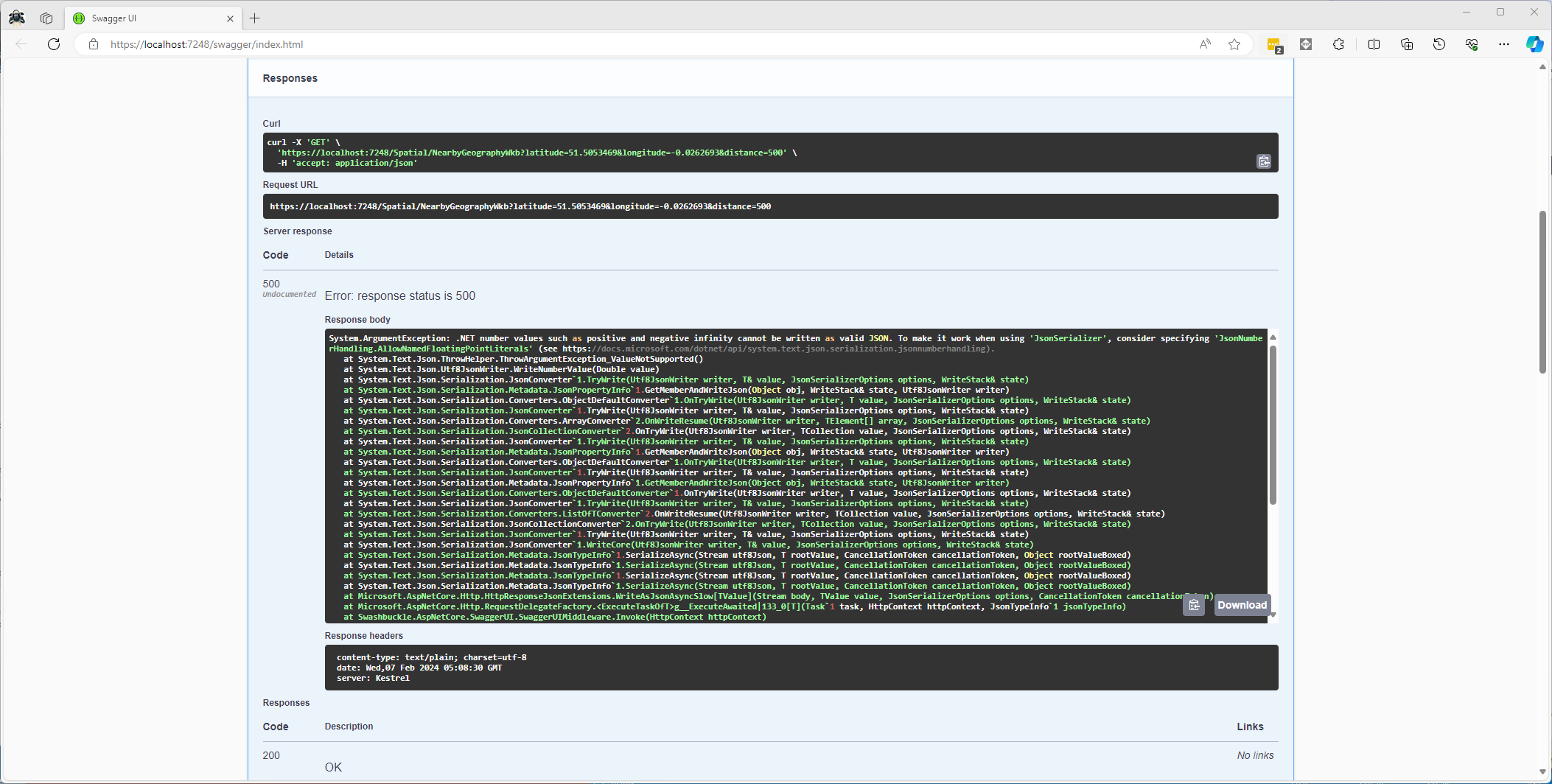
After fixing that issue the response generation failed with “System.ArgumentException: .NET number values such as positive and negative infinity cannot be written as valid JSON.”
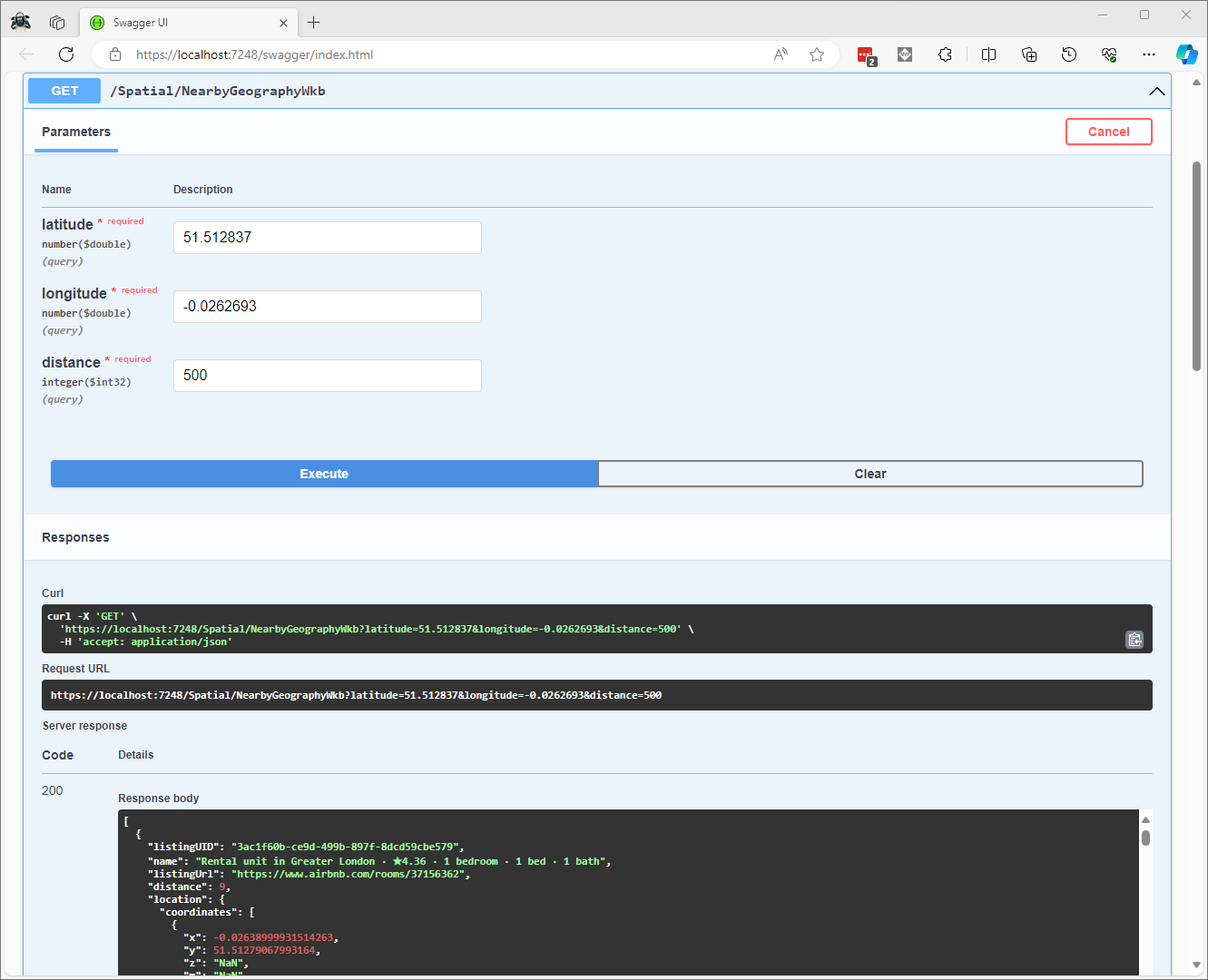
CREATE PROCEDURE [dbo].[ListingsSpatialNearbyNTSWkb]
	@Origin AS GEOGRAPHY,
	@distance AS INTEGER
AS
BEGIN
DECLARE @Circle AS GEOGRAPHY = @Origin.STBuffer(@distance);

SELECT TOP(50) UID AS ListingUID
	,[Name]
	,listing_url as ListingUrl
	,Listing.Location.STDistance(@Origin) as Distance
	,Location.STAsBinary() as Location
FROM [listing]
WHERE (Location.STWithin(@Circle) = 1)
ORDER BY Distance
END
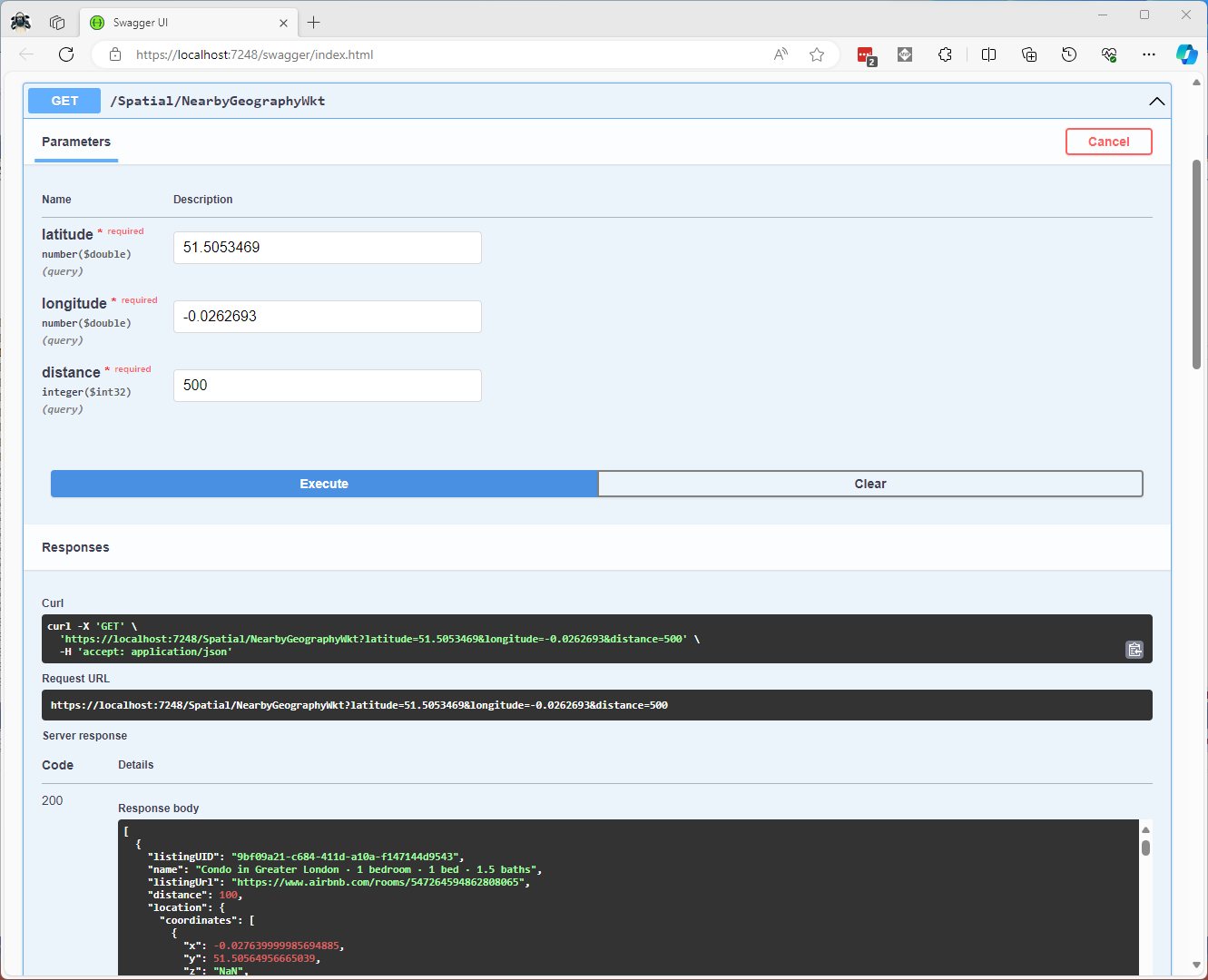
CREATE PROCEDURE [dbo].[ListingsSpatialNearbyNTSWkt]
	@Origin AS GEOGRAPHY,
	@distance AS INTEGER
AS
BEGIN
DECLARE @Circle AS GEOGRAPHY = @Origin.STBuffer(@distance);

SELECT TOP(50) UID AS ListingUID
	,[Name]
	,listing_url as ListingUrl
	,Listing.Location.STDistance(@Origin) as Distance
	,Location.STAsText() as Location
FROM [listing]
WHERE (Location.STWithin(@Circle) = 1)
ORDER BY Distance
END
class PointHandlerWkt : SqlMapper.TypeHandler<Point>
{
   public override Point Parse(object value)
   {
      WKTReader wktReader = new WKTReader();

      return (Point)wktReader.Read(value.ToString());
   }

   public override void SetValue(IDbDataParameter parameter, Point? value)
   {
      ((SqlParameter)parameter).SqlDbType = SqlDbType.Udt;  // @Origin parameter?
      ((SqlParameter)parameter).UdtTypeName = "GEOGRAPHY";

      parameter.Value = new SqlServerBytesWriter() { IsGeography = true }.Write(value);
   }
}
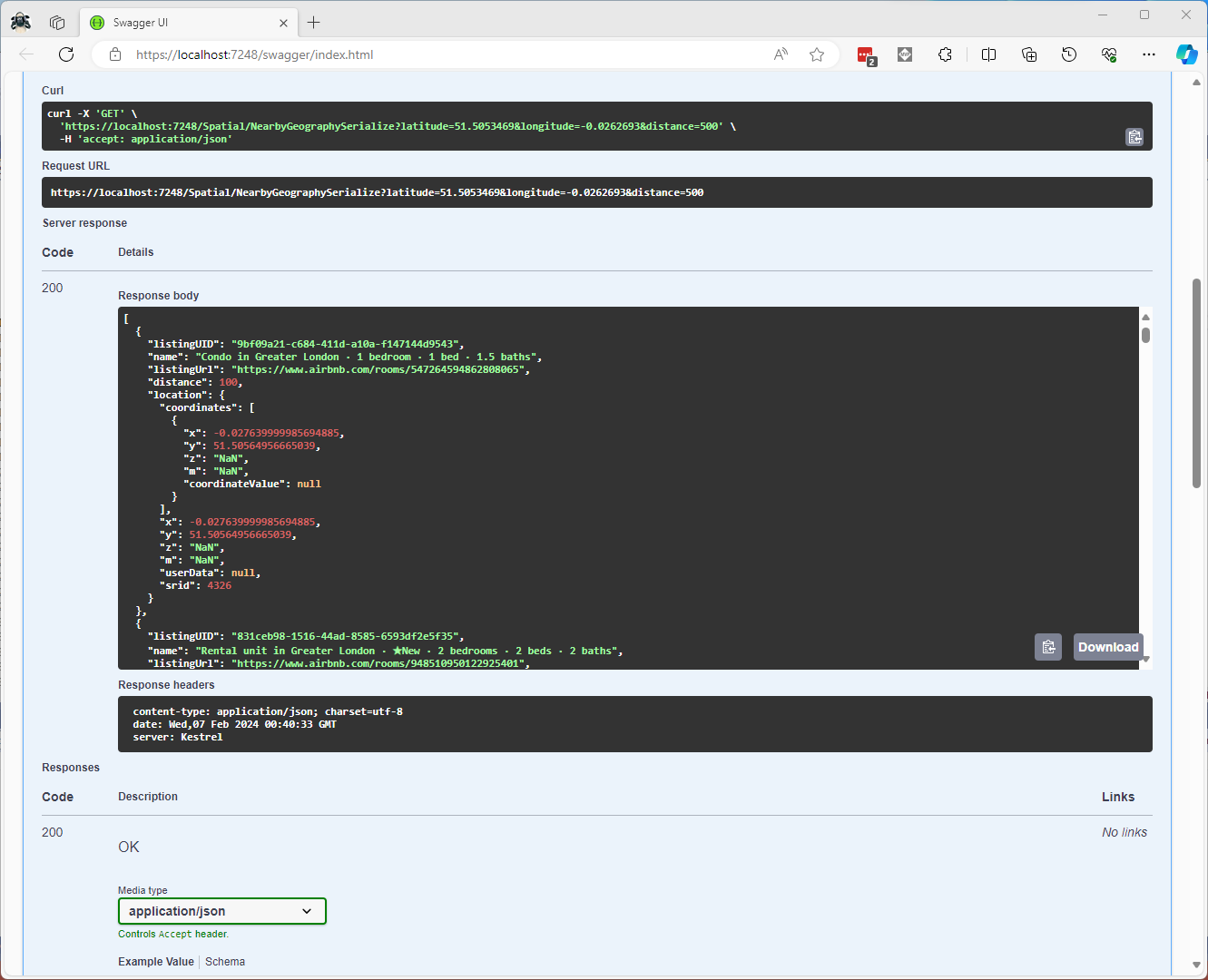
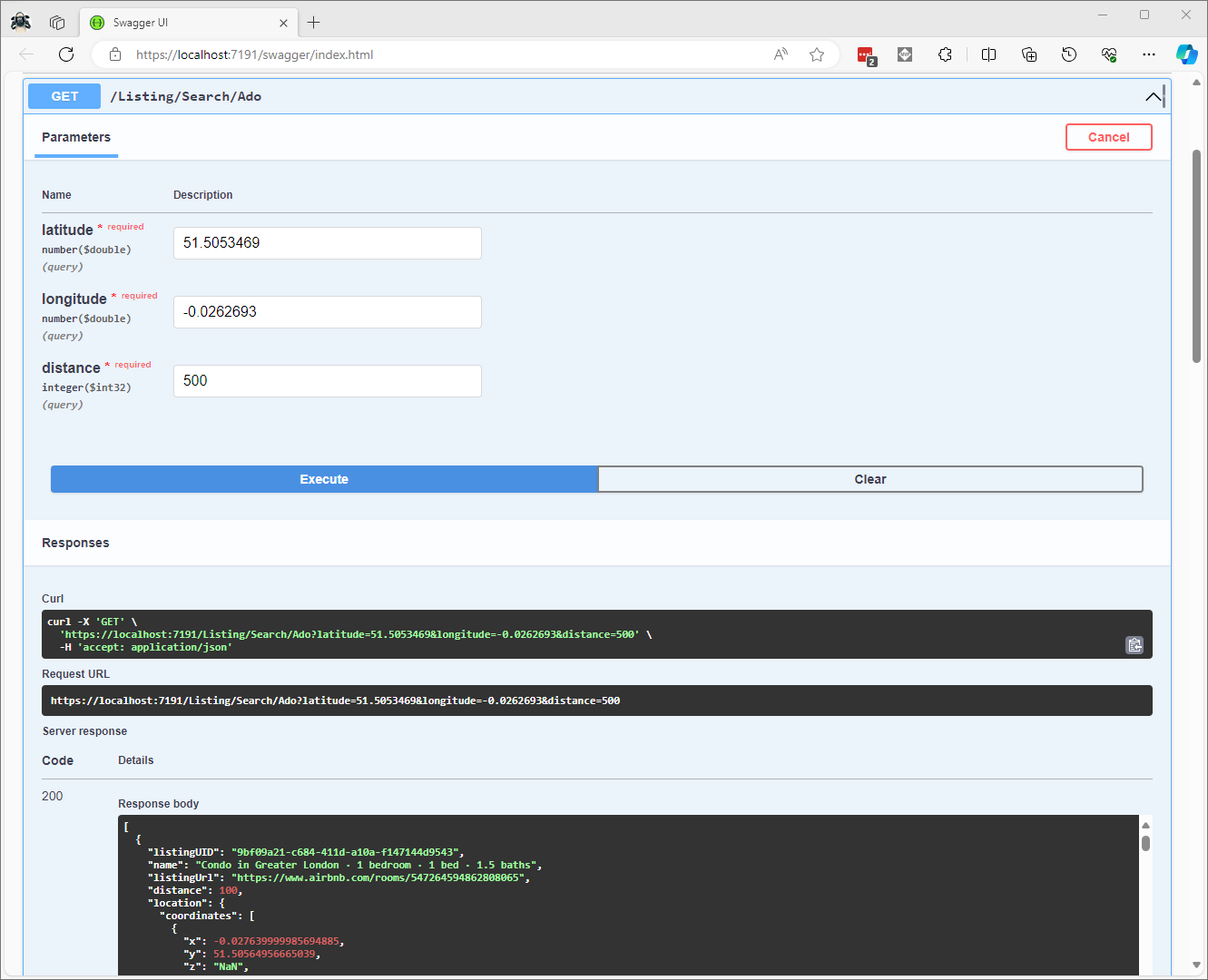
Successful Location processing with WKBReader
I have focused on getting the spatial queries to work and will stress/performance test my implementations in a future post. I will also revisit the /Spatial/NearbyGeography method to see if I can get it to work without “Location.Serialize() as Location”.
CREATE TABLE [dbo].[Neighbourhood](
	[id] [bigint] IDENTITY(1,1) NOT NULL,
	[NeighbourhoodUID] [uniqueidentifier] NOT NULL,
	[name] [nvarchar](50) NOT NULL,
	[neighbourhood_url] [nvarchar](100) NOT NULL,
	[boundary] [geography] NOT NULL,
 CONSTRAINT [PK_Neighbourhood] PRIMARY KEY CLUSTERED
(
	[id] ASC
)
-- Then create a spatial index on GEOGRAPHY which contains the boundary polygon(s)
CREATE SPATIAL INDEX [ISX_NeighbourhoodBoundary] ON [dbo].[Neighbourhood]
(
	[boundary]
)
I added a GEOGRAPHY column to the Listing table, populated it using the Latitude and Longitudes of the Listings then added a spatial index.
-- Use latitude and longitude to populate Location GEOGRAPHY column
UPDATE listing
SET Listing.Location = geography::Point(latitude, longitude, 4326)

-- Then index Location column after changing to NOT NULL
CREATE SPATIAL INDEX [IXS_ListingByLocation] ON [dbo].[listing]
(
	[Location]
)
The first spatial search uses the latitude and longitude (most probably extracted from image metadata) to get a Listing’s neighbourhood.
Testing listing in Neighbourhood SQL
It uses the STContains method to find the neighbourhood polygon (if there is one) which the listing location is inside.
const string ListingInNeighbourhoodSQL = @"SELECT neighbourhoodUID, name, neighbourhood_url as neighbourhoodUrl FROM Neighbourhood WHERE Neighbourhood.Boundary.STContains(geography::Point(@Latitude, @Longitude, 4326)) = 1";
...

app.MapGet("/Spatial/Neighbourhood", async (double latitude, double longitude, [FromServices] IDapperContext dapperContext) =>
{
   Model.NeighbourhoodSearchDto neighbourhood;

   using (var connection = dapperContext.ConnectionCreate())
   {
      neighbourhood = await connection.QuerySingleOrDefaultWithRetryAsync<Model.NeighbourhoodSearchDto>(ListingInNeighbourhoodSQL, new { latitude, longitude });
   }

   if (neighbourhood is null)
   {
      return Results.Problem($"Neighbourhood for Latitude:{latitude} Longitude:{longitude} not found", statusCode: StatusCodes.Status404NotFound);
   }

   return Results.Ok(neighbourhood);
})
.Produces<IList<Model.NeighbourhoodSearchDto>>(StatusCodes.Status200OK)
.Produces(StatusCodes.Status404NotFound )
.WithOpenApi();
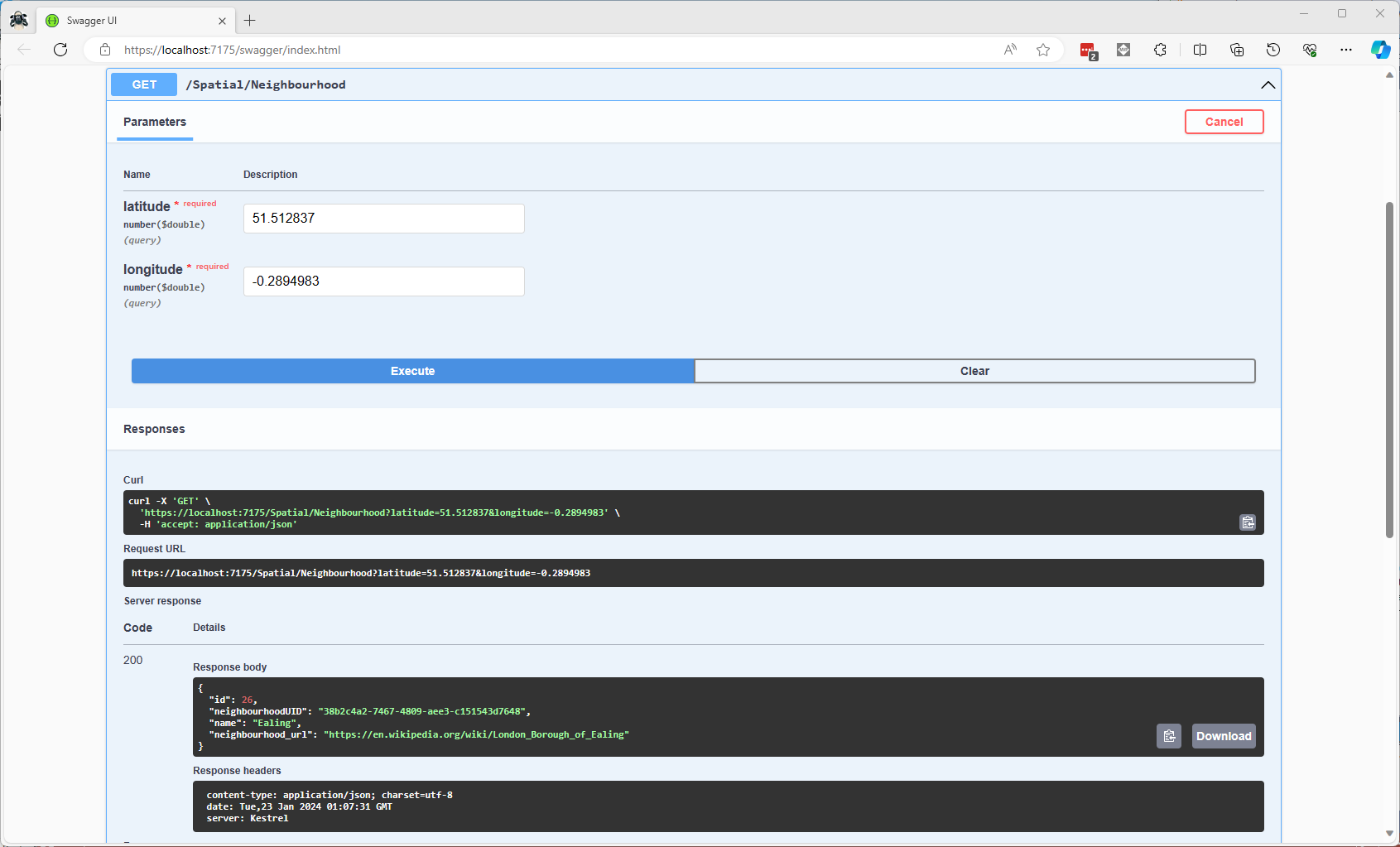
Testing listing Neighbourhood lookup with Swagger user interface
In a future blog post I will compare the performance of STContains vs. STWithin with a load testing application.
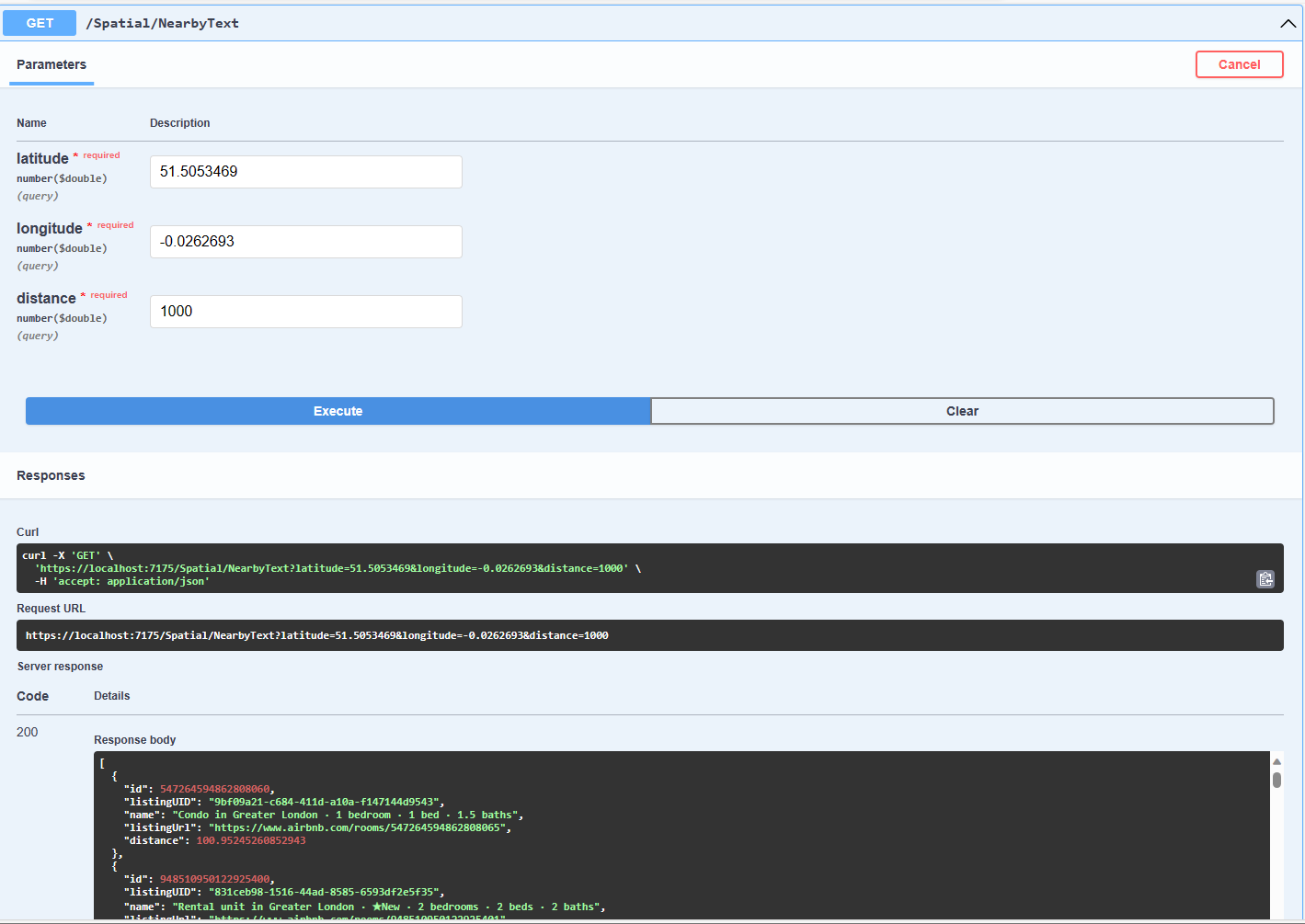
Testing listings near a location SQL
The second search simulates a customer looking for listing(s) within a specified distance of a point of interest.
const string ListingsNearbySQL = @"DECLARE @Origin AS GEOGRAPHY = geography::Point(@Latitude, @Longitude, 4326);
                                  DECLARE @Circle AS GEOGRAPHY = @Origin.STBuffer(@distance);
                                  --DECLARE @Circle AS GEOGRAPHY = @Origin.BufferWithTolerance(@distance, 0.09,true);
                                  SELECT uid as ListingUID, Name, listing_url as ListingUrl,
@Origin.STDistance(Listing.Location) as Distance
                                  FROM [listing]
                                  WHERE Listing.Location.STWithin(@Circle) = 1 ORDER BY Distance";
...
app.MapGet("/Spatial/NearbyText", async (double latitude, double longitude, double distance, [FromServices] IDapperContext dapperContext) =>
{
   using (var connection = dapperContext.ConnectionCreate())
   {
      return await connection.QueryWithRetryAsync<Model.ListingNearbyListDto>(ListingsNearbySQL, new { latitude, longitude, distance });
   }
})
.Produces<IList<Model.ListingNearbyListDto>>(StatusCodes.Status200OK)
.WithOpenApi();
The STBuffer command returns a geography object that represents represent a circle centered on @Location with a radius of @distance.
Testing listings near a location with Swagger user interface
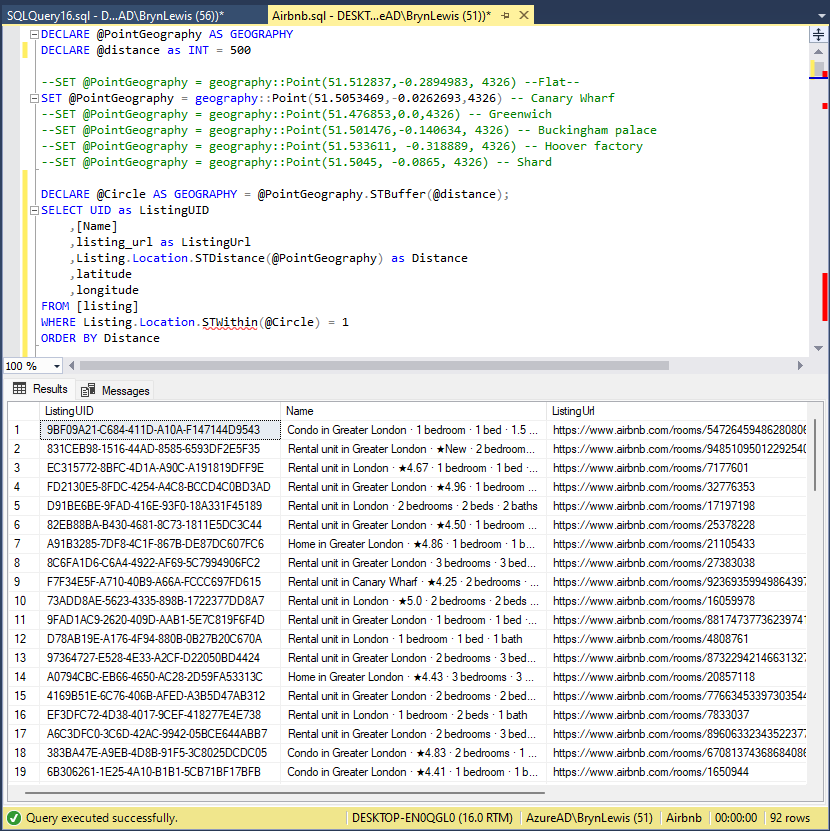
The third and final search simulates a customer looking for listing(s) within a specified distance of a point of interest with the latitude and longitude of the listing included in the results.
Testing listings near a location SQL with latitude & Longitude
const string ListingsNearbyLatitudeLongitudeSQL = @"DECLARE @Location AS GEOGRAPHY = geography::Point(@Latitude, @longitude,4326)
                                 DECLARE @Circle AS GEOGRAPHY = @Location.STBuffer(@distance);
                                 SELECT UID as ListingUID
	                              ,[Name]
	                              ,listing_url as ListingUrl
	                              ,Listing.Location.STDistance(@Location) as Distance
	                              ,latitude
                                 ,longitude
                                 FROM [listing]
                                 WHERE Listing.Location.STWithin(@Circle) = 1
                                 ORDER BY Distance";

app.MapGet("/Spatial/NearbyLatitudeLongitude", async (double latitude, double longitude, double distance, [FromServices] IDapperContext dapperContext) =>
{
   using (var connection = dapperContext.ConnectionCreate())
   {
      return await connection.QueryWithRetryAsync<Model.ListingNearbyListLatitudeLongitudeDto>(ListingsNearbyLatitudeLongitudeSQL, new { latitude, longitude, distance });
   }
})
.Produces<IList<Model.ListingNearbyListLatitudeLongitudeDto>>(StatusCodes.Status200OK)
.WithOpenApi();
Testing listings near a location with latitude & Longitude with Swagger user interface
The next couple of posts will use the third-party libraries Geo and NetTopolgySuite
using System.Text.Json;
using System.Data;
using System.Data.SqlClient;

using Microsoft.SqlServer.Types;

using Dapper;

string jsonString = File.ReadAllText("your geoJSON file");

using (IDbConnection connection = new SqlConnection("This is not the connection string you are looking for"))
{
   connection.Open();

   var neighbourHoods = JsonSerializer.Deserialize<GeoJSON.Text.Feature.FeatureCollection>(jsonString)!;

   Console.WriteLine($"Features:{neighbourHoods.Features.Count}");
   foreach (var feature in neighbourHoods.Features)
   {
      string neighbourhood = feature.Properties["neighbourhood"].ToString();

      Console.WriteLine($"Neightbourhood:{neighbourhood}");

      var geometery = (GeoJSON.Text.Geometry.MultiPolygon)feature.Geometry;

      var s = new SqlGeographyBuilder();

      s.SetSrid(4326);

      s.BeginGeography(OpenGisGeographyType.MultiPolygon);
      s.BeginGeography(OpenGisGeographyType.Polygon); // A

      Console.WriteLine($"Polygon cordinates:{geometery.Coordinates.Count}");
      foreach (var coordinates in geometery.Coordinates)
      {
        //s.BeginGeography(OpenGisGeographyType.Polygon); // B

         Console.WriteLine($"Linestring cordinates:{coordinates.Coordinates.Count}");
         foreach (var c in coordinates.Coordinates)
         {
            Console.WriteLine($"Point cordinates:{c.Coordinates.Count}");

            s.BeginFigure(c.Coordinates[0].Latitude, c.Coordinates[0].Longitude, null, null);

            for (int i = 1; i < c.Coordinates.Count; i++)
            {
               s.AddLine(c.Coordinates[i].Latitude, c.Coordinates[i].Longitude);

               Console.Write('.');
            }
            Console.WriteLine();

            s.EndFigure();
         }
         //s.EndGeography(); //B
      }

      s.EndGeography(); //A
      s.EndGeography(); // OpenGisGeographyType.MultiPolygon

      connection.Execute("INSERT INTO Neighbourhood (Name, Boundary) VALUES( @Neighbourhood, geography::STMPolyFromText(@boundary, 4326))", new { neighbourhood, boundary = s.ConstructedGeography.ToString()});

      Console.WriteLine();
   }
}

Console.WriteLine("loaded press <enter> to exit");
Console.ReadLine();
The neighbourhood feature loader utility is pretty “nasty” and was built for my specific scenario
CREATE TABLE [dbo].[Neighbourhood](
	[NeighbourhoodUID] [uniqueidentifier] NOT NULL,
	[Name] [nvarchar](50) NOT NULL,
	[Boundary] [geography] NOT NULL,
 CONSTRAINT [PK_Neighbourhood] PRIMARY KEY CLUSTERED
(
	[NeighbourhoodUID] ASC
)
I used Dapper to insert rows into the Neighbourhood table
DECLARE @PointGeography AS GEOGRAPHY

SET @PointGeography = geography::Point(51.512837,-0.2894983, 4326) --Flat
--SET @PointGeography = geography::Point(51.5053469,-0.0262693,4326) -- Canary Wharf
--SET @PointGeography = geography::Point(51.476853,0.0,4326) -- Greenwich
--SET @PointGeography = geography::Point(51.501476,-0.140634, 4326) -- Buckingham palace
--SET @PointGeography = geography::Point(51.533611, -0.318889, 4326) -- Hoover factory
--SET @PointGeography = geography::Point(51.5045, -0.0865, 4326) -- Shard
--SET @PointGeography = geography::Point(51.5145683288574,-0.0194199997931719, 4326) -- D0FD60C0-CC45-4517-91F6-00161E710F28 Tower Hamlets
--SET @PointGeography = geography::Point(51.5553092956543,0.00039999998989515, 4326) -- 80264AED-BC74-4150-B393-02D42711E2E6 Waltham Forest
--SET @PointGeography = geography::Point(51.4925193786621,-0.192310005426407, 4326) -- D36E4D1C-4A35-4B6E-B9A7-01E8D732FD3B Kensington and Chelsea
SET @PointGeography = geography::Point(51.5185317993164,-0.199739992618561, 4326) -- 2CAE3CAE-5E43-4F20-9550-01B86D7EF6FF Westminster

SELECT Name, @PointGeography.STWithin(Neighbourhood.Boundary) as 'STWithin', Neighbourhood.Boundary.STContains(@PointGeography) as 'STContains'
FROM Neighbourhood
ORDER BY Name
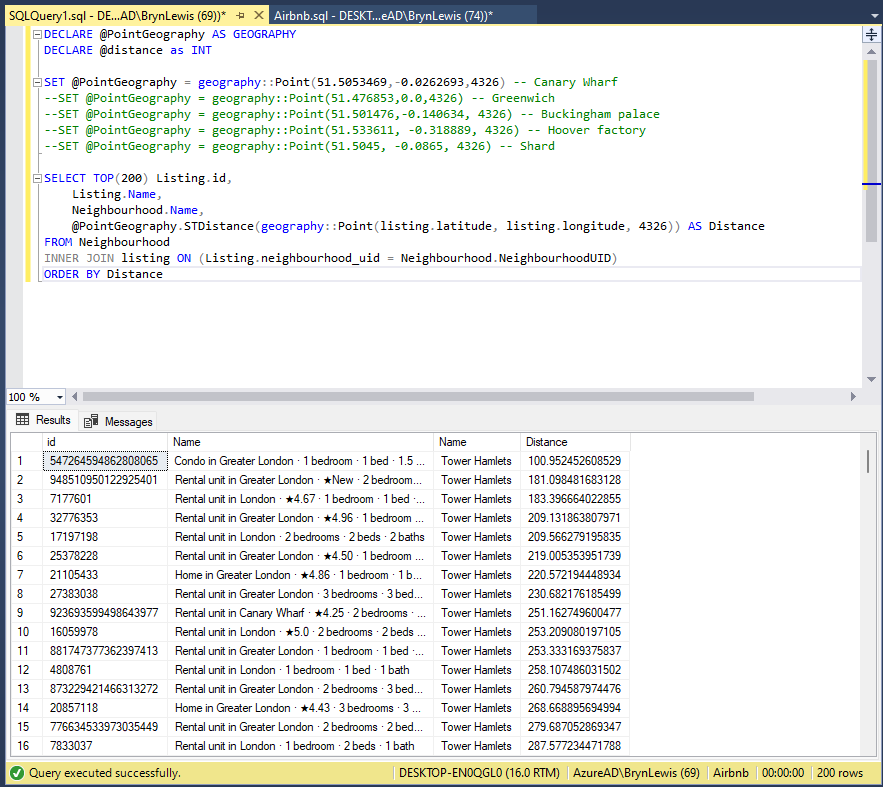
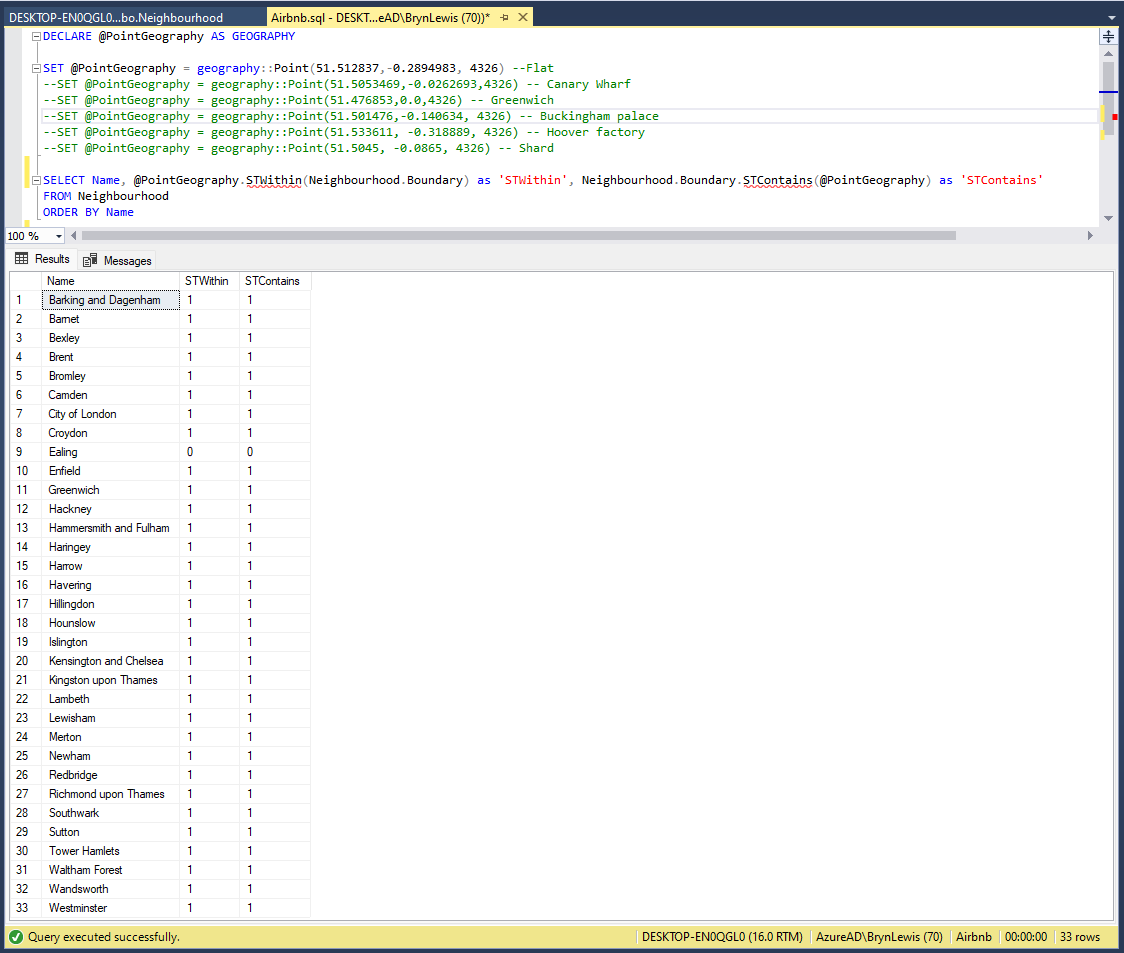
To test the neighbourhood geography I built a test harness with some “known” locations
SQL Server Management Studio Query “inverted” results
The query results were the inverse of what I was expecting.
SQL Server Management Studio Query “reorientated” results
One of my customers Hedgebook has a Microsoft SQL Server database with passwords that have been secured using PWDENCRYPT and PWDCOMPARE As part of a migration plan (away from this approach) we need to be able to validate passwords against hashes that have been generated with many versions of Microsoft SQL Server.
After some searching I found a stackoverflow post which described how to validate hashes up to SQL Server 2012 and I have added code to support more modern versions of SQL Server.
I had a chat with my boss and he approved me posting a console application wrapper for an anonymised version of the code as an aide to other developers.
This sample code is not production ready it is just to illustrate how the password hashes for older and newer versions of SQL Server can be validated in C#
//---------------------------------------------------------------------------------
// Copyright ® Feb 2018, devMobile Software
//
// Licensed under the Apache License, Version 2.0 (the "License");
// you may not use this file except in compliance with the License.
// You may obtain a copy of the License at
//
//     http://www.apache.org/licenses/LICENSE-2.0
//
// Unless required by applicable law or agreed to in writing, software
// distributed under the License is distributed on an "AS IS" BASIS,
// WITHOUT WARRANTIES OR CONDITIONS OF ANY KIND, either express or implied.
// See the License for the specific language governing permissions and
// limitations under the License.
//
// based on https://stackoverflow.com/questions/43879003/how-can-i-manually-check-passwords-hashed-with-sql-server-pwdencrypt-in-c-sharp
//
// Have added implementation for more modern SQL Server boxes and built as a console application
//---------------------------------------------------------------------------------
namespace devMobile.SqlServer.PWDCompareDemo
{
   using System;
   using System.Data.SqlClient;
   using System.Linq;
   using System.Security.Cryptography;
   using System.Text;

   public class Program
   {
      private const int DatabasePasswordHashLength = 256;
      private const int HeaderLength = 2;
      private const int SaltLength = 4;
      private const int Sha1HashLength = 20;
      private const int Sha512HashLength = 64;

      public static void Main(string[] args)
      {
         if (args.Length != 3)
         {
            Console.WriteLine("Expecting ConnectionString UserID Password");
            Console.WriteLine("Press ");
            Console.ReadLine();
            return;
         }

         string connectionString = args[0];
         string userId = args[1];
         string password = args[2];

         using (SqlConnection conn = new SqlConnection(connectionString))
         {
            conn.Open();

            using (SqlCommand cmd = new SqlCommand("SELECT Password FROM Users WHERE UserID=@UserID", conn))
            {
               cmd.Parameters.AddWithValue("@UserID", userId);

               using (SqlDataReader reader = cmd.ExecuteReader())
               {
                  if (reader.Read())
                  {
                     byte[] databasePasswordHash = new byte[DatabasePasswordHashLength];
                     reader.GetBytes(0, 0, databasePasswordHash, 0, databasePasswordHash.Length);

                     int header = BitConverter.ToChar(databasePasswordHash, 0);
                     byte[] salt = new byte[SaltLength];
                     Buffer.BlockCopy(databasePasswordHash, HeaderLength, salt, 0, salt.Length);

                     switch (header)
                     {
                        case 1: //SHA1 encryption for old SQL Server
                           byte[] sha1Hash = new byte[Sha1HashLength];
                           Buffer.BlockCopy(databasePasswordHash, HeaderLength + SaltLength, sha1Hash, 0, sha1Hash.Length);

                           HashAlgorithm sha1Hasher = SHA1.Create();
                           byte[] sha1Result = sha1Hasher.ComputeHash(Encoding.Unicode.GetBytes(password + Encoding.Unicode.GetString(salt)));
                           if (sha1Hash.SequenceEqual(sha1Result))
                           {
                              Console.WriteLine("SHA1 Password is good");
                           }
                           else
                           {
                              Console.WriteLine("SHA1 Password is bad");
                           }

                           break;

                        case 2: //SHA2-512 encryption for modern SQL Server
                           byte[] sha512Hash = new byte[Sha512HashLength];
                           Buffer.BlockCopy(databasePasswordHash, HeaderLength + SaltLength, sha512Hash, 0, sha512Hash.Length);

                           HashAlgorithm sha512Hasher = SHA512.Create();
                           byte[] sha512Result = sha512Hasher.ComputeHash(Encoding.Unicode.GetBytes(password + Encoding.Unicode.GetString(salt)));
                           if (sha512Hash.SequenceEqual(sha512Result))
                           {
                              Console.WriteLine("SHA512 Password is good");
                           }
                           else
                           {
                              Console.WriteLine("SHA512 Password is bad");
                           }

                           break;

                        default:
                           Console.WriteLine("Unknown header value something bad has happened");
                           break;
                     }
                  }
               }
            }
         }

         Console.WriteLine("Press ");
         Console.ReadLine();
      }
   }
}








 devMobile's blog