Random wanderings through Microsoft Azure esp. PaaS plumbing, the IoT bits, AI on Micro controllers, AI on Edge Devices, .NET nanoFramework, .NET Core on *nix and ML.NET+ONNX
using System.Text.Json;
using System.Data;
using System.Data.SqlClient;

using Microsoft.SqlServer.Types;

using Dapper;

string jsonString = File.ReadAllText("your geoJSON file");

using (IDbConnection connection = new SqlConnection("This is not the connection string you are looking for"))
{
   connection.Open();

   var neighbourHoods = JsonSerializer.Deserialize<GeoJSON.Text.Feature.FeatureCollection>(jsonString)!;

   Console.WriteLine($"Features:{neighbourHoods.Features.Count}");
   foreach (var feature in neighbourHoods.Features)
   {
      string neighbourhood = feature.Properties["neighbourhood"].ToString();

      Console.WriteLine($"Neightbourhood:{neighbourhood}");

      var geometery = (GeoJSON.Text.Geometry.MultiPolygon)feature.Geometry;

      var s = new SqlGeographyBuilder();

      s.SetSrid(4326);

      s.BeginGeography(OpenGisGeographyType.MultiPolygon);
      s.BeginGeography(OpenGisGeographyType.Polygon); // A

      Console.WriteLine($"Polygon cordinates:{geometery.Coordinates.Count}");
      foreach (var coordinates in geometery.Coordinates)
      {
        //s.BeginGeography(OpenGisGeographyType.Polygon); // B

         Console.WriteLine($"Linestring cordinates:{coordinates.Coordinates.Count}");
         foreach (var c in coordinates.Coordinates)
         {
            Console.WriteLine($"Point cordinates:{c.Coordinates.Count}");

            s.BeginFigure(c.Coordinates[0].Latitude, c.Coordinates[0].Longitude, null, null);

            for (int i = 1; i < c.Coordinates.Count; i++)
            {
               s.AddLine(c.Coordinates[i].Latitude, c.Coordinates[i].Longitude);

               Console.Write('.');
            }
            Console.WriteLine();

            s.EndFigure();
         }
         //s.EndGeography(); //B
      }

      s.EndGeography(); //A
      s.EndGeography(); // OpenGisGeographyType.MultiPolygon

      connection.Execute("INSERT INTO Neighbourhood (Name, Boundary) VALUES( @Neighbourhood, geography::STMPolyFromText(@boundary, 4326))", new { neighbourhood, boundary = s.ConstructedGeography.ToString()});

      Console.WriteLine();
   }
}

Console.WriteLine("loaded press <enter> to exit");
Console.ReadLine();
The neighbourhood feature loader utility is pretty “nasty” and was built for my specific scenario
CREATE TABLE [dbo].[Neighbourhood](
	[NeighbourhoodUID] [uniqueidentifier] NOT NULL,
	[Name] [nvarchar](50) NOT NULL,
	[Boundary] [geography] NOT NULL,
 CONSTRAINT [PK_Neighbourhood] PRIMARY KEY CLUSTERED
(
	[NeighbourhoodUID] ASC
)
I used Dapper to insert rows into the Neighbourhood table
DECLARE @PointGeography AS GEOGRAPHY

SET @PointGeography = geography::Point(51.512837,-0.2894983, 4326) --Flat
--SET @PointGeography = geography::Point(51.5053469,-0.0262693,4326) -- Canary Wharf
--SET @PointGeography = geography::Point(51.476853,0.0,4326) -- Greenwich
--SET @PointGeography = geography::Point(51.501476,-0.140634, 4326) -- Buckingham palace
--SET @PointGeography = geography::Point(51.533611, -0.318889, 4326) -- Hoover factory
--SET @PointGeography = geography::Point(51.5045, -0.0865, 4326) -- Shard
--SET @PointGeography = geography::Point(51.5145683288574,-0.0194199997931719, 4326) -- D0FD60C0-CC45-4517-91F6-00161E710F28 Tower Hamlets
--SET @PointGeography = geography::Point(51.5553092956543,0.00039999998989515, 4326) -- 80264AED-BC74-4150-B393-02D42711E2E6 Waltham Forest
--SET @PointGeography = geography::Point(51.4925193786621,-0.192310005426407, 4326) -- D36E4D1C-4A35-4B6E-B9A7-01E8D732FD3B Kensington and Chelsea
SET @PointGeography = geography::Point(51.5185317993164,-0.199739992618561, 4326) -- 2CAE3CAE-5E43-4F20-9550-01B86D7EF6FF Westminster

SELECT Name, @PointGeography.STWithin(Neighbourhood.Boundary) as 'STWithin', Neighbourhood.Boundary.STContains(@PointGeography) as 'STContains'
FROM Neighbourhood
ORDER BY Name
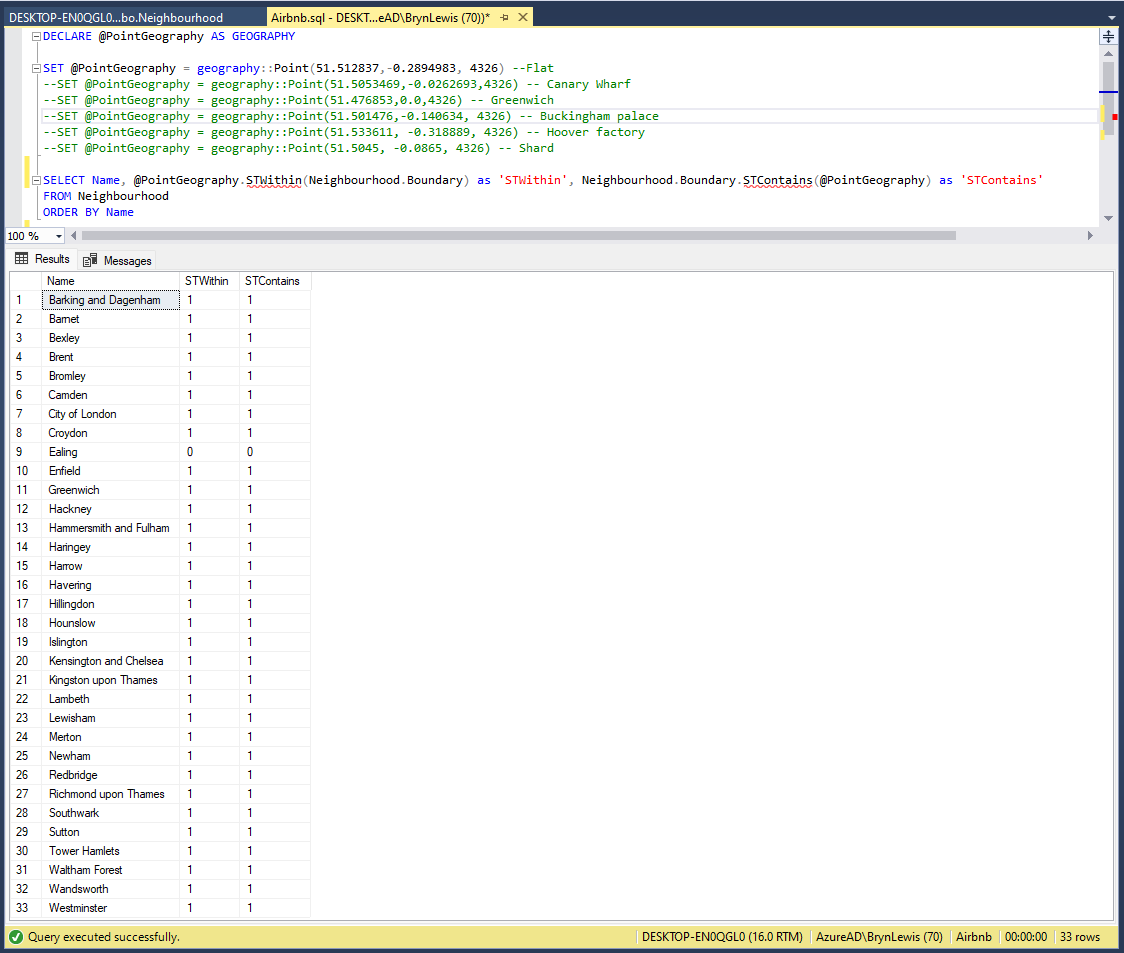
To test the neighbourhood geography I built a test harness with some “known” locations
SQL Server Management Studio Query “inverted” results
The query results were the inverse of what I was expecting.
SQL Server Management Studio Query “reorientated” results
I was interested in the five hosts with the most listings.
Host_id: 129230780
Name: STK Homes
About: Hello from Staykeepers Homes! We are a group of people who love traveling and sharing their experiences with others. But more so, we like to think of ourselves as people who constantly search to challenge and improve themselves.
URL: https://www.airbnb.com/users/show/129230780
Host_id: 33889201
Name: Veeve
About: Greetings from the Veeve team! Veeve manage the largest collection of homes to rent for short stays in London since 2011, launching in Paris in 2017. Our rental homes are predominantly privately-owned, lived-in homes in vibrant neighbourhoods. Thanks to our fully managed service, when you stay in a Veeve property you can benefit from the spaciousness, personal style and relaxed feel of a home – but with all the amenities of a hotel. Once a booking is confirmed our Customer Service team will become your main point of contact and get in touch with you to organise your arrival at the property (including airport transfers, upon request); after which our on-the-ground management team will look after all aspects of your stay, with in-stay support available to help with any queries. We have strict cleanliness guidelines for our cleaners and all staff who enter our properties and have reinforced existing cleaning procedures in line with official WHO, British and French government guidance. As always, our team ensure that all properties are cleaned to a professional standard before and after each stay, with increased focus on touch-point cleaning (door handles, kitchen surfaces, kettles, taps etc.). All staff who enter properties will follow the below procedures: - Carry and regularly use alcohol-based hand rub - Sanitise their mobile phones - Focus extra attention when cleaning key touch-point areas (door handles, kitchen surfaces, kettles, taps etc.) - Wear protective gear where appropriate - Wash and disinfect work shoes We might be able to arrange for property viewings, upon request, for stays of over 28 nights. Please be aware once a booking is confirmed you will be required to complete a Rental Agreement and also ID verification via our partners Superhog. This is mandatory for all our stays and in accordance to short lets requirements with Veeve. If you have any questions, please do not hesitate to contact us and we will be sure to answer you promptly.
URL: https://www.airbnb.com/users/show/33889201
Host_id: 314162972
Name: Blueground
About: We’re Blueground, a global proptech company with several thousand move-in-ready apartments in a growing number of major cities around the world. With flexible terms and homes in vibrant, centrally based neighborhoods, you’ll feel at home and free to roam for as long as you want — a month, a year, or longer. Each apartment is thoughtfully designed with exclusive furnishings, fully equipped kitchens, and incredible amenities – making every day a five-star experience. From day one, you’ll enjoy high-speed Wi-Fi, premium linens, and smart home entertainment. Plus, access to pools, gyms, and outdoor spaces in select buildings. Why stress over your apartment? We provide a hassle-free alternative — a consistent, quality guest experience that starts even before you arrive. Because we let you book our most up-to-date apartment listings online, confirm with a click, pay securely, and check in easily. During your stay Upon arrival, you’ll either be greeted personally by a Blueground team member or given self-check-in instructions. The entire apartment is yours! You’ll enjoy reliable support via email, phone, and our Guest App, where you can request everything from a home cleaning to extra towels. We’ll share all details upon confirmation of your stay.
URL: https://www.airbnb.com/users/show/314162972
Host_id: 28820321
Name: Veronica
About: I moved to London to follow my love who is a Londoner, I have a 4 years old daughter and two cats. we live in a beautiful house surrounded by parks and trees in Muswell Hill. The Airbnb experience has been very positive and from that experience I set up a company called HelloGuest to provide excellent hassle-free Airbnb management services for short stay rental properties in London and across all the UK advertised on Airbnb. Our services cover everything from full property management (guest communication, check-in & out, cleaning & laundry, manage the listing, 24/7 support service, etc) to partly managed or individual services depending on your needs. Our aim is to provide professional services for high quality properties to deliver an excellent guest experience. We are here to help, so please get in touch with any questions you have.
URL: https://www.airbnb.com/users/show/28820321
host_id: 1432477
Name: City Relay
About: City Relay is a property management company that looks after a bright and diverse portfolio of properties in London! We are committed to offering the best stay to each and every one of our guests. We provide some unique services that most of the other hosts cannot provide. All our properties are selected carefully in order to offer you the best stay! From the moment you book to the moment you arrive at the apartment, we are helping you through all the processes so that your stay is hassle-free! In order to address health and safety concerns, all our properties receive a deep professional cleaning and disinfection after each stay.
URL: https://www.airbnb.com/users/show/1432477
After looking at the listings table this was my first attempt at a Host table.
CREATE TABLE [dbo].[Host](
[Id] [bigint] NOT NULL,
[Url] [nvarchar](150) NOT NULL,
[Name] [nvarchar](50) NOT NULL,
[Since] [date] NOT NULL,
[About] [nvarchar](max) NULL,
[Response_time] [nvarchar](50) NOT NULL,
[Response_rate] [nvarchar](50) NOT NULL,
[Acceptance_rate] [nvarchar](50) NOT NULL,
[Thumbnail_url] [nvarchar](150) NOT NULL,
[Picture_url] [nvarchar](150) NOT NULL,
[Identity_verified] [bit] NOT NULL,
[Identity_verifications] [nvarchar](50) NOT NULL,
CONSTRAINT [PK_Host] PRIMARY KEY CLUSTERED
(
[Id] ASC
)
Which I populated with the following SELECT INTO statement
SELECT DISTINCT [Host_id] as Id
,host_url as url
,[Host_Name] as Name
,host_since as Since
---,host_location as
,host_about as About
,host_response_time as Response_time
,host_response_rate as ResponseRate
,host_acceptance_rate as Acceptance_rate
--,host_is_superhost
,host_thumbnail_url as thumbnail_url
,host_picture_url as picture_url
--,host_neighbourhood
--,host_listings_count
--,host_total_listings_count
,host_verifications as Identity_verifications
--,host_has_profile_pic
,host_identity_verified as Identity_verified
FROM listingsRaw
INTO Host
After extracting the hosts information both needed some more “curation” so I wrote some queries (like the following) to find incomplete records.
SELECT id, Url from Host WHERE Url is null
SELECT id, Name from Host WHERE Name is null
SELECT id, Since from Host WHERE Since is null
SELECT id, response_time from Host WHERE response_time is null
SELECT id, response_rate from Host WHERE response_rate is null
SELECT id, Acceptance_rate from Host WHERE Acceptance_rate is null
SELECT id, Thumbnail_url from Host WHERE Thumbnail_url is null
SELECT id, Picture_url from Host WHERE Picture_url is null
SELECT id, Identity_verified from Host WHERE Identity_verified is null
SELECT id, Identity_verifications from Host WHERE Identity_verifications is null
SELECT id, About from Host WHERE About is null
At the end of my data cleansing the Listing table has 87940 rows and the Host table 53388 rows.
The Inside AirbnbLondon dataset has 87946 listings and the id column (which is the primary key) has a minimum value of 13913 and maximum of 973895808066047620 in the database.
Back in the early 90’s I used to live next to the Ealing Lawn Tennis Club in London
I used “Ealing” as the SearchText for my initial testing and tried different page numbers and sizes
Testing the search functionality with SwaggerUI
The listings search results JSON looked good but I missed one important detail…
string LookupByIdSql = @"SELECT Id, [Name], Listing_URL AS ListingURL
FROM ListingsHosts
WHERE id = @Id";
public record ListingLookupDto
{
public long Id { get; set; }
public string? Name { get; set; }
public string? ListingURL { get; set; }
};
//...
app.MapGet("/Listing/Results/{id:long}", async (long id, IDapperContext dappperContext) =>
{
using (var connection = dappperContext.ConnectionCreate())
{
ListingLookupDto result = await connection.QuerySingleOrDefaultWithRetryAsync<ListingLookupDto>(LookupByIdSql, new { id });
if (result is null)
{
return Results.Problem($"Listing {id} not found", statusCode: StatusCodes.Status404NotFound);
}
return Results.Ok(result);
}
})
.Produces<ListingLookupDto>(StatusCodes.Status200OK)
.Produces<ProblemDetails>(StatusCodes.Status404NotFound)
.WithOpenApi();
The id values in the search response and lookup DTOs were correct
Visual Studio 2022 Debugger inspecting listing id value
I had missed the clue in the search response JSON the listing id and the listingURL id didn’t match.
This specification allows implementations to set limits on the range
and precision of numbers accepted. Since software that implements
IEEE 754-2008 binary64 (double precision) numbers [IEEE754] is
generally available and widely used, good interoperability can be
achieved by implementations that expect no more precision or range
than these provide, in the sense that implementations will
approximate JSON numbers within the expected precision.
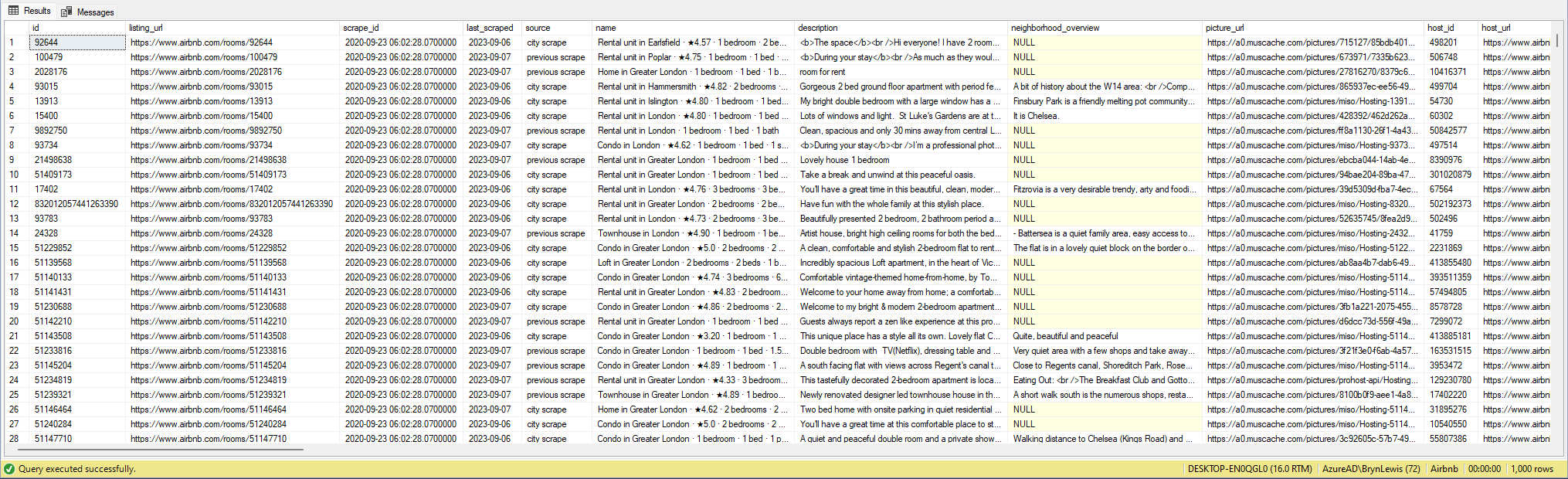
My initial ASP.NET Core Minimal AP exploration uses the Inside AirbnbLondon dataset which has 87946 listings. The data is pretty “nasty” with lots of nullable and wide columns so it took several attempts to import.
CREATE TABLE [dbo].[listingsRaw](
	[id] [bigint] NOT NULL,
	[listing_url] [nvarchar](50) NOT NULL,
	[scrape_id] [datetime2](7) NOT NULL,
	[last_scraped] [date] NOT NULL,
	[source] [nvarchar](50) NOT NULL,
	[name] [nvarchar](max) NOT NULL,
	[description] [nvarchar](max) NULL,
	[neighborhood_overview] [nvarchar](1050) NULL,
	[picture_url] [nvarchar](150) NULL,
	[host_id] [int] NOT NULL,
	[host_url] [nvarchar](50) NOT NULL,
	[host_name] [nvarchar](50) NULL,
	[host_since] [date] NULL,
	[host_location] [nvarchar](100) NULL,
	[host_about] [nvarchar](max) NULL,
	[host_response_time] [nvarchar](50) NULL,
	[host_response_rate] [nvarchar](50) NULL,
	[host_acceptance_rate] [nvarchar](50) NULL,
	[host_is_superhost] [bit] NULL,
	[host_thumbnail_url] [nvarchar](150) NULL,
	[host_picture_url] [nvarchar](150) NULL,
	[host_neighbourhood] [nvarchar](50) NULL,
	[host_listings_count] [int] NULL,
	[host_total_listings_count] [int] NULL,
	[host_verifications] [nvarchar](50) NOT NULL,
	[host_has_profile_pic] [bit] NULL,
	[host_identity_verified] [bit] NULL,
	[neighbourhood] [nvarchar](100) NULL,
	[neighbourhood_cleansed] [nvarchar](50) NOT NULL,
	[neighbourhood_group_cleansed] [nvarchar](1) NULL,
	[latitude] [float] NOT NULL,
	[longitude] [float] NOT NULL,
	[property_type] [nvarchar](50) NOT NULL,
	[room_type] [nvarchar](50) NOT NULL,
	[accommodates] [tinyint] NOT NULL,
	[bathrooms] [nvarchar](1) NULL,
	[bathrooms_text] [nvarchar](50) NULL,
	[bedrooms] [tinyint] NULL,
	[beds] [tinyint] NULL,
	[amenities] [nvarchar](max) NOT NULL,
	[price] [money] NOT NULL,
	[minimum_nights] [smallint] NOT NULL,
	[maximum_nights] [int] NOT NULL,
	[minimum_minimum_nights] [smallint] NULL,
	[maximum_minimum_nights] [int] NULL,
	[minimum_maximum_nights] [int] NULL,
	[maximum_maximum_nights] [int] NULL,
	[minimum_nights_avg_ntm] [float] NULL,
	[maximum_nights_avg_ntm] [float] NULL,
	[calendar_updated] [nvarchar](1) NULL,
	[has_availability] [bit] NOT NULL,
	[availability_30] [tinyint] NOT NULL,
	[availability_60] [tinyint] NOT NULL,
	[availability_90] [tinyint] NOT NULL,
	[availability_365] [smallint] NOT NULL,
	[calendar_last_scraped] [date] NOT NULL,
	[number_of_reviews] [smallint] NOT NULL,
	[number_of_reviews_ltm] [int] NOT NULL,
	[number_of_reviews_l30d] [tinyint] NOT NULL,
	[first_review] [date] NULL,
	[last_review] [date] NULL,
	[review_scores_rating] [float] NULL,
	[review_scores_accuracy] [float] NULL,
	[review_scores_cleanliness] [float] NULL,
	[review_scores_checkin] [float] NULL,
	[review_scores_communication] [float] NULL,
	[review_scores_location] [float] NULL,
	[review_scores_value] [float] NULL,
	[license] [nvarchar](max) NULL,
	[instant_bookable] [bit] NOT NULL,
	[calculated_host_listings_count] [int] NULL,
	[calculated_host_listings_count_entire_homes] [int] NOT NULL,
	[calculated_host_listings_count_private_rooms] [int] NOT NULL,
	[calculated_host_listings_count_shared_rooms] [int] NOT NULL,
	[reviews_per_month] [float] NULL
) ON [PRIMARY] TEXTIMAGE_ON [PRIMARY]
There are other data quality issues e.g. the host information is duplicated in each of their Listings e.g. host_id, host_name, host_since, host_* etc. which will need to be tidied up.
Swagger user interface for Raw Listings search functionality.
I have implemented basic (“incomplete”) OpenAPI support for functionality and stress testing.
Swagger user interface parameterised search functionality.
The search results are paginated and individual listings can be retrieved using the Airbnb listing “id”.
const string SearchPaginatedSql = @"SELECT Uid,Id,[Name], neighbourhood
                     FROM listings
                     WHERE[Name] LIKE N'%' + @SearchText + N'%'
                     ORDER By[Name]
                     OFFSET @PageSize *(@PageNumber - 1) ROWS FETCH NEXT @PageSize ROWS ONLY";

public record ListingListDto
{
   public long Id { get; set; }
   public string? Name { get; set; }
   public string? Neighbourhood { get; set; }
};
Swagger user interface search functionality with untyped response.
The first HTTP GET implementation returns an untyped result-set which was not very helpful.
app.MapGet("/Listing/Search", async (string searchText, int pageNumber, int pageSize, [FromServices] IDapperContext dappperContext) =>
{
   using (var connection = dappperContext.ConnectionCreate())
   {
      return await connection.QueryWithRetryAsync(SearchPaginatedSql, new { searchText, pageNumber, pageSize });
   }
})
.WithOpenApi();
Swagger user interface search functionality with typed response
The second HTTP GET implementation returns a typed result-set which improved the “usability” of clients generated from the OpenAPI definition file.
app.MapGet("/Listing/Search/Typed", async (string searchText, int pageNumber, int pageSize, [FromServices] IDapperContext dappperContext) =>
{
   using (var connection = dappperContext.ConnectionCreate())
   {
      return await connection.QueryWithRetryAsync<ListingListDto>(SearchPaginatedSql, new { searchText, pageNumber, pageSize });
   }
})
.Produces<IList<ListingListDto>>(StatusCodes.Status200OK)
.WithOpenApi();
string LookupByIdSql = @"SELECT Id,[Name], neighbourhood
FROM ListingsHosts
WHERE id = @Id";

public record ListingLookupDto
{
public long Id { get; set; }
public string? Name { get; set; }
public string? Neighbourhood { get; set; }
};
Swagger user interface Listing lookup functionality
app.MapGet("/Listing/{id:long}", async (long id, IDapperContext dappperContext) =>
{
   using (var connection = dappperContext.ConnectionCreate())
   {
      ListingLookupDto result = await connection.QuerySingleOrDefaultWithRetryAsync<ListingLookupDto>(LookupByIdSql, new { id });
      if (result is null)
      {
         return Results.Problem($"Listing {id} not found", statusCode: StatusCodes.Status404NotFound);
      }

      return Results.Ok(result);
   }
})
.Produces<ListingLookupDto>(StatusCodes.Status200OK)
.Produces<ProblemDetails>(StatusCodes.Status404NotFound)
.WithOpenApi();
The lack of validation of the SearchText, PageSize and PageNumber parameters allow uses to enter invalid values which caused searches to fail.
Swagger user interface search functionality with an invalid page number
My initial approach was to decorate the parameters of the ValidatedQuery method with DataAnnotations to ensure only valid values were accepted.
This wasn’t a great solution because the validation of the parameters was declared as part of the user interface and would have to be repeated everywhere listing search functionality was provided.
Swagger user interface search functionality with parameter validation
app.MapGet("/Listing/Search/Parameters", async ([AsParameters] SearchParameters searchParameters,
   [FromServices] IDapperContext dappperContext) =>
{
   using (var connection = dappperContext.ConnectionCreate())
   {
      return await connection.QueryWithRetryAsync<ListingListDto>(SearchPaginatedSql, new { searchText = searchParameters.SearchText, searchParameters.PageNumber, searchParameters.PageSize });
   }
})
.Produces<IList<ListingListDto>>(StatusCodes.Status200OK)
.Produces<ProblemDetails>(StatusCodes.Status400BadRequest)
.WithOpenApi();

public record SearchParameters
{
   // https://github.com/domaindrivendev/Swashbuckle.AspNetCore/issues/2658 possibly related?
   public const byte SearchTextMinimumLength = 3;
   public const byte SearchTextMaximumLength = 15;
   public const int PageNumberMinimum = 1;
   public const int PageNumberMaximum = 100;
   public const byte PageSizeMinimum = 5;
   public const byte PageSizeMaximum = 50;

   //[FromQuery, Required, MinLength(SearchTextMinimumLength, ErrorMessage = "SearchTextMinimumLegth"), MaxLength(SearchTextMaximumLength, ErrorMessage = "SearchTextMaximumLegth")]
   //[Required, MinLength(SearchTextMinimumLength, ErrorMessage = "SearchTextMinimumLegth"), MaxLength(SearchTextMaximumLength, ErrorMessage = "SearchTextMaximumLegth")]
   [MinLength(SearchTextMinimumLength, ErrorMessage = "SearchTextMinimumLegth"), MaxLength(SearchTextMaximumLength, ErrorMessage = "SearchTextMaximumLegth")]
   public string SearchText { get; set; }

   //[FromQuery, Range(PageNumberMinimum, PageNumberMaximum, ErrorMessage = "PageNumberMinimum PageNumberMaximum")]
   //[Required, Range(PageNumberMinimum, PageNumberMaximum, ErrorMessage = "PageNumberMinimum PageNumberMaximum")]
   [Range(PageNumberMinimum, PageNumberMaximum, ErrorMessage = "PageNumberMinimum PageNumberMaximum")]
   public int PageNumber { get; set; }

   [Range(PageSizeMinimum, PageSizeMaximum, ErrorMessage = "PageSizeMinimum PageSizeMaximum")]
   public int PageSize { get; set; }
}
Swagger user interface search functionality with parameter validation
This last two implementations worked though the error messages I had embedded in the code were not displayed I think this is related to this Swashbuckle Issue.
There is also an issue looking up some listings with larger listing ids which I will need some investigation.




 devMobile's blog