Random wanderings through Microsoft Azure esp. PaaS plumbing, the IoT bits, AI on Micro controllers, AI on Edge Devices, .NET nanoFramework, .NET Core on *nix and ML.NET+ONNX
I have started with a “nasty” Proof of Concept(PoC) to figure out how to connect to the Swarm Hive API.
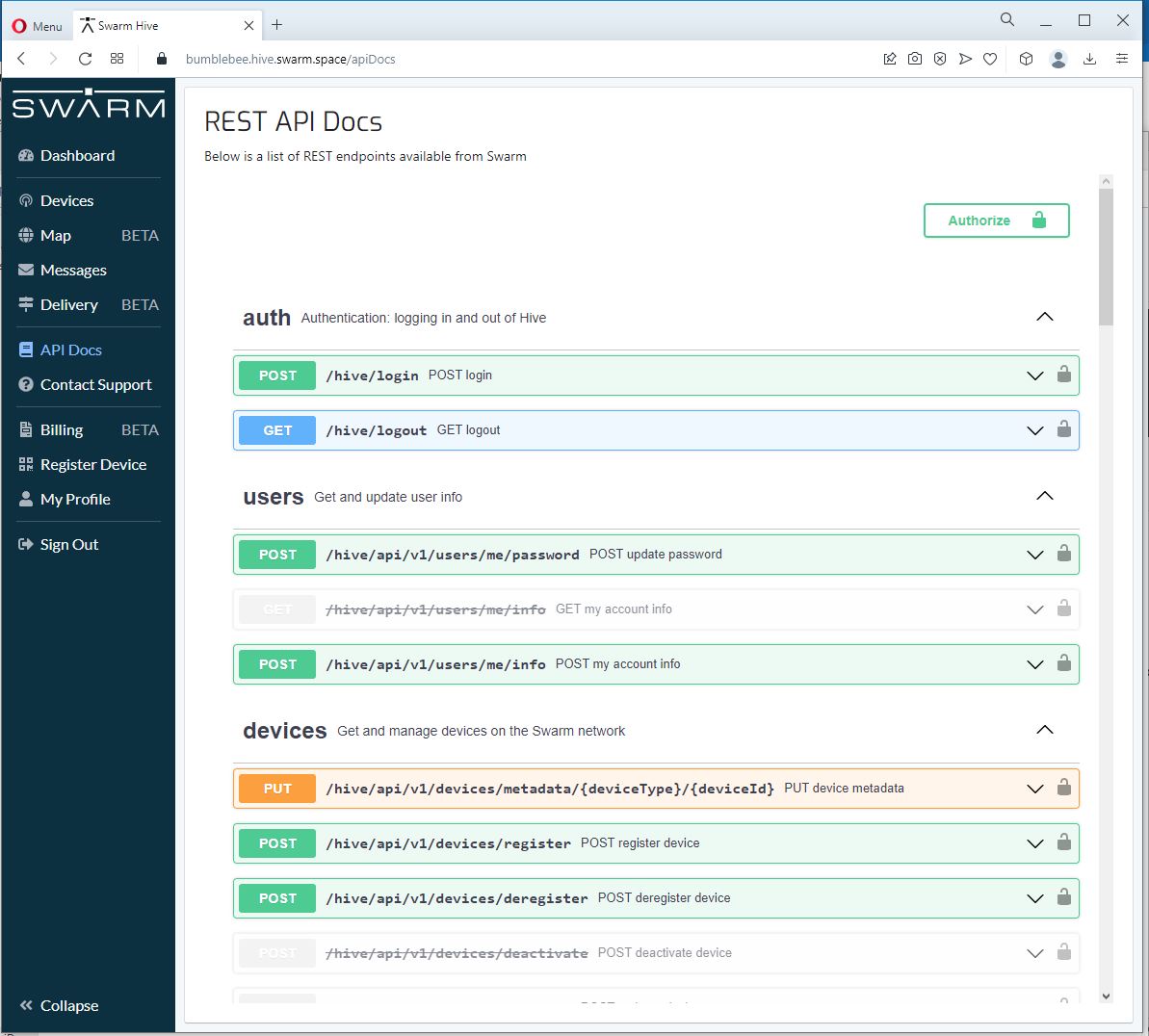
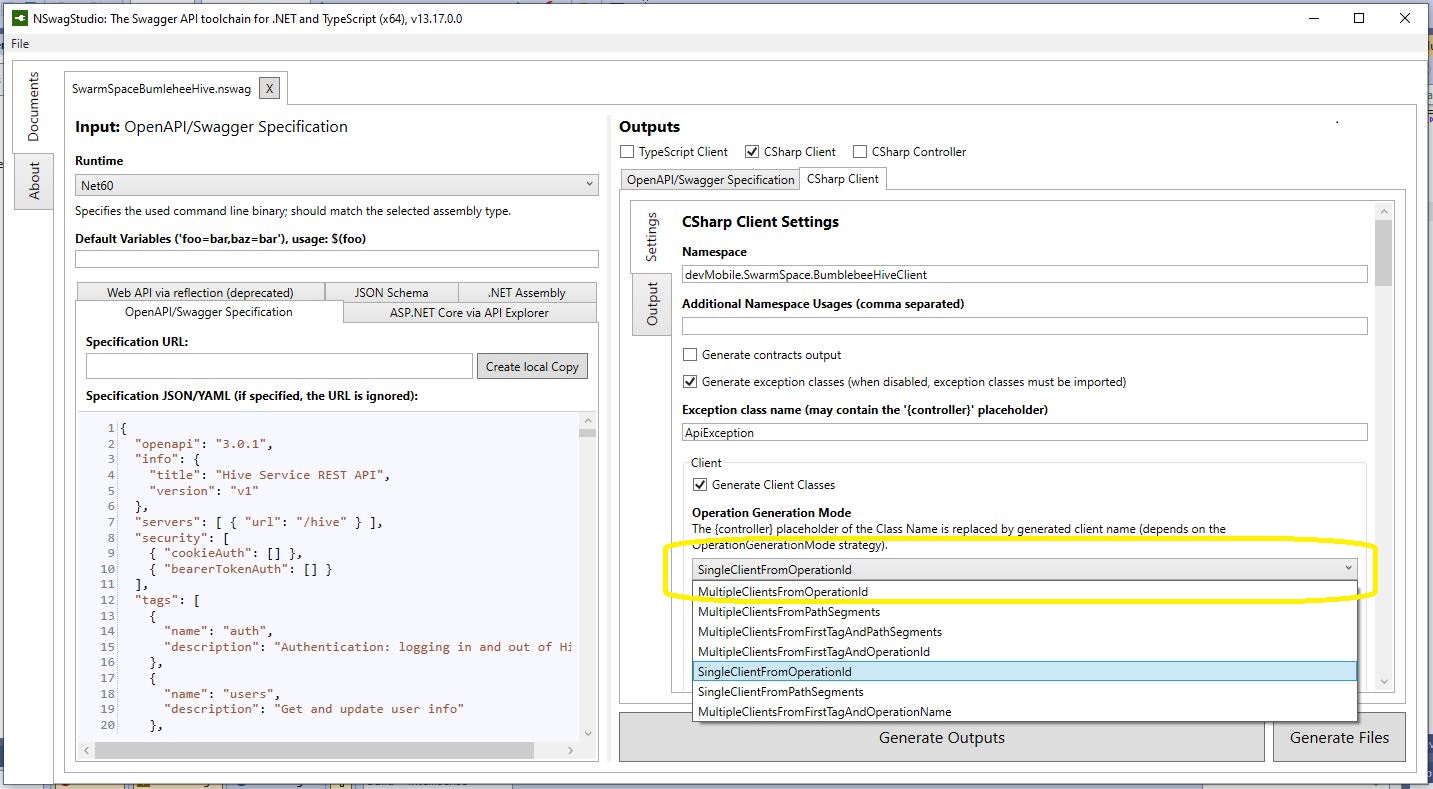
The Swarm Hive API has been published with Swagger/OpenAPI which is really simple to use. I used NSwagStudio to generate a C# client to I didn’t have to “handcraft” one.
Initially the code would compile but I found a clue in a Github Issue from September 2017 which was to change the “Operation Generation Model” to SingleClientFromOperationId.(The setting is highlighted above).
I tried a couple of ways to attach the Swarm Hive API authorisation token (returned by the Login method) to client requests. After a couple for failed attempts, I “realised” that adding the “Authorization” header to the HttpClientdefaultRequestHeaders was by far the simplest approach.
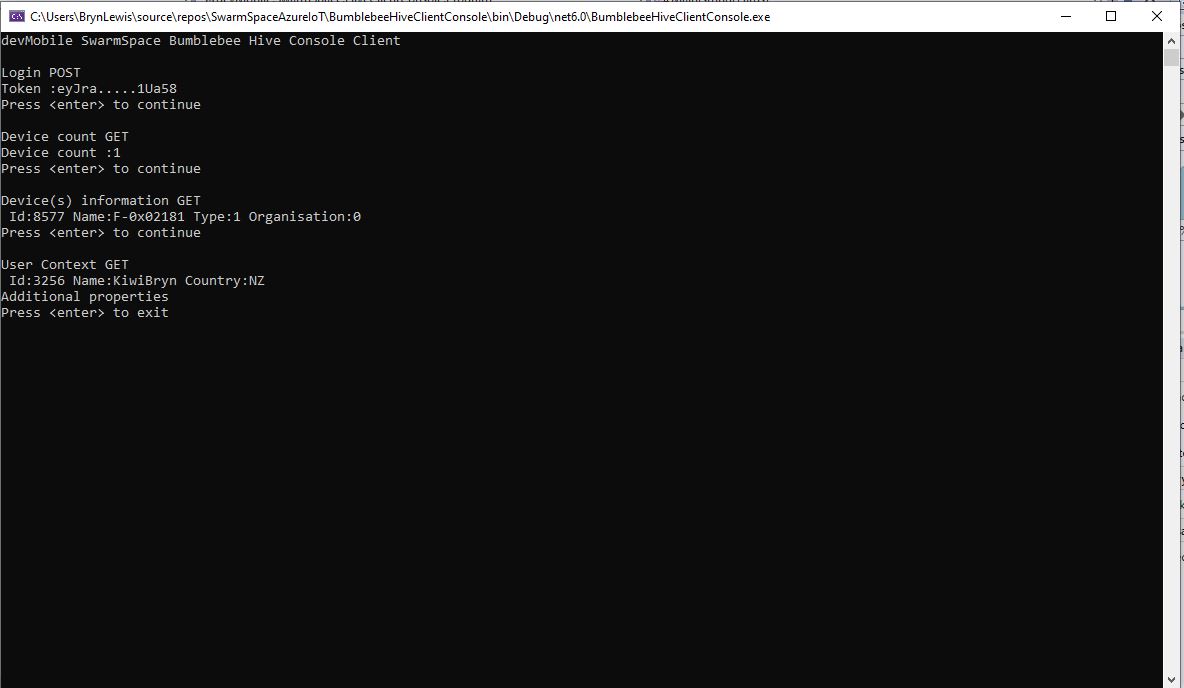
My “nasty” console application calls the Login method, then requests the number of devices (I only have one), gets a list of the properties of all the devices(very short list) then gets the User Context and displays their ID, Name and Country.
A couple of recent contracts have been maintaining and “remediating” legacy codebases which have been in production for upto a decade. The applications are delivering business value (can’t stop working) and the customer’s budgets are limited (they can only afford incremental change). As a result of this we end up making tactical decisions to keep the application working and longer-term ones to improve the “ilities“(taking into account the customer’s priorities).
It is rare to have a “green fields” project, so my plan was to use the next couple of WebAPI + Dapper posts to illustrate the sort of challenges we have encountered.
Customer: “we want to put a nice webby frontend on our existing bespoke solution” (“putting lipstick on a pig”).
Customer: The user’s login details are stored in the database and we can’t change the login process as the help desk won’t cope.
The remediation of Authentication and Authorisation(A&A) functionality can be particularly painful and is often driven by compliance issues e.g. EU GDPR, The Privacy Act 202 etc.
Lots of NULL values which often makes application code more complex
Duplicates in LoginName column e.g. “NO LOGON”
Some “magic” values e.g. “NO LOGON”
Why does the “Data Conversion Only” person have a photo?
The IsExternalLogonProvider is always false.
The UserPreferences, CustomFields and OtherLanguages columns contain Java Script Object Notation(JSON), need to see how these a generated, updated and used.
The application must have an existing external user provisioning process. It looks like a Person record is created by an Administrator then the User sets their password on first Logon. (not certain if there are any password complexity rules enforced)
An application I worked on didn’t have any enforcement of password complexity and minimum length in earlier versions. This caused issues when a number of their clients couldn’t logon to the new application because their existing password was too short. We updated the logon field rules and retained minimum complexity and length rules on change and reset password field validation. We then forced 5-10% of users per month (so the helpdesk wasn’t overwhelmed by support calls) to update their passwords.
ALTER PROCEDURE [Website].[ActivateWebsiteLogon]
@PersonID int,
@LogonName nvarchar(50),
@InitialPassword nvarchar(40)
WITH EXECUTE AS OWNER
AS
BEGIN
    SET NOCOUNT ON;
    SET XACT_ABORT ON;

    UPDATE [Application].People
    SET IsPermittedToLogon = 1,
        LogonName = @LogonName,
        HashedPassword = HASHBYTES(N'SHA2_256', @InitialPassword + FullName),
        UserPreferences = (SELECT UserPreferences FROM [Application].People WHERE PersonID = 1) -- Person 1 has User Preferences template
    WHERE PersonID = @PersonID
    AND PersonID <> 1
    AND IsPermittedToLogon = 0;

    IF @@ROWCOUNT = 0
    BEGIN
        PRINT N'The PersonID must be valid, must not be person 1, and must not already be enabled';
        THROW 51000, N'Invalid PersonID', 1;
        RETURN -1;
    END;
END;
The password hash is seeded with the persons FullName, this could be a problem if a user changes their name.
The user selects their LoginName, this needs further investigate as duplicates could be an issue
XACT_ABORT ON + THROW for validation and state management is odd, need to check how SqlExceptions are handled in application code.
PersonID magic number handling adds complexity and needs further investigation.
EXECUTE AS OWNER caught my attention, checked only one Database user for application.
The LastEditBy isn’t set to the PersonID which seems a bit odd.
Based on the [Website].[ActivateWebsiteLogon] (couldn’t find Logon so reviewed ChangePassword) this is my first attempt at a stored procedure which validates a user’s LogonName and Password.
CREATE PROCEDURE [Application].[PersonAuthenticateLookupByLogonNameV1]
@LogonName nvarchar(50),
@Password nvarchar(40)
AS
BEGIN
	SELECT PersonID, FullName, EmailAddress
	FROM [Application].[People]
	WHERE (( LogonName = @LogonName)
		AND (IsPermittedToLogon = 1)
		AND (HASHBYTES(N'SHA2_256', @Password + FullName) = HashedPassword))
END
GO
We use the ..VX approach to reduce issues when doing canary and rolling deployments. If the parameter list or return dataset of a stored procedure changes (even if we think it is backwards compatible) the version number is incremented so that different versions of the application can be run concurrently and backing out application updates is less fraught.
public class LogonRequest
{
    [JsonRequired]
    [MinLength(Constants.LogonNameLengthMinimum)]
    [MaxLength(Constants.LogonNameLengthMaximum)]
    public string LogonName { get; set; }

    [JsonRequired]
    [MinLength(Constants.PasswordLengthMinimum)]
    [MaxLength(Constants.PasswordLengthMaximum)]
    public string Password { get; set; }
}
Then a Proof of Concept (PoC) AuthenticationController to process a login request.
Swagger Docs Authentication controller Login
The Logon method calls the PersonAuthenticateLookupByLogonNameV1 stored procedure to validate the LoginName and password. In this iteration the only claim added to the JSON Web Token(JWT) is the PersonId. We try and keep the JWTs small as possible as one customer’s application failed randomly because a couple of user’s JWTs were so large (lots of roles) that some versions of browsers choked.
public AuthenticationController(IConfiguration configuration, ILogger<AuthenticationController> logger, IOptions<Model.JwtIssuerOptions> jwtIssuerOptions)
{
    this.configuration = configuration;
    this.logger = logger;
    this.jwtIssuerOptions = jwtIssuerOptions.Value;
 }

[HttpPost("login")]
public async Task<ActionResult> Login([FromBody] Model.LoginRequest request )
{
    var claims = new List<Claim>();

    using (SqlConnection db = new SqlConnection(configuration.GetConnectionString("WorldWideImportersDatabase")))
    {
        UserLogonUserDetailsDto userLogonUserDetails = await db.QuerySingleOrDefaultWithRetryAsync<UserLogonUserDetailsDto>("[Application].[PersonAuthenticateLookupByLogonNameV1]", param: request, commandType: CommandType.StoredProcedure);
        if (userLogonUserDetails == null)
        {
             logger.LogWarning("Login attempt by user {0} failed", request.LogonName);

             return this.Unauthorized();
        }

        // Setup the primary SID + name info
        claims.Add(new Claim(ClaimTypes.PrimarySid, userLogonUserDetails.PersonID.ToString()));
    }

    var authSigningKey = new SymmetricSecurityKey(Encoding.UTF8.GetBytes(jwtIssuerOptions.SecretKey));

    var token = new JwtSecurityToken(
              issuer: jwtIssuerOptions.Issuer,
              audience: jwtIssuerOptions.Audience,
              expires: DateTime.UtcNow.Add(jwtIssuerOptions.TokenExpiresAfter),
              claims: claims,
              signingCredentials: new SigningCredentials(authSigningKey, SecurityAlgorithms.HmacSha256));

        return this.Ok(new
        {
            token = new JwtSecurityTokenHandler().WriteToken(token),
            expiration = token.ValidTo,
        });
    }
}
After a successful logon the Token has to be copied (I regularly miss the first or the last character) from the response payload to the Authorisation form.
The Swagger UI Authentication method after a successful Logon with the bearer token highlighted
I decorated the SystemController DeploymentVersion deployment with the [Authorize] attribute to force a check that the user is authenticated.
/// <summary>
/// WebAPI controller for handling System Dapper functionality.
/// </summary>
[Route("api/[controller]")]
[ApiController]
public class SystemController : ControllerBase
{
    /// <summary>
    /// Returns the Application version in [Major].[Minor].[Build].Revision] format.
    /// </summary>
    /// <response code="200">List of claims returned.</response>
    /// <response code="401">Unauthorised, bearer token missing or expired.</response>
    /// <returns>Returns the Application version in [Major].[Minor].[Build].Revision] format.</returns>
    [HttpGet("DeploymentVersion"), Authorize]
    public string DeploymentVersion()
    {
        return Assembly.GetExecutingAssembly().GetName().Version.ToString();
    }
}
If the bearer token is missing, invalid (I accidentally didn’t copy either the first or last character) or expired the method call will fail with a 401 Unauthorized error.
Swagger UI System Controller DeploymentVersion method failing because the JWT is missing, invalid or expired
Controlling access to controllers and methods of controllers is probably not granular for most applications so adding “coarse” and “fine grained” authorisation to an existing application and the configuration of Swashbuckle and application request processing middleware to support JWTs will be covered in a couple of future posts.
For remediation projects we try to keep the code as simple as possible (but no simpler), by minimising the plumbing and only using advanced language features etc. where it adds value.
I’m leaning towards using Dependency Injection for configuration information, so the way connection strings and jwtIssuerOptions is going to be harmonised. In a future version of the application the jwtIssuerOptions will be migrated to an Azure Key Vault.
// Extract application info for Swagger docs from assembly info
var fileVersionInfo = System.Diagnostics.FileVersionInfo.GetVersionInfo(Assembly.GetEntryAssembly().Location);

builder.Services.AddSwaggerGen(c =>
{
    c.SwaggerDoc("v1",
    new OpenApiInfo
    {
        Title = fileVersionInfo.ProductName,
        Version = $"{fileVersionInfo.FileMajorPart}.{fileVersionInfo.FileMinorPart}",
        Description = fileVersionInfo.Comments,

        License = new OpenApiLicense
        {
             Name = fileVersionInfo.LegalCopyright,
             //Url = new Uri(""),
        },
        //TermsOfService = new Uri(""),

        Contact = new OpenApiContact
        {
            Name = fileVersionInfo.CompanyName,
            //Url = new Uri(""),
        }
    });
    c.OperationFilter<AddResponseHeadersFilter>();
    c.IncludeXmlComments(string.Format(@"{0}\WebAPIDapper.xml", System.AppDomain.CurrentDomain.BaseDirectory));
});
This worked okay but there were still some fields which I had to manually update (or there was no matching property in the assembly information), so I abandoned this approach. I still use the version information property as this changes regularly as part of my build management process.
var version = Assembly.GetEntryAssembly().GetName().Version;

builder.Services.AddSwaggerGen(c =>
{
    c.SwaggerDoc("v1",
    new OpenApiInfo
    {
        Title = ".NET Core web API + Dapper + Swagger",
        Version = $"{version.Major}.{version.Minor}",

        Description = "This sample application shows how .NET Core and Dapper can be used to build lightweight Web APIs described with Swagger",
        Contact = new()
        {
            //Email = "", // Not certain this is a good idea
            Name = "Bryn Lewis",
            Url = new Uri("https://blog.devMobile.co.nz")
        },
        License = new()
        {
            Name = "MIT License",
            Url = new Uri("https://opensource.org/licenses/MIT"),
        }
    });
    c.OperationFilter<AddResponseHeadersFilter>();
    c.IncludeXmlComments(string.Format(@"{0}\WebAPIDapper.xml", System.AppDomain.CurrentDomain.BaseDirectory));
});
The first time I tried to edit one of the image files the “this file comes from and untrusted source..” warning was displayed.
Using File Properties to unblock contents.
I “unblocked” the downloaded zip file and extracted the contents again rather than having to unblock each file individually. I then launched the website in the Visual Studio 2002 debugger and the favicon was not displayed. I had forgotten to configure copying of the image files when the application was compiled.
Configuring the favicon images to be copied to the website root.
public static void Main()
{
    Debug.WriteLine($"{DateTime.UtcNow:HH:mm:ss} devMobile.IoT.RAK.Wisblock.AzureIoTHub.RAK11200.PowerSleep starting");

    Thread.Sleep(5000);

    try
    {
        Configuration.SetPinFunction(Gpio.IO04, DeviceFunction.I2C1_DATA);
        Configuration.SetPinFunction(Gpio.IO05, DeviceFunction.I2C1_CLOCK);

        Debug.WriteLine($"{DateTime.UtcNow:HH:mm:ss} Wifi connecting");

        if (!WifiNetworkHelper.ConnectDhcp(Config.Ssid, Config.Password, requiresDateTime: true))
       {
            if (NetworkHelper.HelperException != null)
            {
                 Debug.WriteLine($"{DateTime.UtcNow:HH:mm:ss} WifiNetworkHelper.ConnectDhcp failed {NetworkHelper.HelperException}");
            }

            Sleep.EnableWakeupByTimer(Config.FailureRetryInterval);
            Sleep.StartDeepSleep();
        }

        Debug.WriteLine($"{DateTime.UtcNow:HH:mm:ss} Wifi connected");

        // Configure the SHTC3
        I2cConnectionSettings settings = new(I2cDeviceBusID, Shtc3.DefaultI2cAddress);
        I2cDevice device = I2cDevice.Create(settings);
        Shtc3 shtc3 = new(device);

        // Assuming that if TryGetTemperatureAndHumidity fails accessing temperature or relativeHumidity will cause an exception
        shtc3.TryGetTemperatureAndHumidity(out var temperature, out var relativeHumidity);

#if SLEEP_SHT3C
        shtc3.Sleep();
#endif

        // Configure Analog input (AIN0) port then read the "battery charge"
        AdcController adcController = new AdcController();
        AdcChannel batteryChargeAdcChannel = adcController.OpenChannel(AdcControllerChannel);

        double batteryCharge = batteryChargeAdcChannel.ReadRatio() * 100.0;

        Debug.WriteLine($" Temperature {temperature.DegreesCelsius:F1}°C Humidity {relativeHumidity.Value:F0}% BatteryCharge {batteryCharge:F1}");

        // Assemble the JSON payload, should use nanoFramework.Json
        string payload = $"{{\"RelativeHumidity\":{relativeHumidity.Value:F0},\"Temperature\":{temperature.DegreesCelsius.ToString("F1")}, \"BatteryCharge\":{batteryCharge:F1}}}";

        // Configure the HttpClient uri, certificate, and authorization
        string uri = $"{Config.AzureIoTHubHostName}.azure-devices.net/devices/{Config.DeviceID}";

        HttpClient httpClient = new HttpClient()
        {
            SslProtocols = System.Net.Security.SslProtocols.Tls12,
            HttpsAuthentCert = new X509Certificate(Config.DigiCertBaltimoreCyberTrustRoot),
            BaseAddress = new Uri($"https://{uri}/messages/events?api-version=2020-03-13"),
        };
        httpClient.DefaultRequestHeaders.Add("Authorization", SasTokenGenerate(uri, Config.Key, DateTime.UtcNow.Add(Config.SasTokenRenewFor)));

        Debug.WriteLine($"{DateTime.UtcNow:HH:mm:ss} Azure IoT Hub device {Config.DeviceID} telemetry update start");

        HttpResponseMessage response = httpClient.Post("", new StringContent(payload));

        Debug.WriteLine($"{DateTime.UtcNow:HH:mm:ss} Response code:{response.StatusCode}");

        response.EnsureSuccessStatusCode();
    }
    catch (Exception ex)
    {
        Debug.WriteLine($"{DateTime.UtcNow:HH:mm:ss} Azure IoT Hub telemetry update failed:{ex.Message} {ex?.InnerException?.Message}");

        Sleep.EnableWakeupByTimer(Config.FailureRetryInterval);
        Sleep.StartDeepSleep();
    }

    Sleep.EnableWakeupByTimer(Config.TelemetryUploadInterval);
#if SLEEP_LIGHT
    Sleep.StartLightSleep();
#endif
#if SLEEP_DEEP
    Sleep.StartDeepSleep();
#endif
 }
The LightSleep or DeepSleep based code is significantly less complex because the allocation and deallocation of resources does not have to be managed because the application is restarted when the WakeUp Timer triggers.


 devMobile's blog