After some testing with more client devices, especially the Easy Sensors Arduino Nano radio shield RFM69/95 or NRF24L01+ I have decided to move to non text addresses for devices and the LoRa field gateway.
THIS IS A BREAKING CHANGE
The unique identifier provided by the SHA204A crypto and authentication chip on the EasySensors shield highlighted this issue. The Binary Coded Decimal(BCD) version of the 72 bit identifier was too long to fit in the from address.
My later Arduino based sample clients have some helper functions to populate the message header, add values, and prepare the message payload for reuse.
On the server side I have added code to log the build version and Raspbery PI shield type
// Log the Application build, shield information etc.
LoggingFields appllicationBuildInformation = new LoggingFields();
#if DRAGINO
   appllicationBuildInformation.AddString("Shield", "DraginoLoRaGPSHat");
#endif
…
#if UPUTRONICS_RPIPLUS_CS1
   appllicationBuildInformation.AddString("Shield", "UputronicsPiPlusLoRaExpansionBoardCS1");
#endif
appllicationBuildInformation.AddString("Timezone", TimeZoneSettings.CurrentTimeZoneDisplayName);
appllicationBuildInformation.AddString("OSVersion", Environment.OSVersion.VersionString);
appllicationBuildInformation.AddString("MachineName", Environment.MachineName);

// This is from the application manifest
Package package = Package.Current;
PackageId packageId = package.Id;
PackageVersion version = packageId.Version;

appllicationBuildInformation.AddString("ApplicationVersion", string.Format($"{version.Major}.{version.Minor}.{version.Build}.{version.Revision}"));
this.loggingChannel.LogEvent("Application starting", appllicationBuildInformation, LoggingLevel.Information);
Then when the message payload is populated the from address byte array is converted to BCD
private async void Rfm9XDevice_OnReceive(object sender, Rfm9XDevice.OnDataReceivedEventArgs e)
{
   string addressBcdText;
   string messageBcdText;
   string messageText = "";
   char[] sensorReadingSeparator = new char[] { ',' };
   char[] sensorIdAndValueSeparator = new char[] { ' ' };

   addressBcdText = BitConverter.ToString(e.Address);

   messageBcdText = BitConverter.ToString(e.Data);
   try
   {
      messageText = UTF8Encoding.UTF8.GetString(e.Data);
   }
   catch (Exception)
   {
      this.loggingChannel.LogMessage("Failure converting payload to text", LoggingLevel.Error);
   return;
   }

#if DEBUG
    Debug.WriteLine(@"{0:HH:mm:ss}-RX From {1} PacketSnr {2:0.0} Packet RSSI {3}dBm RSSI {4}dBm = {5} byte message ""{6}""", DateTime.Now, addressBcdText, e.PacketSnr, e.PacketRssi, e.Rssi, e.Data.Length, messageText);
#endif
   LoggingFields messagePayload = new LoggingFields();
   messagePayload.AddInt32("AddressLength", e.Address.Length);
   messagePayload.AddString("Address-BCD", addressBcdText);
   messagePayload.AddInt32("Message-Length", e.Data.Length);
   messagePayload.AddString("Message-BCD", messageBcdText);
   messagePayload.AddString("Nessage-Unicode", messageText);
   messagePayload.AddDouble("Packet SNR", e.PacketSnr);
   messagePayload.AddInt32("Packet RSSI", e.PacketRssi);
   messagePayload.AddInt32("RSSI", e.Rssi);
   this.loggingChannel.LogEvent("Message Data", messagePayload, LoggingLevel.Verbose);


   // Check the address is not to short/long
   if (e.Address.Length < AddressLengthMinimum)
   {
      this.loggingChannel.LogMessage("From address too short", LoggingLevel.Warning);
      return;
   }

   if (e.Address.Length > MessageLengthMaximum)
   {
      this.loggingChannel.LogMessage("From address too long", LoggingLevel.Warning);
      return;
   }

   // Check the payload is not too short/long
   if (e.Data.Length < MessageLengthMinimum)
   {
      this.loggingChannel.LogMessage("Message too short to contain any data", LoggingLevel.Warning);
      return;
   }

   if (e.Data.Length > MessageLengthMaximum)
   {
      this.loggingChannel.LogMessage("Message too long to contain valid data", LoggingLevel.Warning);
      return;
   }

   // Adafruit IO is case sensitive & only does lower case ?
   string deviceId = addressBcdText.ToLower();

   // Chop up the CSV text payload
   string[] sensorReadings = messageText.Split(sensorReadingSeparator, StringSplitOptions.RemoveEmptyEntries);
   if (sensorReadings.Length == 0)
   {
      this.loggingChannel.LogMessage("Payload contains no sensor readings", LoggingLevel.Warning);
      return;
   }

   Group_feed_data groupFeedData = new Group_feed_data();

   LoggingFields sensorData = new LoggingFields();
   sensorData.AddString("DeviceID", deviceId);

   // Chop up each sensor reading into an ID & value
   foreach (string sensorReading in sensorReadings)
   {
      string[] sensorIdAndValue = sensorReading.Split(sensorIdAndValueSeparator, StringSplitOptions.RemoveEmptyEntries);

      // Check that there is an id & value
      if (sensorIdAndValue.Length != 2)
      {
         this.loggingChannel.LogMessage("Sensor reading invalid format", LoggingLevel.Warning);
         return;
      }

      string sensorId = sensorIdAndValue[0].ToLower();
      string value = sensorIdAndValue[1];

      // Construct the sensor ID from SensordeviceID & Value ID
      groupFeedData.Feeds.Add(new Anonymous2() { Key = string.Format("{0}{1}", deviceId, sensorId), Value = value });

      sensorData.AddString(sensorId, value);

      Debug.WriteLine(" Sensor {0}{1} Value {2}", deviceId, sensorId, value);
   }
   this.loggingChannel.LogEvent("Sensor readings", sensorData, LoggingLevel.Verbose);

   try
   {
      Debug.WriteLine(" CreateGroupDataAsync start");
      await this.adaFruitIOClient.CreateGroupDataAsync(this.applicationSettings.AdaFruitIOUserName,
this.applicationSettings.AdaFruitIOGroupName.ToLower(), groupFeedData);
      Debug.WriteLine(" CreateGroupDataAsync finish");
   }
   catch (Exception ex)
   {
      Debug.WriteLine(" CreateGroupDataAsync failed {0}", ex.Message);
				this.loggingChannel.LogMessage("CreateGroupDataAsync failed " + ex.Message, LoggingLevel.Error);
   }
}
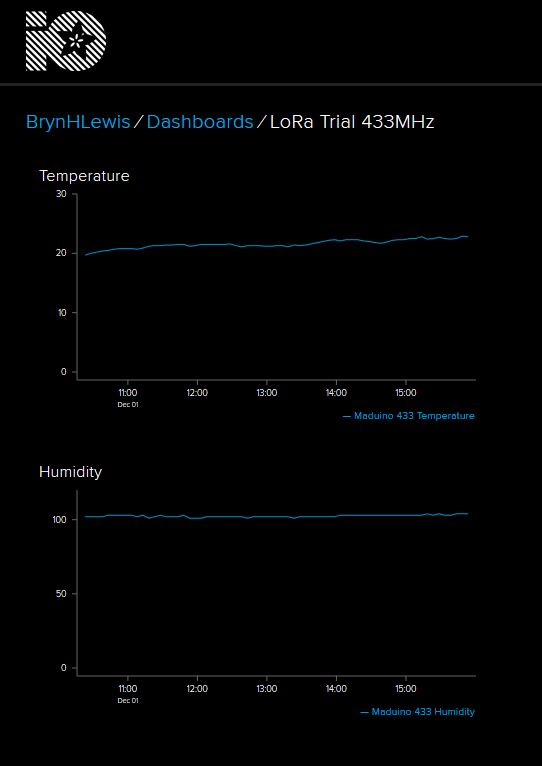
This does mean longer field names but I usually copy n paste them from the Arduino serial monitor or the Event Tracing For Windows (ETW) logging.


 devMobile's blog