Random wanderings through Microsoft Azure esp. PaaS plumbing, the IoT bits, AI on Micro controllers, AI on Edge Devices, .NET nanoFramework, .NET Core on *nix and ML.NET+ONNX
public static void Main(string[] args)
{
    var builder = WebApplication.CreateBuilder(args);

    // Add services to the container.
    builder.Services.AddApplicationInsightsTelemetry();

    // Add services to the container.
    builder.Services.AddTransient<IDapperContext>(s => new DapperContext(builder.Configuration));

    builder.Services.AddControllers();

    builder.Services.AddSingleton<IConnectionMultiplexer>(s => ConnectionMultiplexer.Connect(builder.Configuration.GetConnectionString("Redis")));

    var app = builder.Build();

    // Configure the HTTP request pipeline.
    app.UseHttpsRedirection();
    app.MapControllers();

    app.Run();
}
I trialed the initial versions of my Redis project with Memurai on my development machine, then configured an Azure Cache for Redis. I then load tested the project with several Azure AppService client and there was a significant improvement in response time.
[ApiController]
[Route("api/[controller]")]
public class StockItemsController : ControllerBase
{
    private const int StockItemSearchMaximumRowsToReturn = 15;
    private readonly TimeSpan StockItemListExpiration = new TimeSpan(0, 5, 0);

    private const string sqlCommandText = @"SELECT [StockItemID] as ""ID"", [StockItemName] as ""Name"", [RecommendedRetailPrice], [TaxRate] FROM [Warehouse].[StockItems]";
    //private const string sqlCommandText = @"SELECT [StockItemID] as ""ID"", [StockItemName] as ""Name"", [RecommendedRetailPrice], [TaxRate] FROM [Warehouse].[StockItems]; WAITFOR DELAY '00:00:02'";

    private readonly ILogger<StockItemsController> logger;
    private readonly IDbConnection dbConnection;
    private readonly IDatabase redisCache;

    public StockItemsController(ILogger<StockItemsController> logger, IDapperContext dapperContext, IConnectionMultiplexer connectionMultiplexer)
    {
        this.logger = logger;
        this.dbConnection = dapperContext.ConnectionCreate();
        this.redisCache = connectionMultiplexer.GetDatabase();
    }

        [HttpGet]
    public async Task<ActionResult<IEnumerable<Model.StockItemListDtoV1>>> Get()
    {
        var cached = await redisCache.StringGetAsync("StockItems");
        if (cached.HasValue)
        {
            return Content(cached, "application/json");
        }

        var stockItems = await dbConnection.QueryWithRetryAsync<Model.StockItemListDtoV1>(sql: sqlCommandText, commandType: CommandType.Text);

#if SERIALISER_SOURCE_GENERATION
        string json = JsonSerializer.Serialize(stockItems, typeof(List<Model.StockItemListDtoV1>), Model.StockItemListDtoV1GenerationContext.Default);
#else
        string json = JsonSerializer.Serialize(stockItems);
#endif

        await redisCache.StringSetAsync("StockItems", json, expiry: StockItemListExpiration);

        return Content(json, "application/json");
    }

...

    [HttpDelete()]
    public async Task<ActionResult> ListCacheDelete()
    {
        await redisCache.KeyDeleteAsync("StockItems");

        logger.LogInformation("StockItems list removed");

        return this.Ok();
    }
}
public class StockItemListDtoV1
{
    public int Id { get; set; }

    public string Name { get; set; }

    public decimal RecommendedRetailPrice { get; set; }

    public decimal TaxRate { get; set; }
}

[JsonSourceGenerationOptions(PropertyNamingPolicy = JsonKnownNamingPolicy.CamelCase)]
[JsonSerializable(typeof(List<StockItemListDtoV1>))]
public partial class StockItemListDtoV1GenerationContext : JsonSerializerContext
{
}
The cost of constructing the Serialiser may be higher, but the cost of performing serialisation with it is much smaller.
I used Telerik Fiddler to empty the cache then load the StockItems list 10 times (more tests would improve the quality of the results). The first trial was with the “conventional” serialiser
The average time for the conventional serialiser was 0.028562 seconds
The average time for the generated version was 0.030546 seconds. But, if the initial compilation step was ignored the average duration dropped to 0.000223 seconds a significant improvement.
While exploring some of the functionality of MiniProfiler there were some 3rd party examples which caught my attention.
using (SqlConnection connection = new SqlConnection(@"Data Source=...; Initial Catalog=SyncDB; Trusted_Connection=Yes"))
{
    using (ProfiledDbConnection profiledDbConnection = new ProfiledDbConnection(connection, MiniProfiler.Current))
    {
    if (profiledDbConnection.State != System.Data.ConnectionState.Open)
        profiledDbConnection.Open();
    using (SqlCommand command = new SqlCommand("Select * From Authors", connection))
    {
        using (ProfiledDbCommand profiledDbCommand = new ProfiledDbCommand(command, connection, MiniProfiler.Current))
        {
            var data = profiledDbCommand.ExecuteReader();

            //Write code here to populate the list of Authors
        }
    }
}
“Inspired” by code like this my first attempt to retrieve a list of stock items didn’t look right.
[HttpGet("AdoProfiledOtt")]
public async Task<ActionResult<IEnumerable<Model.StockItemListDtoV1>>> GetAdoProfiledOtt()
{
    List<Model.StockItemListDtoV1> response = new List<Model.StockItemListDtoV1>();

    using (SqlConnection connection = new SqlConnection(configuration.GetConnectionString("default")))
    {
        using (ProfiledDbConnection profiledDbConnection = new ProfiledDbConnection(connection, MiniProfiler.Current))
        {
            await profiledDbConnection.OpenAsync();

            using (SqlCommand command = new SqlCommand(sqlCommandText, connection))
            {
                using (ProfiledDbCommand profiledDbCommand = new ProfiledDbCommand(command, profiledDbConnection, MiniProfiler.Current))
                {
                    using (SqlDataReader reader = await command.ExecuteReaderAsync())
                    {
                        using (ProfiledDbDataReader profiledDbDataReader = new ProfiledDbDataReader(reader, MiniProfiler.Current))
                        {
                            var rowParser = profiledDbDataReader.GetRowParser<Model.StockItemListDtoV1>();

                            while (await profiledDbDataReader.ReadAsync())
                            {
                                response.Add(rowParser(profiledDbDataReader));
                            }
                        }
                    }
                }
            }

            await profiledDbConnection.CloseAsync();
        }
    }
}
/// <summary>
/// Initializes a new instance of the <see cref="ProfiledDbDataReader"/> class (with <see cref="CommandBehavior.Default"/>).
/// </summary>
/// <param name="reader">The reader.</param>
/// <param name="profiler">The profiler.</param>
public ProfiledDbDataReader(DbDataReader reader, IDbProfiler profiler) : this(reader, CommandBehavior.Default, profiler) { }

/// <summary>
/// Initializes a new instance of the <see cref="ProfiledDbDataReader"/> class.
/// </summary>
/// <param name="reader">The reader.</param>
/// <param name="behavior">The behavior specified during command execution.</param>
/// <param name="profiler">The profiler.</param>
public ProfiledDbDataReader(DbDataReader reader, CommandBehavior behavior, IDbProfiler? profiler)
{
    WrappedReader = reader;
    Behavior = behavior;
    _profiler = profiler;
}
...
/// <summary>
/// The <see cref="DbDataReader"/> that is being used.
/// </summary>
public DbDataReader WrappedReader { get; }

/// <inheritdoc cref="DbDataReader.Dispose(bool)"/>
protected override void Dispose(bool disposing)
{
    // reader can be null when we're not profiling, but we've inherited from ProfiledDbCommand and are returning a
    // an unwrapped reader from the base command
    WrappedReader?.Dispose();
    base.Dispose(disposing);
}
Another “using” not required as ProfiledDbDataReader “automagically” disposes the SqlDataReader. This was my final version of profiling the System.Data.SqlClient code to retrieve a list of stock items.
[HttpGet("AdoProfiled")]
public async Task<ActionResult<IEnumerable<Model.StockItemListDtoV1>>> GetProfiledAdo()
{
    List<Model.StockItemListDtoV1> response = new List<Model.StockItemListDtoV1>();

    using (ProfiledDbConnection profiledDbConnection = new ProfiledDbConnection((SqlConnection)dapperContext.ConnectionCreate(), MiniProfiler.Current))
    {
        await profiledDbConnection.OpenAsync();

        using (ProfiledDbCommand profiledDbCommand = new ProfiledDbCommand(new SqlCommand(sqlCommandText), profiledDbConnection, MiniProfiler.Current))
        {
            DbDataReader reader = await profiledDbCommand.ExecuteReaderAsync();

            using (ProfiledDbDataReader profiledDbDataReader = new ProfiledDbDataReader(reader, MiniProfiler.Current))
            {
                var rowParser = profiledDbDataReader.GetRowParser<Model.StockItemListDtoV1>();

                while (await profiledDbDataReader.ReadAsync())
                {
                    response.Add(rowParser(profiledDbDataReader));
                }
            }
        }
    }

    return this.Ok(response);
}
The profileDbDataReader.cs implementation was “sparse” and when loading a longer list of stock items there were some ReadAsync calls which took a bit longer.
/// <summary>
/// The profiled database data reader.
/// </summary>
public class ProfiledDbDataReader : DbDataReader
{
    private readonly IDbProfiler? _profiler;

    /// <summary>
    /// Initializes a new instance of the <see cref="ProfiledDbDataReader"/> class (with <see cref="CommandBehavior.Default"/>).
    /// </summary>
    /// <param name="reader">The reader.</param>
    /// <param name="profiler">The profiler.</param>
    public ProfiledDbDataReader(DbDataReader reader, IDbProfiler profiler) : this(reader, CommandBehavior.Default, profiler) { }

    /// <summary>
    /// Initializes a new instance of the <see cref="ProfiledDbDataReader"/> class.
    /// </summary>
    /// <param name="reader">The reader.</param>
    /// <param name="behavior">The behavior specified during command execution.</param>
    /// <param name="profiler">The profiler.</param>
    public ProfiledDbDataReader(DbDataReader reader, CommandBehavior behavior, IDbProfiler? profiler)
    {
        WrappedReader = reader;
        Behavior = behavior;
        _profiler = profiler;
    }

    /// <summary>Gets the behavior specified during command execution.</summary>
    public CommandBehavior Behavior { get; }

    /// <inheritdoc cref="DbDataReader.Depth"/>
    public override int Depth => WrappedReader.Depth;

    /// <inheritdoc cref="DbDataReader.FieldCount"/>
    public override int FieldCount => WrappedReader.FieldCount;

    /// <inheritdoc cref="DbDataReader.HasRows"/>
    public override bool HasRows => WrappedReader.HasRows;

    /// <inheritdoc cref="DbDataReader.IsClosed"/>
    public override bool IsClosed => WrappedReader.IsClosed;

    /// <inheritdoc cref="DbDataReader.RecordsAffected"/>
    public override int RecordsAffected => WrappedReader.RecordsAffected;

    /// <summary>
    /// The <see cref="DbDataReader"/> that is being used.
    /// </summary>
    public DbDataReader WrappedReader { get; }

    /// <inheritdoc cref="DbDataReader.this[string]"/>
    public override object this[string name] => WrappedReader[name];

    /// <inheritdoc cref="DbDataReader.this[int]"/>
    public override object this[int ordinal] => WrappedReader[ordinal];
...
    /// <inheritdoc cref="DbDataReader.GetString(int)"/>
    public override string GetString(int ordinal) => WrappedReader.GetString(ordinal);

    /// <inheritdoc cref="DbDataReader.GetValue(int)"/>
    public override object GetValue(int ordinal) => WrappedReader.GetValue(ordinal);

    /// <inheritdoc cref="DbDataReader.GetValues(object[])"/>
    public override int GetValues(object[] values) => WrappedReader.GetValues(values);

    /// <inheritdoc cref="DbDataReader.IsDBNull(int)"/>
    public override bool IsDBNull(int ordinal) => WrappedReader.IsDBNull(ordinal);

    /// <inheritdoc cref="DbDataReader.IsDBNullAsync(int, CancellationToken)"/>
    public override Task<bool> IsDBNullAsync(int ordinal, CancellationToken cancellationToken) => WrappedReader.IsDBNullAsync(ordinal, cancellationToken);

    /// <inheritdoc cref="DbDataReader.NextResult()"/>
    public override bool NextResult() => WrappedReader.NextResult();

    /// <inheritdoc cref="DbDataReader.NextResultAsync(CancellationToken)"/>
    public override Task<bool> NextResultAsync(CancellationToken cancellationToken) => WrappedReader.NextResultAsync(cancellationToken);

    /// <inheritdoc cref="DbDataReader.Read()"/>
    public override bool Read() => WrappedReader.Read();

    /// <inheritdoc cref="DbDataReader.ReadAsync(CancellationToken)"/>
    public override Task<bool> ReadAsync(CancellationToken cancellationToken) => WrappedReader.ReadAsync(cancellationToken);

    /// <inheritdoc cref="DbDataReader.Close()"/>
    public override void Close()
    {
        // reader can be null when we're not profiling, but we've inherited from ProfiledDbCommand and are returning a
        // an unwrapped reader from the base command
        WrappedReader?.Close();
        _profiler?.ReaderFinish(this);
    }

    /// <inheritdoc cref="DbDataReader.GetSchemaTable()"/>
    public override DataTable? GetSchemaTable() => WrappedReader.GetSchemaTable();

    /// <inheritdoc cref="DbDataReader.Dispose(bool)"/>
    protected override void Dispose(bool disposing)
    {
        // reader can be null when we're not profiling, but we've inherited from ProfiledDbCommand and are returning a
        // an unwrapped reader from the base command
        WrappedReader?.Dispose();
        base.Dispose(disposing);
    }
}
In the [HttpGet(“DapperProfiledQueryMultipleStep”)] method I wrapped ReadAsync and could see in the profiling that every so often a call did take significantly longer.
using (MiniProfiler.Current.Step("invoiceSummaryLine.ReadAsync"))
{
   response.InvoiceLines = await invoiceSummary.ReadAsync<Model.InvoiceLineSummaryListDtoV1>();
}
I did consider modifying profileDbDataReader.cs to add some instrumentation to the Read… and Get… methods but, the authors of miniprofiler are way way smarter than me so there must be a reason why they didn’t.
The note on the wiki page“For LazyCache v2+ users, you should consider switching away from LazyCache to IDistributedCache. More information at #59“ caught my attention.
I have written other posts about caching Dapper query results with the Dapper Extension Library which worked well but had some configuration limitations. I also have posts about off-loading read-only workloads with Azure Active geo-replication or SQL Data Sync for Azure, which worked well in some scenarios but had limitations (performance and operational costs).
I explored the in-memory implementation (AddDistributedMemoryCache) on my development machine and found “tinkering” with the configuration options had little impact on the performance of my trivial sample application.
CREATE TABLE [dbo].[StockItemsCache](
	[Id] [nvarchar](449) NOT NULL,
	[Value] [varbinary](max) NOT NULL,
	[ExpiresAtTime] [datetimeoffset](7) NOT NULL,
	[SlidingExpirationInSeconds] [bigint] NULL,
	[AbsoluteExpiration] [datetimeoffset](7) NULL,
PRIMARY KEY CLUSTERED
(
	[Id] ASC
)WITH (PAD_INDEX = OFF, STATISTICS_NORECOMPUTE = OFF, IGNORE_DUP_KEY = OFF, ALLOW_ROW_LOCKS = ON, ALLOW_PAGE_LOCKS = ON, OPTIMIZE_FOR_SEQUENTIAL_KEY = OFF) ON [PRIMARY]
) ON [PRIMARY] TEXTIMAGE_ON [PRIMARY]
GO
The table used to store the data wasn’t very complex and I could view the data associated with a cache key in SQL Server Mangement studio.
SQL Server Managment Studio displaying cache table contents
One of the applications I work on uses a complex SQL Server Stored procedure to load reference data (updated daily) and being able to purge the cache at the end of this process like this might be useful. For a geographically distributed application putting the Azure SQL instance “closer” to the application’s users might be worth considering.
[HttpGet]
public async Task<ActionResult<IEnumerable<Model.StockItemListDtoV1>>> Get()
{
    var utcNow = DateTime.UtcNow;

    var cached = await distributedCache.GetAsync("StockItems");
    if (cached != null)
    {
#if SERIALISATION_JSON
        return this.Ok(JsonSerializer.Deserialize<List<Model.StockItemListDtoV1>>(cached));
#endif
#if SERIALISATION_MESSAGE_PACK
        return this.Ok(MessagePackSerializer.Deserialize<List<Model.StockItemListDtoV1>>(cached));
#endif
    }

    var stockItems = await dbConnection.QueryWithRetryAsync<Model.StockItemListDtoV1>(sql: sqlCommandText, commandType: CommandType.Text);

#if SERIALISATION_JSON
    await distributedCache.SetAsync("StockItems", JsonSerializer.SerializeToUtf8Bytes(stockItems), new DistributedCacheEntryOptions()
#endif
#if SERIALISATION_MESSAGE_PACK
    await distributedCache.SetAsync("StockItems", MessagePackSerializer.Serialize(stockItems), new DistributedCacheEntryOptions()
#endif
    {
        AbsoluteExpiration = new DateTime(utcNow.Year, utcNow.Month, DateTime.DaysInMonth(utcNow.Year, utcNow.Month), StockItemListAbsoluteExpiration.Hours, StockItemListAbsoluteExpiration.Minutes, StockItemListAbsoluteExpiration.Seconds)
    });

    return this.Ok(stockItems);
}

[HttpGet("NoLoad")]
public async Task<ActionResult<IEnumerable<Model.StockItemListDtoV1>>> GetNoLoad()
{
    var cached = await distributedCache.GetAsync("StockItems");
    if (cached == null)
    {
        return this.NoContent();
    }

#if SERIALISATION_JSON
    return this.Ok(JsonSerializer.Deserialize<List<Model.StockItemListDtoV1>>(cached));
#endif
#if SERIALISATION_MESSAGE_PACK
        return this.Ok(MessagePackSerializer.Deserialize<List<Model.StockItemListDtoV1>>(cached));
#endif
}
In my test environment the JSON payload for a list of stock items was a bit “chunky” at 25K bytes, so I added compile time configurable support for the MessagePack library. This significantly reduced the size of the payload LZ4Block (5K bytes) and LZ4BlockArray (5K2 bytes) which should reduce network traffic.
Assuming the overheads of JSON vs. MessagePack serialisation are similar and the much smaller MessagePack library payload I would most probably use MessagePack and LZ4BlockArray (For improved compatibility with other implementations) compression.
public static void Main(string[] args)
{
    var builder = WebApplication.CreateBuilder(args);

    // Add services to the container.
    builder.Services.AddApplicationInsightsTelemetry();

    // Add services to the container.
    builder.Services.AddTransient<IDapperContext>(s => new DapperContext(builder.Configuration));

    builder.Services.AddControllers();

    // Register IAppCache as a singleton CachingService
    builder.Services.AddLazyCache();

    var app = builder.Build();

    // Configure the HTTP request pipeline.

    app.UseHttpsRedirection();

    app.MapControllers();

    app.Run();
}
One of the applications I work uses a lot of “reference” data which is effectively static e.g. national/regional holidays in countries where they have customers, and data which is updated on a schedule e.g. exchange rates downloaded at a known time every day.
For the holiday information updates, the dataset could be deleted(“burped”) then refreshed the next time it is referenced or deleted then re-loaded. For exchange rate updates the cache could automatically expire the dataset shortly after the scheduled download.
The time to open the home page of one of the “legacy” applications I was working on was slowly increasing over time. After a quick investigation it looked like there a couple of Azure SQL stored procedures which were called many times as the home page was opening were the problem.
[HttpGet("Dapper")]
public async Task<ActionResult<IEnumerable<Model.StockItemListDtoV1>>> GetDapper()
{
    IEnumerable<Model.StockItemListDtoV1> response;

    using (IDbConnection db = dapperContext.ConnectionCreate())
    {
        response = await db.QueryAsync<Model.StockItemListDtoV1>(sql: sqlCommandText, commandType: CommandType.Text);
    }

    return this.Ok(response);
}
World Wide Importers database list of stockitems
The World Wide Importers database has approximately 250 StockItems which was representative of one of the problematic queries.
[HttpGet("DapperProfiled")]
public async Task<ActionResult<IEnumerable<Model.StockItemListDtoV1>>> GetDapperProfiled()
{
    IEnumerable<Model.StockItemListDtoV1> response;

    using (IDbConnection db = new ProfiledDbConnection((DbConnection)dapperContext.ConnectionCreate(), MiniProfiler.Current))
    {
        response = await db.QueryAsync<Model.StockItemListDtoV1>(sql: sqlCommandText, commandType: CommandType.Text);
    }

    return this.Ok(response);
 }
When I executed the GetDapperProfiler() method of the StockItems controller on my development box it took roughly 2.4 seconds.
MiniProfiler results for StockItems query running on my desktop
I sometimes ran the website on my development box so when I used “toggle trivial gaps” it was easier to see what where the delays were.
When I executed the GetDapperProfiler() method of the StockItems controller running in an Azure AppService it took roughly 20 mSec.
MiniProfiler results for StockItems query running in an Azure AppService
In one application a QueryMultipleAsync is used to retrieve information about a product and a list of its attributes. The World Wide Importers database has Invoices which have invoice lines and Transactions which was representative of another problematic query.
[HttpGet("DapperProfiledQueryMultiple")]
public async Task<ActionResult<IEnumerable<Model.StockItemListDtoV1>>> GetDapperProfiledQueryMultiple([Required][Range(1, int.MaxValue, ErrorMessage = "Invoice id must greater than 0")] int id)
{
    Model.InvoiceSummaryGetDtoV1 response = null;

    using (ProfiledDbConnection db = new ProfiledDbConnection((DbConnection)dapperContext.ConnectionCreate(), MiniProfiler.Current))
    {
        var invoiceSummary = await db.QueryMultipleAsync("[Sales].[InvoiceSummaryGetV1]", param: new { InvoiceId = id }, commandType: CommandType.StoredProcedure);

        response = await invoiceSummary.ReadSingleOrDefaultAsync<Model.InvoiceSummaryGetDtoV1>();
        if (response == default)
        {
            return this.NotFound($"Invoice:{id} not found");
        }

        response.InvoiceLines = await invoiceSummary.ReadAsync<Model.InvoiceLineSummaryListDtoV1>();

        response.StockItemTransactions = await invoiceSummary.ReadAsync<Model.StockItemTransactionSummaryListDtoV1>();
    }

    return this.Ok(response);
}
World Wide Importers database list of invoice lines and transactions for a StockItem
MiniProfiler results for Invoice Item Query Multiple running in an Azure AppService
I couldn’t see any results for reading the StockItem Invoice lines and Transactions so I wrapped each ReadAsync with a MiniProfiler.Current.Step.
[HttpGet("DapperProfiledQueryMultipleStep")]
public async Task<ActionResult<IEnumerable<Model.StockItemListDtoV1>>> GetDapperProfiledQueryMultipleStep([Required][Range(1, int.MaxValue, ErrorMessage = "Invoice id must greater than 0")] int id)
{
    Model.InvoiceSummaryGetDtoV1 response = null;

    using (IDbConnection db = new ProfiledDbConnection((DbConnection)dapperContext.ConnectionCreate(), MiniProfiler.Current))
    {
        SqlMapper.GridReader invoiceSummary;

        using (MiniProfiler.Current.Step("db.QueryMultipleAsync"))
        {
            invoiceSummary = await db.QueryMultipleAsync("[Sales].[InvoiceSummaryGetV1]", param: new { InvoiceId = id }, commandType: CommandType.StoredProcedure);
        }

        using (MiniProfiler.Current.Step("invoiceSummary.ReadSingleOrDefaultAsync"))
        {
            response = await invoiceSummary.ReadSingleOrDefaultAsync<Model.InvoiceSummaryGetDtoV1>();
        }
        if (response == default)
        {
            return this.NotFound($"Invoice:{id} not found");
        }

        using (MiniProfiler.Current.Step("invoiceSummaryLine.ReadAsync"))
        {
            response.InvoiceLines = await invoiceSummary.ReadAsync<Model.InvoiceLineSummaryListDtoV1>();
        }

        using (MiniProfiler.Current.Step("TransactionSummary.ReadAsync"))
        {
            response.StockItemTransactions = await invoiceSummary.ReadAsync<Model.StockItemTransactionSummaryListDtoV1>();
        }
    }

    return this.Ok(response);
}
With larger lists every so often there were ReadAsync calls that took a more than a “trivial” amount of time. I surmise was some sort of batching done by the underlying ReadAsync + NextResultAsync methods of a SqlDataReader.
Need to investigate the use of
using (IDbConnection db = new ProfiledDbConnection(new SqlConnection(_configuration.GetConnectionString("default"), MiniProfiler.Current))
{
//...
}
The application I’m currently working on has some tables with many columns and these were proving painful to update with HTTP PUT methods. Over the last couple of releases, I have been extending the customer facing API with PATCH methods so the client can specify only the values to changed.
The JSON Patch is a format for specifying updates to be applied to a resource.
Stock Items list before HTTP Patch operation
A JSON Patch document has an array of operations which identify a particular type of change.
Using Telerik Fiddler Composer functionality to apply an HTTP PATCH
Stock Items list after HTTP Patch operation
The StockItemPatchDtoV1 class is decorated with DataAnnotations to ensure the contents are valid.
public class StockItemPatchDtoV1
{
    [Required]
    [StringLength(100, MinimumLength = 1, ErrorMessage = "The name text must be at least {2} and no more than {1} characters long")]  // These would be constants in a real application
    public string Name { get; set; }

    [Required]
    [Range(0.0, 100.0)] // These would be constants in a real application
    public decimal UnitPrice { get; set; }

    [Required]
    [Range(0.0, 1000000.0)] // These would be constants in a real application
    public decimal RecommendedRetailPrice { get; set; }
}
The StockItemsController [HttpPatch(“{id}”)] method retrieves the stock item to be updated, then uses ApplyTo method and TryValidateModel to update only the specified fields.
[HttpPatch("{id}")]
public async Task<ActionResult<Model.StockItemGetDtoV1>> Patch([FromBody] JsonPatchDocument<Model.StockItemPatchDtoV1> stockItemPatch, int id)
{
    Model.StockItemGetDtoV1 stockItem;

    using (IDbConnection db = dapperContext.ConnectionCreate())
    {
        stockItem = await db.QuerySingleOrDefaultWithRetryAsync<Model.StockItemGetDtoV1>(sql: "[Warehouse].[StockItemsStockItemLookupV1]", param: new { stockItemId = id }, commandType: CommandType.StoredProcedure);

        if (stockItem == default)
        {
            logger.LogInformation("StockItem:{id} not found", id);

            return this.NotFound($"StockItem:{id} not found");
        }

        Model.StockItemPatchDtoV1 stockItemPatchDto = mapper.Map<Model.StockItemPatchDtoV1>(stockItem);

        stockItemPatch.ApplyTo(stockItemPatchDto, ModelState);

        if (!ModelState.IsValid || !TryValidateModel(stockItemPatchDto))
        {
            logger.LogInformation("stockItemPatchDto invalid {0}", string.Join(Environment.NewLine, ModelState.Values.SelectMany(v => v.Errors).Select(v => v.ErrorMessage + " " + v.Exception))); // would extract this out into shared module

            return BadRequest(ModelState);
        }

        mapper.Map(stockItemPatchDto, stockItem);

        await db.ExecuteWithRetryAsync(sql: "UPDATE Warehouse.StockItems SET StockItemName=@Name, UnitPrice=@UnitPrice, RecommendedRetailPrice=@RecommendedRetailPrice WHERE StockItemId=@Id", param: stockItem, commandType: CommandType.Text);
    }

    return this.Ok();
}
Initially the HTTP Patch method returned this error message.
HTTP/1.1 400 Bad Request
Content-Type: application/problem+json; charset=utf-8
Date: Tue, 27 Jun 2023 09:20:30 GMT
Server: Kestrel
Transfer-Encoding: chunked

1d7
{"type":"https://tools.ietf.org/html/rfc7231#section-6.5.1","title":"One or more validation errors occurred.","status":400,"traceId":"00-665a6ee9ed1105a105237c421793af5d-1719bda40c0b7d5d-00","errors":{"$":["The JSON value could not be converted to Microsoft.AspNetCore.JsonPatch.JsonPatchDocument`1[devMobile.WebAPIDapper.HttpPatch.Model.StockItemPatchDtoV1]. Path: $ | LineNumber: 0 | BytePositionInLine: 1."],"stockItemPatch":["The stockItemPatch field is required."]}}
0
So far, to keep the code really obvious (tends to be more verbose) I have limited the use Dependency Injection(DI). I have been “injecting” an instance of an IConfiguration interface then retrieving the database connection string and other configuration. This isn’t a great approach as the database connection string name is in multiple files etc.
namespace devMobile.WebAPIDapper.ListsDIBasic
{
   using System.Data;
   using System.Data.SqlClient;

   using Microsoft.Extensions.Configuration;

   public interface IDapperContext
   {
      public IDbConnection ConnectionCreate();
      public IDbConnection ConnectionCreate(string connectionStringName);

      public IDbConnection ConnectionReadCreate();
      public IDbConnection ConnectionWriteCreate();
   }

   public class DapperContext : IDapperContext
   {
      private readonly IConfiguration _configuration;

      public DapperContext(IConfiguration configuration)
      {
         _configuration = configuration;
      }

      public IDbConnection ConnectionCreate()
      {
         return new SqlConnection(_configuration.GetConnectionString("default"));
      }

      public IDbConnection ConnectionCreate(string connectionStringName)
      {
         return new SqlConnection(_configuration.GetConnectionString(connectionStringName));
      }

      public IDbConnection ConnectionReadCreate()
      {
         return new SqlConnection(_configuration.GetConnectionString("default-read"));
      }

      public IDbConnection ConnectionWriteCreate()
      {
         return new SqlConnection(_configuration.GetConnectionString("default-write"));
      }
   }
}
public class Program
{
    public static void Main(string[] args)
    {
        var builder = WebApplication.CreateBuilder(args);

        // Add services to the container.
        //builder.Services.AddSingleton<IDapperContext>(s => new DapperContext(builder.Configuration));
        //builder.Services.AddTransient<IDapperContext>(s => new DapperContext(builder.Configuration));
        //builder.Services.AddScoped<IDapperContext>(s => new DapperContext(builder.Configuration));

        builder.Services.AddControllers();

        var app = builder.Build();

        // Configure the HTTP request pipeline.

        app.UseHttpsRedirection();

        app.MapControllers();

        app.Run();
    }
}
Then in the StockItems controller the IDapperContext interface implementation is used to create an IDbConnection for Dapper operations to use. I also added “WAITFOR DELAY ’00:00:02″ to the query to extend the duration of the requests.
[ApiController]
[Route("api/[controller]")]
public class StockItemsController : ControllerBase
{
   private readonly ILogger<StockItemsController> logger;
   private readonly IDapperContext dapperContext;

   public StockItemsController(ILogger<StockItemsController> logger, IDapperContext dapperContext)
   {
      this.logger = logger;

      this.dapperContext = dapperContext;
   }

   [HttpGet]
   public async Task<ActionResult<IEnumerable<Model.StockItemListDtoV1>>> Get()
   {
      IEnumerable<Model.StockItemListDtoV1> response;

      using (IDbConnection db = dapperContext.ConnectionCreate())
      {
         //response = await db.QueryWithRetryAsync<Model.StockItemListDtoV1>(sql: @"SELECT [StockItemID] as ""ID"", [StockItemName] as ""Name"", [RecommendedRetailPrice], [TaxRate] FROM [Warehouse].[StockItems]", commandType: CommandType.Text);
         response = await db.QueryWithRetryAsync<Model.StockItemListDtoV1>(sql: @"SELECT [StockItemID] as ""ID"", [StockItemName] as ""Name"", [RecommendedRetailPrice], [TaxRate] FROM [Warehouse].[StockItems]; WAITFOR DELAY '00:00:02'", commandType: CommandType.Text);
      }

      return this.Ok(response);
   }
...
}
I ran a stress testing application which simulated 50 concurrent users. When the stress test rig was stopped all the connections in the pool were closed after roughly 5 minutes.
SQL Server Management Studio(SSMS) sp_who query – stress test
public class Program
{
    public static void Main(string[] args)
    {
        var builder = WebApplication.CreateBuilder(args);

        // Add services to the container.

        //builder.Services.AddSingleton<IDbConnection>(s => new SqlConnection(builder.Configuration.GetConnectionString("default")));
        //builder.Services.AddScoped<IDbConnection>(s => new SqlConnection(builder.Configuration.GetConnectionString("default")));
        //builder.Services.AddTransient<IDbConnection>(s => new SqlConnection(builder.Configuration.GetConnectionString("default")));

        builder.Services.AddControllers();

        var app = builder.Build();

        app.UseHttpsRedirection();

        app.MapControllers();

        app.Run();
    }
}
The code in the get method was reduced. I also added “WAITFOR DELAY ’00:00:02″ to the query to extend the duration of the requests.
public class StockItemsController : ControllerBase
{
   private readonly ILogger<StockItemsController> logger;
   private readonly IDbConnection dbConnection;

   public StockItemsController(ILogger<StockItemsController> logger, IDbConnection dbConnection)
   {
      this.logger = logger;

      this.dbConnection = dbConnection;
   }

   [HttpGet]
   public async Task<ActionResult<IEnumerable<Model.StockItemListDtoV1>>> Get()
   {
      // return this.Ok(await dbConnection.QueryWithRetryAsync<Model.StockItemListDtoV1>(sql: @"SELECT [StockItemID] as ""ID"", [StockItemName] as ""Name"", [RecommendedRetailPrice], [TaxRate] FROM [Warehouse].[StockItems]; WAITFOR DELAY '00:00:02';", commandType: CommandType.Text));
      return this.Ok(await dbConnection.QueryWithRetryAsync<Model.StockItemListDtoV1>(sql: @"SELECT [StockItemID] as ""ID"", [StockItemName] as ""Name"", [RecommendedRetailPrice], [TaxRate] FROM [Warehouse].[StockItems]", commandType: CommandType.Text));
    }
...
}
With the stress test rig running the number of active connections was roughly the same as the DapperContext based implementation.
I don’t like this approach so will stick with DapperContext
The theme of this post is controlling users’ ability to read and write rows in a table. The best scenario I could come up with using the World Wide Importers database was around controlling access to Customer information.
This would be a representative set of “project requirements”…
Salespeople tend to look after categories of Customers
Kayla – Novelty Shops
Hudson – Supermarkets
Issabella – Computer Stores
Sophia – Gift Stores, Novelty Shops
Amy – Corporates
Anthony – Novelty Stores
Alica – Coporates
Stella – Supermarkets
But some Salespeople have direct relationships with Customers
No changes to the database which could break the existing solution
In a previous engagement we added CustomerCategoryPerson and CustomerPerson like tables to the database to control read/write access to Customers’ information.
The CustomerCategoryPerson table links the CustomerCategory and Person tables with a flag (IsWritable) which indicates whether the Person can read/write Customer information for all the Customers in a CustomerCategory.
CREATE TABLE [Sales].[CustomerCategoryPerson](
	[CustomerCategoryPersonID] [int] IDENTITY(1,1) NOT NULL,
	[CustomerCategoryId] [int] NOT NULL,
	[PersonId] [int] NOT NULL,
	[IsWritable] [bit] NOT NULL,
	[LastUpdatedBy] [int] NOT NULL,
 CONSTRAINT [PK_CustomerCategoryPerson] PRIMARY KEY CLUSTERED
(
	[CustomerCategoryPersonID] ASC
)...
The CustomerPerson table links the Customer and Person tables with a flag (IsWritable) which indicates whether a Person can read/write a Customer’s information.
CREATE TABLE [Sales].[CustomerPerson](
	[CustomerPersonId] [int] IDENTITY(1,1) NOT NULL,
	[CustomerID] [int] NOT NULL,
	[PersonId] [int] NOT NULL,
	[IsWritable] [bit] NOT NULL,
	[LastEditedBy] [int] NOT NULL,
 CONSTRAINT [PK_CustomerPerson] PRIMARY KEY CLUSTERED
(
	[CustomerPersonId] ASC
)...
Users can do “wildcard” searches for Customers and the results set has to be limited to “their” customers and customers in the customer categories they are assigned too.
ALTER PROCEDURE [Sales].[CustomersNameSearchUnionV1]
@UserId as int,
@SearchText nvarchar(20),
@MaximumRowsToReturn int
AS
BEGIN
	-- Individual assignment
    SELECT TOP(@MaximumRowsToReturn) [Customers].[CustomerID] as "ID", [Customers].[CustomerName] as "Name", [Customers].[IsOnCreditHold] as "IsOnCreditHold"
    FROM Sales.Customers
	INNER JOIN [Sales].[CustomerPerson] ON ([Sales].[Customers].[CustomerId] = [Sales].[CustomerPerson].[CustomerId])
    WHERE ((CustomerName LIKE N'%' + @SearchText + N'%')
		AND ([Sales].[CustomerPerson].PersonId = @UserId))
    --ORDER BY [CustomerName]

	UNION

	-- group assignment
   SELECT TOP(@MaximumRowsToReturn) [Customers].[CustomerID] as "ID", [Customers].[CustomerName] as "Name", [Customers].[IsOnCreditHold] as "IsOnCreditHold"
   FROM [Sales].[Customers]
      INNER JOIN [Sales].[CustomerCategories] ON ([Sales].[Customers].[CustomerCategoryID] = [Sales].[CustomerCategories].[CustomerCategoryID])
      INNER JOIN [Sales].[CustomerCategoryPerson] ON ([Sales].[Customers].[CustomerCategoryID] = [CustomerCategoryPerson].[CustomerCategoryID])
    WHERE ((CustomerName LIKE N'%' + @SearchText + N'%')
		AND ([Sales].[CustomerCategoryPerson].PersonId = @UserId))

END;
This approach increases the complexity and reduces the maintainability of stored procedures which have to control the reading/writing of Customer information. Several times I have extracted customer information read\write controls to a couple of database views, one for controlling read access.
CREATE VIEW [Sales].[CustomerPersonReadV1]
AS
-- Individual assignment
   SELECT [Sales].[Customers].[CustomerID], [Sales].[CustomerPerson].[PersonID], [Sales].[Customers].[CustomerCategoryID]
   FROM [Sales].[Customers]
      INNER JOIN [Sales].[CustomerPerson] ON ( [Sales].[Customers].[CustomerID] = CustomerPerson.CustomerID)

UNION -- Takes care of duplicates

-- Group assignment
   SELECT [Sales].[Customers].[CustomerID], [Sales].[CustomerCategoryPerson].[PersonID], [Sales].[Customers].[CustomerCategoryID]
   FROM [Sales].[Customers]
      --INNER JOIN [Sales].[CustomerCategories] ON ([Sales].[Customers].[CustomerCategoryID] = [Sales].[CustomerCategories].[CustomerCategoryID])
      INNER JOIN [Sales].[CustomerCategoryPerson] ON ([Sales].[Customers].[CustomerCategoryID] = [CustomerCategoryPerson].[CustomerCategoryID])
The other database for controlling write access
CREATE VIEW [Sales].[CustomerPersonWriteV1]
AS
-- Individual assignment
   SELECT [Sales].[Customers].[CustomerID], [Sales].[CustomerPerson].[PersonID], [Sales].[Customers].[CustomerCategoryID]
   FROM [Sales].[Customers]
      INNER JOIN [Sales].[CustomerPerson] ON (([Sales].[Customers].[CustomerID] = [CustomerPerson].[CustomerID]) AND ([Sales].[CustomerPerson].[IsWritable] = 1))

UNION -- Takes care of duplicates

-- Group assignment
   SELECT [Sales].[Customers].[CustomerID], [Sales].[CustomerCategoryPerson].[PersonID], [Sales].[Customers].[CustomerCategoryID]
   FROM [Sales].[Customers]
      INNER JOIN [Sales].[CustomerCategories] ON ([Sales].[Customers].[CustomerCategoryID] = [Sales].[CustomerCategories].[CustomerCategoryID])
      INNER JOIN [Sales].[CustomerCategoryPerson] ON ([Sales].[Customers].[CustomerCategoryID] = [CustomerCategoryPerson].[CustomerCategoryID] AND ([Sales].[CustomerCategoryPerson].[IsWritable] = 1))
The versioning of database views uses the same approach as stored procedures. When a view is updated (the columns returned changes , updated constraints etc.) the version number is incremented. Then we work through the dependencies list checking and updating the view version used and re-testing.
SQL Server Management Studio displaying objects which depend on the view
These two views are the UNION of the users individual and group access permissions. (If a user has Write they also have Read access). This reduces the complexity of stored procedures used for reading from and writing to the Customer table.
CREATE PROCEDURE [Sales].[CustomersListV1]
@UserId as int
AS
BEGIN
SELECT [Customers].[CustomerID] as "ID", [Customers].[CustomerName] as "Name", [Customers].[IsOnCreditHold] as "IsOnCreditHold"
	FROM [Sales].[Customers]
		INNER JOIN [Sales].[CustomerPersonReadV1] ON ([Sales].[Customers].[CustomerID] = [Sales].[CustomerPersonReadV1].CustomerID)
    WHERE ([Sales].[CustomerPersonReadV1].PersonId = @UserId)
	ORDER BY Name
END
The GET method of the Customer controller returns a list of all the Customers the current user has read only access to using their individual and group assignment.
[HttpGet(), Authorize(Roles = "SalesPerson,SalesAdministrator")]
[ProducesResponseType(StatusCodes.Status200OK, Type = typeof(List<Models.CustomerListDtoV1>))]
public async Task<ActionResult<IEnumerable<Models.CustomerListDtoV1>>> Get()
{
      IEnumerable<Models.CustomerListDtoV1> response;

      using (SqlConnection db = new SqlConnection(this.connectionString))
      {
         response = await db.QueryWithRetryAsync<Models.CustomerListDtoV1>(sql: "[Sales].[CustomersListV1]", param: new { userId = HttpContext.PersonId() }, commandType: CommandType.StoredProcedure);
      }

   return this.Ok(response);
}
The CustomerPersonWriteV1 view is used to stop users without IsWritable set (individual or group) updating a Customers IsOnCreditHold flag.
CREATE PROCEDURE [Sales].[CustomerCreditHoldStatusUpdateV1]
@UserID int,
@CustomerId int,
@IsOnCreditHold Bit
AS
BEGIN
    UPDATE [Sales].[Customers]
    SET IsOnCreditHold = @IsOnCreditHold, LastEditedBy = @UserID
	FROM [Sales].[Customers]
		INNER JOIN [Sales].[CustomerPersonWriteV1] ON ([Sales].[Customers].[CustomerID] = [Sales].[CustomerPersonWriteV1].CustomerID)
    WHERE (([Sales].[CustomerPersonWriteV1].PersonId = @UserId)
		AND ([Sales].[Customers].[CustomerID] = @CustomerId )
		AND (IsOnCreditHold <> @IsOnCreditHold))

END
The PUT CreditHold method uses a combination of roles (Aministrator,SalesAdministrator,SalesPerson) and database views (CustomerPersonWriteV1) to control the updating of customer data.
[HttpPut("{customerId}/CreditStatus", Name ="CreditHold")]
[Authorize(Roles = "Aministrator,SalesAdministrator,SalesPerson")]
[ProducesResponseType(StatusCodes.Status200OK)]
[ProducesResponseType(StatusCodes.Status409Conflict)]
public async Task<IActionResult> CustomerCeditHold(int customerId, [FromBody] Models.CustomerCreditHoldUpdateV1 request )
{
    request.UserId = HttpContext.PersonId();
    request.CustomerId = customerId;

    using (SqlConnection db = new SqlConnection(connectionString))
    {
        if (await db.ExecuteWithRetryAsync("[Sales].[CustomerCreditHoldStatusUpdateV1]", param: request, commandType: CommandType.StoredProcedure) != 1)
        {
            logger.LogWarning("Person {UserId} Customer {CustomerId} IsOnCreditHold {IsOnCreditHold} update failed", request.UserId, request.CustomerId, request.IsOnCreditHold);

            return this.Conflict();
        }
    }

    return this.Ok();
}
My customers usually don’t have a lot of automated testing so minimising the impact of changes across the database and codebase is critical. Sometimes we duplicate code (definitely not DRY) so that the amount of functionality that has to be retested is reduced. We ensure this is time allocated for revisiting these decisions and remediating as required.
The permissions required for an on-premises system running in a trusted environment are often minimalist. The World Wide Importers database People table has IsSystemUser, IsEmployee, IsSalesperson which is representative of the granularity of permissions I have encountered in Windows Forms .NET, ASP.NET Web Forms and other “legacy” applications.
CREATE TABLE [Application].[People](
    [PersonID] [int] NOT NULL,
    [FullName] nvarchar NOT NULL,
    [PreferredName] nvarchar NOT NULL,
    [SearchName] AS (concat([PreferredName],N' ',[FullName])) PERSISTED NOT NULL,
    [IsPermittedToLogon] [bit] NOT NULL,
    [LogonName] nvarchar NULL,
    [IsExternalLogonProvider] [bit] NOT NULL,
    [HashedPassword] varbinary NULL,
    [IsSystemUser] [bit] NOT NULL,
    [IsEmployee] [bit] NOT NULL,
    [IsSalesperson] [bit] NOT NULL,
    [UserPreferences] nvarchar NULL,
    [PhoneNumber] nvarchar NULL,
    [FaxNumber] nvarchar NULL,
    [EmailAddress] nvarchar NULL,
    [Photo] varbinary NULL,
    [CustomFields] nvarchar NULL,
    [OtherLanguages] AS (json_query([CustomFields],N'$.OtherLanguages')),
    [LastEditedBy] [int] NOT NULL,
    [ValidFrom] datetime2 GENERATED ALWAYS AS ROW START NOT NULL,
    [ValidTo] datetime2 GENERATED ALWAYS AS ROW END NOT NULL,
CONSTRAINT [PK_Application_People] PRIMARY KEY CLUSTERED
(
    [PersonID] ASC
)
The existing application appears to have a method for a Person to change their password which calls the [Website].[ChangePassword] stored procedure (I was surprised that the stored procedure didn’t set the LastEditedBy value).
CREATE PROCEDURE [Website].[ChangePassword]
@PersonID int,
@OldPassword nvarchar(40),
@NewPassword nvarchar(40)
WITH EXECUTE AS OWNER
AS
BEGIN
    SET NOCOUNT ON;
    SET XACT_ABORT ON;

    UPDATE [Application].People
    SET IsPermittedToLogon = 1,
        HashedPassword = HASHBYTES(N'SHA2_256', @NewPassword + FullName)
    WHERE PersonID = @PersonID
    AND PersonID <> 1
    AND HashedPassword = HASHBYTES(N'SHA2_256', @OldPassword + FullName);

    IF @@ROWCOUNT = 0
    BEGIN
        PRINT N'The PersonID must be valid, and the old password must be valid.';
        PRINT N'If the user has also changed name, please contact the IT staff to assist.';
        THROW 51000, N'Invalid Password Change', 1;
        RETURN -1;
    END;
END;
The new version removes the PersonId special case (Assumed that PersonId 1 can’t logon and the use of Throw). I think the use of Throw can add significant complexity to the exception handling of the WebAPI controller that calls the stored procedure
ALTER PROCEDURE [Website].[PersonPasswordChangeV1]
	@UserID int,
	@PasswordOld nvarchar(40),
	@PasswordNew nvarchar(40)
WITH EXECUTE AS OWNER
AS
BEGIN
    UPDATE [Application].People
    SET IsPermittedToLogon = 1
        ,HashedPassword = HASHBYTES(N'SHA2_256', @PasswordNew + FullName)
		,LastEditedBy = @UserID
    WHERE ((PersonID = @UserID )
		AND (HashedPassword = HASHBYTES(N'SHA2_256', @PasswordOld + FullName)))
END;
The PasswordChange method of the Person Controller only requires the caller to be authenticated.
/// <summary>
/// Changes current user's password.
/// </summary>
/// <param name="request">Current password and new password</param>
/// <response code="200">Password changed.</response>
/// <response code="401">Unauthorised, bearer token missing or expired.</response>
/// <response code="409">Previous password invalid or User name has changed.</response>
[Authorize()]
[HttpPut(Name = "PasswordChange")]
public async Task<ActionResult> PasswordChange([FromBody] Models.PersonPasswordChangeRequest request)
{
    request.UserID = HttpContext.PersonId();

    using (SqlConnection db = new SqlConnection(connectionString))
    {
        if (await db.ExecuteWithRetryAsync("[WebSite].[PersonPasswordChangeV1]", param: request, commandType: CommandType.StoredProcedure) != 1)
        {
            logger.LogWarning("Person {0} password change failed", request.UserID);

            return this.Conflict();
        }
    }

    return this.Ok();
}
The new application will have functionality for resetting a Person’s password. Access to this functionality will be restricted to people with the “Administrator” and “PasswordReset” roles.
CREATE PROCEDURE [Website].[PersonPasswordResetV1]
@UserID int,
@PersonID int,
@Password nvarchar(40)
WITH EXECUTE AS OWNER
AS
BEGIN
    UPDATE [Application].People
    SET IsPermittedToLogon = 1
        ,HashedPassword = HASHBYTES(N'SHA2_256', @Password + FullName)
		,LastEditedBy = @UserID
    WHERE PersonID = @PersonID
END;
One of the conventions we often use, is that the first parameter of any stored procedure that is called once a User has logged on is their unique identifier which is used for data access permissions and change tracking.
[Authorize(Roles = "Administrator")]
[HttpPut("{personId:int}", Name = "PasswordReset")]
public async Task<ActionResult> PasswordReset([Range(1, int.MaxValue, ErrorMessage = "Person id must greater than 1")] int personId, [FromBody] Models.PersonPasswordResetRequest request)
{
    request.UserId = HttpContext.PersonId();
    request.PersonID = personId;

    using (SqlConnection db = new SqlConnection(connectionString))
    {
        if (await db.ExecuteWithRetryAsync("[WebSite].[PersonPasswordResetV1]", param: request, commandType: CommandType.StoredProcedure) != 1)
        {
            logger.LogWarning("Person {0} password change failed", request.PersonID);

            return this.Conflict();
        }
    }

    return this.Ok();
}
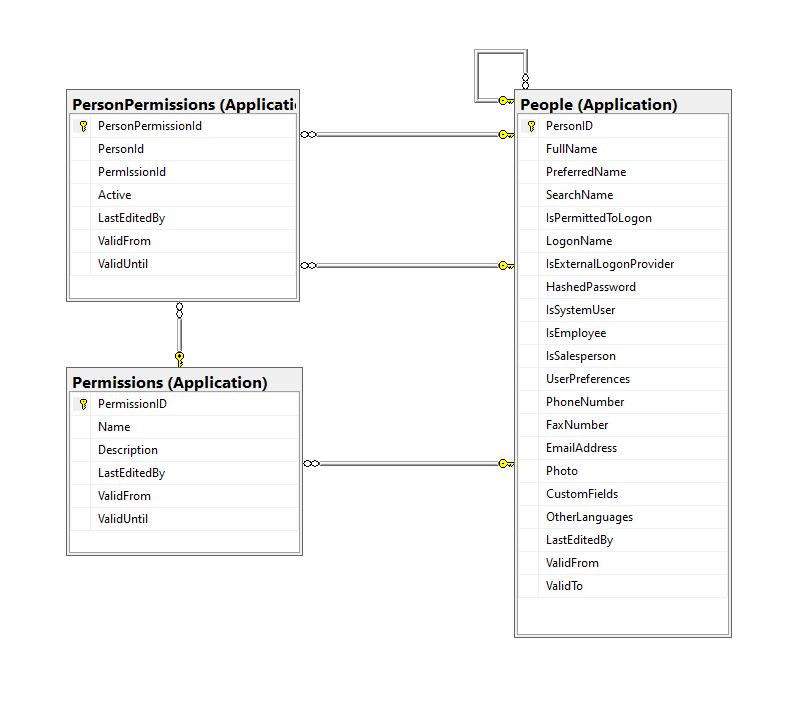
For a couple of applications, we have added “Permissions” and “PersonPermissions” tables alongside the existing authorisation functionality to reduce the likely hood of any unintended side effects.
CREATE TABLE [Application].[Permissions](
	[PermissionID] [int] IDENTITY(1,1) NOT NULL,
	[Name] [nvarchar](20) NOT NULL,
	[Description] [nvarchar](50) NOT NULL,
	[LastEditedBy] [int] NOT NULL,
	[ValidFrom] [datetime2](7) GENERATED ALWAYS AS ROW START HIDDEN NOT NULL,
	[ValidUntil] [datetime2](7) GENERATED ALWAYS AS ROW END HIDDEN NOT NULL,
 CONSTRAINT [PK_Permissions] PRIMARY KEY CLUSTERED
(
	[PermissionID] ASC
)...
CREATE TABLE [Application].[PersonPermissions](
	[PersonPermissionId] [int] IDENTITY(1,1) NOT NULL,
	[PersonId] [int] NOT NULL,
	[PermIssionId] [int] NOT NULL,
	[Active] [bit] NOT NULL,
	[ValidFrom] [datetime2](7) GENERATED ALWAYS AS ROW START HIDDEN NOT NULL,
	[ValidUntil] [datetime2](7) GENERATED ALWAYS AS ROW END HIDDEN NOT NULL,
 CONSTRAINT [PK_PersonPermissions] PRIMARY KEY CLUSTERED
(
	[PersonPermissionId] ASC
)...
Permissions, PersonPermissions and People with Foreign Keys
The additional permissions (from the Person record) and the PersonPermissions table required some modifications to the PersonAuthenticateLookupByLogonNameV1 stored procedure and the addition of the PersonPermissionsByPersonIdV1 stored procedure.
ALTER PROCEDURE [Website].[PersonAuthenticateLookupByLogonNameV2]
@LogonName nvarchar(50),
@Password nvarchar(40)
AS
BEGIN
	SELECT PersonID
		,FullName
		,EmailAddress
		,IsSystemUser
		,IsEmployee
		,IsSalesPerson
	FROM [Application].[People]
	WHERE (( LogonName = @LogonName)
		AND (IsPermittedToLogon = 1)
		AND (HASHBYTES(N'SHA2_256', @Password + FullName) = HashedPassword))
The IsSystemUser, IsEmployee and IsSalesPerson bit flags were added to the stored procedure and Data Transfer Object(DTO)
private class PersonAuthenticateLogonDetailsDto
{
    public int PersonID { get; set; }

    public string FullName { get; set; }

    public string EmailAddress { get; set; }

    public bool IsSystemUser { get; set; }

    public bool IsEmployee { get; set; }

    public bool IsSalesPerson { get; set; }
}
The PersonPermissionsByPersonIdV1 retrieves a list of the permissions of the User who has been authenticated.
ALTER PROCEDURE [Website].[PersonPermissionsByPersonIdV1]
	@PersonId AS int
AS
BEGIN

	SELECT [Application].[Permissions].[Name]
	FROM [Application].[Permissions]
		INNER JOIN [Application].[PersonPermissions] ON ([Application].[Permissions].PermissionID = [Application].[PersonPermissions].[PermissionId] )
	WHERE [Application].[PersonPermissions].[PersonId] = @PersonId
	ORDER BY [Application].[Permissions].[Name]

END
The Person’s permissions(effectively roles) are added as claims, the IsSystemUser, IsEmployee and IsSalesPerson flags are also added to the list of claims so they can be used in the new application.
[HttpPost("logon")]
public async Task<ActionResult> Logon([FromBody] Models.LogonRequest request )
{
    PersonAuthenticateLogonDetailsDto userLogonUserDetails;
    IEnumerable<string> permissions;
    var claims = new List<Claim>();

    using (SqlConnection db = new SqlConnection(configuration.GetConnectionString("WorldWideImportersDatabase")))
    {
        userLogonUserDetails = await db.QuerySingleOrDefaultWithRetryAsync<PersonAuthenticateLogonDetailsDto>("[Website].[PersonAuthenticateLookupByLogonNameV2]", param: request, commandType: CommandType.StoredProcedure);
        if (userLogonUserDetails == null)
        {
            logger.LogWarning("Login attempt by user {0} failed", request.LogonName);

           return this.Unauthorized();
        }

        // Lookup the Person's permissions
        permissions = await db.QueryWithRetryAsync<string>("[Website].[PersonPermissionsByPersonIdV1]", new { userLogonUserDetails.PersonID }, commandType: CommandType.StoredProcedure);
    }

    // Setup the primary SID + name info
    claims.Add(new Claim(ClaimTypes.PrimarySid, userLogonUserDetails.PersonID.ToString()));
    if (userLogonUserDetails.IsSystemUser)
    {
       claims.Add(new Claim(ClaimTypes.Role, "SystemUser"));
    }
    if (userLogonUserDetails.IsEmployee)
    {
       claims.Add(new Claim(ClaimTypes.Role, "Employee"));
    }
    if (userLogonUserDetails.IsSalesPerson)
    {
        claims.Add(new Claim(ClaimTypes.Role, "SalesPerson"));
    }

    foreach(string permission in permissions)
    {
        claims.Add(new Claim(ClaimTypes.Role, permission));
    }

    var authSigningKey = new SymmetricSecurityKey(Encoding.UTF8.GetBytes(jwtIssuerOptions.SecretKey));

    var token = new JwtSecurityToken(
         issuer: jwtIssuerOptions.Issuer,
          audience: jwtIssuerOptions.Audience,
          expires: DateTime.UtcNow.Add(jwtIssuerOptions.TokenExpiresAfter),
          claims: claims,
          signingCredentials: new SigningCredentials(authSigningKey, SecurityAlgorithms.HmacSha256));

    return this.Ok(new
   {
        token = new JwtSecurityTokenHandler().WriteToken(token),
        expiration = token.ValidTo,
    });
}
We try to reduce the number of roles a User requires by having core roles (Administrator, Sales consultant, Warehouse administrator etc.) with additional roles for each task that can be added as required (ResetPassword, CustomerIsOnCreditHold Set/Clear etc.)
/// <summary>
/// Gets a list of the current User's roles.
/// </summary>
/// <response code="200">List of claims returned.</response>
/// <response code="401">Unauthorised, bearer token missing or expired.</response>
/// <returns>list of claims.</returns>
[HttpGet]
[ProducesResponseType(StatusCodes.Status200OK, Type = typeof(List<string>))]
public List<string> Get()
{
    List<string> claimNames = new List<string>();

    foreach (var claim in this.User.Claims.Where(c => c.Type == ClaimTypes.Role))
    {
        claimNames.Add(claim.Value);
    }

    return claimNames;
}
We have found this approach to be a robust way to add granular authorisation for new functionality to a “legacy’ application without breaking the existing solution. I have ignored a user being disabled after a number of failed logins, password complexity rules etc. as these tend to be application specific and not really related to the use of Dapper.
Most blog posts talk about building “green fields” applications, I have found hardly any cover “muddy fields” development where you have to deal with “legacy” code.
Not all “legacy” code is bad, I work on one code base which is nearly 20years old. It started as a spreadsheet plug-in and has grown of time to a SaaS application. There is very little of the original code left it has just been carefully re-factored over the years with time allocated to chip away at technical debt.
A couple of recent contracts have been maintaining and “remediating” legacy codebases which have been in production for upto a decade. The applications are delivering business value (can’t stop working) and the customer’s budgets are limited (they can only afford incremental change). As a result of this we end up making tactical decisions to keep the application working and longer-term ones to improve the “ilities“(taking into account the customer’s priorities).
It is rare to have a “green fields” project, so my plan was to use the next couple of WebAPI + Dapper posts to illustrate the sort of challenges we have encountered.
Customer: “we want to put a nice webby frontend on our existing bespoke solution” (“putting lipstick on a pig”).
Customer: The user’s login details are stored in the database and we can’t change the login process as the help desk won’t cope.
The remediation of Authentication and Authorisation(A&A) functionality can be particularly painful and is often driven by compliance issues e.g. EU GDPR, The Privacy Act 202 etc.
Lots of NULL values which often makes application code more complex
Duplicates in LoginName column e.g. “NO LOGON”
Some “magic” values e.g. “NO LOGON”
Why does the “Data Conversion Only” person have a photo?
The IsExternalLogonProvider is always false.
The UserPreferences, CustomFields and OtherLanguages columns contain Java Script Object Notation(JSON), need to see how these a generated, updated and used.
The application must have an existing external user provisioning process. It looks like a Person record is created by an Administrator then the User sets their password on first Logon. (not certain if there are any password complexity rules enforced)
An application I worked on didn’t have any enforcement of password complexity and minimum length in earlier versions. This caused issues when a number of their clients couldn’t logon to the new application because their existing password was too short. We updated the logon field rules and retained minimum complexity and length rules on change and reset password field validation. We then forced 5-10% of users per month (so the helpdesk wasn’t overwhelmed by support calls) to update their passwords.
ALTER PROCEDURE [Website].[ActivateWebsiteLogon]
@PersonID int,
@LogonName nvarchar(50),
@InitialPassword nvarchar(40)
WITH EXECUTE AS OWNER
AS
BEGIN
    SET NOCOUNT ON;
    SET XACT_ABORT ON;

    UPDATE [Application].People
    SET IsPermittedToLogon = 1,
        LogonName = @LogonName,
        HashedPassword = HASHBYTES(N'SHA2_256', @InitialPassword + FullName),
        UserPreferences = (SELECT UserPreferences FROM [Application].People WHERE PersonID = 1) -- Person 1 has User Preferences template
    WHERE PersonID = @PersonID
    AND PersonID <> 1
    AND IsPermittedToLogon = 0;

    IF @@ROWCOUNT = 0
    BEGIN
        PRINT N'The PersonID must be valid, must not be person 1, and must not already be enabled';
        THROW 51000, N'Invalid PersonID', 1;
        RETURN -1;
    END;
END;
The password hash is seeded with the persons FullName, this could be a problem if a user changes their name.
The user selects their LoginName, this needs further investigate as duplicates could be an issue
XACT_ABORT ON + THROW for validation and state management is odd, need to check how SqlExceptions are handled in application code.
PersonID magic number handling adds complexity and needs further investigation.
EXECUTE AS OWNER caught my attention, checked only one Database user for application.
The LastEditBy isn’t set to the PersonID which seems a bit odd.
Based on the [Website].[ActivateWebsiteLogon] (couldn’t find Logon so reviewed ChangePassword) this is my first attempt at a stored procedure which validates a user’s LogonName and Password.
CREATE PROCEDURE [Application].[PersonAuthenticateLookupByLogonNameV1]
@LogonName nvarchar(50),
@Password nvarchar(40)
AS
BEGIN
	SELECT PersonID, FullName, EmailAddress
	FROM [Application].[People]
	WHERE (( LogonName = @LogonName)
		AND (IsPermittedToLogon = 1)
		AND (HASHBYTES(N'SHA2_256', @Password + FullName) = HashedPassword))
END
GO
We use the ..VX approach to reduce issues when doing canary and rolling deployments. If the parameter list or return dataset of a stored procedure changes (even if we think it is backwards compatible) the version number is incremented so that different versions of the application can be run concurrently and backing out application updates is less fraught.
public class LogonRequest
{
    [JsonRequired]
    [MinLength(Constants.LogonNameLengthMinimum)]
    [MaxLength(Constants.LogonNameLengthMaximum)]
    public string LogonName { get; set; }

    [JsonRequired]
    [MinLength(Constants.PasswordLengthMinimum)]
    [MaxLength(Constants.PasswordLengthMaximum)]
    public string Password { get; set; }
}
Then a Proof of Concept (PoC) AuthenticationController to process a login request.
Swagger Docs Authentication controller Login
The Logon method calls the PersonAuthenticateLookupByLogonNameV1 stored procedure to validate the LoginName and password. In this iteration the only claim added to the JSON Web Token(JWT) is the PersonId. We try and keep the JWTs small as possible as one customer’s application failed randomly because a couple of user’s JWTs were so large (lots of roles) that some versions of browsers choked.
public AuthenticationController(IConfiguration configuration, ILogger<AuthenticationController> logger, IOptions<Model.JwtIssuerOptions> jwtIssuerOptions)
{
    this.configuration = configuration;
    this.logger = logger;
    this.jwtIssuerOptions = jwtIssuerOptions.Value;
 }

[HttpPost("login")]
public async Task<ActionResult> Login([FromBody] Model.LoginRequest request )
{
    var claims = new List<Claim>();

    using (SqlConnection db = new SqlConnection(configuration.GetConnectionString("WorldWideImportersDatabase")))
    {
        UserLogonUserDetailsDto userLogonUserDetails = await db.QuerySingleOrDefaultWithRetryAsync<UserLogonUserDetailsDto>("[Application].[PersonAuthenticateLookupByLogonNameV1]", param: request, commandType: CommandType.StoredProcedure);
        if (userLogonUserDetails == null)
        {
             logger.LogWarning("Login attempt by user {0} failed", request.LogonName);

             return this.Unauthorized();
        }

        // Setup the primary SID + name info
        claims.Add(new Claim(ClaimTypes.PrimarySid, userLogonUserDetails.PersonID.ToString()));
    }

    var authSigningKey = new SymmetricSecurityKey(Encoding.UTF8.GetBytes(jwtIssuerOptions.SecretKey));

    var token = new JwtSecurityToken(
              issuer: jwtIssuerOptions.Issuer,
              audience: jwtIssuerOptions.Audience,
              expires: DateTime.UtcNow.Add(jwtIssuerOptions.TokenExpiresAfter),
              claims: claims,
              signingCredentials: new SigningCredentials(authSigningKey, SecurityAlgorithms.HmacSha256));

        return this.Ok(new
        {
            token = new JwtSecurityTokenHandler().WriteToken(token),
            expiration = token.ValidTo,
        });
    }
}
After a successful logon the Token has to be copied (I regularly miss the first or the last character) from the response payload to the Authorisation form.
The Swagger UI Authentication method after a successful Logon with the bearer token highlighted
I decorated the SystemController DeploymentVersion deployment with the [Authorize] attribute to force a check that the user is authenticated.
/// <summary>
/// WebAPI controller for handling System Dapper functionality.
/// </summary>
[Route("api/[controller]")]
[ApiController]
public class SystemController : ControllerBase
{
    /// <summary>
    /// Returns the Application version in [Major].[Minor].[Build].Revision] format.
    /// </summary>
    /// <response code="200">List of claims returned.</response>
    /// <response code="401">Unauthorised, bearer token missing or expired.</response>
    /// <returns>Returns the Application version in [Major].[Minor].[Build].Revision] format.</returns>
    [HttpGet("DeploymentVersion"), Authorize]
    public string DeploymentVersion()
    {
        return Assembly.GetExecutingAssembly().GetName().Version.ToString();
    }
}
If the bearer token is missing, invalid (I accidentally didn’t copy either the first or last character) or expired the method call will fail with a 401 Unauthorized error.
Swagger UI System Controller DeploymentVersion method failing because the JWT is missing, invalid or expired
Controlling access to controllers and methods of controllers is probably not granular for most applications so adding “coarse” and “fine grained” authorisation to an existing application and the configuration of Swashbuckle and application request processing middleware to support JWTs will be covered in a couple of future posts.
For remediation projects we try to keep the code as simple as possible (but no simpler), by minimising the plumbing and only using advanced language features etc. where it adds value.
I’m leaning towards using Dependency Injection for configuration information, so the way connection strings and jwtIssuerOptions is going to be harmonised. In a future version of the application the jwtIssuerOptions will be migrated to an Azure Key Vault.




 devMobile's blog