Swarm Space – Bumblebee Hive API Basic client

Back in July I purchased a Satellite Transceiver Breakout – Swarm M138 from SparkFun and it has been sitting on the shelf since then. I want to get telemetry from a sensor to an Azure IoT Hub or Azure IoT Central over a Swarm Space link for a project I am working on.
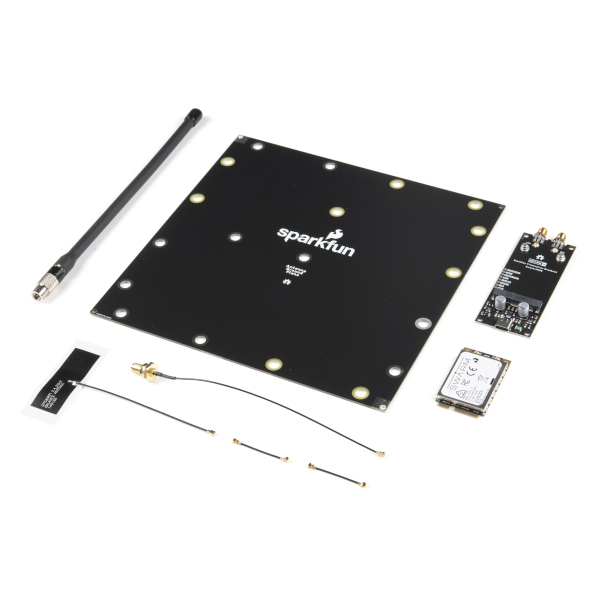
I’ll need to solder on some headers and cut a couple of tracks on the breakout board so my device (most probably a SparkFun – ESP32-S2 WROOM) can connect to the Swarm-M1138 modem. The NET nanoFramework team have an IoT.Device Swarm Tile NuGet package which I will use to interface the device to the modem.

I have started with a “nasty” Proof of Concept(PoC) to figure out how to connect to the Swarm Hive API.
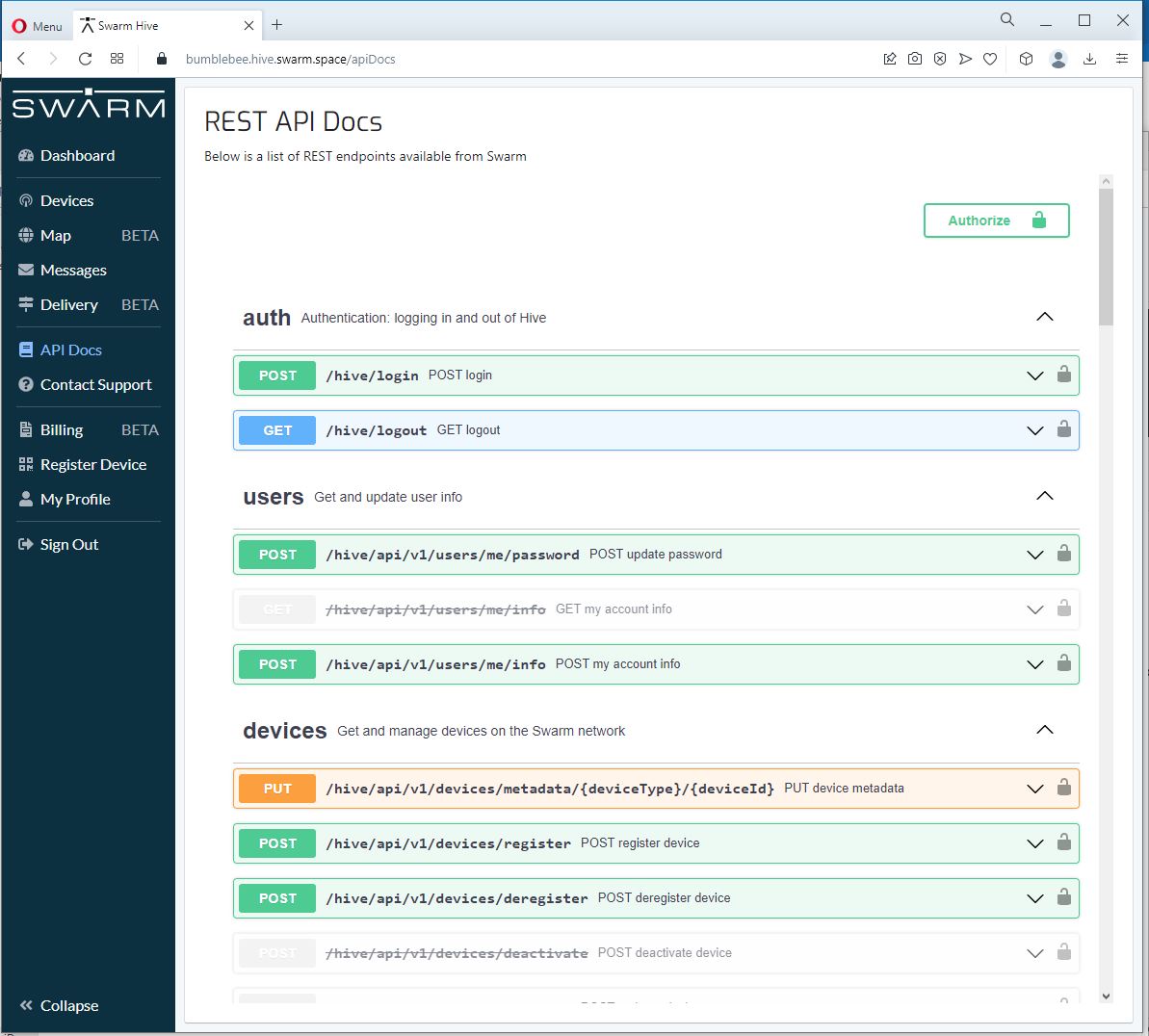
The Swarm Hive API has been published with Swagger/OpenAPI which is really simple to use. I used NSwagStudio to generate a C# client to I didn’t have to “handcraft” one.
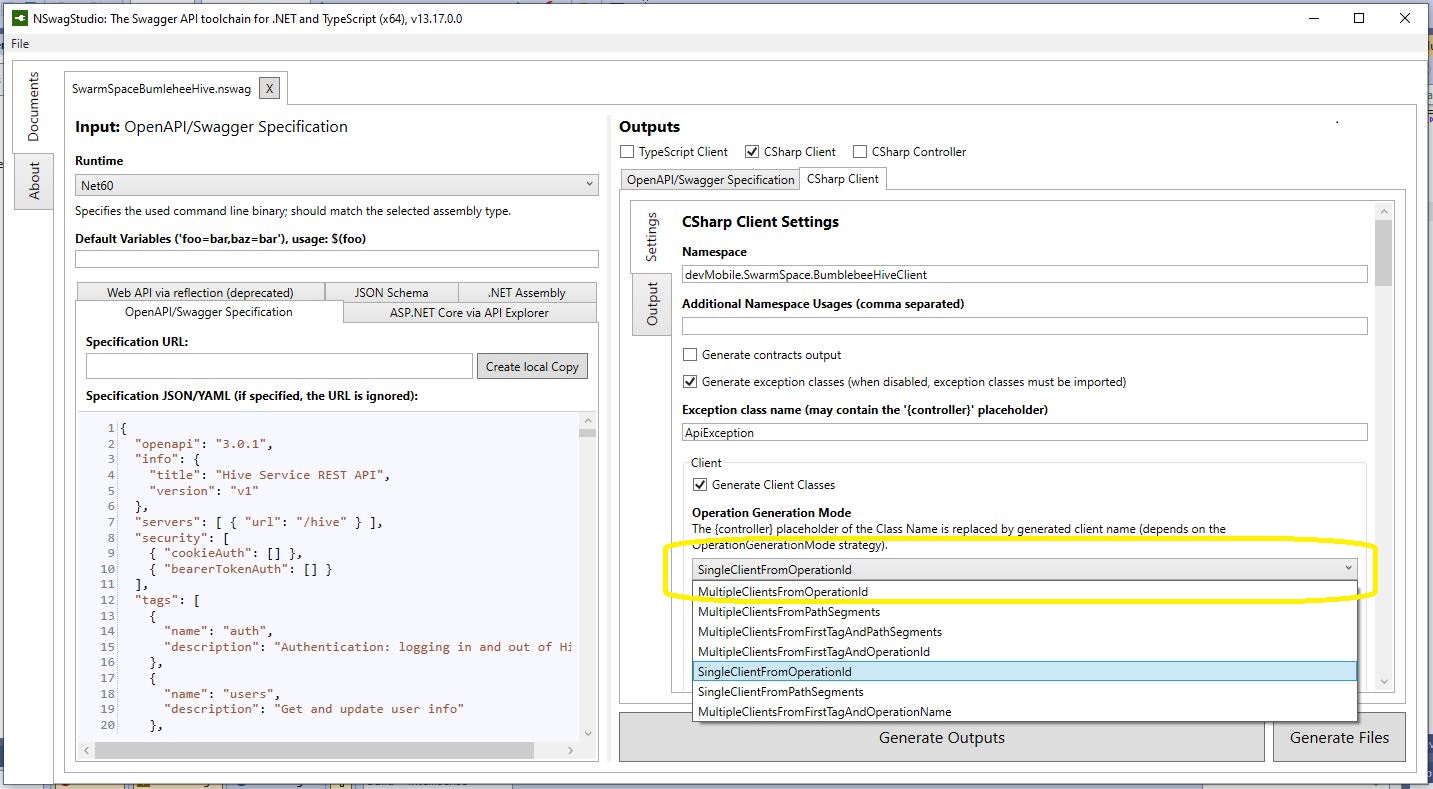
Initially the code would compile but I found a clue in a Github Issue from September 2017 which was to change the “Operation Generation Model” to SingleClientFromOperationId.(The setting is highlighted above).

static async Task Main(string[] args)
{
    using (HttpClient httpClient = new HttpClient())
    {
        BumblebeeHiveClient.Client client = new BumblebeeHiveClient.Client(httpClient);

        client.BaseUrl = "https://bumblebee.hive.swarm.space/hive/";

        BumblebeeHiveClient.LoginForm loginForm = new BumblebeeHiveClient.LoginForm();

        // https://bumblebee.hive.swarm.space/login/
        loginForm.Username = "...";
        loginForm.Password = "...";

        Console.WriteLine($"devMobile SwarmSpace Bumblebee Hive Console Client");
        Console.WriteLine("");

        Console.WriteLine($"Login POST");
        BumblebeeHiveClient.Response response = await client.PostLoginAsync(loginForm);

        Console.WriteLine($"Token :{response.Token[..5]}.....{response.Token[^5..]}");
        Console.WriteLine($"Press <enter> to continue");
        Console.ReadLine();

        string apiKey = "bearer " + response.Token;

        httpClient.DefaultRequestHeaders.Add("Authorization", apiKey);


        Console.WriteLine($"Device count GET");

        string count = await client.GetDeviceCountAsync(1);

        Console.WriteLine($"Device count :{count}");
        Console.WriteLine($"Press <enter> to continue");
        Console.ReadLine();

        Console.WriteLine($"Device(s) information GET");

        var devices = await client.GetDevicesAsync(1, null, null, null, null, null, null, null, null);

        foreach (var device in devices)
        {
            Console.WriteLine($" Id:{device.DeviceId} Name:{device.DeviceName} Type:{device.DeviceType} Organisation:{device.OrganizationId}");
        }

        Console.WriteLine($"Press <enter> to continue");
        Console.ReadLine();

        Console.WriteLine($"User Context GET");
        var userContext = await client.GetUserContextAsync();

        Console.WriteLine($" Id:{userContext.UserId} Name:{userContext.Username} Country:{userContext.Country}");

        Console.WriteLine("Additional properties");
        foreach ( var additionalProperty in userContext.AdditionalProperties)
        {
            Console.WriteLine($" Id:{additionalProperty.Key} Value:{additionalProperty.Value}");
        }

        Console.WriteLine($"Press <enter> to exit");
        Console.ReadLine();
    }
}

I tried a couple of ways to attach the Swarm Hive API authorisation token (returned by the Login method) to client requests. After a couple for failed attempts, I “realised” that adding the “Authorization” header to the HttpClient defaultRequestHeaders was by far the simplest approach.
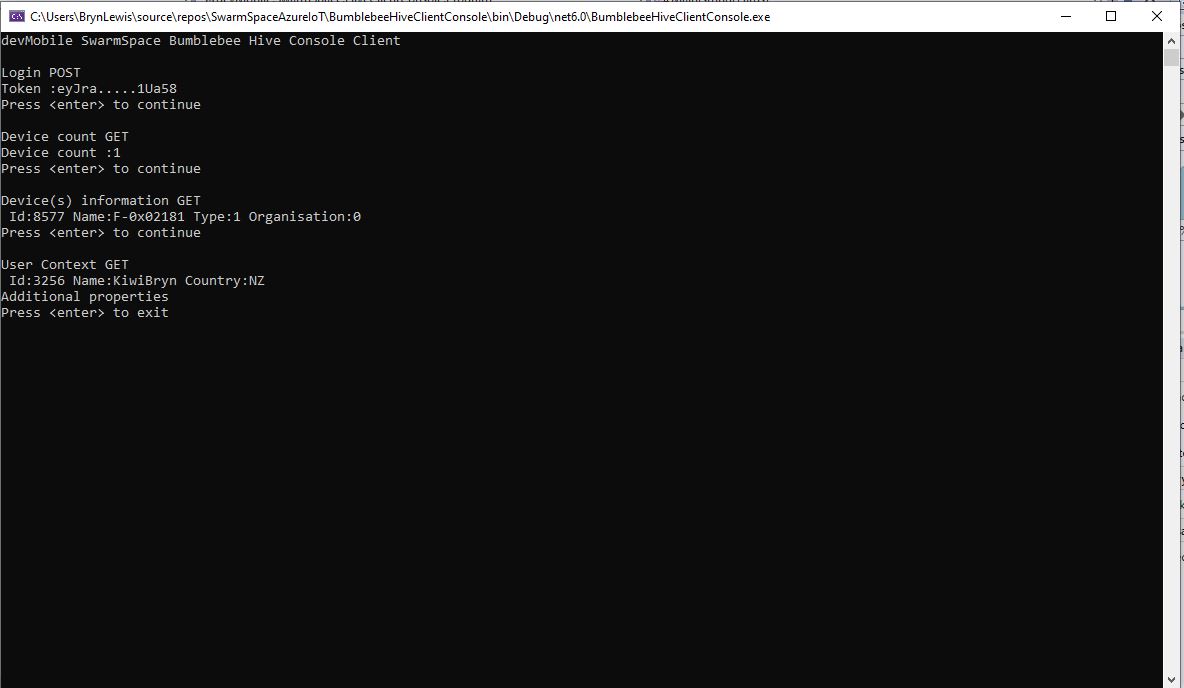
My “nasty” console application calls the Login method, then requests the number of devices (I only have one), gets a list of the properties of all the devices(very short list) then gets the User Context and displays their ID, Name and Country.

.NET nanoFramework RAK2305 – UART GPS

The RAKwireless RAK2305 WisBlock WiFi Interface Module module is based on an Expressif ESP32 processor which is supported by the .NET nanoFramework and I wanted try out it out with a RAK1910 GNSS GPS Location Module.

RAK2350, RAK5005-O and RAK1910 with GPS Antenna

The RAK1910 application is based on the TinyGPSPlusNF library by MBoude which parses the NMEA 0183 sentences produced by the RAK1910.

//---------------------------------------------------------------------------------
// Copyright (c) August 2022, devMobile Software
//
// Licensed under the Apache License, Version 2.0 (the "License");
// you may not use this file except in compliance with the License.
// You may obtain a copy of the License at
//
//     http://www.apache.org/licenses/LICENSE-2.0
//
// Unless required by applicable law or agreed to in writing, software
// distributed under the License is distributed on an "AS IS" BASIS,
// WITHOUT WARRANTIES OR CONDITIONS OF ANY KIND, either express or implied.
// See the License for the specific language governing permissions and
// limitations under the License.
//
// RAK Core WisBlock
// https://docs.rakwireless.com/Product-Categories/WisBlock/RAK11200
//
// RAK WisBlock Wireless
// https://docs.rakwireless.com/Product-Categories/WisBlock/RAK2305/Overview/
//
// RAK WisBlock Bases
// https://docs.rakwireless.com/Product-Categories/WisBlock/RAK5005-O

// https://docs.rakwireless.com/Product-Categories/WisBlock/RAK19001
//
// RAK WisBlock Sensor
// https://docs.rakwireless.com/Product-Categories/WisBlock/RAK1910
//
// Uses the library
// https://github.com/mboud/TinyGPSPlusNF
//
// Inspired by
// https://github.com/RAKWireless/WisBlock/tree/master/examples/common/sensors/RAK1910_GPS_UBLOX7
//
// Pins mapped with
// https://docs.rakwireless.com/Knowledge-Hub/Pin-Mapper/
//
// Flash device with
// nanoff --target ESP32_REV0 --serialport COM16 --update
//
//---------------------------------------------------------------------------------
namespace devMobile.IoT.RAK.Wisblock.RAK1910
{
   using System;
   using System.Device.Gpio;
   using System.Diagnostics;
   using System.IO.Ports;
   using System.Threading;

   using nanoFramework.Hardware.Esp32;

   using TinyGPSPlusNF;

   public class Program
   {
      private static TinyGPSPlus _gps;

      public static void Main()
      {
         Debug.WriteLine($"devMobile.IoT.RAK.Wisblock.RAK1910 starting TinyGPS {TinyGPSPlus.LibraryVersion}");

         try
         {
#if RAK11200
            Configuration.SetPinFunction(Gpio.IO21, DeviceFunction.COM2_TX);
            Configuration.SetPinFunction(Gpio.IO19, DeviceFunction.COM2_RX);
#endif
#if RAK2350
            Configuration.SetPinFunction(Gpio.IO21, DeviceFunction.COM2_RX);
            Configuration.SetPinFunction(Gpio.IO19, DeviceFunction.COM2_TX);
#endif

            _gps = new TinyGPSPlus();

            // UART1 with default Max7Q baudrate
            SerialPort serialPort = new SerialPort("COM2", 9600);

            serialPort.DataReceived += SerialDevice_DataReceived;
            serialPort.Open();
            serialPort.WatchChar = '\n';

            // Enable the GPS module GPS 3V3_S/RESET_GPS - IO2 - GPIO27
            GpioController gpioController = new GpioController();

            GpioPin Gps3V3 = gpioController.OpenPin(Gpio.IO27, PinMode.Output);
            Gps3V3.Write(PinValue.High);

            Debug.WriteLine("Waiting...");

            Thread.Sleep(Timeout.Infinite);
         }
         catch (Exception ex)
         {
            Debug.WriteLine($"UBlox MAX7Q initialisation failed {ex.Message}");

            Thread.Sleep(Timeout.Infinite);
         }
      }

      private static void SerialDevice_DataReceived(object sender, SerialDataReceivedEventArgs e)
      {
         // we only care if got EoL character
         if (e.EventType != SerialData.WatchChar)
         {
            return;
         }

         SerialPort serialDevice = (SerialPort)sender;

         string sentence = serialDevice.ReadExisting();

         if (_gps.Encode(sentence))
         {
            if (_gps.Date.IsValid)
            {
               Debug.Write($"{_gps.Date.Year}-{_gps.Date.Month:D2}-{_gps.Date.Day:D2} ");
            }

            if (_gps.Time.IsValid)
            {
               Debug.Write($"{_gps.Time.Hour:D2}:{_gps.Time.Minute:D2}:{_gps.Time.Second:D2}.{_gps.Time.Centisecond:D2} ");
            }

            if (_gps.Location.IsValid)
            {
               Debug.Write($"Lat:{_gps.Location.Latitude.Degrees:F5}° Lon:{_gps.Location.Longitude.Degrees:F5}° ");
            }

            if (_gps.Altitude.IsValid)
            {
               Debug.Write($"Alt:{_gps.Altitude.Meters:F1}M ");
            }

            if (_gps.Location.IsValid)
            {
               Debug.Write($"Hdop:{_gps.Hdop.Value:F2}");
            }

            if (_gps.Date.IsValid || _gps.Time.IsValid || _gps.Location.IsValid || _gps.Altitude.IsValid)
            {
               Debug.WriteLine("");
            }
         }
      }
   }
}

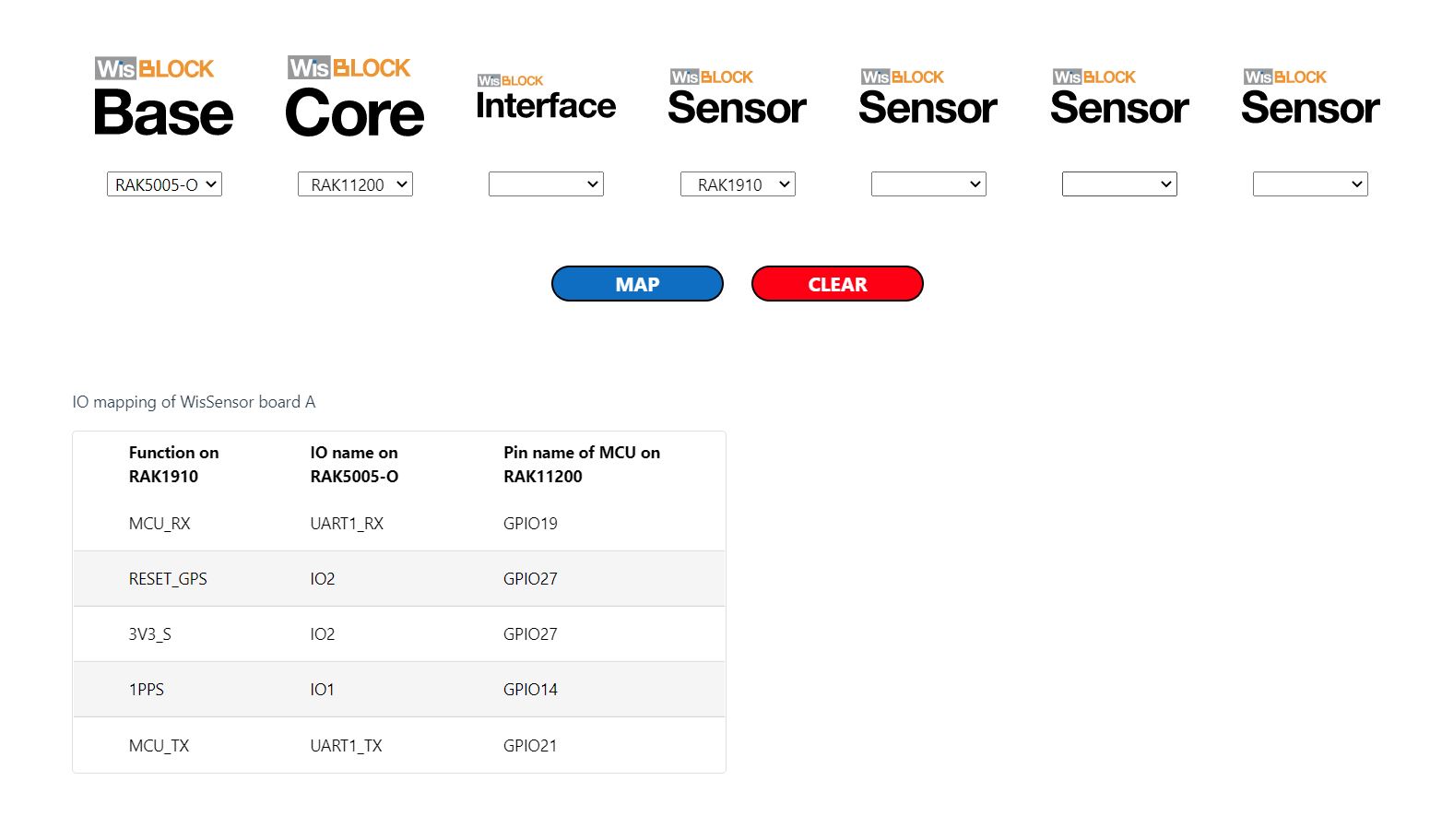
My RAK2305 WisBlock WiFi Interface Module, RAK1910, and RAK5005-O WisBlock Base Board configuration wasn’t supported by the RAK WinBlock Pin Mapper(AUG 2022) tool.

After some experimentation I found that serial port TX/RX lines had to be reversed because both devices would normally be connected to a WisBlock core module.

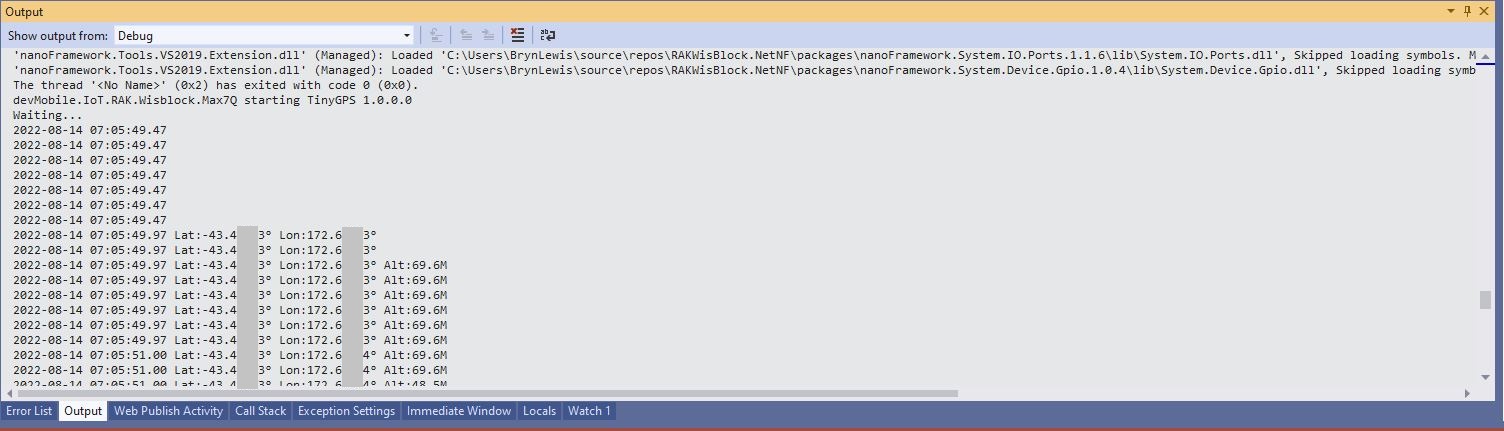
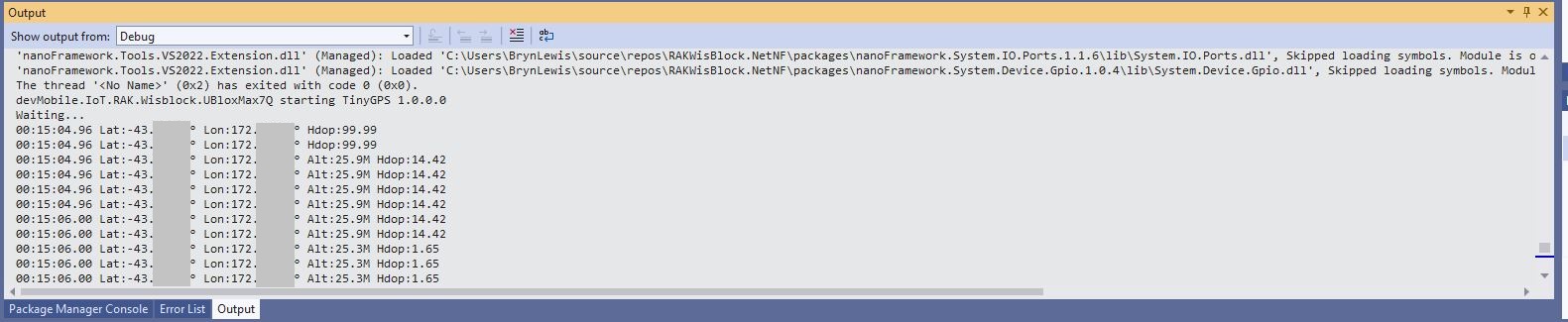
Visual Studio 2K22 Output Window

.NET nanoFramework RAK11200 – UART GPS

The RAKwireless RAK11200 WisBlock WiFi Module module is based on an Expressif ESP32 processor which is supported by the .NET nanoFramework and I wanted try out it out with a RAK1910 GNSS GPS Location Module.

RAK11200, RAK5005-O and RAK1910 with GPS Antenna

The RAK WinBlock Pin Mapper tool output for RAK1910, RAK5005-O WisBlock Base Board and RAK11200

The test application is based on the TinyGPSPlusNF library by MBoude which parses the NMEA 0183 sentences produced by the RAK1910.

public class Program
{
    private static TinyGPSPlus _gps;

    public static void Main()
    {
        Debug.WriteLine($"devMobile.IoT.RAK.Wisblock.Max7Q starting TinyGPS {TinyGPSPlus.LibraryVersion}");

        Configuration.SetPinFunction(Gpio.IO21, DeviceFunction.COM2_TX);
        Configuration.SetPinFunction(Gpio.IO19, DeviceFunction.COM2_RX);

        _gps = new TinyGPSPlus();

        // UART1 with default Max7Q baudrate
        SerialPort serialPort = new SerialPort("COM2", 9600);

        serialPort.DataReceived += SerialDevice_DataReceived;
        serialPort.Open();
        serialPort.WatchChar = '\n';

         // // Enable the with GPS 3V3_S/RESET_GPS - IO2 - GPIO27
        GpioController gpioController = new GpioController();

        GpioPin Gps3V3 = gpioController.OpenPin(Gpio.IO27, PinMode.Output);
        Gps3V3.Write(PinValue.High);

        Debug.WriteLine("Waiting...");

        Thread.Sleep(Timeout.Infinite);
    }

    private static void SerialDevice_DataReceived(object sender, SerialDataReceivedEventArgs e)
    {
        // we only care if got EoL character
        if (e.EventType != SerialData.WatchChar)
        {
            return;
        }

        SerialPort serialDevice = (SerialPort)sender;

        string sentence = serialDevice.ReadExisting();

        if (_gps.Encode(sentence))
        {
            if (_gps.Date.IsValid)
            {
                Debug.Write($"{_gps.Date.Year}-{_gps.Date.Month:D2}-{_gps.Date.Day:D2} ");
            }

            if (_gps.Time.IsValid)
            {
                Debug.Write($"{_gps.Time.Hour:D2}:{_gps.Time.Minute:D2}:{_gps.Time.Second:D2}.{_gps.Time.Centisecond:D2} ");
            }

            if (_gps.Location.IsValid)
            {
                Debug.Write($"Lat:{_gps.Location.Latitude.Degrees:F5}° Lon:{_gps.Location.Longitude.Degrees:F5}° ");
            }

            if (_gps.Altitude.IsValid)
            {
                Debug.Write($"Alt:{_gps.Altitude.Meters:F1}M");
            }

            if (_gps.Date.IsValid || _gps.Time.IsValid || _gps.Location.IsValid || _gps.Altitude.IsValid)
            {
                Debug.WriteLine("");
            }
        }
    }
}
Visual Studio 2K22 Output Window

SeeedStudio Grove GPS IteadStudio Shield Comparison

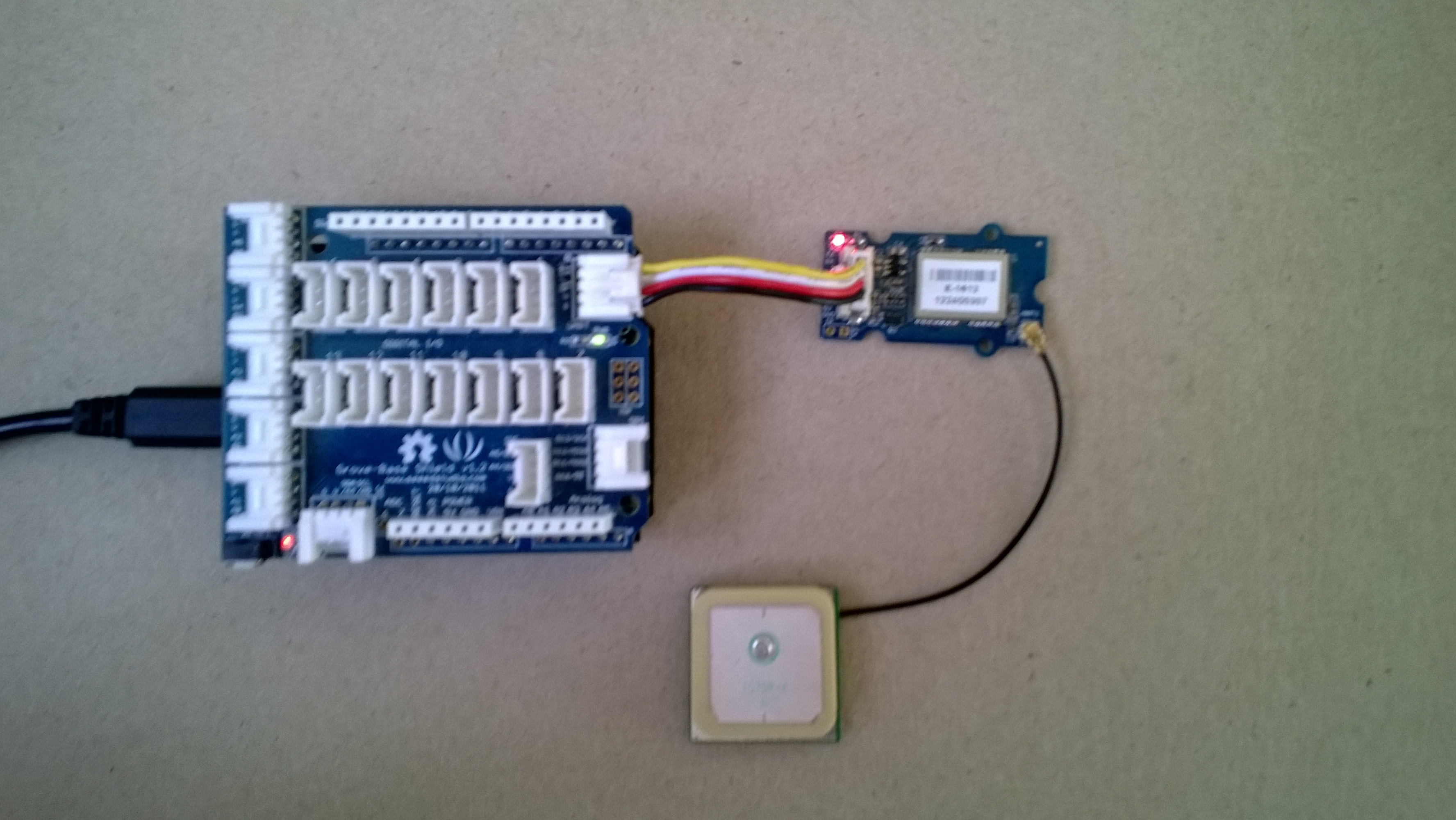
I use the SeeedStudio Grove system for prototyping and teaching. One of the modules is a Global Positioning System (GPS) unit based on the u-blox 5 engine. To get this unit to work you just plug it into the UART socket on the base shield and load the necessary software onto an Arduino (or compatible) board. My day job is working on Microsoft .Net applications so I use a Netduino Plus or a Netduino plus 2.

SeeedStudio GPS unit

SeeedStudio base shield and GPS unit

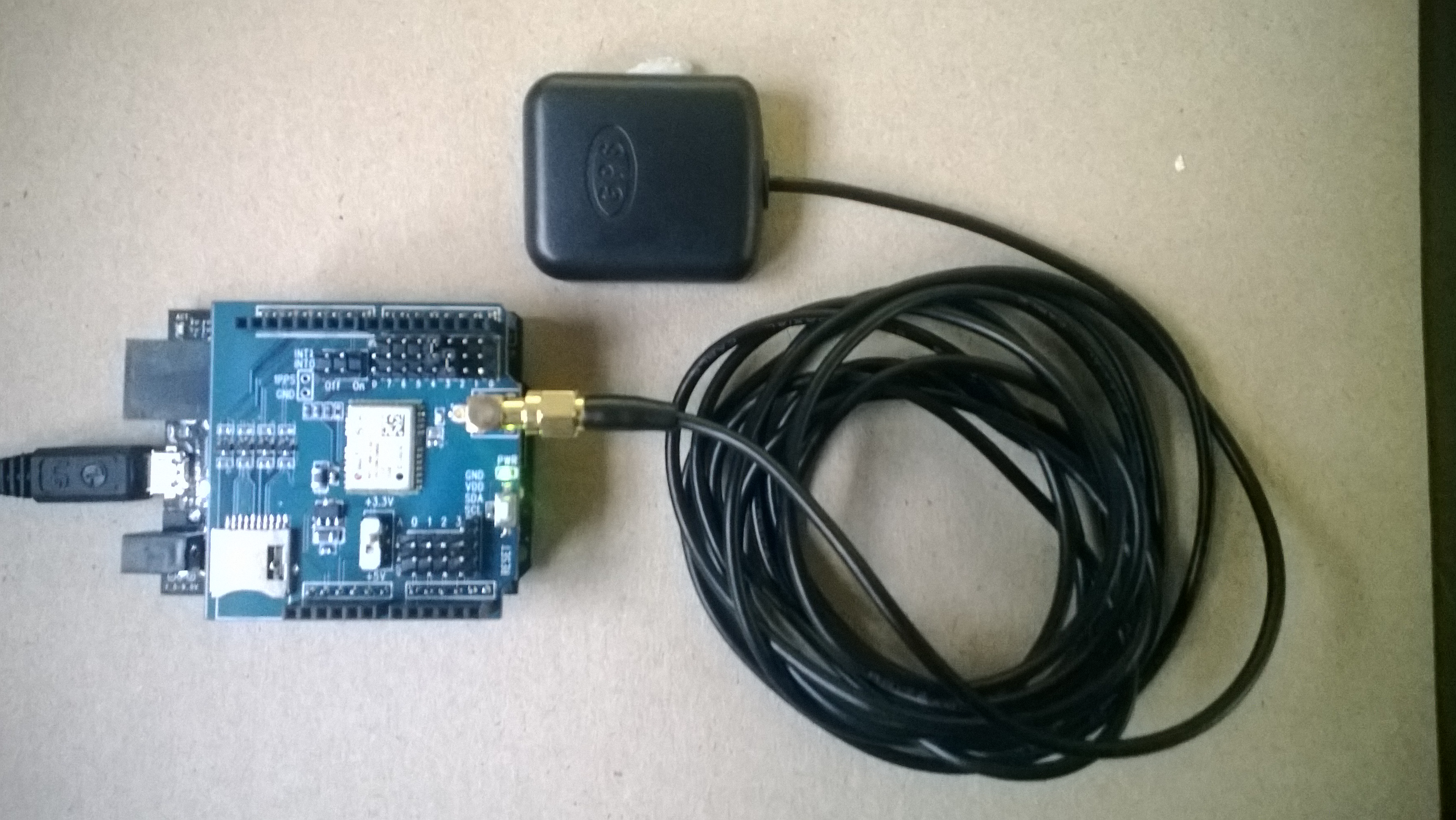
The Seeedstudio 4 wire connector system has some advantages but for a couple of projects I was looking at I needed to be able to run on a different serial port and access the one pulse per second output. I had a look at several other vendors and the iteadstudio GPS Shield + Active Antenna which is based on the u-blox 6 engine looked like a reasonable alternative.

IteadStudio GPS

IteadStudio GPS shield and Antenna

After some testing I found that the Iteadstudio GPS shield appears to have a shorter time to first fix after a power cycle, I averaged 10 sets of readings for each device and found that in my backyard it took on average 46sec for the Iteadstudio shield and 55sec for the SeeedStudio device.

Both devices output National Marine Electronics Association (NMEA) 0183 sentences and I use the NetMF Toolbox NMEA code to process the data streams. I have modified the NetMF toolbox code with an additional event handler which empties the serial input buffer if there is an error and one of the validation checks needed to be tweaked as it was possible to get an exception due to an empty string.

Around line 45

this._Uart = newSerialPort(SerialPort, BaudRate);
this._Uart.ErrorReceived += newSerialErrorReceivedEventHandler(_Uart_ErrorReceived);
this._Uart.DataReceived += newSerialDataReceivedEventHandler(_Uart_DataReceived);


void _Uart_ErrorReceived(object sender, SerialErrorReceivedEventArgs e)
{
if (_Uart.IsOpen)
{
_Uart.Flush();
}
}

Around line 323

// Have we received a full line of data?
int Pos = this._Buffer.IndexOf("\r\n");
if (Pos >= 1)
{

With these modifications my Netduino Plus 2 can runs for days at a time without buffer overflows or other issues, you just need to be careful to make your event handlers block for as little time as possible.

I have been looking at building an NetMF NMEA driver which runs on a background thread and doesn’t use any string manipulation methods e.g. string.splt so the garbage collector has less to do, but this will be a topic for a future post.