Seeedstudio XIAO ESP32 S3 RS-485 test harness(nanoFramework)

As part of a project to read values from a MODBUS RS-485 sensor using a RS-485 Breakout Board for Seeed Studio XIAO and a Seeed Studio XIAO ESP32-S3 I built a .NET nanoFramework version of the Arduino test harness described in this wiki post.
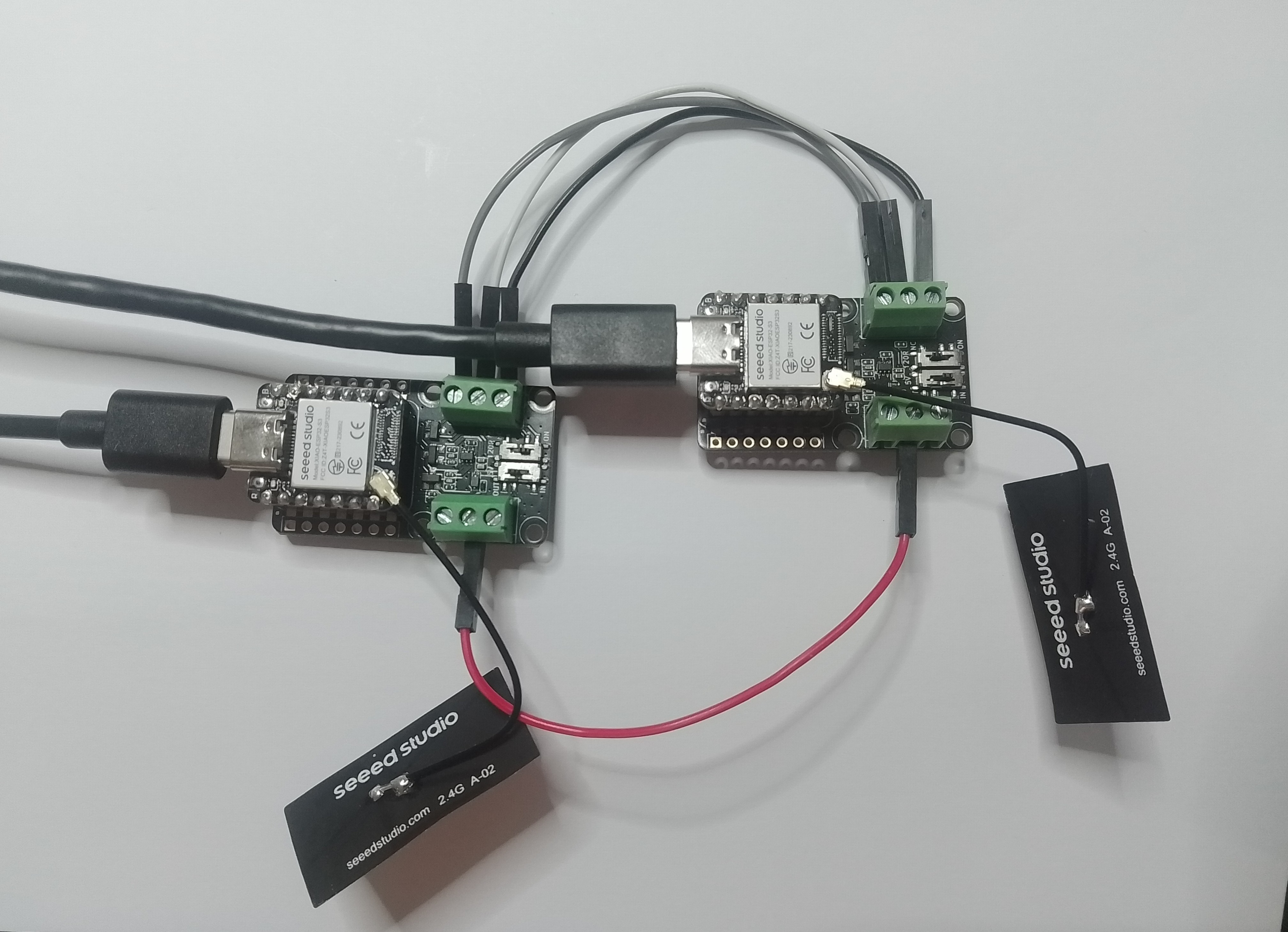
This took a bit longer than I expected mainly because running two instances of Visual Studio 2026 was a problem (running Visual Studio 2022 for one device and Visual Studio 2026 for the other, though not 100% confident this was an issue) as there were some weird interactions.
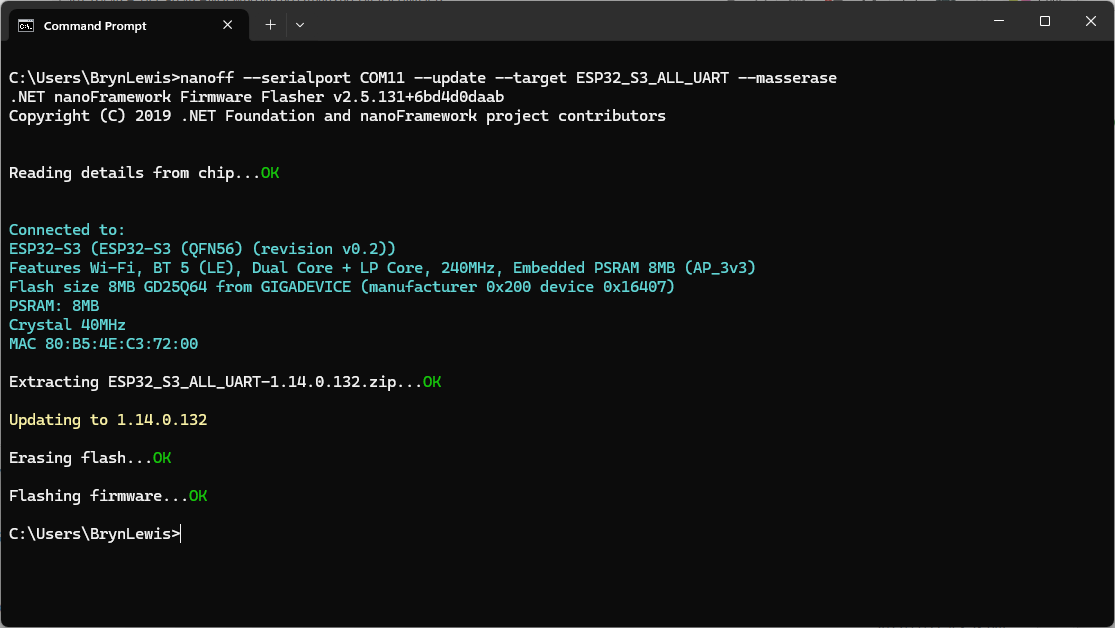
using nanoff to flash a device with the latest version of ESP32_S3_ALL_UART

As I moved between the Arduino tooling and flashing devices with nanoff the serial port numbers would change watching the port assignments in Windows Device Manager was key.
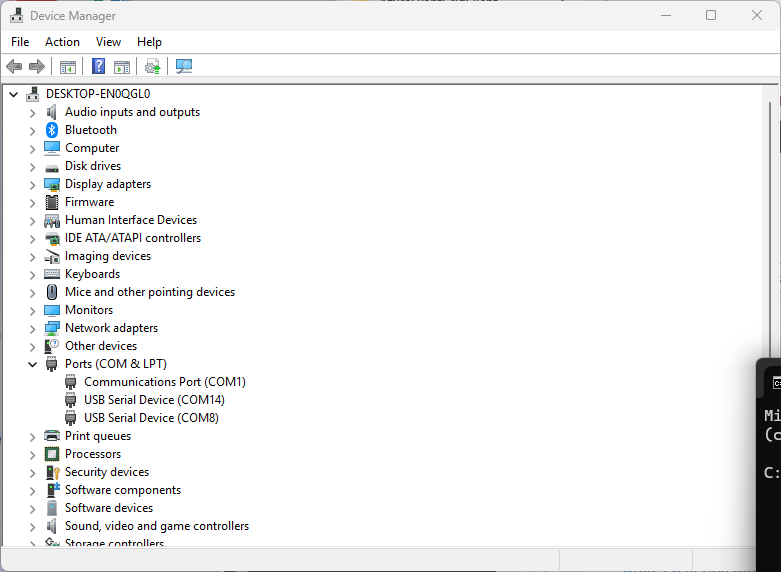
Windows Device manager displaying the available serial ports

Rather than debugging both the nanoFramework RS485Sender and RS485Receiver applications simultaneously, I used the Arduino RS485Sender and RS485 Receiver application but had similar issues with the port assignments changing.
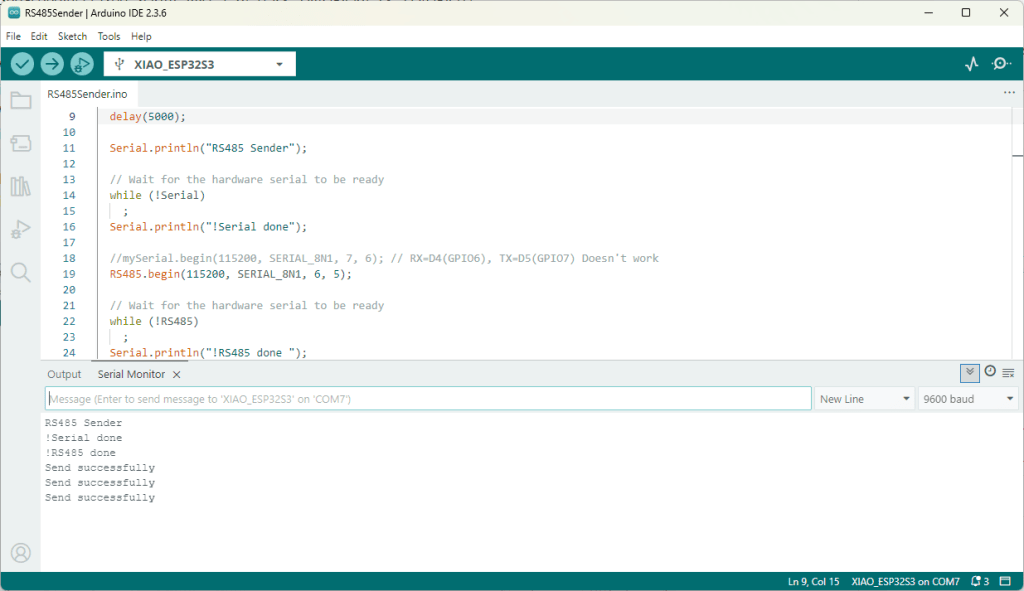
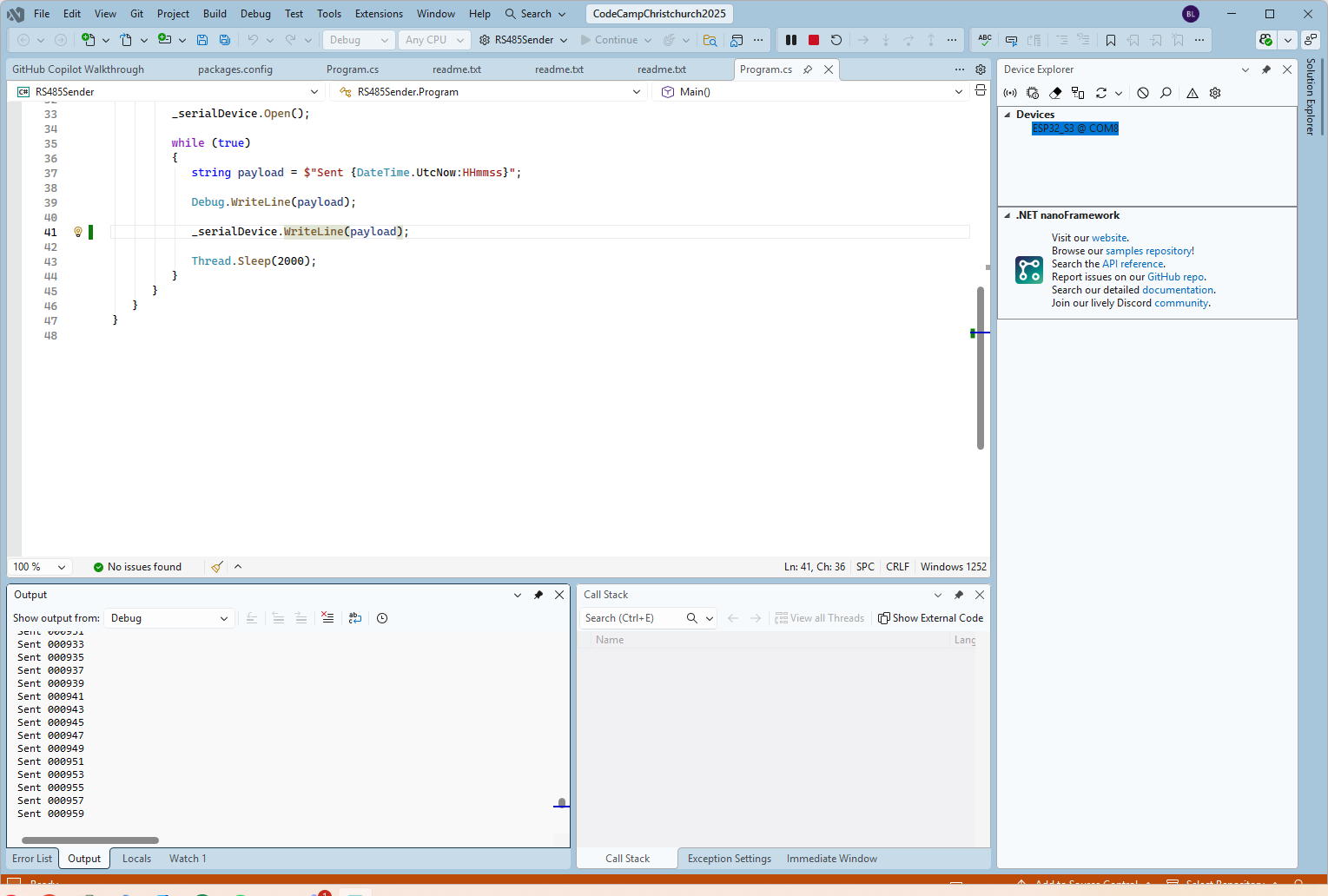
Arduino RS485 Sender application
The nanoFramework sender application
public class Program
{
   static SerialPort _serialDevice;

   public static void Main()
   {
      Configuration.SetPinFunction(Gpio.IO06, DeviceFunction.COM2_RX);
      Configuration.SetPinFunction(Gpio.IO05, DeviceFunction.COM2_TX);
      Configuration.SetPinFunction(Gpio.IO02, DeviceFunction.COM2_RTS);

      Debug.WriteLine("RS485 Sender: ");

      var ports = SerialPort.GetPortNames();

      Debug.WriteLine("Available ports: ");
      foreach (string port in ports)
      {
         Debug.WriteLine($" {port}");
      }

      _serialDevice = new SerialPort("COM2");
      _serialDevice.BaudRate = 9600;
      _serialDevice.Mode = SerialMode.RS485;

      _serialDevice.Open();

      Debug.WriteLine("Sending...");
      while (true)
      {
         string payload = $"{DateTime.UtcNow:HHmmss}";

         Debug.WriteLine($"Sent:{DateTime.UtcNow:HHmmss}");

         Debug.WriteLine(payload);

         _serialDevice.WriteLine(payload);

         Thread.Sleep(2000);
      }
   }
}

if I had built the nanoFramework RS485Sender and RS485Receiver applications first debugging the Arduino RS485Sender and RS485Receiver would been similar.
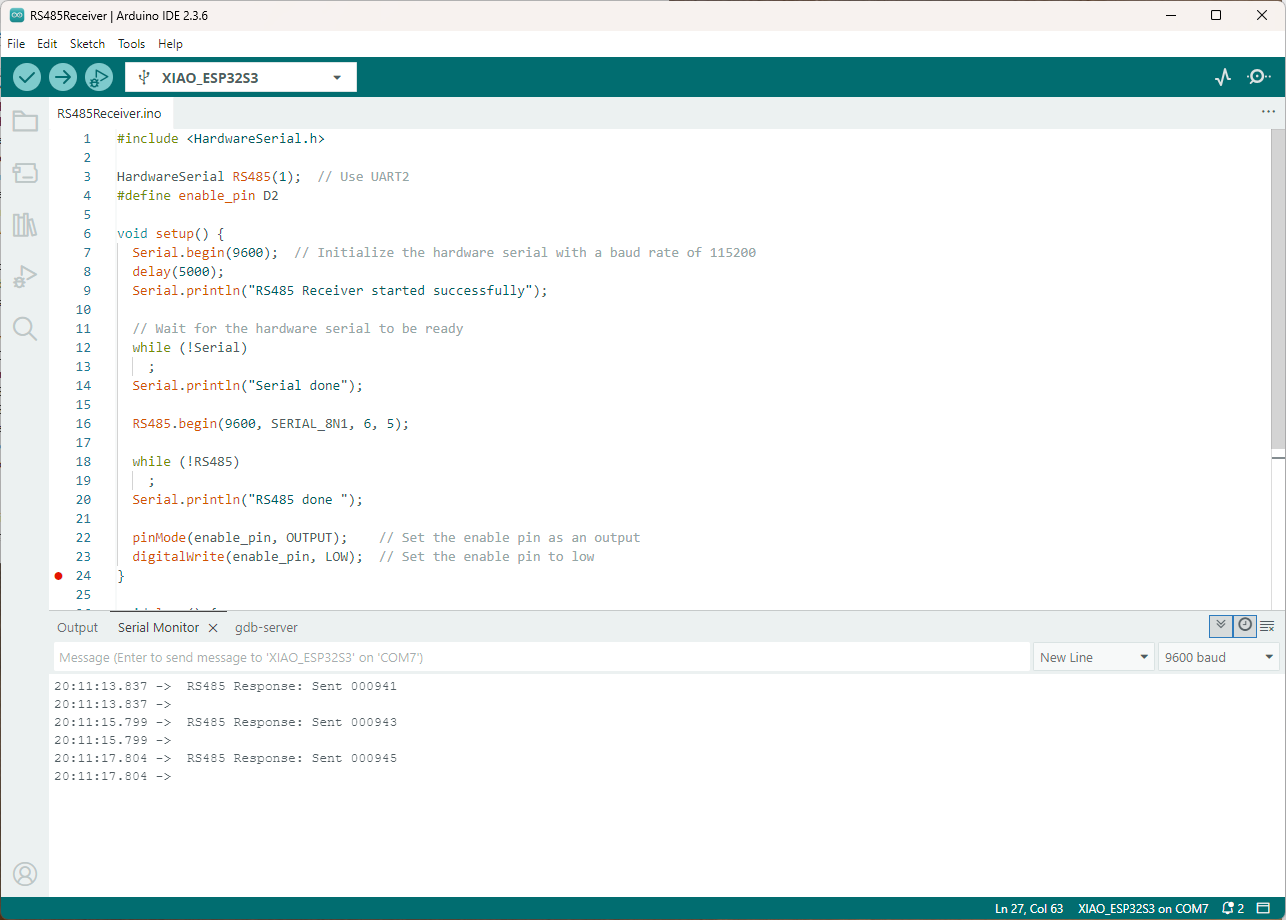
Arduino receiver application displaying messages from the nanoFramework sender application
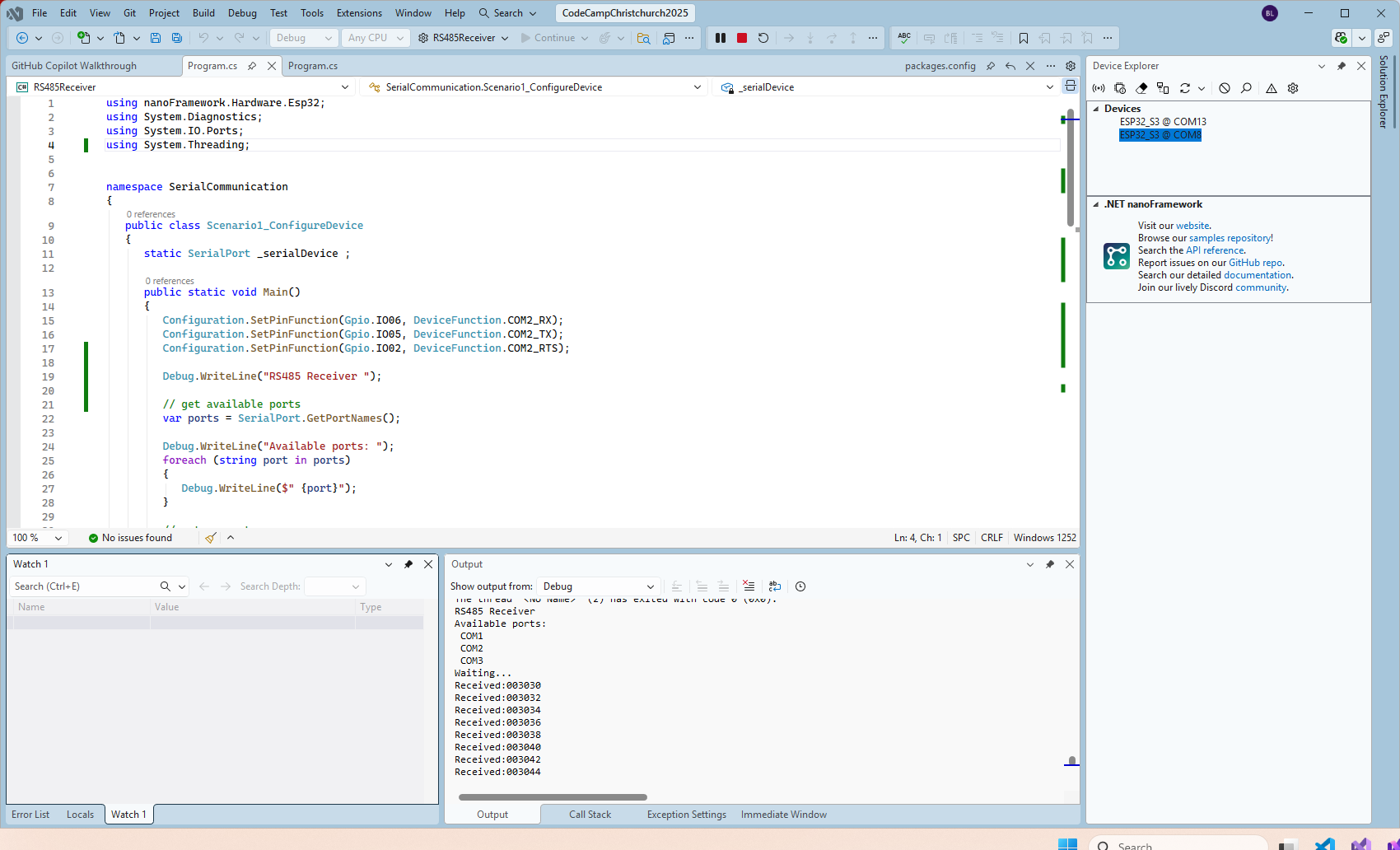
The nanoFramework Receiver receiving messages from the nanoFramework Sender
public class Program
{
   static SerialPort _serialDevice ;
 
   public static void Main()
   {
      Configuration.SetPinFunction(Gpio.IO06, DeviceFunction.COM2_RX);
      Configuration.SetPinFunction(Gpio.IO05, DeviceFunction.COM2_TX);
      Configuration.SetPinFunction(Gpio.IO02, DeviceFunction.COM2_RTS);

      Debug.WriteLine("RS485 Receiver ");

      // get available ports
      var ports = SerialPort.GetPortNames();

      Debug.WriteLine("Available ports: ");
      foreach (string port in ports)
      {
         Debug.WriteLine($" {port}");
      }

      // set parameters
      _serialDevice = new SerialPort("COM2");
      _serialDevice.BaudRate = 9600;
      _serialDevice.Mode = SerialMode.RS485;

      // set a watch char to be notified when it's available in the input stream
      _serialDevice.WatchChar = '\n';

      // setup an event handler that will fire when a char is received in the serial device input stream
      _serialDevice.DataReceived += SerialDevice_DataReceived;

      _serialDevice.Open();

      Debug.WriteLine("Waiting...");
      Thread.Sleep(Timeout.Infinite);
   }

   private static void SerialDevice_DataReceived(object sender, SerialDataReceivedEventArgs e)
   {
      SerialPort serialDevice = (SerialPort)sender;

      switch (e.EventType)
      {
         case SerialData.Chars:
         //break;

         case SerialData.WatchChar:
            string response = serialDevice.ReadExisting();
            Debug.Write($"Received:{response}");
            break;
         default:
            Debug.Assert(false, $"e.EventType {e.EventType} unknown");
            break;
      }
   }
}

The changing of serial port numbers while running different combinations of Arduino and nanoFramework environments concurrently combined with the sender and receiver applications having to be deployed to the right devices (also initially accidentally different baud rates) was a word of pain, and with the benefit of hindsight I should have used two computers.

.NET nanoFramework BME680 Library Debugging Part 2

Reading the RAK1906 WisBlock Environment Sensor/BME680 GasResistance was failing randomly so I decided to dig a bit deeper. I checked the termination resistors, made sure the sensor was firmly seated on the RAK5005, and tried another Inter-Integrated Circuit(I²C) device on the same physical port.

I then used Visual Studio 2022 Debugger to “single step” further into the BME680 code and the first thing that looked a bit odd was the TryReadTemperatureCore, TryReadPressureCore, TryReadHumidityCore and TryReadGasResistanceCore return values were ignored.

/// <summary>
/// Performs a synchronous reading.
/// </summary>
/// <returns><see cref="Bme680ReadResult"/></returns>
public Bme680ReadResult Read()
{
   SetPowerMode(Bme680PowerMode.Forced);
   Thread.Sleep((int)GetMeasurementDuration(HeaterProfile).Milliseconds);

    TryReadTemperatureCore(out Temperature temperature);
    TryReadPressureCore(out Pressure pressure, skipTempFineRead: true);
    TryReadHumidityCore(out RelativeHumidity humidity, skipTempFineRead: true);
    TryReadGasResistanceCore(out ElectricResistance gasResistance);

    return new Bme680ReadResult(temperature, pressure, humidity, gasResistance);
}

I then single stepped into the TryReadTemperatureCore which was returning a boolean indicating whether the read was success.

private bool TryReadTemperatureCore(out Temperature temperature)
{
    if (TemperatureSampling == Sampling.Skipped)
    {
        temperature = default;
        return false;
    }

    var temp = (int)Read24BitsFromRegister((byte)Bme680Register.TEMPDATA, Endianness.BigEndian);

    temperature = CompensateTemperature(temp >> 4);
    return true;
}

This library was based on the dotnet/iot Bmxx80 code, it looked similar, but I missed an important detail lots more ?’s…

Console.WriteLine("Hello BME680!");

// The I2C bus ID on the Raspberry Pi 3.
const int busId = 1;
// set this to the current sea level pressure in the area for correct altitude readings
Pressure defaultSeaLevelPressure = WeatherHelper.MeanSeaLevel;

I2cConnectionSettings i2cSettings = new(busId, Bme680.DefaultI2cAddress);
I2cDevice i2cDevice = I2cDevice.Create(i2cSettings);

using Bme680 bme680 = new Bme680(i2cDevice, Temperature.FromDegreesCelsius(20.0));

while (true)
{
    // reset will change settings back to default
    bme680.Reset();

    // 10 consecutive measurement with default settings
    for (var i = 0; i < 10; i++)
    {
        // Perform a synchronous measurement
        var readResult = bme680.Read();

        // Print out the measured data
        Console.WriteLine($"Gas resistance: {readResult.GasResistance?.Ohms:0.##}Ohm");
        Console.WriteLine($"Temperature: {readResult.Temperature?.DegreesCelsius:0.#}\u00B0C");
        Console.WriteLine($"Pressure: {readResult.Pressure?.Hectopascals:0.##}hPa");
        Console.WriteLine($"Relative humidity: {readResult.Humidity?.Percent:0.#}%");

        if (readResult.Temperature.HasValue && readResult.Pressure.HasValue)
        {
            var altValue = WeatherHelper.CalculateAltitude(readResult.Pressure.Value, defaultSeaLevelPressure, readResult.Temperature.Value);
            Console.WriteLine($"Altitude: {altValue.Meters:0.##}m");
        }

        if (readResult.Temperature.HasValue && readResult.Humidity.HasValue)
        {
            // WeatherHelper supports more calculations, such as saturated vapor pressure, actual vapor pressure and absolute humidity.
            Console.WriteLine($"Heat index: {WeatherHelper.CalculateHeatIndex(readResult.Temperature.Value, readResult.Humidity.Value).DegreesCelsius:0.#}\u00B0C");
            Console.WriteLine($"Dew point: {WeatherHelper.CalculateDewPoint(readResult.Temperature.Value, readResult.Humidity.Value).DegreesCelsius:0.#}\u00B0C");
        }

        // when measuring the gas resistance on each cycle it is important to wait a certain interval
        // because a heating plate is activated which will heat up the sensor without sleep, this can
        // falsify all readings coming from the sensor
        Thread.Sleep(1000);
    }
    ...
}

The Bme680 Read() method checked the TryReadTemperatureCore, TryReadPressureCore, TryReadHumidityCore & TryReadGasResistanceCore return values.

/// <summary>
/// Performs a synchronous reading.
/// </summary>
/// <returns><see cref="Bme680ReadResult"/></returns>
public Bme680ReadResult Read()
{
    SetPowerMode(Bme680PowerMode.Forced);
    Thread.Sleep((int)GetMeasurementDuration(HeaterProfile).Milliseconds);

    var tempSuccess = TryReadTemperatureCore(out var temperature);
    var pressSuccess = TryReadPressureCore(out var pressure, skipTempFineRead: true);
    var humiditySuccess = TryReadHumidityCore(out var humidity, skipTempFineRead: true);
    var gasSuccess = TryReadGasResistanceCore(out var gasResistance);

    return new Bme680ReadResult(tempSuccess ? temperature : null, pressSuccess ? pressure : null, humiditySuccess ? humidity : null, gasSuccess ? gasResistance : null);
}

The dotnet/iot Bmxx80 library uses Nullable reference types which are not supported by the nanoFramework(Sept 2022), and this was overlooked when the library was ported.

I have created a Github issue.

.NET nanoFramework BME680 Library Debugging Part 1

I was intending to use a RAK1906 WisBlock Environment Sensor/BME680 for my nanoFramework RAK11200 Azure IoT Hub HTTP basic project, but the test application kept failing.

RAK1120+RAK5005+RAK106 Test setup

My test setup was a RAKwireless RAK11200 WisBlock WiFi Module, RAK5005 WisBlock Base Board and a RAK1906 WisBlock Environmental Sensor. I used the RAK1906 Sensor because it has nanoFramework.IoTDevice library support.

Visual Studio 2022 Output Window Output window when application failed

When I connected to the device with Tera Term it confirmed that the device was in a “kernel panic” loop.

nanoFramework Kernel Panic loop captured with Tera Term

Before I could debug the BME680 sample I had to get the Bmxx80 & Bmxx80.sample projects to compile (update NuGet packages and remove NerdBank.GitVersioning references).

BMXX80 Solution from nanoFramework.IoT.Device

I then used the Visual Studio 2022 Debugger to “single step” into the library code

/// <summary>
/// Sets the power mode to the given mode
/// </summary>
/// <param name="powerMode">The <see cref="Bme680PowerMode"/> to set.</param>
/// <exception cref="ArgumentOutOfRangeException">Thrown when the power mode does not match a defined mode in <see cref="Bme680PowerMode"/>.</exception>
[Property("PowerMode")]
public void SetPowerMode(Bme680PowerMode powerMode)
{
    //if (!powerMode.Equals(Bme680PowerMode.Forced) &&
    //    !powerMode.Equals(Bme680PowerMode.Sleep))
    //{
    //   throw new ArgumentOutOfRangeException();
    //}

    var status = Read8BitsFromRegister((byte)Bme680Register.CTRL_MEAS);
    status = (byte)((status & (byte)~Bme680Mask.PWR_MODE) | (byte)powerMode);

    SpanByte command = new[]
    {
        (byte)Bme680Register.CTRL_MEAS, status
    };
    _i2cDevice.Write(command);
}

The first problem was the two powerMode.Equals statements used to validate the powerMode parameter around line 287 in Bme680.cs so I commented them out.

Exception when getting the “GasResistance” value

On start-up references to readResult.GasResistance.Ohms would regularly fail, so I commented out everywhere it was used.

Exception when getting the “Barometric Pressure” value

Then references to readResult.Pressure.Hectopascals would randomly fail, so I commented out everywhere it was used.

public static void RunSample()
{
    Debug.WriteLine("Hello BME680!");

    //////////////////////////////////////////////////////////////////////
    Configuration.SetPinFunction(Gpio.IO04, DeviceFunction.I2C1_DATA);
    Configuration.SetPinFunction(Gpio.IO05, DeviceFunction.I2C1_CLOCK);

    // The I2C bus ID on the MCU.
    const int busId = 1;
    // set this to the current sea level pressure in the area for correct altitude readings
    Pressure defaultSeaLevelPressure = WeatherHelper.MeanSeaLevel;

    I2cConnectionSettings i2cSettings = new(busId, Bme680.DefaultI2cAddress);
    I2cDevice i2cDevice = I2cDevice.Create(i2cSettings);

    using Bme680 bme680 = new Bme680(i2cDevice, Temperature.FromDegreesCelsius(20.0));

    while (true)
    {
        // reset will change settings back to default
        bme680.Reset();

        // 10 consecutive measurement with default settings
        for (var i = 0; i < 10; i++)
        {
            // Perform a synchronous measurement
            var readResult = bme680.Read();

            // Print out the measured data
            //Debug.WriteLine($"Gas resistance: {readResult.GasResistance.Ohms}Ohm");
            Debug.WriteLine($"Temperature: {readResult.Temperature.DegreesCelsius}\u00B0C");
            //Debug.WriteLine($"Pressure: {readResult.Pressure.Hectopascals}hPa");
            Debug.WriteLine($"Relative humidity: {readResult.Humidity.Percent}%");

            /* 
            if (!readResult.Temperature.Equals(null) && !readResult.Pressure.Equals(null))
            {
                var altValue = WeatherHelper.CalculateAltitude(readResult.Pressure, defaultSeaLevelPressure, readResult.Temperature);
                Debug.WriteLine($"Altitude: {altValue.Meters}m");
            }

            if (!readResult.Temperature.Equals(null) && !readResult.Humidity.Equals(null))
            {
                // WeatherHelper supports more calculations, such as saturated vapor pressure, actual vapor pressure and absolute humidity.
                Debug.WriteLine($"Heat index: {WeatherHelper.CalculateHeatIndex(readResult.Temperature, readResult. Humidity).DegreesCelsius}\u00B0C");
                Debug.WriteLine($"Dew point: {WeatherHelper.CalculateDewPoint(readResult.Temperature, readResult.Humidity).DegreesCelsius}\u00B0C");
            }
            */

            // when measuring the gas resistance on each cycle it is important to wait a certain interval
            // because a heating plate is activated which will heat up the sensor without sleep, this can
            // falsify all readings coming from the sensor
            Thread.Sleep(1000);
        }
...
}
Visual Studio Debugger output displaying temperature and humidity values

After commenting the out all the .Equal, readResult.GasResistance.Ohms and readResult.Pressure.Hectopascals references the application would run for hours displaying only temperature and relative humidity values.

Next step is figuring out why the readResult.GasResistance.Ohms and readResult.Pressure.Hectopascals are failing.

I have created Github issue for the .Equals crash.