After Swarm Space – Uplink Payload Formatters revisited I wrote a couple of payload formatters and they were easy to get wrong and the Azure Application Insights error messages were unhelpful.
namespace PayloadFormatter // Additional namespace for shortening interface when usage in formatter code
{
    using System.Collections.Generic;

    using Newtonsoft.Json.Linq;

    public interface IFormatterUplink
    {
        public JObject Evaluate(IDictionary<string, string> properties, uint organisationId, uint deviceId, byte deviceType, ushort userApplicationId, JObject payloadJson, string payloadText, byte[] payloadBytes);
    }

    public interface IFormatterDownlink
    {
        public byte[] Evaluate(IDictionary<string, string> properties, uint organisationId, uint deviceId, byte deviceType, ushort userApplicationId, JObject payloadJson, string payloadText, byte[] payloadBytes);
    }
}
The definitions of the uplink & downlink payload formatter evaluator interfaces have been updated and shifted to a new project.
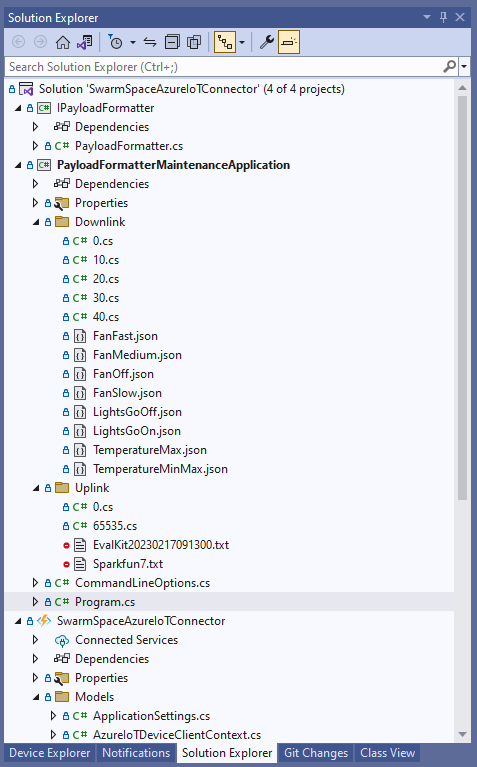
I built a console application to help with developing and debugging uplink or downlink formatters. The application has a number of command line parameters which specify the formatter to be used, UserApplicationId, OrganizationId, DeviceType etc.
public class CommandLineOptions
{
    [Option('d', "Direction", Required = true, HelpText = "Test Uplink or DownLink formatter")]
	public string Direction { get; set; }

    [Option('p', "filename", HelpText = "Uplink or Downlink Payload file name")]
    public string PayloadFilename { get; set; } = string.Empty;

    [Option('o', "OrganisationId", Required = true, HelpText = "Organisation unique identifier")]
    public uint OrganizationId { get; set; }

    [Option('i', "DeviceId", Required = true, HelpText = "Device unique identitifer")]
    public uint DeviceId { get; set; }

    [Option('t', "DeviceType", Required = true, HelpText = "Device type number")]
    public byte DeviceType { get; set; }

    [Option('u', "UserApplicationId", Required = true, HelpText = "User Application Id")]
    public ushort UserApplicationId { get; set; }

    [Option('h', "SwarmHiveReceivedAtUtc", HelpText = "Swarm Hive received at time UTC")]
    public DateTime? SwarmHiveReceivedAtUtc { get; set; }

    [Option('w', "UplinkWebHookReceivedAtUtc", HelpText = "Webhook received at time UTC")]
    public DateTime? UplinkWebHookReceivedAtUtc { get; set; }

    [Option('s', "Status", HelpText = "Uplink local file system file name")]
    public byte? Status { get; set; }

    [Option('c', "Client", HelpText = "Uplink local file system file name")]
    public string Client { get; set; }
 }

The downlink formatter (similar approach for uplink) loads the sample file as an array of bytes, then tries to convert it to text, and finally to JSON. Then the formatter code is “compiled” and the executed with the file payload and command line parameters.
private static async Task DownlinkFormatterCore(CommandLineOptions options)
{
    Dictionary<string, string> properties = new Dictionary<string, string>();

    string formatterFolder = Path.Combine(Environment.CurrentDirectory, "downlink");
    Console.WriteLine($"Downlink- uplinkFormatterFolder: {formatterFolder}");

    string formatterFile = Path.Combine(formatterFolder, $"{options.UserApplicationId}.cs");
    Console.WriteLine($"Downlink- UserApplicationId: {options.UserApplicationId}");
    Console.WriteLine($"Downlink- Payload formatter file: {formatterFile}");

    PayloadFormatter.IFormatterDownlink evalulator;
    try
    {
        evalulator = CSScript.Evaluator.LoadFile<PayloadFormatter.IFormatterDownlink>(formatterFile);
     }
    catch (CSScriptLib.CompilerException cex)
    {
        Console.Write($"Loading or compiling file:{formatterFile} failed Exception:{cex}");
        return;
    }

    string payloadFilename = Path.Combine(formatterFolder, options.PayloadFilename);
    Console.WriteLine($"Downlink- payloadFilename:{payloadFilename}");
    byte[] uplinkBytes;

    try
    {
        uplinkBytes = File.ReadAllBytes(payloadFilename);
    }
    catch (DirectoryNotFoundException dex)
    {
        Console.WriteLine($"Uplink payload filename directory {formatterFolder} not found:{dex}");
        return;
    }
    catch (FileNotFoundException fnfex)
    {
        Console.WriteLine($"Uplink payload filename {payloadFilename} not found:{fnfex}");
        return;
    }
    catch (FormatException fex)
    {
        Console.WriteLine($"Uplink payload file invalid format {payloadFilename} not found:{fex}");
        return;
    }

    // See if payload can be converted to a string
    string uplinkText = string.Empty;
    try
    {
        uplinkText = Encoding.UTF8.GetString(uplinkBytes);
    }
    catch (FormatException fex)
    {
        Console.WriteLine("Encoding.UTF8.GetString failed:{0}", fex.Message);
    }

    // See if payload can be converted to JSON
    JObject uplinkJson;
    try
    {
        uplinkJson = JObject.Parse(uplinkText);
    }
    catch (JsonReaderException jrex)
    {
        Console.WriteLine("JObject.Parse failed Exception:{1}", jrex);

        uplinkJson = new JObject();
    }

    Console.WriteLine("Properties");
    foreach (var property in properties)
    {
        Console.WriteLine($"{property.Key}:{property.Value}");
    }

    // Transform the byte and optional text and JSON payload
    Byte[] payload;
    try
    {
        payload = evalulator.Evaluate(properties, options.OrganizationId, options.DeviceId, options.DeviceType, options.UserApplicationId, uplinkJson, uplinkText, uplinkBytes);
    }
    catch (Exception ex)
    {
        Console.WriteLine($"evalulatorUplink.Evaluate failed Exception:{ex}");
        return;
    }

    Console.WriteLine("Payload");
    Console.WriteLine(Convert.ToBase64String(payload));
}
The sample JSON payload is what would be sent by Azure IoT Central to a device to configure the fan speed

{
  "FanStatus": 2
}
If the downlink payload formatter is compiled and executes successfully the Base64 representation output is displayed

using System;
using System.Collections.Generic;
using Newtonsoft.Json.Linq;

public class FormatterDownlink : PayloadFormatter.IFormatterDownlink
{
    public byte[] Evaluate(IDictionary<string, string> properties, uint organisationId, uint deviceId, byte deviceType, ushort userApplicationId, JObject payloadJson, string payloadText, byte[] payloadBytes)
    {
        byte? status = payloadJson.Value<byte?>("FanStatus");

        if ( status.HasValue )
        {
            return new byte[] { status.Value };
        }

        return new byte[]{};
    }
}
If the downlink payload formatter syntax is incorrect e.g. { status.Value ; }; an error message with the line and column is displayed.

using System;
using System.Collections.Generic;
using Newtonsoft.Json.Linq;

public class FormatterDownlink : PayloadFormatter.IFormatterDownlink
{
    public byte[] Evaluate(IDictionary<string, string> properties, uint organisationId, uint deviceId, byte deviceType, ushort userApplicationId, JObject payloadJson, string payloadText, byte[] payloadBytes)
    {
        byte? status = payloadJson.Value<byte?>("FanStatus");

        if ( status.HasValue )
        {
            return new byte[] { status.Value ; };
        }

        return new byte[]{};
    }
}
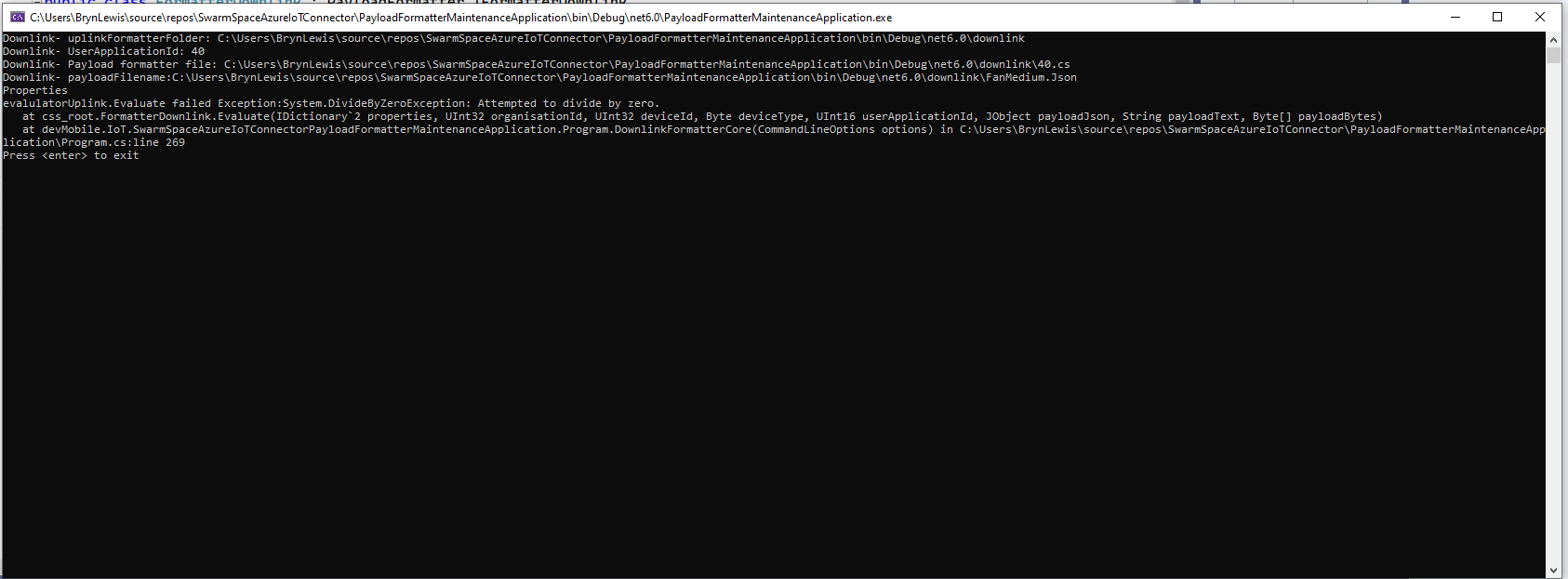
If the downlink payload formatter syntax is correct but execution fails (in the example code division by zero) an error message is displayed.
using System;
using System.Collections.Generic;
using Newtonsoft.Json.Linq;

public class FormatterDownlink : PayloadFormatter.IFormatterDownlink
{
    public byte[] Evaluate(IDictionary<string, string> properties, uint organisationId, uint deviceId, byte deviceType, ushort userApplicationId, JObject payloadJson, string payloadText, byte[] payloadBytes)
    {
        byte? status = payloadJson.Value<byte?>("FanStatus");

        if ( status.HasValue )
        {
            int divideByZero = 10;

            divideByZero = divideByZero / 0;

            return new byte[] { status.Value };
        }

        return new byte[]{};
    }
}
The PayloadFormatterMaintenanceApplication makes it significantly easier to develop formatters. Currently the payload formatters have to be manually uploaded to the application’s Azure Blob Storage for final testing.

 devMobile's blog