Message Transformation in code with HiveMQ Client

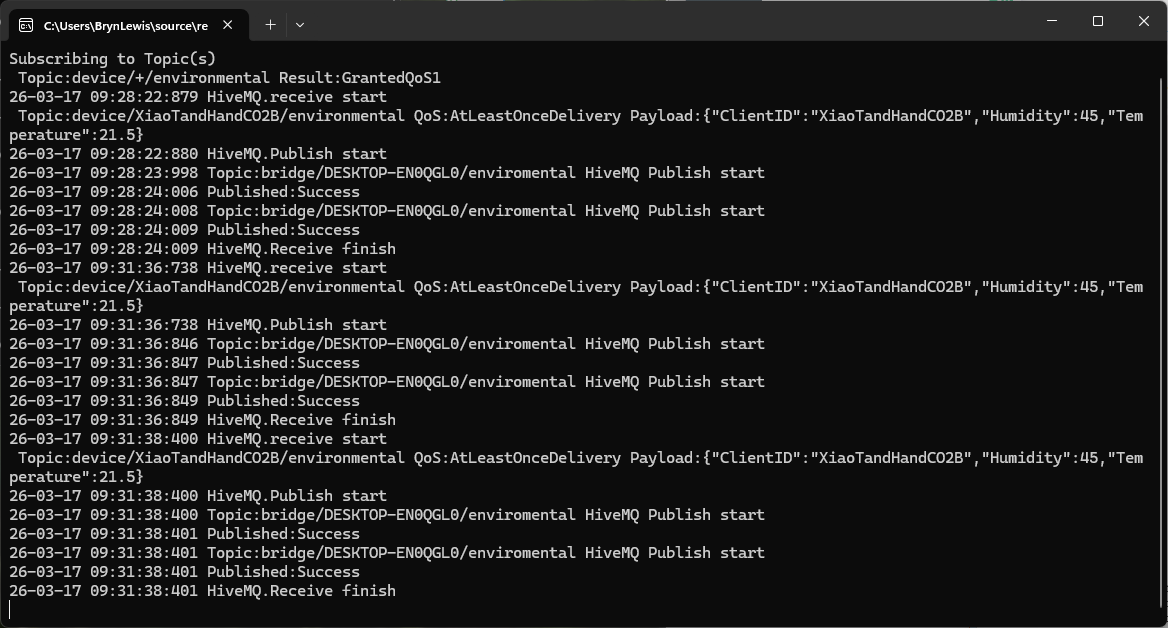
The first prototype of “transforming” telemetry data used C# code complied with the application. The HiveMQClient based application subscribes to topics (devices publishing environmental measurements) and then republishes them to multiple topics.

private static void OnMessageReceived(object? sender, HiveMQtt.Client.Events.OnMessageReceivedEventArgs e)
{
   HiveMQClient client = (HiveMQClient)sender!;

   Console.WriteLine($"{DateTime.UtcNow:yy-MM-dd HH:mm:ss:fff} HiveMQ.receive start");
   Console.WriteLine($" Topic:{e.PublishMessage.Topic} QoS:{e.PublishMessage.QoS} Payload:{e.PublishMessage.PayloadAsString}");

   Console.WriteLine($"{DateTime.UtcNow:yy-MM-dd HH:mm:ss:fff} HiveMQ.Publish start");
   foreach (string topic in _applicationSettings.PublishTopics.Split(',', StringSplitOptions.RemoveEmptyEntries | StringSplitOptions.TrimEntries))
   {
      e.PublishMessage.Topic = string.Format(topic, _applicationSettings.ClientId);

      Console.WriteLine($"{DateTime.UtcNow:yy-MM-dd HH:mm:ss:fff} Topic:{e.PublishMessage.Topic} HiveMQ Publish start ");
      var resultPublish = client.PublishAsync(e.PublishMessage).GetAwaiter().GetResult();
      Console.WriteLine($"{DateTime.UtcNow:yy-MM-dd HH:mm:ss:fff} Published:{resultPublish.QoS1ReasonCode} {resultPublish.QoS2ReasonCode}");
   }
   Console.WriteLine($"{DateTime.UtcNow:yy-MM-dd HH:mm:ss:fff} HiveMQ.Receive finish");
}

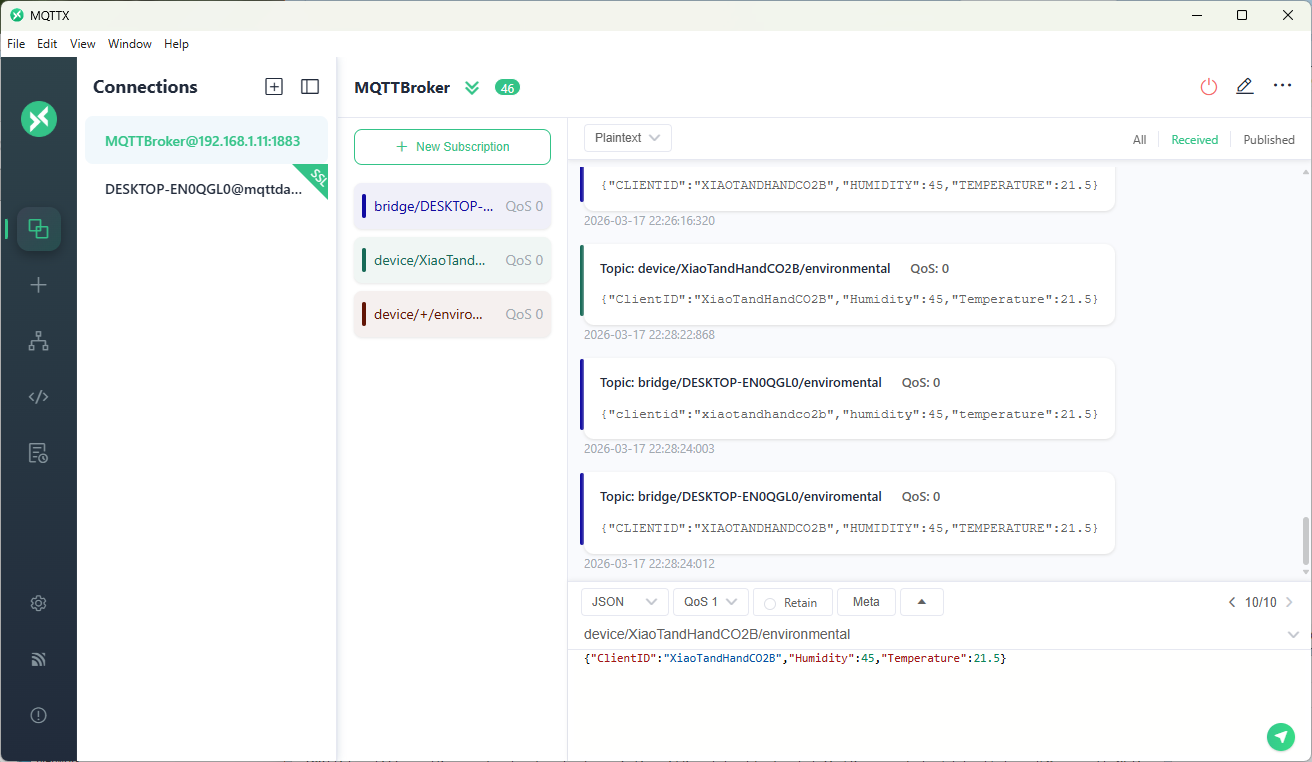
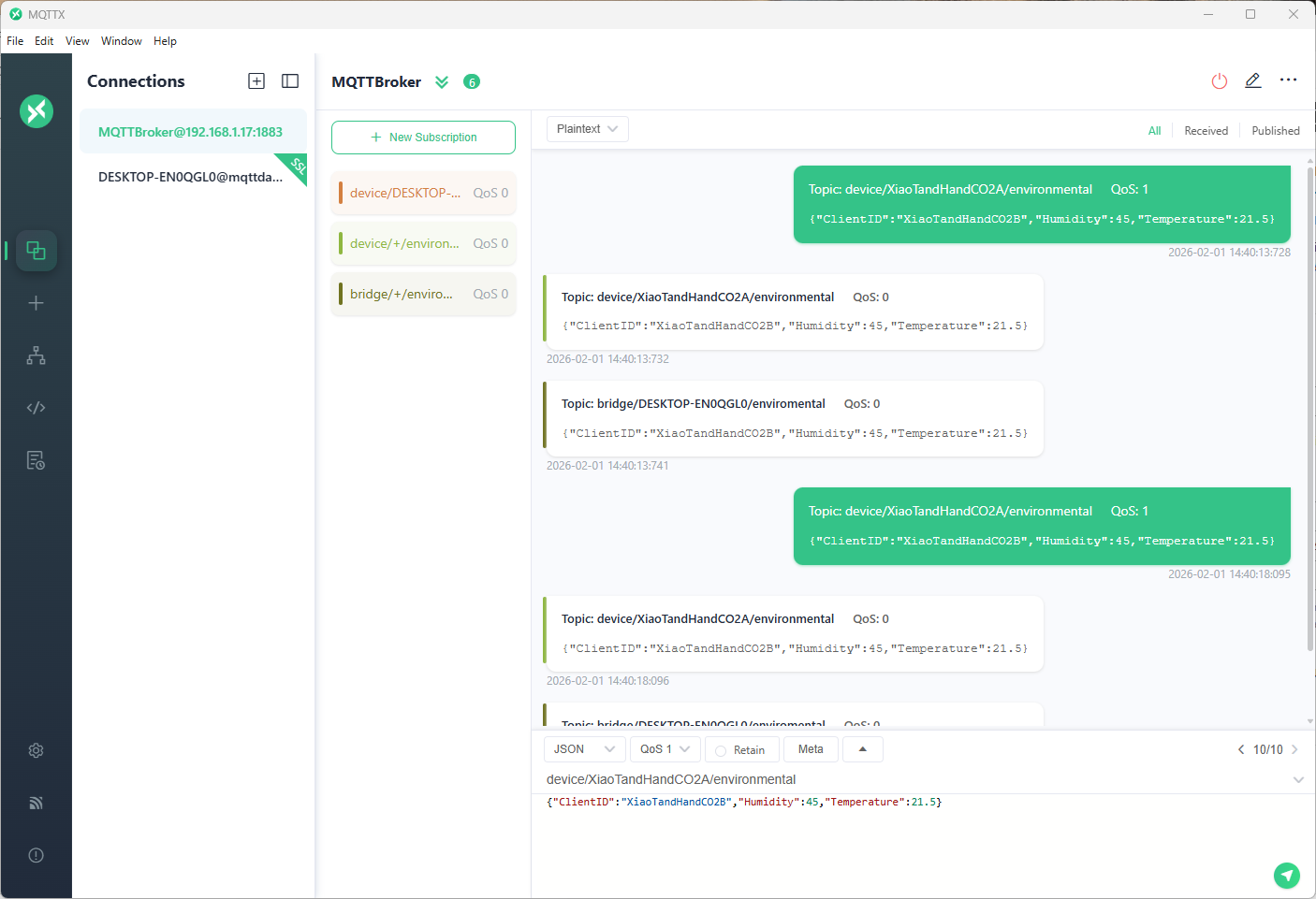
The MQTTX application subscribed to topics that devices (XiaoTandHandCO2A, XiaoTandHandCO2B etc.) and the simulated bridge (DESKTOP-EN0QGL0) published.

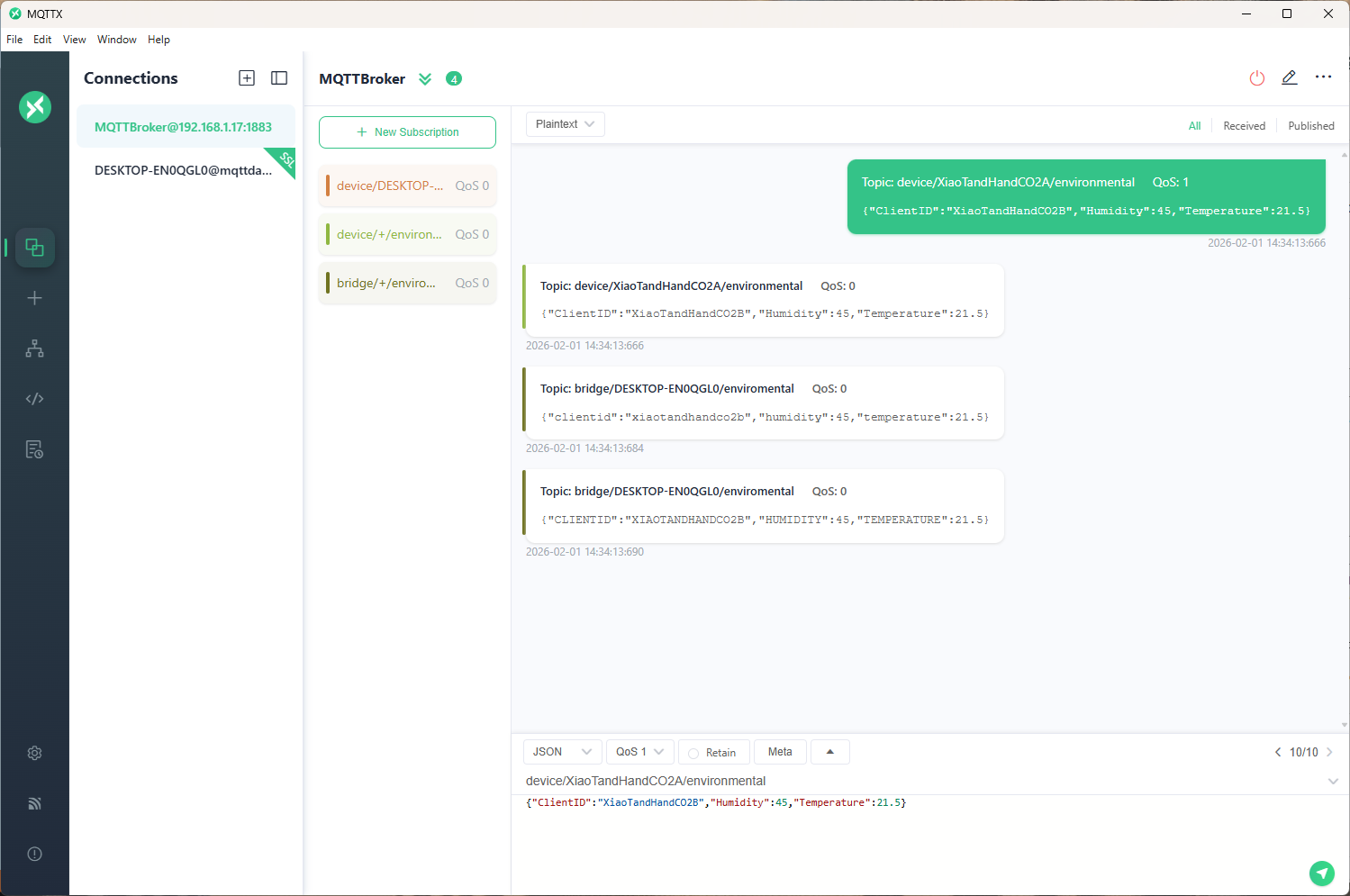
The second prototype “transforms” the telemetry message payloads with C# code that is compiled (with CSScript) as the application starts. The application subscribes to the topics which devices publish (environmental measurements), transforms the payloads, and then republishes the transformed messages to “bridge” topics

private static void OnMessageReceived(object? sender, HiveMQtt.Client.Events.OnMessageReceivedEventArgs e)
{
   HiveMQClient client = (HiveMQClient)sender!;

   Console.WriteLine($"{DateTime.UtcNow:yy-MM-dd HH:mm:ss:fff} HiveMQ.receive start");
   Console.WriteLine($" Topic:{e.PublishMessage.Topic} QoS:{e.PublishMessage.QoS} Payload:{e.PublishMessage.PayloadAsString}");

   Console.WriteLine($"{DateTime.UtcNow:yy-MM-dd HH:mm:ss:fff} HiveMQ.Publish start");
   foreach (string topic in _applicationSettings.PublishTopics.Split(',', StringSplitOptions.RemoveEmptyEntries | StringSplitOptions.TrimEntries))
   {
      e.PublishMessage.Topic = string.Format(topic, _applicationSettings.ClientId);

      foreach (MQTT5PublishMessage message in _evaluator.Transform(e.PublishMessage))
      {
         Console.WriteLine($"{DateTime.UtcNow:yy-MM-dd HH:mm:ss:fff} Topic:{e.PublishMessage.Topic} HiveMQ Publish start ");
         var resultPublish = client.PublishAsync(message).GetAwaiter().GetResult();
         Console.WriteLine($"{DateTime.UtcNow:yy-MM-dd HH:mm:ss:fff} Published:{resultPublish.QoS1ReasonCode} {resultPublish.QoS2ReasonCode}");
      }
   }
   Console.WriteLine($"{DateTime.UtcNow:yy-MM-dd HH:mm:ss:fff} HiveMQ.Receive finish");
}

// This code is compiled as the application starts up, it implements the IMessageTransformer interface
const string sampleTransformCode = @"
using System.Text;
using HiveMQtt.MQTT5.Types;

public class messageTransformer : devMobile.IoT.MqttTransformer.CSScriptLoopback.IMessageTransformer
{
   public MQTT5PublishMessage[] Transform(MQTT5PublishMessage message)
   {
      // Example: echo the payload to a new topic
      var payload = Encoding.UTF8.GetString(message.Payload);


      // Simple transformations: convert to uppercase or lowercase
      var toLower = new MQTT5PublishMessage
      {
         Topic = message.Topic,
         Payload = Encoding.UTF8.GetBytes(payload.ToLower()),
         QoS = QualityOfService.AtLeastOnceDelivery
      };

      var toUpper = new MQTT5PublishMessage
      {
         Topic = message.Topic,
         Payload = Encoding.UTF8.GetBytes(payload.ToUpper()),
         QoS = QualityOfService.AtLeastOnceDelivery
      };

      return new[] { toLower, toUpper };
   }
}";

The sample C# code implements the IMessageTransformer interface and republishes lower and upper case versions of the message.
public interface IMessageTransformer
{
   public MQTT5PublishMessage[] Transform(MQTT5PublishMessage mqttPublishMessage);
}
...
  _evaluator = CSScript.Evaluator.LoadCode<IMessageTransformer>(sampleTransformCode);

The SwarmSpace, and Myriota gateways both use an interface based approach to process uplink and downlink messages. Future versions will include support for isolating processing so that a rogue script can’t crash the application or reference unapproved assemblies

Azure Event Grid MQTT-With HiveMQ & MQTTnet Clients

Most of the examples of connecting to Azure Event Grid’s MQTT broker use MQTTnet so for a bit of variety I started with a hivemq-mqtt-client-dotnet based client. (A customer had been evaluating HiveMQ for a project which was later cancelled)

BEWARE – ClientID parameter is case sensitive.

The HiveMQ client was “inspired” by the How to Guides > Custom Client Certificates documentation.

class Program
{
   private static Model.ApplicationSettings _applicationSettings;
   private static HiveMQClient _client;
   private static bool _publisherBusy = false;

   static async Task Main()
   {
      Console.WriteLine($"{DateTime.UtcNow:yy-MM-dd HH:mm:ss} Hive MQ client starting");

      try
      {
         // load the app settings into configuration
         var configuration = new ConfigurationBuilder()
               .AddJsonFile("appsettings.json", false, true)
               .AddUserSecrets<Program>()
         .Build();

         _applicationSettings = configuration.GetSection("ApplicationSettings").Get<Model.ApplicationSettings>();

         var optionsBuilder = new HiveMQClientOptionsBuilder();

         optionsBuilder
            .WithClientId(_applicationSettings.ClientId)
            .WithBroker(_applicationSettings.Host)
            .WithPort(_applicationSettings.Port)
            .WithUserName(_applicationSettings.UserName)
            .WithCleanStart(_applicationSettings.CleanStart)
            .WithClientCertificate(_applicationSettings.ClientCertificateFileName, _applicationSettings.ClientCertificatePassword)
            .WithUseTls(true);

         using (_client = new HiveMQClient(optionsBuilder.Build()))
         {
            _client.OnMessageReceived += OnMessageReceived;

            var connectResult = await _client.ConnectAsync();
            if (connectResult.ReasonCode != ConnAckReasonCode.Success)
            {
               throw new Exception($"Failed to connect: {connectResult.ReasonString}");
            }

            Console.WriteLine($"Subscribed to Topic");
            foreach (string topic in _applicationSettings.SubscribeTopics.Split(',', StringSplitOptions.RemoveEmptyEntries | StringSplitOptions.TrimEntries))
            {
               var subscribeResult = await _client.SubscribeAsync(topic, _applicationSettings.SubscribeQualityOfService);

               Console.WriteLine($" Topic:{topic} Result:{subscribeResult.Subscriptions[0].SubscribeReasonCode}");
            }
   }
//...
}
HiveMQ Client console application output

The MQTTnet client was “inspired” by the Azure MQTT .NET Application sample

class Program
{
   private static Model.ApplicationSettings _applicationSettings;
   private static IMqttClient _client;
   private static bool _publisherBusy = false;

   static async Task Main()
   {
      Console.WriteLine($"{DateTime.UtcNow:yy-MM-dd HH:mm:ss} MQTTNet client starting");

      try
      {
         // load the app settings into configuration
         var configuration = new ConfigurationBuilder()
               .AddJsonFile("appsettings.json", false, true)
               .AddUserSecrets<Program>()
         .Build();

         _applicationSettings = configuration.GetSection("ApplicationSettings").Get<Model.ApplicationSettings>();

         var mqttFactory = new MqttFactory();

         using (_client = mqttFactory.CreateMqttClient())
         {
            // Certificate based authentication
            List<X509Certificate2> certificates = new List<X509Certificate2>
            {
               new X509Certificate2(_applicationSettings.ClientCertificateFileName, _applicationSettings.ClientCertificatePassword)
            };

            var tlsOptions = new MqttClientTlsOptionsBuilder()
                  .WithClientCertificates(certificates)
                  .WithSslProtocols(System.Security.Authentication.SslProtocols.Tls12)
                  .UseTls(true)
                  .Build();

            MqttClientOptions mqttClientOptions = new MqttClientOptionsBuilder()
                     .WithClientId(_applicationSettings.ClientId)
                     .WithTcpServer(_applicationSettings.Host, _applicationSettings.Port)
                     .WithCredentials(_applicationSettings.UserName, _applicationSettings.Password)
                     .WithCleanStart(_applicationSettings.CleanStart)
                     .WithTlsOptions(tlsOptions)
                     .Build();

            var connectResult = await _client.ConnectAsync(mqttClientOptions);
            if (connectResult.ResultCode != MqttClientConnectResultCode.Success)
            {
               throw new Exception($"Failed to connect: {connectResult.ReasonString}");
            }

            _client.ApplicationMessageReceivedAsync += OnApplicationMessageReceivedAsync;

            Console.WriteLine($"Subscribed to Topic");
            foreach (string topic in _applicationSettings.SubscribeTopics.Split(',', StringSplitOptions.RemoveEmptyEntries | StringSplitOptions.TrimEntries))
            {
               var subscribeResult = await _client.SubscribeAsync(topic, _applicationSettings.SubscribeQualityOfService);

               Console.WriteLine($" {topic} Result:{subscribeResult.Items.First().ResultCode}");
            }
      }
//...
}
MQTTnet client console application output

The design of the MQTT protocol means that the hivemq-mqtt-client-dotnet and MQTTnet implementations are similar. Having used both I personally prefer the HiveMQ client library.