Random wanderings through Microsoft Azure esp. PaaS plumbing, the IoT bits, AI on Micro controllers, AI on Edge Devices, .NET nanoFramework, .NET Core on *nix and ML.NET+ONNX
The Myriota Connector only supports Direct Methods which provide immediate confirmation of the result being queued by the Myriota Cloud API. The Myriota (API) control message send method responds with 400 Bad Request if there is already a message being sent to a device.
Myriota Azure Function Environment Variable configuration
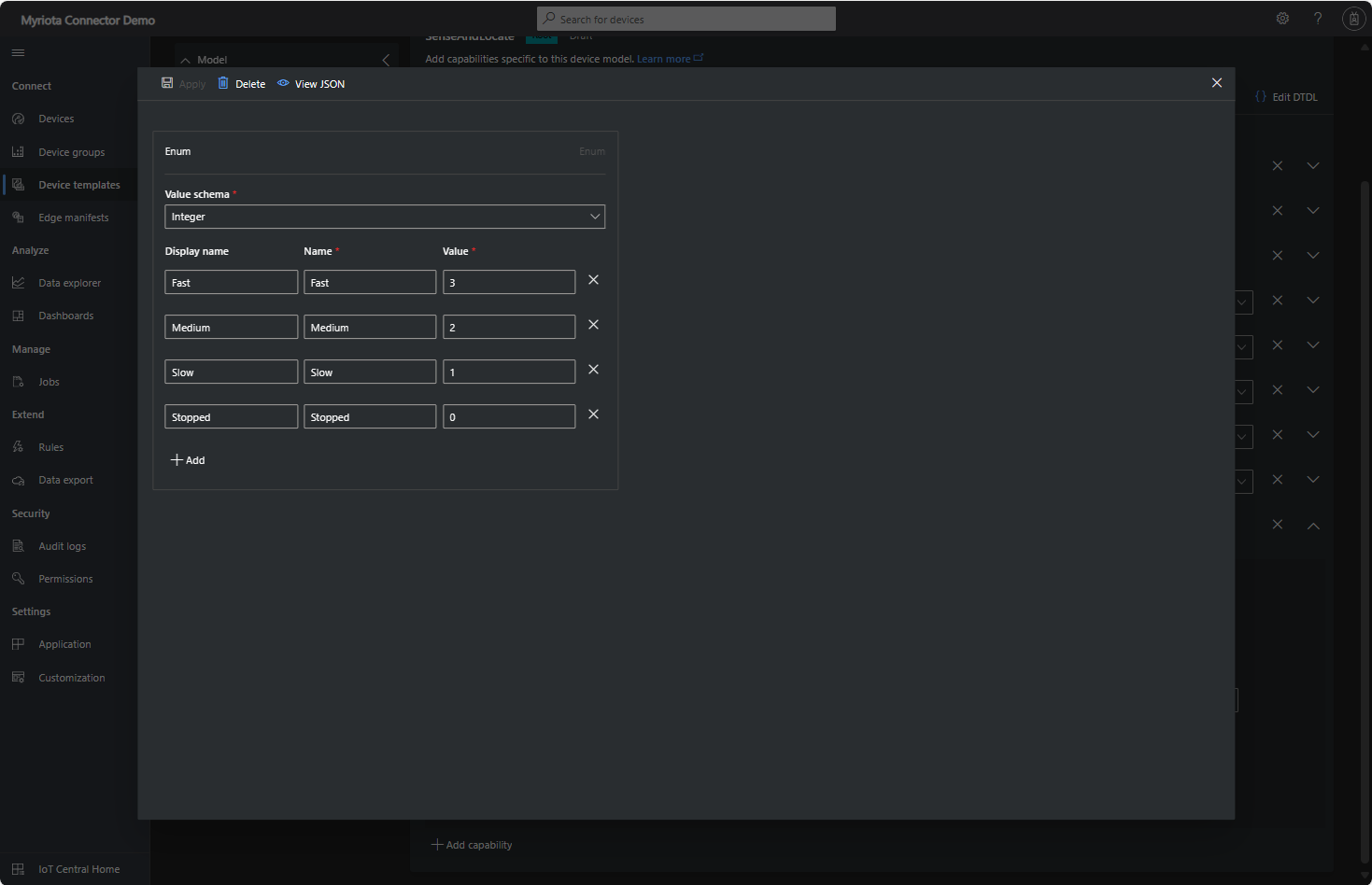
Sense and Locate Azure IoT Central Template Fan Speed Enumeration
The fan speed value in the message payload is configured in the fan speed enumeration.
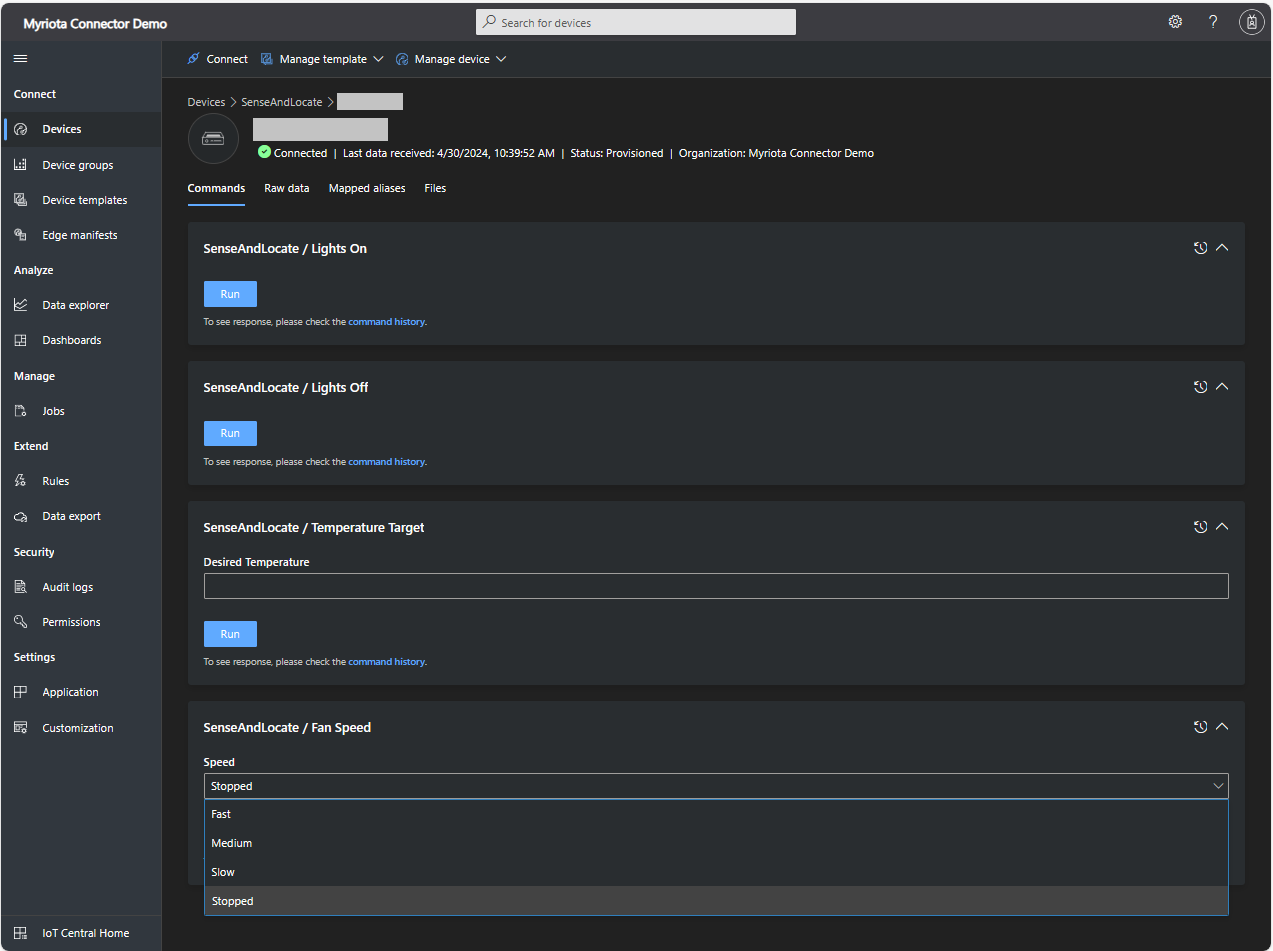
Sense and Locate Azure IoT Central Command Fan Speed Selection
The FanSpeed.cs payload formatter extracts the FanSpeed value from the Javascript Object Notation(JSON) payload and returns a two-byte array containing the message type and speed of the fan.
using System;
using System.Collections.Generic;

using Newtonsoft.Json;
using Newtonsoft.Json.Linq;

public class FormatterDownlink : PayloadFormatter.IFormatterDownlink
{
   public byte[] Evaluate(string terminalId, string methodName, JObject payloadJson, byte[] payloadBytes)
   {
      byte? status = payloadJson.Value<byte?>("FanSpeed");

      if (!status.HasValue)
      {
         return new byte[] { };
      }

      return new byte[] { 1, status.Value };
   }
}
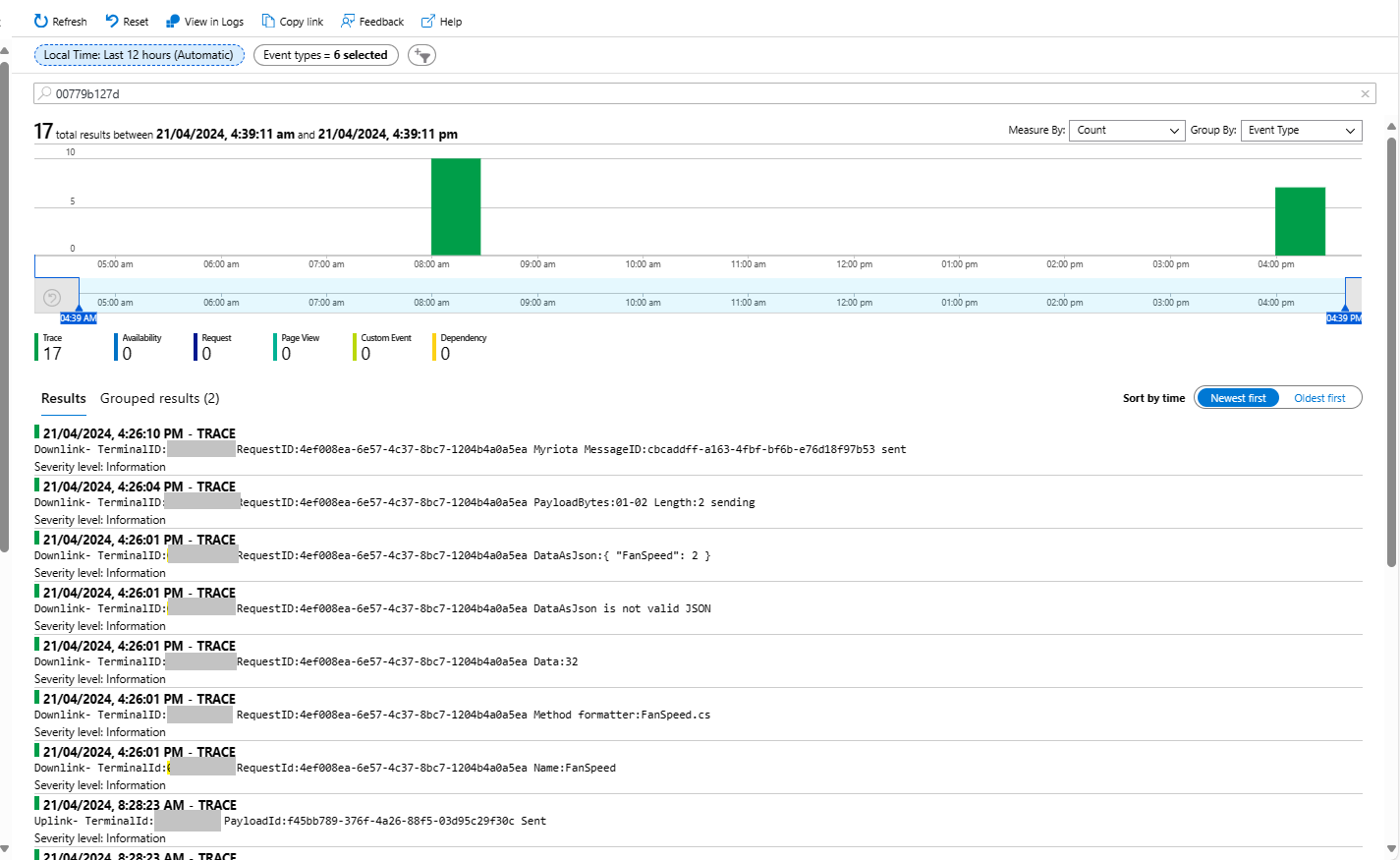
Sense and Locate Azure IoT Central Command Fan Speed History
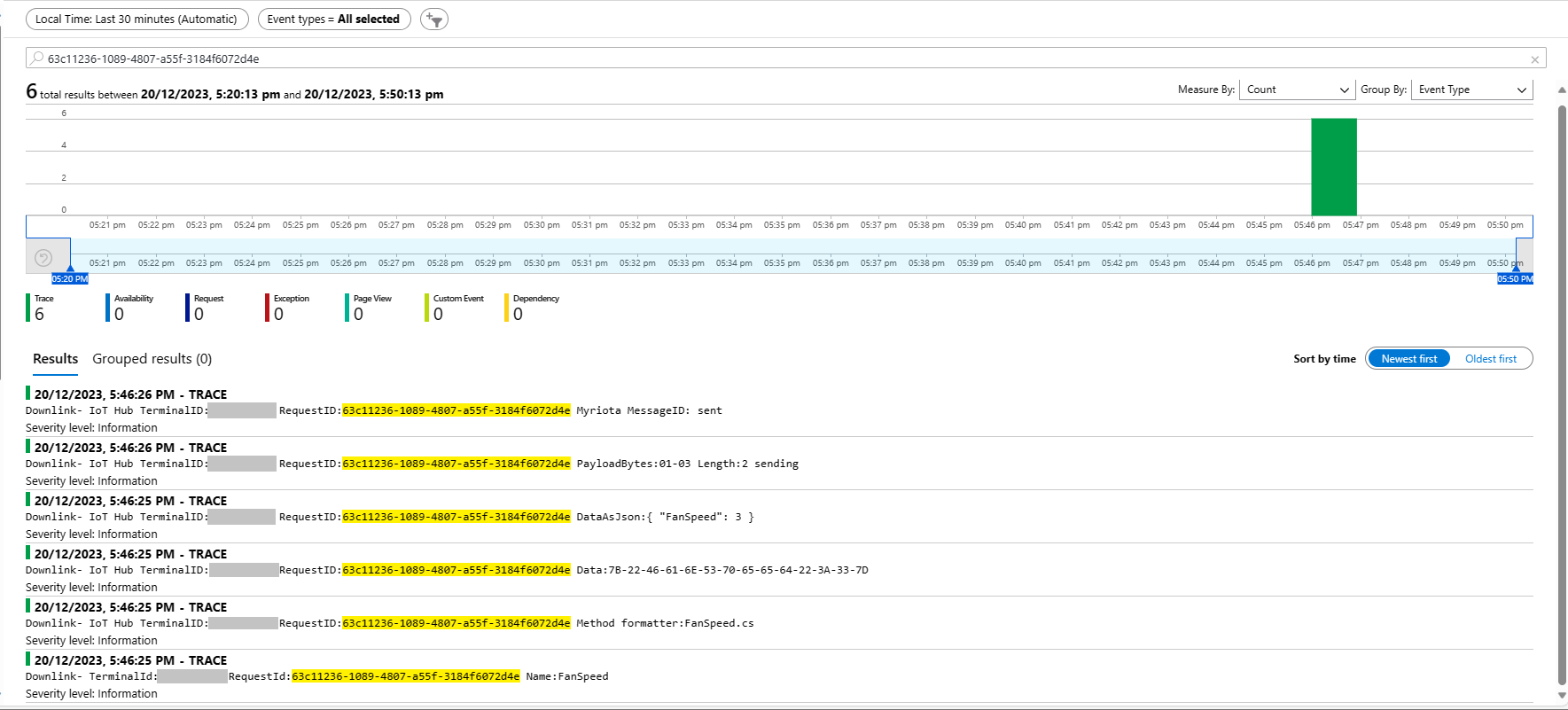
Each Azure Application Insights log entry starts with the TerminalID (to simplify searching for all the messages related to device) and the requestId a Globally Unique Identifier (GUID) to simplify searching for all the “steps” associated with sending/receiving a message) with the rest of the logging message containing “step” specific diagnostic information.
Sense and Locate Azure IoT Central Command Fan Speed Application Insights
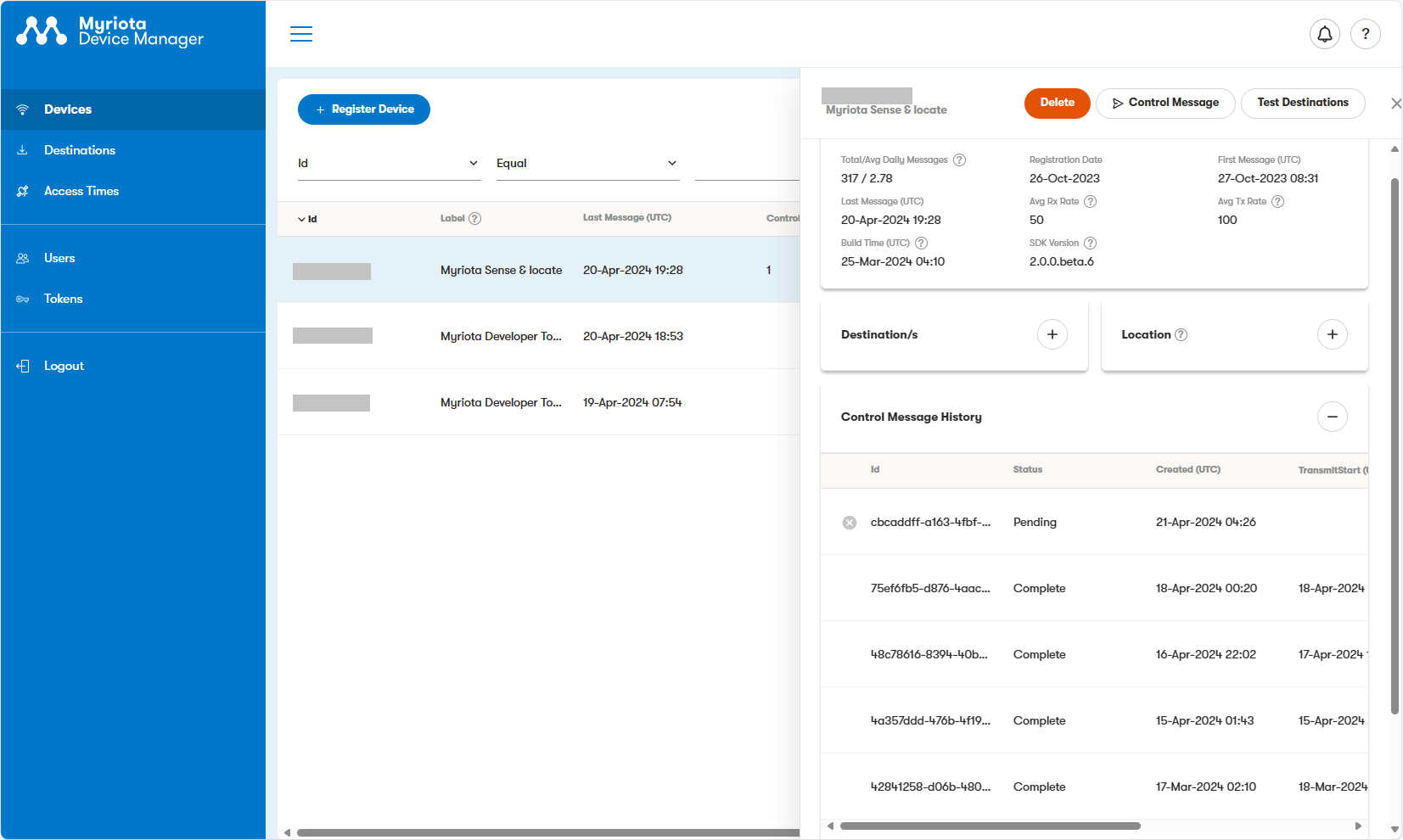
In the Myriota Device Manager the status of Control Messages can be tracked and they can be cancelled if in the “pending” state.
Myriota Control Message status Pending
A Control Message can take up to 24hrs to be delivered and confirmation of delivery has to be implemented by the application developer.
The Method Callback Delegate has different parameters, so I had to update the downlink formatter interface and update all of the sample downlink payload formatters.
public interface IFormatterDownlink
{
   public byte[] Evaluate(string terminalId, string methodName, JObject? payloadJson, byte[] payloadBytes);
}
How direct methods will be processed is configured in the application settings. For each direct method name the downlink payload formatter to be invoked and an optional Javascript Object Notation(JSON) payload can be configured.
If there is no configuration for the direct method name, the payload formatter specified in Myriota device “DownlinkDefault” Attribute is used, and if that is not configured the default formatter in the payloadFormatters section of the application settings is used.
namespace devMobile.IoT.MyriotaAzureIoTConnector.Connector
{
   internal class IoTHubDownlink(ILogger<IoTHubDownlink> _logger, IOptions<Models.AzureIoT> azureIoTSettings, IPayloadFormatterCache _payloadFormatterCache, IMyriotaModuleAPI _myriotaModuleAPI) : IIoTHubDownlink
   {
      private readonly Models.AzureIoT _azureIoTSettings = azureIoTSettings.Value;

      public async Task<MethodResponse> IotHubMethodHandler(MethodRequest methodRequest, object userContext)
      {
         // DIY request identifier so processing progress can be tracked in Application Insights
         string requestId = Guid.NewGuid().ToString();

         Models.DeviceConnectionContext context = (Models.DeviceConnectionContext)userContext;

         try
         {
            _logger.LogInformation("Downlink- TerminalId:{TerminalId} RequestId:{requestId} Name:{Name}", context.TerminalId, requestId, methodRequest.Name);

            // Lookup payload formatter name, none specified use context one which is from device attributes or the default in configuration
            string payloadFormatterName;
            if (_azureIoTSettings.IoTHub.Methods.TryGetValue(methodRequest.Name, out Models.AzureIoTHubMethod? method) && !string.IsNullOrEmpty(method.Formatter))
            {
               payloadFormatterName = method.Formatter;

               _logger.LogInformation("Downlink- IoT Hub TerminalID:{TermimalId} RequestID:{requestId} Method formatter:{payloadFormatterName} ", context.TerminalId, requestId, payloadFormatterName);
            }
            else
            {
               payloadFormatterName = context.PayloadFormatterDownlink;

               _logger.LogInformation("Downlink- IoT Hub TerminalID:{TermimalId} RequestID:{requestId} Context formatter:{payloadFormatterName} ", context.TerminalId, requestId, payloadFormatterName);
            }

            // Display methodRequest.Data as Hex
            if (methodRequest.Data is not null)
            {
               _logger.LogInformation("Downlink- IoT Hub TerminalID:{TerminalId} RequestID:{requestId} Data:{Data}", context.TerminalId, requestId, BitConverter.ToString(methodRequest.Data));
            }
            else
            {
               _logger.LogInformation("Downlink- IoT Hub TerminalID:{TerminalId} RequestID:{requestId} Data:null", context.TerminalId, requestId);
            }

            JObject? requestJson = null;

            if ((method is not null) && !string.IsNullOrWhiteSpace(method.Payload))
            {
               // There is a matching method with a possible JSON payload
               string payload = method.Payload.Trim();

               if ((payload.StartsWith('{') && payload.EndsWith('}')) || (payload.StartsWith('[') && payload.EndsWith(']')))
               {
                  // The payload is could be JSON
                  try
                  {
                     requestJson = JObject.Parse(payload);
                  }
                  catch (JsonReaderException jex)
                  {
                     _logger.LogWarning(jex, "Downlink- IoT Hub TerminalID:{TerminalId} RequestID:{requestId} Method Payload is not valid JSON", context.TerminalId, requestId);

                     return new MethodResponse(Encoding.ASCII.GetBytes($"{{\"message\":\"RequestID:{requestId} Method payload is not valid JSON.\"}}"), (int)HttpStatusCode.UnprocessableEntity);
                  }
               }
               else
               {
                  // The payload couldn't be JSON
                  _logger.LogWarning("Downlink- IoT Hub TerminalID:{TerminalId} RequestID:{requestId} Method Payload is definitely not valid JSON", context.TerminalId, requestId);

                  return new MethodResponse(Encoding.ASCII.GetBytes($"{{\"message\":\"RequestID:{requestId} Method payload is definitely not valid JSON.\"}}"), (int)HttpStatusCode.UnprocessableEntity);
               }

               _logger.LogInformation("Downlink- IoT Hub TerminalID:{TerminalId} RequestID:{requestId} Method Payload:{requestJson}", context.TerminalId, requestId, JsonConvert.SerializeObject(requestJson, Formatting.Indented));
            }
            else
            {
               // If there was not matching method or the payload was "empty" see if the method request payload is valid
               if (!string.IsNullOrWhiteSpace(methodRequest.DataAsJson))
               {
                  string payload = methodRequest.DataAsJson.Trim();

                  if ((payload.StartsWith('{') && payload.EndsWith('}')) || (payload.StartsWith('[') && payload.EndsWith(']')))
                  {
                     // The payload is could be JSON
                     try
                     {
                        requestJson = JObject.Parse(payload);

                        _logger.LogInformation("Downlink- IoT Hub TerminalID:{TerminalId} RequestID:{requestId} DataAsJson:{requestJson}", context.TerminalId, requestId, JsonConvert.SerializeObject(requestJson, Formatting.Indented));
                     }
                     catch (JsonReaderException jex)
                     {
                        _logger.LogInformation(jex, "Downlink- IoT Hub TerminalID:{TerminalId} RequestID:{requestId} DataAsJson is not valid JSON", context.TerminalId, requestId);
                     }
                  }
               }
            }

            // This "shouldn't" fail, but it could for invalid path to blob, timeout retrieving blob, payload formatter syntax error etc.
            IFormatterDownlink payloadFormatter = await _payloadFormatterCache.DownlinkGetAsync(payloadFormatterName);

            if ( requestJson is null )
            {
               requestJson = new JObject();
            }

            // This also "shouldn't" fail, but the payload formatters can throw runtime exceptions like null reference, divide by zero, index out of range etc.
            byte[] payloadBytes = payloadFormatter.Evaluate(context.TerminalId, methodRequest.Name, requestJson, methodRequest.Data);

            // Validate payload before calling Myriota control message send API method
            if (payloadBytes is null)
            {
               _logger.LogWarning("Downlink- IoT Hub TerminalID:{TerminalId} Request:{requestId} Evaluate returned null", context.TerminalId, requestId);

               return new MethodResponse(Encoding.ASCII.GetBytes($"{{\"message\":\"RequestID:{requestId} payload evaluate returned null.\"}}"), (int)HttpStatusCode.UnprocessableEntity);
            }

            if ((payloadBytes.Length < Constants.DownlinkPayloadMinimumLength) || (payloadBytes.Length > Constants.DownlinkPayloadMaximumLength))
            {
               _logger.LogWarning("Downlink- IoT Hub TerminalID:{TerminalId} RequestID:{requestId} PayloadBytes:{payloadBytes} length:{Length} invalid, must be {DownlinkPayloadMinimumLength} to {DownlinkPayloadMaximumLength} bytes", context.TerminalId, requestId, BitConverter.ToString(payloadBytes), payloadBytes.Length, Constants.DownlinkPayloadMinimumLength, Constants.DownlinkPayloadMaximumLength); ;

               return new MethodResponse(Encoding.ASCII.GetBytes($"{{\"message\":\"RequestID:{requestId} payload evaluation length invalid.\"}}"), (int)HttpStatusCode.UnprocessableEntity);
            }

            // Finally send Control Message to device using the Myriota API
            _logger.LogInformation("Downlink- IoT Hub TerminalID:{TerminalId} RequestID:{requestID} PayloadBytes:{payloadBytes} Length:{Length} sending", context.TerminalId, requestId, BitConverter.ToString(payloadBytes), payloadBytes.Length);

            string messageId = await _myriotaModuleAPI.SendAsync(context.TerminalId, payloadBytes);

            _logger.LogInformation("Downlink- IoT Hub TerminalID:{TerminalId} RequestID:{requestId} Myriota MessageID:{messageId} sent", context.TerminalId, requestId, messageId);
         }
         catch (Exception ex)
         {
            _logger.LogError(ex, "Downlink- IoT Hub TerminalID:{TerminalId} RequestID:{requestId} IotHubMethodHandler processing failed", context.TerminalId, requestId);

            return new MethodResponse(Encoding.ASCII.GetBytes($"{{\"message\":\"TerminalID:{context.TerminalId} RequestID:{requestId} method handler failed.\"}}"), (int)HttpStatusCode.InternalServerError);
         }

         return new MethodResponse(Encoding.ASCII.GetBytes($"{{\"message\":\"TerminalID:{context.TerminalId} RequestID:{requestId} Message sent successfully.\"}}"), (int)HttpStatusCode.OK);
      }
   }
}
public class FormatterDownlink : PayloadFormatter.IFormatterDownlink
{
   public byte[] Evaluate(string terminalId, string methodName, JObject payloadJson, byte[] payloadBytes)
   {
      byte? status = payloadJson.GetValue("FanSpeed", StringComparison.OrdinalIgnoreCase)?.Value<byte>();

      if (!status.HasValue)
      {
         return new byte[] { };
      }

      return new byte[] { 1, status.Value };
   }
}
The FanSpeed.cs payload formatter extracts the FanSpeed value from the JSON payload and returns a two byte array containing the message type and speed of the fan.
Azure Function application displaying Diagnostic information for control message
Each logging message starts with the TerminalID (to simplify searching for all the direct methods invoked on a device) and the requestId a Globally Unique Identifier (GUID) to simplify searching for all the “steps” associated with sending a message) with the rest of the logging message containing “step” specific diagnostic information.
Azure Application Insights displaying information diagnostic information
Myriota Device manager control message history displaying pending control message
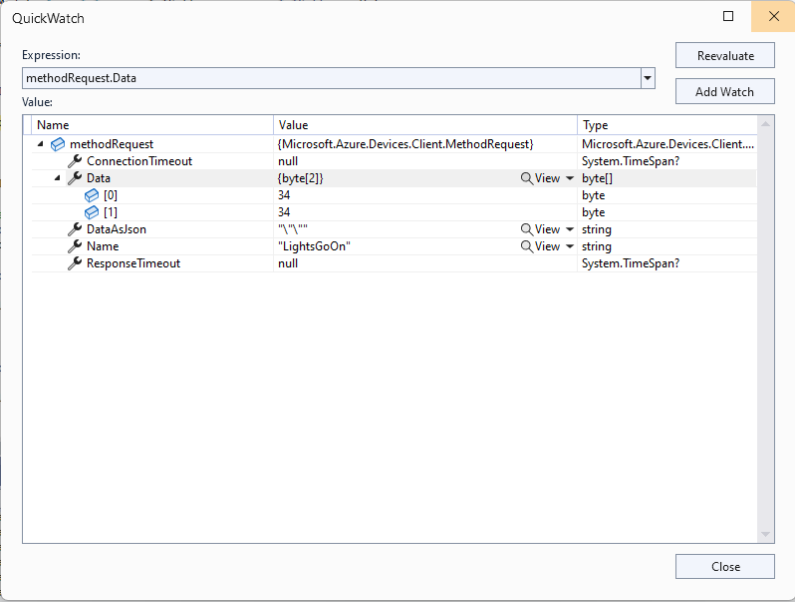
The Azure IoT Explorer payload for an empty message contained two ” characters which is a bit odd. I will have to build a test application which uses the Azure IoT Hub C2D direct method API to see if this is a “feature”.
Each logging message starts with the TerminalID (to simplify searching for all the messages sent to a device) and the message LockToken (to simplify searching for all the “steps” associated with sending a message) with the rest of the logging message containing “step” specific diagnostic information.
Successful Azure IoT Explorer C2D JSON Message
If there is no PayloadFormatter attribute the default in the PayloadFormatters section of the function configuration is used.
using System;
using System.Collections.Generic;

using Newtonsoft.Json;
using Newtonsoft.Json.Linq;

public class FormatterDownlink : PayloadFormatter.IFormatterDownlink
{
   public byte[] Evaluate(IDictionary<string, string> properties, string terminalId, JObject payloadJson, byte[] payloadBytes)
   {
      byte? status = payloadJson.Value<byte?>("FanSpeed");

      if (!status.HasValue)
      {
         return new byte[] { };
      }

      return new byte[] { 1, status.Value };
   }
}
The FanSpeed.cs payload formatter extracts the FanSpeed value from the JSON payload and returns a two byte array containing the message type and speed of the fan.
Azure IoT Function running waiting for a C2D message
After re-reading the SetMethodHandlerAync documentation I refactored the code (back to the approach used a couple of branches ago) with the “using” wrapping the try/catch.
public async Task AzureIoTHubMessageHandler(Message message, object userContext)
{
   Models.DeviceConnectionContext context = (Models.DeviceConnectionContext)userContext;

   _logger.LogInformation("Downlink- IoT Hub TerminalId:{TermimalId} LockToken:{LockToken}", context.TerminalId, message.LockToken);

   using (message) // https://learn.microsoft.com/en-us/dotnet/api/microsoft.azure.devices.client.deviceclient.setreceivemessagehandlerasync?view=azure-dotnet
   {
      try
      {
         // Replace default formatter with message specific formatter if configured.
         if (!message.Properties.TryGetValue(Constants.IoTHubDownlinkPayloadFormatterProperty, out string? payloadFormatterName) || string.IsNullOrEmpty(payloadFormatterName))
         {
            _logger.LogInformation("Downlink- IoT Hub TerminalID:{TermimalId} LockToken:{LockToken} Context formatter:{payloadFormatterName} ", context.TerminalId, message.LockToken, payloadFormatterName);

            payloadFormatterName = context.PayloadFormatterDownlink;
         }
         else
         {
            _logger.LogInformation("Downlink- IoT Hub TerminalID:{TermimalId} LockToken:{LockToken} Property formatter:{payloadFormatterName} ", context.TerminalId, message.LockToken, payloadFormatterName);
         }


         // If GetBytes fails payload really badly broken
         byte[] messageBytes = message.GetBytes();

         _logger.LogInformation("Downlink- IoT Hub TerminalID:{TerminalId} LockToken:{LockToken} Message bytes:{messageBytes}", context.TerminalId, message.LockToken, BitConverter.ToString(messageBytes));


         // Try converting the bytes to text then to JSON
         JObject? messageJson = null;
         try
         {
            // These will fail for some messages, payload formatter gets bytes only
            string messageText = Encoding.UTF8.GetString(messageBytes);

            try
            {
               messageJson = JObject.Parse(messageText);

               _logger.LogInformation("Downlink- IoT Hub TerminalID:{TerminalId} LockToken:{LockToken} JSON:{messageJson}", context.TerminalId, message.LockToken, JsonConvert.SerializeObject(messageJson, Formatting.Indented));
            }
            catch (JsonReaderException jex)
            {
               _logger.LogInformation(jex, "Downlink- IoT Hub TerminalID:{TerminalId} LockToken:{LockToken} not valid JSON", context.TerminalId, message.LockToken);
            }
         }
         catch (ArgumentException aex)
         {
            _logger.LogInformation(aex, "Downlink- IoT Hub TerminalID:{TerminalId} LockToken:{LockToken} message bytes not valid text", context.TerminalId, message.LockToken);
         }


         // This shouldn't fail, but it could for invalid path to blob, timeout retrieving blob, payload formatter syntax error etc.
         IFormatterDownlink payloadFormatter = await _payloadFormatterCache.DownlinkGetAsync(payloadFormatterName);

         // This will fail if payload formatter throws runtime exceptions like null reference, divide by zero, index out of range etc.
         byte[] payloadBytes = payloadFormatter.Evaluate(message.Properties, context.TerminalId, messageJson, messageBytes);


         // Validate payload before calling Myriota control message send API method
         if (payloadBytes is null)
         {
            _logger.LogWarning("Downlink- IoT Hub TerminalID:{TerminalId} LockToken:{LockToken} payload formatter:{payloadFormatter} Evaluate returned null", context.TerminalId, message.LockToken, payloadFormatterName);

            await context.DeviceClient.RejectAsync(message);

            return;
         }

         if ((payloadBytes.Length < Constants.DownlinkPayloadMinimumLength) || (payloadBytes.Length > Constants.DownlinkPayloadMaximumLength))
         {
            _logger.LogWarning("Downlink- IoT Hub TerminalID:{TerminalId} LockToken:{LockToken} PayloadBytes:{payloadBytes} length:{Length} invalid must be {DownlinkPayloadMinimumLength} to {DownlinkPayloadMaximumLength} bytes", context.TerminalId, message.LockToken, Convert.ToHexString(payloadBytes), payloadBytes.Length, Constants.DownlinkPayloadMinimumLength, Constants.DownlinkPayloadMaximumLength);

            await context.DeviceClient.RejectAsync(message);

            return;
         }


         // Finally send Control Message to device using the Myriota API
         _logger.LogInformation("Downlink- IoT Hub TerminalID:{TerminalId} LockToken:{LockToken} PayloadBytes:{payloadBytes} Length:{Length} sending", context.TerminalId, message.LockToken, BitConverter.ToString(payloadBytes), payloadBytes.Length);

         string messageId = await _myriotaModuleAPI.SendAsync(context.TerminalId, payloadBytes);

         _logger.LogInformation("Downlink- IoT Hub TerminalID:{TerminalId} LockToken:{LockToken} MessageID:{messageId} sent", context.TerminalId, message.LockToken, messageId);

         await context.DeviceClient.CompleteAsync(message);
      }
      catch (Exception ex)
      {
         _logger.LogError(ex, "Downlink- IoT Hub TerminalID:{TerminalId} LockToken:{LockToken} MessageHandler processing failed", context.TerminalId, message.LockToken);

         await context.DeviceClient.RejectAsync(message);
      }
   }
}
...
// Finally send Control Message to device using the Myriota API
_logger.LogInformation("Downlink- IoT Hub TerminalID:{TerminalId} LockToken:{LockToken} PayloadBytes:{payloadBytes} Length:{Length} sending", context.TerminalId, message.LockToken, BitConverter.ToString(payloadBytes), payloadBytes.Length);

string messageId = await _myriotaModuleAPI.SendAsync(context.TerminalId, payloadBytes);
...
Azure IoT Function successfully sending downlink message.
The Encoding.UTF8.GetString and JObject.Parse are processed in a single Try with a specialised catch for when the payload cannot be converted to text. If the payload cannot be converted to JSON only the payloadBytes parameter of payload formatter is populated.
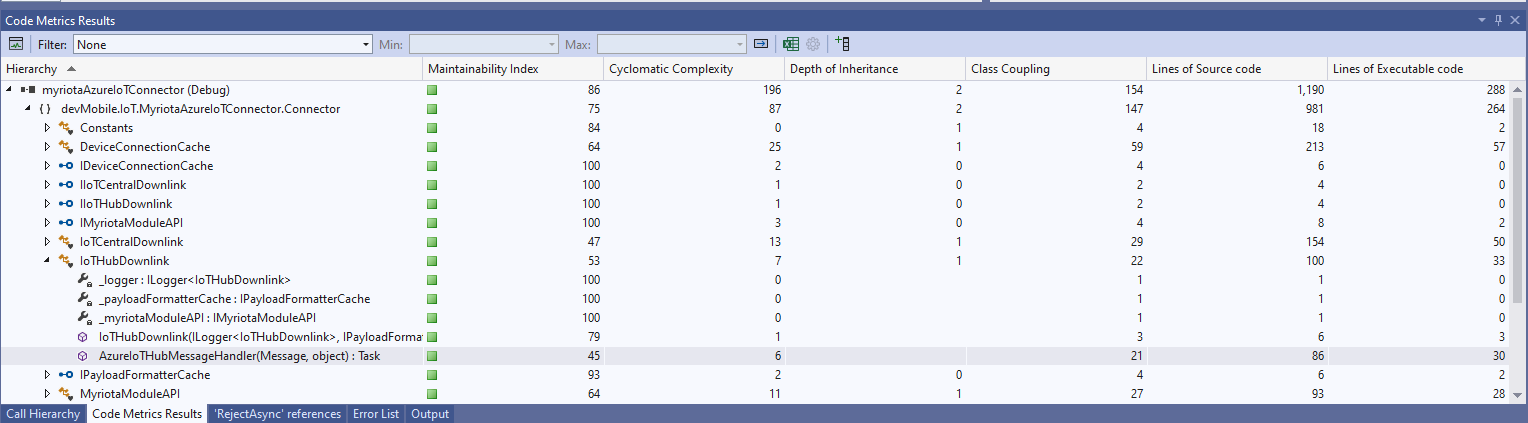
The Azure IoT Hub downlink message handler was a partial class and part of implementation of the IDeviceConnectionCache which was a hangover from one of the initial versions.
The myriotaAzure IoT Hub Cloud Identity Translation Gateway downlink message handler was getting a bit “chunky”. So, I started by stripping the code back to the absolute bare minimum that would “work”.
Then the code was then extended so it worked for “sunny day” scenarios. The payload formatter was successfully retrieved from the configured Azure Storage Blob, CS-Script successfully compiled the payload formatter, the message payload was valid text, the message text was valid Javascript Object Notation(JSON), the JSON was successfully processed by the compiled payload formatter, and finally the payload was accepted by the Myriota Cloud API.
Then finally the code was modified to gracefully handle broken payloads returned by the payload formatter evaluation, some comments were added, and the non-managed resources of the DeviceClient.Message disposed.
public async Task AzureIoTHubMessageHandler(Message message, object userContext)
{
Models.DeviceConnectionContext context = (Models.DeviceConnectionContext)userContext;
_logger.LogInformation("Downlink- IoT Hub TerminalId:{termimalId} LockToken:{LockToken}", context.TerminalId, message.LockToken);
// Use default formatter and replace with message specific formatter if configured.
string payloadFormatter;
if (!message.Properties.TryGetValue(Constants.IoTHubDownlinkPayloadFormatterProperty, out payloadFormatter) || string.IsNullOrEmpty(payloadFormatter))
{
payloadFormatter = context.PayloadFormatterDownlink;
}
_logger.LogInformation("Downlink- IoT Hub TerminalID:{termimalId} LockToken:{LockToken} Payload formatter:{payloadFormatter} ", context.TerminalId, message.LockToken, payloadFormatter);
try
{
// If this fails payload broken
byte[] messageBytes = message.GetBytes();

// This will fail for some messages, payload formatter gets bytes only
string messageText = string.Empty;
try
{
   messageText = Encoding.UTF8.GetString(messageBytes);
}
catch (ArgumentException aex)
{
   _logger.LogInformation("Downlink- IoT Hub TerminalID:{TerminalId} LockToken:{LockToken} messageBytes:{2} not valid Text", context.TerminalId, message.LockToken, BitConverter.ToString(messageBytes));
}

// This will fail for some messages, payload formatter gets bytes only
JObject? messageJson = null;
try
{
   messageJson = JObject.Parse(messageText);
}
catch ( JsonReaderException jex)
{
   _logger.LogInformation("Downlink- IoT Hub TerminalID:{TerminalId} LockToken:{LockToken} messageText:{2} not valid json", context.TerminalId, message.LockToken, BitConverter.ToString(messageBytes));
}
// This shouldn't fail, but it could for lots of diffent reasons, invalid path to blob, syntax error, interface broken etc.
IFormatterDownlink payloadFormatterDownlink = await _payloadFormatterCache.DownlinkGetAsync(payloadFormatter);
// This shouldn't fail, but it could for lots of different reasons, null references, divide by zero, out of range etc.
byte[] payloadBytes = payloadFormatterDownlink.Evaluate(message.Properties, context.TerminalId, messageJson, messageBytes);
// Validate payload before calling Myriota control message send API method
if (payloadBytes is null)
{
_logger.LogWarning("Downlink- IoT Hub TerminalID:{terminalId} LockToken:{LockToken} payload formatter:{payloadFormatter} Evaluate returned null", context.TerminalId, message.LockToken, payloadFormatter);
await context.DeviceClient.RejectAsync(message);
return;
}
if ((payloadBytes.Length < Constants.DownlinkPayloadMinimumLength) || (payloadBytes.Length > Constants.DownlinkPayloadMaximumLength))
{
_logger.LogWarning("Downlink- IoT Hub TerminalID:{terminalId} LockToken:{LockToken} payloadData length:{Length} invalid must be {DownlinkPayloadMinimumLength} to {DownlinkPayloadMaximumLength} bytes", context.TerminalId, message.LockToken, payloadBytes.Length, Constants.DownlinkPayloadMinimumLength, Constants.DownlinkPayloadMaximumLength);
await context.DeviceClient.RejectAsync(message);
return;
}
// This shouldn't fail, but it could few reasons mainly connectivity & message queuing etc.
_logger.LogInformation("Downlink- IoT Hub TerminalID:{TerminalId} LockToken:{LockToken} PayloadData:{payloadData} Length:{Length} sending", context.TerminalId, message.LockToken, Convert.ToHexString(payloadBytes), payloadBytes.Length);
// Finally send the message using Myriota API
string messageId = await _myriotaModuleAPI.SendAsync(context.TerminalId, payloadBytes);
_logger.LogInformation("Downlink- IoT Hub TerminalID:{TerminalId} LockToken:{LockToken} MessageID:{messageId} sent", context.TerminalId, message.LockToken, messageId);
await context.DeviceClient.CompleteAsync(message);
_logger.LogInformation("Downlink- IoT Hub TerminalID:{terminalId} LockToken:{LockToken} MessageID:{messageId} sent", context.TerminalId, message.LockToken, messageId);
}
catch (Exception ex)
{
await context.DeviceClient.RejectAsync(message);
_logger.LogError(ex, "Downlink- IoT Hub TerminalID:{terminalId} LockToken:{LockToken} failed", context.TerminalId, message.LockToken);
}
finally
{
// Mop up the non managed resources of message
message.Dispose();
}
}
As the code was being extended, I tested different failures to make sure the Application Insights logging messages were useful. The first failure mode tested was the Azure Storage Blob, path was broken or the blob was missing.
Visual Studio 2022 Debugger blob not found exception message
Application Insights blob not found exception logging
Then a series of “broken” payload formatters were created to test CS-Script compile time failures.
// Broken interface implementation
using System;
using System.Collections.Generic;

using Newtonsoft.Json;
using Newtonsoft.Json.Linq;

public class FormatterDownlink : PayloadFormatter.IFormatterDownlink
{
   public byte[] Evaluate(IDictionary<string, string> properties, string terminalId, byte[] payloadBytes)
   {
      return payloadBytes;
   }
}
Visual Studio 2022 Debugger interface implementation broken exception message
// Broken syntax
using System;
using System.Collections.Generic;

using Newtonsoft.Json;
using Newtonsoft.Json.Linq;

public class FormatterDownlink : PayloadFormatter.IFormatterDownlink
{
   public byte[] Evaluate(IDictionary<string, string> properties, string terminalId, JObject payloadJson, byte[] payloadBytes)
   {
      return payloadBytes
   }
}
Visual Studio 2022 Debugger syntax error exception message
The final test was sending a downlink message which was valid JSON, contained the correct information for the specified payload formatter and was successfully processed by the Myriota Cloud API.
Azure IoT Explorer with valid JSON payload and payload formatter name
Azure function output of successful downlink message
The first message sent shortly after I powered up the device had the latitude and longitude of Null Island
The Asset Tracker UserApplicationId is 65002 and the payload is similar to the Swarm Eval Kit. I created some message payloads (location of Christchurch Cathedral) for testing.
namespace PayloadFormatter // Additional namespace for shortening interface when usage in formatter code
{
    using System.Collections.Generic;

    using Newtonsoft.Json.Linq;

    public interface IFormatterUplink
    {
        public JObject Evaluate(IDictionary<string, string> properties, uint organisationId, uint deviceId, byte deviceType, ushort userApplicationId, JObject payloadJson, string payloadText, byte[] payloadBytes);
    }

    public interface IFormatterDownlink
    {
        public byte[] Evaluate(IDictionary<string, string> properties, uint organisationId, uint deviceId, byte deviceType, ushort userApplicationId, JObject payloadJson, string payloadText, byte[] payloadBytes);
    }
}
The definitions of the uplink & downlink payload formatter evaluator interfaces have been updated and shifted to a new project.
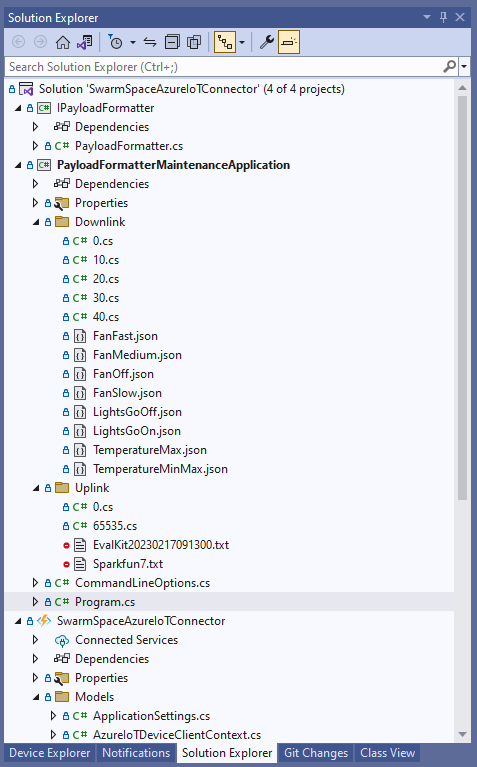
Visual Studio 2022 Solution with payloadformatter maintenance application
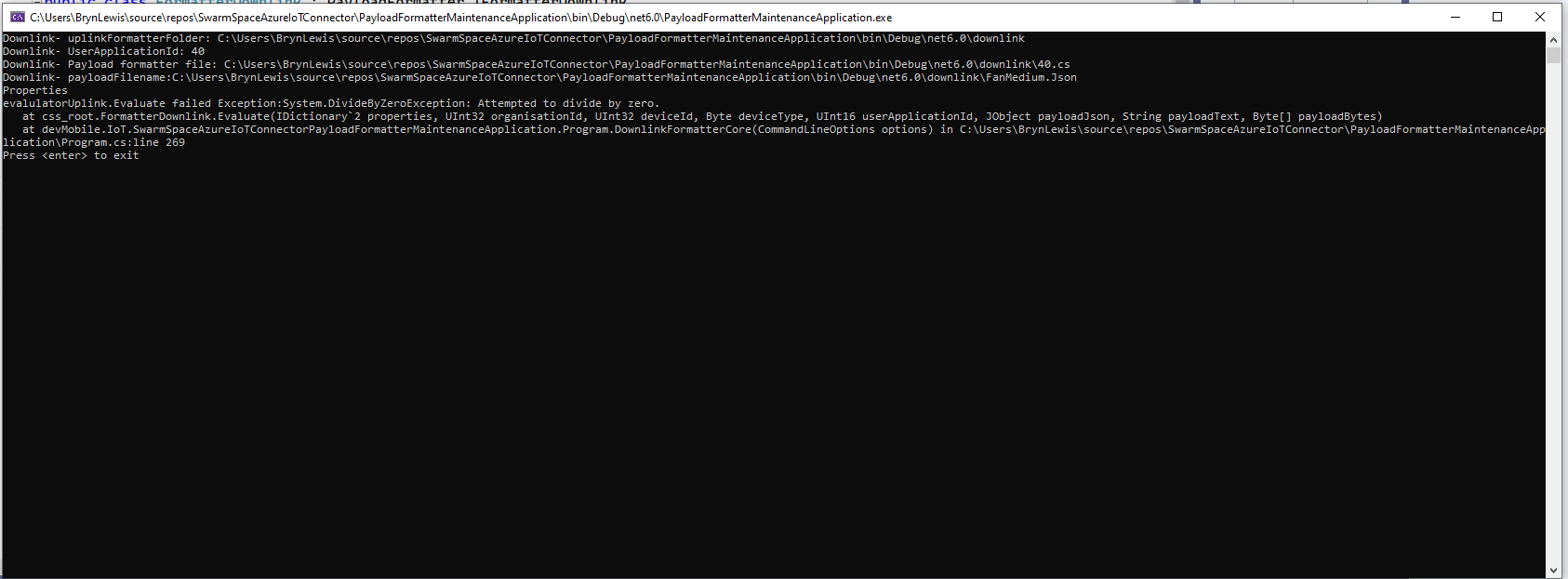
I built a console application to help with developing and debugging uplink or downlink formatters. The application has a number of command line parameters which specify the formatter to be used, UserApplicationId, OrganizationId, DeviceType etc.
public class CommandLineOptions
{
    [Option('d', "Direction", Required = true, HelpText = "Test Uplink or DownLink formatter")]
	public string Direction { get; set; }

    [Option('p', "filename", HelpText = "Uplink or Downlink Payload file name")]
    public string PayloadFilename { get; set; } = string.Empty;

    [Option('o', "OrganisationId", Required = true, HelpText = "Organisation unique identifier")]
    public uint OrganizationId { get; set; }

    [Option('i', "DeviceId", Required = true, HelpText = "Device unique identitifer")]
    public uint DeviceId { get; set; }

    [Option('t', "DeviceType", Required = true, HelpText = "Device type number")]
    public byte DeviceType { get; set; }

    [Option('u', "UserApplicationId", Required = true, HelpText = "User Application Id")]
    public ushort UserApplicationId { get; set; }

    [Option('h', "SwarmHiveReceivedAtUtc", HelpText = "Swarm Hive received at time UTC")]
    public DateTime? SwarmHiveReceivedAtUtc { get; set; }

    [Option('w', "UplinkWebHookReceivedAtUtc", HelpText = "Webhook received at time UTC")]
    public DateTime? UplinkWebHookReceivedAtUtc { get; set; }

    [Option('s', "Status", HelpText = "Uplink local file system file name")]
    public byte? Status { get; set; }

    [Option('c', "Client", HelpText = "Uplink local file system file name")]
    public string Client { get; set; }
 }
The downlink formatter (similar approach for uplink) loads the sample file as an array of bytes, then tries to convert it to text, and finally to JSON. Then the formatter code is “compiled” and the executed with the file payload and command line parameters.
private static async Task DownlinkFormatterCore(CommandLineOptions options)
{
    Dictionary<string, string> properties = new Dictionary<string, string>();

    string formatterFolder = Path.Combine(Environment.CurrentDirectory, "downlink");
    Console.WriteLine($"Downlink- uplinkFormatterFolder: {formatterFolder}");

    string formatterFile = Path.Combine(formatterFolder, $"{options.UserApplicationId}.cs");
    Console.WriteLine($"Downlink- UserApplicationId: {options.UserApplicationId}");
    Console.WriteLine($"Downlink- Payload formatter file: {formatterFile}");

    PayloadFormatter.IFormatterDownlink evalulator;
    try
    {
        evalulator = CSScript.Evaluator.LoadFile<PayloadFormatter.IFormatterDownlink>(formatterFile);
     }
    catch (CSScriptLib.CompilerException cex)
    {
        Console.Write($"Loading or compiling file:{formatterFile} failed Exception:{cex}");
        return;
    }

    string payloadFilename = Path.Combine(formatterFolder, options.PayloadFilename);
    Console.WriteLine($"Downlink- payloadFilename:{payloadFilename}");
    byte[] uplinkBytes;

    try
    {
        uplinkBytes = File.ReadAllBytes(payloadFilename);
    }
    catch (DirectoryNotFoundException dex)
    {
        Console.WriteLine($"Uplink payload filename directory {formatterFolder} not found:{dex}");
        return;
    }
    catch (FileNotFoundException fnfex)
    {
        Console.WriteLine($"Uplink payload filename {payloadFilename} not found:{fnfex}");
        return;
    }
    catch (FormatException fex)
    {
        Console.WriteLine($"Uplink payload file invalid format {payloadFilename} not found:{fex}");
        return;
    }

    // See if payload can be converted to a string
    string uplinkText = string.Empty;
    try
    {
        uplinkText = Encoding.UTF8.GetString(uplinkBytes);
    }
    catch (FormatException fex)
    {
        Console.WriteLine("Encoding.UTF8.GetString failed:{0}", fex.Message);
    }

    // See if payload can be converted to JSON
    JObject uplinkJson;
    try
    {
        uplinkJson = JObject.Parse(uplinkText);
    }
    catch (JsonReaderException jrex)
    {
        Console.WriteLine("JObject.Parse failed Exception:{1}", jrex);

        uplinkJson = new JObject();
    }

    Console.WriteLine("Properties");
    foreach (var property in properties)
    {
        Console.WriteLine($"{property.Key}:{property.Value}");
    }

    // Transform the byte and optional text and JSON payload
    Byte[] payload;
    try
    {
        payload = evalulator.Evaluate(properties, options.OrganizationId, options.DeviceId, options.DeviceType, options.UserApplicationId, uplinkJson, uplinkText, uplinkBytes);
    }
    catch (Exception ex)
    {
        Console.WriteLine($"evalulatorUplink.Evaluate failed Exception:{ex}");
        return;
    }

    Console.WriteLine("Payload");
    Console.WriteLine(Convert.ToBase64String(payload));
}
The sample JSON payload is what would be sent by Azure IoT Central to a device to configure the fan speed
Azure IoT Central M138 Breakout device template with the Fan Status command selected
{
  "FanStatus": 2
}
If the downlink payload formatter is compiled and executes successfully the Base64 representation output is displayed
using System;
using System.Collections.Generic;
using Newtonsoft.Json.Linq;

public class FormatterDownlink : PayloadFormatter.IFormatterDownlink
{
    public byte[] Evaluate(IDictionary<string, string> properties, uint organisationId, uint deviceId, byte deviceType, ushort userApplicationId, JObject payloadJson, string payloadText, byte[] payloadBytes)
    {
        byte? status = payloadJson.Value<byte?>("FanStatus");

        if ( status.HasValue )
        {
            return new byte[] { status.Value };
        }

        return new byte[]{};
    }
}
If the downlink payload formatter syntax is incorrect e.g. { status.Value ; }; an error message with the line and column is displayed.
using System;
using System.Collections.Generic;
using Newtonsoft.Json.Linq;

public class FormatterDownlink : PayloadFormatter.IFormatterDownlink
{
    public byte[] Evaluate(IDictionary<string, string> properties, uint organisationId, uint deviceId, byte deviceType, ushort userApplicationId, JObject payloadJson, string payloadText, byte[] payloadBytes)
    {
        byte? status = payloadJson.Value<byte?>("FanStatus");

        if ( status.HasValue )
        {
            return new byte[] { status.Value ; };
        }

        return new byte[]{};
    }
}
If the downlink payload formatter syntax is correct but execution fails (in the example code division by zero) an error message is displayed.
using System;
using System.Collections.Generic;
using Newtonsoft.Json.Linq;

public class FormatterDownlink : PayloadFormatter.IFormatterDownlink
{
    public byte[] Evaluate(IDictionary<string, string> properties, uint organisationId, uint deviceId, byte deviceType, ushort userApplicationId, JObject payloadJson, string payloadText, byte[] payloadBytes)
    {
        byte? status = payloadJson.Value<byte?>("FanStatus");

        if ( status.HasValue )
        {
            int divideByZero = 10;

            divideByZero = divideByZero / 0;

            return new byte[] { status.Value };
        }

        return new byte[]{};
    }
}
Swarm Space Bumble hive classes in Visual Studio 2022
My SwarmSpaceAzureIoTConnector project only needed to login, get a list of devices and send messages so all the additional functionality was never going to be used. The method to send a message didn’t work, the class used for the payload (UserMessage) appears to be wrong.
"post": {
        "tags": [ "messages" ],
        "summary": "POST user messages",
        "description": "<p>This endpoint submits a JSON formatted UserMessage object for delivery to a Swarm device. A JSON object is returned with a newly assigned <code>packetId</code> and <code>status</code> of<code>OK</code> on success, or <code>ERROR</code> (with a description of the error) on failure.</p><p>The current user must have access to the <code>userApplicationId</code> and <code>device</code> given inside the UserMessage JSON. The device must also have the ability to receive messages from the Hive (\"two-way communication\") enabled. If these conditions are not met, a response with status code 403 (Forbidden) will be returned.</p><p>Note that the <code>data</code> field is the <b>Base64-encoded</b> version of the data to be sent. This allows the sending of binary, as well as text, data.</p>",
        "operationId": "addApplicationMessage",
        "requestBody": {
          "content": { "application/json": { "schema": { "$ref": "#/components/schemas/UserMessage" } } },
          "required": true
        },
        "responses": {
          "401": {
            "description": "Unauthorized",
            "content": { "*/*": { "schema": { "$ref": "#/components/schemas/ApiError" } } }
          },
          "403": {
            "description": "Forbidden",
            "content": { "*/*": { "schema": { "$ref": "#/components/schemas/ApiError" } } }
          },
          "400": {
            "description": "Bad Request",
            "content": { "*/*": { "schema": { "$ref": "#/components/schemas/ApiError" } } }
          },
          "200": {
            "description": "OK",
            "content": { "application/json": { "schema": { "$ref": "#/components/schemas/PacketPostReturn" } } }
          }
        }
      }
    },
[System.CodeDom.Compiler.GeneratedCode("NJsonSchema", "13.17.0.0 (NJsonSchema v10.8.0.0 (Newtonsoft.Json v13.0.0.0))")]
public partial class UserMessage
{
/// <summary>
/// Swarm packet ID
/// </summary>
[Newtonsoft.Json.JsonProperty("packetId", Required = Newtonsoft.Json.Required.Always)]
public long PacketId { get; set; }
/// <summary>
/// Swarm message ID. There may be multiple messages for a single message ID. A message ID represents an intent to send a message, but there may be multiple Swarm packets that are required to fulfill that intent. For example, if a Hive -> device message fails to reach its destination, automatic retry attempts to send that message will have the same message ID.
/// </summary>
[Newtonsoft.Json.JsonProperty("messageId", Required = Newtonsoft.Json.Required.DisallowNull, NullValueHandling = Newtonsoft.Json.NullValueHandling.Ignore)]
public long MessageId { get; set; }
/// <summary>
/// Swarm device type
/// </summary>
[Newtonsoft.Json.JsonProperty("deviceType", Required = Newtonsoft.Json.Required.Always)]
public int DeviceType { get; set; }
/// <summary>
/// Swarm device ID
/// </summary>
[Newtonsoft.Json.JsonProperty("deviceId", Required = Newtonsoft.Json.Required.Always)]
public int DeviceId { get; set; }
/// <summary>
/// Swarm device name
/// </summary>
[Newtonsoft.Json.JsonProperty("deviceName", Required = Newtonsoft.Json.Required.DisallowNull, NullValueHandling = Newtonsoft.Json.NullValueHandling.Ignore)]
public string DeviceName { get; set; }
/// <summary>
/// Direction of message
/// </summary>
[Newtonsoft.Json.JsonProperty("direction", Required = Newtonsoft.Json.Required.Always)]
public int Direction { get; set; }
/// <summary>
/// Message data type, always = 6
/// </summary>
[Newtonsoft.Json.JsonProperty("dataType", Required = Newtonsoft.Json.Required.Always)]
public int DataType { get; set; }
/// <summary>
/// Application ID
/// </summary>
[Newtonsoft.Json.JsonProperty("userApplicationId", Required = Newtonsoft.Json.Required.Always)]
public int UserApplicationId { get; set; }
/// <summary>
/// Organization ID
/// </summary>
[Newtonsoft.Json.JsonProperty("organizationId", Required = Newtonsoft.Json.Required.Always)]
public int OrganizationId { get; set; }
/// <summary>
/// Length of data (in bytes) before base64 encoding
/// </summary>
[Newtonsoft.Json.JsonProperty("len", Required = Newtonsoft.Json.Required.DisallowNull, NullValueHandling = Newtonsoft.Json.NullValueHandling.Ignore)]
public int Len { get; set; }
/// <summary>
/// Base64 encoded data string
/// </summary>
[Newtonsoft.Json.JsonProperty("data", Required = Newtonsoft.Json.Required.Always)]
[System.ComponentModel.DataAnnotations.Required(AllowEmptyStrings = true)]
public byte[] Data { get; set; }
/// <summary>
/// Swarm packet ID of acknowledging packet from device
/// </summary>
[Newtonsoft.Json.JsonProperty("ackPacketId", Required = Newtonsoft.Json.Required.DisallowNull, NullValueHandling = Newtonsoft.Json.NullValueHandling.Ignore)]
public long AckPacketId { get; set; }
/// <summary>
/// Message status. Possible values:
/// <br/>0 = incoming message (from a device)
/// <br/>1 = outgoing message (to a device)
/// <br/>2 = incoming message, acknowledged as seen by customer. OR a outgoing message packet is on groundstation
/// <br/>3 = outgoing message, packet is on satellite
/// <br/>-1 = error
/// <br/>-3 = failed to deliver, retrying
/// <br/>-4 = failed to deliver, will not re-attempt
/// <br/>
/// </summary>
[Newtonsoft.Json.JsonProperty("status", Required = Newtonsoft.Json.Required.DisallowNull, NullValueHandling = Newtonsoft.Json.NullValueHandling.Ignore)]
public int Status { get; set; }
/// <summary>
/// Time that the message was received by the Hive
/// </summary>
[Newtonsoft.Json.JsonProperty("hiveRxTime", Required = Newtonsoft.Json.Required.Always)]
[System.ComponentModel.DataAnnotations.Required(AllowEmptyStrings = true)]
public System.DateTimeOffset HiveRxTime { get; set; }
private System.Collections.Generic.IDictionary<string, object> _additionalProperties;
[Newtonsoft.Json.JsonExtensionData]
public System.Collections.Generic.IDictionary<string, object> AdditionalProperties
{
get { return _additionalProperties ?? (_additionalProperties = new System.Collections.Generic.Dictionary<string, object>()); }
set { _additionalProperties = value; }
}
}
After several attempts I gave up and have rebuilt the required Bumble bee hive integration with RestSharp
public async Task SendAsync(uint organisationId, uint deviceId, byte deviceType, ushort userApplicationId, byte[] data, CancellationToken cancellationToken)
{
    await TokenRefresh(cancellationToken);

    _logger.LogInformation("SendAsync: OrganizationId:{0} DeviceType:{1} DeviceId:{2} UserApplicationId:{3} Data:{4} Enabled:{5}", organisationId, deviceType, deviceId, userApplicationId, Convert.ToBase64String(data), _bumblebeeHiveSettings.DownlinkEnabled);

    Models.MessageSendRequest message = new Models.MessageSendRequest()
    {
        OrganizationId = (int)organisationId,
        DeviceType = deviceType,
        DeviceId = (int)deviceId,
        UserApplicationId = userApplicationId,
        Data = data,
    };

    RestClientOptions restClientOptions = new RestClientOptions()
    {
        BaseUrl = new Uri(_bumblebeeHiveSettings.BaseUrl),
        ThrowOnAnyError = true,
    };

    using (RestClient client = new RestClient(restClientOptions))
    {
        RestRequest request = new RestRequest("api/v1/messages", Method.Post);

        request.AddBody(message);

        request.AddHeader("Authorization", $"bearer {_token}");

        // To save the limited monthly allocation of mesages downlinks can be disabled
        if (_bumblebeeHiveSettings.DownlinkEnabled)
        {
           var response = await client.PostAsync<Models.MessageSendResponse>(request, cancellationToken);

            _logger.LogInformation("SendAsync-Result:{Status} PacketId:{PacketId}", response.Status, response.PacketId);
        }
    }
}
The application now has a StartUpService which loads the Azure DeviceClient cache (Lazy Cache) in the background as the application starts up. If an uplink message is received from a SwarmDevice before, it has been loaded by the FunctionsStartup the DeviceClient information is cached and another connection to the Azure IoT Hub is not established.
I’m looking at building a webby user interface where users an interactivity list, create, edit, delete formatters with syntax highlighter support, and the executing the formatter with sample payloads.
Swarm Space Azure IoT Connector Identity Translation Gateway Architecture
This approach uses most of the existing building blocks, and that’s it no more changes.
Swarm Space Azure IoT Connector Identity Translation Gateway Architecture
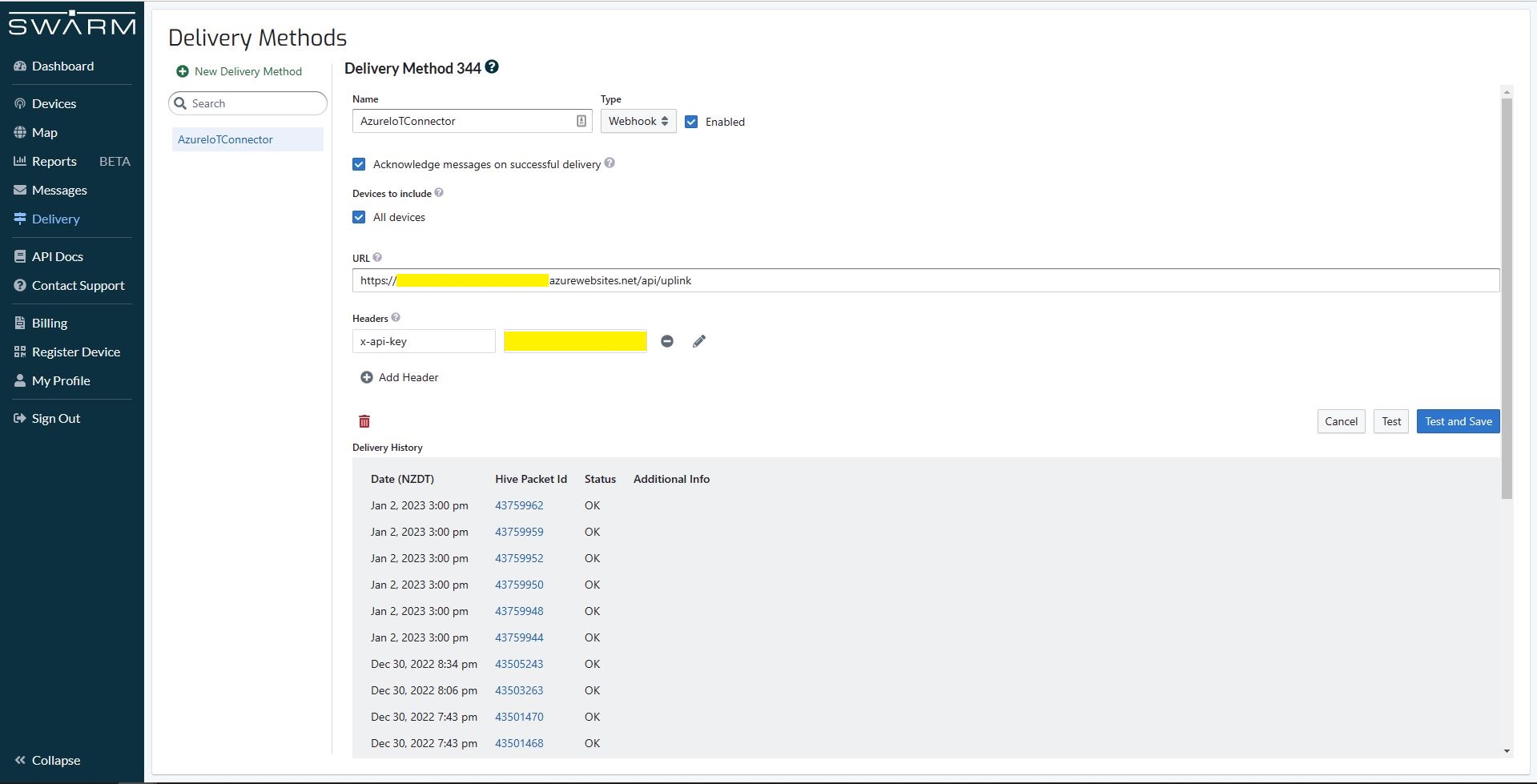
The new approach uses most of the existing building blocks but adds an Azure HTTP Trigger which receives the Swarm Space Bumble bee hive Webhook Delivery Method calls and writes them to an Azure Storage Queue.
Swarm Space Bumble bee hive Web Hook Delivery method
The uplink and downlink formatters are now called asynchronously so they have limited impact on the overall performance of the application.














 devMobile's blog