Netduino Plus 2 Interrupt Performance

I had been considering using the Quadcopter IMU to drive the execution of the orientation and stabilisation algorithms. The MPU 6050 has an interrupt output which can be configured to trigger when there is data available to be read etc.

I had read discussions about the maximum frequency which the Netduino & the NetMF could cope with and just wanted to check for myself. For this test I assumed that the PWM outputs (once initialised) consume little or no CPU and that with only an InterlockedIncrement in the interrupt handler that these would be the maximum possible values.

Netduino Plus 2 Interrupt Testing

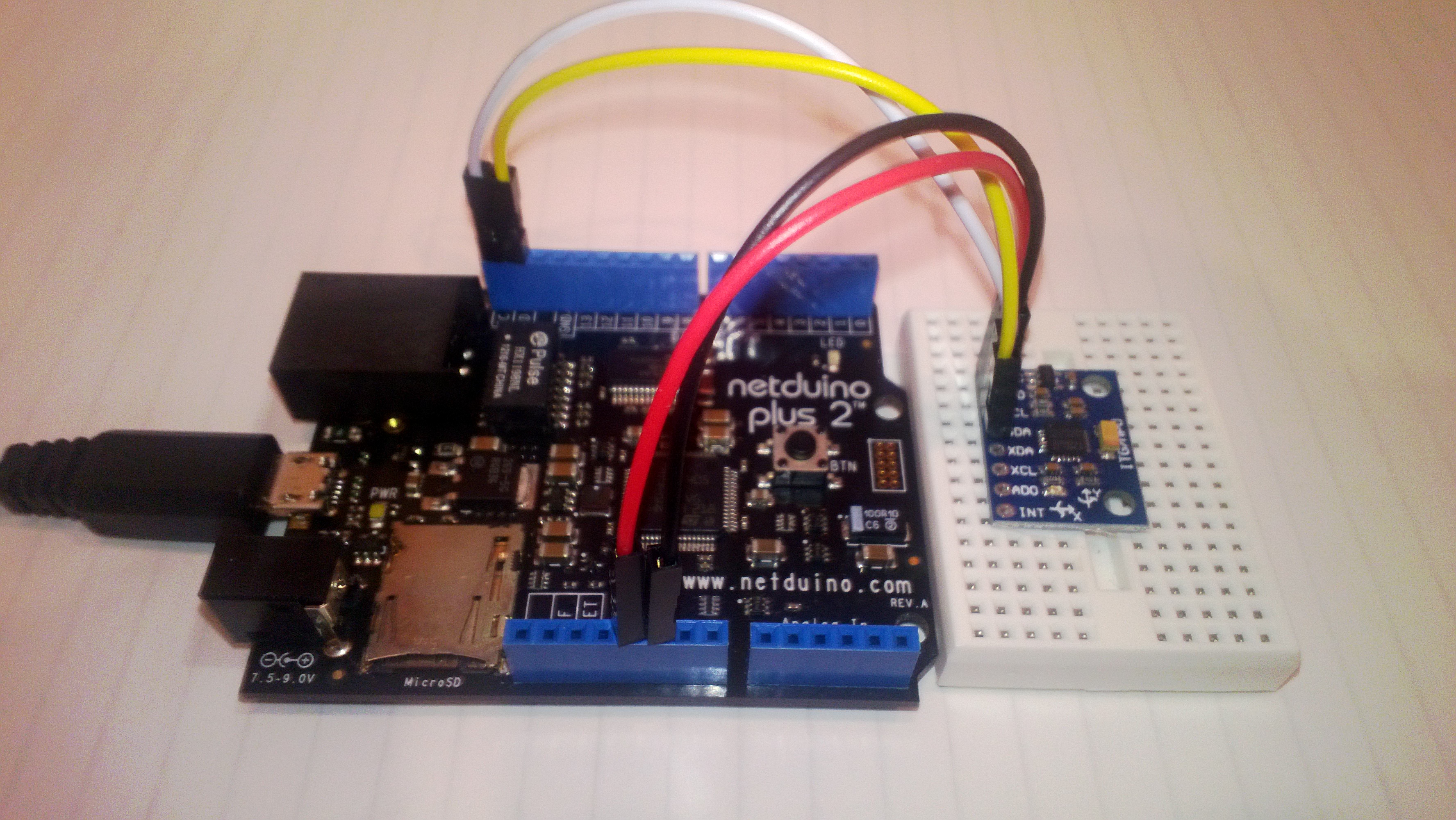
I used the onboard PWM (D3) to drive an interrupt (D1) and then had a background thread display the number calls to the interrupt handler in the last second. The button (D4) in the picture above allowed me to increase the frequency of the PWM output in 100Hz steps. The desired count and actual count where displayed using Debug.Print and the .Net Microframework deployment tool

100 101
200 107
700 453
1000 867
1500 1225
1800 1629
2100 1943
2900 2470
3200 3093
3600 3432
4000 3799
4000 4020
4000 4021
4000 4020

The counts seemed to be reasonably accurate until roughly 13KHz then there would be major memory allocation issues and the device would crash.


MPU 6050 I2C read rates using Netduino plus 2

The quadcopter will need to determine it’s orientation then update the thrust to be delivered by each motor many times a second. So I was interested to see how fast my Nedtduino plus 2 could read data from the MPU 6050 accelerometer & gyroscope. I stumbled across this blog and it appears that they are building a Quadcopter as well(Google translation was hard work to read).

There was also some very useful C# NetMF code which I used as the basis for my performance test harness.

10,000 readings of 16bit values from the Accelerometer (X,Y,Z) Gyroscope (X,Y,Z) and temperature sensor. The initial run didn’t look to positive

21.78, 21.77, 21.77, 21.77, 21.77, 21.77, 21.77,21.77,21.77,21.77 sec Avg 21.77

Which is roughly 460/sec

I then had a look at the I2C interface code and noticed that the bus speed was set to 100KHz so I increased it to 400KHz

10.33, 10.23, 10.23,10.23,10.23,10.23,10.23,10.23,10.72,10.23 Avg 10.29

Which is roughly 970/sec

I then had a look at the I2C interface code and changed the way that the register values were read so the array of registers to read didn’t have to be loaded.

8.55,8.57,8.55,8.57,8.55,8.57,8.57,8.57,8.55,8.57 Avg 8.56

I think 1170/sec should be sufficient, but I’m going to have a look at the Digital Motion Processor (DMP) capabilities of the MPU6050. This will require significant effort as there currently (June 2013) doesn’t appear to be any NetMF support for this approach.

Quadcopter MPU 6050 IMU mounting board ordered

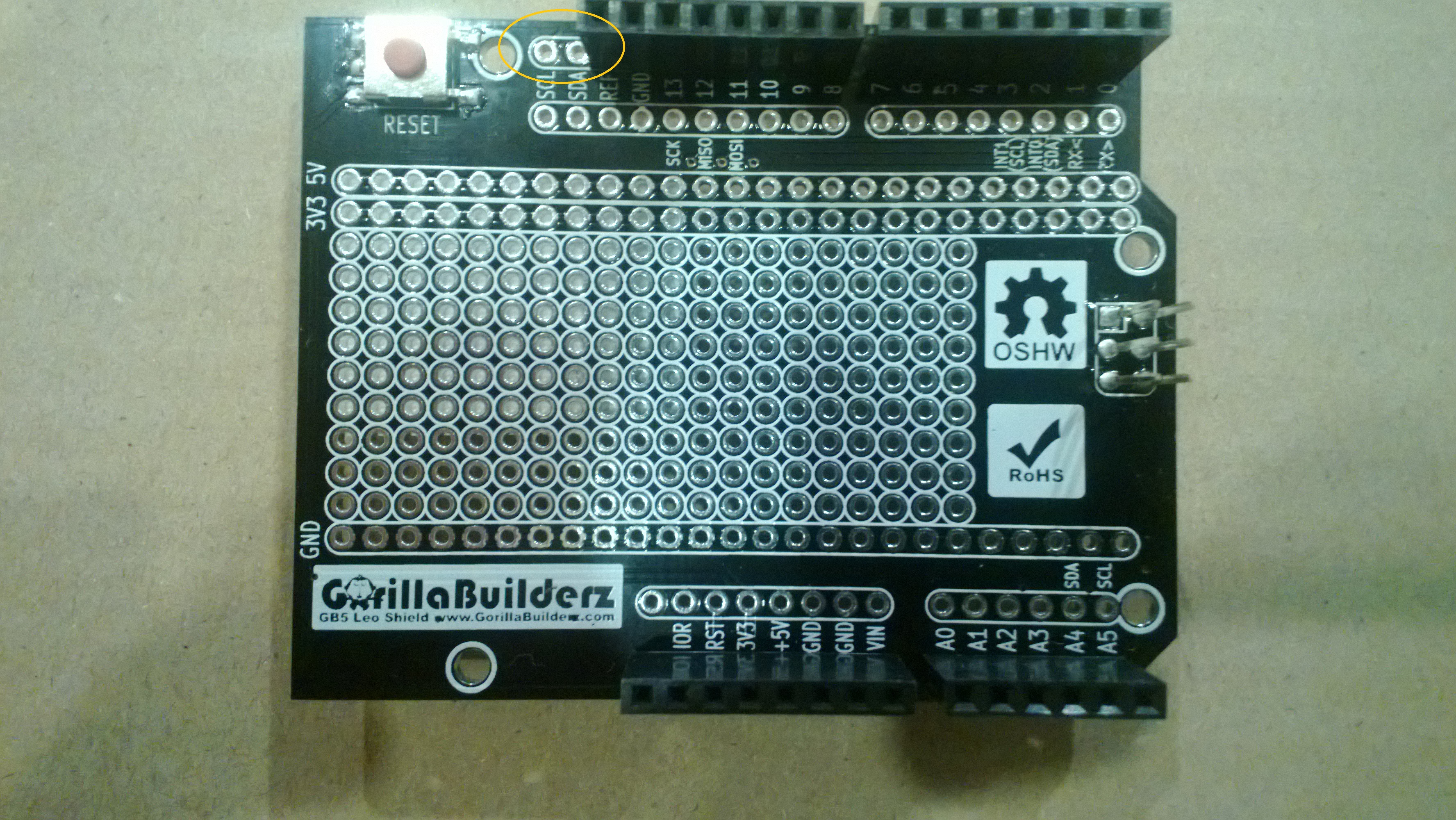
For testing I’m going to need a shield to mount my MPU 6050 breakout board and connectors for the four motor speed controllers so a protoshield looked like an ideal solution. The netduino plus 2 I am planning to use for the Quadcopter controller has a slightly different I2C setup to the original Netduino & Netduino plus. After some research it looks like the Netduino plus 2 arrangement is the same as the Arduino Uno & Arduino Leonardo with the I2C SDA & SCL pins next to the AREF pin. I did consider using a software based I2C implementation but discounted this because I was worried about performance and additional complexity.

Many of the Arduino/Netduino protoshields currently on sale (June 2013) don’t have the necessary SDA & SCL pins e.g. Sparkfun, Freetronics, Adafruit, Makershed, ladyada etc.

I have sourced 2 x Leoshield from GorillaBuilderz in Australia which look suitable.

MPU 6050 Quadcopter IMU has arrived

The  3 x MPU 6050 breakout boards (GY521) I ordered on Alibaba arrived from China yesterday. I’m looking at using a device which has both an accelerometer & gyroscope in one package rather than an IMU assembled from several discrete devices to make the software simpler (only one I2C bus address).

To make the Microsoft I2C implementation work with multiple discrete devices usually requires a layer of abstraction like commonly used AbstractI2CDevice class which I was wanting to avoid in this project.

The test rig for my light weight high performance driver, a netduino 2 plus & breakout board.

Image

If I need a compass to make the Quadcopter controller work I’ll upgrade to an MPU 9150.

NetMF Quadcopter Proof of Concept

A few weeks ago I read a number of conversation on the Netduino and TinyCLR Forums about building a quadcopter. Often there was discussion about how .NetMF wasn’t a viable platform and this got me thinking…

Today, I purchased a Crazyflie Nano Quadcopter Kit 10-DOF as a research platform. I also purchased a Netduino Plus 2 (faster processor than my current Netduino Plus and Fez Panda II boards) and an MPU 6050 breakout board as the start of my control system.

First thing to confirm is that I can read the gyro and accelerometer data from the MPU 6050 at a high enough rate to enable controlled flight. The next step will be to confirm that the processor can process the gyro & accelerometer data at a high enough rate to enable controlled flight.

If these initial investigations are successful start to purchase the parts for a development system based on this Beginners Quadcopter Kit buying guide. I won’t need the remote control hardware (I will use Zigbee or similar) or the controller board.

Using a proven should reduce the risk, plus if I can’t get it to work I can purchase the necessary Openpilot or similar kit and have a working quadcopter.

HTTP Headers GPRS Modem HTTP Post

All my initial deployments used a CAT5 cable and my ADSL connection which was great for testing and debugging but not really representative of the connectivity a mobile solution would experience.

For this test I used a seeedstudio GPRS shield on top of a Netduino Plus.

Netduino + SeeedStudio GPRS Modem

SeedStudio GPRS Modem on top of Netduino Plus

The shield is based on a SIM900 module from SIMCom Wireless and can also initiate HTTP requests. This functionality looked useful as it could make my code a bit simpler and reduce the load on the Netduino CPU.

I initially looked at a the Netduino driver for Seeeduino GSM shield on codeplex but it appeared to only support the sending of SMS messages. (Feb2012)

After some more searching I stumbled across the CodeFreak Out SeeedStudio GPRS Driver which is available as a Nuget package or source code. I had to modify the code to allow me to pass a list of HTTP headers to be added into the request

var gsm = new GPRSShield("www.vodafone.net.nz", SerialPorts.COM1);
gsm.Post(@"gpstrackerhttpheaders.cloudapp.net", 80, @"/posV4.aspx", httpHeaders, "application/html", "");

My simulated data used the same header format as in my earlier testing

x-Pos: 5C-86-4A-00-3F-63 20130218081228 F -43.00000 172.00000 31.4 1.31 0 0

I timed 10 requests

4789,3778,3793,3756,3796,3825,3806,3817,3795,3877

Average 3903 mSec

This was a bit slower than I was expecting so i’ll have to do some digging into the code and see if anything looks a bit odd.

HTTP Headers Payload encryption

So far the content of the messages has been sent as clear text which would not be acceptable for many applications. The requirement for data privacy causes a problem on the Netduino+ (Nov 2012) as the standard NetMF crypto libraries are not baked into the platform.

I then set about finding some crypto libraries which were NetMF friendly. RSA and Xtea are included in some of other NetMF platforms in the Microsoft.SPOT.Cryptography assembly so Xtea seemed like a reasonable choice to ensure interoperability.

When looking for crypto implementations one of the best sources is the Legion of the Bouncy Castle which was where I started. I downloaded the the V17.7 zip file had a look at the size of the Xtea code & all the associated support libraries and then parked that approach as I was worried about the size and performance of the resulting binaries.

I then looked at other possible tea, xtea & xxtea implementations (including porting the original C code to C#)

I am not a cryptographer so I can’t personally confirm the quality and correctness of an implementation. So after having interop problems I went back to the Legion of the Bouncy Castle which has been peer reviewed by experts and had another look. To get an Xtea implementation working on a .NetMF platform like the Netduino+ you need to include the following files…

  • CryptoException.cs
  • DataLengthException.cs
  • IBlockCipher.cs
  • ICipherParameters.cs
  • KeyParameter.cs
  • XTEAEngine.cs

On the Azure side of things where size is not so critical I just added a reference to the Bouncy Castle main project.

Xtea requires 128 bit blocks so you need to pad out the data on the client, then trim off the padding on the server.
// Pad out the data to a multiple of 8 bytes with spaces
if (xPosition.Length % 8 != 0)
{
xPosition += new string(' ', 8 - xPosition.Length % 8);
}

The key and the data need to be converted to byte arrarys, the Xtea engine initialised and a buffer for storing the encrypted data created.

byte[] dataBytes = Encoding.UTF8.GetBytes(xPosition);
byte[] keyBytes = Encoding.UTF8.GetBytes(key);

xteaEngine.Init(true, new KeyParameter(keyBytes));

Then the data can be encrypted in 8 byte chunks
byte[] cryptoBytes = new byte[dataBytes.Length];
for (int i = 0; i < dataBytes.Length; i += 8)
{
xteaEngine.ProcessBlock(dataBytes, i, cryptoBytes, i);
}

I hex encoded the encrypted data for transmission. Downside to this was it doubled the size of the payload
string hexEncodedCryptoBytes = ByteArrayToHex(cryptoBytes);

I added a StopWatch so I could measure the time taken to encrypt the position data (roughly 72 chars) on my Netduino+
285,342,277,345,282,345,342,350,278,343
Average 318mSec

The size of the payload had grown a bit
Request - Bytes Sent: 262
POST http://gpstrackerhttpheaders.cloudapp.net/posV7.aspx HTTP/1.1
Host: gpstrackerhttpheaders.cloudapp.net
x-Pos: 693A7AC6EBF4E5848CE8ABBA2BC6CAC1ED20574C1B2384E7E246A202C8A67E3DE14EE5231A5DF98C211F64F8402547F8BFDCC2241AAE3782A820086E5EF37AA2C50744941F588442
Content-Length: 0
Connection: Close

Response - Bytes Received: 132
HTTP/1.1 200 OK
Cache-Control: private
Content-Type: text/html
Date: Sun, 03 Feb 2013 04:53:30 GMT
Content-Length: 0

This increase in size had an impact on the time taken to send the message

1123,1144,1122,1142,1125,1125,1138,1111,1099,1141
Average 1127mSec

The binary downloaded to the Netduino+ had grown to 28K which still left plenty of space for additional functionality.
HTTP Headers Request reduction

The requests generated by the HTTP_Client were a bit chunky with user-agent strings, content type etc.

POST http://gpstrackerhttpheaders.cloudapp.net/posV4.aspx HTTP/1.1
Accept: */*
Accept-Language: en
User-Agent: NETMFToolbox/0.1 (textmode; Netduino; IntegratedSocket; HTTP_Client)
Host: gpstrackerhttpheaders.cloudapp.net
x-Pos: 5C-86-4A-00-3F-63 20130130080711 F -43.00000 172.00000 16.9 1.28 0 0
Content-Type: application/x-www-form-urlencoded
Content-Length: 0
Connection: Close

I then modified the HTTP_Client so that the accept, accept language, user agent, and content Type headers could be removed if not necessary.

POST http://gpstrackerhttpheaders.cloudapp.net/posV4.aspx HTTP/1.1
Host: gpstrackerhttpheaders.cloudapp.net
x-Pos: 5C-86-4A-00-3F-63 20130130081228 F -43.00000 172.00000 31.4 1.31 0 0
Content-Length: 0
Connection: Close

This reduced the size of the request down to 186 bytes which was comparable with the smallest System.http HTTPRequest. But, the durations looked a bit odd..

1295,1381,1323,1347,1281,1264,1351,1305,1350,1269
Average duration 1317 mSec

This was roughly 200mSec slower than the larger request version. After some digging I think the TCP socket was buffering (Nagle algorithm send coalescing) the send.

I then modified IntegratedSocket.cs connect method to disable this buffering

EndPoint Destination = new IPEndPoint(address.AddressList[0], (int)this._Port);
// Connects to the socket
this._Sock.Connect(Destination);
this._Sock.SetSocketOption(SocketOptionLevel.Tcp, SocketOptionName.NoDelay, true);

I then checked the request durations again

10 requests to gpstrackerhttpheaders.cloudapp.net
1026,1248,983,1027,966,843,1009,983,834,915
Average duration 983 mSec

10 requests to IP Address
584, 595,578,597,581,595,577,593,580,599
Average duration 588 mSec

These were faster than any of the results with the baked in HttpWebRequest in System.http.

So I fired up .Net Reflector and had a look at the decompiled System.http code and though there are calls socket.SetSocketOption in EstablishConnection I can’t see any way for a user to set the NoDelay socket option as allowWriteStreamBuffering appears not to be used.

HTTP Headers NetMF Toolbox

The system.http assembly adds roughly 40K to the size of an application download. The NetMF toolbox has an HTTP client implementation which should significantly reduce the size of the download.

For my first proof of concept attempt, I downloaded the latest version of the NetMF toolbox (21733) and

  • Removed system.http reference
  • Added Toolbox.NETMF.NET.HTTP_Client (4.2)
  • AddedToolbox.NETMF.NET.Core (4.2)
  • Added Toolbox.NETMF.NET.Integrated (4.2)
  • Added Toolbox.NETMF.Core (4.2)
  • Modified code to use HTTP_Client instead of HttpWebRequest

The standard NetMF Toolbox HTTP_Client didn’t support adding HTTP headers to a request so I modified HTTP_Client.cs adding my code in the style of the cookies implementation. After a look at the HTTP request generation code I was interested to see what the performance of the NetMF Toolbox HTTP client was compared to the Microsoft one with my payload reducing tweaks.

gpstrackerhttpheaders.cloudapp.net
1122, 1175, 1200, 1169, 1162, 1153, 1150, 1262, 1171, 1152
Average 1171 mSec

Which was a bit slower than I expected

I then hacked the HTTP client code so I could use Fiddler to inspect the request & response payloads
Request Bytes Sent:351
POST http://gpstrackerhttpheaders.cloudapp.net/posV4.aspx HTTP/1.1
Accept: */*
Accept-Language: en
User-Agent: NETMFToolbox/0.1 (textmode; Netduino; IntegratedSocket; HTTP_Client)
Host: gpstrackerhttpheaders.cloudapp.net
x-Pos: 5C-86-4A-00-3F-63 20000101025524 F -43.00000 172.00000 25.2 0.80 0 0
Content-Type: application/x-www-form-urlencoded
Content-Length: 0
Connection: Close


Bytes Received:132
HTTP/1.1 200 OK
Cache-Control: private
x-UpdMin: 30
Date: Tue, 29 Jan 2013 02:55:25 GMT
Connection: close
Content-Length: 0

The downloaded went from 57K to 25k which is roughly a 32K reduction in size. The HTTP Request was a bit more chunky at 351 chars vs. 192 chars, but in a future post I’ll look into reducing it.