Myriota Connector – Azure IoT Central Downlink Methods

This post is about Azure IoT Central downlink methods and should be read in conjunction with the Myriota Connector – Azure IoT Central Downlink Methods post. My Myriota Sense and Locate template has 4 commands and in this post, I have focused on the fan speed command.

Sense and Locate Azure IoT Central Template

The Myriota Connector only supports Direct Methods which provide immediate confirmation of the result being queued by the Myriota Cloud API. The Myriota (API) control message send method responds with 400 Bad Request if there is already a message being sent to a device.

Myriota Azure Function Environment Variable configuration

The fan speed downlink payload formatter is specified in the Azure Function Environment Variables.

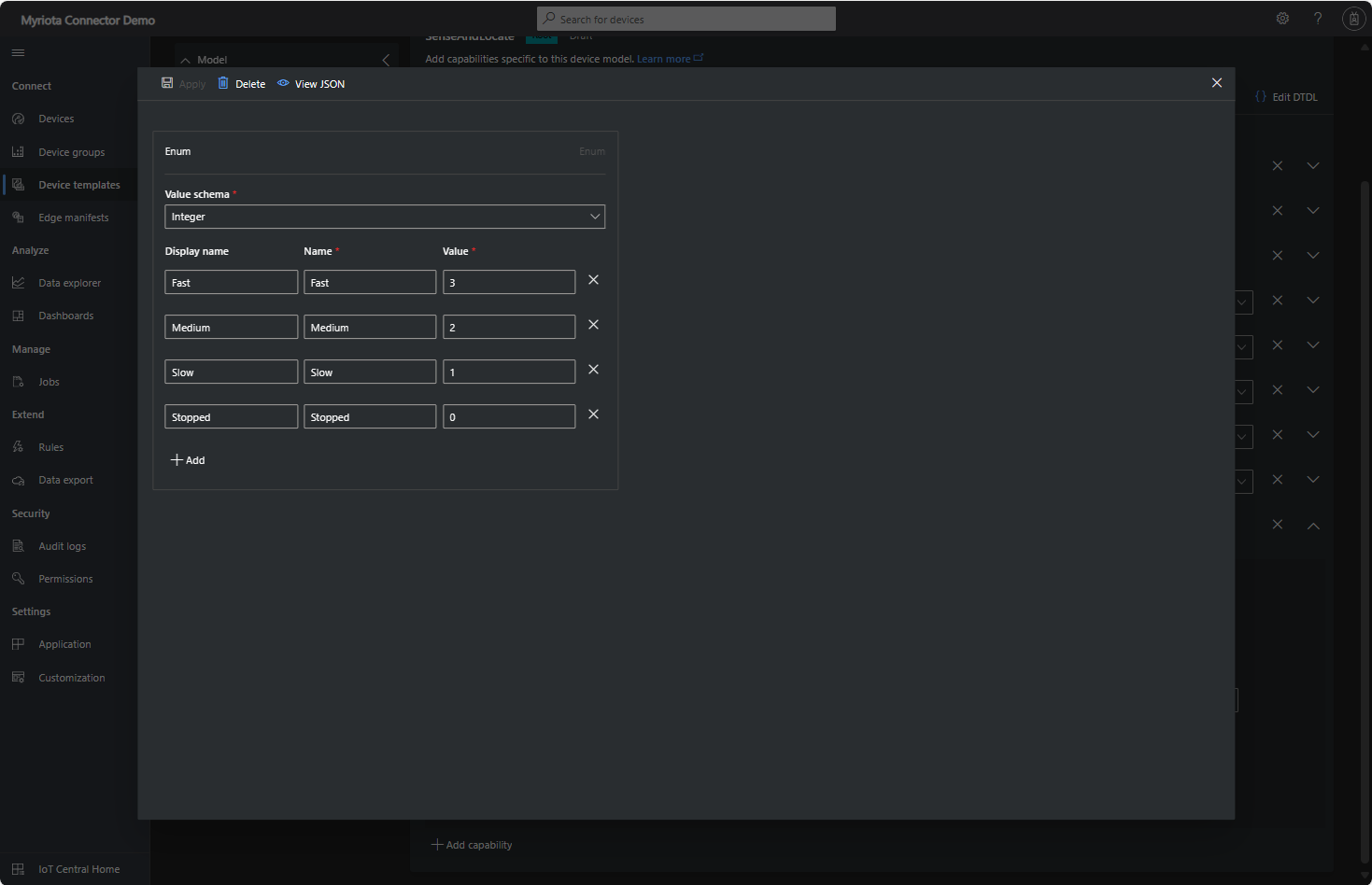
Sense and Locate Azure IoT Central Template Fan Speed Enumeration

The fan speed value in the message payload is configured in the fan speed enumeration.

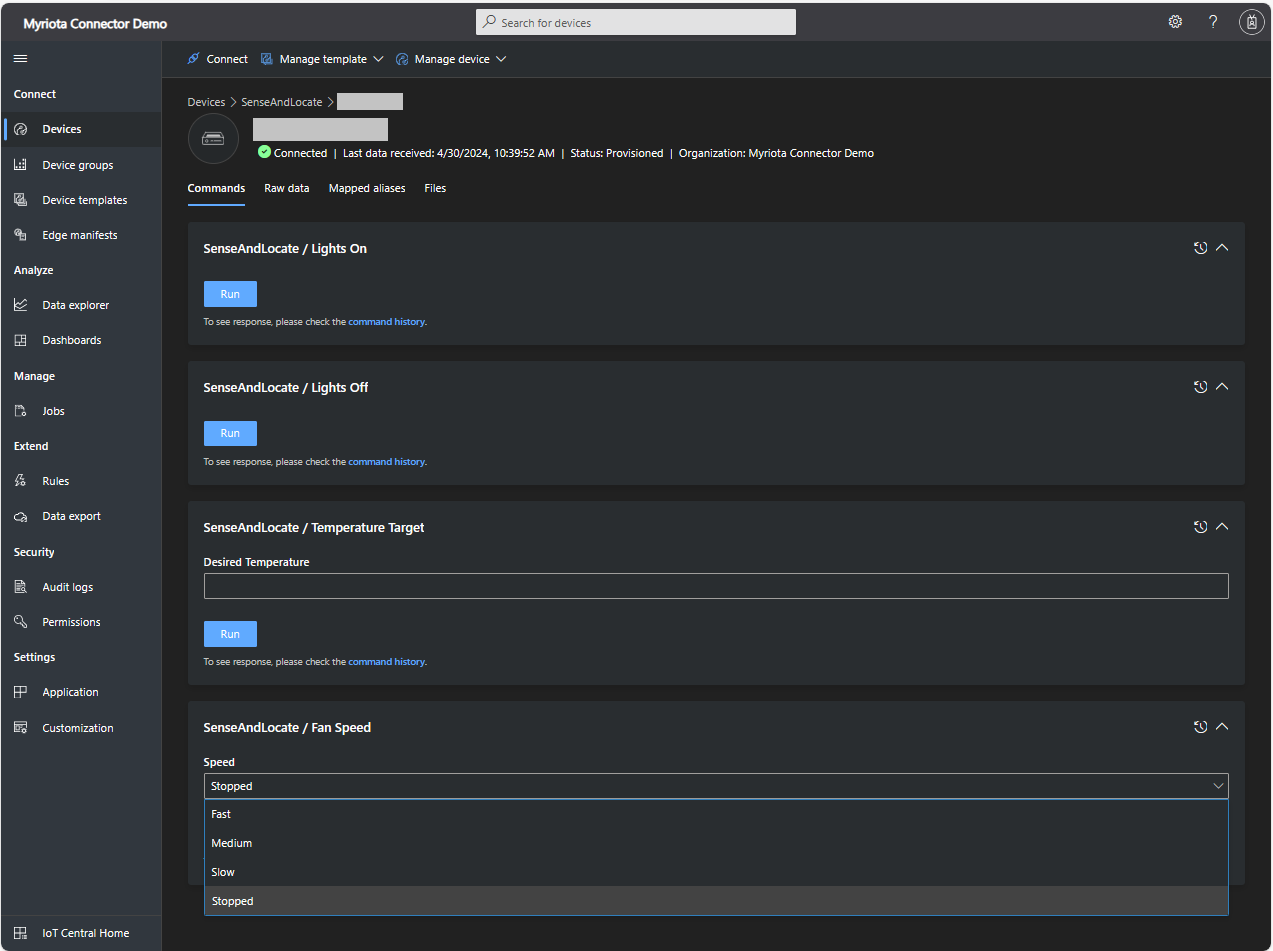
Sense and Locate Azure IoT Central Command Fan Speed Selection

The FanSpeed.cs payload formatter extracts the FanSpeed value from the Javascript Object Notation(JSON) payload and returns a two-byte array containing the message type and speed of the fan.

using System;
using System.Collections.Generic;

using Newtonsoft.Json;
using Newtonsoft.Json.Linq;

public class FormatterDownlink : PayloadFormatter.IFormatterDownlink
{
   public byte[] Evaluate(string terminalId, string methodName, JObject payloadJson, byte[] payloadBytes)
   {
      byte? status = payloadJson.Value<byte?>("FanSpeed");

      if (!status.HasValue)
      {
         return new byte[] { };
      }

      return new byte[] { 1, status.Value };
   }
}

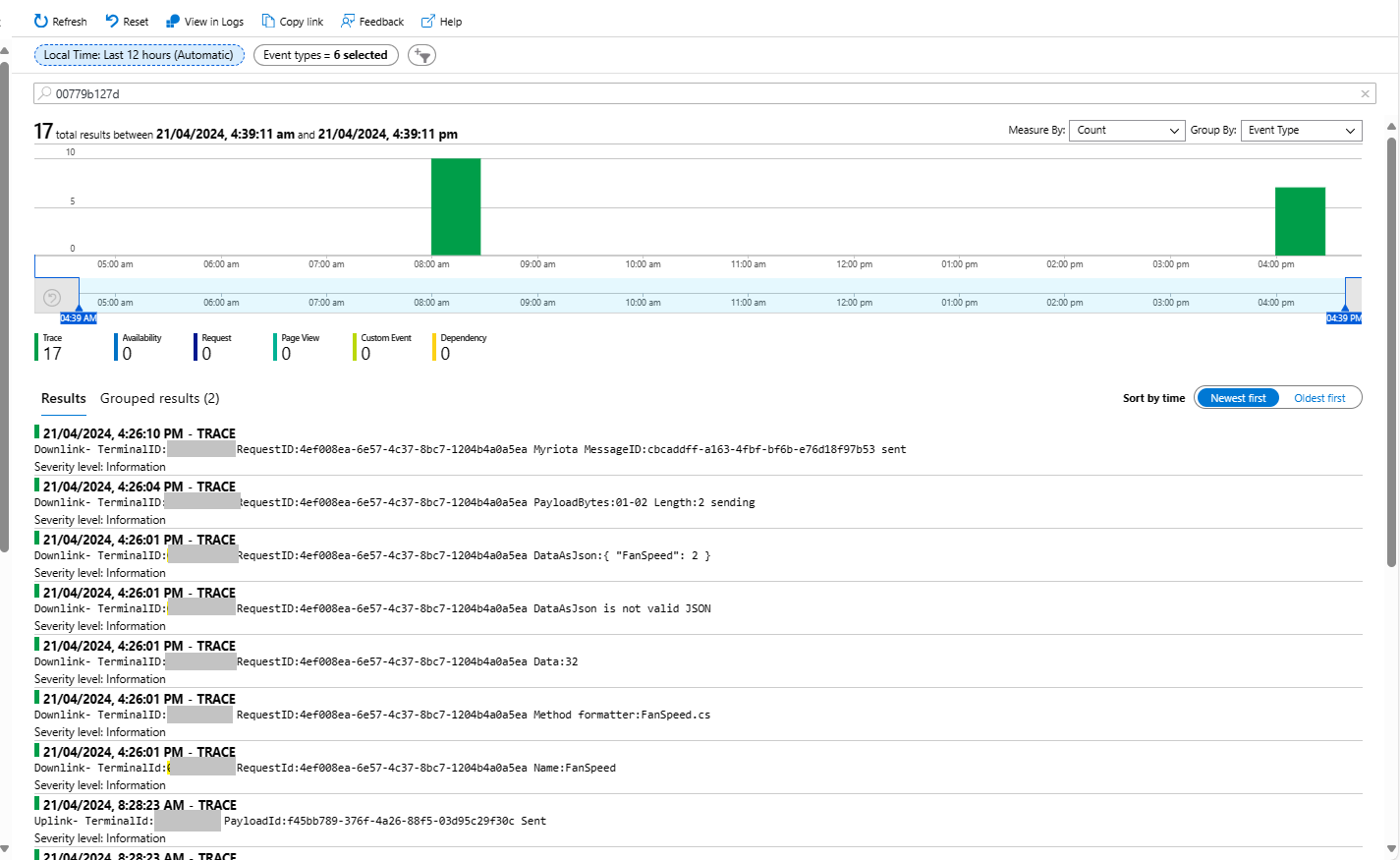
Sense and Locate Azure IoT Central Command Fan Speed History

Each Azure Application Insights log entry starts with the TerminalID (to simplify searching for all the messages related to device) and the requestId a Globally Unique Identifier (GUID) to simplify searching for all the “steps” associated with sending/receiving a message) with the rest of the logging message containing “step” specific diagnostic information.

Sense and Locate Azure IoT Central Command Fan Speed Application Insights

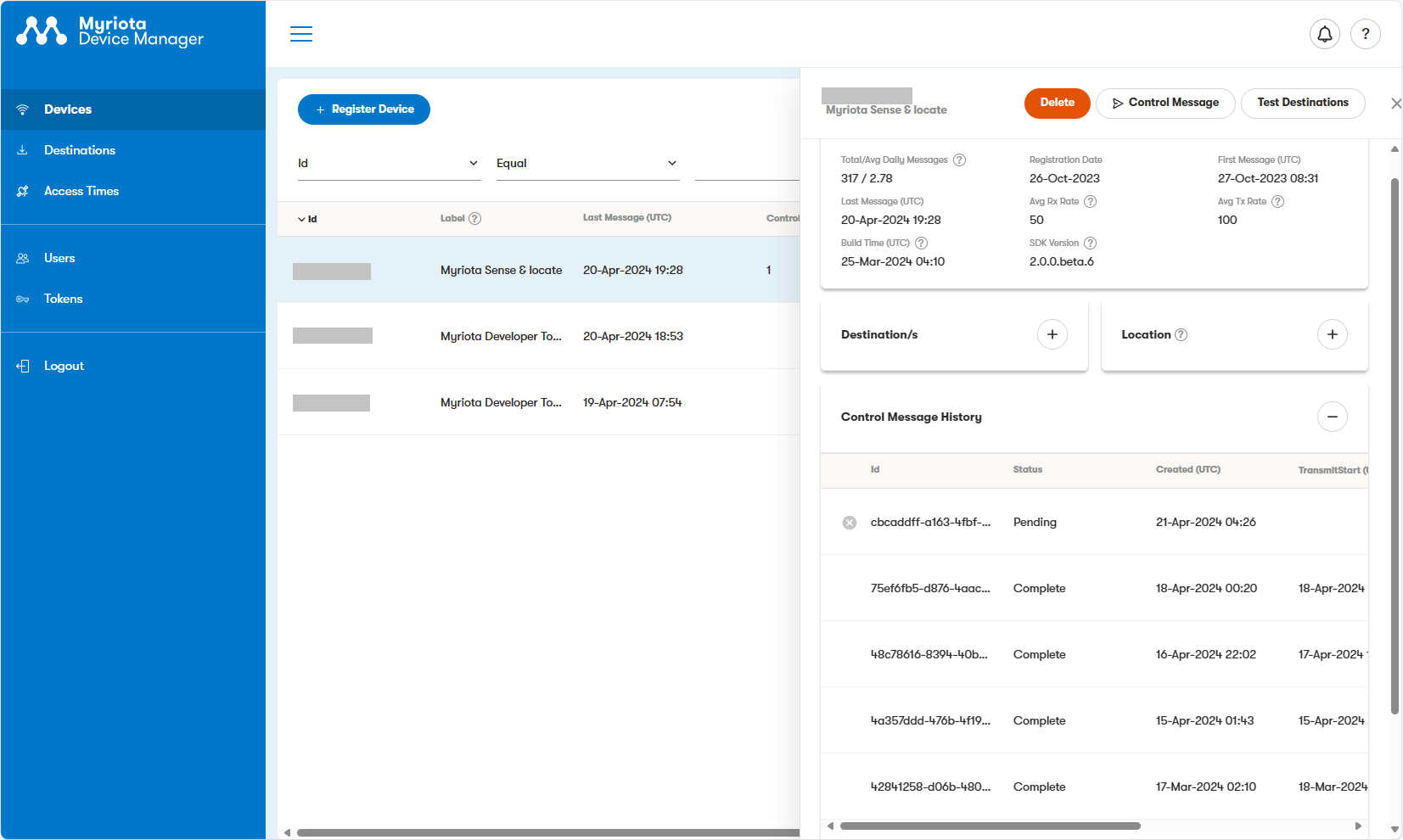
In the Myriota Device Manager the status of Control Messages can be tracked and they can be cancelled if in the “pending” state.

Myriota Control Message status Pending

A Control Message can take up to 24hrs to be delivered and confirmation of delivery has to be implemented by the application developer.

Myriota device Uplink Serialisation

The Myriota Developer documentation has some sample webhook data payloads so I used JSON2csharp to generate a Data Transfer Object(DTO) to deserialise payload. The format of the message is a bit “odd”, the “Data “Value” contains an “escaped” JSON object.

{
  "EndpointRef": "ksnb8GB_TuGj:__jLfs2BQJ2d",
  "Timestamp": 1692928585,
  "Data": "{"Packets": [{"Timestamp": 1692927646796, "TerminalId": "0001020304", "Value": "00008c9512e624cce066adbae764cccccccccccc"}]}",
  "Id": "a5c1bffe-4b62-4233-bbe9-d4ecc4f8b6cb",
  "CertificateUrl": "https://security.myriota.com/data-13f7751f3c5df569a6c9c42a9ce73a8a.crt",
  "Signature": "FDJpQdWHwCY+tzCN/WvQdnbyjgu4BmP/t3cJIOEF11sREGtt7AH2L9vMUDji6X/lxWBYa4K8tmI0T914iPyFV36i+GtjCO4UHUGuFPJObCtiugVV8934EBM+824xgaeW8Hvsqj9eDeyJoXH2S6C1alcAkkZCVt0pUhRZSZZ4jBJGGEEQ1Gm+SOlYjC2exUOf0mCrI5Pct+qyaDHbtiHRd/qNGW0LOMXrB/9difT+/2ZKE1xvDv9VdxylXi7W0/mARCfNa0J6aWtQrpvEXJ5w22VQqKBYuj3nlGtL1oOuXCZnbFYFf4qkysPaXON31EmUBeB4WbZMyPaoyFK0wG3rwA=="
}
namespace devMobile.IoT.myriotaAzureIoTConnector.myriota.UplinkWebhook.Models
{
    public class UplinkPayloadWebDto
    {
        public string EndpointRef { get; set; }
        public long Timestamp { get; set; } 
        public string Data { get; set; } // Embedded JSON ?
        public string Id { get; set; }
        public string CertificateUrl { get; set; }
        public string Signature { get; set; }
    }
}

The UplinkWebhook controller “automagically” deserialises the message, then in code the embedded JSON is deserialised and “unpacked”, finally the processed message is inserted into an Azure Storage queue.

namespace devMobile.IoT.myriotaAzureIoTConnector.myriota.UplinkWebhook.Controllers
{
    [Route("[controller]")]
    [ApiController]
    public class UplinkController : ControllerBase
    {
        private readonly Models.ApplicationSettings _applicationSettings;
        private readonly ILogger<UplinkController> _logger;
        private readonly QueueServiceClient _queueServiceClient;

        public UplinkController(IOptions<Models.ApplicationSettings> applicationSettings, QueueServiceClient queueServiceClient, ILogger<UplinkController> logger)
        {
            _applicationSettings = applicationSettings.Value;
            _queueServiceClient = queueServiceClient;
            _logger = logger;
        }

        [HttpPost]
        public async Task<IActionResult> Post([FromBody] Models.UplinkPayloadWebDto payloadWeb)
        {
            _logger.LogInformation("SendAsync queue name:{QueueName}", _applicationSettings.QueueName);

            QueueClient queueClient = _queueServiceClient.GetQueueClient(_applicationSettings.QueueName);

            var serializeOptions = new JsonSerializerOptions
            {
                WriteIndented = true,
                Encoder = System.Text.Encodings.Web.JavaScriptEncoder.UnsafeRelaxedJsonEscaping
            };

            await queueClient.SendMessageAsync(Convert.ToBase64String(JsonSerializer.SerializeToUtf8Bytes(payloadWeb, serializeOptions)));

            return this.Ok();
        }
    }
}

The webhook application uses the QueueClientBuilderExtensions and AddServiceClient so a QueueServiceClient can be injected into the webhook controller.

namespace devMobile.IoT.myriotaAzureIoTConnector.myriota.UplinkWebhook
{
    public class Program
    {
        public static void Main(string[] args)
        {
            var builder = WebApplication.CreateBuilder(args);

            // Add services to the container.
            builder.Services.AddControllers();

            builder.Services.AddApplicationInsightsTelemetry(i => i.ConnectionString = builder.Configuration.GetConnectionString("ApplicationInsights"));

            builder.Services.Configure<Models.ApplicationSettings>(builder.Configuration.GetSection("Application"));

            builder.Services.AddAzureClients(azureClient =>
            {
                azureClient.AddQueueServiceClient(builder.Configuration.GetConnectionString("AzureWebApi"));
            });

            var app = builder.Build();

            // Configure the HTTP request pipeline.

            app.UseHttpsRedirection();

            app.MapControllers();

            app.Run();
        }
    }
}

After debugging the application on my desktop with Telerik fiddler I deployed the application to one of my Azure subscriptions.

Azure Resource Group for the myriota Azure IoT Connector
Adding a new Destination in the myriota device manager

As part of configuring a new device test messages can be sent to the configured destinations.

Testing a new Destination in the myriota device manager
{
  "EndpointRef": "N_HlfTNgRsqe:uyXKvYTmTAO5",
  "Timestamp": 1563521870,
  "Data": "{"Packets": [{"Timestamp": 1563521870359,
    "TerminalId": "f74636ec549f9bde50cf765d2bcacbf9",
    "Value": "0101010101010101010101010101010101010101"}]}",
  "Id": "fe77e2c7-8e9c-40d0-8980-43720b9dab75",
  "CertificateUrl":    "https://security.myriota.com/data-13f7751f3c5df569a6c9c42a9ce73a8a.crt",
  "Signature": "k2OIBppMRmBT520rUlIvMxNg+h9soJYBhQhOGSIWGdzkppdT1Po2GbFr7jbg..."
}

The DTO generated with JSON2csharp needed some manual “tweaking” after examining how a couple of the sample messages were deserialised.

Azure Storage Explorer messages

I left the Myriota Developer Toolkit device (running the tracker sample) outside overnight and the following day I could see with Azure Storage Explorer a couple of messages in the Azure Storage Queue

Myriota device configuration

For a couple of weeks Myriota Developer Toolkit has been sitting under my desk and today I got some time to setup a device, register it, then upload some data.

Myriota Developer Toolkit

The first step was to download and install the Myriota Configurator so I could get the device registration information and install the tracker example application.

Using Windows File Explorer to “unblock” the downloaded file

After “unblocking” the zip file and upgrading my pip install the install script worked.

Myriota Configurator installation script

The application had to be run from the command line with “python MyriotaConfigurator.py”

Myriota Configurator main menu
Myriota Configurator retrieving device registration code

On the device I’m using the Tracker sample application to generate some sample payloads.

Myriota Configurator downloading tracker sample to device

The next step was to “register” my device and configure the destination(s) for its messages.

Myriota Device Manager Device configuration

Once the device and device manager configuration were sorted, I put the Tracker out on the back lawn on top of a large flowerpot.

Device Manager Access Times

On the “Access Times” page I could see that there were several periods when a satellite was overhead and overnight a couple of messages were uploaded.