Random wanderings through Microsoft Azure esp. PaaS plumbing, the IoT bits, AI on Micro controllers, AI on Edge Devices, .NET nanoFramework, .NET Core on *nix and ML.NET+ONNX
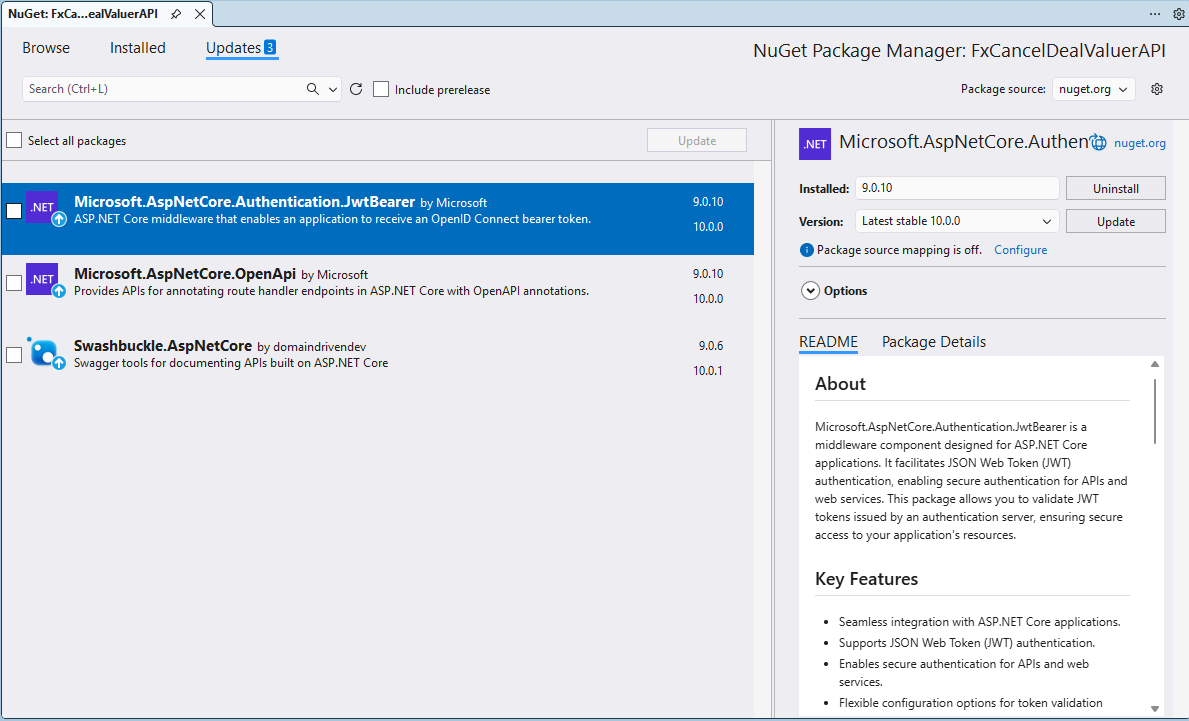
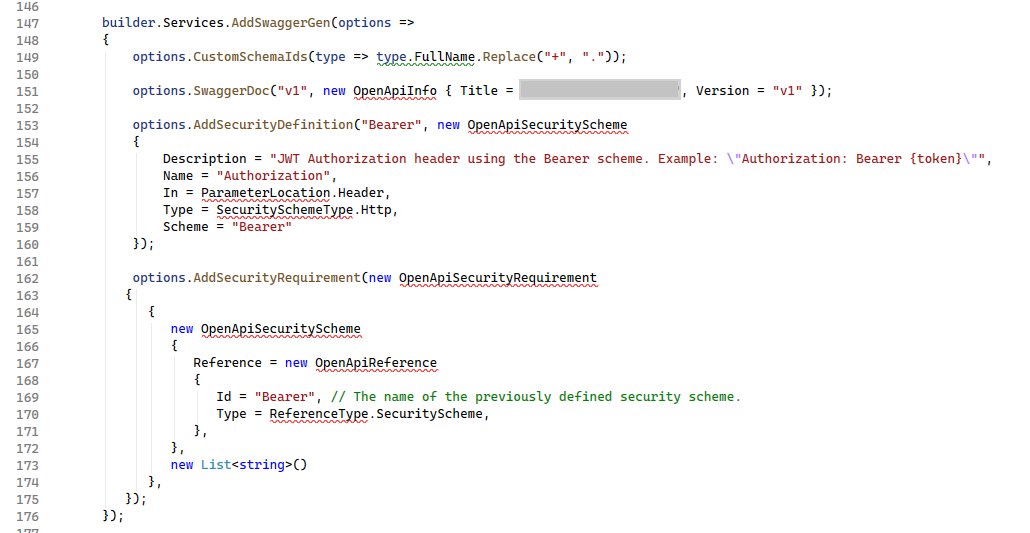
I left these three NuGets to the last as I have had problems updating them before, and this time was no different. The updated NuGets “broke” my code because the way that security definitions and security requirements were implemented had changed.
These articles were the inspiration for my approach
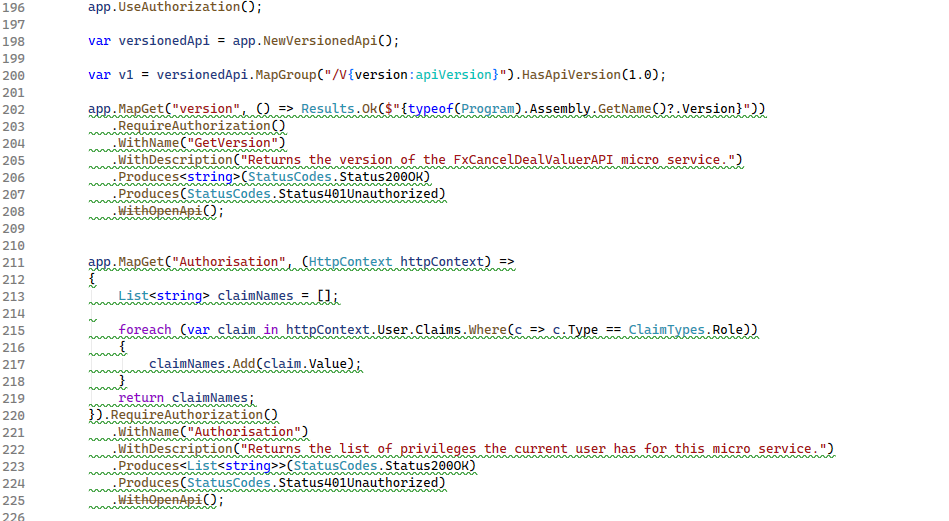
However, starting with .NET 9, ASP.NET Core introduced native OpenAPI document generation via Microsoft.AspNetCore.OpenApi. This made WithOpenApi unnecessary because the new pipeline already supports operation customization through transformers.
app.MapGet("Version", () =>
{
   return Results.Ok(typeof(Program).Assembly.GetName().Version?.ToString());
}).RequireAuthorization()
         .WithName("Version")
         .Produces<string>(StatusCodes.Status200OK)
         .Produces(StatusCodes.Status401Unauthorized)
         .AddOpenApiOperationTransformer((operation, context, ct) =>
         {
            // Per-endpoint tweaks
            operation.Summary = "Returns version of the application";
            operation.Description = "Returns the version of the application from project metadata.";
            return Task.CompletedTask;
         });
namespace devMobile.IoT.myriotaAzureIoTConnector.myriota.UplinkWebhook.Models
{
    public class UplinkPayloadWebDto
    {
        public string EndpointRef { get; set; }
        public long Timestamp { get; set; }
        public string Data { get; set; } // Embedded JSON ?
        public string Id { get; set; }
        public string CertificateUrl { get; set; }
        public string Signature { get; set; }
    }
}
The UplinkWebhook controller “automagically” deserialises the message, then in code the embedded JSON is deserialised and “unpacked”, finally the processed message is inserted into an Azure Storage queue.
For a couple of weeks Myriota Developer Toolkit has been sitting under my desk and today I got some time to setup a device, register it, then upload some data.
ASP.NET Core identityRoles can also have individual claims but with the authorisation model of the legacy application I work on this functionality hasn’t been useful. We use role based authentication with a few user claims to minimise the size of our Java Web Tokens(JWT)
Visual Studio 2022 ASP.NET Core Web Application template options
I tried to minimise the modifications to the application. I added EnableRetryOnFailure, some changes to names spaces etc. I also added support for email address confirmation with SendGrid and “authentication” link to the navabar in _Layout.cshtml.
After several unsuccessful attempts at updating the NuGets packages I started again from scratch
The code wouldn’t compile so I started fixing issues (The first couple of attempts were very “hacky”). The UseDatabaseErrorPage method was from EF Core so it was commented out. The UseBrowserLink method was from the Browser Link support which I decided not to use etc.
...
namespace CustomIdentityProviderSample
{
    public class Startup
    {
        public Startup(IHostingEnvironment env)
        {
            var builder = new ConfigurationBuilder()
                .SetBasePath(env.ContentRootPath)
                .AddJsonFile("appsettings.json", optional: false, reloadOnChange: true)
                .AddJsonFile($"appsettings.{env.EnvironmentName}.json", optional: true);

            if (env.IsDevelopment())
            {
                // For more details on using the user secret store see https://go.microsoft.com/fwlink/?LinkID=532709
                builder.AddUserSecrets<Startup>();
            }

            builder.AddEnvironmentVariables();
            Configuration = builder.Build();
        }

        public IConfigurationRoot Configuration { get; }

        // This method gets called by the runtime. Use this method to add services to the container.
        public void ConfigureServices(IServiceCollection services)
        {
            // Add identity types
            services.AddIdentity<ApplicationUser, ApplicationRole>()
                .AddDefaultTokenProviders();

            // Identity Services
            services.AddTransient<IUserStore<ApplicationUser>, CustomUserStore>();
            services.AddTransient<IRoleStore<ApplicationRole>, CustomRoleStore>();
            string connectionString = Configuration.GetConnectionString("DefaultConnection");
            services.AddTransient<SqlConnection>(e => new SqlConnection(connectionString));
            services.AddTransient<DapperUsersTable>();

            services.AddMvc();

            // Add application services.
            services.AddTransient<IEmailSender, AuthMessageSender>();
            services.AddTransient<ISmsSender, AuthMessageSender>();
        }

        // This method gets called by the runtime. Use this method to configure the HTTP request pipeline.
        public void Configure(IApplicationBuilder app, IHostingEnvironment env, ILoggerFactory loggerFactory)
        {
            // loggerFactory.AddConsole(Configuration.GetSection("Logging"));
            // loggerFactory.AddDebug();

            if (env.IsDevelopment())
            {
                app.UseDeveloperExceptionPage();
                // app.UseDatabaseErrorPage(); BHL
                // app.UseBrowserLink(); BHL
            }
            else
            {
                app.UseExceptionHandler("/Home/Error");
            }

            app.UseStaticFiles();

            app.UseRouting(); // BHL

            // app.UseIdentity(); BHL
            app.UseAuthentication();
            app.UseAuthorization();

            // Add external authentication middleware below. To configure them please see https://go.microsoft.com/fwlink/?LinkID=532715
            app.UseMvc(routes =>
            {
                routes.MapRoute(
                    name: "default",
                    template: "{controller=Home}/{action=Index}/{id?}");
            });
        }
    }
}
using Microsoft.AspNetCore.Identity;
using System;
using System.Threading.Tasks;
using System.Threading;
using System.Collections.Generic;

namespace CustomIdentityProviderSample.CustomProvider
{
    /// <summary>
    /// This store is only partially implemented. It supports user creation and find methods.
    /// </summary>
    public class CustomUserStore : IUserStore<ApplicationUser>,
        IUserPasswordStore<ApplicationUser>,
        IUserPhoneNumberStore<ApplicationUser>,
        IUserTwoFactorStore<ApplicationUser>,
        IUserLoginStore<ApplicationUser>
    {
        private readonly DapperUsersTable _usersTable;

        public CustomUserStore(DapperUsersTable usersTable)
        {
            _usersTable = usersTable;
        }

        public Task AddLoginAsync(ApplicationUser user, UserLoginInfo login, CancellationToken cancellationToken)
        {
            throw new NotImplementedException();
        }

        public async Task<IdentityResult> CreateAsync(ApplicationUser user,
            CancellationToken cancellationToken = default(CancellationToken))
        {
            cancellationToken.ThrowIfCancellationRequested();
            if (user == null) throw new ArgumentNullException(nameof(user));

            return await _usersTable.CreateAsync(user);
        }

        public async Task<IdentityResult> DeleteAsync(ApplicationUser user,
            CancellationToken cancellationToken = default(CancellationToken))
        {
            cancellationToken.ThrowIfCancellationRequested();
            if (user == null) throw new ArgumentNullException(nameof(user));

            return await _usersTable.DeleteAsync(user);

        }

        public async Task<ApplicationUser> FindByIdAsync(string userId,
            CancellationToken cancellationToken = default(CancellationToken))
        {
            cancellationToken.ThrowIfCancellationRequested();
            if (userId == null) throw new ArgumentNullException(nameof(userId));
            Guid idGuid;
            if(!Guid.TryParse(userId, out idGuid))
            {
                throw new ArgumentException("Not a valid Guid id", nameof(userId));
            }

            return await _usersTable.FindByIdAsync(idGuid);

        }

        public Task<ApplicationUser> FindByLoginAsync(string loginProvider, string providerKey, CancellationToken cancellationToken)
        {
            throw new NotImplementedException();
        }

        public async Task<ApplicationUser> FindByNameAsync(string userName,
            CancellationToken cancellationToken = default(CancellationToken))
        {
            cancellationToken.ThrowIfCancellationRequested();
            if (userName == null) throw new ArgumentNullException(nameof(userName));

            return await _usersTable.FindByNameAsync(userName);
        }

        public async Task<IList<UserLoginInfo>> GetLoginsAsync(ApplicationUser user, CancellationToken cancellationToken)
        {
            cancellationToken.ThrowIfCancellationRequested();
            if (user == null) throw new ArgumentNullException(nameof(user));

            return await _usersTable.GetLoginsAsync(user.Id);
        }
...
}
This also required extensions to the DapperUsersTable.cs.
public async Task<IdentityResult> UpdateAsync(ApplicationUser user)
{
   string sql = "UPDATE dbo.AspNetUsers " + // BHL
                     "SET [Id] = @Id, [Email]= @Email, [EmailConfirmed] = @EmailConfirmed, [PasswordHash] = @PasswordHash, [UserName] = @UserName " +
                     "WHERE Id = @Id;";


   int rows = await _connection.ExecuteAsync(sql, new { user.Id, user.Email, user.EmailConfirmed, user.PasswordHash, user.UserName });

   if (rows == 1)
   {
      return IdentityResult.Success;
   }

return IdentityResult.Failed(new IdentityError { Description = $"Could not update user {user.Email}." });
}
After many failed attempts my very nasty Custom Storage Provider refresh works (with many warnings and messages). I now understand how they work well enough that I am going to start again from scratch.


 devMobile's blog