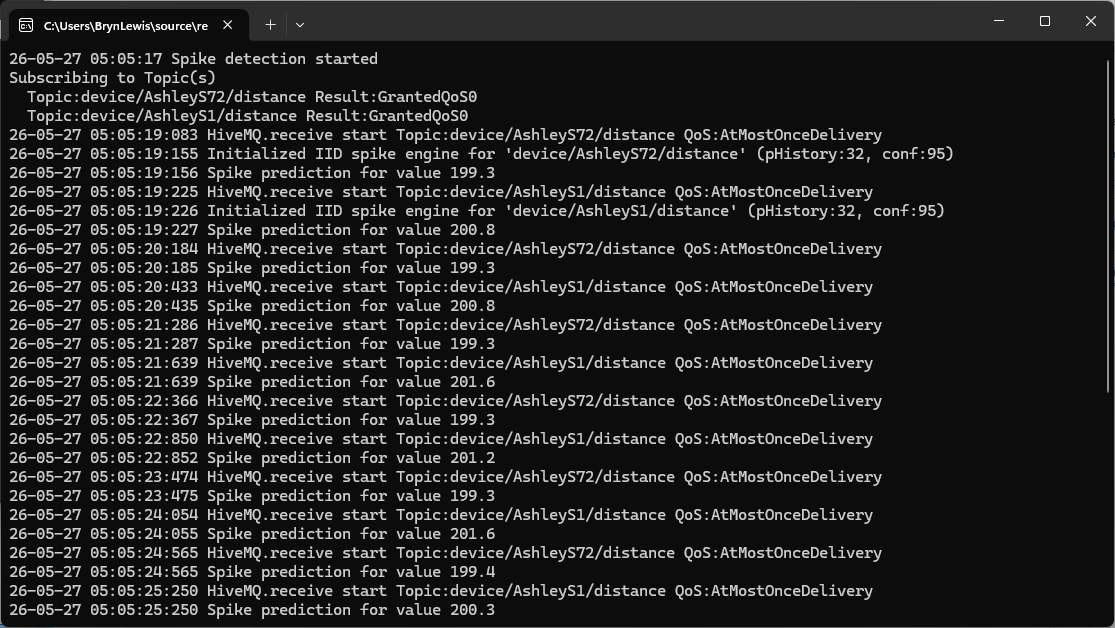
Internet of Things(IoT) sensors generate streams of continuous numeric data. I wanted to detect spikes and change points without building full a Machine Learning (ML) pipeline per device. My approach is to subscribe to Message Queue Telemetry Transport (MQTT) topics using HiveMQ .NET Client Library, extract each message’s numeric value using CS-Script, process it with an ML.NET time-series prediction engine then finally publish an alert to a MQTT Topic when a spike is detected.
This post details the plumbing for detecting change points and spikes;
The next post will cover spike detection with Independent and identically distributed (IID) using DetectIidSpike, and Singular Spectrum Analysis (SSA) with DetectSpikeBySsa.
The final post will cover change point detection with Independent and identically distributed (IID) using DetectIidChangePoint. and Singular Spectrum Analysis (SSA) with DetectChangePointBySsa .
The configuration is stored in appsettings.json and when running on a desktop sensitive information AddUserSecrets() keeps credentials out of source control. The HiveMQ client configured with the builder pattern: The WithClientId, WithBroker, WithPort, WithCleanStart, WithAutomaticReconnect and WithUseTls are loaded from the appsettings.json. To stop the compiler whining about “deprecated methods” there are compile-time #if guards for username/password and certificate blocks.
// Load configuration
var configuration = new ConfigurationBuilder()
         .AddJsonFile("appsettings.json", optional: false, reloadOnChange: true)
         .AddUserSecrets<Program>()
         .Build();

_applicationSettings = configuration.GetSection("ApplicationSettings").Get<Model.ApplicationSettings>() ?? throw new Exception("ApplicationSettings not configured");

// HiveMQ client options
var optionsBuilder = new HiveMQClientOptionsBuilder()
         .WithClientId(_applicationSettings.ClientId)
         .WithBroker(_applicationSettings.Host)
         .WithPort(_applicationSettings.Port)
#if HIVEMQ_USERNAME_AND_PASSWORD_SUPPORT
         .WithUserName(_applicationSettings.UserName)
         .WithPassword(_applicationSettings.Password)
#endif
         .WithCleanStart(_applicationSettings.CleanStart)
         .WithAutomaticReconnect(_applicationSettings.AutomaticReconnect)
         .WithUseTls(_applicationSettings.UseTls);

#if HIVEMQ_CERTIFICATE_SUPPORT
if (!string.IsNullOrWhiteSpace(_applicationSettings.ClientCertificateFileName))
{
      optionsBuilder.WithClientCertificate(_applicationSettings.ClientCertificateFileName,_applicationSettings.ClientCertificatePassword);
   }
#endif

#if HIVEMQ_USERNAME_AND_PASSWORD_SUPPORT
if (!string.IsNullOrWhiteSpace(_applicationSettings.UserName))
{
   optionsBuilder = optionsBuilder.WithPassword(_applicationSettings.Password);
}
#endif
The ApplicationSettings.SubscribedTopics are loaded into a dictionary with the MQTT topic as the key. Each subscription has per-topic configuration (detection mode, confidence, window sizes, QoS, output topic).
The HIVEMQ_CERTIFICATE_SUPPORT and HIVEMQ_USERNAME_AND_PASSWORD_SUPPORT exclude calls to WithUserName, WithPassword and WithClientCertificate(fileName, password). This is required (from version 0.39 of the HiveMQtt .NETClient) even though SecureString is considered obsolete in .NET for cross-platform work.
Converting a plain string from appsettings.json into a SecureString is a PITA as you must iterate characters and AppendChar one by one, then call MakeReadOnly(). SecureString limits the window during which the plaintext lives in managed heap memory,
reducing exposure to memory dumps. I don’t think that trade-off is worth the ceremony is debatable for most IoT scenarios.
Each subscribed topic has two scripts (InputMessageTransformFile and OutputMessageTransformFile) which CSScript.Evaluator.LoadFile(path) compiles, caches and instantiates a C# script at runtime
The IInputMessageTransformer, ISpikeOutputMessageTransformer follow the same pattern for the inbound and outbound payloads. The interfaces decouple the spike detection core from message format. A new or updated .cs script file to handle a new sensor payload can be deployed without touching the host application.
Exception handling is non-optional: script compilation errors surface as exceptions. The try/catch around the foreach that loads transformers is the right place to fail fast at startup rather than silently skipping a topic.
Console.CancelKeyPress sets e.Cancel = true (which suppresses the default termination) and calls cts.Cancel(). Await Task.Delay(Timeout.Infinite, cts.Token), the program does nothing in Main while the event-driven OnMessageReceived handler does all the work. When Ctrl+C fires, Task.Delay throws TaskCanceledException, which is caught in the outer try/catch block and prints a clean shutdown message. Everything else falls through to finally, which disconnects the HiveMQ client.
// one engine per topic; keeps rolling state for IID detector
private static readonly ConcurrentDictionary<string, Lazy<TimeSeriesPredictionEngine<Model.TimeSeriesData, Model.SpikePrediction>>> _spikeEngines = new();

// lock per topic because TimeSeriesPredictionEngine is not thread-safe
private static readonly ConcurrentDictionary<string, object> _engineLocks = new();

...

var spikeEngine = _spikeEngines.GetOrAdd(subscribedTopic, _ =>
   new Lazy<TimeSeriesPredictionEngine<Model.TimeSeriesData, Model.SpikePrediction>>(() =>
or...
var changePointEngine = _changePointEngines.GetOrAdd(subscribedTopic, _ =>
   new Lazy<TimeSeriesPredictionEngine<Model.TimeSeriesData, Model.ChangePointPrediction>>(() =>
{

...

}, LazyThreadSafetyMode.PublicationOnly)).Value;
The _spikeEngines/_changePointEngines is a ConcurrentDictionary keyed by topic string, GetOrAdd with a Lazy<> factory ensures each engine is initialised exactly once, even under concurrent message arrival. The LazyThreadSafetyMode.PublicationOnly means multiple threads may race to construct the value but only one result survives.
Each engine carries rolling internal state (the sliding window of past values), so isolation per topic is essential. The “mixing” of values from different sensors(topics) into one engine would produce nonsense predictions. The DetectionMode enumeration (IID / SSA) is checked inside the Lazy factory, branching to the appropriate ML.NET estimator. The engine type is the same either way (TimeSeriesPredictionEngine) only the output transform and pipeline construction differs.
Two separate try/catch blocks wrap the two transforms in each program, so failures (runtime errors like, bad JSON, missing field, type mismatch etc.) don’t crash the handler or the engine.
float value;
try
{
   value = subscribedTopicSettings.InputMessageTransformer.Transform(subscribedTopic, e.PublishMessage.Payload);
}
catch (Exception ex)
{
   Console.WriteLine($"{DateTime.UtcNow:yy-MM-dd HH:mm:ss:fff} Input transform failed: {ex.Message}");
   return;
}
foreach (string topic in topics)
{
   Console.WriteLine($"{DateTime.UtcNow:yy-MM-dd HH:mm:ss:fff} Publishing to:{topic}");

   var message = new MQTT5PublishMessage(topic, subscribedTopicSettings.OutputQualityOfService)
   {
      ContentType = subscribedTopicSettings.ContentType,
      Payload = payload
   };

   try
   {
      var resultPublish = await client.PublishAsync(message);

      Console.WriteLine($"{DateTime.UtcNow:yy-MM-dd HH:mm:ss:fff} Published:{resultPublish.QoS1ReasonCode} {resultPublish.QoS2ReasonCode}");
   }
   catch (Exception ex)
   {
      Console.WriteLine($"{DateTime.UtcNow:yy-MM-dd HH:mm:ss:fff} client.PublishAsync failed: {ex.Message}");
      return;
   }
}
The async void OnMessageReceived wrapper catches any unhandled exception from OnMessageReceivedCoreAsync. This is necessary because the async void “swallows” exceptions that would otherwise terminate the process silently. This approach is required because a bad/broken payload from one device should never take down detection for all other topics.
 devMobile's blog
Pingback: Real-time IoT Change Point Detection with ML.NET | devMobile's blog