The permissions required for an on-premises system running in a trusted environment are often minimalist. The World Wide Importers database People table has IsSystemUser, IsEmployee, IsSalesperson which is representative of the granularity of permissions I have encountered in Windows Forms .NET, ASP.NET Web Forms and other “legacy” applications.
CREATE TABLE [Application].[People](
    [PersonID] [int] NOT NULL,
    [FullName] nvarchar NOT NULL,
    [PreferredName] nvarchar NOT NULL,
    [SearchName] AS (concat([PreferredName],N' ',[FullName])) PERSISTED NOT NULL,
    [IsPermittedToLogon] [bit] NOT NULL,
    [LogonName] nvarchar NULL,
    [IsExternalLogonProvider] [bit] NOT NULL,
    [HashedPassword] varbinary NULL,
    [IsSystemUser] [bit] NOT NULL,
    [IsEmployee] [bit] NOT NULL,
    [IsSalesperson] [bit] NOT NULL,
    [UserPreferences] nvarchar NULL,
    [PhoneNumber] nvarchar NULL,
    [FaxNumber] nvarchar NULL,
    [EmailAddress] nvarchar NULL,
    [Photo] varbinary NULL,
    [CustomFields] nvarchar NULL,
    [OtherLanguages] AS (json_query([CustomFields],N'$.OtherLanguages')),
    [LastEditedBy] [int] NOT NULL,
    [ValidFrom] datetime2 GENERATED ALWAYS AS ROW START NOT NULL,
    [ValidTo] datetime2 GENERATED ALWAYS AS ROW END NOT NULL,
CONSTRAINT [PK_Application_People] PRIMARY KEY CLUSTERED
(
    [PersonID] ASC
)
The existing application appears to have a method for a Person to change their password which calls the [Website].[ChangePassword] stored procedure (I was surprised that the stored procedure didn’t set the LastEditedBy value).
CREATE PROCEDURE [Website].[ChangePassword]
@PersonID int,
@OldPassword nvarchar(40),
@NewPassword nvarchar(40)
WITH EXECUTE AS OWNER
AS
BEGIN
    SET NOCOUNT ON;
    SET XACT_ABORT ON;

    UPDATE [Application].People
    SET IsPermittedToLogon = 1,
        HashedPassword = HASHBYTES(N'SHA2_256', @NewPassword + FullName)
    WHERE PersonID = @PersonID
    AND PersonID <> 1
    AND HashedPassword = HASHBYTES(N'SHA2_256', @OldPassword + FullName);

    IF @@ROWCOUNT = 0
    BEGIN
        PRINT N'The PersonID must be valid, and the old password must be valid.';
        PRINT N'If the user has also changed name, please contact the IT staff to assist.';
        THROW 51000, N'Invalid Password Change', 1;
        RETURN -1;
    END;
END;
The new version removes the PersonId special case (Assumed that PersonId 1 can’t logon and the use of Throw). I think the use of Throw can add significant complexity to the exception handling of the WebAPI controller that calls the stored procedure
ALTER PROCEDURE [Website].[PersonPasswordChangeV1]
	@UserID int,
	@PasswordOld nvarchar(40),
	@PasswordNew nvarchar(40)
WITH EXECUTE AS OWNER
AS
BEGIN
    UPDATE [Application].People
    SET IsPermittedToLogon = 1
        ,HashedPassword = HASHBYTES(N'SHA2_256', @PasswordNew + FullName)
		,LastEditedBy = @UserID
    WHERE ((PersonID = @UserID )
		AND (HashedPassword = HASHBYTES(N'SHA2_256', @PasswordOld + FullName)))
END;
The PasswordChange method of the Person Controller only requires the caller to be authenticated.
/// <summary>
/// Changes current user's password.
/// </summary>
/// <param name="request">Current password and new password</param>
/// <response code="200">Password changed.</response>
/// <response code="401">Unauthorised, bearer token missing or expired.</response>
/// <response code="409">Previous password invalid or User name has changed.</response>
[Authorize()]
[HttpPut(Name = "PasswordChange")]
public async Task<ActionResult> PasswordChange([FromBody] Models.PersonPasswordChangeRequest request)
{
    request.UserID = HttpContext.PersonId();

    using (SqlConnection db = new SqlConnection(connectionString))
    {
        if (await db.ExecuteWithRetryAsync("[WebSite].[PersonPasswordChangeV1]", param: request, commandType: CommandType.StoredProcedure) != 1)
        {
            logger.LogWarning("Person {0} password change failed", request.UserID);

            return this.Conflict();
        }
    }

    return this.Ok();
}
The new application will have functionality for resetting a Person’s password. Access to this functionality will be restricted to people with the “Administrator” and “PasswordReset” roles.
CREATE PROCEDURE [Website].[PersonPasswordResetV1]
@UserID int,
@PersonID int,
@Password nvarchar(40)
WITH EXECUTE AS OWNER
AS
BEGIN
    UPDATE [Application].People
    SET IsPermittedToLogon = 1
        ,HashedPassword = HASHBYTES(N'SHA2_256', @Password + FullName)
		,LastEditedBy = @UserID
    WHERE PersonID = @PersonID
END;
One of the conventions we often use, is that the first parameter of any stored procedure that is called once a User has logged on is their unique identifier which is used for data access permissions and change tracking.
[Authorize(Roles = "Administrator")]
[HttpPut("{personId:int}", Name = "PasswordReset")]
public async Task<ActionResult> PasswordReset([Range(1, int.MaxValue, ErrorMessage = "Person id must greater than 1")] int personId, [FromBody] Models.PersonPasswordResetRequest request)
{
    request.UserId = HttpContext.PersonId();
    request.PersonID = personId;

    using (SqlConnection db = new SqlConnection(connectionString))
    {
        if (await db.ExecuteWithRetryAsync("[WebSite].[PersonPasswordResetV1]", param: request, commandType: CommandType.StoredProcedure) != 1)
        {
            logger.LogWarning("Person {0} password change failed", request.PersonID);

            return this.Conflict();
        }
    }

    return this.Ok();
}
For a couple of applications, we have added “Permissions” and “PersonPermissions” tables alongside the existing authorisation functionality to reduce the likely hood of any unintended side effects.
CREATE TABLE [Application].[Permissions](
	[PermissionID] [int] IDENTITY(1,1) NOT NULL,
	[Name] [nvarchar](20) NOT NULL,
	[Description] [nvarchar](50) NOT NULL,
	[LastEditedBy] [int] NOT NULL,
	[ValidFrom] [datetime2](7) GENERATED ALWAYS AS ROW START HIDDEN NOT NULL,
	[ValidUntil] [datetime2](7) GENERATED ALWAYS AS ROW END HIDDEN NOT NULL,
 CONSTRAINT [PK_Permissions] PRIMARY KEY CLUSTERED
(
	[PermissionID] ASC
)...
We try and keep the names of the permissions short, so the token doesn’t get too large.
CREATE TABLE [Application].[PersonPermissions](
	[PersonPermissionId] [int] IDENTITY(1,1) NOT NULL,
	[PersonId] [int] NOT NULL,
	[PermIssionId] [int] NOT NULL,
	[Active] [bit] NOT NULL,
	[ValidFrom] [datetime2](7) GENERATED ALWAYS AS ROW START HIDDEN NOT NULL,
	[ValidUntil] [datetime2](7) GENERATED ALWAYS AS ROW END HIDDEN NOT NULL,
 CONSTRAINT [PK_PersonPermissions] PRIMARY KEY CLUSTERED
(
	[PersonPermissionId] ASC
)...
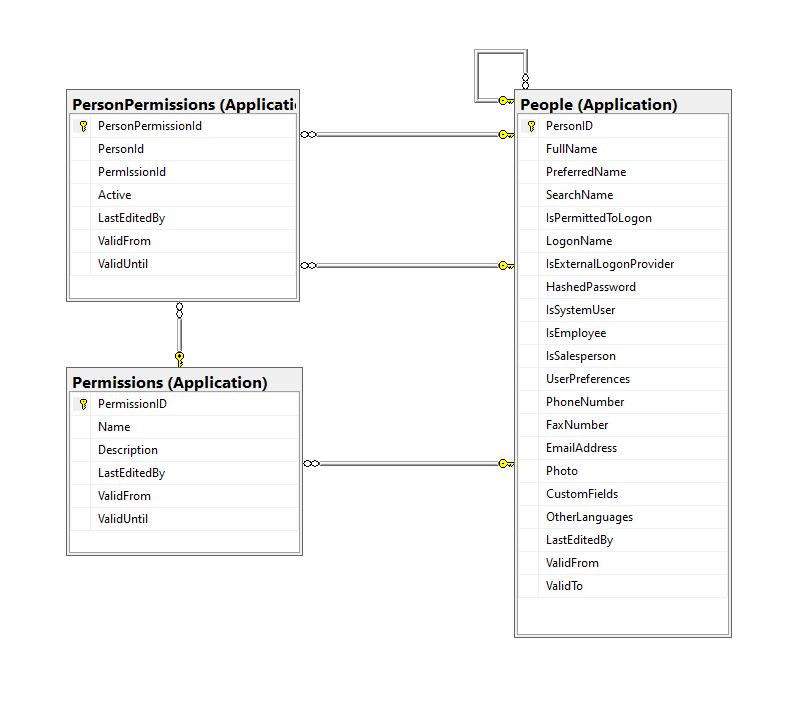
The additional permissions (from the Person record) and the PersonPermissions table required some modifications to the PersonAuthenticateLookupByLogonNameV1 stored procedure and the addition of the PersonPermissionsByPersonIdV1 stored procedure.
ALTER PROCEDURE [Website].[PersonAuthenticateLookupByLogonNameV2]
@LogonName nvarchar(50),
@Password nvarchar(40)
AS
BEGIN
	SELECT PersonID
		,FullName
		,EmailAddress
		,IsSystemUser
		,IsEmployee
		,IsSalesPerson
	FROM [Application].[People]
	WHERE (( LogonName = @LogonName)
		AND (IsPermittedToLogon = 1)
		AND (HASHBYTES(N'SHA2_256', @Password + FullName) = HashedPassword))
The IsSystemUser, IsEmployee and IsSalesPerson bit flags were added to the stored procedure and Data Transfer Object(DTO)
private class PersonAuthenticateLogonDetailsDto
{
    public int PersonID { get; set; }

    public string FullName { get; set; }

    public string EmailAddress { get; set; }

    public bool IsSystemUser { get; set; }

    public bool IsEmployee { get; set; }

    public bool IsSalesPerson { get; set; }
}
The PersonPermissionsByPersonIdV1 retrieves a list of the permissions of the User who has been authenticated.
ALTER PROCEDURE [Website].[PersonPermissionsByPersonIdV1]
	@PersonId AS int
AS
BEGIN

	SELECT [Application].[Permissions].[Name]
	FROM [Application].[Permissions]
		INNER JOIN [Application].[PersonPermissions] ON ([Application].[Permissions].PermissionID = [Application].[PersonPermissions].[PermissionId] )
	WHERE [Application].[PersonPermissions].[PersonId] = @PersonId
	ORDER BY [Application].[Permissions].[Name]

END
The Person’s permissions(effectively roles) are added as claims, the IsSystemUser, IsEmployee and IsSalesPerson flags are also added to the list of claims so they can be used in the new application.
[HttpPost("logon")]
public async Task<ActionResult> Logon([FromBody] Models.LogonRequest request )
{
    PersonAuthenticateLogonDetailsDto userLogonUserDetails;
    IEnumerable<string> permissions;
    var claims = new List<Claim>();

    using (SqlConnection db = new SqlConnection(configuration.GetConnectionString("WorldWideImportersDatabase")))
    {
        userLogonUserDetails = await db.QuerySingleOrDefaultWithRetryAsync<PersonAuthenticateLogonDetailsDto>("[Website].[PersonAuthenticateLookupByLogonNameV2]", param: request, commandType: CommandType.StoredProcedure);
        if (userLogonUserDetails == null)
        {
            logger.LogWarning("Login attempt by user {0} failed", request.LogonName);

           return this.Unauthorized();
        }

        // Lookup the Person's permissions
        permissions = await db.QueryWithRetryAsync<string>("[Website].[PersonPermissionsByPersonIdV1]", new { userLogonUserDetails.PersonID }, commandType: CommandType.StoredProcedure);
    }

    // Setup the primary SID + name info
    claims.Add(new Claim(ClaimTypes.PrimarySid, userLogonUserDetails.PersonID.ToString()));
    if (userLogonUserDetails.IsSystemUser)
    {
       claims.Add(new Claim(ClaimTypes.Role, "SystemUser"));
    }
    if (userLogonUserDetails.IsEmployee)
    {
       claims.Add(new Claim(ClaimTypes.Role, "Employee"));
    }
    if (userLogonUserDetails.IsSalesPerson)
    {
        claims.Add(new Claim(ClaimTypes.Role, "SalesPerson"));
    }

    foreach(string permission in permissions)
    {
        claims.Add(new Claim(ClaimTypes.Role, permission));
    }

    var authSigningKey = new SymmetricSecurityKey(Encoding.UTF8.GetBytes(jwtIssuerOptions.SecretKey));

    var token = new JwtSecurityToken(
         issuer: jwtIssuerOptions.Issuer,
          audience: jwtIssuerOptions.Audience,
          expires: DateTime.UtcNow.Add(jwtIssuerOptions.TokenExpiresAfter),
          claims: claims,
          signingCredentials: new SigningCredentials(authSigningKey, SecurityAlgorithms.HmacSha256));

    return this.Ok(new
   {
        token = new JwtSecurityTokenHandler().WriteToken(token),
        expiration = token.ValidTo,
    });
}
We try to reduce the number of roles a User requires by having core roles (Administrator, Sales consultant, Warehouse administrator etc.) with additional roles for each task that can be added as required (ResetPassword, CustomerIsOnCreditHold Set/Clear etc.)
The Get Method of Authorisation controller returns a list of the User’s Roles which can be used to enable/disable functionality of the user interface.
/// <summary>
/// Gets a list of the current User's roles.
/// </summary>
/// <response code="200">List of claims returned.</response>
/// <response code="401">Unauthorised, bearer token missing or expired.</response>
/// <returns>list of claims.</returns>
[HttpGet]
[ProducesResponseType(StatusCodes.Status200OK, Type = typeof(List<string>))]
public List<string> Get()
{
    List<string> claimNames = new List<string>();

    foreach (var claim in this.User.Claims.Where(c => c.Type == ClaimTypes.Role))
    {
        claimNames.Add(claim.Value);
    }

    return claimNames;
}
We have found this approach to be a robust way to add granular authorisation for new functionality to a “legacy’ application without breaking the existing solution. I have ignored a user being disabled after a number of failed logins, password complexity rules etc. as these tend to be application specific and not really related to the use of Dapper.
Most blog posts talk about building “green fields” applications, I have found hardly any cover “muddy fields” development where you have to deal with “legacy” code.
Not all “legacy” code is bad, I work on one code base which is nearly 20years old. It started as a spreadsheet plug-in and has grown of time to a SaaS application. There is very little of the original code left it has just been carefully re-factored over the years with time allocated to chip away at technical debt.
 devMobile's blog