Swarm Space – Azure IoT Basic Client

To figure out how to poll the Swarm Hive API I have built yet another “nasty” Proof of Concept (PoC) which gets ToDevice and FromDevice messages. Initially I have focused on polling as the volume of messages from my single device is pretty low (WebHooks will be covered in a future post).

Like my Azure IoT The Things Industry connector I use Alastair Crabtrees’s LazyCache to store Azured IoT Hub DeviceClient instances.

NOTE: Swarm Space technical support clarified the parameter values required to get FromDevice and ToDevice messages using the Bumbleebee Hive API.

Swarm API Docs messages functionality

The Messages Get method has a lot of parameters for filtering and paging the response message lists. Many of the parameters have default values so can be null or left blank.
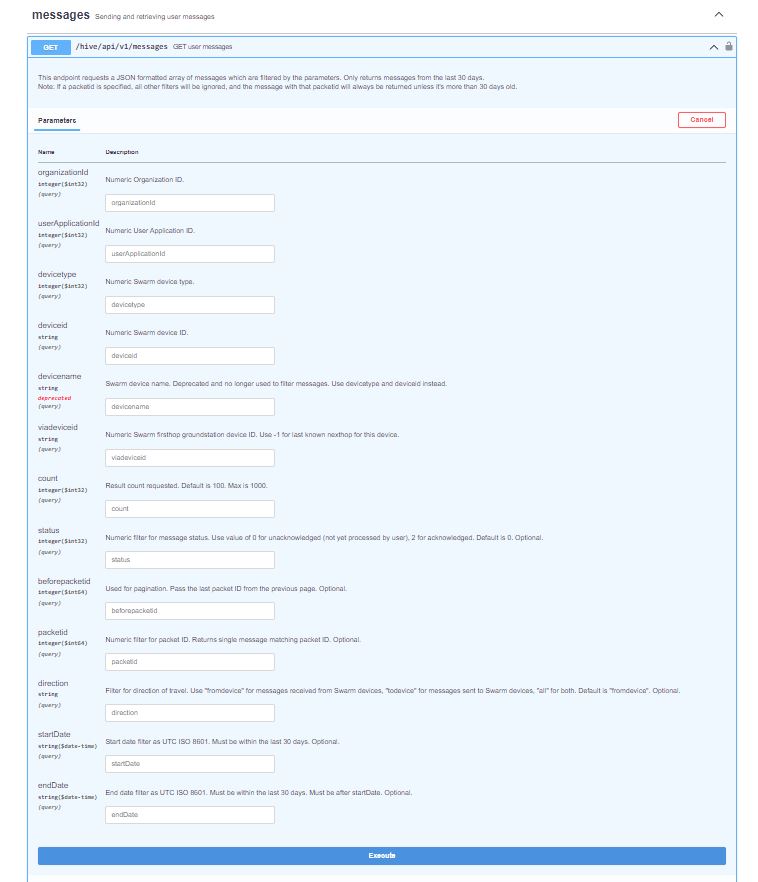
Swarm API Get User Message filters

I started off by seeing if I could duplicate the functionality of the user interface and get a list of all ToDevice and FromDevice messages.

Swarm Dashboard messages list

I first called the Messages Get method with the direction set to “fromdevice” (Odd this is a string rather than an enumeration) and the messages I had sent from my Sparkfun Satellite Transceiver Breakout – Swarm M138 were displayed.

Swarm API Docs displaying “fromdevice” messages

I then called the Messages Get method with the direction set to “all” and only the FromDevice messages were displayed which I wasn’t expecting.
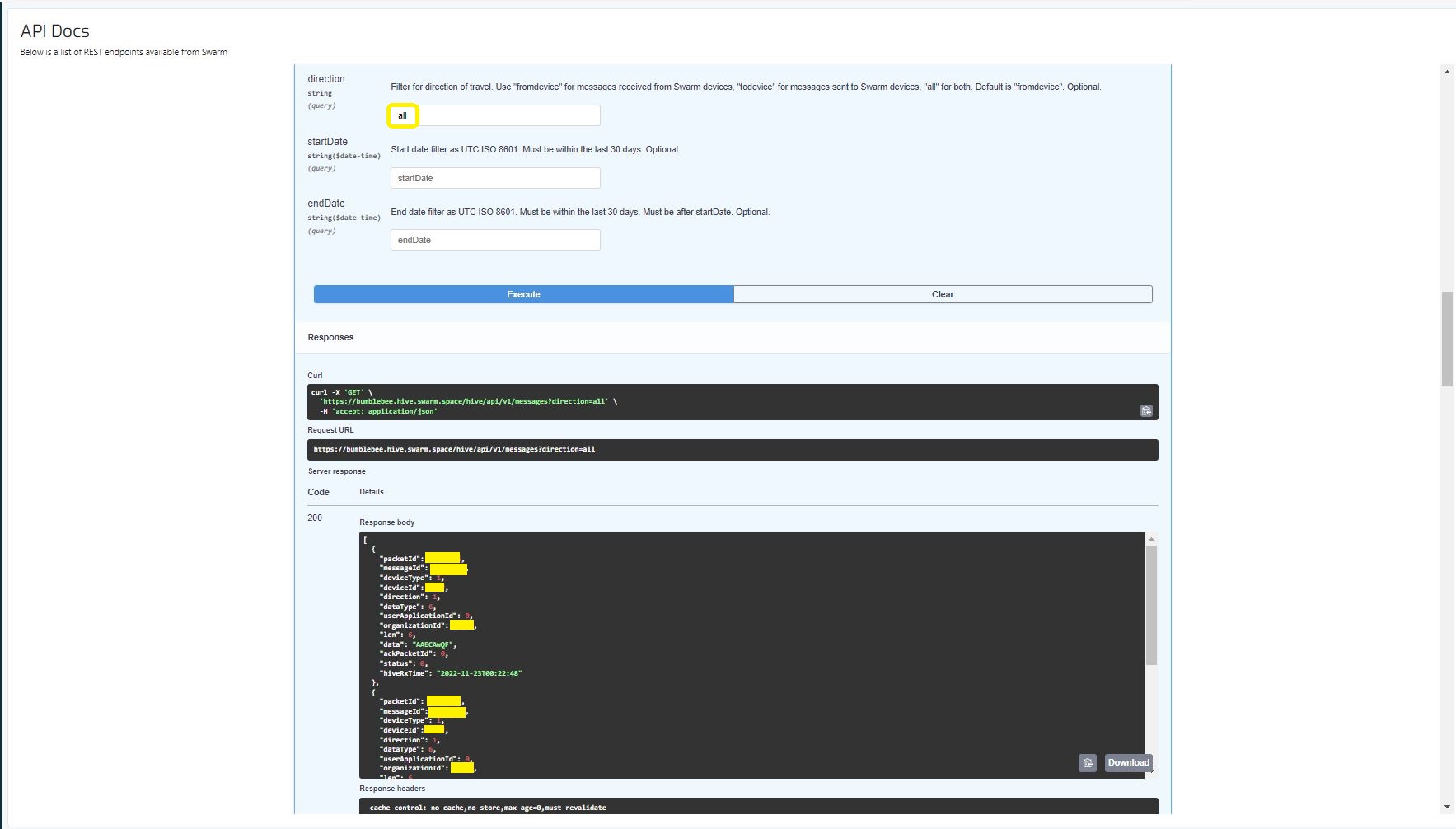
Swarm API Docs displaying ToDevice and FromDevices messages

I then called the Messages Get method with the direction set to “FromDevice and no messages were displayed which I wasn’t expecting

Swarm API Docs displaying “todevice” messages

I then called the Message Get method with the messageId of a ToDevice message and the detailed message information was displayed.

Swarm API Docs displaying the details of a specific inbound message

For testing I configured 5 devices (a real device and the others simulated) in my Azure IoT Hub with the Swarm Device ID ued as the Azure IoT Hub device ID.

Devices configured in Azure IoT Hub

My console application calls the Swarm Bumblebee Hive API Login method, then uses Azure IoT Hub DeviceClient SendEventAsync upload device telemetry.

Nasty console application processing the three “fromdevice” messages which have not been acknowledged.

The console application stores the Swarm Hive API username, password and the Azure IoT Hub Device Connection string locally using the UserSecretsConfigurationExtension.

internal class Program
{
    private static string AzureIoTHubConnectionString = "";
    private readonly static IAppCache _DeviceClients = new CachingService();

    static async Task Main(string[] args)
    {
        Debug.WriteLine("devMobile.SwarmSpace.Hive.AzureIoTHubBasicClient starting");

        IConfiguration configuration = new ConfigurationBuilder()
            .SetBasePath(Directory.GetCurrentDirectory())
            .AddJsonFile("appsettings.json")
            .AddUserSecrets("b4073481-67e9-41bd-bf98-7d2029a0b391").Build();

        AzureIoTHubConnectionString = configuration.GetConnectionString("AzureIoTHub");

        using (HttpClient httpClient = new HttpClient())
        {
            BumblebeeHiveClient.Client client = new BumblebeeHiveClient.Client(httpClient);

            client.BaseUrl = configuration.GetRequiredSection("SwarmConnection").GetRequiredSection("BaseURL").Value;

            BumblebeeHiveClient.LoginForm loginForm = new BumblebeeHiveClient.LoginForm();

            loginForm.Username = configuration.GetRequiredSection("SwarmConnection").GetRequiredSection("UserName").Value;
            loginForm.Password = configuration.GetRequiredSection("SwarmConnection").GetRequiredSection("Password").Value;

            BumblebeeHiveClient.Response response = await client.PostLoginAsync(loginForm);

            Debug.WriteLine($"Token :{response.Token[..5]}.....{response.Token[^5..]}");

            string apiKey = "bearer " + response.Token;
            httpClient.DefaultRequestHeaders.Add("Authorization", apiKey);

            var devices = await client.GetDevicesAsync(null, null, null, null, null, null, null, null, null);

            foreach (BumblebeeHiveClient.Device device in devices)
            {
                Debug.WriteLine($" Id:{device.DeviceId} Name:{device.DeviceName} Type:{device.DeviceType} Organisation:{device.OrganizationId}");

                DeviceClient deviceClient = await _DeviceClients.GetOrAddAsync<DeviceClient>(device.DeviceId.ToString(), (ICacheEntry x) => IoTHubConnectAsync(device.DeviceId.ToString()), memoryCacheEntryOptions);
            }

            foreach (BumblebeeHiveClient.Device device in devices)
            {
                DeviceClient deviceClient = await _DeviceClients.GetAsync<DeviceClient>(device.DeviceId.ToString());

                var messages = await client.GetMessagesAsync(null, null, null, device.DeviceId.ToString(), null, null, null, null, null, null, "all", null, null);
                foreach (var message in messages)
                {
                    Debug.WriteLine($" PacketId:{message.PacketId} Status:{message.Status} Direction:{message.Direction} Length:{message.Len} Data: {BitConverter.ToString(message.Data)}");

                    JObject telemetryEvent = new JObject
                    {
                        { "DeviceID", device.DeviceId },
                        { "ReceivedAtUtc", DateTime.UtcNow.ToString("s", CultureInfo.InvariantCulture) },
                    };

                    telemetryEvent.Add("Payload",BitConverter.ToString(message.Data));

                    using (Message telemetryMessage = new Message(Encoding.ASCII.GetBytes(JsonConvert.SerializeObject(telemetryEvent))))
                    {
                        telemetryMessage.Properties.Add("iothub-creation-time-utc", message.HiveRxTime.ToString("s", CultureInfo.InvariantCulture));

                        await deviceClient.SendEventAsync(telemetryMessage);
                    };

                    //BumblebeeHiveClient.PacketPostReturn packetPostReturn = await client.AckRxMessageAsync(message.PacketId, null);
                }
            }

            foreach (BumblebeeHiveClient.Device device in devices)
            {
                DeviceClient deviceClient = await _DeviceClients.GetAsync<DeviceClient>(device.DeviceId.ToString());

                await deviceClient.CloseAsync();
            }
        }
    }

    private static async Task<DeviceClient> IoTHubConnectAsync(string deviceId)
    {
        DeviceClient deviceClient;

        deviceClient = DeviceClient.CreateFromConnectionString(AzureIoTHubConnectionString, deviceId, TransportSettings);

        await deviceClient.OpenAsync();

        return deviceClient;
    }

    private static readonly MemoryCacheEntryOptions memoryCacheEntryOptions = new MemoryCacheEntryOptions()
    {
        Priority = CacheItemPriority.NeverRemove
    };

    private static readonly ITransportSettings[] TransportSettings = new ITransportSettings[]
    {
        new AmqpTransportSettings(TransportType.Amqp_Tcp_Only)
        {
            AmqpConnectionPoolSettings = new AmqpConnectionPoolSettings()
            {
                Pooling = true,
            }
        }
    };
}

While testing I disabled the message RxAck functionality so I could repeatedly call the MessagesGet method so I didn’t have to send new messages and burn through my 50 free messages.

Azure IoT Explorer telemetry displaying the three messages processed by my console application.

.

Updated parameters based on feedback from Swarm technical support

Need to have status set to -1

Swarm Space – Bumblebee Hive Basic Emulator

One of the main problems building a Cloud Identity Translation Gateway (like my TTIV3AzureIoTConnector) is getting enough devices to make testing (esp. scalability) realistic. This is a problem because I have only got two devices, a Sparkfun Satellite Transceiver Breakout – Swarm M138 and a Swarm Asset Tracker. (Considering buying a Swarm Eval Kit)

Satellite Transceiver Breakout – Swarm M138
Swarm Asset Tracker

So, I can simulate lots of devices and test more complex configurations I have started build a Swarm Bumble Bee Hive emulator based on the API and Delivery-API OpenAPI files.

NSwagStudio configuration for generating ASP.NET Core web API

As well as generating clients NSwagStudio can also generate ASP.NET Core web APIs. To test my approach, I built the simplest possible client I could which calls the generated PostLoginAsync and GetDeviceCountAsync.

Swagger UI for NSwagStudio generated ASP.NET Core web API

Initially the BumblebeeHiveBasicClientConsole login method would fail with an HTTP 415 Unsupported Media Type error.

BumblebeeHiveBasicClientConsole application 415 Unsupported Media Type error

After some trial and error, I modified the HiveController.cs and HiveControllerImplementation.cs Login method signatures so the payload was “application/x-www-form-urlencoded” rather than “application/json” by changing FromBody to FromForm

Task<Response> IAuthController.PostLoginAsync([FromForm] LoginForm body)
{
     return Task.FromResult(new Response()
    {
        Token = Guid.NewGuid().ToString()
    });
}

Modifying code generated by a tool like NSwagStudio should be avoided but I couldn’t work out a simpler solution

/// <summary>
/// POST login
/// </summary>
/// <remarks>
/// &lt;p&gt;Use username and password to log in.&lt;/p&gt;&lt;p&gt;On success: returns status code 200. The response body is the JSON &lt;code&gt;{"token": "&amp;lt;token&amp;gt;"}&lt;/code&gt;, along with the header &lt;code&gt;Set-Cookie: JSESSIONID=&amp;lt;token&amp;gt;; Path=/; Secure; HttpOnly;&lt;/code&gt;. The tokens in the return value and the &lt;code&gt;Set-Cookie&lt;/code&gt; header are the same. The token is a long string of letters, numbers, and punctuation.&lt;/p&gt;&lt;p&gt;On failure: returns status code 401.&lt;/p&gt;&lt;p&gt;To make authenticated requests, there are two ways: &lt;ul&gt;&lt;li&gt;(Preferred) Use the token as a Bearer Authentication token by including the HTTP header &lt;code&gt;Authorization: Bearer &amp;lt;token&amp;gt;&lt;/code&gt; in further requests.&lt;/li&gt;&lt;li&gt;(Deprecated) Use the token as the JSESSIONID cookie in further requests.&lt;/li&gt;&lt;/ul&gt;&lt;/p&gt;
/// </remarks>
/// <returns>Login success</returns>
[Microsoft.AspNetCore.Mvc.HttpPost, Microsoft.AspNetCore.Mvc.Route("login")]
public System.Threading.Tasks.Task<Response> PostLogin([Microsoft.AspNetCore.Mvc.FromForm] LoginForm body)
{

    return _implementation.PostLoginAsync(body);
}

BumblebeeHiveBasicCLientConsole application calling the simulator
BumblebeeHiveBasicClientConsole application calling the production system

After some initial problems with content-types the Swarm Hive API (not tried the Delivery-API yet) appears to be documented and easy to use. Though, some of the variable type choices do seem a bit odd.

public virtual async System.Threading.Tasks.Task<string> GetDeviceCountAsync(int? devicetype, System.Threading.CancellationToken cancellationToken)

Azure Functions with VB.Net on .NET Core V6

A year and a half ago I wrote a post about how to build Azure functions with VB.Net and the .NET Framework 4.X. The Microsoft VB team posted about Visual Basic Support for .NET 5.0 in March 2020 then went quiet, so my customer put the project on hold. Since then, a lot has changed .NET Core 3.1 LTS ends December 12, 2022, and .NET Core 5.0 support (no LTS) ended May 10, 2022 so I have ported the samples to .NET Core V6.

The process is similar (but different) to the original approach

The VB.Net Solution from June 2021

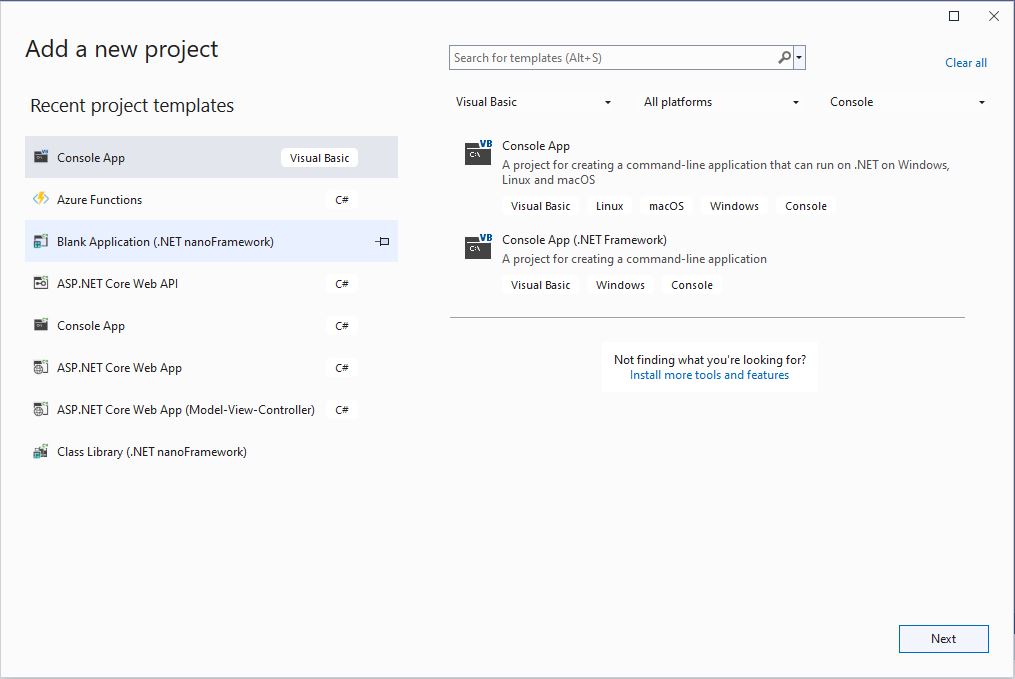
First step is to create a Visual Basic .NET Core V6 console application

Visual Studio 2022 “Add a new project”

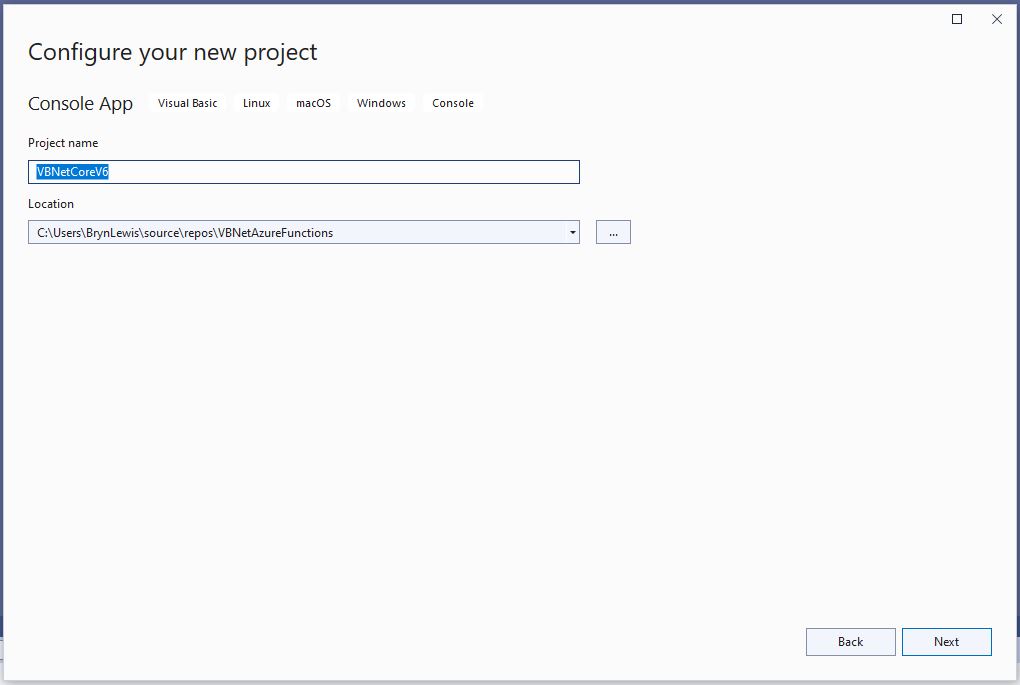
The specify a name for the new project.

Visual Studio 2022 Add Project “Configure your new project”

Then select the version of .NET Core used

Visual Studio 2022 Add Project “Additional information”

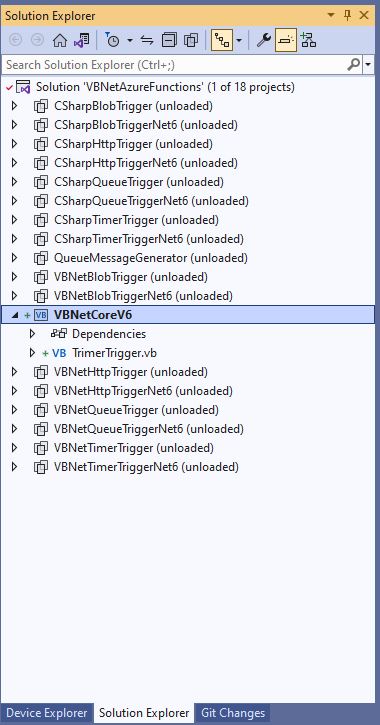
Then rename program.cs to a name which highlights that it is a trigger

Visual Studio 2022 rename program.vb to TimerTrigger.vb

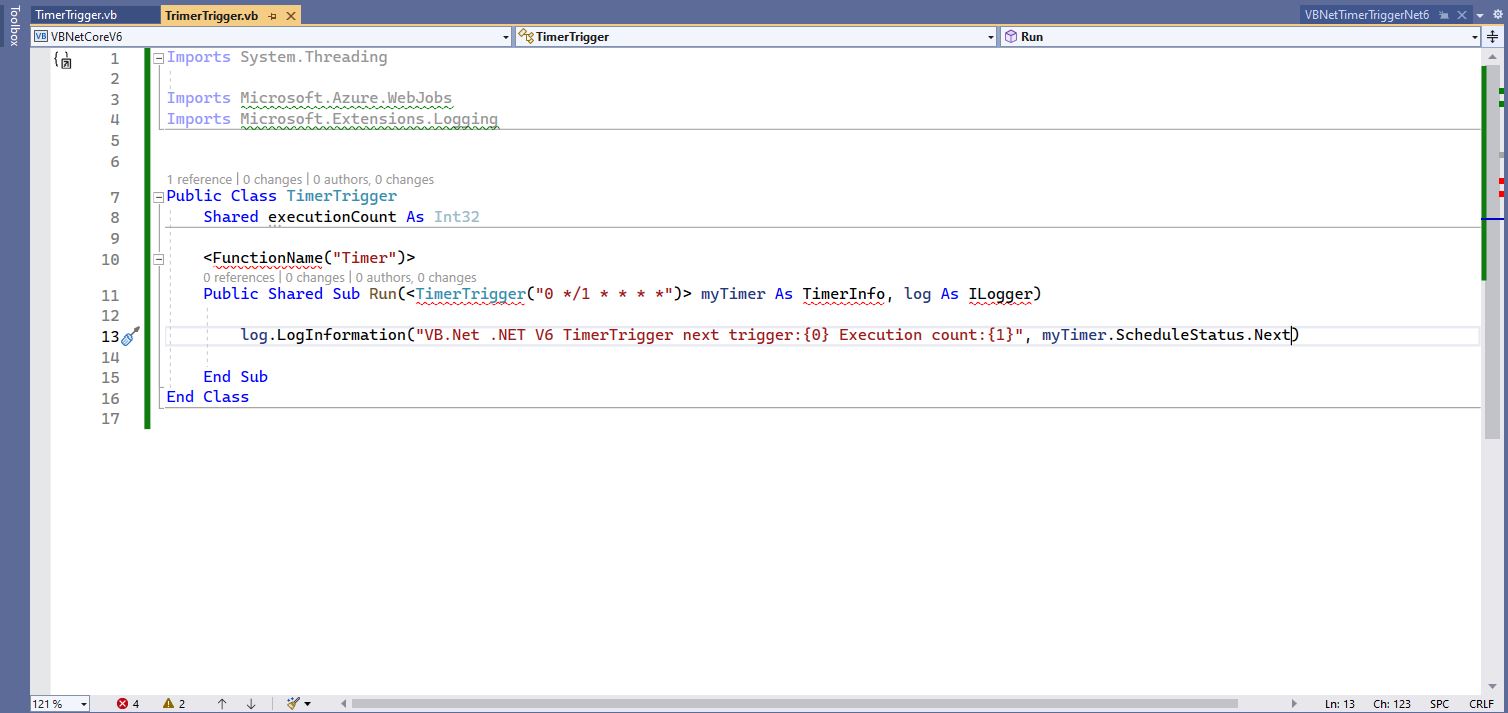
The initial version of the TimerTrigger code was “inspired” by the VB.Net 4.8 version.

'---------------------------------------------------------------------------------
' Copyright (c) November 2022, devMobile Software
'
' Licensed under the Apache License, Version 2.0 (the "License");
' you may Not use this file except in compliance with the License.
' You may obtain a copy of the License at
'
'     http://www.apache.org/licenses/LICENSE-2.0
'
' Unless required by applicable law Or agreed to in writing, software
' distributed under the License Is distributed on an "AS IS" BASIS,
' WITHOUT WARRANTIES Or CONDITIONS OF ANY KIND, either express Or implied.
' See the License for the specific language governing permissions And
' limitations under the License.
'
'---------------------------------------------------------------------------------
Imports System.Threading

Imports Microsoft.Azure.WebJobs
Imports Microsoft.Extensions.Logging


Public Class TimerTrigger
    Shared executionCount As Int32

    <FunctionName("Timer")>
    Public Shared Sub Run(<TimerTrigger("0 */1 * * * *")> myTimer As TimerInfo, log As ILogger)
        Interlocked.Increment(executionCount)

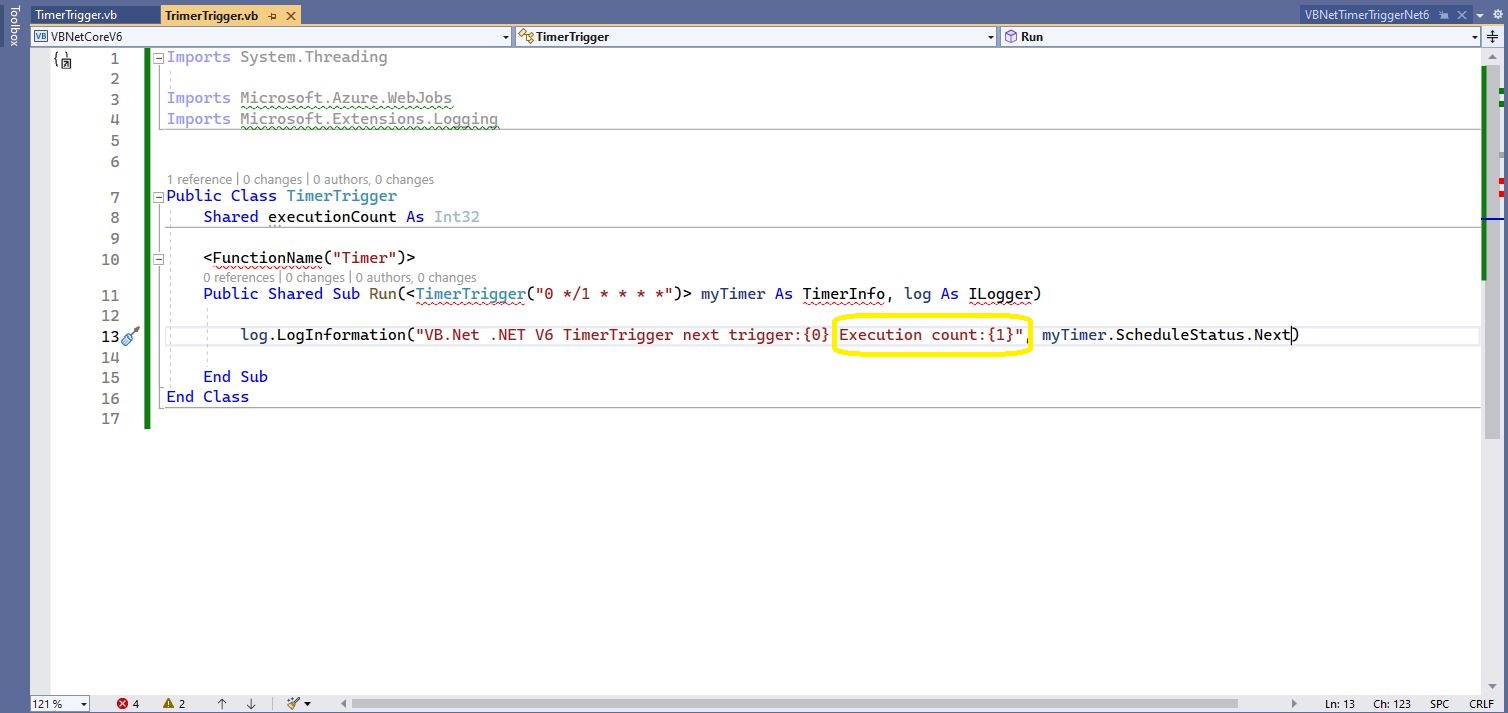
        log.LogInformation("VB.Net .NET V6 TimerTrigger next trigger:{0} Execution count:{1}", myTimer.ScheduleStatus.Next, executionCount)

    End Sub
End Class

Visual Studio 2022 highlighting missing libraries
Visual Studio 2022 with additional function SDK references

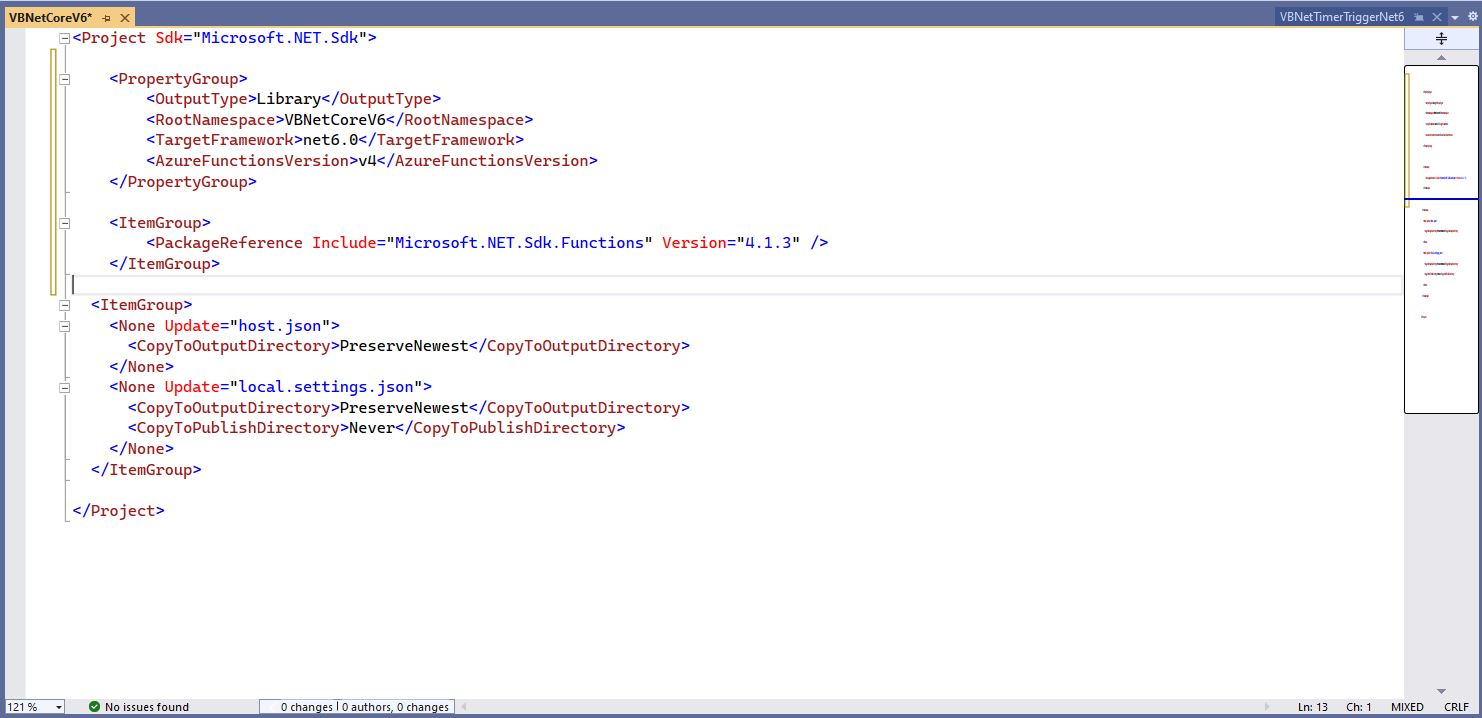
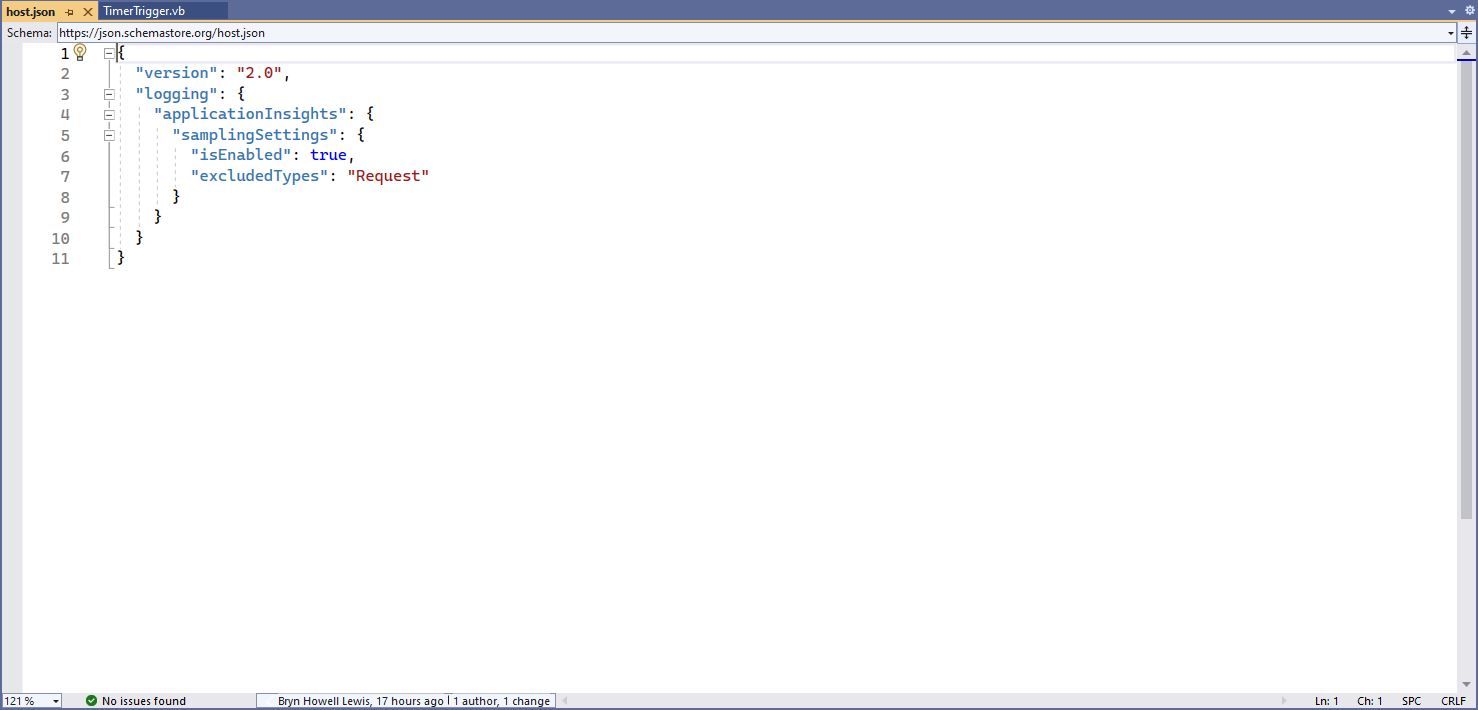
The next step is to add the hosts.json(empty for timer tigger) and localsettings.json to configure the function

Visual 2022 Hosts.json file
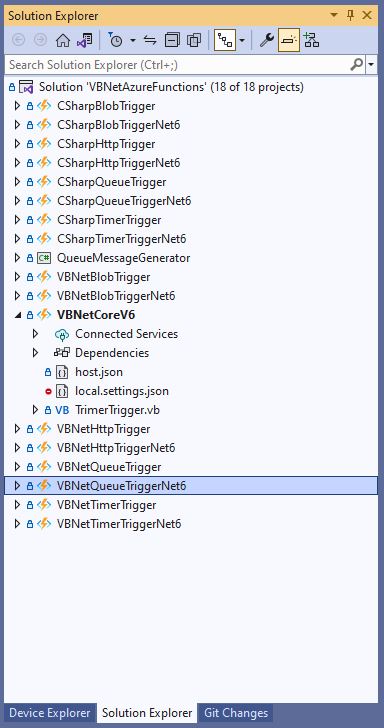
Visual Studio 2022 showing hosts.json & local.settings.json

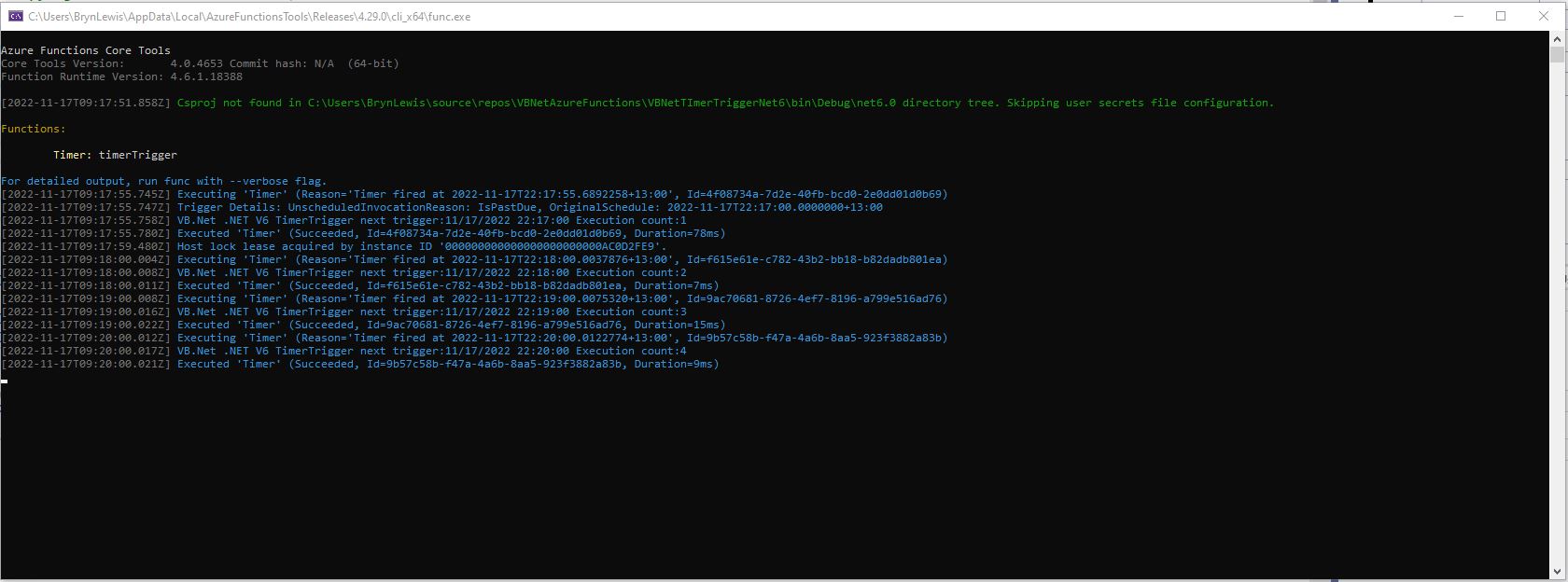
Then I could run the function in the Azure Functions runtime emulator and “single step” in the Visual Studio 2022 Debugger.

VB.Net .NET Core V6 Timer Trigger running in emulator

For completeness I also built sample BlobTrigger, HttpTrigger and QueueTrigger versions

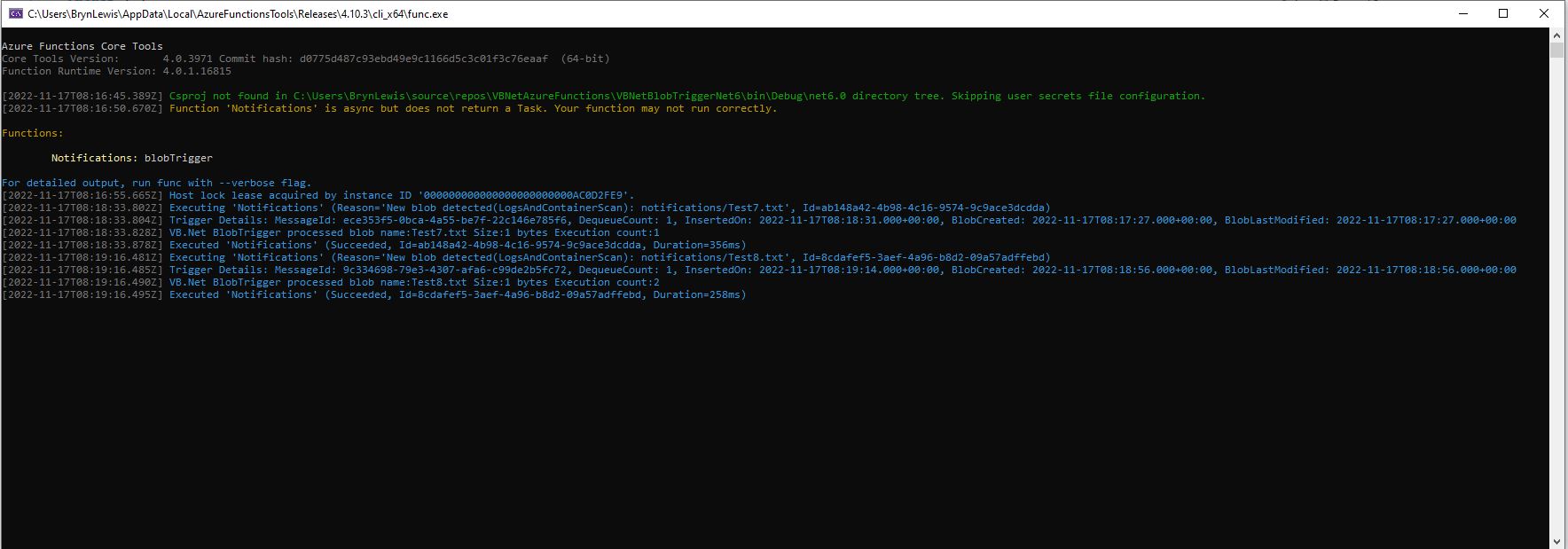
VB.Net .NET Core V6 Blob Trigger running in emulator
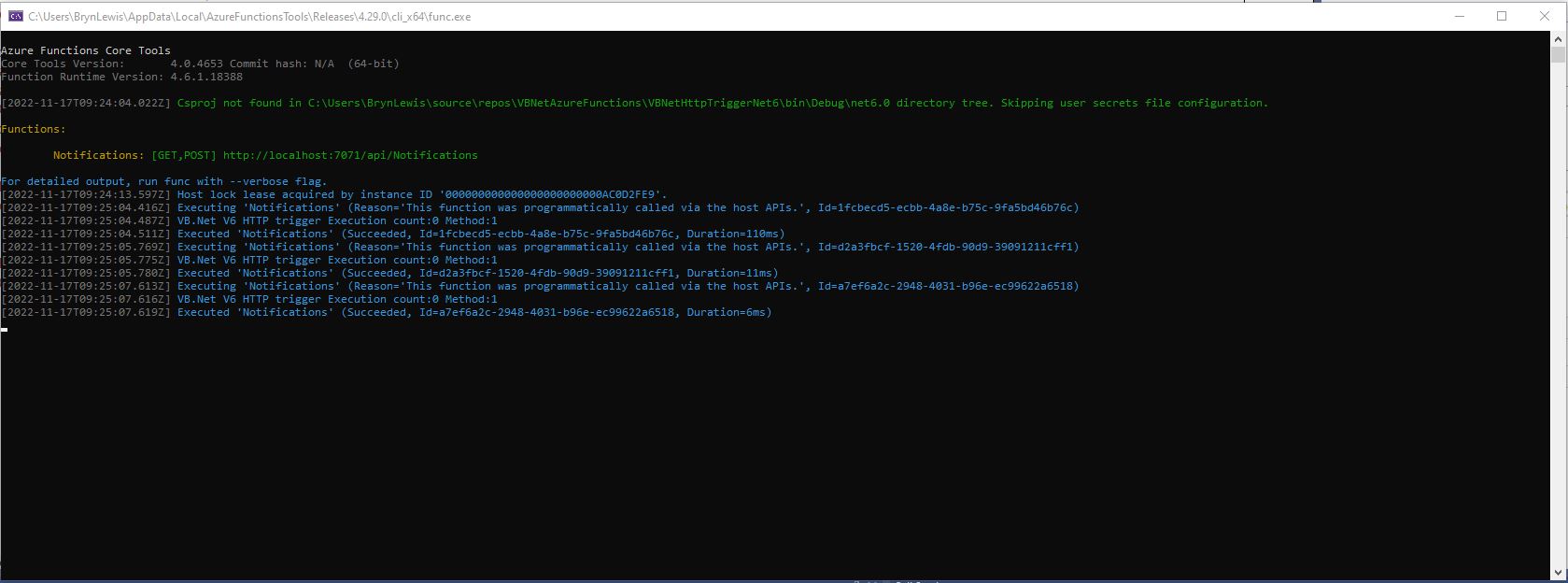
VB.Net .NET Core V6 HTTP Trigger running in emulator
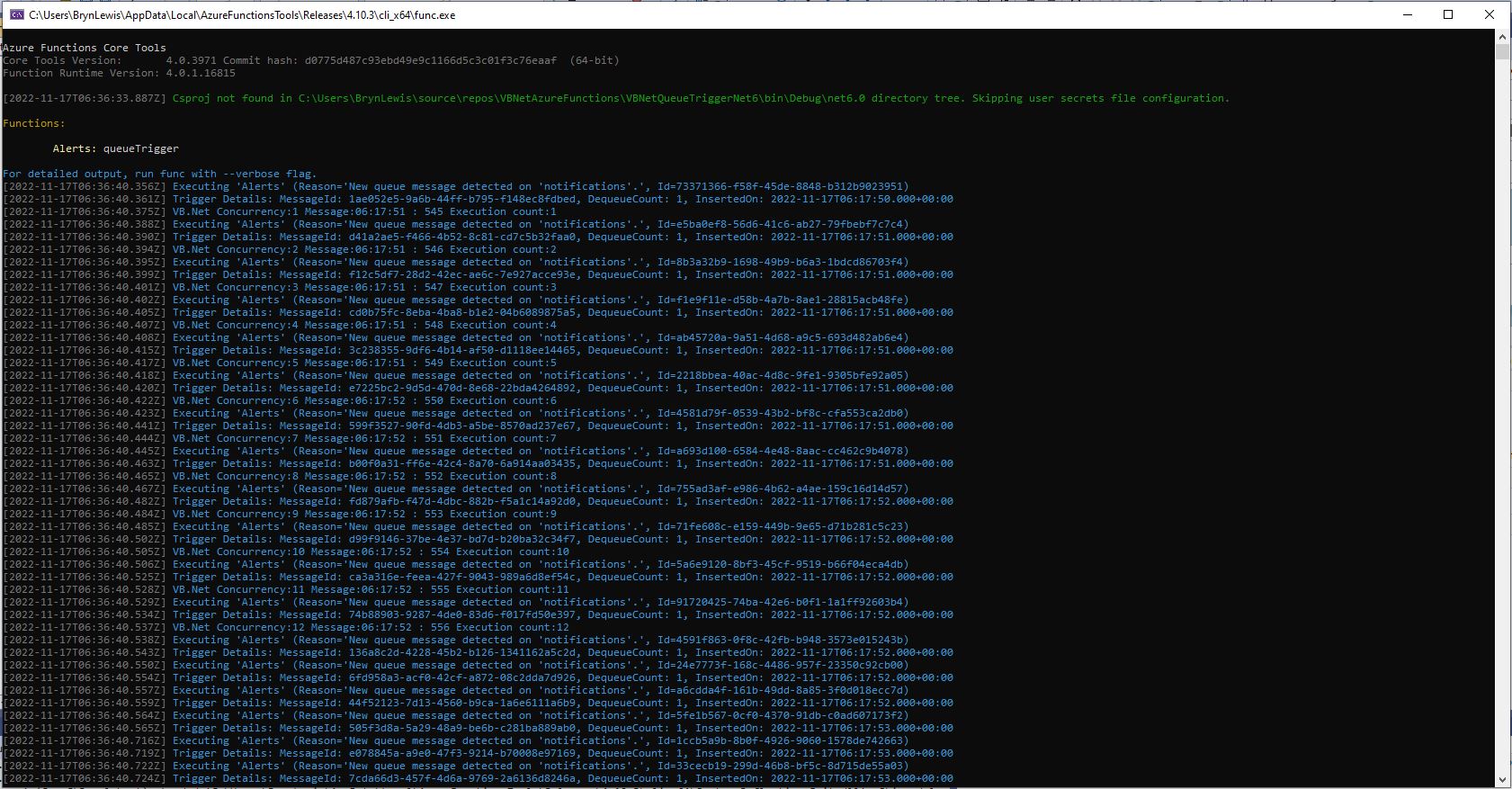
VB.Net .NET Core V6 Queue Trigger running in emulator

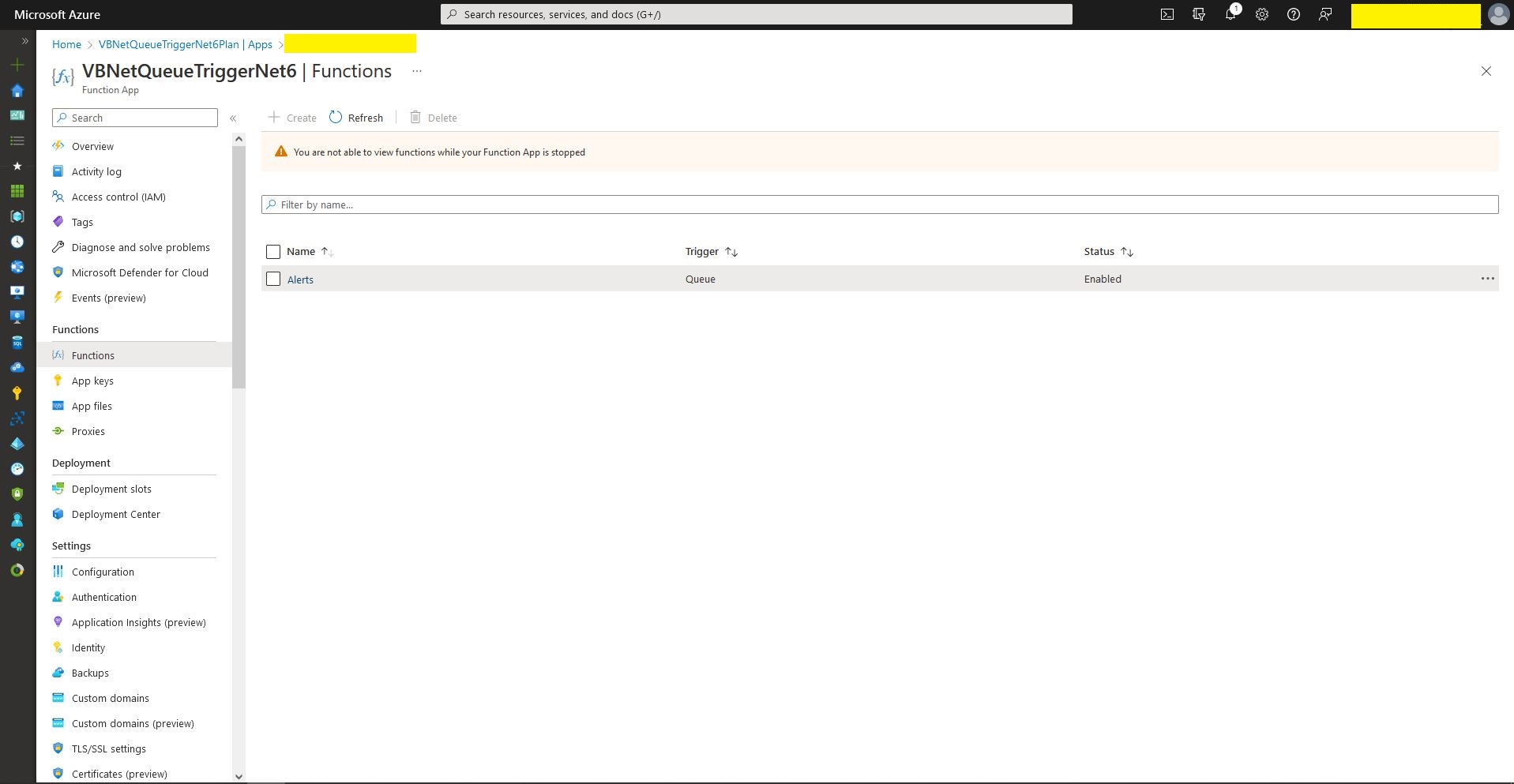
I also deployed the Azure Storage QueueTrigger to Microsoft Azure, configured it, and then stress tested it with multiple instances of my QueueMessageGenerator.

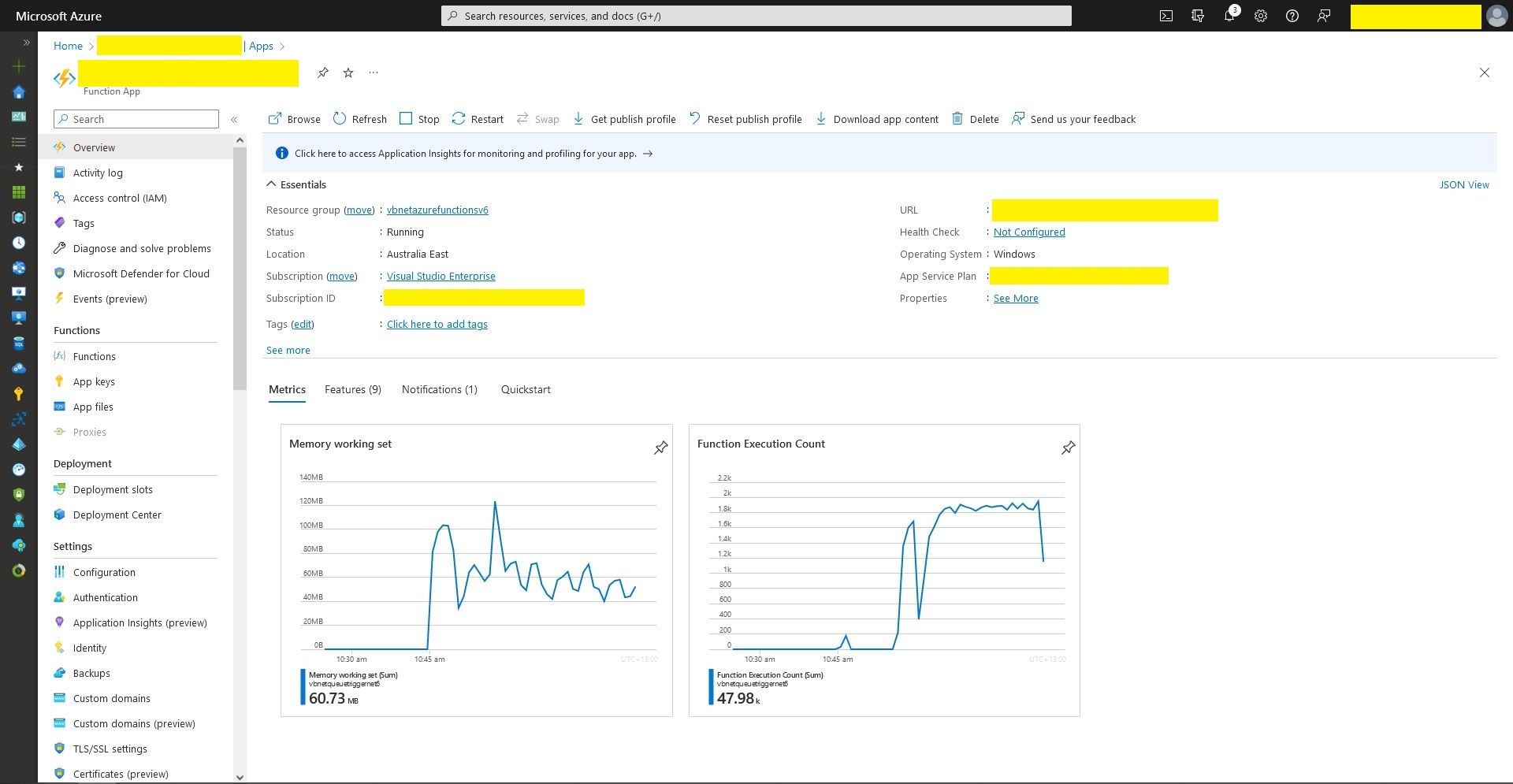
Queue Trigger Function deployment
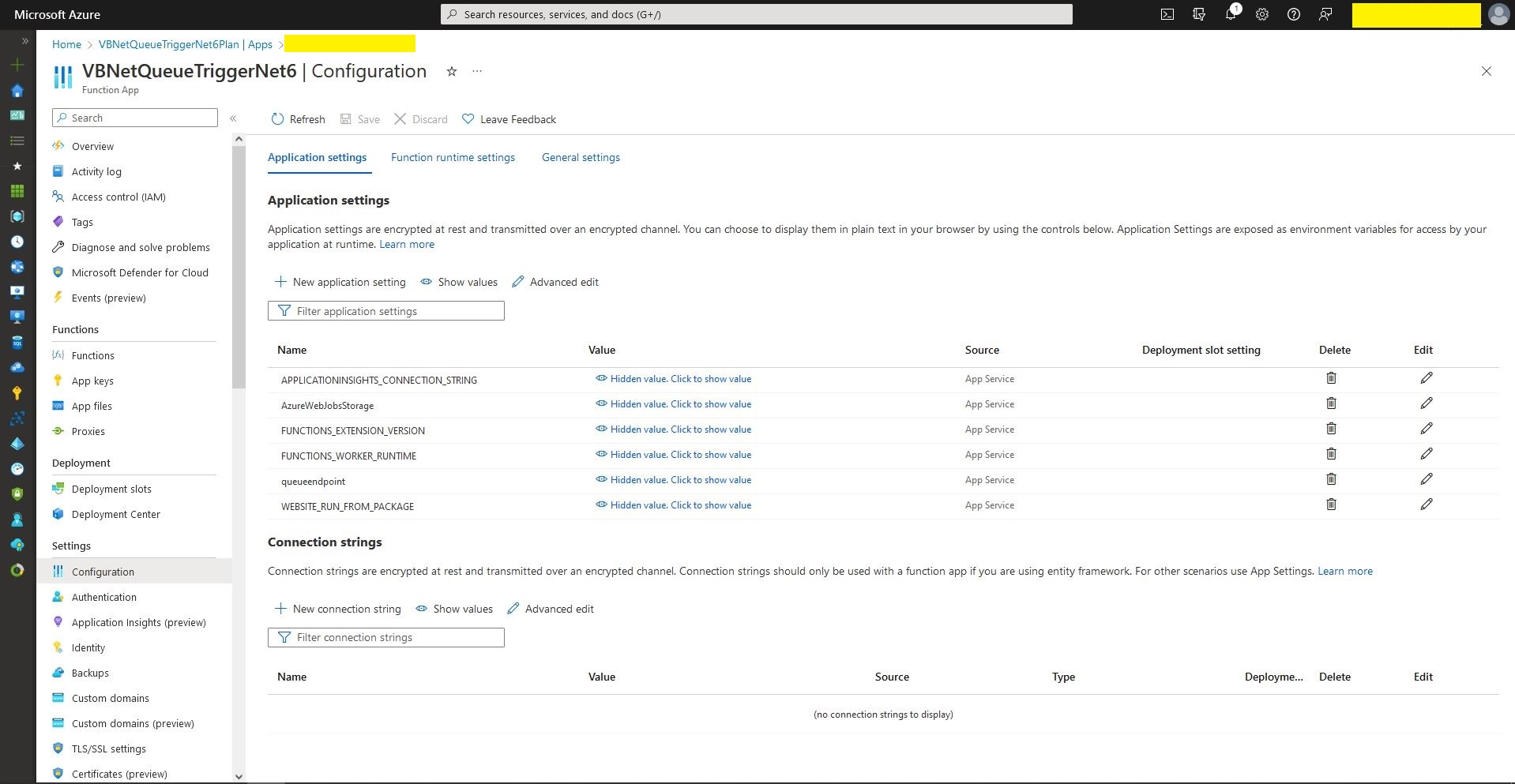
Queue Trigger configuration
Queue Trigger Throughput 48K messages

What if it goes wrong…

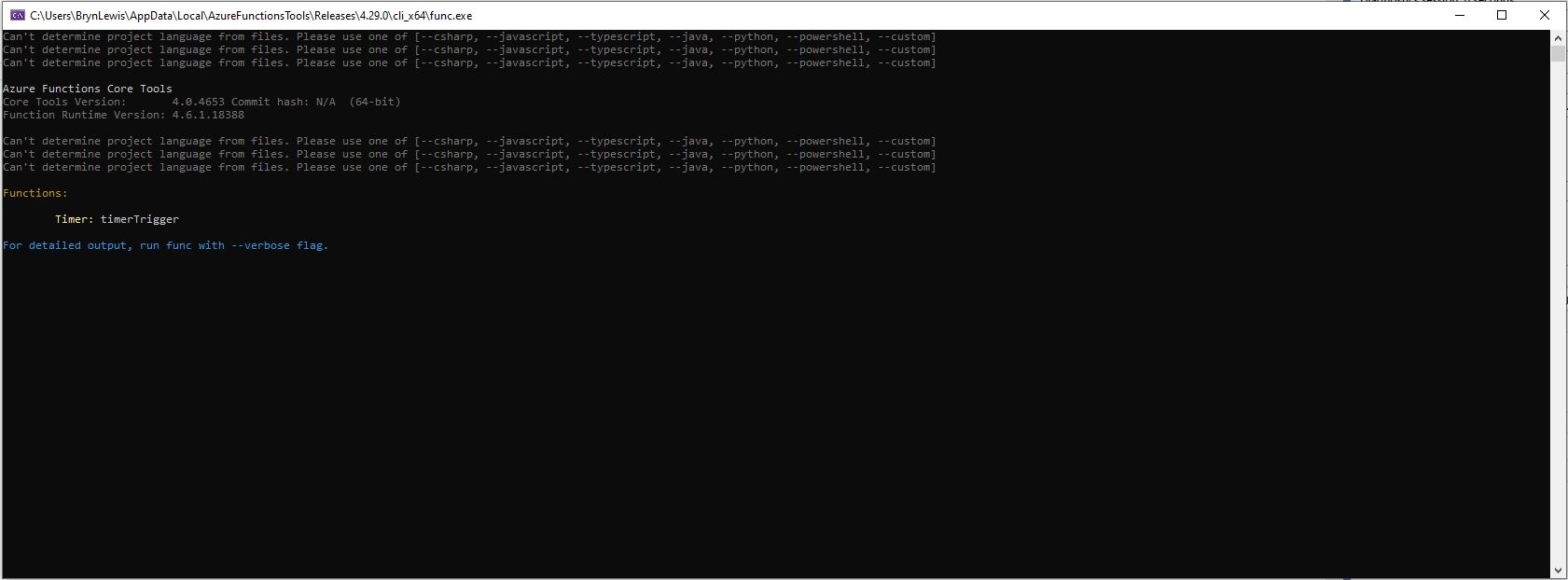
“Can’t determine project language from files. Please add one of [–csharp, –javascript, –typescript, –java, –powershell, –customer]

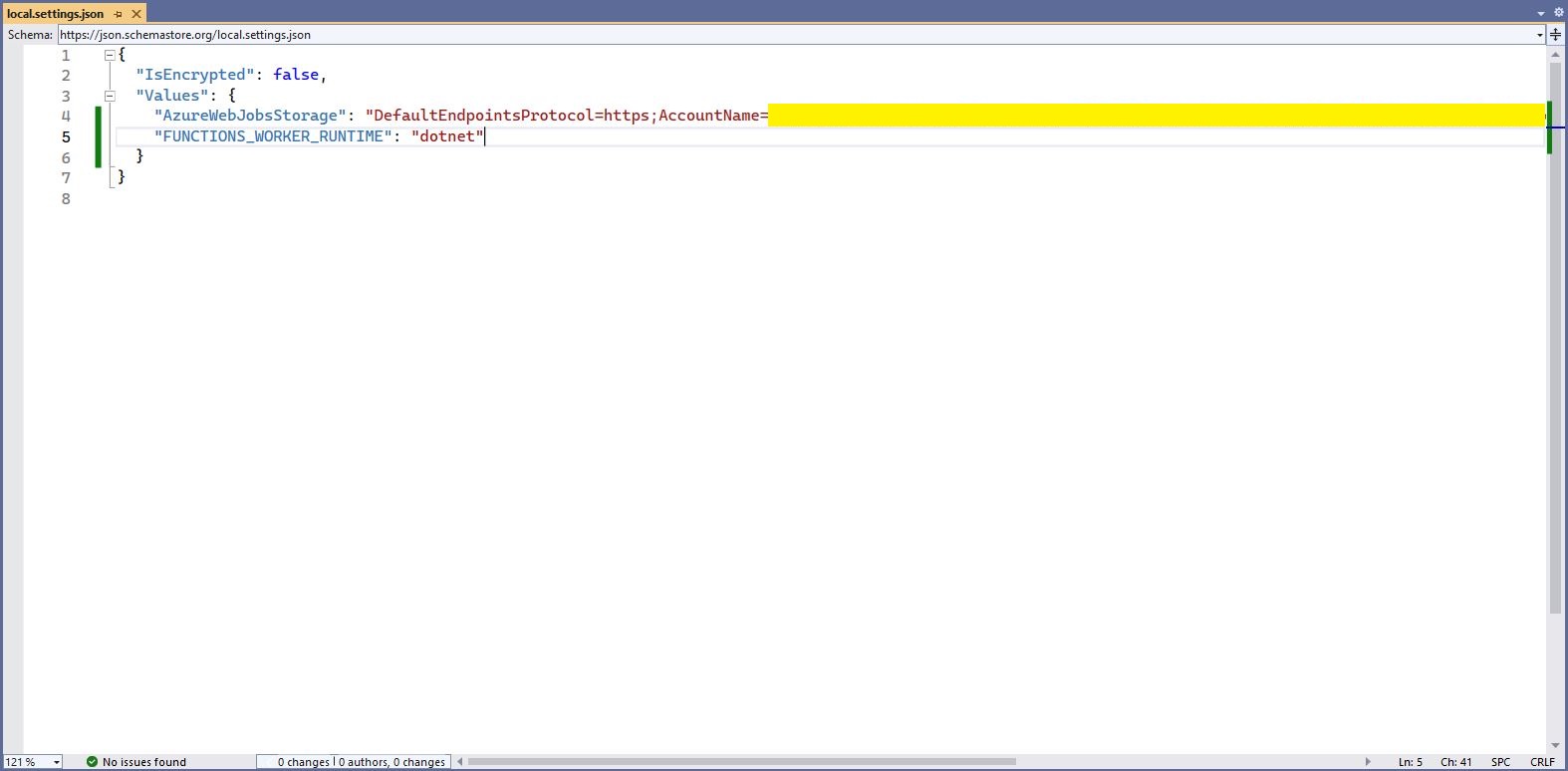
Check “FUNCTIONS_WORKER_RUNTIME” in the local.settings.json file.

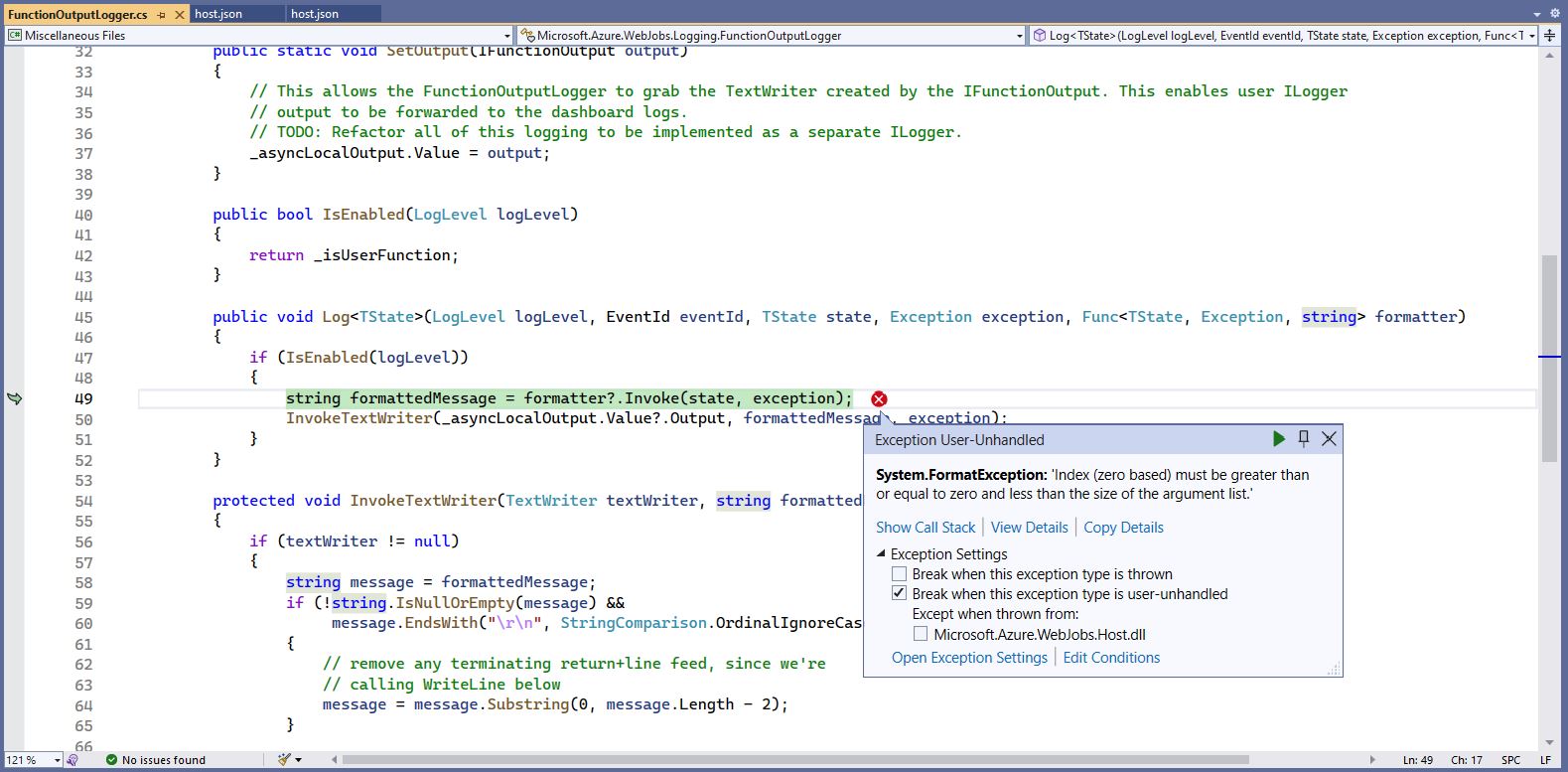
The baked in error logging doesn’t handle broken message formats very well. Look at the call stack or single step through the application to find the message format that is broken

Visual Studio 2022 editor with malformed message highlighted

WARNING

I assume this is not a supported approach so use

“at your own risk”

.NET Core web API + Dapper – Authorisation of Data Access

The theme of this post is controlling users’ ability to read and write rows in a table. The best scenario I could come up with using the World Wide Importers database was around controlling access to Customer information.

This would be a representative set of “project requirements”…

  • Salespeople tend to look after categories of Customers
    • Kayla – Novelty Shops
    • Hudson – Supermarkets
    • Issabella – Computer Stores
    • Sophia – Gift Stores, Novelty Shops
    • Amy – Corporates
    • Anthony – Novelty Stores
    • Alica – Coporates
    • Stella – Supermarkets
  • But some Salespeople have direct relationships with Customers
    • Kayla – Corporate customers Eric Torres & Cosmina
    • Hudson – Tailspin Toys Head Office
    • Issabell – Tailspin Toys (Sylvanite, MT), Tailspin Toys (Sun River, MT), Tailspin Toys (Sylvanite, MT)
  • No changes to the database which could break the existing solution

In a previous engagement we added CustomerCategoryPerson and CustomerPerson like tables to the database to control read/write access to Customers’ information.

The CustomerCategoryPerson table links the CustomerCategory and Person tables with a flag (IsWritable) which indicates whether the Person can read/write Customer information for all the Customers in a CustomerCategory.

CREATE TABLE [Sales].[CustomerCategoryPerson](
	[CustomerCategoryPersonID] [int] IDENTITY(1,1) NOT NULL,
	[CustomerCategoryId] [int] NOT NULL,
	[PersonId] [int] NOT NULL,
	[IsWritable] [bit] NOT NULL,
	[LastUpdatedBy] [int] NOT NULL,
 CONSTRAINT [PK_CustomerCategoryPerson] PRIMARY KEY CLUSTERED 
(
	[CustomerCategoryPersonID] ASC
)...

The CustomerPerson table links the Customer and Person tables with a flag (IsWritable) which indicates whether a Person can read/write a Customer’s information.

CREATE TABLE [Sales].[CustomerPerson](
	[CustomerPersonId] [int] IDENTITY(1,1) NOT NULL,
	[CustomerID] [int] NOT NULL,
	[PersonId] [int] NOT NULL,
	[IsWritable] [bit] NOT NULL,
	[LastEditedBy] [int] NOT NULL,
 CONSTRAINT [PK_CustomerPerson] PRIMARY KEY CLUSTERED 
(
	[CustomerPersonId] ASC
)...

Users can do “wildcard” searches for Customers and the results set has to be limited to “their” customers and customers in the customer categories they are assigned too.

ALTER PROCEDURE [Sales].[CustomersNameSearchUnionV1]
@UserId as int,
@SearchText nvarchar(20),
@MaximumRowsToReturn int
AS
BEGIN
	-- Individual assignment
    SELECT TOP(@MaximumRowsToReturn) [Customers].[CustomerID] as "ID", [Customers].[CustomerName] as "Name", [Customers].[IsOnCreditHold] as "IsOnCreditHold"
    FROM Sales.Customers
	INNER JOIN [Sales].[CustomerPerson] ON ([Sales].[Customers].[CustomerId] = [Sales].[CustomerPerson].[CustomerId])
    WHERE ((CustomerName LIKE N'%' + @SearchText + N'%')
		AND ([Sales].[CustomerPerson].PersonId = @UserId))
    --ORDER BY [CustomerName]

	UNION 
	
	-- group assignment
   SELECT TOP(@MaximumRowsToReturn) [Customers].[CustomerID] as "ID", [Customers].[CustomerName] as "Name", [Customers].[IsOnCreditHold] as "IsOnCreditHold"
   FROM [Sales].[Customers]
      INNER JOIN [Sales].[CustomerCategories] ON ([Sales].[Customers].[CustomerCategoryID] = [Sales].[CustomerCategories].[CustomerCategoryID])
      INNER JOIN [Sales].[CustomerCategoryPerson] ON ([Sales].[Customers].[CustomerCategoryID] = [CustomerCategoryPerson].[CustomerCategoryID])
    WHERE ((CustomerName LIKE N'%' + @SearchText + N'%')
		AND ([Sales].[CustomerCategoryPerson].PersonId = @UserId))

END;

This approach increases the complexity and reduces the maintainability of stored procedures which have to control the reading/writing of Customer information. Several times I have extracted customer information read\write controls to a couple of database views, one for controlling read access.

CREATE VIEW [Sales].[CustomerPersonReadV1]
AS
-- Individual assignment
   SELECT [Sales].[Customers].[CustomerID], [Sales].[CustomerPerson].[PersonID], [Sales].[Customers].[CustomerCategoryID]
   FROM [Sales].[Customers]
      INNER JOIN [Sales].[CustomerPerson] ON ( [Sales].[Customers].[CustomerID] = CustomerPerson.CustomerID)

UNION -- Takes care of duplicates

-- Group assignment
   SELECT [Sales].[Customers].[CustomerID], [Sales].[CustomerCategoryPerson].[PersonID], [Sales].[Customers].[CustomerCategoryID]
   FROM [Sales].[Customers]
      --INNER JOIN [Sales].[CustomerCategories] ON ([Sales].[Customers].[CustomerCategoryID] = [Sales].[CustomerCategories].[CustomerCategoryID])
      INNER JOIN [Sales].[CustomerCategoryPerson] ON ([Sales].[Customers].[CustomerCategoryID] = [CustomerCategoryPerson].[CustomerCategoryID])

The other database for controlling write access

CREATE VIEW [Sales].[CustomerPersonWriteV1]
AS
-- Individual assignment
   SELECT [Sales].[Customers].[CustomerID], [Sales].[CustomerPerson].[PersonID], [Sales].[Customers].[CustomerCategoryID]
   FROM [Sales].[Customers]
      INNER JOIN [Sales].[CustomerPerson] ON (([Sales].[Customers].[CustomerID] = [CustomerPerson].[CustomerID]) AND ([Sales].[CustomerPerson].[IsWritable] = 1))

UNION -- Takes care of duplicates

-- Group assignment
   SELECT [Sales].[Customers].[CustomerID], [Sales].[CustomerCategoryPerson].[PersonID], [Sales].[Customers].[CustomerCategoryID]
   FROM [Sales].[Customers]
      INNER JOIN [Sales].[CustomerCategories] ON ([Sales].[Customers].[CustomerCategoryID] = [Sales].[CustomerCategories].[CustomerCategoryID])
      INNER JOIN [Sales].[CustomerCategoryPerson] ON ([Sales].[Customers].[CustomerCategoryID] = [CustomerCategoryPerson].[CustomerCategoryID] AND ([Sales].[CustomerCategoryPerson].[IsWritable] = 1))

The versioning of database views uses the same approach as stored procedures. When a view is updated (the columns returned changes , updated constraints etc.) the version number is incremented. Then we work through the dependencies list checking and updating the view version used and re-testing.

SQL Server Management Studio displaying objects which depend on the view

These two views are the UNION of the users individual and group access permissions. (If a user has Write they also have Read access). This reduces the complexity of stored procedures used for reading from and writing to the Customer table.

CREATE PROCEDURE [Sales].[CustomersListV1]
@UserId as int
AS
BEGIN
SELECT [Customers].[CustomerID] as "ID", [Customers].[CustomerName] as "Name", [Customers].[IsOnCreditHold] as "IsOnCreditHold"
	FROM [Sales].[Customers]
		INNER JOIN [Sales].[CustomerPersonReadV1] ON ([Sales].[Customers].[CustomerID] = [Sales].[CustomerPersonReadV1].CustomerID)
    WHERE ([Sales].[CustomerPersonReadV1].PersonId = @UserId)
	ORDER BY Name
END

The GET method of the Customer controller returns a list of all the Customers the current user has read only access to using their individual and group assignment.

[HttpGet(), Authorize(Roles = "SalesPerson,SalesAdministrator")]
[ProducesResponseType(StatusCodes.Status200OK, Type = typeof(List<Models.CustomerListDtoV1>))]
public async Task<ActionResult<IEnumerable<Models.CustomerListDtoV1>>> Get()
{
      IEnumerable<Models.CustomerListDtoV1> response;

      using (SqlConnection db = new SqlConnection(this.connectionString))
      {
         response = await db.QueryWithRetryAsync<Models.CustomerListDtoV1>(sql: "[Sales].[CustomersListV1]", param: new { userId = HttpContext.PersonId() }, commandType: CommandType.StoredProcedure);
      }

   return this.Ok(response);
}

The CustomerPersonWriteV1 view is used to stop users without IsWritable set (individual or group) updating a Customers IsOnCreditHold flag.

CREATE PROCEDURE [Sales].[CustomerCreditHoldStatusUpdateV1]
@UserID int,
@CustomerId int,
@IsOnCreditHold Bit
AS
BEGIN
    UPDATE [Sales].[Customers]
    SET IsOnCreditHold = @IsOnCreditHold, LastEditedBy = @UserID
	FROM [Sales].[Customers]
		INNER JOIN [Sales].[CustomerPersonWriteV1] ON ([Sales].[Customers].[CustomerID] = [Sales].[CustomerPersonWriteV1].CustomerID)
    WHERE (([Sales].[CustomerPersonWriteV1].PersonId = @UserId) 
		AND ([Sales].[Customers].[CustomerID] = @CustomerId )
		AND (IsOnCreditHold <> @IsOnCreditHold))
	
END

The PUT CreditHold method uses a combination of roles (Aministrator,SalesAdministrator,SalesPerson) and database views (CustomerPersonWriteV1) to control the updating of customer data.

[HttpPut("{customerId}/CreditStatus", Name ="CreditHold")]
[Authorize(Roles = "Aministrator,SalesAdministrator,SalesPerson")]
[ProducesResponseType(StatusCodes.Status200OK)]
[ProducesResponseType(StatusCodes.Status409Conflict)]
public async Task<IActionResult> CustomerCeditHold(int customerId, [FromBody] Models.CustomerCreditHoldUpdateV1 request )
{
    request.UserId = HttpContext.PersonId();
    request.CustomerId = customerId;

    using (SqlConnection db = new SqlConnection(connectionString))
    {
        if (await db.ExecuteWithRetryAsync("[Sales].[CustomerCreditHoldStatusUpdateV1]", param: request, commandType: CommandType.StoredProcedure) != 1)
        {
            logger.LogWarning("Person {UserId} Customer {CustomerId} IsOnCreditHold {IsOnCreditHold} update failed", request.UserId, request.CustomerId, request.IsOnCreditHold);

            return this.Conflict();
        }
    }

    return this.Ok();
}

My customers usually don’t have a lot of automated testing so minimising the impact of changes across the database and codebase is critical. Sometimes we duplicate code (definitely not DRY) so that the amount of functionality that has to be retested is reduced. We ensure this is time allocated for revisiting these decisions and remediating as required.

.NET Core web API + Dapper – Authorisation Permissions

The permissions required for an on-premises system running in a trusted environment are often minimalist. The World Wide Importers database People table has IsSystemUser, IsEmployee, IsSalesperson which is representative of the granularity of permissions I have encountered in Windows Forms .NET, ASP.NET Web Forms and other “legacy” applications.

CREATE TABLE [Application].[People](
    [PersonID] [int] NOT NULL,
    [FullName] nvarchar NOT NULL,
    [PreferredName] nvarchar NOT NULL,
    [SearchName] AS (concat([PreferredName],N' ',[FullName])) PERSISTED NOT NULL,
    [IsPermittedToLogon] [bit] NOT NULL,
    [LogonName] nvarchar NULL,
    [IsExternalLogonProvider] [bit] NOT NULL,
    [HashedPassword] varbinary NULL,
    [IsSystemUser] [bit] NOT NULL,
    [IsEmployee] [bit] NOT NULL,
    [IsSalesperson] [bit] NOT NULL,
    [UserPreferences] nvarchar NULL,
    [PhoneNumber] nvarchar NULL,
    [FaxNumber] nvarchar NULL,
    [EmailAddress] nvarchar NULL,
    [Photo] varbinary NULL,
    [CustomFields] nvarchar NULL,
    [OtherLanguages] AS (json_query([CustomFields],N'$.OtherLanguages')),
    [LastEditedBy] [int] NOT NULL,
    [ValidFrom] datetime2 GENERATED ALWAYS AS ROW START NOT NULL,
    [ValidTo] datetime2 GENERATED ALWAYS AS ROW END NOT NULL,
CONSTRAINT [PK_Application_People] PRIMARY KEY CLUSTERED
(
    [PersonID] ASC
)

The existing application appears to have a method for a Person to change their password which calls the [Website].[ChangePassword] stored procedure (I was surprised that the stored procedure didn’t set the LastEditedBy value).

CREATE PROCEDURE [Website].[ChangePassword]
@PersonID int,
@OldPassword nvarchar(40),
@NewPassword nvarchar(40)
WITH EXECUTE AS OWNER
AS
BEGIN
    SET NOCOUNT ON;
    SET XACT_ABORT ON;

    UPDATE [Application].People
    SET IsPermittedToLogon = 1,
        HashedPassword = HASHBYTES(N'SHA2_256', @NewPassword + FullName)
    WHERE PersonID = @PersonID
    AND PersonID <> 1
    AND HashedPassword = HASHBYTES(N'SHA2_256', @OldPassword + FullName);

    IF @@ROWCOUNT = 0
    BEGIN
        PRINT N'The PersonID must be valid, and the old password must be valid.';
        PRINT N'If the user has also changed name, please contact the IT staff to assist.';
        THROW 51000, N'Invalid Password Change', 1;
        RETURN -1;
    END;
END;

The new version removes the PersonId special case (Assumed that PersonId 1 can’t logon and the use of Throw). I think the use of Throw can add significant complexity to the exception handling of the WebAPI controller that calls the stored procedure

ALTER PROCEDURE [Website].[PersonPasswordChangeV1]
	@UserID int,
	@PasswordOld nvarchar(40),
	@PasswordNew nvarchar(40)
WITH EXECUTE AS OWNER
AS
BEGIN
    UPDATE [Application].People
    SET IsPermittedToLogon = 1
        ,HashedPassword = HASHBYTES(N'SHA2_256', @PasswordNew + FullName)
		,LastEditedBy = @UserID
    WHERE ((PersonID = @UserID )
		AND (HashedPassword = HASHBYTES(N'SHA2_256', @PasswordOld + FullName)))
END;

The PasswordChange method of the Person Controller only requires the caller to be authenticated.

/// <summary>
/// Changes current user's password.
/// </summary>
/// <param name="request">Current password and new password</param>
/// <response code="200">Password changed.</response>
/// <response code="401">Unauthorised, bearer token missing or expired.</response>
/// <response code="409">Previous password invalid or User name has changed.</response>
[Authorize()]
[HttpPut(Name = "PasswordChange")]
public async Task<ActionResult> PasswordChange([FromBody] Models.PersonPasswordChangeRequest request)
{
    request.UserID = HttpContext.PersonId();

    using (SqlConnection db = new SqlConnection(connectionString))
    {
        if (await db.ExecuteWithRetryAsync("[WebSite].[PersonPasswordChangeV1]", param: request, commandType: CommandType.StoredProcedure) != 1)
        {
            logger.LogWarning("Person {0} password change failed", request.UserID);

            return this.Conflict();
        }
    }

    return this.Ok();
}

The new application will have functionality for resetting a Person’s password. Access to this functionality will be restricted to people with the “Administrator” and “PasswordReset” roles.

CREATE PROCEDURE [Website].[PersonPasswordResetV1]
@UserID int,
@PersonID int,
@Password nvarchar(40)
WITH EXECUTE AS OWNER
AS
BEGIN
    UPDATE [Application].People
    SET IsPermittedToLogon = 1
        ,HashedPassword = HASHBYTES(N'SHA2_256', @Password + FullName)
		,LastEditedBy = @UserID
    WHERE PersonID = @PersonID
END;

One of the conventions we often use, is that the first parameter of any stored procedure that is called once a User has logged on is their unique identifier which is used for data access permissions and change tracking.

[Authorize(Roles = "Administrator")]
[HttpPut("{personId:int}", Name = "PasswordReset")]
public async Task<ActionResult> PasswordReset([Range(1, int.MaxValue, ErrorMessage = "Person id must greater than 1")] int personId, [FromBody] Models.PersonPasswordResetRequest request)
{
    request.UserId = HttpContext.PersonId();
    request.PersonID = personId;

    using (SqlConnection db = new SqlConnection(connectionString))
    {
        if (await db.ExecuteWithRetryAsync("[WebSite].[PersonPasswordResetV1]", param: request, commandType: CommandType.StoredProcedure) != 1)
        {
            logger.LogWarning("Person {0} password change failed", request.PersonID);

            return this.Conflict();
        }
    }

    return this.Ok();
}

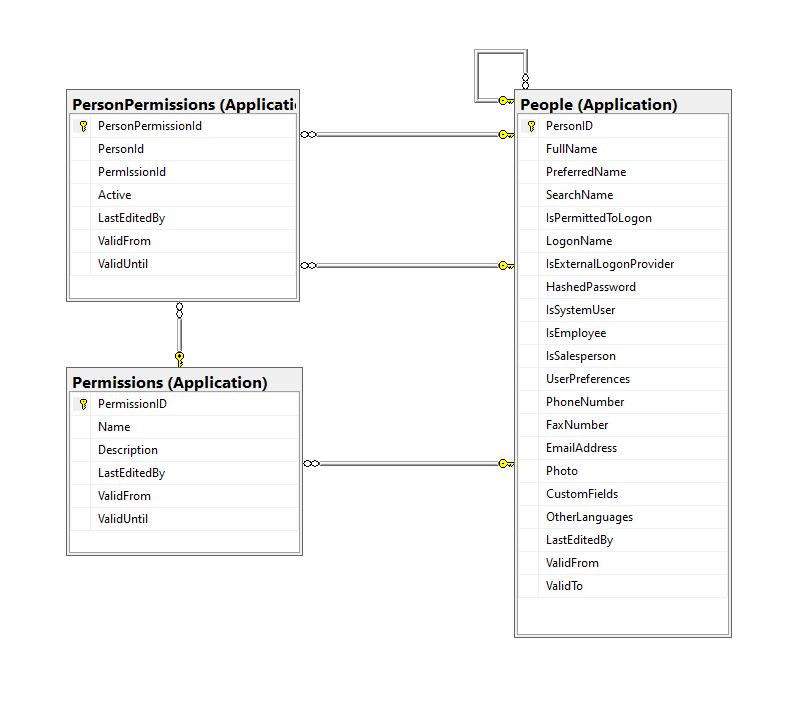
For a couple of applications, we have added “Permissions” and “PersonPermissions” tables alongside the existing authorisation functionality to reduce the likely hood of any unintended side effects.

CREATE TABLE [Application].[Permissions](
	[PermissionID] [int] IDENTITY(1,1) NOT NULL,
	[Name] [nvarchar](20) NOT NULL,
	[Description] [nvarchar](50) NOT NULL,
	[LastEditedBy] [int] NOT NULL,
	[ValidFrom] [datetime2](7) GENERATED ALWAYS AS ROW START HIDDEN NOT NULL,
	[ValidUntil] [datetime2](7) GENERATED ALWAYS AS ROW END HIDDEN NOT NULL,
 CONSTRAINT [PK_Permissions] PRIMARY KEY CLUSTERED 
(
	[PermissionID] ASC
)...

We try and keep the names of the permissions short, so the token doesn’t get too large.

CREATE TABLE [Application].[PersonPermissions](
	[PersonPermissionId] [int] IDENTITY(1,1) NOT NULL,
	[PersonId] [int] NOT NULL,
	[PermIssionId] [int] NOT NULL,
	[Active] [bit] NOT NULL,
	[ValidFrom] [datetime2](7) GENERATED ALWAYS AS ROW START HIDDEN NOT NULL,
	[ValidUntil] [datetime2](7) GENERATED ALWAYS AS ROW END HIDDEN NOT NULL,
 CONSTRAINT [PK_PersonPermissions] PRIMARY KEY CLUSTERED 
(
	[PersonPermissionId] ASC
)...
Permissions, PersonPermissions and People with Foreign Keys

The additional permissions (from the Person record) and the PersonPermissions table required some modifications to the PersonAuthenticateLookupByLogonNameV1 stored procedure and the addition of the PersonPermissionsByPersonIdV1 stored procedure.

ALTER PROCEDURE [Website].[PersonAuthenticateLookupByLogonNameV2]
@LogonName nvarchar(50),
@Password nvarchar(40)
AS
BEGIN
	SELECT PersonID
		,FullName
		,EmailAddress
		,IsSystemUser
		,IsEmployee
		,IsSalesPerson
	FROM [Application].[People]
	WHERE (( LogonName = @LogonName)
		AND (IsPermittedToLogon = 1)
		AND (HASHBYTES(N'SHA2_256', @Password + FullName) = HashedPassword))

The IsSystemUser, IsEmployee and IsSalesPerson bit flags were added to the stored procedure and Data Transfer Object(DTO)

private class PersonAuthenticateLogonDetailsDto
{
    public int PersonID { get; set; }    

    public string FullName { get; set; }

    public string EmailAddress { get; set; }

    public bool IsSystemUser { get; set; }

    public bool IsEmployee { get; set; }

    public bool IsSalesPerson { get; set; }
}

The PersonPermissionsByPersonIdV1 retrieves a list of the permissions of the User who has been authenticated.

ALTER PROCEDURE [Website].[PersonPermissionsByPersonIdV1]
	@PersonId AS int
AS
BEGIN

	SELECT [Application].[Permissions].[Name]
	FROM [Application].[Permissions]
		INNER JOIN [Application].[PersonPermissions] ON ([Application].[Permissions].PermissionID = [Application].[PersonPermissions].[PermissionId] )
	WHERE [Application].[PersonPermissions].[PersonId] = @PersonId
	ORDER BY [Application].[Permissions].[Name]

END

The Person’s permissions(effectively roles) are added as claims, the IsSystemUser, IsEmployee and IsSalesPerson flags are also added to the list of claims so they can be used in the new application.

[HttpPost("logon")]
public async Task<ActionResult> Logon([FromBody] Models.LogonRequest request )
{
    PersonAuthenticateLogonDetailsDto userLogonUserDetails;
    IEnumerable<string> permissions;
    var claims = new List<Claim>();

    using (SqlConnection db = new SqlConnection(configuration.GetConnectionString("WorldWideImportersDatabase")))
    {
        userLogonUserDetails = await db.QuerySingleOrDefaultWithRetryAsync<PersonAuthenticateLogonDetailsDto>("[Website].[PersonAuthenticateLookupByLogonNameV2]", param: request, commandType: CommandType.StoredProcedure);
        if (userLogonUserDetails == null)
        {
            logger.LogWarning("Login attempt by user {0} failed", request.LogonName);

           return this.Unauthorized();
        }

        // Lookup the Person's permissions
        permissions = await db.QueryWithRetryAsync<string>("[Website].[PersonPermissionsByPersonIdV1]", new { userLogonUserDetails.PersonID }, commandType: CommandType.StoredProcedure);
    }

    // Setup the primary SID + name info
    claims.Add(new Claim(ClaimTypes.PrimarySid, userLogonUserDetails.PersonID.ToString()));
    if (userLogonUserDetails.IsSystemUser)
    {
       claims.Add(new Claim(ClaimTypes.Role, "SystemUser"));
    }
    if (userLogonUserDetails.IsEmployee)
    {
       claims.Add(new Claim(ClaimTypes.Role, "Employee"));
    }
    if (userLogonUserDetails.IsSalesPerson)
    {
        claims.Add(new Claim(ClaimTypes.Role, "SalesPerson"));
    }

    foreach(string permission in permissions)
    {
        claims.Add(new Claim(ClaimTypes.Role, permission));
    }

    var authSigningKey = new SymmetricSecurityKey(Encoding.UTF8.GetBytes(jwtIssuerOptions.SecretKey));

    var token = new JwtSecurityToken(
         issuer: jwtIssuerOptions.Issuer,
          audience: jwtIssuerOptions.Audience, 
          expires: DateTime.UtcNow.Add(jwtIssuerOptions.TokenExpiresAfter),
          claims: claims,
          signingCredentials: new SigningCredentials(authSigningKey, SecurityAlgorithms.HmacSha256));
                
    return this.Ok(new
   {
        token = new JwtSecurityTokenHandler().WriteToken(token),
        expiration = token.ValidTo,
    });
}

We try to reduce the number of roles a User requires by having core roles (Administrator, Sales consultant, Warehouse administrator etc.) with additional roles for each task that can be added as required (ResetPassword, CustomerIsOnCreditHold Set/Clear etc.)

The Get Method of Authorisation controller returns a list of the User’s Roles which can be used to enable/disable functionality of the user interface.

/// <summary>
/// Gets a list of the current User's roles.
/// </summary>
/// <response code="200">List of claims returned.</response>
/// <response code="401">Unauthorised, bearer token missing or expired.</response>
/// <returns>list of claims.</returns>
[HttpGet]
[ProducesResponseType(StatusCodes.Status200OK, Type = typeof(List<string>))]
public List<string> Get()
{
    List<string> claimNames = new List<string>();

    foreach (var claim in this.User.Claims.Where(c => c.Type == ClaimTypes.Role))
    {
        claimNames.Add(claim.Value);
    }

    return claimNames;
}

We have found this approach to be a robust way to add granular authorisation for new functionality to a “legacy’ application without breaking the existing solution. I have ignored a user being disabled after a number of failed logins, password complexity rules etc. as these tend to be application specific and not really related to the use of Dapper.

Most blog posts talk about building “green fields” applications, I have found hardly any cover “muddy fields” development where you have to deal with “legacy” code.

Not all “legacy” code is bad, I work on one code base which is nearly 20years old. It started as a spreadsheet plug-in and has grown of time to a SaaS application. There is very little of the original code left it has just been carefully re-factored over the years with time allocated to chip away at technical debt.