Arduino MQTT V5 Side quest – Discovery withWolfMQTT

Over the last week or so I have been trying to get an Arduino application working which supports Message Queue Telemetry Transport(MQTT) properties which were added in V5. This specification was released March 2019 so I figured it would be commonly supported. In the Arduino ecosystem I was wrong and there is going to be a series of pastes about my “epic fail”.

The post is not about WolfMQTT but what I learnt about configuring it (and other) libraries for Arduino.

I wanted to set the message properties (for reasons) and in the .NET nanoFramework (and other .NET libraries) it wasn’t a problem.

 while (true)
 {
    Console.WriteLine("MQTT publish message start...");


    var payload = new MessagePayload() { ClientID = Secrets.MQTT_CLIENTID, Sequence = sequenceNumber++ };

    string jsonPayload = JsonSerializer.SerializeObject(payload);

    var result = mqttClient.Publish(topicPublish, Encoding.UTF8.GetBytes(jsonPayload), "application/json; charset=utf-8", null);

    Debug.WriteLine($"MQTT published ({result}): {jsonPayload}");

    Thread.Sleep(60000);
 }

One of the options suggested by copilot was wolfMQTT(which uses an open/closed source model) but I found there was not an Arduino library for of this product. This was not unexpected due to the target audience of their products (but I did find there is a wolfSSL prebuilt library)

The first step was to grab a copy of the wolfMQTT library from GitHub and unpack it.
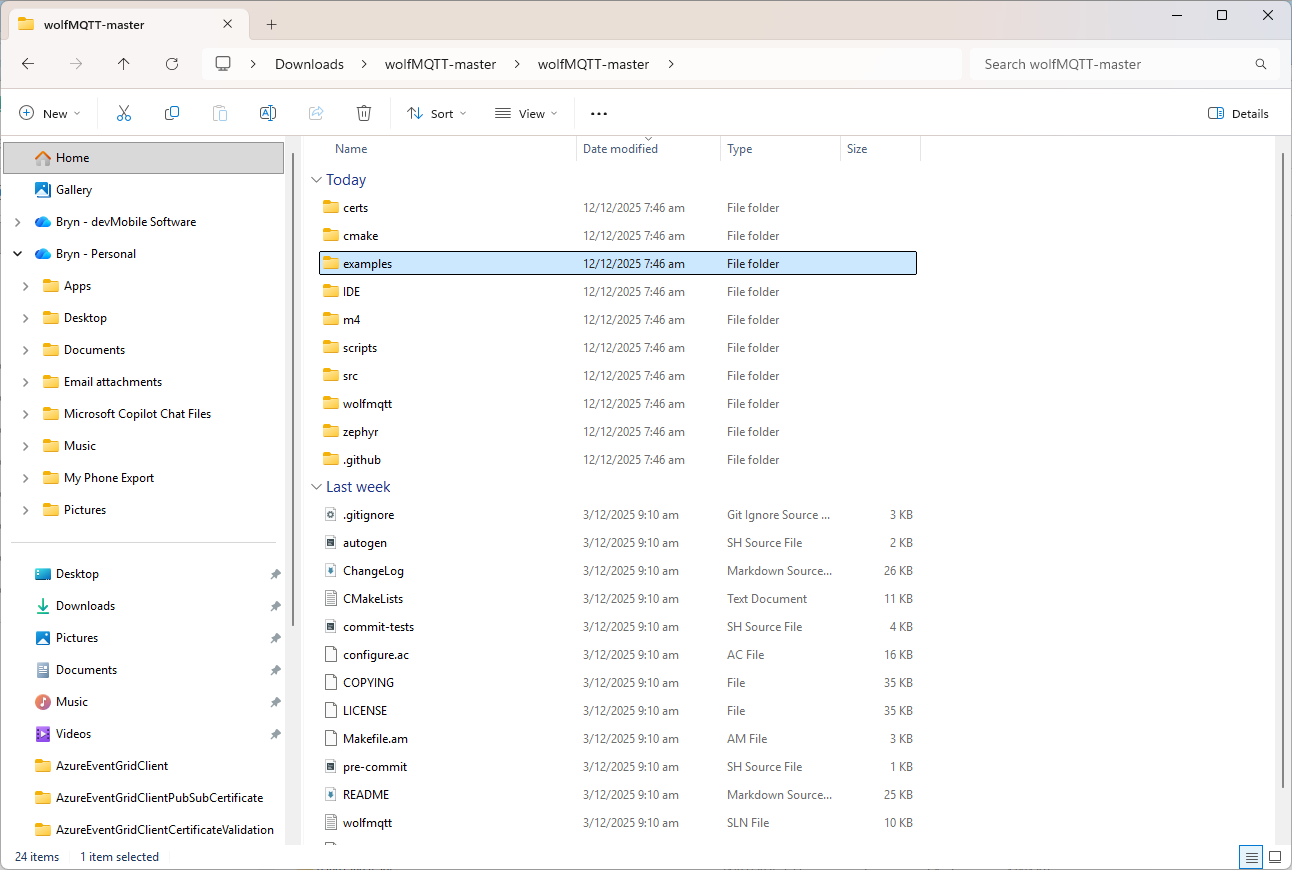
There were instructions on how to “re-organise” the source files into and Arduino friendly library
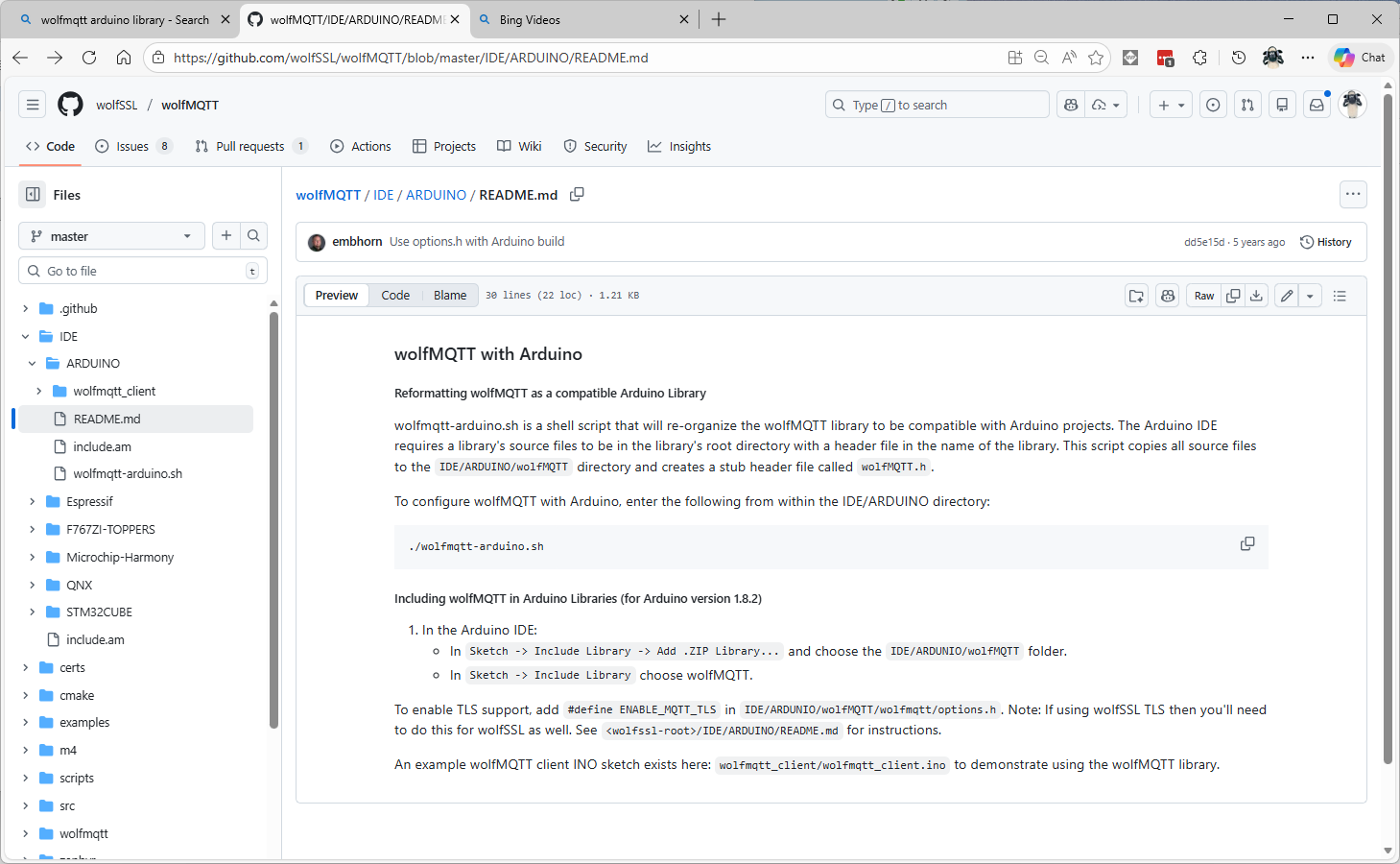
I don’t have an “easy” way of running bash on my dev box so I tried to do it manually (first of a series of mistakes).

#!/bin/sh

# this script will reformat the wolfSSL source code to be compatible with
# an Arduino project
# run as bash ./wolfssl-arduino.sh

DIR=${PWD##*/}

if [ "$DIR" = "ARDUINO" ]; then
    rm -rf wolfMQTT

    mkdir wolfMQTT
    cp ../../src/*.c ./wolfMQTT

    mkdir wolfMQTT/wolfmqtt
    cp ../../wolfmqtt/*.h ./wolfMQTT/wolfmqtt

    echo "/* Generated wolfMQTT header file for Arduino */" >> ./wolfMQTT/wolfMQTT.h
    echo "#include <wolfmqtt/mqtt_client.h>" >> ./wolfMQTT/wolfMQTT.h
else
    echo "ERROR: You must be in the IDE/ARDUINO directory to run this script"
fi

I copied the files into the specified folder tree and my compilation failed. I used a minimalist application to debug the compilation error.
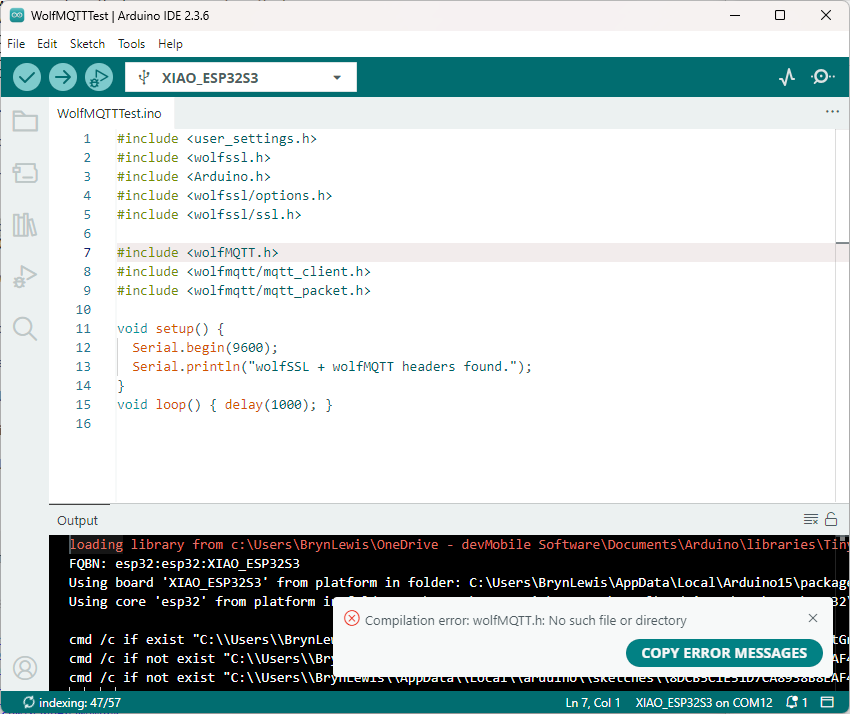
I went back to the script file and realised that has missed creating a header file

    echo "/* Generated wolfMQTT header file for Arduino */" >> ./wolfMQTT/wolfMQTT.h
    echo "#include <wolfmqtt/mqtt_client.h>" >> ./wolfMQTT/wolfMQTT.h

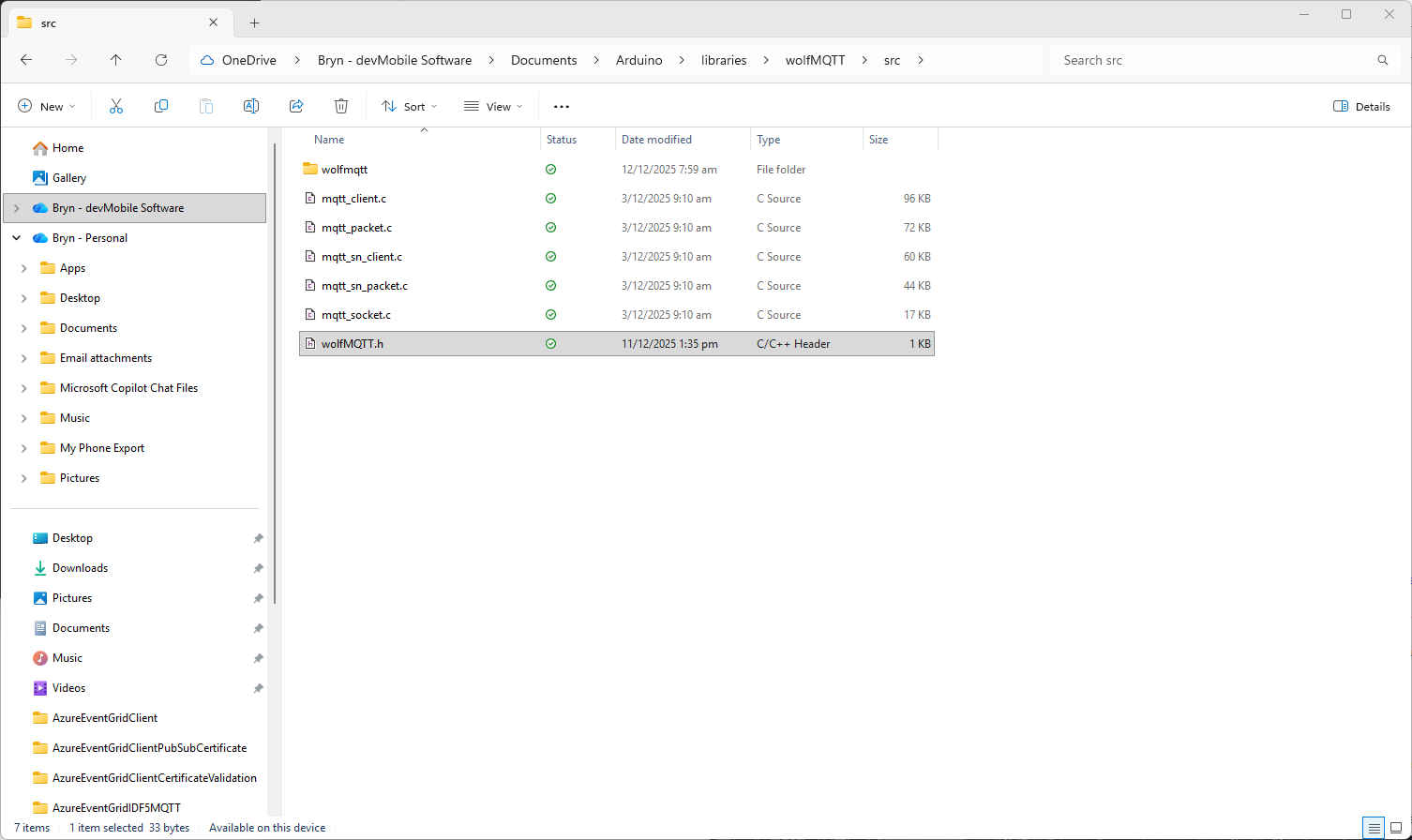
I used a text editor to create the file which I saved into the src folder
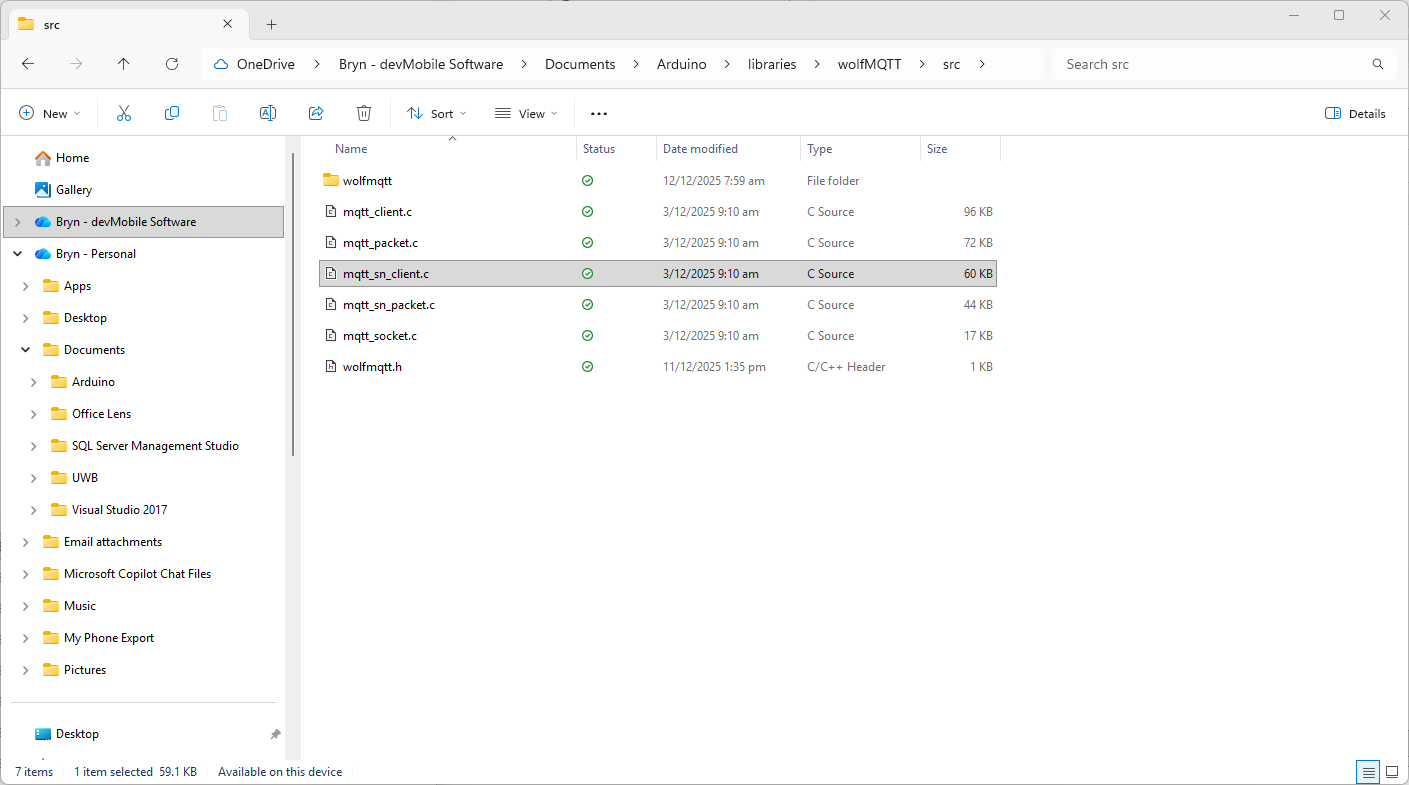
I also checked that I had the same structure as wolfssl
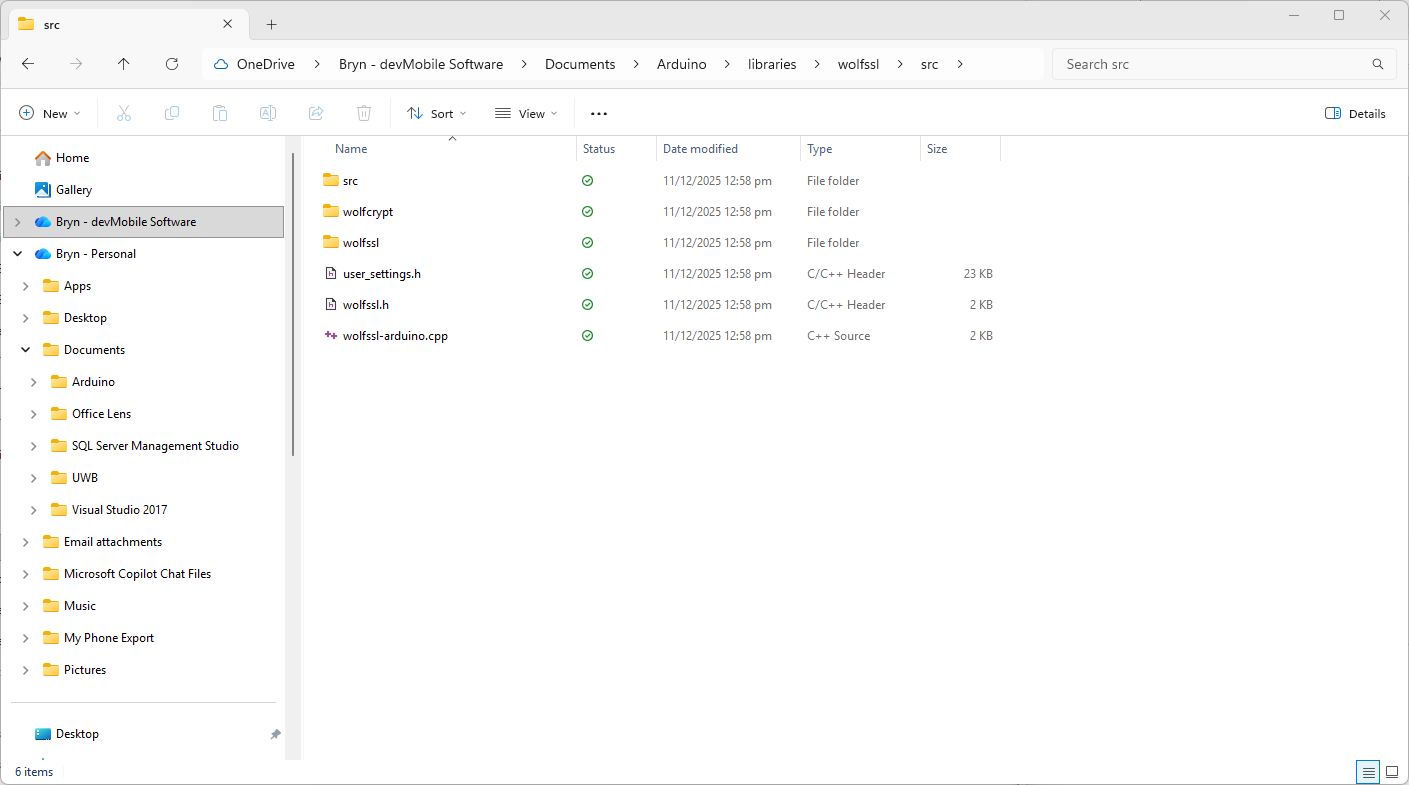
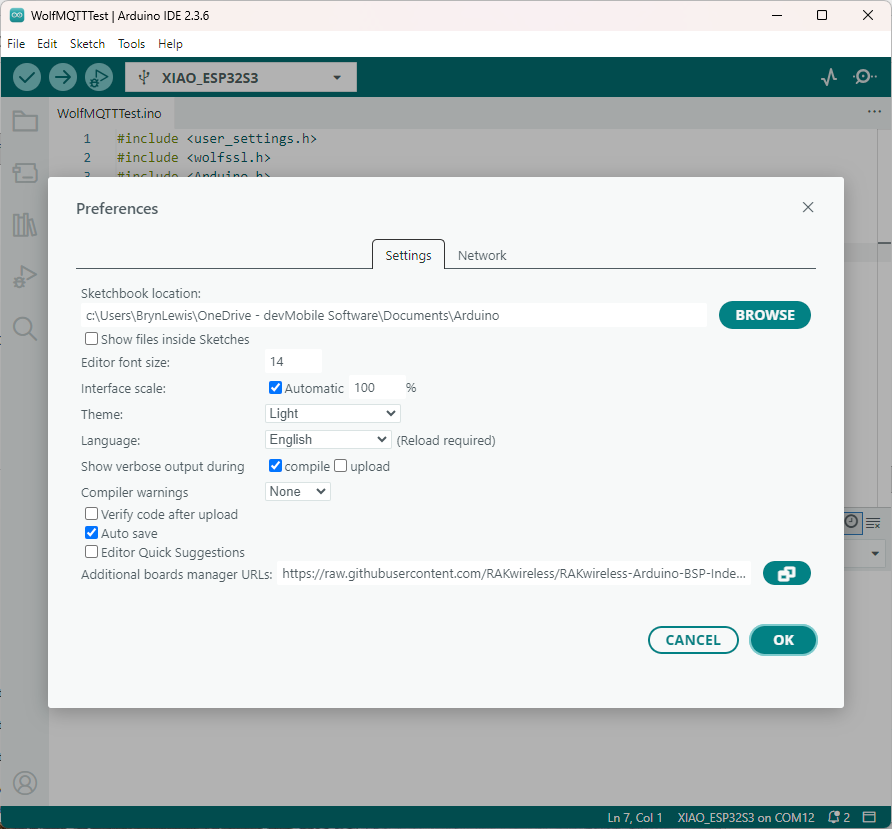
The compilation was still failing so I turned on the Arduino verbose compiler output
After compilations I went back through the compiler output look for clues.
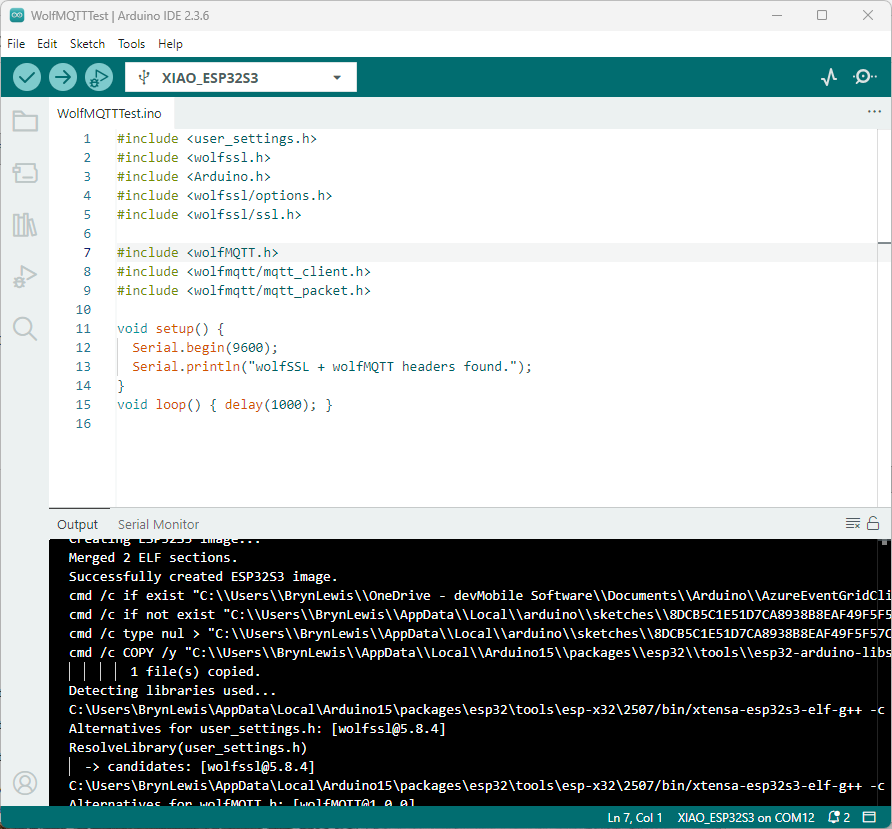
After a couple of failed compilations I paid attention to the error message.
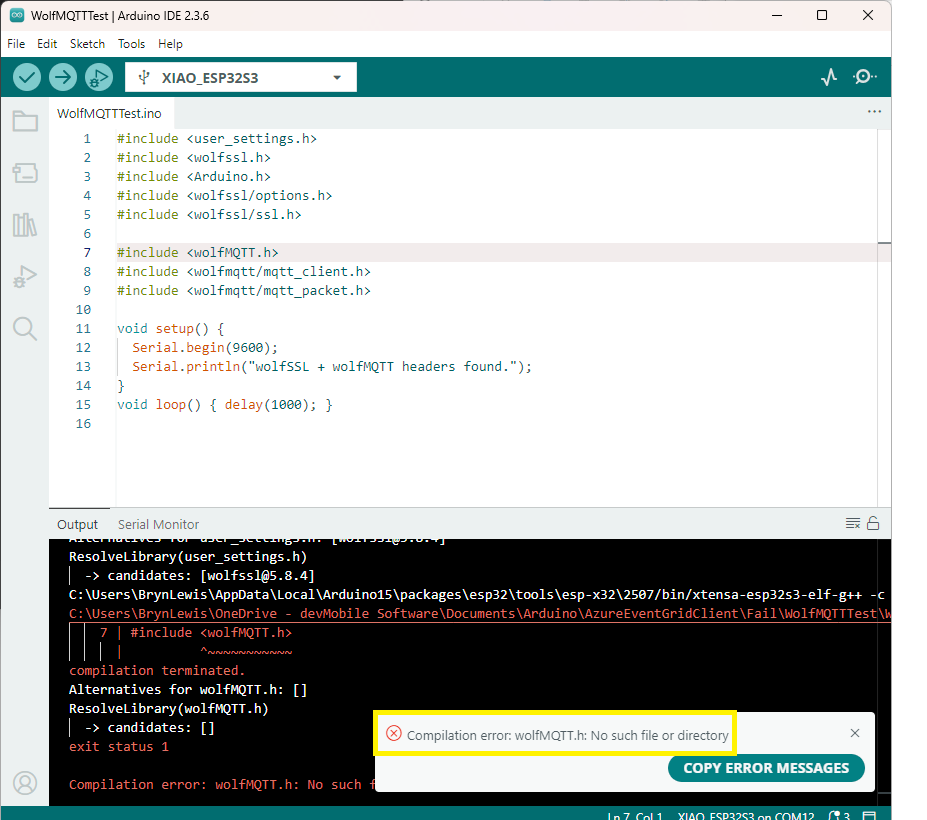
I had the “case” of the header file name wrong, so I changed it to wolfMQTT.h
The compile then worked and the code executed.
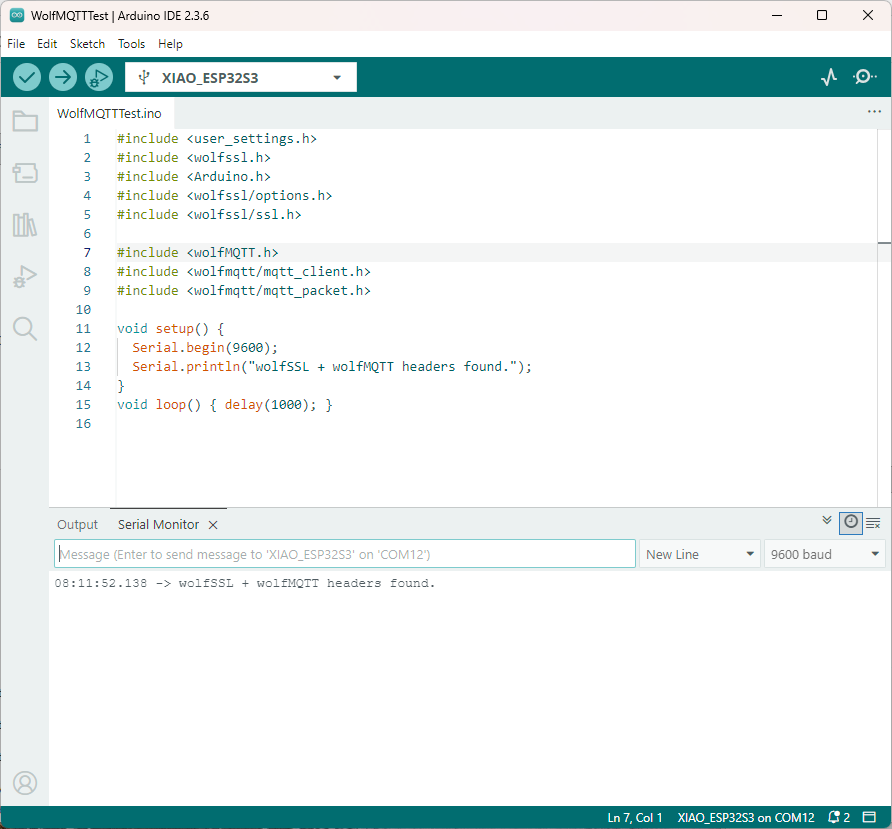
After several hours of “fail” I now understand that case is important for header file names in Arduino(maybe due to Unix origins of some of the tools used). The naming of header file is also important so the library can be discovered.

In another post I will try and build an Azure Event Grid MQTT Broker client that uses wolfMQTT.

Azure IoT Hub SAS Tokens revisited yet again

Based my previous post on SAS Token Expiry I wrote a test harness to better understand DateTimeOffset

using System;

namespace UnixEpochTester
{
   class Program
   {
      static void Main(string[] args)
      {
         Console.WriteLine($"DIY                {new DateTime(1970, 1, 1, 0, 0, 0, DateTimeKind.Utc)}");
         Console.WriteLine($"DateTime.UnixEpoch {DateTime.UnixEpoch} {DateTime.UnixEpoch.Kind}");
         Console.WriteLine();

         TimeSpan fromUnixEpochNow = DateTime.UtcNow - DateTime.UnixEpoch;
         Console.WriteLine($"Epoc now {fromUnixEpochNow} {fromUnixEpochNow.TotalSeconds.ToString("f0")} sec");
         Console.WriteLine();

         TimeSpan fromUnixEpochFixed = new DateTime(2019, 11, 30, 2, 0, 0, DateTimeKind.Utc) - DateTime.UnixEpoch;
         Console.WriteLine($"Epoc  {fromUnixEpochFixed} {fromUnixEpochFixed.TotalSeconds.ToString("f0")} sec");
         Console.WriteLine();

         DateTimeOffset dateTimeOffset = new DateTimeOffset( new DateTime( 2019,11,30,2,0,0, DateTimeKind.Utc));
         Console.WriteLine($"Epoc DateTimeOffset {fromUnixEpochFixed} {dateTimeOffset.ToUnixTimeSeconds()}");
         Console.WriteLine();

         TimeSpan fromEpochStart = new DateTime(2019, 11, 30, 2, 0, 0, DateTimeKind.Utc) - DateTime.UnixEpoch;
         Console.WriteLine($"Epoc DateTimeOffset {fromEpochStart} {fromEpochStart.TotalSeconds.ToString("F0")}");
         Console.WriteLine();


         // https://www.epochconverter.com/ matches
         // https://www.unixtimestamp.com/index.php matches

         Console.WriteLine("Press ENTER to exit");
         Console.ReadLine();
      }
   }
}

I validated my numbers against a couple of online calculators and they matched which was a good start.

DateTimeOffset test harness

As I was testing my Azure MQTT Test Client I had noticed some oddness with MQTT connection timeouts.

string token = generateSasToken($"{server}/devices/{clientId}", password, "", new TimeSpan(0,5,0));
1/12/2019 1:29:52 PM> Device: [MQTTLoRa915MHz], Data:[{"OfficeTemperature":"22.391","OfficeHumidity":"93"}]
1/12/2019 1:30:22 PM> Device: [MQTTLoRa915MHz], Data:[{"OfficeTemperature":"22.29","OfficeHumidity":"64"}]
...
1/12/2019 1:43:56 PM> Device: [MQTTLoRa915MHz], Data:[{"OfficeTemperature":"22.591","OfficeHumidity":"98"}]
1/12/2019 1:44:26 PM> Device: [MQTTLoRa915MHz], Data:[{"OfficeTemperature":"22.754","OfficeHumidity":"68"}]


string token = generateSasToken($"{server}/devices/{clientId}", password, "", new TimeSpan(0,5,0));
1/12/2019 1:29:52 PM> Device: [MQTTLoRa915MHz], Data:[{"OfficeTemperature":"22.391","OfficeHumidity":"93"}]
1/12/2019 1:30:22 PM> Device: [MQTTLoRa915MHz], Data:[{"OfficeTemperature":"22.29","OfficeHumidity":"64"}]
...
1/12/2019 2:01:37 PM> Device: [MQTTLoRa915MHz], Data:[{"OfficeTemperature":"22.334","OfficeHumidity":"79"}]
1/12/2019 2:02:07 PM> Device: [MQTTLoRa915MHz], Data:[{"OfficeTemperature":"22.503","OfficeHumidity":"49"}]


string token = generateSasToken($"{server}/devices/{clientId}", password, "", new TimeSpan(0,5,0));
2/12/2019 9:27:21 PM> Device: [MQTTLoRa915MHz], Data:[{"OfficeTemperature":"22.196","OfficeHumidity":"61"}]
2/12/2019 9:27:51 PM> Device: [MQTTLoRa915MHz], Data:[{"OfficeTemperature":"22.788","OfficeHumidity":"91"}]
...
2/12/2019 9:36:24 PM> Device: [MQTTLoRa915MHz], Data:[{"OfficeTemperature":"22.670","OfficeHumidity":"64"}]
2/12/2019 9:36:54 PM> Device: [MQTTLoRa915MHz], Data:[{"OfficeTemperature":"22.836","OfficeHumidity":"94"}]


string token = generateSasToken($"{server}/devices/{clientId}", password, "", new TimeSpan(0,5,0));
2/12/2019 9:40:52 PM> Device: [MQTTLoRa915MHz], Data:[{"OfficeTemperature":"22.46","OfficeHumidity":"92"}]
2/12/2019 9:41:22 PM> Device: [MQTTLoRa915MHz], Data:[{"OfficeTemperature":"22.443","OfficeHumidity":"62"}]
...
2/12/2019 9:50:55 PM> Device: [MQTTLoRa915MHz], Data:[{"OfficeTemperature":"22.742","OfficeHumidity":"95"}]


string token = generateSasToken($"{server}/devices/{clientId}", password, "", new TimeSpan(0,10,0));
approx 15min as only 30 sec resolution
1/12/2019 12:50:23 PM> Device: [MQTTLoRa915MHz], Data:[{"OfficeTemperature":"22.630","OfficeHumidity":"65"}]
1/12/2019 12:50:53 PM> Device: [MQTTLoRa915MHz], Data:[{"OfficeTemperature":"22.798","OfficeHumidity":"95"}]
...
1/12/2019 1:03:59 PM> Device: [MQTTLoRa915MHz], Data:[{"OfficeTemperature":"22.677","OfficeHumidity":"41"}]
1/12/2019 1:04:30 PM> Device: [MQTTLoRa915MHz], Data:[{"OfficeTemperature":"22.26","OfficeHumidity":"72"}]


string token = generateSasToken($"{server}/devices/{clientId}", password, "", new TimeSpan(0,10,0));
approx 15min as only 30 sec resolution
1/12/2019 1:09:30 PM> Device: [MQTTLoRa915MHz], Data:[{"OfficeTemperature":"22.106","OfficeHumidity":"72"}]
1/12/2019 1:10:00 PM> Device: [MQTTLoRa915MHz], Data:[{"OfficeTemperature":"22.463","OfficeHumidity":"42"}]
...
1/12/2019 1:23:35 PM> Device: [MQTTLoRa915MHz], Data:[{"OfficeTemperature":"22.366","OfficeHumidity":"77"}]
1/12/2019 1:24:05 PM> Device: [MQTTLoRa915MHz], Data:[{"OfficeTemperature":"22.537","OfficeHumidity":"47"}]

The dataset with the 5 minute expiry which remained connected for approximately 30 mins was hopefully a configuration issue.

The updated SAS Token code not uses ToUnixTimeSeconds to eliminate the scope for local vs. UTC issues.

      public static string generateSasToken(string resourceUri, string key, string policyName, TimeSpan timeToLive)
      {
         DateTimeOffset expiryDateTimeOffset = new DateTimeOffset(DateTime.UtcNow.Add(timeToLive));

         string expiryEpoch = expiryDateTimeOffset.ToUnixTimeSeconds().ToString();
         string stringToSign = WebUtility.UrlEncode(resourceUri) + "\n" + expiryEpoch;

         HMACSHA256 hmac = new HMACSHA256(Convert.FromBase64String(key));
         string signature = Convert.ToBase64String(hmac.ComputeHash(Encoding.UTF8.GetBytes(stringToSign)));

         string token = $"SharedAccessSignature sr={WebUtility.UrlEncode(resourceUri)}&sig={WebUtility.UrlEncode(signature)}&se={expiryEpoch}";

         if (!String.IsNullOrEmpty(policyName))
         {
            token += "&skn=" + policyName;
         }

         return token;
      }

I need to test the expiry of my SAS Tokens some more especially with the client running on my development machine (NZT which is currently UTC+13) and in Azure (UTC timezone)

Azure IoT Hub SAS Tokens revisited again

This post has been edited (2019-11-24) my original assumption about how DateTime.Kind unspecified was handled were incorrect.

As I was testing my Azure MQTT Test Client I noticed some oddness with MQTT connection timeouts and this got me wondering about token expiry times. So, I went searching again and found this Azure IoT Hub specific sample code

public static string generateSasToken(string resourceUri, string key, string policyName, int expiryInSeconds = 3600)
{
    TimeSpan fromEpochStart = DateTime.UtcNow - new DateTime(1970, 1, 1);
    string expiry = Convert.ToString((int)fromEpochStart.TotalSeconds + expiryInSeconds);

    string stringToSign = WebUtility.UrlEncode(resourceUri) + "\n" + expiry;

    HMACSHA256 hmac = new HMACSHA256(Convert.FromBase64String(key));
    string signature = Convert.ToBase64String(hmac.ComputeHash(Encoding.UTF8.GetBytes(stringToSign)));

    string token = String.Format(CultureInfo.InvariantCulture, "SharedAccessSignature sr={0}&sig={1}&se={2}", WebUtility.UrlEncode(resourceUri), WebUtility.UrlEncode(signature), expiry);

    if (!String.IsNullOrEmpty(policyName))
    {
        token += "&skn=" + policyName;
    }

    return token;
}

This code worked first time and was more flexible than mine which was a bonus. Though while running my MQTTNet based client I noticed the connection would drop after approximately 10mins (EDIT this was probably an unrelated networking issue).

A long time ago (25 years) I had issues sharing a Unix time value between an applications written with Borland C and Microsoft Visual C which made me wonder about Unix epoch base offsets.

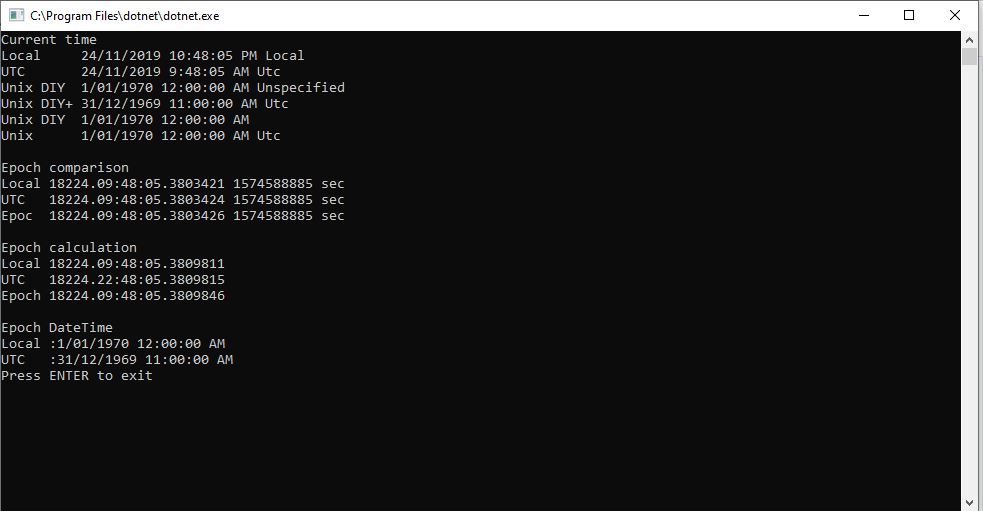
So to test my theory I built a Unix epoch test harness console application

using System;

namespace UnixEpocTest
{
   class Program
   {
      static void Main(string[] args)
      {
         TimeSpan ttl = new TimeSpan(0, 0, 0);

         Console.WriteLine("Current time");
         Console.WriteLine($"Local     {DateTime.Now} {DateTime.Now.Kind}");
         Console.WriteLine($"UTC       {DateTime.UtcNow} {DateTime.UtcNow.Kind}");
         Console.WriteLine($"Unix DIY  {new DateTime(1970, 1, 1)} {new DateTime(1970, 1, 1).Kind}");
         Console.WriteLine($"Unix DIY+ {new DateTime(1970, 1, 1).ToUniversalTime()} {new DateTime(1970, 1, 1).ToUniversalTime().Kind}");
         Console.WriteLine($"Unix DIY  {new DateTime(1970, 1, 1, 0,0,0, DateTimeKind.Utc)}");
         Console.WriteLine($"Unix      {DateTime.UnixEpoch} {DateTime.UnixEpoch.Kind}");
         Console.WriteLine();

         TimeSpan fromEpochStart = DateTime.UtcNow - new DateTime(1970, 1, 1);
         TimeSpan fromEpochStartUtc = DateTime.UtcNow - new DateTime(1970, 1, 1,0,0,0, DateTimeKind.Utc);
         TimeSpan fromEpochStartUnixEpoch = DateTime.UtcNow - DateTime.UnixEpoch;

         Console.WriteLine("Epoch comparison");
         Console.WriteLine($"Local {fromEpochStart} {fromEpochStart.TotalSeconds.ToString("f0")} sec");
         Console.WriteLine($"UTC   {fromEpochStartUtc} {fromEpochStartUtc.TotalSeconds.ToString("f0")} sec");
         Console.WriteLine($"Epoc  {fromEpochStartUnixEpoch} {fromEpochStartUnixEpoch.TotalSeconds.ToString("f0")} sec");
         Console.WriteLine();

         TimeSpan afterEpoch = DateTime.UtcNow.Add(ttl) - new DateTime(1970, 1, 1);
         TimeSpan afterEpochUtC = DateTime.UtcNow.Add(ttl) - new DateTime(1970, 1, 1).ToUniversalTime();
         TimeSpan afterEpochEpoch = DateTime.UtcNow.Add(ttl) - DateTime.UnixEpoch;

         Console.WriteLine("Epoch calculation");
         Console.WriteLine($"Local {afterEpoch}");
         Console.WriteLine($"UTC   {afterEpochUtC}");
         Console.WriteLine($"Epoch {afterEpochEpoch}");
         Console.WriteLine();

         Console.WriteLine("Epoch DateTime");
         Console.WriteLine($"Local :{new DateTime(1970, 1, 1)}");
         Console.WriteLine($"UTC   :{ new DateTime(1970, 1, 1).ToUniversalTime()}");

         Console.WriteLine("Press ENTER to exit");
         Console.ReadLine();

         Console.WriteLine("Hello World!");
      }
   }
}

EDIT: I now think the UtcNow to “unspecified” kind mathematics was being handled correctly. I have updated the code to use the DateTime.UnixEpoch constant so the code is more readable.

public static string generateSasToken(string resourceUri, string key, string policyName, int expiryInSeconds = 900)
      {
         TimeSpan fromEpochStart = DateTime.UtcNow - DateTime.UnixEpoch;
         string expiry = Convert.ToString((int)fromEpochStart.TotalSeconds + expiryInSeconds);

         string stringToSign = WebUtility.UrlEncode(resourceUri) + "\n" + expiry;

         HMACSHA256 hmac = new HMACSHA256(Convert.FromBase64String(key));
         string signature = Convert.ToBase64String(hmac.ComputeHash(Encoding.UTF8.GetBytes(stringToSign)));

         string token = String.Format(CultureInfo.InvariantCulture, "SharedAccessSignature sr={0}&sig={1}&se={2}", WebUtility.UrlEncode(resourceUri), WebUtility.UrlEncode(signature), expiry);

         if (!String.IsNullOrEmpty(policyName))
         {
            token += "&skn=" + policyName;
         }

         return token;
      }

I need to test the expiry of my SAS Tokens some more especially with the client running on my development machine (NZT which is currently UTC+13) and in Azure (UTC timezone)