ML.Net YoloV5 + Security Camera Revisited

This post is about “revisiting” my ML.Net YoloV5 + Camera on ARM64 Raspberry PI application, updating it to .NET 6, the latest version of the TechWings yolov5-net (library formerly from mentalstack) and the latest version of the ML.Net Open Neural Network Exchange(ONNX) libraries.

Visual Studio 2022 with updated NuGet packages

The updated TechWings yolov5-net library now uses Six Labors ImageSharp for markup rather than System.Drawing.Common. (I found System.Drawing.Common a massive Pain in the Arse (PiTA))

private static async void ImageUpdateTimerCallback(object state)
{
   DateTime requestAtUtc = DateTime.UtcNow;

   // Just incase - stop code being called while photo already in progress
   if (_cameraBusy)
   {
      return;
   }
   _cameraBusy = true;

   Console.WriteLine($"{DateTime.UtcNow:yy-MM-dd HH:mm:ss} Image processing start");

   try
   {
#if SECURITY_CAMERA
      Console.WriteLine($" {DateTime.UtcNow:yy-MM-dd HH:mm:ss:fff} Security Camera Image download start");

      using (Stream cameraStream = await _httpClient.GetStreamAsync(_applicationSettings.CameraUrl))
      using (Stream fileStream = File.Create(_applicationSettings.ImageInputFilenameLocal))
      {
         await cameraStream.CopyToAsync(fileStream);
      }

      Console.WriteLine($" {DateTime.UtcNow:yy-MM-dd HH:mm:ss:fff} Security Camera Image download done");
#endif

      List<YoloPrediction> predictions;

      // Process the image on local file system
      using (Image<Rgba32> image = await Image.LoadAsync<Rgba32>(_applicationSettings.ImageInputFilenameLocal))
      {
         Console.WriteLine($" {DateTime.UtcNow:yy-MM-dd HH:mm:ss:fff} YoloV5 inferencing start");
         predictions = _scorer.Predict(image);
         Console.WriteLine($" {DateTime.UtcNow:yy-MM-dd HH:mm:ss:fff} YoloV5 inferencing done");

#if OUTPUT_IMAGE_MARKUP
         Console.WriteLine($" {DateTime.UtcNow:yy-MM-dd HH:mm:ss:fff} Image markup start");

         var font = new Font(new FontCollection().Add(_applicationSettings.ImageOutputMarkupFontPath), _applicationSettings.ImageOutputMarkupFontSize);

         foreach (var prediction in predictions) // iterate predictions to draw results
         {
            double score = Math.Round(prediction.Score, 2);

            var (x, y) = (prediction.Rectangle.Left - 3, prediction.Rectangle.Top - 23);

            image.Mutate(a => a.DrawPolygon(Pens.Solid(prediction.Label.Color, 1),
                  new PointF(prediction.Rectangle.Left, prediction.Rectangle.Top),
                  new PointF(prediction.Rectangle.Right, prediction.Rectangle.Top),
                  new PointF(prediction.Rectangle.Right, prediction.Rectangle.Bottom),
                  new PointF(prediction.Rectangle.Left, prediction.Rectangle.Bottom)
            ));

            image.Mutate(a => a.DrawText($"{prediction.Label.Name} ({score})",
                  font, prediction.Label.Color, new PointF(x, y)));
         }

         await image.SaveAsJpegAsync(_applicationSettings.ImageOutputFilenameLocal);

         Console.WriteLine($" {DateTime.UtcNow:yy-MM-dd HH:mm:ss:fff} Image markup done");
#endif
      }


#if PREDICTION_CLASSES
      Console.WriteLine($" {DateTime.UtcNow:yy-MM-dd HH:mm:ss:fff} Image classes start");
      foreach (var prediction in predictions)
      {
         Console.WriteLine($"  Name:{prediction.Label.Name} Score:{prediction.Score:f2} Valid:{prediction.Score > _applicationSettings.PredictionScoreThreshold}");
      }
      Console.WriteLine($" {DateTime.UtcNow:yy-MM-dd HH:mm:ss:fff} Image classes done");
#endif

#if PREDICTION_CLASSES_OF_INTEREST
      IEnumerable<string> predictionsOfInterest = predictions.Where(p => p.Score > _applicationSettings.PredictionScoreThreshold).Select(c => c.Label.Name).Intersect(_applicationSettings.PredictionLabelsOfInterest, StringComparer.OrdinalIgnoreCase);

      if (predictionsOfInterest.Any())
      {
         Console.WriteLine($" {DateTime.UtcNow:yy-MM-dd HH:mm:ss} Camera image comtains {String.Join(",", predictionsOfInterest)}");
      }

#endif
   }
   catch (Exception ex)
   {
      Console.WriteLine($"{DateTime.UtcNow:yy-MM-dd HH:mm:ss} Camera image download, upload or post procesing failed {ex.Message}");
   }
   finally
   {
      _cameraBusy = false;
   }

   TimeSpan duration = DateTime.UtcNow - requestAtUtc;

   Console.WriteLine($"{DateTime.UtcNow:yy-MM-dd HH:mm:ss} Image processing done {duration.TotalSeconds:f2} sec");
   Console.WriteLine();
}

The names of the input image, output image and yoloV5 model file are configured in the appsettings.json (on device) or secrets.json (Visual Studio 2022 desktop) file. The location (ImageOutputMarkupFontPath) and size (ImageOutputMarkupFontSize) of the font used are configurable to make it easier run the application on different devices and operating systems.

{
   "ApplicationSettings": {
      "ImageTimerDue": "0.00:00:15",
      "ImageTimerPeriod": "0.00:00:30",

      "CameraUrl": "HTTP://10.0.0.56:85/images/snapshot.jpg",
      "CameraUserName": "",
      "CameraUserPassword": "",

      "ImageInputFilenameLocal": "InputLatest.jpg",
      "ImageOutputFilenameLocal": "OutputLatest.jpg",

      "ImageOutputMarkupFontPath": "C:/Windows/Fonts/consola.ttf",
      "ImageOutputMarkupFontSize": 16,

      "YoloV5ModelPath": "YoloV5/yolov5s.onnx",

      "PredictionScoreThreshold": 0.5,

      "PredictionLabelsOfInterest": [
         "bicycle",
         "person",
         "bench"
      ]
   }
}

The test-rig consisted of a Unv ADZK-10 Security Camera, Power over Ethernet(PoE) module and my development desktop PC.
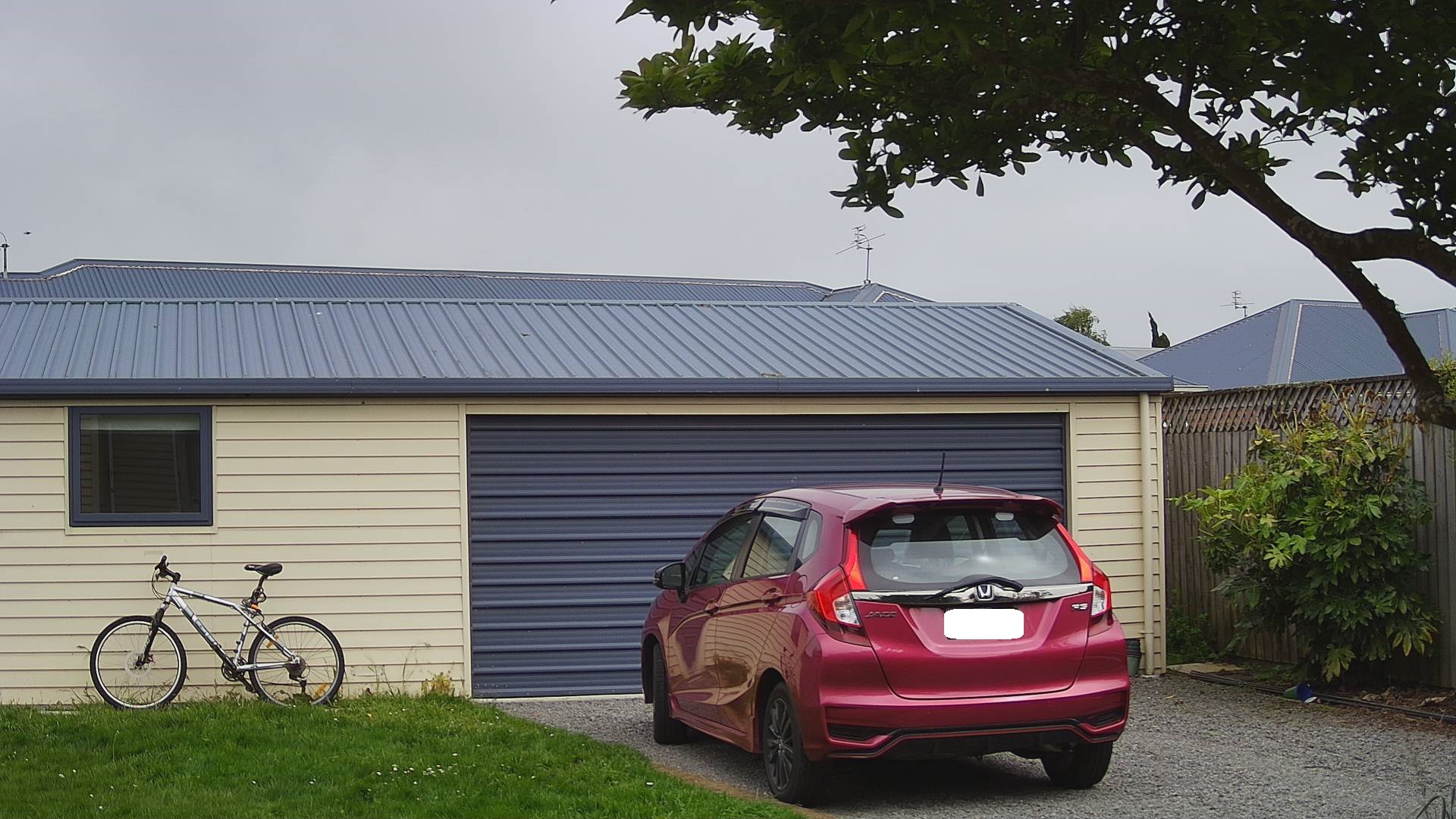
My bicycle and “mother in laws” car in backyard
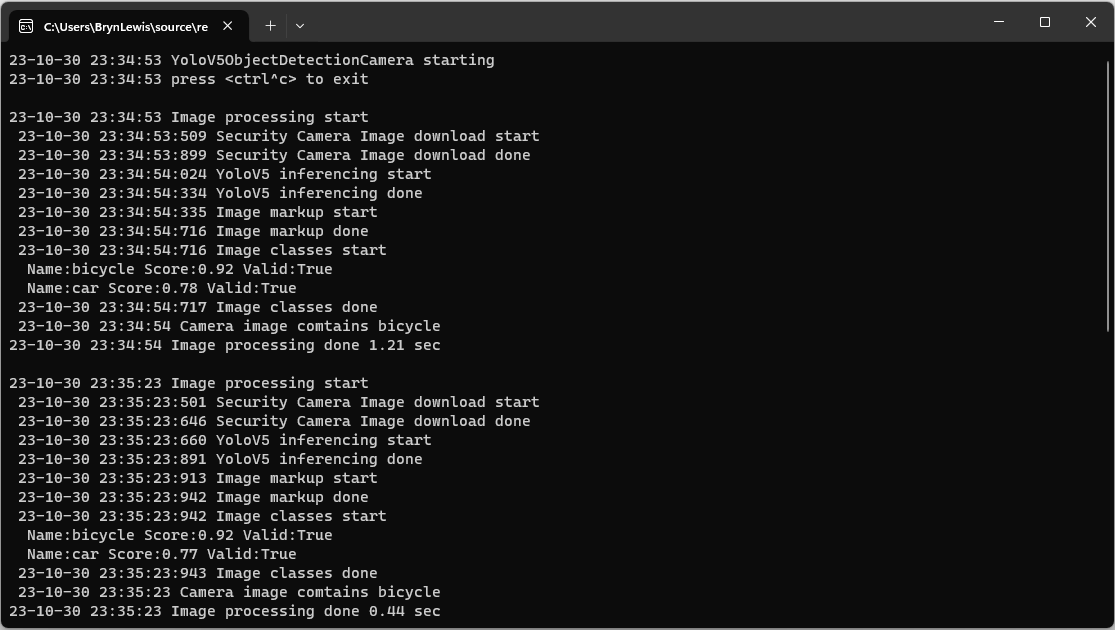
YoloV5ObjectDetectionCamera running on my desktop PC

Once the YoloV5s model was loaded, inferencing was taking roughly 0.47 seconds.

Marked up image of my bicycle and “mother in laws” car in backyard

Summary

Again, I was “standing on the shoulders of giants” the TechWings code just worked. With a pretrained yoloV5 model, the ML.Net Open Neural Network Exchange(ONNX) plumbing it took a couple of hours to update the application. Most of this time was learning about the Six Labors ImageSharp library to mark up the images.

ML.Net YoloV5 + Camera + GPIO on ARM64 Raspberry PI

This project builds on my ML.Net YoloV5 + Camera on ARM64 Raspberry PI post and adds support for turning a Light Emitting Diode(LED) on if the label of any object detected in an image is in the PredictionLabelsOfInterest list.

{
  "ApplicationSettings": {
    "ImageTimerDue": "0.00:00:15",
    "ImageTimerPeriod": "0.00:00:30",

    "CameraUrl": "...",
    "CameraUserName": "..",
    "CameraUserPassword": "...",

    "LedPinNumer": 5,

    "InputImageFilenameLocal": "InputLatest.jpg",
    "OutputImageFilenameLocal": "OutputLatest.jpg",

    "ProcessWaitForExit": 10000,

    "YoloV5ModelPath": "Assets/yolov5/yolov5s.onnx",

    "PredicitionScoreThreshold": 0.5,

    "PredictionLabelsOfInterest": [
      "bicycle",
      "person",
      "bench"
    ]
  }
}

The test-rig has consists of a Unv ADZK-10 Security Camera, Power over Ethernet(PoE) module, D-Link 8 port switch, Raspberry PI 8G 4b with a Seeedstudio Grove-Base Hat for Raspberry Pi, and Grove-Blue LED Button.

Test-rig configuration

class Program
{
	private static Model.ApplicationSettings _applicationSettings;
	private static bool _cameraBusy = false;
	private static YoloScorer<YoloCocoP5Model> _scorer = null;
#if GPIO_SUPPORT
	private static GpioController _gpiocontroller;
#endif

	static async Task Main(string[] args)
	{
		Console.WriteLine($"{DateTime.UtcNow:yy-MM-dd HH:mm:ss} YoloV5ObjectDetectionCamera starting");

		try
		{
			// load the app settings into configuration
			var configuration = new ConfigurationBuilder()
				 .AddJsonFile("appsettings.json", false, true)
				 .Build();

			_applicationSettings = configuration.GetSection("ApplicationSettings").Get<Model.ApplicationSettings>();

#if GPIO_SUPPORT
			Console.WriteLine($" {DateTime.UtcNow:yy-MM-dd HH:mm:ss:fff} GPIO setup start");

			_gpiocontroller = new GpioController(PinNumberingScheme.Logical);

			_gpiocontroller.OpenPin(_applicationSettings.ButtonPinNumer, PinMode.InputPullDown);

			_gpiocontroller.OpenPin(_applicationSettings.LedPinNumer, PinMode.Output);
			_gpiocontroller.Write(_applicationSettings.LedPinNumer, PinValue.Low);

			Console.WriteLine($" {DateTime.UtcNow:yy-MM-dd HH:mm:ss:fff} GPIO setup done");
#endif

			_scorer = new YoloScorer<YoloCocoP5Model>(_applicationSettings.YoloV5ModelPath);

			Timer imageUpdatetimer = new Timer(ImageUpdateTimerCallback, null, _applicationSettings.ImageImageTimerDue, _applicationSettings.ImageTimerPeriod);

			Console.WriteLine($"{DateTime.UtcNow:yy-MM-dd HH:mm:ss} press <ctrl^c> to exit");
			Console.WriteLine();

			try
			{
				await Task.Delay(Timeout.Infinite);
			}
			catch (TaskCanceledException)
			{
				Console.WriteLine($"{DateTime.UtcNow:yy-MM-dd HH:mm:ss} Application shutown requested");
			}
		}
		catch (Exception ex)
		{
				Console.WriteLine($"{DateTime.UtcNow:yy-MM-dd HH:mm:ss} Application shutown failure {ex.Message}", ex);
		}
	}

	private static void ImageUpdateTimerCallback(object state)
	{
		DateTime requestAtUtc = DateTime.UtcNow;

		// Just incase - stop code being called while photo already in progress
		if (_cameraBusy)
		{
			return;
		}
		_cameraBusy = true;

		Console.WriteLine($"{DateTime.UtcNow:yy-MM-dd HH:mm:ss} Image processing start");

		try
		{
#if SECURITY_CAMERA
			Console.WriteLine($" {DateTime.UtcNow:yy-MM-dd HH:mm:ss:fff} Security Camera Image download start");

			NetworkCredential networkCredential = new NetworkCredential()
			{
				UserName = _applicationSettings.CameraUserName,
				Password = _applicationSettings.CameraUserPassword,
			};

			using (WebClient client = new WebClient())
			{
				client.Credentials = networkCredential;

				client.DownloadFile(_applicationSettings.CameraUrl, _applicationSettings.InputImageFilenameLocal);
			}
			Console.WriteLine($" {DateTime.UtcNow:yy-MM-dd HH:mm:ss:fff} Security Camera Image download done");
#endif

#if RASPBERRY_PI_CAMERA
			Console.WriteLine($" {DateTime.UtcNow:yy-MM-dd HH:mm:ss:fff} Raspberry PI Image capture start");

			using (Process process = new Process())
			{
				process.StartInfo.FileName = @"libcamera-jpeg";
				process.StartInfo.Arguments = $"-o {_applicationSettings.InputImageFilenameLocal} --nopreview -t1 --rotation 180";
				process.StartInfo.RedirectStandardError = true;

				process.Start();

				if (!process.WaitForExit(_applicationSettings.ProcessWaitForExit) || (process.ExitCode != 0))
				{
					Console.WriteLine($"{DateTime.UtcNow:yy-MM-dd HH:mm:ss:fff} Image update failure {process.ExitCode}");
				}
			}

			Console.WriteLine($" {DateTime.UtcNow:yy-MM-dd HH:mm:ss:fff} Raspberry PI Image capture done");
#endif

			List<YoloPrediction> predictions;

			// Process the image on local file system
			using (Image image = Image.FromFile(_applicationSettings.InputImageFilenameLocal))
			{
				Console.WriteLine($" {DateTime.UtcNow:yy-MM-dd HH:mm:ss:fff} YoloV5 inferencing start");
				predictions = _scorer.Predict(image);
				Console.WriteLine($" {DateTime.UtcNow:yy-MM-dd HH:mm:ss:fff} YoloV5 inferencing done");

#if OUTPUT_IMAGE_MARKUP
				using (Graphics graphics = Graphics.FromImage(image))
				{
					Console.WriteLine($" {DateTime.UtcNow:yy-MM-dd HH:mm:ss:fff} Image markup start");

					foreach (var prediction in predictions) // iterate predictions to draw results
					{
						double score = Math.Round(prediction.Score, 2);

						graphics.DrawRectangles(new Pen(prediction.Label.Color, 1), new[] { prediction.Rectangle });

						var (x, y) = (prediction.Rectangle.X - 3, prediction.Rectangle.Y - 23);

						graphics.DrawString($"{prediction.Label.Name} ({score})", new Font("Consolas", 16, GraphicsUnit.Pixel), new SolidBrush(prediction.Label.Color), new PointF(x, y));
					}

					image.Save(_applicationSettings.OutputImageFilenameLocal);

					Console.WriteLine($" {DateTime.UtcNow:yy-MM-dd HH:mm:ss:fff} Image markup done");
				}
#endif
			}

#if PREDICTION_CLASSES
			Console.WriteLine($" {DateTime.UtcNow:yy-MM-dd HH:mm:ss:fff} Image classes start");
			foreach (var prediction in predictions)
			{
				Console.WriteLine($"  Name:{prediction.Label.Name} Score:{prediction.Score:f2} Valid:{prediction.Score > _applicationSettings.PredicitionScoreThreshold}");
			}
			Console.WriteLine($" {DateTime.UtcNow:yy-MM-dd HH:mm:ss:fff} Image classes done");
#endif

#if PREDICTION_CLASSES_OF_INTEREST
			IEnumerable<string> predictionsOfInterest= predictions.Where(p=>p.Score > _applicationSettings.PredicitionScoreThreshold).Select(c => c.Label.Name).Intersect(_applicationSettings.PredictionLabelsOfInterest, StringComparer.OrdinalIgnoreCase);

			if (predictionsOfInterest.Any())
			{
				Console.WriteLine($" {DateTime.UtcNow:yy-MM-dd HH:mm:ss} Camera image comtains {String.Join(",", predictionsOfInterest)}");
			}

   #if GPIO_SUPPORT
		   if (predictionsOfInterest.Any())
			{
				_gpiocontroller.Write(_applicationSettings.LedPinNumer, PinValue.High);
			}
			else
			{
				_gpiocontroller.Write(_applicationSettings.LedPinNumer, PinValue.Low);
			}
	#endif
#endif
		}
		catch (Exception ex)
		{
			Console.WriteLine($"{DateTime.UtcNow:yy-MM-dd HH:mm:ss} Camera image download, upload or post procesing failed {ex.Message}");
		}
		finally
		{
			_cameraBusy = false;
		}

		TimeSpan duration = DateTime.UtcNow - requestAtUtc;

		Console.WriteLine($"{DateTime.UtcNow:yy-MM-dd HH:mm:ss} Image processing done {duration.TotalSeconds:f2} sec");
		Console.WriteLine();
	}
}

The name of the digital output pin, input image, output image and yoloV5 model file names are configured in the appsettings.json file.

Mountain bike leaning against garage
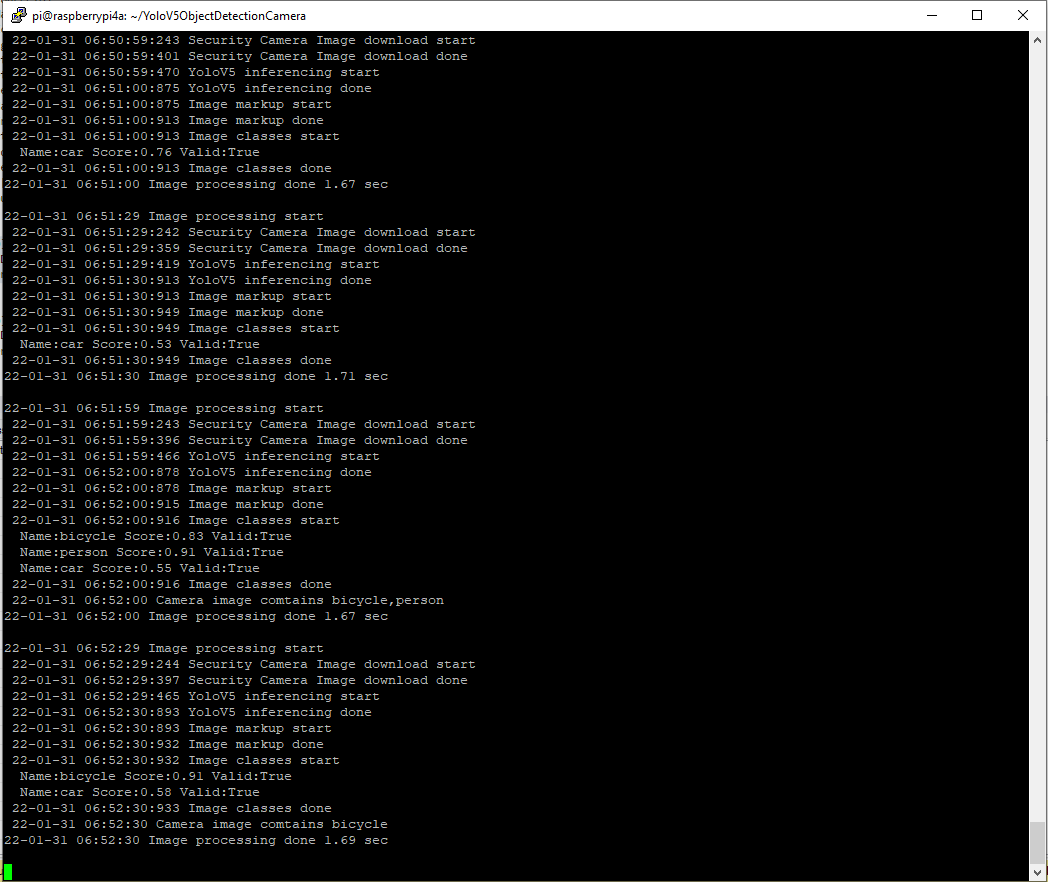
YoloV5 based application console

The 22-01-31 06:52 “person” detection is me moving the mountain bike into position.

Marked up image of my mountain bike leaning against the garage

Summary

Once the YoloV5s model was loaded, inferencing was taking roughly 1.45 seconds. The application is starting to get a bit “nasty” so for the next version I’ll need to do some refactoring.