Swarm Space – Azure IoT FromDevice with webhooks

The initial versions of the Swarm Space Azure Cloud Identity Gateway were based on my The Things Industries(TTI) Azure IoT Connector which used six HTTP Triggered Azure Functions. My Swarm Space Azure IoT connector only has one webhook endpoint so a .NET Core WebAPI with controllers based solution appeared to be more practical. The first step was to get some sample JavaScript Object Notation(JSON) uplink message payloads with the SwarmSpace-From Device with Webhooks project.

{
  "packetId": 0,
  "deviceType": 1,
  "deviceId": 0,
  "userApplicationId": 0,
  "organizationId": 65760,
  "data": "VGhpcyBpcyBhIHRlc3QgbWVzc2FnZS4gVGhlIHBhY2tldElkIGFuZCBkZXZpY2VJZCBhcmUgbm90IHBvcHVsYXRlZCwgYnV0IHdpbGwgYmUgZm9yIGEgcmVhbCBtZXNzYWdlLg==",
  "len": 100,
  "status": 0,
  "hiveRxTime": "2022-11-29T04:52:06"
}

I used JSON2CSharp to generate an initial version of a Plain Old CLR(ComonLanguage Runtime) Object(POCO) to deserialise the Delivery Webhook payload.

 https://json2csharp.com/
    
    // Root myDeserializedClass = JsonConvert.DeserializeObject<Root>(myJsonResponse);
    public class Root
    {
        public int packetId { get; set; }
        public int deviceType { get; set; }
        public int deviceId { get; set; }
        public int userApplicationId { get; set; }
        public int organizationId { get; set; }
        public string data { get; set; }
        public int len { get; set; }
        public int status { get; set; }
        public DateTime hiveRxTime { get; set; }
    }
*/

I then “tweaked” the JSON2CSharp class

 public class UplinkPayload
    {
        [JsonProperty("packetId")]
        public int PacketId { get; set; }

        [JsonProperty("deviceType")]
        public int DeviceType { get; set; }

        [JsonProperty("deviceId")]
        public int DeviceId { get; set; }

        [JsonProperty("userApplicationId")]
        public int UserApplicationId { get; set; }

        [JsonProperty("organizationId")]
        public int OrganizationId { get; set; }

        [JsonProperty("data")]
        [JsonRequired]
        public string Data { get; set; }

        [JsonProperty("len")]
        public int Len { get; set; }

        [JsonProperty("status")]
        public int Status { get; set; }

        [JsonProperty("hiveRxTime")]
        public DateTime HiveRxTime { get; set; }
    }

This class is used to “automagically” deserialise Delivery Webhook payloads. There is also some additional payload validation which discards test messages (not certain this is a good idea) etc.

//---------------------------------------------------------------------------------
// Copyright (c) December 2022, devMobile Software
//
// Licensed under the Apache License, Version 2.0 (the "License");
// you may not use this file except in compliance with the License.
// You may obtain a copy of the License at
//
//     http://www.apache.org/licenses/LICENSE-2.0
//
// Unless required by applicable law or agreed to in writing, software
// distributed under the License is distributed on an "AS IS" BASIS,
// WITHOUT WARRANTIES OR CONDITIONS OF ANY KIND, either express or implied.
// See the License for the specific language governing permissions and
// limitations under the License.
//
//---------------------------------------------------------------------------------
namespace devMobile.IoT.SwarmSpace.AzureIoT.Connector.Controllers
{
    using System.Globalization;
    using System.Text;
    using System.Threading.Tasks;

    using Microsoft.AspNetCore.Mvc;
    using Microsoft.Azure.Devices.Client;
    using Microsoft.Extensions.Logging;

    using Newtonsoft.Json;
    using Newtonsoft.Json.Linq;

    [ApiController]
    [Route("api/[controller]")]
    public class UplinkController : ControllerBase
    {
        private readonly ILogger<UplinkController> _logger;
        private readonly IAzureIoTDeviceClientCache _azureIoTDeviceClientCache;

        public UplinkController(ILogger<UplinkController> logger, IAzureIoTDeviceClientCache azureIoTDeviceClientCache)
        {
            _logger = logger;
            _azureIoTDeviceClientCache = azureIoTDeviceClientCache;
        }

        [HttpPost]
        public async Task<IActionResult> Uplink([FromBody] Models.UplinkPayload payload)
        {
            DeviceClient deviceClient;

            _logger.LogDebug("Payload {0}", JsonConvert.SerializeObject(payload, Formatting.Indented));

            if (payload.PacketId == 0)
            {
                _logger.LogWarning("Uplink-payload simulated DeviceId:{DeviceId}", payload.DeviceId);

                return this.Ok();
            }

            if ((payload.UserApplicationId < Constants.UserApplicationIdMinimum) || (payload.UserApplicationId > Constants.UserApplicationIdMaximum))
            {
                _logger.LogWarning("Uplink-payload invalid User Application Id:{UserApplicationId}", payload.UserApplicationId);

                return this.BadRequest($"Invalid User Application Id {payload.UserApplicationId}");
            }

            if ((payload.Len < Constants.PayloadLengthMinimum) || string.IsNullOrEmpty(payload.Data))
            {
                _logger.LogWarning("Uplink-payload.Data is empty PacketId:{PacketId}", payload.PacketId);

                return this.Ok("payload.Data is empty");
            }

            Models.AzureIoTDeviceClientContext context = new Models.AzureIoTDeviceClientContext()
            {
                OrganisationId = payload.OrganizationId,
                UserApplicationId = payload.UserApplicationId,
                DeviceType = payload.DeviceType,
                DeviceId = payload.DeviceId,
            };

            deviceClient = await _azureIoTDeviceClientCache.GetOrAddAsync(payload.DeviceId.ToString(), context);

            JObject telemetryEvent = new JObject
            {
                { "packetId", payload.PacketId},
                { "deviceType" , payload.DeviceType},
                { "DeviceID", payload.DeviceId },
                { "organizationId", payload.OrganizationId },
                { "ApplicationId", payload.UserApplicationId},
                { "ReceivedAtUtc", payload.HiveRxTime.ToString("s", CultureInfo.InvariantCulture) },
                { "DataLength", payload.Len },
                { "Data", payload.Data },
                { "Status", payload.Status },
            };

            // Send the message to Azure IoT Hub
            using (Message ioTHubmessage = new Message(Encoding.ASCII.GetBytes(JsonConvert.SerializeObject(telemetryEvent))))
            {
                // Ensure the displayed time is the acquired time rather than the uploaded time. 
                ioTHubmessage.Properties.Add("iothub-creation-time-utc", payload.HiveRxTime.ToString("s", CultureInfo.InvariantCulture));
                ioTHubmessage.Properties.Add("OrganizationId", payload.OrganizationId.ToString());
                ioTHubmessage.Properties.Add("ApplicationId", payload.UserApplicationId.ToString());
                ioTHubmessage.Properties.Add("DeviceId", payload.DeviceId.ToString());
                ioTHubmessage.Properties.Add("deviceType", payload.DeviceType.ToString());

                await deviceClient.SendEventAsync(ioTHubmessage);

                _logger.LogInformation("Uplink-DeviceID:{deviceId} SendEventAsync success", payload.DeviceId);
            }

            return this.Ok();
        }
    }
}

I initially debugged and tested the Uplink controller with Telerik Fiddler using sample payloads captured with the SwarmSpace-From Device with Webhooks project.

Using Telerik Fiddler to make test delivery webhook calls

Which I could then inspect with Azure IoT Explorer as they arrived
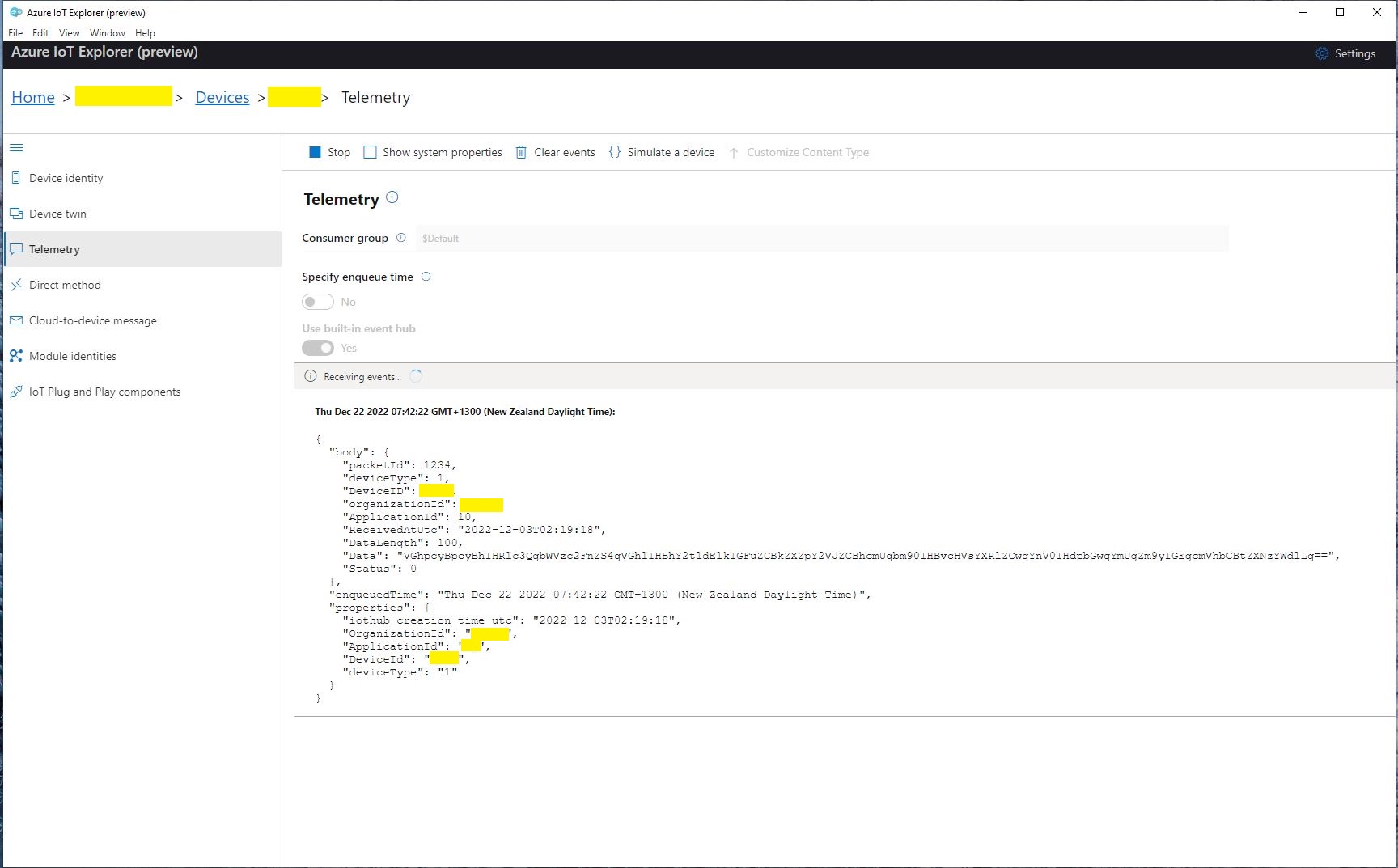
Azure IoT Explorer displaying a test message

The next step was to create a new Delivery Method
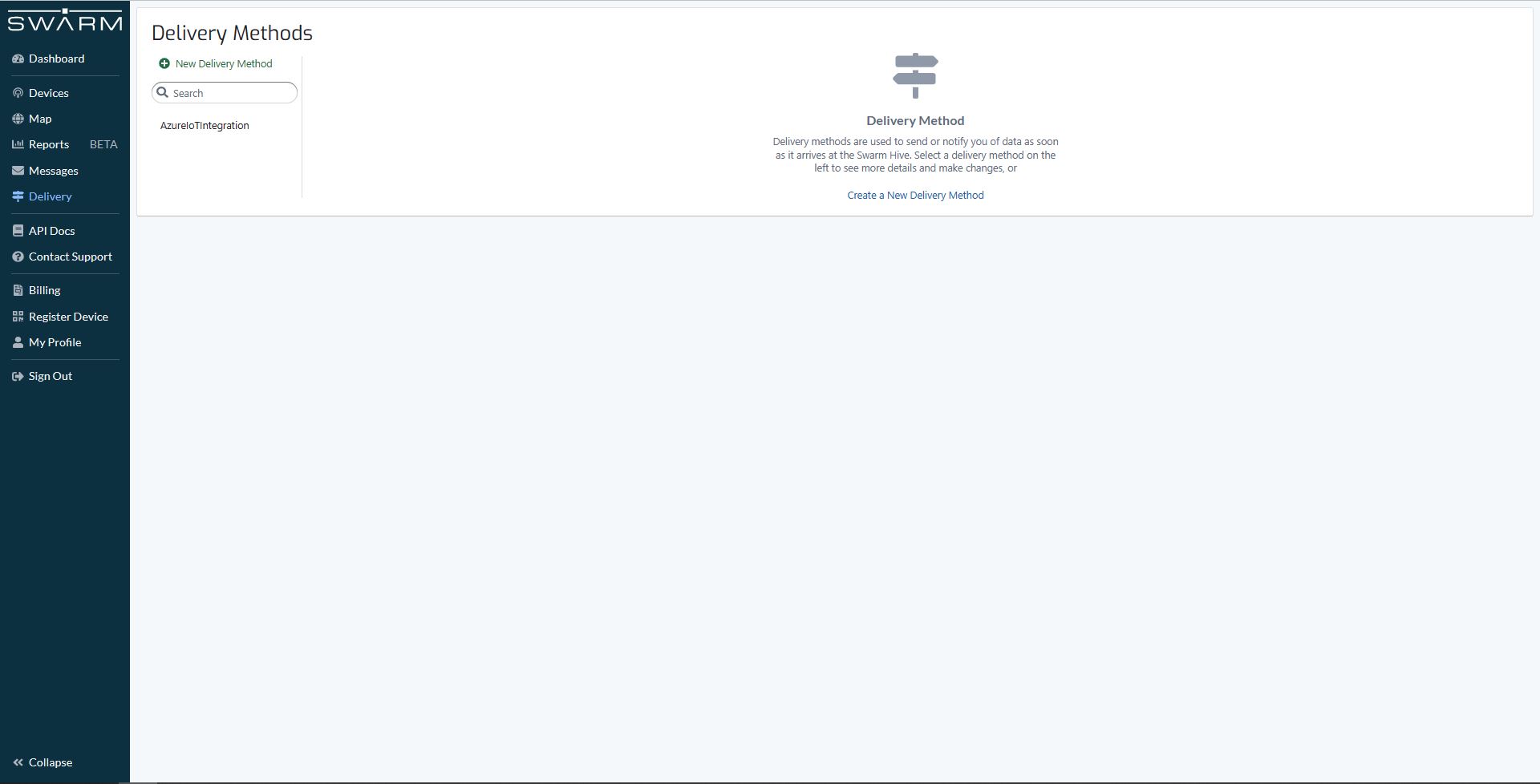
Swarm delivery webhook creation

Configured to call my Uplink controller endpoint.

Swarm delivery webhook configuration

The webhook was configured to “acknowledge messages on successful delivery”. I then checked my Delivery Method configuration with a couple of “Test” messages.

My Swarm Space Eval Kit arrived md-week and after some issues with jumper settings it started reporting position and status information.
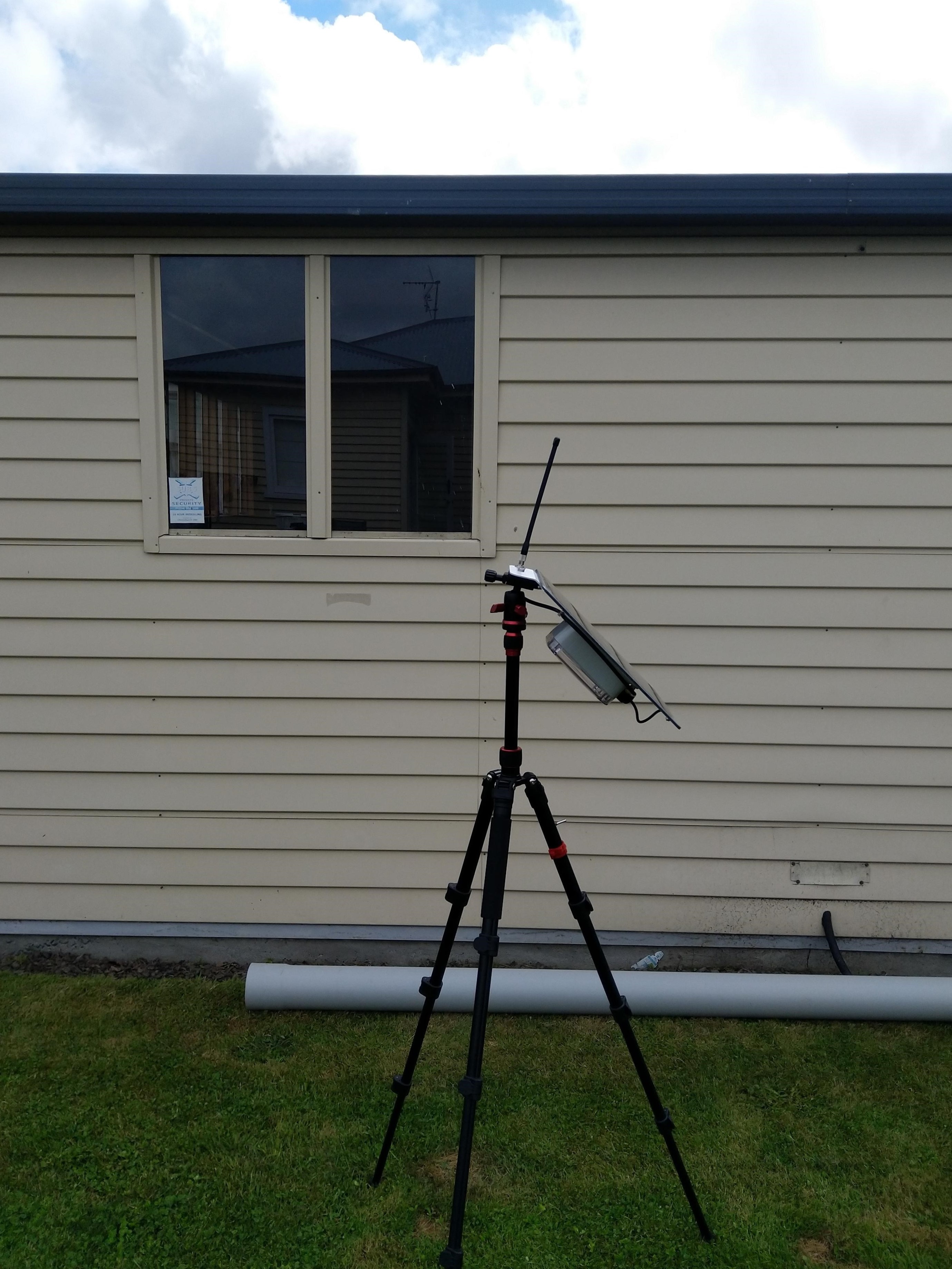
Swarm Eval Kit in my backyard

The first position was just of the coast of West Africa(null island)

Swarm Map centered on Null Island

After the Global Positioning System(GPS) receiver got a good fix the location of the Eval Kit was in the middle of my backyard.

Azure IoT Explorer displaying payload with good latitude and longitude
Swarm Map displaying the location of my device (zoomed out)

Swarm Space – FromDevice with webhooks

I modified my TTI V3 Connector Azure Storage Queues project which uses Azure Functions HTTP Triggers to put messages into Azure Storage Queues to process Swarm FromDevice Webhook messages.

First step was to configure a webhook with the Swarm dashboard

Swarm dashboard webhooks configuration

I configured the webhook, and to “acknowledge messages on successful delivery”. Then checked my configuration with a couple of “Test” messages.

Swarm dashboard webhook configuration

The Swagger API documentation has methods for configuring endpoints which can be called by an application.

Swagger API Documentation for managing endpoints

I queued a couple of messages on my Satellite Transceiver Breakout and when the next satellite passed overhead, shortly after they were visible in the Swarm Dashboard Messages tab.

Swarm Dashboard with test and live fromdevice messages

The messages were also delivered to an Azure Storage Queue, and I could view them with Azure Storage Explorer.

Azure Storage Explorer displaying a webhook message payload

Swarm Space – Azure IoT Basic Client

To figure out how to poll the Swarm Hive API I have built yet another “nasty” Proof of Concept (PoC) which gets ToDevice and FromDevice messages. Initially I have focused on polling as the volume of messages from my single device is pretty low (WebHooks will be covered in a future post).

Like my Azure IoT The Things Industry connector I use Alastair Crabtrees’s LazyCache to store Azured IoT Hub DeviceClient instances.

NOTE: Swarm Space technical support clarified the parameter values required to get FromDevice and ToDevice messages using the Bumbleebee Hive API.

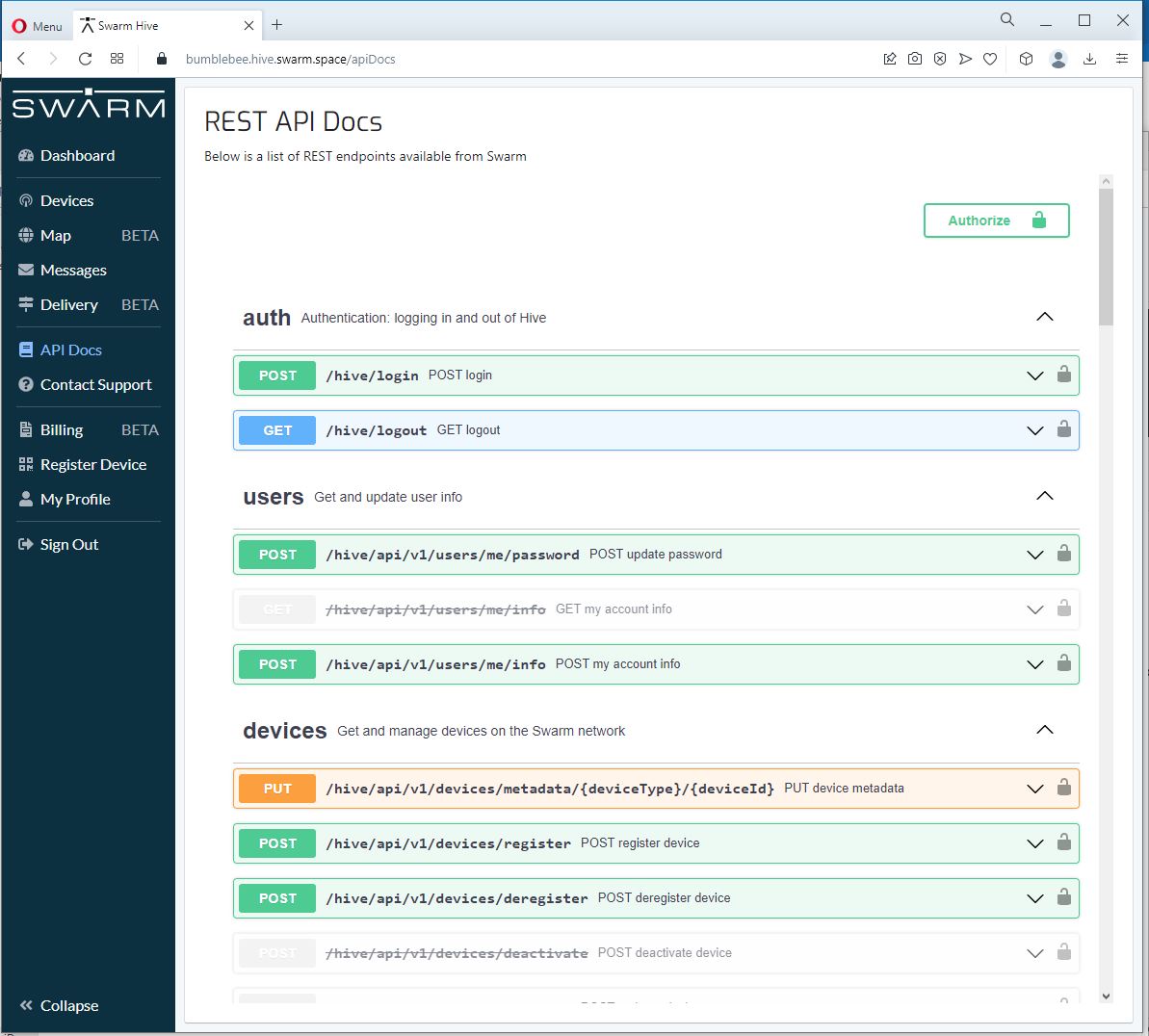
Swarm API Docs messages functionality

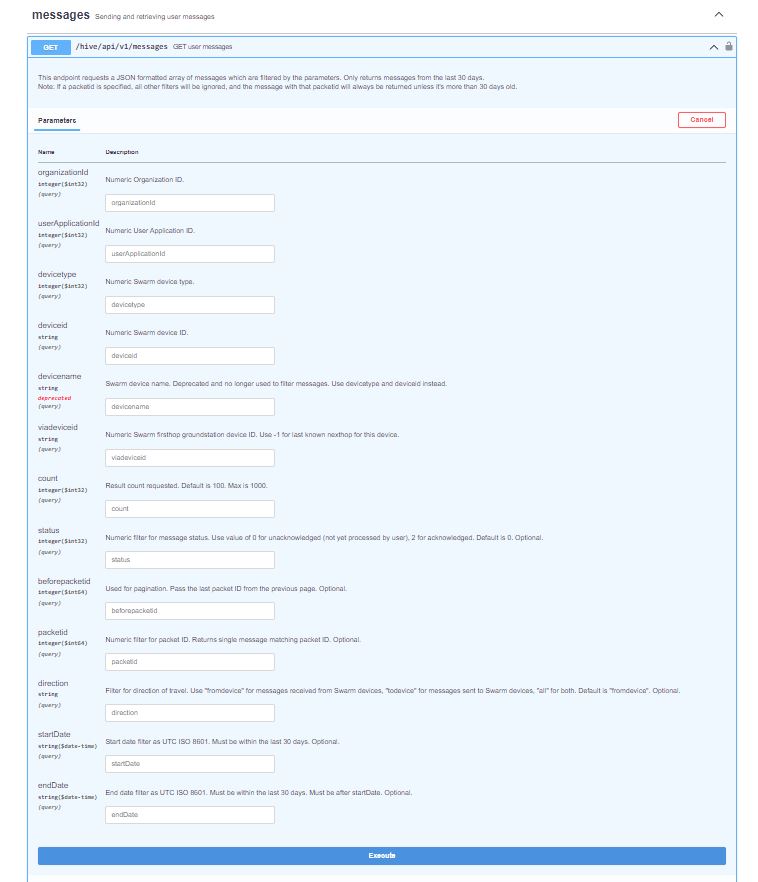
The Messages Get method has a lot of parameters for filtering and paging the response message lists. Many of the parameters have default values so can be null or left blank.

Swarm API Get User Message filters

I started off by seeing if I could duplicate the functionality of the user interface and get a list of all ToDevice and FromDevice messages.

Swarm Dashboard messages list

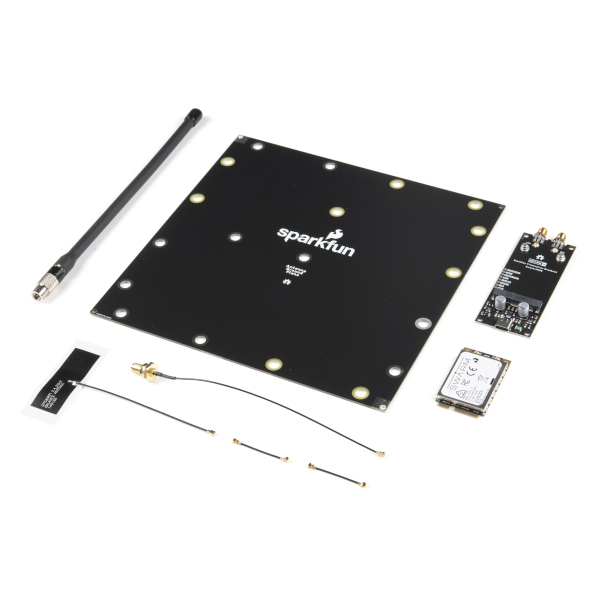
I first called the Messages Get method with the direction set to “fromdevice” (Odd this is a string rather than an enumeration) and the messages I had sent from my Sparkfun Satellite Transceiver Breakout – Swarm M138 were displayed.

Swarm API Docs displaying “fromdevice” messages

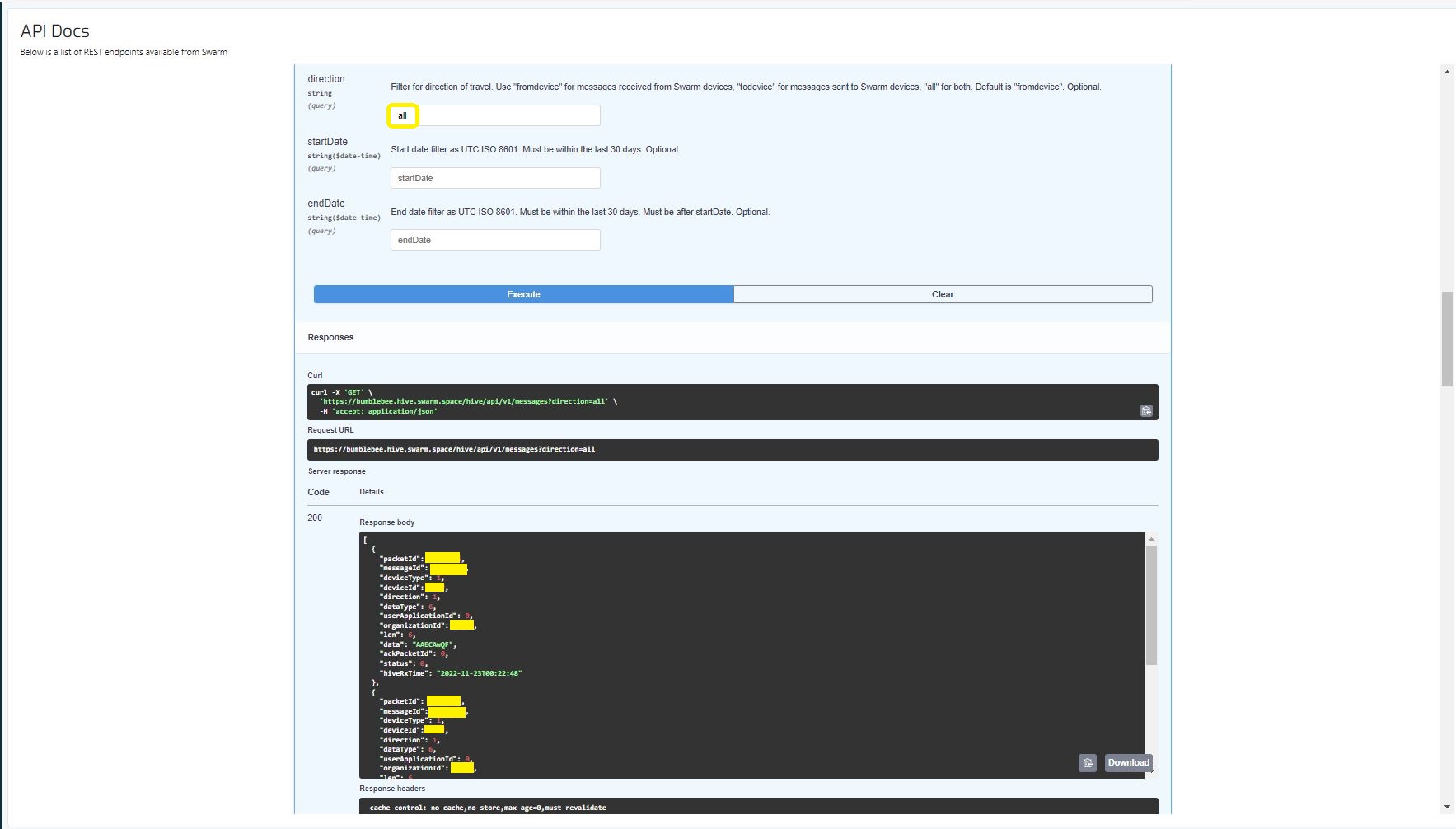
I then called the Messages Get method with the direction set to “all” and only the FromDevice messages were displayed which I wasn’t expecting.

Swarm API Docs displaying ToDevice and FromDevices messages

I then called the Messages Get method with the direction set to “FromDevice and no messages were displayed which I wasn’t expecting

Swarm API Docs displaying “todevice” messages

I then called the Message Get method with the messageId of a ToDevice message and the detailed message information was displayed.

Swarm API Docs displaying the details of a specific inbound message

For testing I configured 5 devices (a real device and the others simulated) in my Azure IoT Hub with the Swarm Device ID ued as the Azure IoT Hub device ID.

Devices configured in Azure IoT Hub

My console application calls the Swarm Bumblebee Hive API Login method, then uses Azure IoT Hub DeviceClient SendEventAsync upload device telemetry.

Nasty console application processing the three “fromdevice” messages which have not been acknowledged.

The console application stores the Swarm Hive API username, password and the Azure IoT Hub Device Connection string locally using the UserSecretsConfigurationExtension.

internal class Program
{
    private static string AzureIoTHubConnectionString = "";
    private readonly static IAppCache _DeviceClients = new CachingService();

    static async Task Main(string[] args)
    {
        Debug.WriteLine("devMobile.SwarmSpace.Hive.AzureIoTHubBasicClient starting");

        IConfiguration configuration = new ConfigurationBuilder()
            .SetBasePath(Directory.GetCurrentDirectory())
            .AddJsonFile("appsettings.json")
            .AddUserSecrets("b4073481-67e9-41bd-bf98-7d2029a0b391").Build();

        AzureIoTHubConnectionString = configuration.GetConnectionString("AzureIoTHub");

        using (HttpClient httpClient = new HttpClient())
        {
            BumblebeeHiveClient.Client client = new BumblebeeHiveClient.Client(httpClient);

            client.BaseUrl = configuration.GetRequiredSection("SwarmConnection").GetRequiredSection("BaseURL").Value;

            BumblebeeHiveClient.LoginForm loginForm = new BumblebeeHiveClient.LoginForm();

            loginForm.Username = configuration.GetRequiredSection("SwarmConnection").GetRequiredSection("UserName").Value;
            loginForm.Password = configuration.GetRequiredSection("SwarmConnection").GetRequiredSection("Password").Value;

            BumblebeeHiveClient.Response response = await client.PostLoginAsync(loginForm);

            Debug.WriteLine($"Token :{response.Token[..5]}.....{response.Token[^5..]}");

            string apiKey = "bearer " + response.Token;
            httpClient.DefaultRequestHeaders.Add("Authorization", apiKey);

            var devices = await client.GetDevicesAsync(null, null, null, null, null, null, null, null, null);

            foreach (BumblebeeHiveClient.Device device in devices)
            {
                Debug.WriteLine($" Id:{device.DeviceId} Name:{device.DeviceName} Type:{device.DeviceType} Organisation:{device.OrganizationId}");

                DeviceClient deviceClient = await _DeviceClients.GetOrAddAsync<DeviceClient>(device.DeviceId.ToString(), (ICacheEntry x) => IoTHubConnectAsync(device.DeviceId.ToString()), memoryCacheEntryOptions);
            }

            foreach (BumblebeeHiveClient.Device device in devices)
            {
                DeviceClient deviceClient = await _DeviceClients.GetAsync<DeviceClient>(device.DeviceId.ToString());

                var messages = await client.GetMessagesAsync(null, null, null, device.DeviceId.ToString(), null, null, null, null, null, null, "all", null, null);
                foreach (var message in messages)
                {
                    Debug.WriteLine($" PacketId:{message.PacketId} Status:{message.Status} Direction:{message.Direction} Length:{message.Len} Data: {BitConverter.ToString(message.Data)}");

                    JObject telemetryEvent = new JObject
                    {
                        { "DeviceID", device.DeviceId },
                        { "ReceivedAtUtc", DateTime.UtcNow.ToString("s", CultureInfo.InvariantCulture) },
                    };

                    telemetryEvent.Add("Payload",BitConverter.ToString(message.Data));

                    using (Message telemetryMessage = new Message(Encoding.ASCII.GetBytes(JsonConvert.SerializeObject(telemetryEvent))))
                    {
                        telemetryMessage.Properties.Add("iothub-creation-time-utc", message.HiveRxTime.ToString("s", CultureInfo.InvariantCulture));

                        await deviceClient.SendEventAsync(telemetryMessage);
                    };

                    //BumblebeeHiveClient.PacketPostReturn packetPostReturn = await client.AckRxMessageAsync(message.PacketId, null);
                }
            }

            foreach (BumblebeeHiveClient.Device device in devices)
            {
                DeviceClient deviceClient = await _DeviceClients.GetAsync<DeviceClient>(device.DeviceId.ToString());

                await deviceClient.CloseAsync();
            }
        }
    }

    private static async Task<DeviceClient> IoTHubConnectAsync(string deviceId)
    {
        DeviceClient deviceClient;

        deviceClient = DeviceClient.CreateFromConnectionString(AzureIoTHubConnectionString, deviceId, TransportSettings);

        await deviceClient.OpenAsync();

        return deviceClient;
    }

    private static readonly MemoryCacheEntryOptions memoryCacheEntryOptions = new MemoryCacheEntryOptions()
    {
        Priority = CacheItemPriority.NeverRemove
    };

    private static readonly ITransportSettings[] TransportSettings = new ITransportSettings[]
    {
        new AmqpTransportSettings(TransportType.Amqp_Tcp_Only)
        {
            AmqpConnectionPoolSettings = new AmqpConnectionPoolSettings()
            {
                Pooling = true,
            }
        }
    };
}

While testing I disabled the message RxAck functionality so I could repeatedly call the MessagesGet method so I didn’t have to send new messages and burn through my 50 free messages.

Azure IoT Explorer telemetry displaying the three messages processed by my console application.

.

Updated parameters based on feedback from Swarm technical support

Need to have status set to -1

Swarm Space – Bumblebee Hive API Basic client

Back in July I purchased a Satellite Transceiver Breakout – Swarm M138 from SparkFun and it has been sitting on the shelf since then. I want to get telemetry from a sensor to an Azure IoT Hub or Azure IoT Central over a Swarm Space link for a project I am working on.

I’ll need to solder on some headers and cut a couple of tracks on the breakout board so my device (most probably a SparkFun – ESP32-S2 WROOM) can connect to the Swarm-M1138 modem. The NET nanoFramework team have an IoT.Device Swarm Tile NuGet package which I will use to interface the device to the modem.

I have started with a “nasty” Proof of Concept(PoC) to figure out how to connect to the Swarm Hive API.

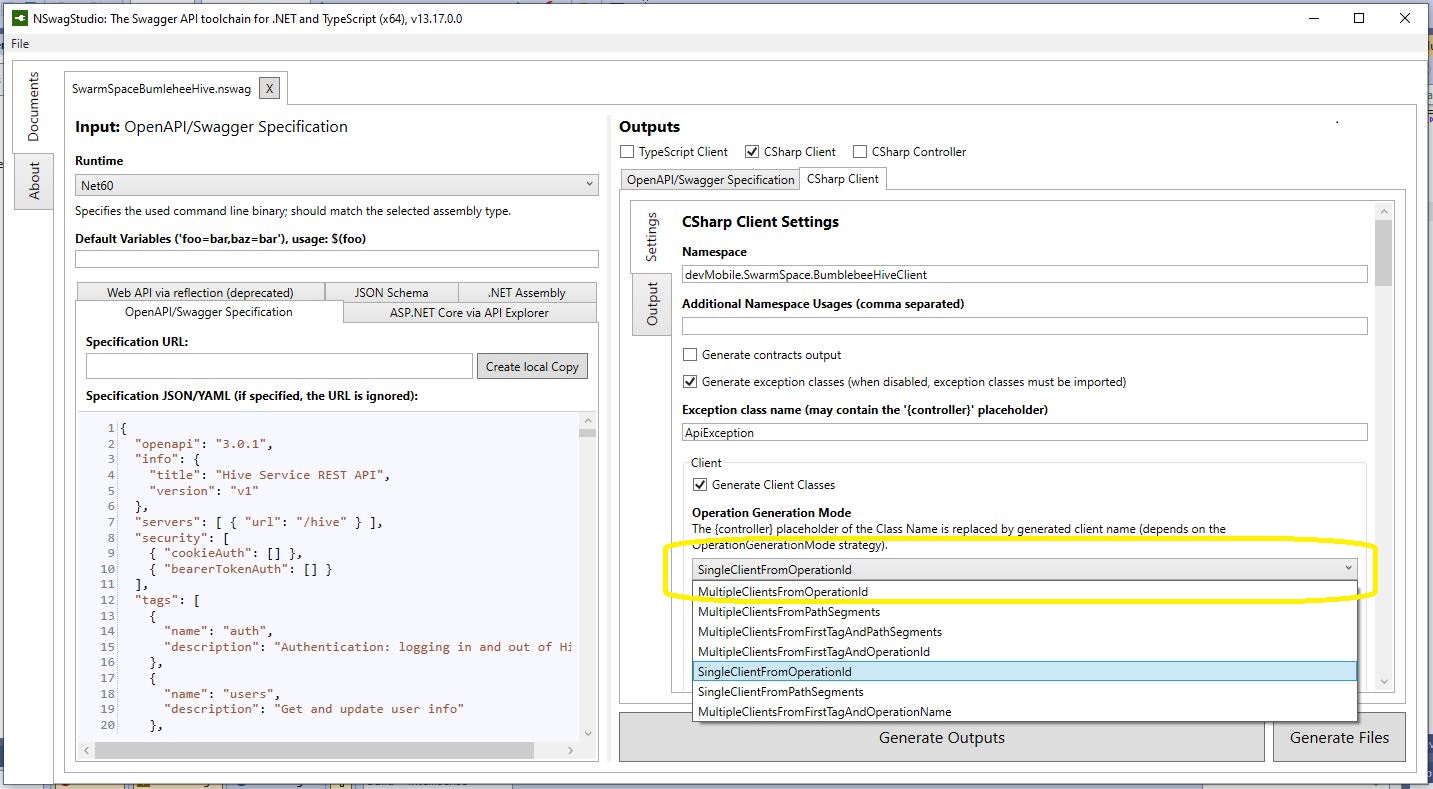
The Swarm Hive API has been published with Swagger/OpenAPI which is really simple to use. I used NSwagStudio to generate a C# client to I didn’t have to “handcraft” one.

Initially the code would compile but I found a clue in a Github Issue from September 2017 which was to change the “Operation Generation Model” to SingleClientFromOperationId.(The setting is highlighted above).

static async Task Main(string[] args)
{
    using (HttpClient httpClient = new HttpClient())
    {
        BumblebeeHiveClient.Client client = new BumblebeeHiveClient.Client(httpClient);

        client.BaseUrl = "https://bumblebee.hive.swarm.space/hive/";

        BumblebeeHiveClient.LoginForm loginForm = new BumblebeeHiveClient.LoginForm();

        // https://bumblebee.hive.swarm.space/login/
        loginForm.Username = "...";
        loginForm.Password = "...";

        Console.WriteLine($"devMobile SwarmSpace Bumblebee Hive Console Client");
        Console.WriteLine("");

        Console.WriteLine($"Login POST");
        BumblebeeHiveClient.Response response = await client.PostLoginAsync(loginForm);

        Console.WriteLine($"Token :{response.Token[..5]}.....{response.Token[^5..]}");
        Console.WriteLine($"Press <enter> to continue");
        Console.ReadLine();

        string apiKey = "bearer " + response.Token;

        httpClient.DefaultRequestHeaders.Add("Authorization", apiKey);


        Console.WriteLine($"Device count GET");

        string count = await client.GetDeviceCountAsync(1);

        Console.WriteLine($"Device count :{count}");
        Console.WriteLine($"Press <enter> to continue");
        Console.ReadLine();

        Console.WriteLine($"Device(s) information GET");

        var devices = await client.GetDevicesAsync(1, null, null, null, null, null, null, null, null);

        foreach (var device in devices)
        {
            Console.WriteLine($" Id:{device.DeviceId} Name:{device.DeviceName} Type:{device.DeviceType} Organisation:{device.OrganizationId}");
        }

        Console.WriteLine($"Press <enter> to continue");
        Console.ReadLine();

        Console.WriteLine($"User Context GET");
        var userContext = await client.GetUserContextAsync();

        Console.WriteLine($" Id:{userContext.UserId} Name:{userContext.Username} Country:{userContext.Country}");

        Console.WriteLine("Additional properties");
        foreach ( var additionalProperty in userContext.AdditionalProperties)
        {
            Console.WriteLine($" Id:{additionalProperty.Key} Value:{additionalProperty.Value}");
        }

        Console.WriteLine($"Press <enter> to exit");
        Console.ReadLine();
    }
}

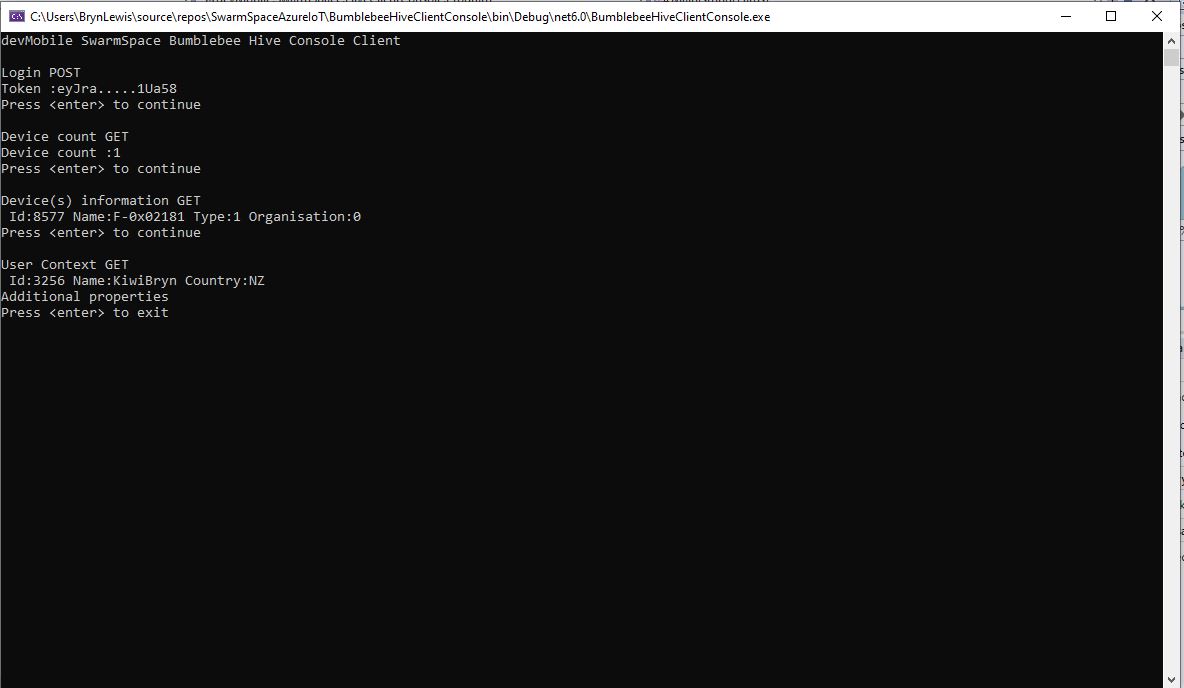
I tried a couple of ways to attach the Swarm Hive API authorisation token (returned by the Login method) to client requests. After a couple for failed attempts, I “realised” that adding the “Authorization” header to the HttpClient defaultRequestHeaders was by far the simplest approach.

My “nasty” console application calls the Login method, then requests the number of devices (I only have one), gets a list of the properties of all the devices(very short list) then gets the User Context and displays their ID, Name and Country.