Random wanderings through Microsoft Azure esp. PaaS plumbing, the IoT bits, AI on Micro controllers, AI on Edge Devices, .NET nanoFramework, .NET Core on *nix and ML.NET+ONNX
const string codeSwarmSpaceUplinkFormatterCode = @"
   using Newtonsoft.Json.Linq;

   public class UplinkFormatter : PayloadFormatter.ISwarmSpaceFormatterUplink
   {
       public JObject Evaluate(JObject telemetryEvent, string payloadBase64, byte[] payloadBytes, string payloadText, JObject payloadJson)
       {
           if ((payloadText != """" ) && ( payloadJson != null))
           {
               JObject location = new JObject() ;

               location.Add(""Lat"", payloadJson.GetValue(""lt""));
               location.Add(""Lon"", payloadJson.GetValue(""ln""));
               location.Add(""Alt"", payloadJson.GetValue(""a""));

               telemetryEvent.Add( ""location"", location);
           };

           return telemetryEvent;
       }
   }";
}
The PayloadFormatter namespace was added to reduce the length of the payload formatter C# interface declarations.
namespace PayloadFormatter
{
    using Newtonsoft.Json.Linq;

    public interface ISwarmSpaceFormatterUplink
    {
        public JObject Evaluate(JObject telemetry, string payloadBase64, byte[] payloadBytes, string payloadText, JObject payloadJson);
    }

    public interface ISwarmSpaceFormatterDownlink
    {
        public string Evaluate(JObject payloadJson, string payloadText, byte[] payloadBytes, string payloadBase64);
    }
}

namespace devMobile.IoT.SwarmSpace.AzureIoT.Connector
{
    using System.Threading.Tasks;
    using Microsoft.Extensions.Logging;

    using CSScriptLib;

    using PayloadFormatter;

    public interface ISwarmSpaceFormatterCache
    {
        public Task<ISwarmSpaceFormatterUplink> PayloadFormatterGetOrAddAsync(int userApplicationId);

    }

    public class SwarmSpaceFormatterCache : ISwarmSpaceFormatterCache
    {
        private readonly ILogger<SwarmSpaceFormatterCache> _logger;

        public SwarmSpaceFormatterCache(ILogger<SwarmSpaceFormatterCache>logger)
        {
            _logger = logger;
        }

        public async Task<ISwarmSpaceFormatterUplink> PayloadFormatterGetOrAddAsync(int deviceId)
        {
            return CSScript.Evaluator.LoadCode<PayloadFormatter.ISwarmSpaceFormatterUplink>(codeSwarmSpaceUplinkFormatterCode);
        }
...
}
The parameters of the formatter are Base64 encoded, textual and a Newtonsoft JObject representations of the uplink payload and a telemetry event populated with some uplink message metadata.
Azure IoT Central uplink telemetry message payload
The initial “compile” of an uplink formatter was taking approximately 2.1 seconds so they will be “compiled” on demand and cached in a Dictionary with the UserApplicationId as the key. A default uplink formatter will be used when a UserApplicationId specific uplink formatter is not configured.
I started with a modified version of the first sample on Github.
public class Samples
{
    const string codeMethod = @"
        int Multiply(int a, int b)
        {
            return a * b;
        }";

    public void Execute1()
    {
       dynamic script = CSScript.Evaluator.LoadMethod(codeMethod);

        int result = script.Multiply(3, 2);

        Console.WriteLine($"Product 1:{result}");
    }
...
internal class Program
{
    static void Main(string[] args)
    {
        new Samples().Execute1();
...
        Console.WriteLine($"Press Enter to exit");
        Console.ReadLine();
    }
}
I then modified it to use a C# interface and the application failed with an exception
CSScriptLib.CompilerException
  HResult=0x80131600
  Message=(2,39): error CS0246: The type or namespace name 'IMultiplier' could not be found (are you missing a using directive or an assembly reference?)

  Source=CSScriptLib
  StackTrace:
   at CSScriptLib.RoslynEvaluator.Compile(String scriptText, String scriptFile, CompileInfo info)
   at CSScriptLib.EvaluatorBase`1.LoadCode[T](String scriptText, Object[] args)
   at devMobile.IoT.SwarmSpace.AzureIoT.PayloadFormatterCSScript.Samples.Execute2A() in C:\Users\BrynLewis\source\repos\SwarmSpaceAzureIoT\PayloadFormatterCSScipt\Program.cs:line 90
   at devMobile.IoT.SwarmSpace.AzureIoT.PayloadFormatterCSScript.Program.Main(String[] args) in C:\Users\BrynLewis\source\repos\SwarmSpaceAzureIoT\PayloadFormatterCSScipt\Program.cs:line 375
After some trial and error, I figured out I had the namespace wrong
const string codeClassA = @"
    public class Calculator : devMobile.IoT.SwarmSpace.AzureIoT.PayloadFormatterCSScript.IMultiplier
    {
        public int Multiply(int a, int b)
        {

            return a * b;
        }
    }";

public void Execute2A()
{
    IMultiplier multiplierA = CSScript.Evaluator.LoadCode<IMultiplier>(codeClassA);

    Console.WriteLine($"Product 2A:{multiplierA.Multiply(3, 2)} - Press Enter to exit");
}
The long namespace would have been a pain in the arse (PITA) for users creating payload formatters and after some experimentation I added another interface with a short namespace. (Not certain this is a good idea).
namespace PayloadFormatter // Additional namespace for shortening interface for formatters
{
    public interface IMultiplier
    {
        int Multiply(int a, int b);
    }
}
...
public void Execute2B()
{
      PayloadFormatter.IMultiplier multiplierB = CSScript.Evaluator.LoadCode<PayloadFormatter.IMultiplier>(codeClassB);

     Console.WriteLine($"Product 2B:{multiplierB.Multiply(3, 2)} - Press Enter to exit");
}
I then wanted to figure out how to limit the namepaces the script has access to
const string codeClassDebug = @"
    using System.Diagnostics;

    public class Calculator : devMobile.IoT.SwarmSpace.AzureIoT.PayloadFormatterCSScript.IMultiplier
    {
        public int Multiply(int a, int b)
        {
           Debug.WriteLine(""Oops""); // Comment out the using System.Diagnostics;

            return a * b;
        }
    }";

public void Execute3()
{
    CSScript.Evaluator.Reset(true);

    IMultiplier multiplier = CSScript.Evaluator
        .LoadCode<IMultiplier>(codeClassDebug);

    int result = multiplier.Multiply(6, 2);

    Console.WriteLine($"Product 3:{result}");
}
The CSScript.Evaluator.Reset(true); removes all of the “default” references but a using directive could make namespaces available, so this needs some more investigation
The next step was to build the simplest possible payload formatter a “pipe” which displayed the text encoded in Base64 string.
const string codeSwarmSpaceFormatterPipe = @"
    public class SwarmSpaceFormatter:devMobile.IoT.SwarmSpace.AzureIoT.PayloadFormatterCSScript.ISwarmSpaceFormatterPipe
    {
        public string Pipe(string payloadBase64)
        {
            var payloadBase64Bytes = System.Convert.FromBase64String(payloadBase64);

             return System.Text.Encoding.UTF8.GetString(payloadBase64Bytes);
        }
    }";
...
public void Execute4()
{
    ISwarmSpaceFormatterPipe SwarmSpaceFormatter = CSScript.Evaluator
           ...
                        .LoadCode<ISwarmSpaceFormatterPipe>(codeSwarmSpaceFormatterPipe);

    string payload = SwarmSpaceFormatter.Pipe(PayloadBase64);

    Console.WriteLine($"Pipe:{payload}");
}
The Base64 encoded uplink payloads will have to be converted to JSON and the downlink JSON payloads will have to be converted to Base64 encoded binary, so I created an uplink and downlink formatters.
I found that having both the byte array and Base64 encoded representation of the uplink payloads was useful. The first formatter converts the temperature field of the downlink payload into a four byte array then reverses the array to illustrate how packed byte payloads could be constructed.
const string codeSwarmSpaceFormatter1 = @"
    public class SwarmSpaceFormatter : devMobile.IoT.SwarmSpace.AzureIoT.PayloadFormatterCSScript.ISwarmSpaceFormatter
    {
        public string Pipe(string payloadBase64)
        {
            var payloadBase64Bytes = System.Convert.FromBase64String(payloadBase64);

            return System.Text.Encoding.UTF8.GetString(payloadBase64Bytes);
       }

        public JObject Uplink(JObject telemetryEvent, string payloadBase64, byte[] payloadBytes)
        {
            var payloadBase64Bytes = System.Convert.FromBase64String(payloadBase64);

            telemetryEvent.Add(""PayloadBase64"", payloadBase64Bytes);
            telemetryEvent.Add(""PayloadBytes"",System.Text.Encoding.UTF8.GetString(payloadBytes));

            return telemetryEvent;
        }

        public string Downlink(JObject command)
        {
            int temperature = command.Value<int>(""Temperature"");

            return System.Convert.ToBase64String(BitConverter.GetBytes(temperature));
        }
    }";

const string codeSwarmSpaceFormatter2 = @"
    public class SwarmSpaceFormatter:devMobile.IoT.SwarmSpace.AzureIoT.PayloadFormatterCSScript.ISwarmSpaceFormatter
    {
        public string Pipe(string payloadBase64)
        {
            var payloadBase64Bytes = System.Convert.FromBase64String(payloadBase64);

            return System.Text.Encoding.UTF8.GetString(payloadBase64Bytes);
        }

        public JObject Uplink(JObject telemetryEvent, string payloadBase64, byte[] payloadBytes)
        {
            var payloadBase64Bytes = System.Convert.FromBase64String(payloadBase64);

            telemetryEvent.Add(""PayloadBase64"", payloadBase64Bytes);
            telemetryEvent.Add(""PayloadBytes"",System.Text.Encoding.UTF8.GetString(payloadBytes));

            return telemetryEvent;
        }

        public string Downlink(JObject command)
        {
            int temperature = command.Value<int>(""Temperature"");

            byte[] temperatureBytes = BitConverter.GetBytes(temperature);

            Array.Reverse(temperatureBytes);

            return System.Convert.ToBase64String(temperatureBytes);
        }
    }";
...
public void Execute6()
{
    string namespaces = $"using Newtonsoft.Json.Linq;using System;\n";
    string code1 = namespaces + codeSwarmSpaceFormatter1;
    string code2 = namespaces + codeSwarmSpaceFormatter2;

    JObject telemetry = new JObject
    {
        { "ApplicationID", 12345 },
        { "DeviceID", 54321 },
        { "DeviceType", 2 },
        { "ReceivedAtUtc", DateTime.UtcNow.ToString("s", CultureInfo.InvariantCulture) },
    };

    var formatters = new Dictionary<string, ISwarmSpaceFormatter>();

    Console.WriteLine($"Evaluator start");
    DateTime evaluatorStartAtUtc = DateTime.UtcNow;

    ISwarmSpaceFormatter SwarmSpaceFormatter1 = CSScript.Evaluator
                                  .LoadCode<ISwarmSpaceFormatter>(code1);

    ISwarmSpaceFormatter SwarmSpaceFormatter2 = CSScript.Evaluator
                                  .LoadCode<ISwarmSpaceFormatter>(code2);

    Console.WriteLine($"Evaluator:{DateTime.UtcNow - evaluatorStartAtUtc}");
    Console.WriteLine("");

    Console.WriteLine($"Evaluation start");
    DateTime evaluationStartUtc = DateTime.UtcNow;

    formatters.Add("F1", SwarmSpaceFormatter1);
    formatters.Add("F2", SwarmSpaceFormatter2);

    JObject command = new JObject
    {
        {"Temperature", 1},
    };

    ISwarmSpaceFormatter downlinkPayload;
    downlinkPayload = formatters["F1"];
    Console.WriteLine($"Downlink F1:{downlinkPayload.Downlink(command)}");

    downlinkPayload = formatters["F2"];
    Console.WriteLine($"Downlink F2:{downlinkPayload.Downlink(command)}");

    Console.WriteLine($"Evaluation:{DateTime.UtcNow - evaluationStartUtc}");
    Console.WriteLine("");

    const int iterations = 100;
    Console.WriteLine($"Evaluations start {iterations}");
    DateTime evaluationsStartUtc = DateTime.UtcNow;

    for (int i = 1; i <= iterations; i++)
    {
        JObject command1 = new JObject
        {
            {"Temperature", 1},
        };

        downlinkPayload = formatters["F1"];
        Console.WriteLine($" Downlink F1:{downlinkPayload.Downlink(command1)}");

        downlinkPayload = formatters["F2"];
        Console.WriteLine($" Downlink F2:{downlinkPayload.Downlink(command1)}");
    }

    Console.WriteLine($"Evaluations:{iterations} Took:{DateTime.UtcNow - evaluationsStartUtc}");
}
On my development box the initial “compile” of each function was taking approximately 2.1 seconds so I cached the “compiled” formatters in a dictionary so they could be reused. Cached in the dictionary executing the two formatters 100 times took approximately 15 milliseconds (which is close to native .NET performance).
Compatibility
To check that the CS-Script tooling could run on a machine without the .NET 6 Software Development Kit (SDK) I tested the application on a laptop which had a “fresh” install of Windows 10.
CS-Script application failing due to missing .NET 6 runtime
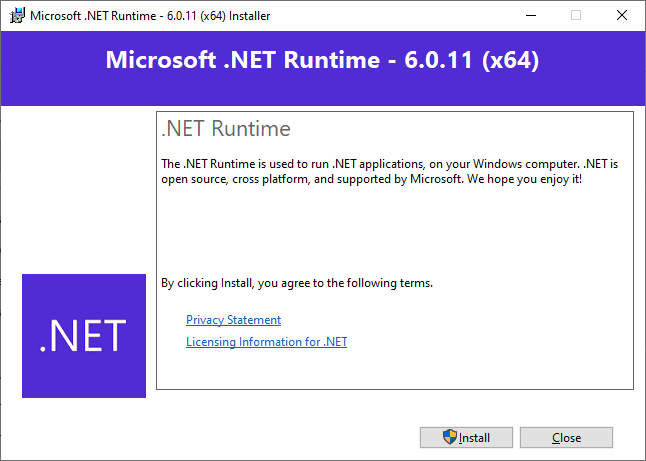
Installing the .NET 6 Runtime
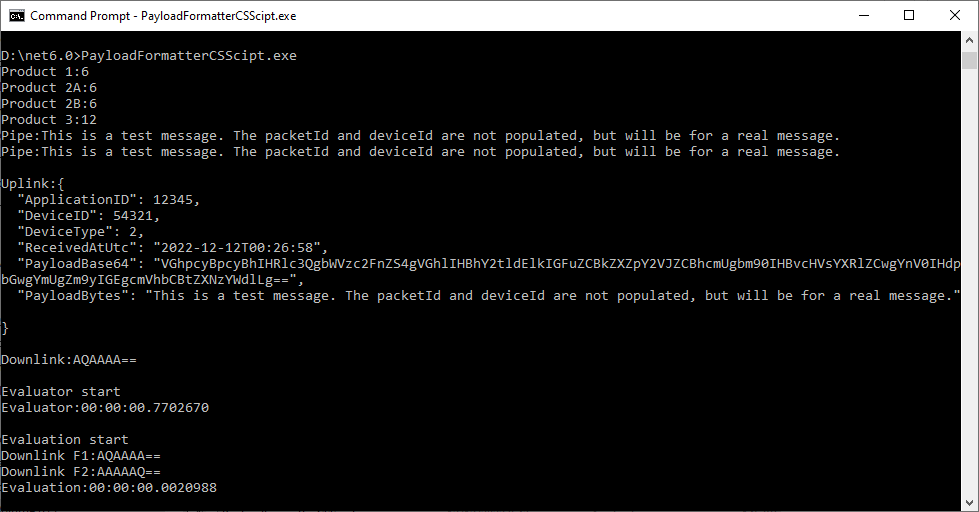
CS-Script application running after .NET runtime installation
The CS-Script library is pretty amazing and has made the development of uplink and downlink payload formatters significantly less complex than I was expecting.


 devMobile's blog